Rust 编程语言
The Rust Programming Language
由 Steve Klabnik、Carol Nichols 和 Chris Krycho 编写,并得到了 Rust 社区的贡献
by Steve Klabnik, Carol Nichols, and Chris Krycho, with contributions from the Rust Community
本书的这一版本假设你正在使用 Rust 1.90.0(2025-09-18 发布)或更高版本,并在所有项目的 Cargo.toml 文件中设置了 edition = "2024",以配置它们使用 Rust 2024 Edition 惯用法。有关安装或更新 Rust 的说明,请参阅 第 1 章的“安装”部分,有关 Edition 的信息,请参阅 附录 E。
This version of the text assumes you’re using Rust 1.90.0 (released 2025-09-18)
or later with edition = "2024" in the Cargo.toml file of all projects to
configure them to use Rust 2024 Edition idioms. See the “Installation” section
of Chapter 1 for instructions on installing or
updating Rust, and see Appendix E for information
on editions.
HTML 格式可在 https://doc.rust-lang.org/stable/book/ 在线获取,也可通过使用 rustup 安装的 Rust 离线获取;运行 rustup doc --book 即可打开。
The HTML format is available online at
https://doc.rust-lang.org/stable/book/
and offline with installations of Rust made with rustup; run rustup doc --book to open.
此外还有多个社区 翻译版本。
Several community translations are also available.
本书可从 No Starch Press 购买纸质版和电子书格式。
This text is available in paperback and ebook format from No Starch Press.
🚨 想要更具互动性的学习体验吗?尝试一下 Rust Book 的另一个版本,其特色包括:测验、高亮、可视化等等:https://rust-book.cs.brown.edu
🚨 Want a more interactive learning experience? Try out a different version of the Rust Book, featuring: quizzes, highlighting, visualizations, and more: https://rust-book.cs.brown.edu
前言
Foreword
Rust 编程语言在短短几年内取得了长足的进步,从最初由一小群爱好者组成的萌芽社区创建和孵化,发展成为世界上最受喜爱和最受欢迎的编程语言之一。回首往事,Rust 的力量和前景必然会引起人们的关注,并在系统编程领域占据一席之地。但不可预见的是,全球范围内兴趣和创新的增长渗透到了开源社区,并催化了各行各业的大规模采用。
The Rust programming language has come a long way in a few short years, from its creation and incubation by a small and nascent community of enthusiasts, to becoming one of the most loved and in-demand programming languages in the world. Looking back, it was inevitable that the power and promise of Rust would turn heads and gain a foothold in systems programming. What was not inevitable was the global growth in interest and innovation that permeated through open source communities and catalyzed wide-scale adoption across industries.
此时此刻,我们可以轻而易举地指出 Rust 所提供的精彩特性,来解释这种兴趣和采用率的爆炸式增长。谁不想要内存安全、以及快速性能、以及友好的编译器、以及卓越的工具,还有许多其他出色的特性呢?你今天看到的 Rust 语言结合了系统编程领域多年的研究与一个充满活力且充满激情的社区的实践智慧。这门语言的设计富有目的性,制作精良,为开发者提供了一个工具,使编写安全、快速且可靠的代码变得更加容易。
At this point in time, it is easy to point to the wonderful features that Rust has to offer to explain this explosion in interest and adoption. Who doesn’t want memory safety, and fast performance, and a friendly compiler, and great tooling, among a host of other wonderful features? The Rust language you see today combines years of research in systems programming with the practical wisdom of a vibrant and passionate community. This language was designed with purpose and crafted with care, offering developers a tool that makes it easier to write safe, fast, and reliable code.
但真正让 Rust 与众不同的是,它的根基在于赋予你(用户)实现目标的能力。这是一门希望你成功的语言,而“赋能”这一原则贯穿于构建、维护和倡导这门语言的社区核心。自本权威著作的上一个版本以来,Rust 已进一步发展成为一种真正全球化且值得信赖的语言。Rust 项目现在得到了 Rust Foundation 的大力支持,该基金会还投资于关键计划,以确保 Rust 的安全、稳定和可持续发展。
But what makes Rust truly special is its roots in empowering you, the user, to achieve your goals. This is a language that wants you to succeed, and the principle of empowerment runs through the core of the community that builds, maintains, and advocates for this language. Since the previous edition of this definitive text, Rust has further developed into a truly global and trusted language. The Rust Project is now robustly supported by the Rust Foundation, which also invests in key initiatives to ensure that Rust is secure, stable, and sustainable.
《Rust 编程语言》(The Rust Programming Language)的这一版是一个全面的更新,反映了该语言多年来的演进,并提供了宝贵的新信息。但这不仅仅是一本关于语法和库的指南——它还是一份加入社区的邀请,这个社区珍视质量、性能和深思熟虑的设计。无论你是一位想要第一次探索 Rust 的资深开发者,还是一位想要精进技能的经验丰富的 Rustacean,这一版都能为每个人提供所需的知识。
This edition of The Rust Programming Language is a comprehensive update, reflecting the language’s evolution over the years and providing valuable new information. But it is not just a guide to syntax and libraries—it’s an invitation to join a community that values quality, performance, and thoughtful design. Whether you’re a seasoned developer looking to explore Rust for the first time or an experienced Rustacean looking to refine your skills, this edition offers something for everyone.
Rust 的历程是一个协作、学习和迭代的过程。这门语言及其生态系统的成长是其背后充满活力、多元化社区的直接体现。成千上万开发者的贡献,从核心语言设计者到业余贡献者,造就了 Rust 这样独特且强大的工具。通过拿起这本书,你不仅是在学习一门新的编程语言,你还在加入一场让软件变得更好、更安全、更令人愉悦的运动。
The Rust journey has been one of collaboration, learning, and iteration. The growth of the language and its ecosystem is a direct reflection of the vibrant, diverse community behind it. The contributions of thousands of developers, from core language designers to casual contributors, are what make Rust such a unique and powerful tool. By picking up this book, you’re not just learning a new programming language—you’re joining a movement to make software better, safer, and more enjoyable to work with.
欢迎来到 Rust 社区!
Welcome to the Rust community!
— Bec Rumbul,Rust Foundation 执行董事
- Bec Rumbul, Executive Director of the Rust Foundation
介绍
Introduction
注意:本书的这个版本与 No Starch Press 出版的纸质书和电子书形式的《The Rust Programming Language》相同。
Note: This edition of the book is the same as The Rust Programming Language available in print and ebook format from No Starch Press.
欢迎阅读《Rust 程序设计语言》,这是一本关于 Rust 的入门书籍。Rust 编程语言能帮助你编写更快、更可靠的软件。在编程语言设计中,高层的人机交互工程学与底层的控制权往往互不相容;Rust 则挑战了这一冲突。通过平衡强大的技术能力和卓越的开发者体验,Rust 让你能够控制底层细节(如内存使用),而无需承担传统底层控制所带来的种种不便。
Welcome to The Rust Programming Language, an introductory book about Rust. The Rust programming language helps you write faster, more reliable software. High-level ergonomics and low-level control are often at odds in programming language design; Rust challenges that conflict. Through balancing powerful technical capacity and a great developer experience, Rust gives you the option to control low-level details (such as memory usage) without all the hassle traditionally associated with such control.
Rust 为谁准备
Who Rust Is For
Rust 对于许多人来说都是理想的选择,原因各不相同。让我们来看看其中最重要的几个群体。
Rust is ideal for many people for a variety of reasons. Let’s look at a few of the most important groups.
开发团队
Teams of Developers
事实证明,对于拥有不同系统编程知识水平的大型开发团队,Rust 是一件高效的协作工具。底层代码容易出现各种微妙的 bug,在大多数其他语言中,这些 bug 只能通过经验丰富的开发者进行广泛测试和细致的代码审查才能发现。在 Rust 中,编译器扮演了“守门员”的角色,它会拒绝编译包含这些隐蔽 bug(包括并发 bug)的代码。通过与编译器并肩工作,团队可以将时间花在关注程序的逻辑上,而不是去追踪 bug。
Rust is proving to be a productive tool for collaborating among large teams of developers with varying levels of systems programming knowledge. Low-level code is prone to various subtle bugs, which in most other languages can only be caught through extensive testing and careful code review by experienced developers. In Rust, the compiler plays a gatekeeper role by refusing to compile code with these elusive bugs, including concurrency bugs. By working alongside the compiler, the team can spend its time focusing on the program’s logic rather than chasing down bugs.
Rust 还为系统编程领域带来了现代化的开发者工具:
Rust also brings contemporary developer tools to the systems programming world:
-
Cargo 是内置的依赖管理器和构建工具,它使得在 Rust 生态系统中添加、编译和管理依赖变得轻松且一致。
-
rustfmt格式化工具确保了开发者之间统一的代码风格。 -
Rust Language Server 为集成开发环境(IDE)提供了代码补全和内联错误消息功能。
-
Cargo, the included dependency manager and build tool, makes adding, compiling, and managing dependencies painless and consistent across the Rust ecosystem.
-
The
rustfmtformatting tool ensures a consistent coding style across developers. -
The Rust Language Server powers integrated development environment (IDE) integration for code completion and inline error messages.
通过使用 Rust 生态系统中的这些及其他工具,开发者在编写系统级代码时可以保持高效。
By using these and other tools in the Rust ecosystem, developers can be productive while writing systems-level code.
学生
Students
Rust 适合学生和那些对学习系统概念感兴趣的人。通过 Rust,许多人学习了诸如操作系统开发之类的课题。Rust 社区非常友好,乐于回答学生的问题。通过本书等努力,Rust 团队希望让系统概念对更多人(尤其是编程新手)而言更加平易近人。
Rust is for students and those who are interested in learning about systems concepts. Using Rust, many people have learned about topics like operating systems development. The community is very welcoming and happy to answer students’ questions. Through efforts such as this book, the Rust teams want to make systems concepts more accessible to more people, especially those new to programming.
公司
Companies
数百家大大小小的公司在生产环境中使用 Rust 执行各种任务,包括命令行工具、Web 服务、DevOps 工具、嵌入式设备、音频和视频分析与转码、加密货币、生物信息学、搜索引擎、物联网应用、机器学习,甚至是 Firefox 网络浏览器的核心部分。
Hundreds of companies, large and small, use Rust in production for a variety of tasks, including command line tools, web services, DevOps tooling, embedded devices, audio and video analysis and transcoding, cryptocurrencies, bioinformatics, search engines, Internet of Things applications, machine learning, and even major parts of the Firefox web browser.
开源开发者
Open Source Developers
Rust 适合那些想要构建 Rust 编程语言、社区、开发工具和库的人。我们非常欢迎你为 Rust 语言贡献力量。
Rust is for people who want to build the Rust programming language, community, developer tools, and libraries. We’d love to have you contribute to the Rust language.
重视速度和稳定性的人
People Who Value Speed and Stability
Rust 适合那些在语言中渴求速度和稳定性的人。所谓速度,我们既指 Rust 代码运行的速度,也指 Rust 让你编写程序的速度。Rust 编译器的检查确保了在增加功能和重构时的稳定性。这与那些没有这些检查的语言中脆弱的遗留代码形成鲜明对比,开发者往往不敢修改它们。通过追求零成本抽象(zero-cost abstractions)——即编译为底层代码后与手动编写的代码一样快的高级特性——Rust 努力让安全的代码也成为高效的代码。
Rust is for people who crave speed and stability in a language. By speed, we mean both how quickly Rust code can run and the speed at which Rust lets you write programs. The Rust compiler’s checks ensure stability through feature additions and refactoring. This is in contrast to the brittle legacy code in languages without these checks, which developers are often afraid to modify. By striving for zero-cost abstractions—higher-level features that compile to lower-level code as fast as code written manually—Rust endeavors to make safe code be fast code as well.
Rust 语言也希望能支持许多其他用户;这里提到的仅仅是一些最大的利益相关者。总的来说,Rust 最大的野心是通过提供安全性“与”生产力、速度“与”易用性,来消除程序员们已经接受了几十年的权衡取舍。尝试一下 Rust,看看它的选择是否适合你。
The Rust language hopes to support many other users as well; those mentioned here are merely some of the biggest stakeholders. Overall, Rust’s greatest ambition is to eliminate the trade-offs that programmers have accepted for decades by providing safety and productivity, speed and ergonomics. Give Rust a try, and see if its choices work for you.
本书为谁准备
Who This Book Is For
本书假设你已经用另一种编程语言写过代码,但并不假设是哪一种。我们努力使这些材料能被拥有各种编程背景的人广泛理解。我们不会花很多时间讨论什么是编程,或者如何思考编程。如果你完全是编程新手,阅读一本专门提供编程入门的书籍会更有帮助。
This book assumes that you’ve written code in another programming language, but it doesn’t make any assumptions about which one. We’ve tried to make the material broadly accessible to those from a wide variety of programming backgrounds. We don’t spend a lot of time talking about what programming is or how to think about it. If you’re entirely new to programming, you would be better served by reading a book that specifically provides an introduction to programming.
如何使用本书
How to Use This Book
通常,本书假设你是从头到尾按顺序阅读。后面的章节建立在前面章节的概念之上,而前面的章节可能不会深入探讨某个特定话题的细节,但会在后面的章节中重新审视该话题。
In general, this book assumes that you’re reading it in sequence from front to back. Later chapters build on concepts in earlier chapters, and earlier chapters might not delve into details on a particular topic but will revisit the topic in a later chapter.
你会发现本书有两种章节:概念章节和项目章节。在概念章节中,你将学习 Rust 的某个方面。在项目章节中,我们将一起构建小程序,应用你目前为止所学到的知识。第 2 章、第 12 章和第 21 章是项目章节;其余都是概念章节。
You’ll find two kinds of chapters in this book: concept chapters and project chapters. In concept chapters, you’ll learn about an aspect of Rust. In project chapters, we’ll build small programs together, applying what you’ve learned so far. Chapter 2, Chapter 12, and Chapter 21 are project chapters; the rest are concept chapters.
第 1 章 解释了如何安装 Rust,如何编写 “Hello, world!” 程序,以及如何使用 Cargo——Rust 的包管理器和构建工具。第 2 章 是编写 Rust 程序的动手实践介绍,带你构建一个猜数游戏。在这里,我们从高层讲解概念,后续章节将提供更多细节。如果你想马上动手实践,第 2 章就是为你准备的。如果你是一个特别细致的学习者,喜欢在继续下一步之前学习每一个细节,你可能想跳过第 2 章直接进入 第 3 章,它涵盖了与其他编程语言相似的 Rust 特性;然后,当你想要通过项目应用所学的细节时,再回到第 2 章。
Chapter 1 explains how to install Rust, how to write a “Hello, world!” program, and how to use Cargo, Rust’s package manager and build tool. Chapter 2 is a hands-on introduction to writing a program in Rust, having you build up a number-guessing game. Here, we cover concepts at a high level, and later chapters will provide additional detail. If you want to get your hands dirty right away, Chapter 2 is the place for that. If you’re a particularly meticulous learner who prefers to learn every detail before moving on to the next, you might want to skip Chapter 2 and go straight to Chapter 3, which covers Rust features that are similar to those of other programming languages; then, you can return to Chapter 2 when you’d like to work on a project applying the details you’ve learned.
在 第 4 章,你将学习 Rust 的所有权(ownership)系统。第 5 章 讨论结构体(structs)和方法。第 6 章 涵盖枚举(enums)、match 表达式,以及 if let 和 let...else 控制流结构。你将使用结构体和枚举来创建自定义类型。
In Chapter 4, you’ll learn about Rust’s ownership system. Chapter 5
discusses structs and methods. Chapter 6 covers enums, match expressions,
and the if let and let...else control flow constructs. You’ll use structs
and enums to make custom types.
在 第 7 章,你将学习 Rust 的模块系统以及用于组织代码及其公共应用编程接口(API)的私有性规则。第 8 章 讨论标准库提供的一些常用集合数据结构:vector、string 和 hash map。第 9 章 探索 Rust 的错误处理哲学和技术。
In Chapter 7, you’ll learn about Rust’s module system and about privacy rules for organizing your code and its public application programming interface (API). Chapter 8 discusses some common collection data structures that the standard library provides: vectors, strings, and hash maps. Chapter 9 explores Rust’s error-handling philosophy and techniques.
第 10 章 深入探讨泛型(generics)、trait 和生命周期(lifetimes),它们让你有能力定义适用于多种类型的代码。第 11 章 全部关于测试,即使有 Rust 的安全保证,测试对于确保程序逻辑正确也是必要的。在 第 12 章,我们将构建自己版本的 grep 命令行工具子集功能,用于在文件中搜索文本。为此,我们将使用前面章节中讨论过的许多概念。
Chapter 10 digs into generics, traits, and lifetimes, which give you the
power to define code that applies to multiple types. Chapter 11 is all
about testing, which even with Rust’s safety guarantees is necessary to ensure
that your program’s logic is correct. In Chapter 12, we’ll build our own
implementation of a subset of functionality from the grep command line tool
that searches for text within files. For this, we’ll use many of the concepts
we discussed in the previous chapters.
第 13 章 探索闭包和迭代器:这些 Rust 特性源自函数式编程语言。在 第 14 章,我们将更深入地研究 Cargo,并讨论与他人分享库的最佳实践。第 15 章 讨论标准库提供的智能指针以及启用其功能的 trait。
Chapter 13 explores closures and iterators: features of Rust that come from functional programming languages. In Chapter 14, we’ll examine Cargo in more depth and talk about best practices for sharing your libraries with others. Chapter 15 discusses smart pointers that the standard library provides and the traits that enable their functionality.
在 第 16 章,我们将介绍并发编程的不同模型,并讨论 Rust 如何帮助你无畏地进行多线程编程。在 第 17 章,我们在此基础上探索 Rust 的 async 和 await 语法,以及任务、future 和 stream,还有它们所支持的轻量级并发模型。
In Chapter 16, we’ll walk through different models of concurrent programming and talk about how Rust helps you program in multiple threads fearlessly. In Chapter 17, we build on that by exploring Rust’s async and await syntax, along with tasks, futures, and streams, and the lightweight concurrency model they enable.
第 18 章 看看 Rust 的习惯用法与你可能熟悉的面向对象编程原则相比如何。第 19 章 是关于模式和模式匹配的参考,它们是贯穿 Rust 程序表达思想的强大方式。第 20 章 包含了一系列感兴趣的高级话题,包括不安全 Rust(unsafe Rust)、宏,以及更多关于生命周期、trait、类型、函数和闭包的内容。
Chapter 18 looks at how Rust idioms compare to object-oriented programming principles you might be familiar with. Chapter 19 is a reference on patterns and pattern matching, which are powerful ways of expressing ideas throughout Rust programs. Chapter 20 contains a smorgasbord of advanced topics of interest, including unsafe Rust, macros, and more about lifetimes, traits, types, functions, and closures.
在 第 21 章,我们将完成一个项目,实现一个底层的多线程 Web 服务器!
In Chapter 21, we’ll complete a project in which we’ll implement a low-level multithreaded web server!
最后,一些附录以更像参考手册的形式包含了关于该语言的有用信息。附录 A 涵盖 Rust 的关键字,附录 B 涵盖 Rust 的运算符和符号,附录 C 涵盖标准库提供的可派生 trait,附录 D 涵盖一些有用的开发工具,附录 E 解释 Rust 的版本(editions)。在 附录 F 中,你可以找到本书的译本,而在 附录 G 中,我们将介绍 Rust 是如何开发的以及什么是 nightly Rust。
Finally, some appendixes contain useful information about the language in a more reference-like format. Appendix A covers Rust’s keywords, Appendix B covers Rust’s operators and symbols, Appendix C covers derivable traits provided by the standard library, Appendix D covers some useful development tools, and Appendix E explains Rust editions. In Appendix F, you can find translations of the book, and in Appendix G we’ll cover how Rust is made and what nightly Rust is.
阅读本书没有错误的方式:如果你想跳着看,那就去吧!如果遇到困惑,你可能需要跳回前面的章节。但请以适合你的方式进行。
There is no wrong way to read this book: If you want to skip ahead, go for it! You might have to jump back to earlier chapters if you experience any confusion. But do whatever works for you.
学习 Rust 过程中的一个重要部分是学习如何阅读编译器显示的错误消息:这些消息将引导你编写出可运行的代码。因此,我们将提供许多无法编译的示例,并附上编译器在每种情况下会向你显示的错误消息。请记住,如果你输入并运行一个随机示例,它可能无法编译!请确保阅读周围的文本,以查看你尝试运行的示例是否原本就是要报错的。在大多数情况下,我们会引导你找到任何无法编译代码的正确版本。Ferris 也会帮助你区分那些本就不该运行的代码:
An important part of the process of learning Rust is learning how to read the error messages the compiler displays: These will guide you toward working code. As such, we’ll provide many examples that don’t compile along with the error message the compiler will show you in each situation. Know that if you enter and run a random example, it may not compile! Make sure you read the surrounding text to see whether the example you’re trying to run is meant to error. In most situations, we’ll lead you to the correct version of any code that doesn’t compile. Ferris will also help you distinguish code that isn’t meant to work:
| Ferris | 含义 |
|---|---|
 | 此代码无法编译! |
 | 此代码会 panic! |
 | 此代码不会产生预期的行为。 |
Meaning
This code does not compile!
This code panics!
This code does not produce the desired behavior.
在大多数情况下,我们会引导你找到任何无法编译代码的正确版本。
In most situations, we’ll lead you to the correct version of any code that doesn’t compile.
源代码
Source Code
生成本书的源文件可以在 GitHub 上找到。
The source files from which this book is generated can be found on GitHub.
入门
Getting Started
让我们开始你的 Rust 旅程吧!有很多东西需要学习,但每段旅程都有起点。在本章中,我们将讨论:
Let’s start your Rust journey! There’s a lot to learn, but every journey starts somewhere. In this chapter, we’ll discuss:
-
在 Linux、macOS 和 Windows 上安装 Rust
-
Installing Rust on Linux, macOS, and Windows
-
编写一个打印
Hello, world!的程序 -
Writing a program that prints
Hello, world! -
使用
cargo,Rust 的包管理器和构建系统 -
Using
cargo, Rust’s package manager and build system
安装
安装
Installation
第一步是安装 Rust。我们将通过 rustup 下载 Rust,这是一个用于管理 Rust 版本和相关工具的命令行工具。下载过程需要互联网连接。
The first step is to install Rust. We’ll download Rust through rustup, a
command line tool for managing Rust versions and associated tools. You’ll need
an internet connection for the download.
注意:如果出于某种原因你不想使用
rustup,请查看 其他 Rust 安装方法页面 以了解更多选项。Note: If you prefer not to use
rustupfor some reason, please see the Other Rust Installation Methods page for more options.
以下步骤将安装 Rust 编译器的最新稳定版本。Rust 的稳定性保证确保了本书中所有能编译的示例在较新的 Rust 版本中将继续保持可编译。不同版本之间的输出可能会有细微差别,因为 Rust 经常改进错误消息和警告。换句话说,你使用这些步骤安装的任何较新的 Rust 稳定版本,都应该能如预期般配合本书内容运行。
The following steps install the latest stable version of the Rust compiler. Rust’s stability guarantees ensure that all the examples in the book that compile will continue to compile with newer Rust versions. The output might differ slightly between versions because Rust often improves error messages and warnings. In other words, any newer, stable version of Rust you install using these steps should work as expected with the content of this book.
命令行标记法
Command Line Notation
在本章以及整本书中,我们将展示一些在终端中使用的命令。你应该在终端中输入的行都以
$开头。你不需要输入$字符;它是显示的命令行提示符,用于指示每个命令的开始。不以$开头的行通常显示上一个命令的输出。此外,PowerShell 特定的示例将使用>而不是$。In this chapter and throughout the book, we’ll show some commands used in the terminal. Lines that you should enter in a terminal all start with
$. You don’t need to type the$character; it’s the command line prompt shown to indicate the start of each command. Lines that don’t start with$typically show the output of the previous command. Additionally, PowerShell-specific examples will use>rather than$.
在 Linux 或 macOS 上安装 rustup
Installing rustup on Linux or macOS
如果你使用的是 Linux 或 macOS,请打开终端并输入以下命令:
If you’re using Linux or macOS, open a terminal and enter the following command:
$ curl --proto '=https' --tlsv1.2 https://sh.rustup.rs -sSf | sh
该命令会下载一个脚本并开始安装 rustup 工具,它会安装 Rust 的最新稳定版本。系统可能会提示你输入密码。如果安装成功,将出现以下行:
The command downloads a script and starts the installation of the rustup
tool, which installs the latest stable version of Rust. You might be prompted
for your password. If the install is successful, the following line will appear:
Rust is installed now. Great!
你还需要一个“链接器”(linker),这是 Rust 用来将其编译输出合并为一个文件的程序。你可能已经拥有一个链接器了。如果你遇到链接器错误,你应该安装一个 C 编译器,它通常包含一个链接器。C 编译器也很有用,因为一些常用的 Rust 包依赖于 C 代码,需要 C 编译器来编译。
You will also need a linker, which is a program that Rust uses to join its compiled outputs into one file. It is likely you already have one. If you get linker errors, you should install a C compiler, which will typically include a linker. A C compiler is also useful because some common Rust packages depend on C code and will need a C compiler.
在 macOS 上,你可以通过运行以下命令来获取 C 编译器:
On macOS, you can get a C compiler by running:
$ xcode-select --install
Linux 用户通常应根据其发行版的文档安装 GCC 或 Clang。例如,如果你使用 Ubuntu,可以安装 build-essential 包。
Linux users should generally install GCC or Clang, according to their
distribution’s documentation. For example, if you use Ubuntu, you can install
the build-essential package.
在 Windows 上安装 rustup
Installing rustup on Windows
在 Windows 上,请访问 https://www.rust-lang.org/tools/install 并按照说明安装 Rust。在安装过程中的某个时刻,系统会提示你安装 Visual Studio。这提供了编译程序所需的链接器和本地库。如果你在此步骤需要更多帮助,请参阅 https://rust-lang.github.io/rustup/installation/windows-msvc.html。
On Windows, go to https://www.rust-lang.org/tools/install and follow the instructions for installing Rust. At some point in the installation, you’ll be prompted to install Visual Studio. This provides a linker and the native libraries needed to compile programs. If you need more help with this step, see https://rust-lang.github.io/rustup/installation/windows-msvc.html.
本书的其余部分使用的命令在 cmd.exe 和 PowerShell 中均可运行。如果存在特定差异,我们会说明使用哪一个。
The rest of this book uses commands that work in both cmd.exe and PowerShell. If there are specific differences, we’ll explain which to use.
故障排除
Troubleshooting
要检查你是否正确安装了 Rust,请打开 shell 并输入以下行:
To check whether you have Rust installed correctly, open a shell and enter this line:
$ rustc --version
你应该能看到已发布的最新稳定版本的版本号、提交哈希和提交日期,格式如下:
You should see the version number, commit hash, and commit date for the latest stable version that has been released, in the following format:
rustc x.y.z (abcabcabc yyyy-mm-dd)
如果你看到了这些信息,说明你已经成功安装了 Rust!如果你没有看到这些信息,请按照以下步骤检查 Rust 是否在你的 %PATH% 系统变量中。
If you see this information, you have installed Rust successfully! If you don’t
see this information, check that Rust is in your %PATH% system variable as
follows.
在 Windows CMD 中,使用:
In Windows CMD, use:
> echo %PATH%
在 PowerShell 中,使用:
In PowerShell, use:
> echo $env:Path
在 Linux 和 macOS 中,使用:
In Linux and macOS, use:
$ echo $PATH
如果一切正确但 Rust 仍然无法运行,你可以在很多地方获得帮助。在 社区页面 上了解如何与其他 Rustaceans(我们给自己的一个俏皮昵称)取得联系。
If that’s all correct and Rust still isn’t working, there are a number of places you can get help. Find out how to get in touch with other Rustaceans (a silly nickname we call ourselves) on the community page.
更新与卸载
Updating and Uninstalling
通过 rustup 安装 Rust 后,更新到新发布的版本非常简单。在你的 shell 中,运行以下更新脚本:
Once Rust is installed via rustup, updating to a newly released version is
easy. From your shell, run the following update script:
$ rustup update
要卸载 Rust 和 rustup,请在你的 shell 中运行以下卸载脚本:
To uninstall Rust and rustup, run the following uninstall script from your
shell:
$ rustup self uninstall
阅读本地文档
Reading the Local Documentation
Rust 的安装还包括一份本地文档副本,以便你可以离线阅读。运行 rustup doc 可以在浏览器中打开本地文档。
The installation of Rust also includes a local copy of the documentation so
that you can read it offline. Run rustup doc to open the local documentation
in your browser.
每当标准库提供了一个类型或函数,而你不确定它的作用或如何使用它时,请使用应用编程接口(API)文档来查找!
Any time a type or function is provided by the standard library and you’re not sure what it does or how to use it, use the application programming interface (API) documentation to find out!
使用文本编辑器和 IDE
Using Text Editors and IDEs
本书不对你编写 Rust 代码所使用的工具做任何假设。几乎任何文本编辑器都可以完成这项工作!不过,许多文本编辑器和集成开发环境(IDE)都内置了对 Rust 的支持。你总能在 Rust 网站的 工具页面 上找到许多编辑器和 IDE 的最新列表。
This book makes no assumptions about what tools you use to author Rust code. Just about any text editor will get the job done! However, many text editors and integrated development environments (IDEs) have built-in support for Rust. You can always find a fairly current list of many editors and IDEs on the tools page on the Rust website.
离线学习本书
Working Offline with This Book
在一些示例中,我们将使用标准库之外的 Rust 包。要完成这些示例,你可能需要互联网连接,或者提前下载这些依赖项。要提前下载依赖项,你可以运行以下命令。(稍后我们将详细解释 cargo 是什么以及这些命令的作用。)
In several examples, we will use Rust packages beyond the standard library. To
work through those examples, you will either need to have an internet connection
or to have downloaded those dependencies ahead of time. To download the
dependencies ahead of time, you can run the following commands. (We’ll explain
what cargo is and what each of these commands does in detail later.)
$ cargo new get-dependencies
$ cd get-dependencies
$ cargo add rand@0.8.5 trpl@0.2.0
这将缓存这些包的下载,这样你以后就不需要再下载它们了。运行此命令后,你不需要保留 get-dependencies 文件夹。如果你已经运行了此命令,可以在本书其余部分的所有 cargo 命令中使用 --offline 标志,以使用这些缓存版本,而不是尝试连接网络。
This will cache the downloads for these packages so you will not need to
download them later. Once you have run this command, you do not need to keep the
get-dependencies folder. If you have run this command, you can use the
--offline flag with all cargo commands in the rest of the book to use these
cached versions instead of attempting to use the network.
Hello, World!
你好,世界!
Hello, World!
既然你已经安装好了 Rust,现在是时候编写你的第一个 Rust 程序了。在学习一门新语言时,编写一个在屏幕上打印 Hello, world! 文本的小程序是一个传统,所以我们在这里也将这样做!
Now that you’ve installed Rust, it’s time to write your first Rust program.
It’s traditional when learning a new language to write a little program that
prints the text Hello, world! to the screen, so we’ll do the same here!
注意:本书假设你具备基本的命令行操作知识。Rust 对你的编辑器、工具链或代码存放位置没有特定要求,因此如果你更喜欢使用 IDE 而不是命令行,请随意使用你喜欢的 IDE。许多 IDE 现在都提供了一定程度的 Rust 支持;详情请查看相应 IDE 的文档。Rust 团队一直致力于通过
rust-analyzer提供出色的 IDE 支持。详情请参阅 附录 D。
Note: This book assumes basic familiarity with the command line. Rust makes no specific demands about your editing or tooling or where your code lives, so if you prefer to use an IDE instead of the command line, feel free to use your favorite IDE. Many IDEs now have some degree of Rust support; check the IDE’s documentation for details. The Rust team has been focusing on enabling great IDE support via
rust-analyzer. See Appendix D for more details.
项目目录设置
Project Directory Setup
首先,你要创建一个用于存放 Rust 代码的目录。Rust 并不关心你的代码存放在哪里,但对于本书中的练习和项目,我们建议在你的家目录(home directory)下创建一个 projects 目录,并将所有项目都存放在那里。
You’ll start by making a directory to store your Rust code. It doesn’t matter to Rust where your code lives, but for the exercises and projects in this book, we suggest making a projects directory in your home directory and keeping all your projects there.
打开终端并输入以下命令,在 projects 目录内创建一个 projects 目录和一个用于“Hello, world!”项目的目录。
Open a terminal and enter the following commands to make a projects directory and a directory for the “Hello, world!” project within the projects directory.
对于 Linux、macOS 和 Windows 上的 PowerShell,请输入:
For Linux, macOS, and PowerShell on Windows, enter this:
$ mkdir ~/projects
$ cd ~/projects
$ mkdir hello_world
$ cd hello_world
对于 Windows CMD,请输入:
For Windows CMD, enter this:
> mkdir "%USERPROFILE%\projects"
> cd /d "%USERPROFILE%\projects"
> mkdir hello_world
> cd hello_world
Rust 程序基础
Rust Program Basics
接下来,创建一个新的源文件并将其命名为 main.rs。Rust 文件总是以 .rs 扩展名结尾。如果在文件名中使用了多个单词,惯例是使用下划线来分隔它们。例如,使用 hello_world.rs 而不是 helloworld.rs。
Next, make a new source file and call it main.rs. Rust files always end with the .rs extension. If you’re using more than one word in your filename, the convention is to use an underscore to separate them. For example, use hello_world.rs rather than helloworld.rs.
现在打开你刚刚创建的 main.rs 文件,并输入示例 1-1 中的代码。
Now open the main.rs file you just created and enter the code in Listing 1-1.
fn main() {
    println!("Hello, world!");
}
保存文件并回到终端窗口的 ~/projects/hello_world 目录。在 Linux 或 macOS 上,输入以下命令来编译并运行该文件:
Save the file and go back to your terminal window in the ~/projects/hello_world directory. On Linux or macOS, enter the following commands to compile and run the file:
$ rustc main.rs
$ ./main
Hello, world!
在 Windows 上,输入命令 .\main 而不是 ./main:
On Windows, enter the command .\main instead of ./main:
> rustc main.rs
> .\main
Hello, world!
无论你的操作系统是什么,字符串 Hello, world! 都应该打印到终端。如果你没有看到这个输出,请回顾安装章节的 “故障排除” 部分以寻求帮助。
Regardless of your operating system, the string Hello, world! should print to
the terminal. If you don’t see this output, refer back to the
“Troubleshooting” part of the Installation
section for ways to get help.
如果 Hello, world! 成功打印了,恭喜你!你正式编写了一个 Rust 程序。这让你成为了一名 Rust 程序员——欢迎加入!
If Hello, world! did print, congratulations! You’ve officially written a Rust
program. That makes you a Rust programmer—welcome!
Rust 程序的解剖
The Anatomy of a Rust Program
让我们详细回顾一下这个 “Hello, world!” 程序。这是拼图的第一块:
Let’s review this “Hello, world!” program in detail. Here’s the first piece of the puzzle:
fn main() {

}
这些行定义了一个名为 main 的函数。main 函数很特殊:它是每个可执行 Rust 程序中首先运行的代码。在这里,第一行声明了一个名为 main 的函数,它没有参数且不返回任何内容。如果有参数,它们会放在圆括号 (()) 内。
These lines define a function named main. The main function is special: It
is always the first code that runs in every executable Rust program. Here, the
first line declares a function named main that has no parameters and returns
nothing. If there were parameters, they would go inside the parentheses (()).
函数体被包裹在 {} 中。Rust 要求所有函数体都要使用花括号。将左花括号与函数声明放在同一行,并在中间添加一个空格,这是一种良好的风格。
The function body is wrapped in {}. Rust requires curly brackets around all
function bodies. It’s good style to place the opening curly bracket on the same
line as the function declaration, adding one space in between.
注意:如果你想在所有 Rust 项目中坚持标准风格,可以使用名为
rustfmt的自动格式化工具将代码格式化为特定风格(更多关于rustfmt的信息请参阅 附录 D)。Rust 团队已经在标准的 Rust 发行版中包含了这个工具,就像rustc一样,所以它应该已经安装在你的电脑上了!
Note: If you want to stick to a standard style across Rust projects, you can use an automatic formatter tool called
rustfmtto format your code in a particular style (more onrustfmtin Appendix D). The Rust team has included this tool with the standard Rust distribution, asrustcis, so it should already be installed on your computer!
main 函数的函数体包含以下代码:
The body of the main function holds the following code:
#![allow(unused)]
fn main() {
println!("Hello, world!");
}
这一行完成了这个小程序中的所有工作:它将文本打印到屏幕上。这里有三个重要的细节需要注意。
This line does all the work in this little program: It prints text to the screen. There are three important details to notice here.
首先,println! 调用了一个 Rust 宏(macro)。如果它调用的是一个函数,那么它将被写成 println(没有 !)。Rust 宏是一种编写生成代码的代码以扩展 Rust 语法的方式,我们将在 第 20 章 中更详细地讨论它们。目前,你只需要知道使用 ! 意味着你正在调用宏而不是普通函数,并且宏并不总是遵循与函数相同的规则。
First, println! calls a Rust macro. If it had called a function instead, it
would be entered as println (without the !). Rust macros are a way to write
code that generates code to extend Rust syntax, and we’ll discuss them in more
detail in Chapter 20. For now, you just need to
know that using a ! means that you’re calling a macro instead of a normal
function and that macros don’t always follow the same rules as functions.
其次,你会看到 "Hello, world!" 字符串。我们将这个字符串作为参数传递给 println!,然后该字符串被打印到屏幕上。
Second, you see the "Hello, world!" string. We pass this string as an argument
to println!, and the string is printed to the screen.
第三,我们以分号 (;) 结束该行,这表示该表达式已结束,下一个表达式已准备好开始。大多数 Rust 代码行都以分号结尾。
Third, we end the line with a semicolon (;), which indicates that this
expression is over, and the next one is ready to begin. Most lines of Rust code
end with a semicolon.
编译与执行
Compilation and Execution
你刚刚运行了一个新创建的程序,所以让我们检查一下该过程中的每个步骤。
You’ve just run a newly created program, so let’s examine each step in the process.
在运行 Rust 程序之前,你必须使用 Rust 编译器对其进行编译,方法是输入 rustc 命令并向其传递源文件的名称,如下所示:
Before running a Rust program, you must compile it using the Rust compiler by
entering the rustc command and passing it the name of your source file, like
this:
$ rustc main.rs
如果你有 C 或 C++ 背景,你会注意到这类似于 gcc 或 clang。编译成功后,Rust 会输出一个二进制可执行文件。
If you have a C or C++ background, you’ll notice that this is similar to gcc
or clang. After compiling successfully, Rust outputs a binary executable.
在 Linux、macOS 和 Windows 的 PowerShell 上,你可以通过在 shell 中输入 ls 命令来查看可执行文件:
On Linux, macOS, and PowerShell on Windows, you can see the executable by
entering the ls command in your shell:
$ ls
main  main.rs
在 Linux 和 macOS 上,你会看到两个文件。在 Windows 的 PowerShell 上,你会看到与使用 CMD 时相同的三个文件。在 Windows 的 CMD 上,你应该输入以下内容:
On Linux and macOS, you’ll see two files. With PowerShell on Windows, you’ll see the same three files that you would see using CMD. With CMD on Windows, you would enter the following:
> dir /B %= /B 选项表示仅显示文件名 =%
main.exe
main.pdb
main.rs
这显示了带有 .rs 扩展名的源代码文件、可执行文件(在 Windows 上为 main.exe,但在所有其他平台上为 main),以及在使用 Windows 时包含调试信息的 .pdb 扩展名文件。从这里,你可以运行 main 或 main.exe 文件,如下所示:
This shows the source code file with the .rs extension, the executable file (main.exe on Windows, but main on all other platforms), and, when using Windows, a file containing debugging information with the .pdb extension. From here, you run the main or main.exe file, like this:
$ ./main # 或者在 Windows 上使用 .\main
如果你的 main.rs 是你的 “Hello, world!” 程序,这一行将在你的终端打印出 Hello, world!。
If your main.rs is your “Hello, world!” program, this line prints Hello, world! to your terminal.
如果你更熟悉 Ruby、Python 或 JavaScript 等动态语言,你可能不习惯将编译和运行程序作为单独的步骤。Rust 是一种“预编译”(ahead-of-time compiled)语言,这意味着你可以编译一个程序并将可执行文件交给别人,即使他们没有安装 Rust 也可以运行它。如果你给别人一个 .rb、.py 或 .js 文件,他们需要分别安装 Ruby、Python 或 JavaScript 的实现。但在那些语言中,你只需要一个命令即可编译并运行程序。语言设计中的一切都是权衡。
If you’re more familiar with a dynamic language, such as Ruby, Python, or JavaScript, you might not be used to compiling and running a program as separate steps. Rust is an ahead-of-time compiled language, meaning you can compile a program and give the executable to someone else, and they can run it even without having Rust installed. If you give someone a .rb, .py, or .js file, they need to have a Ruby, Python, or JavaScript implementation installed (respectively). But in those languages, you only need one command to compile and run your program. Everything is a trade-off in language design.
对于简单的程序,仅使用 rustc 进行编译就可以了,但随着项目的增长,你将希望管理所有选项并使共享代码变得容易。接下来,我们将向你介绍 Cargo 工具,它将帮助你编写实际应用中的 Rust 程序。
Just compiling with rustc is fine for simple programs, but as your project
grows, you’ll want to manage all the options and make it easy to share your
code. Next, we’ll introduce you to the Cargo tool, which will help you write
real-world Rust programs.
Hello, Cargo!
你好,Cargo!
Hello, Cargo!
Cargo 是 Rust 的构建系统和包管理器。大多数 Rust 开发者使用此工具来管理他们的 Rust 项目,因为 Cargo 为你处理了许多任务,例如构建代码、下载代码依赖的库以及构建这些库。(我们将代码需要的库称为“依赖” [dependencies]。)
Cargo is Rust’s build system and package manager. Most Rustaceans use this tool to manage their Rust projects because Cargo handles a lot of tasks for you, such as building your code, downloading the libraries your code depends on, and building those libraries. (We call the libraries that your code needs dependencies.)
最简单的 Rust 程序,比如我们目前写的这个,没有任何依赖。如果我们用 Cargo 构建 “Hello, world!” 项目,它只会使用 Cargo 处理构建代码的部分。随着你编写更复杂的 Rust 程序,你会添加依赖项,如果你使用 Cargo 开始一个项目,添加依赖项将会变得容易得多。
The simplest Rust programs, like the one we’ve written so far, don’t have any dependencies. If we had built the “Hello, world!” project with Cargo, it would only use the part of Cargo that handles building your code. As you write more complex Rust programs, you’ll add dependencies, and if you start a project using Cargo, adding dependencies will be much easier to do.
由于绝大多数 Rust 项目都使用 Cargo,本书的其余部分都假设你也使用 Cargo。如果你使用了 “安装” 章节中讨论的官方安装程序,那么 Cargo 会随 Rust 一起安装。如果你通过其他方式安装了 Rust,请在终端输入以下命令检查是否安装了 Cargo:
Because the vast majority of Rust projects use Cargo, the rest of this book assumes that you’re using Cargo too. Cargo comes installed with Rust if you used the official installers discussed in the “Installation” section. If you installed Rust through some other means, check whether Cargo is installed by entering the following in your terminal:
$ cargo --version
如果你看到版本号,说明你已经安装了它!如果你看到错误,例如 command not found,请查看你的安装方法的文档,以确定如何单独安装 Cargo。
If you see a version number, you have it! If you see an error, such as command not found, look at the documentation for your method of installation to
determine how to install Cargo separately.
使用 Cargo 创建项目
Creating a Project with Cargo
让我们使用 Cargo 创建一个新项目,看看它与我们最初的 “Hello, world!” 项目有何不同。导航回到你的 projects 目录(或者你决定存储代码的任何地方)。然后,在任何操作系统上运行以下命令:
Let’s create a new project using Cargo and look at how it differs from our original “Hello, world!” project. Navigate back to your projects directory (or wherever you decided to store your code). Then, on any operating system, run the following:
$ cargo new hello_cargo
$ cd hello_cargo
第一条命令创建了一个名为 hello_cargo 的新目录和项目。我们将项目命名为 hello_cargo,Cargo 会在同名目录中创建其文件。
The first command creates a new directory and project called hello_cargo. We’ve named our project hello_cargo, and Cargo creates its files in a directory of the same name.
进入 hello_cargo 目录并列出文件。你会看到 Cargo 为我们生成了两个文件和一个目录:一个 Cargo.toml 文件和一个包含 main.rs 文件的 src 目录。
Go into the hello_cargo directory and list the files. You’ll see that Cargo has generated two files and one directory for us: a Cargo.toml file and a src directory with a main.rs file inside.
它还初始化了一个新的 Git 仓库以及一个 .gitignore 文件。如果你在现有的 Git 仓库中运行 cargo new,则不会生成 Git 文件;你可以通过使用 cargo new --vcs=git 来覆盖此行为。
It has also initialized a new Git repository along with a .gitignore file.
Git files won’t be generated if you run cargo new within an existing Git
repository; you can override this behavior by using cargo new --vcs=git.
注意:Git 是一种常用的版本控制系统。你可以通过使用
--vcs标志将cargo new更改为使用不同的版本控制系统或不使用版本控制系统。运行cargo new --help查看可用选项。
Note: Git is a common version control system. You can change
cargo newto use a different version control system or no version control system by using the--vcsflag. Runcargo new --helpto see the available options.
在你选择的文本编辑器中打开 Cargo.toml。它应该看起来类似于示例 1-2 中的代码。
Open Cargo.toml in your text editor of choice. It should look similar to the code in Listing 1-2.
[package]
name = "hello_cargo"
version = "0.1.0"
edition = "2024"

[dependencies]
此文件采用 TOML (Tom’s Obvious, Minimal Language,Tom 的显而易见的、极简的语言) 格式,这是 Cargo 的配置格式。
This file is in the TOML (Tom’s Obvious, Minimal Language) format, which is Cargo’s configuration format.
第一行 [package] 是一个部分标题,表示接下来的语句正在配置一个包。随着我们向该文件添加更多信息,我们将添加其他部分。
The first line, [package], is a section heading that indicates that the
following statements are configuring a package. As we add more information to
this file, we’ll add other sections.
接下来的三行设置了 Cargo 编译程序所需的配置信息:名称、版本和要使用的 Rust 版本 (edition)。我们将在 附录 E 中讨论 edition 键。
The next three lines set the configuration information Cargo needs to compile
your program: the name, the version, and the edition of Rust to use. We’ll talk
about the edition key in Appendix E.
最后一行 [dependencies] 是供你列出项目任何依赖项的部分的开始。在 Rust 中,代码包被称为 crates。这个项目我们不需要任何其他的 crate,但在第 2 章的第一个项目中会需要,所以届时我们将使用这个依赖部分。
The last line, [dependencies], is the start of a section for you to list any
of your project’s dependencies. In Rust, packages of code are referred to as
crates. We won’t need any other crates for this project, but we will in the
first project in Chapter 2, so we’ll use this dependencies section then.
现在打开 src/main.rs 看看:
Now open src/main.rs and take a look:
文件名:src/main.rs Filename: src/main.rs
fn main() {
    println!("Hello, world!");
}
Cargo 为你生成了一个 “Hello, world!” 程序,就像我们在示例 1-1 中编写的一样!到目前为止,我们的项目与 Cargo 生成的项目之间的区别在于 Cargo 将代码放在了 src 目录中,并且我们在顶层目录中有一个 Cargo.toml 配置文件。
Cargo has generated a “Hello, world!” program for you, just like the one we wrote in Listing 1-1! So far, the differences between our project and the project Cargo generated are that Cargo placed the code in the src directory, and we have a Cargo.toml configuration file in the top directory.
Cargo 期望你的源文件位于 src 目录内。顶级项目目录仅用于存放 README 文件、许可信息、配置文件以及与代码无关的其他任何内容。使用 Cargo 有助于你组织项目。每件东西都有它的位置,并且每件东西都在它的位置上。
Cargo expects your source files to live inside the src directory. The top-level project directory is just for README files, license information, configuration files, and anything else not related to your code. Using Cargo helps you organize your projects. There’s a place for everything, and everything is in its place.
如果你启动了一个没有使用 Cargo 的项目(就像我们对 “Hello, world!” 项目所做的那样),你可以将其转换为使用 Cargo 的项目。将项目代码移动到 src 目录并创建一个适当的 Cargo.toml 文件。获取该 Cargo.toml 文件的一种简单方法是运行 cargo init,它会自动为你创建。
If you started a project that doesn’t use Cargo, as we did with the “Hello,
world!” project, you can convert it to a project that does use Cargo. Move the
project code into the src directory and create an appropriate Cargo.toml
file. One easy way to get that Cargo.toml file is to run cargo init, which
will create it for you automatically.
构建并运行 Cargo 项目
Building and Running a Cargo Project
现在让我们看看在使用 Cargo 构建和运行 “Hello, world!” 程序时有什么不同!在你的 hello_cargo 目录下,通过输入以下命令来构建你的项目:
Now let’s look at what’s different when we build and run the “Hello, world!” program with Cargo! From your hello_cargo directory, build your project by entering the following command:
$ cargo build
   Compiling hello_cargo v0.1.0 (file:///projects/hello_cargo)
    Finished dev [unoptimized + debuginfo] target(s) in 2.85 secs
此命令会在 target/debug/hello_cargo(或者 Windows 上的 target\debug\hello_cargo.exe)中创建一个可执行文件,而不是在当前目录中。因为默认构建是调试构建 (debug build),Cargo 将二进制文件放在名为 debug 的目录中。你可以使用此命令运行可执行文件:
This command creates an executable file in target/debug/hello_cargo (or target\debug\hello_cargo.exe on Windows) rather than in your current directory. Because the default build is a debug build, Cargo puts the binary in a directory named debug. You can run the executable with this command:
$ ./target/debug/hello_cargo # or .\target\debug\hello_cargo.exe on Windows
Hello, world!
如果一切顺利,Hello, world! 应该会打印到终端。第一次运行 cargo build 还会导致 Cargo 在顶层创建一个新文件:Cargo.lock。此文件用于跟踪项目中依赖项的确切版本。这个项目没有依赖项,所以该文件内容比较稀疏。你永远不需要手动更改此文件;Cargo 会为你管理其内容。
If all goes well, Hello, world! should print to the terminal. Running cargo build for the first time also causes Cargo to create a new file at the top
level: Cargo.lock. This file keeps track of the exact versions of
dependencies in your project. This project doesn’t have dependencies, so the
file is a bit sparse. You won’t ever need to change this file manually; Cargo
manages its contents for you.
我们刚刚用 cargo build 构建了一个项目并用 ./target/debug/hello_cargo 运行了它,但我们也可以使用 cargo run 在一条命令中编译代码并运行生成的可执行文件:
We just built a project with cargo build and ran it with
./target/debug/hello_cargo, but we can also use cargo run to compile the
code and then run the resultant executable all in one command:
$ cargo run
    Finished dev [unoptimized + debuginfo] target(s) in 0.0 secs
     Running `target/debug/hello_cargo`
Hello, world!
使用 cargo run 比记住运行 cargo build 然后使用二进制文件的完整路径更方便,因此大多数开发者使用 cargo run。
Using cargo run is more convenient than having to remember to run cargo build and then use the whole path to the binary, so most developers use cargo run.
请注意,这次我们没有看到表明 Cargo 正在编译 hello_cargo 的输出。Cargo 发现文件没有变化,所以它没有重新构建,而是直接运行了二进制文件。如果你修改了源代码,Cargo 会在运行之前重新构建项目,你将会看到如下输出:
Notice that this time we didn’t see output indicating that Cargo was compiling
hello_cargo. Cargo figured out that the files hadn’t changed, so it didn’t
rebuild but just ran the binary. If you had modified your source code, Cargo
would have rebuilt the project before running it, and you would have seen this
output:
$ cargo run
   Compiling hello_cargo v0.1.0 (file:///projects/hello_cargo)
    Finished dev [unoptimized + debuginfo] target(s) in 0.33 secs
     Running `target/debug/hello_cargo`
Hello, world!
Cargo 还提供了一个名为 cargo check 的命令。此命令可以快速检查代码以确保其可以编译,但不会产生可执行文件:
Cargo also provides a command called cargo check. This command quickly checks
your code to make sure it compiles but doesn’t produce an executable:
$ cargo check
   Checking hello_cargo v0.1.0 (file:///projects/hello_cargo)
    Finished dev [unoptimized + debuginfo] target(s) in 0.32 secs
为什么你会不想要可执行文件呢?通常,cargo check 比 cargo build 快得多,因为它跳过了生成可执行文件的步骤。如果你在编写代码时不断检查你的工作,使用 cargo check 将加快让你知道项目是否仍在编译的过程!因此,许多 Rust 开发者在编写程序时会定期运行 cargo check 以确保其能够编译。然后,当他们准备好使用可执行文件时,再运行 cargo build。
Why would you not want an executable? Often, cargo check is much faster than
cargo build because it skips the step of producing an executable. If you’re
continually checking your work while writing the code, using cargo check will
speed up the process of letting you know if your project is still compiling! As
such, many Rustaceans run cargo check periodically as they write their
program to make sure it compiles. Then, they run cargo build when they’re
ready to use the executable.
让我们回顾一下到目前为止我们学到的关于 Cargo 的知识:
Let’s recap what we’ve learned so far about Cargo:
-
我们可以使用
cargo new创建一个项目。 -
我们可以使用
cargo build构建一个项目。 -
我们可以使用
cargo run在一个步骤中构建并运行项目。 -
我们可以使用
cargo check在不产生二进制文件的情况下构建项目以检查错误。 -
Cargo 不会将构建结果保存在与代码相同的目录中,而是将其存储在 target/debug 目录中。
-
We can create a project using
cargo new. -
We can build a project using
cargo build. -
We can build and run a project in one step using
cargo run. -
We can build a project without producing a binary to check for errors using
cargo check. -
Instead of saving the result of the build in the same directory as our code, Cargo stores it in the target/debug directory.
使用 Cargo 的另一个优点是,无论你使用的是哪种操作系统,命令都是相同的。因此,从现在起,我们不再为 Linux 和 macOS 还是 Windows 提供特定说明。
An additional advantage of using Cargo is that the commands are the same no matter which operating system you’re working on. So, at this point, we’ll no longer provide specific instructions for Linux and macOS versus Windows.
发布构建
Building for Release
当你的项目最终准备好发布时,你可以使用 cargo build --release 来通过优化进行编译。此命令将在 target/release 而不是 target/debug 中创建一个可执行文件。这些优化使你的 Rust 代码运行得更快,但启用它们会延长程序编译所需的时间。这就是为什么有两种不同的配置文件:一种用于开发,当你希望快速且频繁地重新构建时;另一种用于构建你将提供给用户的最终程序,它不会被反复重新构建,并且将运行得尽可能快。如果你正在对代码的运行时间进行基准测试 (benchmarking),请务必运行 cargo build --release 并使用 target/release 中的可执行文件进行基准测试。
When your project is finally ready for release, you can use cargo build --release to compile it with optimizations. This command will create an
executable in target/release instead of target/debug. The optimizations
make your Rust code run faster, but turning them on lengthens the time it takes
for your program to compile. This is why there are two different profiles: one
for development, when you want to rebuild quickly and often, and another for
building the final program you’ll give to a user that won’t be rebuilt
repeatedly and that will run as fast as possible. If you’re benchmarking your
code’s running time, be sure to run cargo build --release and benchmark with
the executable in target/release.
利用 Cargo 的约定
Leveraging Cargo’s Conventions
对于简单的项目,Cargo 相比于直接使用 rustc 并没有提供太大的价值,但随着你的程序变得越来越复杂,它将证明其价值。一旦程序发展到多个文件或需要依赖项,让 Cargo 协调构建就会容易得多。
With simple projects, Cargo doesn’t provide a lot of value over just using
rustc, but it will prove its worth as your programs become more intricate.
Once programs grow to multiple files or need a dependency, it’s much easier to
let Cargo coordinate the build.
即使 hello_cargo 项目很简单,它现在也使用了你在 Rust 职业生涯的剩余时间里将使用的许多真实工具。事实上,要在任何现有项目上工作,你可以使用以下命令通过 Git 检出代码,进入该项目目录并构建:
Even though the hello_cargo project is simple, it now uses much of the real
tooling you’ll use in the rest of your Rust career. In fact, to work on any
existing projects, you can use the following commands to check out the code
using Git, change to that project’s directory, and build:
$ git clone example.org/someproject
$ cd someproject
$ cargo build
有关 Cargo 的更多信息,请查看 其文档。
For more information about Cargo, check out its documentation.
总结
Summary
你的 Rust 之旅已经有了一个很好的开始!在本章中,你学习了如何:
You’re already off to a great start on your Rust journey! In this chapter, you learned how to:
-
使用
rustup安装最新的 Rust 稳定版本。 -
更新到较新的 Rust 版本。
-
打开本地安装的文档。
-
直接使用
rustc编写并运行 “Hello, world!” 程序。 -
使用 Cargo 的约定创建并运行一个新项目。
-
Install the latest stable version of Rust using
rustup. -
Update to a newer Rust version.
-
Open locally installed documentation.
-
Write and run a “Hello, world!” program using
rustcdirectly. -
Create and run a new project using the conventions of Cargo.
现在是构建一个更充实的程序以适应阅读和编写 Rust 代码的好时机。因此,在第 2 章中,我们将构建一个猜数字游戏程序。如果你更愿意先学习常见的编程概念在 Rust 中是如何工作的,请参阅第 3 章,然后再返回第 2 章。
This is a great time to build a more substantial program to get used to reading and writing Rust code. So, in Chapter 2, we’ll build a guessing game program. If you would rather start by learning how common programming concepts work in Rust, see Chapter 3 and then return to Chapter 2.
编写猜数字游戏
Programming a Guessing Game
让我们通过一起完成一个实战项目来深入了解 Rust!本章将通过展示如何在真实程序中使用一些常见的 Rust 概念来向你介绍它们。你将学习到 let、match、方法、关联函数、外部 crate 等等!在接下来的章节中,我们将更详细地探讨这些想法。在本章中,你只需练习基础知识。
Let’s jump into Rust by working through a hands-on project together! This
chapter introduces you to a few common Rust concepts by showing you how to use
them in a real program. You’ll learn about let, match, methods, associated
functions, external crates, and more! In the following chapters, we’ll explore
these ideas in more detail. In this chapter, you’ll just practice the
fundamentals.
我们将实现一个经典的编程入门问题:猜数字游戏。它的工作原理如下:程序将生成一个 1 到 100 之间的随机整数。然后它会提示玩家输入一个猜测。在输入猜测后,程序将指示该猜测是太低还是太高。如果猜测正确,游戏将打印一条祝贺消息并退出。
We’ll implement a classic beginner programming problem: a guessing game. Here’s how it works: The program will generate a random integer between 1 and 100. It will then prompt the player to enter a guess. After a guess is entered, the program will indicate whether the guess is too low or too high. If the guess is correct, the game will print a congratulatory message and exit.
设置新项目
Setting Up a New Project
要设置一个新项目,请转到你在第 1 章中创建的 projects 目录,并使用 Cargo 创建一个新项目,如下所示:
To set up a new project, go to the projects directory that you created in Chapter 1 and make a new project using Cargo, like so:
$ cargo new guessing_game
$ cd guessing_game
第一条命令 cargo new 将项目名称(guessing_game)作为第一个参数。第二条命令切换到新项目的目录。
The first command, cargo new, takes the name of the project (guessing_game)
as the first argument. The second command changes to the new project’s
directory.
查看生成的 Cargo.toml 文件:
Look at the generated Cargo.toml file:
文件名:Cargo.toml Filename: Cargo.toml
[package]
name = "guessing_game"
version = "0.1.0"
edition = "2024"

[dependencies]
正如你在第 1 章中所看到的,cargo new 为你生成了一个 “Hello, world!” 程序。查看 src/main.rs 文件:
As you saw in Chapter 1, cargo new generates a “Hello, world!” program for
you. Check out the src/main.rs file:
文件名:src/main.rs Filename: src/main.rs
fn main() {
    println!("Hello, world!");
}
现在让我们使用 cargo run 命令在同一个步骤中编译并运行这个 “Hello, world!” 程序:
Now let’s compile this “Hello, world!” program and run it in the same step
using the cargo run command:
$ cargo run
   Compiling guessing_game v0.1.0 (file:///projects/guessing_game)
    Finished `dev` profile [unoptimized + debuginfo] target(s) in 0.08s
     Running `target/debug/guessing_game`
Hello, world!
当你需要快速迭代一个项目时,run 命令非常方便,就像我们在这个游戏中要做的那样,在进入下一个迭代之前快速测试每一个迭代。
The run command comes in handy when you need to rapidly iterate on a project,
as we’ll do in this game, quickly testing each iteration before moving on to
the next one.
重新打开 src/main.rs 文件。你将在这个文件中编写所有的代码。
Reopen the src/main.rs file. You’ll be writing all the code in this file.
处理猜测
Processing a Guess
猜数字程序的第一部分将询问用户输入,处理该输入,并检查输入是否符合预期格式。首先,我们将允许玩家输入一个猜测。在 src/main.rs 中输入示例 2-1 中的代码。
The first part of the guessing game program will ask for user input, process that input, and check that the input is in the expected form. To start, we’ll allow the player to input a guess. Enter the code in Listing 2-1 into src/main.rs.
use std::io;

fn main() {
    println!("Guess the number!");

    println!("Please input your guess.");

    let mut guess = String::new();

    io::stdin()
        .read_line(&mut guess)
        .expect("Failed to read line");

    println!("You guessed: {guess}");
}
这段代码包含很多信息,所以让我们逐行过一遍。为了获取用户输入并将其作为输出打印,我们需要将 io 输入/输出库引入作用域。io 库来自标准库,即 std:
This code contains a lot of information, so let’s go over it line by line. To
obtain user input and then print the result as output, we need to bring the
io input/output library into scope. The io library comes from the standard
library, known as std:
use std::io;

fn main() {
    println!("Guess the number!");

    println!("Please input your guess.");

    let mut guess = String::new();

    io::stdin()
        .read_line(&mut guess)
        .expect("Failed to read line");

    println!("You guessed: {guess}");
}
默认情况下,Rust 在标准库中定义了一组项目,并将它们引入每个程序的作用域。这组项目被称为 prelude(预导入),你可以在 标准库文档 中看到其中的所有内容。
By default, Rust has a set of items defined in the standard library that it brings into the scope of every program. This set is called the prelude, and you can see everything in it in the standard library documentation.
如果你想使用的类型不在 prelude 中,你必须使用 use 语句显式地将该类型引入作用域。使用 std::io 库为你提供了许多有用的功能,包括接受用户输入的能力。
If a type you want to use isn’t in the prelude, you have to bring that type
into scope explicitly with a use statement. Using the std::io library
provides you with a number of useful features, including the ability to accept
user input.
正如你在第 1 章中看到的,main 函数是程序的入口点:
As you saw in Chapter 1, the main function is the entry point into the
program:
use std::io;

fn main() {
    println!("Guess the number!");

    println!("Please input your guess.");

    let mut guess = String::new();

    io::stdin()
        .read_line(&mut guess)
        .expect("Failed to read line");

    println!("You guessed: {guess}");
}
fn 语法声明一个新函数;圆括号 () 表示没有参数;而花括号 { 开始函数体。
The fn syntax declares a new function; the parentheses, (), indicate there
are no parameters; and the curly bracket, {, starts the body of the function.
正如你在第 1 章中学到的,println! 是一个将字符串打印到屏幕上的宏:
As you also learned in Chapter 1, println! is a macro that prints a string to
the screen:
use std::io;

fn main() {
    println!("Guess the number!");

    println!("Please input your guess.");

    let mut guess = String::new();

    io::stdin()
        .read_line(&mut guess)
        .expect("Failed to read line");

    println!("You guessed: {guess}");
}
这段代码打印了一个提示,说明游戏是什么并请求用户输入。
This code is printing a prompt stating what the game is and requesting input from the user.
使用变量存储值
Storing Values with Variables
接下来,我们将创建一个 变量 (variable) 来存储用户输入,如下所示:
Next, we’ll create a variable to store the user input, like this:
use std::io;

fn main() {
    println!("Guess the number!");

    println!("Please input your guess.");

    let mut guess = String::new();

    io::stdin()
        .read_line(&mut guess)
        .expect("Failed to read line");

    println!("You guessed: {guess}");
}
现在程序变得有趣了!这一小行里发生了很多事情。我们使用 let 语句来创建变量。这是另一个例子:
Now the program is getting interesting! There’s a lot going on in this little
line. We use the let statement to create the variable. Here’s another example:
let apples = 5;这行创建了一个名为 apples 的新变量,并将其绑定到值 5。在 Rust 中,变量默认是不可变的 (immutable),这意味着一旦我们给变量一个值,该值就不会改变。我们将在第 3 章的 “变量与可变性” 章节中详细讨论这个概念。要使变量可变,我们在变量名前添加 mut:
This line creates a new variable named apples and binds it to the value 5.
In Rust, variables are immutable by default, meaning once we give the variable
a value, the value won’t change. We’ll be discussing this concept in detail in
the “Variables and Mutability”
section in Chapter 3. To make a variable mutable, we add mut before the
variable name:
let apples = 5; // 不可变
let mut bananas = 5; // 可变
let apples = 5; // immutable
let mut bananas = 5; // mutable注意:
//语法开始一个注释,该注释持续到行尾。Rust 忽略注释中的所有内容。我们将在 第 3 章 中更详细地讨论注释。
Note: The
//syntax starts a comment that continues until the end of the line. Rust ignores everything in comments. We’ll discuss comments in more detail in Chapter 3.
回到猜数字程序,你现在知道 let mut guess 将引入一个名为 guess 的可变变量。等号 (=) 告诉 Rust 我们现在想把某些东西绑定到这个变量上。等号右边是 guess 绑定的值,它是调用 String::new 的结果,该函数返回 String 的一个新实例。String 是标准库提供的一种字符串类型,它是可增长的、UTF-8 编码的文本。
Returning to the guessing game program, you now know that let mut guess will
introduce a mutable variable named guess. The equal sign (=) tells Rust we
want to bind something to the variable now. On the right of the equal sign is
the value that guess is bound to, which is the result of calling
String::new, a function that returns a new instance of a String.
String is a string type provided by the standard
library that is a growable, UTF-8 encoded bit of text.
在 ::new 行中的 :: 语法表示 new 是 String 类型的一个关联函数 (associated function)。关联函数 是实现在某个类型上的函数,在本例中是 String。这个 new 函数创建一个新的空字符串。你会在许多类型上找到 new 函数,因为它是创建某种新值的函数的常用名称。
The :: syntax in the ::new line indicates that new is an associated
function of the String type. An associated function is a function that’s
implemented on a type, in this case String. This new function creates a
new, empty string. You’ll find a new function on many types because it’s a
common name for a function that makes a new value of some kind.
总而言之,let mut guess = String::new(); 这行创建了一个可变变量,该变量目前绑定到 String 的一个新的空实例。呼!
In full, the let mut guess = String::new(); line has created a mutable
variable that is currently bound to a new, empty instance of a String. Whew!
接收用户输入
Receiving User Input
回想一下,我们在程序的第一行使用 use std::io; 包含了标准库中的输入/输出功能。现在我们将调用 io 模块中的 stdin 函数,这将允许我们处理用户输入:
Recall that we included the input/output functionality from the standard
library with use std::io; on the first line of the program. Now we’ll call
the stdin function from the io module, which will allow us to handle user
input:
use std::io;

fn main() {
    println!("Guess the number!");

    println!("Please input your guess.");

    let mut guess = String::new();

    io::stdin()
        .read_line(&mut guess)
        .expect("Failed to read line");

    println!("You guessed: {guess}");
}
如果我们没有在程序开头用 use std::io; 导入 io 模块,我们仍然可以通过将此函数调用写成 std::io::stdin 来使用该函数。stdin 函数返回 std::io::Stdin 的一个实例,这是一个代表终端标准输入句柄 (handle) 的类型。
If we hadn’t imported the io module with use std::io; at the beginning of
the program, we could still use the function by writing this function call as
std::io::stdin. The stdin function returns an instance of
std::io::Stdin, which is a type that represents a
handle to the standard input for your terminal.
接下来,.read_line(&mut guess) 这行调用了标准输入句柄上的 read_line 方法,以获取用户的输入。我们还将 &mut guess 作为参数传递给 read_line,以告诉它将用户输入存储在哪个字符串中。read_line 的全部工作是获取用户在标准输入中输入的任何内容,并将其附加到字符串中(不覆盖其内容),因此我们将该字符串作为参数传递。字符串参数必须是可变的,以便该方法可以更改字符串的内容。
Next, the line .read_line(&mut guess) calls the read_line method on the standard input handle to get input from the user.
We’re also passing &mut guess as the argument to read_line to tell it what
string to store the user input in. The full job of read_line is to take
whatever the user types into standard input and append that into a string
(without overwriting its contents), so we therefore pass that string as an
argument. The string argument needs to be mutable so that the method can change
the string’s content.
& 表示该参数是一个 引用 (reference),它为你提供了一种方法,让代码的多个部分访问同一份数据,而无需在内存中多次复制该数据。引用是一个复杂的功能,而 Rust 的主要优势之一就是使用引用的安全性和简便性。你不需要了解很多细节就能完成这个程序。目前,你只需要知道,与变量一样,引用默认也是不可变的。因此,你需要写成 &mut guess 而不是 &guess 来使其可变。(第 4 章将更全面地解释引用。)
The & indicates that this argument is a reference, which gives you a way to
let multiple parts of your code access one piece of data without needing to
copy that data into memory multiple times. References are a complex feature,
and one of Rust’s major advantages is how safe and easy it is to use
references. You don’t need to know a lot of those details to finish this
program. For now, all you need to know is that, like variables, references are
immutable by default. Hence, you need to write &mut guess rather than
&guess to make it mutable. (Chapter 4 will explain references more
thoroughly.)
使用 Result 处理潜在错误
Handling Potential Failure with Result
我们仍在研究这行代码。我们现在讨论的是第三行文本,但请注意,它仍然是单个逻辑代码行的一部分。下一部分是这个方法:
We’re still working on this line of code. We’re now discussing a third line of text, but note that it’s still part of a single logical line of code. The next part is this method:
use std::io;

fn main() {
    println!("Guess the number!");

    println!("Please input your guess.");

    let mut guess = String::new();

    io::stdin()
        .read_line(&mut guess)
        .expect("Failed to read line");

    println!("You guessed: {guess}");
}
我们本来可以将这段代码写成:
We could have written this code as:
io::stdin().read_line(&mut guess).expect("Failed to read line");然而,过长的一行难以阅读,所以最好将其拆分。当你使用 .method_name() 语法调用方法时,引入换行符和其他空白来帮助拆分长行通常是明智的。现在让我们讨论这行代码的作用。
However, one long line is difficult to read, so it’s best to divide it. It’s
often wise to introduce a newline and other whitespace to help break up long
lines when you call a method with the .method_name() syntax. Now let’s
discuss what this line does.
如前所述,read_line 将用户输入的任何内容放入我们传递给它的字符串中,但它也会返回一个 Result 值。Result 是一个 枚举 (enumeration),通常称为 enum,这是一种可以处于多种可能状态之一的类型。我们称每个可能的状态为一个 变体 (variant)。
As mentioned earlier, read_line puts whatever the user enters into the string
we pass to it, but it also returns a Result value. Result is an enumeration, often called an enum,
which is a type that can be in one of multiple possible states. We call each
possible state a variant.
第 6 章 将更详细地讨论枚举。这些 Result 类型的目的是编码错误处理信息。
Chapter 6 will cover enums in more detail. The purpose
of these Result types is to encode error-handling information.
Result 的变体是 Ok 和 Err。Ok 变体表示操作成功,它包含成功生成的值。Err 变体表示操作失败,它包含有关操作如何失败或为何失败的信息。
Result’s variants are Ok and Err. The Ok variant indicates the
operation was successful, and it contains the successfully generated value.
The Err variant means the operation failed, and it contains information
about how or why the operation failed.
与任何类型的值一样,Result 类型的值也定义了方法。Result 的实例有一个你可以调用的 expect 方法。如果这个 Result 实例是一个 Err 值,expect 将导致程序崩溃,并显示你作为参数传递给 expect 的消息。如果 read_line 方法返回 Err,那很可能是底层操作系统发生错误的结果。如果这个 Result 实例是一个 Ok 值,expect 将获取 Ok 持有的返回值,并仅将该值返回给你,以便你可以使用它。在这种情况下,该值是用户输入中的字节数。
Values of the Result type, like values of any type, have methods defined on
them. An instance of Result has an expect method
that you can call. If this instance of Result is an Err value, expect
will cause the program to crash and display the message that you passed as an
argument to expect. If the read_line method returns an Err, it would
likely be the result of an error coming from the underlying operating system.
If this instance of Result is an Ok value, expect will take the return
value that Ok is holding and return just that value to you so that you can
use it. In this case, that value is the number of bytes in the user’s input.
如果你不调用 expect,程序会编译,但你会得到一个警告:
If you don’t call expect, the program will compile, but you’ll get a warning:
$ cargo build
   Compiling guessing_game v0.1.0 (file:///projects/guessing_game)
warning: unused `Result` that must be used
  --> src/main.rs:10:5
   |
10 |     io::stdin().read_line(&mut guess);
   |     ^^^^^^^^^^^^^^^^^^^^^^^^^^^^^^^^^
   |
   = note: this `Result` may be an `Err` variant, which should be handled
   = note: `#[warn(unused_must_use)]` on by default
help: use `let _ = ...` to ignore the resulting value
   |
10 |     let _ = io::stdin().read_line(&mut guess);
   |     +++++++

warning: `guessing_game` (bin "guessing_game") generated 1 warning
    Finished `dev` profile [unoptimized + debuginfo] target(s) in 0.59s
Rust 警告你没有使用 read_line 返回的 Result 值,这表明程序没有处理可能的错误。
Rust warns that you haven’t used the Result value returned from read_line,
indicating that the program hasn’t handled a possible error.
消除警告的正确方法是实际编写错误处理代码,但在我们的例子中,我们只想在出现问题时让程序崩溃,所以我们可以使用 expect。你将在 第 9 章 中学习如何从错误中恢复。
The right way to suppress the warning is to actually write error-handling code,
but in our case we just want to crash this program when a problem occurs, so we
can use expect. You’ll learn about recovering from errors in Chapter
9.
使用 println! 占位符打印值
Printing Values with println! Placeholders
除了结束花括号,到目前为止代码中只有一行需要讨论:
Aside from the closing curly bracket, there’s only one more line to discuss in the code so far:
use std::io;

fn main() {
    println!("Guess the number!");

    println!("Please input your guess.");

    let mut guess = String::new();

    io::stdin()
        .read_line(&mut guess)
        .expect("Failed to read line");

    println!("You guessed: {guess}");
}这行打印现在包含用户输入的字符串。{} 这对花括号是一个占位符:把 {} 想象成固定值的小螃蟹钳。打印变量的值时,变量名可以放在花括号内。打印表达式求值的结果时,在格式字符串中放置空花括号,然后在格式字符串后面跟随一个逗号分隔的表达式列表,按相同顺序打印在每个空花括号占位符中。在一次 println! 调用中打印一个变量和一个表达式的结果看起来像这样:
This line prints the string that now contains the user’s input. The {} set of
curly brackets is a placeholder: Think of {} as little crab pincers that hold
a value in place. When printing the value of a variable, the variable name can
go inside the curly brackets. When printing the result of evaluating an
expression, place empty curly brackets in the format string, then follow the
format string with a comma-separated list of expressions to print in each empty
curly bracket placeholder in the same order. Printing a variable and the result
of an expression in one call to println! would look like this:
#![allow(unused)]
fn main() {
let x = 5;
let y = 10;

println!("x = {x} and y + 2 = {}", y + 2);
}
这段代码会打印 x = 5 and y + 2 = 12。
This code would print x = 5 and y + 2 = 12.
测试第一部分
Testing the First Part
让我们测试猜数字游戏的第一部分。使用 cargo run 运行它:
Let’s test the first part of the guessing game. Run it using cargo run:
$ cargo run
   Compiling guessing_game v0.1.0 (file:///projects/guessing_game)
    Finished `dev` profile [unoptimized + debuginfo] target(s) in 6.44s
     Running `target/debug/guessing_game`
Guess the number!
Please input your guess.
6
You guessed: 6
至此,游戏的第一部分已经完成:我们正在从键盘获取输入并将其打印出来。
At this point, the first part of the game is done: We’re getting input from the keyboard and then printing it.
生成一个秘密数字
Generating a Secret Number
接下来,我们需要生成一个用户将尝试猜测的秘密数字。秘密数字每次都应该不同,这样游戏玩多次才有意思。我们将使用 1 到 100 之间的随机数,这样游戏就不会太难。Rust 的标准库中尚未包含随机数功能。然而,Rust 团队确实提供了一个具有上述功能的 rand crate。
Next, we need to generate a secret number that the user will try to guess. The
secret number should be different every time so that the game is fun to play
more than once. We’ll use a random number between 1 and 100 so that the game
isn’t too difficult. Rust doesn’t yet include random number functionality in
its standard library. However, the Rust team does provide a rand
crate with said functionality.
使用 Crate 增加功能
Increasing Functionality with a Crate
请记住,crate 是 Rust 源代码文件的集合。我们一直在构建的项目是一个二进制 crate,它是一个可执行文件。rand crate 是一个库 crate,它包含旨在供其他程序使用的代码,不能独立执行。
Remember that a crate is a collection of Rust source code files. The project
we’ve been building is a binary crate, which is an executable. The rand crate
is a library crate, which contains code that is intended to be used in other
programs and can’t be executed on its own.
Cargo 对外部 crate 的协调正是 Cargo 的闪光点所在。在我们编写使用 rand 的代码之前,我们需要修改 Cargo.toml 文件,将 rand crate 包含为依赖项。现在打开该文件,并在 Cargo 为你创建的 [dependencies] 部分标题下方添加以下行。请务必按照此处的版本号准确指定 rand,否则本教程中的代码示例可能无法工作:
Cargo’s coordination of external crates is where Cargo really shines. Before we
can write code that uses rand, we need to modify the Cargo.toml file to
include the rand crate as a dependency. Open that file now and add the
following line to the bottom, beneath the [dependencies] section header that
Cargo created for you. Be sure to specify rand exactly as we have here, with
this version number, or the code examples in this tutorial may not work:
文件名:Cargo.toml Filename: Cargo.toml
[dependencies]
rand = "0.8.5"
在 Cargo.toml 文件中,标题后面的所有内容都属于该部分,直到另一个部分开始。在 [dependencies] 中,你告诉 Cargo 你的项目依赖于哪些外部 crate 以及你需要这些 crate 的哪些版本。在这种情况下,我们使用语义版本说明符 0.8.5 指定 rand crate。Cargo 理解 语义化版本(有时称为 SemVer),这是一种编写版本号的标准。说明符 0.8.5 实际上是 ^0.8.5 的简写,这意味着任何至少为 0.8.5 但低于 0.9.0 的版本。
In the Cargo.toml file, everything that follows a header is part of that
section that continues until another section starts. In [dependencies], you
tell Cargo which external crates your project depends on and which versions of
those crates you require. In this case, we specify the rand crate with the
semantic version specifier 0.8.5. Cargo understands Semantic
Versioning (sometimes called SemVer), which is a
standard for writing version numbers. The specifier 0.8.5 is actually
shorthand for ^0.8.5, which means any version that is at least 0.8.5 but
below 0.9.0.
Cargo 认为这些版本具有与 0.8.5 版本兼容的公共 API,并且此规范确保你将获得最新的补丁版本,且仍然可以与本章中的代码一起编译。任何 0.9.0 或更高版本都不能保证具有与以下示例中使用的相同的 API。
Cargo considers these versions to have public APIs compatible with version 0.8.5, and this specification ensures that you’ll get the latest patch release that will still compile with the code in this chapter. Any version 0.9.0 or greater is not guaranteed to have the same API as what the following examples use.
现在,在不更改任何代码的情况下,让我们构建项目,如示例 2-2 所示。
Now, without changing any of the code, let’s build the project, as shown in Listing 2-2.
$ cargo build
  Updating crates.io index
   Locking 15 packages to latest Rust 1.85.0 compatible versions
    Adding rand v0.8.5 (available: v0.9.0)
 Compiling proc-macro2 v1.0.93
 Compiling unicode-ident v1.0.17
 Compiling libc v0.2.170
 Compiling cfg-if v1.0.0
 Compiling byteorder v1.5.0
 Compiling getrandom v0.2.15
 Compiling rand_core v0.6.4
 Compiling quote v1.0.38
 Compiling syn v2.0.98
 Compiling zerocopy-derive v0.7.35
 Compiling zerocopy v0.7.35
 Compiling ppv-lite86 v0.2.20
 Compiling rand_chacha v0.3.1
 Compiling rand v0.8.5
 Compiling guessing_game v0.1.0 (file:///projects/guessing_game)
  Finished `dev` profile [unoptimized + debuginfo] target(s) in 2.48s
你可能会看到不同的版本号(但由于 SemVer,它们都将与代码兼容!)和不同的行(取决于操作系统),并且这些行的顺序可能会不同。
You may see different version numbers (but they will all be compatible with the code, thanks to SemVer!) and different lines (depending on the operating system), and the lines may be in a different order.
当我们包含外部依赖项时,Cargo 会从 注册表 (registry) 中提取该依赖项所需的所有内容的最新版本,注册表是来自 Crates.io 的数据副本。Crates.io 是 Rust 生态系统中的人们发布他们的开源 Rust 项目供他人使用的地方。
When we include an external dependency, Cargo fetches the latest versions of everything that dependency needs from the registry, which is a copy of data from Crates.io. Crates.io is where people in the Rust ecosystem post their open source Rust projects for others to use.
更新注册表后,Cargo 会检查 [dependencies] 部分并下载任何列出的但尚未下载的 crate。在这种情况下,虽然我们只将 rand 列为依赖项,但 Cargo 也会抓取 rand 运行所需的其他 crate。下载完 crate 后,Rust 会编译它们,然后在依赖项可用的情况下编译项目。
After updating the registry, Cargo checks the [dependencies] section and
downloads any crates listed that aren’t already downloaded. In this case,
although we only listed rand as a dependency, Cargo also grabbed other crates
that rand depends on to work. After downloading the crates, Rust compiles
them and then compiles the project with the dependencies available.
如果你立即再次运行 cargo build 而不做任何更改,除了 Finished 行之外,你不会得到任何输出。Cargo 知道它已经下载并编译了依赖项,并且你没有在 Cargo.toml 文件中更改关于它们的任何内容。Cargo 还知道你没有更改任何代码,因此它也不会重新编译代码。无事可做,它就直接退出了。
If you immediately run cargo build again without making any changes, you
won’t get any output aside from the Finished line. Cargo knows it has already
downloaded and compiled the dependencies, and you haven’t changed anything
about them in your Cargo.toml file. Cargo also knows that you haven’t changed
anything about your code, so it doesn’t recompile that either. With nothing to
do, it simply exits.
如果你打开 src/main.rs 文件,做一个细微的修改,然后保存并再次构建,你将只看到两行输出:
If you open the src/main.rs file, make a trivial change, and then save it and build again, you’ll only see two lines of output:
$ cargo build
   Compiling guessing_game v0.1.0 (file:///projects/guessing_game)
    Finished `dev` profile [unoptimized + debuginfo] target(s) in 0.13s
这些行显示 Cargo 只根据你对 src/main.rs 文件的微小改动来更新构建。你的依赖项没有改变,所以 Cargo 知道它可以重用已经为它们下载并编译好的内容。
These lines show that Cargo only updates the build with your tiny change to the src/main.rs file. Your dependencies haven’t changed, so Cargo knows it can reuse what it has already downloaded and compiled for those.
确保可重现的构建
Ensuring Reproducible Builds
Cargo 拥有一种机制,可以确保你或任何其他人在构建代码时,每次都能重新构建出相同的产物:除非你另行指定,否则 Cargo 将仅使用你指定的依赖项版本。例如,假设下周 rand crate 的 0.8.6 版本发布了,该版本包含一个重要的错误修复,但也包含一个会导致你的代码崩溃的回退 (regression)。为了处理这个问题,Rust 在你第一次运行 cargo build 时创建了 Cargo.lock 文件,所以我们现在在 guessing_game 目录中有了这个文件。
Cargo has a mechanism that ensures that you can rebuild the same artifact every
time you or anyone else builds your code: Cargo will use only the versions of
the dependencies you specified until you indicate otherwise. For example, say
that next week version 0.8.6 of the rand crate comes out, and that version
contains an important bug fix, but it also contains a regression that will
break your code. To handle this, Rust creates the Cargo.lock file the first
time you run cargo build, so we now have this in the guessing_game
directory.
当你第一次构建项目时,Cargo 会找出符合标准的所有依赖项版本,然后将它们写入 Cargo.lock 文件。将来构建项目时,Cargo 会看到 Cargo.lock 文件已存在,并使用其中指定的版本,而不是再次进行找出版本的所有工作。这让你自动拥有了可重现的构建。换句话说,由于有了 Cargo.lock 文件,你的项目将保持在 0.8.5,直到你显式升级。由于 Cargo.lock 文件对于可重现的构建很重要,因此它通常会与项目中的其余代码一起检入源控制系统。
When you build a project for the first time, Cargo figures out all the versions of the dependencies that fit the criteria and then writes them to the Cargo.lock file. When you build your project in the future, Cargo will see that the Cargo.lock file exists and will use the versions specified there rather than doing all the work of figuring out versions again. This lets you have a reproducible build automatically. In other words, your project will remain at 0.8.5 until you explicitly upgrade, thanks to the Cargo.lock file. Because the Cargo.lock file is important for reproducible builds, it’s often checked into source control with the rest of the code in your project.
更新 Crate 以获取新版本
Updating a Crate to Get a New Version
当你 确实 想要更新 crate 时,Cargo 提供了 update 命令,它将忽略 Cargo.lock 文件,并找出符合你 Cargo.toml 中规范的所有最新版本。然后 Cargo 会将这些版本写入 Cargo.lock 文件。否则,默认情况下,Cargo 只会寻找大于 0.8.5 且小于 0.9.0 的版本。如果 rand crate 发布了两个新版本 0.8.6 和 0.999.0,运行 cargo update 时你会看到以下内容:
When you do want to update a crate, Cargo provides the command update,
which will ignore the Cargo.lock file and figure out all the latest versions
that fit your specifications in Cargo.toml. Cargo will then write those
versions to the Cargo.lock file. Otherwise, by default, Cargo will only look
for versions greater than 0.8.5 and less than 0.9.0. If the rand crate has
released the two new versions 0.8.6 and 0.999.0, you would see the following if
you ran cargo update:
$ cargo update
    Updating crates.io index
     Locking 1 package to latest Rust 1.85.0 compatible version
    Updating rand v0.8.5 -> v0.8.6 (available: v0.999.0)
Cargo 忽略了 0.999.0 的发布。此时,你还会注意到 Cargo.lock 文件发生了变化,注明你现在使用的 rand crate 版本是 0.8.6。要使用 rand 版本 0.999.0 或 0.999.x 系列中的任何版本,你必须像这样更新 Cargo.toml 文件(实际上不要做这个修改,因为接下来的示例假设你使用的是 rand 0.8):
Cargo ignores the 0.999.0 release. At this point, you would also notice a
change in your Cargo.lock file noting that the version of the rand crate
you are now using is 0.8.6. To use rand version 0.999.0 or any version in the
0.999.x series, you’d have to update the Cargo.toml file to look like this
instead (don’t actually make this change because the following examples assume
you’re using rand 0.8):
[dependencies]
rand = "0.999.0"
下次运行 cargo build 时,Cargo 将更新可用 crate 的注册表,并根据你指定的新版本重新评估你的 rand 要求。
The next time you run cargo build, Cargo will update the registry of crates
available and reevaluate your rand requirements according to the new version
you have specified.
关于 Cargo 及其 生态系统 还有很多要说的,我们将在第 14 章中讨论,但现在,这就是你需要知道的全部。Cargo 使得重用库变得非常容易,因此 Rust 开发者能够编写由许多包组装而成的较小项目。
There’s a lot more to say about Cargo and its ecosystem, which we’ll discuss in Chapter 14, but for now, that’s all you need to know. Cargo makes it very easy to reuse libraries, so Rustaceans are able to write smaller projects that are assembled from a number of packages.
生成随机数
Generating a Random Number
让我们开始使用 rand 来生成一个要猜的数字。下一步是更新 src/main.rs,如示例 2-3 所示。
Let’s start using rand to generate a number to guess. The next step is to
update src/main.rs, as shown in Listing 2-3.
use std::io;

use rand::Rng;

fn main() {
    println!("Guess the number!");

    let secret_number = rand::thread_rng().gen_range(1..=100);

    println!("The secret number is: {secret_number}");

    println!("Please input your guess.");

    let mut guess = String::new();

    io::stdin()
        .read_line(&mut guess)
        .expect("Failed to read line");

    println!("You guessed: {guess}");
}
首先,我们添加 use rand::Rng; 这行。Rng trait 定义了随机数生成器实现的方法,为了使用这些方法,该 trait 必须在作用域内。第 10 章将详细介绍 trait。
First, we add the line use rand::Rng;. The Rng trait defines methods that
random number generators implement, and this trait must be in scope for us to
use those methods. Chapter 10 will cover traits in detail.
接下来,我们在中间添加两行。在第一行中,我们调用 rand::thread_rng 函数,它为我们提供了我们要使用的特定随机数生成器:一个位于当前执行线程本地并由操作系统设定种子的生成器。然后,我们在随机数生成器上调用 gen_range 方法。该方法由我们使用 use rand::Rng; 语句引入作用域的 Rng trait 定义。gen_range 方法接受一个范围表达式作为参数,并在该范围内生成一个随机数。我们在这里使用的这种范围表达式采用 start..=end 的形式,并且包含下限和上限,所以我们需要指定 1..=100 来请求 1 到 100 之间的数字。
Next, we’re adding two lines in the middle. In the first line, we call the
rand::thread_rng function that gives us the particular random number
generator we’re going to use: one that is local to the current thread of
execution and is seeded by the operating system. Then, we call the gen_range
method on the random number generator. This method is defined by the Rng
trait that we brought into scope with the use rand::Rng; statement. The
gen_range method takes a range expression as an argument and generates a
random number in the range. The kind of range expression we’re using here takes
the form start..=end and is inclusive on the lower and upper bounds, so we
need to specify 1..=100 to request a number between 1 and 100.
注意:你不会直接知道从一个 crate 中使用哪些 trait 以及调用哪些方法和函数,所以每个 crate 都有带有使用说明的文档。Cargo 的另一个巧妙之处在于,运行
cargo doc --open命令将在本地构建所有依赖项提供的文档,并在浏览器中打开。例如,如果你对randcrate 中的其他功能感兴趣,请运行cargo doc --open并点击左侧边栏中的rand。
Note: You won’t just know which traits to use and which methods and functions to call from a crate, so each crate has documentation with instructions for using it. Another neat feature of Cargo is that running the
cargo doc --opencommand will build documentation provided by all your dependencies locally and open it in your browser. If you’re interested in other functionality in therandcrate, for example, runcargo doc --openand clickrandin the sidebar on the left.
第二个新行打印秘密数字。这在开发程序时对测试很有用,但我们会在最终版本中将其删除。如果程序一开始就打印出答案,那就没什么游戏性了!
The second new line prints the secret number. This is useful while we’re developing the program to be able to test it, but we’ll delete it from the final version. It’s not much of a game if the program prints the answer as soon as it starts!
试着多运行几次程序:
Try running the program a few times:
$ cargo run
   Compiling guessing_game v0.1.0 (file:///projects/guessing_game)
    Finished `dev` profile [unoptimized + debuginfo] target(s) in 0.02s
     Running `target/debug/guessing_game`
Guess the number!
The secret number is: 7
Please input your guess.
4
You guessed: 4

$ cargo run
    Finished `dev` profile [unoptimized + debuginfo] target(s) in 0.02s
     Running `target/debug/guessing_game`
Guess the number!
The secret number is: 83
Please input your guess.
5
You guessed: 5
你应该会得到不同的随机数,且它们都应该是 1 到 100 之间的数字。做得好!
You should get different random numbers, and they should all be numbers between 1 and 100. Great job!
比较猜测与秘密数字
Comparing the Guess to the Secret Number
现在我们有了用户输入和一个随机数,我们可以比较它们了。这一步如示例 2-4 所示。请注意,正如我们将要解释的那样,这段代码暂时还不能编译。
Now that we have user input and a random number, we can compare them. That step is shown in Listing 2-4. Note that this code won’t compile just yet, as we will explain.
use std::cmp::Ordering;
use std::io;

use rand::Rng;

fn main() {
    // --snip--
    println!("Guess the number!");

    let secret_number = rand::thread_rng().gen_range(1..=100);

    println!("The secret number is: {secret_number}");

    println!("Please input your guess.");

    let mut guess = String::new();

    io::stdin()
        .read_line(&mut guess)
        .expect("Failed to read line");

    println!("You guessed: {guess}");

    match guess.cmp(&secret_number) {
        Ordering::Less => println!("Too small!"),
        Ordering::Greater => println!("Too big!"),
        Ordering::Equal => println!("You win!"),
    }
}
首先,我们添加另一个 use 语句,从标准库中将一个名为 std::cmp::Ordering 的类型引入作用域。Ordering 类型是另一个枚举,其变体为 Less、Greater 和 Equal。这是你比较两个值时可能出现的三种结果。
First, we add another use statement, bringing a type called
std::cmp::Ordering into scope from the standard library. The Ordering type
is another enum and has the variants Less, Greater, and Equal. These are
the three outcomes that are possible when you compare two values.
然后,我们在底部添加五行使用 Ordering 类型的新代码。cmp 方法比较两个值,可以在任何可以比较的对象上调用。它接受一个你想要与之比较的对象的引用:在这里,它将 guess 与 secret_number 进行比较。然后,它返回一个我们通过 use 语句引入作用域的 Ordering 枚举变体。我们使用 match 表达式来决定下一步做什么,其依据是调用 cmp 比较 guess 和 secret_number 的值后返回了哪种 Ordering 变体。
Then, we add five new lines at the bottom that use the Ordering type. The
cmp method compares two values and can be called on anything that can be
compared. It takes a reference to whatever you want to compare with: Here, it’s
comparing guess to secret_number. Then, it returns a variant of the
Ordering enum we brought into scope with the use statement. We use a
match expression to decide what to do next based on
which variant of Ordering was returned from the call to cmp with the values
in guess and secret_number.
match 表达式由 arms (分支) 组成。一个 arm 由一个与之匹配的 pattern (模式) 以及如果给定的值符合该 arm 的模式则应运行的代码组成。Rust 获取给定的 match 值,并依次查看每个 arm 的模式。模式和 match 结构是 Rust 强大的功能:它们让你表达代码可能遇到的各种情况,并确保你处理了所有这些情况。这些功能将分别在第 6 章和第 19 章中详细讨论。
A match expression is made up of arms. An arm consists of a pattern to
match against, and the code that should be run if the value given to match
fits that arm’s pattern. Rust takes the value given to match and looks
through each arm’s pattern in turn. Patterns and the match construct are
powerful Rust features: They let you express a variety of situations your code
might encounter, and they make sure you handle them all. These features will be
covered in detail in Chapter 6 and Chapter 19, respectively.
让我们用在这里使用的 match 表达式走一个例子。假设用户猜了 50,而这次随机生成的秘密数字是 38。
Let’s walk through an example with the match expression we use here. Say that
the user has guessed 50 and the randomly generated secret number this time is
38.
当代码比较 50 和 38 时,cmp 方法将返回 Ordering::Greater,因为 50 大于 38。match 表达式接收 Ordering::Greater 值,并开始检查每个 arm 的模式。它查看第一个 arm 的模式 Ordering::Less,发现值 Ordering::Greater 与 Ordering::Less 不匹配,因此它忽略该 arm 中的代码并移至下一个 arm。下一个 arm 的模式是 Ordering::Greater,它 确实 与 Ordering::Greater 匹配!该 arm 中的关联代码将执行并打印 Too big! 到屏幕。match 表达式在第一次成功匹配后结束,因此在这种情况下它不会查看最后一个 arm。
When the code compares 50 to 38, the cmp method will return
Ordering::Greater because 50 is greater than 38. The match expression gets
the Ordering::Greater value and starts checking each arm’s pattern. It looks
at the first arm’s pattern, Ordering::Less, and sees that the value
Ordering::Greater does not match Ordering::Less, so it ignores the code in
that arm and moves to the next arm. The next arm’s pattern is
Ordering::Greater, which does match Ordering::Greater! The associated
code in that arm will execute and print Too big! to the screen. The match
expression ends after the first successful match, so it won’t look at the last
arm in this scenario.
然而,示例 2-4 中的代码还不能编译。让我们试试:
However, the code in Listing 2-4 won’t compile yet. Let’s try it:
$ cargo build
   Compiling libc v0.2.86
   Compiling getrandom v0.2.2
   Compiling cfg-if v1.0.0
   Compiling ppv-lite86 v0.2.10
   Compiling rand_core v0.6.2
   Compiling rand_chacha v0.3.0
   Compiling rand v0.8.5
   Compiling guessing_game v0.1.0 (file:///projects/guessing_game)
error[E0308]: mismatched types
  --> src/main.rs:23:21
   |
23 |     match guess.cmp(&secret_number) {
   |                 --- ^^^^^^^^^^^^^^ expected `&String`, found `&{integer}`
   |                 |
   |                 arguments to this method are incorrect
   |
   = note: expected reference `&String`
              found reference `&{integer}`
note: method defined here
  --> /rustc/1159e78c4747b02ef996e55082b704c09b970588/library/core/src/cmp.rs:979:8

For more information about this error, try `rustc --explain E0308`.
error: could not compile `guessing_game` (bin "guessing_game") due to 1 previous error
错误的核心指出存在 类型不匹配。Rust 拥有强大的静态类型系统。然而,它也具有类型推导功能。当我们编写 let mut guess = String::new() 时,Rust 能够推导出 guess 应该是 String 类型,而无需我们写出类型。另一方面,secret_number 是一个数字类型。Rust 的一些数字类型可以包含 1 到 100 之间的值:i32(32 位数字)、u32(无符号 32 位数字)、i64(64 位数字)等等。除非另有说明,Rust 默认使用 i32,除非你在其他地方添加了会导致 Rust 推导出不同数值类型的类型信息,否则这就是 secret_number 的类型。错误的原因是 Rust 无法比较字符串和数字类型。
The core of the error states that there are mismatched types. Rust has a
strong, static type system. However, it also has type inference. When we wrote
let mut guess = String::new(), Rust was able to infer that guess should be
a String and didn’t make us write the type. The secret_number, on the other
hand, is a number type. A few of Rust’s number types can have a value between 1
and 100: i32, a 32-bit number; u32, an unsigned 32-bit number; i64, a
64-bit number; as well as others. Unless otherwise specified, Rust defaults to
an i32, which is the type of secret_number unless you add type information
elsewhere that would cause Rust to infer a different numerical type. The reason
for the error is that Rust cannot compare a string and a number type.
最终,我们想将程序读取为输入的 String 转换为数字类型,以便我们可以将其与秘密数字进行数值比较。我们通过在 main 函数体中添加这一行来做到这一点:
Ultimately, we want to convert the String the program reads as input into a
number type so that we can compare it numerically to the secret number. We do
so by adding this line to the main function body:
文件名:src/main.rs Filename: src/main.rs
use std::cmp::Ordering;
use std::io;

use rand::Rng;

fn main() {
    println!("Guess the number!");

    let secret_number = rand::thread_rng().gen_range(1..=100);

    println!("The secret number is: {secret_number}");

    println!("Please input your guess.");

    // --snip--

    let mut guess = String::new();

    io::stdin()
        .read_line(&mut guess)
        .expect("Failed to read line");

    let guess: u32 = guess.trim().parse().expect("Please type a number!");

    println!("You guessed: {guess}");

    match guess.cmp(&secret_number) {
        Ordering::Less => println!("Too small!"),
        Ordering::Greater => println!("Too big!"),
        Ordering::Equal => println!("You win!"),
    }
}
这行代码是:
The line is:
let guess: u32 = guess.trim().parse().expect("Please type a number!");我们创建了一个名为 guess 的变量。但等等,程序不是已经有一个名为 guess 的变量了吗?确实如此,但好在 Rust 允许我们用一个新值来 遮蔽 (shadow) guess 之前的值。Shadowing 允许我们重用 guess 变量名,而不是强迫我们创建两个唯一的变量,例如 guess_str 和 guess。我们将在 第 3 章 中更详细地讨论这一点,但目前请记住,当你想将一个值从一种类型转换为另一种类型时,通常会使用此功能。
We create a variable named guess. But wait, doesn’t the program already have
a variable named guess? It does, but helpfully Rust allows us to shadow the
previous value of guess with a new one. Shadowing lets us reuse the guess
variable name rather than forcing us to create two unique variables, such as
guess_str and guess, for example. We’ll cover this in more detail in
Chapter 3, but for now, know that this feature is
often used when you want to convert a value from one type to another type.
我们将此新变量绑定到表达式 guess.trim().parse()。表达式中的 guess 指的是包含字符串输入的原始 guess 变量。String 实例上的 trim 方法将消除开头和结尾的任何空白,在我们将字符串转换为只能包含数值数据的 u32 之前,必须这样做。用户必须按下 enter 才能满足 read_line 并输入他们的猜测,这会在字符串中添加一个换行符。例如,如果用户输入 5 并按下 enter,guess 看起来像这样:5\n。\n 代表 “换行”。(在 Windows 上,按下 enter 会导致回车和换行,即 \r\n。)trim 方法会消除 \n 或 \r\n,从而只得到 5。
We bind this new variable to the expression guess.trim().parse(). The guess
in the expression refers to the original guess variable that contained the
input as a string. The trim method on a String instance will eliminate any
whitespace at the beginning and end, which we must do before we can convert the
string to a u32, which can only contain numerical data. The user must press
enter to satisfy read_line and input their guess, which adds a
newline character to the string. For example, if the user types 5 and
presses enter, guess looks like this: 5\n. The \n represents
“newline.” (On Windows, pressing enter results in a carriage return
and a newline, \r\n.) The trim method eliminates \n or \r\n, resulting
in just 5.
字符串上的 parse 方法将字符串转换为另一种类型。在这里,我们使用它将字符串转换为数字。我们需要通过使用 let guess: u32 来告诉 Rust 我们确切需要的数字类型。guess 后面的冒号 (:) 告诉 Rust 我们将注解变量的类型。Rust 有几种内置的数字类型;这里看到的 u32 是一个无符号的 32 位整数。它是小正数的良好默认选择。你将在 第 3 章 中学习其他数字类型。
The parse method on strings converts a string to
another type. Here, we use it to convert from a string to a number. We need to
tell Rust the exact number type we want by using let guess: u32. The colon
(:) after guess tells Rust we’ll annotate the variable’s type. Rust has a
few built-in number types; the u32 seen here is an unsigned, 32-bit integer.
It’s a good default choice for a small positive number. You’ll learn about
other number types in Chapter 3.
此外,此示例程序中的 u32 注解以及与 secret_number 的比较意味着 Rust 也会推导出 secret_number 应该是 u32。所以,现在比较将在两个相同类型的值之间进行!
Additionally, the u32 annotation in this example program and the comparison
with secret_number means Rust will infer that secret_number should be a
u32 as well. So, now the comparison will be between two values of the same
type!
parse 方法仅适用于可以逻辑转换为数字的字符,因此很容易导致错误。例如,如果字符串包含 A👍%,则无法将其转换为数字。由于它可能会失败,因此 parse 方法返回 Result 类型,就像 read_line 方法一样(前面在 “使用 Result 处理潜在错误” 中讨论过)。我们将通过再次使用 expect 方法以同样的方式处理此 Result。如果 parse 返回 Err Result 变体,因为无法从字符串创建数字,则 expect 调用将使游戏崩溃并打印我们提供的信息。如果 parse 可以成功将字符串转换为数字,它将返回 Result 的 Ok 变体,而 expect 将从 Ok 值中返回我们想要的数字。
The parse method will only work on characters that can logically be converted
into numbers and so can easily cause errors. If, for example, the string
contained A👍%, there would be no way to convert that to a number. Because it
might fail, the parse method returns a Result type, much as the read_line
method does (discussed earlier in “Handling Potential Failure with
Result”). We’ll treat
this Result the same way by using the expect method again. If parse
returns an Err Result variant because it couldn’t create a number from the
string, the expect call will crash the game and print the message we give it.
If parse can successfully convert the string to a number, it will return the
Ok variant of Result, and expect will return the number that we want from
the Ok value.
现在运行程序:
Let’s run the program now:
$ cargo run
   Compiling guessing_game v0.1.0 (file:///projects/guessing_game)
    Finished `dev` profile [unoptimized + debuginfo] target(s) in 0.26s
     Running `target/debug/guessing_game`
Guess the number!
The secret number is: 58
Please input your guess.
  76
You guessed: 76
Too big!
不错!即使猜测之前添加了空格,程序仍然算出用户猜的是 76。多次运行程序以验证不同种类输入的各种行为:正确猜中数字、猜一个过高的数字以及猜一个过低的数字。
Nice! Even though spaces were added before the guess, the program still figured out that the user guessed 76. Run the program a few times to verify the different behavior with different kinds of input: Guess the number correctly, guess a number that is too high, and guess a number that is too low.
我们现在已经完成了游戏的大部分工作,但用户只能进行一次猜测。让我们通过添加循环来改变这一点!
We have most of the game working now, but the user can make only one guess. Let’s change that by adding a loop!
使用循环允许多次猜测
Allowing Multiple Guesses with Looping
loop 关键字创建一个无限循环。我们将添加一个循环,让用户有更多机会猜测数字:
The loop keyword creates an infinite loop. We’ll add a loop to give users
more chances at guessing the number:
文件名:src/main.rs Filename: src/main.rs
use std::cmp::Ordering;
use std::io;

use rand::Rng;

fn main() {
    println!("Guess the number!");

    let secret_number = rand::thread_rng().gen_range(1..=100);

    // --snip--

    println!("The secret number is: {secret_number}");

    loop {
        println!("Please input your guess.");

        // --snip--


        let mut guess = String::new();

        io::stdin()
            .read_line(&mut guess)
            .expect("Failed to read line");

        let guess: u32 = guess.trim().parse().expect("Please type a number!");

        println!("You guessed: {guess}");

        match guess.cmp(&secret_number) {
            Ordering::Less => println!("Too small!"),
            Ordering::Greater => println!("Too big!"),
            Ordering::Equal => println!("You win!"),
        }
    }
}
如你所见,我们将从猜测输入提示开始的所有内容都移到了循环中。确保将循环内的各行代码再缩进四个空格,并再次运行程序。程序现在将永远要求进行另一次猜测,这实际上引入了一个新问题。看起来用户无法退出了!
As you can see, we’ve moved everything from the guess input prompt onward into a loop. Be sure to indent the lines inside the loop another four spaces each and run the program again. The program will now ask for another guess forever, which actually introduces a new problem. It doesn’t seem like the user can quit!
用户始终可以使用键盘快捷键 ctrl-C 来中断程序。但正如 “比较猜测与秘密数字” 中关于 parse 的讨论提到的,还有另一种方法可以逃离这个贪婪的怪物:如果用户输入非数字答案,程序将崩溃。我们可以利用这一点来允许用户退出,如下所示:
The user could always interrupt the program by using the keyboard shortcut
ctrl-C. But there’s another way to escape this insatiable
monster, as mentioned in the parse discussion in “Comparing the Guess to the
Secret Number”: If
the user enters a non-number answer, the program will crash. We can take
advantage of that to allow the user to quit, as shown here:
$ cargo run
   Compiling guessing_game v0.1.0 (file:///projects/guessing_game)
    Finished `dev` profile [unoptimized + debuginfo] target(s) in 0.23s
     Running `target/debug/guessing_game`
Guess the number!
The secret number is: 59
Please input your guess.
45
You guessed: 45
Too small!
Please input your guess.
60
You guessed: 60
Too big!
Please input your guess.
59
You guessed: 59
You win!
Please input your guess.
quit

thread 'main' panicked at src/main.rs:28:47:
Please type a number!: ParseIntError { kind: InvalidDigit }
note: run with `RUST_BACKTRACE=1` environment variable to display a backtrace
输入 quit 将退出游戏,但你会注意到,输入任何其他非数字输入也会退出。这至少可以说是不够理想的;我们希望在猜对数字时游戏也能停止。
Typing quit will quit the game, but as you’ll notice, so will entering any
other non-number input. This is suboptimal, to say the least; we want the game
to also stop when the correct number is guessed.
猜对后退出
Quitting After a Correct Guess
让我们通过添加 break 语句来编写游戏在用户获胜时退出的程序:
Let’s program the game to quit when the user wins by adding a break statement:
文件名:src/main.rs Filename: src/main.rs
use std::cmp::Ordering;
use std::io;

use rand::Rng;

fn main() {
    println!("Guess the number!");

    let secret_number = rand::thread_rng().gen_range(1..=100);

    println!("The secret number is: {secret_number}");

    loop {
        println!("Please input your guess.");

        let mut guess = String::new();

        io::stdin()
            .read_line(&mut guess)
            .expect("Failed to read line");

        let guess: u32 = guess.trim().parse().expect("Please type a number!");

        println!("You guessed: {guess}");

        // --snip--

        match guess.cmp(&secret_number) {
            Ordering::Less => println!("Too small!"),
            Ordering::Greater => println!("Too big!"),
            Ordering::Equal => {
                println!("You win!");
                break;
            }
        }
    }
}
在 You win! 之后添加 break 行使程序在用户正确猜中秘密数字时退出循环。由于循环是 main 的最后一部分,退出循环也意味着退出程序。
Adding the break line after You win! makes the program exit the loop when
the user guesses the secret number correctly. Exiting the loop also means
exiting the program, because the loop is the last part of main.
处理无效输入
Handling Invalid Input
为了进一步完善游戏的表现,与其在用户输入非数字时使程序崩溃,不如让游戏忽略非数字,以便用户可以继续猜测。我们可以通过修改将 guess 从 String 转换为 u32 的那行代码来实现,如示例 2-5 所示。
To further refine the game’s behavior, rather than crashing the program when
the user inputs a non-number, let’s make the game ignore a non-number so that
the user can continue guessing. We can do that by altering the line where
guess is converted from a String to a u32, as shown in Listing 2-5.
use std::cmp::Ordering;
use std::io;

use rand::Rng;

fn main() {
    println!("Guess the number!");

    let secret_number = rand::thread_rng().gen_range(1..=100);

    println!("The secret number is: {secret_number}");

    loop {
        println!("Please input your guess.");

        let mut guess = String::new();

        // --snip--

        io::stdin()
            .read_line(&mut guess)
            .expect("Failed to read line");

        let guess: u32 = match guess.trim().parse() {
            Ok(num) => num,
            Err(_) => continue,
        };

        println!("You guessed: {guess}");

        // --snip--

        match guess.cmp(&secret_number) {
            Ordering::Less => println!("Too small!"),
            Ordering::Greater => println!("Too big!"),
            Ordering::Equal => {
                println!("You win!");
                break;
            }
        }
    }
}
我们将 expect 调用切换为 match 表达式,以便从出错时崩溃转变为处理错误。请记住,parse 返回一个 Result 类型,而 Result 是一个包含 Ok 和 Err 变体的枚举。我们在这里使用 match 表达式,就像我们处理 cmp 方法的 Ordering 结果一样。
We switch from an expect call to a match expression to move from crashing
on an error to handling the error. Remember that parse returns a Result
type and Result is an enum that has the variants Ok and Err. We’re using
a match expression here, as we did with the Ordering result of the cmp
method.
如果 parse 能够成功地将字符串转换为数字,它将返回一个包含生成数字的 Ok 值。该 Ok 值将匹配第一个 arm 的模式,而 match 表达式将直接返回 parse 产生的并放在 Ok 值内的 num 值。该数字最终会出现在我们正在创建的新 guess 变量中。
If parse is able to successfully turn the string into a number, it will
return an Ok value that contains the resultant number. That Ok value will
match the first arm’s pattern, and the match expression will just return the
num value that parse produced and put inside the Ok value. That number
will end up right where we want it in the new guess variable we’re creating.
如果 parse 不 能将字符串转换为数字,它将返回一个包含有关错误更多信息的 Err 值。Err 值不匹配第一个 match arm 中的 Ok(num) 模式,但它确实匹配第二个 arm 中的 Err(_) 模式。下划线 _ 是一个全匹配 (catch-all) 值;在这个例子中,我们要表达的是我们想匹配所有的 Err 值,不管它们包含什么信息。因此,程序将执行第二个 arm 的代码 continue,它告诉程序进入 loop 的下一次迭代并请求另一个猜测。所以实际上,程序忽略了 parse 可能遇到的所有错误!
If parse is not able to turn the string into a number, it will return an
Err value that contains more information about the error. The Err value
does not match the Ok(num) pattern in the first match arm, but it does
match the Err(_) pattern in the second arm. The underscore, _, is a
catch-all value; in this example, we’re saying we want to match all Err
values, no matter what information they have inside them. So, the program will
execute the second arm’s code, continue, which tells the program to go to the
next iteration of the loop and ask for another guess. So, effectively, the
program ignores all errors that parse might encounter!
现在程序中的一切都应该按预期工作了。让我们试试:
Now everything in the program should work as expected. Let’s try it:
$ cargo run
   Compiling guessing_game v0.1.0 (file:///projects/guessing_game)
    Finished `dev` profile [unoptimized + debuginfo] target(s) in 0.13s
     Running `target/debug/guessing_game`
Guess the number!
The secret number is: 61
Please input your guess.
10
You guessed: 10
Too small!
Please input your guess.
99
You guessed: 99
Too big!
Please input your guess.
foo
Please input your guess.
61
You guessed: 61
You win!
棒极了!只需最后一个小调整,我们就完成了猜数字游戏。回想一下,程序仍然在打印秘密数字。这对于测试很有效,但它毁了游戏。让我们删除输出秘密数字的 println!。示例 2-6 显示了最终代码。
Awesome! With one tiny final tweak, we will finish the guessing game. Recall
that the program is still printing the secret number. That worked well for
testing, but it ruins the game. Let’s delete the println! that outputs the
secret number. Listing 2-6 shows the final code.
use std::cmp::Ordering;
use std::io;

use rand::Rng;

fn main() {
    println!("Guess the number!");

    let secret_number = rand::thread_rng().gen_range(1..=100);

    loop {
        println!("Please input your guess.");

        let mut guess = String::new();

        io::stdin()
            .read_line(&mut guess)
            .expect("Failed to read line");

        let guess: u32 = match guess.trim().parse() {
            Ok(num) => num,
            Err(_) => continue,
        };

        println!("You guessed: {guess}");

        match guess.cmp(&secret_number) {
            Ordering::Less => println!("Too small!"),
            Ordering::Greater => println!("Too big!"),
            Ordering::Equal => {
                println!("You win!");
                break;
            }
        }
    }
}
至此,你已成功构建了猜数字游戏。恭喜!
At this point, you’ve successfully built the guessing game. Congratulations!
总结
Summary
这个项目是通过实践向你介绍许多新的 Rust 概念的一种方式:let、match、函数、外部 crate 的使用等等。在接下来的几章中,你将更详细地学习这些概念。第 3 章涵盖了大多数编程语言都有的概念,例如变量、数据类型和函数,并展示了如何在 Rust 中使用它们。第 4 章探讨了所有权 (ownership),这是使 Rust 与其他语言不同的一个特性。第 5 章讨论了结构体 (struct) 和方法语法,第 6 章解释了枚举如何工作。
This project was a hands-on way to introduce you to many new Rust concepts:
let, match, functions, the use of external crates, and more. In the next
few chapters, you’ll learn about these concepts in more detail. Chapter 3
covers concepts that most programming languages have, such as variables, data
types, and functions, and shows how to use them in Rust. Chapter 4 explores
ownership, a feature that makes Rust different from other languages. Chapter 5
discusses structs and method syntax, and Chapter 6 explains how enums work.
常见编程概念
Common Programming Concepts
本章介绍几乎所有编程语言中都会出现的概念,以及它们在 Rust 中是如何工作的。许多编程语言的核心都有很多共同之处。本章介绍的概念都不是 Rust 特有的,但我们将在 Rust 的背景下讨论它们,并解释使用它们的约定。
This chapter covers concepts that appear in almost every programming language and how they work in Rust. Many programming languages have much in common at their core. None of the concepts presented in this chapter are unique to Rust, but we’ll discuss them in the context of Rust and explain the conventions around using them.
具体来说,你将学习变量、基本类型、函数、注释和控制流。这些基础知识将出现在每个 Rust 程序中,及早学习它们将为你打下坚实的基础。
Specifically, you’ll learn about variables, basic types, functions, comments, and control flow. These foundations will be in every Rust program, and learning them early will give you a strong core to start from.
关键字
Keywords
Rust 语言有一组保留给语言本身使用的“关键字”(keywords),就像其他语言一样。请记住,你不能将这些词用作变量或函数的名称。大多数关键字具有特殊含义,你将使用它们在 Rust 程序中执行各种任务;少数关键字目前没有关联的功能,但已为将来可能添加到 Rust 的功能而保留。你可以在 附录 A 中找到关键字列表。
The Rust language has a set of keywords that are reserved for use by the language only, much as in other languages. Keep in mind that you cannot use these words as names of variables or functions. Most of the keywords have special meanings, and you’ll be using them to do various tasks in your Rust programs; a few have no current functionality associated with them but have been reserved for functionality that might be added to Rust in the future. You can find the list of the keywords in Appendix A.
变量与可变性
变量与可变性
Variables and Mutability
正如在“使用变量存储值”部分所提到的,默认情况下,变量是不可变的。这是 Rust 为你提供的众多暗示之一,旨在让你编写代码时能利用 Rust 提供的安全性和便捷的并发性。不过,你仍然可以选择让变量变得可变。让我们探讨一下 Rust 为何以及如何鼓励你优先使用不可变性,以及为什么有时你可能想要弃用它。
As mentioned in the “Storing Values with Variables” section, by default, variables are immutable. This is one of many nudges Rust gives you to write your code in a way that takes advantage of the safety and easy concurrency that Rust offers. However, you still have the option to make your variables mutable. Let’s explore how and why Rust encourages you to favor immutability and why sometimes you might want to opt out.
当变量不可变时,一旦某个值绑定到一个名称上,你就不能更改该值。为了说明这一点,在你的 projects 目录中使用 cargo new variables 生成一个名为 variables 的新项目。
When a variable is immutable, once a value is bound to a name, you can’t change
that value. To illustrate this, generate a new project called variables in
your projects directory by using cargo new variables.
然后,在你的新 variables 目录中,打开 src/main.rs 并将其代码替换为以下代码,这些代码目前还无法编译:
Then, in your new variables directory, open src/main.rs and replace its code with the following code, which won’t compile just yet:
文件名:src/main.rs Filename: src/main.rs
fn main() {
    let x = 5;
    println!("The value of x is: {x}");
    x = 6;
    println!("The value of x is: {x}");
}
保存并使用 cargo run 运行程序。你应该会收到一条关于不可变性错误的错误消息,如下输出所示:
Save and run the program using cargo run. You should receive an error message
regarding an immutability error, as shown in this output:
$ cargo run
   Compiling variables v0.1.0 (file:///projects/variables)
error[E0384]: cannot assign twice to immutable variable `x`
 --> src/main.rs:4:5
  |
2 |     let x = 5;
  |         - first assignment to `x`
3 |     println!("The value of x is: {x}");
4 |     x = 6;
  |     ^^^^^ cannot assign twice to immutable variable
  |
help: consider making this binding mutable
  |
2 |     let mut x = 5;
  |         +++

For more information about this error, try `rustc --explain E0384`.
error: could not compile `variables` (bin "variables") due to 1 previous error
这个例子展示了编译器如何帮助你发现程序中的错误。编译器错误可能会令人沮丧,但实际上它们只意味着你的程序还没有安全地执行你想要它做的事情;它们并不意味着你不是一个好的程序员!即使是资深的 Rustaceans 仍然会遇到编译器错误。
This example shows how the compiler helps you find errors in your programs. Compiler errors can be frustrating, but really they only mean your program isn’t safely doing what you want it to do yet; they do not mean that you’re not a good programmer! Experienced Rustaceans still get compiler errors.
你收到了错误消息 cannot assign twice to immutable variable `x`(不能对不可变变量 x 进行二次赋值),因为你尝试为不可变的 x 变量分配第二个值。
You received the error message cannot assign twice to immutable variable `x` because you tried to assign a second value to the immutable x variable.
当我们尝试更改指定为不可变的值时收到编译时错误是很重要的,因为这种情况会导致 bug。如果代码的一部分基于值永远不会改变的假设运行,而代码的另一部分改变了该值,那么第一部分代码可能无法实现其设计功能。这种 bug 的原因在事后可能很难追踪,尤其是当第二段代码只是有时更改值时。Rust 编译器保证当你声明一个值不会改变时,它就真的不会改变,所以你不需要自己去跟踪它。因此,你的代码更容易推导。
It’s important that we get compile-time errors when we attempt to change a value that’s designated as immutable, because this very situation can lead to bugs. If one part of our code operates on the assumption that a value will never change and another part of our code changes that value, it’s possible that the first part of the code won’t do what it was designed to do. The cause of this kind of bug can be difficult to track down after the fact, especially when the second piece of code changes the value only sometimes. The Rust compiler guarantees that when you state that a value won’t change, it really won’t change, so you don’t have to keep track of it yourself. Your code is thus easier to reason through.
但可变性可能非常有用,并且可以使代码编写更方便。虽然变量默认是不可变的,但你可以通过在变量名前添加 mut 来使其可变,正如你在第 2 章中所做的那样。添加 mut 还向代码的未来读者传达了意图,表明代码的其他部分将更改此变量的值。
But mutability can be very useful and can make code more convenient to write.
Although variables are immutable by default, you can make them mutable by
adding mut in front of the variable name as you did in Chapter
2. Adding mut also conveys
intent to future readers of the code by indicating that other parts of the code
will be changing this variable’s value.
例如,让我们将 src/main.rs 修改为以下内容:
For example, let’s change src/main.rs to the following:
文件名:src/main.rs Filename: src/main.rs
fn main() {
    let mut x = 5;
    println!("The value of x is: {x}");
    x = 6;
    println!("The value of x is: {x}");
}
当我们现在运行程序时,我们得到如下结果:
When we run the program now, we get this:
$ cargo run
   Compiling variables v0.1.0 (file:///projects/variables)
    Finished `dev` profile [unoptimized + debuginfo] target(s) in 0.30s
     Running `target/debug/variables`
The value of x is: 5
The value of x is: 6
使用 mut 时,允许我们将绑定到 x 的值从 5 更改为 6。最终,决定是否使用可变性取决于你,取决于你认为在特定情况下什么最清晰。
We’re allowed to change the value bound to x from 5 to 6 when mut is
used. Ultimately, deciding whether to use mutability or not is up to you and
depends on what you think is clearest in that particular situation.
声明常量
Declaring Constants
与不可变变量类似,常量也是绑定到名称且不允许更改的值,但常量和变量之间有一些区别。
Like immutable variables, constants are values that are bound to a name and are not allowed to change, but there are a few differences between constants and variables.
首先,你不允许在常量中使用 mut。常量不仅默认不可变,而且总是不可变的。你使用 const 关键字而不是 let 关键字来声明常量,并且值的类型必须被标注。我们将在下一节“数据类型”中介绍类型和类型标注,所以现在不用担心细节。只要知道你必须始终标注类型即可。
First, you aren’t allowed to use mut with constants. Constants aren’t just
immutable by default—they’re always immutable. You declare constants using the
const keyword instead of the let keyword, and the type of the value must
be annotated. We’ll cover types and type annotations in the next section,
“Data Types”, so don’t worry about the details
right now. Just know that you must always annotate the type.
常量可以在任何作用域中声明,包括全局作用域,这使得它们对于代码中许多部分都需要知道的值非常有用。
Constants can be declared in any scope, including the global scope, which makes them useful for values that many parts of code need to know about.
最后一个区别是,常量只能设置为常量表达式,而不能是只能在运行时计算出的值的结果。
The last difference is that constants may be set only to a constant expression, not the result of a value that could only be computed at runtime.
这是一个常量声明的例子:
Here’s an example of a constant declaration:
#![allow(unused)]
fn main() {
const THREE_HOURS_IN_SECONDS: u32 = 60 * 60 * 3;
}
常量的名称是 THREE_HOURS_IN_SECONDS,它的值被设置为 60(一分钟的秒数)乘以 60(一小时的分钟数)再乘以 3(我们要在此程序中计算的小时数)的结果。Rust 的常量命名约定是使用全大写字母,并在单词之间使用下划线。编译器能够在编译时评估一组有限的操作,这让我们可以选择以一种更容易理解和验证的方式写出这个值,而不是将此常量直接设置为值 10,800。有关声明常量时可以使用哪些操作的更多信息,请参阅 Rust 参考手册中的常量求值部分。
The constant’s name is THREE_HOURS_IN_SECONDS, and its value is set to the
result of multiplying 60 (the number of seconds in a minute) by 60 (the number
of minutes in an hour) by 3 (the number of hours we want to count in this
program). Rust’s naming convention for constants is to use all uppercase with
underscores between words. The compiler is able to evaluate a limited set of
operations at compile time, which lets us choose to write out this value in a
way that’s easier to understand and verify, rather than setting this constant
to the value 10,800. See the Rust Reference’s section on constant
evaluation for more information on what operations can be used
when declaring constants.
常量在程序运行的整个时间内都有效,且在其被声明的作用域内有效。这一特性使得常量对于应用程序领域中程序多个部分可能需要知道的值非常有用,例如游戏玩家允许获得的最高分数,或者光速。
Constants are valid for the entire time a program runs, within the scope in which they were declared. This property makes constants useful for values in your application domain that multiple parts of the program might need to know about, such as the maximum number of points any player of a game is allowed to earn, or the speed of light.
将整个程序中使用的硬编码值命名为常量,有助于向代码未来的维护者传达该值的含义。如果以后需要更新硬编码值,你的代码中也只需在一处进行更改。
Naming hardcoded values used throughout your program as constants is useful in conveying the meaning of that value to future maintainers of the code. It also helps to have only one place in your code that you would need to change if the hardcoded value needed to be updated in the future.
重影(Shadowing)
Shadowing
正如你在第 2 章的猜数字教程中所看到的,你可以声明一个与先前变量同名的新变量。Rustaceans 说第一个变量被第二个变量*重影(shadowed)*了,这意味着当你使用变量名称时,编译器将看到第二个变量。实际上,第二个变量遮蔽了第一个变量,将所有对该变量名的使用都据为己有,直到它自己被重影或作用域结束。我们可以通过使用相同的变量名并重复使用 let 关键字来重影一个变量,如下所示:
As you saw in the guessing game tutorial in Chapter
2, you can declare a
new variable with the same name as a previous variable. Rustaceans say that the
first variable is shadowed by the second, which means that the second
variable is what the compiler will see when you use the name of the variable.
In effect, the second variable overshadows the first, taking any uses of the
variable name to itself until either it itself is shadowed or the scope ends.
We can shadow a variable by using the same variable’s name and repeating the
use of the let keyword as follows:
文件名:src/main.rs Filename: src/main.rs
fn main() {
    let x = 5;

    let x = x + 1;

    {
        let x = x * 2;
        println!("The value of x in the inner scope is: {x}");
    }

    println!("The value of x is: {x}");
}
此程序首先将 x 绑定到值 5。然后,它通过重复 let x = 创建一个新变量 x,获取原始值并加 1,从而使 x 的值为 6。然后,在使用花括号创建的内部作用域中,第三个 let 语句也重影了 x 并创建了一个新变量,将之前的值乘以 2,使 x 的值为 12。当该作用域结束时,内部重影结束,x 恢复为 6。当我们运行此程序时,它将输出以下内容:
This program first binds x to a value of 5. Then, it creates a new variable
x by repeating let x =, taking the original value and adding 1 so that
the value of x is 6. Then, within an inner scope created with the curly
brackets, the third let statement also shadows x and creates a new
variable, multiplying the previous value by 2 to give x a value of 12.
When that scope is over, the inner shadowing ends and x returns to being 6.
When we run this program, it will output the following:
$ cargo run
   Compiling variables v0.1.0 (file:///projects/variables)
    Finished `dev` profile [unoptimized + debuginfo] target(s) in 0.31s
     Running `target/debug/variables`
The value of x in the inner scope is: 12
The value of x is: 6
重影与将变量标记为 mut 不同,因为如果我们不小心尝试在不使用 let 关键字的情况下重新为该变量赋值,我们将得到一个编译时错误。通过使用 let,我们可以对一个值执行几次转换,但在这些转换完成后,变量仍然是不可变的。
Shadowing is different from marking a variable as mut because we’ll get a
compile-time error if we accidentally try to reassign to this variable without
using the let keyword. By using let, we can perform a few transformations
on a value but have the variable be immutable after those transformations have
completed.
mut 和重影之间的另一个区别是,因为当我们再次使用 let 关键字时实际上是创建了一个新变量,所以我们可以更改值的类型,但重复使用相同的名称。例如,假设我们的程序通过输入空格字符要求用户显示他们想要在某些文本之间留出多少空格,然后我们想将该输入存储为一个数字:
The other difference between mut and shadowing is that because we’re
effectively creating a new variable when we use the let keyword again, we can
change the type of the value but reuse the same name. For example, say our
program asks a user to show how many spaces they want between some text by
inputting space characters, and then we want to store that input as a number:
fn main() {
    let spaces = "   ";
    let spaces = spaces.len();
}
第一个 spaces 变量是字符串类型,第二个 spaces 变量是数字类型。因此,重影使我们不必想出不同的名称,如 spaces_str 和 spaces_num;相反,我们可以重复使用更简单的 spaces 名称。但是,如果我们尝试为此使用 mut,如下所示,我们将得到一个编译时错误:
The first spaces variable is a string type, and the second spaces variable
is a number type. Shadowing thus spares us from having to come up with
different names, such as spaces_str and spaces_num; instead, we can reuse
the simpler spaces name. However, if we try to use mut for this, as shown
here, we’ll get a compile-time error:
fn main() {
    let mut spaces = "   ";
    spaces = spaces.len();
}
错误提示我们不允许更改变量的类型:
The error says we’re not allowed to mutate a variable’s type:
$ cargo run
   Compiling variables v0.1.0 (file:///projects/variables)
error[E0308]: mismatched types
 --> src/main.rs:3:14
  |
2 |     let mut spaces = "   ";
  |                      ----- expected due to this value
3 |     spaces = spaces.len();
  |              ^^^^^^^^^^^^ expected `&str`, found `usize`

For more information about this error, try `rustc --explain E0308`.
error: could not compile `variables` (bin "variables") due to 1 previous error
既然我们已经探讨了变量的工作原理,现在让我们来看看它们可以拥有的更多数据类型。
Now that we’ve explored how variables work, let’s look at more data types they can have.
数据类型
数据类型
Data Types
Rust 中的每一个值都有其特定的数据类型(data type),这告诉 Rust 它被指定为什么样的数据,以便它知道如何处理这些数据。我们将研究两种数据类型子集:标量类型和复合类型。
Every value in Rust is of a certain data type, which tells Rust what kind of data is being specified so that it knows how to work with that data. We’ll look at two data type subsets: scalar and compound.
请记住,Rust 是一种静态类型(statically typed)语言,这意味着它必须在编译时知道所有变量的类型。编译器通常可以根据值及其使用方式推断出我们想要使用的类型。在可能有多种类型的情况下,例如在第 2 章的“比较猜测数字与秘密数字”部分中,我们使用 parse 将 String 转换为数值类型时,我们必须添加类型标注,如下所示:
Keep in mind that Rust is a statically typed language, which means that it
must know the types of all variables at compile time. The compiler can usually
infer what type we want to use based on the value and how we use it. In cases
when many types are possible, such as when we converted a String to a numeric
type using parse in the “Comparing the Guess to the Secret
Number” section in
Chapter 2, we must add a type annotation, like this:
#![allow(unused)]
fn main() {
let guess: u32 = "42".parse().expect("Not a number!");
}
如果我们不添加上面代码中显示的 : u32 类型标注,Rust 将显示以下错误,这意味着编译器需要我们提供更多信息才能知道我们要使用哪种类型:
If we don’t add the : u32 type annotation shown in the preceding code, Rust
will display the following error, which means the compiler needs more
information from us to know which type we want to use:
$ cargo build
   Compiling no_type_annotations v0.1.0 (file:///projects/no_type_annotations)
error[E0284]: type annotations needed
 --> src/main.rs:2:9
  |
2 |     let guess = "42".parse().expect("Not a number!");
  |         ^^^^^        ----- type must be known at this point
  |
  = note: cannot satisfy `<_ as FromStr>::Err == _`
help: consider giving `guess` an explicit type
  |
2 |     let guess: /* Type */ = "42".parse().expect("Not a number!");
  |              ++++++++++++

For more information about this error, try `rustc --explain E0284`.
error: could not compile `no_type_annotations` (bin "no_type_annotations") due to 1 previous error
你会看到其他数据类型的不同类型标注。
You’ll see different type annotations for other data types.
标量类型
Scalar Types
标量(scalar)类型代表单个值。Rust 有四种主要的标量类型:整数、浮点数、布尔值和字符。你可能从其他编程语言中认识这些类型。让我们跳入它们在 Rust 中是如何工作的。
A scalar type represents a single value. Rust has four primary scalar types: integers, floating-point numbers, Booleans, and characters. You may recognize these from other programming languages. Let’s jump into how they work in Rust.
整数类型
Integer Types
整数(integer)是一个没有小数部分的数字。我们在第 2 章中使用过一种整数类型,即 u32 类型。这个类型声明表明它关联的值应该是一个无符号整数(有符号整数类型以 i 而不是 u 开头),占用 32 位的空间。表 3-1 显示了 Rust 中内置的整数类型。我们可以使用这些变体中的任何一种来声明整数值的类型。
An integer is a number without a fractional component. We used one integer
type in Chapter 2, the u32 type. This type declaration indicates that the
value it’s associated with should be an unsigned integer (signed integer types
start with i instead of u) that takes up 32 bits of space. Table 3-1 shows
the built-in integer types in Rust. We can use any of these variants to declare
the type of an integer value.
表 3-1:Rust 中的整数类型 Table 3-1: Integer Types in Rust
| 长度 | 有符号 | 无符号 |
|---|---|---|
| 8-bit | i8 | u8 |
| 16-bit | i16 | u16 |
| 32-bit | i32 | u32 |
| 64-bit | i64 | u64 |
| 128-bit | i128 | u128 |
| 依赖架构 | isize | usize |
每个变体都可以是有符号的或无符号的,并且具有明确的大小。有符号(signed)和无符号(unsigned)是指数字是否可能为负数——换句话说,数字是否需要带有符号(有符号),或者它是否永远为正数因此可以在没有符号的情况下表示(无符号)。这就像在纸上写数字一样:当符号很重要时,数字会显示加号或减号;但是,当可以安全地假设数字为正数时,它就不显示符号。有符号数使用二进制补码表示法存储。
Each variant can be either signed or unsigned and has an explicit size. Signed and unsigned refer to whether it’s possible for the number to be negative—in other words, whether the number needs to have a sign with it (signed) or whether it will only ever be positive and can therefore be represented without a sign (unsigned). It’s like writing numbers on paper: When the sign matters, a number is shown with a plus sign or a minus sign; however, when it’s safe to assume the number is positive, it’s shown with no sign. Signed numbers are stored using two’s complement representation.
每个有符号变体可以存储从 −(2n − 1) 到 2n − 1 − 1(包含端点)的数字,其中 n 是该变体使用的位数。因此,i8 可以存储从 −(27) 到 27 − 1 的数字,即 -128 到 127。无符号变体可以存储从 0 到 2n − 1 的数字,因此 u8 可以存储从 0 到 28 − 1 的数字,即 0 到 255。
Each signed variant can store numbers from −(2n − 1) to 2n −
1 − 1 inclusive, where n is the number of bits that variant uses. So, an
i8 can store numbers from −(27) to 27 − 1, which equals
−128 to 127. Unsigned variants can store numbers from 0 to 2n − 1,
so a u8 can store numbers from 0 to 28 − 1, which equals 0 to 255.
此外,isize 和 usize 类型取决于程序运行所在的计算机架构:如果你在 64 位架构上,则为 64 位;如果你在 32 位架构上,则为 32 位。
Additionally, the isize and usize types depend on the architecture of the
computer your program is running on: 64 bits if you’re on a 64-bit architecture
and 32 bits if you’re on a 32-bit architecture.
你可以按照表 3-2 中所示的任何形式编写整型字面量。请注意,可以是多种数值类型的数字字面量允许使用类型后缀(例如 57u8)来指定类型。数字字面量还可以使用 _ 作为视觉分隔符,使数字更易读,例如 1_000,其值与你指定 1000 时的值相同。
You can write integer literals in any of the forms shown in Table 3-2. Note
that number literals that can be multiple numeric types allow a type suffix,
such as 57u8, to designate the type. Number literals can also use _ as a
visual separator to make the number easier to read, such as 1_000, which will
have the same value as if you had specified 1000.
表 3-2:Rust 中的整型字面量 Table 3-2: Integer Literals in Rust
| 数字字面量 | 示例 |
|---|---|
| 十进制 | 98_222 |
| 十六进制 | 0xff |
| 八进制 | 0o77 |
| 二进制 | 0b1111_0000 |
字节(仅限 u8) | b'A' |
那么你如何知道该使用哪种类型的整数呢?如果你不确定,Rust 的默认值通常是很好的起点:整数类型默认为 i32。使用 isize 或 usize 的主要场景是在对某种集合进行索引时。
So how do you know which type of integer to use? If you’re unsure, Rust’s
defaults are generally good places to start: Integer types default to i32.
The primary situation in which you’d use isize or usize is when indexing
some sort of collection.
整数溢出
Integer Overflow
假设你有一个
u8类型的变量,它可以持有 0 到 255 之间的值。如果你尝试将变量更改为该范围之外的值(例如 256),则会发生整数溢出(integer overflow),这可能导致两种行为之一。当你以调试模式编译时,Rust 会包含整数溢出检查,如果发生这种行为,会导致程序在运行时恐慌(panic)。当程序带着错误退出时,Rust 使用“恐慌”这个术语;我们将在第 9 章的“使用panic!处理不可恢复的错误”部分中更深入地讨论恐慌。Let’s say you have a variable of type
u8that can hold values between 0 and 255. If you try to change the variable to a value outside that range, such as 256, integer overflow will occur, which can result in one of two behaviors. When you’re compiling in debug mode, Rust includes checks for integer overflow that cause your program to panic at runtime if this behavior occurs. Rust uses the term panicking when a program exits with an error; we’ll discuss panics in more depth in the “Unrecoverable Errors withpanic!” section in Chapter 9.当你使用
--release标志以发布模式编译时,Rust 不包含会导致恐慌的整数溢出检查。相反,如果发生溢出,Rust 会执行二进制补码回绕(two’s complement wrapping)。简而言之,大于该类型所能持有的最大值的数值会“回绕”到该类型所能持有的最小值。在u8的情况下,值 256 变为 0,值 257 变为 1,依此类推。程序不会恐慌,但变量的值可能不是你预期的值。依赖整数溢出的回绕行为被认为是一个错误。When you’re compiling in release mode with the
--releaseflag, Rust does not include checks for integer overflow that cause panics. Instead, if overflow occurs, Rust performs two’s complement wrapping. In short, values greater than the maximum value the type can hold “wrap around” to the minimum of the values the type can hold. In the case of au8, the value 256 becomes 0, the value 257 becomes 1, and so on. The program won’t panic, but the variable will have a value that probably isn’t what you were expecting it to have. Relying on integer overflow’s wrapping behavior is considered an error.为了显式地处理可能发生的溢出,你可以使用标准库为原始数值类型提供的这些方法系列:
To explicitly handle the possibility of overflow, you can use these families of methods provided by the standard library for primitive numeric types:
- 使用
wrapping_*方法在所有模式下进行回绕,例如wrapping_add。
- Wrap in all modes with the
wrapping_*methods, such aswrapping_add.
- 如果发生溢出,使用
checked_*方法返回None值。
- Return the
Nonevalue if there is overflow with thechecked_*methods.
- 使用
overflowing_*方法返回该值和一个指示是否发生溢出的布尔值。
- Return the value and a Boolean indicating whether there was overflow with the
overflowing_*methods.
- 使用
saturating_*方法使数值饱和在值的最小值或最大值处。
- Saturate at the value’s minimum or maximum values with the
saturating_*methods.
浮点类型
Floating-Point Types
Rust 还有两种用于浮点数(floating-point numbers)的原始类型,即带小数点的数字。Rust 的浮点类型是 f32 和 f64,其大小分别为 32 位和 64 位。默认类型是 f64,因为在现代 CPU 上,它的速度与 f32 大致相同,但精度更高。所有浮点类型都是有符号的。
Rust also has two primitive types for floating-point numbers, which are
numbers with decimal points. Rust’s floating-point types are f32 and f64,
which are 32 bits and 64 bits in size, respectively. The default type is f64
because on modern CPUs, it’s roughly the same speed as f32 but is capable of
more precision. All floating-point types are signed.
这是一个展示浮点数实际应用的例子:
Here’s an example that shows floating-point numbers in action:
文件名:src/main.rs Filename: src/main.rs
fn main() {
    let x = 2.0; // f64

    let y: f32 = 3.0; // f32
}
浮点数是根据 IEEE-754 标准表示的。
Floating-point numbers are represented according to the IEEE-754 standard.
数值运算
Numeric Operations
Rust 支持你对所有数字类型所期望的基本数学运算:加法、减法、乘法、除法和取余。整数除法会向零截断到最近的整数。以下代码显示了你如何在 let 语句中使用各种数值运算:
Rust supports the basic mathematical operations you’d expect for all the number
types: addition, subtraction, multiplication, division, and remainder. Integer
division truncates toward zero to the nearest integer. The following code shows
how you’d use each numeric operation in a let statement:
文件名:src/main.rs Filename: src/main.rs
fn main() {
    // addition
    let sum = 5 + 10;

    // subtraction
    let difference = 95.5 - 4.3;

    // multiplication
    let product = 4 * 30;

    // division
    let quotient = 56.7 / 32.2;
    let truncated = -5 / 3; // Results in -1

    // remainder
    let remainder = 43 % 5;
}这些语句中的每个表达式都使用了一个数学运算符,并求值为一个单独的值,然后将其绑定到一个变量。附录 B包含了 Rust 提供的所有运算符的列表。
Each expression in these statements uses a mathematical operator and evaluates to a single value, which is then bound to a variable. Appendix B contains a list of all operators that Rust provides.
布尔类型
The Boolean Type
与大多数其他编程语言一样,Rust 中的布尔类型有两个可能的值:true 和 false。布尔值的大小为一字节。Rust 中的布尔类型使用 bool 指定。例如:
As in most other programming languages, a Boolean type in Rust has two possible
values: true and false. Booleans are one byte in size. The Boolean type in
Rust is specified using bool. For example:
文件名:src/main.rs Filename: src/main.rs
fn main() {
    let t = true;

    let f: bool = false; // with explicit type annotation
}
使用布尔值的主要方式是通过条件判断,例如 if 表达式。我们将在“控制流”部分介绍 if 表达式在 Rust 中是如何工作的。
The main way to use Boolean values is through conditionals, such as an if
expression. We’ll cover how if expressions work in Rust in the “Control
Flow” section.
字符类型
The Character Type
Rust 的 char 类型是该语言最原始的字母类型。以下是一些声明 char 值的例子:
Rust’s char type is the language’s most primitive alphabetic type. Here are
some examples of declaring char values:
文件名:src/main.rs Filename: src/main.rs
fn main() {
    let c = 'z';
    let z: char = 'ℤ'; // with explicit type annotation
    let heart_eyed_cat = '😻';
}
注意,我们使用单引号指定 char 字面量,这与使用双引号的字符串字面量不同。Rust 的 char 类型大小为 4 字节,代表一个 Unicode 标量值,这意味着它可以代表比 ASCII 多得多的内容。重音字母、中文、日文和韩文文本、emoji 以及零宽空格在 Rust 中都是有效的 char 值。Unicode 标量值的范围从 U+0000 到 U+D7FF 以及 U+E000 到 U+10FFFF(包含端点)。然而,“字符”在 Unicode 中并不是一个真正的概念,所以你对什么是“字符”的直觉可能与 Rust 中的 char 是什么不匹配。我们将在第 8 章的“使用字符串存储 UTF-8 编码的文本”中详细讨论这个话题。
Note that we specify char literals with single quotation marks, as opposed to
string literals, which use double quotation marks. Rust’s char type is 4
bytes in size and represents a Unicode scalar value, which means it can
represent a lot more than just ASCII. Accented letters; Chinese, Japanese, and
Korean characters; emojis; and zero-width spaces are all valid char values in
Rust. Unicode scalar values range from U+0000 to U+D7FF and U+E000 to
U+10FFFF inclusive. However, a “character” isn’t really a concept in Unicode,
so your human intuition for what a “character” is may not match up with what a
char is in Rust. We’ll discuss this topic in detail in “Storing UTF-8
Encoded Text with Strings” in Chapter 8.
复合类型
Compound Types
复合类型(compound types)可以将多个值组合成一个类型。Rust 有两种原始复合类型:元组(tuple)和数组(array)。
Compound types can group multiple values into one type. Rust has two primitive compound types: tuples and arrays.
元组类型
The Tuple Type
元组(tuple)是将多种类型的多个值组合成一个复合类型的通用方法。元组具有固定长度:一旦声明,它们的大小就不能增长或缩小。
A tuple is a general way of grouping together a number of values with a variety of types into one compound type. Tuples have a fixed length: Once declared, they cannot grow or shrink in size.
我们通过在圆括号内编写以逗号分隔的值列表来创建元组。元组中的每个位置都有一个类型,元组中不同值之间的类型不必相同。在这个例子中,我们添加了可选的类型标注:
We create a tuple by writing a comma-separated list of values inside parentheses. Each position in the tuple has a type, and the types of the different values in the tuple don’t have to be the same. We’ve added optional type annotations in this example:
文件名:src/main.rs Filename: src/main.rs
fn main() {
    let tup: (i32, f64, u8) = (500, 6.4, 1);
}
变量 tup 绑定到整个元组,因为元组被认为是一个单独的复合元素。要从元组中获取单个值,我们可以使用模式匹配来解构元组值,如下所示:
The variable tup binds to the entire tuple because a tuple is considered a
single compound element. To get the individual values out of a tuple, we can
use pattern matching to destructure a tuple value, like this:
文件名:src/main.rs Filename: src/main.rs
fn main() {
    let tup = (500, 6.4, 1);

    let (x, y, z) = tup;

    println!("The value of y is: {y}");
}
该程序首先创建一个元组并将其绑定到变量 tup。然后,它使用带有 let 的模式将 tup 拆分为三个独立的变量 x、y 和 z。这被称为解构(destructuring),因为它将单个元组拆分为三个部分。最后,程序打印 y 的值,即 6.4。
This program first creates a tuple and binds it to the variable tup. It then
uses a pattern with let to take tup and turn it into three separate
variables, x, y, and z. This is called destructuring because it breaks
the single tuple into three parts. Finally, the program prints the value of
y, which is 6.4.
我们还可以通过使用点号(.)后跟我们要访问的值的索引来直接访问元组元素。例如:
We can also access a tuple element directly by using a period (.) followed by
the index of the value we want to access. For example:
文件名:src/main.rs Filename: src/main.rs
fn main() {
    let x: (i32, f64, u8) = (500, 6.4, 1);

    let five_hundred = x.0;

    let six_point_four = x.1;

    let one = x.2;
}
该程序创建元组 x,然后使用各自的索引访问元组的每个元素。与大多数编程语言一样,元组中的第一个索引是 0。
This program creates the tuple x and then accesses each element of the tuple
using their respective indices. As with most programming languages, the first
index in a tuple is 0.
没有任何值的元组有一个特殊的名称:单元类型(unit)。该值及其相应的类型都写作 (),代表一个空值或空返回类型。如果表达式不返回任何其他值,则它们会隐式返回单元值。
The tuple without any values has a special name, unit. This value and its
corresponding type are both written () and represent an empty value or an
empty return type. Expressions implicitly return the unit value if they don’t
return any other value.
数组类型
The Array Type
拥有多个值集合的另一种方法是使用数组(array)。与元组不同,数组的每个元素都必须具有相同的类型。与某些其他语言中的数组不同,Rust 中的数组具有固定长度。
Another way to have a collection of multiple values is with an array. Unlike a tuple, every element of an array must have the same type. Unlike arrays in some other languages, arrays in Rust have a fixed length.
我们将数组中的值写在方括号内,并以逗号分隔:
We write the values in an array as a comma-separated list inside square brackets:
文件名:src/main.rs Filename: src/main.rs
fn main() {
    let a = [1, 2, 3, 4, 5];
}当你希望数据分配在栈上(与我们目前看到的其他类型相同)而不是堆上(我们将在第 4 章中更多地讨论栈和堆),或者当你希望确保始终拥有固定数量的元素时,数组非常有用。不过,数组不像 vector 类型那样灵活。vector 是由标准库提供的一种类似的集合类型,它被允许增长或缩小,因为其内容存储在堆上。如果你不确定是使用数组还是 vector,那么很可能你应该使用 vector。 第 8 章更详细地讨论了 vector。
Arrays are useful when you want your data allocated on the stack, the same as the other types we have seen so far, rather than the heap (We will discuss the stack and the heap more in Chapter 4) or when you want to ensure that you always have a fixed number of elements. An array isn’t as flexible as the vector type, though. A vector is a similar collection type provided by the standard library that is allowed to grow or shrink in size because its contents live on the heap. If you’re unsure whether to use an array or a vector, chances are you should use a vector. Chapter 8 discusses vectors in more detail.
但是,当你确定元素数量不需要更改时,数组会更有用。例如,如果你在程序中使用月份的名称,你可能会使用数组而不是 vector,因为你知道它将始终包含 12 个元素:
However, arrays are more useful when you know the number of elements will not need to change. For example, if you were using the names of the month in a program, you would probably use an array rather than a vector because you know it will always contain 12 elements:
#![allow(unused)]
fn main() {
let months = ["January", "February", "March", "April", "May", "June", "July",
              "August", "September", "October", "November", "December"];
}
你可以使用方括号编写数组类型,其中包含每个元素的类型、分号,然后是数组中的元素数量,如下所示:
You write an array’s type using square brackets with the type of each element, a semicolon, and then the number of elements in the array, like so:
#![allow(unused)]
fn main() {
let a: [i32; 5] = [1, 2, 3, 4, 5];
}在这里,i32 是每个元素的类型。分号之后,数字 5 表示该数组包含五个元素。
Here, i32 is the type of each element. After the semicolon, the number 5
indicates the array contains five elements.
你还可以通过指定初始值,后跟分号,然后在方括号中指定数组长度,来初始化一个每个元素都包含相同值的数组,如下所示:
You can also initialize an array to contain the same value for each element by specifying the initial value, followed by a semicolon, and then the length of the array in square brackets, as shown here:
#![allow(unused)]
fn main() {
let a = [3; 5];
}
名为 a 的数组将包含 5 个元素,这些元素最初都将被设置为值 3。这与编写 let a = [3, 3, 3, 3, 3]; 相同,但方式更简洁。
The array named a will contain 5 elements that will all be set to the value
3 initially. This is the same as writing let a = [3, 3, 3, 3, 3]; but in a
more concise way.
访问数组元素
Array Element Access
数组是分配在栈上的、已知固定大小的单块内存。你可以使用索引访问数组的元素,如下所示:
An array is a single chunk of memory of a known, fixed size that can be allocated on the stack. You can access elements of an array using indexing, like this:
文件名:src/main.rs Filename: src/main.rs
fn main() {
    let a = [1, 2, 3, 4, 5];

    let first = a[0];
    let second = a[1];
}
在这个例子中,名为 first 的变量将获得值 1,因为那是数组中索引 [0] 处的值。名为 second 的变量将从数组的索引 [1] 处获得值 2。
In this example, the variable named first will get the value 1 because that
is the value at index [0] in the array. The variable named second will get
the value 2 from index [1] in the array.
无效的数组元素访问
Invalid Array Element Access
让我们看看如果你尝试访问数组末尾之后的数组元素会发生什么。假设你运行这段代码(类似于第 2 章中的猜数字游戏),以从用户那里获取数组索引:
Let’s see what happens if you try to access an element of an array that is past the end of the array. Say you run this code, similar to the guessing game in Chapter 2, to get an array index from the user:
文件名:src/main.rs Filename: src/main.rs
use std::io;

fn main() {
    let a = [1, 2, 3, 4, 5];

    println!("Please enter an array index.");

    let mut index = String::new();

    io::stdin()
        .read_line(&mut index)
        .expect("Failed to read line");

    let index: usize = index
        .trim()
        .parse()
        .expect("Index entered was not a number");

    let element = a[index];

    println!("The value of the element at index {index} is: {element}");
}
这段代码可以成功编译。如果你使用 cargo run 运行此代码并输入 0、1、2、3 或 4,程序将打印出数组中该索引对应的相应值。如果你改为输入一个超过数组末尾的数字(例如 10),你将看到如下输出:
This code compiles successfully. If you run this code using cargo run and
enter 0, 1, 2, 3, or 4, the program will print out the corresponding
value at that index in the array. If you instead enter a number past the end of
the array, such as 10, you’ll see output like this:
thread 'main' panicked at src/main.rs:19:19:
index out of bounds: the len is 5 but the index is 10
note: run with `RUST_BACKTRACE=1` environment variable to display a backtrace
程序在索引操作中使用无效值的地方导致了运行时错误。程序以一条错误消息退出,并没有执行最后的 println! 语句。当你尝试使用索引访问元素时,Rust 将检查你指定的索引是否小于数组长度。如果索引大于或等于长度,Rust 会发生恐慌。这种检查必须在运行时发生,尤其是在这种情况下,因为编译器不可能知道用户以后运行代码时会输入什么值。
The program resulted in a runtime error at the point of using an invalid
value in the indexing operation. The program exited with an error message and
didn’t execute the final println! statement. When you attempt to access an
element using indexing, Rust will check that the index you’ve specified is less
than the array length. If the index is greater than or equal to the length,
Rust will panic. This check has to happen at runtime, especially in this case,
because the compiler can’t possibly know what value a user will enter when they
run the code later.
这是 Rust 内存安全原则的一个实际应用。在许多底层语言中,不会进行这种检查,当你提供不正确的索引时,可能会访问到无效内存。Rust 通过立即退出而不是允许内存访问并继续运行来保护你免受此类错误的影响。第 9 章讨论了 Rust 的更多错误处理方式,以及如何编写既不会发生恐慌也不允许无效内存访问的可读、安全的代码。
This is an example of Rust’s memory safety principles in action. In many low-level languages, this kind of check is not done, and when you provide an incorrect index, invalid memory can be accessed. Rust protects you against this kind of error by immediately exiting instead of allowing the memory access and continuing. Chapter 9 discusses more of Rust’s error handling and how you can write readable, safe code that neither panics nor allows invalid memory access.
函数
函数
Functions
函数在 Rust 代码中非常普遍。你已经见过语言中最重要的函数之一:main 函数,它是许多程序的入口点。你也见过 fn 关键字,它允许你声明新的函数。
Functions are prevalent in Rust code. You’ve already seen one of the most
important functions in the language: the main function, which is the entry
point of many programs. You’ve also seen the fn keyword, which allows you to
declare new functions.
Rust 代码使用“蛇形命名法”(snake case)作为函数和变量名的常规风格,即所有字母均为小写,并用下划线分隔单词。下面是一个包含示例函数定义的程序:
Rust code uses snake case as the conventional style for function and variable names, in which all letters are lowercase and underscores separate words. Here’s a program that contains an example function definition:
文件名:src/main.rs Filename: src/main.rs
fn main() {
    println!("Hello, world!");

    another_function();
}

fn another_function() {
    println!("Another function.");
}
在 Rust 中,我们通过输入 fn 后跟函数名和一对圆括号来定义函数。花括号告诉编译器函数体的开始和结束位置。
We define a function in Rust by entering fn followed by a function name and a
set of parentheses. The curly brackets tell the compiler where the function
body begins and ends.
我们可以通过输入函数名后跟一对圆括号来调用定义的任何函数。因为程序中定义了 another_function,所以可以在 main 函数内部调用它。注意,我们在源代码中将 another_function 定义在 main 函数“之后”;我们也可以将其定义在之前。Rust 不在乎你在哪里定义函数,只要它们被定义在调用者可见的作用域内的某个地方即可。
We can call any function we’ve defined by entering its name followed by a set
of parentheses. Because another_function is defined in the program, it can be
called from inside the main function. Note that we defined another_function
after the main function in the source code; we could have defined it before
as well. Rust doesn’t care where you define your functions, only that they’re
defined somewhere in a scope that can be seen by the caller.
让我们启动一个名为 functions 的新二进制项目,以进一步探索函数。将 another_function 示例放入 src/main.rs 中并运行。你应该会看到以下输出:
Let’s start a new binary project named functions to explore functions
further. Place the another_function example in src/main.rs and run it. You
should see the following output:
$ cargo run
   Compiling functions v0.1.0 (file:///projects/functions)
    Finished `dev` profile [unoptimized + debuginfo] target(s) in 0.28s
     Running `target/debug/functions`
Hello, world!
Another function.
代码行按照它们在 main 函数中出现的顺序执行。首先打印 “Hello, world!” 消息,然后调用 another_function 并打印其消息。
The lines execute in the order in which they appear in the main function.
First the “Hello, world!” message prints, and then another_function is called
and its message is printed.
参数
Parameters
我们可以定义带有“参数”(parameters)的函数,参数是属于函数签名一部分的特殊变量。当函数有参数时,你可以为这些参数提供具体的值。从技术上讲,这些具体的值被称为“实参”(arguments),但在日常对话中,人们倾向于交替使用“形参”(parameter)和“实参”(argument)这两个词,无论是指函数定义中的变量还是调用函数时传入的具体值。
We can define functions to have parameters, which are special variables that are part of a function’s signature. When a function has parameters, you can provide it with concrete values for those parameters. Technically, the concrete values are called arguments, but in casual conversation, people tend to use the words parameter and argument interchangeably for either the variables in a function’s definition or the concrete values passed in when you call a function.
在这个版本的 another_function 中,我们添加了一个参数:
In this version of another_function we add a parameter:
文件名:src/main.rs Filename: src/main.rs
fn main() {
    another_function(5);
}

fn another_function(x: i32) {
    println!("The value of x is: {x}");
}
尝试运行这个程序;你应该会得到以下输出:
Try running this program; you should get the following output:
$ cargo run
   Compiling functions v0.1.0 (file:///projects/functions)
    Finished `dev` profile [unoptimized + debuginfo] target(s) in 1.21s
     Running `target/debug/functions`
The value of x is: 5
another_function 的声明有一个名为 x 的参数。x 的类型被指定为 i32。当我们向 another_function 传入 5 时,println! 宏会将 5 放在格式字符串中包含 x 的那对花括号所在的位置。
The declaration of another_function has one parameter named x. The type of
x is specified as i32. When we pass 5 in to another_function, the
println! macro puts 5 where the pair of curly brackets containing x was
in the format string.
在函数签名中,你“必须”声明每个参数的类型。这是 Rust 设计中的一个刻意决定:在函数定义中要求类型注解意味着编译器几乎不需要你在代码的其他地方使用它们来推断你的意图。如果编译器知道函数期望的类型,它也能提供更有帮助的错误信息。
In function signatures, you must declare the type of each parameter. This is a deliberate decision in Rust’s design: Requiring type annotations in function definitions means the compiler almost never needs you to use them elsewhere in the code to figure out what type you mean. The compiler is also able to give more-helpful error messages if it knows what types the function expects.
定义多个参数时,请用逗号分隔参数声明,如下所示:
When defining multiple parameters, separate the parameter declarations with commas, like this:
文件名:src/main.rs Filename: src/main.rs
fn main() {
    print_labeled_measurement(5, 'h');
}

fn print_labeled_measurement(value: i32, unit_label: char) {
    println!("The measurement is: {value}{unit_label}");
}
这个例子创建了一个名为 print_labeled_measurement 的函数,它有两个参数。第一个参数名为 value,类型是 i32。第二个名为 unit_label,类型是 char。然后该函数打印包含 value 和 unit_label 的文本。
This example creates a function named print_labeled_measurement with two
parameters. The first parameter is named value and is an i32. The second is
named unit_label and is type char. The function then prints text containing
both the value and the unit_label.
让我们尝试运行这段代码。将当前 functions 项目的 src/main.rs 文件中的程序替换为前面的示例,并使用 cargo run 运行它:
Let’s try running this code. Replace the program currently in your functions
project’s src/main.rs file with the preceding example and run it using cargo run:
$ cargo run
   Compiling functions v0.1.0 (file:///projects/functions)
    Finished `dev` profile [unoptimized + debuginfo] target(s) in 0.31s
     Running `target/debug/functions`
The measurement is: 5h
因为我们调用该函数时 value 的值为 5,unit_label 的值为 'h',所以程序输出包含这些值。
Because we called the function with 5 as the value for value and 'h' as
the value for unit_label, the program output contains those values.
语句和表达式
Statements and Expressions
函数体由一系列语句组成,可选地以一个表达式结尾。到目前为止,我们介绍的函数还没有包含结尾表达式,但你已经见过表达式作为语句的一部分。因为 Rust 是一门基于表达式的语言,所以这是一个需要理解的重要区别。其他语言没有相同的区别,所以让我们来看看什么是语句和表达式,以及它们的区别如何影响函数体。
Function bodies are made up of a series of statements optionally ending in an expression. So far, the functions we’ve covered haven’t included an ending expression, but you have seen an expression as part of a statement. Because Rust is an expression-based language, this is an important distinction to understand. Other languages don’t have the same distinctions, so let’s look at what statements and expressions are and how their differences affect the bodies of functions.
-
语句(Statements)是执行某些操作且不返回值的指令。
-
表达式(Expressions)计算并产生一个结果值。
-
Statements are instructions that perform some action and do not return a value.
-
Expressions evaluate to a resultant value.
让我们看一些例子。
Let’s look at some examples.
实际上,我们已经使用过语句和表达式了。使用 let 关键字创建变量并为其赋值是一个语句。在示例 3-1 中,let y = 6; 是一个语句。
We’ve actually already used statements and expressions. Creating a variable and
assigning a value to it with the let keyword is a statement. In Listing 3-1,
let y = 6; is a statement.
fn main() {
    let y = 6;
}
函数定义也是语句;整个前面的示例本身就是一个语句。(正如我们很快就会看到的,调用函数则不是语句。)
Function definitions are also statements; the entire preceding example is a statement in itself. (As we’ll see shortly, calling a function is not a statement, though.)
语句不返回值。因此,你不能将 let 语句赋值给另一个变量,如下面的代码尝试做的那样;你会得到一个错误:
Statements do not return values. Therefore, you can’t assign a let statement
to another variable, as the following code tries to do; you’ll get an error:
文件名:src/main.rs Filename: src/main.rs
fn main() {
    let x = (let y = 6);
}
当你运行这个程序时,得到的错误如下所示:
When you run this program, the error you’ll get looks like this:
$ cargo run
   Compiling functions v0.1.0 (file:///projects/functions)
error: expected expression, found `let` statement
 --> src/main.rs:2:14
  |
2 |     let x = (let y = 6);
  |              ^^^
  |
  = note: only supported directly in conditions of `if` and `while` expressions

warning: unnecessary parentheses around assigned value
 --> src/main.rs:2:13
  |
2 |     let x = (let y = 6);
  |             ^         ^
  |
  = note: `#[warn(unused_parens)]` on by default
help: remove these parentheses
  |
2 -     let x = (let y = 6);
2 +     let x = let y = 6;
  |

warning: `functions` (bin "functions") generated 1 warning
error: could not compile `functions` (bin "functions") due to 1 previous error; 1 warning emitted
let y = 6 语句不返回值,所以没有东西可以绑定到 x。这与 C 和 Ruby 等其他语言的情况不同,在这些语言中赋值返回赋值的值。在那些语言中,你可以写成 x = y = 6 并让 x 和 y 的值都为 6;但在 Rust 中并非如此。
The let y = 6 statement does not return a value, so there isn’t anything for
x to bind to. This is different from what happens in other languages, such as
C and Ruby, where the assignment returns the value of the assignment. In those
languages, you can write x = y = 6 and have both x and y have the value
6; that is not the case in Rust.
表达式计算出一个值,并且构成了你在 Rust 中编写的大部分其余代码。考虑一个数学运算,例如 5 + 6,它是一个求得值 11 的表达式。表达式可以是语句的一部分:在示例 3-1 中,语句 let y = 6; 中的 6 是一个求得值 6 的表达式。调用函数是一个表达式。调用宏是一个表达式。用花括号创建的新作用域块也是一个表达式,例如:
Expressions evaluate to a value and make up most of the rest of the code that
you’ll write in Rust. Consider a math operation, such as 5 + 6, which is an
expression that evaluates to the value 11. Expressions can be part of
statements: In Listing 3-1, the 6 in the statement let y = 6; is an
expression that evaluates to the value 6. Calling a function is an
expression. Calling a macro is an expression. A new scope block created with
curly brackets is an expression, for example:
文件名:src/main.rs Filename: src/main.rs
fn main() {
    let y = {
        let x = 3;
        x + 1
    };

    println!("The value of y is: {y}");
}
这个表达式:
This expression:
{
    let x = 3;
    x + 1
}
是一个代码块,在本例中,它的计算结果为 4。该值作为 let 语句的一部分绑定到 y。注意 x + 1 这一行末尾没有分号,这与你目前见过的大多数行不同。表达式不包括结尾的分号。如果你在表达式末尾加上分号,你就把它变成了语句,它将不再返回值。在接下来探索函数返回值和表达式时,请记住这一点。
is a block that, in this case, evaluates to 4. That value gets bound to y
as part of the let statement. Note the x + 1 line without a semicolon at
the end, which is unlike most of the lines you’ve seen so far. Expressions do
not include ending semicolons. If you add a semicolon to the end of an
expression, you turn it into a statement, and it will then not return a value.
Keep this in mind as you explore function return values and expressions next.
具有返回值的函数
Functions with Return Values
函数可以向调用它们的代码返回值。我们不命名返回值,但必须在箭头(->)之后声明它们的类型。在 Rust 中,函数的返回值与函数体代码块中最后一个表达式的值同义。你可以通过使用 return 关键字并指定一个值来从函数中提前返回,但大多数函数会隐式返回最后一个表达式。这是一个返回值的函数示例:
Functions can return values to the code that calls them. We don’t name return
values, but we must declare their type after an arrow (->). In Rust, the
return value of the function is synonymous with the value of the final
expression in the block of the body of a function. You can return early from a
function by using the return keyword and specifying a value, but most
functions return the last expression implicitly. Here’s an example of a
function that returns a value:
文件名:src/main.rs Filename: src/main.rs
fn five() -> i32 {
    5
}

fn main() {
    let x = five();

    println!("The value of x is: {x}");
}
在 five 函数中没有函数调用、宏,甚至没有 let 语句——只有数字 5 本身。这在 Rust 中是一个完全有效的函数。注意函数的返回类型也被指定为 -> i32。尝试运行这段代码;输出应该如下所示:
There are no function calls, macros, or even let statements in the five
function—just the number 5 by itself. That’s a perfectly valid function in
Rust. Note that the function’s return type is specified too, as -> i32. Try
running this code; the output should look like this:
$ cargo run
   Compiling functions v0.1.0 (file:///projects/functions)
    Finished `dev` profile [unoptimized + debuginfo] target(s) in 0.30s
     Running `target/debug/functions`
The value of x is: 5
five 中的 5 是函数的返回值,这就是为什么返回类型是 i32。让我们更详细地研究一下。有两个重要部分:首先,行 let x = five(); 显示我们正在使用函数的返回值来初始化一个变量。因为函数 five 返回 5,所以该行与以下行相同:
The 5 in five is the function’s return value, which is why the return type
is i32. Let’s examine this in more detail. There are two important bits:
First, the line let x = five(); shows that we’re using the return value of a
function to initialize a variable. Because the function five returns a 5,
that line is the same as the following:
#![allow(unused)]
fn main() {
let x = 5;
}其次,five 函数没有参数并定义了返回值的类型,但函数体是一个孤独的 5,没有分号,因为它是我们想要返回其值的表达式。
Second, the five function has no parameters and defines the type of the
return value, but the body of the function is a lonely 5 with no semicolon
because it’s an expression whose value we want to return.
让我们看另一个例子:
Let’s look at another example:
文件名:src/main.rs Filename: src/main.rs
fn main() {
    let x = plus_one(5);

    println!("The value of x is: {x}");
}

fn plus_one(x: i32) -> i32 {
    x + 1
}
运行这段代码将打印 The value of x is: 6。但是,如果我们在包含 x + 1 的行末尾加上分号,将其从表达式改为语句,会发生什么呢?
Running this code will print The value of x is: 6. But what happens if we
place a semicolon at the end of the line containing x + 1, changing it from
an expression to a statement?
文件名:src/main.rs Filename: src/main.rs
fn main() {
    let x = plus_one(5);

    println!("The value of x is: {x}");
}

fn plus_one(x: i32) -> i32 {
    x + 1;
}
编译这段代码将产生如下错误:
Compiling this code will produce an error, as follows:
$ cargo run
   Compiling functions v0.1.0 (file:///projects/functions)
error[E0308]: mismatched types
 --> src/main.rs:7:24
  |
7 | fn plus_one(x: i32) -> i32 {
  |    --------            ^^^ expected `i32`, found `()`
  |    |
  |    implicitly returns `()` as its body has no tail or `return` expression
8 |     x + 1;
  |          - help: remove this semicolon to return this value

For more information about this error, try `rustc --explain E0308`.
error: could not compile `functions` (bin "functions") due to 1 previous error
主要的错误信息 mismatched types(类型不匹配)揭示了这段代码的核心问题。函数 plus_one 的定义说它将返回一个 i32,但语句不会求得一个值,这由单元类型 () 表示。因此,没有返回任何东西,这与函数定义相矛盾并导致错误。在这个输出中,Rust 提供了一条可能有助于纠正此问题的消息:它建议删除分号,这将修复该错误。
The main error message, mismatched types, reveals the core issue with this
code. The definition of the function plus_one says that it will return an
i32, but statements don’t evaluate to a value, which is expressed by (),
the unit type. Therefore, nothing is returned, which contradicts the function
definition and results in an error. In this output, Rust provides a message to
possibly help rectify this issue: It suggests removing the semicolon, which
would fix the error.
注释
注释
Comments
所有程序员都力求使他们的代码易于理解,但有时仍需要额外的解释。在这些情况下,程序员会在源代码中留下“注释”(comments),编译器会忽略这些注释,但阅读源代码的人可能会觉得它们很有用。
All programmers strive to make their code easy to understand, but sometimes extra explanation is warranted. In these cases, programmers leave comments in their source code that the compiler will ignore but that people reading the source code may find useful.
这是一个简单的注释:
Here’s a simple comment:
#![allow(unused)]
fn main() {
// hello, world
}
在 Rust 中,惯用的注释风格是以两个斜杠开始注释,注释一直持续到行尾。对于超出单行的注释,你需要在每一行都包含 //,如下所示:
In Rust, the idiomatic comment style starts a comment with two slashes, and the
comment continues until the end of the line. For comments that extend beyond a
single line, you’ll need to include // on each line, like this:
#![allow(unused)]
fn main() {
// So we're doing something complicated here, long enough that we need
// multiple lines of comments to do it! Whew! Hopefully, this comment will
// explain what's going on.
}
注释也可以放在包含代码的行末尾:
Comments can also be placed at the end of lines containing code:
文件名:src/main.rs Filename: src/main.rs
fn main() {
    let lucky_number = 7; // I'm feeling lucky today
}
但你更常见到它们被用这种格式,即注释位于其所注解代码上方独立的一行:
But you’ll more often see them used in this format, with the comment on a separate line above the code it’s annotating:
文件名:src/main.rs Filename: src/main.rs
fn main() {
    // I'm feeling lucky today
    let lucky_number = 7;
}
Rust 还有另一种注释,即文档注释,我们将在第 14 章的“将 Crate 发布到 Crates.io”部分进行讨论。
Rust also has another kind of comment, documentation comments, which we’ll discuss in the “Publishing a Crate to Crates.io” section of Chapter 14.
控制流
控制流
Control Flow
根据条件是否为 true 来运行某些代码,以及在条件为 true 时重复运行某些代码的能力,是大多数编程语言的基本构建块。在 Rust 中,让你控制执行流程最常见的结构是 if 表达式和循环。
The ability to run some code depending on whether a condition is true and the
ability to run some code repeatedly while a condition is true are basic
building blocks in most programming languages. The most common constructs that
let you control the flow of execution of Rust code are if expressions and
loops.
if 表达式
if Expressions
if 表达式允许你根据条件对代码进行分支。你提供一个条件,然后声明:“如果满足此条件,则运行此代码块。如果不满足此条件,则不运行此代码块。”
An if expression allows you to branch your code depending on conditions. You
provide a condition and then state, “If this condition is met, run this block
of code. If the condition is not met, do not run this block of code.”
在你的 projects 目录中创建一个名为 branches 的新项目,以探索 if 表达式。在 src/main.rs 文件中,输入以下内容:
Create a new project called branches in your projects directory to explore
the if expression. In the src/main.rs file, input the following:
文件名:src/main.rs Filename: src/main.rs
fn main() {
    let number = 3;

    if number < 5 {
        println!("condition was true");
    } else {
        println!("condition was false");
    }
}
所有 if 表达式都以关键字 if 开头,后跟一个条件。在这个例子中,条件检查变量 number 的值是否小于 5。我们将如果条件为 true 时要执行的代码块放在条件之后的花括号内。与 if 表达式中的条件相关联的代码块有时被称为“分支”(arms),就像我们在第 2 章“比较猜测结果与秘密数字”部分讨论的 match 表达式的分支一样。
All if expressions start with the keyword if, followed by a condition. In
this case, the condition checks whether or not the variable number has a
value less than 5. We place the block of code to execute if the condition is
true immediately after the condition inside curly brackets. Blocks of code
associated with the conditions in if expressions are sometimes called arms,
just like the arms in match expressions that we discussed in the “Comparing
the Guess to the Secret Number” section of Chapter 2.
可选地,我们还可以包含一个 else 表达式,我们在这里选择了这样做,以便在条件计算结果为 false 时为程序提供另一个可执行的代码块。如果你不提供 else 表达式且条件为 false,程序将直接跳过 if 块并继续执行下一段代码。
Optionally, we can also include an else expression, which we chose to do
here, to give the program an alternative block of code to execute should the
condition evaluate to false. If you don’t provide an else expression and
the condition is false, the program will just skip the if block and move on
to the next bit of code.
尝试运行这段代码;你应该会看到以下输出:
Try running this code; you should see the following output:
$ cargo run
   Compiling branches v0.1.0 (file:///projects/branches)
    Finished `dev` profile [unoptimized + debuginfo] target(s) in 0.31s
     Running `target/debug/branches`
condition was true
让我们尝试将 number 的值更改为使条件为 false 的值,看看会发生什么:
Let’s try changing the value of number to a value that makes the condition
false to see what happens:
fn main() {
    let number = 7;

    if number < 5 {
        println!("condition was true");
    } else {
        println!("condition was false");
    }
}
再次运行程序,查看输出:
Run the program again, and look at the output:
$ cargo run
   Compiling branches v0.1.0 (file:///projects/branches)
    Finished `dev` profile [unoptimized + debuginfo] target(s) in 0.31s
     Running `target/debug/branches`
condition was false
同样值得注意的是,此代码中的条件“必须”是一个 bool。如果条件不是 bool,我们会得到一个错误。例如,尝试运行以下代码:
It’s also worth noting that the condition in this code must be a bool. If
the condition isn’t a bool, we’ll get an error. For example, try running the
following code:
文件名:src/main.rs Filename: src/main.rs
fn main() {
    let number = 3;

    if number {
        println!("number was three");
    }
}
这次 if 条件的值为 3,Rust 抛出了一个错误:
The if condition evaluates to a value of 3 this time, and Rust throws an
error:
$ cargo run
   Compiling branches v0.1.0 (file:///projects/branches)
error[E0308]: mismatched types
 --> src/main.rs:4:8
  |
4 |     if number {
  |        ^^^^^^ expected `bool`, found integer

For more information about this error, try `rustc --explain E0308`.
error: could not compile `branches` (bin "branches") due to 1 previous error
错误指示 Rust 期望一个 bool 但得到了一个整数。与 Ruby 和 JavaScript 等语言不同,Rust 不会自动尝试将非布尔类型转换为布尔值。你必须显式地始终为 if 提供一个布尔值作为其条件。例如,如果我们希望 if 代码块仅在数字不等于 0 时运行,我们可以将 if 表达式更改为:
The error indicates that Rust expected a bool but got an integer. Unlike
languages such as Ruby and JavaScript, Rust will not automatically try to
convert non-Boolean types to a Boolean. You must be explicit and always provide
if with a Boolean as its condition. If we want the if code block to run
only when a number is not equal to 0, for example, we can change the if
expression to the following:
文件名:src/main.rs Filename: src/main.rs
fn main() {
    let number = 3;

    if number != 0 {
        println!("number was something other than zero");
    }
}
运行这段代码将打印 number was something other than zero。
Running this code will print number was something other than zero.
使用 else if 处理多个条件
Handling Multiple Conditions with else if
你可以通过在 else if 表达式中组合 if 和 else 来使用多个条件。例如:
You can use multiple conditions by combining if and else in an else if
expression. For example:
文件名:src/main.rs Filename: src/main.rs
fn main() {
    let number = 6;

    if number % 4 == 0 {
        println!("number is divisible by 4");
    } else if number % 3 == 0 {
        println!("number is divisible by 3");
    } else if number % 2 == 0 {
        println!("number is divisible by 2");
    } else {
        println!("number is not divisible by 4, 3, or 2");
    }
}
这个程序有四条可能的路径。运行后,你应该会看到以下输出:
This program has four possible paths it can take. After running it, you should see the following output:
$ cargo run
   Compiling branches v0.1.0 (file:///projects/branches)
    Finished `dev` profile [unoptimized + debuginfo] target(s) in 0.31s
     Running `target/debug/branches`
number is divisible by 3
当程序执行时,它会依次检查每个 if 表达式,并执行第一个条件计算结果为 true 的代码体。注意,即使 6 也能被 2 整除,我们也没有看到输出 number is divisible by 2,也没有看到来自 else 块的 number is not divisible by 4, 3, or 2 文本。这是因为 Rust 仅执行第一个 true 条件对应的代码块,一旦找到一个,它甚至不会检查其余的。
When this program executes, it checks each if expression in turn and executes
the first body for which the condition evaluates to true. Note that even
though 6 is divisible by 2, we don’t see the output number is divisible by 2,
nor do we see the number is not divisible by 4, 3, or 2 text from the else
block. That’s because Rust only executes the block for the first true
condition, and once it finds one, it doesn’t even check the rest.
使用过多的 else if 表达式会使代码显得杂乱,因此如果你有多个 else if,你可能需要重构代码。第 6 章介绍了一种强大的 Rust 分支结构,称为 match,专门用于这些情况。
Using too many else if expressions can clutter your code, so if you have more
than one, you might want to refactor your code. Chapter 6 describes a powerful
Rust branching construct called match for these cases.
在 let 语句中使用 if
Using if in a let Statement
因为 if 是一个表达式,我们可以将其用于 let 语句的右侧,以将结果分配给变量,如示例 3-2 所示。
Because if is an expression, we can use it on the right side of a let
statement to assign the outcome to a variable, as in Listing 3-2.
fn main() {
    let condition = true;
    let number = if condition { 5 } else { 6 };

    println!("The value of number is: {number}");
}
number 变量将根据 if 表达式的结果绑定到一个值。运行此代码看看会发生什么:
The number variable will be bound to a value based on the outcome of the if
expression. Run this code to see what happens:
$ cargo run
   Compiling branches v0.1.0 (file:///projects/branches)
    Finished `dev` profile [unoptimized + debuginfo] target(s) in 0.30s
     Running `target/debug/branches`
The value of number is: 5
请记住,代码块的计算结果是其中的最后一个表达式,而数字本身也是表达式。在这种情况下,整个 if 表达式的值取决于执行哪个代码块。这意味着 if 的每个分支可能产生的结果值必须是相同的类型;在示例 3-2 中,if 分支和 else 分支的结果都是 i32 整数。如果类型不匹配,如下例所示,我们将得到一个错误:
Remember that blocks of code evaluate to the last expression in them, and
numbers by themselves are also expressions. In this case, the value of the
whole if expression depends on which block of code executes. This means the
values that have the potential to be results from each arm of the if must be
the same type; in Listing 3-2, the results of both the if arm and the else
arm were i32 integers. If the types are mismatched, as in the following
example, we’ll get an error:
文件名:src/main.rs Filename: src/main.rs
fn main() {
    let condition = true;

    let number = if condition { 5 } else { "six" };

    println!("The value of number is: {number}");
}当我们尝试编译这段代码时,会得到一个错误。if 和 else 分支的值类型不兼容,Rust 准确地指出了程序中出现问题的位置:
When we try to compile this code, we’ll get an error. The if and else arms
have value types that are incompatible, and Rust indicates exactly where to
find the problem in the program:
$ cargo run
   Compiling branches v0.1.0 (file:///projects/branches)
error[E0308]: `if` and `else` have incompatible types
 --> src/main.rs:4:44
  |
4 |     let number = if condition { 5 } else { "six" };
  |                                 -          ^^^^^ expected integer, found `&str`
  |                                 |
  |                                 expected because of this

For more information about this error, try `rustc --explain E0308`.
error: could not compile `branches` (bin "branches") due to 1 previous error
if 块中的表达式计算结果为整数,而 else 块中的表达式计算结果为字符串。这行不通,因为变量必须具有单一类型,并且 Rust 需要在编译时明确知道 number 变量是什么类型。知道 number 的类型可以让编译器验证该类型在我们使用 number 的每个地方都是有效的。如果 number 的类型仅在运行时确定,Rust 就无法做到这一点;如果编译器必须跟踪任何变量的多种假设类型,它将变得更加复杂,并且对代码提供的保证也会减少。
The expression in the if block evaluates to an integer, and the expression in
the else block evaluates to a string. This won’t work, because variables must
have a single type, and Rust needs to know definitively at compile time what
type the number variable is. Knowing the type of number lets the compiler
verify the type is valid everywhere we use number. Rust wouldn’t be able to
do that if the type of number was only determined at runtime; the compiler
would be more complex and would make fewer guarantees about the code if it had
to keep track of multiple hypothetical types for any variable.
使用循环重复执行
Repetition with Loops
多次执行一个代码块通常很有用。为了完成这个任务,Rust 提供了几种循环(loops),它们会运行循环体内的代码直到结束,然后立即返回开头。为了实验循环,让我们创建一个名为 loops 的新项目。
It’s often useful to execute a block of code more than once. For this task, Rust provides several loops, which will run through the code inside the loop body to the end and then start immediately back at the beginning. To experiment with loops, let’s make a new project called loops.
Rust 有三种循环:loop、while 和 for。让我们逐一尝试。
Rust has three kinds of loops: loop, while, and for. Let’s try each one.
使用 loop 重复代码
Repeating Code with loop
loop 关键字告诉 Rust 一遍又一遍地执行一个代码块,直到永远或者直到你显式地告诉它停止。
The loop keyword tells Rust to execute a block of code over and over again
either forever or until you explicitly tell it to stop.
作为一个例子,将 loops 目录中的 src/main.rs 文件更改为如下形式:
As an example, change the src/main.rs file in your loops directory to look like this:
文件名:src/main.rs Filename: src/main.rs
fn main() {
    loop {
        println!("again!");
    }
}
当我们运行这个程序时,我们会看到 again! 被连续不断地打印出来,直到我们手动停止程序。大多数终端支持快捷键 ctrl-C 来中断陷入死循环的程序。试试看:
When we run this program, we’ll see again! printed over and over continuously
until we stop the program manually. Most terminals support the keyboard shortcut
ctrl-C to interrupt a program that is stuck in a continual
loop. Give it a try:
$ cargo run
   Compiling loops v0.1.0 (file:///projects/loops)
    Finished `dev` profile [unoptimized + debuginfo] target(s) in 0.08s
     Running `target/debug/loops`
again!
again!
again!
again!
^Cagain!
符号 ^C 代表你按下 ctrl-C 的位置。
The symbol ^C represents where you pressed ctrl-C.
取决于代码在接收到中断信号时处于循环的哪个位置,你可能会也可能不会在 ^C 之后看到打印出的 again!。
You may or may not see the word again! printed after the ^C, depending on
where the code was in the loop when it received the interrupt signal.
幸运的是,Rust 还提供了一种使用代码跳出循环的方法。你可以将 break 关键字放在循环中,以告诉程序何时停止执行循环。回想一下,我们在第 2 章“猜对后退出”部分在猜谜游戏中执行了此操作,以便在用户通过猜对数字获胜时退出程序。
Fortunately, Rust also provides a way to break out of a loop using code. You
can place the break keyword within the loop to tell the program when to stop
executing the loop. Recall that we did this in the guessing game in the
“Quitting After a Correct Guess” section of Chapter 2 to exit the program when the user won the game by
guessing the correct number.
我们还在猜谜游戏中使用了 continue,在循环中它告诉程序跳过此迭代中任何剩余的代码并进入下一次迭代。
We also used continue in the guessing game, which in a loop tells the program
to skip over any remaining code in this iteration of the loop and go to the
next iteration.
从循环中返回值
Returning Values from Loops
loop 的用途之一是重试你已知可能会失败的操作,例如检查线程是否完成了其作业。你可能还需要将该操作的结果从循环中传递给代码的其余部分。为此,你可以在用于停止循环的 break 表达式之后添加你想要返回的值;该值将从循环中返回,以便你可以使用它,如下所示:
One of the uses of a loop is to retry an operation you know might fail, such
as checking whether a thread has completed its job. You might also need to pass
the result of that operation out of the loop to the rest of your code. To do
this, you can add the value you want returned after the break expression you
use to stop the loop; that value will be returned out of the loop so that you
can use it, as shown here:
fn main() {
    let mut counter = 0;

    let result = loop {
        counter += 1;

        if counter == 10 {
            break counter * 2;
        }
    };

    println!("The result is {result}");
}
在循环之前,我们声明了一个名为 counter 的变量并将其初始化为 0。然后,我们声明了一个名为 result 的变量来保存从循环返回的值。在循环的每次迭代中,我们将 counter 变量加 1,然后检查 counter 是否等于 10。当相等时,我们使用带有值 counter * 2 的 break 关键字。循环之后,我们使用分号结束将值赋给 result 的语句。最后,我们打印 result 中的值,在本例中为 20。
Before the loop, we declare a variable named counter and initialize it to
0. Then, we declare a variable named result to hold the value returned from
the loop. On every iteration of the loop, we add 1 to the counter variable,
and then check whether the counter is equal to 10. When it is, we use the
break keyword with the value counter * 2. After the loop, we use a
semicolon to end the statement that assigns the value to result. Finally, we
print the value in result, which in this case is 20.
你也可以从循环内部 return。break 仅退出当前循环,而 return 总是退出当前函数。
You can also return from inside a loop. While break only exits the current
loop, return always exits the current function.
使用循环标签在多个循环之间消除歧义
Disambiguating with Loop Labels
如果你有嵌套循环,break 和 continue 将应用于此时最内层的循环。你可以选择在循环上指定一个“循环标签”(loop label),然后将其与 break 或 continue 配合使用,以指定这些关键字应用于带标签的循环,而不是最内层的循环。循环标签必须以单引号开头。这是一个包含两个嵌套循环的示例:
If you have loops within loops, break and continue apply to the innermost
loop at that point. You can optionally specify a loop label on a loop that
you can then use with break or continue to specify that those keywords
apply to the labeled loop instead of the innermost loop. Loop labels must begin
with a single quote. Here’s an example with two nested loops:
fn main() {
    let mut count = 0;
    'counting_up: loop {
        println!("count = {count}");
        let mut remaining = 10;

        loop {
            println!("remaining = {remaining}");
            if remaining == 9 {
                break;
            }
            if count == 2 {
                break 'counting_up;
            }
            remaining -= 1;
        }

        count += 1;
    }
    println!("End count = {count}");
}
外层循环具有标签 'counting_up,它将从 0 计数到 2。没有标签的内层循环从 10 倒数到 9。第一个未指定标签的 break 将仅退出内层循环。break 'counting_up; 语句将退出外层循环。此代码打印:
The outer loop has the label 'counting_up, and it will count up from 0 to 2.
The inner loop without a label counts down from 10 to 9. The first break that
doesn’t specify a label will exit the inner loop only. The break 'counting_up; statement will exit the outer loop. This code prints:
$ cargo run
   Compiling loops v0.1.0 (file:///projects/loops)
    Finished `dev` profile [unoptimized + debuginfo] target(s) in 0.58s
     Running `target/debug/loops`
count = 0
remaining = 10
remaining = 9
count = 1
remaining = 10
remaining = 9
count = 2
remaining = 10
End count = 2
使用 while 进行条件循环
Streamlining Conditional Loops with while
程序通常需要在循环内评估一个条件。当条件为 true 时,循环运行。当条件不再为 true 时,程序调用 break,停止循环。你可以结合使用 loop、if、else 和 break 来实现此类行为;如果你愿意,现在可以在程序中尝试一下。然而,这种模式非常常见,以至于 Rust 有一个专门的内置语言结构,称为 while 循环。在示例 3-3 中,我们使用 while 使程序循环三次,每次倒计时,然后在循环之后打印一条消息并退出。
A program will often need to evaluate a condition within a loop. While the
condition is true, the loop runs. When the condition ceases to be true, the
program calls break, stopping the loop. It’s possible to implement behavior
like this using a combination of loop, if, else, and break; you could
try that now in a program, if you’d like. However, this pattern is so common
that Rust has a built-in language construct for it, called a while loop. In
Listing 3-3, we use while to loop the program three times, counting down each
time, and then, after the loop, to print a message and exit.
fn main() {
    let mut number = 3;

    while number != 0 {
        println!("{number}!");

        number -= 1;
    }

    println!("LIFTOFF!!!");
}
这种结构消除了如果你使用 loop、if、else 和 break 所必需的大量嵌套,并且更加清晰。只要条件计算结果为 true,代码就会运行;否则,它将退出循环。
This construct eliminates a lot of nesting that would be necessary if you used
loop, if, else, and break, and it’s clearer. While a condition
evaluates to true, the code runs; otherwise, it exits the loop.
使用 for 遍历集合
Looping Through a Collection with for
你可以选择使用 while 结构来遍历集合中的元素,例如数组。例如,示例 3-4 中的循环打印数组 a 中的每个元素。
You can choose to use the while construct to loop over the elements of a
collection, such as an array. For example, the loop in Listing 3-4 prints each
element in the array a.
fn main() {
    let a = [10, 20, 30, 40, 50];
    let mut index = 0;

    while index < 5 {
        println!("the value is: {}", a[index]);

        index += 1;
    }
}
在这里,代码对数组中的元素进行计数。它从索引 0 开始,然后循环直到达到数组的最终索引(即当 index < 5 不再为 true 时)。运行这段代码将打印数组中的每个元素:
Here, the code counts up through the elements in the array. It starts at index
0 and then loops until it reaches the final index in the array (that is,
when index < 5 is no longer true). Running this code will print every
element in the array:
$ cargo run
   Compiling loops v0.1.0 (file:///projects/loops)
    Finished `dev` profile [unoptimized + debuginfo] target(s) in 0.32s
     Running `target/debug/loops`
the value is: 10
the value is: 20
the value is: 30
the value is: 40
the value is: 50
如预期的那样,所有五个数组值都出现在终端中。即使 index 在某个点会达到 5,循环在尝试从数组中获取第六个值之前就会停止执行。
All five array values appear in the terminal, as expected. Even though index
will reach a value of 5 at some point, the loop stops executing before trying
to fetch a sixth value from the array.
然而,这种方法容易出错;如果索引值或测试条件不正确,我们可能会导致程序恐慌(panic)。例如,如果你将 a 数组的定义更改为具有四个元素,但忘记将条件更新为 while index < 4,代码将会恐慌。它也很慢,因为编译器会在循环的每次迭代中添加运行时代码,以执行索引是否在数组边界内的条件检查。
However, this approach is error-prone; we could cause the program to panic if
the index value or test condition is incorrect. For example, if you changed the
definition of the a array to have four elements but forgot to update the
condition to while index < 4, the code would panic. It’s also slow, because
the compiler adds runtime code to perform the conditional check of whether the
index is within the bounds of the array on every iteration through the loop.
作为一个更简洁的替代方案,你可以使用 for 循环并为集合中的每个项执行某些代码。for 循环看起来像示例 3-5 中的代码。
As a more concise alternative, you can use a for loop and execute some code
for each item in a collection. A for loop looks like the code in Listing 3-5.
fn main() {
    let a = [10, 20, 30, 40, 50];

    for element in a {
        println!("the value is: {element}");
    }
}
当我们运行这段代码时,我们会看到与示例 3-4 相同的输出。更重要的是,我们现在提高了代码的安全性,并消除了由于超出数组末尾或没走够而漏掉某些项而可能导致的错误。从 for 循环生成的机器码也可能更高效,因为在每次迭代中不需要将索引与数组长度进行比较。
When we run this code, we’ll see the same output as in Listing 3-4. More
importantly, we’ve now increased the safety of the code and eliminated the
chance of bugs that might result from going beyond the end of the array or not
going far enough and missing some items. Machine code generated from for
loops can be more efficient as well because the index doesn’t need to be
compared to the length of the array at every iteration.
使用 for 循环,如果你更改了数组中值的数量,你就不需要像示例 3-4 中使用的方法那样记得更改任何其他代码。
Using the for loop, you wouldn’t need to remember to change any other code if
you changed the number of values in the array, as you would with the method
used in Listing 3-4.
for 循环的安全性且简洁性使其成为 Rust 中最常用的循环结构。即使在你想将某些代码运行特定次数的情况下(例如示例 3-3 中使用 while 循环的倒计时示例),大多数 Rustaceans 也会使用 for 循环。方法是使用标准库提供的 Range,它按顺序生成从一个数字开始并在另一个数字之前结束的所有数字。
The safety and conciseness of for loops make them the most commonly used loop
construct in Rust. Even in situations in which you want to run some code a
certain number of times, as in the countdown example that used a while loop
in Listing 3-3, most Rustaceans would use a for loop. The way to do that
would be to use a Range, provided by the standard library, which generates
all numbers in sequence starting from one number and ending before another
number.
这是使用 for 循环和我们尚未讨论的另一种方法 rev(用于反转范围)后的倒计时样子:
Here’s what the countdown would look like using a for loop and another method
we’ve not yet talked about, rev, to reverse the range:
文件名:src/main.rs Filename: src/main.rs
fn main() {
    for number in (1..4).rev() {
        println!("{number}!");
    }
    println!("LIFTOFF!!!");
}
这段代码看起来更漂亮一些,不是吗?
This code is a bit nicer, isn’t it?
总结
Summary
你做到了!这是一个相当大的章节:你学习了变量、标量和复合数据类型、函数、注释、if 表达式和循环!为了练习本章讨论的概念,请尝试构建程序来执行以下操作:
You made it! This was a sizable chapter: You learned about variables, scalar
and compound data types, functions, comments, if expressions, and loops! To
practice with the concepts discussed in this chapter, try building programs to
do the following:
-
在华氏温度和摄氏温度之间转换温度。
-
生成第 n 个斐波那契数。
-
打印圣诞颂歌“圣诞节的十二天”的歌词,利用歌曲中的重复部分。
-
Convert temperatures between Fahrenheit and Celsius.
-
Generate the nth Fibonacci number.
-
Print the lyrics to the Christmas carol “The Twelve Days of Christmas,” taking advantage of the repetition in the song.
当你准备好继续前进时,我们将讨论 Rust 中一个在其他编程语言中通常“不存在”的概念:所有权。
When you’re ready to move on, we’ll talk about a concept in Rust that doesn’t commonly exist in other programming languages: ownership.
理解所有权
Understanding Ownership
所有权是 Rust 最独特的功能,对语言的其他部分有着深远的影响。它使 Rust 能够在不需要垃圾回收器的情况下做出内存安全保证,因此了解所有权的工作原理非常重要。在本章中,我们将讨论所有权以及几个相关的特性:借用、切片以及 Rust 如何在内存中布局数据。
Ownership is Rust’s most unique feature and has deep implications for the rest of the language. It enables Rust to make memory safety guarantees without needing a garbage collector, so it’s important to understand how ownership works. In this chapter, we’ll talk about ownership as well as several related features: borrowing, slices, and how Rust lays data out in memory.
什么是所有权?
什么是所有权?
What Is Ownership?
“所有权”(Ownership)是一套管理 Rust 程序如何管理内存的规则。所有程序在运行时都必须管理它们使用计算机内存的方式。一些语言具有垃圾回收机制,在程序运行时定期寻找不再使用的内存;在其他语言中,程序员必须显式地分配和释放内存。Rust 采用了第三种方法:内存通过一个所有权系统进行管理,该系统有一套编译器检查的规则。如果违反了任何规则,程序将无法编译。在程序运行时,所有权的功能都不会减慢程序的运行速度。
Ownership is a set of rules that govern how a Rust program manages memory. All programs have to manage the way they use a computer’s memory while running. Some languages have garbage collection that regularly looks for no-longer-used memory as the program runs; in other languages, the programmer must explicitly allocate and free the memory. Rust uses a third approach: Memory is managed through a system of ownership with a set of rules that the compiler checks. If any of the rules are violated, the program won’t compile. None of the features of ownership will slow down your program while it’s running.
因为所有权对许多程序员来说是一个新概念,所以确实需要一些时间来适应。好消息是,你对 Rust 和所有权系统的规则越熟悉,你就越容易自然地开发出既安全又高效的代码。坚持下去!
Because ownership is a new concept for many programmers, it does take some time to get used to. The good news is that the more experienced you become with Rust and the rules of the ownership system, the easier you’ll find it to naturally develop code that is safe and efficient. Keep at it!
当你理解了所有权,你就为理解使 Rust 独特的功能打下了坚实的基础。在本章中,你将通过学习一些专注于非常常见的数据结构(字符串)的示例来学习所有权。
When you understand ownership, you’ll have a solid foundation for understanding the features that make Rust unique. In this chapter, you’ll learn ownership by working through some examples that focus on a very common data structure: strings.
栈和堆
The Stack and the Heap
许多编程语言不要求你经常思考栈和堆。但在像 Rust 这样的系统编程语言中,一个值是在栈上还是在堆上会影响语言的行为方式,以及你为什么必须做出某些决定。本章稍后将结合栈和堆来描述所有权的部分内容,因此这里先做一个简要的解释作为准备。
Many programming languages don’t require you to think about the stack and the heap very often. But in a systems programming language like Rust, whether a value is on the stack or the heap affects how the language behaves and why you have to make certain decisions. Parts of ownership will be described in relation to the stack and the heap later in this chapter, so here is a brief explanation in preparation.
栈和堆都是你的代码在运行时可以使用的内存部分,但它们的结构方式不同。栈按接收值的顺序存储值,并按相反的顺序移除值。这被称为“后进先出”(last in, first out (LIFO))。想象一叠盘子:当你添加更多盘子时,你把它们放在堆的最上面,当你需要一个盘子时,你从最上面拿走一个。从中间或底部添加或移除盘子就不那么方便了!添加数据被称为“压入栈”(pushing onto the stack),移除数据被称为“弹出栈”(popping off the stack)。所有存储在栈上的数据都必须具有已知的、固定的大小。在编译时大小未知或大小可能发生变化的数据必须存储在堆上。
Both the stack and the heap are parts of memory available to your code to use at runtime, but they are structured in different ways. The stack stores values in the order it gets them and removes the values in the opposite order. This is referred to as last in, first out (LIFO). Think of a stack of plates: When you add more plates, you put them on top of the pile, and when you need a plate, you take one off the top. Adding or removing plates from the middle or bottom wouldn’t work as well! Adding data is called pushing onto the stack, and removing data is called popping off the stack. All data stored on the stack must have a known, fixed size. Data with an unknown size at compile time or a size that might change must be stored on the heap instead.
堆的组织性较差:当你把数据放在堆上时,你会请求一定量的空间。内存分配器在堆中找到一个足够大的空位,将其标记为正在使用,并返回一个“指针”(pointer),即该位置的地址。这个过程被称为“在堆上分配”(allocating on the heap),有时简称为“分配”(allocating)(将值压入栈不被视为分配)。因为指向堆的指针是已知的、固定的大小,所以你可以将指针存储在栈上,但当你想要实际数据时,必须跟随指针。想象一下在餐厅就座。当你进入时,你说明你的人数,服务生会找一张适合所有人的空桌子并带你过去。如果你组里有人迟到了,他们可以询问你坐在哪里来找到你。
The heap is less organized: When you put data on the heap, you request a certain amount of space. The memory allocator finds an empty spot in the heap that is big enough, marks it as being in use, and returns a pointer, which is the address of that location. This process is called allocating on the heap and is sometimes abbreviated as just allocating (pushing values onto the stack is not considered allocating). Because the pointer to the heap is a known, fixed size, you can store the pointer on the stack, but when you want the actual data, you must follow the pointer. Think of being seated at a restaurant. When you enter, you state the number of people in your group, and the host finds an empty table that fits everyone and leads you there. If someone in your group comes late, they can ask where you’ve been seated to find you.
压入栈比在堆上分配快,因为分配器永远不需要搜索存储新数据的地方;那个位置总是在栈的最顶端。相比之下,在堆上分配空间需要更多的工作,因为分配器必须首先找到一个足够大的空间来容纳数据,然后进行记账工作以准备下一次分配。
Pushing to the stack is faster than allocating on the heap because the allocator never has to search for a place to store new data; that location is always at the top of the stack. Comparatively, allocating space on the heap requires more work because the allocator must first find a big enough space to hold the data and then perform bookkeeping to prepare for the next allocation.
访问堆中的数据通常比访问栈上的数据慢,因为你必须通过指针才能到达那里。如果现代处理器在内存中跳跃较少,它们的速度会更快。继续这个类比,考虑餐厅的服务员接受许多桌子的订单。在移到下一张桌子之前,在一张桌子上拿走所有的订单是最有效的。从 A 桌拿一个订单,然后从 B 桌拿一个,然后再从 A 桌拿一个,然后再从 B 桌拿一个,这将是一个慢得多的过程。出于同样的理由,如果处理器处理与其他数据接近的数据(如在栈上),而不是较远的数据(如在堆上),它通常能更好地完成工作。
Accessing data in the heap is generally slower than accessing data on the stack because you have to follow a pointer to get there. Contemporary processors are faster if they jump around less in memory. Continuing the analogy, consider a server at a restaurant taking orders from many tables. It’s most efficient to get all the orders at one table before moving on to the next table. Taking an order from table A, then an order from table B, then one from A again, and then one from B again would be a much slower process. By the same token, a processor can usually do its job better if it works on data that’s close to other data (as it is on the stack) rather than farther away (as it can be on the heap).
当你的代码调用一个函数时,传递给函数的值(可能包括指向堆上数据的指针)和函数的局部变量会被压入栈。当函数结束时,这些值会从栈中弹出。
When your code calls a function, the values passed into the function (including, potentially, pointers to data on the heap) and the function’s local variables get pushed onto the stack. When the function is over, those values get popped off the stack.
跟踪代码的哪些部分正在使用堆上的哪些数据,最大限度地减少堆上的重复数据量,以及清理堆上未使用的数据以防止空间耗尽,这些都是所有权要解决的问题。一旦你理解了所有权,你就不需要经常考虑栈和堆了。但知道所有权的主要目的是管理堆数据,可以帮助解释它为什么以这种方式工作。
Keeping track of what parts of code are using what data on the heap, minimizing the amount of duplicate data on the heap, and cleaning up unused data on the heap so that you don’t run out of space are all problems that ownership addresses. Once you understand ownership, you won’t need to think about the stack and the heap very often. But knowing that the main purpose of ownership is to manage heap data can help explain why it works the way it does.
所有权规则
Ownership Rules
首先,让我们来看看所有权规则。在学习说明这些规则的示例时,请记住这些规则:
First, let’s take a look at the ownership rules. Keep these rules in mind as we work through the examples that illustrate them:
-
Rust 中的每个值都有一个“所有者”(owner)。
-
Each value in Rust has an owner.
-
同一时间只能有一个所有者。
-
There can only be one owner at a time.
-
当所有者离开作用域时,该值将被丢弃。
-
When the owner goes out of scope, the value will be dropped.
变量作用域
Variable Scope
既然我们已经学过了 Rust 的基本语法,我们就不会在示例中包含所有的 fn main() { 代码了,所以如果你在跟着做,请确保手动将以下示例放入 main 函数中。因此,我们的示例将更加简洁,让我们能够专注于实际的细节而不是样板代码。
Now that we’re past basic Rust syntax, we won’t include all the fn main() {
code in the examples, so if you’re following along, make sure to put the
following examples inside a main function manually. As a result, our examples
will be a bit more concise, letting us focus on the actual details rather than
boilerplate code.
作为所有权的第一个例子,我们将看看一些变量的作用域。“作用域”(scope)是一个项在程序中有效的范围。以以下变量为例:
As a first example of ownership, we’ll look at the scope of some variables. A scope is the range within a program for which an item is valid. Take the following variable:
#![allow(unused)]
fn main() {
let s = "hello";
}
变量 s 指向一个字符串字面量,其中字符串的值被硬编码在程序的文本中。该变量从声明点开始有效,直到当前作用域结束。示例 4-1 显示了一个带有注释说明变量 s 在何处有效的程序。
The variable s refers to a string literal, where the value of the string is
hardcoded into the text of our program. The variable is valid from the point at
which it’s declared until the end of the current scope. Listing 4-1 shows a
program with comments annotating where the variable s would be valid.
fn main() {
    {                      // s is not valid here, since it's not yet declared
        let s = "hello";   // s is valid from this point forward

        // do stuff with s
    }                      // this scope is now over, and s is no longer valid
}
换句话说,这里有两个重要的时间点:
In other words, there are two important points in time here:
-
当
s“进入”作用域时,它是有效的。 -
When
scomes into scope, it is valid. -
它保持有效,直到它“离开”作用域。
-
It remains valid until it goes out of scope.
到目前为止,作用域与变量何时有效之间的关系与其他编程语言类似。现在我们将通过引入 String 类型来在此基础上进行构建。
At this point, the relationship between scopes and when variables are valid is
similar to that in other programming languages. Now we’ll build on top of this
understanding by introducing the String type.
String 类型
The String Type
为了说明所有权规则,我们需要一种比我们在第 3 章“数据类型”部分中介绍的更复杂的数据类型。之前介绍的类型具有已知的大小,可以存储在栈上并在其作用域结束时从栈中弹出,并且如果代码的其他部分需要在不同的作用域中使用相同的值,可以快速且琐碎地复制以制作一个新的、独立的实例。但我们想要研究存储在堆上的数据,并探索 Rust 如何知道何时清理这些数据,而 String 类型就是一个很好的例子。
To illustrate the rules of ownership, we need a data type that is more complex
than those we covered in the “Data Types” section
of Chapter 3. The types covered previously are of a known size, can be stored
on the stack and popped off the stack when their scope is over, and can be
quickly and trivially copied to make a new, independent instance if another
part of code needs to use the same value in a different scope. But we want to
look at data that is stored on the heap and explore how Rust knows when to
clean up that data, and the String type is a great example.
我们将集中讨论 String 中与所有权相关的部分。这些方面也适用于其他复杂数据类型,无论它们是由标准库提供的还是由你创建的。我们将在第 8 章讨论 String 的非所有权方面。
We’ll concentrate on the parts of String that relate to ownership. These
aspects also apply to other complex data types, whether they are provided by
the standard library or created by you. We’ll discuss non-ownership aspects of
String in Chapter 8.
我们已经见过字符串字面量,其中字符串值被硬编码到我们的程序中。字符串字面量很方便,但它们并不适用于我们可能想要使用文本的每种情况。一个原因是它们是不可变的。另一个原因是,并非每个字符串值在我们编写代码时都能知道:例如,如果我们想要获取用户输入并存储它该怎么办?针对这些情况,Rust 提供了 String 类型。此类型管理在堆上分配的数据,因此能够存储我们在编译时未知的文本量。你可以使用 from 函数从字符串字面量创建一个 String,如下所示:
We’ve already seen string literals, where a string value is hardcoded into our
program. String literals are convenient, but they aren’t suitable for every
situation in which we may want to use text. One reason is that they’re
immutable. Another is that not every string value can be known when we write
our code: For example, what if we want to take user input and store it? It is
for these situations that Rust has the String type. This type manages
data allocated on the heap and as such is able to store an amount of text that
is unknown to us at compile time. You can create a String from a string
literal using the from function, like so:
#![allow(unused)]
fn main() {
let s = String::from("hello");
}
双冒号 :: 运算符允许我们将这个特定的 from 函数命名空间化在 String 类型下,而不是使用类似于 string_from 之类的名称。我们将在第 5 章的“方法”部分,以及第 7 章“引用模块树中项的路径”中讨论模块命名空间时进一步讨论这种语法。
The double colon :: operator allows us to namespace this particular from
function under the String type rather than using some sort of name like
string_from. We’ll discuss this syntax more in the “Methods” section of Chapter 5, and when we talk about namespacing with
modules in “Paths for Referring to an Item in the Module
Tree” in Chapter 7.
这种字符串“可以”被修改:
This kind of string can be mutated:
fn main() {
    let mut s = String::from("hello");

    s.push_str(", world!"); // push_str() appends a literal to a String

    println!("{s}"); // this will print `hello, world!`
}
那么,这里有什么区别呢?为什么 String 可以修改而字面量不能?区别在于这两类如何处理内存。
So, what’s the difference here? Why can String be mutated but literals
cannot? The difference is in how these two types deal with memory.
内存与分配
Memory and Allocation
对于字符串字面量,我们在编译时就知道了内容,所以文本被直接硬编码到最终的可执行文件中。这就是为什么字符串字面量快速且高效的原因。但这些特性仅源于字符串字面量的不可变性。不幸的是,对于每一段在编译时大小未知且在运行程序时大小可能发生变化的文本,我们无法将一块内存放入二进制文件中。
In the case of a string literal, we know the contents at compile time, so the text is hardcoded directly into the final executable. This is why string literals are fast and efficient. But these properties only come from the string literal’s immutability. Unfortunately, we can’t put a blob of memory into the binary for each piece of text whose size is unknown at compile time and whose size might change while running the program.
使用 String 类型,为了支持可变的、可增长的文本片段,我们需要在堆上分配一定数量的内存(编译时未知)来保存内容。这意味着:
With the String type, in order to support a mutable, growable piece of text,
we need to allocate an amount of memory on the heap, unknown at compile time,
to hold the contents. This means:
-
必须在运行时从内存分配器请求内存。
-
The memory must be requested from the memory allocator at runtime.
-
当我们用完
String后,我们需要一种将此内存返回给分配器的方法。 -
We need a way of returning this memory to the allocator when we’re done with our
String.
第一部分由我们完成:当我们调用 String::from 时,它的实现会请求它需要的内存。这在编程语言中几乎是通用的。
That first part is done by us: When we call String::from, its implementation
requests the memory it needs. This is pretty much universal in programming
languages.
然而,第二部分不同。在具有“垃圾回收器”(GC)的语言中,GC 会跟踪并清理不再使用的内存,我们不需要思考它。在大多数没有 GC 的语言中,我们的责任是识别内存何时不再被使用,并调用代码显式释放它,就像我们请求它一样。正确执行此操作在历史上一直是一个困难的编程问题。如果我们忘记了,我们将浪费内存。如果我们做得太早,我们将拥有一个无效变量。如果我们做两次,那也是一个错误。我们需要将恰好一个 allocate(分配)与恰好一个 free(释放)配对。
However, the second part is different. In languages with a garbage collector
(GC), the GC keeps track of and cleans up memory that isn’t being used
anymore, and we don’t need to think about it. In most languages without a GC,
it’s our responsibility to identify when memory is no longer being used and to
call code to explicitly free it, just as we did to request it. Doing this
correctly has historically been a difficult programming problem. If we forget,
we’ll waste memory. If we do it too early, we’ll have an invalid variable. If
we do it twice, that’s a bug too. We need to pair exactly one allocate with
exactly one free.
Rust 走了一条不同的路:一旦拥有内存的变量离开作用域,内存就会自动返回。这里有一个使用 String 代替字符串字面量的示例 4-1 中的作用域示例版本:
Rust takes a different path: The memory is automatically returned once the
variable that owns it goes out of scope. Here’s a version of our scope example
from Listing 4-1 using a String instead of a string literal:
fn main() {
    {
        let s = String::from("hello"); // s is valid from this point forward

        // do stuff with s
    }                                  // this scope is now over, and s is no
                                       // longer valid
}
有一个自然的时间点可以将 String 需要的内存返回给分配器:当 s 离开作用域时。当变量离开作用域时,Rust 会为我们调用一个特殊的函数。这个函数被称为 drop,String 的作者可以在其中放入返回内存的代码。Rust 在遇到闭合花括号时会自动调用 drop。
There is a natural point at which we can return the memory our String needs
to the allocator: when s goes out of scope. When a variable goes out of
scope, Rust calls a special function for us. This function is called
drop, and it’s where the author of String can put
the code to return the memory. Rust calls drop automatically at the closing
curly bracket.
注意:在 C++ 中,这种在项的生命周期结束时释放资源的模式有时被称为“资源获取即初始化”(Resource Acquisition Is Initialization (RAII))。如果你使用过 RAII 模式,Rust 中的
drop函数对你来说会很熟悉。Note: In C++, this pattern of deallocating resources at the end of an item’s lifetime is sometimes called Resource Acquisition Is Initialization (RAII). The
dropfunction in Rust will be familiar to you if you’ve used RAII patterns.
这种模式对 Rust 代码的编写方式有着深远的影响。现在看来可能很简单,但在我们想要让多个变量使用我们在堆上分配的数据的更复杂情况下,代码的行为可能会出乎意料。让我们现在来探索其中的一些情况。
This pattern has a profound impact on the way Rust code is written. It may seem simple right now, but the behavior of code can be unexpected in more complicated situations when we want to have multiple variables use the data we’ve allocated on the heap. Let’s explore some of those situations now.
变量与数据交互的方式:移动
Variables and Data Interacting with Move
在 Rust 中,多个变量可以以不同的方式与相同的数据进行交互。示例 4-2 显示了一个使用整数的例子。
Multiple variables can interact with the same data in different ways in Rust. Listing 4-2 shows an example using an integer.
fn main() {
    let x = 5;
    let y = x;
}
我们大概可以猜到这是在做什么:“将值 5 绑定到 x;然后,复制 x 中的值并将其绑定到 y。”我们现在有两个变量 x 和 y,它们都等于 5。这确实是正在发生的事情,因为整数是具有已知的固定大小的简单值,而这两个 5 值被压入栈。
We can probably guess what this is doing: “Bind the value 5 to x; then, make
a copy of the value in x and bind it to y.” We now have two variables, x
and y, and both equal 5. This is indeed what is happening, because integers
are simple values with a known, fixed size, and these two 5 values are pushed
onto the stack.
现在让我们看看 String 版本:
Now let’s look at the String version:
fn main() {
    let s1 = String::from("hello");
    let s2 = s1;
}
这看起来非常相似,所以我们可能会假设它的工作方式是相同的:即第二行会复制 s1 中的值并将其绑定到 s2。但这并非完全如此。
This looks very similar, so we might assume that the way it works would be the
same: That is, the second line would make a copy of the value in s1 and bind
it to s2. But this isn’t quite what happens.
看看图 4-1,了解 String 底层发生了什么。一个 String 由三部分组成,如左图所示:一个指向保存字符串内容的内存的指针、一个长度和一个容量。这组数据存储在栈上。右边是堆中保存内容的内存。
Take a look at Figure 4-1 to see what is happening to String under the
covers. A String is made up of three parts, shown on the left: a pointer to
the memory that holds the contents of the string, a length, and a capacity.
This group of data is stored on the stack. On the right is the memory on the
heap that holds the contents.
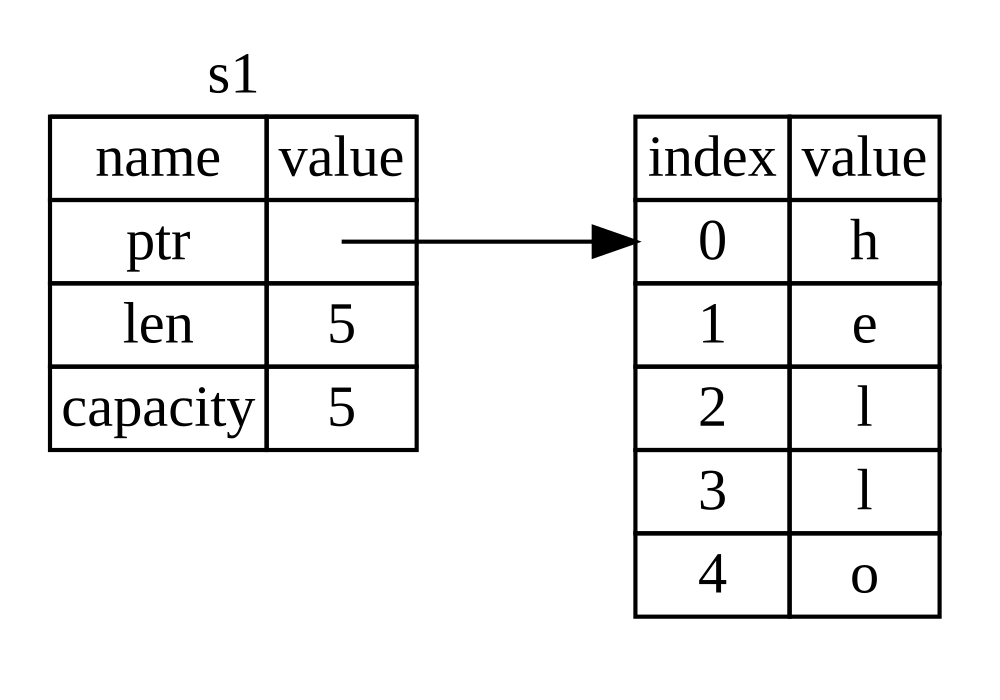
图 4-1:存储绑定到 s1 的值 "hello" 的 String 在内存中的表示
Figure 4-1: The representation in memory of a String
holding the value "hello" bound to s1
长度是 String 内容当前使用的内存量(以字节为单位)。容量是 String 从分配器接收到的内存总量(以字节为单位)。长度和容量之间的差异很重要,但在这种情况下并不重要,所以现在可以忽略容量。
The length is how much memory, in bytes, the contents of the String are
currently using. The capacity is the total amount of memory, in bytes, that the
String has received from the allocator. The difference between length and
capacity matters, but not in this context, so for now, it’s fine to ignore the
capacity.
当我们把 s1 赋值给 s2 时,String 数据被复制,这意味着我们复制了栈上的指针、长度和容量。我们不复制指针指向的堆上的数据。换句话说,内存中的数据表示如图 4-2 所示。
When we assign s1 to s2, the String data is copied, meaning we copy the
pointer, the length, and the capacity that are on the stack. We do not copy the
data on the heap that the pointer refers to. In other words, the data
representation in memory looks like Figure 4-2.
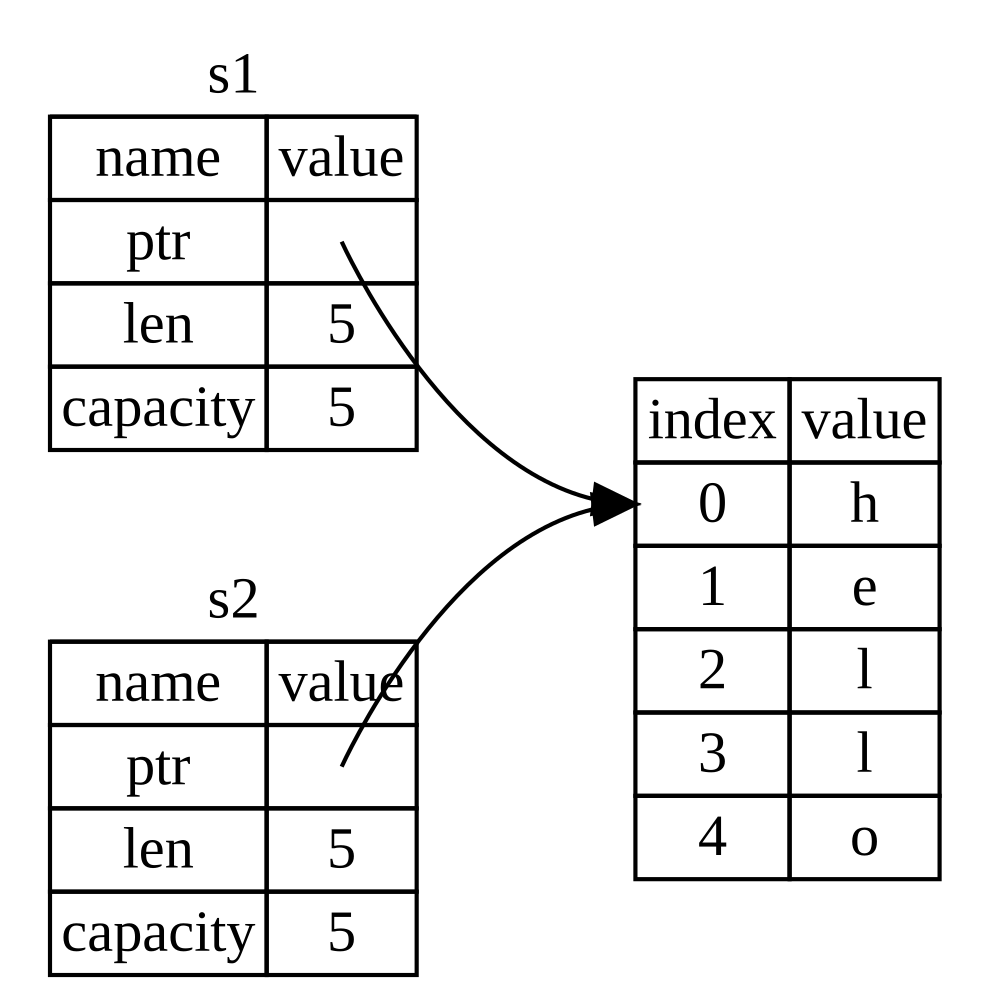
图 4-2:变量 s2 的内存表示,它具有 s1 指针、长度和容量的副本
Figure 4-2: The representation in memory of the variable
s2 that has a copy of the pointer, length, and capacity of s1
这种表示“并不”像图 4-3 所示,如果 Rust 同时也复制了堆数据,内存就会是这个样子。如果 Rust 这样做,如果堆上的数据很大,操作 s2 = s1 可能会在运行时性能方面非常昂贵。
The representation does not look like Figure 4-3, which is what memory would
look like if Rust instead copied the heap data as well. If Rust did this, the
operation s2 = s1 could be very expensive in terms of runtime performance if
the data on the heap were large.
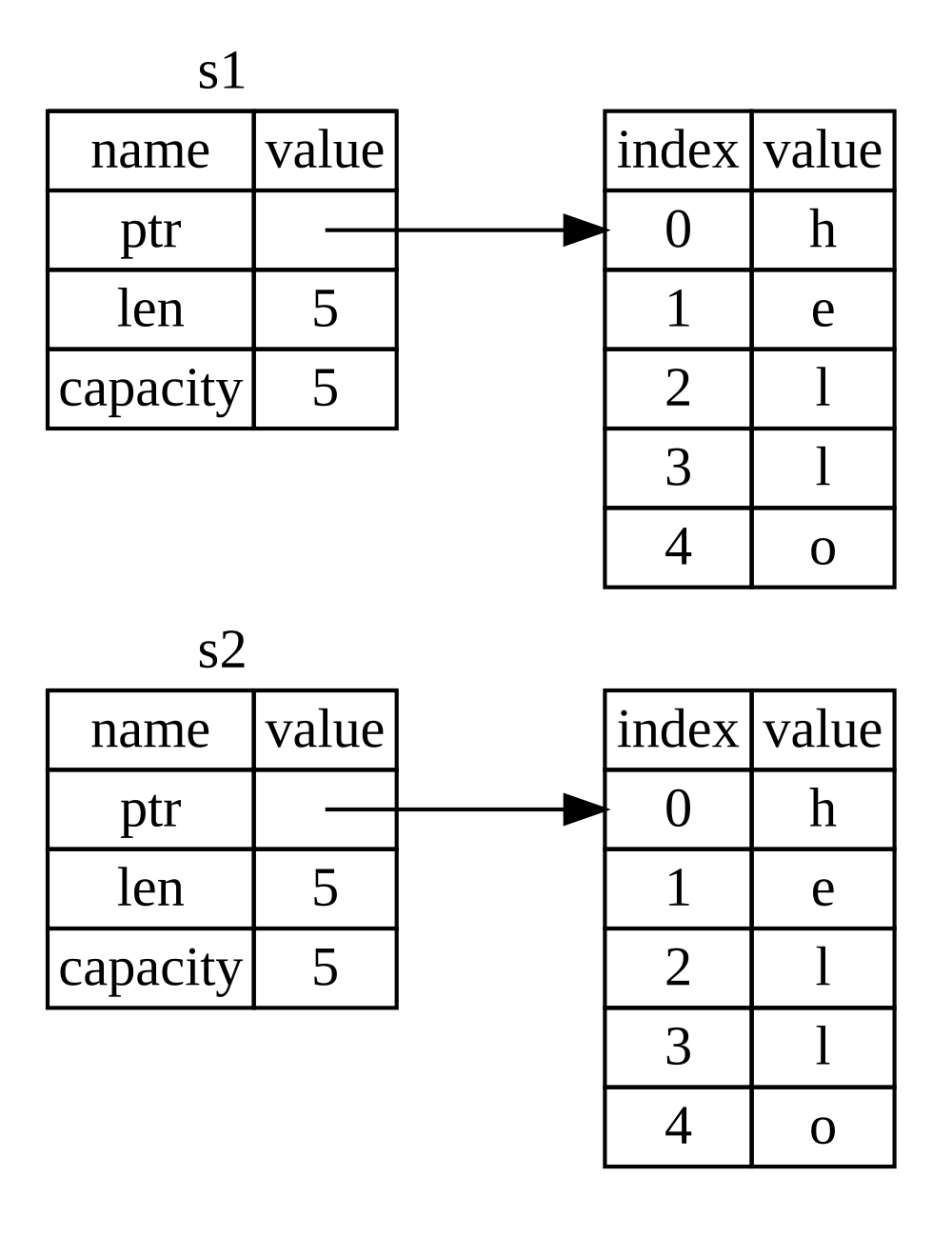
图 4-3:如果 Rust 也复制堆数据,s2 = s1 可能做的另一种可能性
Figure 4-3: Another possibility for what s2 = s1 might
do if Rust copied the heap data as well
之前我们说过,当变量离开作用域时,Rust 会自动调用 drop 函数并为该变量清理堆内存。但图 4-2 显示两个数据指针指向同一个位置。这是一个问题:当 s2 和 s1 离开作用域时,它们都会尝试释放相同的内存。这被称为“二次释放”(double free)错误,是我们之前提到的内存安全漏洞之一。释放两次内存会导致内存损坏,这可能会导致安全漏洞。
Earlier, we said that when a variable goes out of scope, Rust automatically
calls the drop function and cleans up the heap memory for that variable. But
Figure 4-2 shows both data pointers pointing to the same location. This is a
problem: When s2 and s1 go out of scope, they will both try to free the
same memory. This is known as a double free error and is one of the memory
safety bugs we mentioned previously. Freeing memory twice can lead to memory
corruption, which can potentially lead to security vulnerabilities.
为了确保内存安全,在 let s2 = s1; 行之后,Rust 认为 s1 不再有效。因此,当 s1 离开作用域时,Rust 不需要释放任何东西。看看在创建 s2 后尝试使用 s1 会发生什么;它将无法工作:
To ensure memory safety, after the line let s2 = s1;, Rust considers s1 as
no longer valid. Therefore, Rust doesn’t need to free anything when s1 goes
out of scope. Check out what happens when you try to use s1 after s2 is
created; it won’t work:
fn main() {
    let s1 = String::from("hello");
    let s2 = s1;

    println!("{s1}, world!");
}
你会得到如下错误,因为 Rust 阻止你使用已失效的引用:
You’ll get an error like this because Rust prevents you from using the invalidated reference:
$ cargo run
   Compiling ownership v0.1.0 (file:///projects/ownership)
error[E0382]: borrow of moved value: `s1`
 --> src/main.rs:5:16
  |
2 |     let s1 = String::from("hello");
  |         -- move occurs because `s1` has type `String`, which does not implement the `Copy` trait
3 |     let s2 = s1;
  |              -- value moved here
4 |
5 |     println!("{s1}, world!");
  |                ^^ value borrowed here after move
  |
  = note: this error originates in the macro `$crate::format_args_nl` which comes from the expansion of the macro `println` (in Nightly builds, run with -Z macro-backtrace for more info)
help: consider cloning the value if the performance cost is acceptable
  |
3 |     let s2 = s1.clone();
  |                ++++++++

For more information about this error, try `rustc --explain E0382`.
error: could not compile `ownership` (bin "ownership") due to 1 previous error
如果你在学习其他语言时听说过“浅拷贝”(shallow copy)和“深拷贝”(deep copy)这两个术语,那么只复制指针、长度和容量而不复制数据的概念听起来可能像是浅拷贝。但由于 Rust 还会使第一个变量失效,因此它不被称为浅拷贝,而是被称为“移动”(move)。在这个例子中,我们会说 s1 被“移动”到了 s2。所以,实际发生的事情如图 4-4 所示。
If you’ve heard the terms shallow copy and deep copy while working with
other languages, the concept of copying the pointer, length, and capacity
without copying the data probably sounds like making a shallow copy. But
because Rust also invalidates the first variable, instead of being called a
shallow copy, it’s known as a move. In this example, we would say that s1
was moved into s2. So, what actually happens is shown in Figure 4-4.
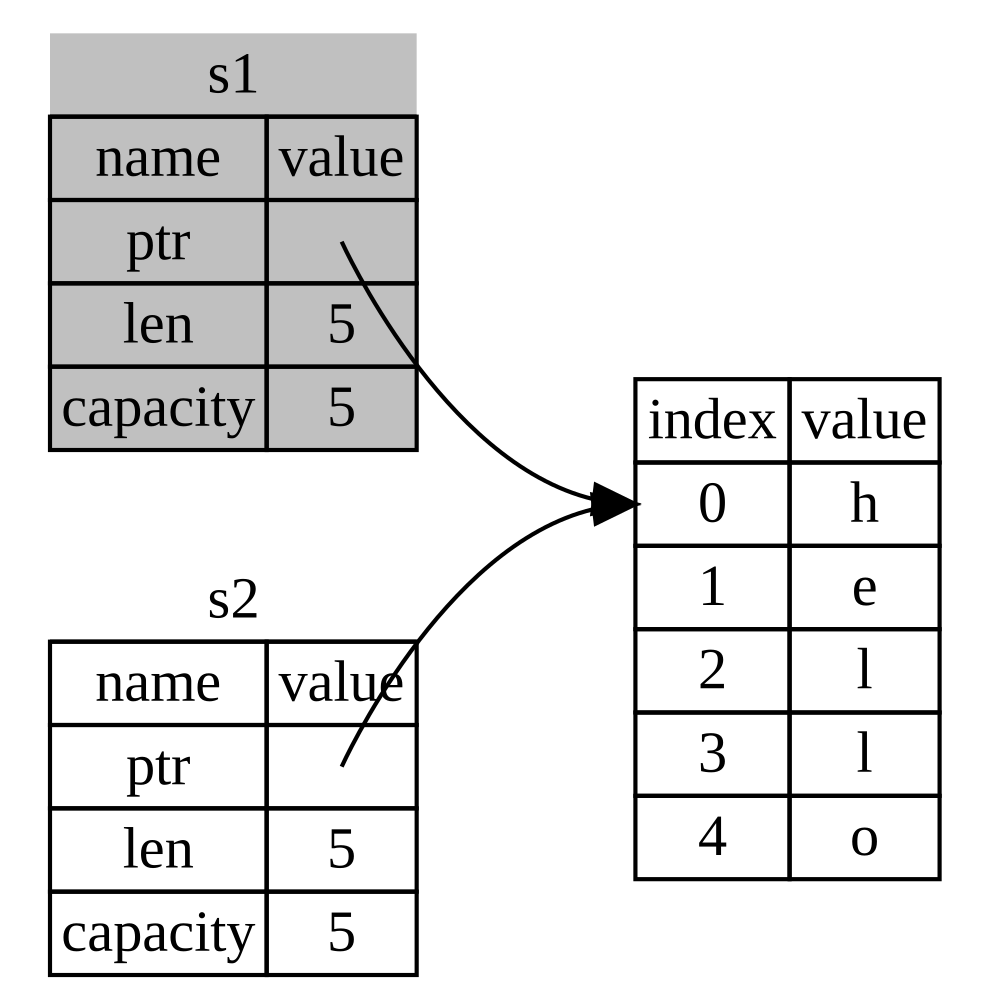
图 4-4:s1 失效后的内存表示
Figure 4-4: The representation in memory after s1 has
been invalidated
这解决了我们的问题!只有 s2 有效,当它离开作用域时,只有它会释放内存,任务完成。
That solves our problem! With only s2 valid, when it goes out of scope it
alone will free the memory, and we’re done.
此外,这隐含了一个设计选择:Rust 永远不会自动创建数据的“深”拷贝。因此,任何“自动”复制都可以被认为是运行时性能开销较小的。
In addition, there’s a design choice that’s implied by this: Rust will never automatically create “deep” copies of your data. Therefore, any automatic copying can be assumed to be inexpensive in terms of runtime performance.
作用域与赋值
Scope and Assignment
反过来,对于作用域、所有权与通过 drop 函数释放内存之间的关系也是如此。当你给现有变量分配一个全新的值时,Rust 会立即调用 drop 并释放原始值的内存。例如,考虑这段代码:
The inverse of this is true for the relationship between scoping, ownership, and
memory being freed via the drop function as well. When you assign a completely
new value to an existing variable, Rust will call drop and free the original
value’s memory immediately. Consider this code, for example:
fn main() {
    let mut s = String::from("hello");
    s = String::from("ahoy");

    println!("{s}, world!");
}
我们最初声明一个变量 s 并将其绑定到一个值为 "hello" 的 String。然后,我们立即创建一个值为 "ahoy" 的新 String 并将其赋给 s。此时,没有任何东西指向堆上的原始值。图 4-5 展示了现在的栈和堆数据:
We initially declare a variable s and bind it to a String with the value
"hello". Then, we immediately create a new String with the value "ahoy"
and assign it to s. At this point, nothing is referring to the original value
on the heap at all. Figure 4-5 illustrates the stack and heap data now:
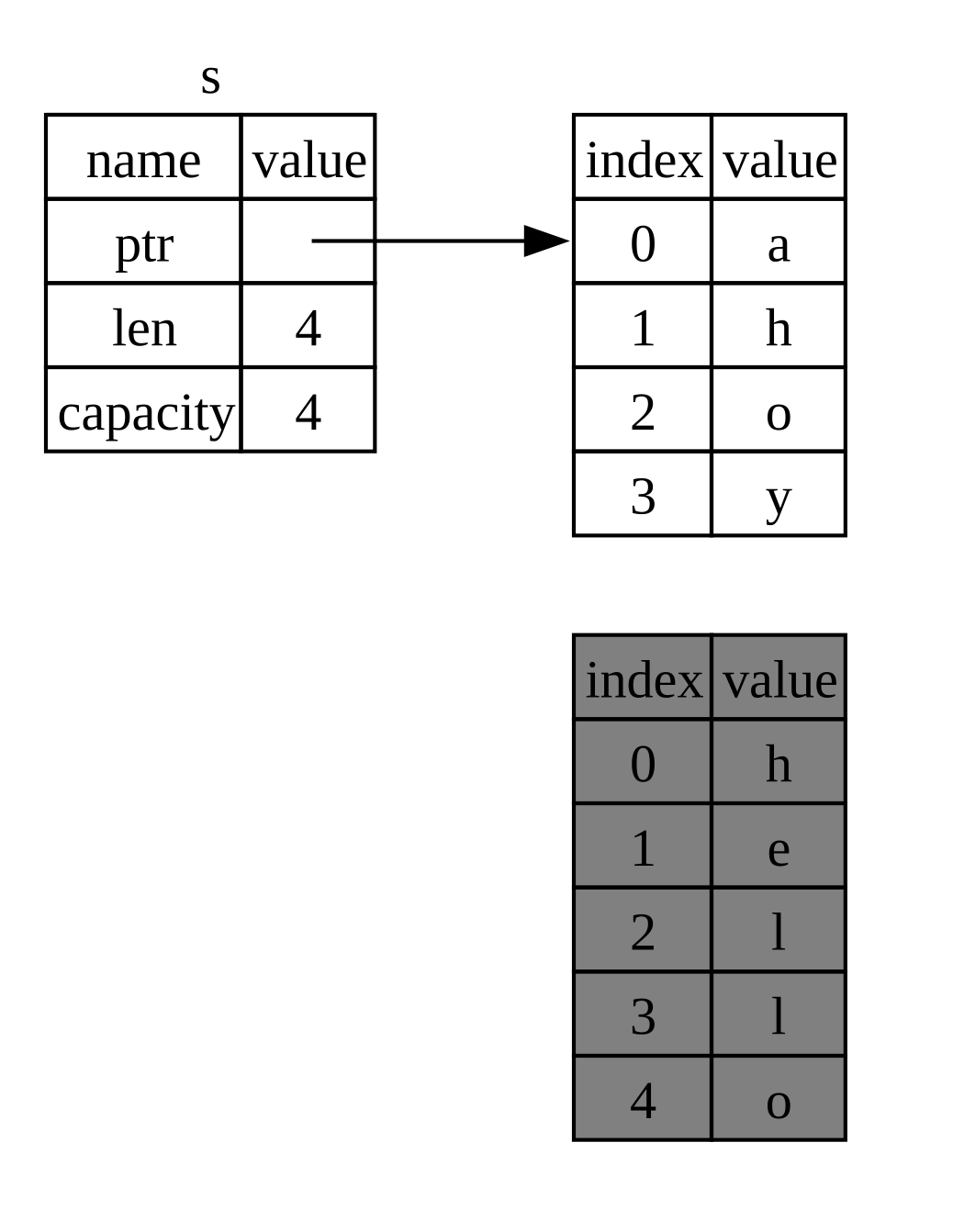
图 4-5:初始值被完全替换后的内存表示 Figure 4-5: The representation in memory after the initial value has been replaced in its entirety
因此原始字符串立即离开作用域。Rust 将对其运行 drop 函数,其内存将立即被释放。当我们最后打印该值时,它将是 "ahoy, world!"。
The original string thus immediately goes out of scope. Rust will run the drop
function on it and its memory will be freed right away. When we print the value
at the end, it will be "ahoy, world!".
变量与数据交互的方式:克隆
Variables and Data Interacting with Clone
如果我们“确实”想要深度复制 String 的堆数据,而不只是栈数据,我们可以使用一个常用的方法叫做 clone。我们将在第 5 章讨论方法语法,但因为方法在许多编程语言中都是一个通用功能,你可能以前见过它们。
If we do want to deeply copy the heap data of the String, not just the
stack data, we can use a common method called clone. We’ll discuss method
syntax in Chapter 5, but because methods are a common feature in many
programming languages, you’ve probably seen them before.
这是 clone 方法的一个示例:
Here’s an example of the clone method in action:
fn main() {
    let s1 = String::from("hello");
    let s2 = s1.clone();

    println!("s1 = {s1}, s2 = {s2}");
}
这工作得很好,并显式地产生了如图 4-3 所示的行为,即堆数据“确实”被复制了。
This works just fine and explicitly produces the behavior shown in Figure 4-3, where the heap data does get copied.
当你看到对 clone 的调用时,你就知道某些任意代码正在被执行,并且该代码可能开销很大。这是一个视觉指示,表明正在发生一些不同的事情。
When you see a call to clone, you know that some arbitrary code is being
executed and that code may be expensive. It’s a visual indicator that something
different is going on.
只在栈上的数据:拷贝
Stack-Only Data: Copy
还有一个我们还没谈到的细节。这段使用整数的代码(其中一部分在示例 4-2 中显示)是有效且可以运行的:
There’s another wrinkle we haven’t talked about yet. This code using integers—part of which was shown in Listing 4-2—works and is valid:
fn main() {
    let x = 5;
    let y = x;

    println!("x = {x}, y = {y}");
}
但这段代码似乎与我们刚刚学到的相矛盾:我们没有调用 clone,但 x 仍然有效,没有被移动到 y。
But this code seems to contradict what we just learned: We don’t have a call to
clone, but x is still valid and wasn’t moved into y.
原因是像整数这样在编译时具有已知大小的类型完全存储在栈上,所以实际值的副本可以快速制作。这意味着没有理由在我们创建变量 y 后阻止 x 继续有效。换句话说,这里深拷贝和浅拷贝没有区别,所以调用 clone 不会做任何与通常的浅拷贝不同的事情,我们可以省略它。
The reason is that types such as integers that have a known size at compile
time are stored entirely on the stack, so copies of the actual values are quick
to make. That means there’s no reason we would want to prevent x from being
valid after we create the variable y. In other words, there’s no difference
between deep and shallow copying here, so calling clone wouldn’t do anything
different from the usual shallow copying, and we can leave it out.
Rust 有一个特殊的注解叫做 Copy trait,我们可以将其放置在像整数那样存储在栈上的类型上(我们将在第 10 章更多地讨论 trait)。如果一个类型实现了 Copy trait,使用它的变量不会移动,而是被琐碎地复制,使它们在赋值给另一个变量后仍然有效。
Rust has a special annotation called the Copy trait that we can place on
types that are stored on the stack, as integers are (we’ll talk more about
traits in Chapter 10). If a type implements the Copy
trait, variables that use it do not move, but rather are trivially copied,
making them still valid after assignment to another variable.
如果一个类型或其任何部分实现了 Drop trait,Rust 将不允许我们用 Copy 来注解该类型。如果该类型在值离开作用域时需要发生一些特殊处理,而我们又给该类型添加了 Copy 注解,我们就会得到一个编译时错误。要了解如何向你的类型添加 Copy 注解以实现该 trait,请参阅附录 C 中的“派生 Trait”。
Rust won’t let us annotate a type with Copy if the type, or any of its parts,
has implemented the Drop trait. If the type needs something special to happen
when the value goes out of scope and we add the Copy annotation to that type,
we’ll get a compile-time error. To learn about how to add the Copy annotation
to your type to implement the trait, see “Derivable
Traits” in Appendix C.
那么,哪些类型实现了 Copy trait 呢?你可以查看给定类型的文档以确定,但作为一般规则,任何一组简单的标量值都可以实现 Copy,而任何需要分配或作为某种资源的形式都不能实现 Copy。以下是一些实现了 Copy 的类型:
So, what types implement the Copy trait? You can check the documentation for
the given type to be sure, but as a general rule, any group of simple scalar
values can implement Copy, and nothing that requires allocation or is some
form of resource can implement Copy. Here are some of the types that
implement Copy:
-
所有整数类型,如
u32。 -
All the integer types, such as
u32. -
布尔类型
bool,值为true和false。 -
The Boolean type,
bool, with valuestrueandfalse. -
所有浮点类型,如
f64。 -
All the floating-point types, such as
f64. -
字符类型
char。 -
The character type,
char. -
元组,如果它们仅包含也实现
Copy的类型。例如,(i32, i32)实现了Copy,但(i32, String)不实现。 -
Tuples, if they only contain types that also implement
Copy. For example,(i32, i32)implementsCopy, but(i32, String)does not.
所有权与函数
Ownership and Functions
将值传递给函数机制与将值赋给变量的机制类似。向函数传递变量将发生移动或复制,就像赋值一样。示例 4-3 有一个带有注释的例子,显示了变量进入和离开作用域的位置。
The mechanics of passing a value to a function are similar to those when assigning a value to a variable. Passing a variable to a function will move or copy, just as assignment does. Listing 4-3 has an example with some annotations showing where variables go into and out of scope.
fn main() {
    let s = String::from("hello");  // s comes into scope

    takes_ownership(s);             // s's value moves into the function...
                                    // ... and so is no longer valid here

    let x = 5;                      // x comes into scope

    makes_copy(x);                  // Because i32 implements the Copy trait,
                                    // x does NOT move into the function,
                                    // so it's okay to use x afterward.

} // Here, x goes out of scope, then s. However, because s's value was moved,
  // nothing special happens.

fn takes_ownership(some_string: String) { // some_string comes into scope
    println!("{some_string}");
} // Here, some_string goes out of scope and `drop` is called. The backing
  // memory is freed.

fn makes_copy(some_integer: i32) { // some_integer comes into scope
    println!("{some_integer}");
} // Here, some_integer goes out of scope. Nothing special happens.
如果我们尝试在调用 takes_ownership 之后使用 s,Rust 将抛出编译时错误。这些静态检查保护我们免受错误的影响。尝试向 main 中添加使用 s 和 x 的代码,看看在哪里可以使用它们,以及所有权规则在哪里阻止你这样做。
If we tried to use s after the call to takes_ownership, Rust would throw a
compile-time error. These static checks protect us from mistakes. Try adding
code to main that uses s and x to see where you can use them and where
the ownership rules prevent you from doing so.
返回值与作用域
Return Values and Scope
返回值也可以转移所有权。示例 4-4 显示了一个返回某些值的函数示例,带有与示例 4-3 类似的注释。
Returning values can also transfer ownership. Listing 4-4 shows an example of a function that returns some value, with similar annotations as those in Listing 4-3.
fn main() {
    let s1 = gives_ownership();        // gives_ownership moves its return
                                       // value into s1

    let s2 = String::from("hello");    // s2 comes into scope

    let s3 = takes_and_gives_back(s2); // s2 is moved into
                                       // takes_and_gives_back, which also
                                       // moves its return value into s3
} // Here, s3 goes out of scope and is dropped. s2 was moved, so nothing
  // happens. s1 goes out of scope and is dropped.

fn gives_ownership() -> String {       // gives_ownership will move its
                                       // return value into the function
                                       // that calls it

    let some_string = String::from("yours"); // some_string comes into scope

    some_string                        // some_string is returned and
                                       // moves out to the calling
                                       // function
}

// This function takes a String and returns a String.
fn takes_and_gives_back(a_string: String) -> String {
    // a_string comes into
    // scope

    a_string  // a_string is returned and moves out to the calling function
}
变量的所有权每次都遵循相同的模式:将一个值赋给另一个变量会发生移动。当包含堆上数据的变量离开作用域时,除非数据的所有权已移动到另一个变量,否则该值将被 drop 清理。
The ownership of a variable follows the same pattern every time: Assigning a
value to another variable moves it. When a variable that includes data on the
heap goes out of scope, the value will be cleaned up by drop unless ownership
of the data has been moved to another variable.
虽然这可行,但在每个函数中获取所有权然后返回所有权有点乏味。如果我们想让函数使用值但不获取所有权呢?非常恼人的是,如果我们想再次使用它,任何我们传入的东西也需要被传回来,此外还可能需要返回函数体产生的任何数据。
While this works, taking ownership and then returning ownership with every function is a bit tedious. What if we want to let a function use a value but not take ownership? It’s quite annoying that anything we pass in also needs to be passed back if we want to use it again, in addition to any data resulting from the body of the function that we might want to return as well.
Rust 确实允许我们使用元组返回多个值,如示例 4-5 所示。
Rust does let us return multiple values using a tuple, as shown in Listing 4-5.
fn main() {
    let s1 = String::from("hello");

    let (s2, len) = calculate_length(s1);

    println!("The length of '{s2}' is {len}.");
}

fn calculate_length(s: String) -> (String, usize) {
    let length = s.len(); // len() returns the length of a String

    (s, length)
}
但这对于一个本应通用的概念来说,仪式感太强,工作量也太大了。幸运的是,Rust 有一个在不转移所有权的情况下使用值的功能:引用(references)。
But this is too much ceremony and a lot of work for a concept that should be common. Luckily for us, Rust has a feature for using a value without transferring ownership: references.
引用与借用
引用与借用
References and Borrowing
示例 4-5 中元组代码的问题在于,我们必须将 String 返回给调用函数,以便在调用 calculate_length 之后仍能使用该 String,因为 String 已被移动到了 calculate_length 中。相反,我们可以提供对 String 值的“引用”(reference)。引用类似于指针,因为它是一个地址,我们可以跟随该地址访问存储在该地址的数据;该数据由其他某个变量所有。与指针不同,引用保证在引用的生命周期内指向特定类型的有效值。
The issue with the tuple code in Listing 4-5 is that we have to return the
String to the calling function so that we can still use the String after
the call to calculate_length, because the String was moved into
calculate_length. Instead, we can provide a reference to the String value.
A reference is like a pointer in that it’s an address we can follow to access
the data stored at that address; that data is owned by some other variable.
Unlike a pointer, a reference is guaranteed to point to a valid value of a
particular type for the life of that reference.
下面是你如何定义和使用一个 calculate_length 函数,该函数将对象的引用作为参数,而不是获取值的所有权:
Here is how you would define and use a calculate_length function that has a
reference to an object as a parameter instead of taking ownership of the value:
fn main() {
    let s1 = String::from("hello");

    let len = calculate_length(&s1);

    println!("The length of '{s1}' is {len}.");
}

fn calculate_length(s: &String) -> usize {
    s.len()
}
首先,请注意变量声明和函数返回值中的所有元组代码都消失了。其次,请注意我们将 &s1 传递给 calculate_length,并且在其定义中,我们接收 &String 而不是 String。这些 & 符号代表“引用”,它们允许你引用某个值而不获取其所有权。图 4-6 描绘了这个概念。
First, notice that all the tuple code in the variable declaration and the
function return value is gone. Second, note that we pass &s1 into
calculate_length and, in its definition, we take &String rather than
String. These ampersands represent references, and they allow you to refer to
some value without taking ownership of it. Figure 4-6 depicts this concept.
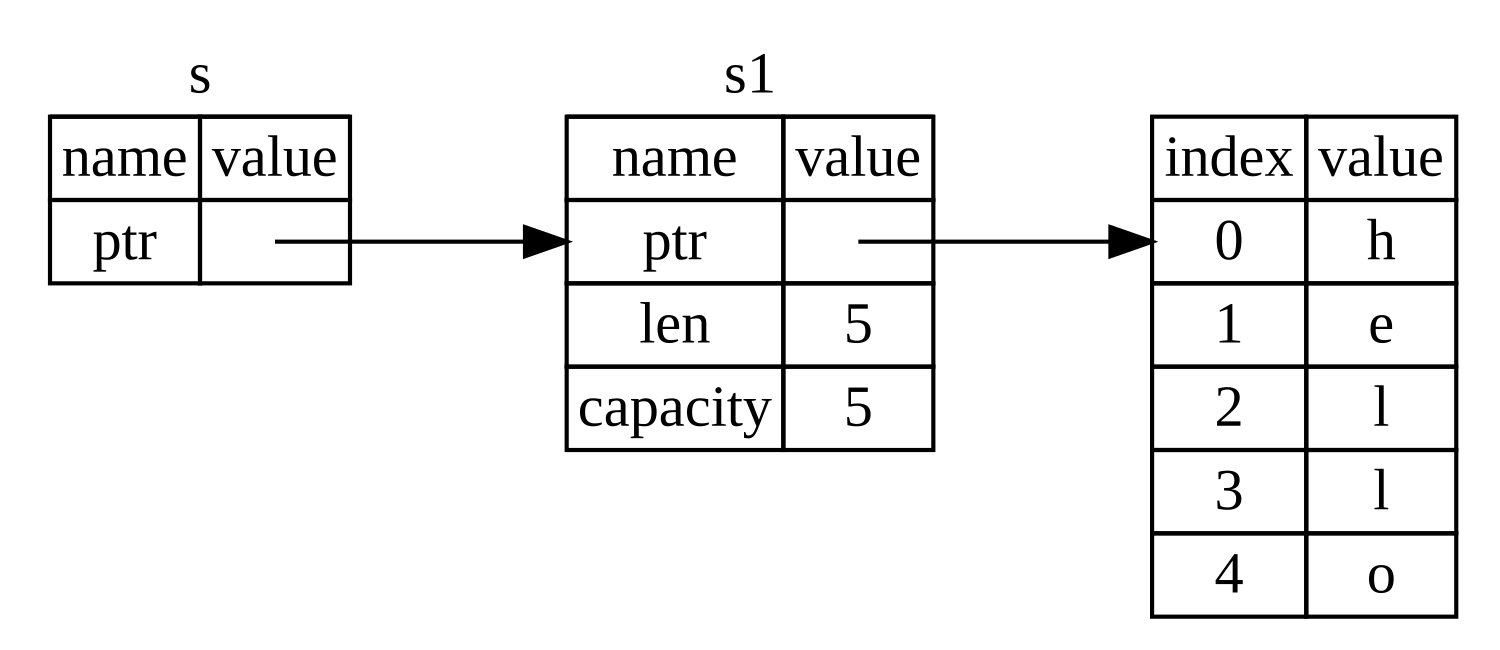
图 4-6:&String s 指向 String s1 的图解
Figure 4-6: A diagram of &String s pointing at
String s1
注意:使用
&进行引用的相反操作是“解引用”(dereferencing),它是通过解引用运算符*完成的。我们将在第 8 章看到解引用运算符的一些用法,并在第 15 章讨论解引用的细节。Note: The opposite of referencing by using
&is dereferencing, which is accomplished with the dereference operator,*. We’ll see some uses of the dereference operator in Chapter 8 and discuss details of dereferencing in Chapter 15.
让我们仔细看看这里的函数调用:
Let’s take a closer look at the function call here:
fn main() {
    let s1 = String::from("hello");

    let len = calculate_length(&s1);

    println!("The length of '{s1}' is {len}.");
}

fn calculate_length(s: &String) -> usize {
    s.len()
}
&s1 语法允许我们创建一个引用,该引用“引用”了 s1 的值,但不拥有它。因为引用不拥有它,所以当引用停止使用时,它指向的值不会被丢弃。
The &s1 syntax lets us create a reference that refers to the value of s1
but does not own it. Because the reference does not own it, the value it points
to will not be dropped when the reference stops being used.
同样,函数的签名使用 & 来指示参数 s 的类型是一个引用。让我们添加一些解释性注释:
Likewise, the signature of the function uses & to indicate that the type of
the parameter s is a reference. Let’s add some explanatory annotations:
fn main() {
    let s1 = String::from("hello");

    let len = calculate_length(&s1);

    println!("The length of '{s1}' is {len}.");
}

fn calculate_length(s: &String) -> usize { // s is a reference to a String
    s.len()
} // Here, s goes out of scope. But because s does not have ownership of what
  // it refers to, the String is not dropped.
变量 s 有效的作用域与任何函数参数的作用域相同,但当 s 停止使用时,引用指向的值不会被丢弃,因为 s 不具有所有权。当函数以引用作为参数而不是实际值时,我们不需要为了归还所有权而返回这些值,因为我们从未拥有过所有权。
The scope in which the variable s is valid is the same as any function
parameter’s scope, but the value pointed to by the reference is not dropped
when s stops being used, because s doesn’t have ownership. When functions
have references as parameters instead of the actual values, we won’t need to
return the values in order to give back ownership, because we never had
ownership.
我们将创建引用的行为称为“借用”(borrowing)。就像在现实生活中一样,如果一个人拥有某样东西,你可以从他们那里借用。当你用完后,你必须还回去。你不拥有它。
We call the action of creating a reference borrowing. As in real life, if a person owns something, you can borrow it from them. When you’re done, you have to give it back. You don’t own it.
那么,如果我们尝试修改借来的东西会发生什么呢?尝试示例 4-6 中的代码。剧透警告:它行不通!
So, what happens if we try to modify something we’re borrowing? Try the code in Listing 4-6. Spoiler alert: It doesn’t work!
fn main() {
    let s = String::from("hello");

    change(&s);
}

fn change(some_string: &String) {
    some_string.push_str(", world");
}
这是错误信息:
Here’s the error:
$ cargo run
   Compiling ownership v0.1.0 (file:///projects/ownership)
error[E0596]: cannot borrow `*some_string` as mutable, as it is behind a `&` reference
 --> src/main.rs:8:5
  |
8 |     some_string.push_str(", world");
  |     ^^^^^^^^^^^ `some_string` is a `&` reference, so the data it refers to cannot be borrowed as mutable
  |
help: consider changing this to be a mutable reference
  |
7 | fn change(some_string: &mut String) {
  |                         +++

For more information about this error, try `rustc --explain E0596`.
error: could not compile `ownership` (bin "ownership") due to 1 previous error
正如变量默认是不可变的一样,引用也是如此。我们不被允许修改我们拥有其引用的东西。
Just as variables are immutable by default, so are references. We’re not allowed to modify something we have a reference to.
可变引用
Mutable References
我们可以修复示例 4-6 中的代码,通过一些小改动来允许我们修改借用的值,即改用“可变引用”(mutable reference):
We can fix the code from Listing 4-6 to allow us to modify a borrowed value with just a few small tweaks that use, instead, a mutable reference:
fn main() {
    let mut s = String::from("hello");

    change(&mut s);
}

fn change(some_string: &mut String) {
    some_string.push_str(", world");
}
首先,我们将 s 更改为 mut。然后,在调用 change 函数的地方使用 &mut s 创建一个可变引用,并更新函数签名以接受一个可变引用 some_string: &mut String。这非常清楚地表明 change 函数将修改它借用的值。
First, we change s to be mut. Then, we create a mutable reference with
&mut s where we call the change function and update the function signature
to accept a mutable reference with some_string: &mut String. This makes it
very clear that the change function will mutate the value it borrows.
可变引用有一个很大的限制:如果你对一个值有一个可变引用,你不能再对该值有任何其他引用。尝试对 s 创建两个可变引用的代码将会失败:
Mutable references have one big restriction: If you have a mutable reference to
a value, you can have no other references to that value. This code that
attempts to create two mutable references to s will fail:
fn main() {
    let mut s = String::from("hello");

    let r1 = &mut s;
    let r2 = &mut s;

    println!("{r1}, {r2}");
}
这是错误信息:
Here’s the error:
$ cargo run
   Compiling ownership v0.1.0 (file:///projects/ownership)
error[E0499]: cannot borrow `s` as mutable more than once at a time
 --> src/main.rs:5:14
  |
4 |     let r1 = &mut s;
  |              ------ first mutable borrow occurs here
5 |     let r2 = &mut s;
  |              ^^^^^^ second mutable borrow occurs here
6 |
7 |     println!("{r1}, {r2}");
  |                -- first borrow later used here

For more information about this error, try `rustc --explain E0499`.
error: could not compile `ownership` (bin "ownership") due to 1 previous error
此错误说明此代码无效,因为我们不能在同一时间多次将 s 借用为可变的。第一个可变借用在 r1 中,并且必须持续到它在 println! 中使用为止,但在创建该可变引用与其使用之间,我们尝试在 r2 中创建另一个借用与 r1 相同数据的可变引用。
This error says that this code is invalid because we cannot borrow s as
mutable more than once at a time. The first mutable borrow is in r1 and must
last until it’s used in the println!, but between the creation of that
mutable reference and its usage, we tried to create another mutable reference
in r2 that borrows the same data as r1.
限制在同一时间内对同一数据进行多个可变引用,是为了以一种非常受控的方式允许修改。这是新 Rustacean 感到吃力的地方,因为大多数语言允许你随时随地进行修改。拥有此限制的好处是 Rust 可以在编译时防止数据竞争。“数据竞争”(data race)类似于竞态条件,当发生以下三种行为时会发生:
The restriction preventing multiple mutable references to the same data at the same time allows for mutation but in a very controlled fashion. It’s something that new Rustaceans struggle with because most languages let you mutate whenever you’d like. The benefit of having this restriction is that Rust can prevent data races at compile time. A data race is similar to a race condition and happens when these three behaviors occur:
-
两个或多个指针同时访问相同的数据。
-
Two or more pointers access the same data at the same time.
-
至少有一个指针被用于向数据写入。
-
At least one of the pointers is being used to write to the data.
-
没有使用任何机制来同步对数据的访问。
-
There’s no mechanism being used to synchronize access to the data.
数据竞争会导致未定义行为,并且当你尝试在运行时追踪它们时,可能难以诊断和修复;Rust 通过拒绝编译具有数据竞争的代码来防止此问题!
Data races cause undefined behavior and can be difficult to diagnose and fix when you’re trying to track them down at runtime; Rust prevents this problem by refusing to compile code with data races!
一如既往,我们可以使用花括号来创建一个新作用域,从而允许存在多个可变引用,只是不能是“同时”存在的:
As always, we can use curly brackets to create a new scope, allowing for multiple mutable references, just not simultaneous ones:
fn main() {
    let mut s = String::from("hello");

    {
        let r1 = &mut s;
    } // r1 goes out of scope here, so we can make a new reference with no problems.

    let r2 = &mut s;
}
Rust 对于结合可变引用和不可变引用也强制执行类似的规则。这段代码会导致错误:
Rust enforces a similar rule for combining mutable and immutable references. This code results in an error:
fn main() {
    let mut s = String::from("hello");

    let r1 = &s; // no problem
    let r2 = &s; // no problem
    let r3 = &mut s; // BIG PROBLEM

    println!("{r1}, {r2}, and {r3}");
}
这是错误信息:
Here’s the error:
$ cargo run
   Compiling ownership v0.1.0 (file:///projects/ownership)
error[E0502]: cannot borrow `s` as mutable because it is also borrowed as immutable
 --> src/main.rs:6:14
  |
4 |     let r1 = &s; // no problem
  |              -- immutable borrow occurs here
5 |     let r2 = &s; // no problem
6 |     let r3 = &mut s; // BIG PROBLEM
  |              ^^^^^^ mutable borrow occurs here
7 |
8 |     println!("{r1}, {r2}, and {r3}");
  |                -- immutable borrow later used here

For more information about this error, try `rustc --explain E0502`.
error: could not compile `ownership` (bin "ownership") due to 1 previous error
哇!当我们对同一个值有一个不可变引用时,我们“也”不能有一个可变引用。
Whew! We also cannot have a mutable reference while we have an immutable one to the same value.
不可变引用的使用者不希望值在他们眼皮底下突然改变!然而,允许存在多个不可变引用,因为仅仅读取数据的人都没有能力影响其他人读取数据。
Users of an immutable reference don’t expect the value to suddenly change out from under them! However, multiple immutable references are allowed because no one who is just reading the data has the ability to affect anyone else’s reading of the data.
请注意,引用的作用域从引入它的地方开始,一直持续到最后一次使用该引用。例如,这段代码可以编译,因为不可变引用的最后一次使用是在 println! 中,在引入可变引用之前:
Note that a reference’s scope starts from where it is introduced and continues
through the last time that reference is used. For instance, this code will
compile because the last usage of the immutable references is in the println!,
before the mutable reference is introduced:
fn main() {
    let mut s = String::from("hello");

    let r1 = &s; // no problem
    let r2 = &s; // no problem
    println!("{r1} and {r2}");
    // Variables r1 and r2 will not be used after this point.

    let r3 = &mut s; // no problem
    println!("{r3}");
}
不可变引用 r1 和 r2 的作用域在它们最后一次使用的 println! 之后结束,这发生在创建可变引用 r3 之前。这些作用域不重叠,所以此代码是被允许的:编译器可以判断出在作用域结束之前的某个点,引用已不再被使用。
The scopes of the immutable references r1 and r2 end after the println!
where they are last used, which is before the mutable reference r3 is
created. These scopes don’t overlap, so this code is allowed: The compiler can
tell that the reference is no longer being used at a point before the end of
the scope.
尽管借用错误有时可能令人沮丧,但请记住,这是 Rust 编译器在尽早(在编译时而不是在运行时)指出潜在的错误,并向你显示问题的确切位置。这样,你就不必追踪为什么你的数据不是你想象中的那样了。
Even though borrowing errors may be frustrating at times, remember that it’s the Rust compiler pointing out a potential bug early (at compile time rather than at runtime) and showing you exactly where the problem is. Then, you don’t have to track down why your data isn’t what you thought it was.
悬垂引用
Dangling References
在具有指针的语言中,很容易由于释放了一些内存而保留了指向该内存的指针,从而错误地创建了“悬垂指针”(dangling pointer)——即引用了一个可能已被分配给其他人的内存位置的指针。相比之下,在 Rust 中,编译器保证引用永远不会是悬垂引用:如果你有一个对某些数据的引用,编译器将确保数据在引用离开作用域之前不会离开作用域。
In languages with pointers, it’s easy to erroneously create a dangling pointer—a pointer that references a location in memory that may have been given to someone else—by freeing some memory while preserving a pointer to that memory. In Rust, by contrast, the compiler guarantees that references will never be dangling references: If you have a reference to some data, the compiler will ensure that the data will not go out of scope before the reference to the data does.
让我们尝试创建一个悬垂引用,看看 Rust 如何通过编译时错误来防止它们:
Let’s try to create a dangling reference to see how Rust prevents them with a compile-time error:
fn main() {
    let reference_to_nothing = dangle();
}

fn dangle() -> &String {
    let s = String::from("hello");

    &s
}
这是错误信息:
Here’s the error:
$ cargo run
   Compiling ownership v0.1.0 (file:///projects/ownership)
error[E0106]: missing lifetime specifier
 --> src/main.rs:5:16
  |
5 | fn dangle() -> &String {
  |                ^ expected named lifetime parameter
  |
  = help: this function's return type contains a borrowed value, but there is no value for it to be borrowed from
help: consider using the `'static` lifetime, but this is uncommon unless you're returning a borrowed value from a `const` or a `static`
  |
5 | fn dangle() -> &'static String {
  |                 +++++++
help: instead, you are more likely to want to return an owned value
  |
5 - fn dangle() -> &String {
5 + fn dangle() -> String {
  |

For more information about this error, try `rustc --explain E0106`.
error: could not compile `ownership` (bin "ownership") due to 1 previous error
此错误消息提到了一个我们尚未介绍的功能:生命周期。我们将在第 10 章详细讨论生命周期。但是,如果你忽略关于生命周期的部分,该消息确实包含了此代码为何存在问题的关键:
This error message refers to a feature we haven’t covered yet: lifetimes. We’ll discuss lifetimes in detail in Chapter 10. But, if you disregard the parts about lifetimes, the message does contain the key to why this code is a problem:
this function's return type contains a borrowed value, but there is no value
for it to be borrowed from
让我们仔细看看 dangle 代码的每个阶段究竟发生了什么:
Let’s take a closer look at exactly what’s happening at each stage of our
dangle code:
fn main() {
    let reference_to_nothing = dangle();
}

fn dangle() -> &String { // dangle returns a reference to a String

    let s = String::from("hello"); // s is a new String

    &s // we return a reference to the String, s
} // Here, s goes out of scope and is dropped, so its memory goes away.
  // Danger!
因为 s 是在 dangle 内部创建的,当 dangle 的代码运行结束时,s 将被释放。但我们尝试返回一个指向它的引用。这意味着此引用将指向一个无效的 String。这可不行!Rust 不会让我们这样做。
Because s is created inside dangle, when the code of dangle is finished,
s will be deallocated. But we tried to return a reference to it. That means
this reference would be pointing to an invalid String. That’s no good! Rust
won’t let us do this.
这里的解决方案是直接返回 String:
The solution here is to return the String directly:
fn main() {
    let string = no_dangle();
}

fn no_dangle() -> String {
    let s = String::from("hello");

    s
}
这没有任何问题。所有权被移出,没有任何东西被释放。
This works without any problems. Ownership is moved out, and nothing is deallocated.
引用的规则
The Rules of References
让我们回顾一下我们讨论过的关于引用的内容:
Let’s recap what we’ve discussed about references:
-
在任何给定的时间,你要么只能有一个可变引用,要么可以有任意数量的不可变引用。
-
At any given time, you can have either one mutable reference or any number of immutable references.
-
引用必须始终有效。
-
References must always be valid.
接下来,我们将看看另一种引用:切片(slices)。
Next, we’ll look at a different kind of reference: slices.
切片类型
切片类型
The Slice Type
“切片”(Slices)允许你引用集合中一段连续的元素序列。切片是一种引用,因此它不具有所有权。
Slices let you reference a contiguous sequence of elements in a collection. A slice is a kind of reference, so it does not have ownership.
这里有一个小的编程问题:编写一个函数,接收一个由空格分隔的单词字符串,并返回它在该字符串中找到的第一个单词。如果函数在字符串中没有找到空格,则说明整个字符串就是一个单词,因此应该返回整个字符串。
Here’s a small programming problem: Write a function that takes a string of words separated by spaces and returns the first word it finds in that string. If the function doesn’t find a space in the string, the whole string must be one word, so the entire string should be returned.
注意:为了介绍切片,我们在本节中仅假设 ASCII 编码;关于 UTF-8 处理的更透彻讨论见第 8 章的“使用字符串存储 UTF-8 编码的文本”部分。
Note: For the purposes of introducing slices, we are assuming ASCII only in this section; a more thorough discussion of UTF-8 handling is in the “Storing UTF-8 Encoded Text with Strings” section of Chapter 8.
让我们看看在不使用切片的情况下如何编写此函数的签名,以理解切片将解决的问题:
Let’s work through how we’d write the signature of this function without using slices, to understand the problem that slices will solve:
fn first_word(s: &String) -> ?first_word 函数有一个 &String 类型的参数。我们不需要所有权,所以这没问题。(在惯用的 Rust 中,除非需要,否则函数不会获取参数的所有权,随着深入学习,其原因会变得更加清晰。)但是我们应该返回什么呢?我们并没有一个真正的方法来谈论字符串的“一部分”。但是,我们可以返回由空格指示的单词结尾的索引。让我们尝试一下,如示例 4-7 所示。
The first_word function has a parameter of type &String. We don’t need
ownership, so this is fine. (In idiomatic Rust, functions do not take ownership
of their arguments unless they need to, and the reasons for that will become
clear as we keep going.) But what should we return? We don’t really have a way
to talk about part of a string. However, we could return the index of the end
of the word, indicated by a space. Let’s try that, as shown in Listing 4-7.
fn first_word(s: &String) -> usize {
    let bytes = s.as_bytes();

    for (i, &item) in bytes.iter().enumerate() {
        if item == b' ' {
            return i;
        }
    }

    s.len()
}

fn main() {}
因为我们需要逐个检查 String 的元素并判断是否为空格,所以我们将使用 as_bytes 方法将 String 转换为字节数组。
Because we need to go through the String element by element and check whether
a value is a space, we’ll convert our String to an array of bytes using the
as_bytes method.
fn first_word(s: &String) -> usize {
    let bytes = s.as_bytes();

    for (i, &item) in bytes.iter().enumerate() {
        if item == b' ' {
            return i;
        }
    }

    s.len()
}

fn main() {}
接下来,我们使用 iter 方法在字节数组上创建一个迭代器:
Next, we create an iterator over the array of bytes using the iter method:
fn first_word(s: &String) -> usize {
    let bytes = s.as_bytes();

    for (i, &item) in bytes.iter().enumerate() {
        if item == b' ' {
            return i;
        }
    }

    s.len()
}

fn main() {}我们将在第 13 章中更详细地讨论迭代器。现在,你只需知道 iter 是一个返回集合中每个元素的方法,而 enumerate 包装了 iter 的结果,并将每个元素作为元组的一部分返回。enumerate 返回的元组的第一个元素是索引,第二个元素是该元素的引用。这比我们自己计算索引要方便一些。
We’ll discuss iterators in more detail in Chapter 13.
For now, know that iter is a method that returns each element in a collection
and that enumerate wraps the result of iter and returns each element as
part of a tuple instead. The first element of the tuple returned from
enumerate is the index, and the second element is a reference to the element.
This is a bit more convenient than calculating the index ourselves.
因为 enumerate 方法返回一个元组,所以我们可以使用模式来解构该元组。我们将在第 6 章中更多地讨论模式。在 for 循环中,我们指定了一个模式,其中 i 代表元组中的索引,而 &item 代表元组中的单个字节。因为我们从 .iter().enumerate() 获得的是元素的引用,所以我们在模式中使用 &。
Because the enumerate method returns a tuple, we can use patterns to
destructure that tuple. We’ll be discussing patterns more in Chapter
6. In the for loop, we specify a pattern that has i
for the index in the tuple and &item for the single byte in the tuple.
Because we get a reference to the element from .iter().enumerate(), we use
& in the pattern.
在 for 循环内部,我们使用字节字面量语法搜索代表空格的字节。如果找到了空格,我们就返回该位置。否则,我们通过使用 s.len() 返回字符串的长度。
Inside the for loop, we search for the byte that represents the space by
using the byte literal syntax. If we find a space, we return the position.
Otherwise, we return the length of the string by using s.len().
fn first_word(s: &String) -> usize {
    let bytes = s.as_bytes();

    for (i, &item) in bytes.iter().enumerate() {
        if item == b' ' {
            return i;
        }
    }

    s.len()
}

fn main() {}
现在我们有了一种找出字符串中第一个单词结尾索引的方法,但这里有一个问题。我们单独返回了一个 usize,但它只有在 &String 的上下文中才是有意义的数字。换句话说,因为它是一个与 String 分离的值,所以无法保证它在将来仍然有效。考虑示例 4-8 中使用了示例 4-7 中 first_word 函数的程序。
We now have a way to find out the index of the end of the first word in the
string, but there’s a problem. We’re returning a usize on its own, but it’s
only a meaningful number in the context of the &String. In other words,
because it’s a separate value from the String, there’s no guarantee that it
will still be valid in the future. Consider the program in Listing 4-8 that
uses the first_word function from Listing 4-7.
fn first_word(s: &String) -> usize {
    let bytes = s.as_bytes();

    for (i, &item) in bytes.iter().enumerate() {
        if item == b' ' {
            return i;
        }
    }

    s.len()
}

fn main() {
    let mut s = String::from("hello world");

    let word = first_word(&s); // word will get the value 5

    s.clear(); // this empties the String, making it equal to ""

    // word still has the value 5 here, but s no longer has any content that we
    // could meaningfully use with the value 5, so word is now totally invalid!
}
这个程序编译时不会报错,即使我们在调用 s.clear() 之后使用 word 也是如此。因为 word 与 s 的状态完全没有联系,所以 word 仍然包含值 5。我们可以将值 5 与变量 s 配合使用,尝试提取出第一个单词,但这将是一个错误,因为自我们将 5 保存到 word 以来,s 的内容已经发生了变化。
This program compiles without any errors and would also do so if we used word
after calling s.clear(). Because word isn’t connected to the state of s
at all, word still contains the value 5. We could use that value 5 with
the variable s to try to extract the first word out, but this would be a bug
because the contents of s have changed since we saved 5 in word.
必须担心 word 中的索引与 s 中的数据不同步是乏味且容易出错的!如果我们编写一个 second_word 函数,管理这些索引会变得更加脆弱。它的签名必须看起来像这样:
Having to worry about the index in word getting out of sync with the data in
s is tedious and error-prone! Managing these indices is even more brittle if
we write a second_word function. Its signature would have to look like this:
fn second_word(s: &String) -> (usize, usize) {现在我们正在跟踪起始索引“和”结束索引,我们甚至有更多从特定状态的数据计算出来的、但与该状态完全没有关联的值。我们有三个不相关的变量散落在各处,需要保持同步。
Now we’re tracking a starting and an ending index, and we have even more values that were calculated from data in a particular state but aren’t tied to that state at all. We have three unrelated variables floating around that need to be kept in sync.
幸运的是,Rust 有一个解决这个问题的方案:字符串切片(string slices)。
Luckily, Rust has a solution to this problem: string slices.
字符串切片
String Slices
“字符串切片”(string slice)是对 String 中连续元素序列的引用,它看起来像这样:
A string slice is a reference to a contiguous sequence of the elements of a
String, and it looks like this:
fn main() {
    let s = String::from("hello world");

    let hello = &s[0..5];
    let world = &s[6..11];
}
hello 不是对整个 String 的引用,而是对 String 一部分的引用,这由额外的 [0..5] 指定。我们通过在方括号内指定 [starting_index..ending_index] 来创建切片,其中 starting_index 是切片中的第一个位置,而 ending_index 比切片中的最后一个位置大一。在内部,切片数据结构存储切片的起始位置和长度,长度对应于 ending_index 减去 starting_index。所以,在 let world = &s[6..11]; 的情况下,world 将是一个包含指向 s 索引 6 处字节的指针以及长度值 5 的切片。
Rather than a reference to the entire String, hello is a reference to a
portion of the String, specified in the extra [0..5] bit. We create slices
using a range within square brackets by specifying
[starting_index..ending_index], where starting_index is the first
position in the slice and ending_index is one more than the last position
in the slice. Internally, the slice data structure stores the starting position
and the length of the slice, which corresponds to ending_index minus
starting_index. So, in the case of let world = &s[6..11];, world would
be a slice that contains a pointer to the byte at index 6 of s with a length
value of 5.
图 4-7 的图示显示了这一点。
Figure 4-7 shows this in a diagram.
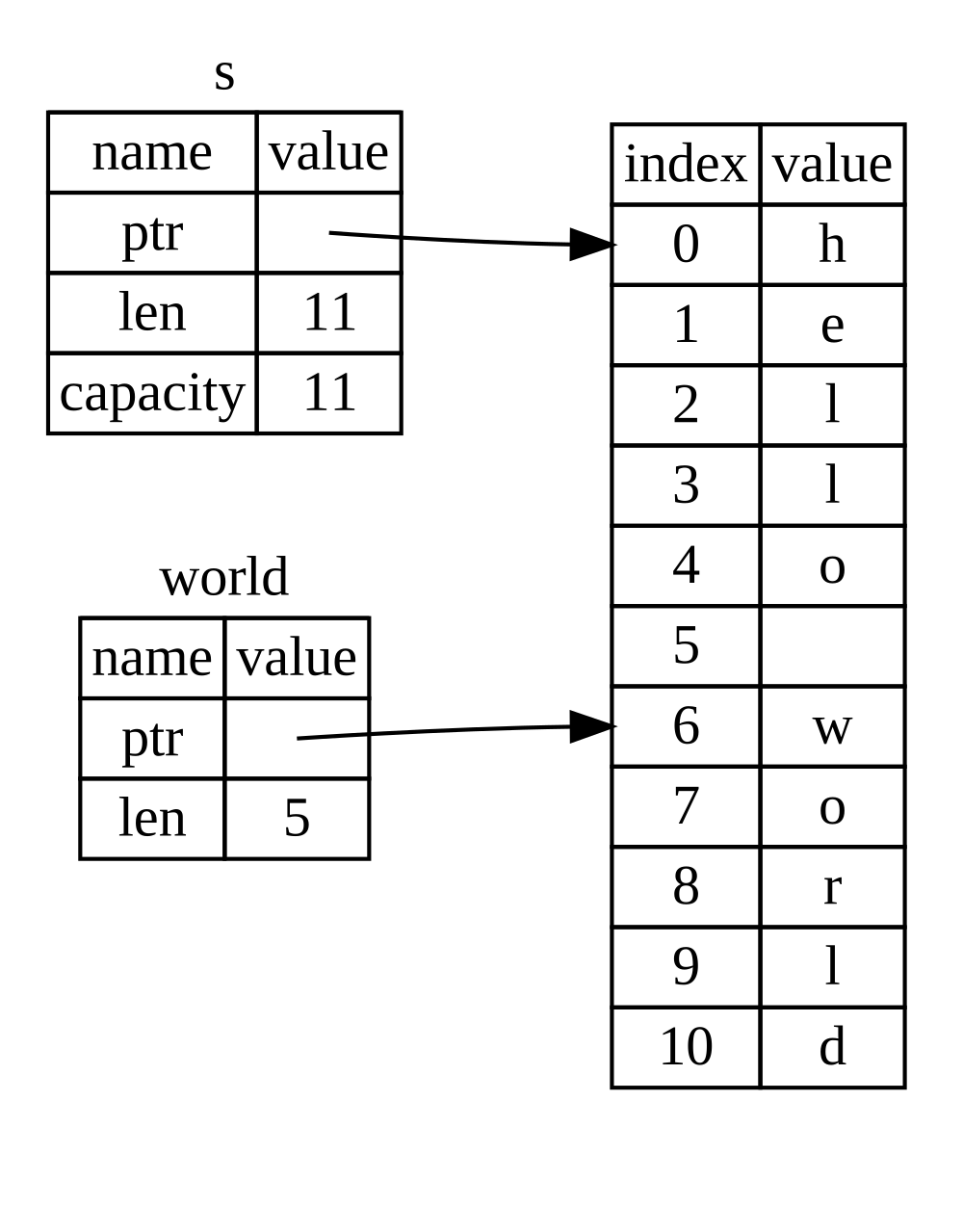
图 4-7:引用 String 一部分的字符串切片
Figure 4-7: A string slice referring to part of a
String
使用 Rust 的 .. 范围语法,如果你想从索引 0 开始,可以省略两个点之前的值。换句话说,以下写法是等价的:
With Rust’s .. range syntax, if you want to start at index 0, you can drop
the value before the two periods. In other words, these are equal:
#![allow(unused)]
fn main() {
let s = String::from("hello");

let slice = &s[0..2];
let slice = &s[..2];
}
同理,如果你的切片包含 String 的最后一个字节,你可以省略末尾的数字。这意味着以下写法是等价的:
By the same token, if your slice includes the last byte of the String, you
can drop the trailing number. That means these are equal:
#![allow(unused)]
fn main() {
let s = String::from("hello");

let len = s.len();

let slice = &s[3..len];
let slice = &s[3..];
}
你也可以省略两个值来获取整个字符串的切片。所以,以下写法是等价的:
You can also drop both values to take a slice of the entire string. So, these are equal:
#![allow(unused)]
fn main() {
let s = String::from("hello");

let len = s.len();

let slice = &s[0..len];
let slice = &s[..];
}
注意:字符串切片范围索引必须位于有效的 UTF-8 字符边界处。如果你尝试在多字节字符中间创建字符串切片,你的程序将因错误而退出。
Note: String slice range indices must occur at valid UTF-8 character boundaries. If you attempt to create a string slice in the middle of a multibyte character, your program will exit with an error.
了解了这些信息后,让我们重写 first_word 以返回一个切片。代表“字符串切片”的类型写作 &str:
With all this information in mind, let’s rewrite first_word to return a
slice. The type that signifies “string slice” is written as &str:
fn first_word(s: &String) -> &str {
    let bytes = s.as_bytes();

    for (i, &item) in bytes.iter().enumerate() {
        if item == b' ' {
            return &s[0..i];
        }
    }

    &s[..]
}

fn main() {}
我们以与示例 4-7 相同的方式获取单词结尾的索引,即寻找第一次出现的空格。当我们找到空格时,我们使用字符串的开头和空格索引作为起始和结束索引返回一个字符串切片。
We get the index for the end of the word the same way we did in Listing 4-7, by looking for the first occurrence of a space. When we find a space, we return a string slice using the start of the string and the index of the space as the starting and ending indices.
现在当我们调用 first_word 时,我们得到一个与底层数据相关联的单一值。该值由切片起始点的引用和切片中的元素数量组成。
Now when we call first_word, we get back a single value that is tied to the
underlying data. The value is made up of a reference to the starting point of
the slice and the number of elements in the slice.
返回切片对于 second_word 函数也同样有效:
Returning a slice would also work for a second_word function:
fn second_word(s: &String) -> &str {我们现在拥有了一个简单直观的 API,它更不容易出错,因为编译器将确保对 String 的引用保持有效。还记得示例 4-8 程序中的错误吗?当时我们获取了第一个单词结尾的索引,但随后清空了字符串,导致索引无效。那段代码逻辑上是不正确的,但没有显示任何即时错误。如果我们继续在清空后的字符串上使用第一个单词的索引,问题稍后就会显现。切片使这种错误变得不可能,并让我们更早地知道代码存在问题。使用切片版本的 first_word 将抛出编译时错误:
We now have a straightforward API that’s much harder to mess up because the
compiler will ensure that the references into the String remain valid.
Remember the bug in the program in Listing 4-8, when we got the index to the
end of the first word but then cleared the string so our index was invalid?
That code was logically incorrect but didn’t show any immediate errors. The
problems would show up later if we kept trying to use the first word index with
an emptied string. Slices make this bug impossible and let us know much sooner
that we have a problem with our code. Using the slice version of first_word
will throw a compile-time error:
fn first_word(s: &String) -> &str {
    let bytes = s.as_bytes();

    for (i, &item) in bytes.iter().enumerate() {
        if item == b' ' {
            return &s[0..i];
        }
    }

    &s[..]
}

fn main() {
    let mut s = String::from("hello world");

    let word = first_word(&s);

    s.clear(); // error!

    println!("the first word is: {word}");
}
这是编译器错误:
Here’s the compiler error:
$ cargo run
   Compiling ownership v0.1.0 (file:///projects/ownership)
error[E0502]: cannot borrow `s` as mutable because it is also borrowed as immutable
  --> src/main.rs:18:5
   |
16 |     let word = first_word(&s);
   |                           -- immutable borrow occurs here
17 |
18 |     s.clear(); // error!
   |     ^^^^^^^^^ mutable borrow occurs here
19 |
20 |     println!("the first word is: {word}");
   |                                   ---- immutable borrow later used here

For more information about this error, try `rustc --explain E0502`.
error: could not compile `ownership` (bin "ownership") due to 1 previous error
回想借用规则,如果我们对某样东西有一个不可变引用,我们就不能同时也获得一个可变引用。因为 clear 需要截断 String,所以它需要获得一个可变引用。在调用 clear 之后的 println! 使用了 word 中的引用,所以此时不可变引用必须仍然有效。Rust 不允许 clear 中的可变引用和 word 中的不可变引用同时存在,编译失败。Rust 不仅使我们的 API 更易于使用,还在编译时消除了一整类错误!
Recall from the borrowing rules that if we have an immutable reference to
something, we cannot also take a mutable reference. Because clear needs to
truncate the String, it needs to get a mutable reference. The println!
after the call to clear uses the reference in word, so the immutable
reference must still be active at that point. Rust disallows the mutable
reference in clear and the immutable reference in word from existing at the
same time, and compilation fails. Not only has Rust made our API easier to use,
but it has also eliminated an entire class of errors at compile time!
字符串字面量作为切片
String Literals as Slices
回想一下我们谈到的字符串字面量存储在二进制文件内部。现在我们了解了切片,就可以正确理解字符串字面量了:
Recall that we talked about string literals being stored inside the binary. Now that we know about slices, we can properly understand string literals:
#![allow(unused)]
fn main() {
let s = "Hello, world!";
}
这里 s 的类型是 &str:它是一个指向二进制文件特定点的切片。这也是为什么字符串字面量是不可变的;&str 是一个不可变引用。
The type of s here is &str: It’s a slice pointing to that specific point of
the binary. This is also why string literals are immutable; &str is an
immutable reference.
字符串切片作为参数
String Slices as Parameters
既然知道可以获取字面量和 String 值的切片,这引导我们对 first_word 进行最后一项改进,那就是它的签名:
Knowing that you can take slices of literals and String values leads us to
one more improvement on first_word, and that’s its signature:
fn first_word(s: &String) -> &str {经验丰富的 Rustacean 会改写为示例 4-9 所示的签名,因为它允许我们在 &String 值和 &str 值上使用相同的函数。
A more experienced Rustacean would write the signature shown in Listing 4-9
instead because it allows us to use the same function on both &String values
and &str values.
fn first_word(s: &str) -> &str {
    let bytes = s.as_bytes();

    for (i, &item) in bytes.iter().enumerate() {
        if item == b' ' {
            return &s[0..i];
        }
    }

    &s[..]
}

fn main() {
    let my_string = String::from("hello world");

    // `first_word` works on slices of `String`s, whether partial or whole.
    let word = first_word(&my_string[0..6]);
    let word = first_word(&my_string[..]);
    // `first_word` also works on references to `String`s, which are equivalent
    // to whole slices of `String`s.
    let word = first_word(&my_string);

    let my_string_literal = "hello world";

    // `first_word` works on slices of string literals, whether partial or
    // whole.
    let word = first_word(&my_string_literal[0..6]);
    let word = first_word(&my_string_literal[..]);

    // Because string literals *are* string slices already,
    // this works too, without the slice syntax!
    let word = first_word(my_string_literal);
}
如果我们有一个字符串切片,我们可以直接传递它。如果我们有一个 String,我们可以传递 String 的切片或对 String 的引用。这种灵活性利用了“解引用强制转换”(deref coercions),这是我们将在第 15 章的“在函数和方法中使用解引用强制转换”部分介绍的功能。
If we have a string slice, we can pass that directly. If we have a String, we
can pass a slice of the String or a reference to the String. This
flexibility takes advantage of deref coercions, a feature we will cover in
the “Using Deref Coercions in Functions and Methods” section of Chapter 15.
定义一个接受字符串切片而不是 String 引用的函数,可以使我们的 API 在不丢失任何功能的情况下更加通用和有用:
Defining a function to take a string slice instead of a reference to a String
makes our API more general and useful without losing any functionality:
fn first_word(s: &str) -> &str {
    let bytes = s.as_bytes();

    for (i, &item) in bytes.iter().enumerate() {
        if item == b' ' {
            return &s[0..i];
        }
    }

    &s[..]
}

fn main() {
    let my_string = String::from("hello world");

    // `first_word` works on slices of `String`s, whether partial or whole.
    let word = first_word(&my_string[0..6]);
    let word = first_word(&my_string[..]);
    // `first_word` also works on references to `String`s, which are equivalent
    // to whole slices of `String`s.
    let word = first_word(&my_string);

    let my_string_literal = "hello world";

    // `first_word` works on slices of string literals, whether partial or
    // whole.
    let word = first_word(&my_string_literal[0..6]);
    let word = first_word(&my_string_literal[..]);

    // Because string literals *are* string slices already,
    // this works too, without the slice syntax!
    let word = first_word(my_string_literal);
}
其他切片
Other Slices
正如你可能想象的那样,字符串切片是专门针对字符串的。但也有更通用的切片类型。考虑这个数组:
String slices, as you might imagine, are specific to strings. But there’s a more general slice type too. Consider this array:
#![allow(unused)]
fn main() {
let a = [1, 2, 3, 4, 5];
}
正如我们可能想要引用字符串的一部分一样,我们也可能想要引用数组的一部分。我们会这样做:
Just as we might want to refer to part of a string, we might want to refer to part of an array. We’d do so like this:
#![allow(unused)]
fn main() {
let a = [1, 2, 3, 4, 5];

let slice = &a[1..3];

assert_eq!(slice, &[2, 3]);
}
该切片的类型是 &[i32]。它的工作方式与字符串切片相同,通过存储首个元素的引用和长度。你将对各种其他集合使用此类切片。我们将在第 8 章讨论 vector 时详细讨论这些集合。
This slice has the type &[i32]. It works the same way as string slices do, by
storing a reference to the first element and a length. You’ll use this kind of
slice for all sorts of other collections. We’ll discuss these collections in
detail when we talk about vectors in Chapter 8.
总结
Summary
所有权、借用和切片的概念确保了 Rust 程序在编译时的内存安全。Rust 语言赋予你像其他系统编程语言一样控制内存使用的权力。但是,让数据的所有者在所有者离开作用域时自动清理该数据,意味着你不需要为了获得这种控制权而编写和调试额外的代码。
The concepts of ownership, borrowing, and slices ensure memory safety in Rust programs at compile time. The Rust language gives you control over your memory usage in the same way as other systems programming languages. But having the owner of data automatically clean up that data when the owner goes out of scope means you don’t have to write and debug extra code to get this control.
所有权影响了 Rust 的许多其他部分的运作方式,因此我们将在本书的后续章节中进一步讨论这些概念。让我们继续进入第 5 章,看看如何在 struct(结构体)中对多块数据进行分组。
Ownership affects how lots of other parts of Rust work, so we’ll talk about
these concepts further throughout the rest of the book. Let’s move on to
Chapter 5 and look at grouping pieces of data together in a struct.
使用结构体来组织相关数据
Using Structs to Structure Related Data
“结构体”(struct 或 structure)是一种自定义数据类型,它允许你将多个相关的、构成一个有意义组的值打包并命名。如果你熟悉面向对象的语言,结构体就像对象的“数据属性”。在本章中,我们将比较元组与结构体,在现有知识的基础上,展示何时结构体是更好的数据分组方式。
A struct, or structure, is a custom data type that lets you package together and name multiple related values that make up a meaningful group. If you’re familiar with an object-oriented language, a struct is like an object’s data attributes. In this chapter, we’ll compare and contrast tuples with structs to build on what you already know and demonstrate when structs are a better way to group data.
我们将演示如何定义和实例化结构体。我们将讨论如何定义关联函数,特别是称为“方法”(methods)的那类关联函数,以指定与结构体类型相关联的行为。结构体和枚举(在第 6 章中讨论)是为你程序的领域创建新类型的构建块,以充分利用 Rust 的编译时类型检查。
We’ll demonstrate how to define and instantiate structs. We’ll discuss how to define associated functions, especially the kind of associated functions called methods, to specify behavior associated with a struct type. Structs and enums (discussed in Chapter 6) are the building blocks for creating new types in your program’s domain to take full advantage of Rust’s compile-time type checking.
定义并实例化结构体
定义和实例化结构体
Defining and Instantiating Structs
结构体类似于“元组类型”部分讨论的元组,因为两者都持有多个相关的值。与元组一样,结构体的各部分可以是不同的类型。与元组不同的是,在结构体中,你将为每部分数据命名,以便清楚地了解这些值的含义。添加这些名称意味着结构体比元组更灵活:你不必依赖数据的顺序来指定或访问实例的值。
Structs are similar to tuples, discussed in “The Tuple Type” section, in that both hold multiple related values. Like tuples, the pieces of a struct can be different types. Unlike with tuples, in a struct you’ll name each piece of data so it’s clear what the values mean. Adding these names means that structs are more flexible than tuples: You don’t have to rely on the order of the data to specify or access the values of an instance.
要定义结构体,我们输入关键字 struct 并为整个结构体命名。结构体的名称应该描述被分组在一起的数据片段的意义。然后,在花括号内,我们定义数据片段的名称和类型,我们称之为“字段”(fields)。例如,示例 5-1 显示了一个存储用户帐户信息的结构体。
To define a struct, we enter the keyword struct and name the entire struct. A
struct’s name should describe the significance of the pieces of data being
grouped together. Then, inside curly brackets, we define the names and types of
the pieces of data, which we call fields. For example, Listing 5-1 shows a
struct that stores information about a user account.
struct User {
    active: bool,
    username: String,
    email: String,
    sign_in_count: u64,
}

fn main() {}在我们定义了结构体之后,要使用它,我们要通过为每个字段指定具体值来创建该结构体的“实例”(instance)。我们通过声明结构体的名称来创建一个实例,然后添加包含 key: value 对的花括号,其中键是字段的名称,值是我们想要存储在这些字段中的数据。我们不必按照在结构体中声明字段的相同顺序来指定字段。换句话说,结构体定义就像该类型的通用模板,而实例则用特定数据填充该模板以创建该类型的值。例如,我们可以声明一个特定用户,如示例 5-2 所示。
To use a struct after we’ve defined it, we create an instance of that struct
by specifying concrete values for each of the fields. We create an instance by
stating the name of the struct and then add curly brackets containing key: value pairs, where the keys are the names of the fields and the values are the
data we want to store in those fields. We don’t have to specify the fields in
the same order in which we declared them in the struct. In other words, the
struct definition is like a general template for the type, and instances fill
in that template with particular data to create values of the type. For
example, we can declare a particular user as shown in Listing 5-2.
struct User {
    active: bool,
    username: String,
    email: String,
    sign_in_count: u64,
}

fn main() {
    let user1 = User {
        active: true,
        username: String::from("someusername123"),
        email: String::from("someone@example.com"),
        sign_in_count: 1,
    };
}
要从结构体中获取特定值,我们使用点表示法。例如,要访问此用户的电子邮件地址,我们使用 user1.email。如果实例是可变的,我们可以通过使用点表示法并赋值给特定字段来更改值。示例 5-3 显示了如何更改可变 User 实例中 email 字段的值。
To get a specific value from a struct, we use dot notation. For example, to
access this user’s email address, we use user1.email. If the instance is
mutable, we can change a value by using the dot notation and assigning into a
particular field. Listing 5-3 shows how to change the value in the email
field of a mutable User instance.
struct User {
    active: bool,
    username: String,
    email: String,
    sign_in_count: u64,
}

fn main() {
    let mut user1 = User {
        active: true,
        username: String::from("someusername123"),
        email: String::from("someone@example.com"),
        sign_in_count: 1,
    };

    user1.email = String::from("anotheremail@example.com");
}
注意,整个实例必须是可变的;Rust 不允许我们仅将某些字段标记为可变。与任何表达式一样,我们可以构造结构体的新实例作为函数体中的最后一个表达式,以隐式返回该新实例。
Note that the entire instance must be mutable; Rust doesn’t allow us to mark only certain fields as mutable. As with any expression, we can construct a new instance of the struct as the last expression in the function body to implicitly return that new instance.
示例 5-4 显示了一个 build_user 函数,该函数返回具有给定电子邮件和用户名的 User 实例。active 字段获取值 true,sign_in_count 获取值 1。
Listing 5-4 shows a build_user function that returns a User instance with
the given email and username. The active field gets the value true, and the
sign_in_count gets a value of 1.
struct User {
    active: bool,
    username: String,
    email: String,
    sign_in_count: u64,
}

fn build_user(email: String, username: String) -> User {
    User {
        active: true,
        username: username,
        email: email,
        sign_in_count: 1,
    }
}

fn main() {
    let user1 = build_user(
        String::from("someone@example.com"),
        String::from("someusername123"),
    );
}
将函数参数命名为与结构体字段相同的名称是有道理的,但是必须重复 email 和 username 字段名称和变量有点乏味。如果结构体有更多字段,重复每个名称会变得更加烦人。幸运的是,有一个方便的简写!
It makes sense to name the function parameters with the same name as the struct
fields, but having to repeat the email and username field names and
variables is a bit tedious. If the struct had more fields, repeating each name
would get even more annoying. Luckily, there’s a convenient shorthand!
使用字段初始化简写
Using the Field Init Shorthand
因为示例 5-4 中的参数名称和结构体字段名称完全相同,我们可以使用“字段初始化简写”(field init shorthand)语法来重写 build_user,使其行为完全相同,但没有 username 和 email 的重复,如示例 5-5 所示。
Because the parameter names and the struct field names are exactly the same in
Listing 5-4, we can use the field init shorthand syntax to rewrite
build_user so that it behaves exactly the same but doesn’t have the
repetition of username and email, as shown in Listing 5-5.
struct User {
    active: bool,
    username: String,
    email: String,
    sign_in_count: u64,
}

fn build_user(email: String, username: String) -> User {
    User {
        active: true,
        username,
        email,
        sign_in_count: 1,
    }
}

fn main() {
    let user1 = build_user(
        String::from("someone@example.com"),
        String::from("someusername123"),
    );
}
在这里,我们正在创建一个 User 结构体的新实例,它有一个名为 email 的字段。我们想要将 email 字段的值设置为 build_user 函数的 email 参数中的值。因为 email 字段和 email 参数具有相同的名称,我们只需要写 email 而不是 email: email。
Here, we’re creating a new instance of the User struct, which has a field
named email. We want to set the email field’s value to the value in the
email parameter of the build_user function. Because the email field and
the email parameter have the same name, we only need to write email rather
than email: email.
使用结构体更新语法从其他实例创建实例
Creating Instances with Struct Update Syntax
创建一个结构体的新实例,其中包含另一个相同类型实例的大部分值,但更改其中的一部分,这通常很有用。你可以使用“结构体更新语法”(struct update syntax)来做到这一点。
It’s often useful to create a new instance of a struct that includes most of the values from another instance of the same type, but changes some of them. You can do this using struct update syntax.
首先,在示例 5-6 中,我们展示了如何在 user2 中以常规方式创建一个新的 User 实例,而不使用更新语法。我们为 email 设置了一个新值,但在其他方面使用我们在示例 5-2 中创建的 user1 中的相同值。
First, in Listing 5-6 we show how to create a new User instance in user2 in
the regular way, without the update syntax. We set a new value for email but
otherwise use the same values from user1 that we created in Listing 5-2.
struct User {
    active: bool,
    username: String,
    email: String,
    sign_in_count: u64,
}

fn main() {
    // --snip--

    let user1 = User {
        email: String::from("someone@example.com"),
        username: String::from("someusername123"),
        active: true,
        sign_in_count: 1,
    };

    let user2 = User {
        active: user1.active,
        username: user1.username,
        email: String::from("another@example.com"),
        sign_in_count: user1.sign_in_count,
    };
}
使用结构体更新语法,我们可以用更少的代码实现相同的效果,如示例 5-7 所示。语法 .. 指定未显式设置的剩余字段应具有与给定实例中的字段相同的值。
Using struct update syntax, we can achieve the same effect with less code, as
shown in Listing 5-7. The syntax .. specifies that the remaining fields not
explicitly set should have the same value as the fields in the given instance.
struct User {
    active: bool,
    username: String,
    email: String,
    sign_in_count: u64,
}

fn main() {
    // --snip--

    let user1 = User {
        email: String::from("someone@example.com"),
        username: String::from("someusername123"),
        active: true,
        sign_in_count: 1,
    };

    let user2 = User {
        email: String::from("another@example.com"),
        ..user1
    };
}
示例 5-7 中的代码也在 user2 中创建了一个实例,该实例具有不同的 email 值,但具有与 user1 相同的 username、active 和 sign_in_count 字段值。..user1 必须放在最后,以指定任何剩余字段都应从 user1 中的相应字段获取它们的值,但我们可以选择以任何顺序为任意数量的字段指定值,而不必考虑结构体定义中字段的顺序。
The code in Listing 5-7 also creates an instance in user2 that has a
different value for email but has the same values for the username,
active, and sign_in_count fields from user1. The ..user1 must come last
to specify that any remaining fields should get their values from the
corresponding fields in user1, but we can choose to specify values for as
many fields as we want in any order, regardless of the order of the fields in
the struct’s definition.
请注意,结构体更新语法像赋值一样使用 =;这是因为它会移动数据,正如我们在“变量与数据交互的方式:移动”部分看到的那样。在这个例子中,在创建 user2 之后,我们不能再使用 user1,因为 user1 的 username 字段中的 String 被移动到了 user2 中。如果我们为 user2 的 email 和 username 都提供了新的 String 值,从而仅使用 user1 的 active 和 sign_in_count 值,那么在创建 user2 之后 user1 仍然有效。active 和 sign_in_count 都是实现了 Copy trait 的类型,因此我们在“只在栈上的数据:拷贝”部分讨论的行为将适用。在这个例子中,我们仍然可以使用 user1.email,因为它的值没有从 user1 中移出。
Note that the struct update syntax uses = like an assignment; this is because
it moves the data, just as we saw in the “Variables and Data Interacting with
Move” section. In this example, we can no longer use
user1 after creating user2 because the String in the username field of
user1 was moved into user2. If we had given user2 new String values for
both email and username, and thus only used the active and sign_in_count
values from user1, then user1 would still be valid after creating user2.
Both active and sign_in_count are types that implement the Copy trait, so
the behavior we discussed in the “Stack-Only Data: Copy”
section would apply. We can also still use user1.email in this example,
because its value was not moved out of user1.
使用元组结构体创建不同的类型
Creating Different Types with Tuple Structs
Rust 还支持类似于元组的结构体,称为“元组结构体”(tuple structs)。元组结构体具有结构体名称提供的附加含义,但没有与其字段相关联的名称;相反,它们只有字段的类型。当你想要给整个元组一个名称,并使该元组成为与其他元组不同的类型,且像在常规结构体中那样为每个字段命名会显得冗长或多余时,元组结构体非常有用。
Rust also supports structs that look similar to tuples, called tuple structs. Tuple structs have the added meaning the struct name provides but don’t have names associated with their fields; rather, they just have the types of the fields. Tuple structs are useful when you want to give the whole tuple a name and make the tuple a different type from other tuples, and when naming each field as in a regular struct would be verbose or redundant.
要定义元组结构体,以 struct 关键字和结构体名称开头,后跟元组中的类型。例如,在这里我们定义并使用两个名为 Color 和 Point 的元组结构体:
To define a tuple struct, start with the struct keyword and the struct name
followed by the types in the tuple. For example, here we define and use two
tuple structs named Color and Point:
struct Color(i32, i32, i32);
struct Point(i32, i32, i32);

fn main() {
    let black = Color(0, 0, 0);
    let origin = Point(0, 0, 0);
}注意,black 和 origin 值是不同的类型,因为它们是不同元组结构体的实例。你定义的每个结构体都是它自己的类型,即使结构体内的字段可能具有相同的类型。例如,一个接收 Color 类型参数的函数不能将 Point 作为参数,即使这两种类型都由三个 i32 值组成。除此之外,元组结构体实例与元组类似,你可以将它们解构为各自的部分,并且可以使用 . 后跟索引来访问单个值。与元组不同,元组结构体要求你在解构它们时命名结构体的类型。例如,我们会写 let Point(x, y, z) = origin; 来将 origin 点中的值解构到名为 x、y 和 z 的变量中。
Note that the black and origin values are different types because they’re
instances of different tuple structs. Each struct you define is its own type,
even though the fields within the struct might have the same types. For
example, a function that takes a parameter of type Color cannot take a
Point as an argument, even though both types are made up of three i32
values. Otherwise, tuple struct instances are similar to tuples in that you can
destructure them into their individual pieces, and you can use a . followed
by the index to access an individual value. Unlike tuples, tuple structs
require you to name the type of the struct when you destructure them. For
example, we would write let Point(x, y, z) = origin; to destructure the
values in the origin point into variables named x, y, and z.
定义类单元结构体
Defining Unit-Like Structs
你还可以定义没有任何字段的结构体!这些被称为“类单元结构体”(unit-like structs),因为它们的行为类似于 (),即我们在“元组类型”部分提到的单元类型。当你需要在某种类型上实现 trait,但没有任何想要存储在类型本身中的数据时,类单元结构体非常有用。我们将在第 10 章讨论 trait。这里有一个声明和实例化一个名为 AlwaysEqual 的单元结构体的例子:
You can also define structs that don’t have any fields! These are called
unit-like structs because they behave similarly to (), the unit type that
we mentioned in “The Tuple Type” section. Unit-like
structs can be useful when you need to implement a trait on some type but don’t
have any data that you want to store in the type itself. We’ll discuss traits
in Chapter 10. Here’s an example of declaring and instantiating a unit struct
named AlwaysEqual:
struct AlwaysEqual;

fn main() {
    let subject = AlwaysEqual;
}
要定义 AlwaysEqual,我们使用 struct 关键字、我们想要的名称,然后是一个分号。不需要花括号或圆括号!然后,我们可以以类似的方式在 subject 变量中获得 AlwaysEqual 的一个实例:使用我们定义的名称,不带任何花括号或圆括号。想象一下,稍后我们将为此类型实现行为,使得 AlwaysEqual 的每个实例始终等于任何其他类型的每个实例,或许是为了测试目的而获得一个已知的结果。我们不需要任何数据来实现这种行为!你将在第 10 章中看到如何定义 trait 并在任何类型(包括类单元结构体)上实现它们。
To define AlwaysEqual, we use the struct keyword, the name we want, and
then a semicolon. No need for curly brackets or parentheses! Then, we can get
an instance of AlwaysEqual in the subject variable in a similar way: using
the name we defined, without any curly brackets or parentheses. Imagine that
later we’ll implement behavior for this type such that every instance of
AlwaysEqual is always equal to every instance of any other type, perhaps to
have a known result for testing purposes. We wouldn’t need any data to
implement that behavior! You’ll see in Chapter 10 how to define traits and
implement them on any type, including unit-like structs.
结构体数据的所有权
Ownership of Struct Data
在示例 5-1 的
User结构体定义中,我们使用了拥有的String类型而不是&str字符串切片类型。这是一个深思熟虑的选择,因为我们希望该结构体的每个实例都拥有其所有数据,并希望该数据在整个结构体有效期间保持有效。In the
Userstruct definition in Listing 5-1, we used the ownedStringtype rather than the&strstring slice type. This is a deliberate choice because we want each instance of this struct to own all of its data and for that data to be valid for as long as the entire struct is valid.结构体也可以存储对由其他东西拥有的数据的引用,但这样做需要使用“生命周期”(lifetimes),这是我们将在第 10 章讨论的 Rust 功能。生命周期确保结构体引用的数据与结构体本身一样长久有效。假设你尝试在不指定生命周期的情况下在结构体中存储引用,如下所示在 src/main.rs 中;这行不通:
It’s also possible for structs to store references to data owned by something else, but to do so requires the use of lifetimes, a Rust feature that we’ll discuss in Chapter 10. Lifetimes ensure that the data referenced by a struct is valid for as long as the struct is. Let’s say you try to store a reference in a struct without specifying lifetimes, like the following in src/main.rs; this won’t work:
struct User {
    active: bool,
    username: &str,
    email: &str,
    sign_in_count: u64,
}

fn main() {
    let user1 = User {
        active: true,
        username: "someusername123",
        email: "someone@example.com",
        sign_in_count: 1,
    };
}
编译器会抱怨它需要生命周期标识符:
The compiler will complain that it needs lifetime specifiers:
$ cargo run
   Compiling structs v0.1.0 (file:///projects/structs)
error[E0106]: missing lifetime specifier
 --> src/main.rs:3:15
  |
3 |     username: &str,
  |               ^ expected named lifetime parameter
  |
help: consider introducing a named lifetime parameter
  |
1 ~ struct User<'a> {
2 |     active: bool,
3 ~     username: &'a str,
  |

error[E0106]: missing lifetime specifier
 --> src/main.rs:4:12
  |
4 |     email: &str,
  |            ^ expected named lifetime parameter
  |
help: consider introducing a named lifetime parameter
  |
1 ~ struct User<'a> {
2 |     active: bool,
3 |     username: &str,
4 ~     email: &'a str,
  |

For more information about this error, try `rustc --explain E0106`.
error: could not compile `structs` (bin "structs") due to 2 previous errors
在第 10 章中,我们将讨论如何修复这些错误,以便你可以在结构体中存储引用,但现在,我们将使用像
String这样的拥有类型而不是像&str这样的引用来修复此类错误。In Chapter 10, we’ll discuss how to fix these errors so that you can store references in structs, but for now, we’ll fix errors like these using owned types like
Stringinstead of references like&str.
结构体示例程序
一个使用结构体的示例程序
An Example Program Using Structs
为了理解我们何时可能想要使用结构体,让我们编写一个计算长方形面积的程序。我们将从使用单个变量开始,然后重构程序,直到改为使用结构体。
To understand when we might want to use structs, let’s write a program that calculates the area of a rectangle. We’ll start by using single variables and then refactor the program until we’re using structs instead.
让我们用 Cargo 创建一个名为 rectangles 的新二进制项目,它将接收以像素为单位的长方形宽度和高度,并计算该长方形的面积。示例 5-8 展示了一个简短的程序,它是我们项目 src/main.rs 中实现该功能的一种方式。
Let’s make a new binary project with Cargo called rectangles that will take the width and height of a rectangle specified in pixels and calculate the area of the rectangle. Listing 5-8 shows a short program with one way of doing exactly that in our project’s src/main.rs.
fn main() {
    let width1 = 30;
    let height1 = 50;

    println!(
        "The area of the rectangle is {} square pixels.",
        area(width1, height1)
    );
}

fn area(width: u32, height: u32) -> u32 {
    width * height
}
现在,使用 cargo run 运行此程序:
Now, run this program using cargo run:
$ cargo run
   Compiling rectangles v0.1.0 (file:///projects/rectangles)
    Finished `dev` profile [unoptimized + debuginfo] target(s) in 0.42s
     Running `target/debug/rectangles`
The area of the rectangle is 1500 square pixels.
此代码通过使用每个维度调用 area 函数成功算出了长方形的面积,但我们可以做更多工作来使此代码清晰易读。
This code succeeds in figuring out the area of the rectangle by calling the
area function with each dimension, but we can do more to make this code clear
and readable.
此代码的问题在 area 的签名中显而易见:
The issue with this code is evident in the signature of area:
fn main() {
    let width1 = 30;
    let height1 = 50;

    println!(
        "The area of the rectangle is {} square pixels.",
        area(width1, height1)
    );
}

fn area(width: u32, height: u32) -> u32 {
    width * height
}
area 函数本应计算“一个”长方形的面积,但我们编写的函数有两个参数,并且在我们的程序中没有任何地方清楚地表明这两个参数是相关的。将宽度和高度分组在一起会使代码更具可读性且更易于管理。我们已经在第 3 章的“元组类型”部分讨论了实现这一目标的一种方法:使用元组。
The area function is supposed to calculate the area of one rectangle, but the
function we wrote has two parameters, and it’s not clear anywhere in our
program that the parameters are related. It would be more readable and more
manageable to group width and height together. We’ve already discussed one way
we might do that in “The Tuple Type” section
of Chapter 3: by using tuples.
使用元组重构
Refactoring with Tuples
示例 5-9 展示了我们程序的另一个使用元组的版本。
Listing 5-9 shows another version of our program that uses tuples.
fn main() {
    let rect1 = (30, 50);

    println!(
        "The area of the rectangle is {} square pixels.",
        area(rect1)
    );
}

fn area(dimensions: (u32, u32)) -> u32 {
    dimensions.0 * dimensions.1
}
在某种程度上,这个程序更好了。元组让我们可以增加一些结构,并且我们现在只传递一个参数。但从另一个角度看,这个版本不够清晰:元组没有为其元素命名,因此我们必须通过索引访问元组的部分,这使得我们的计算不够直观。
In one way, this program is better. Tuples let us add a bit of structure, and we’re now passing just one argument. But in another way, this version is less clear: Tuples don’t name their elements, so we have to index into the parts of the tuple, making our calculation less obvious.
对于面积计算来说,混淆宽度和高度并不重要,但如果我们想在屏幕上绘制长方形,那就有关系了!我们必须记住 width 是元组索引 0,而 height 是元组索引 1。如果别人要使用我们的代码,他们会更难理解并记住这一点。因为我们没有在代码中传达数据的含义,所以现在更容易引入错误。
Mixing up the width and height wouldn’t matter for the area calculation, but if
we want to draw the rectangle on the screen, it would matter! We would have to
keep in mind that width is the tuple index 0 and height is the tuple
index 1. This would be even harder for someone else to figure out and keep in
mind if they were to use our code. Because we haven’t conveyed the meaning of
our data in our code, it’s now easier to introduce errors.
使用结构体重构:赋予更多意义
Refactoring with Structs
我们使用结构体通过标记数据来增加意义。我们可以将正在使用的元组转换为结构体,既为整体命名,也为部分命名,如示例 5-10 所示。
We use structs to add meaning by labeling the data. We can transform the tuple we’re using into a struct with a name for the whole as well as names for the parts, as shown in Listing 5-10.
struct Rectangle {
    width: u32,
    height: u32,
}

fn main() {
    let rect1 = Rectangle {
        width: 30,
        height: 50,
    };

    println!(
        "The area of the rectangle is {} square pixels.",
        area(&rect1)
    );
}

fn area(rectangle: &Rectangle) -> u32 {
    rectangle.width * rectangle.height
}
在这里,我们定义了一个结构体并将其命名为 Rectangle。在花括号内,我们将字段定义为 width 和 height,两者的类型都是 u32。然后,在 main 中,我们创建了一个具体的 Rectangle 实例,其宽度为 30,高度为 50。
Here, we’ve defined a struct and named it Rectangle. Inside the curly
brackets, we defined the fields as width and height, both of which have
type u32. Then, in main, we created a particular instance of Rectangle
that has a width of 30 and a height of 50.
我们的 area 函数现在定义了一个参数,我们将其命名为 rectangle ,其类型是结构体 Rectangle 实例的一个不可变借用。正如第 4 章提到的,我们想要借用结构体而不是获取其所有权。这样,main 就可以保留其所有权并继续使用 rect1,这也是我们在函数签名和调用函数的地方使用 & 的原因。
Our area function is now defined with one parameter, which we’ve named
rectangle, whose type is an immutable borrow of a struct Rectangle
instance. As mentioned in Chapter 4, we want to borrow the struct rather than
take ownership of it. This way, main retains its ownership and can continue
using rect1, which is the reason we use the & in the function signature and
where we call the function.
area 函数访问 Rectangle 实例的 width 和 height 字段(注意访问借用的结构体实例的字段不会移动字段值,这就是为什么你经常看到结构体的借用)。我们的 area 函数签名现在准确地表达了我们的意图:使用 Rectangle 的 width 和 height 字段来计算它的面积。这传达了宽度和高度是相互关联的,并且它赋予了值描述性的名称,而不是使用元组索引值 0 和 1。这对清晰度来说是一个胜利。
The area function accesses the width and height fields of the Rectangle
instance (note that accessing fields of a borrowed struct instance does not
move the field values, which is why you often see borrows of structs). Our
function signature for area now says exactly what we mean: Calculate the area
of Rectangle, using its width and height fields. This conveys that the
width and height are related to each other, and it gives descriptive names to
the values rather than using the tuple index values of 0 and 1. This is a
win for clarity.
通过派生 Trait 增加有用功能
Adding Functionality with Derived Traits
如果在调试程序时能够打印 Rectangle 的实例并查看其所有字段的值,那将会很有用。示例 5-11 尝试像我们在前几章中那样使用 println! 宏。然而,这行不通。
It’d be useful to be able to print an instance of Rectangle while we’re
debugging our program and see the values for all its fields. Listing 5-11 tries
using the println! macro as we have used in
previous chapters. This won’t work, however.
struct Rectangle {
    width: u32,
    height: u32,
}

fn main() {
    let rect1 = Rectangle {
        width: 30,
        height: 50,
    };

    println!("rect1 is {rect1}");
}
当我们编译这段代码时,会得到一个错误,核心信息如下:
error[E0277]: `Rectangle` doesn't implement `std::fmt::Display`
println! 宏可以进行多种格式化,默认情况下,花括号告诉 println! 使用称为 Display 的格式:旨在直接供最终用户消费的输出。到目前为止我们见过的原始类型默认都实现了 Display,因为你只想以一种方式向用户显示 1 或任何其他原始类型。但对于结构体,println! 应该如何格式化输出就不那么明确了,因为有更多的显示可能性:你想要逗号吗?你想要打印花括号吗?所有的字段都应该显示吗?由于这种歧义,Rust 不会尝试猜测我们想要什么,并且结构体没有提供用于 println! 和 {} 占位符的 Display 实现。
The println! macro can do many kinds of formatting, and by default, the curly
brackets tell println! to use formatting known as Display: output intended
for direct end user consumption. The primitive types we’ve seen so far
implement Display by default because there’s only one way you’d want to show
a 1 or any other primitive type to a user. But with structs, the way
println! should format the output is less clear because there are more
display possibilities: Do you want commas or not? Do you want to print the
curly brackets? Should all the fields be shown? Due to this ambiguity, Rust
doesn’t try to guess what we want, and structs don’t have a provided
implementation of Display to use with println! and the {} placeholder.
如果我们继续阅读错误信息,会发现这条有用的提示:
   |                        |`Rectangle` cannot be formatted with the default formatter
   |                        required by this formatting parameter
让我们试试看!println! 宏调用现在将变成 println!("rect1 is {rect1:?}");。在花括号内放入标识符 :? 告诉 println! 我们想要使用一种名为 Debug 的输出格式。Debug trait 使我们能够以一种对开发人员有用的方式打印我们的结构体,以便我们在调试代码时可以看到它的值。
Let’s try it! The println! macro call will now look like println!("rect1 is {rect1:?}");. Putting the specifier :? inside the curly brackets tells
println! we want to use an output format called Debug. The Debug trait
enables us to print our struct in a way that is useful for developers so that
we can see its value while we’re debugging our code.
修改后编译代码。哎呀!我们仍然得到一个错误:
error[E0277]: `Rectangle` doesn't implement `Debug`
但编译器再次给了我们一条有用的提示:
   |                        required by this formatting parameter
   |
Rust “确实”包含打印调试信息的功能,但我们必须显式地选择让该功能对我们的结构体可用。为此,我们在结构体定义之前添加外部属性 #[derive(Debug)],如示例 5-12 所示。
Rust does include functionality to print out debugging information, but we
have to explicitly opt in to make that functionality available for our struct.
To do that, we add the outer attribute #[derive(Debug)] just before the
struct definition, as shown in Listing 5-12.
#[derive(Debug)]
struct Rectangle {
    width: u32,
    height: u32,
}

fn main() {
    let rect1 = Rectangle {
        width: 30,
        height: 50,
    };

    println!("rect1 is {rect1:?}");
}
现在当我们运行程序时,不会得到任何错误,并且会看到以下输出:
Now when we run the program, we won’t get any errors, and we’ll see the following output:
$ cargo run
   Compiling rectangles v0.1.0 (file:///projects/rectangles)
    Finished `dev` profile [unoptimized + debuginfo] target(s) in 0.48s
     Running `target/debug/rectangles`
rect1 is Rectangle { width: 30, height: 50 }
不错!虽然不是最漂亮的输出,但它显示了此实例所有字段的值,这在调试期间肯定会有所帮助。当我们的结构体较大时,让输出更易于阅读会更有用;在这些情况下,我们可以在 println! 字符串中使用 {:#?} 代替 {:?}。在这个例子中,使用 {:#?} 风格将输出以下内容:
Nice! It’s not the prettiest output, but it shows the values of all the fields
for this instance, which would definitely help during debugging. When we have
larger structs, it’s useful to have output that’s a bit easier to read; in
those cases, we can use {:#?} instead of {:?} in the println! string. In
this example, using the {:#?} style will output the following:
$ cargo run
   Compiling rectangles v0.1.0 (file:///projects/rectangles)
    Finished `dev` profile [unoptimized + debuginfo] target(s) in 0.48s
     Running `target/debug/rectangles`
rect1 is Rectangle {
    width: 30,
    height: 50,
}
另一种使用 Debug 格式打印值的方法是使用 dbg! 宏,它会获取表达式的所有权(与 println! 接收引用相反),打印代码中调用 dbg! 宏的文件名和行号,以及该表达式的结果值,最后返回该值的所有权。
Another way to print out a value using the Debug format is to use the dbg!
macro, which takes ownership of an expression (as opposed
to println!, which takes a reference), prints the file and line number of
where that dbg! macro call occurs in your code along with the resultant value
of that expression, and returns ownership of the value.
注意:调用
dbg!宏会打印到标准错误控制台流(stderr),而println!则是打印到标准输出控制台流(stdout)。我们将在第 12 章的“将错误重定向到标准错误”部分更多地讨论stderr和stdout。Note: Calling the
dbg!macro prints to the standard error console stream (stderr), as opposed toprintln!, which prints to the standard output console stream (stdout). We’ll talk more aboutstderrandstdoutin the “Redirecting Errors to Standard Error” section in Chapter 12.
这里有一个例子,我们对分配给 width 字段的值以及 rect1 中整个结构体的值感兴趣:
#[derive(Debug)]
struct Rectangle {
    width: u32,
    height: u32,
}

fn main() {
    let scale = 2;
    let rect1 = Rectangle {
        width: dbg!(30 * scale),
        height: 50,
    };

    dbg!(&rect1);
}
我们可以将 dbg! 放在表达式 30 * scale 周围,由于 dbg! 会返回表达式值的所有权,width 字段将获得与我们没有在那调用 dbg! 时相同的值。我们不希望 dbg! 获取 rect1 的所有权,因此在下一次调用中我们使用了 rect1 的引用。以下是此示例输出的样子:
$ cargo run
   Compiling rectangles v0.1.0 (file:///projects/rectangles)
    Finished `dev` profile [unoptimized + debuginfo] target(s) in 0.61s
     Running `target/debug/rectangles`
[src/main.rs:10:16] 30 * scale = 60
[src/main.rs:14:5] &rect1 = Rectangle {
    width: 60,
    height: 50,
}
我们可以看到第一部分输出源自 src/main.rs 第 10 行,我们正在调试表达式 30 * scale,其结果值为 60(为整数实现的 Debug 格式化是仅打印它们的值)。在 src/main.rs 第 14 行调用的 dbg! 输出 &rect1 的值,即 Rectangle 结构体。此输出使用了 Rectangle 类型的漂亮 Debug 格式化。当你想要弄清楚代码在做什么时,dbg! 宏真的非常有帮助!
We can see the first bit of output came from src/main.rs line 10 where we’re
debugging the expression 30 * scale, and its resultant value is 60 (the
Debug formatting implemented for integers is to print only their value). The
dbg! call on line 14 of src/main.rs outputs the value of &rect1, which is
the Rectangle struct. This output uses the pretty Debug formatting of the
Rectangle type. The dbg! macro can be really helpful when you’re trying to
figure out what your code is doing!
除了 Debug trait 之外,Rust 还为我们提供了许多 trait,供我们与 derive 属性一起使用,以便为我们的自定义类型增加有用的行为。这些 trait 及其行为列在附录 C中。我们将在第 10 章介绍如何使用自定义行为实现这些 trait,以及如何创建你自己的 trait。除了 derive 之外还有许多其他属性;更多信息请参阅 Rust 参考手册的“属性”部分。
In addition to the Debug trait, Rust has provided a number of traits for us
to use with the derive attribute that can add useful behavior to our custom
types. Those traits and their behaviors are listed in Appendix C. We’ll cover how to implement these traits with custom behavior as
well as how to create your own traits in Chapter 10. There are also many
attributes other than derive; for more information, see the “Attributes”
section of the Rust Reference.
我们的 area 函数非常具体:它只计算长方形的面积。将此行为更紧密地与我们的 Rectangle 结构体联系起来会很有帮助,因为它不适用于任何其他类型。让我们来看看如何通过将 area 函数转变为定义在 Rectangle 类型上的 area “方法”来继续重构此代码。
Our area function is very specific: It only computes the area of rectangles.
It would be helpful to tie this behavior more closely to our Rectangle struct
because it won’t work with any other type. Let’s look at how we can continue to
refactor this code by turning the area function into an area method
defined on our Rectangle type.
方法语法
方法
Methods
方法类似于函数:我们使用 fn 关键字和名称来声明它们,它们可以有参数和返回值,并且包含一些当从其他地方调用方法时运行的代码。与函数不同,方法定义在结构体(或枚举或 trait 对象,我们分别在第 6 章和第 18 章中介绍)的上下文中,并且它们的第一个参数总是 self,它代表调用该方法的结构体实例。
Methods are similar to functions: We declare them with the fn keyword and a
name, they can have parameters and a return value, and they contain some code
that’s run when the method is called from somewhere else. Unlike functions,
methods are defined within the context of a struct (or an enum or a trait
object, which we cover in Chapter 6 and Chapter
18, respectively), and their first parameter is
always self, which represents the instance of the struct the method is being
called on.
方法语法
Method Syntax
让我们更改将 Rectangle 实例作为参数的 area 函数,改为在 Rectangle 结构体上定义一个 area 方法,如示例 5-13 所示。
Let’s change the area function that has a Rectangle instance as a parameter
and instead make an area method defined on the Rectangle struct, as shown
in Listing 5-13.
#[derive(Debug)]
struct Rectangle {
    width: u32,
    height: u32,
}

impl Rectangle {
    fn area(&self) -> u32 {
        self.width * self.height
    }
}

fn main() {
    let rect1 = Rectangle {
        width: 30,
        height: 50,
    };

    println!(
        "The area of the rectangle is {} square pixels.",
        rect1.area()
    );
}
为了在 Rectangle 的上下文中定义该函数,我们为 Rectangle 启动一个 impl(implementation,实现)块。此 impl 块中的所有内容都将与 Rectangle 类型相关联。然后,我们将 area 函数移至 impl 的花括号内,并将签名中以及函数体中所有位置的第一个(在本例中也是唯一的)参数更改为 self。在调用 area 函数并将 rect1 作为参数传递的 main 中,我们可以改为使用“方法语法”在我们的 Rectangle 实例上调用 area 方法。方法语法位于实例之后:我们添加一个点,后跟方法名、圆括号和任何参数。
To define the function within the context of Rectangle, we start an impl
(implementation) block for Rectangle. Everything within this impl block
will be associated with the Rectangle type. Then, we move the area function
within the impl curly brackets and change the first (and in this case, only)
parameter to be self in the signature and everywhere within the body. In
main, where we called the area function and passed rect1 as an argument,
we can instead use method syntax to call the area method on our Rectangle
instance. The method syntax goes after an instance: We add a dot followed by
the method name, parentheses, and any arguments.
在 area 的签名中,我们使用 &self 而不是 rectangle: &Rectangle。&self 实际上是 self: &Self 的简写。在 impl 块内部,类型 Self 是 impl 块所针对的类型的别名。方法的第一个参数必须有一个名为 self 且类型为 Self 的参数,因此 Rust 允许你在第一个参数位置仅使用名称 self 来缩写它。注意,我们仍然需要在 self 简写前面使用 & 来指示此方法借用了 Self 实例,就像我们在 rectangle: &Rectangle 中所做的那样。方法可以获取 self 的所有权,不可变地借用 self(如我们在这里所做的),或者可变地借用 self,就像处理任何其他参数一样。
In the signature for area, we use &self instead of rectangle: &Rectangle.
The &self is actually short for self: &Self. Within an impl block, the
type Self is an alias for the type that the impl block is for. Methods must
have a parameter named self of type Self for their first parameter, so Rust
lets you abbreviate this with only the name self in the first parameter spot.
Note that we still need to use the & in front of the self shorthand to
indicate that this method borrows the Self instance, just as we did in
rectangle: &Rectangle. Methods can take ownership of self, borrow self
immutably, as we’ve done here, or borrow self mutably, just as they can any
other parameter.
我们在这里选择 &self 的原因与在函数版本中使用 &Rectangle 的原因相同:我们不想获取所有权,我们只想读取结构体中的数据,而不是写入它。如果我们想在方法执行过程中更改调用该方法的实例,我们将使用 &mut self 作为第一个参数。通过仅使用 self 作为第一个参数来获取实例所有权的方法很少见;这种技术通常用于当方法将 self 转换为其他东西,并且你希望防止调用者在转换后使用原始实例时。
We chose &self here for the same reason we used &Rectangle in the function
version: We don’t want to take ownership, and we just want to read the data in
the struct, not write to it. If we wanted to change the instance that we’ve
called the method on as part of what the method does, we’d use &mut self as
the first parameter. Having a method that takes ownership of the instance by
using just self as the first parameter is rare; this technique is usually
used when the method transforms self into something else and you want to
prevent the caller from using the original instance after the transformation.
使用方法而不是函数的主要原因,除了提供方法语法和不必在每个方法的签名中重复 self 的类型之外,还在于组织性。我们将可以使用某种类型的实例进行的所有操作都放在一个 impl 块中,而不是让代码的未来用户在向他们提供的库中的各个位置搜索 Rectangle 的功能。
The main reason for using methods instead of functions, in addition to
providing method syntax and not having to repeat the type of self in every
method’s signature, is for organization. We’ve put all the things we can do
with an instance of a type in one impl block rather than making future users
of our code search for capabilities of Rectangle in various places in the
library we provide.
请注意,我们可以选择给方法起一个与结构体字段之一相同的名称。例如,我们可以在 Rectangle 上定义一个也名为 width 的方法:
Note that we can choose to give a method the same name as one of the struct’s
fields. For example, we can define a method on Rectangle that is also named
width:
#[derive(Debug)]
struct Rectangle {
    width: u32,
    height: u32,
}

impl Rectangle {
    fn width(&self) -> bool {
        self.width > 0
    }
}

fn main() {
    let rect1 = Rectangle {
        width: 30,
        height: 50,
    };

    if rect1.width() {
        println!("The rectangle has a nonzero width; it is {}", rect1.width);
    }
}
在这里,我们选择让 width 方法在实例的 width 字段值大于 0 时返回 true,在值为 0 时返回 false:我们可以在同名方法中使用同名实字段来实现任何目的。在 main 中,当我们给 rect1.width 加上圆括号时,Rust 知道我们指的是 width 方法。当我们不使用圆括号时,Rust 知道我们指的是 width 字段。
Here, we’re choosing to make the width method return true if the value in
the instance’s width field is greater than 0 and false if the value is
0: We can use a field within a method of the same name for any purpose. In
main, when we follow rect1.width with parentheses, Rust knows we mean the
method width. When we don’t use parentheses, Rust knows we mean the field
width.
通常(但并非总是),当我们给一个方法起一个与字段相同的名称时,我们希望它仅返回字段中的值而不执行其他操作。像这样的方法被称为“getter”,Rust 不会像其他一些语言那样为结构体字段自动实现它们。Getter 很有用,因为你可以将字段设为私有而将方法设为公开,从而作为类型公开 API 的一部分,实现对该字段的只读访问。我们将在第 7 章讨论什么是公开和私有,以及如何将字段或方法指定为公开或私有。
Often, but not always, when we give a method the same name as a field we want it to only return the value in the field and do nothing else. Methods like this are called getters, and Rust does not implement them automatically for struct fields as some other languages do. Getters are useful because you can make the field private but the method public and thus enable read-only access to that field as part of the type’s public API. We will discuss what public and private are and how to designate a field or method as public or private in Chapter 7.
->运算符在哪里?
Where’s the
->Operator?在 C 和 C++ 中,调用方法使用两种不同的运算符:如果你直接在对象上调用方法,使用
.;如果你在对象的指针上调用方法并且需要先解引用指针,使用->。换句话说,如果object是一个指针,object->something()类似于(*object).something()。In C and C++, two different operators are used for calling methods: You use
.if you’re calling a method on the object directly and->if you’re calling the method on a pointer to the object and need to dereference the pointer first. In other words, ifobjectis a pointer,object->something()is similar to(*object).something().Rust 没有与
->运算符等效的运算符;相反,Rust 有一个名为“自动引用和解引用”(automatic referencing and dereferencing)的功能。调用方法是 Rust 中少数具有此行为的地方之一。Rust doesn’t have an equivalent to the
->operator; instead, Rust has a feature called automatic referencing and dereferencing. Calling methods is one of the few places in Rust with this behavior.它是这样工作的:当你使用
object.something()调用方法时,Rust 会自动添加&、&mut或*,以便object匹配方法的签名。换句话说,以下写法是相同的:Here’s how it works: When you call a method with
object.something(), Rust automatically adds in&,&mut, or*so thatobjectmatches the signature of the method. In other words, the following are the same:#![allow(unused)] fn main() { #[derive(Debug,Copy,Clone)] struct Point { x: f64, y: f64, } impl Point { fn distance(&self, other: &Point) -> f64 { let x_squared = f64::powi(other.x - self.x, 2); let y_squared = f64::powi(other.y - self.y, 2); f64::sqrt(x_squared + y_squared) } } let p1 = Point { x: 0.0, y: 0.0 }; let p2 = Point { x: 5.0, y: 6.5 }; p1.distance(&p2); (&p1).distance(&p2); }第一种写法看起来整洁得多。这种自动引用行为之所以有效,是因为方法有一个明确的接收者——
self的类型。给定方法的接收者和名称,Rust 可以明确地找出该方法是在读取(&self)、修改(&mut self)还是消耗(self)。Rust 为方法接收者隐式进行借用的事实,是使所有权在实践中符合人体工程学的重要部分。The first one looks much cleaner. This automatic referencing behavior works because methods have a clear receiver—the type of
self. Given the receiver and name of a method, Rust can figure out definitively whether the method is reading (&self), mutating (&mut self), or consuming (self). The fact that Rust makes borrowing implicit for method receivers is a big part of making ownership ergonomic in practice.
带有更多参数的方法
Methods with More Parameters
让我们通过在 Rectangle 结构体上实现第二个方法来练习使用方法。这次我们希望 Rectangle 的一个实例接收 Rectangle 的另一个实例,并如果第二个 Rectangle 可以完全放入 self(第一个 Rectangle)内部,则返回 true;否则,它应该返回 false。也就是说,一旦我们定义了 can_hold 方法,我们希望能够编写示例 5-14 所示的程序。
Let’s practice using methods by implementing a second method on the Rectangle
struct. This time we want an instance of Rectangle to take another instance
of Rectangle and return true if the second Rectangle can fit completely
within self (the first Rectangle); otherwise, it should return false.
That is, once we’ve defined the can_hold method, we want to be able to write
the program shown in Listing 5-14.
fn main() {
    let rect1 = Rectangle {
        width: 30,
        height: 50,
    };
    let rect2 = Rectangle {
        width: 10,
        height: 40,
    };
    let rect3 = Rectangle {
        width: 60,
        height: 45,
    };

    println!("Can rect1 hold rect2? {}", rect1.can_hold(&rect2));
    println!("Can rect1 hold rect3? {}", rect1.can_hold(&rect3));
}
预期的输出如下所示,因为 rect2 的两个维度都小于 rect1 的维度,但 rect3 比 rect1 更宽:
The expected output would look like the following because both dimensions of
rect2 are smaller than the dimensions of rect1, but rect3 is wider than
rect1:
Can rect1 hold rect2? true
Can rect1 hold rect3? false
我们知道我们想定义一个方法,因此它将在 impl Rectangle 块内。方法名称将是 can_hold ,它将接收另一个 Rectangle 的不可变借用作为参数。我们可以通过查看调用该方法的代码来了解参数的类型:rect1.can_hold(&rect2) 传入了 &rect2,它是对 Rectangle 实例 rect2 的一个不可变借用。这是有道理的,因为我们只需要读取 rect2(而不是写入,那意味着我们需要一个可变借用),并且我们希望 main 保留 rect2 的所有权,以便在调用 can_hold 方法后我们可以再次使用它。can_hold 的返回值将是一个布尔值,实现将分别检查 self 的宽度和高度是否大于另一个 Rectangle 的宽度和高度。让我们将新的 can_hold 方法添加到示例 5-13 的 impl 块中,如示例 5-15 所示。
We know we want to define a method, so it will be within the impl Rectangle
block. The method name will be can_hold, and it will take an immutable borrow
of another Rectangle as a parameter. We can tell what the type of the
bit. The method name will be can_hold, and it will take an immutable borrow
parameter will be by looking at the code that calls the method:
rect1.can_hold(&rect2) passes in &rect2, which is an immutable borrow to
rect2, an instance of Rectangle. This makes sense because we only need to
read rect2 (rather than write, which would mean we’d need a mutable borrow),
and we want main to retain ownership of rect2 so that we can use it again
after calling the can_hold method. The return value of can_hold will be a
Boolean, and the implementation will check whether the width and height of
self are greater than the width and height of the other Rectangle,
respectively. Let’s add the new can_hold method to the impl block from
Listing 5-13, shown in Listing 5-15.
#[derive(Debug)]
struct Rectangle {
width: u32,
height: u32,
}
impl Rectangle {
fn area(&self) -> u32 {
self.width * self.height
}
fn can_hold(&self, other: &Rectangle) -> bool {
self.width > other.width && self.height > other.height
}
}
fn main() {
let rect1 = Rectangle {
width: 30,
height: 50,
};
let rect2 = Rectangle {
width: 10,
height: 40,
};
let rect3 = Rectangle {
width: 60,
height: 45,
};
println!("Can rect1 hold rect2? {}", rect1.can_hold(&rect2));
println!("Can rect1 hold rect3? {}", rect1.can_hold(&rect3));
}当我们使用示例 5-14 中的 main 函数运行此代码时,我们将获得所需的输出。方法可以接收多个参数,我们将这些参数在 self 参数之后添加到签名中,这些参数的作用与函数中的参数完全相同。
When we run this code with the main function in Listing 5-14, we’ll get our
desired output. Methods can take multiple parameters that we add to the
signature after the self parameter, and those parameters work just like
parameters in functions.
关联函数
Associated Functions
在 impl 块中定义的所有函数都被称为“关联函数”(associated functions),因为它们与以 impl 命名的类型相关联。我们可以定义不以 self 作为第一个参数的关联函数(因此它们不是方法),因为它们不需要类型的实例来工作。我们已经使用过一个这样的函数:定义在 String 类型上的 String::from 函数。
All functions defined within an impl block are called associated functions
because they’re associated with the type named after the impl. We can define
associated functions that don’t have self as their first parameter (and thus
are not methods) because they don’t need an instance of the type to work with.
We’ve already used one function like this: the String::from function that’s
defined on the String type.
非方法的关联函数通常用于返回结构体新实例的构造函数。这些函数通常被命名为 new,但 new 并不是一个特殊的名称,也不是内置在语言中的。例如,我们可以选择提供一个名为 square 的关联函数,它接收一个维度参数并将其同时用作宽度和高度,从而更容易创建一个正方形的 Rectangle ,而不必指定两次相同的值:
Associated functions that aren’t methods are often used for constructors that
will return a new instance of the struct. These are often called new, but
new isn’t a special name and isn’t built into the language. For example, we
could choose to provide an associated function named square that would have
one dimension parameter and use that as both width and height, thus making it
easier to create a square Rectangle rather than having to specify the same
value twice:
文件名:src/main.rs Filename: src/main.rs
#[derive(Debug)]
struct Rectangle {
width: u32,
height: u32,
}
impl Rectangle {
fn square(size: u32) -> Self {
Self {
width: size,
height: size,
}
}
}
fn main() {
let sq = Rectangle::square(3);
}返回类型中以及函数体中的 Self 关键字出现在 impl 关键字之后的类型的别名,在本例中即为 Rectangle。
The Self keywords in the return type and in the body of the function are
aliases for the type that appears after the impl keyword, which in this case
is Rectangle.
要调用此关联函数,我们使用带有结构体名称的 :: 语法;let sq = Rectangle::square(3); 就是一个例子。此函数由结构体命名空间化::: 语法既用于关联函数,也用于由模块创建的命名空间。我们将在第 7 章中讨论模块。
To call this associated function, we use the :: syntax with the struct name;
let sq = Rectangle::square(3); is an example. This function is namespaced by
the struct: The :: syntax is used for both associated functions and
namespaces created by modules. We’ll discuss modules in Chapter
7.
多个 impl 块
Multiple impl Blocks
每个结构体允许有多个 impl 块。例如,示例 5-15 等同于示例 5-16 所示的代码,其中每个方法都在其自己的 impl 块中。
Each struct is allowed to have multiple impl blocks. For example, Listing
5-15 is equivalent to the code shown in Listing 5-16, which has each method in
its own impl block.
#[derive(Debug)]
struct Rectangle {
width: u32,
height: u32,
}
impl Rectangle {
fn area(&self) -> u32 {
self.width * self.height
}
}
impl Rectangle {
fn can_hold(&self, other: &Rectangle) -> bool {
self.width > other.width && self.height > other.height
}
}
fn main() {
let rect1 = Rectangle {
width: 30,
height: 50,
};
let rect2 = Rectangle {
width: 10,
height: 40,
};
let rect3 = Rectangle {
width: 60,
height: 45,
};
println!("Can rect1 hold rect2? {}", rect1.can_hold(&rect2));
println!("Can rect1 hold rect3? {}", rect1.can_hold(&rect3));
}虽然在这里没有理由将这些方法分成多个 impl 块,但这是有效的语法。我们将在第 10 章看到多个 impl 块很有用的情况,届时我们将讨论泛型和 trait。
There’s no reason to separate these methods into multiple impl blocks here,
but this is valid syntax. We’ll see a case in which multiple impl blocks are
useful in Chapter 10, where we discuss generic types and traits.
总结
Summary
结构体让你可以创建对你的领域有意义的自定义类型。通过使用结构体,你可以将关联的数据片段保持连接,并为每个部分命名以使你的代码清晰。在 impl 块中,你可以定义与你的类型相关联的函数,而方法是一种关联函数,让你指定结构体实例具有的行为。
Structs let you create custom types that are meaningful for your domain. By
using structs, you can keep associated pieces of data connected to each other
and name each piece to make your code clear. In impl blocks, you can define
functions that are associated with your type, and methods are a kind of
associated function that let you specify the behavior that instances of your
structs have.
但结构体并不是创建自定义类型的唯一方式:让我们转向 Rust 的枚举(enum)功能,为你的工具箱添加另一个工具。
But structs aren’t the only way you can create custom types: Let’s turn to Rust’s enum feature to add another tool to your toolbox.
枚举和模式匹配
Enums and Pattern Matching
在本章中,我们将讨论枚举(enumerations),也简称为“枚举”(enums)。枚举允许你通过枚举其可能存在的“变体”(variants)来定义一种类型。首先,我们将定义并使用一个枚举,展示枚举如何将意义与数据一起编码。接下来,我们将探索一个特别有用的枚举,名为 Option,它表达了一个值既可以是某个东西,也可以是无。然后,我们将了解 match 表达式中的模式匹配如何轻松地为枚举的不同值运行不同的代码。最后,我们将介绍 if let 结构是如何在代码中处理枚举的另一个方便且简洁的惯用法。
In this chapter, we’ll look at enumerations, also referred to as enums.
Enums allow you to define a type by enumerating its possible variants. First
we’ll define and use an enum to show how an enum can encode meaning along with
data. Next, we’ll explore a particularly useful enum, called Option, which
expresses that a value can be either something or nothing. Then, we’ll look at
how pattern matching in the match expression makes it easy to run different
code for different values of an enum. Finally, we’ll cover how the if let
construct is another convenient and concise idiom available to handle enums in
your code.
定义枚举
定义枚举
Defining an Enum
结构体让你能够将相关的字段和数据分组,比如具有 width 和 height 的 Rectangle;而枚举则让你能够表达一个值是某一组可能值中的一个。例如,我们可能想说 Rectangle 是可能形状集合中的一个,该集合还包括 Circle(圆形)和 Triangle(三角形)。为此,Rust 允许我们将这些可能性编码为一个枚举。
Where structs give you a way of grouping together related fields and data, like
a Rectangle with its width and height, enums give you a way of saying a
value is one of a possible set of values. For example, we may want to say that
Rectangle is one of a set of possible shapes that also includes Circle and
Triangle. To do this, Rust allows us to encode these possibilities as an enum.
让我们看一个我们可能想在代码中表达的情况,看看为什么在这种情况下枚举比结构体更有用且更合适。假设我们需要处理 IP 地址。目前,IP 地址有两种主要标准:版本四和版本六。因为我们的程序只会遇到这两种 IP 地址的可能性,所以我们可以“枚举”所有可能的变体,这就是“枚举”名称的由来。
Let’s look at a situation we might want to express in code and see why enums are useful and more appropriate than structs in this case. Say we need to work with IP addresses. Currently, two major standards are used for IP addresses: version four and version six. Because these are the only possibilities for an IP address that our program will come across, we can enumerate all possible variants, which is where enumeration gets its name.
任何 IP 地址要么是版本四地址,要么是版本六地址,但不能同时是两者。IP 地址的这种属性使得枚举数据结构非常合适,因为枚举值只能是其变体之一。版本四和版本六地址从根本上说仍然都是 IP 地址,因此当代码处理适用于任何类型 IP 地址的情况时,它们应该被视为相同的类型。
Any IP address can be either a version four or a version six address, but not both at the same time. That property of IP addresses makes the enum data structure appropriate because an enum value can only be one of its variants. Both version four and version six addresses are still fundamentally IP addresses, so they should be treated as the same type when the code is handling situations that apply to any kind of IP address.
我们可以通过定义 IpAddrKind 枚举并列出 IP 地址可能的类型 V4 和 V6 来在代码中表达这个概念。这些是枚举的变体:
We can express this concept in code by defining an IpAddrKind enumeration and
listing the possible kinds an IP address can be, V4 and V6. These are the
variants of the enum:
enum IpAddrKind {
V4,
V6,
}
fn main() {
let four = IpAddrKind::V4;
let six = IpAddrKind::V6;
route(IpAddrKind::V4);
route(IpAddrKind::V6);
}
fn route(ip_kind: IpAddrKind) {}IpAddrKind 现在是一个自定义数据类型,我们可以在代码的其他地方使用它。
IpAddrKind is now a custom data type that we can use elsewhere in our code.
枚举值
Enum Values
我们可以像这样创建 IpAddrKind 两个变体的每一个实例:
We can create instances of each of the two variants of IpAddrKind like this:
enum IpAddrKind {
V4,
V6,
}
fn main() {
let four = IpAddrKind::V4;
let six = IpAddrKind::V6;
route(IpAddrKind::V4);
route(IpAddrKind::V6);
}
fn route(ip_kind: IpAddrKind) {}注意,枚举的变体命名空间在其标识符之下,我们使用双冒号来分隔两者。这很有用,因为现在 IpAddrKind::V4 和 IpAddrKind::V6 这两个值都属于同一个类型:IpAddrKind。例如,我们可以定义一个接受任何 IpAddrKind 的函数:
Note that the variants of the enum are namespaced under its identifier, and we
use a double colon to separate the two. This is useful because now both values
IpAddrKind::V4 and IpAddrKind::V6 are of the same type: IpAddrKind. We
can then, for instance, define a function that takes any IpAddrKind:
enum IpAddrKind {
V4,
V6,
}
fn main() {
let four = IpAddrKind::V4;
let six = IpAddrKind::V6;
route(IpAddrKind::V4);
route(IpAddrKind::V6);
}
fn route(ip_kind: IpAddrKind) {}我们可以使用任何变体来调用此函数:
And we can call this function with either variant:
enum IpAddrKind {
V4,
V6,
}
fn main() {
let four = IpAddrKind::V4;
let six = IpAddrKind::V6;
route(IpAddrKind::V4);
route(IpAddrKind::V6);
}
fn route(ip_kind: IpAddrKind) {}使用枚举还有更多优势。再深入思考我们的 IP 地址类型,目前我们还没有办法存储实际的 IP 地址“数据”;我们只知道它是哪种“类型”。鉴于你刚刚在第 5 章中学习了结构体,你可能会想用结构体来解决这个问题,如示例 6-1 所示。
Using enums has even more advantages. Thinking more about our IP address type, at the moment we don’t have a way to store the actual IP address data; we only know what kind it is. Given that you just learned about structs in Chapter 5, you might be tempted to tackle this problem with structs as shown in Listing 6-1.
fn main() {
enum IpAddrKind {
V4,
V6,
}
struct IpAddr {
kind: IpAddrKind,
address: String,
}
let home = IpAddr {
kind: IpAddrKind::V4,
address: String::from("127.0.0.1"),
};
let loopback = IpAddr {
kind: IpAddrKind::V6,
address: String::from("::1"),
};
}在这里,我们定义了一个结构体 IpAddr,它有两个字段:一个是 kind 字段,其类型为 IpAddrKind(我们之前定义的枚举);另一个是 address 字段,类型为 String。我们有两个此结构体的实例。第一个是 home,它的 kind 值为 IpAddrKind::V4,关联的地址数据为 127.0.0.1。第二个实例是 loopback。它的 kind 值为 IpAddrKind::V6,关联的地址为 ::1。我们使用结构体将 kind 和 address 值捆绑在一起,因此现在变体与值关联起来了。
Here, we’ve defined a struct IpAddr that has two fields: a kind field that
is of type IpAddrKind (the enum we defined previously) and an address field
of type String. We have two instances of this struct. The first is home,
and it has the value IpAddrKind::V4 as its kind with associated address
data of 127.0.0.1. The second instance is loopback. It has the other
variant of IpAddrKind as its kind value, V6, and has address ::1
associated with it. We’ve used a struct to bundle the kind and address
values together, so now the variant is associated with the value.
然而,仅使用枚举来表示相同的概念更为简洁:我们不使用结构体内部的枚举,而是直接将数据放入每个枚举变体中。IpAddr 枚举的新定义表明 V4 和 V6 变体都将具有关联的 String 值:
However, representing the same concept using just an enum is more concise:
Rather than an enum inside a struct, we can put data directly into each enum
variant. This new definition of the IpAddr enum says that both V4 and V6
variants will have associated String values:
fn main() {
enum IpAddr {
V4(String),
V6(String),
}
let home = IpAddr::V4(String::from("127.0.0.1"));
let loopback = IpAddr::V6(String::from("::1"));
}我们直接将数据附加到枚举的每个变体,因此不需要额外的结构体。在这里,也更容易看到枚举工作的另一个细节:我们定义的每个枚举变体名称也变成了一个构造枚举实例的函数。也就是说,IpAddr::V4() 是一个函数调用,它接收一个 String 参数并返回 IpAddr 类型的一个实例。由于定义了枚举,我们自动获得了这个定义的构造函数。
We attach data to each variant of the enum directly, so there is no need for an
extra struct. Here, it’s also easier to see another detail of how enums work:
The name of each enum variant that we define also becomes a function that
constructs an instance of the enum. That is, IpAddr::V4() is a function call
that takes a String argument and returns an instance of the IpAddr type. We
automatically get this constructor function defined as a result of defining the
enum.
使用枚举而不是结构体还有另一个优势:每个变体可以具有不同类型和数量的关联数据。版本四 IP 地址总是有四个数值组成部分,其值在 0 到 255 之间。如果我们想将 V4 地址存储为四个 u8 值,但仍将 V6 地址表示为一个 String 值,使用结构体就无法做到。枚举可以轻松处理这种情况:
There’s another advantage to using an enum rather than a struct: Each variant
can have different types and amounts of associated data. Version four IP
addresses will always have four numeric components that will have values
between 0 and 255. If we wanted to store V4 addresses as four u8 values but
still express V6 addresses as one String value, we wouldn’t be able to with
a struct. Enums handle this case with ease:
fn main() {
enum IpAddr {
V4(u8, u8, u8, u8),
V6(String),
}
let home = IpAddr::V4(127, 0, 0, 1);
let loopback = IpAddr::V6(String::from("::1"));
}我们展示了几种定义数据结构来存储版本四和版本六 IP 地址的不同方法。然而,事实证明,想要存储 IP 地址并编码它们的类型是非常普遍的需求,以至于标准库中已经有一个我们可以使用的定义! 让我们看看标准库是如何定义 IpAddr 的。它具有我们定义并使用的完全相同的枚举和变体,但它以两个不同结构体的形式将地址数据嵌入到变体内部,这两个结构体针对每个变体进行了不同的定义:
We’ve shown several different ways to define data structures to store version
four and version six IP addresses. However, as it turns out, wanting to store
IP addresses and encode which kind they are is so common that the standard
library has a definition we can use! Let’s look at how
the standard library defines IpAddr. It has the exact enum and variants that
we’ve defined and used, but it embeds the address data inside the variants in
the form of two different structs, which are defined differently for each
variant:
#![allow(unused)]
fn main() {
struct Ipv4Addr {
// --snip--
}
struct Ipv6Addr {
// --snip--
}
enum IpAddr {
V4(Ipv4Addr),
V6(Ipv6Addr),
}
}这段代码说明你可以将任何类型的数据放入枚举变体中:例如字符串、数值类型或结构体。你甚至可以包含另一个枚举!此外,标准库类型的复杂程度通常不会比你自己想出的复杂多少。
This code illustrates that you can put any kind of data inside an enum variant: strings, numeric types, or structs, for example. You can even include another enum! Also, standard library types are often not much more complicated than what you might come up with.
注意,即使标准库包含 IpAddr 的定义,我们仍然可以创建并使用我们自己的定义而不会发生冲突,因为我们还没有将标准库的定义引入我们的作用域。我们将在第 7 章更多地讨论将类型引入作用域。
Note that even though the standard library contains a definition for IpAddr,
we can still create and use our own definition without conflict because we
haven’t brought the standard library’s definition into our scope. We’ll talk
more about bringing types into scope in Chapter 7.
让我们看看示例 6-2 中的另一个枚举例子:这个枚举在其变体中嵌入了各种各样的类型。
Let’s look at another example of an enum in Listing 6-2: This one has a wide variety of types embedded in its variants.
enum Message {
Quit,
Move { x: i32, y: i32 },
Write(String),
ChangeColor(i32, i32, i32),
}
fn main() {}这个枚举有四个不同类型的变体:
This enum has four variants with different types:
-
Quit:完全没有关联数据。 -
Quit: Has no data associated with it at all -
Move:具有命名字段,就像结构体一样。 -
Move: Has named fields, like a struct does -
Write:包含一个String。 -
Write: Includes a singleString -
ChangeColor:包含三个i32值。 -
ChangeColor: Includes threei32values
定义一个具有像示例 6-2 这种变体的枚举,类似于定义不同种类的结构体,不同之处在于枚举不使用 struct 关键字,并且所有变体都归组在 Message 类型下。以下结构体可以持有与前述枚举变体相同的数据:
Defining an enum with variants such as the ones in Listing 6-2 is similar to
defining different kinds of struct definitions, except the enum doesn’t use the
struct keyword and all the variants are grouped together under the Message
type. The following structs could hold the same data that the preceding enum
variants hold:
struct QuitMessage; // unit struct
struct MoveMessage {
x: i32,
y: i32,
}
struct WriteMessage(String); // tuple struct
struct ChangeColorMessage(i32, i32, i32); // tuple struct
fn main() {}但是,如果我们使用这些不同的结构体(每个结构体都有自己的类型),我们就无法像使用示例 6-2 中定义的单一类型的 Message 枚举那样,轻易地定义一个接受这些任何一种消息的函数。
But if we used the different structs, each of which has its own type, we
couldn’t as easily define a function to take any of these kinds of messages as
we could with the Message enum defined in Listing 6-2, which is a single type.
枚举和结构体之间还有一个相似之处:就像我们可以使用 impl 在结构体上定义方法一样,我们也能够在枚举上定义方法。这是一个我们可以在 Message 枚举上定义的名为 call 的方法:
There is one more similarity between enums and structs: Just as we’re able to
define methods on structs using impl, we’re also able to define methods on
enums. Here’s a method named call that we could define on our Message enum:
fn main() {
enum Message {
Quit,
Move { x: i32, y: i32 },
Write(String),
ChangeColor(i32, i32, i32),
}
impl Message {
fn call(&self) {
// method body would be defined here
}
}
let m = Message::Write(String::from("hello"));
m.call();
}方法体将使用 self 来获取我们调用方法的那个值。在这个例子中,我们创建了一个变量 m,它的值为 Message::Write(String::from("hello")),这就是当 m.call() 运行时 call 方法体中的 self。
The body of the method would use self to get the value that we called the
method on. In this example, we’ve created a variable m that has the value
Message::Write(String::from("hello")), and that is what self will be in the
body of the call method when m.call() runs.
让我们看看标准库中另一个非常常见且有用的枚举:Option。
Let’s look at another enum in the standard library that is very common and
useful: Option.
Option 枚举
The Option Enum
本节将探讨 Option 的案例研究,它是标准库定义的另一个枚举。Option 类型编码了一个非常常见的场景,即一个值可能存在,也可能不存在。
This section explores a case study of Option, which is another enum defined
by the standard library. The Option type encodes the very common scenario in
which a value could be something, or it could be nothing.
例如,如果你请求一个非空列表中的第一个项目,你会得到一个值。如果你请求一个空列表中的第一个项目,你会一无所获。从类型系统的角度表达这个概念意味着编译器可以检查你是否处理了你应该处理的所有情况;这种功能可以防止其他编程语言中极其常见的错误。
For example, if you request the first item in a non-empty list, you would get a value. If you request the first item in an empty list, you would get nothing. Expressing this concept in terms of the type system means the compiler can check whether you’ve handled all the cases you should be handling; this functionality can prevent bugs that are extremely common in other programming languages.
编程语言设计通常考虑包含哪些功能,但排除哪些功能也很重要。Rust 没有许多其他语言所具有的空值(null)功能。空值(Null)是一个表示那里没有值的值。在具有空值的语言中,变量始终处于两种状态之一:空或非空。
Programming language design is often thought of in terms of which features you include, but the features you exclude are important too. Rust doesn’t have the null feature that many other languages have. Null is a value that means there is no value there. In languages with null, variables can always be in one of two states: null or not-null.
托尼·霍尔(Tony Hoare),空值的发明者,在他 2009 年的演讲《空引用:价值十亿美元的错误》中这样说道:
In his 2009 presentation “Null References: The Billion Dollar Mistake,” Tony Hoare, the inventor of null, had this to say:
我称它为我价值十亿美元的错误。当时,我正在为一种面向对象语言设计第一个全面的引用类型系统。我的目标是确保所有引用的使用都绝对安全,由编译器自动执行检查。但我禁不住诱惑,加入了一个空引用,仅仅是因为它实现起来非常容易。这导致了无数的错误、漏洞和系统崩溃,在过去的四十年里可能造成了十亿美元的痛苦和损失。
I call it my billion-dollar mistake. At that time, I was designing the first comprehensive type system for references in an object-oriented language. My goal was to ensure that all use of references should be absolutely safe, with checking performed automatically by the compiler. But I couldn’t resist the temptation to put in a null reference, simply because it was so easy to implement. This has led to innumerable errors, vulnerabilities, and system crashes, which have probably caused a billion dollars of pain and damage in the last forty years.
空值的问题在于,如果你尝试将空值作为非空值使用,你会得到某种类型的错误。由于这种空或非空的属性无处不在,极其容易犯这种错误。
The problem with null values is that if you try to use a null value as a not-null value, you’ll get an error of some kind. Because this null or not-null property is pervasive, it’s extremely easy to make this kind of error.
然而,空值试图表达的概念仍然是一个有用的概念:空值是一个当前由于某种原因而无效或缺失的值。
However, the concept that null is trying to express is still a useful one: A null is a value that is currently invalid or absent for some reason.
问题实际上不在于概念,而在于具体的实现。因此,Rust 没有空值,但它确实有一个可以编码值存在或缺失概念的枚举。这个枚举就是 Option<T>,它由标准库定义如下:
The problem isn’t really with the concept but with the particular
implementation. As such, Rust does not have nulls, but it does have an enum
that can encode the concept of a value being present or absent. This enum is
Option<T>, and it is defined by the standard library
as follows:
#![allow(unused)]
fn main() {
enum Option<T> {
None,
Some(T),
}
}Option<T> 枚举非常有用,以至于它甚至被包含在预导入模块(prelude)中;你不需要显式地将其引入作用域。它的变体也包含在预导入模块中:你可以直接使用 Some 和 None,而不需要 Option:: 前缀。Option<T> 枚举仍然只是一个普通枚举,而 Some(T) 和 None 仍然是 Option<T> 类型的变体。
The Option<T> enum is so useful that it’s even included in the prelude; you
don’t need to bring it into scope explicitly. Its variants are also included in
the prelude: You can use Some and None directly without the Option::
prefix. The Option<T> enum is still just a regular enum, and Some(T) and
None are still variants of type Option<T>.
<T> 语法是我们尚未谈论的 Rust 功能。它是一个泛型类型参数,我们将在第 10 章更详细地介绍泛型。目前,你只需要知道 <T> 意味着 Option 枚举的 Some 变体可以持有任何类型的一块数据,并且每个用来替代 T 的具体类型都会使整体 Option<T> 类型成为不同的类型。下面是一些使用 Option 值持有数值类型和字符类型的例子:
The <T> syntax is a feature of Rust we haven’t talked about yet. It’s a
generic type parameter, and we’ll cover generics in more detail in Chapter 10.
For now, all you need to know is that <T> means that the Some variant of
the Option enum can hold one piece of data of any type, and that each
concrete type that gets used in place of T makes the overall Option<T> type
a different type. Here are some examples of using Option values to hold
number types and char types:
fn main() {
let some_number = Some(5);
let some_char = Some('e');
let absent_number: Option<i32> = None;
}some_number 的类型是 Option<i32>。some_char 的类型是 Option<char>,这是一个不同的类型。Rust 可以推断这些类型,因为我们在 Some 变体中指定了一个值。对于 absent_number,Rust 要求我们注解整体的 Option 类型:编译器无法仅通过观察 None 值来推断相应的 Some 变体将持有的类型。在这里,我们告诉 Rust 我们希望 absent_number 的类型为 Option<i32>。
The type of some_number is Option<i32>. The type of some_char is
Option<char>, which is a different type. Rust can infer these types because
we’ve specified a value inside the Some variant. For absent_number, Rust
requires us to annotate the overall Option type: The compiler can’t infer the
type that the corresponding Some variant will hold by looking only at a
None value. Here, we tell Rust that we mean for absent_number to be of type
Option<i32>.
当我们有一个 Some 值时,我们知道值是存在的,并且值被保存在 Some 内部。当我们有一个 None 值时,从某种意义上说,它和空值的意思一样:我们没有一个有效的值。那么,为什么拥有 Option<T> 会比拥有空值更好呢?
When we have a Some value, we know that a value is present, and the value is
held within the Some. When we have a None value, in some sense it means the
same thing as null: We don’t have a valid value. So, why is having Option<T>
any better than having null?
简而言之,因为 Option<T> 和 T(其中 T 可以是任何类型)是不同的类型,编译器不允许我们将 Option<T> 值当作肯定是一个有效值来使用。例如,这段代码无法编译,因为它尝试将 i8 加到 Option<i8> 上:
In short, because Option<T> and T (where T can be any type) are different
types, the compiler won’t let us use an Option<T> value as if it were
definitely a valid value. For example, this code won’t compile, because it’s
trying to add an i8 to an Option<i8>:
fn main() {
let x: i8 = 5;
let y: Option<i8> = Some(5);
let sum = x + y;
}如果我们运行这段代码,会得到如下错误信息:
$ cargo run
Compiling enums v0.1.0 (file:///projects/enums)
error[E0277]: cannot add `Option<i8>` to `i8`
--> src/main.rs:5:17
|
5 | let sum = x + y;
| ^ no implementation for `i8 + Option<i8>`
|
= help: the trait `Add<Option<i8>>` is not implemented for `i8`
= help: the following other types implement trait `Add<Rhs>`:
`&i8` implements `Add<i8>`
`&i8` implements `Add`
`i8` implements `Add<&i8>`
`i8` implements `Add`
For more information about this error, try `rustc --explain E0277`.
error: could not compile `enums` (bin "enums") due to 1 previous error
语气强烈!实际上,这条错误信息意味着 Rust 不明白如何将 i8 和 Option<i8> 相加,因为它们是不同的类型。当我们在 Rust 中拥有一个像 i8 这样类型的值时,编译器将确保我们始终拥有一个有效值。我们可以自信地继续,而不必在使用该值之前检查空值。只有当我们拥有一个 Option<i8>(或者我们正在处理的任何类型的值)时,我们才必须担心可能没有值,并且编译器将确保我们在使用该值之前处理了那种情况。
Intense! In effect, this error message means that Rust doesn’t understand how
to add an i8 and an Option<i8>, because they’re different types. When we
have a value of a type like i8 in Rust, the compiler will ensure that we
always have a valid value. We can proceed confidently without having to check
for null before using that value. Only when we have an Option<i8> (or
whatever type of value we’re working with) do we have to worry about possibly
not having a value, and the compiler will make sure we handle that case before
using the value.
换句话说,在你对 Option<T> 执行 T 操作之前,你必须将其转换为 T。通常,这有助于捕捉空值最常见的问题之一:假设某物不是空值,而实际上它是空值。
In other words, you have to convert an Option<T> to a T before you can
perform T operations with it. Generally, this helps catch one of the most
common issues with null: assuming that something isn’t null when it actually is.
消除错误地假设非空值的风险有助于你对代码更有信心。为了拥有一个可能为空的值,你必须显式地通过将该值的类型设为 Option<T> 来选择加入。然后,当你使用该值时,你被要求显式地处理该值为空的情况。只要一个值的类型不是 Option<T>,你就可以安全地假设该值不是空值。这是 Rust 为限制空值的普遍性并提高 Rust 代码安全性而做出的深思熟虑的设计决定。
Eliminating the risk of incorrectly assuming a not-null value helps you be more
confident in your code. In order to have a value that can possibly be null, you
must explicitly opt in by making the type of that value Option<T>. Then, when
you use that value, you are required to explicitly handle the case when the
value is null. Everywhere that a value has a type that isn’t an Option<T>,
you can safely assume that the value isn’t null. This was a deliberate design
decision for Rust to limit null’s pervasiveness and increase the safety of Rust
code.
那么,当你拥有一个 Option<T> 类型的值时,如何从 Some 变体中获取 T 值以便使用该值呢?Option<T> 枚举拥有大量在各种情况下都有用的方法;你可以在其文档中查看它们。熟悉 Option<T> 上的方法将在你的 Rust 旅程中极其有用。
So how do you get the T value out of a Some variant when you have a value
of type Option<T> so that you can use that value? The Option<T> enum has a
large number of methods that are useful in a variety of situations; you can
check them out in its documentation. Becoming familiar
with the methods on Option<T> will be extremely useful in your journey with
Rust.
通常,为了使用 Option<T> 值,你希望拥有能够处理每个变体的代码。你希望一些代码仅在你拥有 Some(T) 值时运行,并且这些代码被允许使用内部的 T。你希望另一些代码仅在你拥有 None 值时运行,并且这些代码没有 T 值可用。match 表达式是一个控制流结构,当与枚举一起使用时,它正是这样做的:它将根据枚举的变体运行不同的代码,并且这些代码可以使用匹配值内部的数据。
In general, in order to use an Option<T> value, you want to have code that
will handle each variant. You want some code that will run only when you have a
Some(T) value, and this code is allowed to use the inner T. You want some
other code to run only if you have a None value, and that code doesn’t have a
T value available. The match expression is a control flow construct that
does just this when used with enums: It will run different code depending on
which variant of the enum it has, and that code can use the data inside the
matching value.
match 控制流结构
match 控制流结构
The match Control Flow Construct
Rust 有一个极其强大的控制流结构,叫做 match,它允许你将一个值与一系列模式进行比较,并根据哪个模式匹配来执行代码。模式可以由字面量值、变量名、通配符和许多其他东西组成;第 19 章涵盖了所有不同种类的模式及其作用。match 的强大之处在于模式的表达能力,以及编译器会确认所有可能的情况都已得到处理。
Rust has an extremely powerful control flow construct called match that
allows you to compare a value against a series of patterns and then execute
code based on which pattern matches. Patterns can be made up of literal values,
variable names, wildcards, and many other things; Chapter
19 covers all the different kinds of patterns
and what they do. The power of match comes from the expressiveness of the
patterns and the fact that the compiler confirms that all possible cases are
handled.
你可以把 match 表达式想象成一台硬币分拣机:硬币滑落下一条轨道,轨道上散布着大小不一的孔,每枚硬币都会掉进它遇到的第一个适合它的孔里。同样地,值会经过 match 中的每个模式,在值“适合”的第一个模式处,该值会掉进相关的代码块中,以便在执行期间使用。
Think of a match expression as being like a coin-sorting machine: Coins slide
down a track with variously sized holes along it, and each coin falls through
the first hole it encounters that it fits into. In the same way, values go
through each pattern in a match, and at the first pattern the value “fits,”
the value falls into the associated code block to be used during execution.
说到硬币,让我们用它们作为使用 match 的例子!我们可以编写一个函数,它接收一个未知的美国硬币,并以与分拣机类似的方式,确定它是哪种硬币并返回其以美分为单位的值,如示例 6-3 所示。
Speaking of coins, let’s use them as an example using match! We can write a
function that takes an unknown US coin and, in a similar way as the counting
machine, determines which coin it is and returns its value in cents, as shown
in Listing 6-3.
enum Coin {
Penny,
Nickel,
Dime,
Quarter,
}
fn value_in_cents(coin: Coin) -> u8 {
match coin {
Coin::Penny => 1,
Coin::Nickel => 5,
Coin::Dime => 10,
Coin::Quarter => 25,
}
}
fn main() {}让我们分解 value_in_cents 函数中的 match。首先,我们列出 match 关键字,后跟一个表达式,在本例中是值 coin。这看起来与 if 使用的条件表达式非常相似,但有一个很大的区别:对于 if,条件需要计算为布尔值,但在这里它可以是任何类型。本例中 coin 的类型是我们第一行定义的 Coin 枚举。
Let’s break down the match in the value_in_cents function. First, we list
the match keyword followed by an expression, which in this case is the value
coin. This seems very similar to a conditional expression used with if, but
there’s a big difference: With if, the condition needs to evaluate to a
Boolean value, but here it can be any type. The type of coin in this example
is the Coin enum that we defined on the first line.
接下来是 match 的“分支”(arms)。一个分支由两部分组成:一个模式和一些代码。这里的第一个分支有一个模式,它是值 Coin::Penny,然后是 => 运算符,用于分隔模式和要运行的代码。在本例中,代码只是值 1。每个分支与下一个分支之间用逗号分隔。
Next are the match arms. An arm has two parts: a pattern and some code. The
first arm here has a pattern that is the value Coin::Penny and then the =>
operator that separates the pattern and the code to run. The code in this case
is just the value 1. Each arm is separated from the next with a comma.
当 match 表达式执行时,它会按顺序将结果值与每个分支的模式进行比较。如果一个模式匹配该值,则执行与该模式关联的代码。如果该模式不匹配该值,执行将继续到下一个分支,就像在硬币分拣机中一样。我们可以根据需要拥有任意数量的分支:在示例 6-3 中,我们的 match 有四个分支。
When the match expression executes, it compares the resultant value against
the pattern of each arm, in order. If a pattern matches the value, the code
associated with that pattern is executed. If that pattern doesn’t match the
value, execution continues to the next arm, much as in a coin-sorting machine.
We can have as many arms as we need: In Listing 6-3, our match has four arms.
与每个分支关联的代码是一个表达式,而匹配分支中表达式的结果值就是整个 match 表达式返回的值。
The code associated with each arm is an expression, and the resultant value of
the expression in the matching arm is the value that gets returned for the
entire match expression.
如果匹配分支的代码很短,我们通常不使用花括号,就像示例 6-3 中每个分支只返回一个值那样。如果你想在匹配分支中运行多行代码,必须使用花括号,此时分支后面的逗号是可选的。例如,以下代码在每次使用 Coin::Penny 调用该方法时都会打印 “Lucky penny!”,但它仍然返回代码块的最后一个值 1:
We don’t typically use curly brackets if the match arm code is short, as it is
in Listing 6-3 where each arm just returns a value. If you want to run multiple
lines of code in a match arm, you must use curly brackets, and the comma
following the arm is then optional. For example, the following code prints
“Lucky penny!” every time the method is called with a Coin::Penny, but it
still returns the last value of the block, 1:
enum Coin {
Penny,
Nickel,
Dime,
Quarter,
}
fn value_in_cents(coin: Coin) -> u8 {
match coin {
Coin::Penny => {
println!("Lucky penny!");
1
}
Coin::Nickel => 5,
Coin::Dime => 10,
Coin::Quarter => 25,
}
}
fn main() {}绑定到值的模式
Patterns That Bind to Values
匹配分支的另一个有用特性是,它们可以绑定到匹配模式的值的部分。这就是我们如何从枚举变体中提取值的方法。
Another useful feature of match arms is that they can bind to the parts of the values that match the pattern. This is how we can extract values out of enum variants.
作为一个例子,让我们更改一个枚举变体以在其内部持有数据。从 1999 年到 2008 年,美国铸造了 25 美分硬币(quarter),其一面针对 50 个州分别采用了不同的设计。其他硬币都没有州设计,因此只有 25 美分硬币具有此额外值。我们可以通过更改 Quarter 变体以包含存储在其内部的 UsState 值来将此信息添加到我们的 enum 中,我们在示例 6-4 中已经这样做了。
As an example, let’s change one of our enum variants to hold data inside it.
From 1999 through 2008, the United States minted quarters with different
designs for each of the 50 states on one side. No other coins got state
designs, so only quarters have this extra value. We can add this information to
our enum by changing the Quarter variant to include a UsState value
stored inside it, which we’ve done in Listing 6-4.
#[derive(Debug)] // so we can inspect the state in a minute
enum UsState {
Alabama,
Alaska,
// --snip--
}
enum Coin {
Penny,
Nickel,
Dime,
Quarter(UsState),
}
fn main() {}让我们设想一个朋友正试图收集所有 50 个州的 25 美分硬币。当我们按硬币类型分拣零钱时,我们还会喊出与每枚 25 美分硬币相关的州的名称,这样如果是我们朋友没有的那个州,他们就可以将其添加到他们的收藏中。
Let’s imagine that a friend is trying to collect all 50 state quarters. While we sort our loose change by coin type, we’ll also call out the name of the state associated with each quarter so that if it’s one our friend doesn’t have, they can add it to their collection.
在此代码的匹配表达式中,我们在匹配变体 Coin::Quarter 值的模式中添加了一个名为 state 的变量。当匹配到 Coin::Quarter 时,state 变量将绑定到该 25 美分硬币所属州的值。然后,我们可以在该分支的代码中使用 state,如下所示:
In the match expression for this code, we add a variable called state to the
pattern that matches values of the variant Coin::Quarter. When a
Coin::Quarter matches, the state variable will bind to the value of that
quarter’s state. Then, we can use state in the code for that arm, like so:
#[derive(Debug)]
enum UsState {
Alabama,
Alaska,
// --snip--
}
enum Coin {
Penny,
Nickel,
Dime,
Quarter(UsState),
}
fn value_in_cents(coin: Coin) -> u8 {
match coin {
Coin::Penny => 1,
Coin::Nickel => 5,
Coin::Dime => 10,
Coin::Quarter(state) => {
println!("State quarter from {state:?}!");
25
}
}
}
fn main() {
value_in_cents(Coin::Quarter(UsState::Alaska));
}如果我们调用 value_in_cents(Coin::Quarter(UsState::Alaska)),coin 将是 Coin::Quarter(UsState::Alaska)。当我们将该值与每个匹配分支进行比较时,在到达 Coin::Quarter(state) 之前,它们都不匹配。届时,state 的绑定将是值 UsState::Alaska。然后我们可以在 println! 表达式中使用该绑定,从而从 Quarter 的 Coin 枚举变体中提取出内部的州值。
If we were to call value_in_cents(Coin::Quarter(UsState::Alaska)), coin
would be Coin::Quarter(UsState::Alaska). When we compare that value with each
of the match arms, none of them match until we reach Coin::Quarter(state). At
that point, the binding for state will be the value UsState::Alaska. We can
then use that binding in the println! expression, thus getting the inner
state value out of the Coin enum variant for Quarter.
匹配 Option<T>
The Option<T> match Pattern
在上一节中,我们想在使用 Option<T> 时从 Some 情况中提取出内部的 T 值;我们也可以像处理 Coin 枚举一样,使用 match 处理 Option<T>!我们将比较 Option<T> 的变体,而不是比较硬币,但 match 表达式的工作方式保持不变。
In the previous section, we wanted to get the inner T value out of the Some
case when using Option<T>; we can also handle Option<T> using match, as
we did with the Coin enum! Instead of comparing coins, we’ll compare the
variants of Option<T>, but the way the match expression works remains the
same.
假设我们要编写一个函数,它接收一个 Option<i32>,如果有值在内部,就给该值加 1。如果内部没有值,函数应返回 None 值,并且不尝试执行任何操作。
Let’s say we want to write a function that takes an Option<i32> and, if
there’s a value inside, adds 1 to that value. If there isn’t a value inside,
the function should return the None value and not attempt to perform any
operations.
由于有了 match,这个函数非常容易编写,看起来就像示例 6-5。
This function is very easy to write, thanks to match, and will look like
Listing 6-5.
fn main() {
fn plus_one(x: Option<i32>) -> Option<i32> {
match x {
None => None,
Some(i) => Some(i + 1),
}
}
let five = Some(5);
let six = plus_one(five);
let none = plus_one(None);
}让我们更详细地研究一下 plus_one 的第一次执行。当我们调用 plus_one(five) 时,plus_one 体内的变量 x 将具有值 Some(5)。然后我们将其与每个匹配分支进行比较:
Let’s examine the first execution of plus_one in more detail. When we call
plus_one(five), the variable x in the body of plus_one will have the
value Some(5). We then compare that against each match arm:
fn main() {
fn plus_one(x: Option<i32>) -> Option<i32> {
match x {
None => None,
Some(i) => Some(i + 1),
}
}
let five = Some(5);
let six = plus_one(five);
let none = plus_one(None);
}Some(5) 值不匹配模式 None,所以我们继续下一个分支:
fn main() {
fn plus_one(x: Option<i32>) -> Option<i32> {
match x {
None => None,
Some(i) => Some(i + 1),
}
}
let five = Some(5);
let six = plus_one(five);
let none = plus_one(None);
}The Some(5) value doesn’t match the pattern None, so we continue to the
next arm:
fn main() {
fn plus_one(x: Option<i32>) -> Option<i32> {
match x {
None => None,
Some(i) => Some(i + 1),
}
}
let five = Some(5);
let six = plus_one(five);
let none = plus_one(None);
}Some(5) 匹配 Some(i) 吗?是的!我们有相同的变体。i 绑定到 Some 中包含的值,所以 i 取值 5。然后执行匹配分支中的代码,所以我们给 i 的值加 1,并创建一个内部总和为 6 的新 Some 值。
Does Some(5) match Some(i)? It does! We have the same variant. The i
binds to the value contained in Some, so i takes the value 5. The code in
the match arm is then executed, so we add 1 to the value of i and create a
new Some value with our total 6 inside.
现在让我们考虑示例 6-5 中 plus_one 的第二次调用,其中 x 是 None。我们进入 match 并与第一个分支比较:
Now let’s consider the second call of plus_one in Listing 6-5, where x is
None. We enter the match and compare to the first arm:
fn main() {
fn plus_one(x: Option<i32>) -> Option<i32> {
match x {
None => None,
Some(i) => Some(i + 1),
}
}
let five = Some(5);
let six = plus_one(five);
let none = plus_one(None);
}匹配成功!没有值可以相加,所以程序停止并返回 => 右侧的 None 值。因为第一个分支匹配了,所以不会再比较其他分支。
It matches! There’s no value to add to, so the program stops and returns the
None value on the right side of =>. Because the first arm matched, no other
arms are compared.
将 match 和枚举结合使用在许多情况下都很有用。你会在 Rust 代码中经常看到这种模式:针对枚举进行 match,将一个变量绑定到内部数据,然后根据其执行代码。起初这有点棘手,但一旦习惯了,你就会希望所有语言都有这个功能。它始终是用户的最爱。
Combining match and enums is useful in many situations. You’ll see this
pattern a lot in Rust code: match against an enum, bind a variable to the
data inside, and then execute code based on it. It’s a bit tricky at first, but
once you get used to it, you’ll wish you had it in all languages. It’s
consistently a user favorite.
匹配是穷尽的
Matches Are Exhaustive
我们还需要讨论 match 的另一个方面:分支的模式必须涵盖所有可能性。考虑一下我们 plus_one 函数的这个版本,它有一个 bug 且无法编译:
There’s one other aspect of match we need to discuss: The arms’ patterns must
cover all possibilities. Consider this version of our plus_one function,
which has a bug and won’t compile:
fn main() {
fn plus_one(x: Option<i32>) -> Option<i32> {
match x {
Some(i) => Some(i + 1),
}
}
let five = Some(5);
let six = plus_one(five);
let none = plus_one(None);
}我们没有处理 None 的情况,所以这段代码会导致 bug。幸运的是,这是 Rust 知道如何捕捉的 bug。如果我们尝试编译这段代码,我们会得到这个错误:
$ cargo run
Compiling enums v0.1.0 (file:///projects/enums)
error[E0004]: non-exhaustive patterns: `None` not covered
--> src/main.rs:3:15
|
3 | match x {
| ^ pattern `None` not covered
|
note: `Option<i32>` defined here
--> /rustc/1159e78c4747b02ef996e55082b704c09b970588/library/core/src/option.rs:593:1
::: /rustc/1159e78c4747b02ef996e55082b704c09b970588/library/core/src/option.rs:597:5
|
= note: not covered
= note: the matched value is of type `Option<i32>`
help: ensure that all possible cases are being handled by adding a match arm with a wildcard pattern or an explicit pattern as shown
|
4 ~ Some(i) => Some(i + 1),
5 ~ None => todo!(),
|
For more information about this error, try `rustc --explain E0004`.
error: could not compile `enums` (bin "enums") due to 1 previous error
Rust 知道我们没有涵盖所有可能的情况,甚至知道我们忘记了哪个模式!Rust 中的匹配是“穷尽的”(exhaustive):为了使代码有效,我们必须穷尽最后一种可能性。特别是在 Option<T> 的情况下,当 Rust 阻止我们忘记显式处理 None 情况时,它保护我们免于假设拥有一个值(而实际上可能是空值),从而使前面讨论的价值十亿美元的错误变得不可能。
Rust knows that we didn’t cover every possible case and even knows which
pattern we forgot! Matches in Rust are exhaustive: We must exhaust every last
possibility in order for the code to be valid. Especially in the case of
Option<T>, when Rust prevents us from forgetting to explicitly handle the
None case, it protects us from assuming that we have a value when we might
have null, thus making the billion-dollar mistake discussed earlier impossible.
通配模式和 _ 占位符
Catch-All Patterns and the _ Placeholder
使用枚举,我们还可以对几个特定值采取特殊操作,但对所有其他值采取一个默认操作。想象一下,我们正在实现一个游戏,如果你掷骰子掷到 3,你的角色不会移动,而是会得到一顶漂亮的新帽子。如果你掷到 7,你的角色会失去一顶漂亮的帽子。对于所有其他值,你的角色会在游戏板上移动相应格数。这里有一个实现该逻辑的 match,骰子的结果是硬编码的而不是随机值,所有其他逻辑由没有函数体的函数表示,因为实际实现它们超出了本例的范围:
Using enums, we can also take special actions for a few particular values, but
for all other values take one default action. Imagine we’re implementing a game
where, if you roll a 3 on a dice roll, your player doesn’t move but instead
gets a fancy new hat. If you roll a 7, your player loses a fancy hat. For all
other values, your player moves that number of spaces on the game board. Here’s
a match that implements that logic, with the result of the dice roll
hardcoded rather than a random value, and all other logic represented by
functions without bodies because actually implementing them is out of scope for
this example:
fn main() {
let dice_roll = 9;
match dice_roll {
3 => add_fancy_hat(),
7 => remove_fancy_hat(),
other => move_player(other),
}
fn add_fancy_hat() {}
fn remove_fancy_hat() {}
fn move_player(num_spaces: u8) {}
}对于前两个分支,模式是字面量值 3 和 7。对于涵盖所有其他可能值的最后一个分支,模式是我们选择命名为 other 的变量。为 other 分支运行的代码通过将其传递给 move_player 函数来使用该变量。
For the first two arms, the patterns are the literal values 3 and 7. For
the last arm that covers every other possible value, the pattern is the
variable we’ve chosen to name other. The code that runs for the other arm
uses the variable by passing it to the move_player function.
即使我们没有列出 u8 可能具有的所有值,这段代码也可以编译,因为最后一个模式将匹配所有未明确列出的值。这个通配模式满足了 match 必须是穷尽的要求。注意我们必须把通配分支放在最后,因为模式是按顺序评估的。如果我们把通配分支放在前面,其他分支将永远不会运行,所以如果你在通配分支后面添加分支,Rust 会警告你!
This code compiles, even though we haven’t listed all the possible values a
u8 can have, because the last pattern will match all values not specifically
listed. This catch-all pattern meets the requirement that match must be
exhaustive. Note that we have to put the catch-all arm last because the
patterns are evaluated in order. If we had put the catch-all arm earlier, the
other arms would never run, so Rust will warn us if we add arms after a
catch-all!
当我们想要一个通配模式但又不想“使用”通配模式中的值时,Rust 还有一个模式可以使用:_ 是一个特殊的模式,它匹配任何值且不绑定到该值。这告诉 Rust 我们不打算使用该值,所以 Rust 不会警告我们变量未使用。
Rust also has a pattern we can use when we want a catch-all but don’t want to
use the value in the catch-all pattern: _ is a special pattern that matches
any value and does not bind to that value. This tells Rust we aren’t going to
use the value, so Rust won’t warn us about an unused variable.
让我们改变游戏规则:现在,如果你掷出 3 或 7 以外的任何数字,你必须重新掷一次。我们不再需要使用通配值,所以我们可以将代码改为使用 _ 而不是名为 other 的变量:
Let’s change the rules of the game: Now, if you roll anything other than a 3 or
a 7, you must roll again. We no longer need to use the catch-all value, so we
can change our code to use _ instead of the variable named other:
fn main() {
let dice_roll = 9;
match dice_roll {
3 => add_fancy_hat(),
7 => remove_fancy_hat(),
_ => reroll(),
}
fn add_fancy_hat() {}
fn remove_fancy_hat() {}
fn reroll() {}
}这个例子也满足了穷尽性要求,因为我们在最后一个分支中显式地忽略了所有其他值;我们没有遗漏任何东西。
This example also meets the exhaustiveness requirement because we’re explicitly ignoring all other values in the last arm; we haven’t forgotten anything.
最后,我们再次更改游戏规则,如果你掷出 3 或 7 以外的任何数字,你的回合什么都不会发生。我们可以通过使用单元值(我们在“元组类型”部分提到的空元组类型)作为 _ 分支对应的代码来表达这一点:
Finally, we’ll change the rules of the game one more time so that nothing else
happens on your turn if you roll anything other than a 3 or a 7. We can express
that by using the unit value (the empty tuple type we mentioned in “The Tuple
Type” section) as the code that goes with the _ arm:
fn main() {
let dice_roll = 9;
match dice_roll {
3 => add_fancy_hat(),
7 => remove_fancy_hat(),
_ => (),
}
fn add_fancy_hat() {}
fn remove_fancy_hat() {}
}在这里,我们显式地告诉 Rust 我们不会使用任何不匹配前面分支模式的其他值,并且在这种情况下我们不想运行任何代码。
Here, we’re telling Rust explicitly that we aren’t going to use any other value that doesn’t match a pattern in an earlier arm, and we don’t want to run any code in this case.
关于模式和匹配的内容,我们将在第 19 章中进一步讨论。现在,我们要继续讨论 if let 语法,它在 match 表达式显得有点冗长的情况下非常有用。
There’s more about patterns and matching that we’ll cover in Chapter
19. For now, we’re going to move on to the
if let syntax, which can be useful in situations where the match expression
is a bit wordy.
使用 if let 和 let...else 的简洁控制流
使用 if let 和 let...else 的简洁控制流
Concise Control Flow with if let and let...else
if let 语法让你可以将 if 和 let 结合成一种更不冗长的方式,来处理匹配一个模式的值,同时忽略其余模式。考虑示例 6-6 中的程序,它在 config_max 变量中匹配 Option<u8> 值,但只想在值是 Some 变体时执行代码。
The if let syntax lets you combine if and let into a less verbose way to
handle values that match one pattern while ignoring the rest. Consider the
program in Listing 6-6 that matches on an Option<u8> value in the
config_max variable but only wants to execute code if the value is the Some
variant.
fn main() {
let config_max = Some(3u8);
match config_max {
Some(max) => println!("The maximum is configured to be {max}"),
_ => (),
}
}如果值是 Some,我们通过在模式中将值绑定到变量 max 来打印出 Some 变体中的值。我们不想对 None 值做任何事情。为了满足 match 表达式,我们必须在仅处理一个变体后添加 _ => (),这是添加起来很烦人的样板代码。
If the value is Some, we print out the value in the Some variant by binding
the value to the variable max in the pattern. We don’t want to do anything
with the None value. To satisfy the match expression, we have to add _ => () after processing just one variant, which is annoying boilerplate code to
add.
相反,我们可以使用 if let 以更短的方式编写这段代码。以下代码的行为与示例 6-6 中的 match 相同:
Instead, we could write this in a shorter way using if let. The following
code behaves the same as the match in Listing 6-6:
fn main() {
let config_max = Some(3u8);
if let Some(max) = config_max {
println!("The maximum is configured to be {max}");
}
}语法 if let 接收一个模式和一个表达式,两者用等号分隔。它的工作方式与 match 相同,其中表达式被提供给 match,而模式是其第一个分支。在本例中,模式是 Some(max),而 max 绑定到 Some 内部的值。然后我们可以在 if let 块的正文中使用 max,方式与在相应的 match 分支中使用 max 相同。if let 块中的代码仅在值匹配模式时运行。
The syntax if let takes a pattern and an expression separated by an equal
sign. It works the same way as a match, where the expression is given to the
match and the pattern is its first arm. In this case, the pattern is
Some(max), and the max binds to the value inside the Some. We can then
use max in the body of the if let block in the same way we used max in
the corresponding match arm. The code in the if let block only runs if the
value matches the pattern.
使用 if let 意味着更少的输入、更少的缩进和更少的样板代码。然而,你失去了 match 强制执行的穷尽性检查,该检查确保你没有忘记处理任何情况。在 match 和 if let 之间做出选择取决于你在特定情况下正在做什么,以及获得简洁性是否是失去穷尽性检查的合适折衷。
Using if let means less typing, less indentation, and less boilerplate code.
However, you lose the exhaustive checking match enforces that ensures that
you aren’t forgetting to handle any cases. Choosing between match and if let depends on what you’re doing in your particular situation and whether
gaining conciseness is an appropriate trade-off for losing exhaustive checking.
换句话说,你可以将 if let 看作是 match 的语法糖,它在值匹配一个模式时运行代码,然后忽略所有其他值。
In other words, you can think of if let as syntax sugar for a match that
runs code when the value matches one pattern and then ignores all other values.
我们可以在 if let 中包含 else。与 else 搭配的代码块与在等效于 if let 和 else 的 match 表达式中与 _ 情况搭配的代码块相同。回想示例 6-4 中的 Coin 枚举定义,其中 Quarter 变体还持有一个 UsState 值。如果我们想在宣布 25 美分硬币所属州的同时,也清点我们看到的所有非 25 美分硬币,我们可以用 match 表达式这样做:
We can include an else with an if let. The block of code that goes with the
else is the same as the block of code that would go with the _ case in the
match expression that is equivalent to the if let and else. Recall the
Coin enum definition in Listing 6-4, where the Quarter variant also held a
UsState value. If we wanted to count all non-quarter coins we see while also
announcing the state of the quarters, we could do that with a match
expression, like this:
#[derive(Debug)]
enum UsState {
Alabama,
Alaska,
// --snip--
}
enum Coin {
Penny,
Nickel,
Dime,
Quarter(UsState),
}
fn main() {
let coin = Coin::Penny;
let mut count = 0;
match coin {
Coin::Quarter(state) => println!("State quarter from {state:?}!"),
_ => count += 1,
}
}或者我们可以使用 if let 和 else 表达式,像这样:
Or we could use an if let and else expression, like this:
#[derive(Debug)]
enum UsState {
Alabama,
Alaska,
// --snip--
}
enum Coin {
Penny,
Nickel,
Dime,
Quarter(UsState),
}
fn main() {
let coin = Coin::Penny;
let mut count = 0;
if let Coin::Quarter(state) = coin {
println!("State quarter from {state:?}!");
} else {
count += 1;
}
}使用 let...else 保持在“快乐路径”上
Staying on the “Happy Path” with let...else
常见的模式是当值存在时执行某些计算,否则返回一个默认值。继续我们带有 UsState 值的硬币示例,如果我们想根据 25 美分硬币上的州有多古老来说些有趣的话,我们可能会在 UsState 上引入一个方法来检查州的年龄,如下所示:
The common pattern is to perform some computation when a value is present and
return a default value otherwise. Continuing with our example of coins with a
UsState value, if we wanted to say something funny depending on how old the
state on the quarter was, we might introduce a method on UsState to check the
age of a state, like so:
#[derive(Debug)] // so we can inspect the state in a minute
enum UsState {
Alabama,
Alaska,
// --snip--
}
impl UsState {
fn existed_in(&self, year: u16) -> bool {
match self {
UsState::Alabama => year >= 1819,
UsState::Alaska => year >= 1959,
// -- snip --
}
}
}
enum Coin {
Penny,
Nickel,
Dime,
Quarter(UsState),
}
fn describe_state_quarter(coin: Coin) -> Option<String> {
if let Coin::Quarter(state) = coin {
if state.existed_in(1900) {
Some(format!("{state:?} is pretty old, for America!"))
} else {
Some(format!("{state:?} is relatively new."))
}
} else {
None
}
}
fn main() {
if let Some(desc) = describe_state_quarter(Coin::Quarter(UsState::Alaska)) {
println!("{desc}");
}
}然后,我们可能会使用 if let 来匹配硬币类型,在条件正文中引入一个 state 变量,如示例 6-7 所示。
Then, we might use if let to match on the type of coin, introducing a state
variable within the body of the condition, as in Listing 6-7.
#[derive(Debug)] // so we can inspect the state in a minute
enum UsState {
Alabama,
Alaska,
// --snip--
}
impl UsState {
fn existed_in(&self, year: u16) -> bool {
match self {
UsState::Alabama => year >= 1819,
UsState::Alaska => year >= 1959,
// -- snip --
}
}
}
enum Coin {
Penny,
Nickel,
Dime,
Quarter(UsState),
}
fn describe_state_quarter(coin: Coin) -> Option<String> {
if let Coin::Quarter(state) = coin {
if state.existed_in(1900) {
Some(format!("{state:?} is pretty old, for America!"))
} else {
Some(format!("{state:?} is relatively new."))
}
} else {
None
}
}
fn main() {
if let Some(desc) = describe_state_quarter(Coin::Quarter(UsState::Alaska)) {
println!("{desc}");
}
}这完成了任务,但它将工作推到了 if let 语句的正文中,如果待完成的工作更复杂,可能很难确切地跟随顶级分支是如何关联的。我们也可以利用表达式产生一个值的事实,要么从 if let 产生 state ,要么提前返回,如示例 6-8 所示。(你也可以用 match 做类似的事情。)
That gets the job done, but it has pushed the work into the body of the if let statement, and if the work to be done is more complicated, it might be
hard to follow exactly how the top-level branches relate. We could also take
advantage of the fact that expressions produce a value either to produce the
state from the if let or to return early, as in Listing 6-8. (You could do
something similar with a match, too.)
#[derive(Debug)] // so we can inspect the state in a minute
enum UsState {
Alabama,
Alaska,
// --snip--
}
impl UsState {
fn existed_in(&self, year: u16) -> bool {
match self {
UsState::Alabama => year >= 1819,
UsState::Alaska => year >= 1959,
// -- snip --
}
}
}
enum Coin {
Penny,
Nickel,
Dime,
Quarter(UsState),
}
fn describe_state_quarter(coin: Coin) -> Option<String> {
let state = if let Coin::Quarter(state) = coin {
state
} else {
return None;
};
if state.existed_in(1900) {
Some(format!("{state:?} is pretty old, for America!"))
} else {
Some(format!("{state:?} is relatively new."))
}
}
fn main() {
if let Some(desc) = describe_state_quarter(Coin::Quarter(UsState::Alaska)) {
println!("{desc}");
}
}不过,这本身也有点让人烦!if let 的一个分支产生一个值,而另一个分支则完全从函数返回。
This is a bit annoying to follow in its own way, though! One branch of the if let produces a value, and the other one returns from the function entirely.
为了使这种常见的模式更漂亮地表达,Rust 提供了 let...else。let...else 语法在左侧接收一个模式,在右侧接收一个表达式,与 if let 非常相似,但它没有 if 分支,只有 else 分支。如果模式匹配,它将在外部作用域中绑定来自模式的值。如果模式“不”匹配,程序将流入 else 分支,该分支必须从函数返回。
To make this common pattern nicer to express, Rust has let...else. The
let...else syntax takes a pattern on the left side and an expression on the
right, very similar to if let, but it does not have an if branch, only an
else branch. If the pattern matches, it will bind the value from the pattern
in the outer scope. If the pattern does not match, the program will flow into
the else arm, which must return from the function.
在示例 6-9 中,你可以看到使用 let...else 代替 if let 时示例 6-8 看起来是什么样子的。
In Listing 6-9, you can see how Listing 6-8 looks when using let...else in
place of if let.
#[derive(Debug)] // so we can inspect the state in a minute
enum UsState {
Alabama,
Alaska,
// --snip--
}
impl UsState {
fn existed_in(&self, year: u16) -> bool {
match self {
UsState::Alabama => year >= 1819,
UsState::Alaska => year >= 1959,
// -- snip --
}
}
}
enum Coin {
Penny,
Nickel,
Dime,
Quarter(UsState),
}
fn describe_state_quarter(coin: Coin) -> Option<String> {
let Coin::Quarter(state) = coin else {
return None;
};
if state.existed_in(1900) {
Some(format!("{state:?} is pretty old, for America!"))
} else {
Some(format!("{state:?} is relatively new."))
}
}
fn main() {
if let Some(desc) = describe_state_quarter(Coin::Quarter(UsState::Alaska)) {
println!("{desc}");
}
}请注意,以这种方式在函数的主体中它保持在“快乐路径”(happy path)上,而不会像 if let 那样为两个分支提供显着不同的控制流。
Notice that it stays on the “happy path” in the main body of the function this
way, without having significantly different control flow for two branches the
way the if let did.
如果你遇到程序逻辑过于冗长而无法使用 match 表达的情况,请记住 if let 和 let...else 也在你的 Rust 工具箱中。
If you have a situation in which your program has logic that is too verbose to
express using a match, remember that if let and let...else are in your
Rust toolbox as well.
总结
Summary
我们现在已经介绍了如何使用枚举来创建自定义类型,这些类型可以是枚举值集合中的一个。我们展示了标准库的 Option<T> 类型如何帮助你利用类型系统来预防错误。当枚举值内部包含数据时,你可以根据需要处理的情况数量,使用 match 或 if let 来提取并使用这些值。
We’ve now covered how to use enums to create custom types that can be one of a
set of enumerated values. We’ve shown how the standard library’s Option<T>
type helps you use the type system to prevent errors. When enum values have
data inside them, you can use match or if let to extract and use those
values, depending on how many cases you need to handle.
你的 Rust 程序现在可以使用结构体和枚举来表达你领域中的概念。创建要在 API 中使用的自定义类型可确保类型安全:编译器将确保你的函数仅获得每个函数所期望类型的值。
Your Rust programs can now express concepts in your domain using structs and enums. Creating custom types to use in your API ensures type safety: The compiler will make certain your functions only get values of the type each function expects.
为了向你的用户提供组织良好、易于使用且仅公开用户确切需要内容的 API,现在让我们转向 Rust 的模块(modules)。
In order to provide a well-organized API to your users that is straightforward to use and only exposes exactly what your users will need, let’s now turn to Rust’s modules.
Package、Crate 和模块
Packages, Crates, and Modules
当你编写大型程序时,组织代码将变得越来越重要。通过将相关功能分组并将具有不同特性的代码分离,你将明确在哪里可以找到实现特定功能的代码,以及在哪里可以更改功能的工作方式。
As you write large programs, organizing your code will become increasingly important. By grouping related functionality and separating code with distinct features, you’ll clarify where to find code that implements a particular feature and where to go to change how a feature works.
到目前为止,我们编写的程序都在一个文件中的一个模块中。随着项目的增长,你应该通过将代码拆分为多个模块然后再拆分为多个文件来组织代码。一个 package 可以包含多个二进制 crate,以及可选的一个库 crate。随着 package 的增长,你可以将其部分提取到单独的 crate 中,从而成为外部依赖项。本章涵盖了所有这些技术。对于由一组相互关联、共同发展的 package 组成的大型项目,Cargo 提供了 workspace(工作空间),我们将在第 14 章的“Cargo Workspace”中进行介绍。
The programs we’ve written so far have been in one module in one file. As a project grows, you should organize code by splitting it into multiple modules and then multiple files. A package can contain multiple binary crates and optionally one library crate. As a package grows, you can extract parts into separate crates that become external dependencies. This chapter covers all these techniques. For very large projects comprising a set of interrelated packages that evolve together, Cargo provides workspaces, which we’ll cover in “Cargo Workspaces” in Chapter 14.
我们还将讨论封装实现细节,这允许你在更高层次上重用代码:一旦你实现了一个操作,其他代码就可以通过其公共接口调用你的代码,而无需知道实现是如何工作的。你编写代码的方式定义了哪些部分是公开给其他代码使用的,哪些部分是保留更改权的私有实现细节。这是限制你脑子里必须保留细节数量的另一种方法。
We’ll also discuss encapsulating implementation details, which lets you reuse code at a higher level: Once you’ve implemented an operation, other code can call your code via its public interface without having to know how the implementation works. The way you write code defines which parts are public for other code to use and which parts are private implementation details that you reserve the right to change. This is another way to limit the amount of detail you have to keep in your head.
一个相关的概念是作用域:编写代码的嵌套上下文有一组被定义为“在作用域内”的名称。在阅读、编写和编译代码时,程序员和编译器需要知道特定位置的特定名称是指变量、函数、结构体、枚举、模块、常量还是其他项,以及该项的含义。你可以创建作用域,并更改哪些名称在作用域内或作用域外。在同一个作用域内不能有两个同名的项;可以使用工具来解决名称冲突。
A related concept is scope: The nested context in which code is written has a set of names that are defined as “in scope.” When reading, writing, and compiling code, programmers and compilers need to know whether a particular name at a particular spot refers to a variable, function, struct, enum, module, constant, or other item and what that item means. You can create scopes and change which names are in or out of scope. You can’t have two items with the same name in the same scope; tools are available to resolve name conflicts.
Rust 有许多功能允许你管理代码组织,包括公开哪些细节、哪些细节是私有的,以及程序中每个作用域内有哪些名称。这些功能有时统称为“模块系统”(module system),包括:
Rust has a number of features that allow you to manage your code’s organization, including which details are exposed, which details are private, and what names are in each scope in your programs. These features, sometimes collectively referred to as the module system, include:
-
Package(包):让你构建、测试和共享 crate 的 Cargo 功能。
-
Packages: A Cargo feature that lets you build, test, and share crates
-
Crate(单元包):产生库或可执行文件的模块树。
-
Crates: A tree of modules that produces a library or executable
-
模块(Module)和 use:让你控制路径的组织、作用域和隐私。
-
Modules and use: Let you control the organization, scope, and privacy of paths
-
路径(Path):命名项(如结构体、函数或模块)的方法。
-
Paths: A way of naming an item, such as a struct, function, or module
在本章中,我们将涵盖所有这些功能,讨论它们如何交互,并解释如何使用它们来管理作用域。到最后,你应该对模块系统有深刻的理解,并能像专家一样处理作用域!
In this chapter, we’ll cover all these features, discuss how they interact, and explain how to use them to manage scope. By the end, you should have a solid understanding of the module system and be able to work with scopes like a pro!
包和 Crate
Package 和 Crate
Packages and Crates
我们要讨论的模块系统的第一部分是 package(包)和 crate(单元包)。
The first parts of the module system we’ll cover are packages and crates.
Crate 是 Rust 编译器一次考虑的最小代码量。即使你运行 rustc 而不是 cargo 并传递一个源代码文件(正如我们在第 1 章“Rust 程序基础”中所做的那样),编译器也会将该文件视为一个 crate。Crate 可以包含模块,并且这些模块可能定义在随 crate 一起编译的其他文件中,我们将在接下来的章节中看到。
A crate is the smallest amount of code that the Rust compiler considers at a
time. Even if you run rustc rather than cargo and pass a single source code
file (as we did all the way back in “Rust Program Basics” in Chapter 1), the compiler considers that file to be a crate. Crates can
contain modules, and the modules may be defined in other files that get
compiled with the crate, as we’ll see in the coming sections.
Crate 有两种形式:二进制 crate 或库 crate。二进制 crate(Binary crates)是可以编译成可运行的可执行文件的程序,例如命令行程序或服务器。每个二进制 crate 必须有一个名为 main 的函数,该函数定义了可执行文件运行时的行为。到目前为止,我们创建的所有 crate 都是二进制 crate。
A crate can come in one of two forms: a binary crate or a library crate.
Binary crates are programs you can compile to an executable that you can run,
such as a command line program or a server. Each must have a function called
main that defines what happens when the executable runs. All the crates we’ve
created so far have been binary crates.
库 crate(Library crates)没有 main 函数,且不会编译为可执行文件。相反,它们定义了旨在与多个项目共享的功能。例如,我们在第 2 章中使用的 rand crate 提供了生成随机数的功能。大多数时候 Rustacean 说 “crate” 时指的是库 crate,并且他们将 “crate” 与通用的编程概念“库”(library)互换使用。
Library crates don’t have a main function, and they don’t compile to an
executable. Instead, they define functionality intended to be shared with
multiple projects. For example, the rand crate we used in Chapter
2 provides functionality that generates random numbers.
Most of the time when Rustaceans say “crate,” they mean library crate, and they
use “crate” interchangeably with the general programming concept of a “library.”
Crate root(单元包根)是 Rust 编译器开始并构成 crate 根模块的源文件(我们将在“使用模块控制作用域和隐私”中深入解释模块)。
The crate root is a source file that the Rust compiler starts from and makes up the root module of your crate (we’ll explain modules in depth in “Control Scope and Privacy with Modules”).
Package 是提供一组功能的一个或多个 crate 的捆绑。Package 包含一个 Cargo.toml 文件,该文件描述了如何构建这些 crate。Cargo 实际上是一个 package,它包含你一直用来构建代码的命令行工具的二进制 crate。Cargo package 还包含二进制 crate 所依赖的库 crate。其他项目可以依赖 Cargo 库 crate 来使用 Cargo 命令行工具使用的相同逻辑。
A package is a bundle of one or more crates that provides a set of functionality. A package contains a Cargo.toml file that describes how to build those crates. Cargo is actually a package that contains the binary crate for the command line tool you’ve been using to build your code. The Cargo package also contains a library crate that the binary crate depends on. Other projects can depend on the Cargo library crate to use the same logic the Cargo command line tool uses.
一个 package 可以包含任意数量的二进制 crate,但最多只能包含一个库 crate。一个 package 必须包含至少一个 crate,无论是库 crate 还是二进制 crate。
A package can contain as many binary crates as you like, but at most only one library crate. A package must contain at least one crate, whether that’s a library or binary crate.
让我们看看创建一个 package 时会发生什么。首先,我们输入命令 cargo new my-project:
Let’s walk through what happens when we create a package. First, we enter the
command cargo new my-project:
$ cargo new my-project
Created binary (application) `my-project` package
$ ls my-project
Cargo.toml
src
$ ls my-project/src
main.rs
运行 cargo new my-project 后,我们使用 ls 查看 Cargo 创建了什么。在 my-project 目录中,有一个 Cargo.toml 文件,为我们提供了一个 package。还有一个包含 main.rs 的 src 目录。在文本编辑器中打开 Cargo.toml,注意没有提到 src/main.rs。Cargo 遵循一项约定,即 src/main.rs 是与 package 同名的二进制 crate 的 crate root。同样,Cargo 知道如果 package 目录包含 src/lib.rs,则 package 包含一个与 package 同名的库 crate,并且 src/lib.rs 是其 crate root。Cargo 将 crate root 文件传递给 rustc 以构建库或二进制文件。
After we run cargo new my-project, we use ls to see what Cargo creates. In
the my-project directory, there’s a Cargo.toml file, giving us a package.
There’s also a src directory that contains main.rs. Open Cargo.toml in
your text editor and note that there’s no mention of src/main.rs. Cargo
follows a convention that src/main.rs is the crate root of a binary crate
with the same name as the package. Likewise, Cargo knows that if the package
directory contains src/lib.rs, the package contains a library crate with the
same name as the package, and src/lib.rs is its crate root. Cargo passes the
crate root files to rustc to build the library or binary.
在这里,我们有一个仅包含 src/main.rs 的 package,这意味着它仅包含一个名为 my-project 的二进制 crate。如果一个 package 包含 src/main.rs 和 src/lib.rs,它就有两个 crate:一个二进制 crate 和一个库 crate,且两者都与 package 同名。通过将文件放置在 src/bin 目录中,一个 package 可以拥有多个二进制 crate:每个文件都将是一个单独的二进制 crate。
Here, we have a package that only contains src/main.rs, meaning it only
contains a binary crate named my-project. If a package contains src/main.rs
and src/lib.rs, it has two crates: a binary and a library, both with the same
name as the package. A package can have multiple binary crates by placing files
in the src/bin directory: Each file will be a separate binary crate.
使用模块控制作用域和私有性
使用模块控制作用域和隐私
Control Scope and Privacy with Modules
在本节中,我们将讨论模块和模块系统的其他部分,即:允许你命名的路径(paths);将路径引入作用域的 use 关键字;以及使项变为公开的 pub 关键字。我们还将讨论 as 关键字、外部 package 以及 glob 运算符。
In this section, we’ll talk about modules and other parts of the module system,
namely paths, which allow you to name items; the use keyword that brings a
path into scope; and the pub keyword to make items public. We’ll also discuss
the as keyword, external packages, and the glob operator.
模块速查表
Modules Cheat Sheet
在深入了解模块和路径的细节之前,这里我们提供了一个关于模块、路径、use 关键字和 pub 关键字在编译器中如何工作,以及大多数开发人员如何组织他们的代码的快速参考。我们将在本章中贯穿这些规则的示例,但这是一个提醒模块如何工作的绝佳参考。
Before we get to the details of modules and paths, here we provide a quick
reference on how modules, paths, the use keyword, and the pub keyword work
in the compiler, and how most developers organize their code. We’ll be going
through examples of each of these rules throughout this chapter, but this is a
great place to refer to as a reminder of how modules work.
-
从 crate root 开始:在编译 crate 时,编译器首先在 crate root 文件(通常库 crate 为 src/lib.rs,二进制 crate 为 src/main.rs)中寻找要编译的代码。
-
Start from the crate root: When compiling a crate, the compiler first looks in the crate root file (usually src/lib.rs for a library crate and src/main.rs for a binary crate) for code to compile.
-
声明模块:在 crate root 文件中,你可以声明新模块;假设你用
mod garden;声明了一个 “garden” 模块。编译器将在以下位置寻找模块的代码: -
Declaring modules: In the crate root file, you can declare new modules; say you declare a “garden” module with
mod garden;. The compiler will look for the module’s code in these places:-
内联(Inline),在取代
mod garden后面分号的花括号内。 -
Inline, within curly brackets that replace the semicolon following
mod garden -
在文件 src/garden.rs 中。
-
In the file src/garden.rs
-
在文件 src/garden/mod.rs 中。
-
In the file src/garden/mod.rs
-
-
声明子模块:在除 crate root 以外的任何文件中,你都可以声明子模块。例如,你可能在 src/garden.rs 中声明
mod vegetables;。编译器将在以父模块命名的目录下寻找子模块的代码: -
Declaring submodules: In any file other than the crate root, you can declare submodules. For example, you might declare
mod vegetables;in src/garden.rs. The compiler will look for the submodule’s code within the directory named for the parent module in these places:-
内联,直接跟在
mod vegetables后面,放在花括号内而不是分号。 -
Inline, directly following
mod vegetables, within curly brackets instead of the semicolon -
在文件 src/garden/vegetables.rs 中。
-
In the file src/garden/vegetables.rs
-
在文件 src/garden/vegetables/mod.rs 中。
-
In the file src/garden/vegetables/mod.rs
-
-
模块中代码的路径:一旦模块成为你 crate 的一部分,你就可以从同一个 crate 的任何其他地方引用该模块中的代码,只要隐私规则允许,使用代码的路径即可。例如,garden vegetables 模块中的
Asparagus类型将在crate::garden::vegetables::Asparagus找到。 -
Paths to code in modules: Once a module is part of your crate, you can refer to code in that module from anywhere else in that same crate, as long as the privacy rules allow, using the path to the code. For example, an
Asparagustype in the garden vegetables module would be found atcrate::garden::vegetables::Asparagus. -
私有与公开:默认情况下,模块内的代码对其父模块是私有的。要使模块公开,请使用
pub mod而不是mod来声明它。要使公开模块内的项也公开,请在它们的声明前使用pub。 -
Private vs. public: Code within a module is private from its parent modules by default. To make a module public, declare it with
pub modinstead ofmod. To make items within a public module public as well, usepubbefore their declarations. -
use关键字:在一个作用域内,use关键字可以为项创建快捷方式,以减少长路径的重复。在任何可以引用crate::garden::vegetables::Asparagus的作用域内,你都可以使用use crate::garden::vegetables::Asparagus;创建快捷方式,从那时起你只需要编写Asparagus即可在作用域内使用该类型。 -
The
usekeyword: Within a scope, theusekeyword creates shortcuts to items to reduce repetition of long paths. In any scope that can refer tocrate::garden::vegetables::Asparagus, you can create a shortcut withuse crate::garden::vegetables::Asparagus;, and from then on you only need to writeAsparagusto make use of that type in the scope.
在这里,我们创建一个名为 backyard 的二进制 crate 来说明这些规则。该 crate 的目录(也名为 backyard)包含这些文件和目录:
Here, we create a binary crate named backyard that illustrates these rules.
The crate’s directory, also named backyard, contains these files and
directories:
backyard
├── Cargo.lock
├── Cargo.toml
└── src
├── garden
│ └── vegetables.rs
├── garden.rs
└── main.rs
在这种情况下,crate root 文件是 src/main.rs,它包含:
The crate root file in this case is src/main.rs, and it contains:
use crate::garden::vegetables::Asparagus;
pub mod garden;
fn main() {
let plant = Asparagus {};
println!("I'm growing {plant:?}!");
}pub mod garden; 这行告诉编译器包含它在 src/garden.rs 中找到的代码,即:
The pub mod garden; line tells the compiler to include the code it finds in
src/garden.rs, which is:
pub mod vegetables;在这里,pub mod vegetables; 意味着 src/garden/vegetables.rs 中的代码也被包含了。该代码是:
Here, pub mod vegetables; means the code in src/garden/vegetables.rs is
included too. That code is:
#[derive(Debug)]
pub struct Asparagus {}现在让我们深入了解这些规则的细节,并演示它们的实际应用!
Now let’s get into the details of these rules and demonstrate them in action!
在模块中对相关代码进行分组
Grouping Related Code in Modules
模块让我们能够为了可读性和易重用性而在 crate 内组织代码。模块还允许我们控制项的隐私(privacy),因为模块内的代码默认是私有的。私有项是不可供外部使用的内部实现细节。我们可以选择将模块及其内部的项设为公开,这会暴露它们,以允许外部代码使用并依赖它们。
Modules let us organize code within a crate for readability and easy reuse. Modules also allow us to control the privacy of items because code within a module is private by default. Private items are internal implementation details not available for outside use. We can choose to make modules and the items within them public, which exposes them to allow external code to use and depend on them.
作为一个例子,让我们编写一个提供餐厅功能的库 crate。我们将定义函数的签名,但保持其主体为空,以专注于代码的组织,而不是餐厅的实现。
As an example, let’s write a library crate that provides the functionality of a restaurant. We’ll define the signatures of functions but leave their bodies empty to concentrate on the organization of the code rather than the implementation of a restaurant.
在餐饮业中,餐厅的某些部分被称为“前台”(front of house),其他部分被称为“后台”(back of house)。前台是顾客所在的地方;这包括接待员为顾客安排座位的地方、服务员接单和结账的地方,以及调酒师调酒的地方。后台是主厨和厨师在厨房工作、洗碗工清理以及经理进行管理工作的地方。
In the restaurant industry, some parts of a restaurant are referred to as front of house and others as back of house. Front of house is where customers are; this encompasses where the hosts seat customers, servers take orders and payment, and bartenders make drinks. Back of house is where the chefs and cooks work in the kitchen, dishwashers clean up, and managers do administrative work.
为了以这种方式构建我们的 crate,我们可以将其函数组织到嵌套模块中。通过运行 cargo new restaurant --lib 创建一个名为 restaurant 的新库。然后,将示例 7-1 中的代码输入 src/lib.rs 以定义一些模块和函数签名;此代码是前台部分。
To structure our crate in this way, we can organize its functions into nested
modules. Create a new library named restaurant by running cargo new restaurant --lib. Then, enter the code in Listing 7-1 into src/lib.rs to
define some modules and function signatures; this code is the front of house
section.
mod front_of_house {
mod hosting {
fn add_to_waitlist() {}
fn seat_at_table() {}
}
mod serving {
fn take_order() {}
fn serve_order() {}
fn take_payment() {}
}
}我们使用 mod 关键字后跟模块名称(在本例中为 front_of_house)来定义模块。然后,模块的主体放在花括号内。在模块内,我们可以放置其他模块,如本例中的 hosting 和 serving 模块。模块还可以持有其他项的定义,例如结构体、枚举、常量、trait,以及如示例 7-1 所示的函数。
We define a module with the mod keyword followed by the name of the module
(in this case, front_of_house). The body of the module then goes inside curly
brackets. Inside modules, we can place other modules, as in this case with the
modules hosting and serving. Modules can also hold definitions for other
items, such as structs, enums, constants, traits, and as in Listing 7-1,
functions.
通过使用模块,我们可以将相关的定义组合在一起,并命名它们相关的原因。使用此代码的程序员可以根据这些分组来浏览代码,而不必通读所有定义,从而更容易找到与他们相关的定义。向此代码添加新功能的程序员将知道将代码放在哪里以保持程序的组织性。
By using modules, we can group related definitions together and name why they’re related. Programmers using this code can navigate the code based on the groups rather than having to read through all the definitions, making it easier to find the definitions relevant to them. Programmers adding new functionality to this code would know where to place the code to keep the program organized.
早些时候,我们提到 src/main.rs 和 src/lib.rs 被称为 crate root。它们名称的原因是这两个文件中的任何一个的内容都在 crate 模块结构的根部形成了一个名为 crate 的模块,这就是所谓的“模块树”(module tree)。
Earlier, we mentioned that src/main.rs and src/lib.rs are called crate
roots. The reason for their name is that the contents of either of these two
files form a module named crate at the root of the crate’s module structure,
known as the module tree.
示例 7-2 展示了示例 7-1 中结构的模块树。
Listing 7-2 shows the module tree for the structure in Listing 7-1.
crate
└── front_of_house
├── hosting
│ ├── add_to_waitlist
│ └── seat_at_table
└── serving
├── take_order
├── serve_order
└── take_payment
此树展示了某些模块如何嵌套在其他模块中;例如,hosting 嵌套在 front_of_house 内部。该树还展示了某些模块是“兄弟”(siblings),这意味着它们定义在同一个模块中;hosting 和 serving 是定义在 front_of_house 内的兄弟。如果模块 A 包含在模块 B 内,我们说模块 A 是模块 B 的“子”(child),而模块 B 是模块 A 的“父”(parent)。请注意,整个模块树都植根于名为 crate 的隐式模块之下。
This tree shows how some of the modules nest inside other modules; for example,
hosting nests inside front_of_house. The tree also shows that some modules
are siblings, meaning they’re defined in the same module; hosting and
serving are siblings defined within front_of_house. If module A is
contained inside module B, we say that module A is the child of module B and
that module B is the parent of module A. Notice that the entire module tree
is rooted under the implicit module named crate.
模块树可能会让你想起电脑文件系统上的目录树;这是一个非常恰当的类比!就像文件系统中的目录一样,你使用模块来组织你的代码。就像目录中的文件一样,我们需要一种方法来寻找我们的模块。
The module tree might remind you of the filesystem’s directory tree on your computer; this is a very apt comparison! Just like directories in a filesystem, you use modules to organize your code. And just like files in a directory, we need a way to find our modules.
引用模块树中项目的路径
引用模块树中项的路径
Paths for Referring to an Item in the Module Tree
为了向 Rust 展示在模块树中何处寻找项,我们使用路径,就像我们在导航文件系统时使用路径一样。要调用函数,我们需要知道其路径。
To show Rust where to find an item in a module tree, we use a path in the same way we use a path when navigating a filesystem. To call a function, we need to know its path.
路径可以有两种形式:
A path can take two forms:
-
绝对路径(absolute path)是从 crate root 开始的全路径;对于来自外部 crate 的代码,绝对路径以 crate 名称开头,对于来自当前 crate 的代码,它以字面量
crate开头。 -
An absolute path is the full path starting from a crate root; for code from an external crate, the absolute path begins with the crate name, and for code from the current crate, it starts with the literal
crate. -
相对路径(relative path)从当前模块开始,并使用
self、super或当前模块中的标识符。 -
A relative path starts from the current module and uses
self,super, or an identifier in the current module.
绝对路径和相对路径后面都跟着一个或多个由双冒号(::)分隔的标识符。
Both absolute and relative paths are followed by one or more identifiers
separated by double colons (::).
回到示例 7-1,假设我们想调用 add_to_waitlist 函数。这相当于问:add_to_waitlist 函数的路径是什么?示例 7-3 包含了移除了部分模块和函数的示例 7-1。
Returning to Listing 7-1, say we want to call the add_to_waitlist function.
This is the same as asking: What’s the path of the add_to_waitlist function?
Listing 7-3 contains Listing 7-1 with some of the modules and functions removed.
我们将展示两种在 crate root 中定义的 eat_at_restaurant 新函数中调用 add_to_waitlist 函数的方法。这些路径是正确的,但还有一个问题会导致此示例无法按原样编译。我们稍后会解释原因。
We’ll show two ways to call the add_to_waitlist function from a new function,
eat_at_restaurant, defined in the crate root. These paths are correct, but
there’s another problem remaining that will prevent this example from compiling
as is. We’ll explain why in a bit.
eat_at_restaurant 函数是我们库 crate 公共 API 的一部分,因此我们用 pub 关键字标记它。在“使用 pub 关键字暴露路径”部分,我们将更详细地介绍 pub。
The eat_at_restaurant function is part of our library crate’s public API, so
we mark it with the pub keyword. In the “Exposing Paths with the pub
Keyword” section, we’ll go into more detail about pub.
mod front_of_house {
mod hosting {
fn add_to_waitlist() {}
}
}
pub fn eat_at_restaurant() {
// Absolute path
crate::front_of_house::hosting::add_to_waitlist();
// Relative path
front_of_house::hosting::add_to_waitlist();
}我们在 eat_at_restaurant 中第一次调用 add_to_waitlist 函数时,使用的是绝对路径。add_to_waitlist 函数与 eat_at_restaurant 定义在同一个 crate 中,这意味着我们可以使用 crate 关键字来开始一个绝对路径。然后我们依次包含每个模块,直到找到 add_to_waitlist。你可以想象一个具有相同结构的文件系统:我们会指定路径 /front_of_house/hosting/add_to_waitlist 来运行 add_to_waitlist 程序;使用 crate 名称从 crate root 开始就像在 shell 中使用 / 从文件系统根目录开始一样。
The first time we call the add_to_waitlist function in eat_at_restaurant,
we use an absolute path. The add_to_waitlist function is defined in the same
crate as eat_at_restaurant, which means we can use the crate keyword to
start an absolute path. We then include each of the successive modules until we
make our way to add_to_waitlist. You can imagine a filesystem with the same
structure: We’d specify the path /front_of_house/hosting/add_to_waitlist to
run the add_to_waitlist program; using the crate name to start from the
crate root is like using / to start from the filesystem root in your shell.
我们在 eat_at_restaurant 中第二次调用 add_to_waitlist 时,使用的是相对路径。该路径以 front_of_house 开头,这是定义在模块树中与 eat_at_restaurant 同一层的模块名称。在这里,文件系统的等效做法是使用路径 front_of_house/hosting/add_to_waitlist。以模块名称开头意味着路径是相对的。
The second time we call add_to_waitlist in eat_at_restaurant, we use a
relative path. The path starts with front_of_house, the name of the module
defined at the same level of the module tree as eat_at_restaurant. Here the
filesystem equivalent would be using the path
front_of_house/hosting/add_to_waitlist. Starting with a module name means
that the path is relative.
选择使用相对路径还是绝对路径是你根据项目做出的决定,这取决于你是否更有可能将项定义代码与使用项的代码分开移动或一起移动。例如,如果我们把 front_of_house 模块和 eat_at_restaurant 函数移动到一个名为 customer_experience 的模块中,我们需要将 add_to_waitlist 的绝对路径更新,但相对路径仍然有效。然而,如果我们把 eat_at_restaurant 函数单独移动到一个名为 dining 的模块中,add_to_waitlist 调用的绝对路径将保持不变,但相对路径需要更新。我们通常倾向于指定绝对路径,因为我们更有可能想要独立地移动代码定义和项调用。
Choosing whether to use a relative or absolute path is a decision you’ll make
based on your project, and it depends on whether you’re more likely to move
item definition code separately from or together with the code that uses the
item. For example, if we moved the front_of_house module and the
eat_at_restaurant function into a module named customer_experience, we’d
need to update the absolute path to add_to_waitlist, but the relative path
would still be valid. However, if we moved the eat_at_restaurant function
separately into a module named dining, the absolute path to the
add_to_waitlist call would stay the same, but the relative path would need to
be updated. Our preference in general is to specify absolute paths because it’s
more likely we’ll want to move code definitions and item calls independently of
each other.
让我们尝试编译示例 7-3,看看为什么它还不能编译!我们得到的错误如示例 7-4 所示。
Let’s try to compile Listing 7-3 and find out why it won’t compile yet! The errors we get are shown in Listing 7-4.
$ cargo build
Compiling restaurant v0.1.0 (file:///projects/restaurant)
error[E0603]: module `hosting` is private
--> src/lib.rs:9:28
|
9 | crate::front_of_house::hosting::add_to_waitlist();
| ^^^^^^^ --------------- function `add_to_waitlist` is not publicly re-exported
| |
| private module
|
note: the module `hosting` is defined here
--> src/lib.rs:2:5
|
2 | mod hosting {
| ^^^^^^^^^^^
error[E0603]: module `hosting` is private
--> src/lib.rs:12:21
|
12 | front_of_house::hosting::add_to_waitlist();
| ^^^^^^^ --------------- function `add_to_waitlist` is not publicly re-exported
| |
| private module
|
note: the module `hosting` is defined here
--> src/lib.rs:2:5
|
2 | mod hosting {
| ^^^^^^^^^^^
For more information about this error, try `rustc --explain E0603`.
error: could not compile `restaurant` (lib) due to 2 previous errors
错误信息显示模块 hosting 是私有的。换句话说,我们有 hosting 模块和 add_to_waitlist 函数的正确路径,但 Rust 不允许我们使用它们,因为它无法访问私有部分。在 Rust 中,默认情况下所有项(函数、方法、结构体、枚举、模块和常量)对父模块都是私有的。如果你想将函数或结构体等项设为私有,就把它放在模块中。
The error messages say that module hosting is private. In other words, we
have the correct paths for the hosting module and the add_to_waitlist
function, but Rust won’t let us use them because it doesn’t have access to the
private sections. In Rust, all items (functions, methods, structs, enums,
modules, and constants) are private to parent modules by default. If you want
to make an item like a function or struct private, you put it in a module.
父模块中的项不能使用子模块内部的私有项,但子模块中的项可以使用其祖先模块中的项。这是因为子模块包装并隐藏了它们的实现细节,但子模块可以看到定义它们的上下文。继续我们的比喻,把隐私规则想象成餐厅的后台办公室:那里发生的事情对餐厅顾客是私有的,但办公室经理可以看到并操作他们经营的餐厅里的一切。
Items in a parent module can’t use the private items inside child modules, but items in child modules can use the items in their ancestor modules. This is because child modules wrap and hide their implementation details, but the child modules can see the context in which they’re defined. To continue with our metaphor, think of the privacy rules as being like the back office of a restaurant: What goes on in there is private to restaurant customers, but office managers can see and do everything in the restaurant they operate.
Rust 选择让模块系统以这种方式运行,以便默认隐藏内部实现细节。这样,你就能知道内部代码的哪些部分可以更改而不会破坏外部代码。然而,Rust 确实给了你选择,通过使用 pub 关键字使项公开,从而将子模块代码的内部部分暴露给外部祖先模块。
Rust chose to have the module system function this way so that hiding inner
implementation details is the default. That way, you know which parts of the
inner code you can change without breaking the outer code. However, Rust does
give you the option to expose inner parts of child modules’ code to outer
ancestor modules by using the pub keyword to make an item public.
使用 pub 关键字暴露路径
Exposing Paths with the pub Keyword
让我们回到示例 7-4 中的错误,它告诉我们 hosting 模块是私有的。我们希望父模块中的 eat_at_restaurant 函数能够访问子模块中的 add_to_waitlist 函数,因此我们用 pub 关键字标记 hosting 模块,如示例 7-5 所示。
Let’s return to the error in Listing 7-4 that told us the hosting module is
private. We want the eat_at_restaurant function in the parent module to have
access to the add_to_waitlist function in the child module, so we mark the
hosting module with the pub keyword, as shown in Listing 7-5.
mod front_of_house {
pub mod hosting {
fn add_to_waitlist() {}
}
}
// -- snip --
pub fn eat_at_restaurant() {
// Absolute path
crate::front_of_house::hosting::add_to_waitlist();
// Relative path
front_of_house::hosting::add_to_waitlist();
}不幸的是,示例 7-5 中的代码仍然会导致编译器错误,如示例 7-6 所示。
Unfortunately, the code in Listing 7-5 still results in compiler errors, as shown in Listing 7-6.
$ cargo build
Compiling restaurant v0.1.0 (file:///projects/restaurant)
error[E0603]: function `add_to_waitlist` is private
--> src/lib.rs:10:37
|
10 | crate::front_of_house::hosting::add_to_waitlist();
| ^^^^^^^^^^^^^^^ private function
|
note: the function `add_to_waitlist` is defined here
--> src/lib.rs:3:9
|
3 | fn add_to_waitlist() {}
| ^^^^^^^^^^^^^^^^^^^^
error[E0603]: function `add_to_waitlist` is private
--> src/lib.rs:13:30
|
13 | front_of_house::hosting::add_to_waitlist();
| ^^^^^^^^^^^^^^^ private function
|
note: the function `add_to_waitlist` is defined here
--> src/lib.rs:3:9
|
3 | fn add_to_waitlist() {}
| ^^^^^^^^^^^^^^^^^^^^
For more information about this error, try `rustc --explain E0603`.
error: could not compile `restaurant` (lib) due to 2 previous errors
发生了什么?在 mod hosting 前面添加 pub 关键字使模块变为公开。有了这个改变,如果我们能访问 front_of_house,我们就能访问 hosting。但 hosting 的内容仍然是私有的;使模块公开并不会使其内容也公开。模块上的 pub 关键字仅允许其祖先模块的代码引用它,而不能访问其内部代码。因为模块是容器,仅使模块公开并不能做太多事情;我们需要更进一步,选择将模块内的一个或多个项也设为公开。
What happened? Adding the pub keyword in front of mod hosting makes the
module public. With this change, if we can access front_of_house, we can
access hosting. But the contents of hosting are still private; making the
module public doesn’t make its contents public. The pub keyword on a module
only lets code in its ancestor modules refer to it, not access its inner code.
Because modules are containers, there’s not much we can do by only making the
module public; we need to go further and choose to make one or more of the
items within the module public as well.
示例 7-6 中的错误提示 add_to_waitlist 函数是私有的。隐私规则适用于结构体、枚举、函数、方法以及模块。
The errors in Listing 7-6 say that the add_to_waitlist function is private.
The privacy rules apply to structs, enums, functions, and methods as well as
modules.
让我们也通过在 add_to_waitlist 函数定义前添加 pub 关键字将其设为公开,如示例 7-7 所示。
Let’s also make the add_to_waitlist function public by adding the pub
keyword before its definition, as in Listing 7-7.
mod front_of_house {
pub mod hosting {
pub fn add_to_waitlist() {}
}
}
// -- snip --
pub fn eat_at_restaurant() {
// Absolute path
crate::front_of_house::hosting::add_to_waitlist();
// Relative path
front_of_house::hosting::add_to_waitlist();
}现在代码可以编译了!为了了解为什么在隐私规则方面添加 pub 关键字允许我们在 eat_at_restaurant 中使用这些路径,让我们看看绝对路径和相对路径。
Now the code will compile! To see why adding the pub keyword lets us use
these paths in eat_at_restaurant with respect to the privacy rules, let’s
look at the absolute and the relative paths.
在绝对路径中,我们从 crate(我们的 crate 模块树的根)开始。front_of_house 模块定义在 crate root 中。虽然 front_of_house 不是公开的,但因为 eat_at_restaurant 函数与 front_of_house 定义在同一个模块中(也就是说,eat_at_restaurant 和 front_of_house 是兄弟),我们可以在 eat_at_restaurant 中引用 front_of_house。接下来是标记为 pub 的 hosting 模块。我们可以访问 hosting 的父模块,因此我们可以访问 hosting。最后,add_to_waitlist 函数被标记为 pub,我们可以访问它的父模块,所以此函数调用有效!
In the absolute path, we start with crate, the root of our crate’s module
tree. The front_of_house module is defined in the crate root. While
front_of_house isn’t public, because the eat_at_restaurant function is
defined in the same module as front_of_house (that is, eat_at_restaurant
and front_of_house are siblings), we can refer to front_of_house from
eat_at_restaurant. Next is the hosting module marked with pub. We can
access the parent module of hosting, so we can access hosting. Finally, the
add_to_waitlist function is marked with pub, and we can access its parent
module, so this function call works!
在相对路径中,逻辑与绝对路径相同,除了第一步:路径不是从 crate root 开始,而是从 front_of_house 开始。front_of_house 模块与 eat_at_restaurant 定义在同一个模块中,因此从定义 eat_at_restaurant 的模块开始的相对路径有效。然后,由于 hosting 和 add_to_waitlist 被标记为 pub,路径的其余部分有效,并且此函数调用合法!
In the relative path, the logic is the same as the absolute path except for the
first step: Rather than starting from the crate root, the path starts from
front_of_house. The front_of_house module is defined within the same module
as eat_at_restaurant, so the relative path starting from the module in which
eat_at_restaurant is defined works. Then, because hosting and
add_to_waitlist are marked with pub, the rest of the path works, and this
function call is valid!
如果你打算共享你的库 crate 以便其他项目可以使用你的代码,那么你的公共 API 就是你与 crate 用户之间的合约,它决定了他们如何与你的代码进行交互。关于管理公共 API 的更改以方便人们依赖你的 crate,有很多注意事项。这些注意事项超出了本书的范围;如果你对这个话题感兴趣,请看 Rust API 指南。
If you plan to share your library crate so that other projects can use your code, your public API is your contract with users of your crate that determines how they can interact with your code. There are many considerations around managing changes to your public API to make it easier for people to depend on your crate. These considerations are beyond the scope of this book; if you’re interested in this topic, see the Rust API Guidelines.
拥有二进制和库的 package 的最佳实践
Best Practices for Packages with a Binary and a Library
我们提到一个 package 可以同时包含 src/main.rs 二进制 crate root 以及 src/lib.rs 库 crate root,默认情况下这两个 crate 都将拥有 package 名称。通常,采用这种包含库和二进制 crate 模式的 package,在二进制 crate 中只需包含足够的代码来启动一个调用库 crate 中定义代码的可执行文件。这使得其他项目可以从 package 提供的绝大多数功能中受益,因为库 crate 的代码可以被共享。
We mentioned that a package can contain both a src/main.rs binary crate root as well as a src/lib.rs library crate root, and both crates will have the package name by default. Typically, packages with this pattern of containing both a library and a binary crate will have just enough code in the binary crate to start an executable that calls code defined in the library crate. This lets other projects benefit from the most functionality that the package provides because the library crate’s code can be shared.
模块树应该定义在 src/lib.rs 中。然后,任何公开项都可以在二进制 crate 中通过以 package 名称开头的路径来使用。二进制 crate 变成了库 crate 的使用者,就像一个完全外部的 crate 使用库 crate 一样:它只能使用公共 API。这有助于你设计一个良好的 API;你不仅是作者,你还是客户端!
The module tree should be defined in src/lib.rs. Then, any public items can be used in the binary crate by starting paths with the name of the package. The binary crate becomes a user of the library crate just like a completely external crate would use the library crate: It can only use the public API. This helps you design a good API; not only are you the author, but you’re also a client!
在第 12 章中,我们将演示这种组织实践,创建一个同时包含二进制 crate 和库 crate 的命令行程序。
In Chapter 12, we’ll demonstrate this organizational practice with a command line program that will contain both a binary crate and a library crate.
使用 super 开始相对路径
Starting Relative Paths with super
我们可以通过在路径开头使用 super 来构造从父模块(而不是当前模块或 crate root)开始的相对路径。这就像以 .. 语法开始文件系统路径,表示转到父目录。使用 super 允许我们引用我们知道在父模块中的项,这可以在模块与父模块关系紧密,但将来父模块可能会被移动到模块树的其他地方时,使得重新排列模块树更容易。
We can construct relative paths that begin in the parent module, rather than
the current module or the crate root, by using super at the start of the
path. This is like starting a filesystem path with the .. syntax that means
to go to the parent directory. Using super allows us to reference an item
that we know is in the parent module, which can make rearranging the module
tree easier when the module is closely related to the parent but the parent
might be moved elsewhere in the module tree someday.
考虑示例 7-8 中的代码,它模拟了厨师修正错误订单并亲自将其送到顾客面前的情况。在 back_of_house 模块中定义的 fix_incorrect_order 函数通过指定以 super 开头的 deliver_order 路径,调用了在父模块中定义的 deliver_order 函数。
Consider the code in Listing 7-8 that models the situation in which a chef
fixes an incorrect order and personally brings it out to the customer. The
function fix_incorrect_order defined in the back_of_house module calls the
function deliver_order defined in the parent module by specifying the path to
deliver_order, starting with super.
fn deliver_order() {}
mod back_of_house {
fn fix_incorrect_order() {
cook_order();
super::deliver_order();
}
fn cook_order() {}
}fix_incorrect_order 函数位于 back_of_house 模块中,因此我们可以使用 super 转到 back_of_house 的父模块,在本例中是 crate(根)。从那里,我们寻找 deliver_order 并找到了它。成功!我们认为 back_of_house 模块和 deliver_order 函数很可能会保持相同的相互关系,并且如果决定重组 crate 的模块树,它们会一起移动。因此,我们使用了 super,以便如果将来这段代码被移动到不同的模块,我们需要更新的代码位置会更少。
The fix_incorrect_order function is in the back_of_house module, so we can
use super to go to the parent module of back_of_house, which in this case
is crate, the root. From there, we look for deliver_order and find it.
Success! We think the back_of_house module and the deliver_order function
are likely to stay in the same relationship to each other and get moved
together should we decide to reorganize the crate’s module tree. Therefore, we
used super so that we’ll have fewer places to update code in the future if
this code gets moved to a different module.
将结构体和枚举设为公开
Making Structs and Enums Public
我们也可以使用 pub 来指定结构体和枚举为公开,但 pub 在结构体和枚举上的用法还有一些额外的细节。如果在结构体定义之前使用 pub,我们会使结构体变为公开,但结构体的字段仍然是私有的。我们可以根据具体情况决定是否使每个字段公开。在示例 7-9 中,我们定义了一个公开的 back_of_house::Breakfast 结构体,它有一个公开的 toast 字段但有一个私有的 seasonal_fruit 字段。这模拟了餐厅中的一种情况:顾客可以挑选餐点随附的面包类型,但厨师会根据季节和库存决定随餐附送哪种水果。可用的水果变化很快,所以顾客不能选择水果,甚至看不到他们将得到哪种水果。
We can also use pub to designate structs and enums as public, but there are a
few extra details to the usage of pub with structs and enums. If we use pub
before a struct definition, we make the struct public, but the struct’s fields
will still be private. We can make each field public or not on a case-by-case
basis. In Listing 7-9, we’ve defined a public back_of_house::Breakfast struct
with a public toast field but a private seasonal_fruit field. This models
the case in a restaurant where the customer can pick the type of bread that
comes with a meal, but the chef decides which fruit accompanies the meal based
on what’s in season and in stock. The available fruit changes quickly, so
customers can’t choose the fruit or even see which fruit they’ll get.
mod back_of_house {
pub struct Breakfast {
pub toast: String,
seasonal_fruit: String,
}
impl Breakfast {
pub fn summer(toast: &str) -> Breakfast {
Breakfast {
toast: String::from(toast),
seasonal_fruit: String::from("peaches"),
}
}
}
}
pub fn eat_at_restaurant() {
// Order a breakfast in the summer with Rye toast.
let mut meal = back_of_house::Breakfast::summer("Rye");
// Change our mind about what bread we'd like.
meal.toast = String::from("Wheat");
println!("I'd like {} toast please", meal.toast);
// The next line won't compile if we uncomment it; we're not allowed
// to see or modify the seasonal fruit that comes with the meal.
// meal.seasonal_fruit = String::from("blueberries");
}因为 back_of_house::Breakfast 结构体中的 toast 字段是公开的,所以在 eat_at_restaurant 中我们可以使用点表示法对 toast 字段进行读写。请注意,在 eat_at_restaurant 中我们不能使用 seasonal_fruit 字段,因为 seasonal_fruit 是私有的。尝试取消注释修改 seasonal_fruit 字段值的行,看看你会得到什么错误!
Because the toast field in the back_of_house::Breakfast struct is public,
in eat_at_restaurant we can write and read to the toast field using dot
notation. Notice that we can’t use the seasonal_fruit field in
eat_at_restaurant, because seasonal_fruit is private. Try uncommenting the
line modifying the seasonal_fruit field value to see what error you get!
另外,请注意,因为 back_of_house::Breakfast 有一个私有字段,结构体需要提供一个公开的关联函数来构造 Breakfast 实例(我们在这里将其命名为 summer)。如果 Breakfast 没有这样一个函数,我们就无法在 eat_at_restaurant 中创建 Breakfast 的实例,因为我们无法在 eat_at_restaurant 中设置私有字段 seasonal_fruit 的值。
Also, note that because back_of_house::Breakfast has a private field, the
struct needs to provide a public associated function that constructs an
instance of Breakfast (we’ve named it summer here). If Breakfast didn’t
have such a function, we couldn’t create an instance of Breakfast in
eat_at_restaurant, because we couldn’t set the value of the private
seasonal_fruit field in eat_at_restaurant.
相反,如果我们使枚举变为公开,它的所有变体就都是公开的。我们只需要在 enum 关键字前放 pub 即可,如示例 7-10 所示。
In contrast, if we make an enum public, all of its variants are then public. We
only need the pub before the enum keyword, as shown in Listing 7-10.
mod back_of_house {
pub enum Appetizer {
Soup,
Salad,
}
}
pub fn eat_at_restaurant() {
let order1 = back_of_house::Appetizer::Soup;
let order2 = back_of_house::Appetizer::Salad;
}因为我们使 Appetizer 枚举变为公开,所以我们可以在 eat_at_restaurant 中使用 Soup 和 Salad 变体。
Because we made the Appetizer enum public, we can use the Soup and Salad
variants in eat_at_restaurant.
枚举如果没有公开变体就没什么用;在每种情况下都要用 pub 注解所有枚举变体将是很烦人的,所以枚举变体的默认设置是公开。结构体在字段不公开的情况下通常很有用,因此结构体字段遵循通用的默认私有规则,除非用 pub 注解。
Enums aren’t very useful unless their variants are public; it would be annoying
to have to annotate all enum variants with pub in every case, so the default
for enum variants is to be public. Structs are often useful without their
fields being public, so struct fields follow the general rule of everything
being private by default unless annotated with pub.
还有一种涉及 pub 的情况我们还没有涵盖,那就是我们最后一个模块系统功能:use 关键字。我们将先单独涵盖 use,然后我们将展示如何结合 pub 和 use。
There’s one more situation involving pub that we haven’t covered, and that is
our last module system feature: the use keyword. We’ll cover use by itself
first, and then we’ll show how to combine pub and use.
使用 use 关键字将路径引入作用域
使用 use 关键字将路径引入作用域
Bringing Paths into Scope with the use Keyword
必须写出调用函数的完整路径可能会感到不便且重复。在示例 7-7 中,无论我们选择 add_to_waitlist 函数的绝对路径还是相对路径,每次想调用 add_to_waitlist 时,我们都必须指定 front_of_house 和 hosting。幸运的是,有一种方法可以简化这个过程:我们可以使用 use 关键字为路径创建一个快捷方式,然后在该作用域的其他任何地方使用这个较短的名称。
Having to write out the paths to call functions can feel inconvenient and
repetitive. In Listing 7-7, whether we chose the absolute or relative path to
the add_to_waitlist function, every time we wanted to call add_to_waitlist
we had to specify front_of_house and hosting too. Fortunately, there’s a
way to simplify this process: We can create a shortcut to a path with the use
keyword once and then use the shorter name everywhere else in the scope.
在示例 7-11 中,我们将 crate::front_of_house::hosting 模块引入 eat_at_restaurant 函数的作用域,这样我们在 eat_at_restaurant 中调用 add_to_waitlist 函数时只需指定 hosting::add_to_waitlist 即可。
In Listing 7-11, we bring the crate::front_of_house::hosting module into the
scope of the eat_at_restaurant function so that we only have to specify
hosting::add_to_waitlist to call the add_to_waitlist function in
eat_at_restaurant.
mod front_of_house {
pub mod hosting {
pub fn add_to_waitlist() {}
}
}
use crate::front_of_house::hosting;
pub fn eat_at_restaurant() {
hosting::add_to_waitlist();
}在作用域中添加 use 和路径类似于在文件系统中创建符号链接。通过在 crate root 中添加 use crate::front_of_house::hosting,hosting 现在在该作用域中是一个有效的名称,就像 hosting 模块是在 crate root 中定义的一样。通过 use 引入作用域的路径也会检查隐私性,就像任何其他路径一样。
Adding use and a path in a scope is similar to creating a symbolic link in
the filesystem. By adding use crate::front_of_house::hosting in the crate
root, hosting is now a valid name in that scope, just as though the hosting
module had been defined in the crate root. Paths brought into scope with use
also check privacy, like any other paths.
注意,use 只为 use 出现的特定作用域创建快捷方式。示例 7-12 将 eat_at_restaurant 函数移动到一个名为 customer 的新子模块中,该模块与 use 语句属于不同的作用域,因此函数体将无法编译。
Note that use only creates the shortcut for the particular scope in which the
use occurs. Listing 7-12 moves the eat_at_restaurant function into a new
child module named customer, which is then a different scope than the use
statement, so the function body won’t compile.
mod front_of_house {
pub mod hosting {
pub fn add_to_waitlist() {}
}
}
use crate::front_of_house::hosting;
mod customer {
pub fn eat_at_restaurant() {
hosting::add_to_waitlist();
}
}编译器错误显示快捷方式在 customer 模块内不再适用:
$ cargo build
Compiling restaurant v0.1.0 (file:///projects/restaurant)
error[E0433]: failed to resolve: use of unresolved module or unlinked crate `hosting`
--> src/lib.rs:11:9
|
11 | hosting::add_to_waitlist();
| ^^^^^^^ use of unresolved module or unlinked crate `hosting`
|
= help: if you wanted to use a crate named `hosting`, use `cargo add hosting` to add it to your `Cargo.toml`
help: consider importing this module through its public re-export
|
10 + use crate::hosting;
|
warning: unused import: `crate::front_of_house::hosting`
--> src/lib.rs:7:5
|
7 | use crate::front_of_house::hosting;
| ^^^^^^^^^^^^^^^^^^^^^^^^^^^^^^
|
= note: `#[warn(unused_imports)]` on by default
For more information about this error, try `rustc --explain E0433`.
warning: `restaurant` (lib) generated 1 warning
error: could not compile `restaurant` (lib) due to 1 previous error; 1 warning emitted
注意还有一个警告,提示 use 在其作用域内不再被使用!要解决此问题,请将 use 也移动到 customer 模块内,或者在子 customer 模块中使用 super::hosting 引用父模块中的快捷方式。
Notice there’s also a warning that the use is no longer used in its scope! To
fix this problem, move the use within the customer module too, or reference
the shortcut in the parent module with super::hosting within the child
customer module.
创建惯用的 use 路径
Creating Idiomatic use Paths
在示例 7-11 中,你可能想知道为什么我们指定了 use crate::front_of_house::hosting 然后在 eat_at_restaurant 中调用 hosting::add_to_waitlist,而不是像示例 7-13 那样将 use 路径一直指定到 add_to_waitlist 函数来达到同样的结果。
In Listing 7-11, you might have wondered why we specified use crate::front_of_house::hosting and then called hosting::add_to_waitlist in
eat_at_restaurant, rather than specifying the use path all the way out to
the add_to_waitlist function to achieve the same result, as in Listing 7-13.
mod front_of_house {
pub mod hosting {
pub fn add_to_waitlist() {}
}
}
use crate::front_of_house::hosting::add_to_waitlist;
pub fn eat_at_restaurant() {
add_to_waitlist();
}虽然示例 7-11 和示例 7-13 完成了相同的任务,但示例 7-11 是将函数引入作用域的惯用方式。将函数的父模块引入作用域意味着我们在调用函数时必须指定父模块。在调用函数时指定父模块可以清楚地表明该函数不是本地定义的,同时仍能最大限度地减少完整路径的重复。示例 7-13 中的代码对于 add_to_waitlist 是在哪里定义的并不清楚。
Although both Listing 7-11 and Listing 7-13 accomplish the same task, Listing
7-11 is the idiomatic way to bring a function into scope with use. Bringing
the function’s parent module into scope with use means we have to specify the
parent module when calling the function. Specifying the parent module when
calling the function makes it clear that the function isn’t locally defined
while still minimizing repetition of the full path. The code in Listing 7-13 is
unclear as to where add_to_waitlist is defined.
另一方面,当通过 use 引入结构体、枚举和其他项时,惯用法是指定完整路径。示例 7-14 展示了将标准库的 HashMap 结构体引入二进制 crate 作用域的惯用方式。
On the other hand, when bringing in structs, enums, and other items with use,
it’s idiomatic to specify the full path. Listing 7-14 shows the idiomatic way
to bring the standard library’s HashMap struct into the scope of a binary
crate.
use std::collections::HashMap;
fn main() {
let mut map = HashMap::new();
map.insert(1, 2);
}这个惯用法背后并没有强有力的理由:它只是随之出现的约定,人们已经习惯了以这种方式阅读和编写 Rust 代码。
There’s no strong reason behind this idiom: It’s just the convention that has emerged, and folks have gotten used to reading and writing Rust code this way.
这个惯用法的例外情况是,如果我们通过 use 语句将两个同名的项引入作用域,因为 Rust 不允许这样做。示例 7-15 展示了如何将两个同名但父模块不同的 Result 类型引入作用域,以及如何引用它们。
The exception to this idiom is if we’re bringing two items with the same name
into scope with use statements, because Rust doesn’t allow that. Listing 7-15 shows how to bring two Result` types into scope that have the same name but
different parent modules, and how to refer to them.
use std::fmt;
use std::io;
fn function1() -> fmt::Result {
// --snip--
Ok(())
}
fn function2() -> io::Result<()> {
// --snip--
Ok(())
}如你所见,使用父模块可以区分这两个 Result 类型。如果相反我们指定 use std::fmt::Result 和 use std::io::Result,我们就会在同一个作用域内拥有两个 Result 类型,而 Rust 在我们使用 Result 时将不知道我们指的是哪一个。
As you can see, using the parent modules distinguishes the two Result types.
If instead we specified use std::fmt::Result and use std::io::Result, we’d
have two Result types in the same scope, and Rust wouldn’t know which one we
meant when we used Result.
使用 as 关键字提供新名称
Providing New Names with the as Keyword
对于将两个同名类型引入同一个作用域的问题,还有另一种解决方案:在路径之后,我们可以指定 as 和一个该类型的新本地名称(即别名,alias)。示例 7-16 展示了编写示例 7-15 代码的另一种方式,即使用 as 重命名两个 Result 类型中的一个。
There’s another solution to the problem of bringing two types of the same name
into the same scope with use: After the path, we can specify as and a new
local name, or alias, for the type. Listing 7-16 shows another way to write
the code in Listing 7-15 by renaming one of the two Result types using as.
use std::fmt::Result;
use std::io::Result as IoResult;
fn function1() -> Result {
// --snip--
Ok(())
}
fn function2() -> IoResult<()> {
// --snip--
Ok(())
}在第二个 use 语句中,我们为 std::io::Result 类型选择了新名称 IoResult ,这不会与我们也引入作用域的来自 std::fmt 的 Result 发生冲突。示例 7-15 和示例 7-16 都被认为是惯用的,所以选择权在你!
In the second use statement, we chose the new name IoResult for the
std::io::Result type, which won’t conflict with the Result from std::fmt
that we’ve also brought into scope. Listing 7-15 and Listing 7-16 are
considered idiomatic, so the choice is up to you!
使用 pub use 重导出名称
Re-exporting Names with pub use
当我们使用 use 关键字将名称引入作用域时,该名称在导入它的作用域内是私有的。为了使该作用域之外的代码能够引用该名称,就像它是在该作用域内定义的一样,我们可以结合 pub 和 use。这种技术被称为重导出(re-exporting),因为我们不仅将一个项引入作用域,还让该项可供其他人引入其作用域。
When we bring a name into scope with the use keyword, the name is private to
the scope into which we imported it. To enable code outside that scope to refer
to that name as if it had been defined in that scope, we can combine pub and
use. This technique is called re-exporting because we’re bringing an item
into scope but also making that item available for others to bring into their
scope.
示例 7-17 显示了示例 7-11 中的代码,根模块中的 use 更改为 pub use。
Listing 7-17 shows the code in Listing 7-11 with use in the root module
changed to pub use.
mod front_of_house {
pub mod hosting {
pub fn add_to_waitlist() {}
}
}
pub use crate::front_of_house::hosting;
pub fn eat_at_restaurant() {
hosting::add_to_waitlist();
}在这次更改之前,外部代码必须通过使用路径 restaurant::front_of_house::hosting::add_to_waitlist() 来调用 add_to_waitlist 函数,这也需要将 front_of_house 模块标记为 pub。既然这个 pub use 已经从根模块重导出了 hosting 模块,外部代码现在可以改用路径 restaurant::hosting::add_to_waitlist()。
Before this change, external code would have to call the add_to_waitlist
function by using the path
restaurant::front_of_house::hosting::add_to_waitlist(), which also would have
required the front_of_house module to be marked as pub. Now that this pub use has re-exported the hosting module from the root module, external code
can use the path restaurant::hosting::add_to_waitlist() instead.
当代码的内部结构与调用代码的程序员思考该领域的方式不同时,重导出非常有用。例如,在这个餐厅的比喻中,经营餐厅的人考虑“前台”和“后台”。但光顾餐厅的顾客可能不会从这些方面考虑餐厅的各个部分。通过 pub use,我们可以用一种结构编写代码,但暴露不同的结构。这样做可以使我们的库对于开发库的程序员和调用库的程序员都组织良好。我们将在第 14 章的“导出便捷的公共 API”中看到另一个 pub use 的例子,以及它如何影响 crate 的文档。
Re-exporting is useful when the internal structure of your code is different
from how programmers calling your code would think about the domain. For
example, in this restaurant metaphor, the people running the restaurant think
about “front of house” and “back of house.” But customers visiting a restaurant
probably won’t think about the parts of the restaurant in those terms. With pub use, we can write our code with one structure but expose a different structure.
Doing so makes our library well organized for programmers working on the library
and programmers calling the library. We’ll look at another example of pub use
and how it affects your crate’s documentation in “Exporting a Convenient Public
API” in Chapter 14.
使用外部 Package
Using External Packages
在第 2 章中,我们编写了一个猜谜游戏项目,它使用了一个名为 rand 的外部 package 来获取随机数。为了在我们的项目中使用 rand,我们在 Cargo.toml 中添加了这一行:
In Chapter 2, we programmed a guessing game project that used an external
package called rand to get random numbers. To use rand in our project, we
added this line to Cargo.toml:
rand = "0.8.5"
在 Cargo.toml 中添加 rand 作为依赖项,会告诉 Cargo 从 crates.io 下载 rand package 及其任何依赖项,并使 rand 对我们的项目可用。
Adding rand as a dependency in Cargo.toml tells Cargo to download the
rand package and any dependencies from crates.io and
make rand available to our project.
然后,为了将 rand 定义引入我们 package 的作用域,我们添加了一个以 crate 名称 rand 开头的 use 行,并列出了我们想引入作用域的项。回想在第 2 章“生成随机数”中,我们将 Rng trait 引入作用域并调用了 rand::thread_rng 函数:
Then, to bring rand definitions into the scope of our package, we added a
use line starting with the name of the crate, rand, and listed the items we
wanted to bring into scope. Recall that in “Generating a Random
Number” in Chapter 2, we brought the Rng trait into
scope and called the rand::thread_rng function:
use std::io;
use rand::Rng;
fn main() {
println!("Guess the number!");
let secret_number = rand::thread_rng().gen_range(1..=100);
println!("The secret number is: {secret_number}");
println!("Please input your guess.");
let mut guess = String::new();
io::stdin()
.read_line(&mut guess)
.expect("Failed to read line");
println!("You guessed: {guess}");
}Rust 社区的成员在 crates.io 上提供了许多 package,将其中任何一个拉入你的 package 都涉及这些相同的步骤:在 package 的 Cargo.toml 文件中列出它们,并使用 use 将它们 crate 中的项引入作用域。
Members of the Rust community have made many packages available at
crates.io, and pulling any of them into your package
involves these same steps: listing them in your package’s Cargo.toml file and
using use to bring items from their crates into scope.
注意,标准库 std 也是我们 package 外部的一个 crate。因为标准库是随 Rust 语言一起交付的,所以我们不需要更改 Cargo.toml 来包含 std。但我们确实需要使用 use 来引用它,以便将其中的项引入我们的 package 作用域。例如,对于 HashMap,我们会使用这一行:
Note that the standard std library is also a crate that’s external to our
package. Because the standard library is shipped with the Rust language, we
don’t need to change Cargo.toml to include std. But we do need to refer to
it with use to bring items from there into our package’s scope. For example,
with HashMap we would use this line:
#![allow(unused)]
fn main() {
use std::collections::HashMap;
}这是一个以 std(标准库 crate 的名称)开头的绝对路径。
This is an absolute path starting with std, the name of the standard library
crate.
使用嵌套路径清理大型 use 列表
Using Nested Paths to Clean Up use Lists
如果我们正在使用定义在同一个 crate 或同一个模块中的多个项,将每个项列在它自己的行上会占用文件中大量的垂直空间。例如,我们在示例 2-4 中的猜谜游戏中有这两个 use 语句将来自 std 的项引入作用域:
If we’re using multiple items defined in the same crate or same module, listing
each item on its own line can take up a lot of vertical space in our files. For
example, these two use statements we had in the guessing game in Listing 2-4
bring items from std into scope:
use rand::Rng;
// --snip--
use std::cmp::Ordering;
use std::io;
// --snip--
fn main() {
println!("Guess the number!");
let secret_number = rand::thread_rng().gen_range(1..=100);
println!("The secret number is: {secret_number}");
println!("Please input your guess.");
let mut guess = String::new();
io::stdin()
.read_line(&mut guess)
.expect("Failed to read line");
println!("You guessed: {guess}");
match guess.cmp(&secret_number) {
Ordering::Less => println!("Too small!"),
Ordering::Greater => println!("Too big!"),
Ordering::Equal => println!("You win!"),
}
}相反,我们可以使用嵌套路径在一行中将相同的项引入作用域。我们通过指定路径的共同部分,后跟两个冒号,然后在花括号中列出路径中不同的部分来实现这一点,如示例 7-18 所示。
Instead, we can use nested paths to bring the same items into scope in one line. We do this by specifying the common part of the path, followed by two colons, and then curly brackets around a list of the parts of the paths that differ, as shown in Listing 7-18.
use rand::Rng;
// --snip--
use std::{cmp::Ordering, io};
// --snip--
fn main() {
println!("Guess the number!");
let secret_number = rand::thread_rng().gen_range(1..=100);
println!("The secret number is: {secret_number}");
println!("Please input your guess.");
let mut guess = String::new();
io::stdin()
.read_line(&mut guess)
.expect("Failed to read line");
let guess: u32 = guess.trim().parse().expect("Please type a number!");
println!("You guessed: {guess}");
match guess.cmp(&secret_number) {
Ordering::Less => println!("Too small!"),
Ordering::Greater => println!("Too big!"),
Ordering::Equal => println!("You win!"),
}
}在较大的程序中,使用嵌套路径从同一个 crate 或模块引入许多项可以大大减少所需的独立 use 语句数量!
In bigger programs, bringing many items into scope from the same crate or
module using nested paths can reduce the number of separate use statements
needed by a lot!
我们可以在路径的任何层级使用嵌套路径,这在合并两个共享子路径的 use 语句时非常有用。例如,示例 7-19 显示了两个 use 语句:一个将 std::io 引入作用域,另一个将 std::io::Write 引入作用域。
We can use a nested path at any level in a path, which is useful when combining
two use statements that share a subpath. For example, Listing 7-19 shows two
use statements: one that brings std::io into scope and one that brings
std::io::Write into scope.
use std::io;
use std::io::Write;这两个路径的共同部分是 std::io,而这正是完整的第一个路径。要将这两个路径合并为一个 use 语句,我们可以在嵌套路径中使用 self,如示例 7-20 所示。
The common part of these two paths is std::io, and that’s the complete first
path. To merge these two paths into one use statement, we can use self in
the nested path, as shown in Listing 7-20.
use std::io::{self, Write};这一行将 std::io 和 std::io::Write 引入了作用域。
This line brings std::io and std::io::Write into scope.
使用 Glob 运算符导入项
Importing Items with the Glob Operator
如果我们想将路径中定义的“所有”公开项引入作用域,我们可以指定该路径,后跟 * glob 运算符:
If we want to bring all public items defined in a path into scope, we can
specify that path followed by the * glob operator:
#![allow(unused)]
fn main() {
use std::collections::*;
}这个 use 语句将 std::collections 中定义的所有公开项引入当前作用域。使用 glob 运算符时要小心!Glob 会让你更难分辨哪些名称在作用域内,以及程序中使用的名称是在哪里定义的。此外,如果依赖项更改了其定义,你导入的内容也会随之更改,这可能会在你升级依赖项时导致编译器错误,例如,如果依赖项添加了一个与你在同一作用域内的定义同名的定义。
This use statement brings all public items defined in std::collections into
the current scope. Be careful when using the glob operator! Glob can make it
harder to tell what names are in scope and where a name used in your program
was defined. Additionally, if the dependency changes its definitions, what
you’ve imported changes as well, which may lead to compiler errors when you
upgrade the dependency if the dependency adds a definition with the same name
as a definition of yours in the same scope, for example.
Glob 运算符通常在测试时使用,用于将所有被测内容引入 tests 模块;我们将在第 11 章的“如何编写测试”中讨论。Glob 运算符有时也被用作 prelude(预导入)模式的一部分:有关该模式的更多信息,请参阅标准库文档。
The glob operator is often used when testing to bring everything under test into
the tests module; we’ll talk about that in “How to Write
Tests” in Chapter 11. The glob operator is also
sometimes used as part of the prelude pattern: See the standard library
documentation for more
information on that pattern.
将模块拆分为不同的文件
将模块拆分为不同的文件
Separating Modules into Different Files
到目前为止,本章中的所有示例都在一个文件中定义了多个模块。当模块变得很大时,你可能想将其定义移动到单独的文件中,以使代码更易于浏览。
So far, all the examples in this chapter defined multiple modules in one file. When modules get large, you might want to move their definitions to a separate file to make the code easier to navigate.
例如,让我们从具有多个餐厅模块的示例 7-17 中的代码开始。我们将把模块提取到文件中,而不是在 crate root 文件中定义所有模块。在这种情况下,crate root 文件是 src/lib.rs,但此过程也适用于 crate root 文件为 src/main.rs 的二进制 crate。
For example, let’s start from the code in Listing 7-17 that had multiple restaurant modules. We’ll extract modules into files instead of having all the modules defined in the crate root file. In this case, the crate root file is src/lib.rs, but this procedure also works with binary crates whose crate root file is src/main.rs.
首先,我们将 front_of_house 模块提取到它自己的文件中。删除 front_of_house 模块花括号内的代码,仅留下 mod front_of_house; 声明,使得 src/lib.rs 包含示例 7-21 所示的代码。注意,在我们在示例 7-22 中创建 src/front_of_house.rs 文件之前,这段代码将无法编译。
First, we’ll extract the front_of_house module to its own file. Remove the
code inside the curly brackets for the front_of_house module, leaving only
the mod front_of_house; declaration, so that src/lib.rs contains the code
shown in Listing 7-21. Note that this won’t compile until we create the
src/front_of_house.rs file in Listing 7-22.
mod front_of_house;
pub use crate::front_of_house::hosting;
pub fn eat_at_restaurant() {
hosting::add_to_waitlist();
}接下来,将花括号中的代码放入名为 src/front_of_house.rs 的新文件中,如示例 7-22 所示。编译器知道要在这个文件中查找,因为它在 crate root 中遇到了名为 front_of_house 的模块声明。
Next, place the code that was in the curly brackets into a new file named
src/front_of_house.rs, as shown in Listing 7-22. The compiler knows to look
in this file because it came across the module declaration in the crate root
with the name front_of_house.
pub mod hosting {
pub fn add_to_waitlist() {}
}注意,在模块树中,你只需要使用 mod 声明来加载一个文件一次。一旦编译器知道该文件是项目的一部分(并且由于你放置 mod 语句的位置而知道该代码在模块树中的位置),项目中的其他文件应该使用指向其声明位置的路径来引用加载文件的代码,如“引用模块树中项的路径”部分所述。换句话说,mod 不是你在其他编程语言中可能见过的 “include” 操作。
Note that you only need to load a file using a mod declaration once in your
module tree. Once the compiler knows the file is part of the project (and knows
where in the module tree the code resides because of where you’ve put the mod
statement), other files in your project should refer to the loaded file’s code
using a path to where it was declared, as covered in the “Paths for Referring
to an Item in the Module Tree” section. In other words,
mod is not an “include” operation that you may have seen in other
programming languages.
接下来,我们将 hosting 模块提取到它自己的文件中。这个过程略有不同,因为 hosting 是 front_of_house 的子模块,而不是根模块的子模块。我们将 hosting 的文件放在一个新目录中,该目录将以其在模块树中的祖先命名,在本例中为 src/front_of_house。
Next, we’ll extract the hosting module to its own file. The process is a bit
different because hosting is a child module of front_of_house, not of the
root module. We’ll place the file for hosting in a new directory that will be
named for its ancestors in the module tree, in this case src/front_of_house.
要开始移动 hosting,我们更改 src/front_of_house.rs 以仅包含 hosting 模块的声明:
To start moving hosting, we change src/front_of_house.rs to contain only
the declaration of the hosting module:
pub mod hosting;然后,我们创建一个 src/front_of_house 目录和一个 hosting.rs 文件,以包含在 hosting 模块中进行的定义:
Then, we create a src/front_of_house directory and a hosting.rs file to
contain the definitions made in the hosting module:
pub fn add_to_waitlist() {}如果我们相反将 hosting.rs 放在 src 目录中,编译器会期望 hosting.rs 的代码位于 crate root 中声明的 hosting 模块中,而不是声明为 front_of_house 模块的子模块。编译器关于在哪些文件中查找哪些模块代码的规则意味着目录和文件与模块树更加匹配。
If we instead put hosting.rs in the src directory, the compiler would
expect the hosting.rs code to be in a hosting module declared in the crate
root and not declared as a child of the front_of_house module. The
compiler’s rules for which files to check for which modules’ code mean the
directories and files more closely match the module tree.
替代文件路径
Alternate File Paths
到目前为止,我们已经介绍了 Rust 编译器使用的最惯用的文件路径,但 Rust 也支持一种旧式的文件路径。对于在 crate root 中声明的名为
front_of_house的模块,编译器将在以下位置寻找模块代码:So far we’ve covered the most idiomatic file paths the Rust compiler uses, but Rust also supports an older style of file path. For a module named
front_of_housedeclared in the crate root, the compiler will look for the module’s code in:
- src/front_of_house.rs(我们介绍过的)
- src/front_of_house.rs (what we covered)
- src/front_of_house/mod.rs(旧式路径,仍然支持)
- src/front_of_house/mod.rs (older style, still supported path)
对于作为
front_of_house子模块的名为hosting的模块,编译器将在以下位置寻找模块代码:For a module named
hostingthat is a submodule offront_of_house, the compiler will look for the module’s code in:
- src/front_of_house/hosting.rs(我们介绍过的)
- src/front_of_house/hosting.rs (what we covered)
- src/front_of_house/hosting/mod.rs(旧式路径,仍然支持)
- src/front_of_house/hosting/mod.rs (older style, still supported path)
如果你对同一个模块同时使用两种风格,你将得到一个编译器错误。在同一个项目中的不同模块混合使用两种风格是允许的,但可能会让浏览你项目的人感到困惑。
If you use both styles for the same module, you’ll get a compiler error. Using a mix of both styles for different modules in the same project is allowed but might be confusing for people navigating your project.
使用名为 mod.rs 的文件的主要缺点是,你的项目最终可能会有许多名为 mod.rs 的文件,当你同时在编辑器中打开它们时,这可能会变得令人困惑。
The main downside to the style that uses files named mod.rs is that your project can end up with many files named mod.rs, which can get confusing when you have them open in your editor at the same time.
我们已经将每个模块的代码移动到单独的文件中,模块树保持不变。即使定义位于不同的文件中,eat_at_restaurant 中的函数调用无需任何修改即可工作。这种技术让你可以在模块大小增长时将其移动到新文件中。
We’ve moved each module’s code to a separate file, and the module tree remains
the same. The function calls in eat_at_restaurant will work without any
modification, even though the definitions live in different files. This
technique lets you move modules to new files as they grow in size.
注意 src/lib.rs 中的 pub use crate::front_of_house::hosting 语句也没有改变,use 对作为 crate 一部分编译哪些文件也没有任何影响。mod 关键字声明模块,Rust 会在与模块同名的文件中查找进入该模块的代码。
Note that the pub use crate::front_of_house::hosting statement in
src/lib.rs also hasn’t changed, nor does use have any impact on what files
are compiled as part of the crate. The mod keyword declares modules, and Rust
looks in a file with the same name as the module for the code that goes into
that module.
总结
Summary
Rust 允许你将 package 拆分为多个 crate,将 crate 拆分为多个模块,以便你可以从一个模块引用另一个模块中定义的项。你可以通过指定绝对或相对路径来实现这一点。这些路径可以使用 use 语句引入作用域,以便你在该作用域内多次使用该项时可以使用较短的路径。默认情况下,模块代码是私有的,但你可以通过添加 pub 关键字使定义变为公开。
Rust lets you split a package into multiple crates and a crate into modules so
that you can refer to items defined in one module from another module. You can
do this by specifying absolute or relative paths. These paths can be brought
into scope with a use statement so that you can use a shorter path for
multiple uses of the item in that scope. Module code is private by default, but
you can make definitions public by adding the pub keyword.
在下一章中,我们将看看标准库中的一些集合数据结构,你可以在你整洁组织的代码中使用它们。
In the next chapter, we’ll look at some collection data structures in the standard library that you can use in your neatly organized code.
常用集合
使用 Vector 存储列表
使用 Vector 存储一系列值
Storing Lists of Values with Vectors
我们要看的第一个集合类型是 Vec<T>,也被称为 vector。Vector 允许你在单个数据结构中存储多个值,这些值在内存中彼此相邻。Vector 只能存储相同类型的值。当你拥有一系列项目时,它们非常有用,例如文件中的文本行或购物车中项目的价格。
The first collection type we’ll look at is Vec<T>, also known as a vector. Vectors allow you to store more than one value in a single data structure that puts all the values next to each other in memory. Vectors can only store values of the same type. They are useful when you have a list of items, such as the lines of text in a file or the prices of items in a shopping cart.
创建一个新的 Vector
Creating a New Vector
要创建一个新的空 vector,我们可以调用 Vec::new 函数,如示例 8-1 所示。
To create a new, empty vector, we call the Vec::new function, as shown in Listing 8-1.
fn main() {
let v: Vec<i32> = Vec::new();
}注意这里我们添加了类型标注。因为我们没有向这个 vector 插入任何值,Rust 不知道我们打算存储哪种类型的元素。这是一个重点。Vector 是使用泛型实现的;我们将在第 10 章中介绍如何在你自己的类型中使用泛型。目前,你只需要知道标准库提供的 Vec<T> 类型可以保存任何类型。当我们创建一个保存特定类型的 vector 时,我们可以在尖括号内指定该类型。在示例 8-1 中,我们告诉 Rust v 中的 Vec<T> 将保存 i32 类型的元素。
Note that we added a type annotation here. Because we aren’t inserting any values into this vector, Rust doesn’t know what kind of elements we intend to store. This is an important point. Vectors are implemented using generics; we’ll cover how to use generics with your own types in Chapter 10. For now, know that the Vec<T> type provided by the standard library can hold any type. When we create a vector to hold a specific type, we can specify the type within angle brackets. In Listing 8-1, we’ve told Rust that the Vec<T> in v will hold elements of the i32 type.
更多时候,你会使用初始值创建一个 Vec<T>,Rust 会推断你想要存储的值的类型,因此你很少需要进行类型标注。Rust 提供了便捷的 vec! 宏,它可以根据你提供的值创建一个新的 vector。示例 8-2 创建了一个新的包含值 1、2 和 3 的 Vec<i32>。整数类型是 i32,因为这是默认的整数类型,正如我们在第 3 章“数据类型”部分讨论的那样。
More often, you’ll create a Vec<T> with initial values, and Rust will infer the type of value you want to store, so you rarely need to do this type annotation. Rust conveniently provides the vec! macro, which will create a new vector that holds the values you give it. Listing 8-2 creates a new Vec<i32> that holds the values 1, 2, and 3. The integer type is i32 because that’s the default integer type, as we discussed in the “Data Types” section of Chapter 3.
fn main() {
let v = vec![1, 2, 3];
}因为我们已经给出了初始的 i32 值,Rust 可以推断出 v 的类型是 Vec<i32>,因此类型标注不是必需的。接下来,我们将看看如何修改一个 vector。
Because we’ve given initial i32 values, Rust can infer that the type of v is Vec<i32>, and the type annotation isn’t necessary. Next, we’ll look at how to modify a vector.
更新 Vector
Updating a Vector
要创建一个 vector 然后向其添加元素,我们可以使用 push 方法,如示例 8-3 所示。
To create a vector and then add elements to it, we can use the push method, as shown in Listing 8-3.
fn main() {
let mut v = Vec::new();
v.push(5);
v.push(6);
v.push(7);
v.push(8);
}与任何变量一样,如果我们希望能够更改它的值,我们需要使用 mut 关键字将其设为可变的,如第 3 章所述。我们放入其中的数字都是 i32 类型,Rust 会从数据中推断出这一点,因此我们不需要 Vec<i32> 标注。
As with any variable, if we want to be able to change its value, we need to make it mutable using the mut keyword, as discussed in Chapter 3. The numbers we place inside are all of type i32, and Rust infers this from the data, so we don’t need the Vec<i32> annotation.
读取 Vector 的元素
Reading Elements of Vectors
有两种方式可以引用存储在 vector 中的值:通过索引或使用 get 方法。在下面的示例中,为了更加清晰,我们标注了这些函数返回值的类型。
There are two ways to reference a value stored in a vector: via indexing or by using the get method. In the following examples, we’ve annotated the types of the values that are returned from these functions for extra clarity.
示例 8-4 展示了访问 vector 中值的两种方法,即索引语法和 get 方法。
Listing 8-4 shows both methods of accessing a value in a vector, with indexing syntax and the get method.
fn main() {
let v = vec![1, 2, 3, 4, 5];
let third: &i32 = &v[2];
println!("The third element is {third}");
let third: Option<&i32> = v.get(2);
match third {
Some(third) => println!("The third element is {third}"),
None => println!("There is no third element."),
}
}注意这里的一些细节。我们使用索引值 2 来获取第三个元素,因为 vector 是通过数字索引的,从零开始。使用 & 和 [] 会得到一个指向该索引值处元素的引用。当我们使用 get 方法并将索引作为参数传递时,我们会得到一个可以用于 match 的 Option<&T>。
Note a few details here. We use the index value of 2 to get the third element because vectors are indexed by number, starting at zero. Using & and [] gives us a reference to the element at the index value. When we use the get method with the index passed as an argument, we get an Option<&T> that we can use with match.
Rust 提供这两种引用元素的方式,以便你可以选择当尝试使用现有元素范围之外的索引值时程序的行为。作为一个例子,让我们看看当我们有一个包含五个元素的 vector,然后尝试使用每种技术访问索引 100 处的元素时会发生什么,如示例 8-5 所示。
Rust provides these two ways to reference an element so that you can choose how the program behaves when you try to use an index value outside the range of existing elements. As an example, let’s see what happens when we have a vector of five elements and then we try to access an element at index 100 with each technique, as shown in Listing 8-5.
fn main() {
let v = vec![1, 2, 3, 4, 5];
let does_not_exist = &v[100];
let does_not_exist = v.get(100);
}当我们运行这段代码时,第一种 [] 方法将导致程序恐慌(panic),因为它引用了一个不存在的元素。当你希望程序在尝试访问超过 vector 末尾的元素时崩溃时,最好使用此方法。
When we run this code, the first [] method will cause the program to panic because it references a nonexistent element. This method is best used when you want your program to crash if there’s an attempt to access an element past the end of the vector.
当 get 方法被传递一个超出 vector 范围的索引时,它会返回 None 而不发生恐慌。如果在正常情况下偶尔可能会发生访问超出 vector 范围的元素,你应当使用此方法。然后你的代码将拥有处理 Some(&element) 或 None 的逻辑,正如第 6 章中所讨论的那样。例如,索引可能来自人输入的数字。如果他们不小心输入了一个太大的数字,程序得到了一个 None 值,你可以告诉用户当前 vector 中有多少项,并给他们另一次输入有效值的机会。这比因为打错字而导致程序崩溃要对用户更友好!
When the get method is passed an index that is outside the vector, it returns None without panicking. You would use this method if accessing an element beyond the range of the vector may happen occasionally under normal circumstances. Your code will then have logic to handle having either Some(&element) or None, as discussed in Chapter 6. For example, the index could be coming from a person entering a number. If they accidentally enter a number that’s too large and the program gets a None value, you could tell the user how many items are in the current vector and give them another chance to enter a valid value. That would be more user-friendly than crashing the program due to a typo!
当程序拥有一个有效引用时,借用检查器会执行所有权和借用规则(在第 4 章中介绍),以确保此引用以及对 vector 内容的任何其他引用保持有效。回想一下那个规定你不能在同一作用域内同时拥有可变引用和不可变引用的规则。该规则也适用于示例 8-6,其中我们持有一个对 vector 第一个元素的不可变引用,并尝试在末尾添加一个元素。如果我们稍后在函数中也尝试引用该元素,程序将无法工作。
When the program has a valid reference, the borrow checker enforces the ownership and borrowing rules (covered in Chapter 4) to ensure that this reference and any other references to the contents of the vector remain valid. Recall the rule that states you can’t have mutable and immutable references in the same scope. That rule applies in Listing 8-6, where we hold an immutable reference to the first element in a vector and try to add an element to the end. This program won’t work if we also try to refer to that element later in the function.
fn main() {
let mut v = vec![1, 2, 3, 4, 5];
let first = &v[0];
v.push(6);
println!("The first element is: {first}");
}编译这段代码会导致如下错误:
Compiling this code will result in this error:
$ cargo run
Compiling collections v0.1.0 (file:///projects/collections)
error[E0502]: cannot borrow `v` as mutable because it is also borrowed as immutable
--> src/main.rs:6:5
|
4 | let first = &v[0];
| - immutable borrow occurs here
5 |
6 | v.push(6);
| ^^^^^^^^^ mutable borrow occurs here
7 |
8 | println!("The first element is: {first}");
| ----- immutable borrow later used here
For more information about this error, try `rustc --explain E0502`.
error: could not compile `collections` (bin "collections") due to 1 previous error
示例 8-6 中的代码看起来应该可以工作:为什么对第一个元素的引用要关心 vector 末尾的变化呢?这个错误是由 vector 的工作方式导致的:由于 vector 将值在内存中彼此相邻地放置,如果当前存储 vector 的地方没有足够的空间将所有元素相邻存放,那么在 vector 末尾添加新元素可能需要分配新内存并将旧元素复制到新空间。在这种情况下,对第一个元素的引用将指向已释放的内存。借用规则防止程序陷入这种情况。
The code in Listing 8-6 might look like it should work: Why should a reference to the first element care about changes at the end of the vector? This error is due to the way vectors work: Because vectors put the values next to each other in memory, adding a new element onto the end of the vector might require allocating new memory and copying the old elements to the new space, if there isn’t enough room to put all the elements next to each other where the vector is currently stored. In that case, the reference to the first element would be pointing to deallocated memory. The borrowing rules prevent programs from ending up in that situation.
注意:有关
Vec<T>类型实现细节的更多信息,请参见 “The Rustonomicon”。
Note: For more on the implementation details of the
Vec<T>type, see “The Rustonomicon”.
遍历 Vector 中的值
Iterating Over the Values in a Vector
要依次访问 vector 中的每个元素,我们会遍历所有元素,而不是使用索引一次访问一个。示例 8-7 展示了如何使用 for 循环获取 i32 值的 vector 中每个元素的不可变引用并打印它们。
To access each element in a vector in turn, we would iterate through all of the elements rather than use indices to access one at a time. Listing 8-7 shows how to use a for loop to get immutable references to each element in a vector of i32 values and print them.
fn main() {
let v = vec![100, 32, 57];
for i in &v {
println!("{i}");
}
}我们还可以遍历可变 vector 中每个元素的可变引用,以便更改所有元素。示例 8-8 中的 for 循环将给每个元素加 50。
We can also iterate over mutable references to each element in a mutable vector in order to make changes to all the elements. The for loop in Listing 8-8 will add 50 to each element.
fn main() {
let mut v = vec![100, 32, 57];
for i in &mut v {
*i += 50;
}
}要更改可变引用所指向的值,我们必须使用 * 解引用运算符来获取 i 中的值,然后才能使用 += 运算符。我们将在第 15 章“通过解引用运算符追踪指针的值”部分进一步讨论解引用运算符。
To change the value that the mutable reference refers to, we have to use the * dereference operator to get to the value in i before we can use the += operator. We’ll talk more about the dereference operator in the “Following the Reference to the Value” section of Chapter 15.
由于借用检查器的规则,无论是不可变地还是可变地遍历 vector 都是安全的。如果我们尝试在示例 8-7 和示例 8-8 的 for 循环体中插入或删除项,我们将得到一个类似于我们在示例 8-6 的代码中得到的编译器错误。for 循环持有的对 vector 的引用可以防止同时修改整个 vector。
Iterating over a vector, whether immutably or mutably, is safe because of the borrow checker’s rules. If we attempted to insert or remove items in the for loop bodies in Listing 8-7 and Listing 8-8, we would get a compiler error similar to the one we got with the code in Listing 8-6. The reference to the vector that the for loop holds prevents simultaneous modification of the whole vector.
使用枚举存储多种类型
Using an Enum to Store Multiple Types
Vector 只能存储相同类型的值。这可能很不方便;在某些用例中确实需要存储不同类型的项目列表。幸运的是,枚举的变体定义在同一个枚举类型下,所以当我们需要一个类型来表示不同类型的元素时,我们可以定义并使用枚举!
Vectors can only store values that are of the same type. This can be inconvenient; there are definitely use cases for needing to store a list of items of different types. Fortunately, the variants of an enum are defined under the same enum type, so when we need one type to represent elements of different types, we can define and use an enum!
例如,假设我们想从电子表格的一行中获取值,其中该行的一些列包含整数,一些包含浮点数,一些包含字符串。我们可以定义一个枚举,其变体将保存不同的值类型,并且所有枚举变体都将被视为相同的类型:即该枚举的类型。然后,我们可以创建一个 vector 来保存该枚举,从而最终保存不同的类型。我们在示例 8-9 中对此进行了演示。
For example, say we want to get values from a row in a spreadsheet in which some of the columns in the row contain integers, some floating-point numbers, and some strings. We can define an enum whose variants will hold the different value types, and all the enum variants will be considered the same type: that of the enum. Then, we can create a vector to hold that enum and so, ultimately, hold different types. We’ve demonstrated this in Listing 8-9.
fn main() {
enum SpreadsheetCell {
Int(i32),
Float(f64),
Text(String),
}
let row = vec![
SpreadsheetCell::Int(3),
SpreadsheetCell::Text(String::from("blue")),
SpreadsheetCell::Float(10.12),
];
}Rust 需要在编译时知道 vector 中将包含哪些类型,以便它确切地知道在堆上存储每个元素需要多少内存。我们也必须显式说明此 vector 中允许哪些类型。如果 Rust 允许 vector 保存任何类型,那么 vector 元素上执行的操作可能会导致一个或多个类型出错。使用枚举加上 match 表达式意味着 Rust 将在编译时确保处理了每种可能的情况,正如第 6 章中所讨论的那样。
Rust needs to know what types will be in the vector at compile time so that it knows exactly how much memory on the heap will be needed to store each element. We must also be explicit about what types are allowed in this vector. If Rust allowed a vector to hold any type, there would be a chance that one or more of the types would cause errors with the operations performed on the elements of the vector. Using an enum plus a match expression means that Rust will ensure at compile time that every possible case is handled, as discussed in Chapter 6.
如果你不知道程序在运行时会获取哪些详尽的类型集并将其存储在 vector 中,那么枚举技术将不起作用。相反,你可以使用 trait 对象,我们将在第 18 章中介绍。
If you don’t know the exhaustive set of types a program will get at runtime to store in a vector, the enum technique won’t work. Instead, you can use a trait object, which we’ll cover in Chapter 18.
现在我们已经讨论了一些使用 vector 的最常见方法,请务必查看标准库在 Vec<T> 上定义的许多有用方法的 API 文档。例如,除了 push 之外,pop 方法还可以删除并返回最后一个元素。
Now that we’ve discussed some of the most common ways to use vectors, be sure to review the API documentation for all of the many useful methods defined on Vec<T> by the standard library. For example, in addition to push, a pop method removes and returns the last element.
丢弃 Vector 也会丢弃其元素
Dropping a Vector Drops Its Elements
与任何其他 struct 一样,当 vector 超出作用域时会被释放,如示例 8-10 所示。
Like any other struct, a vector is freed when it goes out of scope, as annotated in Listing 8-10.
fn main() {
{
let v = vec![1, 2, 3, 4];
// do stuff with v
} // <- v goes out of scope and is freed here
}当 vector 被丢弃(drop)时,它的所有内容也会被丢弃,这意味着它保存的整数将被清理。借用检查器确保只有在 vector 本身有效时才使用对 vector 内容的任何引用。
When the vector gets dropped, all of its contents are also dropped, meaning the integers it holds will be cleaned up. The borrow checker ensures that any references to contents of a vector are only used while the vector itself is valid.
让我们继续学习下一个集合类型:String!
Let’s move on to the next collection type: String!
使用 String 存储 UTF-8 编码的文本
使用 String 存储 UTF-8 编码的文本
Storing UTF-8 Encoded Text with Strings
我们在第 4 章讨论过字符串,但现在我们要更深入地研究它们。新 Rust 用户通常会在字符串上遇到困难,原因有三点:Rust 倾向于暴露可能的错误、字符串是比许多程序员想象中更复杂的数据结构,以及 UTF-8。当你从其他编程语言转到 Rust 时,这些因素结合在一起可能会让你觉得困难。
We talked about strings in Chapter 4, but we’ll look at them in more depth now. New Rustaceans commonly get stuck on strings for a combination of three reasons: Rust’s propensity for exposing possible errors, strings being a more complicated data structure than many programmers give them credit for, and UTF-8. These factors combine in a way that can seem difficult when you’re coming from other programming languages.
我们在集合的上下文中讨论字符串,是因为字符串被实现为字节集合,并提供了一些当这些字节被解释为文本时提供有用功能的方法。在本节中,我们将讨论每个集合类型都有的对 String 的操作,例如创建、更新和读取。我们还将讨论 String 与其他集合的不同之处,即由于人类和计算机解释 String 数据的方式不同,对 String 进行索引是如何变得复杂的。
We discuss strings in the context of collections because strings are implemented as a collection of bytes, plus some methods to provide useful functionality when those bytes are interpreted as text. In this section, we’ll talk about the operations on String that every collection type has, such as creating, updating, and reading. We’ll also discuss the ways in which String is different from the other collections, namely, how indexing into a String is complicated by the differences between how people and computers interpret String data.
定义字符串
Defining Strings
我们首先定义术语“字符串”的含义。Rust 的核心语言中只有一种字符串类型,即字符串切片 str,通常以其借用形式 &str 出现。在第 4 章中,我们讨论了字符串切片,它们是对存储在别处的某些 UTF-8 编码的字符串数据的引用。例如,字符串字面量存储在程序的二进制文件中,因此它们是字符串切片。
We’ll first define what we mean by the term string. Rust has only one string type in the core language, which is the string slice str that is usually seen in its borrowed form, &str. In Chapter 4, we talked about string slices, which are references to some UTF-8 encoded string data stored elsewhere. String literals, for example, are stored in the program’s binary and are therefore string slices.
String 类型由 Rust 标准库提供,而不是编码在核心语言中,它是一种可增长、可变、拥有所有权且采用 UTF-8 编码的字符串类型。当 Rust 用户在 Rust 中提到“字符串”时,他们可能指的是 String 或字符串切片 &str 类型,而不仅仅是其中一种。虽然本节主要讨论 String,但 Rust 标准库中大量使用了这两种类型,且 String 和字符串切片都是 UTF-8 编码的。
The String type, which is provided by Rust’s standard library rather than coded into the core language, is a growable, mutable, owned, UTF-8 encoded string type. When Rustaceans refer to “strings” in Rust, they might be referring to either the String or the string slice &str types, not just one of those types. Although this section is largely about String, both types are used heavily in Rust’s standard library, and both String and string slices are UTF-8 encoded.
创建一个新的 String
Creating a New String
Vec<T> 上的许多相同操作也可用于 String,因为 String 实际上被实现为对字节 vector 的包装,并具有一些额外的保证、限制和功能。Vec<T> 和 String 以相同方式工作的函数示例是创建实例的 new 函数,如示例 8-11 所示。
Many of the same operations available with Vec<T> are available with String as well because String is actually implemented as a wrapper around a vector of bytes with some extra guarantees, restrictions, and capabilities. An example of a function that works the same way with Vec<T> and String is the new function to create an instance, shown in Listing 8-11.
fn main() {
let mut s = String::new();
}这一行创建了一个名为 s 的新的空字符串,然后我们可以向其中加载数据。通常,我们会希望字符串以一些初始数据开始。为此,我们使用 to_string 方法,该方法可用于任何实现了 Display trait 的类型,字符串字面量就是如此。示例 8-12 展示了两个例子。
This line creates a new, empty string called s, into which we can then load data. Often, we’ll have some initial data with which we want to start the string. For that, we use the to_string method, which is available on any type that implements the Display trait, as string literals do. Listing 8-12 shows two examples.
fn main() {
let data = "initial contents";
let s = data.to_string();
// The method also works on a literal directly:
let s = "initial contents".to_string();
}这段代码创建了一个包含 initial contents 的字符串。
This code creates a string containing initial contents.
我们也可以使用 String::from 函数从字符串字面量创建 String。示例 8-13 中的代码等同于示例 8-12 中使用 to_string 的代码。
We can also use the function String::from to create a String from a string literal. The code in Listing 8-13 is equivalent to the code in Listing 8-12 that uses to_string.
fn main() {
let s = String::from("initial contents");
}因为字符串用途广泛,所以我们可以为字符串使用许多不同的泛型 API,为我们提供了很多选择。其中一些看起来可能多余,但它们都有各自的用武之地!在这种情况下,String::from 和 to_string 做的是相同的事情,所以你选择哪一个纯粹是风格和可读性的问题。
Because strings are used for so many things, we can use many different generic APIs for strings, providing us with a lot of options. Some of them can seem redundant, but they all have their place! In this case, String::from and to_string do the same thing, so which one you choose is a matter of style and readability.
请记住,字符串是 UTF-8 编码的,因此我们可以将任何正确编码的数据包含在其中,如示例 8-14 所示。
Remember that strings are UTF-8 encoded, so we can include any properly encoded data in them, as shown in Listing 8-14.
fn main() {
let hello = String::from("السلام عليكم");
let hello = String::from("Dobrý den");
let hello = String::from("Hello");
let hello = String::from("שלום");
let hello = String::from("नमस्ते");
let hello = String::from("こんにちは");
let hello = String::from("안녕하세요");
let hello = String::from("你好");
let hello = String::from("Olá");
let hello = String::from("Здравствуйте");
let hello = String::from("Hola");
}所有这些都是有效的 String 值。
All of these are valid String values.
更新 String
Updating a String
如果向 String 中推入更多数据,它的尺寸可以增长,其内容也可以改变,就像 Vec<T> 的内容一样。此外,你可以方便地使用 + 运算符或 format! 宏来拼接 String 值。
A String can grow in size and its contents can change, just like the contents of a Vec<T>, if you push more data into it. In addition, you can conveniently use the + operator or the format! macro to concatenate String values.
使用 push_str 或 push 追加内容
Appending with push_str or push
我们可以通过使用 push_str 方法追加字符串切片来增加 String 的长度,如示例 8-15 所示。
We can grow a String by using the push_str method to append a string slice, as shown in Listing 8-15.
fn main() {
let mut s = String::from("foo");
s.push_str("bar");
}在这两行代码之后,s 将包含 foobar。push_str 方法采用字符串切片,因为我们不一定希望获取参数的所有权。例如,在示例 8-16 的代码中,我们希望在将 s2 的内容追加到 s1 后,仍然能够使用 s2。
After these two lines, s will contain foobar. The push_str method takes a string slice because we don’t necessarily want to take ownership of the parameter. For example, in the code in Listing 8-16, we want to be able to use s2 after appending its contents to s1.
fn main() {
let mut s1 = String::from("foo");
let s2 = "bar";
s1.push_str(s2);
println!("s2 is {s2}");
}如果 push_str 方法获取了 s2 的所有权,我们就无法在最后一行打印它的值。然而,这段代码如我们所愿地工作!
If the push_str method took ownership of s2, we wouldn’t be able to print its value on the last line. However, this code works as we’d expect!
push 方法将单个字符作为参数,并将其添加到 String 中。示例 8-17 使用 push 方法将字母 l 添加到 String 中。
The push method takes a single character as a parameter and adds it to the String. Listing 8-17 adds the letter l to a String using the push method.
fn main() {
let mut s = String::from("lo");
s.push('l');
}结果,s 将包含 lol。
As a result, s will contain lol.
使用 + 或 format! 拼接
Concatenating with + or format!
通常,你会想要组合两个现有的字符串。一种方法是使用 + 运算符,如示例 8-18 所示。
Often, you’ll want to combine two existing strings. One way to do so is to use the + operator, as shown in Listing 8-18.
fn main() {
let s1 = String::from("Hello, ");
let s2 = String::from("world!");
let s3 = s1 + &s2; // note s1 has been moved here and can no longer be used
}字符串 s3 将包含 Hello, world!。s1 在相加后不再有效的原因,以及我们使用 s2 引用的原因,与使用 + 运算符时调用的方法签名有关。+ 运算符使用 add 方法,其签名看起来像这样:
The string s3 will contain Hello, world!. The reason s1 is no longer valid after the addition, and the reason we used a reference to s2, has to do with the signature of the method that’s called when we use the + operator. The + operator uses the add method, whose signature looks something like this:
fn add(self, s: &str) -> String {在标准库中,你会看到 add 是使用泛型和关联类型定义的。在这里,我们替换了具体类型,这正是我们使用 String 值调用此方法时发生的情况。我们将在第 10 章讨论泛型。这个签名提供了我们理解 + 运算符棘手部分所需的线索。
In the standard library, you’ll see add defined using generics and associated types. Here, we’ve substituted in concrete types, which is what happens when we call this method with String values. We’ll discuss generics in Chapter 10. This signature gives us the clues we need in order to understand the tricky bits of the + operator.
首先,s2 有一个 &,这意味着我们将第二个字符串的引用添加到第一个字符串中。这是因为 add 函数中的 s 参数:我们只能将字符串切片添加到 String;我们不能将两个 String 值相加。但是等一下——&s2 的类型是 &String,而不是 add 的第二个参数中指定的 &str。那么,为什么示例 8-18 可以编译呢?
First, s2 has an &, meaning that we’re adding a reference of the second string to the first string. This is because of the s parameter in the add function: We can only add a string slice to a String; we can’t add two String values together. But wait—the type of &s2 is &String, not &str, as specified in the second parameter to add. So, why does Listing 8-18 compile?
我们能够在 add 调用中使用 &s2 的原因是编译器可以将 &String 参数强制转换为 &str。当我们调用 add 方法时,Rust 使用了解引用强制转换(deref coercion),在这里它将 &s2 转换为 &s2[..]。我们将在第 15 章更深入地讨论解引用强制转换。因为 add 不获取 s 参数的所有权,所以在此操作之后 s2 仍将是一个有效的 String。
The reason we’re able to use &s2 in the call to add is that the compiler can coerce the &String argument into a &str. When we call the add method, Rust uses a deref coercion, which here turns &s2 into &s2[..]. We’ll discuss deref coercion in more depth in Chapter 15. Because add does not take ownership of the s parameter, s2 will still be a valid String after this operation.
其次,我们可以在签名中看到 add 获取了 self 的所有权,因为 self 没有 &。这意味着示例 8-18 中的 s1 将被移动到 add 调用中,并且在那之后将不再有效。因此,虽然 let s3 = s1 + &s2; 看起来像它会复制两个字符串并创建一个新字符串,但该语句实际上获取了 s1 的所有权,追加了 s2 内容的副本,然后返回结果的所有权。换句话说,它看起来像是在进行大量的复制,但事实并非如此;该实现比复制更有效。
Second, we can see in the signature that add takes ownership of self because self does not have an &. This means s1 in Listing 8-18 will be moved into the add call and will no longer be valid after that. So, although let s3 = s1 + &s2; looks like it will copy both strings and create a new one, this statement actually takes ownership of s1, appends a copy of the contents of s2, and then returns ownership of the result. In other words, it looks like it’s making a lot of copies, but it isn’t; the implementation is more efficient than copying.
如果我们需要拼接多个字符串,+ 运算符的行为会变得难以处理:
If we need to concatenate multiple strings, the behavior of the + operator gets unwieldy:
fn main() {
let s1 = String::from("tic");
let s2 = String::from("tac");
let s3 = String::from("toe");
let s = s1 + "-" + &s2 + "-" + &s3;
}此时,s 将是 tic-tac-toe。由于所有的 + 和 " 字符,很难看出发生了什么。为了以更复杂的方式组合字符串,我们可以改用 format! 宏:
At this point, s will be tic-tac-toe. With all of the + and " characters, it’s difficult to see what’s going on. For combining strings in more complicated ways, we can instead use the format! macro:
fn main() {
let s1 = String::from("tic");
let s2 = String::from("tac");
let s3 = String::from("toe");
let s = format!("{s1}-{s2}-{s3}");
}这段代码也将 s 设置为 tic-tac-toe。format! 宏的工作原理类似于 println!,但它不是将输出打印到屏幕上,而是返回一个包含内容的 String。使用 format! 的版本代码更容易阅读,并且 format! 宏生成的代码使用引用,因此该调用不会获取其任何参数的所有权。
This code also sets s to tic-tac-toe. The format! macro works like println!, but instead of printing the output to the screen, it returns a String with the contents. The version of the code using format! is much easier to read, and the code generated by the format! macro uses references so that this call doesn’t take ownership of any of its parameters.
字符串索引
Indexing into Strings
在许多其他编程语言中,通过索引引用访问字符串中的单个字符是一种有效且常见的操作。但是,如果你尝试在 Rust 中使用索引语法访问 String 的某些部分,你将得到一个错误。考虑示例 8-19 中的无效代码。
In many other programming languages, accessing individual characters in a string by referencing them by index is a valid and common operation. However, if you try to access parts of a String using indexing syntax in Rust, you’ll get an error. Consider the invalid code in Listing 8-19.
fn main() {
let s1 = String::from("hi");
let h = s1[0];
}这段代码将导致以下错误:
$ cargo run
Compiling collections v0.1.0 (file:///projects/collections)
error[E0277]: the type `str` cannot be indexed by `{integer}`
--> src/main.rs:3:16
|
3 | let h = s1[0];
| ^ string indices are ranges of `usize`
|
= help: the trait `SliceIndex<str>` is not implemented for `{integer}`
= note: you can use `.chars().nth()` or `.bytes().nth()`
for more information, see chapter 8 in The Book: <https://doc.rust-lang.org/book/ch08-02-strings.html#indexing-into-strings>
= help: the following other types implement trait `SliceIndex<T>`:
`usize` implements `SliceIndex<ByteStr>`
`usize` implements `SliceIndex<[T]>`
= note: required for `String` to implement `Index<{integer}>`
For more information about this error, try `rustc --explain E0277`.
error: could not compile `collections` (bin "collections") due to 1 previous error
错误说明了一切:Rust 字符串不支持索引。但为什么不支持呢?为了回答这个问题,我们需要讨论 Rust 如何在内存中存储字符串。
The error tells the story: Rust strings don’t support indexing. But why not? To answer that question, we need to discuss how Rust stores strings in memory.
内部表示
Internal Representation
String 是对 Vec<u8> 的包装。让我们看看示例 8-14 中一些正确编码的 UTF-8 示例字符串。首先,看这个:
A String is a wrapper over a Vec<u8>. Let’s look at some of our properly encoded UTF-8 example strings from Listing 8-14. First, this one:
fn main() {
let hello = String::from("السلام عليكم");
let hello = String::from("Dobrý den");
let hello = String::from("Hello");
let hello = String::from("שלום");
let hello = String::from("नमस्ते");
let hello = String::from("こんにちは");
let hello = String::from("안녕하세요");
let hello = String::from("你好");
let hello = String::from("Olá");
let hello = String::from("Здравствуйте");
let hello = String::from("Hola");
}在这种情况下,len 将是 4,这意味着存储字符串 "Hola" 的 vector 长度为 4 字节。当采用 UTF-8 编码时,这些字母中的每一个都占用 1 字节。然而,下面这一行可能会让你感到惊讶(请注意,这个字符串以大写的西里尔字母 Ze 开头,而不是数字 3):
In this case, len will be 4, which means the vector storing the string "Hola" is 4 bytes long. Each of these letters takes 1 byte when encoded in UTF-8. The following line, however, may surprise you (note that this string begins with the capital Cyrillic letter Ze, not the number 3):
fn main() {
let hello = String::from("السلام عليكم");
let hello = String::from("Dobrý den");
let hello = String::from("Hello");
let hello = String::from("שלום");
let hello = String::from("नमस्ते");
let hello = String::from("こんにちは");
let hello = String::from("안녕하세요");
let hello = String::from("你好");
let hello = String::from("Olá");
let hello = String::from("Здравствуйте");
let hello = String::from("Hola");
}如果问你这个字符串有多长,你可能会说是 12。事实上,Rust 的答案是 24:这是在 UTF-8 中编码“Здравствуйте”所需的字节数,因为该字符串中的每个 Unicode 标量值占用 2 字节的存储空间。因此,对字符串字节的索引并不总是对应于一个有效的 Unicode 标量值。为了演示,考虑这段无效的 Rust 代码:
If you were asked how long the string is, you might say 12. In fact, Rust’s answer is 24: That’s the number of bytes it takes to encode “Здравствуйте” in UTF-8, because each Unicode scalar value in that string takes 2 bytes of storage. Therefore, an index into the string’s bytes will not always correlate to a valid Unicode scalar value. To demonstrate, consider this invalid Rust code:
let hello = "Здравствуйте";
let answer = &hello[0];你已经知道 answer 不会是 З(第一个字母)。当以 UTF-8 编码时,З 的第一个字节是 208,第二个字节是 151,所以看起来 answer 实际上应该是 208,但 208 本身并不是一个有效的字符。如果用户请求该字符串的第一个字母,返回 208 可能不是他们想要的;然而,这是 Rust 在字节索引 0 处拥有的唯一数据。即使字符串仅包含拉丁字母,用户通常也不希望返回字节值:如果 &"hi"[0] 是返回字节值的有效代码,它将返回 104,而不是 h。
You already know that answer will not be З, the first letter. When encoded in UTF-8, the first byte of З is 208 and the second is 151, so it would seem that answer should in fact be 208, but 208 is not a valid character on its own. Returning 208 is likely not what a user would want if they asked for the first letter of this string; however, that’s the only data that Rust has at byte index 0. Users generally don’t want the byte value returned, even if the string contains only Latin letters: If &"hi"[0] were valid code that returned the byte value, it would return 104, not h.
因此,为了避免返回意外值并导致可能不会立即发现的错误,Rust 根本不编译这段代码,并在开发过程的早期就防止了误解。
The answer, then, is that to avoid returning an unexpected value and causing bugs that might not be discovered immediately, Rust doesn’t compile this code at all and prevents misunderstandings early in the development process.
字节、标量值和字形集
Bytes, Scalar Values, and Grapheme Clusters
关于 UTF-8 的另一点是,从 Rust 的角度来看,实际上有三种相关的方法可以查看字符串:作为字节、标量值和字形集(最接近我们称之为 字母 的东西)。
Another point about UTF-8 is that there are actually three relevant ways to look at strings from Rust’s perspective: as bytes, scalar values, and grapheme clusters (the closest thing to what we would call letters).
如果我们看用天城体书写的印地语单词“नमस्ते”,它被存储为一个 u8 值的 vector,看起来像这样:
If we look at the Hindi word “नमस्ते” written in the Devanagari script, it is stored as a vector of u8 values that looks like this:
[224, 164, 168, 224, 164, 174, 224, 164, 184, 224, 165, 141, 224, 164, 164,
224, 165, 135]
那是 18 个字节,这是计算机最终存储此数据的方式。如果我们把它们看作 Unicode 标量值(即 Rust 的 char 类型),那些字节看起来像这样:
That’s 18 bytes and is how computers ultimately store this data. If we look at them as Unicode scalar values, which are what Rust’s char type is, those bytes look like this:
['न', 'म', 'स', '्', 'त', 'े']
这里有六个 char 值,但第四个和第六个不是字母:它们是变音符号,单独存在没有意义。最后,如果我们把它们看作字形集,我们会得到人类所说的构成该印地语单词的四个字母:
There are six char values here, but the fourth and sixth are not letters: They’re diacritics that don’t make sense on their own. Finally, if we look at them as grapheme clusters, we’d get what a person would call the four letters that make up the Hindi word:
["न", "म", "स्", "ते"]
Rust 提供了不同的方式来解释计算机存储的原始字符串数据,以便每个程序可以选择它所需的解释方式,无论数据使用的是哪种人类语言。
Rust provides different ways of interpreting the raw string data that computers store so that each program can choose the interpretation it needs, no matter what human language the data is in.
Rust 不允许我们通过索引 String 来获取字符的最后一个原因是索引操作被期望始终花费常数时间 (O(1))。但在 String 上无法保证该性能,因为 Rust 必须从头开始遍历内容到索引处,以确定有多少个有效的字符。
A final reason Rust doesn’t allow us to index into a String to get a character is that indexing operations are expected to always take constant time (O(1)). But it isn’t possible to guarantee that performance with a String, because Rust would have to walk through the contents from the beginning to the index to determine how many valid characters were were.
字符串切片
Slicing Strings
对字符串进行索引通常是一个坏主意,因为不清楚字符串索引操作的返回类型应该是什么:字节值、字符、字形集或字符串切片。因此,如果你确实需要使用索引来创建字符串切片,Rust 会要求你更加明确。
Indexing into a string is often a bad idea because it’s not clear what the return type of the string-indexing operation should be: a byte value, a character, a grapheme cluster, or a string slice. If you really need to use indices to create string slices, therefore, Rust asks you to be more specific.
你可以使用带有范围的 [] 来创建一个包含特定字节的字符串切片,而不是使用带有单个数字的 [] 进行索引:
Rather than indexing using [] with a single number, you can use [] with a range to create a string slice containing particular bytes:
#![allow(unused)]
fn main() {
let hello = "Здравствуйте";
let s = &hello[0..4];
}在这里,s 将是一个包含字符串前 4 个字节的 &str。前面我们提到这些字符每个都是 2 字节,这意味着 s 将是 Зд。
Here, s will be a &str that contains the first 4 bytes of the string. Earlier, we mentioned that each of these characters was 2 bytes, which means s will be Зд.
如果我们尝试使用类似 &hello[0..1] 的方式仅切分字符的部分字节,Rust 在运行时会发生恐慌,就像在访问 vector 中的无效索引一样:
If we were to try to slice only part of a character’s bytes with something like &hello[0..1], Rust would panic at runtime in the same way as if an invalid index were accessed in a vector:
$ cargo run
Compiling collections v0.1.0 (file:///projects/collections)
Finished `dev` profile [unoptimized + debuginfo] target(s) in 0.43s
Running `target/debug/collections`
thread 'main' panicked at src/main.rs:4:19:
byte index 1 is not a char boundary; it is inside 'З' (bytes 0..2) of `Здравствуйте`
note: run with `RUST_BACKTRACE=1` environment variable to display a backtrace
使用范围创建字符串切片时应格外小心,因为这样做可能会导致程序崩溃。
You should use caution when creating string slices with ranges, because doing so can crash your program.
遍历字符串
Iterating Over Strings
对字符串片段进行操作的最佳方式是明确你是想要字符还是字节。对于单个 Unicode 标量值,使用 chars 方法。在“Зд”上调用 chars 会分离并返回两个 char 类型的值,你可以遍历结果以访问每个元素:
The best way to operate on pieces of strings is to be explicit about whether you want characters or bytes. For individual Unicode scalar values, use the chars method. Calling chars on “Зд” separates out and returns two values of type char, and you can iterate over the result to access each element:
#![allow(unused)]
fn main() {
for c in "Зд".chars() {
println!("{c}");
}
}这段代码将打印以下内容:
This code will print the following:
З
д
或者,bytes 方法返回每个原始字节,这可能适合你的领域需求:
Alternatively, the bytes method returns each raw byte, which might be appropriate for your domain:
#![allow(unused)]
fn main() {
for b in "Зд".bytes() {
println!("{b}");
}
}这段代码将打印构成该字符串的 4 个字节:
This code will print the 4 bytes that make up this string:
208
151
208
180
但请务必记住,有效的 Unicode 标量值可能由 1 个以上的字节组成。
But be sure to remember that valid Unicode scalar values may be made up of more than 1 byte.
从字符串中获取字形集(如天城体脚本)非常复杂,因此标准库不提供此功能。如果你需要此功能,可以在 crates.io 上找到相关的 crate。
Getting grapheme clusters from strings, as with the Devanagari script, is complex, so this functionality is not provided by the standard library. Crates are available on crates.io if this is the functionality you need.
处理字符串的复杂性
Handling the Complexities of Strings
总而言之,字符串很复杂。不同的编程语言对于如何向程序员呈现这种复杂性做出了不同的选择。Rust 选择将正确处理 String 数据作为所有 Rust 程序的默认行为,这意味着程序员必须预先花更多心思处理 UTF-8 数据。这种权衡比其他编程语言显现出了更多的字符串复杂性,但它可以防止你在开发生命周期的后期不得不处理涉及非 ASCII 字符的错误。
To summarize, strings are complicated. Different programming languages make different choices about how to present this complexity to the programmer. Rust has chosen to make the correct handling of String data the default behavior for all Rust programs, which means programmers have to put more thought into handling UTF-8 data up front. This trade-off exposes more of the complexity of strings than is apparent in other programming languages, but it prevents you from having to handle errors involving non-ASCII characters later in your development life cycle.
好消息是,标准库提供了许多基于 String 和 &str 类型构建的功能,以帮助正确处理这些复杂情况。请务必查看文档中非常有用的方法,例如用于在字符串中搜索的 contains 和用于将字符串的一部分替换为另一个字符串的 replace。
The good news is that the standard library offers a lot of functionality built off the String and &str types to help handle these complex situations correctly. Be sure to check out the documentation for useful methods like contains for searching in a string and replace for substituting parts of a string with another string.
让我们切换到稍微简单一点的东西:哈希映射(hash map)!
Let’s switch to something a bit less complex: hash maps!
在 Hash Map 中存储键值对
在哈希映射中存储键和关联的值
Storing Keys with Associated Values in Hash Maps
我们要看的最后一种常用集合是哈希映射(hash map)。HashMap<K, V> 类型通过一个哈希函数(hashing function)存储类型为 K 的键到类型为 V 的值的映射,该函数决定了它如何将这些键和值放入内存。许多编程语言都支持这种数据结构,但它们通常使用不同的名称,例如 hash、map、object、hash table(哈希表)、dictionary(字典)或 associative array(关联数组),这里仅列举一部分。
The last of our common collections is the hash map. The type HashMap<K, V> stores a mapping of keys of type K to values of type V using a hashing function, which determines how it places these keys and values into memory. Many programming languages support this kind of data structure, but they often use a different name, such as hash, map, object, hash table, dictionary, or associative array, just to name a few.
当你不想像在 vector 中那样使用索引,而是想通过可以是任何类型的键来查找数据时,哈希映射非常有用。例如,在一个游戏中,你可以使用哈希映射来跟踪每个队伍的分数,其中每个键是队伍的名称,值是每个队伍的分数。给定一个队伍名称,你就可以检索到它的分数。
Hash maps are useful when you want to look up data not by using an index, as you can with vectors, but by using a key that can be of any type. For example, in a game, you could keep track of each team’s score in a hash map in which each key is a team’s name and the values are each team’s score. Given a team name, you can retrieve its score.
在本节中,我们将介绍哈希映射的基本 API,但在标准库为 HashMap<K, V> 定义的函数中还隐藏着更多好东西。一如既往,请查看标准库文档以获取更多信息。
We’ll go over the basic API of hash maps in this section, but many more goodies are hiding in the functions defined on HashMap<K, V> by the standard library. As always, check the standard library documentation for more information.
创建一个新的哈希映射
Creating a New Hash Map
创建一个空哈希映射的一种方法是使用 new,并使用 insert 添加元素。在示例 8-20 中,我们正在跟踪两个队伍的分数,队伍名称分别为 Blue(蓝队)和 Yellow(黄队)。蓝队初始分数为 10 分,黄队初始分数为 50 分。
One way to create an empty hash map is to use new and to add elements with insert. In Listing 8-20, we’re keeping track of the scores of two teams whose names are Blue and Yellow. The Blue team starts with 10 points, and the Yellow team starts with 50.
fn main() {
use std::collections::HashMap;
let mut scores = HashMap::new();
scores.insert(String::from("Blue"), 10);
scores.insert(String::from("Yellow"), 50);
}请注意,我们首先需要从标准库的集合部分 use(导入)HashMap。在我们这三种常用集合中,这一种是最不常用的,因此它没有包含在 prelude(预导入模块)自动带入作用域的功能中。哈希映射得到的标准库支持也较少;例如,没有内置的宏来构建它们。
Note that we need to first use the HashMap from the collections portion of the standard library. Of our three common collections, this one is the least often used, so it’s not included in the features brought into scope automatically in the prelude. Hash maps also have less support from the standard library; there’s no built-in macro to construct them, for example.
就像 vector 一样,哈希映射将数据存储在堆上。这个 HashMap 的键类型是 String,值类型是 i32。与 vector 类似,哈希映射是同质的:所有的键必须具有相同的类型,所有的值也必须具有相同的类型。
Just like vectors, hash maps store their data on the heap. This HashMap has keys of type String and values of type i32. Like vectors, hash maps are homogeneous: All of the keys must have the same type, and all of the values must have the same type.
访问哈希映射中的值
Accessing Values in a Hash Map
我们可以通过将键提供给 get 方法来从哈希映射中获取值,如示例 8-21 所示。
We can get a value out of the hash map by providing its key to the get method, as shown in Listing 8-21.
fn main() {
use std::collections::HashMap;
let mut scores = HashMap::new();
scores.insert(String::from("Blue"), 10);
scores.insert(String::from("Yellow"), 50);
let team_name = String::from("Blue");
let score = scores.get(&team_name).copied().unwrap_or(0);
}在这里,score 将拥有与蓝队关联的值,结果将是 10。get 方法返回一个 Option<&V>;如果哈希映射中没有该键的值,get 将返回 None。此程序通过调用 copied 来获取 Option<i32> 而不是 Option<&i32>,然后调用 unwrap_or 在 scores 没有该键的条目时将 score 设置为零,以此来处理 Option。
Here, score will have the value that’s associated with the Blue team, and the result will be 10. The get method returns an Option<&V>; if there’s no value for that key in the hash map, get will return None. This program handles the Option by calling copied to get an Option<i32> rather than an Option<&i32>, then unwrap_or to set score to zero if scores doesn’t have an entry for the key.
我们可以使用 for 循环以类似于遍历 vector 的方式遍历哈希映射中的每个键值对:
We can iterate over each key-value pair in a hash map in a similar manner as we do with vectors, using a for loop:
fn main() {
use std::collections::HashMap;
let mut scores = HashMap::new();
scores.insert(String::from("Blue"), 10);
scores.insert(String::from("Yellow"), 50);
for (key, value) in &scores {
println!("{key}: {value}");
}
}这段代码将以任意顺序打印每一对:
This code will print each pair in an arbitrary order:
Yellow: 50
Blue: 10
哈希映射中的所有权管理
Managing Ownership in Hash Maps
对于实现了 Copy trait 的类型(如 i32),值会被复制到哈希映射中。对于拥有所有权的值(如 String),值将被移动(move),而哈希映射将成为这些值的所有者,如示例 8-22 所示。
For types that implement the Copy trait, like i32, the values are copied into the hash map. For owned values like String, the values will be moved and the hash map will be the owner of those values, as demonstrated in Listing 8-22.
fn main() {
use std::collections::HashMap;
let field_name = String::from("Favorite color");
let field_value = String::from("Blue");
let mut map = HashMap::new();
map.insert(field_name, field_value);
// field_name and field_value are invalid at this point, try using them and
// see what compiler error you get!
}在调用 insert 将变量 field_name 和 field_value 移动到哈希映射之后,我们就无法再使用它们了。
We aren’t able to use the variables field_name and field_value after they’ve been moved into the hash map with the call to insert.
如果我们将值的引用插入哈希映射,值将不会被移动到哈希映射中。引用指向的值必须至少在哈希映射有效期间保持有效。我们将在第 10 章的“使用生命周期验证引用”中详细讨论这些问题。
If we insert references to values into the hash map, the values won’t be moved into the hash map. The values that the references point to must be valid for at least as long as the hash map is valid. We’ll talk more about these issues in “Validating References with Lifetimes” in Chapter 10.
更新哈希映射
Updating a Hash Map
虽然键值对的数量是可增长的,但每个唯一的键在同一时间只能关联一个值(但反之则不然:例如,蓝队和黄队都可以在 scores 哈希映射中存储值 10)。
Although the number of key and value pairs is growable, each unique key can only have one value associated with it at a time (but not vice versa: For example, both the Blue team and the Yellow team could have the value 10 stored in the scores hash map).
当你想要更改哈希映射中的数据时,必须决定如何处理键已经分配了值的情况。你可以用新值替换旧值,完全忽略旧值。你可以保留旧值并忽略新值,只有当键不存在值时才添加新值。或者你可以将旧值和新值结合起来。让我们看看如何实现其中的每一种!
When you want to change the data in a hash map, you have to decide how to handle the case when a key already has a value assigned. You could replace the old value with the new value, completely disregarding the old value. You could keep the old value and ignore the new value, only adding the new value if the key doesn’t already have a value. Or you could combine the old value and the new value. Let’s look at how to do each of these!
覆盖一个值
Overwriting a Value
如果我们向哈希映射插入一个键和一个值,然后再次插入具有不同值的相同键,则与该键关联的值将被替换。尽管示例 8-23 中的代码调用了两次 insert,但哈希映射将只包含一个键值对,因为我们两次都在插入蓝队键的值。
If we insert a key and a value into a hash map and then insert that same key with a different value, the value associated with that key will be replaced. Even though the code in Listing 8-23 calls insert twice, the hash map will only contain one key-value pair because we’re inserting the value for the Blue team’s key both times.
fn main() {
use std::collections::HashMap;
let mut scores = HashMap::new();
scores.insert(String::from("Blue"), 10);
scores.insert(String::from("Blue"), 25);
println!("{scores:?}");
}这段代码将打印 {"Blue": 25}。原始值 10 已被覆盖。
This code will print {"Blue": 25}. The original value of 10 has been overwritten.
仅在键不存在时添加键和值
Adding a Key and Value Only If a Key Isn’t Present
通常需要检查哈希映射中是否已存在某个特定键及其值,然后采取以下操作:如果该键确实存在于哈希映射中,则现有值应保持原样;如果该键不存在,则插入它及其值。
It’s common to check whether a particular key already exists in the hash map with a value and then to take the following actions: If the key does exist in the hash map, the existing value should remain the way it is; if the key doesn’t exist, insert it and a value for it.
哈希映射为此提供了一个名为 entry 的特殊 API,它将你想要检查的键作为参数。entry 方法的返回值是一个名为 Entry 的枚举,代表一个可能存在也可能不存在的值。假设我们要检查黄队的键是否有与之关联的值。如果没有,我们要插入值 50,蓝队也是如此。使用 entry API,代码如示例 8-24 所示。
Hash maps have a special API for this called entry that takes the key you want to check as a parameter. The return value of the entry method is an enum called Entry that represents a value that might or might not exist. Let’s say we want to check whether the key for the Yellow team has a value associated with it. If it doesn’t, we want to insert the value 50, and the same for the Blue team. Using the entry API, the code looks like Listing 8-24.
fn main() {
use std::collections::HashMap;
let mut scores = HashMap::new();
scores.insert(String::from("Blue"), 10);
scores.entry(String::from("Yellow")).or_insert(50);
scores.entry(String::from("Blue")).or_insert(50);
println!("{scores:?}");
}Entry 上的 or_insert 方法被定义为:如果对应的 Entry 键存在,则返回指向该值的可变引用;如果不存在,则将参数插入为该键的新值,并返回指向新值的可变引用。这种技术比我们自己编写逻辑要简洁得多,而且与借用检查器结合得更好。
The or_insert method on Entry is defined to return a mutable reference to the value for the corresponding Entry key if that key exists, and if not, it inserts the parameter as the new value for this key and returns a mutable reference to the new value. This technique is much cleaner than writing the logic ourselves and, in addition, plays more nicely with the borrow checker.
运行示例 8-24 中的代码将打印 {"Yellow": 50, "Blue": 10}。第一次调用 entry 将为黄队插入键和值 50,因为黄队之前没有值。第二次调用 entry 不会改变哈希映射,因为蓝队已经有了值 10。
Running the code in Listing 8-24 will print {"Yellow": 50, "Blue": 10}. The first call to entry will insert the key for the Yellow team with the value 50 because the Yellow team doesn’t have a value already. The second call to entry will not change the hash map, because the Blue team already has the value 10.
根据旧值更新值
Updating a Value Based on the Old Value
哈希映射的另一个常见用例是查找键的值,然后根据旧值对其进行更新。例如,示例 8-25 展示了统计一段文本中每个单词出现次数的代码。我们使用一个以单词为键的哈希映射,并递增其值以跟踪我们看到该单词的次数。如果这是我们第一次看到某个单词,我们将首先插入值 0。
Another common use case for hash maps is to look up a key’s value and then update it based on the old value. For instance, Listing 8-25 shows code that counts how many times each word appears in some text. We use a hash map with the words as keys and increment the value to keep track of how many times we’ve seen that word. If it’s the first time we’ve seen a word, we’ll first insert the value 0.
fn main() {
use std::collections::HashMap;
let text = "hello world wonderful world";
let mut map = HashMap::new();
for word in text.split_whitespace() {
let count = map.entry(word).or_insert(0);
*count += 1;
}
println!("{map:?}");
}这段代码将打印 {"world": 2, "hello": 1, "wonderful": 1}。你可能会看到相同的键值对以不同的顺序打印出来:回想一下“访问哈希映射中的值”部分,遍历哈希映射是以任意顺序进行的。
This code will print {"world": 2, "hello": 1, "wonderful": 1}. You might see the same key-value pairs printed in a different order: Recall from “Accessing Values in a Hash Map” that iterating over a hash map happens in an arbitrary order.
split_whitespace 方法返回一个迭代器,遍历 text 中的值按空白字符分隔出的子切片。or_insert 方法返回指向指定键的值的可变引用(&mut V)。在这里,我们将该可变引用存储在 count 变量中,因此为了给该值赋值,我们必须首先使用星号(*)对 count 进行解引用。可变引用在 for 循环结束时超出作用域,因此所有这些更改都是安全的,并且符合借用规则。
The split_whitespace method returns an iterator over subslices, separated by whitespace, of the value in text. The or_insert method returns a mutable reference (&mut V) to the value for the specified key. Here, we store that mutable reference in the count variable, so in order to assign to that value, we must first dereference count using the asterisk (*). The mutable reference goes out of scope at the end of the for loop, so all of these changes are safe and allowed by the borrowing rules.
哈希函数
Hashing Functions
默认情况下,HashMap 使用一种名为 SipHash 的哈希函数,它可以抵抗涉及哈希表的拒绝服务(DoS)攻击1。这不是目前最快的哈希算法,但为了降低性能而换取更好的安全性是值得的。如果你对代码进行性能分析并发现默认哈希函数对你的目的而言太慢,你可以通过指定不同的 hasher(哈希器)来切换到另一个函数。hasher 是一个实现了 BuildHasher trait 的类型。我们将在第 10 章讨论 trait 及其实现方法。你不一定非要从头开始实现自己的 hasher;crates.io 上有其他 Rust 用户分享的库,提供了实现许多常见哈希算法的 hasher。
By default, HashMap uses a hashing function called SipHash that can provide resistance to denial-of-service (DoS) attacks involving hash tables1. This is not the fastest hashing algorithm available, but the trade-off for better security that comes with the drop in performance is worth it. If you profile your code and find that the default hash function is too slow for your purposes, you can switch to another function by specifying a different hasher. A hasher is a type that implements the BuildHasher trait. We’ll talk about traits and how to implement them in Chapter 10. You don’t necessarily have to implement your own hasher from scratch; crates.io has libraries shared by other Rust users that provide hashers implementing many common hashing algorithms.
总结
Summary
当需要存储、访问和修改数据时,vector、string 和哈希映射将提供程序所需的大量功能。以下是你现在应该有能力解决的一些练习:
Vectors, strings, and hash maps will provide a large amount of functionality necessary in programs when you need to store, access, and modify data. Here are some exercises you should now be equipped to solve:
-
给定一个整数列表,使用 vector 并返回列表的中位数(排序后位于中间位置的值)和众数(出现次数最多的值;这里哈希映射会很有帮助)。
-
Given a list of integers, use a vector and return the median (when sorted, the value in the middle position) and mode (the value that occurs most often; a hash map will be helpful here) of the list.
-
将字符串转换为猪拉丁语(Pig Latin)。每个单词的第一个辅音字母移到单词末尾并加上 ay,例如 first 变成 irst-fay。以元音字母开头的单词则在末尾加上 hay(apple 变成 apple-hay)。请牢记有关 UTF-8 编码的细节!
-
Convert strings to Pig Latin. The first consonant of each word is moved to the end of the word and ay is added, so first becomes irst-fay. Words that start with a vowel have hay added to the end instead (apple becomes apple-hay). Keep in mind the details about UTF-8 encoding!
-
使用哈希映射和 vector,创建一个文本界面,允许用户将员工姓名添加到公司的部门中;例如,“Add Sally to Engineering”(将 Sally 添加到工程部)或 “Add Amir to Sales”(将 Amir 添加到销售部)。然后,让用户检索按字母顺序排序的特定部门的所有人员列表,或按部门检索公司所有人员的列表。
-
Using a hash map and vectors, create a text interface to allow a user to add employee names to a department in a company; for example, “Add Sally to Engineering” or “Add Amir to Sales.” Then, let the user retrieve a list of all people in a department or all people in the company by department, sorted alphabetically.
标准库 API 文档描述了 vector、string 和哈希映射所具有的方法,这些方法对完成这些练习很有帮助!
The standard library API documentation describes methods that vectors, strings, and hash maps have that will be helpful for these exercises!
我们正在进入更复杂的程序,其中的操作可能会失败,所以现在是讨论错误处理的最佳时机。我们接下来就开始讨论!
We’re getting into more complex programs in which operations can fail, so it’s a perfect time to discuss error handling. We’ll do that next!
错误处理
Error Handling
错误是软件开发中不可避免的事实,因此 Rust 拥有许多处理出错情况的特性。在许多情况下,Rust 要求你在代码编译之前承认存在错误的可能性并采取一些行动。这一要求确保了你能在将代码部署到生产环境之前发现错误并进行适当的处理,从而使你的程序更加健壮!
Errors are a fact of life in software, so Rust has a number of features for handling situations in which something goes wrong. In many cases, Rust requires you to acknowledge the possibility of an error and take some action before your code will compile. This requirement makes your program more robust by ensuring that you’ll discover errors and handle them appropriately before deploying your code to production!
Rust 将错误分为两大类:可恢复错误(recoverable)和不可恢复错误(unrecoverable)。对于 可恢复错误,例如 文件未找到 错误,我们很可能只想向用户报告问题并重试该操作。不可恢复错误 通常是 Bug 的症状,例如尝试访问超出数组末尾的位置,因此我们希望立即停止程序。
Rust groups errors into two major categories: recoverable and unrecoverable errors. For a recoverable error, such as a file not found error, we most likely just want to report the problem to the user and retry the operation. Unrecoverable errors are always symptoms of bugs, such as trying to access a location beyond the end of an array, and so we want to immediately stop the program.
大多数语言不区分这两类错误,并使用异常(exception)等机制以相同的方式处理它们。Rust 没有异常。相反,它拥有用于可恢复错误的 Result<T, E> 类型,以及在程序遇到不可恢复错误时停止执行的 panic! 宏。本章将首先介绍调用 panic!,然后讨论返回 Result<T, E> 值。此外,我们将探讨在决定是尝试从错误中恢复还是停止执行时的考虑因素。
Most languages don’t distinguish between these two kinds of errors and handle both in the same way, using mechanisms such as exceptions. Rust doesn’t have exceptions. Instead, it has the type Result<T, E> for recoverable errors and the panic! macro that stops execution when the program encounters an unrecoverable error. This chapter covers calling panic! first and then talks about returning Result<T, E> values. Additionally, we’ll explore considerations when deciding whether to try to recover from an error or to stop execution.
使用 panic! 处理不可恢复的错误
用 panic! 处理不可恢复的错误
Unrecoverable Errors with panic!
有时候,代码中会发生一些不好的事情,而你对此无能为力。在这种情况下,Rust 有 panic! 宏。在实践中,有两种方式会导致 panic:执行会导致代码 panic 的操作(例如访问数组越界)或者显式调用 panic! 宏。在这两种情况下,我们都会在程序中引发 panic。默认情况下,这些 panic 会打印一条失败消息,展开并清理栈,然后退出。通过环境变量,你还可以让 Rust 在发生 panic 时显示调用栈,以便更容易地追踪 panic 的来源。
Sometimes bad things happen in your code, and there’s nothing you can do about it. In these cases, Rust has the panic! macro. There are two ways to cause a panic in practice: by taking an action that causes our code to panic (such as accessing an array past the end) or by explicitly calling the panic! macro. In both cases, we cause a panic in our program. By default, these panics will print a failure message, unwind, clean up the stack, and quit. Via an environment variable, you can also have Rust display the call stack when a panic occurs to make it easier to track down the source of the panic.
展开栈或中止以响应 Panic
Unwinding the Stack or Aborting in Response to a Panic
默认情况下,当发生 panic 时,程序开始 展开(unwinding),这意味着 Rust 会回溯栈并清理遇到的每个函数中的数据。然而,回溯和清理工作量很大。因此,Rust 允许你选择立即 中止(aborting)作为替代方案,这会在不进行清理的情况下结束程序。
By default, when a panic occurs, the program starts unwinding, which means Rust walks back up the stack and cleans up the data from each function it encounters. However, walking back and cleaning up is a lot of work. Rust therefore allows you to choose the alternative of immediately aborting, which ends the program without cleaning up.
程序正在使用的内存随后将需要由操作系统进行清理。如果在你的项目中需要使生成的二进制文件尽可能小,你可以通过在 Cargo.toml 文件的适当
[profile]部分添加panic = 'abort',将 panic 时的行为从展开切换为中止。例如,如果你想在发布模式下发生 panic 时中止,请添加以下内容:Memory that the program was using will then need to be cleaned up by the operating system. If in your project you need to make the resultant binary as small as possible, you can switch from unwinding to aborting upon a panic by adding
panic = 'abort'to the appropriate[profile]sections in your Cargo.toml file. For example, if you want to abort on panic in release mode, add this:[profile.release] panic = 'abort'
让我们尝试在一个简单的程序中调用 panic!:
Let’s try calling panic! in a simple program:
fn main() {
panic!("crash and burn");
}当你运行该程序时,你会看到类似以下的内容:
When you run the program, you’ll see something like this:
$ cargo run
Compiling panic v0.1.0 (file:///projects/panic)
Finished `dev` profile [unoptimized + debuginfo] target(s) in 0.25s
Running `target/debug/panic`
thread 'main' panicked at src/main.rs:2:5:
crash and burn
note: run with `RUST_BACKTRACE=1` environment variable to display a backtrace
调用 panic! 会导致最后两行中包含的错误消息。第一行显示了我们的 panic 消息以及源代码中发生 panic 的位置:src/main.rs:2:5 表示它是 src/main.rs 文件的第 2 行、第 5 个字符。
The call to panic! causes the error message contained in the last two lines. The first line shows our panic message and the place in our source code where the panic occurred: src/main.rs:2:5 indicates that it’s the second line, fifth character of our src/main.rs file.
在这种情况下,指示的行是我们代码的一部分,如果我们查看该行,就会看到 panic! 宏调用。在其他情况下,panic! 调用可能位于我们代码所调用的代码中,错误消息报告的文件名和行号将是调用 panic! 宏的其他人的代码,而不是最终导致 panic! 调用的我们代码中的行。
In this case, the line indicated is part of our code, and if we go to that line, we see the panic! macro call. In other cases, the panic! call might be in code that our code calls, and the filename and line number reported by the error message will be someone else’s code where the panic! macro is called, not the line of our code that eventually led to the panic! call.
我们可以使用 panic! 调用来源函数的回溯(backtrace)来找出代码中导致问题的部分。为了理解如何使用 panic! 回溯,让我们看另一个例子,看看当 panic! 调用来自库且是由我们代码中的 Bug 而非直接调用宏引起时是什么样子的。示例 9-1 中的代码尝试访问 vector 中超出有效索引范围的索引。
We can use the backtrace of the functions the panic! call came from to figure out the part of our code that is causing the problem. To understand how to use a panic! backtrace, let’s look at another example and see what it’s like when a panic! call comes from a library because of a bug in our code instead of from our code calling the macro directly. Listing 9-1 has some code that attempts to access an index in a vector beyond the range of valid indexes.
fn main() {
let v = vec![1, 2, 3];
v[99];
}在这里,我们尝试访问 vector 的第 100 个元素(索引为 99,因为索引从零开始),但 vector 只有三个元素。在这种情况下,Rust 会发生 panic。使用 [] 应该返回一个元素,但如果你传递了一个无效索引,Rust 在这里无法返回任何正确的元素。
Here, we’re attempting to access the 100th element of our vector (which is at index 99 because indexing starts at zero), but the vector has only three elements. In this situation, Rust will panic. Using [] is supposed to return an element, but if you pass an invalid index, there’s no element that Rust could return here that would be correct.
在 C 语言中,尝试读取数据结构末尾之外的内容是未定义行为。你可能会得到内存中与数据结构中该元素对应的位置上的任何内容,即使该内存并不属于该结构。这被称为 缓冲区超读(buffer overread),如果攻击者能够操纵索引从而读取存储在数据结构之后的不应被允许访问的数据,则可能导致安全漏洞。
In C, attempting to read beyond the end of a data structure is undefined behavior. You might get whatever is at the location in memory that would correspond to that element in the data structure, even though the memory doesn’t belong to that structure. This is called a buffer overread and can lead to security vulnerabilities if an attacker is able to manipulate the index in such a way as to read data they shouldn’t be allowed to that is stored after the data structure.
为了保护你的程序免受此类漏洞的影响,如果你尝试读取不存在的索引处的元素,Rust 将停止执行并拒绝继续。让我们尝试一下看看:
To protect your program from this sort of vulnerability, if you try to read an element at an index that doesn’t exist, Rust will stop execution and refuse to continue. Let’s try it and see:
$ cargo run
Compiling panic v0.1.0 (file:///projects/panic)
Finished `dev` profile [unoptimized + debuginfo] target(s) in 0.27s
Running `target/debug/panic`
thread 'main' panicked at src/main.rs:4:6:
index out of bounds: the len is 3 but the index is 99
note: run with `RUST_BACKTRACE=1` environment variable to display a backtrace
此错误指向 main.rs 的第 4 行,即我们尝试访问 v 中 vector 的索引 99 的位置。
This error points at line 4 of our main.rs where we attempt to access index 99 of the vector in v.
note: 行告诉我们可以设置 RUST_BACKTRACE 环境变量来获取导致错误的详细回溯信息。回溯(backtrace)是到达当前点所调用的所有函数的列表。Rust 中的回溯与其他语言中的工作方式相同:阅读回溯的关键是从顶部开始阅读,直到看到你编写的文件。那就是问题起源的地方。该位置之上的行是你的代码调用的代码;之下的行是调用你代码的代码。这些前后的行可能包括 Rust 核心代码、标准库代码或你正在使用的 crate。让我们尝试通过将 RUST_BACKTRACE 环境变量设置为除 0 以外的任何值来获取回溯。示例 9-2 显示了与你将看到的类似的输出。
The note: line tells us that we can set the RUST_BACKTRACE environment variable to get a backtrace of exactly what happened to cause the error. A backtrace is a list of all the functions that have been called to get to this point. Backtraces in Rust work as they do in other languages: The key to reading the backtrace is to start from the top and read until you see files you wrote. That’s the spot where the problem originated. The lines above that spot are code that your code has called; the lines below are code that called your code. These before-and-after lines might include core Rust code, standard library code, or crates that you’re using. Let’s try to get a backtrace by setting the RUST_BACKTRACE environment variable to any value except 0. Listing 9-2 shows output similar to what you’ll see.
$ RUST_BACKTRACE=1 cargo run
thread 'main' panicked at src/main.rs:4:6:
index out of bounds: the len is 3 but the index is 99
stack backtrace:
0: rust_begin_unwind
at /rustc/4d91de4e48198da2e33413efdcd9cd2cc0c46688/librahttps://doc.rust-lang.org/std/src/panicking.rs:692:5
1: core::panicking::panic_fmt
at /rustc/4d91de4e48198da2e33413efdcd9cd2cc0c46688/library/core/src/panicking.rs:75:14
2: core::panicking::panic_bounds_check
at /rustc/4d91de4e48198da2e33413efdcd9cd2cc0c46688/library/core/src/panicking.rs:273:5
3: <usize as core::slice::index::SliceIndex<[T]>>::index
at file:///home/.rustup/toolchains/1.85/lib/rustlib/src/rust/library/core/src/slice/index.rs:274:10
4: core::slice::index::<impl core::ops::index::Index<I> for [T]>::index
at file:///home/.rustup/toolchains/1.85/lib/rustlib/src/rust/library/core/src/slice/index.rs:16:9
5: <alloc::vec::Vec<T,A> as core::ops::index::Index<I>>::index
at file:///home/.rustup/toolchains/1.85/lib/rustlib/src/rust/library/alloc/src/vec/mod.rs:3361:9
6: panic::main
at ./src/main.rs:4:6
7: core::ops::function::FnOnce::call_once
at file:///home/.rustup/toolchains/1.85/lib/rustlib/src/rust/library/core/src/ops/function.rs:250:5
note: Some details are omitted, run with `RUST_BACKTRACE=full` for a verbose backtrace.
输出内容很多!具体的输出可能会根据你的操作系统和 Rust 版本而有所不同。为了获得包含这些信息的回溯,必须启用调试符号。当使用不带 --release 标志的 cargo build 或 cargo run 时,调试符号是默认启用的,就像我们在这里所做的那样。
That’s a lot of output! The exact output you see might be different depending on your operating system and Rust version. In order to get backtraces with this information, debug symbols must be enabled. Debug symbols are enabled by default when using cargo build or cargo run without the --release flag, as we have here.
在示例 9-2 的输出中,回溯的第 6 行指向了我们项目中导致问题的行:src/main.rs 的第 4 行。如果我们不希望程序发生 panic,我们应该从提到我们编写的文件的第一行所指向的位置开始调查。在示例 9-1 中,我们故意编写了会导致 panic 的代码,修复该 panic 的方法是不要请求超出 vector 索引范围的元素。将来当你的代码发生 panic 时,你需要弄清楚代码正在使用哪些值执行什么操作导致了 panic,以及代码应该改为做什么。
In the output in Listing 9-2, line 6 of the backtrace points to the line in our project that’s causing the problem: line 4 of src/main.rs. If we don’t want our program to panic, we should start our investigation at the location pointed to by the first line mentioning a file we wrote. In Listing 9-1, where we deliberately wrote code that would panic, the way to fix the panic is to not request an element beyond the range of the vector indexes. When your code panics in the future, you’ll need to figure out what action the code is taking with what values to cause the panic and what the code should do instead.
在本章稍后的“要不要 panic!”部分,我们将回到 panic! 以及何时应该或不应该使用 panic! 来处理错误情况。接下来,我们将看看如何使用 Result 从错误中恢复。
We’ll come back to panic! and when we should and should not use panic! to handle error conditions in the “To panic! or Not to panic!” section later in this chapter. Next, we’ll look at how to recover from an error using Result.
使用 Result 处理可恢复的错误
用 Result 处理可恢复的错误
Recoverable Errors with Result
大多数错误都不严重,不需要程序完全停止。有时函数失败是由于你可以轻松解释并响应的原因。例如,如果你尝试打开一个文件,但由于文件不存在而失败,你可能希望创建该文件而不是终止进程。
Most errors aren’t serious enough to require the program to stop entirely. Sometimes when a function fails, it’s for a reason that you can easily interpret and respond to. For example, if you try to open a file and that operation fails because the file doesn’t exist, you might want to create the file instead of terminating the process.
回顾第 2 章“使用 Result 处理潜在的失败”,Result 枚举定义如下,它有两个变体:Ok 和 Err:
Recall from “Handling Potential Failure with Result” in Chapter 2 that the Result enum is defined as having two variants, Ok and Err, as follows:
#![allow(unused)]
fn main() {
enum Result<T, E> {
Ok(T),
Err(E),
}
}T 和 E 是泛型类型参数:我们将在第 10 章详细讨论泛型。你现在需要知道的是,T 代表成功情况下 Ok 变体中将返回的值的类型,而 E 代表失败情况下 Err 变体中将返回的错误的类型。因为 Result 具有这些泛型类型参数,所以我们可以在许多不同的情况下使用 Result 类型及其定义的方法,即使我们想要返回的成功值和错误值可能各不相同。
The T and E are generic type parameters: We’ll discuss generics in more detail in Chapter 10. What you need to know right now is that T represents the type of the value that will be returned in a success case within the Ok variant, and E represents the type of the error that will be returned in a failure case within the Err variant. Because Result has these generic type parameters, we can use the Result type and the functions defined on it in many different situations where the success value and error value we want to return may differ.
让我们调用一个返回 Result 值的函数,因为该函数可能会失败。在示例 9-3 中,我们尝试打开一个文件。
Let’s call a function that returns a Result value because the function could fail. In Listing 9-3, we try to open a file.
use std::fs::File;
fn main() {
let greeting_file_result = File::open("hello.txt");
}File::open 的返回类型是 Result<T, E>。泛型参数 T 已由 File::open 的实现填充为成功值的类型 std::fs::File,它是一个文件句柄。错误值中使用的 E 的类型是 std::io::Error。这个返回类型意味着对 File::open 的调用可能会成功,并返回一个我们可以进行读写的文件句柄。该函数调用也可能会失败:例如,文件可能不存在,或者我们可能没有访问该文件的权限。File::open 函数需要有一种方式告诉我们它是成功还是失败,同时为我们提供文件句柄或错误信息。这正是 Result 枚举所表达的信息。
The return type of File::open is a Result<T, E>. The generic parameter T has been filled in by the implementation of File::open with the type of the success value, std::fs::File, which is a file handle. The type of E used in the error value is std::io::Error. This return type means the call to File::open might succeed and return a file handle that we can read from or write to. The function call also might fail: For example, the file might not exist, or we might not have permission to access the file. The File::open function needs to have a way to tell us whether it succeeded or failed and at the same time give us either the file handle or error information. This information is exactly what the Result enum conveys.
在 File::open 成功的情况下,变量 greeting_file_result 中的值将是一个包含文件句柄的 Ok 实例。在失败的情况下,greeting_file_result 中的值将是一个包含有关所发生错误种类的更多信息的 Err 实例。
In the case where File::open succeeds, the value in the variable greeting_file_result will be an instance of Ok that contains a file handle. In the case where it fails, the value in greeting_file_result will be an instance of Err that contains more information about the kind of error that occurred.
我们需要在示例 9-3 的代码基础上添加逻辑,根据 File::open 返回的值采取不同的行动。示例 9-4 展示了处理 Result 的一种方法,即使用我们在第 6 章讨论过的基本工具 match 表达式。
We need to add to the code in Listing 9-3 to take different actions depending on the value File::open returns. Listing 9-4 shows one way to handle the Result using a basic tool, the match expression that we discussed in Chapter 6.
use std::fs::File;
fn main() {
let greeting_file_result = File::open("hello.txt");
let greeting_file = match greeting_file_result {
Ok(file) => file,
Err(error) => panic!("Problem opening the file: {error:?}"),
};
}请注意,与 Option 枚举一样,Result 枚举及其变体已由 prelude 引入作用域,因此我们不需要在 match 分支中的 Ok 和 Err 变体之前指定 Result::。
Note that, like the Option enum, the Result enum and its variants have been brought into scope by the prelude, so we don’t need to specify Result:: before the Ok and Err variants in the match arms.
当结果为 Ok 时,这段代码将从 Ok 变体中返回内部的 file 值,然后我们将该文件句柄值分配给变量 greeting_file。在 match 之后,我们可以使用该文件句柄进行读写。
When the result is Ok, this code will return the inner file value out of the Ok variant, and we then assign that file handle value to the variable greeting_file. After the match, we can use the file handle for reading or writing.
match 的另一个分支处理我们从 File::open 获得 Err 值的情况。在这个例子中,我们选择调用 panic! 宏。如果当前目录中没有名为 hello.txt 的文件并运行此代码,我们将看到来自 panic! 宏的以下输出:
The other arm of the match handles the case where we get an Err value from File::open. In this example, we’ve chosen to call the panic! macro. If there’s no file named hello.txt in our current directory and we run this code, we’ll see the following output from the panic! macro:
$ cargo run
Compiling error-handling v0.1.0 (file:///projects/error-handling)
Finished `dev` profile [unoptimized + debuginfo] target(s) in 0.73s
Running `target/debug/error-handling`
thread 'main' panicked at src/main.rs:8:23:
Problem opening the file: Os { code: 2, kind: NotFound, message: "No such file or directory" }
note: run with `RUST_BACKTRACE=1` environment variable to display a backtrace
一如既往,此输出准确地告诉我们出了什么问题。
As usual, this output tells us exactly what has gone wrong.
匹配不同的错误
Matching on Different Errors
无论 File::open 失败的原因是什么,示例 9-4 中的代码都会执行 panic!。然而,我们希望针对不同的失败原因采取不同的行动。如果 File::open 因为文件不存在而失败,我们希望创建该文件并返回新文件的句柄。如果 File::open 因为任何其他原因(例如,因为我们没有打开该文件的权限)而失败,我们仍然希望代码像示例 9-4 中那样执行 panic!。为此,我们添加了一个内部 match 表达式,如示例 9-5 所示。
The code in Listing 9-4 will panic! no matter why File::open failed. However, we want to take different actions for different failure reasons. If File::open failed because the file doesn’t exist, we want to create the file and return the handle to the new file. If File::open failed for any other reason—for example, because we didn’t have permission to open the file—we still want the code to panic! in the same way it did in Listing 9-4. For this, we add an inner match expression, shown in Listing 9-5.
use std::fs::File;
use std::io::ErrorKind;
fn main() {
let greeting_file_result = File::open("hello.txt");
let greeting_file = match greeting_file_result {
Ok(file) => file,
Err(error) => match error.kind() {
ErrorKind::NotFound => match File::create("hello.txt") {
Ok(fc) => fc,
Err(e) => panic!("Problem creating the file: {e:?}"),
},
_ => {
panic!("Problem opening the file: {error:?}");
}
},
};
}File::open 在 Err 变体中返回的值类型是 io::Error,这是标准库提供的一个结构体。该结构体有一个 kind 方法,我们可以调用它来获取 io::ErrorKind 值。枚举 io::ErrorKind 由标准库提供,其变体代表可能由 io 操作导致的不同种类的错误。我们要使用的变体是 ErrorKind::NotFound,它表示我们要尝试打开的文件尚不存在。因此,我们对 greeting_file_result 进行匹配,但在内部也对 error.kind() 进行匹配。
The type of the value that File::open returns inside the Err variant is io::Error, which is a struct provided by the standard library. This struct has a method, kind, that we can call to get an io::ErrorKind value. The enum io::ErrorKind is provided by the standard library and has variants representing the different kinds of errors that might result from an io operation. The variant we want to use is ErrorKind::NotFound, which indicates the file we’re trying to open doesn’t exist yet. So, we match on greeting_file_result, but we also have an inner match on error.kind().
我们想在内部匹配中检查的条件是 error.kind() 返回的值是否是 ErrorKind 枚举的 NotFound 变体。如果是,我们尝试使用 File::create 创建文件。然而,因为 File::create 也可能会失败,所以我们需要在内部 match 表达式中添加第二个分支。当文件无法创建时,会打印不同的错误消息。外部 match 的第二个分支保持不变,因此除了文件缺失错误之外,程序在遇到任何其他错误时都会发生恐慌。
The condition we want to check in the inner match is whether the value returned by error.kind() is the NotFound variant of the ErrorKind enum. If it is, we try to create the file with File::create. However, because File::create could also fail, we need a second arm in the inner match expression. When the file can’t be created, a different error message is printed. The second arm of the outer match stays the same, so the program panics on any error besides the missing file error.
使用
Result<T, E>时 match 的替代方案
Alternatives to Using
matchwithResult<T, E>这么多的
match!match表达式非常有用,但也很原始。在第 13 章中,你将学习闭包,它与Result<T, E>上定义的许多方法配合使用。在处理代码中的Result<T, E>值时,这些方法可以比使用match更简洁。That’s a lot of
match! Thematchexpression is very useful but also very much a primitive. In Chapter 13, you’ll learn about closures, which are used with many of the methods defined onResult<T, E>. These methods can be more concise than usingmatchwhen handlingResult<T, E>values in your code.例如,这里是编写与示例 9-5 相同逻辑的另一种方式,这次使用了闭包和
unwrap_or_else方法:For example, here’s another way to write the same logic as shown in Listing 9-5, this time using closures and the
unwrap_or_elsemethod:use std::fs::File; use std::io::ErrorKind; fn main() { let greeting_file = File::open("hello.txt").unwrap_or_else(|error| { if error.kind() == ErrorKind::NotFound { File::create("hello.txt").unwrap_or_else(|error| { panic!("Problem creating the file: {error:?}"); }) } else { panic!("Problem opening the file: {error:?}"); } }); }虽然这段代码的行为与示例 9-5 相同,但它不包含任何
match表达式,阅读起来更整洁。在阅读完第 13 章后回到这个例子,并在标准库文档中查找unwrap_or_else方法。在处理错误时,还有更多此类方法可以清理庞大且嵌套的match表达式。Although this code has the same behavior as Listing 9-5, it doesn’t contain any
matchexpressions and is cleaner to read. Come back to this example after you’ve read Chapter 13 and look up theunwrap_or_elsemethod in the standard library documentation. Many more of these methods can clean up huge, nestedmatchexpressions when you’re dealing with errors.
遇到错误时引发恐慌的简捷方法
Shortcuts for Panic on Error
使用 match 工作得很好,但它可能有点冗长,而且并不总能很好地传达意图。Result<T, E> 类型定义了许多辅助方法来执行各种更具体的任务。unwrap 方法是一个简捷方法,它的实现就像我们在示例 9-4 中编写的 match 表达式一样。如果 Result 值是 Ok 变体,unwrap 将返回 Ok 内部的值。如果 Result 是 Err 变体,unwrap 将为我们调用 panic! 宏。以下是 unwrap 实际应用的一个例子:
Using match works well enough, but it can be a bit verbose and doesn’t always communicate intent well. The Result<T, E> type has many helper methods defined on it to do various, more specific tasks. The unwrap method is a shortcut method implemented just like the match expression we wrote in Listing 9-4. If the Result value is the Ok variant, unwrap will return the value inside the Ok. If the Result is the Err variant, unwrap will call the panic! macro for us. Here is an example of unwrap in action:
use std::fs::File;
fn main() {
let greeting_file = File::open("hello.txt").unwrap();
}如果我们在没有 hello.txt 文件的情况下运行此代码,我们将看到来自 unwrap 方法发出的 panic! 调用的错误消息:
If we run this code without a hello.txt file, we’ll see an error message from the panic! call that the unwrap method makes:
thread 'main' panicked at src/main.rs:4:49:
called `Result::unwrap()` on an `Err` value: Os { code: 2, kind: NotFound, message: "No such file or directory" }
类似地,expect 方法还允许我们选择 panic! 错误消息。使用 expect 而不是 unwrap 并提供良好的错误消息可以传达你的意图,并使追踪 panic 来源更加容易。expect 的语法如下所示:
Similarly, the expect method lets us also choose the panic! error message. Using expect instead of unwrap and providing good error messages can convey your intent and make tracking down the source of a panic easier. The syntax of expect looks like this:
use std::fs::File;
fn main() {
let greeting_file = File::open("hello.txt")
.expect("hello.txt should be included in this project");
}我们以与 unwrap 相同的方式使用 expect:返回文件句柄或调用 panic! 宏。expect 在其 panic! 调用中使用的错误消息将是我们传递给 expect 的参数,而不是 unwrap 使用的默认 panic! 消息。它看起来像这样:
We use expect in the same way as unwrap: to return the file handle or call the panic! macro. The error message used by expect in its call to panic! will be the parameter that we pass to expect, rather than the default panic! message that unwrap uses. Here’s what it looks like:
thread 'main' panicked at src/main.rs:5:10:
hello.txt should be included in this project: Os { code: 2, kind: NotFound, message: "No such file or directory" }
在具有生产质量的代码中,大多数 Rust 用户会选择 expect 而不是 unwrap,并提供更多关于为什么该操作被预期为始终成功的信息。这样,如果你的假设最终被证明是错误的,你就有更多的信息用于调试。
In production-quality code, most Rustaceans choose expect rather than unwrap and give more context about why the operation is expected to always succeed. That way, if your assumptions are ever proven wrong, you have more information to use in debugging.
传播错误
Propagating Errors
当函数的实现调用了某些可能会失败的操作时,你不需要在函数内部处理错误,而是可以将错误返回给调用代码,以便它决定如何处理。这被称为 传播(propagating)错误,并将更多控制权交给了调用代码,因为与你的代码上下文相比,调用代码可能拥有更多引导错误处理的信息或逻辑。
When a function’s implementation calls something that might fail, instead of handling the error within the function itself, you can return the error to the calling code so that it can decide what to do. This is known as propagating the error and gives more control to the calling code, where there might be more information or logic that dictates how the error should be handled than what you have available in the context of your code.
例如,示例 9-6 展示了一个从文件中读取用户名的函数。如果文件不存在或无法读取,该函数将把这些错误返回给调用该函数的代码。
For example, Listing 9-6 shows a function that reads a username from a file. If the file doesn’t exist or can’t be read, this function will return those errors to the code that called the function.
#![allow(unused)]
fn main() {
use std::fs::File;
use std::io::{self, Read};
fn read_username_from_file() -> Result<String, io::Error> {
let username_file_result = File::open("hello.txt");
let mut username_file = match username_file_result {
Ok(file) => file,
Err(e) => return Err(e),
};
let mut username = String::new();
match username_file.read_to_string(&mut username) {
Ok(_) => Ok(username),
Err(e) => Err(e),
}
}
}这个函数可以用更简短的方式编写,但为了探索错误处理,我们将从手动完成大部分工作开始;最后,我们将展示简短的方式。让我们先看看函数的返回类型:Result<String, io::Error>。这意味着该函数返回一个 Result<T, E> 类型的值,其中泛型参数 T 已填充为具体类型 String,泛型参数 E 已填充为具体类型 io::Error。
This function can be written in a much shorter way, but we’re going to start by doing a lot of it manually in order to explore error handling; at the end, we’ll show the shorter way. Let’s look at the return type of the function first: Result<String, io::Error>. This means the function is returning a value of the type Result<T, E>, where the generic parameter T has been filled in with the concrete type String and the generic type E has been filled in with the concrete type io::Error.
如果该函数成功运行而没有发生任何问题,调用该函数的代码将收到一个包含 String 的 Ok 值——即该函数从文件中读取的 username。如果该函数遇到任何问题,调用代码将收到一个包含 io::Error 实例的 Err 值,其中包含有关具体问题的更多信息。我们选择 io::Error 作为该函数的返回类型,是因为它恰好是我们在该函数体中调用的两个可能失败操作返回的错误值类型:File::open 函数和 read_to_string 方法。
If this function succeeds without any problems, the code that calls this function will receive an Ok value that holds a String—the username that this function read from the file. If this function encounters any problems, the calling code will receive an Err value that holds an instance of io::Error that contains more information about what the problems were. We chose io::Error as the return type of this function because that happens to be the type of the error value returned from both of the operations we’re calling in this function’s body that might fail: the File::open function and the read_to_string method.
函数体首先调用 File::open 函数。然后,我们使用类似于示例 9-4 中的 match 来处理 Result 值。如果 File::open 成功,模式变量 file 中的文件句柄将成为可变变量 username_file 的值,函数继续执行。在 Err 的情况下,我们不调用 panic!,而是使用 return 关键字从函数中提前返回,并将 File::open 产生的错误值(现在在模式变量 e 中)传回给调用代码,作为该函数的错误值。
The body of the function starts by calling the File::open function. Then, we handle the Result value with a match similar to the match in Listing 9-4. If File::open succeeds, the file handle in the pattern variable file becomes the value in the mutable variable username_file and the function continues. In the Err case, instead of calling panic!, we use the return keyword to return early out of the function entirely and pass the error value from File::open, now in the pattern variable e, back to the calling code as this function’s error value.
因此,如果 username_file 中有一个文件句柄,函数随后在变量 username 中创建一个新的 String,并对 username_file 中的文件句柄调用 read_to_string 方法,将文件的内容读取到 username 中。即使 File::open 成功,read_to_string 方法也可能会失败,因此它也会返回一个 Result。所以,我们需要另一个 match 来处理那个 Result:如果 read_to_string 成功,那么我们的函数就成功了,我们将从文件中读取并现存在 username 中的用户名包装在 Ok 中返回。如果 read_to_string 失败,我们返回错误值,方式与我们在处理 File::open 返回值的 match 中返回错误值的方式相同。但是,我们不需要显式地说 return,因为这是函数中的最后一个表达式。
So, if we have a file handle in username_file, the function then creates a new String in variable username and calls the read_to_string method on the file handle in username_file to read the contents of the file into username. The read_to_string method also returns a Result because it might fail, even though File::open succeeded. So, we need another match to handle that Result: If read_to_string succeeds, then our function has succeeded, and we return the username from the file that’s now in username wrapped in an Ok. If read_to_string fails, we return the error value in the same way that we returned the error value in the match that handled the return value of File::open. However, we don’t need to explicitly say return, because this is the last expression in the function.
调用此代码的代码随后将处理获取包含用户名的 Ok 值或包含 io::Error 的 Err 值的情况。由调用代码来决定如何处理这些值。例如,如果调用代码获得一个 Err 值,它可以调用 panic! 并使程序崩溃,使用默认用户名,或者从文件以外的其他地方查找用户名。我们没有关于调用代码实际尝试做什么的足够信息,因此我们将所有成功或错误信息向上传播,以便其进行适当处理。
The code that calls this code will then handle getting either an Ok value that contains a username or an Err value that contains an io::Error. It’s up to the calling code to decide what to do with those values. If the calling code gets an Err value, it could call panic! and crash the program, use a default username, or look up the username from somewhere other than a file, for example. We don’t have enough information on what the calling code is actually trying to do, so we propagate all the success or error information upward for it to handle appropriately.
这种传播错误的模式在 Rust 中非常普遍,以至于 Rust 提供了问号运算符 ? 来简化此过程。
This pattern of propagating errors is so common in Rust that Rust provides the question mark operator ? to make this easier.
? 运算符的简捷性
The ? Operator Shortcut
示例 9-7 展示了 read_username_from_file 的一个实现,它具有与示例 9-6 相同的功能,但该实现使用了 ? 运算符。
Listing 9-7 shows an implementation of read_username_from_file that has the same functionality as in Listing 9-6, but this implementation uses the ? operator.
#![allow(unused)]
fn main() {
use std::fs::File;
use std::io::{self, Read};
fn read_username_from_file() -> Result<String, io::Error> {
let mut username_file = File::open("hello.txt")?;
let mut username = String::new();
username_file.read_to_string(&mut username)?;
Ok(username)
}
}放置在 Result 值之后的 ? 被定义为:其工作方式与我们在示例 9-6 中定义用于处理 Result 值的 match 表达式几乎相同。如果 Result 的值是 Ok,则 Ok 内部的值将从该表达式中返回,程序继续运行。如果值是 Err,则该 Err 将从整个函数中返回,就像我们使用了 return 关键字一样,以便错误值传播到调用代码。
The ? placed after a Result value is defined to work in almost the same way as the match expressions that we defined to handle the Result values in Listing 9-6. If the value of the Result is an Ok, the value inside the Ok will get returned from this expression, and the program will continue. If the value is an Err, the Err will be returned from the whole function as if we had used the return keyword so that the error value gets propagated to the calling code.
示例 9-6 中的 match 表达式所做的与 ? 运算符所做的之间存在差异:被调用 ? 运算符的错误值会经过 from 函数,该函数定义在标准库的 From trait 中,用于将值从一种类型转换为另一种类型。当 ? 运算符调用 from 函数时,接收到的错误类型会被转换为当前函数返回类型中定义的错误类型。当一个函数返回一种错误类型来代表函数可能失败的所有方式时,即使各部分可能因为许多不同的原因而失败,这也会非常有用。
There is a difference between what the match expression from Listing 9-6 does and what the ? operator does: Error values that have the ? operator called on them go through the from function, defined in the From trait in the standard library, which is used to convert values from one type into another. When the ? operator calls the from function, the error type received is converted into the error type defined in the return type of the current function. This is useful when a function returns one error type to represent all the ways a function might fail, even if parts might fail for many different reasons.
例如,我们可以将示例 9-7 中的 read_username_from_file 函数更改为返回我们定义的名为 OurError 的自定义错误类型。如果我们还定义了 impl From<io::Error> for OurError 以从 io::Error 构造 OurError 的实例,那么 read_username_from_file 体内的 ? 运算符调用将调用 from 并转换错误类型,而无需向函数添加任何更多代码。
For example, we could change the read_username_from_file function in Listing 9-7 to return a custom error type named OurError that we define. If we also define impl From<io::Error> for OurError to construct an instance of OurError from an io::Error, then the ? operator calls in the body of read_username_from_file will call from and convert the error types without needing to add any more code to the function.
在示例 9-7 的上下文中,File::open 调用末尾的 ? 将把 Ok 内部的值返回给变量 username_file。如果发生错误,? 运算符将从整个函数中提前返回,并向调用代码提供任何 Err 值。同样的情况也适用于 read_to_string 调用末尾的 ?。
In the context of Listing 9-7, the ? at the end of the File::open call will return the value inside an Ok to the variable username_file. If an error occurs, the ? operator will return early out of the whole function and give any Err value to the calling code. The same thing applies to the ? at the end of the read_to_string call.
? 运算符消除了大量样板代码,并使该函数的实现更简单。我们甚至可以通过在 ? 之后立即链接方法调用来进一步缩短此代码,如示例 8-8 所示。
The ? operator eliminates a lot of boilerplate and makes this function’s implementation simpler. We could even shorten this code further by chaining method calls immediately after the ?, as shown in Listing 9-8.
#![allow(unused)]
fn main() {
use std::fs::File;
use std::io::{self, Read};
fn read_username_from_file() -> Result<String, io::Error> {
let mut username = String::new();
File::open("hello.txt")?.read_to_string(&mut username)?;
Ok(username)
}
}我们将 username 中新 String 的创建移动到了函数的开头;那部分没有改变。我们没有创建变量 username_file,而是将 read_to_string 的调用直接链接到了 File::open("hello.txt")? 的结果上。我们在 read_to_string 调用的末尾仍然有一个 ?,并且当 File::open 和 read_to_string 都成功时,我们仍然返回包含 username 的 Ok 值,而不是返回错误。其功能再次与示例 9-6 和示例 9-7 相同;这只是一种不同的、更符合人体工程学的编写方式。
We’ve moved the creation of the new String in username to the beginning of the function; that part hasn’t changed. Instead of creating a variable username_file, we’ve chained the call to read_to_string directly onto the result of File::open("hello.txt")?. We still have a ? at the end of the read_to_string call, and we still return an Ok value containing username when both File::open and read_to_string succeed rather than returning errors. The functionality is again the same as in Listing 9-6 and Listing 9-7; this is just a different, more ergonomic way to write it.
示例 9-9 展示了一种使用 fs::read_to_string 使其变得更短的方法。
Listing 9-9 shows a way to make this even shorter using fs::read_to_string.
#![allow(unused)]
fn main() {
use std::fs;
use std::io;
fn read_username_from_file() -> Result<String, io::Error> {
fs::read_to_string("hello.txt")
}
}将文件读取到字符串中是一项相当常见的操作,因此标准库提供了便捷的 fs::read_to_string 函数,该函数打开文件、创建一个新的 String、读取文件内容、将内容放入该 String 并将其返回。当然,使用 fs::read_to_string 无法让我们有机会解释所有的错误处理,所以我们先用较长的方式完成了它。
Reading a file into a string is a fairly common operation, so the standard library provides the convenient fs::read_to_string function that opens the file, creates a new String, reads the contents of the file, puts the contents into that String, and returns it. Of course, using fs::read_to_string doesn’t give us the opportunity to explain all the error handling, so we did it the longer way first.
哪里可以使用 ? 运算符
Where to Use the ? Operator
? 运算符只能在返回类型与 ? 所使用的值兼容的函数中使用。这是因为 ? 运算符被定义为执行值的提前返回,方式与我们在示例 9-6 中定义的 match 表达式相同。在示例 9-6 中,match 使用的是 Result 值,提前返回分支返回的是 Err(e) 值。函数的返回类型必须是 Result,以便与该 return 兼容。
The ? operator can only be used in functions whose return type is compatible with the value the ? is used on. This is because the ? operator is defined to perform an early return of a value out of the function, in the same manner as the match expression we defined in Listing 9-6. In Listing 9-6, the match was using a Result value, and the early return arm returned an Err(e) value. The return type of the function has to be a Result so that it’s compatible with this return.
在示例 9-10 中,让我们看看如果在返回类型与我们使用 ? 的值类型不兼容的 main 函数中使用 ? 运算符会得到什么错误。
In Listing 9-10, let’s look at the error we’ll get if we use the ? operator in a main function with a return type that is incompatible with the type of the value we use ? on.
use std::fs::File;
fn main() {
let greeting_file = File::open("hello.txt")?;
}这段代码打开一个文件,该操作可能会失败。? 运算符跟在 File::open 返回的 Result 值之后,但此 main 函数的返回类型是 (),而不是 Result。当我们编译此代码时,会得到以下错误消息:
This code opens a file, which might fail. The ? operator follows the Result value returned by File::open, but this main function has the return type of (), not Result. When we compile this code, we get the following error message:
$ cargo run
Compiling error-handling v0.1.0 (file:///projects/error-handling)
error[E0277]: the `?` operator can only be used in a function that returns `Result` or `Option` (or another type that implements `FromResidual`)
--> src/main.rs:4:48
|
3 | fn main() {
| --------- this function should return `Result` or `Option` to accept `?`
4 | let greeting_file = File::open("hello.txt")?;
| ^ cannot use the `?` operator in a function that returns `()`
|
help: consider adding return type
|
3 ~ fn main() -> Result<(), Box<dyn std::error::Error>> {
4 | let greeting_file = File::open("hello.txt")?;
5 + Ok(())
|
For more information about this error, try `rustc --explain E0277`.
error: could not compile `error-handling` (bin "error-handling") due to 1 previous error
此错误指出我们只允许在返回 Result、Option 或其他实现了 FromResidual 的类型的函数中使用 ? 运算符。
This error points out that we’re only allowed to use the ? operator in a function that returns Result, Option, or another type that implements FromResidual.
要修复该错误,你有两个选择。一种选择是将函数的返回类型更改为与你使用 ? 运算符的值兼容,前提是你没有阻止这样做的限制。另一种选择是使用 match 或 Result<T, E> 的某种方法,以任何适当的方式处理 Result<T, E>。
To fix the error, you have two choices. One choice is to change the return type of your function to be compatible with the value you’re using the ? operator on as long as you have no restrictions preventing that. The other choice is to use a match or one of the Result<T, E> methods to handle the Result<T, E> in whatever way is appropriate.
错误消息还提到 ? 也可以用于 Option<T> 值。与对 Result 使用 ? 一样,你只能在返回 Option 的函数中对 Option 使用 ?。在 Option<T> 上调用 ? 运算符的行为类似于在 Result<T, E> 上调用它的行为:如果值是 None,则 None 将在此时从函数提前返回。如果值是 Some,则 Some 内部的值就是表达式的结果值,函数继续执行。示例 9-11 展示了一个在给定文本中查找第一行最后一个字符的函数。
The error message also mentioned that ? can be used with Option<T> values as well. As with using ? on Result, you can only use ? on Option in a function that returns an Option. The behavior of the ? operator when called on an Option<T> is similar to its behavior when called on a Result<T, E>: If the value is None, the None will be returned early from the function at that point. If the value is Some, the value inside the Some is the resultant value of the expression, and the function continues. Listing 9-11 has an example of a function that finds the last character of the first line in the given text.
fn last_char_of_first_line(text: &str) -> Option<char> {
text.lines().next()?.chars().last()
}
fn main() {
assert_eq!(
last_char_of_first_line("Hello, world\nHow are you today?"),
Some('d')
);
assert_eq!(last_char_of_first_line(""), None);
assert_eq!(last_char_of_first_line("\nhi"), None);
}该函数返回 Option<char>,因为那里可能有一个字符,但也可能没有。这段代码获取 text 字符串切片参数并对其调用 lines 方法,该方法返回字符串中各行的迭代器。由于此函数想要检查第一行,因此它对迭代器调用 next 以从迭代器获取第一个值。如果 text 是空字符串,则此次 next 调用将返回 None,在这种情况下,我们使用 ? 停止并从 last_char_of_first_line 返回 None。如果 text 不是空字符串,则 next 将返回一个包含 text 第一行字符串切片的 Some 值。
This function returns Option<char> because it’s possible that there is a character there, but it’s also possible that there isn’t. This code takes the text string slice argument and calls the lines method on it, which returns an iterator over the lines in the string. Because this function wants to examine the first line, it calls next on the iterator to get the first value from the iterator. If text is the empty string, this call to next will return None, in which case we use ? to stop and return None from last_char_of_first_line. If text is not the empty string, next will return a Some value containing a string slice of the first line in text.
? 提取字符串切片,我们可以对该字符串切片调用 chars 以获取其字符的迭代器。我们对这第一行的最后一个字符感兴趣,因此我们调用 last 返回迭代器中的最后一项。这是一个 Option,因为第一行可能是空字符串;例如,如果 text 以空行开头,但在其他行有字符,如 "\nhi"。但是,如果第一行有最后一个字符,它将以 Some 变体返回。中间的 ? 运算符为我们提供了一种简洁的方式来表达此逻辑,从而使我们能够用一行代码实现该函数。如果我们不能在 Option 上使用 ? 运算符,我们就不得不使用更多的方法调用或 match 表达式来实现此逻辑。
The ? extracts the string slice, and we can call chars on that string slice to get an iterator of its characters. We’re interested in the last character in this first line, so we call last to return the last item in the iterator. This is an Option because it’s possible that the first line is the empty string; for example, if text starts with a blank line but has characters on other lines, as in "\nhi". However, if there is a last character on the first line, it will be returned in the Some variant. The ? operator in the middle gives us a concise way to express this logic, allowing us to implement the function in one line. If we couldn’t use the ? operator on Option, we’d have to implement this logic using more method calls or a match expression.
请注意,你可以在返回 Result 的函数中对 Result 使用 ? 运算符,也可以在返回 Option 的函数中对 Option 使用 ? 运算符,但不能混用。? 运算符不会自动将 Result 转换为 Option 或反之亦然;在这些情况下,你可以使用 Result 上的 ok 方法或 Option 上的 ok_or 方法等方法来显式进行转换。
Note that you can use the ? operator on a Result in a function that returns Result, and you can use the ? operator on an Option in a function that returns Option, but you can’t mix and match. The ? operator won’t automatically convert a Result to an Option or vice versa; in those cases, you can use methods like the ok method on Result or the ok_or method on Option to do the conversion explicitly.
到目前为止,我们使用的所有 main 函数都返回 ()。main 函数很特别,因为它是可执行程序的入口点和出口点,而且为了让程序行为符合预期,对其返回类型有所限制。
So far, all the main functions we’ve used return (). The main function is special because it’s the entry point and exit point of an executable program, and there are restrictions on what its return type can be for the program to behave as expected.
幸运的是,main 也可以返回 Result<(), E>。示例 9-12 包含了示例 9-10 中的代码,但我们将 main 的返回类型更改为 Result<(), Box<dyn Error>>,并在末尾添加了一个返回值 Ok(())。这段代码现在可以编译了。
Luckily, main can also return a Result<(), E>. Listing 9-12 has the code from Listing 9-10, but we’ve changed the return type of main to be Result<(), Box<dyn Error>> and added a return value Ok(()) to the end. This code will now compile.
use std::error::Error;
use std::fs::File;
fn main() -> Result<(), Box<dyn Error>> {
let greeting_file = File::open("hello.txt")?;
Ok(())
}Box<dyn Error> 类型是一个 trait 对象,我们将在第 18 章的“使用 trait 对象来抽象不同类型的值”中讨论。目前,你可以将 Box<dyn Error> 理解为“任何类型的错误”。在错误类型为 Box<dyn Error> 的 main 函数中,允许对 Result 值使用 ?,因为它允许提前返回任何 Err 值。尽管此 main 函数体只会返回 std::io::Error 类型的错误,但通过指定 Box<dyn Error>,即使在 main 体内添加了更多返回其他错误的代码,此签名也将继续保持正确。
The Box<dyn Error> type is a trait object, which we’ll talk about in “Using Trait Objects to Abstract over Shared Behavior” in Chapter 18. For now, you can read Box<dyn Error> to mean “any kind of error.” Using ? on a Result value in a main function with the error type Box<dyn Error> is allowed because it allows any Err value to be returned early. Even though the body of this main function will only ever return errors of type std::io::Error, by specifying Box<dyn Error>, this signature will continue to be correct even if more code that returns other errors is added to the body of main.
当 main 函数返回 Result<(), E> 时,如果 main 返回 Ok(()),可执行程序将以 0 值退出;如果 main 返回 Err 值,程序将以非零值退出。用 C 语言编写的可执行程序在退出时返回整数:成功退出的程序返回整数 0,报错的程序返回 0 以外的某个整数。Rust 也从可执行程序返回整数,以符合这一惯例。
When a main function returns a Result<(), E>, the executable will exit with a value of 0 if main returns Ok(()) and will exit with a nonzero value if main returns an Err value. Executables written in C return integers when they exit: Programs that exit successfully return the integer 0, and programs that error return some integer other than 0. Rust also returns integers from executables to be compatible with this convention.
main 函数可以返回任何实现了 std::process::Termination trait 的类型,该 trait 包含一个返回 ExitCode 的 report 函数。有关为自己的类型实现 Termination trait 的更多信息,请查阅标准库文档。
The main function may return any types that implement the std::process::Termination trait, which contains a function report that returns an ExitCode. Consult the standard library documentation for more information on implementing the Termination trait for your own types.
现在我们已经讨论了调用 panic! 或返回 Result 的细节,让我们回到如何决定在哪些情况下使用哪种方法更合适的话题。
Now that we’ve discussed the details of calling panic! or returning Result, let’s return to the topic of how to decide which is appropriate to use in which cases.
要不要 panic!
要不要 panic!
To panic! or Not to panic!
那么,你该如何决定何时应该调用 panic!,何时应该返回 Result 呢?当代码发生 panic 时,没有办法恢复。你可以针对任何错误情况调用 panic!,无论是否有恢复的可能,但这样你就是在代表调用代码做出“某种情况不可恢复”的决定。当你选择返回 Result 值时,你给了调用代码更多的选择。调用代码可以选择以适合其情况的方式尝试恢复,或者它可以决定在这种情况下 Err 值是不可恢复的,因此它可以调用 panic! 并将你的可恢复错误转变为不可恢复错误。因此,当你定义一个可能失败的函数时,返回 Result 是一个很好的默认选择。
So, how do you decide when you should call panic! and when you should return Result? When code panics, there’s no way to recover. You could call panic! for any error situation, whether there’s a possible way to recover or not, but then you’re making the decision that a situation is unrecoverable on behalf of the calling code. When you choose to return a Result value, you give the calling code options. The calling code could choose to attempt to recover in a way that’s appropriate for its situation, or it could decide that an Err value in this case is unrecoverable, so it can call panic! and turn your recoverable error into an unrecoverable one. Therefore, returning Result is a good default choice when you’re defining a function that might fail.
在示例、原型代码和测试等情况下,编写会发生 panic 的代码比返回 Result 更合适。让我们探讨一下原因,然后讨论一些编译器无法判断失败是否是不可能的,但你作为人类却可以判断的情况。本章最后将提供一些关于如何决定在库代码中是否使用 panic 的通用指南。
In situations such as examples, prototype code, and tests, it’s more appropriate to write code that panics instead of returning a Result. Let’s explore why, then discuss situations in which the compiler can’t tell that failure is impossible, but you as a human can. The chapter will conclude with some general guidelines on how to decide whether to panic in library code.
示例、原型代码和测试
Examples, Prototype Code, and Tests
当你编写示例来阐明某些概念时,如果还包含健壮的错误处理代码,可能会使示例变得不那么清晰。在示例中,人们理解像 unwrap 这样可能导致 panic 的方法调用只是你希望应用程序处理错误方式的一个占位符,而具体的处理方式可以根据你代码的其他部分在做什么而有所不同。
When you’re writing an example to illustrate some concept, also including robust error-handling code can make the example less clear. In examples, it’s understood that a call to a method like unwrap that could panic is meant as a placeholder for the way you’d want your application to handle errors, which can differ based on what the rest of your code is doing.
同样,当你正在编写原型且尚未决定如何处理错误时,unwrap 和 expect 方法非常方便。它们在你的代码中留下了清晰的标记,以便当你准备好让程序更健壮时进行修改。
Similarly, the unwrap and expect methods are very handy when you’re prototyping and you’re not yet ready to decide how to handle errors. They leave clear markers in your code for when you’re ready to make your program more robust.
如果测试中的某个方法调用失败,你肯定希望整个测试都失败,即使该方法不是被测试的功能。因为 panic! 是标记测试失败的方式,所以调用 unwrap 或 expect 正是应该发生的。
If a method call fails in a test, you’d want the whole test to fail, even if that method isn’t the functionality under test. Because panic! is how a test is marked as a failure, calling unwrap or expect is exactly what should happen.
当你拥有比编译器更多的信息时
When You Have More Information Than the Compiler
当你拥有其他逻辑可以确保 Result 必定拥有 Ok 值,但该逻辑是编译器无法理解的东西时,调用 expect 也是合适的。你仍然有一个需要处理的 Result 值:你调用的任何操作通常仍然有失败的可能性,尽管在你特定的情况下在逻辑上是不可能的。如果你可以通过手动检查代码来确保永远不会出现 Err 变体,那么调用 expect 并在参数文本中记录你认为永远不会出现 Err 变体的原因是完全可以接受的。这里有一个例子:
It would also be appropriate to call expect when you have some other logic that ensures that the Result will have an Ok value, but the logic isn’t something the compiler understands. You’ll still have a Result value that you need to handle: Whatever operation you’re calling still has the possibility of failing in general, even though it’s logically impossible in your particular situation. If you can ensure by manually inspecting the code that you’ll never have an Err variant, it’s perfectly acceptable to call expect and document the reason you think you’ll never have an Err variant in the argument text. Here’s an example:
fn main() {
use std::net::IpAddr;
let home: IpAddr = "127.0.0.1"
.parse()
.expect("Hardcoded IP address should be valid");
}我们正在通过解析硬编码的字符串来创建一个 IpAddr 实例。我们可以看到 127.0.0.1 是一个有效的 IP 地址,因此在这里使用 expect 是可以接受的。然而,拥有一个硬编码的、有效的字符串并不会改变 parse 方法的返回类型:我们仍然会得到一个 Result 值,并且编译器仍然会要求我们像处理 Err 变体可能出现的情况一样处理这个 Result,因为编译器不够聪明,看不出这个字符串始终是一个有效的 IP 地址。如果 IP 地址字符串来自用户而不是硬编码在程序中,因此确实有失败的可能性,我们肯定会希望以一种更健壮的方式来处理 Result。提及“此 IP 地址是硬编码的”这一假设,会提示我们在将来如果需要从其他来源获取 IP 地址时,将 expect 更改为更好的错误处理代码。
We’re creating an IpAddr instance by parsing a hardcoded string. We can see that 127.0.0.1 is a valid IP address, so it’s acceptable to use expect here. However, having a hardcoded, valid string doesn’t change the return type of the parse method: We still get a Result value, and the compiler will still make us handle the Result as if the Err variant is a possibility because the compiler isn’t smart enough to see that this string is always a valid IP address. If the IP address string came from a user rather than being hardcoded into the program and therefore did have a possibility of failure, we’d definitely want to handle the Result in a more robust way instead. Mentioning the assumption that this IP address is hardcoded will prompt us to change expect to better error-handling code if, in the future, we need to get the IP address from some other source instead.
错误处理指南
Guidelines for Error Handling
当你的代码可能陷入糟糕的状态时,建议让你的代码发生 panic。在这种情况下,糟糕的状态 是指某些假设、保证、契约或不变性被打破,例如将无效值、矛盾值或缺失值传递给你的代码——并且满足以下一个或多个条件:
It’s advisable to have your code panic when it’s possible that your code could end up in a bad state. In this context, a bad state is when some assumption, guarantee, contract, or invariant has been broken, such as when invalid values, contradictory values, or missing values are passed to your code—plus one or more of the following:
-
糟糕的状态是意料之外的事情,而不是像用户以错误的格式输入数据那样可能偶尔发生的事情。
-
The bad state is something that is unexpected, as opposed to something that will likely happen occasionally, like a user entering data in the wrong format.
-
在此之后的代码需要依赖于不处于这种糟糕的状态,而不是在每一步都检查该问题。
-
Your code after this point needs to rely on not being in this bad state, rather than checking for the problem at every step.
-
没有一种很好的方法可以将此信息编码到你使用的类型中。我们将在第 18 章的“将状态和行为编码为类型”中详细介绍我们的意思。
-
There’s not a good way to encode this information in the types you use. We’ll work through an example of what we mean in “Encoding States and Behavior as Types” in Chapter 18.
如果有人调用你的代码并传入了没有意义的值,最好尽可能返回一个错误,以便库的用户可以决定在这种情况下他们想做什么。然而,在继续执行可能不安全或有害的情况下,最好的选择可能是调用 panic! 并提醒使用你的库的人他们的代码中有 Bug,以便他们可以在开发过程中修复它。同样地,如果你调用的外部代码不受你控制,并且它返回了一个你无法修复的无效状态,那么使用 panic! 通常也是合适的。
If someone calls your code and passes in values that don’t make sense, it’s best to return an error if you can so that the user of the library can decide what they want to do in that case. However, in cases where continuing could be insecure or harmful, the best choice might be to call panic! and alert the person using your library to the bug in their code so that they can fix it during development. Similarly, panic! is often appropriate if you’re calling external code that is out of your control and returns an invalid state that you have no way of fixing.
然而,当预期会发生失败时,返回 Result 比调用 panic! 更合适。例如,解析器被赋予了格式错误的数据,或者 HTTP 请求返回了一个表示你已达到速率限制的状态。在这些情况下,返回 Result 表示失败是一个预期的可能性,调用代码必须决定如何处理它。
However, when failure is expected, it’s more appropriate to return a Result than to make a panic! call. Examples include a parser being given malformed data or an HTTP request returning a status that indicates you have hit a rate limit. In these cases, returning a Result indicates that failure is an expected possibility that the calling code must decide how to handle.
当你的代码执行一项操作,如果使用无效值调用该操作可能会使用户面临风险时,你的代码应首先验证值是否有效,如果值无效则发生 panic。这主要是出于安全原因:尝试操作无效数据会使你的代码暴露在漏洞之下。这是如果你尝试进行越界内存访问时标准库会调用 panic! 的主要原因:尝试访问不属于当前数据结构的内存是一个常见的安全问题。函数通常有 契约(contract):只有在输入满足特定要求时,其行为才能得到保证。在违反契约时发生 panic 是有道理的,因为违反契约始终表示调用方存在 Bug,这不是你希望调用代码必须显式处理的那种错误。事实上,调用代码没有合理的恢复方式;调用方的 程序员 需要修复代码。函数的契约,特别是当违约会导致 panic 时,应在函数的 API 文档中进行说明。
When your code performs an operation that could put a user at risk if it’s called using invalid values, your code should verify the values are valid first and panic if the values aren’t valid. This is mostly for safety reasons: Attempting to operate on invalid data can expose your code to vulnerabilities. This is the main reason the standard library will call panic! if you attempt an out-of-bounds memory access: Trying to access memory that doesn’t belong to the current data structure is a common security problem. Functions often have contracts: Their behavior is only guaranteed if the inputs meet particular requirements. Panicking when the contract is violated makes sense because a contract violation always indicates a caller-side bug, and it’s not a kind of error you want the calling code to have to explicitly handle. In fact, there’s no reasonable way for calling code to recover; the calling programmers need to fix the code. Contracts for a function, especially when a violation will cause a panic, should be explained in the API documentation for the function.
然而,在你所有的函数中都进行大量的错误检查会很冗长且令人烦恼。幸运的是,你可以使用 Rust 的类型系统(以及编译器完成的类型检查)来为你完成许多检查。如果你的函数有一个特定类型作为参数,你可以放心地继续执行你的代码逻辑,因为你知道编译器已经确保你拥有一个有效值。例如,如果你有一个具体的类型而不是 Option,你的程序预期会得到 某些东西 而不是 空。这样,你的代码就不必处理 Some 和 None 变体这两种情况:它只需处理确定有一个值的情况。尝试向你的函数传递空值的代码甚至无法编译,因此你的函数不必在运行时检查这种情况。另一个例子是使用无符号整数类型(如 u32),这可以确保参数永远不会是负数。
However, having lots of error checks in all of your functions would be verbose and annoying. Fortunately, you can use Rust’s type system (and thus the type checking done by the compiler) to do many of the checks for you. If your function has a particular type as a parameter, you can proceed with your code’s logic knowing that the compiler has already ensured that you have a valid value. For example, if you have a type rather than an Option, your program expects to have something rather than nothing. Your code then doesn’t have to handle two cases for the Some and None variants: It will only have one case for definitely having a value. Code trying to pass nothing to your function won’t even compile, so your function doesn’t have to check for that case at runtime. Another example is using an unsigned integer type such as u32, which ensures that the parameter is never negative.
用于验证的自定义类型
Custom Types for Validation
让我们更进一步,利用 Rust 的类型系统来确保我们拥有一个有效的值,并看看如何创建一个用于验证的自定义类型。回想一下第 2 章中的猜谜游戏,我们的代码要求用户猜一个 1 到 100 之间的数字。在将其与我们的秘密数字进行核对之前,我们从未验证过用户的猜测是否在这些数字之间;我们只验证了猜测是正数。在这种情况下,后果并不是很严重:我们输出的“太高了”或“太低了”仍然是正确的。但如果能引导用户进行有效的猜测,并且当用户猜了一个超出范围的数字时,与用户输入字母等情况相比有不同的行为,那将是一个非常有用的改进。
Let’s take the idea of using Rust’s type system to ensure that we have a valid value one step further and look at creating a custom type for validation. Recall the guessing game in Chapter 2 in which our code asked the user to guess a number between 1 and 100. We never validated that the user’s guess was between those numbers before checking it against our secret number; we only validated that the guess was positive. In this case, the consequences were not very dire: Our output of “Too high” or “Too low” would still be correct. But it would be a useful enhancement to guide the user toward valid guesses and have different behavior when the user guesses a number that’s out of range versus when the user types, for example, letters instead.
一种方法是将猜测解析为 i32 而不仅仅是 u32,以允许可能出现的负数,然后添加一个检查数字是否在范围内的判断,如下所示:
One way to do this would be to parse the guess as an i32 instead of only a u32 to allow potentially negative numbers, and then add a check for the number being in range, like so:
use rand::Rng;
use std::cmp::Ordering;
use std::io;
fn main() {
println!("Guess the number!");
let secret_number = rand::thread_rng().gen_range(1..=100);
loop {
// --snip--
println!("Please input your guess.");
let mut guess = String::new();
io::stdin()
.read_line(&mut guess)
.expect("Failed to read line");
let guess: i32 = match guess.trim().parse() {
Ok(num) => num,
Err(_) => continue,
};
if guess < 1 || guess > 100 {
println!("The secret number will be between 1 and 100.");
continue;
}
match guess.cmp(&secret_number) {
// --snip--
Ordering::Less => println!("Too small!"),
Ordering::Greater => println!("Too big!"),
Ordering::Equal => {
println!("You win!");
break;
}
}
}
}if 表达式检查我们的值是否超出范围,告诉用户相关问题,并调用 continue 开始循环的下一次迭代并请求另一个猜测。在 if 表达式之后,我们可以继续进行 guess 和秘密数字之间的比较,因为知道 guess 在 1 到 100 之间。
The if expression checks whether our value is out of range, tells the user about the problem, and calls continue to start the next iteration of the loop and ask for another guess. After the if expression, we can proceed with the comparisons between guess and the secret number knowing that guess is between 1 and 100.
然而,这并不是一个理想的解决方案:如果程序只在 1 到 100 之间的值上运行绝对至关重要,并且它有许多具有此要求的函数,那么在每个函数中都进行这样的检查将非常繁琐(并且可能会影响性能)。
However, this is not an ideal solution: If it were absolutely critical that the program only operated on values between 1 and 100, and it had many functions with this requirement, having a check like this in every function would be tedious (and might impact performance).
相反,我们可以在一个专用模块中创建一个新类型,并将验证逻辑放在创建该类型实例的函数中,而不是在到处重复验证。这样,函数在其签名中使用新类型并放心使用接收到的值就是安全的。示例 9-13 展示了定义 Guess 类型的一种方法,只有当 new 函数接收到 1 到 100 之间的值时,它才会创建 Guess 的实例。
Instead, we can make a new type in a dedicated module and put the validations in a function to create an instance of the type rather than repeating the validations everywhere. That way, it’s safe for functions to use the new type in their signatures and confidently use the values they receive. Listing 9-13 shows one way to define a Guess type that will only create an instance of Guess if the new function receives a value between 1 and 100.
#![allow(unused)]
fn main() {
pub struct Guess {
value: i32,
}
impl Guess {
pub fn new(value: i32) -> Guess {
if value < 1 || value > 100 {
panic!("Guess value must be between 1 and 100, got {value}.");
}
Guess { value }
}
pub fn value(&self) -> i32 {
self.value
}
}
}请注意,src/guessing_game.rs 中的这段代码依赖于我们在 src/lib.rs 中添加的模块声明 mod guessing_game;,这里我们没有展示。在这个新模块的文件中,我们定义了一个名为 Guess 的结构体,它有一个名为 value 的字段,用于保存 i32。这就是存储数字的地方。
Note that this code in src/guessing_game.rs depends on adding a module declaration mod guessing_game; in src/lib.rs that we haven’t shown here. Within this new module’s file, we define a struct named Guess that has a field named value that holds an i32. This is where the number will be stored.
然后,我们在 Guess 上实现了一个名为 new 的关联函数,用于创建 Guess 值的实例。new 函数定义为有一个名为 value 的 i32 类型参数,并返回一个 Guess。new 函数体内的代码测试 value 以确保其在 1 到 100 之间。如果 value 没有通过测试,我们会调用 panic!,这将提醒编写调用代码的程序员他们有一个需要修复的 Bug,因为使用超出此范围的 value 创建 Guess 会违反 Guess::new 所依赖的契约。Guess::new 可能发生 panic 的情况应在其面向公众的 API 文档中进行说明;我们将在第 14 章介绍 API 文档中指示可能发生 panic! 的编写惯例。如果 value 通过了测试,我们将创建一个新的 Guess,其 value 字段设置为 value 参数,并返回该 Guess。
Then, we implement an associated function named new on Guess that creates instances of Guess values. The new function is defined to have one parameter named value of type i32 and to return a Guess. The code in the body of the new function tests value to make sure it’s between 1 and 100. If value doesn’t pass this test, we make a panic! call, which will alert the programmer who is writing the calling code that they have a bug they need to fix, because creating a Guess with a value outside this range would violate the contract that Guess::new is relying on. The conditions in which Guess::new might panic should be discussed in its public-facing API documentation; we’ll cover documentation conventions indicating the possibility of a panic! in the API documentation that you create in Chapter 14. If value does pass the test, we create a new Guess with its value field set to the value parameter and return the Guess.
接下来,我们实现了一个名为 value 的方法,该方法借用 self,没有其他参数,并返回一个 i32。这类方法有时被称为 getter,因为其目的是从字段中获取某些数据并将其返回。这个公共方法是必要的,因为 Guess 结构体的 value 字段是私有的。value 字段必须是私有的,这一点很重要,这样使用 Guess 结构体的代码就不被允许直接设置 value:guessing_game 模块之外的代码 必须 使用 Guess::new 函数来创建 Guess 实例,从而确保 Guess 的 value 不可能未经 Guess::new 函数中的条件检查。
Next, we implement a method named value that borrows self, doesn’t have any other parameters, and returns an i32. This kind of method is sometimes called a getter because its purpose is to get some data from its fields and return it. This public method is necessary because the value field of the Guess struct is private. It’s important that the value field be private so that code using the Guess struct is not allowed to set value directly: Code outside the guessing_game module must use the Guess::new function to create an instance of Guess, thereby ensuring that there’s no way for a Guess to have a value that hasn’t been checked by the conditions in the Guess::new function.
具有仅处理 1 到 100 之间数字的参数或返回值的函数,随后可以在其签名中声明它接收或返回的是 Guess 而不是 i32,并且其函数体中不需要进行任何额外的检查。
A function that has a parameter or returns only numbers between 1 and 100 could then declare in its signature that it takes or returns a Guess rather than an i32 and wouldn’t need to do any additional checks in its body.
总结
Summary
Rust 的错误处理功能旨在帮助你编写更健壮的代码。panic! 宏表示你的程序处于它无法处理的状态,并允许你告诉进程停止,而不是尝试继续处理无效或不正确的值。Result 枚举利用 Rust 的类型系统来指示操作可能会以你的代码可以恢复的方式失败。你可以使用 Result 来告诉调用你代码的代码,它也需要处理潜在的成功或失败。在适当的情况下使用 panic! 和 Result 将使你的代码在面对不可避免的问题时更加可靠。
Rust’s error-handling features are designed to help you write more robust code. The panic! macro signals that your program is in a state it can’t handle and lets you tell the process to stop instead of trying to proceed with invalid or incorrect values. The Result enum uses Rust’s type system to indicate that operations might fail in a way that your code could recover from. You can use Result to tell code that calls your code that it needs to handle potential success or failure as well. Using panic! and Result in the appropriate situations will make your code more reliable in the face of inevitable problems.
既然你已经看到了标准库在 Option 和 Result 枚举中使用泛型的有用方式,我们将讨论泛型是如何工作的,以及你如何在代码中使用它们。
Now that you’ve seen useful ways that the standard library uses generics with the Option and Result enums, we’ll talk about how generics work and how you can use them in your code.
泛型、Trait 和生命周期
Generic Types, Traits, and Lifetimes
每种编程语言都有能有效地处理重复概念的工具。在 Rust 中,这种工具之一就是 泛型 (generics):具体类型或其他属性的抽象占位符。我们可以表达泛型的行为,或者它们与其他泛型之间的关系,而无需在编译和运行代码时知道它们的具体位置。
Every programming language has tools for effectively handling the duplication of concepts. In Rust, one such tool is generics: abstract stand-ins for concrete types or other properties. We can express the behavior of generics or how they relate to other generics without knowing what will be in their place when compiling and running the code.
函数可以接受某些泛型类型的参数,而不是像 i32 或 String 这样的具体类型,就像它们接受未知值的参数以在多个具体值上运行相同的代码一样。事实上,我们已经在第 6 章的 Option<T>、第 8 章的 Vec<T> 和 HashMap<K, V> 以及第 9 章的 Result<T, E> 中使用过泛型了。在本章中,你将探索如何使用泛型定义你自己的类型、函数和方法!
Functions can take parameters of some generic type, instead of a concrete type like i32 or String, in the same way they take parameters with unknown values to run the same code on multiple concrete values. In fact, we already used generics in Chapter 6 with Option<T>, in Chapter 8 with Vec<T> and HashMap<K, V>, and in Chapter 9 with Result<T, E>. In this chapter, you’ll explore how to define your own types, functions, and methods with generics!
首先,我们将回顾如何通过提取函数来减少代码重复。然后,我们将使用相同的技术,从两个仅在参数类型上有所不同的函数中提取出一个泛型函数。我们还将解释如何在结构体(struct)和枚举(enum)定义中使用泛型类型。
First, we’ll review how to extract a function to reduce code duplication. We’ll then use the same technique to make a generic function from two functions that differ only in the types of their parameters. We’ll also explain how to use generic types in struct and enum definitions.
接着,你将学习如何使用 Trait 以通用的方式定义行为。你可以将 Trait 与泛型结合使用,以约束泛型类型仅接受那些具有特定行为的类型,而不是任何类型。
Then, you’ll learn how to use traits to define behavior in a generic way. You can combine traits with generic types to constrain a generic type to accept only those types that have a particular behavior, as opposed to just any type.
最后,我们将讨论 生命周期 (lifetimes):这是一种为编译器提供有关引用之间如何相互关联的信息的泛型。生命周期允许我们向编译器提供足够的关于借用值的信息,以便它可以确保引用在比没有我们帮助时更多的情况下保持有效。
Finally, we’ll discuss lifetimes: a variety of generics that give the compiler information about how references relate to each other. Lifetimes allow us to give the compiler enough information about borrowed values so that it can ensure that references will be valid in more situations than it could without our help.
通过提取函数消除重复
Removing Duplication by Extracting a Function
泛型允许我们用代表多种类型的占位符替换特定类型,从而消除代码重复。在深入研究泛型语法之前,让我们先看看如何以一种不涉及泛型类型的方式,通过提取一个函数来消除重复,该函数用代表多个值的占位符替换特定值。然后,我们将应用相同的技术来提取一个泛型函数!通过观察如何识别可以提取到函数中的重复代码,你将开始识别可以使用泛型的重复代码。
Generics allow us to replace specific types with a placeholder that represents multiple types to remove code duplication. Before diving into generics syntax, let’s first look at how to remove duplication in a way that doesn’t involve generic types by extracting a function that replaces specific values with a placeholder that represents multiple values. Then, we’ll apply the same technique to extract a generic function! By looking at how to recognize duplicated code you can extract into a function, you’ll start to recognize duplicated code that can use generics.
我们将从示例 10-1 中的简短程序开始,该程序用于在列表中寻找最大的数字。
We’ll begin with the short program in Listing 10-1 that finds the largest number in a list.
fn main() {
let number_list = vec![34, 50, 25, 100, 65];
let mut largest = &number_list[0];
for number in &number_list {
if number > largest {
largest = number;
}
}
println!("The largest number is {largest}");
assert_eq!(*largest, 100);
}我们将一个整数列表存储在变量 number_list 中,并将对列表中第一个数字的引用放入名为 largest 的变量中。然后我们遍历列表中的所有数字,如果当前数字大于存储在 largest 中的数字,我们就替换该变量中的引用。但是,如果当前数字小于或等于目前看到的最大的数字,该变量就不会改变,代码会继续处理列表中的下一个数字。在考虑了列表中的所有数字后,largest 应该引用最大的数字,在本例中是 100。
We store a list of integers in the variable number_list and place a reference to the first number in the list in a variable named largest. We then iterate through all the numbers in the list, and if the current number is greater than the number stored in largest, we replace the reference in that variable. However, if the current number is less than or equal to the largest number seen so far, the variable doesn’t change, and the code moves on to the next number in the list. After considering all the numbers in the list, largest should refer to the largest number, which in this case is 100.
现在我们的任务是寻找两个不同数字列表中的最大数字。为此,我们可以选择复制示例 10-1 中的代码,并在程序中的两个不同位置使用相同的逻辑,如示例 10-2 所示。
We’ve now been tasked with finding the largest number in two different lists of numbers. To do so, we can choose to duplicate the code in Listing 10-1 and use the same logic at two different places in the program, as shown in Listing 10-2.
fn main() {
let number_list = vec![34, 50, 25, 100, 65];
let mut largest = &number_list[0];
for number in &number_list {
if number > largest {
largest = number;
}
}
println!("The largest number is {largest}");
let number_list = vec![102, 34, 6000, 89, 54, 2, 43, 8];
let mut largest = &number_list[0];
for number in &number_list {
if number > largest {
largest = number;
}
}
println!("The largest number is {largest}");
}虽然这段代码可以工作,但重复代码既冗长又容易出错。当我们想要更改代码时,我们还必须记得在多个地方更新它。
Although this code works, duplicating code is tedious and error-prone. We also have to remember to update the code in multiple places when we want to change it.
为了消除这种重复,我们将通过定义一个函数来创建一个抽象,该函数对作为参数传入的任何整数列表进行操作。这种解决方案使我们的代码更清晰,并让我们能够抽象地表达寻找列表中最大数字的概念。
To eliminate this duplication, we’ll create an abstraction by defining a function that operates on any list of integers passed in as a parameter. This solution makes our code clearer and lets us express the concept of finding the largest number in a list abstractly.
在示例 10-3 中,我们将寻找最大数字的代码提取到一个名为 largest 的函数中。然后,我们调用该函数来寻找示例 10-2 中两个列表中的最大数字。我们还可以对将来可能拥有的任何其他 i32 值列表使用该函数。
In Listing 10-3, we extract the code that finds the largest number into a function named largest. Then, we call the function to find the largest number in the two lists from Listing 10-2. We could also use the function on any other list of i32 values we might have in the future.
fn largest(list: &[i32]) -> &i32 {
let mut largest = &list[0];
for item in list {
if item > largest {
largest = item;
}
}
largest
}
fn main() {
let number_list = vec![34, 50, 25, 100, 65];
let result = largest(&number_list);
println!("The largest number is {result}");
assert_eq!(*result, 100);
let number_list = vec![102, 34, 6000, 89, 54, 2, 43, 8];
let result = largest(&number_list);
println!("The largest number is {result}");
assert_eq!(*result, 6000);
}largest 函数有一个名为 list 的参数,它代表我们可能传递给函数的任何具体的 i32 切片。因此,当我们调用该函数时,代码会在我们传入的具体值上运行。
The largest function has a parameter called list, which represents any concrete slice of i32 values we might pass into the function. As a result, when we call the function, the code runs on the specific values that we pass in.
总之,以下是将代码从示例 10-2 更改为示例 10-3 的步骤:
In summary, here are the steps we took to change the code from Listing 10-2 to Listing 10-3:
-
识别重复代码。
Identify duplicate code.
-
将重复代码提取到函数体中,并在函数签名中指定该代码的输入和返回值。
Extract the duplicate code into the body of the function, and specify the inputs and return values of that code in the function signature.
-
更新两个重复代码实例,改为调用该函数。
Update the two instances of duplicated code to call the function instead.
接下来,我们将使用同样的步骤结合泛型来减少代码重复。就像函数体可以对抽象的 list 而不是具体的值进行操作一样,泛型允许代码对抽象类型进行操作。
Next, we’ll use these same steps with generics to reduce code duplication. In the same way that the function body can operate on an abstract list instead of specific values, generics allow code to operate on abstract types.
例如,假设我们有两个函数:一个用于寻找 i32 值切片中的最大项,另一个用于寻找 char 值切片中的最大项。我们要如何消除那种重复呢?让我们拭目以待!
For example, say we had two functions: one that finds the largest item in a slice of i32 values and one that finds the largest item in a slice of char values. How would we eliminate that duplication? Let’s find out!
泛型数据类型
泛型数据类型
Generic Data Types
我们使用泛型来为函数签名或结构体等项创建定义,然后我们可以将其与许多不同的具体数据类型一起使用。让我们首先看看如何使用泛型定义函数、结构体、枚举和方法。然后,我们将讨论泛型如何影响代码性能。
We use generics to create definitions for items like function signatures or structs, which we can then use with many different concrete data types. Let’s first look at how to define functions, structs, enums, and methods using generics. Then, we’ll discuss how generics affect code performance.
在函数定义中
In Function Definitions
当定义一个使用泛型的函数时,我们将泛型放在函数签名中通常指定参数和返回值数据类型的地方。这样做可以使我们的代码更灵活,并为函数的调用者提供更多功能,同时防止代码重复。
When defining a function that uses generics, we place the generics in the signature of the function where we would usually specify the data types of the parameters and return value. Doing so makes our code more flexible and provides more functionality to callers of our function while preventing code duplication.
继续我们的 largest 函数,示例 10-4 展示了两个都在切片中寻找最大值的函数。然后我们将把它们合并成一个使用泛型的函数。
Continuing with our largest function, Listing 10-4 shows two functions that
both find the largest value in a slice. We’ll then combine these into a single
function that uses generics.
fn largest_i32(list: &[i32]) -> &i32 {
let mut largest = &list[0];
for item in list {
if item > largest {
largest = item;
}
}
largest
}
fn largest_char(list: &[char]) -> &char {
let mut largest = &list[0];
for item in list {
if item > largest {
largest = item;
}
}
largest
}
fn main() {
let number_list = vec![34, 50, 25, 100, 65];
let result = largest_i32(&number_list);
println!("The largest number is {result}");
assert_eq!(*result, 100);
let char_list = vec!['y', 'm', 'a', 'q'];
let result = largest_char(&char_list);
println!("The largest char is {result}");
assert_eq!(*result, 'y');
}largest_i32 函数是我们在示例 10-3 中提取的,用于寻找切片中最大的 i32。largest_char 函数寻找切片中最大的 char。这两个函数体具有相同的代码,所以让我们通过在单个函数中引入泛型类型参数来消除重复。
The largest_i32 function is the one we extracted in Listing 10-3 that finds
the largest i32 in a slice. The largest_char function finds the largest
char in a slice. The function bodies have the same code, so let’s eliminate
the duplication by introducing a generic type parameter in a single function.
为了在新的单个函数中参数化类型,我们需要为类型参数命名,就像我们为函数的数值参数命名一样。你可以使用任何标识符作为类型参数名称。但我们将使用 T,因为按照惯例,Rust 中的类型参数名称都很短,通常只有一个字母,而且 Rust 的类型命名约定是 UpperCamelCase(大驼峰式)。作为 type 的缩写,T 是大多数 Rust 程序员的默认选择。
To parameterize the types in a new single function, we need to name the type
parameter, just as we do for the value parameters to a function. You can use
any identifier as a type parameter name. But we’ll use T because, by
convention, type parameter names in Rust are short, often just one letter, and
Rust’s type-naming convention is UpperCamelCase. Short for type, T is the
default choice of most Rust programmers.
当我们在函数体中使用参数时,必须在签名中声明参数名,以便编译器知道该名称的含义。同样地,当我们在函数签名中使用类型参数名时,必须在使用它之前声明该类型参数名。为了定义泛型 largest 函数,我们将类型名称声明放在尖括号 <> 中,位于函数名和参数列表之间,如下所示:
When we use a parameter in the body of the function, we have to declare the
parameter name in the signature so that the compiler knows what that name
means. Similarly, when we use a type parameter name in a function signature, we
have to declare the type parameter name before we use it. To define the generic
largest function, we place type name declarations inside angle brackets,
<>, between the name of the function and the parameter list, like this:
fn largest<T>(list: &[T]) -> &T {我们将此定义读作“函数 largest 对某种类型 T 是泛型的”。该函数有一个名为 list 的参数,它是一个类型为 T 的值的切片。largest 函数将返回对相同类型 T 的值的引用。
We read this definition as “The function largest is generic over some type
T.” This function has one parameter named list, which is a slice of values
of type T. The largest function will return a reference to a value of the
same type T.
示例 10-5 展示了在签名中使用泛型数据类型的合并后的 largest 函数定义。该示例还展示了我们如何使用 i32 值的切片或 char 值的切片来调用该函数。请注意,这段代码目前还无法编译。
Listing 10-5 shows the combined largest function definition using the generic
data type in its signature. The listing also shows how we can call the function
with either a slice of i32 values or char values. Note that this code won’t
compile yet.
fn largest<T>(list: &[T]) -> &T {
let mut largest = &list[0];
for item in list {
if item > largest {
largest = item;
}
}
largest
}
fn main() {
let number_list = vec![34, 50, 25, 100, 65];
let result = largest(&number_list);
println!("The largest number is {result}");
let char_list = vec!['y', 'm', 'a', 'q'];
let result = largest(&char_list);
println!("The largest char is {result}");
}如果我们现在编译这段代码,我们会得到这个错误:
If we compile this code right now, we’ll get this error:
$ cargo run
Compiling chapter10 v0.1.0 (file:///projects/chapter10)
error[E0369]: binary operation `>` cannot be applied to type `&T`
--> src/main.rs:5:17
|
5 | if item > largest {
| ---- ^ ------- &T
| |
| &T
|
help: consider restricting type parameter `T` with trait `PartialOrd`
|
1 | fn largest<T: std::cmp::PartialOrd>(list: &[T]) -> &T {
| ++++++++++++++++++++++
For more information about this error, try `rustc --explain E0369`.
error: could not compile `chapter10` (bin "chapter10") due to 1 previous error
帮助文本提到了 std::cmp::PartialOrd,这是一个 Trait,我们将在下一节讨论 Trait。目前,请记住这个错误说明 largest 的函数体不适用于 T 可能代表的所有类型。因为我们想在函数体中比较类型 T 的值,所以我们只能使用那些其值可以排序的类型。为了启用比较,标准库提供了 std::cmp::PartialOrd Trait,你可以在类型上实现它(有关此 Trait 的更多信息,请参阅附录 C)。为了修复示例 10-5,我们可以遵循帮助文本的建议,将 T 的有效类型限制为仅实现 PartialOrd 的类型。这样该示例就可以编译了,因为标准库为 i32 和 char 都实现了 PartialOrd。
The help text mentions std::cmp::PartialOrd, which is a trait, and we’re
going to talk about traits in the next section. For now, know that this error
states that the body of largest won’t work for all possible types that T
could be. Because we want to compare values of type T in the body, we can
only use types whose values can be ordered. To enable comparisons, the standard
library has the std::cmp::PartialOrd trait that you can implement on types
(see Appendix C for more on this trait). To fix Listing 10-5, we can follow the
help text’s suggestion and restrict the types valid for T to only those that
implement PartialOrd. The listing will then compile, because the standard
library implements PartialOrd on both i32 and char.
在结构体定义中
In Struct Definitions
我们还可以使用 <> 语法定义结构体,以便在一个或多个字段中使用泛型类型参数。示例 10-6 定义了一个 Point<T> 结构体,用于保存任何类型的 x 和 y 坐标值。
We can also define structs to use a generic type parameter in one or more
fields using the <> syntax. Listing 10-6 defines a Point<T> struct to hold
x and y coordinate values of any type.
struct Point<T> {
x: T,
y: T,
}
fn main() {
let integer = Point { x: 5, y: 10 };
let float = Point { x: 1.0, y: 4.0 };
}在结构体定义中使用泛型的语法与函数定义中使用的语法相似。首先,我们在结构体名称后面紧跟的尖括号内声明类型参数的名称。然后,在结构体定义中使用泛型类型,而原本我们会指定具体的数据类型。
The syntax for using generics in struct definitions is similar to that used in function definitions. First, we declare the name of the type parameter inside angle brackets just after the name of the struct. Then, we use the generic type in the struct definition where we would otherwise specify concrete data types.
请注意,因为我们只使用了一个泛型类型来定义 Point<T>,所以这个定义表示 Point<T> 结构体对某种类型 T 是泛型的,并且字段 x 和 y 都是 相同的类型,无论该类型是什么。如果我们创建了一个具有不同类型值的 Point<T> 实例,如示例 10-7 所示,我们的代码将无法编译。
Note that because we’ve used only one generic type to define Point<T>, this
definition says that the Point<T> struct is generic over some type T, and
the fields x and y are both that same type, whatever that type may be. If
we create an instance of a Point<T> that has values of different types, as in
Listing 10-7, our code won’t compile.
struct Point<T> {
x: T,
y: T,
}
fn main() {
let wont_work = Point { x: 5, y: 4.0 };
}在这个例子中,当我们为 x 分配整数值 5 时,我们让编译器知道对于 Point<T> 的这个实例,泛型 T 将是一个整数。然后,当我们为 y 指定 4.0 时(我们已经定义 y 与 x 类型相同),我们将得到如下所示的类型不匹配错误:
In this example, when we assign the integer value 5 to x, we let the
compiler know that the generic type T will be an integer for this instance of
Point<T>. Then, when we specify 4.0 for y, which we’ve defined to have
the same type as x, we’ll get a type mismatch error like this:
$ cargo run
Compiling chapter10 v0.1.0 (file:///projects/chapter10)
error[E0308]: mismatched types
--> src/main.rs:7:38
|
7 | let wont_work = Point { x: 5, y: 4.0 };
| ^^^ expected integer, found floating-point number
For more information about this error, try `rustc --explain E0308`.
error: could not compile `chapter10` (bin "chapter10") due to 1 previous error
为了定义一个 Point 结构体,其中 x 和 y 都是泛型但可以具有不同的类型,我们可以使用多个泛型类型参数。例如,在示例 10-8 中,我们将 Point 的定义更改为对类型 T 和 U 是泛型的,其中 x 是类型 T,y 是类型 U。
To define a Point struct where x and y are both generics but could have
different types, we can use multiple generic type parameters. For example, in
Listing 10-8, we change the definition of Point to be generic over types T
and U where x is of type T and y is of type U.
struct Point<T, U> {
x: T,
y: U,
}
fn main() {
let both_integer = Point { x: 5, y: 10 };
let both_float = Point { x: 1.0, y: 4.0 };
let integer_and_float = Point { x: 5, y: 4.0 };
}现在展示的所有 Point 实例都被允许了!你可以在定义中使用任意数量的泛型类型参数,但使用超过几个会使你的代码难以阅读。如果你发现你的代码中需要大量的泛型类型,这可能表明你的代码需要重新重构为更小的部分。
Now all the instances of Point shown are allowed! You can use as many generic
type parameters in a definition as you want, but using more than a few makes
your code hard to read. If you’re finding you need lots of generic types in
your code, it could indicate that your code needs restructuring into smaller
pieces.
在枚举定义中
In Enum Definitions
正如我们在结构体中所做的那样,我们可以定义枚举在其变体中持有泛型数据类型。让我们再看看标准库提供的 Option<T> 枚举,我们在第 6 章中用到过它:
As we did with structs, we can define enums to hold generic data types in their
variants. Let’s take another look at the Option<T> enum that the standard
library provides, which we used in Chapter 6:
#![allow(unused)]
fn main() {
enum Option<T> {
Some(T),
None,
}
}这个定义现在对你来说应该更有意义了。如你所见,Option<T> 枚举对类型 T 是泛型的,它有两个变体:Some 持有一个类型为 T 的值,以及一个不持有任何值的 None 变体。通过使用 Option<T> 枚举,我们可以表达可选值的抽象概念,并且由于 Option<T> 是泛型的,无论可选值的类型是什么,我们都可以使用这种抽象。
This definition should now make more sense to you. As you can see, the
Option<T> enum is generic over type T and has two variants: Some, which
holds one value of type T, and a None variant that doesn’t hold any value.
By using the Option<T> enum, we can express the abstract concept of an
optional value, and because Option<T> is generic, we can use this abstraction
no matter what the type of the optional value is.
枚举也可以使用多个泛型类型。我们在第 9 章中使用的 Result 枚举的定义就是一个例子:
Enums can use multiple generic types as well. The definition of the Result
enum that we used in Chapter 9 is one example:
#![allow(unused)]
fn main() {
enum Result<T, E> {
Ok(T),
Err(E),
}
}Result 枚举对两个类型 T 和 E 是泛型的,并有两个变体:Ok 持有一个类型为 T 的值,Err 持有一个类型为 E 的值。这个定义使得在任何我们有可能会成功(返回某种类型 T 的值)或失败(返回某种类型 E 的错误)的操作的地方,都可以方便地使用 Result 枚举。事实上,这就是我们在示例 9-3 中用于打开文件的方法,其中成功打开文件时 T 被填充为 std::fs::File 类型,而在打开文件出现问题时 E 被填充为 std::io::Error 类型。
The Result enum is generic over two types, T and E, and has two variants:
Ok, which holds a value of type T, and Err, which holds a value of type
E. This definition makes it convenient to use the Result enum anywhere we
have an operation that might succeed (return a value of some type T) or fail
(return an error of some type E). In fact, this is what we used to open a
file in Listing 9-3, where T was filled in with the type std::fs::File when
the file was opened successfully and E was filled in with the type
std::io::Error when there were problems opening the file.
当你识别出代码中存在多个结构体或枚举定义,而它们仅在所持有的值的类型上有所不同时,你可以通过改用泛型类型来避免重复。
When you recognize situations in your code with multiple struct or enum definitions that differ only in the types of the values they hold, you can avoid duplication by using generic types instead.
在方法定义中
In Method Definitions
我们可以在结构体和枚举上实现方法(正如我们在第 5 章所做的那样),并可以在其定义中使用泛型类型。示例 10-9 展示了我们在示例 10-6 中定义的 Point<T> 结构体,其上实现了一个名为 x 的方法。
We can implement methods on structs and enums (as we did in Chapter 5) and use
generic types in their definitions too. Listing 10-9 shows the Point<T>
struct we defined in Listing 10-6 with a method named x implemented on it.
struct Point<T> {
x: T,
y: T,
}
impl<T> Point<T> {
fn x(&self) -> &T {
&self.x
}
}
fn main() {
let p = Point { x: 5, y: 10 };
println!("p.x = {}", p.x());
}在这里,我们在 Point<T> 上定义了一个名为 x 的方法,它返回对字段 x 中数据的引用。
Here, we’ve defined a method named x on Point<T> that returns a reference
to the data in the field x.
请注意,我们必须在 impl 之后立即声明 T,以便我们可以使用 T 来指定我们正在为类型 Point<T> 实现方法。通过在 impl 之后将 T 声明为泛型类型,Rust 可以识别出 Point 尖括号中的类型是泛型类型而不是具体类型。我们可以为这个泛型参数选择一个与结构体定义中声明的泛型参数不同的名称,但使用相同的名称是惯例。如果你在一个声明了泛型类型的 impl 块中编写方法,该方法将被定义在该类型的任何实例上,无论最终替换泛型类型的具体类型是什么。
Note that we have to declare T just after impl so that we can use T to
specify that we’re implementing methods on the type Point<T>. By declaring
T as a generic type after impl, Rust can identify that the type in the
angle brackets in Point is a generic type rather than a concrete type. We
could have chosen a different name for this generic parameter than the generic
parameter declared in the struct definition, but using the same name is
conventional. If you write a method within an impl that declares a generic
type, that method will be defined on any instance of the type, no matter what
concrete type ends up substituting for the generic type.
在为类型定义方法时,我们还可以指定对泛型类型的约束。例如,我们可以只在 Point<f32> 实例上实现方法,而不是在具有任何泛型类型的 Point<T> 实例上实现。在示例 10-10 中,我们使用了具体类型 f32,这意味着我们不在 impl 之后声明任何类型。
We can also specify constraints on generic types when defining methods on the
type. We could, for example, implement methods only on Point<f32> instances
rather than on Point<T> instances with any generic type. In Listing 10-10, we
use the concrete type f32, meaning we don’t declare any types after impl.
struct Point<T> {
x: T,
y: T,
}
impl<T> Point<T> {
fn x(&self) -> &T {
&self.x
}
}
impl Point<f32> {
fn distance_from_origin(&self) -> f32 {
(self.x.powi(2) + self.y.powi(2)).sqrt()
}
}
fn main() {
let p = Point { x: 5, y: 10 };
println!("p.x = {}", p.x());
}这段代码意味着 Point<f32> 类型将拥有一个 distance_from_origin 方法;而其他 T 不是 f32 类型的 Point<T> 实例则不会定义此方法。该方法测量点到坐标 (0.0, 0.0) 的距离,并使用了仅对浮点类型可用的数学运算。
This code means the type Point<f32> will have a distance_from_origin
method; other instances of Point<T> where T is not of type f32 will not
have this method defined. The method measures how far our point is from the
point at coordinates (0.0, 0.0) and uses mathematical operations that are
available only for floating-point types.
结构体定义中的泛型类型参数并不总是与你在该结构体的方法签名中使用的相同。示例 10-11 在 Point 结构体中使用了泛型类型 X1 和 Y1,在 mixup 方法签名中使用了 X2 和 Y2,以使示例更清晰。该方法使用来自 self Point(类型为 X1)的 x 值和来自传入 Point(类型为 Y2)的 y 值创建一个新的 Point 实例。
Generic type parameters in a struct definition aren’t always the same as those
you use in that same struct’s method signatures. Listing 10-11 uses the generic
types X1 and Y1 for the Point struct and X2 and Y2 for the mixup
method signature to make the example clearer. The method creates a new Point
instance with the x value from the self Point (of type X1) and the y
value from the passed-in Point (of type Y2).
struct Point<X1, Y1> {
x: X1,
y: Y1,
}
impl<X1, Y1> Point<X1, Y1> {
fn mixup<X2, Y2>(self, other: Point<X2, Y2>) -> Point<X1, Y2> {
Point {
x: self.x,
y: other.y,
}
}
}
fn main() {
let p1 = Point { x: 5, y: 10.4 };
let p2 = Point { x: "Hello", y: 'c' };
let p3 = p1.mixup(p2);
println!("p3.x = {}, p3.y = {}", p3.x, p3.y);
}在 main 中,我们定义了一个 Point,其 x 为 i32(值为 5),y 为 f64(值为 10.4)。p2 变量是一个 Point 结构体,其 x 为字符串切片(值为 "Hello"),y 为 char(值为 c)。在 p1 上调用 mixup 并传入参数 p2 会得到 p3,其 x 将是 i32 类型,因为 x 来自 p1。p3 变量的 y 将是 char 类型,因为 y 来自 p2。println! 宏调用将打印 p3.x = 5, p3.y = c。
In main, we’ve defined a Point that has an i32 for x (with value 5)
and an f64 for y (with value 10.4). The p2 variable is a Point struct
that has a string slice for x (with value "Hello") and a char for y
(with value c). Calling mixup on p1 with the argument p2 gives us p3,
which will have an i32 for x because x came from p1. The p3 variable
will have a char for y because y came from p2. The println! macro
call will print p3.x = 5, p3.y = c.
此示例的目的是演示一种情况,其中一些泛型参数在 impl 中声明,而另一些在方法定义中声明。在这里,泛型参数 X1 和 Y1 在 impl 之后声明,因为它们与结构体定义相对应。泛型参数 X2 和 Y2 在 fn mixup 之后声明,因为它们只与该方法相关。
The purpose of this example is to demonstrate a situation in which some generic
parameters are declared with impl and some are declared with the method
definition. Here, the generic parameters X1 and Y1 are declared after
impl because they go with the struct definition. The generic parameters X2
and Y2 are declared after fn mixup because they’re only relevant to the
method.
使用泛型的代码性能
Performance of Code Using Generics
你可能想知道使用泛型类型参数是否会产生运行时开销。好消息是,使用泛型类型不会使你的程序运行速度比使用具体类型慢。
You might be wondering whether there is a runtime cost when using generic type parameters. The good news is that using generic types won’t make your program run any slower than it would with concrete types.
Rust 通过在编译时对使用泛型的代码执行单态化(monomorphization)来实现这一点。单态化 是通过填充编译时使用的具体类型,将泛型代码转换为特定代码的过程。在此过程中,编译器执行的操作与我们在示例 10-5 中创建泛型函数所采取的步骤相反:编译器查看所有调用泛型代码的地方,并为泛型代码被调用时使用的具体类型生成代码。
Rust accomplishes this by performing monomorphization of the code using generics at compile time. Monomorphization is the process of turning generic code into specific code by filling in the concrete types that are used when compiled. In this process, the compiler does the opposite of the steps we used to create the generic function in Listing 10-5: The compiler looks at all the places where generic code is called and generates code for the concrete types the generic code is called with.
让我们通过使用标准库的泛型 Option<T> 枚举来看看它是如何工作的:
Let’s look at how this works by using the standard library’s generic
Option<T> enum:
#![allow(unused)]
fn main() {
let integer = Some(5);
let float = Some(5.0);
}当 Rust 编译这段代码时,它会执行单态化。在这个过程中,编译器读取在 Option<T> 实例中使用的值,并识别出两种 Option<T>:一种是 i32,另一种是 f64。因此,它将 Option<T> 的泛型定义展开为针对 i32 和 f64 特化的两个定义,从而将泛型定义替换为具体的定义。
When Rust compiles this code, it performs monomorphization. During that
process, the compiler reads the values that have been used in Option<T>
instances and identifies two kinds of Option<T>: One is i32 and the other
is f64. As such, it expands the generic definition of Option<T> into two
definitions specialized to i32 and f64, thereby replacing the generic
definition with the specific ones.
单态化版本的代码看起来类似于下面这样(编译器使用的名称与我们此处用于说明的名称不同):
The monomorphized version of the code looks similar to the following (the compiler uses different names than what we’re using here for illustration):
enum Option_i32 {
Some(i32),
None,
}
enum Option_f64 {
Some(f64),
None,
}
fn main() {
let integer = Option_i32::Some(5);
let float = Option_f64::Some(5.0);
}泛型的 Option<T> 被编译器创建的具体定义所取代。因为 Rust 会将泛型代码编译为在每个实例中指定类型的代码,所以我们使用泛型不需要付出运行时开销。当代码运行时,它的表现就像我们手动复制了每个定义一样。单态化的过程使得 Rust 的泛型在运行时极其高效。
The generic Option<T> is replaced with the specific definitions created by
the compiler. Because Rust compiles generic code into code that specifies the
type in each instance, we pay no runtime cost for using generics. When the code
runs, it performs just as it would if we had duplicated each definition by
hand. The process of monomorphization makes Rust’s generics extremely efficient
at runtime.
使用 Trait 定义共享行为
使用 Trait 定义共享行为
Defining Shared Behavior with Traits
一个 Trait 定义了某个特定类型拥有并可以与其他类型共享的功能。我们可以使用 Trait 以抽象的方式定义共享行为。我们可以使用 Trait bound 来指定泛型类型可以是任何具有特定行为的类型。
A trait defines the functionality a particular type has and can share with other types. We can use traits to define shared behavior in an abstract way. We can use trait bounds to specify that a generic type can be any type that has certain behavior.
注意:Trait 类似于其他语言中通常被称为 接口 (interfaces) 的功能,尽管存在一些差异。
Note: Traits are similar to a feature often called interfaces in other languages, although with some differences.
定义 Trait
Defining a Trait
一个类型的行为由我们可以在该类型上调用的方法组成。如果我们可以在所有这些类型上调用相同的方法,那么不同的类型就共享相同的行为。Trait 定义是一种将方法签名组合在一起,以定义完成某些目的所必需的一组行为的方法。
A type’s behavior consists of the methods we can call on that type. Different types share the same behavior if we can call the same methods on all of those types. Trait definitions are a way to group method signatures together to define a set of behaviors necessary to accomplish some purpose.
例如,假设我们有多个持有各种类型和数量文本的 struct:NewsArticle struct 持有在特定地点归档的新闻报道,而 SocialPost 则最多可以有 280 个字符,并附带指示它是新帖、转发还是对另一帖回复的元数据。
For example, let’s say we have multiple structs that hold various kinds and
amounts of text: a NewsArticle struct that holds a news story filed in a
particular location and a SocialPost that can have, at most, 280 characters
along with metadata that indicates whether it was a new post, a repost, or a
reply to another post.
我们想要创建一个名为 aggregator 的媒体聚合库 crate,它可以显示可能存储在 NewsArticle 或 SocialPost 实例中的数据摘要。为此,我们需要来自每个类型的摘要,并且我们将通过调用实例上的 summarize 方法来请求该摘要。示例 10-12 展示了一个公有的 Summary Trait 的定义,它表达了这种行为。
We want to make a media aggregator library crate named aggregator that can
display summaries of data that might be stored in a NewsArticle or
SocialPost instance. To do this, we need a summary from each type, and we’ll
request that summary by calling a summarize method on an instance. Listing
10-12 shows the definition of a public Summary trait that expresses this
behavior.
pub trait Summary {
fn summarize(&self) -> String;
}在这里,我们使用 trait 关键字声明一个 Trait,然后是 Trait 的名称,在本例中是 Summary。我们还将 Trait 声明为 pub,以便依赖此 crate 的其他 crate 也可以使用此 Trait,正如我们将在接下来的几个示例中看到的那样。在花括号内,我们声明描述实现此 Trait 的类型的行为的方法签名,在本例中是 fn summarize(&self) -> String。
Here, we declare a trait using the trait keyword and then the trait’s name,
which is Summary in this case. We also declare the trait as pub so that
crates depending on this crate can make use of this trait too, as we’ll see in
a few examples. Inside the curly brackets, we declare the method signatures
that describe the behaviors of the types that implement this trait, which in
this case is fn summarize(&self) -> String.
在方法签名之后,我们使用分号而不是在花括号内提供实现。实现此 Trait 的每个类型都必须为方法体提供自己的自定义行为。编译器将强制要求任何具有 Summary Trait 的类型都必须定义具有完全相同签名的 summarize 方法。
After the method signature, instead of providing an implementation within curly
brackets, we use a semicolon. Each type implementing this trait must provide
its own custom behavior for the body of the method. The compiler will enforce
that any type that has the Summary trait will have the method summarize
defined with this signature exactly.
Trait 的主体中可以有多个方法:方法签名每行罗列一个,且每行以分号结尾。
A trait can have multiple methods in its body: The method signatures are listed one per line, and each line ends in a semicolon.
在类型上实现 Trait
Implementing a Trait on a Type
既然我们已经定义了 Summary Trait 方法所需的签名,我们就可以在媒体聚合器中的类型上实现它。示例 10-13 展示了在 NewsArticle struct 上实现 Summary Trait 的过程,该实现使用标题、作者和地点来创建 summarize 的返回值。对于 SocialPost struct,我们将 summarize 定义为用户名后跟帖子的完整文本,假设帖子内容已经被限制在 280 个字符以内。
Now that we’ve defined the desired signatures of the Summary trait’s methods,
we can implement it on the types in our media aggregator. Listing 10-13 shows
an implementation of the Summary trait on the NewsArticle struct that uses
the headline, the author, and the location to create the return value of
summarize. For the SocialPost struct, we define summarize as the username
followed by the entire text of the post, assuming that the post content is
already limited to 280 characters.
pub trait Summary {
fn summarize(&self) -> String;
}
pub struct NewsArticle {
pub headline: String,
pub location: String,
pub author: String,
pub content: String,
}
impl Summary for NewsArticle {
fn summarize(&self) -> String {
format!("{}, by {} ({})", self.headline, self.author, self.location)
}
}
pub struct SocialPost {
pub username: String,
pub content: String,
pub reply: bool,
pub repost: bool,
}
impl Summary for SocialPost {
fn summarize(&self) -> String {
format!("{}: {}", self.username, self.content)
}
}在类型上实现 Trait 与实现普通方法类似。不同之处在于在 impl 之后,我们放入想要实现的 Trait 名称,然后使用 for 关键字,接着指定我们想要为其实现 Trait 的类型名称。在 impl 块内部,我们放入 Trait 定义中定义好的方法签名。我们不再在每个签名后添加分号,而是使用花括号,并在其中填充我们希望该 Trait 方法针对特定类型所具有的具体行为。
Implementing a trait on a type is similar to implementing regular methods. The
difference is that after impl, we put the trait name we want to implement,
then use the for keyword, and then specify the name of the type we want to
implement the trait for. Within the impl block, we put the method signatures
that the trait definition has defined. Instead of adding a semicolon after each
signature, we use curly brackets and fill in the method body with the specific
behavior that we want the methods of the trait to have for the particular type.
现在库已经在 NewsArticle 和 SocialPost 上实现了 Summary Trait,crate 的用户就可以像调用普通方法一样,在 NewsArticle 和 SocialPost 实例上调用 Trait 方法。唯一的区别是用户必须将 Trait 和类型都引入作用域。以下是一个 binary crate 如何使用我们的 aggregator 库 crate 的示例:
Now that the library has implemented the Summary trait on NewsArticle and
SocialPost, users of the crate can call the trait methods on instances of
NewsArticle and SocialPost in the same way we call regular methods. The only
difference is that the user must bring the trait into scope as well as the
types. Here’s an example of how a binary crate could use our aggregator
library crate:
use aggregator::{SocialPost, Summary};
fn main() {
let post = SocialPost {
username: String::from("horse_ebooks"),
content: String::from(
"of course, as you probably already know, people",
),
reply: false,
repost: false,
};
println!("1 new post: {}", post.summarize());
}这段代码会打印 1 new post: horse_ebooks: of course, as you probably already know, people。
This code prints 1 new post: horse_ebooks: of course, as you probably already know, people.
依赖 aggregator crate 的其他 crate 也可以将 Summary Trait 引入作用域,以便在它们自己的类型上实现 Summary。需要注意的一个限制是,只有当 Trait 或类型(或两者)对于我们的 crate 是本地的时,我们才能在类型上实现该 Trait。例如,我们可以作为 aggregator crate 功能的一部分,在 SocialPost 这样的自定义类型上实现像 Display 这样的标准库 Trait,因为 SocialPost 类型对于我们的 aggregator crate 是本地的。我们也可以在 aggregator crate 中为 Vec<T> 实现 Summary,因为 Summary Trait 对于我们的 aggregator crate 是本地的。
Other crates that depend on the aggregator crate can also bring the Summary
trait into scope to implement Summary on their own types. One restriction to
note is that we can implement a trait on a type only if either the trait or the
type, or both, are local to our crate. For example, we can implement standard
library traits like Display on a custom type like SocialPost as part of our
aggregator crate functionality because the type SocialPost is local to our
aggregator crate. We can also implement Summary on Vec<T> in our
aggregator crate because the trait Summary is local to our aggregator
crate.
但我们不能在外部类型上实现外部 Trait。例如,我们不能在 aggregator crate 中为 Vec<T> 实现 Display Trait,因为 Display 和 Vec<T> 都在标准库中定义,对于我们的 aggregator crate 来说都不是本地的。这个限制是被称为 相干性 (coherence) 属性的一部分,更具体地说叫做 孤儿规则 (orphan rule),因其父类型不存在而得名。这条规则确保了别人的代码不会破坏你的代码,反之亦然。如果没有这条规则,两个 crate 可能会为同一个类型实现同一个 Trait,而 Rust 将不知道该使用哪个实现。
But we can’t implement external traits on external types. For example, we can’t
implement the Display trait on Vec<T> within our aggregator crate,
because Display and Vec<T> are both defined in the standard library and
aren’t local to our aggregator crate. This restriction is part of a property
called coherence, and more specifically the orphan rule, so named because
the parent type is not present. This rule ensures that other people’s code
can’t break your code and vice versa. Without the rule, two crates could
implement the same trait for the same type, and Rust wouldn’t know which
implementation to use.
使用默认实现
Using Default Implementations
有时为 Trait 中的某些或全部方法提供默认行为是很有用的,而不是要求在每个类型上都实现所有方法。这样,当我们针对特定类型实现 Trait 时,我们可以保留或重写每个方法的默认行为。
Sometimes it’s useful to have default behavior for some or all of the methods in a trait instead of requiring implementations for all methods on every type. Then, as we implement the trait on a particular type, we can keep or override each method’s default behavior.
在示例 10-14 中,我们为 Summary Trait 的 summarize 方法指定了一个默认字符串,而不是像示例 10-12 那样仅定义方法签名。
In Listing 10-14, we specify a default string for the summarize method of the
Summary trait instead of only defining the method signature, as we did in
Listing 10-12.
pub trait Summary {
fn summarize(&self) -> String {
String::from("(Read more...)")
}
}
pub struct NewsArticle {
pub headline: String,
pub location: String,
pub author: String,
pub content: String,
}
impl Summary for NewsArticle {}
pub struct SocialPost {
pub username: String,
pub content: String,
pub reply: bool,
pub repost: bool,
}
impl Summary for SocialPost {
fn summarize(&self) -> String {
format!("{}: {}", self.username, self.content)
}
}为了使用默认实现来聚合 NewsArticle 的实例,我们指定一个空的 impl 块:impl Summary for NewsArticle {}。
To use a default implementation to summarize instances of NewsArticle, we
specify an empty impl block with impl Summary for NewsArticle {}.
尽管我们不再直接在 NewsArticle 上定义 summarize 方法,但我们提供了一个默认实现,并指定 NewsArticle 实现了 Summary Trait。因此,我们仍然可以调用 NewsArticle 实例上的 summarize 方法,如下所示:
Even though we’re no longer defining the summarize method on NewsArticle
directly, we’ve provided a default implementation and specified that
NewsArticle implements the Summary trait. As a result, we can still call
the summarize method on an instance of NewsArticle, like this:
use aggregator::{self, NewsArticle, Summary};
fn main() {
let article = NewsArticle {
headline: String::from("Penguins win the Stanley Cup Championship!"),
location: String::from("Pittsburgh, PA, USA"),
author: String::from("Iceburgh"),
content: String::from(
"The Pittsburgh Penguins once again are the best \
hockey team in the NHL.",
),
};
println!("New article available! {}", article.summarize());
}这段代码会打印 New article available! (Read more...)。
This code prints New article available! (Read more...).
创建一个默认实现并不要求我们更改示例 10-13 中 SocialPost 的 Summary 实现。原因是重写默认实现的语法与实现没有默认实现的 Trait 方法的语法相同。
Creating a default implementation doesn’t require us to change anything about
the implementation of Summary on SocialPost in Listing 10-13. The reason is
that the syntax for overriding a default implementation is the same as the
syntax for implementing a trait method that doesn’t have a default
implementation.
默认实现可以调用同一 Trait 中的其他方法,即使这些其他方法没有默认实现。通过这种方式,Trait 可以提供很多有用的功能,并仅要求实现者指定其中的一小部分。例如,我们可以定义 Summary Trait 拥有一个必须实现的 summarize_author 方法,然后定义一个具有调用 summarize_author 方法的默认实现的 summarize 方法:
Default implementations can call other methods in the same trait, even if those
other methods don’t have a default implementation. In this way, a trait can
provide a lot of useful functionality and only require implementors to specify
a small part of it. For example, we could define the Summary trait to have a
summarize_author method whose implementation is required, and then define a
summarize method that has a default implementation that calls the
summarize_author method:
pub trait Summary {
fn summarize_author(&self) -> String;
fn summarize(&self) -> String {
format!("(Read more from {}...)", self.summarize_author())
}
}
pub struct SocialPost {
pub username: String,
pub content: String,
pub reply: bool,
pub repost: bool,
}
impl Summary for SocialPost {
fn summarize_author(&self) -> String {
format!("@{}", self.username)
}
}要使用这个版本的 Summary,当我们为某个类型实现 Trait 时,只需要定义 summarize_author:
To use this version of Summary, we only need to define summarize_author
when we implement the trait on a type:
pub trait Summary {
fn summarize_author(&self) -> String;
fn summarize(&self) -> String {
format!("(Read more from {}...)", self.summarize_author())
}
}
pub struct SocialPost {
pub username: String,
pub content: String,
pub reply: bool,
pub repost: bool,
}
impl Summary for SocialPost {
fn summarize_author(&self) -> String {
format!("@{}", self.username)
}
}定义了 summarize_author 后,我们就可以在 SocialPost struct 的实例上调用 summarize,summarize 的默认实现将调用我们提供的 summarize_author 定义。因为我们实现了 summarize_author,Summary Trait 就赋予了我们 summarize 方法的行为,而不需要我们再编写任何代码。以下是它的样子:
After we define summarize_author, we can call summarize on instances of the
SocialPost struct, and the default implementation of summarize will call the
definition of summarize_author that we’ve provided. Because we’ve implemented
summarize_author, the Summary trait has given us the behavior of the
summarize method without requiring us to write any more code. Here’s what
that looks like:
use aggregator::{self, SocialPost, Summary};
fn main() {
let post = SocialPost {
username: String::from("horse_ebooks"),
content: String::from(
"of course, as you probably already know, people",
),
reply: false,
repost: false,
};
println!("1 new post: {}", post.summarize());
}这段代码会打印 1 new post: (Read more from @horse_ebooks...)。
This code prints 1 new post: (Read more from @horse_ebooks...).
请注意,无法从同一方法的重写实现中调用默认实现。
Note that it isn’t possible to call the default implementation from an overriding implementation of that same method.
使用 Trait 作为参数
Using Traits as Parameters
既然你已经知道如何定义和实现 Trait,我们就可以探索如何使用 Trait 来定义接受多种不同类型的函数。我们将使用示例 10-13 中在 NewsArticle 和 SocialPost 类型上实现的 Summary Trait 来定义一个 notify 函数,该函数在其 item 参数上调用 summarize 方法,该参数属于实现了 Summary Trait 的某种类型。为此,我们使用 impl Trait 语法,如下所示:
Now that you know how to define and implement traits, we can explore how to use
traits to define functions that accept many different types. We’ll use the
Summary trait we implemented on the NewsArticle and SocialPost types in
Listing 10-13 to define a notify function that calls the summarize method
on its item parameter, which is of some type that implements the Summary
trait. To do this, we use the impl Trait syntax, like this:
pub trait Summary {
fn summarize(&self) -> String;
}
pub struct NewsArticle {
pub headline: String,
pub location: String,
pub author: String,
pub content: String,
}
impl Summary for NewsArticle {
fn summarize(&self) -> String {
format!("{}, by {} ({})", self.headline, self.author, self.location)
}
}
pub struct SocialPost {
pub username: String,
pub content: String,
pub reply: bool,
pub repost: bool,
}
impl Summary for SocialPost {
fn summarize(&self) -> String {
format!("{}: {}", self.username, self.content)
}
}
pub fn notify(item: &impl Summary) {
println!("Breaking news! {}", item.summarize());
}我们不为 item 参数指定具体类型,而是指定 impl 关键字和 Trait 名称。此参数接受实现指定 Trait 的任何类型。在 notify 的函数体中,我们可以调用 item 上来自 Summary Trait 的任何方法,例如 summarize。我们可以调用 notify 并传入 NewsArticle 或 SocialPost 的任何实例。使用任何其他类型(例如 String 或 i32)调用该函数的代码将无法编译,因为这些类型没有实现 Summary。
Instead of a concrete type for the item parameter, we specify the impl
keyword and the trait name. This parameter accepts any type that implements the
specified trait. In the body of notify, we can call any methods on item
that come from the Summary trait, such as summarize. We can call notify
and pass in any instance of NewsArticle or SocialPost. Code that calls the
function with any other type, such as a String or an i32, won’t compile,
because those types don’t implement Summary.
Trait Bound 语法
Trait Bound Syntax
impl Trait 语法在简单情况下适用,但它实际上是一种被称为 Trait bound 的更长形式的语法糖;它看起来像这样:
pub fn notify<T: Summary>(item: &T) {
println!("Breaking news! {}", item.summarize());
}这种更长的形式与上一节中的示例等效,但更加冗长。我们将 Trait bound 与泛型类型参数的声明放在一起,位于冒号之后且在尖括号内。
This longer form is equivalent to the example in the previous section but is more verbose. We place trait bounds with the declaration of the generic type parameter after a colon and inside angle brackets.
impl Trait 语法很方便,并且在简单情况下能使代码更简洁,而更完整的 Trait bound 语法则可以在其他情况下表达更多复杂性。例如,我们可以有两个实现了 Summary 的参数。使用 impl Trait 语法的做法如下:
The impl Trait syntax is convenient and makes for more concise code in simple
cases, while the fuller trait bound syntax can express more complexity in other
cases. For example, we can have two parameters that implement Summary. Doing
so with the impl Trait syntax looks like this:
pub fn notify(item1: &impl Summary, item2: &impl Summary) {如果我们希望此函数允许 item1 和 item2 具有不同的类型(只要两种类型都实现了 Summary),使用 impl Trait 是合适的。然而,如果我们想强制两个参数具有相同的类型,我们就必须使用 Trait bound,如下所示:
Using impl Trait is appropriate if we want this function to allow item1 and
item2 to have different types (as long as both types implement Summary). If
we want to force both parameters to have the same type, however, we must use a
trait bound, like this:
pub fn notify<T: Summary>(item1: &T, item2: &T) {指定为 item1 和 item2 参数类型的泛型类型 T 约束了该函数,使得作为 item1 和 item2 的实参传入的值的具体类型必须相同。
The generic type T specified as the type of the item1 and item2
parameters constrains the function such that the concrete type of the value
passed as an argument for item1 and item2 must be the same.
通过 + 语法指定多个 Trait Bound
Multiple Trait Bounds with the + Syntax
我们还可以指定多个 Trait bound。假设我们希望 notify 在 item 上既能使用显示格式又能使用 summarize:我们在 notify 定义中指定 item 必须同时实现 Display 和 Summary。我们可以使用 + 语法来实现:
We can also specify more than one trait bound. Say we wanted notify to use
display formatting as well as summarize on item: We specify in the notify
definition that item must implement both Display and Summary. We can do
so using the + syntax:
pub fn notify(item: &(impl Summary + Display)) {+ 语法在泛型类型的 Trait bound 上同样有效:
pub fn notify<T: Summary + Display>(item: &T) {通过指定的两个 Trait bound,notify 的函数体可以调用 summarize 并使用 {} 来格式化 item。
With the two trait bounds specified, the body of notify can call summarize
and use {} to format item.
通过 where 子句简化 Trait Bound
Clearer Trait Bounds with where Clauses
使用太多的 Trait bound 也有其缺点。每个泛型都有自己的 Trait bound,因此具有多个泛型类型参数的函数在函数名和参数列表之间可能会包含大量的 Trait bound 信息,从而使函数签名难以阅读。出于这个原因,Rust 提供了另一种语法,用于在函数签名之后的 where 子句中指定 Trait bound。所以,不要这样写:
Using too many trait bounds has its downsides. Each generic has its own trait
bounds, so functions with multiple generic type parameters can contain lots of
trait bound information between the function’s name and its parameter list,
making the function signature hard to read. For this reason, Rust has alternate
syntax for specifying trait bounds inside a where clause after the function
signature. So, instead of writing this:
fn some_function<T: Display + Clone, U: Clone + Debug>(t: &T, u: &U) -> i32 {我们可以使用 where 子句,如下所示:
we can use a where clause, like this:
fn some_function<T, U>(t: &T, u: &U) -> i32
where
T: Display + Clone,
U: Clone + Debug,
{
unimplemented!()
}这个函数的签名看起来不那么拥挤:函数名、参数列表和返回类型都靠在一起,类似于没有大量 Trait bound 的函数。
This function’s signature is less cluttered: The function name, parameter list, and return type are close together, similar to a function without lots of trait bounds.
返回实现了 Trait 的类型
Returning Types That Implement Traits
我们还可以在返回位置使用 impl Trait 语法,以返回实现了 Trait 的某种类型的值,如下所示:
We can also use the impl Trait syntax in the return position to return a
value of some type that implements a trait, as shown here:
pub trait Summary {
fn summarize(&self) -> String;
}
pub struct NewsArticle {
pub headline: String,
pub location: String,
pub author: String,
pub content: String,
}
impl Summary for NewsArticle {
fn summarize(&self) -> String {
format!("{}, by {} ({})", self.headline, self.author, self.location)
}
}
pub struct SocialPost {
pub username: String,
pub content: String,
pub reply: bool,
pub repost: bool,
}
impl Summary for SocialPost {
fn summarize(&self) -> String {
format!("{}: {}", self.username, self.content)
}
}
fn returns_summarizable() -> impl Summary {
SocialPost {
username: String::from("horse_ebooks"),
content: String::from(
"of course, as you probably already know, people",
),
reply: false,
repost: false,
}
}通过在返回类型中使用 impl Summary,我们指定 returns_summarizable 函数返回某种实现了 Summary Trait 的类型,而无需指出具体的类型。在这种情况下,returns_summarizable 返回一个 SocialPost,但调用此函数的代码不需要知道这一点。
By using impl Summary for the return type, we specify that the
returns_summarizable function returns some type that implements the Summary
trait without naming the concrete type. In this case, returns_summarizable
returns a SocialPost, but the code calling this function doesn’t need to know
that.
仅通过它实现的 Trait 来指定返回类型的能力,在闭包和迭代器的上下文中特别有用,我们将在第 13 章中讨论这些内容。闭包和迭代器创建了只有编译器知道的类型,或者指定起来非常长的类型。impl Trait 语法让你能够简洁地指定函数返回某种实现了 Iterator Trait 的类型,而不需要写出非常长的类型。
The ability to specify a return type only by the trait it implements is
especially useful in the context of closures and iterators, which we cover in
Chapter 13. Closures and iterators create types that only the compiler knows or
types that are very long to specify. The impl Trait syntax lets you concisely
specify that a function returns some type that implements the Iterator trait
without needing to write out a very long type.
但是,只有当你返回单一类型时,才能使用 impl Trait。例如,这段返回 NewsArticle 或 SocialPost 且返回类型指定为 impl Summary 的代码将无法工作:
However, you can only use impl Trait if you’re returning a single type. For
example, this code that returns either a NewsArticle or a SocialPost with
the return type specified as impl Summary wouldn’t work:
pub trait Summary {
fn summarize(&self) -> String;
}
pub struct NewsArticle {
pub headline: String,
pub location: String,
pub author: String,
pub content: String,
}
impl Summary for NewsArticle {
fn summarize(&self) -> String {
format!("{}, by {} ({})", self.headline, self.author, self.location)
}
}
pub struct SocialPost {
pub username: String,
pub content: String,
pub reply: bool,
pub repost: bool,
}
impl Summary for SocialPost {
fn summarize(&self) -> String {
format!("{}: {}", self.username, self.content)
}
}
fn returns_summarizable(switch: bool) -> impl Summary {
if switch {
NewsArticle {
headline: String::from(
"Penguins win the Stanley Cup Championship!",
),
location: String::from("Pittsburgh, PA, USA"),
author: String::from("Iceburgh"),
content: String::from(
"The Pittsburgh Penguins once again are the best \
hockey team in the NHL.",
),
}
} else {
SocialPost {
username: String::from("horse_ebooks"),
content: String::from(
"of course, as you probably already know, people",
),
reply: false,
repost: false,
}
}
}由于编译器中 impl Trait 语法的实现限制,不允许返回 NewsArticle 或 SocialPost。我们将在第 18 章的 “使用 Trait 对象实现共享行为的抽象” 一节中讨论如何编写具有此类行为的函数。
Returning either a NewsArticle or a SocialPost isn’t allowed due to
restrictions around how the impl Trait syntax is implemented in the compiler.
We’ll cover how to write a function with this behavior in the “Using Trait
Objects to Abstract over Shared Behavior”
section of Chapter 18.
使用 Trait Bound 有条件地实现方法
Using Trait Bounds to Conditionally Implement Methods
通过将 Trait bound 与使用泛型类型参数的 impl 块结合使用,我们可以为实现了指定 Trait 的类型有条件地实现方法。例如,示例 10-15 中的 Pair<T> 类型始终实现 new 函数以返回 Pair<T> 的新实例(回想第 5 章 “方法语法” 一节,Self 是 impl 块类型的类型别名,在本例中即为 Pair<T>)。但在下一个 impl 块中,只有当 Pair<T> 的内部类型 T 同时实现了支持比较的 PartialOrd Trait 和 支持打印的 Display Trait 时,Pair<T> 才会实现 cmp_display 方法。
By using a trait bound with an impl block that uses generic type parameters,
we can implement methods conditionally for types that implement the specified
traits. For example, the type Pair<T> in Listing 10-15 always implements the
new function to return a new instance of Pair<T> (recall from the “Method
Syntax” section of Chapter 5 that Self is a type
alias for the type of the impl block, which in this case is Pair<T>). But
in the next impl block, Pair<T> only implements the cmp_display method if
its inner type T implements the PartialOrd trait that enables comparison
and the Display trait that enables printing.
use std::fmt::Display;
struct Pair<T> {
x: T,
y: T,
}
impl<T> Pair<T> {
fn new(x: T, y: T) -> Self {
Self { x, y }
}
}
impl<T: Display + PartialOrd> Pair<T> {
fn cmp_display(&self) {
if self.x >= self.y {
println!("The largest member is x = {}", self.x);
} else {
println!("The largest member is y = {}", self.y);
}
}
}我们还可以为任何实现了另一个 Trait 的类型有条件地实现一个 Trait。对任何满足 Trait bound 的类型实现 Trait 的做法被称为 全面实现 (blanket implementations),这在 Rust 标准库中被广泛使用。例如,标准库为任何实现了 Display Trait 的类型实现了 ToString Trait。标准库中的 impl 块看起来类似于这段代码:
We can also conditionally implement a trait for any type that implements
another trait. Implementations of a trait on any type that satisfies the trait
bounds are called blanket implementations and are used extensively in the
Rust standard library. For example, the standard library implements the
ToString trait on any type that implements the Display trait. The impl
block in the standard library looks similar to this code:
impl<T: Display> ToString for T {
// --snip--
}因为标准库具有这种全面实现,所以我们可以在任何实现了 Display Trait 的类型上调用由 ToString Trait 定义的 to_string 方法。例如,我们可以像这样将整数转换为它们对应的 String 值,因为整数实现了 Display:
Because the standard library has this blanket implementation, we can call the
to_string method defined by the ToString trait on any type that implements
the Display trait. For example, we can turn integers into their corresponding
String values like this because integers implement Display:
#![allow(unused)]
fn main() {
let s = 3.to_string();
}全面实现会出现在 Trait 文档的 “Implementors” 部分。
Blanket implementations appear in the documentation for the trait in the “Implementors” section.
Trait 和 Trait bound 让我们能够编写使用泛型类型参数的代码以减少重复,同时也能向编译器指定我们希望泛型类型具有特定行为。编译器随后可以利用 Trait bound 信息来检查我们的代码所使用的所有具体类型是否都提供了正确的行为。在动态类型语言中,如果我们对一个没有定义该方法的类型调用该方法,我们会在运行时得到错误。但 Rust 将这些错误移到了编译时,这样我们就必须在代码运行之前修复这些问题。此外,我们不需要编写在运行时检查行为的代码,因为我们已经在编译时检查过了。这样做既提高了性能,又无需放弃泛型的灵活性。
Traits and trait bounds let us write code that uses generic type parameters to reduce duplication but also specify to the compiler that we want the generic type to have particular behavior. The compiler can then use the trait bound information to check that all the concrete types used with our code provide the correct behavior. In dynamically typed languages, we would get an error at runtime if we called a method on a type that didn’t define the method. But Rust moves these errors to compile time so that we’re forced to fix the problems before our code is even able to run. Additionally, we don’t have to write code that checks for behavior at runtime, because we’ve already checked at compile time. Doing so improves performance without having to give up the flexibility of generics.
使用生命周期验证引用
用生命周期验证引用
Validating References with Lifetimes
生命周期(lifetimes)是另一种我们已经一直在使用的泛型。生命周期不是确保类型具有我们想要的行为,而是确保引用在我们需要它们的时间内一直有效。
Lifetimes are another kind of generic that we’ve already been using. Rather than ensuring that a type has the behavior we want, lifetimes ensure that references are valid as long as we need them to be.
我们在第 4 章的 “引用与借用” 一节中没有讨论的一个细节是,Rust 中的每个引用都有一个生命周期,即该引用有效的范围。大多数时候,生命周期是隐式的且可以被推断出来的,就像大多数时候类型也是可以被推断出来的一样。只有当可能存在多个类型时,我们才需要标注类型。类似地,当引用的生命周期可能以几种不同的方式相关联时,我们必须标注生命周期。Rust 要求我们使用泛型生命周期参数来标注这些关系,以确保在运行时使用的实际引用绝对是有效的。
One detail we didn’t discuss in the “References and Borrowing” section in Chapter 4 is that every reference in Rust has a lifetime, which is the scope for which that reference is valid. Most of the time, lifetimes are implicit and inferred, just like most of the time, types are inferred. We are only required to annotate types when multiple types are possible. In a similar way, we must annotate lifetimes when the lifetimes of references could be related in a few different ways. Rust requires us to annotate the relationships using generic lifetime parameters to ensure that the actual references used at runtime will definitely be valid.
标注生命周期甚至不是大多数其他编程语言中拥有的概念,所以这会让你感到陌生。虽然我们不会在本章中涵盖生命周期的全部内容,但我们将讨论你可能遇到生命周期语法的常见方式,以便你能够适应这个概念。
Annotating lifetimes is not even a concept most other programming languages have, so this is going to feel unfamiliar. Although we won’t cover lifetimes in their entirety in this chapter, we’ll discuss common ways you might encounter lifetime syntax so that you can get comfortable with the concept.
悬垂引用
Dangling References
生命周期的主要目标是防止悬垂引用(dangling references),如果允许它们存在,会导致程序引用非预期的数据。考虑示例 10-16 中的程序,它有一个外部作用域和一个内部作用域。
The main aim of lifetimes is to prevent dangling references, which, if they were allowed to exist, would cause a program to reference data other than the data it’s intended to reference. Consider the program in Listing 10-16, which has an outer scope and an inner scope.
fn main() {
let r;
{
let x = 5;
r = &x;
}
println!("r: {r}");
}注意:示例 10-16、10-17 和 10-23 声明了变量但没有赋予初值,因此变量名存在于外部作用域中。乍一看,这似乎与 Rust 没有空值(null values)相冲突。但是,如果我们尝试在给变量赋值之前使用它,我们会得到一个编译时错误,这表明 Rust 确实不允许空值。
Note: The examples in Listings 10-16, 10-17, and 10-23 declare variables without giving them an initial value, so the variable name exists in the outer scope. At first glance, this might appear to be in conflict with Rust having no null values. However, if we try to use a variable before giving it a value, we’ll get a compile-time error, which shows that indeed Rust does not allow null values.
外部作用域声明了一个名为 r 的变量且没有初值,内部作用域声明了一个名为 x 的变量且初值为 5。在内部作用域中,我们尝试将 r 的值设置为对 x 的引用。然后,内部作用域结束,我们尝试打印 r 中的值。这段代码无法编译,因为 r 所引用的值在我们尝试使用它之前就已经超出了作用域。以下是错误信息:
The outer scope declares a variable named r with no initial value, and the
inner scope declares a variable named x with the initial value of 5. Inside
the inner scope, we attempt to set the value of r as a reference to x.
Then, the inner scope ends, and we attempt to print the value in r. This code
won’t compile, because the value that r is referring to has gone out of scope
before we try to use it. Here is the error message:
$ cargo run
Compiling chapter10 v0.1.0 (file:///projects/chapter10)
error[E0597]: `x` does not live long enough
--> src/main.rs:6:13
|
5 | let x = 5;
| - binding `x` declared here
6 | r = &x;
| ^^ borrowed value does not live long enough
7 | }
| - `x` dropped here while still borrowed
8 |
9 | println!("r: {r}");
| - borrow later used here
For more information about this error, try `rustc --explain E0597`.
error: could not compile `chapter10` (bin "chapter10") due to 1 previous error
错误信息指出变量 x “活得不够久”。原因是当第 7 行的内部作用域结束时,x 将超出作用域。但 r 对于外部作用域仍然有效;因为它的作用域更大,我们说它“活得更久”。如果 Rust 允许这段代码工作,r 将引用在 x 超出作用域时已被释放的内存,而我们尝试对 r 做的任何操作都无法正确工作。那么,Rust 是如何确定这段代码无效的呢?它使用借用检查器。
The error message says that the variable x “does not live long enough.” The
reason is that x will be out of scope when the inner scope ends on line 7.
But r is still valid for the outer scope; because its scope is larger, we say
that it “lives longer.” If Rust allowed this code to work, r would be
referencing memory that was deallocated when x went out of scope, and
anything we tried to do with r wouldn’t work correctly. So, how does Rust
determine that this code is invalid? It uses a borrow checker.
借用检查器
The Borrow Checker
Rust 编译器有一个 借用检查器 (borrow checker),它比较作用域以确定所有借用是否有效。示例 10-17 显示了与示例 10-16 相同的代码,但添加了显示变量生命周期的注释。
The Rust compiler has a borrow checker that compares scopes to determine whether all borrows are valid. Listing 10-17 shows the same code as Listing 10-16 but with annotations showing the lifetimes of the variables.
fn main() {
let r; // ---------+-- 'a
// |
{ // |
let x = 5; // -+-- 'b |
r = &x; // | |
} // -+ |
// |
println!("r: {r}"); // |
} // ---------+在这里,我们将 r 的生命周期标注为 'a,将 x 的生命周期标注为 'b。如你所见,内部的 'b 块比外部的 'a 生命周期块要小得多。在编译时,Rust 比较这两个生命周期的大小,看到 r 的生命周期为 'a,但它引用了生命周期为 'b 的内存。由于 'b 比 'a 短,程序被拒绝:引用的主体没有引用本身活得久。
Here, we’ve annotated the lifetime of r with 'a and the lifetime of x
with 'b. As you can see, the inner 'b block is much smaller than the outer
'a lifetime block. At compile time, Rust compares the size of the two
lifetimes and sees that r has a lifetime of 'a but that it refers to memory
with a lifetime of 'b. The program is rejected because 'b is shorter than
'a: The subject of the reference doesn’t live as long as the reference.
示例 10-18 修复了代码,使其不再有悬垂引用,并且在编译时没有任何错误。
Listing 10-18 fixes the code so that it doesn’t have a dangling reference and it compiles without any errors.
fn main() {
let x = 5; // ----------+-- 'b
// |
let r = &x; // --+-- 'a |
// | |
println!("r: {r}"); // | |
// --+ |
} // ----------+在这里,x 的生命周期是 'b,在本例中它比 'a 大。这意味着 r 可以引用 x,因为 Rust 知道只要 x 有效,r 中的引用就始终有效。
Here, x has the lifetime 'b, which in this case is larger than 'a. This
means r can reference x because Rust knows that the reference in r will
always be valid while x is valid.
既然你已经知道引用的生命周期在哪里,以及 Rust 如何分析生命周期以确保引用始终有效,现在让我们探索函数参数和返回值中的泛型生命周期。
Now that you know where the lifetimes of references are and how Rust analyzes lifetimes to ensure that references will always be valid, let’s explore generic lifetimes in function parameters and return values.
函数中的泛型生命周期
Generic Lifetimes in Functions
我们将编写一个返回两个字符串切片中较长者的函数。这个函数将接受两个字符串切片并返回一个字符串切片。在我们实现了 longest 函数之后,示例 10-19 中的代码应该打印 The longest string is abcd。
We’ll write a function that returns the longer of two string slices. This
function will take two string slices and return a single string slice. After
we’ve implemented the longest function, the code in Listing 10-19 should
print The longest string is abcd.
fn main() {
let string1 = String::from("abcd");
let string2 = "xyz";
let result = longest(string1.as_str(), string2);
println!("The longest string is {result}");
}请注意,我们希望函数接受字符串切片(它们是引用)而不是字符串,因为我们不希望 longest 函数夺取其参数的所有权。有关为什么示例 10-19 中使用的参数正是我们想要的,请参阅第 4 章中的 “作为参数的字符串切片” 讨论。
Note that we want the function to take string slices, which are references,
rather than strings, because we don’t want the longest function to take
ownership of its parameters. Refer to “String Slices as
Parameters” in Chapter 4 for more
discussion about why the parameters we use in Listing 10-19 are the ones we
want.
如果我们尝试像示例 10-20 所示那样实现 longest 函数,它将无法编译。
If we try to implement the longest function as shown in Listing 10-20, it
won’t compile.
fn main() {
let string1 = String::from("abcd");
let string2 = "xyz";
let result = longest(string1.as_str(), string2);
println!("The longest string is {result}");
}
fn longest(x: &str, y: &str) -> &str {
if x.len() > y.len() { x } else { y }
}相反,我们得到了以下涉及生命周期的错误:
Instead, we get the following error that talks about lifetimes:
$ cargo run
Compiling chapter10 v0.1.0 (file:///projects/chapter10)
error[E0106]: missing lifetime specifier
--> src/main.rs:9:33
|
9 | fn longest(x: &str, y: &str) -> &str {
| ---- ---- ^ expected named lifetime parameter
|
= help: this function's return type contains a borrowed value, but the signature does not say whether it is borrowed from `x` or `y`
help: consider introducing a named lifetime parameter
|
9 | fn longest<'a>(x: &'a str, y: &'a str) -> &'a str {
| ++++ ++ ++ ++
For more information about this error, try `rustc --explain E0106`.
error: could not compile `chapter10` (bin "chapter10") due to 1 previous error
帮助文本显示返回类型需要一个泛型生命周期参数,因为 Rust 无法分辨返回的引用是指向 x 还是 y。实际上,我们也不知道,因为该函数体中的 if 块返回对 x 的引用,而 else 块返回对 y 的引用!
The help text reveals that the return type needs a generic lifetime parameter
on it because Rust can’t tell whether the reference being returned refers to
x or y. Actually, we don’t know either, because the if block in the body
of this function returns a reference to x and the else block returns a
reference to y!
当我们定义此函数时,我们不知道将传递给此函数的具体值,因此不知道将执行 if 情况还是 else 情况。我们也不知道传入引用的具体生命周期,因此我们无法像在示例 10-17 和 10-18 中那样查看作用域,来确定我们返回的引用是否始终有效。借用检查器也无法确定这一点,因为它不知道 x 和 y 的生命周期与返回值的生命周期是如何关联的。为了修复此错误,我们将添加泛型生命周期参数,这些参数定义了引用之间的关系,以便借用检查器可以执行其分析。
When we’re defining this function, we don’t know the concrete values that will
be passed into this function, so we don’t know whether the if case or the
else case will execute. We also don’t know the concrete lifetimes of the
references that will be passed in, so we can’t look at the scopes as we did in
Listings 10-17 and 10-18 to determine whether the reference we return will
always be valid. The borrow checker can’t determine this either, because it
doesn’t know how the lifetimes of x and y relate to the lifetime of the
return value. To fix this error, we’ll add generic lifetime parameters that
define the relationship between the references so that the borrow checker can
perform its analysis.
生命周期标注语法
Lifetime Annotation Syntax
生命周期标注并不改变任何引用的活多久。相反,它们在不影响生命周期的前提下,描述了多个引用的生命周期相互之间的关系。就像当签名指定泛型类型参数时函数可以接受任何类型一样,通过指定泛型生命周期参数,函数可以接受任何生命周期的引用。
Lifetime annotations don’t change how long any of the references live. Rather, they describe the relationships of the lifetimes of multiple references to each other without affecting the lifetimes. Just as functions can accept any type when the signature specifies a generic type parameter, functions can accept references with any lifetime by specifying a generic lifetime parameter.
生命周期标注有一种稍微不寻常的语法:生命周期参数的名称必须以撇号 (') 开头,通常全是小写字母且非常短,就像泛型类型一样。大多数人使用名称 'a 作为第一个生命周期标注。我们将生命周期参数标注放在引用的 & 之后,使用空格将标注与引用的类型分开。
Lifetime annotations have a slightly unusual syntax: The names of lifetime
parameters must start with an apostrophe (') and are usually all lowercase
and very short, like generic types. Most people use the name 'a for the first
lifetime annotation. We place lifetime parameter annotations after the & of a
reference, using a space to separate the annotation from the reference’s type.
这里有一些例子:一个没有生命周期参数的 i32 引用,一个带有名为 'a 的生命周期参数的 i32 引用,以及一个同样具有生命周期 'a 的 i32 可变引用:
Here are some examples—a reference to an i32 without a lifetime parameter, a
reference to an i32 that has a lifetime parameter named 'a, and a mutable
reference to an i32 that also has the lifetime 'a:
&i32 // a reference
&'a i32 // a reference with an explicit lifetime
&'a mut i32 // a mutable reference with an explicit lifetime单个生命周期标注本身没有多大意义,因为标注的目的是告诉 Rust 多个引用的泛型生命周期参数是如何相互关联的。让我们在 longest 函数的上下文中研究生命周期标注是如何相互关联的。
One lifetime annotation by itself doesn’t have much meaning, because the
annotations are meant to tell Rust how generic lifetime parameters of multiple
references relate to each other. Let’s examine how the lifetime annotations
relate to each other in the context of the longest function.
在函数签名中
In Function Signatures
要在函数签名中使用生命周期标注,我们需要在函数名和参数列表之间的尖括号内声明泛型生命周期参数,就像我们处理泛型类型参数一样。
To use lifetime annotations in function signatures, we need to declare the generic lifetime parameters inside angle brackets between the function name and the parameter list, just as we did with generic type parameters.
我们希望签名表达以下约束:只要两个参数都有效,返回的引用就有效。这就是参数和返回值生命周期之间的关系。我们将生命周期命名为 'a,然后将其添加到每个引用中,如示例 10-21 所示。
We want the signature to express the following constraint: The returned
reference will be valid as long as both of the parameters are valid. This is
the relationship between lifetimes of the parameters and the return value.
We’ll name the lifetime 'a and then add it to each reference, as shown in
Listing 10-21.
fn main() {
let string1 = String::from("abcd");
let string2 = "xyz";
let result = longest(string1.as_str(), string2);
println!("The longest string is {result}");
}
fn longest<'a>(x: &'a str, y: &'a str) -> &'a str {
if x.len() > y.len() { x } else { y }
}当我们将这段代码与示例 10-19 中的 main 函数一起使用时,它应该能够编译并产生我们想要的结果。
This code should compile and produce the result we want when we use it with the
main function in Listing 10-19.
现在函数签名告诉 Rust,对于某个生命周期 'a,函数接受两个参数,它们都是字符串切片,且存活时间至少与生命周期 'a 一样长。函数签名还告诉 Rust,从函数返回的字符串切片也将至少与生命周期 'a 一样长。实际上,这意味着由 longest 函数返回的引用的生命周期,与函数参数所引用的值的生命周期中较小的一个相同。这些关系正是我们希望 Rust 在分析此代码时使用的。
The function signature now tells Rust that for some lifetime 'a, the function
takes two parameters, both of which are string slices that live at least as
long as lifetime 'a. The function signature also tells Rust that the string
slice returned from the function will live at least as long as lifetime 'a.
In practice, it means that the lifetime of the reference returned by the
longest function is the same as the smaller of the lifetimes of the values
referred to by the function arguments. These relationships are what we want
Rust to use when analyzing this code.
请记住,当我们在此函数签名中指定生命周期参数时,我们并没有改变任何传入或返回值的生命周期。相反,我们是在指定借用检查器应该拒绝任何不符合这些约束的值。请注意,longest 函数不需要确切地知道 x 和 y 将活多久,只需要知道某个作用域可以替代 'a 以满足此签名。
Remember, when we specify the lifetime parameters in this function signature,
we’re not changing the lifetimes of any values passed in or returned. Rather,
we’re specifying that the borrow checker should reject any values that don’t
adhere to these constraints. Note that the longest function doesn’t need to
know exactly how long x and y will live, only that some scope can be
substituted for 'a that will satisfy this signature.
在函数中标注生命周期时,标注放在函数签名中,而不是函数体中。生命周期标注成为函数契约的一部分,很像签名中的类型。让函数签名包含生命周期契约意味着 Rust 编译器执行的分析可以更简单。如果函数的标注方式或调用方式有问题,编译器错误可以更精确地指向代码的部分和约束条件。相反,如果 Rust 编译器对我们预期的生命周期关系做出更多推断,编译器可能只能指向距离问题原因许多步骤之外的代码调用。
When annotating lifetimes in functions, the annotations go in the function signature, not in the function body. The lifetime annotations become part of the contract of the function, much like the types in the signature. Having function signatures contain the lifetime contract means the analysis the Rust compiler does can be simpler. If there’s a problem with the way a function is annotated or the way it is called, the compiler errors can point to the part of our code and the constraints more precisely. If, instead, the Rust compiler made more inferences about what we intended the relationships of the lifetimes to be, the compiler might only be able to point to a use of our code many steps away from the cause of the problem.
当我们向 longest 传递具体引用时,替换 'a 的具体生命周期是 x 的作用域与 y 的作用域重叠的部分。换句话说,泛型生命周期 'a 将获得等于 x 和 y 生命周期中较小者的具体生命周期。因为我们已经用相同的生命周期参数 'a 标注了返回的引用,所以返回的引用在 x 和 y 生命周期中较短的那段时间内也是有效的。
When we pass concrete references to longest, the concrete lifetime that is
substituted for 'a is the part of the scope of x that overlaps with the
scope of y. In other words, the generic lifetime 'a will get the concrete
lifetime that is equal to the smaller of the lifetimes of x and y. Because
we’ve annotated the returned reference with the same lifetime parameter 'a,
the returned reference will also be valid for the length of the smaller of the
lifetimes of x and y.
让我们来看看生命周期标注如何通过传入具有不同具体生命周期的引用来约束 longest 函数。示例 10-22 是一个简单的例子。
Let’s look at how the lifetime annotations restrict the longest function by
passing in references that have different concrete lifetimes. Listing 10-22 is
a straightforward example.
fn main() {
let string1 = String::from("long string is long");
{
let string2 = String::from("xyz");
let result = longest(string1.as_str(), string2.as_str());
println!("The longest string is {result}");
}
}
fn longest<'a>(x: &'a str, y: &'a str) -> &'a str {
if x.len() > y.len() { x } else { y }
}在这个例子中,string1 在外部作用域结束前有效,string2 在内部作用域结束前有效,而 result 引用了在内部作用域结束前有效的东西。运行这段代码,你会看到借用检查器通过了;它将编译并打印 The longest string is long string is long。
In this example, string1 is valid until the end of the outer scope, string2
is valid until the end of the inner scope, and result references something
that is valid until the end of the inner scope. Run this code and you’ll see
that the borrow checker approves; it will compile and print The longest string is long string is long.
接下来,让我们尝试一个例子,展示 result 中引用的生命周期必须是两个参数中较小的那个生命周期。我们将 result 变量的声明移到内部作用域之外,但将 result 变量的赋值留在与 string2 相同的作用域内。然后,我们将使用 result 的 println! 移到内部作用域之外,即内部作用域结束之后。示例 10-23 中的代码将无法编译。
Next, let’s try an example that shows that the lifetime of the reference in
result must be the smaller lifetime of the two arguments. We’ll move the
declaration of the result variable outside the inner scope but leave the
assignment of the value to the result variable inside the scope with
string2. Then, we’ll move the println! that uses result to outside the
inner scope, after the inner scope has ended. The code in Listing 10-23 will
not compile.
fn main() {
let string1 = String::from("long string is long");
let result;
{
let string2 = String::from("xyz");
result = longest(string1.as_str(), string2.as_str());
}
println!("The longest string is {result}");
}
fn longest<'a>(x: &'a str, y: &'a str) -> &'a str {
if x.len() > y.len() { x } else { y }
}当我们尝试编译这段代码时,我们得到这个错误:
When we try to compile this code, we get this error:
$ cargo run
Compiling chapter10 v0.1.0 (file:///projects/chapter10)
error[E0597]: `string2` does not live long enough
--> src/main.rs:6:44
|
5 | let string2 = String::from("xyz");
| ------- binding `string2` declared here
6 | result = longest(string1.as_str(), string2.as_str());
| ^^^^^^^ borrowed value does not live long enough
7 | }
| - `string2` dropped here while still borrowed
8 | println!("The longest string is {result}");
| ------ borrow later used here
For more information about this error, try `rustc --explain E0597`.
error: could not compile `chapter10` (bin "chapter10") due to 1 previous error
错误表明为了让 result 对 println! 语句有效,string2 需要在外部作用域结束之前一直有效。Rust 知道这一点,是因为我们使用了相同的生命周期参数 'a 标注了函数参数和返回值的生命周期。
The error shows that for result to be valid for the println! statement,
string2 would need to be valid until the end of the outer scope. Rust knows
this because we annotated the lifetimes of the function parameters and return
values using the same lifetime parameter 'a.
作为人类,我们可以看到这段代码中 string1 比 string2 长,因此 result 将包含对 string1 的引用。因为 string1 还没有超出作用域,对 string1 的引用对于 println! 语句仍然有效。然而,编译器在这种情况下无法看出引用是有效的。我们告诉 Rust,longest 函数返回的引用的生命周期与传入引用的生命周期中较小的一个相同。因此,借用检查器不允许示例 10-23 中的代码,认为它可能包含无效引用。
As humans, we can look at this code and see that string1 is longer than
string2, and therefore, result will contain a reference to string1.
Because string1 has not gone out of scope yet, a reference to string1 will
still be valid for the println! statement. However, the compiler can’t see
that the reference is valid in this case. We’ve told Rust that the lifetime of
the reference returned by the longest function is the same as the smaller of the lifetimes of the references passed in. Therefore, the borrow checker
disallows the code in Listing 10-23 as possibly having an invalid reference.
尝试设计更多实验,改变传递给 longest 函数的引用的值和生命周期,以及返回引用的使用方式。在编译之前,对你的实验是否能通过借用检查器进行假设;然后,检查你是否正确!
Try designing more experiments that vary the values and lifetimes of the
references passed in to the longest function and how the returned reference
is used. Make hypotheses about whether or not your experiments will pass the
borrow checker before you compile; then, check to see if you’re right!
关系
Relationships
你需要指定生命周期参数的方式取决于你的函数在做什么。例如,如果我们更改 longest 函数的实现,使其始终返回第一个参数而不是最长的字符串切片,我们就不需要在 y 参数上指定生命周期。以下代码将能够编译:
The way in which you need to specify lifetime parameters depends on what your
function is doing. For example, if we changed the implementation of the
longest function to always return the first parameter rather than the longest
string slice, we wouldn’t need to specify a lifetime on the y parameter. The
following code will compile:
fn main() {
let string1 = String::from("abcd");
let string2 = "efghijklmnopqrstuvwxyz";
let result = longest(string1.as_str(), string2);
println!("The longest string is {result}");
}
fn longest<'a>(x: &'a str, y: &str) -> &'a str {
x
}我们为参数 x 和返回类型指定了生命周期参数 'a,但没有为参数 y 指定,因为 y 的生命周期与 x 或返回值的生命周期没有任何关系。
We’ve specified a lifetime parameter 'a for the parameter x and the return
type, but not for the parameter y, because the lifetime of y does not have
any relationship with the lifetime of x or the return value.
从函数返回引用时,返回类型的生命周期参数需要与其中一个参数的生命周期参数匹配。如果返回的引用不指向其中一个参数,它必须指向在此函数内创建的值。然而,这将是一个悬垂引用,因为该值将在函数结束时超出作用域。考虑下面这个尝试实现的 longest 函数,它无法编译:
When returning a reference from a function, the lifetime parameter for the
return type needs to match the lifetime parameter for one of the parameters. If
the reference returned does not refer to one of the parameters, it must refer
to a value created within this function. However, this would be a dangling
reference because the value will go out of scope at the end of the function.
Consider this attempted implementation of the longest function that won’t
compile:
fn main() {
let string1 = String::from("abcd");
let string2 = "xyz";
let result = longest(string1.as_str(), string2);
println!("The longest string is {result}");
}
fn longest<'a>(x: &str, y: &str) -> &'a str {
let result = String::from("really long string");
result.as_str()
}在这里,即使我们为返回类型指定了生命周期参数 'a,这个实现也会编译失败,因为返回值的生命周期与参数的生命周期根本没有关系。以下是我们得到的错误信息:
Here, even though we’ve specified a lifetime parameter 'a for the return
type, this implementation will fail to compile because the return value
lifetime is not related to the lifetime of the parameters at all. Here is the
error message we get:
$ cargo run
Compiling chapter10 v0.1.0 (file:///projects/chapter10)
error[E0515]: cannot return value referencing local variable `result`
--> src/main.rs:11:5
|
11 | result.as_str()
| ------^^^^^^^^^
| |
| returns a value referencing data owned by the current function
| `result` is borrowed here
For more information about this error, try `rustc --explain E0515`.
error: could not compile `chapter10` (bin "chapter10") due to 1 previous error
问题在于 result 在 longest 函数结束时超出了作用域并被清理掉了。而我们还尝试从函数返回对 result 的引用。没有任何办法可以指定生命周期参数来改变悬垂引用,而且 Rust 不会让我们创建悬垂引用。在这种情况下,最好的修复方法是返回一个拥有的数据类型而不是引用,这样调用函数就负责清理该值了。
The problem is that result goes out of scope and gets cleaned up at the end
of the longest function. We’re also trying to return a reference to result
from the function. There is no way we can specify lifetime parameters that
would change the dangling reference, and Rust won’t let us create a dangling
reference. In this case, the best fix would be to return an owned data type
rather than a reference so that the calling function is then responsible for
cleaning up the value.
归根结底,生命周期语法是为了连接函数的各种参数和返回值的生命周期。一旦它们连接起来,Rust 就有足够的信息来允许内存安全的操作,并禁止会产生悬垂指针或以其他方式违反内存安全的操作。
Ultimately, lifetime syntax is about connecting the lifetimes of various parameters and return values of functions. Once they’re connected, Rust has enough information to allow memory-safe operations and disallow operations that would create dangling pointers or otherwise violate memory safety.
在结构体定义中
In Struct Definitions
到目前为止,我们定义的结构体都持有拥有的类型。我们可以定义结构体来持有引用,但在这种情况下,我们需要在结构体定义的每个引用上添加生命周期标注。示例 10-24 有一个名为 ImportantExcerpt 的结构体,它持有一个字符串切片。
So far, the structs we’ve defined all hold owned types. We can define structs
to hold references, but in that case, we would need to add a lifetime
annotation on every reference in the struct’s definition. Listing 10-24 has a
struct named ImportantExcerpt that holds a string slice.
struct ImportantExcerpt<'a> {
part: &'a str,
}
fn main() {
let novel = String::from("Call me Ishmael. Some years ago...");
let first_sentence = novel.split('.').next().unwrap();
let i = ImportantExcerpt {
part: first_sentence,
};
}该结构体有一个字段 part,它持有一个字符串切片,即一个引用。与泛型数据类型一样,我们在结构体名称后的尖括号内声明泛型生命周期参数的名称,以便我们可以在结构体定义体中使用该生命周期参数。此标注意味着 ImportantExcerpt 的实例不能比其 part 字段中持有的引用活得更久。
This struct has the single field part that holds a string slice, which is a
reference. As with generic data types, we declare the name of the generic
lifetime parameter inside angle brackets after the name of the struct so that
we can use the lifetime parameter in the body of the struct definition. This
annotation means an instance of ImportantExcerpt can’t outlive the reference
it holds in its part field.
这里的 main 函数创建了一个 ImportantExcerpt 结构体的实例,它持有对变量 novel 拥有的 String 的第一句的引用。novel 中的数据在 ImportantExcerpt 实例创建之前就存在。此外,novel 直到 ImportantExcerpt 超出作用域之后才超出作用域,因此 ImportantExcerpt 实例中的引用是有效的。
The main function here creates an instance of the ImportantExcerpt struct
that holds a reference to the first sentence of the String owned by the
variable novel. The data in novel exists before the ImportantExcerpt
instance is created. In addition, novel doesn’t go out of scope until after
the ImportantExcerpt goes out of scope, so the reference in the
ImportantExcerpt instance is valid.
生命周期省略
Lifetime Elision
你已经了解到每个引用都有生命周期,并且你需要为使用引用的函数或结构体指定生命周期参数。然而,我们在示例 4-9 中有一个函数(示例 10-25 再次显示),它在没有生命周期标注的情况下编译通过了。
You’ve learned that every reference has a lifetime and that you need to specify lifetime parameters for functions or structs that use references. However, we had a function in Listing 4-9, shown again in Listing 10-25, that compiled without lifetime annotations.
fn first_word(s: &str) -> &str {
let bytes = s.as_bytes();
for (i, &item) in bytes.iter().enumerate() {
if item == b' ' {
return &s[0..i];
}
}
&s[..]
}
fn main() {
let my_string = String::from("hello world");
// first_word works on slices of `String`s
let word = first_word(&my_string[..]);
let my_string_literal = "hello world";
// first_word works on slices of string literals
let word = first_word(&my_string_literal[..]);
// Because string literals *are* string slices already,
// this works too, without the slice syntax!
let word = first_word(my_string_literal);
}这个函数之所以在没有生命周期标注的情况下也能编译,是有历史原因的:在 Rust 的早期版本(1.0 之前)中,这段代码是无法编译的,因为每个引用都需要显式的生命周期。在那时,函数签名会写成这样:
The reason this function compiles without lifetime annotations is historical: In early versions (pre-1.0) of Rust, this code wouldn’t have compiled, because every reference needed an explicit lifetime. At that time, the function signature would have been written like this:
fn first_word<'a>(s: &'a str) -> &'a str {在编写了大量 Rust 代码后,Rust 团队发现 Rust 程序员在特定情况下会一遍又一遍地输入相同的生命周期标注。这些情况是可以预测的,并且遵循一些确定的模式。开发人员将这些模式编程到编译器的代码中,以便借用检查器可以在这些情况下推断生命周期,而不需要显式的标注。
After writing a lot of Rust code, the Rust team found that Rust programmers were entering the same lifetime annotations over and over in particular situations. These situations were predictable and followed a few deterministic patterns. The developers programmed these patterns into the compiler’s code so that the borrow checker could infer the lifetimes in these situations and wouldn’t need explicit annotations.
这段 Rust 历史之所以相关,是因为将来可能会出现更多确定的模式并被添加到编译器中。在未来,可能需要的生命周期标注会更少。
This piece of Rust history is relevant because it’s possible that more deterministic patterns will emerge and be added to the compiler. In the future, even fewer lifetime annotations might be required.
被编程到 Rust 引用分析中的模式被称为 生命周期省略规则 (lifetime elision rules)。这些规则不是程序员需要遵守的规则;它们是编译器会考虑的一组特定情况,如果你的代码符合这些情况,你就无需显式编写生命周期。
The patterns programmed into Rust’s analysis of references are called the lifetime elision rules. These aren’t rules for programmers to follow; they’re a set of particular cases that the compiler will consider, and if your code fits these cases, you don’t need to write the lifetimes explicitly.
省略规则并不提供完整的推断。如果 Rust 应用规则后,引用的生命周期仍然存在歧义,编译器将不会猜测剩余引用的生命周期应该是什么。编译器不会猜测,而是会给你一个错误,你可以通过添加生命周期标注来解决。
The elision rules don’t provide full inference. If there is still ambiguity about what lifetimes the references have after Rust applies the rules, the compiler won’t guess what the lifetime of the remaining references should be. Instead of guessing, the compiler will give you an error that you can resolve by adding the lifetime annotations.
函数或方法参数上的生命周期被称为 输入生命周期 (input lifetimes),返回值的生命周期被称为 输出生命周期 (output lifetimes)。
Lifetimes on function or method parameters are called input lifetimes, and lifetimes on return values are called output lifetimes.
编译器在没有显式标注时使用三条规则来计算引用的生命周期。第一条规则适用于输入生命周期,第二条和第三条规则适用于输出生命周期。如果编译器走完这三条规则后仍有无法确定生命周期的引用,编译器将停止并报错。这些规则适用于 fn 定义以及 impl 块。
The compiler uses three rules to figure out the lifetimes of the references
when there aren’t explicit annotations. The first rule applies to input
lifetimes, and the second and third rules apply to output lifetimes. If the
compiler gets to the end of the three rules and there are still references for
which it can’t figure out lifetimes, the compiler will stop with an error.
These rules apply to fn definitions as well as impl blocks.
第一条规则是编译器为每一个引用类型的参数分配一个生命周期参数。换句话说,有一个参数的函数获得一个生命周期参数:fn foo<'a>(x: &'a i32);有两个参数的函数获得两个独立的生命周期参数:fn foo<'a, 'b>(x: &'a i32, y: &'b i32);依此类推。
The first rule is that the compiler assigns a lifetime parameter to each
parameter that’s a reference. In other words, a function with one parameter
gets one lifetime parameter: fn foo<'a>(x: &'a i32); a function with two
parameters gets two separate lifetime parameters: fn foo<'a, 'b>(x: &'a i32, y: &'b i32); and so on.
第二条规则是,如果恰好只有一个输入生命周期参数,那么该生命周期将被分配给所有输出生命周期参数:fn foo<'a>(x: &'a i32) -> &'a i32。
The second rule is that, if there is exactly one input lifetime parameter, that
lifetime is assigned to all output lifetime parameters: fn foo<'a>(x: &'a i32) -> &'a i32.
第三条规则是,如果有多个输入生命周期参数,但其中一个是 &self 或 &mut self(因为这是一个方法),那么 self 的生命周期将被分配给所有输出生命周期参数。这条第三规则使得方法读写起来更加舒心,因为需要的符号更少。
The third rule is that, if there are multiple input lifetime parameters, but
one of them is &self or &mut self because this is a method, the lifetime of
self is assigned to all output lifetime parameters. This third rule makes
methods much nicer to read and write because fewer symbols are necessary.
让我们假装自己是编译器。我们将应用这些规则来计算示例 10-25 中 first_word 函数签名中引用的生命周期。签名开始时没有任何与引用关联的生命周期:
Let’s pretend we’re the compiler. We’ll apply these rules to figure out the
lifetimes of the references in the signature of the first_word function in
Listing 10-25. The signature starts without any lifetimes associated with the
references:
fn first_word(s: &str) -> &str {然后,编译器应用第一条规则,该规则指定每个参数获得自己的生命周期。我们像往常一样称它为 'a,所以现在的签名是这样的:
Then, the compiler applies the first rule, which specifies that each parameter
gets its own lifetime. We’ll call it 'a as usual, so now the signature is
this:
fn first_word<'a>(s: &'a str) -> &str {第二条规则适用,因为恰好有一个输入生命周期。第二条规则指定将这一个输入参数的生命周期分配给输出生命周期,所以签名现在是这样的:
The second rule applies because there is exactly one input lifetime. The second rule specifies that the lifetime of the one input parameter gets assigned to the output lifetime, so the signature is now this:
fn first_word<'a>(s: &'a str) -> &'a str {现在此函数签名中的所有引用都有了生命周期,编译器可以继续其分析,而不需要程序员在此函数签名中标注生命周期。
Now all the references in this function signature have lifetimes, and the compiler can continue its analysis without needing the programmer to annotate the lifetimes in this function signature.
让我们看另一个例子,这次使用我们开始在示例 10-20 中处理时没有生命周期参数的 longest 函数:
Let’s look at another example, this time using the longest function that had
no lifetime parameters when we started working with it in Listing 10-20:
fn longest(x: &str, y: &str) -> &str {让我们应用第一条规则:每个参数获得它自己的生命周期。这次我们有两个参数而不是一个,所以我们有两个生命周期:
Let’s apply the first rule: Each parameter gets its own lifetime. This time we have two parameters instead of one, so we have two lifetimes:
fn longest<'a, 'b>(x: &'a str, y: &'b str) -> &str {你可以看到第二条规则不适用,因为输入生命周期不止一个。第三条规则也不适用,因为 longest 是一个函数而不是一个方法,所以参数中没有 self。在走完所有三条规则后,我们仍然没有计算出返回类型的生命周期。这就是为什么我们在尝试编译示例 10-20 中的代码时会得到错误:编译器走完了生命周期省略规则,但仍然无法计算出签名中所有引用的生命周期。
You can see that the second rule doesn’t apply, because there is more than one
input lifetime. The third rule doesn’t apply either, because longest is a
function rather than a method, so none of the parameters are self. After
working through all three rules, we still haven’t figured out what the return
type’s lifetime is. This is why we got an error trying to compile the code in
Listing 10-20: The compiler worked through the lifetime elision rules but still
couldn’t figure out all the lifetimes of the references in the signature.
因为第三条规则实际上只适用于方法签名,所以我们接下来将在那个上下文中查看生命周期,看看为什么第三条规则意味着我们不必经常在方法签名中标注生命周期。
Because the third rule really only applies in method signatures, we’ll look at lifetimes in that context next to see why the third rule means we don’t have to annotate lifetimes in method signatures very often.
在方法定义中
In Method Definitions
当我们为带有生命周期的结构体实现方法时,我们使用与泛型类型参数相同的语法,如示例 10-11 所示。我们在哪里声明和使用生命周期参数取决于它们是与结构体字段相关,还是与方法参数和返回值相关。
When we implement methods on a struct with lifetimes, we use the same syntax as that of generic type parameters, as shown in Listing 10-11. Where we declare and use the lifetime parameters depends on whether they’re related to the struct fields or the method parameters and return values.
结构体字段的生命周期名称始终需要在 impl 关键字之后声明,然后在结构体名称之后使用,因为这些生命周期是结构体类型的一部分。
Lifetime names for struct fields always need to be declared after the impl
keyword and then used after the struct’s name because those lifetimes are part
of the struct’s type.
在 impl 块内的方法签名中,引用可能与结构体字段中引用的生命周期相关联,也可能是独立的。此外,生命周期省略规则通常使得在方法签名中不需要生命周期标注。让我们看一些使用我们在示例 10-24 中定义的名为 ImportantExcerpt 的结构体的例子。
In method signatures inside the impl block, references might be tied to the
lifetime of references in the struct’s fields, or they might be independent. In
addition, the lifetime elision rules often make it so that lifetime annotations
aren’t necessary in method signatures. Let’s look at some examples using the
struct named ImportantExcerpt that we defined in Listing 10-24.
首先,我们将使用一个名为 level 的方法,其唯一的参数是对 self 的引用,其返回值是一个 i32,它不引用任何东西:
First, we’ll use a method named level whose only parameter is a reference to
self and whose return value is an i32, which is not a reference to anything:
struct ImportantExcerpt<'a> {
part: &'a str,
}
impl<'a> ImportantExcerpt<'a> {
fn level(&self) -> i32 {
3
}
}
impl<'a> ImportantExcerpt<'a> {
fn announce_and_return_part(&self, announcement: &str) -> &str {
println!("Attention please: {announcement}");
self.part
}
}
fn main() {
let novel = String::from("Call me Ishmael. Some years ago...");
let first_sentence = novel.split('.').next().unwrap();
let i = ImportantExcerpt {
part: first_sentence,
};
}impl 之后的生命周期参数声明及其在类型名称之后的使用是必需的,但由于第一条省略规则,我们不被要求标注对 self 引用的生命周期。
The lifetime parameter declaration after impl and its use after the type name
are required, but because of the first elision rule, we’re not required to
annotate the lifetime of the reference to self.
这是一个适用第三条生命周期省略规则的例子:
Here is an example where the third lifetime elision rule applies:
struct ImportantExcerpt<'a> {
part: &'a str,
}
impl<'a> ImportantExcerpt<'a> {
fn level(&self) -> i32 {
3
}
}
impl<'a> ImportantExcerpt<'a> {
fn announce_and_return_part(&self, announcement: &str) -> &str {
println!("Attention please: {announcement}");
self.part
}
}
fn main() {
let novel = String::from("Call me Ishmael. Some years ago...");
let first_sentence = novel.split('.').next().unwrap();
let i = ImportantExcerpt {
part: first_sentence,
};
}有两个输入生命周期,因此 Rust 应用第一条生命周期省略规则并给 &self 和 announcement 各自的生命周期。然后,因为参数之一是 &self,返回类型获得 &self 的生命周期,所有生命周期都已计算完毕。
There are two input lifetimes, so Rust applies the first lifetime elision rule
and gives both &self and announcement their own lifetimes. Then, because
one of the parameters is &self, the return type gets the lifetime of &self,
and all lifetimes have been accounted for.
静态生命周期
The Static Lifetime
我们需要讨论的一个特殊生命周期是 'static,它表示受影响的引用可以在整个程序的持续时间内有效。所有字符串字面量都具有 'static 生命周期,我们可以按如下方式标注:
One special lifetime we need to discuss is 'static, which denotes that the
affected reference can live for the entire duration of the program. All
string literals have the 'static lifetime, which we can annotate as follows:
#![allow(unused)]
fn main() {
let s: &'static str = "I have a static lifetime.";
}该字符串的文本直接存储在程序的二进制文件中,该文件始终可用。因此,所有字符串字面量的生命周期都是 'static。
The text of this string is stored directly in the program’s binary, which is
always available. Therefore, the lifetime of all string literals is 'static.
你可能会在错误消息中看到使用 'static 生命周期的建议。但在将 'static 指定为引用的生命周期之前,请考虑你拥有的引用是否真的能在程序的整个生命周期内存在,以及你是否希望它如此。大多数情况下,建议使用 'static 生命周期的错误消息是由于尝试创建悬垂引用或可用生命周期不匹配导致的。在这种情况下,解决方案是修复这些问题,而不是指定 'static 生命周期。
You might see suggestions in error messages to use the 'static lifetime. But
before specifying 'static as the lifetime for a reference, think about
whether or not the reference you have actually lives the entire lifetime of
your program, and whether you want it to. Most of the time, an error message
suggesting the 'static lifetime results from attempting to create a dangling
reference or a mismatch of the available lifetimes. In such cases, the solution
is to fix those problems, not to specify the 'static lifetime.
泛型类型参数、Trait Bound 和生命周期
Generic Type Parameters, Trait Bounds, and Lifetimes
让我们简要地看一下在一个函数中同时指定泛型类型参数、Trait bound 和生命周期的语法!
Let’s briefly look at the syntax of specifying generic type parameters, trait bounds, and lifetimes all in one function!
fn main() {
let string1 = String::from("abcd");
let string2 = "xyz";
let result = longest_with_an_announcement(
string1.as_str(),
string2,
"Today is someone's birthday!",
);
println!("The longest string is {result}");
}
use std::fmt::Display;
fn longest_with_an_announcement<'a, T>(
x: &'a str,
y: &'a str,
ann: T,
) -> &'a str
where
T: Display,
{
println!("Announcement! {ann}");
if x.len() > y.len() { x } else { y }
}这是示例 10-21 中返回两个字符串切片中较长者的 longest 函数。但现在它多了一个泛型类型为 T 的参数 ann,它可以由满足 where 子句指定的 Display Trait 的任何类型填充。这个额外的参数将使用 {} 打印,这就是为什么 Display Trait bound 是必要的。因为生命周期是泛型的一种,所以生命周期参数 'a 和泛型类型参数 T 的声明都放在函数名后尖括号内的同一个列表中。
This is the longest function from Listing 10-21 that returns the longer of
two string slices. But now it has an extra parameter named ann of the generic
type T, which can be filled in by any type that implements the Display
trait as specified by the where clause. This extra parameter will be printed
using {}, which is why the Display trait bound is necessary. Because
lifetimes are a type of generic, the declarations of the lifetime parameter
'a and the generic type parameter T go in the same list inside the angle
brackets after the function name.
总结
Summary
本章涵盖了很多内容!既然你已经了解了泛型类型参数、Trait 和 Trait bound 以及泛型生命周期参数,你就准备好编写可在许多不同情况下运行且无重复的代码了。泛型类型参数允许你将代码应用于不同的类型。Trait 和 Trait bound 确保即使类型是泛型的,它们也将具有代码所需的行为。你学习了如何使用生命周期标注来确保这种灵活的代码不会产生任何悬垂引用。而所有这些分析都发生在编译时,不会影响运行时性能!
We covered a lot in this chapter! Now that you know about generic type parameters, traits and trait bounds, and generic lifetime parameters, you’re ready to write code without repetition that works in many different situations. Generic type parameters let you apply the code to different types. Traits and trait bounds ensure that even though the types are generic, they’ll have the behavior the code needs. You learned how to use lifetime annotations to ensure that this flexible code won’t have any dangling references. And all of this analysis happens at compile time, which doesn’t affect runtime performance!
信不信由你,关于我们在本章中讨论的主题还有更多内容需要学习:第 18 章讨论了 Trait 对象,这是使用 Trait 的另一种方式。还有涉及生命周期标注的更复杂场景,你只会在非常高级的场景中需要它们;对于这些内容,你应该阅读 Rust 参考手册。但接下来,你将学习如何在 Rust 中编写测试,以便确保你的代码按预期方式工作。
Believe it or not, there is much more to learn on the topics we discussed in this chapter: Chapter 18 discusses trait objects, which are another way to use traits. There are also more complex scenarios involving lifetime annotations that you will only need in very advanced scenarios; for those, you should read the Rust Reference. But next, you’ll learn how to write tests in Rust so that you can make sure your code is working the way it should.
编写自动化测试
Writing Automated Tests
艾兹格·W·迪杰斯特拉(Edsger W. Dijkstra)在他 1972 年的论文《谦卑的程序员》(“The Humble Programmer”)中写道:“程序测试是显示缺陷存在的极有效方式,但对于显示缺陷不存在,它是极度不足的。”这并不意味着我们不应该尽力去进行尽可能多的测试!
In his 1972 essay “The Humble Programmer,” Edsger W. Dijkstra said that “program testing can be a very effective way to show the presence of bugs, but it is hopelessly inadequate for showing their absence.” That doesn’t mean we shouldn’t try to test as much as we can!
程序的“正确性”是指代码在多大程度上实现了我们的意图。Rust 的设计高度关注程序的正确性,但正确性很复杂且不易证明。Rust 的类型系统承担了这一负担的一大部分,但类型系统无法捕获所有问题。因此,Rust 包含了对编写自动化软件测试的支持。
Correctness in our programs is the extent to which our code does what we intend it to do. Rust is designed with a high degree of concern about the correctness of programs, but correctness is complex and not easy to prove. Rust’s type system shoulders a huge part of this burden, but the type system cannot catch everything. As such, Rust includes support for writing automated software tests.
假设我们编写了一个函数 add_two,它将传递给它的任何数字加 2。该函数的签名接受一个整数作为参数,并返回一个整数作为结果。当我们实现并编译该函数时,Rust 会执行目前你所学过的所有类型检查和借用检查,以确保(例如)我们不会向该函数传递 String 值或无效引用。但 Rust 无法 检查该函数是否会精确执行我们的意图,即返回参数加 2,而不是(比如)参数加 10 或参数减 50!这就是测试派上用场的地方。
Say we write a function add_two that adds 2 to whatever number is passed to
it. This function’s signature accepts an integer as a parameter and returns an
integer as a result. When we implement and compile that function, Rust does all
the type checking and borrow checking that you’ve learned so far to ensure
that, for instance, we aren’t passing a String value or an invalid reference
to this function. But Rust can’t check that this function will do precisely
what we intend, which is return the parameter plus 2 rather than, say, the
parameter plus 10 or the parameter minus 50! That’s where tests come in.
我们可以编写测试来断言(例如),当我们将 3 传递给 add_two 函数时,返回值为 5。每当我们对代码进行更改时,我们都可以运行这些测试,以确保任何现有的正确行为都没有改变。
We can write tests that assert, for example, that when we pass 3 to the
add_two function, the returned value is 5. We can run these tests whenever
we make changes to our code to make sure any existing correct behavior has not
changed.
测试是一项复杂的技能:虽然我们无法在一章中涵盖编写优秀测试的每一个细节,但在本章中,我们将讨论 Rust 测试设施的机制。我们将讨论在编写测试时可用的注解和宏、运行测试时提供的默认行为和选项,以及如何将测试组织成单元测试和集成测试。
Testing is a complex skill: Although we can’t cover in one chapter every detail about how to write good tests, in this chapter we will discuss the mechanics of Rust’s testing facilities. We’ll talk about the annotations and macros available to you when writing your tests, the default behavior and options provided for running your tests, and how to organize tests into unit tests and integration tests.
如何编写测试
如何编写测试
How to Write Tests
测试 (Tests) 是验证非测试代码是否以预期方式运行的 Rust 函数。测试函数的主体通常执行以下三个操作:
Tests are Rust functions that verify that the non-test code is functioning in the expected manner. The bodies of test functions typically perform these three actions:
-
设置任何所需的数据或状态。
Set up any needed data or state.
-
运行你想要测试的代码。
Run the code you want to test.
-
断言结果是你所期望的。
Assert that the results are what you expect.
让我们看看 Rust 专门为执行这些操作编写测试所提供的特性,包括 test 属性、一些宏以及 should_panic 属性。
Let’s look at the features Rust provides specifically for writing tests that
take these actions, which include the test attribute, a few macros, and the
should_panic attribute.
剖析测试函数
Structuring Test Functions
最简单的,Rust 中的测试是一个被标注了 test 属性的函数。属性(Attributes)是关于 Rust 代码片段的元数据;一个例子是我们在第 5 章中对结构体使用的 derive 属性。要将一个函数变成测试函数,请在 fn 之前的一行添加 #[test]。当你使用 cargo test 命令运行测试时,Rust 会构建一个测试运行器二进制文件,它会运行这些被标注的函数,并报告每个测试函数是通过还是失败。
At its simplest, a test in Rust is a function that’s annotated with the test
attribute. Attributes are metadata about pieces of Rust code; one example is
the derive attribute we used with structs in Chapter 5. To change a function
into a test function, add #[test] on the line before fn. When you run your
tests with the cargo test command, Rust builds a test runner binary that runs
the annotated functions and reports on whether each test function passes or
fails.
每当我们使用 Cargo 创建一个新的库项目时,都会自动为我们生成一个带有测试函数的测试模块。这个模块为你编写测试提供了一个模板,这样你就不用在每次开始新项目时都去查找确切的结构和语法。你可以根据需要添加任意数量的额外测试函数和测试模块!
Whenever we make a new library project with Cargo, a test module with a test function in it is automatically generated for us. This module gives you a template for writing your tests so that you don’t have to look up the exact structure and syntax every time you start a new project. You can add as many additional test functions and as many test modules as you want!
在实际测试任何代码之前,我们将通过试验模板测试来探索测试工作原理的一些方面。然后,我们将编写一些真实的测试,它们调用我们编写的一些代码并断言其行为是正确的。
We’ll explore some aspects of how tests work by experimenting with the template test before we actually test any code. Then, we’ll write some real-world tests that call some code that we’ve written and assert that its behavior is correct.
让我们创建一个名为 adder 的新库项目,它将两个数字相加:
Let’s create a new library project called adder that will add two numbers:
$ cargo new adder --lib
Created library `adder` project
$ cd adder
你的 adder 库中的 src/lib.rs 文件内容应该如示例 11-1 所示。
The contents of the src/lib.rs file in your adder library should look like
Listing 11-1.
pub fn add(left: u64, right: u64) -> u64 {
left + right
}
#[cfg(test)]
mod tests {
use super::*;
#[test]
fn it_works() {
let result = add(2, 2);
assert_eq!(result, 4);
}
}该文件以一个示例 add 函数开始,以便我们有一些东西可以测试。
The file starts with an example add function so that we have something to
test.
现在,让我们只关注 it_works 函数。请注意 #[test] 标注:这个属性表明这是一个测试函数,因此测试运行器知道将此函数视为测试。我们还可能在 tests 模块中拥有非测试函数,以帮助设置常见场景或执行常见操作,因此我们始终需要指明哪些函数是测试。
For now, let’s focus solely on the it_works function. Note the #[test]
annotation: This attribute indicates this is a test function, so the test
runner knows to treat this function as a test. We might also have non-test
functions in the tests module to help set up common scenarios or perform
common operations, so we always need to indicate which functions are tests.
该示例函数体使用 assert_eq! 宏来断言 result(包含使用 2 和 2 调用 add 的结果)等于 4。这个断言是典型测试格式的一个示例。让我们运行它看看这个测试是否通过。
The example function body uses the assert_eq! macro to assert that result,
which contains the result of calling add with 2 and 2, equals 4. This
assertion serves as an example of the format for a typical test. Let’s run it
to see that this test passes.
cargo test 命令运行项目中所有的测试,如示例 11-2 所示。
The cargo test command runs all tests in our project, as shown in Listing
11-2.
$ cargo test
Compiling adder v0.1.0 (file:///projects/adder)
Finished `test` profile [unoptimized + debuginfo] target(s) in 0.57s
Running unittests src/lib.rs (target/debug/deps/adder-01ad14159ff659ab)
running 1 test
test tests::it_works ... ok
test result: ok. 1 passed; 0 failed; 0 ignored; 0 measured; 0 filtered out; finished in 0.00s
Doc-tests adder
running 0 tests
test result: ok. 0 passed; 0 failed; 0 ignored; 0 measured; 0 filtered out; finished in 0.00s
Cargo 编译并运行了测试。我们看到 running 1 test 这一行。下一行显示生成的测试函数的名称,即 tests::it_works,以及运行该测试的结果是 ok。总体摘要 test result: ok. 意味着所有测试都通过了,而 1 passed; 0 failed 部分汇总了通过或失败的测试数量。
Cargo compiled and ran the test. We see the line running 1 test. The next
line shows the name of the generated test function, called tests::it_works,
and that the result of running that test is ok. The overall summary test result: ok. means that all the tests passed, and the portion that reads 1 passed; 0 failed totals the number of tests that passed or failed.
可以将一个测试标记为忽略(ignored),这样它在特定情况下就不会运行;我们将在本章稍后的 “除非特别请求,否则忽略某些测试” 一节中介绍。因为我们在这里没有这样做,所以摘要显示 0 ignored。我们还可以向 cargo test 命令传递一个参数,以仅运行名称与字符串匹配的测试;这被称为 过滤 (filtering),我们将在 “通过名称运行测试子集” 一节中介绍。在这里,我们没有过滤正在运行的测试,因此摘要末尾显示 0 filtered out。
It’s possible to mark a test as ignored so that it doesn’t run in a particular
instance; we’ll cover that in the “Ignoring Tests Unless Specifically
Requested” section later in this chapter. Because we
haven’t done that here, the summary shows 0 ignored. We can also pass an
argument to the cargo test command to run only tests whose name matches a
string; this is called filtering, and we’ll cover it in the “Running a
Subset of Tests by Name” section. Here, we haven’t
filtered the tests being run, so the end of the summary shows 0 filtered out.
0 measured 统计数据用于衡量性能的基准测试(benchmark tests)。截至目前,基准测试仅在 nightly Rust 中可用。请参阅 有关基准测试的文档 以了解更多信息。
The 0 measured statistic is for benchmark tests that measure performance.
Benchmark tests are, as of this writing, only available in nightly Rust. See
the documentation about benchmark tests to learn more.
测试输出的下一部分(以 Doc-tests adder 开头)是任何文档测试的结果。我们目前还没有任何文档测试,但 Rust 可以编译出现在我们的 API 文档中的任何代码示例。此特性有助于保持文档和代码同步!我们将在第 14 章的 “作为测试的文档注释” 一节中讨论如何编写文档测试。现在,我们将忽略 Doc-tests 输出。
The next part of the test output starting at Doc-tests adder is for the
results of any documentation tests. We don’t have any documentation tests yet,
but Rust can compile any code examples that appear in our API documentation.
This feature helps keep your docs and your code in sync! We’ll discuss how to
write documentation tests in the “Documentation Comments as
Tests” section of Chapter 14. For now, we’ll
ignore the Doc-tests output.
让我们开始根据自己的需要自定义测试。首先,将 it_works 函数的名称更改为不同的名称,例如 exploration,如下所示:
Let’s start to customize the test to our own needs. First, change the name of
the it_works function to a different name, such as exploration, like so:
文件名:src/lib.rs Filename: src/lib.rs
pub fn add(left: u64, right: u64) -> u64 {
left + right
}
#[cfg(test)]
mod tests {
use super::*;
#[test]
fn exploration() {
let result = add(2, 2);
assert_eq!(result, 4);
}
}然后,再次运行 cargo test。现在输出显示 exploration 而不是 it_works:
Then, run cargo test again. The output now shows exploration instead of
it_works:
$ cargo test
Compiling adder v0.1.0 (file:///projects/adder)
Finished `test` profile [unoptimized + debuginfo] target(s) in 0.59s
Running unittests src/lib.rs (target/debug/deps/adder-92948b65e88960b4)
running 1 test
test tests::exploration ... ok
test result: ok. 1 passed; 0 failed; 0 ignored; 0 measured; 0 filtered out; finished in 0.00s
Doc-tests adder
running 0 tests
test result: ok. 0 passed; 0 failed; 0 ignored; 0 measured; 0 filtered out; finished in 0.00s
现在我们将添加另一个测试,但这次我们要编写一个会失败的测试!当测试函数中的某些内容发生 panic 时,测试就会失败。每个测试都在一个新线程中运行,当主线程看到测试线程死亡时,该测试就会被标记为失败。在第 9 章中,我们讨论了引发 panic 最简单的方法是调用 panic! 宏。将新测试输入为一个名为 another 的函数,使你的 src/lib.rs 文件如示例 11-3 所示。
Now we’ll add another test, but this time we’ll make a test that fails! Tests
fail when something in the test function panics. Each test is run in a new
thread, and when the main thread sees that a test thread has died, the test is
marked as failed. In Chapter 9, we talked about how the simplest way to panic
is to call the panic! macro. Enter the new test as a function named
another, so your src/lib.rs file looks like Listing 11-3.
pub fn add(left: u64, right: u64) -> u64 {
left + right
}
#[cfg(test)]
mod tests {
use super::*;
#[test]
fn exploration() {
let result = add(2, 2);
assert_eq!(result, 4);
}
#[test]
fn another() {
panic!("Make this test fail");
}
}再次使用 cargo test 运行测试。输出应该如示例 11-4 所示,它显示我们的 exploration 测试通过了,而 another 测试失败了。
Run the tests again using cargo test. The output should look like Listing
11-4, which shows that our exploration test passed and another failed.
$ cargo test
Compiling adder v0.1.0 (file:///projects/adder)
Finished `test` profile [unoptimized + debuginfo] target(s) in 0.72s
Running unittests src/lib.rs (target/debug/deps/adder-92948b65e88960b4)
running 2 tests
test tests::another ... FAILED
test tests::exploration ... ok
failures:
---- tests::another stdout ----
thread 'tests::another' panicked at src/lib.rs:17:9:
Make this test fail
note: run with `RUST_BACKTRACE=1` environment variable to display a backtrace
failures:
tests::another
test result: FAILED. 1 passed; 1 failed; 0 ignored; 0 measured; 0 filtered out; finished in 0.00s
error: test failed, to rerun pass `--lib`
test tests::another 这一行显示的不是 ok,而是 FAILED。在单个结果和摘要之间出现了两个新部分:第一部分显示了每个测试失败的具体原因。在这种情况下,我们得到的细节是 tests::another 失败了,因为它在 src/lib.rs 文件的第 17 行发生了 panic,带有消息 Make this test fail。下一部分仅列出了所有失败测试的名称,当有很多测试且有很多详细的失败测试输出时,这很有用。我们可以使用失败测试的名称来仅运行该测试,以便更容易地进行调试;我们将在 “控制测试的运行方式” 一节中详细讨论运行测试的方法。
Instead of ok, the line test tests::another shows FAILED. Two new
sections appear between the individual results and the summary: The first
displays the detailed reason for each test failure. In this case, we get the
details that tests::another failed because it panicked with the message Make this test fail on line 17 in the src/lib.rs file. The next section lists
just the names of all the failing tests, which is useful when there are lots of
tests and lots of detailed failing test output. We can use the name of a
failing test to run just that test to debug it more easily; we’ll talk more
about ways to run tests in the “Controlling How Tests Are
Run” section.
摘要行最后显示:总体而言,我们的测试结果是 FAILED。我们有一个测试通过,一个测试失败。
The summary line displays at the end: Overall, our test result is FAILED. We
had one test pass and one test fail.
既然你已经看到了不同情况下测试结果的样子,让我们看看除 panic! 之外在测试中常用的宏。
Now that you’ve seen what the test results look like in different scenarios,
let’s look at some macros other than panic! that are useful in tests.
使用 assert! 检查结果
Checking Results with assert!
由标准库提供的 assert! 宏在你想确保测试中的某个条件评估为 true 时非常有用。我们给 assert! 宏一个评估为布尔值的参数。如果值为 true,则什么也不会发生,测试通过。如果值为 false,assert! 宏会调用 panic! 从而使测试失败。使用 assert! 宏有助于我们检查代码是否以我们预期的方向运行。
The assert! macro, provided by the standard library, is useful when you want
to ensure that some condition in a test evaluates to true. We give the
assert! macro an argument that evaluates to a Boolean. If the value is
true, nothing happens and the test passes. If the value is false, the
assert! macro calls panic! to cause the test to fail. Using the assert!
macro helps us check that our code is functioning in the way we intend.
在第 5 章示例 5-15 中,我们使用了一个 Rectangle 结构体和一个 can_hold 方法,它们在此处的示例 11-5 中重复出现。让我们将这些代码放入 src/lib.rs 文件中,然后使用 assert! 宏为其编写一些测试。
In Chapter 5, Listing 5-15, we used a Rectangle struct and a can_hold
method, which are repeated here in Listing 11-5. Let’s put this code in the
src/lib.rs file, then write some tests for it using the assert! macro.
#[derive(Debug)]
struct Rectangle {
width: u32,
height: u32,
}
impl Rectangle {
fn can_hold(&self, other: &Rectangle) -> bool {
self.width > other.width && self.height > other.height
}
}can_hold 方法返回一个布尔值,这意味着它是 assert! 宏的一个完美用例。在示例 11-6 中,我们编写了一个测试来练习 can_hold 方法:创建一个宽为 8、高为 7 的 Rectangle 实例,并断言它可以容纳另一个宽为 5、高为 1 的 Rectangle 实例。
The can_hold method returns a Boolean, which means it’s a perfect use case
for the assert! macro. In Listing 11-6, we write a test that exercises the
can_hold method by creating a Rectangle instance that has a width of 8 and
a height of 7 and asserting that it can hold another Rectangle instance that
has a width of 5 and a height of 1.
#[derive(Debug)]
struct Rectangle {
width: u32,
height: u32,
}
impl Rectangle {
fn can_hold(&self, other: &Rectangle) -> bool {
self.width > other.width && self.height > other.height
}
}
#[cfg(test)]
mod tests {
use super::*;
#[test]
fn larger_can_hold_smaller() {
let larger = Rectangle {
width: 8,
height: 7,
};
let smaller = Rectangle {
width: 5,
height: 1,
};
assert!(larger.can_hold(&smaller));
}
}注意 tests 模块内部的 use super::*; 这一行。tests 模块是一个遵循我们在第 7 章 “引用模块树中项的路径” 一节所介绍的通用可见性规则的普通模块。因为 tests 模块是一个内部模块,我们需要将被测试的代码从外部模块带入内部模块的作用域。我们在这里使用 glob (星号),因此我们在外部模块中定义的任何内容对这个 tests 模块都是可用的。
Note the use super::*; line inside the tests module. The tests module is
a regular module that follows the usual visibility rules we covered in Chapter
7 in the “Paths for Referring to an Item in the Module
Tree”
section. Because the tests module is an inner module, we need to bring the
code under test in the outer module into the scope of the inner module. We use
a glob here, so anything we define in the outer module is available to this
tests module.
我们将测试命名为 larger_can_hold_smaller,并创建了所需的两个 Rectangle 实例。然后,我们调用了 assert! 宏,并向其传递了调用 larger.can_hold(&smaller) 的结果。这个表达式应该返回 true,因此我们的测试应该通过。让我们一探究竟!
We’ve named our test larger_can_hold_smaller, and we’ve created the two
Rectangle instances that we need. Then, we called the assert! macro and
passed it the result of calling larger.can_hold(&smaller). This expression is
supposed to return true, so our test should pass. Let’s find out!
$ cargo test
Compiling rectangle v0.1.0 (file:///projects/rectangle)
Finished `test` profile [unoptimized + debuginfo] target(s) in 0.66s
Running unittests src/lib.rs (target/debug/deps/rectangle-6584c4561e48942e)
running 1 test
test tests::larger_can_hold_smaller ... ok
test result: ok. 1 passed; 0 failed; 0 ignored; 0 measured; 0 filtered out; finished in 0.00s
Doc-tests rectangle
running 0 tests
test result: ok. 0 passed; 0 failed; 0 ignored; 0 measured; 0 filtered out; finished in 0.00s
它确实通过了!让我们添加另一个测试,这次断言较小的长方形不能容纳较大的长方形:
It does pass! Let’s add another test, this time asserting that a smaller rectangle cannot hold a larger rectangle:
文件名:src/lib.rs Filename: src/lib.rs
#[derive(Debug)]
struct Rectangle {
width: u32,
height: u32,
}
impl Rectangle {
fn can_hold(&self, other: &Rectangle) -> bool {
self.width > other.width && self.height > other.height
}
}
#[cfg(test)]
mod tests {
use super::*;
#[test]
fn larger_can_hold_smaller() {
// --snip--
let larger = Rectangle {
width: 8,
height: 7,
};
let smaller = Rectangle {
width: 5,
height: 1,
};
assert!(larger.can_hold(&smaller));
}
#[test]
fn smaller_cannot_hold_larger() {
let larger = Rectangle {
width: 8,
height: 7,
};
let smaller = Rectangle {
width: 5,
height: 1,
};
assert!(!smaller.can_hold(&larger));
}
}因为在这种情况下 can_hold 函数的正确结果是 false,所以我们在将其传递给 assert! 宏之前需要对该结果取反。结果是,如果 can_hold 返回 false,我们的测试将通过:
Because the correct result of the can_hold function in this case is false,
we need to negate that result before we pass it to the assert! macro. As a
result, our test will pass if can_hold returns false:
$ cargo test
Compiling rectangle v0.1.0 (file:///projects/rectangle)
Finished `test` profile [unoptimized + debuginfo] target(s) in 0.66s
Running unittests src/lib.rs (target/debug/deps/rectangle-6584c4561e48942e)
running 2 tests
test tests::larger_can_hold_smaller ... ok
test tests::smaller_cannot_hold_larger ... ok
test result: ok. 2 passed; 0 failed; 0 ignored; 0 measured; 0 filtered out; finished in 0.00s
Doc-tests rectangle
running 0 tests
test result: ok. 0 passed; 0 failed; 0 ignored; 0 measured; 0 filtered out; finished in 0.00s
两个测试都通过了!现在让我们看看当我们在代码中引入一个 bug 时测试结果会发生什么。我们将通过在比较宽度时将大于号 (>) 替换为小于号 (<) 来更改 can_hold 方法的实现:
Two tests that pass! Now let’s see what happens to our test results when we
introduce a bug in our code. We’ll change the implementation of the can_hold
method by replacing the greater-than sign (>) with a less-than sign (<)
when it compares the widths:
#[derive(Debug)]
struct Rectangle {
width: u32,
height: u32,
}
// --snip--
impl Rectangle {
fn can_hold(&self, other: &Rectangle) -> bool {
self.width < other.width && self.height > other.height
}
}
#[cfg(test)]
mod tests {
use super::*;
#[test]
fn larger_can_hold_smaller() {
let larger = Rectangle {
width: 8,
height: 7,
};
let smaller = Rectangle {
width: 5,
height: 1,
};
assert!(larger.can_hold(&smaller));
}
#[test]
fn smaller_cannot_hold_larger() {
let larger = Rectangle {
width: 8,
height: 7,
};
let smaller = Rectangle {
width: 5,
height: 1,
};
assert!(!smaller.can_hold(&larger));
}
}现在运行测试会产生以下结果:
Running the tests now produces the following:
$ cargo test
Compiling rectangle v0.1.0 (file:///projects/rectangle)
Finished `test` profile [unoptimized + debuginfo] target(s) in 0.66s
Running unittests src/lib.rs (target/debug/deps/rectangle-6584c4561e48942e)
running 2 tests
test tests::larger_can_hold_smaller ... FAILED
test tests::smaller_cannot_hold_larger ... ok
failures:
---- tests::larger_can_hold_smaller stdout ----
thread 'tests::larger_can_hold_smaller' panicked at src/lib.rs:28:9:
assertion failed: larger.can_hold(&smaller)
note: run with `RUST_BACKTRACE=1` environment variable to display a backtrace
failures:
tests::larger_can_hold_smaller
test result: FAILED. 1 passed; 1 failed; 0 ignored; 0 measured; 0 filtered out; finished in 0.00s
error: test failed, to rerun pass `--lib`
我们的测试发现了 bug!因为 larger.width 是 8 而 smaller.width 是 5,现在 can_hold 中的宽度比较返回 false:8 不小于 5。
Our tests caught the bug! Because larger.width is 8 and smaller.width is
5, the comparison of the widths in can_hold now returns false: 8 is not
less than 5.
使用 assert_eq! 和 assert_ne! 测试相等性
Testing Equality with assert_eq! and assert_ne!
验证功能的一种常见方法是测试被测代码的结果与你期望代码返回的值是否相等。你可以通过使用 assert! 宏并向其传递一个使用 == 运算符的表达式来实现。然而,由于这是一种非常普遍的测试,标准库提供了一对宏 —— assert_eq! 和 assert_ne! —— 以更方便地执行此测试。这些宏分别比较两个参数是否相等或不相等。如果断言失败,它们还会打印这两个值,这使得更容易看出测试失败的 原因 ;相反,assert! 宏仅指示它为 == 表达式获得了一个 false 值,而不会打印导致该 false 值的具体数值。
A common way to verify functionality is to test for equality between the result
of the code under test and the value you expect the code to return. You could
do this by using the assert! macro and passing it an expression using the
== operator. However, this is such a common test that the standard library
provides a pair of macros—assert_eq! and assert_ne!—to perform this test
more conveniently. These macros compare two arguments for equality or
inequality, respectively. They’ll also print the two values if the assertion
fails, which makes it easier to see why the test failed; conversely, the
assert! macro only indicates that it got a false value for the ==
expression, without printing the values that led to the false value.
在示例 11-7 中,我们编写了一个名为 add_two 的函数,它将其参数加 2,然后我们使用 assert_eq! 宏测试此函数。
In Listing 11-7, we write a function named add_two that adds 2 to its
parameter, and then we test this function using the assert_eq! macro.
pub fn add_two(a: u64) -> u64 {
a + 2
}
#[cfg(test)]
mod tests {
use super::*;
#[test]
fn it_adds_two() {
let result = add_two(2);
assert_eq!(result, 4);
}
}让我们检查它是否通过!
Let’s check that it passes!
$ cargo test
Compiling adder v0.1.0 (file:///projects/adder)
Finished `test` profile [unoptimized + debuginfo] target(s) in 0.58s
Running unittests src/lib.rs (target/debug/deps/adder-92948b65e88960b4)
running 1 test
test tests::it_adds_two ... ok
test result: ok. 1 passed; 0 failed; 0 ignored; 0 measured; 0 filtered out; finished in 0.00s
Doc-tests adder
running 0 tests
test result: ok. 0 passed; 0 failed; 0 ignored; 0 measured; 0 filtered out; finished in 0.00s
我们创建了一个名为 result 的变量,用于保存调用 add_two(2) 的结果。然后,我们将 result 和 4 作为参数传递给 assert_eq! 宏。此测试的输出行是 test tests::it_adds_two ... ok,ok 文本表示我们的测试通过了!
We create a variable named result that holds the result of calling
add_two(2). Then, we pass result and 4 as the arguments to the
assert_eq! macro. The output line for this test is test tests::it_adds_two ... ok, and the ok text indicates that our test passed!
让我们在代码中引入一个 bug,看看 assert_eq! 失败时的样子。将 add_two 函数的实现更改为改为加 3:
Let’s introduce a bug into our code to see what assert_eq! looks like when it
fails. Change the implementation of the add_two function to instead add 3:
pub fn add_two(a: u64) -> u64 {
a + 3
}
#[cfg(test)]
mod tests {
use super::*;
#[test]
fn it_adds_two() {
let result = add_two(2);
assert_eq!(result, 4);
}
}再次运行测试:
Run the tests again:
$ cargo test
Compiling adder v0.1.0 (file:///projects/adder)
Finished `test` profile [unoptimized + debuginfo] target(s) in 0.61s
Running unittests src/lib.rs (target/debug/deps/adder-92948b65e88960b4)
running 1 test
test tests::it_adds_two ... FAILED
failures:
---- tests::it_adds_two stdout ----
thread 'tests::it_adds_two' panicked at src/lib.rs:12:9:
assertion `left == right` failed
left: 5
right: 4
note: run with `RUST_BACKTRACE=1` environment variable to display a backtrace
failures:
tests::it_adds_two
test result: FAILED. 0 passed; 1 failed; 0 ignored; 0 measured; 0 filtered out; finished in 0.00s
error: test failed, to rerun pass `--lib`
我们的测试发现了 bug!tests::it_adds_two 测试失败了,消息告诉我们失败的断言是 left == right,以及 left 和 right 的值是多少。此消息有助于我们开始调试:left 参数(我们调用 add_two(2) 的结果)是 5,而 right 参数是 4。你可以想象,当我们要进行大量测试时,这会特别有帮助。
Our test caught the bug! The tests::it_adds_two test failed, and the message
tells us that the assertion that failed was left == right and what the left
and right values are. This message helps us start debugging: The left
argument, where we had the result of calling add_two(2), was 5, but the
right argument was 4. You can imagine that this would be especially helpful
when we have a lot of tests going on.
请注意,在某些语言和测试框架中,相等断言函数的参数被称为 expected (预期值) 和 actual (实际值),并且我们指定参数的顺序很重要。然而,在 Rust 中,它们被称为 left (左) 和 right (右),我们指定期望值和代码产生值的顺序并不重要。我们可以将此测试中的断言写成 assert_eq!(4, result),这会导致同样的失败消息显示 assertion `left == right` failed。
Note that in some languages and test frameworks, the parameters to equality
assertion functions are called expected and actual, and the order in which
we specify the arguments matters. However, in Rust, they’re called left and
right, and the order in which we specify the value we expect and the value
the code produces doesn’t matter. We could write the assertion in this test as
assert_eq!(4, result), which would result in the same failure message that
displays assertion `left == right` failed.
如果我们提供给它的两个值不相等,assert_ne! 宏将通过;如果它们相等,它将失败。当不确定一个值 会 是什么,但知道该值肯定 不应该 是什么时,这个宏最有用。例如,如果我们正在测试一个保证会以某种方式更改其输入的函数,但输入更改的方式取决于我们运行测试的一周中的哪一天,那么最好的断言方式可能是断言函数的输出不等于输入。
The assert_ne! macro will pass if the two values we give it are not equal and
will fail if they are equal. This macro is most useful for cases when we’re not
sure what a value will be, but we know what the value definitely shouldn’t
be. For example, if we’re testing a function that is guaranteed to change its
input in some way, but the way in which the input is changed depends on the day
of the week that we run our tests, the best thing to assert might be that the
output of the function is not equal to the input.
在底层,assert_eq! 和 assert_ne! 宏分别使用运算符 == 和 !=。当断言失败时,这些宏会使用调试格式(debug formatting)打印其参数,这意味着被比较的值必须实现 PartialEq 和 Debug Trait。所有的原始类型和大多数标准库类型都实现了这些 Trait。对于你自己定义的结构体和枚举,你需要实现 PartialEq 才能断言这些类型的相等性。你还需要实现 Debug 才能在断言失败时打印这些值。因为这两个 Trait 都是可派生的 Trait(正如第 5 章示例 5-12 中提到的),这通常就像在你的结构体或枚举定义中添加 #[derive(PartialEq, Debug)] 注解一样简单。有关这些和其他可派生 Trait 的更多详细信息,请参阅附录 C “可派生 Trait”。
Under the surface, the assert_eq! and assert_ne! macros use the operators
== and !=, respectively. When the assertions fail, these macros print their
arguments using debug formatting, which means the values being compared must
implement the PartialEq and Debug traits. All primitive types and most of
the standard library types implement these traits. For structs and enums that
you define yourself, you’ll need to implement PartialEq to assert equality of
those types. You’ll also need to implement Debug to print the values when the
assertion fails. Because both traits are derivable traits, as mentioned in
Listing 5-12 in Chapter 5, this is usually as straightforward as adding the
#[derive(PartialEq, Debug)] annotation to your struct or enum definition. See
Appendix C, “Derivable Traits,” for more
details about these and other derivable traits.
添加自定义失败消息
Adding Custom Failure Messages
你还可以作为可选参数向 assert!、assert_eq! 和 assert_ne! 宏添加自定义消息,以便与失败消息一起打印。在必需参数之后指定的任何参数都会被传递给 format! 宏(在第 8 章 “使用 + 或 format! 拼接” 中讨论),因此你可以传递一个包含 {} 占位符的格式化字符串,以及要放入这些占位符的值。自定义消息对于记录断言的含义很有用;当测试失败时,你将更好地了解代码出了什么问题。
You can also add a custom message to be printed with the failure message as
optional arguments to the assert!, assert_eq!, and assert_ne! macros. Any
arguments specified after the required arguments are passed along to the
format! macro (discussed in “Concatenating with + or
format!” in Chapter 8), so you can pass a format string that contains {}
placeholders and values to go in those placeholders. Custom messages are useful
for documenting what an assertion means; when a test fails, you’ll have a better
idea of what the problem is with the code.
例如,假设我们有一个根据姓名问候人们的函数,并且我们想要测试传递给函数的姓名是否出现在输出中:
For example, let’s say we have a function that greets people by name and we want to test that the name we pass into the function appears in the output:
文件名:src/lib.rs Filename: src/lib.rs
pub fn greeting(name: &str) -> String {
format!("Hello {name}!")
}
#[cfg(test)]
mod tests {
use super::*;
#[test]
fn greeting_contains_name() {
let result = greeting("Carol");
assert!(result.contains("Carol"));
}
}这个程序的各种需求尚未达成一致,我们很确定问候语开头的 Hello 文本会改变。我们决定不希望在需求发生变化时不得不更新测试,因此我们不检查与 greeting 函数返回值的完全相等,而是仅断言输出包含输入参数的文本。
The requirements for this program haven’t been agreed upon yet, and we’re
pretty sure the Hello text at the beginning of the greeting will change. We
decided we don’t want to have to update the test when the requirements change,
so instead of checking for exact equality to the value returned from the
greeting function, we’ll just assert that the output contains the text of the
input parameter.
现在让我们通过将 greeting 更改为不包含 name 来在代码中引入一个 bug,看看默认的测试失败是什么样子的:
Now let’s introduce a bug into this code by changing greeting to exclude
name to see what the default test failure looks like:
pub fn greeting(name: &str) -> String {
String::from("Hello!")
}
#[cfg(test)]
mod tests {
use super::*;
#[test]
fn greeting_contains_name() {
let result = greeting("Carol");
assert!(result.contains("Carol"));
}
}运行此测试会产生以下结果:
Running this test produces the following:
$ cargo test
Compiling greeter v0.1.0 (file:///projects/greeter)
Finished `test` profile [unoptimized + debuginfo] target(s) in 0.91s
Running unittests src/lib.rs (target/debug/deps/greeter-170b942eb5bf5e3a)
running 1 test
test tests::greeting_contains_name ... FAILED
failures:
---- tests::greeting_contains_name stdout ----
thread 'tests::greeting_contains_name' panicked at src/lib.rs:12:9:
assertion failed: result.contains("Carol")
note: run with `RUST_BACKTRACE=1` environment variable to display a backtrace
failures:
tests::greeting_contains_name
test result: FAILED. 0 passed; 1 failed; 0 ignored; 0 measured; 0 filtered out; finished in 0.00s
error: test failed, to rerun pass `--lib`
此结果仅指示断言失败以及断言所在的行号。一个更有用的失败消息应该是打印出来自 greeting 函数的值。让我们添加一条自定义失败消息,由一个格式化字符串组成,其中占位符填充了我们从 greeting 函数获得的实际值:
This result just indicates that the assertion failed and which line the
assertion is on. A more useful failure message would print the value from the
greeting function. Let’s add a custom failure message composed of a format
string with a placeholder filled in with the actual value we got from the
greeting function:
pub fn greeting(name: &str) -> String {
String::from("Hello!")
}
#[cfg(test)]
mod tests {
use super::*;
#[test]
fn greeting_contains_name() {
let result = greeting("Carol");
assert!(
result.contains("Carol"),
"Greeting did not contain name, value was `{result}`"
);
}
}现在当我们运行测试时,我们将得到一个更具信息量的错误消息:
Now when we run the test, we’ll get a more informative error message:
$ cargo test
Compiling greeter v0.1.0 (file:///projects/greeter)
Finished `test` profile [unoptimized + debuginfo] target(s) in 0.93s
Running unittests src/lib.rs (target/debug/deps/greeter-170b942eb5bf5e3a)
running 1 test
test tests::greeting_contains_name ... FAILED
failures:
---- tests::greeting_contains_name stdout ----
thread 'tests::greeting_contains_name' panicked at src/lib.rs:12:9:
Greeting did not contain name, value was `Hello!`
note: run with `RUST_BACKTRACE=1` environment variable to display a backtrace
failures:
tests::greeting_contains_name
test result: FAILED. 0 passed; 1 failed; 0 ignored; 0 measured; 0 filtered out; finished in 0.00s
error: test failed, to rerun pass `--lib`
我们可以在测试输出中看到我们实际得到的值,这有助于我们调试发生了什么,而不是我们期望发生什么。
We can see the value we actually got in the test output, which would help us debug what happened instead of what we were expecting to happen.
使用 should_panic 检查 Panic
Checking for Panics with should_panic
除了检查返回值之外,检查我们的代码是否按预期处理错误条件也很重要。例如,考虑我们在第 9 章示例 9-13 中创建的 Guess 类型。其他使用 Guess 的代码依赖于 Guess 实例仅包含 1 到 100 之间的值的保证。我们可以编写一个测试,确保尝试创建一个带有该范围之外值的 Guess 实例会发生 panic。
In addition to checking return values, it’s important to check that our code
handles error conditions as we expect. For example, consider the Guess type
that we created in Chapter 9, Listing 9-13. Other code that uses Guess
depends on the guarantee that Guess instances will contain only values
between 1 and 100. We can write a test that ensures that attempting to create a
Guess instance with a value outside that range panics.
我们通过向测试函数添加属性 should_panic 来实现这一点。如果函数内部的代码发生了 panic,则测试通过;如果函数内部的代码没有发生 panic,则测试失败。
We do this by adding the attribute should_panic to our test function. The
test passes if the code inside the function panics; the test fails if the code
inside the function doesn’t panic.
示例 11-8 展示了一个测试,它检查 Guess::new 的错误条件是否在我们预期时发生。
Listing 11-8 shows a test that checks that the error conditions of Guess::new
happen when we expect them to.
pub struct Guess {
value: i32,
}
impl Guess {
pub fn new(value: i32) -> Guess {
if value < 1 || value > 100 {
panic!("Guess value must be between 1 and 100, got {value}.");
}
Guess { value }
}
}
#[cfg(test)]
mod tests {
use super::*;
#[test]
#[should_panic]
fn greater_than_100() {
Guess::new(200);
}
}我们将 #[should_panic] 属性放在 #[test] 属性之后,以及它所适用的测试函数之前。让我们看看此测试通过时的结果:
We place the #[should_panic] attribute after the #[test] attribute and
before the test function it applies to. Let’s look at the result when this test
passes:
$ cargo test
Compiling guessing_game v0.1.0 (file:///projects/guessing_game)
Finished `test` profile [unoptimized + debuginfo] target(s) in 0.58s
Running unittests src/lib.rs (target/debug/deps/guessing_game-57d70c3acb738f4d)
running 1 test
test tests::greater_than_100 - should panic ... ok
test result: ok. 1 passed; 0 failed; 0 ignored; 0 measured; 0 filtered out; finished in 0.00s
Doc-tests guessing_game
running 0 tests
test result: ok. 0 passed; 0 failed; 0 ignored; 0 measured; 0 filtered out; finished in 0.00s
看起来不错!现在让我们在代码中引入一个 bug,移除当值大于 100 时 new 函数会发生 panic 的条件:
Looks good! Now let’s introduce a bug in our code by removing the condition
that the new function will panic if the value is greater than 100:
pub struct Guess {
value: i32,
}
// --snip--
impl Guess {
pub fn new(value: i32) -> Guess {
if value < 1 {
panic!("Guess value must be between 1 and 100, got {value}.");
}
Guess { value }
}
}
#[cfg(test)]
mod tests {
use super::*;
#[test]
#[should_panic]
fn greater_than_100() {
Guess::new(200);
}
}当我们运行示例 11-8 中的测试时,它将失败:
When we run the test in Listing 11-8, it will fail:
$ cargo test
Compiling guessing_game v0.1.0 (file:///projects/guessing_game)
Finished `test` profile [unoptimized + debuginfo] target(s) in 0.62s
Running unittests src/lib.rs (target/debug/deps/guessing_game-57d70c3acb738f4d)
running 1 test
test tests::greater_than_100 - should panic ... FAILED
failures:
---- tests::greater_than_100 stdout ----
note: test did not panic as expected at src/lib.rs:21:8
failures:
tests::greater_than_100
test result: FAILED. 0 passed; 1 failed; 0 ignored; 0 measured; 0 filtered out; finished in 0.00s
error: test failed, to rerun pass `--lib`
在这种情况下我们没有得到非常有用的消息,但当我们查看测试函数时,我们看到它被标注了 #[should_panic]。我们得到的失败意味着测试函数中的代码没有引发 panic。
We don’t get a very helpful message in this case, but when we look at the test
function, we see that it’s annotated with #[should_panic]. The failure we got
means that the code in the test function did not cause a panic.
使用 should_panic 的测试可能会不够精确。即使测试由于与我们预期的原因不同的原因而发生 panic,should_panic 测试也会通过。为了使 should_panic 测试更精确,我们可以向 should_panic 属性添加一个可选的 expected 参数。测试框架将确保失败消息包含提供的文本。例如,考虑示例 11-9 中修改后的 Guess 代码,其中 new 函数根据值是太小还是太大而引发不同的 panic 消息。
Tests that use should_panic can be imprecise. A should_panic test would
pass even if the test panics for a different reason from the one we were
expecting. To make should_panic tests more precise, we can add an optional
expected parameter to the should_panic attribute. The test harness will
make sure that the failure message contains the provided text. For example,
consider the modified code for Guess in Listing 11-9 where the new function
panics with different messages depending on whether the value is too small or
too large.
pub struct Guess {
value: i32,
}
// --snip--
impl Guess {
pub fn new(value: i32) -> Guess {
if value < 1 {
panic!(
"Guess value must be greater than or equal to 1, got {value}."
);
} else if value > 100 {
panic!(
"Guess value must be less than or equal to 100, got {value}."
);
}
Guess { value }
}
}
#[cfg(test)]
mod tests {
use super::*;
#[test]
#[should_panic(expected = "less than or equal to 100")]
fn greater_than_100() {
Guess::new(200);
}
}此测试将通过,因为我们在 should_panic 属性的 expected 参数中放入的值是 Guess::new 函数发生 panic 时消息的子字符串。我们可以指定我们期望的完整 panic 消息,在本例中是 Guess value must be less than or equal to 100, got 200。你选择指定什么取决于 panic 消息中有多少是唯一或动态的,以及你希望测试有多精确。在这种情况下,panic 消息的一个子字符串就足以确保测试函数中的代码执行了 else if value > 100 情况。
This test will pass because the value we put in the should_panic attribute’s
expected parameter is a substring of the message that the Guess::new
function panics with. We could have specified the entire panic message that we
expect, which in this case would be Guess value must be less than or equal to 100, got 200. What you choose to specify depends on how much of the panic
message is unique or dynamic and how precise you want your test to be. In this
case, a substring of the panic message is enough to ensure that the code in the
test function executes the else if value > 100 case.
为了看看当一个带有 expected 消息的 should_panic 测试失败时会发生什么,让我们再次在代码中引入一个 bug,交换 if value < 1 和 else if value > 100 块的主体:
To see what happens when a should_panic test with an expected message
fails, let’s again introduce a bug into our code by swapping the bodies of the
if value < 1 and the else if value > 100 blocks:
pub struct Guess {
value: i32,
}
impl Guess {
pub fn new(value: i32) -> Guess {
if value < 1 {
panic!(
"Guess value must be less than or equal to 100, got {value}."
);
} else if value > 100 {
panic!(
"Guess value must be greater than or equal to 1, got {value}."
);
}
Guess { value }
}
}
#[cfg(test)]
mod tests {
use super::*;
#[test]
#[should_panic(expected = "less than or equal to 100")]
fn greater_than_100() {
Guess::new(200);
}
}这一次当我们运行 should_panic 测试时,它将失败:
This time when we run the should_panic test, it will fail:
$ cargo test
Compiling guessing_game v0.1.0 (file:///projects/guessing_game)
Finished `test` profile [unoptimized + debuginfo] target(s) in 0.66s
Running unittests src/lib.rs (target/debug/deps/guessing_game-57d70c3acb738f4d)
running 1 test
test tests::greater_than_100 - should panic ... FAILED
failures:
---- tests::greater_than_100 stdout ----
thread 'tests::greater_than_100' panicked at src/lib.rs:12:13:
Guess value must be greater than or equal to 1, got 200.
note: run with `RUST_BACKTRACE=1` environment variable to display a backtrace
note: panic did not contain expected string
panic message: "Guess value must be greater than or equal to 1, got 200."
expected substring: "less than or equal to 100"
failures:
tests::greater_than_100
test result: FAILED. 0 passed; 1 failed; 0 ignored; 0 measured; 0 filtered out; finished in 0.00s
error: test failed, to rerun pass `--lib`
失败消息指出,此测试确实如我们预期那样发生了 panic,但 panic 消息不包含预期的字符串 less than or equal to 100。在这种情况下,我们得到的 panic 消息实际上是 Guess value must be greater than or equal to 1, got 200。现在我们可以开始找出我们的 bug 在哪里了!
The failure message indicates that this test did indeed panic as we expected,
but the panic message did not include the expected string less than or equal to 100. The panic message that we did get in this case was Guess value must be greater than or equal to 1, got 200. Now we can start figuring out where
our bug is!
在测试中使用 Result<T, E>
Using Result<T, E> in Tests
到目前为止,我们所有的测试在失败时都会发生 panic。我们还可以编写使用 Result<T, E> 的测试!这是示例 11-1 中的测试,重写为使用 Result<T, E> 并在失败时返回 Err 而不是发生 panic:
All of our tests so far panic when they fail. We can also write tests that use
Result<T, E>! Here’s the test from Listing 11-1, rewritten to use Result<T, E> and return an Err instead of panicking:
pub fn add(left: u64, right: u64) -> u64 {
left + right
}
#[cfg(test)]
mod tests {
use super::*;
#[test]
fn it_works() -> Result<(), String> {
let result = add(2, 2);
if result == 4 {
Ok(())
} else {
Err(String::from("two plus two does not equal four"))
}
}
}it_works 函数现在的返回类型为 Result<(), String>。在函数体中,我们不再调用 assert_eq! 宏,而是在测试通过时返回 Ok(()),在测试失败时返回一个包含 String 的 Err。
The it_works function now has the Result<(), String> return type. In the
body of the function, rather than calling the assert_eq! macro, we return
Ok(()) when the test passes and an Err with a String inside when the test
fails.
将测试编写为返回 Result<T, E> 使你能够在测试体中使用问号运算符,这可以成为编写测试的一种便捷方式,如果测试中的任何操作返回 Err 变体,该测试就应该失败。
Writing tests so that they return a Result<T, E> enables you to use the
question mark operator in the body of tests, which can be a convenient way to
write tests that should fail if any operation within them returns an Err
variant.
你不能在返回 Result<T, E> 的测试上使用 #[should_panic] 注解。要断言一个操作返回 Err 变体, 不要 在 Result<T, E> 值上使用问号运算符。相反,使用 assert!(value.is_err())。
You can’t use the #[should_panic] annotation on tests that use Result<T, E>. To assert that an operation returns an Err variant, don’t use the
question mark operator on the Result<T, E> value. Instead, use
assert!(value.is_err()).
既然你已经了解了编写测试的几种方法,让我们看看运行测试时发生了什么,并探索可以与 cargo test 一起使用的不同选项。
Now that you know several ways to write tests, let’s look at what is happening
when we run our tests and explore the different options we can use with cargo test.
控制测试如何运行
控制测试的运行方式
Controlling How Tests Are Run
就像 cargo run 会编译你的代码并运行生成的二进制文件一样,cargo test 会在测试模式下编译你的代码并运行生成的测试二进制文件。由 cargo test 生成的二进制文件的默认行为是并行运行所有测试并捕获测试运行期间生成的输出,从而防止显示这些输出,使得阅读与测试结果相关的输出更加容易。但是,你可以指定命令行选项来更改此默认行为。
Just as cargo run compiles your code and then runs the resultant binary,
cargo test compiles your code in test mode and runs the resultant test
binary. The default behavior of the binary produced by cargo test is to run
all the tests in parallel and capture output generated during test runs,
preventing the output from being displayed and making it easier to read the
output related to the test results. You can, however, specify command line
options to change this default behavior.
一些命令行选项传递给 cargo test,另一些则传递给生成的测试二进制文件。为了区分这两类参数,你先列出传递给 cargo test 的参数,然后是分隔符 --,接着是传递给测试二进制文件的参数。运行 cargo test --help 会显示你可以与 cargo test 一起使用的选项,而运行 cargo test -- --help 会显示你可以在分隔符之后使用的选项。这些选项在 《rustc 手册》中的“测试”部分 也有详细记录。
Some command line options go to cargo test, and some go to the resultant test
binary. To separate these two types of arguments, you list the arguments that
go to cargo test followed by the separator -- and then the ones that go to
the test binary. Running cargo test --help displays the options you can use
with cargo test, and running cargo test -- --help displays the options you
can use after the separator. These options are also documented in the “Tests”
section of The rustc Book.
并行或连续运行测试
Running Tests in Parallel or Consecutively
当你运行多个测试时,默认情况下它们使用线程并行运行,这意味着它们可以更快地完成运行,你也能更早地得到反馈。由于测试是同时运行的,你必须确保你的测试不相互依赖,也不依赖于任何共享状态,包括共享环境(如当前工作目录或环境变量)。
When you run multiple tests, by default they run in parallel using threads, meaning they finish running more quickly and you get feedback sooner. Because the tests are running at the same time, you must make sure your tests don’t depend on each other or on any shared state, including a shared environment, such as the current working directory or environment variables.
例如,假设你的每个测试都运行一些代码,这些代码会在磁盘上创建一个名为 test-output.txt 的文件并向该文件写入一些数据。然后,每个测试读取该文件中的数据并断言该文件包含一个特定的值,而这个值在每个测试中都是不同的。由于测试同时运行,一个测试可能会在另一个测试写入和读取文件之间的时间段内重写该文件。那么第二个测试就会失败,这不是因为代码不正确,而是因为测试在并行运行时相互干扰。一种解决方案是确保每个测试写入不同的文件;另一种解决方案是一个接一个地运行测试。
For example, say each of your tests runs some code that creates a file on disk named test-output.txt and writes some data to that file. Then, each test reads the data in that file and asserts that the file contains a particular value, which is different in each test. Because the tests run at the same time, one test might overwrite the file in the time between when another test is writing and reading the file. The second test will then fail, not because the code is incorrect but because the tests have interfered with each other while running in parallel. One solution is to make sure each test writes to a different file; another solution is to run the tests one at a time.
如果你不想并行运行测试,或者如果你想对所使用的线程数进行更细粒度的控制,你可以向测试二进制文件发送 --test-threads 标志和你想要使用的线程数。请看以下示例:
If you don’t want to run the tests in parallel or if you want more fine-grained
control over the number of threads used, you can send the --test-threads flag
and the number of threads you want to use to the test binary. Take a look at
the following example:
$ cargo test -- --test-threads=1
我们将测试线程数设置为 1,告诉程序不要使用任何并行性。使用一个线程运行测试会比并行运行花费更长的时间,但如果测试共享状态,它们就不会相互干扰。
We set the number of test threads to 1, telling the program not to use any
parallelism. Running the tests using one thread will take longer than running
them in parallel, but the tests won’t interfere with each other if they share
state.
显示函数输出
Showing Function Output
默认情况下,如果测试通过,Rust 的测试库会捕获打印到标准输出的所有内容。例如,如果我们在测试中调用 println! 且测试通过了,我们就不会在终端看到 println! 的输出;我们只会看到指示测试通过的那一行。如果测试失败,我们会在失败消息的其余部分看到打印到标准输出的所有内容。
By default, if a test passes, Rust’s test library captures anything printed to
standard output. For example, if we call println! in a test and the test
passes, we won’t see the println! output in the terminal; we’ll see only the
line that indicates the test passed. If a test fails, we’ll see whatever was
printed to standard output with the rest of the failure message.
作为一个例子,示例 11-10 有一个愚蠢的函数,它打印其参数的值并返回 10,以及一个通过的测试和一个失败的测试。
As an example, Listing 11-10 has a silly function that prints the value of its parameter and returns 10, as well as a test that passes and a test that fails.
fn prints_and_returns_10(a: i32) -> i32 {
println!("I got the value {a}");
10
}
#[cfg(test)]
mod tests {
use super::*;
#[test]
fn this_test_will_pass() {
let value = prints_and_returns_10(4);
assert_eq!(value, 10);
}
#[test]
fn this_test_will_fail() {
let value = prints_and_returns_10(8);
assert_eq!(value, 5);
}
}当我们使用 cargo test 运行这些测试时,我们将看到以下输出:
When we run these tests with cargo test, we’ll see the following output:
$ cargo test
Compiling silly-function v0.1.0 (file:///projects/silly-function)
Finished `test` profile [unoptimized + debuginfo] target(s) in 0.58s
Running unittests src/lib.rs (target/debug/deps/silly_function-160869f38cff9166)
running 2 tests
test tests::this_test_will_fail ... FAILED
test tests::this_test_will_pass ... ok
failures:
---- tests::this_test_will_fail stdout ----
I got the value 8
thread 'tests::this_test_will_fail' panicked at src/lib.rs:19:9:
assertion `left == right` failed
left: 10
right: 5
note: run with `RUST_BACKTRACE=1` environment variable to display a backtrace
failures:
tests::this_test_will_fail
test result: FAILED. 1 passed; 1 failed; 0 ignored; 0 measured; 0 filtered out; finished in 0.00s
error: test failed, to rerun pass `--lib`
请注意,在此输出中,我们没有在任何地方看到 I got the value 4,该行是在通过的测试运行时打印的。该输出已被捕获。来自失败测试的输出 I got the value 8 出现在测试摘要输出的部分,该部分还显示了测试失败的原因。
Note that nowhere in this output do we see I got the value 4, which is
printed when the test that passes runs. That output has been captured. The
output from the test that failed, I got the value 8, appears in the section
of the test summary output, which also shows the cause of the test failure.
如果我们也想看到通过测试的打印值,我们可以告诉 Rust 也显示成功测试的输出,使用 --show-output:
If we want to see printed values for passing tests as well, we can tell Rust to
also show the output of successful tests with --show-output:
$ cargo test -- --show-output
当我们再次使用 --show-output 标志运行示例 11-10 中的测试时,我们看到以下输出:
When we run the tests in Listing 11-10 again with the --show-output flag, we
see the following output:
$ cargo test -- --show-output
Compiling silly-function v0.1.0 (file:///projects/silly-function)
Finished `test` profile [unoptimized + debuginfo] target(s) in 0.60s
Running unittests src/lib.rs (target/debug/deps/silly_function-160869f38cff9166)
running 2 tests
test tests::this_test_will_fail ... FAILED
test tests::this_test_will_pass ... ok
successes:
---- tests::this_test_will_pass stdout ----
I got the value 4
successes:
tests::this_test_will_pass
failures:
---- tests::this_test_will_fail stdout ----
I got the value 8
thread 'tests::this_test_will_fail' panicked at src/lib.rs:19:9:
assertion `left == right` failed
left: 10
right: 5
note: run with `RUST_BACKTRACE=1` environment variable to display a backtrace
failures:
tests::this_test_will_fail
test result: FAILED. 1 passed; 1 failed; 0 ignored; 0 measured; 0 filtered out; finished in 0.00s
error: test failed, to rerun pass `--lib`
通过名称运行测试子集
Running a Subset of Tests by Name
运行完整的测试套件有时会花费很长时间。如果你正在开发特定区域的代码,你可能只想运行与该代码相关的测试。你可以通过将你想要运行的一个或多个测试名称作为参数传递给 cargo test 来选择要运行的测试。
Running a full test suite can sometimes take a long time. If you’re working on
code in a particular area, you might want to run only the tests pertaining to
that code. You can choose which tests to run by passing cargo test the name
or names of the test(s) you want to run as an argument.
为了演示如何运行测试子集,我们首先为 add_two 函数创建三个测试,如示例 11-11 所示,并选择运行哪些测试。
To demonstrate how to run a subset of tests, we’ll first create three tests for
our add_two function, as shown in Listing 11-11, and choose which ones to run.
pub fn add_two(a: u64) -> u64 {
a + 2
}
#[cfg(test)]
mod tests {
use super::*;
#[test]
fn add_two_and_two() {
let result = add_two(2);
assert_eq!(result, 4);
}
#[test]
fn add_three_and_two() {
let result = add_two(3);
assert_eq!(result, 5);
}
#[test]
fn one_hundred() {
let result = add_two(100);
assert_eq!(result, 102);
}
}正如我们之前看到的,如果我们不传递任何参数地运行测试,所有测试都将并行运行:
If we run the tests without passing any arguments, as we saw earlier, all the tests will run in parallel:
$ cargo test
Compiling adder v0.1.0 (file:///projects/adder)
Finished `test` profile [unoptimized + debuginfo] target(s) in 0.62s
Running unittests src/lib.rs (target/debug/deps/adder-92948b65e88960b4)
running 3 tests
test tests::add_three_and_two ... ok
test tests::add_two_and_two ... ok
test tests::one_hundred ... ok
test result: ok. 3 passed; 0 failed; 0 ignored; 0 measured; 0 filtered out; finished in 0.00s
Doc-tests adder
running 0 tests
test result: ok. 0 passed; 0 failed; 0 ignored; 0 measured; 0 filtered out; finished in 0.00s
运行单个测试
Running Single Tests
我们可以将任何测试函数的名称传递给 cargo test 以仅运行该测试:
We can pass the name of any test function to cargo test to run only that test:
$ cargo test one_hundred
Compiling adder v0.1.0 (file:///projects/adder)
Finished `test` profile [unoptimized + debuginfo] target(s) in 0.69s
Running unittests src/lib.rs (target/debug/deps/adder-92948b65e88960b4)
running 1 test
test tests::one_hundred ... ok
test result: ok. 1 passed; 0 failed; 0 ignored; 0 measured; 2 filtered out; finished in 0.00s
只有名为 one_hundred 的测试运行了;另外两个测试与该名称不匹配。测试输出通过在末尾显示 2 filtered out 来告知我们还有更多测试未运行。
Only the test with the name one_hundred ran; the other two tests didn’t match
that name. The test output lets us know we had more tests that didn’t run by
displaying 2 filtered out at the end.
我们不能以这种方式指定多个测试的名称;只会使用传递给 cargo test 的第一个值。但有一种方法可以运行多个测试。
We can’t specify the names of multiple tests in this way; only the first value
given to cargo test will be used. But there is a way to run multiple tests.
过滤以运行多个测试
Filtering to Run Multiple Tests
我们可以指定测试名称的一部分,任何名称与该值匹配的测试都会被运行。例如,由于我们的两个测试名称中包含 add,我们可以通过运行 cargo test add 来运行这两个测试:
We can specify part of a test name, and any test whose name matches that value
will be run. For example, because two of our tests’ names contain add, we can
run those two by running cargo test add:
$ cargo test add
Compiling adder v0.1.0 (file:///projects/adder)
Finished `test` profile [unoptimized + debuginfo] target(s) in 0.61s
Running unittests src/lib.rs (target/debug/deps/adder-92948b65e88960b4)
running 2 tests
test tests::add_three_and_two ... ok
test tests::add_two_and_two ... ok
test result: ok. 2 passed; 0 failed; 0 ignored; 0 measured; 1 filtered out; finished in 0.00s
此命令运行了名称中包含 add 的所有测试,并过滤掉了名为 one_hundred 的测试。还要注意,测试所在的模块也会成为测试名称的一部分,因此我们可以通过对模块名称进行过滤来运行一个模块中的所有测试。
This command ran all tests with add in the name and filtered out the test
named one_hundred. Also note that the module in which a test appears becomes
part of the test’s name, so we can run all the tests in a module by filtering
on the module’s name.
除非特别请求,否则忽略某些测试
Ignoring Tests Unless Specifically Requested
有时,少数特定的测试可能会执行起来非常耗时,因此你可能希望在大多数 cargo test 运行时排除它们。与其将你想要运行的所有测试都列为参数,不如使用 ignore 属性标注耗时的测试来排除它们,如下所示:
Sometimes a few specific tests can be very time-consuming to execute, so you
might want to exclude them during most runs of cargo test. Rather than
listing as arguments all tests you do want to run, you can instead annotate the
time-consuming tests using the ignore attribute to exclude them, as shown
here:
文件名:src/lib.rs Filename: src/lib.rs
pub fn add(left: u64, right: u64) -> u64 {
left + right
}
#[cfg(test)]
mod tests {
use super::*;
#[test]
fn it_works() {
let result = add(2, 2);
assert_eq!(result, 4);
}
#[test]
#[ignore]
fn expensive_test() {
// code that takes an hour to run
}
}在 #[test] 之后,我们将 #[ignore] 行添加到想要排除的测试中。现在当我们运行测试时,it_works 会运行,而 expensive_test 不会运行:
After #[test], we add the #[ignore] line to the test we want to exclude.
Now when we run our tests, it_works runs, but expensive_test doesn’t:
$ cargo test
Compiling adder v0.1.0 (file:///projects/adder)
Finished `test` profile [unoptimized + debuginfo] target(s) in 0.60s
Running unittests src/lib.rs (target/debug/deps/adder-92948b65e88960b4)
running 2 tests
test tests::expensive_test ... ignored
test tests::it_works ... ok
test result: ok. 1 passed; 0 failed; 1 ignored; 0 measured; 0 filtered out; finished in 0.00s
Doc-tests adder
running 0 tests
test result: ok. 0 passed; 0 failed; 0 ignored; 0 measured; 0 filtered out; finished in 0.00s
expensive_test 函数被列为 ignored。如果我们只想运行被忽略的测试,我们可以使用 cargo test -- --ignored:
The expensive_test function is listed as ignored. If we want to run only
the ignored tests, we can use cargo test -- --ignored:
$ cargo test -- --ignored
Compiling adder v0.1.0 (file:///projects/adder)
Finished `test` profile [unoptimized + debuginfo] target(s) in 0.61s
Running unittests src/lib.rs (target/debug/deps/adder-92948b65e88960b4)
running 1 test
test tests::expensive_test ... ok
test result: ok. 1 passed; 0 failed; 0 ignored; 0 measured; 1 filtered out; finished in 0.00s
Doc-tests adder
running 0 tests
test result: ok. 0 passed; 0 failed; 0 ignored; 0 measured; 0 filtered out; finished in 0.00s
通过控制运行哪些测试,你可以确保你的 cargo test 结果能够快速返回。当你到了需要检查 ignored 测试结果且有时间等待结果的时候,你可以运行 cargo test -- --ignored。如果你想运行所有测试,无论它们是否被忽略,你可以运行 cargo test -- --include-ignored。
By controlling which tests run, you can make sure your cargo test results
will be returned quickly. When you’re at a point where it makes sense to check
the results of the ignored tests and you have time to wait for the results,
you can run cargo test -- --ignored instead. If you want to run all tests
whether they’re ignored or not, you can run cargo test -- --include-ignored.
测试的组织结构
测试组织
Test Organization
正如本章开头所提到的,测试是一门复杂的学科,不同的人使用不同的术语和组织方式。Rust 社区根据两个主要类别来思考测试:单元测试(unit tests)和集成测试(integration tests)。单元测试 小而专注,每次以隔离的方式测试一个模块,并可以测试私有接口。集成测试 对于你的库来说完全是外部的,它们以与其他外部代码相同的方式使用你的代码,只使用公有接口,并且每个测试可能会执行多个模块。
As mentioned at the start of the chapter, testing is a complex discipline, and different people use different terminology and organization. The Rust community thinks about tests in terms of two main categories: unit tests and integration tests. Unit tests are small and more focused, testing one module in isolation at a time, and can test private interfaces. Integration tests are entirely external to your library and use your code in the same way any other external code would, using only the public interface and potentially exercising multiple modules per test.
编写这两种测试对于确保你的库的各个部分分别运行以及组合在一起运行都符合预期非常重要。
Writing both kinds of tests is important to ensure that the pieces of your library are doing what you expect them to, separately and together.
单元测试
Unit Tests
单元测试的目的是将每一单元的代码与其余代码隔离开来测试,以便快速确定代码在何处按预期工作或不按预期工作。你将把单元测试放在 src 目录下的每个文件中,与它们要测试的代码放在一起。惯例是在每个文件中创建一个名为 tests 的模块来包含测试函数,并使用 cfg(test) 标注该模块。
The purpose of unit tests is to test each unit of code in isolation from the rest of the code to quickly pinpoint where code is and isn’t working as expected. You’ll put unit tests in the src directory in each file with the code that they’re testing. The convention is to create a module named tests in each file to contain the test functions and to annotate the module with cfg(test).
tests 模块与 #[cfg(test)]
The tests Module and #[cfg(test)]
tests 模块上的 #[cfg(test)] 标注告诉 Rust 只在运行 cargo test 时编译和运行测试代码,而在运行 cargo build 时不运行。当由于你只想构建库而节省了编译时间,并且由于测试不被包含在内而在生成的编译产物中节省了空间。你会看到,因为集成测试位于不同的目录中,所以它们不需要 #[cfg(test)] 标注。然而,由于单元测试与代码位于相同的文件中,你将使用 #[cfg(test)] 来指定它们不应被包含在编译结果中。
The #[cfg(test)] annotation on the tests module tells Rust to compile and run the test code only when you run cargo test, not when you run cargo build. This saves compile time when you only want to build the library and saves space in the resultant compiled artifact because the tests are not included. You’ll see that because integration tests go in a different directory, they don’t need the #[cfg(test)] annotation. However, because unit tests go in the same files as the code, you’ll use #[cfg(test)] to specify that they shouldn’t be included in the compiled result.
回顾本章第一部分生成新的 adder 项目时,Cargo 为我们生成的代码:
Recall that when we generated the new adder project in the first section of this chapter, Cargo generated this code for us:
文件名:src/lib.rs Filename: src/lib.rs
pub fn add(left: u64, right: u64) -> u64 {
left + right
}
#[cfg(test)]
mod tests {
use super::*;
#[test]
fn it_works() {
let result = add(2, 2);
assert_eq!(result, 4);
}
}在自动生成的 tests 模块上,属性 cfg 代表 configuration(配置),它告诉 Rust 仅在给定的特定配置选项下才包含接下来的项。在这种情况下,配置选项是 test,它由 Rust 提供,用于编译和运行测试。通过使用 cfg 属性,Cargo 仅在我们通过 cargo test 主动运行测试时才编译我们的测试代码。这包括该模块中可能存在的任何辅助函数,以及标注了 #[test] 的函数。
On the automatically generated tests module, the attribute cfg stands for configuration and tells Rust that the following item should only be included given a certain configuration option. In this case, the configuration option is test, which is provided by Rust for compiling and running tests. By using the cfg attribute, Cargo compiles our test code only if we actively run the tests with cargo test. This includes any helper functions that might be within this module, in addition to the functions annotated with #[test].
私有函数测试
Private Function Tests
测试社区中关于是否应该直接测试私有函数存在争论,而其他语言使得测试私有函数变得困难或不可能。无论你坚持哪种测试意识形态,Rust 的私有化规则都允许你测试私有函数。考虑示例 11-12 中带有私有函数 internal_adder 的代码。
There’s debate within the testing community about whether or not private functions should be tested directly, and other languages make it difficult or impossible to test private functions. Regardless of which testing ideology you adhere to, Rust’s privacy rules do allow you to test private functions. Consider the code in Listing 11-12 with the private function internal_adder.
pub fn add_two(a: u64) -> u64 {
internal_adder(a, 2)
}
fn internal_adder(left: u64, right: u64) -> u64 {
left + right
}
#[cfg(test)]
mod tests {
use super::*;
#[test]
fn internal() {
let result = internal_adder(2, 2);
assert_eq!(result, 4);
}
}注意 internal_adder 函数没有被标记为 pub。测试只是 Rust 代码,而 tests 模块也只是另一个模块。正如我们在 “引用模块树中项的路径” 中讨论的那样,子模块中的项可以使用其祖先模块中的项。在这个测试中,我们使用 use super::* 将 tests 模块父级的所有项引入作用域,然后测试就可以调用 internal_adder 了。如果你认为不应该测试私有函数,Rust 中没有任何东西会强迫你这样做。
Note that the internal_adder function is not marked as pub. Tests are just Rust code, and the tests module is just another module. As we discussed in “Paths for Referring to an Item in the Module Tree”, items in child modules can use the items in their ancestor modules. In this test, we bring all of the items belonging to the tests module’s parent into scope with use super::*, and then the test can call internal_adder. If you don’t think private functions should be tested, there’s nothing in Rust that will compel you to do so.
集成测试
Integration Tests
在 Rust 中,集成测试对于你的库来说完全是外部的。它们以与任何其他代码相同的方式使用你的库,这意味着它们只能调用属于你的库公有 API 的函数。它们的目的是测试你的库的许多部分是否能正确地协同工作。独立运行正确的代码单元在集成时可能会出现问题,因此集成代码的测试覆盖率也非常重要。要创建集成测试,你首先需要一个 tests 目录。
In Rust, integration tests are entirely external to your library. They use your library in the same way any other code would, which means they can only call functions that are part of your library’s public API. Their purpose is to test whether many parts of your library work together correctly. Units of code that work correctly on their own could have problems when integrated, so test coverage of the integrated code is important as well. To create integration tests, you first need a tests directory.
tests 目录
The tests Directory
我们在项目目录的顶层,即 src 旁边,创建一个 tests 目录。Cargo 知道在此目录中查找集成测试文件。然后我们可以根据需要创建任意数量的测试文件,Cargo 会将每个文件编译为一个单独的 crate。
We create a tests directory at the top level of our project directory, next to src. Cargo knows to look for integration test files in this directory. We can then make as many test files as we want, and Cargo will compile each of the files as an individual crate.
让我们创建一个集成测试。保持示例 11-12 中的代码仍在 src/lib.rs 文件中,创建一个 tests 目录,并创建一个名为 tests/integration_test.rs 的新文件。你的目录结构应该像这样:
Let’s create an integration test. With the code in Listing 11-12 still in the src/lib.rs file, make a tests directory, and create a new file named tests/integration_test.rs. Your directory structure should look like this:
adder
├── Cargo.lock
├── Cargo.toml
├── src
│ └── lib.rs
└── tests
└── integration_test.rs
将示例 11-13 中的代码输入到 tests/integration_test.rs 文件中。
Enter the code in Listing 11-13 into the tests/integration_test.rs file.
use adder::add_two;
#[test]
fn it_adds_two() {
let result = add_two(2);
assert_eq!(result, 4);
}tests 目录中的每个文件都是一个独立的 crate,因此我们需要将我们的库引入每个测试 crate 的作用域。出于这个原因,我们在代码顶部添加了 use adder::add_two;,这在单元测试中是不需要的。
Each file in the tests directory is a separate crate, so we need to bring our library into each test crate’s scope. For that reason, we add use adder::add_two; at the top of the code, which we didn’t need in the unit tests.
我们不需要在 tests/integration_test.rs 中的任何代码上标注 #[cfg(test)]。Cargo 特殊处理 tests 目录,并仅在我们运行 cargo test 时才编译该目录中的文件。现在运行 cargo test:
We don’t need to annotate any code in tests/integration_test.rs with #[cfg(test)]. Cargo treats the tests directory specially and compiles files in this directory only when we run cargo test. Run cargo test now:
$ cargo test
Compiling adder v0.1.0 (file:///projects/adder)
Finished `test` profile [unoptimized + debuginfo] target(s) in 1.31s
Running unittests src/lib.rs (target/debug/deps/adder-1082c4b063a8fbe6)
running 1 test
test tests::internal ... ok
test result: ok. 1 passed; 0 failed; 0 ignored; 0 measured; 0 filtered out; finished in 0.00s
Running tests/integration_test.rs (target/debug/deps/integration_test-1082c4b063a8fbe6)
running 1 test
test it_adds_two ... ok
test result: ok. 1 passed; 0 failed; 0 ignored; 0 measured; 0 filtered out; finished in 0.00s
Doc-tests adder
running 0 tests
test result: ok. 0 passed; 0 failed; 0 ignored; 0 measured; 0 filtered out; finished in 0.00s
输出的三个部分包括单元测试、集成测试和文档测试(doc tests)。注意,如果某个部分的任何测试失败,则后续部分将不会运行。例如,如果一个单元测试失败,则集成测试和文档测试将不会有任何输出,因为只有在所有单元测试都通过的情况下才会运行这些测试。
The three sections of output include the unit tests, the integration test, and the doc tests. Note that if any test in a section fails, the following sections will not be run. For example, if a unit test fails, there won’t be any output for integration and doc tests, because those tests will only be run if all unit tests are passing.
单元测试的第一部分与我们一直看到的一样:每个单元测试一行(一行名为 internal 的测试,这是我们在示例 11-12 中添加的),然后是单元测试的摘要行。
The first section for the unit tests is the same as we’ve been seeing: one line for each unit test (one named internal that we added in Listing 11-12) and then a summary line for the unit tests.
集成测试部分以 Running tests/integration_test.rs 行开始。接下来,该集成测试中的每个测试函数都有一行,在 Doc-tests adder 部分开始之前,还有一行集成测试结果的摘要。
The integration tests section starts with the line Running tests/integration_test.rs. Next, there is a line for each test function in that integration test and a summary line for the results of the integration test just before the Doc-tests adder section starts.
每个集成测试文件都有自己的部分,因此如果我们在 tests 目录中添加更多文件,就会有更多的集成测试部分。
Each integration test file has its own section, so if we add more files in the tests directory, there will be more integration test sections.
我们仍然可以通过将测试函数的名称作为参数传递给 cargo test 来运行特定的集成测试函数。要运行特定集成测试文件中的所有测试,请使用 cargo test 的 --test 参数,后跟文件名:
We can still run a particular integration test function by specifying the test function’s name as an argument to cargo test. To run all the tests in a particular integration test file, use the --test argument of cargo test followed by the name of the file:
$ cargo test --test integration_test
Compiling adder v0.1.0 (file:///projects/adder)
Finished `test` profile [unoptimized + debuginfo] target(s) in 0.64s
Running tests/integration_test.rs (target/debug/deps/integration_test-82e7799c1bc62298)
running 1 test
test it_adds_two ... ok
test result: ok. 1 passed; 0 failed; 0 ignored; 0 measured; 0 filtered out; finished in 0.00s
此命令仅运行 tests/integration_test.rs 文件中的测试。
This command runs only the tests in the tests/integration_test.rs file.
集成测试中的子模块
Submodules in Integration Tests
随着你添加更多的集成测试,你可能希望在 tests 目录中创建更多文件来帮助组织它们;例如,你可以根据测试的功能对测试函数进行分组。如前所述,tests 目录中的每个文件都被编译为自己独立的 crate,这对于创建单独的作用域以更紧密地模仿最终用户使用你的 crate 的方式很有用。然而,这意味着 tests 目录中的文件不具有与 src 中文件相同的行为,正如你在第 7 章中学习到的关于如何将代码分离到模块和文件中的内容。
As you add more integration tests, you might want to make more files in the tests directory to help organize them; for example, you can group the test functions by the functionality they’re testing. As mentioned earlier, each file in the tests directory is compiled as its own separate crate, which is useful for creating separate scopes to more closely imitate the way end users will be using your crate. However, this means files in the tests directory don’t share the same behavior as files in src do, as you learned in Chapter 7 regarding how to separate code into modules and files.
当有一组辅助函数要在多个集成测试文件中使用,并且你尝试遵循第 7 章 “将模块拆分为不同的文件” 部分中的步骤将它们提取到一个公共模块中时,tests 目录文件的不同行为最为明显。例如,如果我们创建 tests/common.rs 并将名为 setup 的函数放入其中,我们可以在 setup 中添加一些我们想从多个测试文件中的多个测试函数调用的代码:
The different behavior of tests directory files is most noticeable when you have a set of helper functions to use in multiple integration test files, and you try to follow the steps in the “Separating Modules into Different Files” section of Chapter 7 to extract them into a common module. For example, if we create tests/common.rs and place a function named setup in it, we can add some code to setup that we want to call from multiple test functions in multiple test files:
文件名:tests/common.rs Filename: tests/common.rs
pub fn setup() {
// setup code specific to your library's tests would go here
}当我们再次运行测试时,我们会在测试输出中看到 common.rs 文件的新部分,即使该文件不包含任何测试函数,我们也没有从任何地方调用 setup 函数:
When we run the tests again, we’ll see a new section in the test output for the common.rs file, even though this file doesn’t contain any test functions nor did we call the setup function from anywhere:
$ cargo test
Compiling adder v0.1.0 (file:///projects/adder)
Finished `test` profile [unoptimized + debuginfo] target(s) in 0.89s
Running unittests src/lib.rs (target/debug/deps/adder-92948b65e88960b4)
running 1 test
test tests::internal ... ok
test result: ok. 1 passed; 0 failed; 0 ignored; 0 measured; 0 filtered out; finished in 0.00s
Running tests/common.rs (target/debug/deps/common-92948b65e88960b4)
running 0 tests
test result: ok. 0 passed; 0 failed; 0 ignored; 0 measured; 0 filtered out; finished in 0.00s
Running tests/integration_test.rs (target/debug/deps/integration_test-92948b65e88960b4)
running 1 test
test it_adds_two ... ok
test result: ok. 1 passed; 0 failed; 0 ignored; 0 measured; 0 filtered out; finished in 0.00s
Doc-tests adder
running 0 tests
test result: ok. 0 passed; 0 failed; 0 ignored; 0 measured; 0 filtered out; finished in 0.00s
让 common 出现在测试结果中并显示 running 0 tests 并不是我们想要的。我们只是想与其他集成测试文件共享一些代码。为了避免 common 出现在测试输出中,我们将创建 tests/common/mod.rs 而不是创建 tests/common.rs。项目目录现在看起来像这样:
Having common appear in the test results with running 0 tests displayed for it is not what we wanted. We just wanted to share some code with the other integration test files. To avoid having common appear in the test output, instead of creating tests/common.rs, we’ll create tests/common/mod.rs. The project directory now looks like this:
├── Cargo.lock
├── Cargo.toml
├── src
│ └── lib.rs
└── tests
├── common
│ └── mod.rs
└── integration_test.rs
这是我们在第 7 章 “备选文件路径” 中提到的 Rust 也能理解的旧命名约定。以此方式命名文件会告诉 Rust 不要将 common 模块视为集成测试文件。当我们将 setup 函数代码移至 tests/common/mod.rs 并删除 tests/common.rs 文件时,测试输出中的该部分将不再出现。tests 目录子目录中的文件不会被编译为单独的 crate,也不会在测试输出中有相应的部分。
This is the older naming convention that Rust also understands that we mentioned in “Alternate File Paths” in Chapter 7. Naming the file this way tells Rust not to treat the common module as an integration test file. When we move the setup function code into tests/common/mod.rs and delete the tests/common.rs file, the section in the test output will no longer appear. Files in subdirectories of the tests directory don’t get compiled as separate crates or have sections in the test output.
创建 tests/common/mod.rs 之后,我们就可以从任何集成测试文件中将其作为模块使用。这是一个在 tests/integration_test.rs 中的 it_adds_two 测试中调用 setup 函数的示例:
After we’ve created tests/common/mod.rs, we can use it from any of the integration test files as a module. Here’s an example of calling the setup function from the it_adds_two test in tests/integration_test.rs:
文件名:tests/integration_test.rs Filename: tests/integration_test.rs
use adder::add_two;
mod common;
#[test]
fn it_adds_two() {
common::setup();
let result = add_two(2);
assert_eq!(result, 4);
}注意,mod common; 声明与我们在示例 7-21 中展示的模块声明相同。然后,在测试函数中,我们可以调用 common::setup() 函数。
Note that the mod common; declaration is the same as the module declaration we demonstrated in Listing 7-21. Then, in the test function, we can call the common::setup() function.
二进制 crate 的集成测试
Integration Tests for Binary Crates
如果我们的项目是一个二进制 crate,只包含 src/main.rs 文件而没有 src/lib.rs 文件,我们就不能在 tests 目录中创建集成测试并使用 use 语句将 src/main.rs 文件中定义的函数引入作用域。只有库 crate 才会暴露其他 crate 可以使用的函数;二进制 crate 旨在独立运行。
If our project is a binary crate that only contains a src/main.rs file and doesn’t have a src/lib.rs file, we can’t create integration tests in the tests directory and bring functions defined in the src/main.rs file into scope with a use statement. Only library crates expose functions that other crates can use; binary crates are meant to be run on their own.
这就是提供二进制文件的 Rust 项目具有简单的 src/main.rs 文件来调用位于 src/lib.rs 文件中的逻辑的原因之一。使用这种结构,集成测试 可以 通过 use 测试库 crate 来使重要功能可用。如果重要功能工作正常,src/main.rs 文件中的少量代码也将工作正常,并且这少量代码不需要测试。
This is one of the reasons Rust projects that provide a binary have a straightforward src/main.rs file that calls logic that lives in the src/lib.rs file. Using that structure, integration tests can test the library crate with use to make the important functionality available. If the important functionality works, the small amount of code in the src/main.rs file will work as well, and that small amount of code doesn’t need to be tested.
总结
Summary
Rust 的测试功能提供了一种指定代码应如何运行的方法,以确保即使在进行更改时代码也能继续按预期工作。单元测试分别运行库的不同部分,并可以测试私有实现细节。集成测试检查库的许多部分是否正确协同工作,并使用库的公有 API 以与外部代码相同的方式测试代码。尽管 Rust 的类型系统和所有权规则有助于防止某些类型的错误,但测试对于减少与代码预期行为相关的逻辑错误仍然非常重要。
Rust’s testing features provide a way to specify how code should function to ensure that it continues to work as you expect, even as you make changes. Unit tests exercise different parts of a library separately and can test private implementation details. Integration tests check that many parts of the library work together correctly, and they use the library’s public API to test the code in the same way external code will use it. Even though Rust’s type system and ownership rules help prevent some kinds of bugs, tests are still important to reduce logic bugs having to do with how your code is expected to behave.
让我们结合你在本章和之前章节中学到的知识来开展一个项目吧!
Let’s combine the knowledge you learned in this chapter and in previous chapters to work on a project!
一个 I/O 项目:构建命令行程序
An I/O Project: Building a Command Line Program
本章是对你目前所学到的众多技能的回顾,也是对更多标准库功能的探索。我们将构建一个与文件和命令行输入/输出交互的命令行工具,以练习你现在已经掌握的一些 Rust 概念。
This chapter is a recap of the many skills you’ve learned so far and an exploration of a few more standard library features. We’ll build a command line tool that interacts with file and command line input/output to practice some of the Rust concepts you now have under your belt.
Rust 的速度、安全性、单一二进制输出和跨平台支持使其成为创建命令行工具的理想语言,因此在我们的项目中,我们将制作自己版本的经典命令行搜索工具 grep(globally search a regular expression and print,全局正则表达式搜索并打印)。在最简单的用例中,grep 在指定文件中搜索指定的字符串。为此,grep 接受文件路径和字符串作为参数。然后,它读取文件,在文件中找到包含字符串参数的行,并打印这些行。
Rust’s speed, safety, single binary output, and cross-platform support make it an ideal language for creating command line tools, so for our project, we’ll make our own version of the classic command line search tool grep (globally search a regular expression and print). In the simplest use case, grep searches a specified file for a specified string. To do so, grep takes as its arguments a file path and a string. Then, it reads the file, finds lines in that file that contain the string argument, and prints those lines.
在此过程中,我们将展示如何让我们的命令行工具使用许多其他命令行工具使用的终端功能。我们将读取环境变量的值,以允许用户配置我们工具的行为。我们还将把错误消息打印到标准错误控制台流(stderr)而不是标准输出(stdout),这样,例如,用户可以将成功的输出重定向到文件,同时仍能在屏幕上看到错误消息。
Along the way, we’ll show how to make our command line tool use the terminal features that many other command line tools use. We’ll read the value of an environment variable to allow the user to configure the behavior of our tool. We’ll also print error messages to the standard error console stream (stderr) instead of standard output (stdout) so that, for example, the user can redirect successful output to a file while still seeing error messages onscreen.
Rust 社区成员 Andrew Gallant 已经创建了一个功能齐全且速度极快的 grep 版本,名为 ripgrep。相比之下,我们的版本将相当简单,但本章将为你提供理解像 ripgrep 这样的真实项目所需的一些背景知识。
One Rust community member, Andrew Gallant, has already created a fully featured, very fast version of grep, called ripgrep. By comparison, our version will be fairly simple, but this chapter will give you some of the background knowledge you need to understand a real-world project such as ripgrep.
我们的 grep 项目将结合你目前学到的许多概念:
Our grep project will combine a number of concepts you’ve learned so far:
-
组织代码(第 7 章)
-
Organizing code (Chapter 7)
-
使用 vector 和字符串(第 8 章)
-
Using vectors and strings (Chapter 8)
-
处理错误(第 9 章)
-
Handling errors (Chapter 9)
-
在适当的地方使用 trait 和生命周期(第 10 章)
-
Using traits and lifetimes where appropriate (Chapter 10)
-
编写测试(第 11 章)
-
Writing tests (Chapter 11)
我们还将简要介绍闭包、迭代器和 trait 对象,第 13 章 和 第 18 章 将详细介绍这些内容。
We’ll also briefly introduce closures, iterators, and trait objects, which Chapter 13 and Chapter 18 will cover in detail.
接受命令行参数
接受命令行参数
Accepting Command Line Arguments
让我们一如既往地使用 cargo new 创建一个新项目。我们将项目命名为 minigrep,以区别于系统中可能已经存在的 grep 工具:
Let’s create a new project with, as always, cargo new. We’ll call our project minigrep to distinguish it from the grep tool that you might already have on your system:
$ cargo new minigrep
Created binary (application) `minigrep` project
$ cd minigrep
第一个任务是让 minigrep 接受它的两个命令行参数:文件路径和要搜索的字符串。也就是说,我们希望能够使用 cargo run 运行程序,后面跟着两个连字符(表示接下来的参数是给我们的程序的,而不是给 cargo 的),然后是要搜索的字符串,以及要搜索的文件路径,如下所示:
The first task is to make minigrep accept its two command line arguments: the file path and a string to search for. That is, we want to be able to run our program with cargo run, two hyphens to indicate the following arguments are for our program rather than for cargo, a string to search for, and a path to a file to search in, like so:
$ cargo run -- searchstring example-filename.txt
目前,由 cargo new 生成的程序无法处理我们给它的参数。一些 crates.io 上现有的库可以帮助编写接受命令行参数的程序,但由于你正在学习这个概念,让我们自己来实现这个功能。
Right now, the program generated by cargo new cannot process arguments we give it. Some existing libraries on crates.io can help with writing a program that accepts command line arguments, but because you’re just learning this concept, let’s implement this capability ourselves.
读取参数值
Reading the Argument Values
为了使 minigrep 能够读取传给它的命令行参数的值,我们需要 Rust 标准库中提供的 std::env::args 函数。这个函数返回一个传递给 minigrep 的命令行参数的迭代器。我们将在 第 13 章 详细讲解迭代器。目前,你只需要了解关于迭代器的两个细节:迭代器产生一系列值,并且我们可以在迭代器上调用 collect 方法将其转换为一个集合,比如包含迭代器产生的所有元素的 vector。
To enable minigrep to read the values of command line arguments we pass to it, we’ll need the std::env::args function provided in Rust’s standard library. This function returns an iterator of the command line arguments passed to minigrep. We’ll cover iterators fully in Chapter 13. For now, you only need to know two details about iterators: Iterators produce a series of values, and we can call the collect method on an iterator to turn it into a collection, such as a vector, which contains all the elements the iterator produces.
示例 12-1 中的代码允许你的 minigrep 程序读取任何传给它的命令行参数,然后将这些值收集到一个 vector 中。
The code in Listing 12-1 allows your minigrep program to read any command line arguments passed to it and then collect the values into a vector.
use std::env;
fn main() {
let args: Vec<String> = env::args().collect();
dbg!(args);
}首先,我们使用 use 语句将 std::env 模块引入作用域,以便我们可以使用它的 args 函数。注意 std::env::args 函数嵌套在两层模块中。正如我们在 第 7 章 中讨论过的,当所需函数嵌套在多于一层模块中时,我们选择将父模块引入作用域,而不是函数本身。通过这样做,我们可以轻松地使用 std::env 中的其他函数。这也比添加 use std::env::args 然后只用 args 调用该函数更不容易产生歧义,因为 args 很容易被误认为是当前模块中定义的函数。
First, we bring the std::env module into scope with a use statement so that we can use its args function. Notice that the std::env::args function is nested in two levels of modules. As we discussed in Chapter 7, in cases where the desired function is nested in more than one module, we’ve chosen to bring the parent module into scope rather than the function. By doing so, we can easily use other functions from std::env. It’s also less ambiguous than adding use std::env::args and then calling the function with just args, because args might easily be mistaken for a function that’s defined in the current module.
args函数与无效的 Unicode
The
argsFunction and Invalid Unicode注意,如果任何参数包含无效的 Unicode,
std::env::args将会 panic。如果你的程序需要接受包含无效 Unicode 的参数,请改用std::env::args_os。该函数返回产生OsString值而不是String值的迭代器。为了简单起见,我们在这里选择了使用std::env::args,因为OsString值在不同平台上有所不同,且处理起来比String值更复杂。
Note that
std::env::argswill panic if any argument contains invalid Unicode. If your program needs to accept arguments containing invalid Unicode, usestd::env::args_osinstead. That function returns an iterator that producesOsStringvalues instead ofStringvalues. We’ve chosen to usestd::env::argshere for simplicity becauseOsStringvalues differ per platform and are more complex to work with thanStringvalues.
在 main 的第一行,我们调用 env::args,并立即使用 collect 将迭代器转换为包含迭代器产生的所有值的 vector。我们可以使用 collect 函数来创建多种集合,所以我们显式地标注 args 的类型,以指定我们想要一个字符串 vector。虽然在 Rust 中你很少需要标注类型,但 collect 是你经常需要标注的函数之一,因为 Rust 无法推断出你想要哪种集合。
On the first line of main, we call env::args, and we immediately use collect to turn the iterator into a vector containing all the values produced by the iterator. We can use the collect function to create many kinds of collections, so we explicitly annotate the type of args to specify that we want a vector of strings. Although you very rarely need to annotate types in Rust, collect is one function you do often need to annotate because Rust isn’t able to infer the kind of collection you want.
最后,我们使用 debug 宏打印该 vector。让我们先在没有参数的情况下运行代码,然后再带两个参数运行:
Finally, we print the vector using the debug macro. Let’s try running the code first with no arguments and then with two arguments:
$ cargo run
Compiling minigrep v0.1.0 (file:///projects/minigrep)
Finished `dev` profile [unoptimized + debuginfo] target(s) in 0.61s
Running `target/debug/minigrep`
[src/main.rs:5:5] args = [
"target/debug/minigrep",
]
$ cargo run -- needle haystack
Compiling minigrep v0.1.0 (file:///projects/minigrep)
Finished `dev` profile [unoptimized + debuginfo] target(s) in 1.57s
Running `target/debug/minigrep needle haystack`
[src/main.rs:5:5] args = [
"target/debug/minigrep",
"needle",
"haystack",
]
请注意,vector 中的第一个值是 "target/debug/minigrep",这是我们二进制文件的名称。这与 C 语言中参数列表的行为一致,允许程序在其执行过程中使用被调用的名称。如果你想在消息中打印程序名称,或者根据调用程序时使用的命令行别名来更改程序的行为,那么能够访问程序名称通常是很方便的。但就本章而言,我们将忽略它,只保存我们需要的那两个参数。
Notice that the first value in the vector is "target/debug/minigrep", which is the name of our binary. This matches the behavior of the arguments list in C, letting programs use the name by which they were invoked in their execution. It’s often convenient to have access to the program name in case you want to print it in messages or change the behavior of the program based on what command line alias was used to invoke the program. But for the purposes of this chapter, we’ll ignore it and save only the two arguments we need.
将参数值保存到变量中
Saving the Argument Values in Variables
该程序目前能够访问指定为命令行参数的值。现在我们需要将这两个参数的值保存到变量中,以便在程序的其余部分中使用这些值。我们在示例 12-2 中这样做。
The program is currently able to access the values specified as command line arguments. Now we need to save the values of the two arguments in variables so that we can use the values throughout the rest of the program. We do that in Listing 12-2.
use std::env;
fn main() {
let args: Vec<String> = env::args().collect();
let query = &args[1];
let file_path = &args[2];
println!("Searching for {query}");
println!("In file {file_path}");
}正如我们在打印 vector 时所看到的,程序的名称占据了 vector 中 args[0] 的第一个值,所以我们从索引 1 开始获取参数。minigrep 接受的第一个参数是我们正在搜索的字符串,因此我们将第一个参数的引用放入变量 query 中。第二个参数将是文件路径,因此我们将第二个参数的引用放入变量 file_path 中。
As we saw when we printed the vector, the program’s name takes up the first value in the vector at args[0], so we’re starting arguments at index 1. The first argument minigrep takes is the string we’re searching for, so we put a reference to the first argument in the variable query. The second argument will be the file path, so we put a reference to the second argument in the variable file_path.
我们暂时打印这些变量的值,以证明代码正按我们的预期工作。让我们再次使用参数 test 和 sample.txt 运行这个程序:
We temporarily print the values of these variables to prove that the code is working as we intend. Let’s run this program again with the arguments test and sample.txt:
$ cargo run -- test sample.txt
Compiling minigrep v0.1.0 (file:///projects/minigrep)
Finished `dev` profile [unoptimized + debuginfo] target(s) in 0.0s
Running `target/debug/minigrep test sample.txt`
Searching for test
In file sample.txt
太棒了,程序正常工作!我们需要的参数值正被保存到正确的变量中。稍后我们将添加一些错误处理,以处理某些潜在的错误情况,例如当用户不提供任何参数时;目前,我们将忽略这种情况,转而处理添加文件读取功能。
Great, the program is working! The values of the arguments we need are being saved into the right variables. Later we’ll add some error handling to deal with certain potential erroneous situations, such as when the user provides no arguments; for now, we’ll ignore that situation and work on adding file-reading capabilities instead.
读取文件
读取文件
Reading a File
现在我们将添加读取 file_path 参数中指定的文件功能。首先,我们需要一个示例文件来进行测试:我们将使用一个包含少量多行文本且带有一些重复单词的文件。示例 12-3 中的艾米莉·狄金森(Emily Dickinson)的诗非常适合!在项目的根目录下创建一个名为 poem.txt 的文件,并输入这首诗 “I’m Nobody! Who are you?”
Now we’ll add functionality to read the file specified in the file_path
argument. First, we need a sample file to test it with: We’ll use a file with a
small amount of text over multiple lines with some repeated words. Listing 12-3
has an Emily Dickinson poem that will work well! Create a file called
poem.txt at the root level of your project, and enter the poem “I’m Nobody!
Who are you?”
I'm nobody! Who are you?
Are you nobody, too?
Then there's a pair of us - don't tell!
They'd banish us, you know.
How dreary to be somebody!
How public, like a frog
To tell your name the livelong day
To an admiring bog!
文本准备就绪后,编辑 src/main.rs 并添加读取文件的代码,如示例 12-4 所示。
With the text in place, edit src/main.rs and add code to read the file, as shown in Listing 12-4.
use std::env;
use std::fs;
fn main() {
// --snip--
let args: Vec<String> = env::args().collect();
let query = &args[1];
let file_path = &args[2];
println!("Searching for {query}");
println!("In file {file_path}");
let contents = fs::read_to_string(file_path)
.expect("Should have been able to read the file");
println!("With text:\n{contents}");
}首先,我们通过 use 语句引入标准库的相关部分:我们需要 std::fs 来处理文件。
First, we bring in a relevant part of the standard library with a use
statement: We need std::fs to handle files.
在 main 函数中,新增的语句 fs::read_to_string 接收 file_path,打开该文件,并返回一个包含文件内容的 std::io::Result<String> 类型的值。
In main, the new statement fs::read_to_string takes the file_path, opens
that file, and returns a value of type std::io::Result<String> that contains
the file’s contents.
之后,我们再次添加一个临时的 println! 语句,在文件读取后打印 contents 的值,以便检查程序目前是否正常工作。
After that, we again add a temporary println! statement that prints the value
of contents after the file is read so that we can check that the program is
working so far.
让我们运行这段代码,使用任意字符串作为第一个命令行参数(因为我们还没有实现搜索部分),并将 poem.txt 文件作为第二个参数:
Let’s run this code with any string as the first command line argument (because we haven’t implemented the searching part yet) and the poem.txt file as the second argument:
$ cargo run -- the poem.txt
Compiling minigrep v0.1.0 (file:///projects/minigrep)
Finished `dev` profile [unoptimized + debuginfo] target(s) in 0.0s
Running `target/debug/minigrep the poem.txt`
Searching for the
In file poem.txt
With text:
I'm nobody! Who are you?
Are you nobody, too?
Then there's a pair of us - don't tell!
They'd banish us, you know.
How dreary to be somebody!
How public, like a frog
To tell your name the livelong day
To an admiring bog!
太棒了!代码读取并打印了文件的内容。但这段代码还有一些缺陷。目前,main 函数承担了多项职责:通常情况下,如果每个函数只负责一个功能,函数会更清晰且更易于维护。另一个问题是,我们处理错误的方式还不够完善。虽然程序目前还很小,这些缺陷不是大问题,但随着程序的增长,以干净的方式修复它们将变得更加困难。在开发程序时尽早开始重构是一个良好的实践,因为重构少量的代码要容易得多。我们接下来的工作就是重构。
Great! The code read and then printed the contents of the file. But the code
has a few flaws. At the moment, the main function has multiple
responsibilities: Generally, functions are clearer and easier to maintain if
each function is responsible for only one idea. The other problem is that we’re
not handling errors as well as we could. The program is still small, so these
flaws aren’t a big problem, but as the program grows, it will be harder to fix
them cleanly. It’s a good practice to begin refactoring early on when
developing a program because it’s much easier to refactor smaller amounts of
code. We’ll do that next.
重构以改进模块化和错误处理
重构以改进模块化和错误处理
Refactoring to Improve Modularity and Error Handling
为了改进我们的程序,我们将修复四个与程序结构及其处理潜在错误方式有关的问题。首先,我们的 main 函数现在执行两个任务:解析参数和读取文件。随着程序的增长,main 函数处理的独立任务数量将会增加。当一个函数承担更多职责时,它会变得更难以理解、更难以测试,并且在不破坏其中一部分的情况下更难以更改。最好将功能分开,使每个函数只负责一个任务。
To improve our program, we’ll fix four problems that have to do with the
program’s structure and how it’s handling potential errors. First, our main
function now performs two tasks: It parses arguments and reads files. As our
program grows, the number of separate tasks the main function handles will
increase. As a function gains responsibilities, it becomes more difficult to
reason about, harder to test, and harder to change without breaking one of its
parts. It’s best to separate functionality so that each function is responsible
for one task.
这个问题也引出了第二个问题:虽然 query 和 file_path 是程序的配置变量,但像 contents 这里的变量是用于执行程序逻辑的。main 变得越长,我们就需要将越多的变量带入作用域;作用域内的变量越多,跟踪每个变量的用途就越困难。最好将配置变量分组到一个结构中,使其目的明确。
This issue also ties into the second problem: Although query and file_path
are configuration variables to our program, variables like contents are used
to perform the program’s logic. The longer main becomes, the more variables
we’ll need to bring into scope; the more variables we have in scope, the harder
it will be to keep track of the purpose of each. It’s best to group the
configuration variables into one structure to make their purpose clear.
第三个问题是,我们在读取文件失败时使用了 expect 来打印错误信息,但该错误信息只是打印 Should have been able to read the file。读取文件可能会以多种方式失败:例如,文件可能缺失,或者我们可能没有权限打开它。目前,无论情况如何,我们都会为所有错误打印相同的错误信息,这不会给用户提供任何信息!
The third problem is that we’ve used expect to print an error message when
reading the file fails, but the error message just prints Should have been able to read the file. Reading a file can fail in a number of ways: For
example, the file could be missing, or we might not have permission to open it.
Right now, regardless of the situation, we’d print the same error message for
everything, which wouldn’t give the user any information!
第四,我们使用 expect 来处理错误,如果用户运行我们的程序时没有指定足够的参数,他们将收到 Rust 的 index out of bounds 错误,该错误无法清楚地解释问题。最好将所有的错误处理代码集中在一个地方,这样如果错误处理逻辑需要更改,未来的维护者只需在一个地方查阅代码。将所有错误处理代码放在一个地方也将确保我们打印的信息对最终用户是有意义的。
Fourth, we use expect to handle an error, and if the user runs our program
without specifying enough arguments, they’ll get an index out of bounds error
from Rust that doesn’t clearly explain the problem. It would be best if all the
error-handling code were in one place so that future maintainers had only one
place to consult the code if the error-handling logic needed to change. Having
all the error-handling code in one place will also ensure that we’re printing
messages that will be meaningful to our end users.
让我们通过重构项目来解决这四个问题。
Let’s address these four problems by refactoring our project.
二进制项目中的关注点分离
Separating Concerns in Binary Projects
将多个任务的职责分配给 main 函数的组织问题在许多二进制项目中都很常见。因此,许多 Rust 程序员发现,在 main 函数开始变大时,拆分二进制程序的独立关注点很有用。这个过程包括以下步骤:
The organizational problem of allocating responsibility for multiple tasks to
the main function is common to many binary projects. As a result, many Rust
programmers find it useful to split up the separate concerns of a binary
program when the main function starts getting large. This process has the
following steps:
-
将你的程序拆分为 main.rs 文件和 lib.rs 文件,并将程序的逻辑移动到 lib.rs 中。
-
Split your program into a main.rs file and a lib.rs file and move your program’s logic to lib.rs.
-
只要你的命令行解析逻辑很小,它就可以保留在
main函数中。 -
As long as your command line parsing logic is small, it can remain in the
mainfunction. -
当命令行解析逻辑开始变得复杂时,将其从
main函数中提取到其他函数或类型中。 -
When the command line parsing logic starts getting complicated, extract it from the
mainfunction into other functions or types.
在此过程之后留在 main 函数中的职责应仅限于以下内容:
The responsibilities that remain in the main function after this process
should be limited to the following:
-
使用参数值调用命令行解析逻辑
-
Calling the command line parsing logic with the argument values
-
设置任何其他配置
-
Setting up any other configuration
-
调用 lib.rs 中的
run函数 -
Calling a
runfunction in lib.rs -
如果
run返回错误,则处理该错误 -
Handling the error if
runreturns an error
这种模式是为了分离关注点:main.rs 负责运行程序,而 lib.rs 负责处理当前任务的所有逻辑。因为你无法直接测试 main 函数,所以这种结构允许你通过将所有程序逻辑移出 main 函数来测试它。留在 main 函数中的代码将足够小,可以通过阅读来验证其正确性。让我们按照这个过程重新编写我们的程序。
This pattern is about separating concerns: main.rs handles running the
program and lib.rs handles all the logic of the task at hand. Because you
can’t test the main function directly, this structure lets you test all of
your program’s logic by moving it out of the main function. The code that
remains in the main function will be small enough to verify its correctness
by reading it. Let’s rework our program by following this process.
提取参数解析器
Extracting the Argument Parser
我们将把解析参数的功能提取到 main 将调用的函数中。示例 12-5 显示了 main 函数的新开头,它调用了一个新的函数 parse_config,我们将在 src/main.rs 中定义它。
We’ll extract the functionality for parsing arguments into a function that
main will call. Listing 12-5 shows the new start of the main function that
calls a new function parse_config, which we’ll define in src/main.rs.
use std::env;
use std::fs;
fn main() {
let args: Vec<String> = env::args().collect();
let (query, file_path) = parse_config(&args);
// --snip--
println!("Searching for {query}");
println!("In file {file_path}");
let contents = fs::read_to_string(file_path)
.expect("Should have been able to read the file");
println!("With text:\n{contents}");
}
fn parse_config(args: &[String]) -> (&str, &str) {
let query = &args[1];
let file_path = &args[2];
(query, file_path)
}我们仍然将命令行参数收集到一个 vector 中,但我们不是在 main 函数中将索引 1 的参数值分配给变量 query,将索引 2 的参数值分配给变量 file_path,而是将整个 vector 传递给 parse_config 函数。然后,parse_config 函数保存确定哪个参数进入哪个变量的逻辑,并将这些值传回给 main。我们仍然在 main 中创建 query 和 file_path 变量,但 main 不再负责确定命令行参数和变量如何对应。
We’re still collecting the command line arguments into a vector, but instead of
assigning the argument value at index 1 to the variable query and the
argument value at index 2 to the variable file_path within the main
function, we pass the whole vector to the parse_config function. The
parse_config function then holds the logic that determines which argument
goes in which variable and passes the values back to main. We still create
the query and file_path variables in main, but main no longer has the
responsibility of determining how the command line arguments and variables
correspond.
对于我们的小程序来说,这种重做可能看起来有些大材小用,但我们正在以小的、增量的步骤进行重构。完成此更改后,再次运行程序以验证参数解析是否仍然有效。经常检查进度很有好处,这有助于在问题发生时识别原因。
This rework may seem like overkill for our small program, but we’re refactoring in small, incremental steps. After making this change, run the program again to verify that the argument parsing still works. It’s good to check your progress often, to help identify the cause of problems when they occur.
对配置值进行分组
Grouping Configuration Values
我们可以采取另一个小步骤来进一步改进 parse_config 函数。目前,我们返回的是一个元组,但随后我们立即再次将该元组拆分为各个部分。这迹象表明也许我们还没有找到正确的抽象。
We can take another small step to improve the parse_config function further.
At the moment, we’re returning a tuple, but then we immediately break that
tuple into individual parts again. This is a sign that perhaps we don’t have
the right abstraction yet.
另一个表明有改进空间的迹象是 parse_config 的 config 部分,这暗示我们返回的两个值是相关的,并且都是一个配置值的一部分。目前,除了将这两个值分组到一个元组之外,我们没有在数据结构中传达这种含义;相反,我们将这两个值放入一个结构体中,并为每个结构体字段赋予一个有意义的名称。这样做将使该代码未来的维护者更容易理解不同值之间如何关联以及它们的用途是什么。
Another indicator that shows there’s room for improvement is the config part
of parse_config, which implies that the two values we return are related and
are both part of one configuration value. We’re not currently conveying this
meaning in the structure of the data other than by grouping the two values into
a tuple; we’ll instead put the two values into one struct and give each of the
struct fields a meaningful name. Doing so will make it easier for future
maintainers of this code to understand how the different values relate to each
other and what their purpose is.
示例 12-6 显示了对 parse_config 函数的改进。
Listing 12-6 shows the improvements to the parse_config function.
use std::env;
use std::fs;
fn main() {
let args: Vec<String> = env::args().collect();
let config = parse_config(&args);
println!("Searching for {}", config.query);
println!("In file {}", config.file_path);
let contents = fs::read_to_string(config.file_path)
.expect("Should have been able to read the file");
// --snip--
println!("With text:\n{contents}");
}
struct Config {
query: String,
file_path: String,
}
fn parse_config(args: &[String]) -> Config {
let query = args[1].clone();
let file_path = args[2].clone();
Config { query, file_path }
}我们添加了一个名为 Config 的结构体,其定义具有名为 query 和 file_path 的字段。parse_config 的签名现在表示它返回一个 Config 值。在 parse_config 的函数体中,我们以前返回引用 args 中 String 值的字符串切片,现在我们将 Config 定义为包含拥有的 String 值。main 中的 args 变量是参数值的所有者,仅允许 parse_config 函数借用它们,这意味着如果 Config 尝试获取 args 中值的所有权,我们将违反 Rust 的借用规则。
We’ve added a struct named Config defined to have fields named query and
file_path. The signature of parse_config now indicates that it returns a
Config value. In the body of parse_config, where we used to return
string slices that reference String values in args, we now define Config
to contain owned String values. The args variable in main is the owner of
the argument values and is only letting the parse_config function borrow
them, which means we’d violate Rust’s borrowing rules if Config tried to take
ownership of the values in args.
有很多方法可以管理 String 数据;最简单但效率稍低的方法是在值上调用 clone 方法。这将为 Config 实例创建一个完整的数据副本,这比存储对字符串数据的引用需要更多的时间和内存。然而,克隆数据也使我们的代码非常直截了当,因为我们不必管理引用的生命周期;在这种情况下,牺牲一点性能来获得简洁性是值得的权衡。
There are a number of ways we could manage the String data; the easiest,
though somewhat inefficient, route is to call the clone method on the values.
This will make a full copy of the data for the Config instance to own, which
takes more time and memory than storing a reference to the string data.
However, cloning the data also makes our code very straightforward because we
don’t have to manage the lifetimes of the references; in this circumstance,
giving up a little performance to gain simplicity is a worthwhile trade-off.
使用
clone的权衡
The Trade-Offs of Using
clone许多 Rustaceans 倾向于避免使用
clone来解决所有权问题,因为它的运行时开销。在第 13 章中,你将学习如何在这种情况使用更有效的方法。但就目前而言,复制几个字符串以继续取得进展是可以的,因为你只会复制这些副本一次,而且你的文件路径和查询字符串非常小。与其在第一次尝试时就尝试过度优化代码,不如先拥有一个运行良好但效率稍低的程序。随着你对 Rust 变得更有经验,从最有效的解决方案开始会更容易,但就目前而言,调用clone是完全可以接受的。There’s a tendency among many Rustaceans to avoid using
cloneto fix ownership problems because of its runtime cost. In Chapter 13, you’ll learn how to use more efficient methods in this type of situation. But for now, it’s okay to copy a few strings to continue making progress because you’ll make these copies only once and your file path and query string are very small. It’s better to have a working program that’s a bit inefficient than to try to hyperoptimize code on your first pass. As you become more experienced with Rust, it’ll be easier to start with the most efficient solution, but for now, it’s perfectly acceptable to callclone.
我们更新了 main,使其将 parse_config 返回的 Config 实例放入名为 config 的变量中,并且更新了之前使用独立的 query 和 file_path 变量的代码,使其现在改用 Config 结构体上的字段。
We’ve updated main so that it places the instance of Config returned by
parse_config into a variable named config, and we updated the code that
previously used the separate query and file_path variables so that it now
uses the fields on the Config struct instead.
现在我们的代码更清晰地传达了 query 和 file_path 是相关的,并且它们的目的是配置程序将如何工作。任何使用这些值的代码都知道可以在 config 实例中以其用途命名的字段中找到它们。
Now our code more clearly conveys that query and file_path are related and
that their purpose is to configure how the program will work. Any code that
uses these values knows to find them in the config instance in the fields
named for their purpose.
为 Config 创建构造函数
Creating a Constructor for Config
到目前为止,我们已经从 main 中提取了解析命令行参数的逻辑,并将其放在 parse_config 函数中。这样做帮助我们看到 query 和 file_path 值是相关的,并且这种关系应该在我们的代码中传达出来。然后,我们添加了一个 Config 结构体来命名 query 和 file_path 的相关目的,并能够从 parse_config 函数返回以结构体字段命名的值。
So far, we’ve extracted the logic responsible for parsing the command line
arguments from main and placed it in the parse_config function. Doing so
helped us see that the query and file_path values were related, and that
relationship should be conveyed in our code. We then added a Config struct to
name the related purpose of query and file_path and to be able to return the
values’ names as struct field names from the parse_config function.
既然 parse_config 函数的目的是创建一个 Config 实例,我们可以将 parse_config 从普通函数改为与 Config 结构体关联的名为 new 的函数。进行此更改将使代码更具惯用性。我们可以通过调用 String::new 来创建标准库中类型的实例,例如 String。类似地,通过将 parse_config 更改为与 Config 关联的 new 函数,我们将能够通过调用 Config::new 来创建 Config 的实例。示例 12-7 显示了我们需要做的更改。
So, now that the purpose of the parse_config function is to create a Config
instance, we can change parse_config from a plain function to a function
named new that is associated with the Config struct. Making this change
will make the code more idiomatic. We can create instances of types in the
standard library, such as String, by calling String::new. Similarly, by
changing parse_config into a new function associated with Config, we’ll
be able to create instances of Config by calling Config::new. Listing 12-7
shows the changes we need to make.
use std::env;
use std::fs;
fn main() {
let args: Vec<String> = env::args().collect();
let config = Config::new(&args);
println!("Searching for {}", config.query);
println!("In file {}", config.file_path);
let contents = fs::read_to_string(config.file_path)
.expect("Should have been able to read the file");
println!("With text:\n{contents}");
// --snip--
}
// --snip--
struct Config {
query: String,
file_path: String,
}
impl Config {
fn new(args: &[String]) -> Config {
let query = args[1].clone();
let file_path = args[2].clone();
Config { query, file_path }
}
}我们更新了 main 中调用 parse_config 的地方,改为调用 Config::new。我们将 parse_config 的名称更改为 new 并将其移至 impl 块中,这使 new 函数与 Config 关联。尝试再次编译此代码以确保它正常工作。
We’ve updated main where we were calling parse_config to instead call
Config::new. We’ve changed the name of parse_config to new and moved it
within an impl block, which associates the new function with Config. Try
compiling this code again to make sure it works.
修复错误处理
Fixing the Error Handling
现在我们将致力于修复错误处理。回想一下,如果 args vector 包含的项目少于三个,尝试访问索引 1 或索引 2 处的值将导致程序 panic。尝试在没有任何参数的情况下运行程序;它看起来像这样:
Now we’ll work on fixing our error handling. Recall that attempting to access
the values in the args vector at index 1 or index 2 will cause the program to
panic if the vector contains fewer than three items. Try running the program
without any arguments; it will look like this:
$ cargo run
Compiling minigrep v0.1.0 (file:///projects/minigrep)
Finished `dev` profile [unoptimized + debuginfo] target(s) in 0.0s
Running `target/debug/minigrep`
thread 'main' panicked at src/main.rs:27:21:
index out of bounds: the len is 1 but the index is 1
note: run with `RUST_BACKTRACE=1` environment variable to display a backtrace
index out of bounds: the len is 1 but the index is 1 这一行是面向程序员的错误信息。它无法帮助最终用户理解他们应该做什么。现在让我们修复它。
The line index out of bounds: the len is 1 but the index is 1 is an error
message intended for programmers. It won’t help our end users understand what
they should do instead. Let’s fix that now.
改进错误信息
Improving the Error Message
在示例 12-8 中,我们在 new 函数中添加了一个检查,以便在访问索引 1 和索引 2 之前验证切片是否足够长。如果切片不够长,程序会 panic 并显示更好的错误信息。
In Listing 12-8, we add a check in the new function that will verify that the
slice is long enough before accessing index 1 and index 2. If the slice isn’t
long enough, the program panics and displays a better error message.
use std::env;
use std::fs;
fn main() {
let args: Vec<String> = env::args().collect();
let config = Config::new(&args);
println!("Searching for {}", config.query);
println!("In file {}", config.file_path);
let contents = fs::read_to_string(config.file_path)
.expect("Should have been able to read the file");
println!("With text:\n{contents}");
}
struct Config {
query: String,
file_path: String,
}
impl Config {
// --snip--
fn new(args: &[String]) -> Config {
if args.len() < 3 {
panic!("not enough arguments");
}
// --snip--
let query = args[1].clone();
let file_path = args[2].clone();
Config { query, file_path }
}
}这段代码类似于我们在示例 9-13 中编写的 Guess::new 函数,在其中当 value 参数超出有效值范围时我们调用了 panic!。在这里我们不是检查值的范围,而是检查 args 的长度至少为 3,并且函数的其余部分可以在满足此条件的假设下运行。如果 args 少于三个项目,此条件将为 true,我们调用 panic! 宏立即结束程序。
This code is similar to the Guess::new function we wrote in Listing
9-13, where we called panic! when the
value argument was out of the range of valid values. Instead of checking for
a range of values here, we’re checking that the length of args is at least
3 and the rest of the function can operate under the assumption that this
condition has been met. If args has fewer than three items, this condition
will be true, and we call the panic! macro to end the program immediately.
通过在 new 中添加这几行额外的代码,让我们在没有任何参数的情况下再次运行程序,看看现在的错误是什么样的:
With these extra few lines of code in new, let’s run the program without any
arguments again to see what the error looks like now:
$ cargo run
Compiling minigrep v0.1.0 (file:///projects/minigrep)
Finished `dev` profile [unoptimized + debuginfo] target(s) in 0.0s
Running `target/debug/minigrep`
thread 'main' panicked at src/main.rs:26:13:
not enough arguments
note: run with `RUST_BACKTRACE=1` environment variable to display a backtrace
这个输出更好了:我们现在有了一个合理的错误信息。但是,我们也有一些不想提供给用户的无关信息。也许我们在示例 9-13 中使用的技术不是这里最好的:正如在第 9 章讨论的,调用 panic! 比起用法问题更适合编程问题。相反,我们将使用你在第 9 章学到的另一种技术——返回一个 Result,表示成功或错误。
This output is better: We now have a reasonable error message. However, we also
have extraneous information we don’t want to give to our users. Perhaps the
technique we used in Listing 9-13 isn’t the best one to use here: A call to
panic! is more appropriate for a programming problem than a usage problem,
as discussed in Chapter 9. Instead,
we’ll use the other technique you learned about in Chapter 9—returning a
Result that indicates either success or an error.
返回 Result 而不是调用 panic!
Returning a Result Instead of Calling panic!
我们可以转而返回一个 Result 值,在成功的情况下包含一个 Config 实例,在错误的情况下描述问题。我们还将把函数名称从 new 更改为 build,因为许多程序员期望 new 函数永远不会失败。当 Config::build 与 main 通信时,我们可以使用 Result 类型来发出出现问题的信号。然后,我们可以更改 main 以将 Err 变体转换为对我们的用户更实用的错误,而不会产生由 panic! 调用引起的关于 thread 'main' 和 RUST_BACKTRACE 的环绕文本。
We can instead return a Result value that will contain a Config instance in
the successful case and will describe the problem in the error case. We’re also
going to change the function name from new to build because many
programmers expect new functions to never fail. When Config::build is
communicating to main, we can use the Result type to signal there was a
problem. Then, we can change main to convert an Err variant into a more
practical error for our users without the surrounding text about thread 'main' and RUST_BACKTRACE that a call to panic! causes.
示例 12-9 显示了我们需要对现在称为 Config::build 的函数的返回值和返回 Result 所需的函数体所做的更改。请注意,在我们也更新 main 之前,这段代码将无法编译,我们将在下一个示例中进行更新。
Listing 12-9 shows the changes we need to make to the return value of the
function we’re now calling Config::build and the body of the function needed
to return a Result. Note that this won’t compile until we update main as
well, which we’ll do in the next listing.
use std::env;
use std::fs;
fn main() {
let args: Vec<String> = env::args().collect();
let config = Config::new(&args);
println!("Searching for {}", config.query);
println!("In file {}", config.file_path);
let contents = fs::read_to_string(config.file_path)
.expect("Should have been able to read the file");
println!("With text:\n{contents}");
}
struct Config {
query: String,
file_path: String,
}
impl Config {
fn build(args: &[String]) -> Result<Config, &'static str> {
if args.len() < 3 {
return Err("not enough arguments");
}
let query = args[1].clone();
let file_path = args[2].clone();
Ok(Config { query, file_path })
}
}我们的 build 函数在成功情况下返回包含 Config 实例的 Result,在错误情况下返回字符串字面量。我们的错误值将始终是具有 'static 生命周期的字符串字面量。
Our build function returns a Result with a Config instance in the success
case and a string literal in the error case. Our error values will always be
string literals that have the 'static lifetime.
我们在函数体中做了两处更改:当用户没有传递足够的参数时,我们不再调用 panic!,而是返回一个 Err 值,并且我们将 Config 返回值包装在 Ok 中。这些更改使函数符合其新的类型签名。
We’ve made two changes in the body of the function: Instead of calling panic!
when the user doesn’t pass enough arguments, we now return an Err value, and
we’ve wrapped the Config return value in an Ok. These changes make the
function conform to its new type signature.
从 Config::build 返回 Err 值允许 main 函数处理从 build 函数返回的 Result 值,并在错误情况下更干净地退出进程。
Returning an Err value from Config::build allows the main function to
handle the Result value returned from the build function and exit the
process more cleanly in the error case.
调用 Config::build 并处理错误
Calling Config::build and Handling Errors
为了处理错误情况并打印用户友好的信息,我们需要更新 main 以处理 Config::build 返回的 Result,如示例 12-10 所示。我们还将承担从 panic! 那里接管的职责,手动实现以非零错误代码退出命令行工具。非零退出状态是一种惯例,用于向调用我们程序的进程发出信号,表明程序以错误状态退出。
To handle the error case and print a user-friendly message, we need to update
main to handle the Result being returned by Config::build, as shown in
Listing 12-10. We’ll also take the responsibility of exiting the command line
tool with a nonzero error code away from panic! and instead implement it by
hand. A nonzero exit status is a convention to signal to the process that
called our program that the program exited with an error state.
use std::env;
use std::fs;
use std::process;
fn main() {
let args: Vec<String> = env::args().collect();
let config = Config::build(&args).unwrap_or_else(|err| {
println!("Problem parsing arguments: {err}");
process::exit(1);
});
// --snip--
println!("Searching for {}", config.query);
println!("In file {}", config.file_path);
let contents = fs::read_to_string(config.file_path)
.expect("Should have been able to read the file");
println!("With text:\n{contents}");
}
struct Config {
query: String,
file_path: String,
}
impl Config {
fn build(args: &[String]) -> Result<Config, &'static str> {
if args.len() < 3 {
return Err("not enough arguments");
}
let query = args[1].clone();
let file_path = args[2].clone();
Ok(Config { query, file_path })
}
}在这个示例中,我们使用了一个尚未详细讲解的方法:unwrap_or_else,它是由标准库在 Result<T, E> 上定义的。使用 unwrap_or_else 允许我们定义一些自定义的、非 panic! 的错误处理。如果 Result 是 Ok 值,则此方法的行为类似于 unwrap:它返回 Ok 包装的内部值。但是,如果该值是 Err 值,则此方法调用闭包(closure)中的代码,闭包是我们定义的并作为参数传递给 unwrap_or_else 的匿名函数。我们将在第 13 章中更详细地介绍闭包。目前,你只需要知道 unwrap_or_else 会将 Err 的内部值(在本例中是我们在示例 12-9 中添加的静态字符串 "not enough arguments")传递给出现在垂直管道符号之间的参数 err。闭包中的代码随后可以在运行时使用 err 值。
In this listing, we’ve used a method we haven’t covered in detail yet:
unwrap_or_else, which is defined on Result<T, E> by the standard library.
Using unwrap_or_else allows us to define some custom, some non-panic! error
handling. If the Result is an Ok value, this method’s behavior is similar
to unwrap: It returns the inner value that Ok is wrapping. However, if the
value is an Err value, this method calls the code in the closure, which is
an anonymous function we define and pass as an argument to unwrap_or_else.
We’ll cover closures in more detail in Chapter 13. For
now, you just need to know that unwrap_or_else will pass the inner value of
the Err, which in this case is the static string "not enough arguments"
that we added in Listing 12-9, to our closure in the argument err that
appears between the vertical pipes. The code in the closure can then use the
err value when it runs.
我们添加了一行新的 use 语句,将标准库中的 process 引入作用域。在错误情况下运行的闭包中的代码只有两行:我们打印 err 值,然后调用 process::exit。process::exit 函数将立即停止程序并返回作为退出状态代码传递的数字。这类似于我们在示例 12-8 中使用的基于 panic! 的处理,但我们不再获得所有额外的输出。让我们尝试一下:
We’ve added a new use line to bring process from the standard library into
scope. The code in the closure that will be run in the error case is only two
lines: We print the err value and then call process::exit. The
process::exit function will stop the program immediately and return the
number that was passed as the exit status code. This is similar to the
panic!-based handling we used in Listing 12-8, but we no longer get all the
extra output. Let’s try it:
$ cargo run
Compiling minigrep v0.1.0 (file:///projects/minigrep)
Finished `dev` profile [unoptimized + debuginfo] target(s) in 0.48s
Running `target/debug/minigrep`
Problem parsing arguments: not enough arguments
太棒了!这个输出对我们的用户友好得多。
Great! This output is much friendlier for our users.
从 main 中提取逻辑
Extracting Logic from main
现在我们已经完成了配置解析的重构,让我们转向程序的逻辑。正如我们在“二进制项目中的关注点分离”中所述,我们将提取一个名为 run 的函数,它将保存目前 main 函数中所有不涉及设置配置或处理错误以外的逻辑。完成后,main 函数将简洁且易于通过检查进行验证,并且我们将能够为所有其他逻辑编写测试。
Now that we’ve finished refactoring the configuration parsing, let’s turn to
the program’s logic. As we stated in “Separating Concerns in Binary
Projects”, we’ll
extract a function named run that will hold all the logic currently in the
main function that isn’t involved with setting up configuration or handling
errors. When we’re done, the main function will be concise and easy to verify
by inspection, and we’ll be able to write tests for all the other logic.
示例 12-11 显示了提取 run 函数这一小的增量改进。
Listing 12-11 shows the small, incremental improvement of extracting a run
function.
use std::env;
use std::fs;
use std::process;
fn main() {
// --snip--
let args: Vec<String> = env::args().collect();
let config = Config::build(&args).unwrap_or_else(|err| {
println!("Problem parsing arguments: {err}");
process::exit(1);
});
println!("Searching for {}", config.query);
println!("In file {}", config.file_path);
run(config);
}
fn run(config: Config) {
let contents = fs::read_to_string(config.file_path)
.expect("Should have been able to read the file");
println!("With text:\n{contents}");
}
// --snip--
struct Config {
query: String,
file_path: String,
}
impl Config {
fn build(args: &[String]) -> Result<Config, &'static str> {
if args.len() < 3 {
return Err("not enough arguments");
}
let query = args[1].clone();
let file_path = args[2].clone();
Ok(Config { query, file_path })
}
}run 函数现在包含从读取文件开始的所有剩余 main 逻辑。run 函数将 Config 实例作为参数。
The run function now contains all the remaining logic from main, starting
from reading the file. The run function takes the Config instance as an
argument.
从 run 返回错误
Returning Errors from run
随着剩余的程序逻辑被分离到 run 函数中,我们可以像示例 12-9 中对 Config::build 所做的那样改进错误处理。run 函数不再通过调用 expect 允许程序 panic,而是在出现问题时返回一个 Result<T, E>。这将使我们能够以用户友好的方式将有关处理错误的逻辑进一步合并到 main 中。示例 12-12 显示了我们需要对 run 的签名和主体所做的更改。
With the remaining program logic separated into the run function, we can
improve the error handling, as we did with Config::build in Listing 12-9.
Instead of allowing the program to panic by calling expect, the run
function will return a Result<T, E> when something goes wrong. This will let
us further consolidate the logic around handling errors into main in a
user-friendly way. Listing 12-12 shows the changes we need to make to the
signature and body of run.
use std::env;
use std::fs;
use std::process;
use std::error::Error;
// --snip--
fn main() {
let args: Vec<String> = env::args().collect();
let config = Config::build(&args).unwrap_or_else(|err| {
println!("Problem parsing arguments: {err}");
process::exit(1);
});
println!("Searching for {}", config.query);
println!("In file {}", config.file_path);
run(config);
}
fn run(config: Config) -> Result<(), Box<dyn Error>> {
let contents = fs::read_to_string(config.file_path)?;
println!("With text:\n{contents}");
Ok(())
}
struct Config {
query: String,
file_path: String,
}
impl Config {
fn build(args: &[String]) -> Result<Config, &'static str> {
if args.len() < 3 {
return Err("not enough arguments");
}
let query = args[1].clone();
let file_path = args[2].clone();
Ok(Config { query, file_path })
}
}我们在这里做了三个显著的更改。首先,我们将 run 函数的返回类型更改为 Result<(), Box<dyn Error>>。此函数以前返回单元类型 (),我们将其作为 Ok 情况中返回的值保留。
We’ve made three significant changes here. First, we changed the return type of
the run function to Result<(), Box<dyn Error>>. This function previously
returned the unit type, (), and we keep that as the value returned in the
Ok case.
对于错误类型,我们使用了 trait 对象 Box<dyn Error>(并且我们在顶部使用 use 语句将 std::error::Error 引入了作用域)。我们将在第 18 章中介绍 trait 对象。目前,只需知道 Box<dyn Error> 意味着该函数将返回一个实现了 Error trait 的类型,但我们不必指定返回值的具体类型。这给了我们灵活性,可以在不同的错误情况下返回可能属于不同类型的错误值。dyn 关键字是 dynamic(动态)的缩写。
For the error type, we used the trait object Box<dyn Error> (and we brought
std::error::Error into scope with a use statement at the top). We’ll cover
trait objects in Chapter 18. For now, just know that
Box<dyn Error> means the function will return a type that implements the
Error trait, but we don’t have to specify what particular type the return
value will be. This gives us flexibility to return error values that may be of
different types in different error cases. The dyn keyword is short for
dynamic.
其次,我们删除了对 expect 的调用,转而使用 ? 运算符,正如我们在第 9 章中所讨论的那样。? 不会在发生错误时调用 panic!,而是从当前函数返回错误值供调用者处理。
Second, we’ve removed the call to expect in favor of the ? operator, as we
talked about in Chapter 9. Rather than
panic! on an error, ? will return the error value from the current function
for the caller to handle.
第三,run 函数现在在成功情况下返回一个 Ok 值。我们在签名中将 run 函数的成功类型声明为 (),这意味着我们需要将单元类型值包装在 Ok 值中。这种 Ok(()) 语法起初看起来可能有点奇怪。但是这样使用 () 是表示我们调用 run 只是为了它的副作用的惯用方式;它不返回我们需要的值。
Third, the run function now returns an Ok value in the success case.
We’ve declared the run function’s success type as () in the signature,
which means we need to wrap the unit type value in the Ok value. This
Ok(()) syntax might look a bit strange at first. But using () like this is
the idiomatic way to indicate that we’re calling run for its side effects
only; it doesn’t return a value we need.
当你运行这段代码时,它可以编译但会显示警告:
When you run this code, it will compile but will display a warning:
$ cargo run -- the poem.txt
Compiling minigrep v0.1.0 (file:///projects/minigrep)
warning: unused `Result` that must be used
--> src/main.rs:19:5
|
19 | run(config);
| ^^^^^^^^^^^
|
= note: this `Result` may be an `Err` variant, which should be handled
= note: `#[warn(unused_must_use)]` on by default
help: use `let _ = ...` to ignore the resulting value
|
19 | let _ = run(config);
| +++++++
warning: `minigrep` (bin "minigrep") generated 1 warning
Finished `dev` profile [unoptimized + debuginfo] target(s) in 0.71s
Running `target/debug/minigrep the poem.txt`
Searching for the
In file poem.txt
With text:
I'm nobody! Who are you?
Are you nobody, too?
Then there's a pair of us - don't tell!
They'd banish us, you know.
How dreary to be somebody!
How public, like a frog
To tell your name the livelong day
To an admiring bog!
Rust 告诉我们,我们的代码忽略了 Result 值,而 Result 值可能表明发生了错误。但我们没有检查是否存在错误,编译器提醒我们可能原本打算在这里编写一些错误处理代码!现在让我们纠正这个问题。
Rust tells us that our code ignored the Result value and the Result value
might indicate that an error occurred. But we’re not checking to see whether or
not there was an error, and the compiler reminds us that we probably meant to
have some error-handling code here! Let’s rectify that problem now.
在 main 中处理 run 返回的错误
Handling Errors Returned from run in main
我们将使用类似于在示例 12-10 中对 Config::build 使用的技术来检查并处理错误,但略有不同:
We’ll check for errors and handle them using a technique similar to one we used
with Config::build in Listing 12-10, but with a slight difference:
文件名:src/main.rs
Filename: src/main.rs
use std::env;
use std::error::Error;
use std::fs;
use std::process;
fn main() {
// --snip--
let args: Vec<String> = env::args().collect();
let config = Config::build(&args).unwrap_or_else(|err| {
println!("Problem parsing arguments: {err}");
process::exit(1);
});
println!("Searching for {}", config.query);
println!("In file {}", config.file_path);
if let Err(e) = run(config) {
println!("Application error: {e}");
process::exit(1);
}
}
fn run(config: Config) -> Result<(), Box<dyn Error>> {
let contents = fs::read_to_string(config.file_path)?;
println!("With text:\n{contents}");
Ok(())
}
struct Config {
query: String,
file_path: String,
}
impl Config {
fn build(args: &[String]) -> Result<Config, &'static str> {
if args.len() < 3 {
return Err("not enough arguments");
}
let query = args[1].clone();
let file_path = args[2].clone();
Ok(Config { query, file_path })
}
}我们使用 if let 而不是 unwrap_or_else 来检查 run 是否返回 Err 值,并在返回时调用 process::exit(1)。run 函数并不像 Config::build 返回 Config 实例那样返回一个我们想要 unwrap 的值。因为 run 在成功情况下返回 (),所以我们只关心检测错误,因此不需要 unwrap_or_else 来返回被解包的值,因为它只会是 ()。
We use if let rather than unwrap_or_else to check whether run returns an
Err value and to call process::exit(1) if it does. The run function
doesn’t return a value that we want to unwrap in the same way that
Config::build returns the Config instance. Because run returns () in
the success case, we only care about detecting an error, so we don’t need
unwrap_or_else to return the unwrapped value, which would only be ().
在两种情况下,if let 和 unwrap_or_else 函数的主体是相同的:我们打印错误并退出。
The bodies of the if let and the unwrap_or_else functions are the same in
both cases: We print the error and exit.
将代码拆分为库 Crate
Splitting Code into a Library Crate
到目前为止,我们的 minigrep 项目看起来不错!现在我们将拆分 src/main.rs 文件并将一些代码放入 src/lib.rs 文件中。这样,我们可以测试代码,并拥有一个职责更少的 src/main.rs 文件。
Our minigrep project is looking good so far! Now we’ll split the
src/main.rs file and put some code into the src/lib.rs file. That way, we
can test the code and have a src/main.rs file with fewer responsibilities.
让我们在 src/lib.rs 而不是 src/main.rs 中定义负责搜索文本的代码,这将使我们(或任何其他使用我们的 minigrep 库的人)可以从比我们的 minigrep 二进制文件更多的上下文中调用搜索函数。
Let’s define the code responsible for searching text in src/lib.rs rather
than in src/main.rs, which will let us (or anyone else using our
minigrep library) call the searching function from more contexts than our
minigrep binary.
首先,让我们在 src/lib.rs 中定义 search 函数签名,如示例 12-13 所示,其函数体调用 unimplemented! 宏。当我们填写实现时,我们将更详细地解释签名。
First, let’s define the search function signature in src/lib.rs as shown in
Listing 12-13, with a body that calls the unimplemented! macro. We’ll explain
the signature in more detail when we fill in the implementation.
pub fn search<'a>(query: &str, contents: &'a str) -> Vec<&'a str> {
unimplemented!();
}我们在函数定义上使用了 pub 关键字,将 search 指定为我们的库 crate 公共 API 的一部分。现在我们有了一个可以从二进制 crate 中使用并且可以测试的库 crate!
We’ve used the pub keyword on the function definition to designate search
as part of our library crate’s public API. We now have a library crate that we
can use from our binary crate and that we can test!
现在我们需要将 src/lib.rs 中定义的代码引入 src/main.rs 中二进制 crate 的作用域并调用它,如示例 12-14 所示。
Now we need to bring the code defined in src/lib.rs into the scope of the binary crate in src/main.rs and call it, as shown in Listing 12-14.
use std::env;
use std::error::Error;
use std::fs;
use std::process;
// --snip--
use minigrep::search;
fn main() {
// --snip--
let args: Vec<String> = env::args().collect();
let config = Config::build(&args).unwrap_or_else(|err| {
println!("Problem parsing arguments: {err}");
process::exit(1);
});
if let Err(e) = run(config) {
println!("Application error: {e}");
process::exit(1);
}
}
// --snip--
struct Config {
query: String,
file_path: String,
}
impl Config {
fn build(args: &[String]) -> Result<Config, &'static str> {
if args.len() < 3 {
return Err("not enough arguments");
}
let query = args[1].clone();
let file_path = args[2].clone();
Ok(Config { query, file_path })
}
}
fn run(config: Config) -> Result<(), Box<dyn Error>> {
let contents = fs::read_to_string(config.file_path)?;
for line in search(&config.query, &contents) {
println!("{line}");
}
Ok(())
}我们添加了一行 use minigrep::search,将库 crate 中的 search 函数引入二进制 crate 的作用域。然后,在 run 函数中,我们不再打印文件的内容,而是调用 search 函数并将 config.query 值和 contents 作为参数传递。然后,run 将使用 for 循环来打印从 search 返回的每个与查询匹配的行。这也是删除 main 函数中显示查询和文件路径的 println! 调用(如果未发生错误,则我们的程序仅打印搜索结果)的好时机。
We add a use minigrep::search line to bring the search function from
the library crate into the binary crate’s scope. Then, in the run function,
rather than printing out the contents of the file, we call the search
function and pass the config.query value and contents as arguments. Then,
run will use a for loop to print each line returned from search that
matched the query. This is also a good time to remove the println! calls in
the main function that displayed the query and the file path so that our
program only prints the search results (if no errors occur).
请注意,在进行任何打印之前,搜索函数将把所有结果收集到它返回的 vector 中。在搜索大文件时,此实现显示结果的速度可能会很慢,因为结果在找到时不会被打印出来;我们将在第 13 章讨论一种使用迭代器解决此问题的可能方法。
Note that the search function will be collecting all the results into a vector it returns before any printing happens. This implementation could be slow to display results when searching large files, because results aren’t printed as they’re found; we’ll discuss a possible way to fix this using iterators in Chapter 13.
呼!做了很多工作,但我们已经为未来做好了准备。现在处理错误变得更加容易,并且我们使代码更加模块化。从现在开始,我们几乎所有的工作都将在 src/lib.rs 中完成。
Whew! That was a lot of work, but we’ve set ourselves up for success in the future. Now it’s much easier to handle errors, and we’ve made the code more modular. Almost all of our work will be done in src/lib.rs from here on out.
让我们利用这种新发现的模块化,做一些用旧代码很难但用新代码很容易的事情:我们将编写一些测试!
Let’s take advantage of this newfound modularity by doing something that would have been difficult with the old code but is easy with the new code: We’ll write some tests!
使用测试驱动开发添加功能
使用测试驱动开发添加功能
Adding Functionality with Test-Driven Development
既然我们将 src/lib.rs 中的搜索逻辑与 main 函数分离开了,那么为代码的核心功能编写测试就变得容易得多。我们可以直接使用各种参数调用函数并检查返回值,而不必从命令行调用二进制文件。
Now that we have the search logic in src/lib.rs separate from the main
function, it’s much easier to write tests for the core functionality of our
code. We can call functions directly with various arguments and check return
values without having to call our binary from the command line.
在本节中,我们将使用测试驱动开发 (TDD) 过程将搜索逻辑添加到 minigrep 程序中,该过程包含以下步骤:
In this section, we’ll add the searching logic to the minigrep program using
the test-driven development (TDD) process with the following steps:
-
编写一个失败的测试,并运行它以确保它因为你预期的原因而失败。
-
Write a test that fails and run it to make sure it fails for the reason you expect.
-
编写或修改刚好足够的代码来使新测试通过。
-
Write or modify just enough code to make the new test pass.
-
重构你刚才添加或更改的代码,并确保测试继续通过。
-
Refactor the code you just added or changed and make sure the tests continue to pass.
-
从第 1 步开始重复!
-
Repeat from step 1!
虽然这只是编写软件的众多方法之一,但 TDD 可以帮助驱动代码设计。在编写使测试通过的代码之前编写测试,有助于在整个过程中保持高测试覆盖率。
Though it’s just one of many ways to write software, TDD can help drive code design. Writing the test before you write the code that makes the test pass |helps maintain high test coverage throughout the process.
我们将通过测试驱动来实现实际在文件内容中搜索查询字符串并生成匹配行列表的功能。我们将在一个名为 search 的函数中添加此功能。
We’ll test-drive the implementation of the functionality that will actually do
the searching for the query string in the file contents and produce a list of
lines that match the query. We’ll add this functionality in a function called
search.
编写一个失败的测试
Writing a Failing Test
在 src/lib.rs 中,我们将添加一个带有测试函数的 tests 模块,就像我们在第 11 章中所做的那样。该测试函数指定了我们希望 search 函数具有的行为:它将接收一个查询字符串和要搜索的文本,并仅返回文本中包含查询字符串的行。示例 12-15 展示了这个测试。
In src/lib.rs, we’ll add a tests module with a test function, as we did in
Chapter 11. The test function specifies the
behavior we want the search function to have: It will take a query and the
text to search, and it will return only the lines from the text that contain
the query. Listing 12-15 shows this test.
pub fn search<'a>(query: &str, contents: &'a str) -> Vec<&'a str> {
unimplemented!();
}
// --snip--
#[cfg(test)]
mod tests {
use super::*;
#[test]
fn one_result() {
let query = "duct";
let contents = "\
Rust:
safe, fast, productive.
Pick three.";
assert_eq!(vec!["safe, fast, productive."], search(query, contents));
}
}此测试搜索字符串 "duct"。我们正在搜索的文本有三行,其中只有一行包含 "duct"(请注意,起始双引号后的反斜杠告诉 Rust 不要在该字符串字面量的开头放置换行符)。我们断言 search 函数返回的值仅包含我们预期的行。
This test searches for the string "duct". The text we’re searching is three
lines, only one of which contains "duct" (note that the backslash after the
opening double quote tells Rust not to put a newline character at the beginning
of the contents of this string literal). We assert that the value returned from
the search function contains only the line we expect.
如果我们现在运行此测试,它将失败,因为 unimplemented! 宏会以“not implemented”消息引发 panic。根据 TDD 原则,我们将迈出一小步,通过将 search 函数定义为始终返回空 vector,添加刚好足够的代码,使调用该函数时不会引发 panic,如示例 12-16 所示。然后,测试应该能够编译并失败,因为空 vector 不匹配包含 "safe, fast, productive." 行的 vector。
If we run this test, it will currently fail because the unimplemented! macro
panics with the message “not implemented”. In accordance with TDD principles,
we’ll take a small step of adding just enough code to get the test to not panic
when calling the function by defining the search function to always return an
empty vector, as shown in Listing 12-16. Then, the test should compile and fail
because an empty vector doesn’t match a vector containing the line "safe, fast, productive.".
pub fn search<'a>(query: &str, contents: &'a str) -> Vec<&'a str> {
vec![]
}
#[cfg(test)]
mod tests {
use super::*;
#[test]
fn one_result() {
let query = "duct";
let contents = "\
Rust:
safe, fast, productive.
Pick three.";
assert_eq!(vec!["safe, fast, productive."], search(query, contents));
}
}现在让我们讨论为什么我们需要在 search 的签名中定义一个显式的生命周期 'a,并对 contents 参数和返回值使用该生命周期。回顾第 10 章,生命周期参数指定了哪个参数生命周期与返回值的生命周期相关联。在这种情况下,我们指明返回的 vector 应该包含引用参数 contents(而不是参数 query)切片的字符串切片。
Now let’s discuss why we need to define an explicit lifetime 'a in the
signature of search and use that lifetime with the contents argument and
the return value. Recall in Chapter 10 that
the lifetime parameters specify which argument lifetime is connected to the
lifetime of the return value. In this case, we indicate that the returned
vector should contain string slices that reference slices of the argument
contents (rather than the argument query).
换句话说,我们告诉 Rust,search 函数返回的数据将与通过 contents 参数传递到 search 函数的数据存活时间一样长。这很重要!切片引用的数据需要有效,引用才有效;如果编译器假设我们正在创建 query 而不是 contents 的字符串切片,它将进行错误的安全性检查。
In other words, we tell Rust that the data returned by the search function
will live as long as the data passed into the search function in the
contents argument. This is important! The data referenced by a slice needs
to be valid for the reference to be valid; if the compiler assumes we’re making
string slices of query rather than contents, it will do its safety checking
incorrectly.
如果我们忘记了生命周期标注并尝试编译此函数,我们将得到此错误:
If we forget the lifetime annotations and try to compile this function, we’ll get this error:
$ cargo build
Compiling minigrep v0.1.0 (file:///projects/minigrep)
error[E0106]: missing lifetime specifier
--> src/lib.rs:1:51
|
1 | pub fn search(query: &str, contents: &str) -> Vec<&str> {
| ---- ---- ^ expected named lifetime parameter
|
= help: this function's return type contains a borrowed value, but the signature does not say whether it is borrowed from `query` or `contents`
help: consider introducing a named lifetime parameter
|
1 | pub fn search<'a>(query: &'a str, contents: &'a str) -> Vec<&'a str> {
| ++++ ++ ++ ++
For more information about this error, try `rustc --explain E0106`.
error: could not compile `minigrep` (lib) due to 1 previous error
Rust 无法知道输出需要两个参数中的哪一个,因此我们需要明确地告诉它。请注意,帮助文本建议为所有参数和输出类型指定相同的生命周期参数,这是不正确的!因为 contents 是包含我们所有文本的参数,并且我们希望返回该文本中匹配的部分,所以我们知道 contents 是唯一应该使用生命周期语法与返回值连接的参数。
Rust can’t know which of the two parameters we need for the output, so we need
to tell it explicitly. Note that the help text suggests specifying the same
lifetime parameter for all the parameters and the output type, which is
incorrect! Because contents is the parameter that contains all of our text
and we want to return the parts of that text that match, we know contents is
the only parameter that should be connected to the return value using the
lifetime syntax.
其他编程语言不要求你在签名中将参数与返回值连接起来,但随着时间的推移,这种做法会变得越来越容易。你可能希望将此示例与第 10 章中的“使用生命周期验证引用”一节中的示例进行比较。
Other programming languages don’t require you to connect arguments to return values in the signature, but this practice will get easier over time. You might want to compare this example with the examples in the “Validating References with Lifetimes” section in Chapter 10.
编写代码使测试通过
Writing Code to Pass the Test
目前,我们的测试失败了,因为 we 总是返回一个空 vector。为了修复该问题并实现 search,我们的程序需要遵循以下步骤:
Currently, our test is failing because we always return an empty vector. To fix
that and implement search, our program needs to follow these steps:
-
遍历内容的每一行。
-
Iterate through each line of the contents.
-
检查该行是否包含我们的查询字符串。
-
Check whether the line contains our query string.
-
如果包含,将其添加到我们要返回的值列表中。
-
If it does, add it to the list of values we’re returning.
-
如果不包含,什么都不做。
-
If it doesn’t, do nothing.
-
返回匹配的结果列表。
-
Return the list of results that match.
让我们逐步完成每个步骤,从遍历行开始。
Let’s work through each step, starting with iterating through lines.
使用 lines 方法遍历行
Iterating Through Lines with the lines Method
Rust 有一个方便的方法来处理字符串的逐行遍历,它的名字很贴切,叫作 lines,它的工作方式如示例 12-17 所示。请注意,这还不能编译。
Rust has a helpful method to handle line-by-line iteration of strings,
conveniently named lines, that works as shown in Listing 12-17. Note that
this won’t compile yet.
pub fn search<'a>(query: &str, contents: &'a str) -> Vec<&'a str> {
for line in contents.lines() {
// do something with line
}
}
#[cfg(test)]
mod tests {
use super::*;
#[test]
fn one_result() {
let query = "duct";
let contents = "\
Rust:
safe, fast, productive.
Pick three.";
assert_eq!(vec!["safe, fast, productive."], search(query, contents));
}
}lines 方法返回一个迭代器。我们将在第 13 章中深入讨论迭代器。但回想一下,你在示例 3-5中看到过这种使用迭代器的方法,我们在那里使用 for 循环和迭代器对集合中的每个项目运行一些代码。
The lines method returns an iterator. We’ll talk about iterators in depth in
Chapter 13. But recall that you saw this way
of using an iterator in Listing 3-5, where we used a
for loop with an iterator to run some code on each item in a collection.
在每一行中搜索查询字符串
Searching Each Line for the Query
接下来,我们将检查当前行是否包含我们的查询字符串。幸运的是,字符串有一个名为 contains 的好方法可以为我们完成这项工作!在 search 函数中添加对 contains 方法的调用,如示例 12-18 所示。请注意,这仍然无法编译。
Next, we’ll check whether the current line contains our query string.
Fortunately, strings have a helpful method named contains that does this for
us! Add a call to the contains method in the search function, as shown in
Listing 12-18. Note that this still won’t compile yet.
pub fn search<'a>(query: &str, contents: &'a str) -> Vec<&'a str> {
for line in contents.lines() {
if line.contains(query) {
// do something with line
}
}
}
#[cfg(test)]
mod tests {
use super::*;
#[test]
fn one_result() {
let query = "duct";
let contents = "\
Rust:
safe, fast, productive.
Pick three.";
assert_eq!(vec!["safe, fast, productive."], search(query, contents));
}
}目前,我们正在构建功能。为了使代码能够编译,我们需要从函数体中返回一个值,正如我们在函数签名中所指出的那样。
At the moment, we’re building up functionality. To get the code to compile, we need to return a value from the body as we indicated we would in the function signature.
存储匹配行
Storing Matching Lines
为了完成这个函数,我们需要一种方法来存储我们想要返回的匹配行。为此,我们可以在 for 循环之前创建一个可变 vector,并调用 push 方法将 line 存储在 vector 中。在 for 循环之后,我们返回该 vector,如示例 12-19 所示。
To finish this function, we need a way to store the matching lines that we want
to return. For that, we can make a mutable vector before the for loop and
call the push method to store a line in the vector. After the for loop,
we return the vector, as shown in Listing 12-19.
pub fn search<'a>(query: &str, contents: &'a str) -> Vec<&'a str> {
let mut results = Vec::new();
for line in contents.lines() {
if line.contains(query) {
results.push(line);
}
}
results
}
#[cfg(test)]
mod tests {
use super::*;
#[test]
fn one_result() {
let query = "duct";
let contents = "\
Rust:
safe, fast, productive.
Pick three.";
assert_eq!(vec!["safe, fast, productive."], search(query, contents));
}
}现在 search 函数应该只返回包含 query 的行,并且我们的测试应该通过。让我们运行测试:
Now the search function should return only the lines that contain query,
and our test should pass. Let’s run the test:
$ cargo test
Compiling minigrep v0.1.0 (file:///projects/minigrep)
Finished `test` profile [unoptimized + debuginfo] target(s) in 1.22s
Running unittests src/lib.rs (target/debug/deps/minigrep-9cd200e5fac0fc94)
running 1 test
test tests::one_result ... ok
test result: ok. 1 passed; 0 failed; 0 ignored; 0 measured; 0 filtered out; finished in 0.00s
Running unittests src/main.rs (target/debug/deps/minigrep-9cd200e5fac0fc94)
running 0 tests
test result: ok. 0 passed; 0 failed; 0 ignored; 0 measured; 0 filtered out; finished in 0.00s
Doc-tests minigrep
running 0 tests
test result: ok. 0 passed; 0 failed; 0 ignored; 0 measured; 0 filtered out; finished in 0.00s
我们的测试通过了,所以我们知道它有效!
Our test passed, so we know it works!
在这一点上,我们可以考虑重构搜索函数的实现机会,同时保持测试通过以维持相同的功能。搜索函数中的代码还算不错,但它没有利用迭代器的一些有用特性。我们将在第 13 章中回到这个例子,届时我们将详细探索迭代器,并看看如何改进它。
At this point, we could consider opportunities for refactoring the implementation of the search function while keeping the tests passing to maintain the same functionality. The code in the search function isn’t too bad, but it doesn’t take advantage of some useful features of iterators. We’ll return to this example in Chapter 13, where we’ll explore iterators in detail, and look at how to improve it.
现在整个程序应该可以工作了!让我们试一试,首先使用一个应该从艾米莉·狄金森的诗中准确返回一行的单词:frog。
Now the entire program should work! Let’s try it out, first with a word that should return exactly one line from the Emily Dickinson poem: frog.
$ cargo run -- frog poem.txt
Compiling minigrep v0.1.0 (file:///projects/minigrep)
Finished `dev` profile [unoptimized + debuginfo] target(s) in 0.38s
Running `target/debug/minigrep frog poem.txt`
How public, like a frog
酷!现在让我们尝试一个会匹配多行的单词,比如 body:
Cool! Now let’s try a word that will match multiple lines, like body:
$ cargo run -- body poem.txt
Compiling minigrep v0.1.0 (file:///projects/minigrep)
Finished `dev` profile [unoptimized + debuginfo] target(s) in 0.0s
Running `target/debug/minigrep body poem.txt`
I'm nobody! Who are you?
Are you nobody, too?
How dreary to be somebody!
最后,让我们确保在搜索诗中任何地方都没有的单词(例如 monomorphization)时,不会得到任何行:
And finally, let’s make sure that we don’t get any lines when we search for a word that isn’t anywhere in the poem, such as monomorphization:
$ cargo run -- monomorphization poem.txt
Compiling minigrep v0.1.0 (file:///projects/minigrep)
Finished `dev` profile [unoptimized + debuginfo] target(s) in 0.0s
Running `target/debug/minigrep monomorphization poem.txt`
太棒了!我们构建了自己迷你版本的经典工具,并学到了很多关于如何构建应用程序的知识。我们还了解了一些关于文件输入和输出、生命周期、测试和命令行解析的知识。
Excellent! We’ve built our own mini version of a classic tool and learned a lot about how to structure applications. We’ve also learned a bit about file input and output, lifetimes, testing, and command line parsing.
为了完善这个项目,我们将简要演示如何处理环境变量以及如何打印到标准错误,这两者在编写命令行程序时都很有用。
To round out this project, we’ll briefly demonstrate how to work with environment variables and how to print to standard error, both of which are useful when you’re writing command line programs.
使用环境变量
使用环境变量
Working with Environment Variables
我们将通过添加一个额外的功能来改进 minigrep 二进制程序:一个用户可以通过环境变量开启的不区分大小写搜索选项。我们可以将此功能做成命令行选项,并要求用户每次想要应用时都输入它,但通过将其改为环境变量,我们允许用户只需设置一次该环境变量,就能使他们在该终端会话中的所有搜索都不区分大小写。
We’ll improve the minigrep binary by adding an extra feature: an option for
case-insensitive searching that the user can turn on via an environment
variable. We could make this feature a command line option and require that
users enter it each time they want it to apply, but by instead making it an
environment variable, we allow our users to set the environment variable once
and have all their searches be case insensitive in that terminal session.
为不区分大小写的搜索函数编写一个失败测试
Writing a Failing Test for Case-Insensitive Search
我们首先在 minigrep 库中添加一个新的 search_case_insensitive 函数,当环境变量有值时将调用该函数。我们将继续遵循 TDD 流程,所以第一步还是编写一个失败测试。我们将为新的 search_case_insensitive 函数添加一个新测试,并将旧测试从 one_result 重命名为 case_sensitive,以阐明这两个测试之间的区别,如示例 12-20 所示。
We first add a new search_case_insensitive function to the minigrep library
that will be called when the environment variable has a value. We’ll continue
to follow the TDD process, so the first step is again to write a failing test.
We’ll add a new test for the new search_case_insensitive function and rename
our old test from one_result to case_sensitive to clarify the differences
between the two tests, as shown in Listing 12-20.
pub fn search<'a>(query: &str, contents: &'a str) -> Vec<&'a str> {
let mut results = Vec::new();
for line in contents.lines() {
if line.contains(query) {
results.push(line);
}
}
results
}
#[cfg(test)]
mod tests {
use super::*;
#[test]
fn case_sensitive() {
let query = "duct";
let contents = "\
Rust:
safe, fast, productive.
Pick three.
Duct tape.";
assert_eq!(vec!["safe, fast, productive."], search(query, contents));
}
#[test]
fn case_insensitive() {
let query = "rUsT";
let contents = "\
Rust:
safe, fast, productive.
Pick three.
Trust me.";
assert_eq!(
vec!["Rust:", "Trust me."],
search_case_insensitive(query, contents)
);
}
}请注意,我们也修改了旧测试的 contents。我们添加了一行新文本 "Duct tape.",它使用了大写的 D,当我们以区分大小写的方式搜索 "duct" 时,它不应该匹配。以这种方式修改旧测试有助于确保我们不会意外破坏已经实现的区分大小写搜索功能。这个测试现在应该通过,并且在我们开发不区分大小写搜索时应该继续通过。
Note that we’ve edited the old test’s contents too. We’ve added a new line
with the text "Duct tape." using a capital D that shouldn’t match the query
"duct" when we’re searching in a case-sensitive manner. Changing the old test
in this way helps ensure that we don’t accidentally break the case-sensitive
search functionality that we’ve already implemented. This test should pass now
and should continue to pass as we work on the case-insensitive search.
新的不区分大小写搜索测试使用 "rUsT" 作为查询。在我们将要添加的 search_case_insensitive 函数中,查询 "rUsT" 应该匹配包含 "Rust:"(带有大写 R)的行以及 "Trust me." 行,即使这两行的大小写都与查询不同。这是我们的失败测试,由于我们还没有定义 search_case_insensitive 函数,它将无法编译。你可以随意添加一个总是返回空向量的骨架实现,就像我们在示例 12-16 中为 search 函数所做的那样,以观察测试的编译和失败情况。
The new test for the case-insensitive search uses "rUsT" as its query. In
the search_case_insensitive function we’re about to add, the query "rUsT"
should match the line containing "Rust:" with a capital R and match the
line "Trust me." even though both have different casing from the query. This
is our failing test, and it will fail to compile because we haven’t yet defined
the search_case_insensitive function. Feel free to add a skeleton
implementation that always returns an empty vector, similar to the way we did
for the search function in Listing 12-16 to see the test compile and fail.
实现 search_case_insensitive 函数
Implementing the search_case_insensitive Function
示例 12-21 所示的 search_case_insensitive 函数将与 search 函数几乎完全相同。唯一的区别是我们将把 query 和每一行 line 都转换为小写,这样无论输入参数的大小写如何,在检查该行是否包含查询时,它们的大小写都将一致。
The search_case_insensitive function, shown in Listing 12-21, will be almost
the same as the search function. The only difference is that we’ll lowercase
the query and each line so that whatever the case of the input arguments,
they’ll be the same case when we check whether the line contains the query.
pub fn search<'a>(query: &str, contents: &'a str) -> Vec<&'a str> {
let mut results = Vec::new();
for line in contents.lines() {
if line.contains(query) {
results.push(line);
}
}
results
}
pub fn search_case_insensitive<'a>(
query: &str,
contents: &'a str,
) -> Vec<&'a str> {
let query = query.to_lowercase();
let mut results = Vec::new();
for line in contents.lines() {
if line.to_lowercase().contains(&query) {
results.push(line);
}
}
results
}
#[cfg(test)]
mod tests {
use super::*;
#[test]
fn case_sensitive() {
let query = "duct";
let contents = "\
Rust:
safe, fast, productive.
Pick three.
Duct tape.";
assert_eq!(vec!["safe, fast, productive."], search(query, contents));
}
#[test]
fn case_insensitive() {
let query = "rUsT";
let contents = "\
Rust:
safe, fast, productive.
Pick three.
Trust me.";
assert_eq!(
vec!["Rust:", "Trust me."],
search_case_insensitive(query, contents)
);
}
}首先,我们将 query 字符串转换为小写,并将其存储在同名的新变量中,从而遮盖(shadow)原始的 query。对查询调用 to_lowercase 是必要的,这样无论用户输入的查询是 "rust"、"RUST"、"Rust" 还是 "rUsT",我们都会将查询视为 "rust",从而忽略大小写。虽然 to_lowercase 可以处理基本的 Unicode,但它并不会 100% 准确。如果我们正在编写一个真实的应用程序,我们会想在这里做更多的工作,但本节是关于环境变量而非 Unicode 的,所以我们就此带过。
First, we lowercase the query string and store it in a new variable with the
same name, shadowing the original query. Calling to_lowercase on the query
is necessary so that no matter whether the user’s query is "rust", "RUST",
"Rust", or "rUsT", we’ll treat the query as if it were "rust" and be
insensitive to the case. While to_lowercase will handle basic Unicode, it
won’t be 100 percent accurate. If we were writing a real application, we’d want
to do a bit more work here, but this section is about environment variables,
not Unicode, so we’ll leave it at that here.
注意 query 现在是 String 而不是字符串切片,因为调用 to_lowercase 会创建新数据而不是引用现有数据。以查询是 "rUsT" 为例:该字符串切片不包含供我们使用的小写 u 或 t,因此我们必须分配一个新的包含 "rust" 的 String。现在当我们把 query 作为参数传递给 contains 方法时,我们需要添加一个连字符(&),因为 contains 的签名被定义为接收一个字符串切片。
Note that query is now a String rather than a string slice because calling
to_lowercase creates new data rather than referencing existing data. Say the
query is "rUsT", as an example: That string slice doesn’t contain a lowercase
u or t for us to use, so we have to allocate a new String containing
"rust". When we pass query as an argument to the contains method now, we
need to add an ampersand because the signature of contains is defined to take
a string slice.
接下来,我们在每一行 line 上调用 to_lowercase 来将所有字符转为小写。既然我们已经将 line 和 query 都转换为了小写,无论查询的大小写如何,我们都能找到匹配项。
Next, we add a call to to_lowercase on each line to lowercase all
characters. Now that we’ve converted line and query to lowercase, we’ll
find matches no matter what the case of the query is.
让我们看看这个实现是否通过了测试:
Let’s see if this implementation passes the tests:
$ cargo test
Compiling minigrep v0.1.0 (file:///projects/minigrep)
Finished `test` profile [unoptimized + debuginfo] target(s) in 1.33s
Running unittests src/lib.rs (target/debug/deps/minigrep-9cd200e5fac0fc94)
running 2 tests
test tests::case_insensitive ... ok
test tests::case_sensitive ... ok
test result: ok. 2 passed; 0 failed; 0 ignored; 0 measured; 0 filtered out; finished in 0.00s
Running unittests src/main.rs (target/debug/deps/minigrep-9cd200e5fac0fc94)
running 0 tests
test result: ok. 0 passed; 0 failed; 0 ignored; 0 measured; 0 filtered out; finished in 0.00s
Doc-tests minigrep
running 0 tests
test result: ok. 0 passed; 0 failed; 0 ignored; 0 measured; 0 filtered out; finished in 0.00s
太棒了!测试通过了。现在让我们从 run 函数中调用新的 search_case_insensitive 函数。首先,我们将在 Config 结构体中添加一个配置选项,用于在区分大小写和不区分大小写的搜索之间切换。添加此字段会导致编译器错误,因为我们还没有在任何地方初始化这个字段:
Great! They passed. Now let’s call the new search_case_insensitive function
from the run function. First, we’ll add a configuration option to the Config
struct to switch between case-sensitive and case-insensitive search. Adding
this field will cause compiler errors because we aren’t initializing this field
anywhere yet:
文件名:src/main.rs Filename: src/main.rs
use std::env;
use std::error::Error;
use std::fs;
use std::process;
use minigrep::{search, search_case_insensitive};
// --snip--
fn main() {
let args: Vec<String> = env::args().collect();
let config = Config::build(&args).unwrap_or_else(|err| {
println!("Problem parsing arguments: {err}");
process::exit(1);
});
if let Err(e) = run(config) {
println!("Application error: {e}");
process::exit(1);
}
}
pub struct Config {
pub query: String,
pub file_path: String,
pub ignore_case: bool,
}
impl Config {
fn build(args: &[String]) -> Result<Config, &'static str> {
if args.len() < 3 {
return Err("not enough arguments");
}
let query = args[1].clone();
let file_path = args[2].clone();
Ok(Config { query, file_path })
}
}
fn run(config: Config) -> Result<(), Box<dyn Error>> {
let contents = fs::read_to_string(config.file_path)?;
let results = if config.ignore_case {
search_case_insensitive(&config.query, &contents)
} else {
search(&config.query, &contents)
};
for line in results {
println!("{line}");
}
Ok(())
}我们添加了持有布尔值的 ignore_case 字段。接下来,我们需要 run 函数检查 ignore_case 字段的值,并据此决定是调用 search 函数还是 search_case_insensitive 函数,如示例 12-22 所示。这仍然无法编译。
We added the ignore_case field that holds a Boolean. Next, we need the run
function to check the ignore_case field’s value and use that to decide
whether to call the search function or the search_case_insensitive
function, as shown in Listing 12-22. This still won’t compile yet.
use std::env;
use std::error::Error;
use std::fs;
use std::process;
use minigrep::{search, search_case_insensitive};
// --snip--
fn main() {
let args: Vec<String> = env::args().collect();
let config = Config::build(&args).unwrap_or_else(|err| {
println!("Problem parsing arguments: {err}");
process::exit(1);
});
if let Err(e) = run(config) {
println!("Application error: {e}");
process::exit(1);
}
}
pub struct Config {
pub query: String,
pub file_path: String,
pub ignore_case: bool,
}
impl Config {
fn build(args: &[String]) -> Result<Config, &'static str> {
if args.len() < 3 {
return Err("not enough arguments");
}
let query = args[1].clone();
let file_path = args[2].clone();
Ok(Config { query, file_path })
}
}
fn run(config: Config) -> Result<(), Box<dyn Error>> {
let contents = fs::read_to_string(config.file_path)?;
let results = if config.ignore_case {
search_case_insensitive(&config.query, &contents)
} else {
search(&config.query, &contents)
};
for line in results {
println!("{line}");
}
Ok(())
}最后,我们需要检查环境变量。用于处理环境变量的函数位于标准库的 env 模块中,该模块已经包含在 src/main.rs 顶部的作用域内。我们将使用 env 模块中的 var 函数来检查名为 IGNORE_CASE 的环境变量是否设置了任何值,如示例 12-23 所示。
Finally, we need to check for the environment variable. The functions for
working with environment variables are in the env module in the standard
library, which is already in scope at the top of src/main.rs. We’ll use the
var function from the env module to check to see if any value has been set
for an environment variable named IGNORE_CASE, as shown in Listing 12-23.
use std::env;
use std::error::Error;
use std::fs;
use std::process;
use minigrep::{search, search_case_insensitive};
fn main() {
let args: Vec<String> = env::args().collect();
let config = Config::build(&args).unwrap_or_else(|err| {
println!("Problem parsing arguments: {err}");
process::exit(1);
});
if let Err(e) = run(config) {
println!("Application error: {e}");
process::exit(1);
}
}
pub struct Config {
pub query: String,
pub file_path: String,
pub ignore_case: bool,
}
impl Config {
fn build(args: &[String]) -> Result<Config, &'static str> {
if args.len() < 3 {
return Err("not enough arguments");
}
let query = args[1].clone();
let file_path = args[2].clone();
let ignore_case = env::var("IGNORE_CASE").is_ok();
Ok(Config {
query,
file_path,
ignore_case,
})
}
}
fn run(config: Config) -> Result<(), Box<dyn Error>> {
let contents = fs::read_to_string(config.file_path)?;
let results = if config.ignore_case {
search_case_insensitive(&config.query, &contents)
} else {
search(&config.query, &contents)
};
for line in results {
println!("{line}");
}
Ok(())
}在这里,我们创建了一个新变量 ignore_case。为了设置它的值,我们调用 env::var 函数并向其传递 IGNORE_CASE 环境变量的名称。如果环境变量被设置为任何值,env::var 函数将返回一个包含该环境变量值的成功 Ok 变体。如果环境变量未设置,它将返回 Err 变体。
Here, we create a new variable, ignore_case. To set its value, we call the
env::var function and pass it the name of the IGNORE_CASE environment
variable. The env::var function returns a Result that will be the
successful Ok variant that contains the value of the environment variable if
the environment variable is set to any value. It will return the Err variant
if the environment variable is not set.
我们使用 Result 上的 is_ok 方法来检查环境变量是否已设置,这意味着程序应该执行不区分大小写的搜索。如果 IGNORE_CASE 环境变量没有设置任何内容,is_ok 将返回 false,程序将执行区分大小写的搜索。我们不关心环境变量的 值,只关心它是否已设置,所以我们检查 is_ok 而不是使用 unwrap、expect 或我们在 Result 上见过的任何其他方法。
We’re using the is_ok method on the Result to check whether the environment
variable is set, which means the program should do a case-insensitive search.
If the IGNORE_CASE environment variable isn’t set to anything, is_ok will
return false and the program will perform a case-sensitive search. We don’t
care about the value of the environment variable, just whether it’s set or
unset, so we’re checking is_ok rather than using unwrap, expect, or any
of the other methods we’ve seen on Result.
我们将 ignore_case 变量中的值传递给 Config 实例,以便 run 函数可以读取该值并决定是调用 search_case_insensitive 还是 search,正如我们在示例 12-22 中实现的那样。
We pass the value in the ignore_case variable to the Config instance so
that the run function can read that value and decide whether to call
search_case_insensitive or search, as we implemented in Listing 12-22.
让我们试一试!首先,我们在不设置环境变量的情况下运行程序,并使用查询 to,这应该匹配任何包含全小写单词 to 的行:
Let’s give it a try! First, we’ll run our program without the environment
variable set and with the query to, which should match any line that contains
the word to in all lowercase:
$ cargo run -- to poem.txt
Compiling minigrep v0.1.0 (file:///projects/minigrep)
Finished `dev` profile [unoptimized + debuginfo] target(s) in 0.0s
Running `target/debug/minigrep to poem.txt`
Are you nobody, too?
How dreary to be somebody!
看起来依然有效!现在让我们在将 IGNORE_CASE 设置为 1 的情况下运行程序,但使用相同的查询 to:
Looks like that still works! Now let’s run the program with IGNORE_CASE set
to 1 but with the same query to:
$ IGNORE_CASE=1 cargo run -- to poem.txt
如果你正在使用 PowerShell,你需要将设置环境变量和运行程序作为单独的命令:
If you’re using PowerShell, you will need to set the environment variable and run the program as separate commands:
PS> $Env:IGNORE_CASE=1; cargo run -- to poem.txt
这将使 IGNORE_CASE 在当前 shell 会话的剩余时间内保持有效。可以使用 Remove-Item cmdlet 取消设置:
This will make IGNORE_CASE persist for the remainder of your shell session.
It can be unset with the Remove-Item cmdlet:
PS> Remove-Item Env:IGNORE_CASE
我们应该会得到包含 to 的行,且其中可能包含大写字母:
We should get lines that contain to that might have uppercase letters:
Are you nobody, too?
How dreary to be somebody!
To tell your name the livelong day
To an admiring bog!
太棒了,我们也得到了包含 To 的行!我们的 minigrep 程序现在可以执行由环境变量控制的不区分大小写搜索。现在你知道了如何管理通过命令行参数或环境变量设置的选项。
Excellent, we also got lines containing To! Our minigrep program can now do
case-insensitive searching controlled by an environment variable. Now you know
how to manage options set using either command line arguments or environment
variables.
有些程序允许对同一配置使用参数 和 环境变量。在这些情况下,程序会决定其中一个具有更高的优先级。作为你自己的另一个练习,尝试通过命令行参数或环境变量来控制大小写敏感度。决定如果程序在运行时一个设置为区分大小写而另一个设置为忽略大小写,是命令行参数还是环境变量应该具有优先权。
Some programs allow arguments and environment variables for the same configuration. In those cases, the programs decide that one or the other takes precedence. For another exercise on your own, try controlling case sensitivity through either a command line argument or an environment variable. Decide whether the command line argument or the environment variable should take precedence if the program is run with one set to case sensitive and one set to ignore case.
std::env 模块包含更多用于处理环境变量的实用功能:查看其文档以了解有哪些可用功能。
The std::env module contains many more useful features for dealing with
environment variables: Check out its documentation to see what is available.
将错误重定向到标准错误
将错误重定向到标准错误
Redirecting Errors to Standard Error
目前,我们使用 println! 宏将所有输出都写入终端。在大多数终端中,有两种输出:用于一般信息的 标准输出(stdout)和用于错误信息的 标准错误(stderr)。这种区别使用户可以选择将程序的成功输出定向到文件,但仍然将错误信息打印到屏幕上。
At the moment, we’re writing all of our output to the terminal using the
println! macro. In most terminals, there are two kinds of output: standard
output (stdout) for general information and standard error (stderr) for
error messages. This distinction enables users to choose to direct the
successful output of a program to a file but still print error messages to the
screen.
println! 宏只能打印到标准输出,因此我们必须使用其他工具来打印到标准错误。
The println! macro is only capable of printing to standard output, so we have
to use something else to print to standard error.
检查错误被写入何处
Checking Where Errors Are Written
首先,让我们观察 minigrep 目前打印的内容是如何写入标准输出的,包括我们希望改为写入标准错误的任何错误信息。我们将通过在故意引发错误的同时将标准输出流重定向到文件来实现这一点。我们不会重定向标准错误流,因此任何发送到标准错误的内容将继续显示在屏幕上。
First, let’s observe how the content printed by minigrep is currently being
written to standard output, including any error messages we want to write to
standard error instead. We’ll do that by redirecting the standard output stream
to a file while intentionally causing an error. We won’t redirect the standard
error stream, so any content sent to standard error will continue to display on
the screen.
命令行程序应该将错误信息发送到标准错误流,这样即使我们将标准输出流重定向到文件,我们仍然可以在屏幕上看到错误信息。我们的程序目前表现得并不好:我们将看到它把错误信息输出保存到了文件中!
Command line programs are expected to send error messages to the standard error stream so that we can still see error messages on the screen even if we redirect the standard output stream to a file. Our program is not currently well behaved: We’re about to see that it saves the error message output to a file instead!
为了演示这种行为,我们将使用 > 和我们想要重定向标准输出流的文件路径 output.txt 来运行程序。我们不传递任何参数,这应该会导致一个错误:
To demonstrate this behavior, we’ll run the program with > and the file path,
output.txt, that we want to redirect the standard output stream to. We won’t
pass any arguments, which should cause an error:
$ cargo run > output.txt
> 语法告诉 shell 将标准输出的内容写入 output.txt 而不是屏幕。我们没有看到预期的错误信息打印到屏幕上,所以这意味着它肯定进入了文件中。这是 output.txt 包含的内容:
The > syntax tells the shell to write the contents of standard output to
output.txt instead of the screen. We didn’t see the error message we were
expecting printed to the screen, so that means it must have ended up in the
file. This is what output.txt contains:
Problem parsing arguments: not enough arguments
是的,我们的错误信息正在被打印到标准输出。对于这样的错误信息,将其打印到标准错误要有用得多,这样只有成功运行的数据才会最终出现在文件中。我们将改变这一点。
Yup, our error message is being printed to standard output. It’s much more useful for error messages like this to be printed to standard error so that only data from a successful run ends up in the file. We’ll change that.
将错误打印到标准错误
Printing Errors to Standard Error
我们将使用示例 12-24 中的代码来更改打印错误信息的方式。得益于我们在本章前面进行的重构,所有打印错误信息的代码都在一个函数 main 中。标准库提供了打印到标准错误流的 eprintln! 宏,因此让我们将两处调用 println! 打印错误的地方改为使用 eprintln!。
We’ll use the code in Listing 12-24 to change how error messages are printed.
Because of the refactoring we did earlier in this chapter, all the code that
prints error messages is in one function, main. The standard library provides
the eprintln! macro that prints to the standard error stream, so let’s change
the two places we were calling println! to print errors to use eprintln!
instead.
use std::env;
use std::error::Error;
use std::fs;
use std::process;
use minigrep::{search, search_case_insensitive};
fn main() {
let args: Vec<String> = env::args().collect();
let config = Config::build(&args).unwrap_or_else(|err| {
eprintln!("Problem parsing arguments: {err}");
process::exit(1);
});
if let Err(e) = run(config) {
eprintln!("Application error: {e}");
process::exit(1);
}
}
pub struct Config {
pub query: String,
pub file_path: String,
pub ignore_case: bool,
}
impl Config {
fn build(args: &[String]) -> Result<Config, &'static str> {
if args.len() < 3 {
return Err("not enough arguments");
}
let query = args[1].clone();
let file_path = args[2].clone();
let ignore_case = env::var("IGNORE_CASE").is_ok();
Ok(Config {
query,
file_path,
ignore_case,
})
}
}
fn run(config: Config) -> Result<(), Box<dyn Error>> {
let contents = fs::read_to_string(config.file_path)?;
let results = if config.ignore_case {
search_case_insensitive(&config.query, &contents)
} else {
search(&config.query, &contents)
};
for line in results {
println!("{line}");
}
Ok(())
}现在让我们以同样的方式再次运行程序,不带任何参数并使用 > 重定向标准输出:
Let’s now run the program again in the same way, without any arguments and
redirecting standard output with >:
$ cargo run > output.txt
Problem parsing arguments: not enough arguments
现在我们看到了屏幕上的错误,而 output.txt 没有任何内容,这正是我们对命令行程序所期望的行为。
Now we see the error onscreen and output.txt contains nothing, which is the behavior we expect of command line programs.
让我们再次运行程序,使用不会导致错误但仍然将标准输出重定向到文件的参数,如下所示:
Let’s run the program again with arguments that don’t cause an error but still redirect standard output to a file, like so:
$ cargo run -- to poem.txt > output.txt
我们不会在终端看到任何输出,而 output.txt 将包含我们的结果:
We won’t see any output to the terminal, and output.txt will contain our results:
文件名:output.txt Filename: output.txt
Are you nobody, too?
How dreary to be somebody!
这证明了我们现在在适当时将标准输出用于成功输出,将标准错误用于错误输出。
This demonstrates that we’re now using standard output for successful output and standard error for error output as appropriate.
总结
Summary
本章回顾了你目前学到的一些主要概念,并介绍了如何在 Rust 中执行常见的 I/O 操作。通过使用命令行参数、文件、环境变量以及用于打印错误的 eprintln! 宏,你现在已经准备好编写命令行应用程序了。结合前面章节的概念,你的代码将组织良好,能够有效地将数据存储在适当的数据结构中,优雅地处理错误,并且测试充分。
This chapter recapped some of the major concepts you’ve learned so far and
covered how to perform common I/O operations in Rust. By using command line
arguments, files, environment variables, and the eprintln! macro for printing
errors, you’re now prepared to write command line applications. Combined with
the concepts in previous chapters, your code will be well organized, store data
effectively in the appropriate data structures, handle errors nicely, and be
well tested.
接下来,我们将探索一些受函数式语言影响的 Rust 特性:闭包(closures)和迭代器(iterators)。
Next, we’ll explore some Rust features that were influenced by functional languages: closures and iterators.
函数式语言特性:迭代器和闭包
Functional Language Features: Iterators and Closures
Rust 的设计从许多现有的语言和技术中汲取了灵感,其中一个显著的影响就是“函数式编程”。以函数式风格编程通常包括将函数作为值使用,例如将其作为参数传递、从其他函数返回、将其赋值给变量以供以后执行等等。
Rust’s design has taken inspiration from many existing languages and techniques, and one significant influence is functional programming. Programming in a functional style often includes using functions as values by passing them in arguments, returning them from other functions, assigning them to variables for later execution, and so forth.
在本章中,我们不会争论什么是函数式编程,什么不是,而是讨论 Rust 中一些类似于许多通常被称为函数式语言的特性。
In this chapter, we won’t debate the issue of what functional programming is or isn’t but will instead discuss some features of Rust that are similar to features in many languages often referred to as functional.
具体来说,我们将涵盖:
More specifically, we’ll cover:
-
闭包(Closures),一种可以存储在变量中的类似函数的结构
-
Closures, a function-like construct you can store in a variable
-
迭代器(Iterators),一种处理一系列元素的方式
-
Iterators, a way of processing a series of elements
-
如何使用闭包和迭代器来改进第 12 章中的 I/O 项目
-
How to use closures and iterators to improve the I/O project in Chapter 12
-
闭包和迭代器的性能(剧透预警:它们比你想象的要快!)
-
The performance of closures and iterators (spoiler alert: They’re faster than you might think!)
我们已经介绍了一些其他受函数式风格影响的 Rust 特性,例如模式匹配和枚举。因为掌握闭包和迭代器是编写快速、地道的 Rust 代码的重要组成部分,所以我们将用整整一章的篇幅来介绍它们。
We’ve already covered some other Rust features, such as pattern matching and enums, that are also influenced by the functional style. Because mastering closures and iterators is an important part of writing fast, idiomatic, Rust code, we’ll devote this entire chapter to them.
闭包
闭包
Closures
Rust 的闭包是可以保存为变量或作为参数传递给其他函数的匿名函数。你可以在一个地方创建闭包,然后在另一个地方调用它以在不同的上下文中求值。与函数不同,闭包可以从定义它们的作用域中捕获值。我们将演示这些闭包特性如何实现代码重用和行为自定义。
Rust’s closures are anonymous functions you can save in a variable or pass as arguments to other functions. You can create the closure in one place and then call the closure elsewhere to evaluate it in a different context. Unlike functions, closures can capture values from the scope in which they’re defined. We’ll demonstrate how these closure features allow for code reuse and behavior customization.
捕获环境
Capturing the Environment
我们首先研究如何使用闭包从定义它们的环境中捕获值以供以后使用。场景如下:我们的 T 恤公司偶尔会向邮件列表中的某人赠送一件独家限量版衬衫作为促销。邮件列表中的人可以有选择地在他们的个人资料中添加他们最喜欢的颜色。如果被选中获得免费衬衫的人设置了他们最喜欢的颜色,他们就会得到那种颜色的衬衫。如果该人没有指定最喜欢的颜色,他们将得到公司目前库存最多的颜色。
We’ll first examine how we can use closures to capture values from the environment they’re defined in for later use. Here’s the scenario: Every so often, our T-shirt company gives away an exclusive, limited-edition shirt to someone on our mailing list as a promotion. People on the mailing list can optionally add their favorite color to their profile. If the person chosen for a free shirt has their favorite color set, they get that color shirt. If the person hasn’t specified a favorite color, they get whatever color the company currently has the most of.
实现这一点的方法有很多。在这个例子中,我们将使用一个名为 ShirtColor 的枚举,它具有 Red 和 Blue 变体(为了简单起见,限制了可用颜色的数量)。我们使用 Inventory 结构体来表示公司的库存,它有一个名为 shirts 的字段,包含一个 Vec<ShirtColor>,表示目前库存中的衬衫颜色。在 Inventory 上定义的 giveaway 方法获取免费衬衫获得者可选的衬衫颜色偏好,并返回该人将获得的衬衫颜色。此设置如示例 13-1 所示。
There are many ways to implement this. For this example, we’re going to use an
enum called ShirtColor that has the variants Red and Blue (limiting the
number of colors available for simplicity). We represent the company’s
inventory with an Inventory struct that has a field named shirts that
contains a Vec<ShirtColor> representing the shirt colors currently in stock.
The method giveaway defined on Inventory gets the optional shirt color
preference of the free-shirt winner, and it returns the shirt color the
person will get. This setup is shown in Listing 13-1.
#[derive(Debug, PartialEq, Copy, Clone)]
enum ShirtColor {
Red,
Blue,
}
struct Inventory {
shirts: Vec<ShirtColor>,
}
impl Inventory {
fn giveaway(&self, user_preference: Option<ShirtColor>) -> ShirtColor {
user_preference.unwrap_or_else(|| self.most_stocked())
}
fn most_stocked(&self) -> ShirtColor {
let mut num_red = 0;
let mut num_blue = 0;
for color in &self.shirts {
match color {
ShirtColor::Red => num_red += 1,
ShirtColor::Blue => num_blue += 1,
}
}
if num_red > num_blue {
ShirtColor::Red
} else {
ShirtColor::Blue
}
}
}
fn main() {
let store = Inventory {
shirts: vec![ShirtColor::Blue, ShirtColor::Red, ShirtColor::Blue],
};
let user_pref1 = Some(ShirtColor::Red);
let giveaway1 = store.giveaway(user_pref1);
println!(
"The user with preference {:?} gets {:?}",
user_pref1, giveaway1
);
let user_pref2 = None;
let giveaway2 = store.giveaway(user_pref2);
println!(
"The user with preference {:?} gets {:?}",
user_pref2, giveaway2
);
}main 函数中定义的 store 还有两件蓝色衬衫和一件红色衬衫可供此次限量促销分发。我们为一个偏好红色衬衫的用户和一个没有任何偏好的用户调用 giveaway 方法。
The store defined in main has two blue shirts and one red shirt remaining
to distribute for this limited-edition promotion. We call the giveaway method
for a user with a preference for a red shirt and a user without any preference.
同样,这段代码可以用多种方式实现,在这里,为了专注于闭包,除了使用闭包的 giveaway 方法体之外,我们坚持使用你已经学过的概念。在 giveaway 方法中,我们获取 Option<ShirtColor> 类型的用户偏好作为参数,并在 user_preference 上调用 unwrap_or_else 方法。Option<T> 上的 unwrap_or_else 方法是由标准库定义的。它接受一个参数:一个没有参数并返回类型 T(与 Option<T> 的 Some 变体中存储的类型相同,在本例中为 ShirtColor)的值的闭包。如果 Option<T> 是 Some 变体,unwrap_or_else 返回 Some 中的值。如果 Option<T> 是 None 变体,unwrap_or_else 会调用闭包并返回闭包返回的值。
Again, this code could be implemented in many ways, and here, to focus on
closures, we’ve stuck to concepts you’ve already learned, except for the body of
the giveaway method that uses a closure. In the giveaway method, we get the
user preference as a parameter of type Option<ShirtColor> and call the
unwrap_or_else method on user_preference. The unwrap_or_else method on
Option<T> is defined by the standard library.
It takes one argument: a closure without any arguments that returns a value T
(the same type stored in the Some variant of the Option<T>, in this case
ShirtColor). If the Option<T> is the Some variant, unwrap_or_else
returns the value from within the Some. If the Option<T> is the None
variant, unwrap_or_else calls the closure and returns the value returned by
the closure.
我们将闭包表达式 || self.most_stocked() 指定为 unwrap_or_else 的参数。这是一个本身不带参数的闭包(如果闭包有参数,它们将出现在两个竖线之间)。闭包体调用 self.most_stocked()。我们在这里定义闭包,如果需要结果,unwrap_or_else 的实现稍后将对闭包求值。
We specify the closure expression || self.most_stocked() as the argument to
unwrap_or_else. This is a closure that takes no parameters itself (if the
closure had parameters, they would appear between the two vertical pipes). The
body of the closure calls self.most_stocked(). We’re defining the closure
here, and the implementation of unwrap_or_else will evaluate the closure
later if the result is needed.
运行这段代码会打印以下内容:
Running this code prints the following:
$ cargo run
Compiling shirt-company v0.1.0 (file:///projects/shirt-company)
Finished `dev` profile [unoptimized + debuginfo] target(s) in 0.27s
Running `target/debug/shirt-company`
The user with preference Some(Red) gets Red
The user with preference None gets Blue
这里一个有趣的方面是我们传递了一个在当前 Inventory 实例上调用 self.most_stocked() 的闭包。标准库不需要了解我们定义的 Inventory 或 ShirtColor 类型,也不需要了解我们在这个场景中想要使用的逻辑。闭包捕获了对 self Inventory 实例的不可变引用,并将其与我们指定的代码一起传递给 unwrap_or_else 方法。另一方面,函数无法以这种方式捕获其环境。
One interesting aspect here is that we’ve passed a closure that calls
self.most_stocked() on the current Inventory instance. The standard library
didn’t need to know anything about the Inventory or ShirtColor types we
defined, or the logic we want to use in this scenario. The closure captures an
immutable reference to the self Inventory instance and passes it with the
code we specify to the unwrap_or_else method. Functions, on the other hand,
are not able to capture their environment in this way.
推导并注解闭包类型
Inferring and Annotating Closure Types
函数和闭包之间还有更多区别。闭包通常不需要像 fn 函数那样让你注解参数或返回值的类型。函数需要类型注解,因为类型是暴露给用户的显式接口的一部分。严谨地定义这个接口对于确保每个人都对函数使用和返回什么类型的值达成一致非常重要。另一方面,闭包并不用于像这样暴露的接口:它们存储在变量中,在使用它们时无需命名它们并将其暴露给我们库的用户。
There are more differences between functions and closures. Closures don’t
usually require you to annotate the types of the parameters or the return value
like fn functions do. Type annotations are required on functions because the
types are part of an explicit interface exposed to your users. Defining this
interface rigidly is important for ensuring that everyone agrees on what types
of values a function uses and returns. Closures, on the other hand, aren’t used
in an exposed interface like this: They’re stored in variables, and they’re
used without naming them and exposing them to users of our library.
闭包通常很短,并且仅在狭窄的上下文中有意义,而不是在任何任意场景中。在这些受限的上下文中,编译器可以推导参数的类型和返回类型,类似于它能够推导大多数变量的类型的方式(在极少数情况下,编译器也需要闭包类型注解)。
Closures are typically short and relevant only within a narrow context rather than in any arbitrary scenario. Within these limited contexts, the compiler can infer the types of the parameters and the return type, similar to how it’s able to infer the types of most variables (there are rare cases where the compiler needs closure type annotations too).
与变量一样,如果我们想要增加显式性和清晰度,我们可以添加类型注解,代价是比绝对必要的代码更繁琐。为闭包注解类型看起来像示例 13-2 中所示的定义。在这个例子中,我们定义了一个闭包并将其存储在一个变量中,而不是像在示例 13-1 中那样在传递参数的地方定义闭包。
As with variables, we can add type annotations if we want to increase explicitness and clarity at the cost of being more verbose than is strictly necessary. Annotating the types for a closure would look like the definition shown in Listing 13-2. In this example, we’re defining a closure and storing it in a variable rather than defining the closure in the spot we pass it as an argument, as we did in Listing 13-1.
use std::thread;
use std::time::Duration;
fn generate_workout(intensity: u32, random_number: u32) {
let expensive_closure = |num: u32| -> u32 {
println!("calculating slowly...");
thread::sleep(Duration::from_secs(2));
num
};
if intensity < 25 {
println!("Today, do {} pushups!", expensive_closure(intensity));
println!("Next, do {} situps!", expensive_closure(intensity));
} else {
if random_number == 3 {
println!("Take a break today! Remember to stay hydrated!");
} else {
println!(
"Today, run for {} minutes!",
expensive_closure(intensity)
);
}
}
}
fn main() {
let simulated_user_specified_value = 10;
let simulated_random_number = 7;
generate_workout(simulated_user_specified_value, simulated_random_number);
}添加类型注解后,闭包的语法看起来与函数的语法更加相似。为了进行比较,这里我们定义了一个将其参数加 1 的函数和一个具有相同行为的闭包。我们添加了一些空格来对齐相关部分。这说明了闭包语法如何与函数语法相似,除了竖线的使用和可选语法的数量:
With type annotations added, the syntax of closures looks more similar to the syntax of functions. Here, we define a function that adds 1 to its parameter and a closure that has the same behavior, for comparison. We’ve added some spaces to line up the relevant parts. This illustrates how closure syntax is similar to function syntax except for the use of pipes and the amount of syntax that is optional:
fn add_one_v1 (x: u32) -> u32 { x + 1 }
let add_one_v2 = |x: u32| -> u32 { x + 1 };
let add_one_v3 = |x| { x + 1 };
let add_one_v4 = |x| x + 1 ;第一行显示了一个函数定义,第二行显示了一个完全注解的闭包定义。在第三行中,我们从闭包定义中删除了类型注解。在第四行中,我们删除了花括号,因为闭包体只有一个表达式,所以它们是可选的。这些都是有效的定义,在调用时会产生相同的行为。add_one_v3 和 add_one_v4 行需要对闭包求值才能编译,因为类型将从其用法中推导出来。这类似于 let v = Vec::new(); 需要类型注解或插入某种类型的值到 Vec 中,Rust 才能推导类型。
The first line shows a function definition and the second line shows a fully
annotated closure definition. In the third line, we remove the type annotations
from the closure definition. In the fourth line, we remove the brackets, which
are optional because the closure body has only one expression. These are all
valid definitions that will produce the same behavior when they’re called. The
add_one_v3 and add_one_v4 lines require the closures to be evaluated to be
able to compile because the types will be inferred from their usage. This is
similar to let v = Vec::new(); needing either type annotations or values of
some type to be inserted into the Vec for Rust to be able to infer the type.
对于闭包定义,编译器将为其每个参数和返回值推导一个具体类型。例如,示例 13-3 展示了一个简单的闭包定义,它只是返回作为参数接收的值。除了用于本例之外,这个闭包没什么用处。请注意,我们没有在定义中添加任何类型注解。由于没有类型注解,我们可以使用任何类型调用闭包,我们在这里第一次使用了 String。如果我们随后尝试使用整数调用 example_closure,我们将得到一个错误。
For closure definitions, the compiler will infer one concrete type for each of
their parameters and for their return value. For instance, Listing 13-3 shows
the definition of a short closure that just returns the value it receives as a
parameter. This closure isn’t very useful except for the purposes of this
example. Note that we haven’t added any type annotations to the definition.
Because there are no type annotations, we can call the closure with any type,
which we’ve done here with String the first time. If we then try to call
example_closure with an integer, we’ll get an error.
fn main() {
let example_closure = |x| x;
let s = example_closure(String::from("hello"));
let n = example_closure(5);
}编译器给出了这个错误:
The compiler gives us this error:
$ cargo run
Compiling closure-example v0.1.0 (file:///projects/closure-example)
error[E0308]: mismatched types
--> src/main.rs:5:29
|
5 | let n = example_closure(5);
| --------------- ^ expected `String`, found integer
| |
| arguments to this function are incorrect
|
note: expected because the closure was earlier called with an argument of type `String`
--> src/main.rs:4:29
|
4 | let s = example_closure(String::from("hello"));
| --------------- ^^^^^^^^^^^^^^^^^^^^^ expected because this argument is of type `String`
| |
| in this closure call
note: closure parameter defined here
--> src/main.rs:2:28
|
2 | let example_closure = |x| x;
| ^
help: try using a conversion method
|
5 | let n = example_closure(5.to_string());
| ++++++++++++
For more information about this error, try `rustc --explain E0308`.
error: could not compile `closure-example` (bin "closure-example") due to 1 previous error
我们第一次使用 String 值调用 example_closure 时,编译器推导 x 的类型和闭包的返回类型为 String。这些类型随后被锁定在 example_closure 的闭包中,下次我们尝试在同一个闭包中使用不同类型时,就会得到一个类型错误。
The first time we call example_closure with the String value, the compiler
infers the type of x and the return type of the closure to be String. Those
types are then locked into the closure in example_closure, and we get a type
error when we next try to use a different type with the same closure.
捕获引用或移动所有权
Capturing References or Moving Ownership
闭包可以通过三种方式从其环境中捕获值,这直接对应于函数获取参数的三种方式:不可变借用、可变借用和获取所有权。闭包将根据函数体对捕获的值所做的操作来决定使用哪种方式。
Closures can capture values from their environment in three ways, which directly map to the three ways a function can take a parameter: borrowing immutably, borrowing mutably, and taking ownership. The closure will decide which of these to use based on what the body of the function does with the captured values.
在示例 13-4 中,我们定义了一个捕获名为 list 的 vector 的不可变引用的闭包,因为它只需要一个不可变引用来打印值。
In Listing 13-4, we define a closure that captures an immutable reference to
the vector named list because it only needs an immutable reference to print
the value.
fn main() {
let list = vec![1, 2, 3];
println!("Before defining closure: {list:?}");
let only_borrows = || println!("From closure: {list:?}");
println!("Before calling closure: {list:?}");
only_borrows();
println!("After calling closure: {list:?}");
}这个例子也说明了变量可以绑定到闭包定义,稍后我们可以通过使用变量名和括号来调用闭包,就像变量名是一个函数名一样。
This example also illustrates that a variable can bind to a closure definition, and we can later call the closure by using the variable name and parentheses as if the variable name were a function name.
因为我们可以同时对 list 进行多个不可变引用,所以 list 在闭包定义之前、在闭包定义之后但在调用闭包之前,以及在调用闭包之后,仍然可以从代码中访问。这段代码编译、运行并打印:
Because we can have multiple immutable references to list at the same time,
list is still accessible from the code before the closure definition, after
the closure definition but before the closure is called, and after the closure
is called. This code compiles, runs, and prints:
$ cargo run
Compiling closure-example v0.1.0 (file:///projects/closure-example)
Finished `dev` profile [unoptimized + debuginfo] target(s) in 0.43s
Running `target/debug/closure-example`
Before defining closure: [1, 2, 3]
Before calling closure: [1, 2, 3]
From closure: [1, 2, 3]
After calling closure: [1, 2, 3]
接下来,在示例 13-5 中,我们修改闭包体,使其向 list vector 添加一个元素。闭包现在捕获了一个可变引用。
Next, in Listing 13-5, we change the closure body so that it adds an element to
the list vector. The closure now captures a mutable reference.
fn main() {
let mut list = vec![1, 2, 3];
println!("Before defining closure: {list:?}");
let mut borrows_mutably = || list.push(7);
borrows_mutably();
println!("After calling closure: {list:?}");
}这段代码编译、运行并打印:
This code compiles, runs, and prints:
$ cargo run
Compiling closure-example v0.1.0 (file:///projects/closure-example)
Finished `dev` profile [unoptimized + debuginfo] target(s) in 0.43s
Running `target/debug/closure-example`
Before defining closure: [1, 2, 3]
After calling closure: [1, 2, 3, 7]
请注意,在 borrows_mutably 闭包的定义和调用之间不再有 println!:当定义 borrows_mutably 时,它捕获了对 list 的可变引用。在调用闭包之后我们不再使用该闭包,因此可变借用结束。在闭包定义和闭包调用之间,不允许进行打印的不可变借用,因为当存在可变借用时,不允许进行任何其他借用。尝试在那里添加一个 println! 看看你会得到什么错误信息!
Note that there’s no longer a println! between the definition and the call of
the borrows_mutably closure: When borrows_mutably is defined, it captures a
mutable reference to list. We don’t use the closure again after the closure
is called, so the mutable borrow ends. Between the closure definition and the
closure call, an immutable borrow to print isn’t allowed, because no other
borrows are allowed when there’s a mutable borrow. Try adding a println!
there to see what error message you get!
如果你想强制闭包获取它在环境中所使用的值的所有权,即使闭包体并不严格需要所有权,你可以在参数列表之前使用 move 关键字。
If you want to force the closure to take ownership of the values it uses in the
environment even though the body of the closure doesn’t strictly need
ownership, you can use the move keyword before the parameter list.
这种技术在将闭包传递给新线程以移动数据使其归新线程所有时最有用。我们将在第 16 章讨论并发时详细讨论线程以及为什么要使用它们,但现在,让我们简要探讨一下使用需要 move 关键字的闭包生成新线程。示例 13-6 显示了修改后的示例 13-4,用于在新线程而不是主线程中打印 vector。
This technique is mostly useful when passing a closure to a new thread to move
the data so that it’s owned by the new thread. We’ll discuss threads and why
you would want to use them in detail in Chapter 16 when we talk about
concurrency, but for now, let’s briefly explore spawning a new thread using a
closure that needs the move keyword. Listing 13-6 shows Listing 13-4 modified
to print the vector in a new thread rather than in the main thread.
use std::thread;
fn main() {
let list = vec![1, 2, 3];
println!("Before defining closure: {list:?}");
thread::spawn(move || println!("From thread: {list:?}"))
.join()
.unwrap();
}我们派生一个新线程,给该线程一个闭包作为参数运行。闭包体打印出列表。在示例 13-4 中,闭包仅使用不可变引用捕获 list,因为这是打印它所需的对 list 的最小访问权限。在这个例子中,即使闭包体仍然只需要一个不可变引用,我们也需要通过在闭包定义开头放置 move 关键字来指定应该将 list 移动到闭包中。如果主线程在对新线程调用 join 之前执行了更多操作,新线程可能会在主线程的其余部分完成之前完成,或者主线程可能会先完成。如果主线程保留了 list 的所有权但在新线程结束前结束并释放了 list,则线程中的不可变引用将失效。因此,编译器要求将 list 移动到提供给新线程的闭包中,以便引用有效。尝试删除 move 关键字或在定义闭包后在主线程中使用 list,看看你会得到什么编译器错误!
We spawn a new thread, giving the thread a closure to run as an argument. The
closure body prints out the list. In Listing 13-4, the closure only captured
list using an immutable reference because that’s the least amount of access
to list needed to print it. In this example, even though the closure body
still only needs an immutable reference, we need to specify that list should
be moved into the closure by putting the move keyword at the beginning of the
closure definition. If the main thread performed more operations before calling
join on the new thread, the new thread might finish before the rest of the
main thread finishes, or the main thread might finish first. If the main thread
maintained ownership of list but ended before the new thread and drops
list, the immutable reference in the thread would be invalid. Therefore, the
compiler requires that list be moved into the closure given to the new thread
so that the reference will be valid. Try removing the move关键字 or using
list in the main thread after the closure is defined to see what compiler
errors you get!
将捕获的值移出闭包
Moving Captured Values Out of Closures
一旦闭包从定义它的环境中捕获了引用或捕获了值的所有权(从而影响了什么内容被移动 进 闭包,如果有的话),闭包体中的代码就定义了稍后对闭包求值时引用或值会发生什么(从而影响了什么内容被移 出 闭包,如果有的话)。
Once a closure has captured a reference or captured ownership of a value from the environment where the closure is defined (thus affecting what, if anything, is moved into the closure), the code in the body of the closure defines what happens to the references or values when the closure is evaluated later (thus affecting what, if anything, is moved out of the closure).
闭包体可以执行以下任何操作:将捕获的值移出闭包、修改捕获的值、既不移动也不修改值,或者最初不从环境中捕获任何内容。
A closure body can do any of the following: Move a captured value out of the closure, mutate the captured value, neither move nor mutate the value, or capture nothing from the environment to begin with.
闭包捕获和处理环境中值的方式会影响闭包实现的 trait,而 trait 是函数和结构体指定它们可以使用哪种闭包的方式。根据闭包体处理值的方式,闭包将自动以累加的方式实现这三个 Fn trait 中的一个、两个或全部三个:
The way a closure captures and handles values from the environment affects
which traits the closure implements, and traits are how functions and structs
can specify what kinds of closures they can use. Closures will automatically
implement one, two, or all three of these Fn traits, in an additive fashion,
depending on how the closure’s body handles the values:
-
FnOnce适用于可以调用一次的闭包。所有闭包都至少实现此 trait,因为所有闭包都是可以调用的。将捕获的值移出其主体的闭包将仅实现FnOnce而不实现任何其他Fntrait,因为它只能被调用一次。 -
FnOnceapplies to closures that can be called once. All closures implement at least this trait because all closures can be called. A closure that moves captured values out of its body will only implementFnOnceand none of the otherFntraits because it can only be called once. -
FnMut适用于不将捕获的值移出主体,但可能会修改捕获的值的闭包。这些闭包可以被多次调用。 -
FnMutapplies to closures that don’t move captured values out of their body but might mutate the captured values. These closures can be called more than once. -
Fn适用于既不将捕获的值移出主体也不修改捕获的值的闭包,以及不从环境中捕获任何内容的闭包。这些闭包可以在不修改其环境的情况下多次调用,这在诸如并发多次调用闭包的情况下非常重要。 -
Fnapplies to closures that don’t move captured values out of their body and don’t mutate captured values, as well as closures that capture nothing from their environment. These closures can be called more than once without mutating their environment, which is important in cases such as calling a closure multiple times concurrently.
让我们看看示例 13-1 中使用的 Option<T> 上的 unwrap_or_else 方法的定义:
Let’s look at the definition of the unwrap_or_else method on Option<T> that
used in Listing 13-1:
impl<T> Option<T> {
pub fn unwrap_or_else<F>(self, f: F) -> T
where
F: FnOnce() -> T
{
match self {
Some(x) => x,
None => f(),
}
}
}回想一下,T 是代表 Option 的 Some 变体中值的类型的泛型。该类型 T 也是 unwrap_or_else 函数的返回类型:例如,在 Option<String> 上调用 unwrap_or_else 的代码将获得一个 String。
Recall that T is the generic type representing the type of the value in the
Some variant of an Option. That type T is also the return type of the
unwrap_or_else function: Code that calls unwrap_or_else on an
Option<String>, for example, will get a String.
接下来,注意 unwrap_or_else 函数具有额外的泛型类型参数 F。F 类型是名为 f 的参数的类型,它是在调用 unwrap_or_else 时提供的闭包。
Next, notice that the unwrap_or_else function has the additional generic type
parameter F. The F type is the type of the parameter named f, which is
the closure we provide when calling unwrap_or_else.
在泛型 F 上指定的 trait 约束是 FnOnce() -> T,这意味着 F 必须能够被调用一次,不带参数并返回 T。在 trait 约束中使用 FnOnce 表达了 unwrap_or_else 调用 f 不会超过一次的约束。在 unwrap_or_else 的主体中,我们可以看到如果 Option 是 Some,则不会调用 f。如果 Option 是 None,f 将被调用一次。因为所有闭包都实现 FnOnce,所以 unwrap_or_else 接受所有三种闭包,并且具有最大的灵活性。
The trait bound specified on the generic type F is FnOnce() -> T, which
means F must be able to be called once, take no arguments, and return a T.
Using FnOnce in the trait bound expresses the constraint that
unwrap_or_else will not call f more than once. In the body of
unwrap_or_else, we can see that if the Option is Some, f won’t be
called. If the Option is None, f will be called once. Because all
closures implement FnOnce, unwrap_or_else accepts all three kinds of
closures and is as flexible as it can be.
注意:如果我们想要做的操作不需要从环境中捕获值,在需要实现
Fntrait 的地方,我们可以使用函数的名称而不是闭包。例如,在Option<Vec<T>>值上,我们可以调用unwrap_or_else(Vec::new),如果值为None,则获取一个新的空 vector。编译器会自动为函数定义实现任何适用的Fntrait。
Note: If what we want to do doesn’t require capturing a value from the environment, we can use the name of a function rather than a closure where we need something that implements one of the
Fntraits. For example, on anOption<Vec<T>>value, we could callunwrap_or_else(Vec::new)to get a new, empty vector if the value isNone. The compiler automatically implements whichever of theFntraits is applicable for a function definition.
现在让我们看看在切片上定义的标准库方法 sort_by_key,看看它与 unwrap_or_else 有何不同,以及为什么 sort_by_key 为 trait 约束使用 FnMut 而不是 FnOnce。闭包获取一个参数,形式是对当前正在考虑的切片中项目的引用,并返回一个可以排序的 K 类型的值。当你想要根据每个项目的特定属性对切片进行排序时,此函数非常有用。在示例 13-7 中,我们有一个 Rectangle 实例列表,并使用 sort_by_key 按其 width 属性从小到大对它们进行排序。
Now let’s look at the standard library method sort_by_key, defined on slices,
to see how that differs from unwrap_or_else and why sort_by_key uses
FnMut instead of FnOnce for the trait bound. The closure gets one argument
in the form of a reference to the current item in the slice being considered,
and it returns a value of type K that can be ordered. This function is useful
when you want to sort a slice by a particular attribute of each item. In
Listing 13-7, we have a list of Rectangle instances, and we use sort_by_key
to order them by their width attribute from low to high.
#[derive(Debug)]
struct Rectangle {
width: u32,
height: u32,
}
fn main() {
let mut list = [
Rectangle { width: 10, height: 1 },
Rectangle { width: 3, height: 5 },
Rectangle { width: 7, height: 12 },
];
list.sort_by_key(|r| r.width);
println!("{list:#?}");
}这段代码打印:
This code prints:
$ cargo run
Compiling rectangles v0.1.0 (file:///projects/rectangles)
Finished `dev` profile [unoptimized + debuginfo] target(s) in 0.41s
Running `target/debug/rectangles`
[
Rectangle {
width: 3,
height: 5,
},
Rectangle {
width: 7,
height: 12,
},
Rectangle {
width: 10,
height: 1,
},
]
sort_by_key 被定义为接受 FnMut 闭包的原因是它会多次调用闭包:切片中的每个项目调用一次。闭包 |r| r.width 既不从环境中捕获、修改也不移出任何内容,因此它满足 trait 约束要求。
The reason sort_by_key is defined to take an FnMut closure is that it calls
the closure multiple times: once for each item in the slice. The closure |r| r.width doesn’t capture, mutate, or move anything out from its environment, so
it meets the trait bound requirements.
相比之下,示例 13-8 显示了一个仅实现 FnOnce trait 的闭包示例,因为它从环境中移出了一个值。编译器不允许我们将此闭包与 sort_by_key 一起使用。
In contrast, Listing 13-8 shows an example of a closure that implements just
the FnOnce trait, because it moves a value out of the environment. The
compiler won’t let us use this closure with sort_by_key.
#[derive(Debug)]
struct Rectangle {
width: u32,
height: u32,
}
fn main() {
let mut list = [
Rectangle { width: 10, height: 1 },
Rectangle { width: 3, height: 5 },
Rectangle { width: 7, height: 12 },
];
let mut sort_operations = vec![];
let value = String::from("closure called");
list.sort_by_key(|r| {
sort_operations.push(value);
r.width
});
println!("{list:#?}");
}这是一种人为设计的、复杂的方法(而且行不通),试图在对 list 排序时统计 sort_by_key 调用闭包的次数。这段代码试图通过将 value(来自闭包环境的 String)推入 sort_operations vector 来进行计数。闭包捕获 value,然后通过将 value 的所有权转移到 sort_operations vector 来将 value 移出闭包。此闭包只能调用一次;尝试第二次调用它将不起作用,因为 value 将不再在环境中,无法再次推入 sort_operations!因此,此闭包仅实现 FnOnce。当我们尝试编译此代码时,我们会得到这个错误,即 value 不能被移出闭包,因为闭包必须实现 FnMut:
This is a contrived, convoluted way (that doesn’t work) to try to count the
number of times sort_by_key calls the closure when sorting list. This code
attempts to do this counting by pushing value—a String from the closure’s
environment—into the sort_operations vector. The closure captures value and
then moves value out of the closure by transferring ownership of value to
the sort_operations vector. This closure can be called once; trying to call
it a second time wouldn’t work, because value would no longer be in the
environment to be pushed into sort_operations again! Therefore, this closure
only implements FnOnce. When we try to compile this code, we get this error
that value can’t be moved out of the closure because the closure must
implement FnMut:
$ cargo run
Compiling rectangles v0.1.0 (file:///projects/rectangles)
error[E0507]: cannot move out of `value`, a captured variable in an `FnMut` closure
--> src/main.rs:18:30
|
15 | let value = String::from("closure called");
| ----- ------------------------------ move occurs because `value` has type `String`, which does not implement the `Copy` trait
| |
| captured outer variable
16 |
17 | list.sort_by_key(|r| {
| --- captured by this `FnMut` closure
18 | sort_operations.push(value);
| ^^^^^ `value` is moved here
|
help: consider cloning the value if the performance cost is acceptable
|
18 | sort_operations.push(value.clone());
| ++++++++
For more information about this error, try `rustc --explain E0507`.
error: could not compile `rectangles` (bin "rectangles") due to 1 previous error
该错误指向闭包体中将 value 移出环境的那一行。要修复此问题,我们需要更改闭包体,使其不将值移出环境。在环境中保留一个计数器并在闭包体中增加其值是计算闭包调用次数的更直接的方法。示例 13-9 中的闭包可以与 sort_by_key 配合使用,因为它仅捕获对 num_sort_operations 计数器的可变引用,因此可以被多次调用。
The error points to the line in the closure body that moves value out of the
environment. To fix this, we need to change the closure body so that it doesn’t
move values out of the environment. Keeping a counter in the environment and
incrementing its value in the closure body is a more straightforward way to
count the number of times the closure is called. The closure in Listing 13-9
works with sort_by_key because it is only capturing a mutable reference to the
num_sort_operations counter and can therefore be called more than once.
#[derive(Debug)]
struct Rectangle {
width: u32,
height: u32,
}
fn main() {
let mut list = [
Rectangle { width: 10, height: 1 },
Rectangle { width: 3, height: 5 },
Rectangle { width: 7, height: 12 },
];
let mut num_sort_operations = 0;
list.sort_by_key(|r| {
num_sort_operations += 1;
r.width
});
println!("{list:#?}, sorted in {num_sort_operations} operations");
}在定义或使用利用闭包的函数或类型时,Fn trait 非常重要。在下一节中,我们将讨论迭代器。许多迭代器方法都接受闭包参数,因此在我们继续学习时,请记住这些闭包的细节!
The Fn traits are important when defining or using functions or types that
make use of closures. In the next section, we’ll discuss iterators. Many
iterator methods take closure arguments, so keep these closure details in mind
as we continue!
使用迭代器处理一系列项
使用迭代器处理一系列项目
Processing a Series of Items with Iterators
迭代器模式允许你对序列中的每一项依次执行某些任务。迭代器负责遍历每一项并决定序列何时结束的逻辑。当你使用迭代器时,你不必自己重新实现这些逻辑。
The iterator pattern allows you to perform some task on a sequence of items in turn. An iterator is responsible for the logic of iterating over each item and determining when the sequence has finished. When you use iterators, you don’t have to reimplement that logic yourself.
在 Rust 中,迭代器是 惰性的(lazy),这意味着直到你调用消费迭代器的方法来消耗它之前,它都不会产生任何效果。例如,示例 13-10 中的代码通过调用 Vec<T> 上定义的 iter 方法,为 vector v1 中的项创建了一个迭代器。这段代码本身并不做任何有用的事情。
In Rust, iterators are lazy, meaning they have no effect until you call
methods that consume the iterator to use it up. For example, the code in
Listing 13-10 creates an iterator over the items in the vector v1 by calling
the iter method defined on Vec<T>. This code by itself doesn’t do anything
useful.
fn main() {
let v1 = vec![1, 2, 3];
let v1_iter = v1.iter();
}迭代器存储在 v1_iter 变量中。一旦创建了迭代器,我们就可以通过多种方式使用它。在示例 3-5 中,我们使用 for 循环遍历数组,对其中的每一项执行一些代码。在底层,这隐式地创建并消耗了一个迭代器,但直到现在我们才详细讨论它是如何工作的。
The iterator is stored in the v1_iter variable. Once we’ve created an
iterator, we can use it in a variety of ways. In Listing 3-5, we iterated over
an array using a for loop to execute some code on each of its items. Under
the hood, this implicitly created and then consumed an iterator, but we glossed
over how exactly that works until now.
在示例 13-11 的例子中,我们将迭代器的创建与在 for 循环中使用迭代器分开。当使用 v1_iter 中的迭代器调用 for 循环时,迭代器中的每个元素都会在循环的一次迭代中使用,从而打印出每个值。
In the example in Listing 13-11, we separate the creation of the iterator from
the use of the iterator in the for loop. When the for loop is called using
the iterator in v1_iter, each element in the iterator is used in one
iteration of the loop, which prints out each value.
fn main() {
let v1 = vec![1, 2, 3];
let v1_iter = v1.iter();
for val in v1_iter {
println!("Got: {val}");
}
}在标准库没有提供迭代器的语言中,你可能会通过从索引 0 开始创建一个变量,使用该变量对 vector 进行索引以获取值,并在循环中递增该变量值,直到达到 vector 中的项目总数来实现相同的功能。
In languages that don’t have iterators provided by their standard libraries, you would likely write this same functionality by starting a variable at index 0, using that variable to index into the vector to get a value, and incrementing the variable value in a loop until it reached the total number of items in the vector.
迭代器为你处理了所有这些逻辑,减少了你可能出错的重复代码。迭代器为你提供了更大的灵活性,可以将相同的逻辑用于许多不同种类的序列,而不仅仅是像 vector 这样可以索引的数据结构。让我们来看看迭代器是如何做到这一点的。
Iterators handle all of that logic for you, cutting down on repetitive code you could potentially mess up. Iterators give you more flexibility to use the same logic with many different kinds of sequences, not just data structures you can index into, like vectors. Let’s examine how iterators do that.
Iterator trait 和 next 方法
The Iterator Trait and the next Method
所有的迭代器都实现了一个定义在标准库中名为 Iterator 的 trait。该 trait 的定义看起来像这样:
All iterators implement a trait named Iterator that is defined in the
standard library. The definition of the trait looks like this:
#![allow(unused)]
fn main() {
pub trait Iterator {
type Item;
fn next(&mut self) -> Option<Self::Item>;
// methods with default implementations elided
}
}请注意,此定义使用了一些新语法:type Item 和 Self::Item,它们定义了该 trait 的 关联类型(associated type)。我们将在第 20 章深入讨论关联类型。目前,你只需要知道这段代码表示实现 Iterator trait 要求你也定义一个 Item 类型,并且这个 Item 类型被用于 next 方法的返回类型。换句话说,Item 类型将是从迭代器返回的类型。
Notice that this definition uses some new syntax: type Item and Self::Item,
which are defining an associated type with this trait. We’ll talk about
associated types in depth in Chapter 20. For now, all you need to know is that
this code says implementing the Iterator trait requires that you also define
an Item type, and this Item type is used in the return type of the next
method. In other words, the Item type will be the type returned from the
iterator.
Iterator trait 只要求实现者定义一个方法:next 方法,它每次返回迭代器中的一个项,封装在 Some 中,并在迭代结束时返回 None。
The Iterator trait only requires implementors to define one method: the
next method, which returns one item of the iterator at a time, wrapped in
Some, and, when iteration is over, returns None.
我们可以直接调用迭代器上的 next 方法;示例 13-12 演示了从 vector 创建的迭代器在重复调用 next 时返回的值。
We can call the next method on iterators directly; Listing 13-12 demonstrates
what values are returned from repeated calls to next on the iterator created
from the vector.
#[cfg(test)]
mod tests {
#[test]
fn iterator_demonstration() {
let v1 = vec![1, 2, 3];
let mut v1_iter = v1.iter();
assert_eq!(v1_iter.next(), Some(&1));
assert_eq!(v1_iter.next(), Some(&2));
assert_eq!(v1_iter.next(), Some(&3));
assert_eq!(v1_iter.next(), None);
}
}请注意,我们需要使 v1_iter 可变:在迭代器上调用 next 方法会更改迭代器用于跟踪其在序列中所处位置的内部状态。换句话说,这段代码 消耗 了迭代器。每次调用 next 都会从迭代器中吃掉一个项。当使用 for 循环时,我们不需要使 v1_iter 可变,因为循环在后台获取了 v1_iter 的所有权并使其可变。
Note that we needed to make v1_iter mutable: Calling the next method on an
iterator changes internal state that the iterator uses to keep track of where
it is in the sequence. In other words, this code consumes, or uses up, the
iterator. Each call to next eats up an item from the iterator. We didn’t need
to make v1_iter mutable when we used a for loop, because the loop took
ownership of v1_iter and made it mutable behind the scenes.
还要注意,我们从 next 调用中获取的值是 vector 中值的不可变引用。iter 方法产生一个不可变引用的迭代器。如果我们想创建一个获取 v1 所有权并返回所有权值的迭代器,我们可以调用 into_iter 而不是 iter。类似地,如果我们想遍历可变引用,我们可以调用 iter_mut 而不是 iter。
Also note that the values we get from the calls to next are immutable
references to the values in the vector. The iter method produces an iterator
over immutable references. If we want to create an iterator that takes
ownership of v1 and returns owned values, we can call into_iter instead of
iter. Similarly, if we want to iterate over mutable references, we can call
iter_mut instead of iter.
消耗迭代器的方法
Methods That Consume the Iterator
Iterator trait 有许多由标准库提供默认实现的不同方法;你可以通过查看标准库中 Iterator trait 的 API 文档来了解这些方法。其中一些方法在定义中调用了 next 方法,这就是为什么在实现 Iterator trait 时必须实现 next 方法的原因。
The Iterator trait has a number of different methods with default
implementations provided by the standard library; you can find out about these
methods by looking in the standard library API documentation for the Iterator
trait. Some of these methods call the next method in their definition, which
is why you’re required to implement the next method when implementing the
Iterator trait.
调用 next 的方法被称为 消耗适配器(consuming adapters),因为调用它们会耗尽迭代器。一个例子是 sum 方法,它获取迭代器的所有权,并通过重复调用 next 来遍历其中的项,从而消耗迭代器。在遍历过程中,它将每个项添加到一个运行总和中,并在迭代完成时返回该总和。示例 13-13 有一个测试,演示了 sum 方法的使用。
Methods that call next are called consuming adapters because calling them
uses up the iterator. One example is the sum method, which takes ownership of
the iterator and iterates through the items by repeatedly calling next, thus
consuming the iterator. As it iterates through, it adds each item to a running
total and returns the total when iteration is complete. Listing 13-13 has a
test illustrating a use of the sum method.
#[cfg(test)]
mod tests {
#[test]
fn iterator_sum() {
let v1 = vec![1, 2, 3];
let v1_iter = v1.iter();
let total: i32 = v1_iter.sum();
assert_eq!(total, 6);
}
}在调用 sum 之后,我们不被允许再使用 v1_iter,因为 sum 获取了我们调用它的迭代器的所有权。
We aren’t allowed to use v1_iter after the call to sum, because sum takes
ownership of the iterator we call it on.
产生其他迭代器的方法
Methods That Produce Other Iterators
迭代器适配器(Iterator adapters)是定义在 Iterator trait 上的方法,它们不会消耗迭代器。相反,它们通过更改原始迭代器的某些方面来产生不同的迭代器。
Iterator adapters are methods defined on the Iterator trait that don’t
consume the iterator. Instead, they produce different iterators by changing
some aspect of the original iterator.
示例 13-14 显示了调用迭代器适配器方法 map 的示例,该方法接受一个闭包,在遍历每一项时调用该闭包。map 方法返回一个新的迭代器,该迭代器产生修改后的项。这里的闭包创建了一个新的迭代器,其中 vector 中的每一项都将加 1。
Listing 13-14 shows an example of calling the iterator adapter method map,
which takes a closure to call on each item as the items are iterated through.
The map method returns a new iterator that produces the modified items. The
closure here creates a new iterator in which each item from the vector will be
incremented by 1.
fn main() {
let v1: Vec<i32> = vec![1, 2, 3];
v1.iter().map(|x| x + 1);
}然而,这段代码会产生一个警告:
However, this code produces a warning:
$ cargo run
Compiling iterators v0.1.0 (file:///projects/iterators)
warning: unused `Map` that must be used
--> src/main.rs:4:5
|
4 | v1.iter().map(|x| x + 1);
| ^^^^^^^^^^^^^^^^^^^^^^^^
|
= note: iterators are lazy and do nothing unless consumed
= note: `#[warn(unused_must_use)]` on by default
help: use `let _ = ...` to ignore the resulting value
|
4 | let _ = v1.iter().map(|x| x + 1);
| +++++++
warning: `iterators` (bin "iterators") generated 1 warning
Finished `dev` profile [unoptimized + debuginfo] target(s) in 0.47s
Running `target/debug/iterators`
示例 13-14 中的代码不执行任何操作;我们指定的闭包从未被调用过。警告提醒了我们原因:迭代器适配器是惰性的,我们需要在这里消耗迭代器。
The code in Listing 13-14 doesn’t do anything; the closure we’ve specified never gets called. The warning reminds us why: Iterator adapters are lazy, and we need to consume the iterator here.
为了修复这个警告并消耗迭代器,我们将使用 collect 方法,我们在示例 12-1 中对 env::args 使用过它。此方法消耗迭代器并将结果值收集到一种集合数据类型中。
To fix this warning and consume the iterator, we’ll use the collect method,
which we used with env::args in Listing 12-1. This method consumes the
iterator and collects the resultant values into a collection data type.
在示例 13-15 中,我们将遍历调用 map 返回的迭代器的结果收集到一个 vector 中。这个 vector 最终将包含原始 vector 中的每一项加 1 后的结果。
In Listing 13-15, we collect the results of iterating over the iterator that’s
returned from the call to map into a vector. This vector will end up
containing each item from the original vector, incremented by 1.
fn main() {
let v1: Vec<i32> = vec![1, 2, 3];
let v2: Vec<_> = v1.iter().map(|x| x + 1).collect();
assert_eq!(v2, vec![2, 3, 4]);
}因为 map 接受一个闭包,所以我们可以指定要在每一项上执行的任何操作。这是一个关于闭包如何让你在重用 Iterator trait 提供的迭代行为的同时,自定义某些行为的绝佳例子。
Because map takes a closure, we can specify any operation we want to perform
on each item. This is a great example of how closures let you customize some
behavior while reusing the iteration behavior that the Iterator trait
provides.
你可以链式调用多个迭代器适配器,以可读的方式执行复杂的操作。但因为所有的迭代器都是惰性的,你必须调用一个消耗适配器方法才能从迭代器适配器调用中获得结果。
You can chain multiple calls to iterator adapters to perform complex actions in a readable way. But because all iterators are lazy, you have to call one of the consuming adapter methods to get results from calls to iterator adapters.
捕获环境的闭包
Closures That Capture Their Environment
许多迭代器适配器接受闭包作为参数,通常我们将指定为迭代器适配器参数的闭包是捕获其环境的闭包。
Many iterator adapters take closures as arguments, and commonly the closures we’ll specify as arguments to iterator adapters will be closures that capture their environment.
对于这个例子,我们将使用接受闭包的 filter 方法。闭包从迭代器中获取一个项并返回一个 bool。如果闭包返回 true,该值将包含在 filter 产生的迭代中。如果闭包返回 false,该值将不被包含。
For this example, we’ll use the filter method that takes a closure. The
closure gets an item from the iterator and returns a bool. If the closure
returns true, the value will be included in the iteration produced by
filter. If the closure returns false, the value won’t be included.
在示例 13-16 中,我们使用 filter 配合一个捕获其环境中 shoe_size 变量的闭包来遍历 Shoe 结构体实例的集合。它将仅返回指定尺寸的鞋子。
In Listing 13-16, we use filter with a closure that captures the shoe_size
variable from its environment to iterate over a collection of Shoe struct
instances. It will return only shoes that are the specified size.
#[derive(PartialEq, Debug)]
struct Shoe {
size: u32,
style: String,
}
fn shoes_in_size(shoes: Vec<Shoe>, shoe_size: u32) -> Vec<Shoe> {
shoes.into_iter().filter(|s| s.size == shoe_size).collect()
}
#[cfg(test)]
mod tests {
use super::*;
#[test]
fn filters_by_size() {
let shoes = vec![
Shoe {
size: 10,
style: String::from("sneaker"),
},
Shoe {
size: 13,
style: String::from("sandal"),
},
Shoe {
size: 10,
style: String::from("boot"),
},
];
let in_my_size = shoes_in_size(shoes, 10);
assert_eq!(
in_my_size,
vec![
Shoe {
size: 10,
style: String::from("sneaker")
},
Shoe {
size: 10,
style: String::from("boot")
},
]
);
}
}shoes_in_size 函数获取一个鞋子的 vector 和一个鞋子尺寸作为参数。它返回一个仅包含指定尺寸鞋子的 vector。
The shoes_in_size function takes ownership of a vector of shoes and a shoe
size as parameters. It returns a vector containing only shoes of the specified
size.
在 shoes_in_size 的主体中,我们调用 into_iter 来创建一个获取该 vector 所有权的迭代器。然后,我们调用 filter 将该迭代器适配成一个新的迭代器,该迭代器仅包含闭包返回 true 的元素。
In the body of shoes_in_size, we call into_iter to create an iterator that
takes ownership of the vector. Then, we call filter to adapt that iterator
into a new iterator that only contains elements for which the closure returns
true.
闭包从环境中捕获 shoe_size 参数,并将其值与每只鞋子的尺寸进行比较,仅保留指定尺寸的鞋子。最后,调用 collect 将适配后的迭代器返回的值收集到一个 vector 中,该 vector 由函数返回。
The closure captures the shoe_size parameter from the environment and
compares the value with each shoe’s size, keeping only shoes of the size
specified. Finally, calling collect gathers the values returned by the
adapted iterator into a vector that’s returned by the function.
测试显示,当我们调用 shoes_in_size 时,我们只得到了与我们指定的值具有相同尺寸的鞋子。
The test shows that when we call shoes_in_size, we get back only shoes that
have the same size as the value we specified.
改进我们的 I/O 项目
改进我们的 I/O 项目
Improving Our I/O Project
有了关于迭代器的新知识,我们可以通过使用迭代器使代码中某些部分更清晰、更简洁,从而改进第 12 章中的 I/O 项目。让我们看看迭代器如何改进 Config::build 函数和 search 函数的实现。
With this new knowledge about iterators, we can improve the I/O project in
Chapter 12 by using iterators to make places in the code clearer and more
concise. Let’s look at how iterators can improve our implementation of the
Config::build function and the search function.
使用迭代器去掉 clone
Removing a clone Using an Iterator
在示例 12-6 中,我们添加了获取 String 值切片的代码,并通过索引切片并克隆值来创建 Config 结构体的实例,从而允许 Config 结构体拥有这些值。在示例 13-17 中,我们重现了示例 12-23 中 Config::build 函数的实现。
In Listing 12-6, we added code that took a slice of String values and created
an instance of the Config struct by indexing into the slice and cloning the
values, allowing the Config struct to own those values. In Listing 13-17,
we’ve reproduced the implementation of the Config::build function as it was
in Listing 12-23.
use std::env;
use std::error::Error;
use std::fs;
use std::process;
use minigrep::{search, search_case_insensitive};
fn main() {
let args: Vec<String> = env::args().collect();
let config = Config::build(&args).unwrap_or_else(|err| {
println!("Problem parsing arguments: {err}");
process::exit(1);
});
if let Err(e) = run(config) {
println!("Application error: {e}");
process::exit(1);
}
}
pub struct Config {
pub query: String,
pub file_path: String,
pub ignore_case: bool,
}
impl Config {
fn build(args: &[String]) -> Result<Config, &'static str> {
if args.len() < 3 {
return Err("not enough arguments");
}
let query = args[1].clone();
let file_path = args[2].clone();
let ignore_case = env::var("IGNORE_CASE").is_ok();
Ok(Config {
query,
file_path,
ignore_case,
})
}
}
fn run(config: Config) -> Result<(), Box<dyn Error>> {
let contents = fs::read_to_string(config.file_path)?;
let results = if config.ignore_case {
search_case_insensitive(&config.query, &contents)
} else {
search(&config.query, &contents)
};
for line in results {
println!("{line}");
}
Ok(())
}当时,我们说不要担心效率低下的 clone 调用,因为我们将来会去掉它们。现在,那个时刻到来了!
At the time, we said not to worry about the inefficient clone calls because
we would remove them in the future. Well, that time is now!
我们在这里需要 clone 是因为我们在参数 args 中有一个带有 String 元素的切片,但 build 函数并不拥有 args。为了返回一个 Config 实例的所有权,我们必须克隆 Config 的 query 和 file_path 字段中的值,以便 Config 实例可以拥有其值。
We needed clone here because we have a slice with String elements in the
parameter args, but the build function doesn’t own args. To return
ownership of a Config instance, we had to clone the values from the query
and file_path fields of Config so that the Config instance can own its
values.
有了关于迭代器的新知识,我们可以将 build 函数改为接受一个迭代器的所有权作为其参数,而不是借用一个切片。我们将使用迭代器功能,而不是检查切片长度并索引特定位置的代码。由于迭代器将访问这些值,这将阐明 Config::build 函数正在执行的操作。
With our new knowledge about iterators, we can change the build function to
take ownership of an iterator as its argument instead of borrowing a slice.
We’ll use the iterator functionality instead of the code that checks the length
of the slice and indexes into specific locations. This will clarify what the
Config::build function is doing because the iterator will access the values.
一旦 Config::build 获取了迭代器的所有权并停止使用借用的索引操作,我们就可以将 String 值从迭代器移动到 Config 中,而不是调用 clone 并进行新的内存分配。
Once Config::build takes ownership of the iterator and stops using indexing
operations that borrow, we can move the String values from the iterator into
Config rather than calling clone and making a new allocation.
直接使用返回的迭代器
Using the Returned Iterator Directly
打开 I/O 项目的 src/main.rs 文件,它看起来应该像这样:
Open your I/O project’s src/main.rs file, which should look like this:
文件名:src/main.rs Filename: src/main.rs
use std::env;
use std::error::Error;
use std::fs;
use std::process;
use minigrep::{search, search_case_insensitive};
fn main() {
let args: Vec<String> = env::args().collect();
let config = Config::build(&args).unwrap_or_else(|err| {
eprintln!("Problem parsing arguments: {err}");
process::exit(1);
});
// --snip--
if let Err(e) = run(config) {
eprintln!("Application error: {e}");
process::exit(1);
}
}
pub struct Config {
pub query: String,
pub file_path: String,
pub ignore_case: bool,
}
impl Config {
fn build(args: &[String]) -> Result<Config, &'static str> {
if args.len() < 3 {
return Err("not enough arguments");
}
let query = args[1].clone();
let file_path = args[2].clone();
let ignore_case = env::var("IGNORE_CASE").is_ok();
Ok(Config {
query,
file_path,
ignore_case,
})
}
}
fn run(config: Config) -> Result<(), Box<dyn Error>> {
let contents = fs::read_to_string(config.file_path)?;
let results = if config.ignore_case {
search_case_insensitive(&config.query, &contents)
} else {
search(&config.query, &contents)
};
for line in results {
println!("{line}");
}
Ok(())
}我们首先将示例 12-24 中 main 函数的开头部分更改为示例 13-18 中的代码,这次使用了迭代器。这在我们也更新 Config::build 之前是无法编译的。
We’ll first change the start of the main function that we had in Listing
12-24 to the code in Listing 13-18, which this time uses an iterator. This
won’t compile until we update Config::build as well.
use std::env;
use std::error::Error;
use std::fs;
use std::process;
use minigrep::{search, search_case_insensitive};
fn main() {
let config = Config::build(env::args()).unwrap_or_else(|err| {
eprintln!("Problem parsing arguments: {err}");
process::exit(1);
});
// --snip--
if let Err(e) = run(config) {
eprintln!("Application error: {e}");
process::exit(1);
}
}
pub struct Config {
pub query: String,
pub file_path: String,
pub ignore_case: bool,
}
impl Config {
fn build(args: &[String]) -> Result<Config, &'static str> {
if args.len() < 3 {
return Err("not enough arguments");
}
let query = args[1].clone();
let file_path = args[2].clone();
let ignore_case = env::var("IGNORE_CASE").is_ok();
Ok(Config {
query,
file_path,
ignore_case,
})
}
}
fn run(config: Config) -> Result<(), Box<dyn Error>> {
let contents = fs::read_to_string(config.file_path)?;
let results = if config.ignore_case {
search_case_insensitive(&config.query, &contents)
} else {
search(&config.query, &contents)
};
for line in results {
println!("{line}");
}
Ok(())
}env::args 函数返回一个迭代器!现在我们不再将迭代器的值收集到 vector 中然后将切片传递给 Config::build,而是直接将 env::args 返回的迭代器的所有权传递给 Config::build。
The env::args function returns an iterator! Rather than collecting the
iterator values into a vector and then passing a slice to Config::build, now
we’re passing ownership of the iterator returned from env::args to
Config::build directly.
接下来,我们需要更新 Config::build 的定义。让我们将 Config::build 的签名改为示例 13-19 所示的样子。由于我们需要更新函数体,这仍然无法编译。
Next, we need to update the definition of Config::build. Let’s change the
signature of Config::build to look like Listing 13-19. This still won’t
compile, because we need to update the function body.
use std::env;
use std::error::Error;
use std::fs;
use std::process;
use minigrep::{search, search_case_insensitive};
fn main() {
let config = Config::build(env::args()).unwrap_or_else(|err| {
eprintln!("Problem parsing arguments: {err}");
process::exit(1);
});
if let Err(e) = run(config) {
eprintln!("Application error: {e}");
process::exit(1);
}
}
pub struct Config {
pub query: String,
pub file_path: String,
pub ignore_case: bool,
}
impl Config {
fn build(
mut args: impl Iterator<Item = String>,
) -> Result<Config, &'static str> {
// --snip--
if args.len() < 3 {
return Err("not enough arguments");
}
let query = args[1].clone();
let file_path = args[2].clone();
let ignore_case = env::var("IGNORE_CASE").is_ok();
Ok(Config {
query,
file_path,
ignore_case,
})
}
}
fn run(config: Config) -> Result<(), Box<dyn Error>> {
let contents = fs::read_to_string(config.file_path)?;
let results = if config.ignore_case {
search_case_insensitive(&config.query, &contents)
} else {
search(&config.query, &contents)
};
for line in results {
println!("{line}");
}
Ok(())
}env::args 函数的标准库文档显示它返回的迭代器类型是 std::env::Args,该类型实现了 Iterator trait 并返回 String 值。
The standard library documentation for the env::args function shows that the
type of the iterator it returns is std::env::Args, and that type implements
the Iterator trait and returns String values.
我们更新了 Config::build 函数的签名,使参数 args 具有带 trait 约束 impl Iterator<Item = String> 的泛型类型,而不是 &[String]。这种我们在第 10 章 “将 Trait 作为参数”部分讨论过的 impl Trait 语法的用法,意味着 args 可以是任何实现了 Iterator trait 并返回 String 项的类型。
We’ve updated the signature of the Config::build function so that the
parameter args has a generic type with the trait bounds impl Iterator<Item = String> instead of &[String]. This usage of the impl Trait syntax we
discussed in the “Using Traits as Parameters”
section of Chapter 10 means that args can be any type that implements the
Iterator trait and returns String items.
因为我们要获取 args 的所有权,并且我们将通过对其进行迭代来修改 args,所以我们可以在 args 参数的说明中添加 mut 关键字以使其可变。
Because we’re taking ownership of args and we’ll be mutating args by
iterating over it, we can add the mut keyword into the specification of the
args parameter to make it mutable.
使用 Iterator Trait 方法
Using Iterator Trait Methods
接下来,我们将修复 Config::build 的函数体。由于 args 实现了 Iterator trait,我们知道可以在其上调用 next 方法!示例 13-20 将示例 12-23 中的代码更新为使用 next 方法。
Next, we’ll fix the body of Config::build. Because args implements the
Iterator trait, we know we can call the next method on it! Listing 13-20
updates the code from Listing 12-23 to use the next method.
use std::env;
use std::error::Error;
use std::fs;
use std::process;
use minigrep::{search, search_case_insensitive};
fn main() {
let config = Config::build(env::args()).unwrap_or_else(|err| {
eprintln!("Problem parsing arguments: {err}");
process::exit(1);
});
if let Err(e) = run(config) {
eprintln!("Application error: {e}");
process::exit(1);
}
}
pub struct Config {
pub query: String,
pub file_path: String,
pub ignore_case: bool,
}
impl Config {
fn build(
mut args: impl Iterator<Item = String>,
) -> Result<Config, &'static str> {
args.next();
let query = match args.next() {
Some(arg) => arg,
None => return Err("Didn't get a query string"),
};
let file_path = match args.next() {
Some(arg) => arg,
None => return Err("Didn't get a file path"),
};
let ignore_case = env::var("IGNORE_CASE").is_ok();
Ok(Config {
query,
file_path,
ignore_case,
})
}
}
fn run(config: Config) -> Result<(), Box<dyn Error>> {
let contents = fs::read_to_string(config.file_path)?;
let results = if config.ignore_case {
search_case_insensitive(&config.query, &contents)
} else {
search(&config.query, &contents)
};
for line in results {
println!("{line}");
}
Ok(())
}请记住,env::args 返回值的第一个值是程序的名称。我们想要忽略它并获取下一个值,所以首先我们调用 next 并且不对返回值进行任何操作。然后,我们调用 next 来获取我们想要放入 Config 的 query 字段中的值。如果 next 返回 Some,我们使用 match 来提取该值。如果它返回 None,则意味着没有给出足够的参数,我们提前返回一个 Err 值。我们对 file_path 值执行同样的操作。
Remember that the first value in the return value of env::args is the name of
the program. We want to ignore that and get to the next value, so first we call
next and do nothing with the return value. Then, we call next to get the
value we want to put in the query field of Config. If next returns
Some, we use a match to extract the value. If it returns None, it means
not enough arguments were given, and we return early with an Err value. We do
the same thing for the file_path value.
使用迭代器适配器澄清代码
Clarifying Code with Iterator Adapters
我们也可以在 I/O 项目的 search 函数中利用迭代器,示例 13-21 重现了示例 12-19 中的代码。
We can also take advantage of iterators in the search function in our I/O
project, which is reproduced here in Listing 13-21 as it was in Listing 12-19.
pub fn search<'a>(query: &str, contents: &'a str) -> Vec<&'a str> {
let mut results = Vec::new();
for line in contents.lines() {
if line.contains(query) {
results.push(line);
}
}
results
}
#[cfg(test)]
mod tests {
use super::*;
#[test]
fn one_result() {
let query = "duct";
let contents = "\
Rust:
safe, fast, productive.
Pick three.";
assert_eq!(vec!["safe, fast, productive."], search(query, contents));
}
}我们可以使用迭代器适配器方法以更简洁的方式编写这段代码。这样做还可以让我们避免使用可变的中间 results vector。函数式编程风格更倾向于尽量减少可变状态的量,以使代码更清晰。移除可变状态可能会使将来实现并行搜索成为可能,因为我们不必管理对 results vector 的并发访问。示例 13-22 显示了这一变化。
We can write this code in a more concise way using iterator adapter methods.
Doing so also lets us avoid having a mutable intermediate results vector. The
functional programming style prefers to minimize the amount of mutable state to
make code clearer. Removing the mutable state might enable a future enhancement
to make searching happen in parallel because we wouldn’t have to manage
concurrent access to the results vector. Listing 13-22 shows this change.
pub fn search<'a>(query: &str, contents: &'a str) -> Vec<&'a str> {
contents
.lines()
.filter(|line| line.contains(query))
.collect()
}
pub fn search_case_insensitive<'a>(
query: &str,
contents: &'a str,
) -> Vec<&'a str> {
let query = query.to_lowercase();
let mut results = Vec::new();
for line in contents.lines() {
if line.to_lowercase().contains(&query) {
results.push(line);
}
}
results
}
#[cfg(test)]
mod tests {
use super::*;
#[test]
fn case_sensitive() {
let query = "duct";
let contents = "\
Rust:
safe, fast, productive.
Pick three.
Duct tape.";
assert_eq!(vec!["safe, fast, productive."], search(query, contents));
}
#[test]
fn case_insensitive() {
let query = "rUsT";
let contents = "\
Rust:
safe, fast, productive.
Pick three.
Trust me.";
assert_eq!(
vec!["Rust:", "Trust me."],
search_case_insensitive(query, contents)
);
}
}回想一下,search 函数的目的是返回 contents 中所有包含 query 的行。类似于示例 13-16 中的 filter 示例,这段代码使用 filter 适配器仅保留 line.contains(query) 返回 true 的行。然后我们使用 collect 将匹配的行收集到另一个 vector 中。简单得多!你也可以随意在 search_case_insensitive 函数中进行相同的更改以使用迭代器方法。
Recall that the purpose of the search function is to return all lines in
contents that contain the query. Similar to the filter example in Listing
13-16, this code uses the filter adapter to keep only the lines for which
line.contains(query) returns true. We then collect the matching lines into
another vector with collect. Much simpler! Feel free to make the same change
to use iterator methods in the search_case_insensitive function as well.
进一步改进,可以通过移除对 collect 的调用并将返回类型更改为 impl Iterator<Item = &'a str> 来使 search 函数返回一个迭代器,从而使该函数成为一个迭代器适配器。请注意,你还需要更新测试!在进行此更改之前和之后,使用你的 minigrep 工具搜索一个大文件,以观察行为上的差异。在更改之前,程序在收集完所有结果之前不会打印任何结果,但在更改之后,每找到一个匹配行就会打印结果,因为 run 函数中的 for 循环能够利用迭代器的惰性。
For a further improvement, return an iterator from the search function by
removing the call to collect and changing the return type to impl Iterator<Item = &'a str> so that the function becomes an iterator adapter.
Note that you’ll also need to update the tests! Search through a large file
using your minigrep tool before and after making this change to observe the
difference in behavior. Before this change, the program won’t print any results
until it has collected all of the results, but after the change, the results
will be printed as each matching line is found because the for loop in the
run function is able to take advantage of the laziness of the iterator.
在循环和迭代器之间做出选择
Choosing Between Loops and Iterators
接下来的逻辑问题是在你自己的代码中应该选择哪种风格,以及为什么:是示例 13-21 中的原始实现,还是示例 13-22 中使用迭代器的版本(假设我们在返回之前收集了所有结果,而不是返回迭代器)。大多数 Rust 程序员更喜欢使用迭代器风格。起初可能比较难掌握,但一旦你熟悉了各种迭代器适配器及其功能,迭代器就会变得更容易理解。代码不再折腾各种循环片段和构建新的 vector,而是专注于循环的高级目标。这抽象掉了一些常见的代码,从而更容易看到这段代码独有的概念,例如迭代器中每个元素必须通过的过滤条件。
The next logical question is which style you should choose in your own code and why: the original implementation in Listing 13-21 or the version using iterators in Listing 13-22 (assuming we’re collecting all the results before returning them rather than returning the iterator). Most Rust programmers prefer to use the iterator style. It’s a bit tougher to get the hang of at first, but once you get a feel for the various iterator adapters and what they do, iterators can be easier to understand. Instead of fiddling with the various bits of looping and building new vectors, the code focuses on the high-level objective of the loop. This abstracts away some of the commonplace code so that it’s easier to see the concepts that are unique to this code, such as the filtering condition each element in the iterator must pass.
但是这两种实现真的是等效的吗?直觉上的假设可能是低级循环会更快。让我们来谈谈性能。
But are the two implementations truly equivalent? The intuitive assumption might be that the lower-level loop will be faster. Let’s talk about performance.
循环与迭代器的性能对比
循环与迭代器的性能对比
Performance in Loops vs. Iterators
为了决定是使用循环还是迭代器,你需要了解哪种实现更快:带有显式 for 循环版本的 search 函数,还是带有迭代器的版本。
To determine whether to use loops or iterators, you need to know which
implementation is faster: the version of the search function with an explicit
for loop or the version with iterators.
我们运行了一个基准测试,将亚瑟·柯南·道尔爵士的《福尔摩斯探案集》的全部内容加载到一个 String 中,并在内容中寻找单词 the。以下是使用 for 循环版本的 search 和使用迭代器版本的基准测试结果:
We ran a benchmark by loading the entire contents of The Adventures of
Sherlock Holmes by Sir Arthur Conan Doyle into a String and looking for the
word the in the contents. Here are the results of the benchmark on the
version of search using the for loop and the version using iterators:
test bench_search_for ... bench: 19,620,300 ns/iter (+/- 915,700)
test bench_search_iter ... bench: 19,234,900 ns/iter (+/- 657,200)
这两个实现的性能相似!我们在这里不解释基准测试代码,因为重点不是要证明这两个版本是等效的,而是为了对这两个实现性能对比有一个大致的了解。
The two implementations have similar performance! We won’t explain the benchmark code here because the point is not to prove that the two versions are equivalent but to get a general sense of how these two implementations compare performance-wise.
为了进行更全面的基准测试,你应该检查使用各种大小的不同文本作为 contents,不同的单词和不同长度的单词作为 query,以及所有其他各种变化。重点在于:迭代器虽然是一种高级抽象,但会被编译成与你自己编写底层代码大致相同的代码。迭代器是 Rust 的 零成本抽象(zero-cost abstractions)之一,我们的意思是使用该抽象不会带来额外的运行时开销。这类似于 C++ 的最初设计者和实现者 Bjarne Stroustrup 在他 2012 年 ETAPS 主旨演讲《C++ 基础》(Foundations of C++)中对零开销(zero-overhead)的定义:
For a more comprehensive benchmark, you should check using various texts of
various sizes as the contents, different words and words of different lengths
as the query, and all kinds of other variations. The point is this:
Iterators, although a high-level abstraction, get compiled down to roughly the
same code as if you’d written the lower-level code yourself. Iterators are one
of Rust’s zero-cost abstractions, by which we mean that using the abstraction
imposes no additional runtime overhead. This is analogous to how Bjarne
Stroustrup, the original designer and implementor of C++, defines
zero-overhead in his 2012 ETAPS keynote presentation “Foundations of C++”:
通常情况下,C++ 的实现遵循零开销原则:你没用到的东西,你不必为其付出代价。更进一步:你所用到的东西,你自己手工编写的代码也不会做得更好。
In general, C++ implementations obey the zero-overhead principle: What you don’t use, you don’t pay for. And further: What you do use, you couldn’t hand code any better.
在许多情况下,使用迭代器的 Rust 代码会编译成与你手动编写的相同汇编代码。循环展开和消除数组访问的边界检查等优化措施会被应用,使生成的代码极其高效。既然你已经知道了这一点,就可以放心地使用迭代器和闭包了!它们使代码看起来更高级,但并不会为此带来运行时性能损耗。
In many cases, Rust code using iterators compiles to the same assembly you’d write by hand. Optimizations such as loop unrolling and eliminating bounds checking on array access apply and make the resultant code extremely efficient. Now that you know this, you can use iterators and closures without fear! They make code seem like it’s higher level but don’t impose a runtime performance penalty for doing so.
总结
Summary
闭包和迭代器是受函数式编程语言思想启发的 Rust 特性。它们有助于 Rust 以底层性能清晰地表达高级思想。闭包和迭代器的实现方式使得运行时性能不受影响。这是 Rust 努力提供零成本抽象目标的一部分。
Closures and iterators are Rust features inspired by functional programming language ideas. They contribute to Rust’s capability to clearly express high-level ideas at low-level performance. The implementations of closures and iterators are such that runtime performance is not affected. This is part of Rust’s goal to strive to provide zero-cost abstractions.
现在我们已经改进了 I/O 项目的表达能力,让我们来看看 cargo 的更多特性,这些特性将帮助我们将项目与世界分享。
Now that we’ve improved the expressiveness of our I/O project, let’s look at
some more features of cargo that will help us share the project with the
world.
更多关于 Cargo 和 crates.io 的内容
More About Cargo and Crates.io
到目前为止,我们只使用了 Cargo 最基本的功能来构建、运行和测试我们的代码,但它能做的远不止这些。在本章中,我们将讨论它的其他一些更高级的功能,向你展示如何执行以下操作:
So far, we’ve used only the most basic features of Cargo to build, run, and test our code, but it can do a lot more. In this chapter, we’ll discuss some of its other, more advanced features to show you how to do the following:
-
通过发布配置(release profiles)自定义你的构建。
-
Customize your build through release profiles.
-
在 crates.io 上发布库。
-
Publish libraries on crates.io.
-
使用工作空间(workspaces)组织大型项目。
-
Organize large projects with workspaces.
-
从 crates.io 安装二进制文件。
-
Install binaries from crates.io.
-
使用自定义命令扩展 Cargo。
-
Extend Cargo using custom commands.
Cargo 的功能甚至比我们在本章中涵盖的内容还要多,因此有关其所有功能的完整说明,请参阅其文档。
Cargo can do even more than the functionality we cover in this chapter, so for a full explanation of all its features, see its documentation.
使用发布配置定制构建
使用发布配置自定义构建
Customizing Builds with Release Profiles
在 Rust 中,发布配置(release profiles)是预定义的、可定制的配置文件,具有不同的配置,允许程序员对编译代码的各种选项有更多的控制。每个配置文件的配置彼此独立。
In Rust, release profiles are predefined, customizable profiles with different configurations that allow a programmer to have more control over various options for compiling code. Each profile is configured independently of the others.
Cargo 有两个主要的配置文件:运行 cargo build 时 Cargo 使用的 dev 配置文件,以及运行 cargo build --release 时 Cargo 使用的 release 配置文件。dev 配置文件定义了适用于开发的良好默认设置,而 release 配置文件则具有适用于发布构建的良好默认设置。
Cargo has two main profiles: the dev profile Cargo uses when you run cargo build, and the release profile Cargo uses when you run cargo build --release. The dev profile is defined with good defaults for development,
and the release profile has good defaults for release builds.
这些配置文件名称可能在你的构建输出中很熟悉:
These profile names might be familiar from the output of your builds:
$ cargo build
Finished `dev` profile [unoptimized + debuginfo] target(s) in 0.00s
$ cargo build --release
Finished `release` profile [optimized] target(s) in 0.32s
dev 和 release 是编译器使用的这些不同的配置文件。
The dev and release are these different profiles used by the compiler.
如果你没有在项目的 Cargo.toml 文件中显式添加任何 [profile.*] 部分,Cargo 会为每个配置文件应用默认设置。通过为想要自定义的任何配置文件添加 [profile.*] 部分,你可以覆盖默认设置的任何子集。例如,这里是 dev 和 release 配置文件中 opt-level 设置的默认值:
Cargo has default settings for each of the profiles that apply when you haven’t
explicitly added any [profile.*] sections in the project’s Cargo.toml file.
By adding [profile.*] sections for any profile you want to customize, you
override any subset of the default settings. For example, here are the default
values for the opt-level setting for the dev and release profiles:
文件名:Cargo.toml Filename: Cargo.toml
[profile.dev]
opt-level = 0
[profile.release]
opt-level = 3
opt-level 设置控制 Rust 对代码应用的优化数量,范围从 0 到 3。应用更多优化会延长编译时间,因此如果你处于开发阶段并经常编译代码,你可能会希望优化较少,以便即使生成的代码运行较慢,也能更快地完成编译。因此,dev 的默认 opt-level 是 0。当你准备发布代码时,最好花更多的时间进行编译。你只会在发布模式下编译一次,但你会多次运行编译好的程序,所以发布模式是以更长的编译时间换取更快的代码运行速度。这就是为什么 release 配置文件的默认 opt-level 是 3。
The opt-level setting controls the number of optimizations Rust will apply to
your code, with a range of 0 to 3. Applying more optimizations extends
compiling time, so if you’re in development and compiling your code often,
you’ll want fewer optimizations to compile faster even if the resultant code
runs slower. The default opt-level for dev is therefore 0. When you’re
ready to release your code, it’s best to spend more time compiling. You’ll only
compile in release mode once, but you’ll run the compiled program many times,
so release mode trades longer compile time for code that runs faster. That is
why the default opt-level for the release profile is 3.
你可以通过在 Cargo.toml 中为其添加不同的值来覆盖默认设置。例如,如果我们想在开发配置文件中使用优化级别 1,我们可以在项目的 Cargo.toml 文件中添加这两行:
You can override a default setting by adding a different value for it in Cargo.toml. For example, if we want to use optimization level 1 in the development profile, we can add these two lines to our project’s Cargo.toml file:
文件名:Cargo.toml Filename: Cargo.toml
[profile.dev]
opt-level = 1
这段代码覆盖了默认设置 0。现在当我们运行 cargo build 时,Cargo 将使用 dev 配置文件的默认设置加上我们对 opt-level 的自定义设置。因为我们将 opt-level 设置为 1,Cargo 将应用比默认更多的优化,但不如发布构建中的多。
This code overrides the default setting of 0. Now when we run cargo build,
Cargo will use the defaults for the dev profile plus our customization to
opt-level. Because we set opt-level to 1, Cargo will apply more
optimizations than the default, but not as many as in a release build.
有关每个配置文件的完整配置选项和默认值列表,请参阅 Cargo 文档。
For the full list of configuration options and defaults for each profile, see Cargo’s documentation.
将 Crate 发布到 Crates.io
将 Crate 发布到 Crates.io
Publishing a Crate to Crates.io
我们已经使用过来自 crates.io 的包作为项目的依赖,但你也可以通过发布自己的包来与其他程序分享你的代码。位于 crates.io 的 crate 注册中心会分发你的包的源代码,因此它主要托管开源代码。
We’ve used packages from crates.io as dependencies of our project, but you can also share your code with other people by publishing your own packages. The crate registry at crates.io distributes the source code of your packages, so it primarily hosts code that is open source.
Rust 和 Cargo 提供了一些特性,使你发布的包更容易被人们找到和使用。接下来我们将讨论其中的一些特性,然后解释如何发布一个包。
Rust and Cargo have features that make your published package easier for people to find and use. We’ll talk about some of these features next and then explain how to publish a package.
编写有用的文档注释
Making Useful Documentation Comments
准确地为你的包编写文档将有助于其他用户了解如何以及何时使用它们,因此值得投入时间编写文档。在第 3 章中,我们讨论了如何使用双斜杠 // 来注释 Rust 代码。Rust 还有一种特殊的文档注释,为了方便起见,它被称为 文档注释(documentation comment),可以生成 HTML 文档。HTML 文档会显示文档注释的内容,供那些想知道如何 使用 你的 crate 而不是你的 crate 如何 实现 的程序员查看。
Accurately documenting your packages will help other users know how and when to
use them, so it’s worth investing the time to write documentation. In Chapter
3, we discussed how to comment Rust code using two slashes, //. Rust also has
a particular kind of comment for documentation, known conveniently as a
documentation comment, that will generate HTML documentation. The HTML
displays the contents of documentation comments for public API items intended
for programmers interested in knowing how to use your crate as opposed to how
your crate is implemented.
文档注释使用三斜杠 /// 而不是双斜杠,并支持 Markdown 语法来格式化文本。将文档注释紧贴在被说明的项目之前。示例 14-1 展示了名为 my_crate 的 crate 中 add_one 函数的文档注释。
Documentation comments use three slashes, ///, instead of two and support
Markdown notation for formatting the text. Place documentation comments just
before the item they’re documenting. Listing 14-1 shows documentation comments
for an add_one function in a crate named my_crate.
/// Adds one to the number given.
///
/// # Examples
///
/// ```
/// let arg = 5;
/// let answer = my_crate::add_one(arg);
///
/// assert_eq!(6, answer);
/// ```
pub fn add_one(x: i32) -> i32 {
x + 1
}在这里,我们描述了 add_one 函数的功能,以 Examples 标题开始一个章节,然后提供演示如何使用 add_one 函数的代码。我们可以通过运行 cargo doc 从该文档注释生成 HTML 文档。此命令运行随 Rust 分发的 rustdoc 工具,并将生成的 HTML 文档放在 target/doc 目录中。
Here, we give a description of what the add_one function does, start a
section with the heading Examples, and then provide code that demonstrates
how to use the add_one function. We can generate the HTML documentation from
this documentation comment by running cargo doc. This command runs the
rustdoc tool distributed with Rust and puts the generated HTML documentation
in the target/doc directory.
为了方便起见,运行 cargo doc --open 将为当前 crate 的文档(以及所有依赖项的文档)构建 HTML,并在 Web 浏览器中打开结果。导航到 add_one 函数,你将看到文档注释中的文本是如何渲染的,如图 14-1 所示。
For convenience, running cargo doc --open will build the HTML for your
current crate’s documentation (as well as the documentation for all of your
crate’s dependencies) and open the result in a web browser. Navigate to the
add_one function and you’ll see how the text in the documentation comments is
rendered, as shown in Figure 14-1.
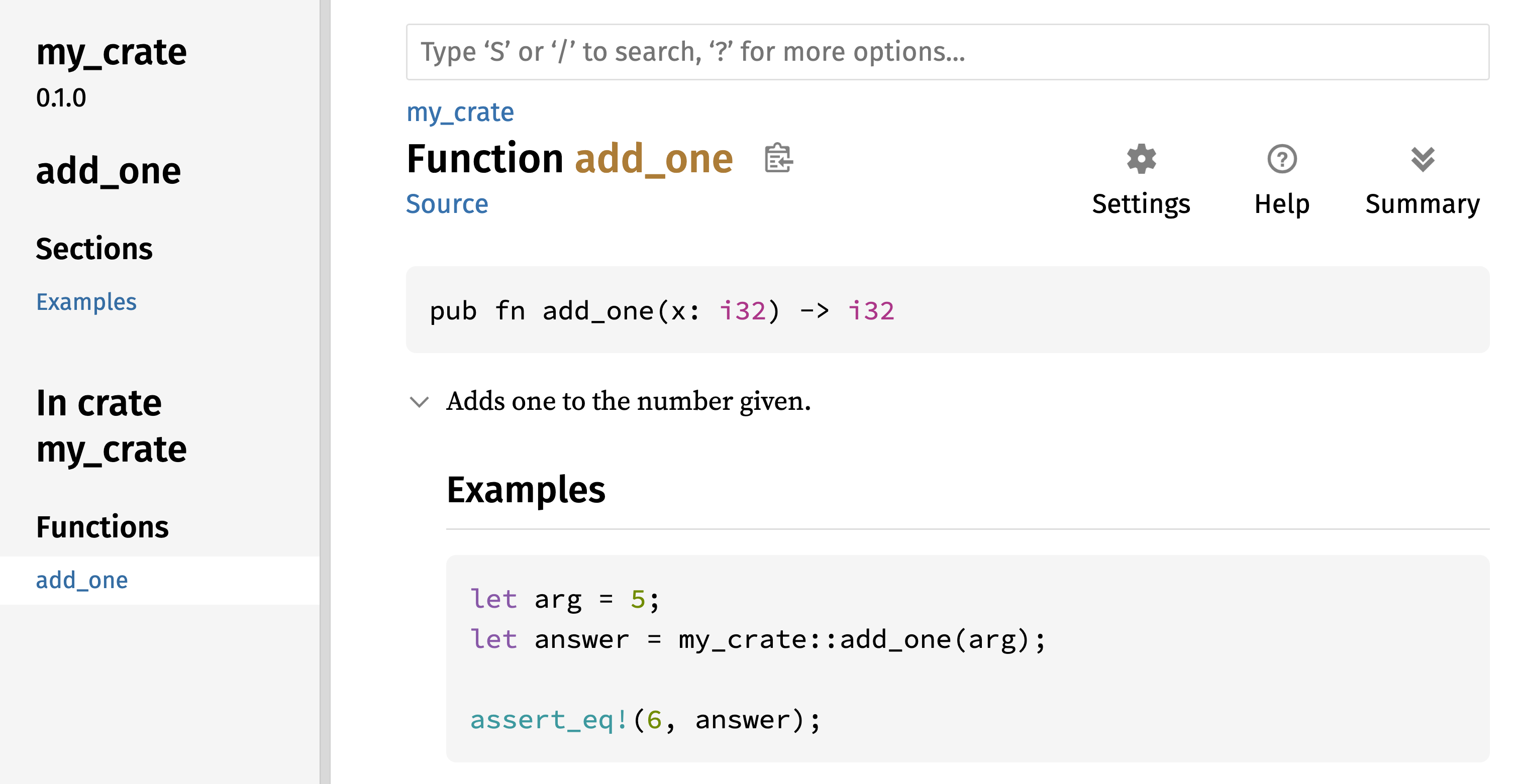
图 14-1:add_one 函数的 HTML 文档
Figure 14-1: The HTML documentation for the add_one
function
常用章节
Commonly Used Sections
我们在示例 14-1 中使用了 # Examples Markdown 标题,在 HTML 中创建了一个名为“Examples”的章节。以下是 crate 作者在文档中常用的一些其他章节:
We used the # Examples Markdown heading in Listing 14-1 to create a section
in the HTML with the title “Examples.” Here are some other sections that crate
authors commonly use in their documentation:
-
Panics:文档化函数可能发生 panic 的场景。不希望程序发生 panic 的函数调用者应确保不在这些情况下调用该函数。
-
Panics: These are the scenarios in which the function being documented could panic. Callers of the function who don’t want their programs to panic should make sure they don’t call the function in these situations.
-
Errors:如果函数返回
Result,描述可能发生的错误种类以及导致返回这些错误的条件,可以帮助调用者编写代码以不同的方式处理不同类型的错误。 -
Errors: If the function returns a
Result, describing the kinds of errors that might occur and what conditions might cause those errors to be returned can be helpful to callers so that they can write code to handle the different kinds of errors in different ways. -
Safety:如果调用函数是
unsafe的(我们将在第 20 章讨论不安全性),则应包含一个章节解释为什么该函数是不安全的,并涵盖函数期望调用者遵守的固定规则(invariants)。 -
Safety: If the function is
unsafeto call (we discuss unsafety in Chapter 20), there should be a section explaining why the function is unsafe and covering the invariants that the function expects callers to uphold.
大多数文档注释不需要包含所有这些章节,但这是一个很好的清单,可以提醒你用户感兴趣的关于代码的各个方面。
Most documentation comments don’t need all of these sections, but this is a good checklist to remind you of the aspects of your code users will be interested in knowing about.
文档注释作为测试
Documentation Comments as Tests
在文档注释中添加示例代码块不仅可以演示如何使用你的库,还有一个额外的好处:运行 cargo test 会将文档中的代码示例作为测试运行!没有什么比带示例的文档更好的了。但也没有什么比因代码在文档编写后发生变更而导致示例失效更糟糕的了。如果我们对示例 14-1 中 add_one 函数的文档运行 cargo test,我们将在测试结果中看到如下章节:
Adding example code blocks in your documentation comments can help demonstrate
how to use your library and has an additional bonus: Running cargo test will
run the code examples in your documentation as tests! Nothing is better than
documentation with examples. But nothing is worse than examples that don’t work
because the code has changed since the documentation was written. If we run
cargo test with the documentation for the add_one function from Listing
14-1, we will see a section in the test results that looks like this:
Doc-tests my_crate
running 1 test
test src/lib.rs - add_one (line 5) ... ok
test result: ok. 1 passed; 0 failed; 0 ignored; 0 measured; 0 filtered out; finished in 0.27s
现在,如果我们更改函数或示例,使示例中的 assert_eq! 发生 panic,并再次运行 cargo test,我们将看到文档测试捕获到了示例与代码不一致的情况!
Now, if we change either the function or the example so that the assert_eq!
in the example panics, and run cargo test again, we’ll see that the doc tests
catch that the example and the code are out of sync with each other!
包含项注释
Contained Item Comments
文档注释风格 //! 会为 包含 注释的项目添加文档,而不是为注释 之后 的项目添加文档。我们通常在 crate 根文件(按惯例是 src/lib.rs)或模块内部使用这些文档注释,来为整个 crate 或模块编写说明。
The style of doc comment //! adds documentation to the item that contains
the comments rather than to the items following the comments. We typically
use these doc comments inside the crate root file (src/lib.rs by convention)
or inside a module to document the crate or the module as a whole.
例如,要添加描述包含 add_one 函数的 my_crate 目的的文档,我们将以 //! 开头的文档注释添加到 src/lib.rs 文件的开头,如示例 14-2 所示。
For example, to add documentation that describes the purpose of the my_crate
crate that contains the add_one function, we add documentation comments that
start with //! to the beginning of the src/lib.rs file, as shown in Listing
14-2.
//! # My Crate
//!
//! `my_crate` is a collection of utilities to make performing certain
//! calculations more convenient.
/// Adds one to the number given.
// --snip--
///
/// # Examples
///
/// ```
/// let arg = 5;
/// let answer = my_crate::add_one(arg);
///
/// assert_eq!(6, answer);
/// ```
pub fn add_one(x: i32) -> i32 {
x + 1
}注意最后一行以 //! 开头的内容之后没有任何代码。因为我们以 //! 而不是 /// 开始注释,所以我们是在记录包含此注释的项目,而不是此注释之后的项目。在这种情况下,该项目是 src/lib.rs 文件,也就是 crate 根。这些注释描述了整个 crate。
Notice there isn’t any code after the last line that begins with //!. Because
we started the comments with //! instead of ///, we’re documenting the item
that contains this comment rather than an item that follows this comment. In
this case, that item is the src/lib.rs file, which is the crate root. These
comments describe the entire crate.
当我们运行 cargo doc --open 时,这些注释将显示在 my_crate 文档首页的公共项目列表上方,如图 14-2 所示。
When we run cargo doc --open, these comments will display on the front page
of the documentation for my_crate above the list of public items in the
crate, as shown in Figure 14-2.
项目内部的文档注释对于描述 crate 和模块特别有用。使用它们来解释容器的整体目的,以帮助用户理解 crate 的组织结构。
Documentation comments within items are useful for describing crates and modules especially. Use them to explain the overall purpose of the container to help your users understand the crate’s organization.
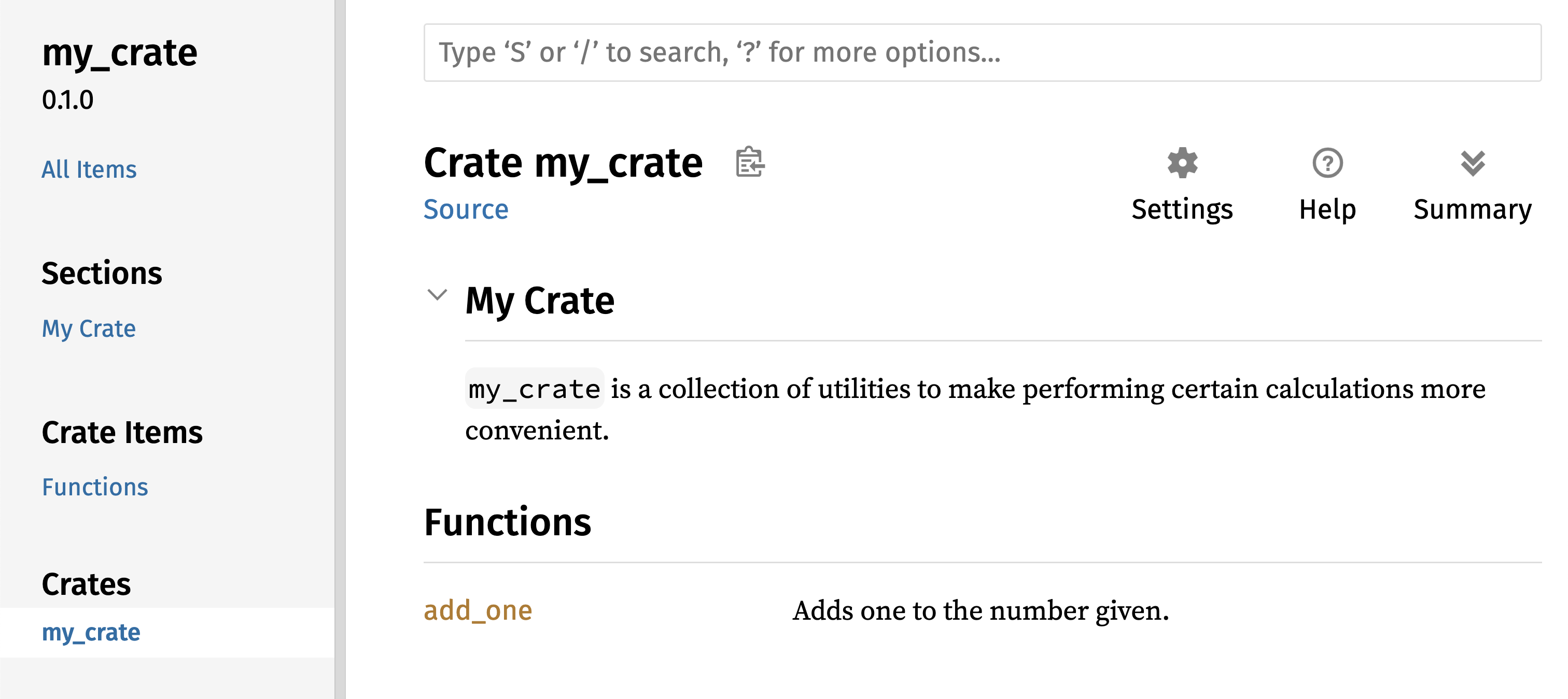
图 14-2:my_crate 的渲染文档,包括描述整个 crate 的注释
Figure 14-2: The rendered documentation for my_crate,
including the comment describing the crate as a whole
导出便捷的公共 API
Exporting a Convenient Public API
发布 crate 时,公共 API 的结构是一个重要的考虑因素。使用你的 crate 的人不如你熟悉它的结构,如果你的 crate 有庞大的模块层级,他们可能难以找到想要使用的部分。
The structure of your public API is a major consideration when publishing a crate. People who use your crate are less familiar with the structure than you are and might have difficulty finding the pieces they want to use if your crate has a large module hierarchy.
在第 7 章中,我们介绍了如何使用 pub 关键字将项设为公开,以及如何使用 use 关键字将项引入作用域。然而,你在开发 crate 时认为合理的结构对于用户来说可能并不方便。你可能希望按层级组织结构体,但想要使用深埋在层级中的类型的用户可能会难以发现该类型的存在。他们也可能对不得不输入 use my_crate::some_module::another_module::UsefulType; 而不是 use my_crate::UsefulType; 感到厌烦。
In Chapter 7, we covered how to make items public using the pub keyword, and
how to bring items into a scope with the use keyword. However, the structure
that makes sense to you while you’re developing a crate might not be very
convenient for your users. You might want to organize your structs in a
hierarchy containing multiple levels, but then people who want to use a type
you’ve defined deep in the hierarchy might have trouble finding out that type
exists. They might also be annoyed at having to enter use my_crate::some_module::another_module::UsefulType; rather than use my_crate::UsefulType;.
好消息是,如果这种结构对于其他库的使用者来说 并不 方便,你不需要重新安排内部组织结构:相反,你可以使用 pub use 重新导出(re-export)项,以创建一个与内部私有结构不同的公共结构。重新导出 会获取一个位置的公共项,并将其在另一个位置公开,就好像它是在另一个位置定义的一样。
The good news is that if the structure isn’t convenient for others to use
from another library, you don’t have to rearrange your internal organization:
Instead, you can re-export items to make a public structure that’s different
from your private structure by using pub use. Re-exporting takes a public
item in one location and makes it public in another location, as if it were
defined in the other location instead.
例如,假设我们创建了一个名为 art 的库,用于模拟艺术概念。该库包含两个模块:包含两个枚举 PrimaryColor 和 SecondaryColor 的 kinds 模块,以及包含 mix 函数的 utils 模块,如示例 14-3 所示。
For example, say we made a library named art for modeling artistic concepts.
Within this library are two modules: a kinds module containing two enums
named PrimaryColor and SecondaryColor and a utils module containing a
function named mix, as shown in Listing 14-3.
//! # Art
//!
//! A library for modeling artistic concepts.
pub mod kinds {
/// The primary colors according to the RYB color model.
pub enum PrimaryColor {
Red,
Yellow,
Blue,
}
/// The secondary colors according to the RYB color model.
pub enum SecondaryColor {
Orange,
Green,
Purple,
}
}
pub mod utils {
use crate::kinds::*;
/// Combines two primary colors in equal amounts to create
/// a secondary color.
pub fn mix(c1: PrimaryColor, c2: PrimaryColor) -> SecondaryColor {
// --snip--
unimplemented!();
}
}图 14-3 展示了由 cargo doc 生成的该 crate 文档首页的样子。
Figure 14-3 shows what the front page of the documentation for this crate
generated by cargo doc would look like.
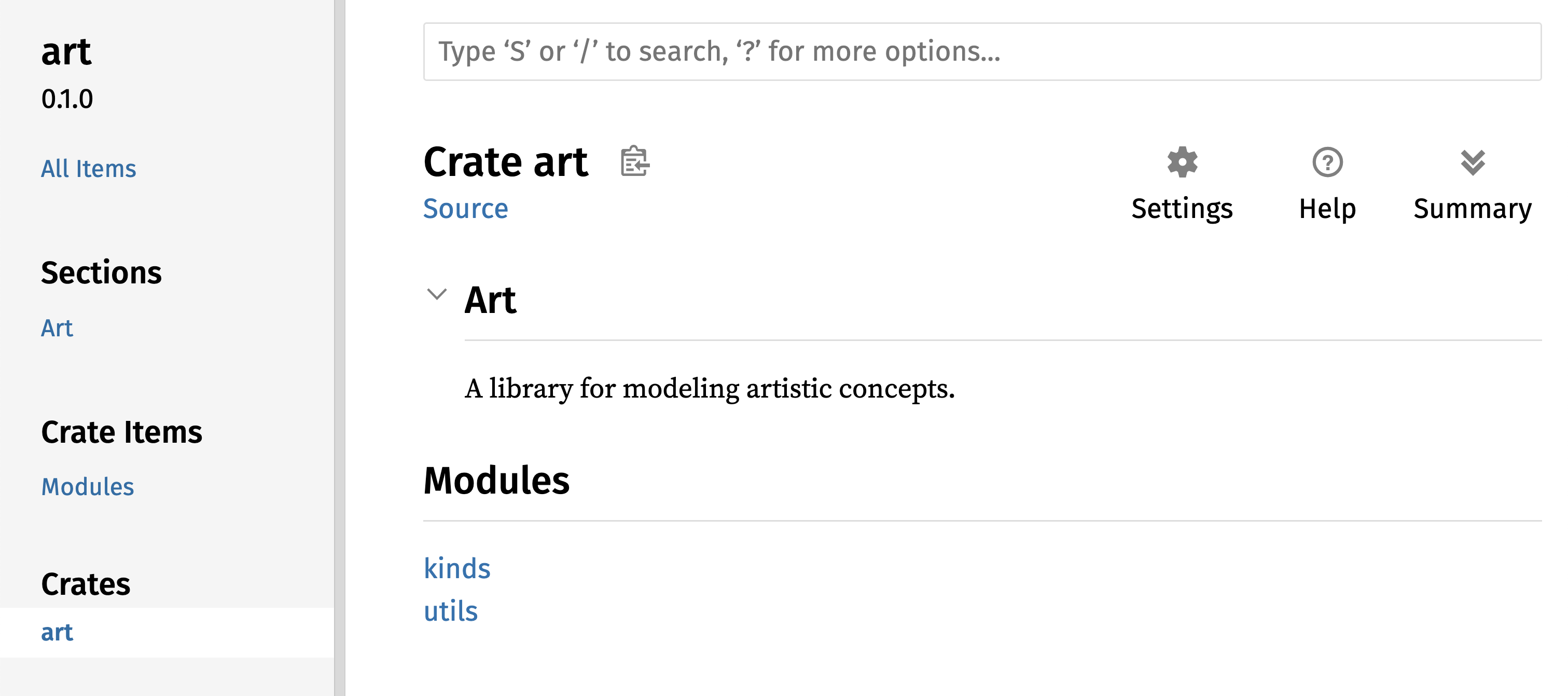
图 14-3:art 文档首页,列出了 kinds 和 utils 模块
Figure 14-3: The front page of the documentation for art
that lists the kinds and utils modules
注意 PrimaryColor 和 SecondaryColor 类型没有列在首页,mix 函数也没有。我们必须点击 kinds 和 utils 才能看到它们。
Note that the PrimaryColor and SecondaryColor types aren’t listed on the
front page, nor is the mix function. We have to click kinds and utils to
see them.
另一个依赖此库的 crate 需要使用 use 语句将 art 中的项引入作用域,并指定当前定义的模块结构。示例 14-4 展示了一个使用 art crate 中的 PrimaryColor 和 mix 项的 crate 示例。
Another crate that depends on this library would need use statements that
bring the items from art into scope, specifying the module structure that’s
currently defined. Listing 14-4 shows an example of a crate that uses the
PrimaryColor and mix items from the art crate.
use art::kinds::PrimaryColor;
use art::utils::mix;
fn main() {
let red = PrimaryColor::Red;
let yellow = PrimaryColor::Yellow;
mix(red, yellow);
}示例 14-4 中代码的作者(使用了 art crate)不得不弄清楚 PrimaryColor 在 kinds 模块中,而 mix 在 utils 模块中。art crate 的模块结构对于开发 art crate 的人比使用它的人更有意义。对于试图了解如何使用 art crate 的人来说,内部结构不包含任何有用信息,反而会造成混淆,因为开发者必须弄清楚去哪里寻找,并且必须在 use 语句中指定模块名称。
The author of the code in Listing 14-4, which uses the art crate, had to
figure out that PrimaryColor is in the kinds module and mix is in the
utils module. The module structure of the art crate is more relevant to
developers working on the art crate than to those using it. The internal
structure doesn’t contain any useful information for someone trying to
understand how to use the art crate, but rather causes confusion because
developers who use it have to figure out where to look, and must specify the
module names in the use statements.
为了从公共 API 中移除内部组织结构,我们可以修改示例 14-3 中的 art crate 代码,添加 pub use 语句在顶层重新导出这些项,如示例 14-5 所示。
To remove the internal organization from the public API, we can modify the
art crate code in Listing 14-3 to add pub use statements to re-export the
items at the top level, as shown in Listing 14-5.
//! # Art
//!
//! A library for modeling artistic concepts.
pub use self::kinds::PrimaryColor;
pub use self::kinds::SecondaryColor;
pub use self::utils::mix;
pub mod kinds {
// --snip--
/// The primary colors according to the RYB color model.
pub enum PrimaryColor {
Red,
Yellow,
Blue,
}
/// The secondary colors according to the RYB color model.
pub enum SecondaryColor {
Orange,
Green,
Purple,
}
}
pub mod utils {
// --snip--
use crate::kinds::*;
/// Combines two primary colors in equal amounts to create
/// a secondary color.
pub fn mix(c1: PrimaryColor, c2: PrimaryColor) -> SecondaryColor {
SecondaryColor::Orange
}
}cargo doc 为此 crate 生成的 API 文档现在将在首页列出并链接重新导出的内容,如图 14-4 所示,使得 PrimaryColor、SecondaryColor 类型和 mix 函数更容易被找到。
The API documentation that cargo doc generates for this crate will now list
and link re-exports on the front page, as shown in Figure 14-4, making the
PrimaryColor and SecondaryColor types and the mix function easier to find.
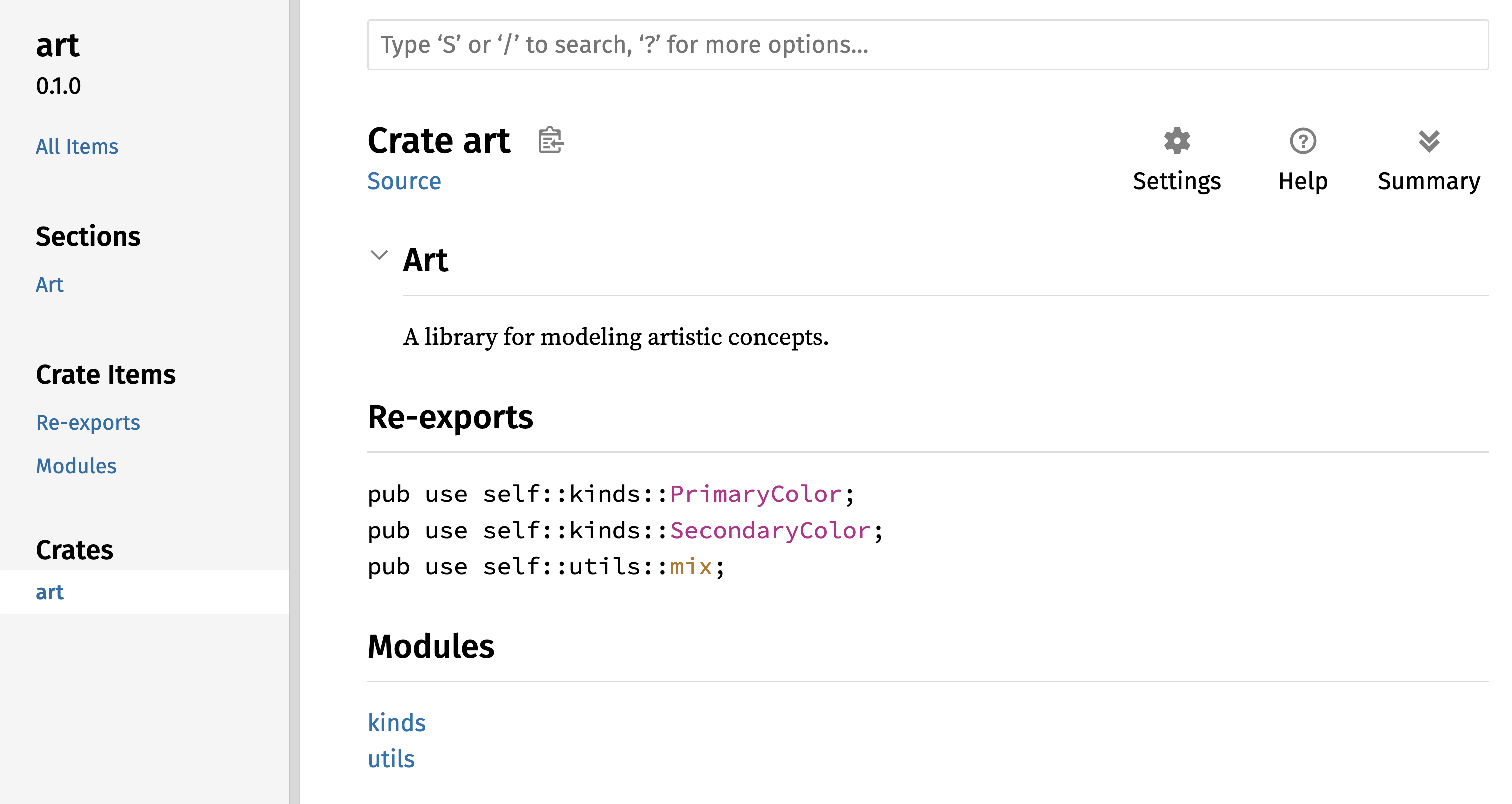
图 14-4:art 文档首页,列出了重新导出的项
Figure 14-4: The front page of the documentation for art
that lists the re-exports
art crate 的用户仍然可以像示例 14-4 中演示的那样查看和使用示例 14-3 中的内部结构,或者他们可以使用示例 14-5 中更方便的结构,如示例 14-6 所示。
The art crate users can still see and use the internal structure from Listing
14-3 as demonstrated in Listing 14-4, or they can use the more convenient
structure in Listing 14-5, as shown in Listing 14-6.
use art::PrimaryColor;
use art::mix;
fn main() {
// --snip--
let red = PrimaryColor::Red;
let yellow = PrimaryColor::Yellow;
mix(red, yellow);
}在有许多嵌套模块的情况下,使用 pub use 在顶层重新导出类型可以显著改善使用该 crate 的体验。pub use 的另一个常见用途是在当前 crate 中重新导出依赖项的定义,使该 crate 的定义成为你 crate 公共 API 的一部分。
In cases where there are many nested modules, re-exporting the types at the top
level with pub use can make a significant difference in the experience of
people who use the crate. Another common use of pub use is to re-export
definitions of a dependency in the current crate to make that crate’s
definitions part of your crate’s public API.
创建一个有用的公共 API 结构与其说是一门科学,不如说是一门艺术,你可以通过不断迭代来找到最适合用户的 API。选择 pub use 让你在内部构建 crate 时具有灵活性,并将内部结构与呈现给用户的内容解耦。看看你安装的一些 crate 的代码,看看它们的内部结构是否与其公共 API 不同。
Creating a useful public API structure is more an art than a science, and you
can iterate to find the API that works best for your users. Choosing pub use
gives you flexibility in how you structure your crate internally and decouples
that internal structure from what you present to your users. Look at some of
the code of crates you’ve installed to see if their internal structure differs
from their public API.
设置 Crates.io 账号
Setting Up a Crates.io Account
在发布任何 crate 之前,你需要在 crates.io 上创建一个账号并获取一个 API 令牌。为此,请访问 crates.io 首页,通过 GitHub 账号登录。(GitHub 账号目前是必需的,但该网站未来可能会支持其他创建账号的方式。)登录后,访问你的账户设置页面 https://crates.io/me/ 并获取你的 API 密钥。然后,运行 cargo login 命令并在提示时粘贴你的 API 密钥,如下所示:
Before you can publish any crates, you need to create an account on
crates.io and get an API token. To do so,
visit the home page at crates.io and log
in via a GitHub account. (The GitHub account is currently a requirement, but
the site might support other ways of creating an account in the future.) Once
you’re logged in, visit your account settings at
https://crates.io/me/ and retrieve your
API key. Then, run the cargo login command and paste your API key when prompted, like this:
$ cargo login
abcdefghijklmnopqrstuvwxyz012345
此命令将告知 Cargo 你的 API 令牌,并将其本地存储在 ~/.cargo/credentials.toml 中。注意,此令牌是秘密信息:不要分享给任何人。如果你出于任何原因将其分享给了别人,你应该撤销它并在 crates.io 上生成一个新令牌。
This command will inform Cargo of your API token and store it locally in ~/.cargo/credentials.toml. Note that this token is a secret: Do not share it with anyone else. If you do share it with anyone for any reason, you should revoke it and generate a new token on crates.io.
为新 Crate 添加元数据
Adding Metadata to a New Crate
假设你有一个想要发布的 crate。在发布之前,你需要在 crate 的 Cargo.toml 文件的 [package] 部分添加一些元数据。
Let’s say you have a crate you want to publish. Before publishing, you’ll need
to add some metadata in the [package] section of the crate’s Cargo.toml
file.
你的 crate 需要一个唯一的名称。在本地开发时,你可以随意命名 crate。然而,crates.io 上的 crate 名称是先到先得的。一旦一个名称被占用,其他人就无法发布同名的 crate。在尝试发布 crate 之前,请搜索你想要使用的名称。如果该名称已被使用,你需要找另一个名称并修改 Cargo.toml 文件 [package] 部分下的 name 字段,如下所示:
Your crate will need a unique name. While you’re working on a crate locally,
you can name a crate whatever you’d like. However, crate names on
crates.io are allocated on a first-come,
first-served basis. Once a crate name is taken, no one else can publish a crate
with that name. Before attempting to publish a crate, search for the name you
want to use. If the name has been used, you will need to find another name and
edit the name field in the Cargo.toml file under the [package] section to
use the new name for publishing, like so:
文件名:Cargo.toml Filename: Cargo.toml
[package]
name = "guessing_game"
即使你选择了一个唯一的名称,如果此时运行 cargo publish 发布 crate,你会得到一个警告,然后是一个错误:
Even if you’ve chosen a unique name, when you run cargo publish to publish
the crate at this point, you’ll get a warning and then an error:
$ cargo publish
Updating crates.io index
warning: manifest has no description, license, license-file, documentation, homepage or repository.
See https://doc.rust-lang.org/carhttps://doc.rust-lang.org/reference/manifest.html#package-metadata for more info.
--snip--
error: failed to publish to registry at https://crates.io
Caused by:
the remote server responded with an error (status 400 Bad Request): missing or empty metadata fields: description, license. Please see https://doc.rust-lang.org/carhttps://doc.rust-lang.org/reference/manifest.html for more information on configuring these fields
这会导致错误,因为你缺少了一些关键信息:需要有描述(description)和许可证(license),以便人们知道你的 crate 是做什么的,以及可以在什么条款下使用它。在 Cargo.toml 中,添加一个只有一两句话的描述,因为它会随你的 crate 一起出现在搜索结果中。对于 license 字段,你需要提供一个 许可证标识符值。 Linux 基金会的 SPDX (Software Package Data Exchange) 列出了你可以使用的标识符。例如,要指定你使用 MIT 许可证授权你的 crate,请添加 MIT 标识符:
This results in an error because you’re missing some crucial information: A
description and license are required so that people will know what your crate
does and under what terms they can use it. In Cargo.toml, add a description
that’s just a sentence or two, because it will appear with your crate in search
results. For the license field, you need to give a license identifier
value. The Linux Foundation’s Software Package Data Exchange (SPDX)
lists the identifiers you can use for this value. For example, to specify that
you’ve licensed your crate using the MIT License, add the MIT identifier:
文件名:Cargo.toml Filename: Cargo.toml
[package]
name = "guessing_game"
license = "MIT"
如果你想使用 SPDX 中未出现的许可证,你需要将该许可证的文本放在一个文件中,将该文件包含在项目中,然后使用 license-file 指定该文件的名称,而不是使用 license 键。
If you want to use a license that doesn’t appear in the SPDX, you need to place
the text of that license in a file, include the file in your project, and then
use license-file to specify the name of that file instead of using the
license key.
关于哪种许可证适合你的项目超出了本书的范围。Rust 社区中的许多人使用与 Rust 相同的 MIT OR Apache-2.0 双重许可证授权他们的项目。这种做法展示了你也可以指定多个由 OR 分隔的许可证标识符,以便为你的项目提供多个许可证。
Guidance on which license is appropriate for your project is beyond the scope
of this book. Many people in the Rust community license their projects in the
same way as Rust by using a dual license of MIT OR Apache-2.0. This practice
demonstrates that you can also specify multiple license identifiers separated
by OR to have multiple licenses for your project.
添加了唯一的名称、版本、描述和许可证后,准备发布的项目的 Cargo.toml 文件可能看起来像这样:
With a unique name, the version, your description, and a license added, the Cargo.toml file for a project that is ready to publish might look like this:
文件名:Cargo.toml Filename: Cargo.toml
[package]
name = "guessing_game"
version = "0.1.0"
edition = "2024"
description = "A fun game where you guess what number the computer has chosen."
license = "MIT OR Apache-2.0"
[dependencies]
Cargo 的文档 描述了你可以指定的其他元数据,以确保其他人可以更轻松地发现和使用你的 crate。
Cargo’s documentation describes other metadata you can specify to ensure that others can discover and use your crate more easily.
发布到 Crates.io
Publishing to Crates.io
现在你已经创建了账号,保存了 API 令牌,为你的 crate 选择了名称,并指定了所需的元数据,你已经准备好发布了!发布 crate 会将特定版本上传到 crates.io 供他人使用。
Now that you’ve created an account, saved your API token, chosen a name for your crate, and specified the required metadata, you’re ready to publish! Publishing a crate uploads a specific version to crates.io for others to use.
请务必小心,因为发布是 永久性 的。该版本永远无法被覆盖,代码也无法被删除,除非在某些特殊情况下。Crates.io 的一个主要目标是充当代码的永久存档,以便所有依赖来自 crates.io 的 crate 的项目的构建能够继续工作。允许版本删除将使这一目标无法实现。然而,发布 crate 版本的数量没有限制。
Be careful, because a publish is permanent. The version can never be overwritten, and the code cannot be deleted except in certain circumstances. One major goal of Crates.io is to act as a permanent archive of code so that builds of all projects that depend on crates from crates.io will continue to work. Allowing version deletions would make fulfilling that goal impossible. However, there is no limit to the number of crate versions you can publish.
再次运行 cargo publish 命令。现在它应该成功了:
Run the cargo publish command again. It should succeed now:
$ cargo publish
Updating crates.io index
Packaging guessing_game v0.1.0 (file:///projects/guessing_game)
Packaged 6 files, 1.2KiB (895.0B compressed)
Verifying guessing_game v0.1.0 (file:///projects/guessing_game)
Compiling guessing_game v0.1.0
(file:///projects/guessing_game/target/package/guessing_game-0.1.0)
Finished `dev` profile [unoptimized + debuginfo] target(s) in 0.19s
Uploading guessing_game v0.1.0 (file:///projects/guessing_game)
Uploaded guessing_game v0.1.0 to registry `crates-io`
note: waiting for `guessing_game v0.1.0` to be available at registry
`crates-io`.
You may press ctrl-c to skip waiting; the crate should be available shortly.
Published guessing_game v0.1.0 at registry `crates-io`
恭喜!你现在已经与 Rust 社区分享了你的代码,任何人都可以轻松地将你的 crate 作为其项目的依赖项。
Congratulations! You’ve now shared your code with the Rust community, and anyone can easily add your crate as a dependency of their project.
发布现有 Crate 的新版本
Publishing a New Version of an Existing Crate
当你对 crate 进行了修改并准备发布新版本时,你需要更改 Cargo.toml 文件中指定的 version 值并重新发布。根据你所做的修改类型,使用 语义化版本规则(Semantic Versioning rules) 来决定下一个合适的版本号。然后,运行 cargo publish 上传新版本。
When you’ve made changes to your crate and are ready to release a new version,
you change the version value specified in your Cargo.toml file and
republish. Use the Semantic Versioning rules to decide what an
appropriate next version number is, based on the kinds of changes you’ve made.
Then, run cargo publish to upload the new version.
从 Crates.io 撤回版本
Deprecating Versions from Crates.io
虽然你不能删除 crate 的旧版本,但你可以防止任何未来的项目将它们添加为新依赖项。当由于某种原因某个 crate 版本损坏时,这非常有用。在这种情况下,Cargo 支持 撤回(yank)一个 crate 版本。
Although you can’t remove previous versions of a crate, you can prevent any future projects from adding them as a new dependency. This is useful when a crate version is broken for one reason or another. In such situations, Cargo supports yanking a crate version.
撤回 一个版本可以防止新项目依赖该版本,同时允许所有现有的依赖该版本的项目继续运行。本质上,撤回意味着所有带有 Cargo.lock 的项目都不会损坏,并且未来生成的任何 Cargo.lock 文件都不会使用被撤回的版本。
Yanking a version prevents new projects from depending on that version while allowing all existing projects that depend on it to continue. Essentially, a yank means that all projects with a Cargo.lock will not break, and any future Cargo.lock files generated will not use the yanked version.
要撤回某个版本的 crate,请在之前发布的 crate 目录中运行 cargo yank 并指定你要撤回的版本。例如,如果我们发布了名为 guessing_game 的 crate 的 1.0.1 版本并想要撤回它,那么我们将在 guessing_game 的项目目录中运行以下命令:
To yank a version of a crate, in the directory of the crate that you’ve
previously published, run cargo yank and specify which version you want to
yank. For example, if we’ve published a crate named guessing_game version
1.0.1 and we want to yank it, then we’d run the following in the project
directory for guessing_game:
$ cargo yank --vers 1.0.1
Updating crates.io index
Yank guessing_game@1.0.1
通过在命令中添加 --undo,你还可以取消撤回,并允许项目再次开始依赖该版本:
By adding --undo to the command, you can also undo a yank and allow projects
to start depending on a version again:
$ cargo yank --vers 1.0.1 --undo
Updating crates.io index
Unyank guessing_game@1.0.1
撤回 不会 删除任何代码。例如,它无法删除意外上传的秘密信息。如果发生了这种情况,你必须立即重置这些秘密信息。
A yank does not delete any code. It cannot, for example, delete accidentally uploaded secrets. If that happens, you must reset those secrets immediately.
Cargo 工作空间
Cargo 工作空间
Cargo Workspaces
在第 12 章中,我们构建了一个包含二进制 crate 和库 crate 的包。随着项目的发展,你可能会发现库 crate 持续变大,并且你希望将包进一步拆分为多个库 crate。Cargo 提供了一个名为“工作空间”(workspaces)的特性,可以帮助管理多个相关的、共同开发的包。
In Chapter 12, we built a package that included a binary crate and a library crate. As your project develops, you might find that the library crate continues to get bigger and you want to split your package further into multiple library crates. Cargo offers a feature called workspaces that can help manage multiple related packages that are developed in tandem.
创建工作空间
Creating a Workspace
“工作空间”是一组共享同一个 Cargo.lock 和输出目录的包。让我们使用工作空间来创建一个项目——我们将使用简单的代码,以便专注于工作空间的结构。组织工作空间有多种方式,我们将只展示一种常见的方式。我们将建立一个包含一个二进制程序和两个库的工作空间。二进制程序将提供主要功能,并依赖于这两个库。一个库将提供 add_one 函数,另一个库提供 add_two 函数。这三个 crate 将成为同一个工作空间的一部分。我们首先为工作空间创建一个新目录:
A workspace is a set of packages that share the same Cargo.lock and output
directory. Let’s make a project using a workspace—we’ll use trivial code so
that we can concentrate on the structure of the workspace. There are multiple
ways to structure a workspace, so we’ll just show one common way. We’ll have a
workspace containing a binary and two libraries. The binary, which will provide
the main functionality, will depend on the two libraries. One library will
provide an add_one function and the other library an add_two function.
These three crates will be part of the same workspace. We’ll start by creating
a new directory for the workspace:
$ mkdir add
$ cd add
接下来,在 add 目录中,我们创建用于配置整个工作空间的 Cargo.toml 文件。此文件不会有 [package] 部分。相反,它将以 [workspace] 部分开始,这将允许我们将成员添加到工作空间。我们还通过将 resolver 的值设置为 "3",从而在工作空间中使用 Cargo 解析器算法的最新最佳版本:
Next, in the add directory, we create the Cargo.toml file that will
configure the entire workspace. This file won’t have a [package] section.
Instead, it will start with a [workspace] section that will allow us to add
members to the workspace. We also make a point to use the latest and greatest
version of Cargo’s resolver algorithm in our workspace by setting the
resolver value to "3":
文件名:Cargo.toml Filename: Cargo.toml
[workspace]
resolver = "3"
接下来,我们在 add 目录中运行 cargo new 来创建 adder 二进制 crate:
Next, we’ll create the adder binary crate by running cargo new within the
add directory:
$ cargo new adder
Created binary (application) `adder` package
Adding `adder` as member of workspace at `file:///projects/add`
在工作空间内部运行 cargo new 也会自动将新创建的包添加到工作空间 Cargo.toml 的 [workspace] 定义中的 members 键中,如下所示:
Running cargo new inside a workspace also automatically adds the newly created
package to the members key in the [workspace] definition in the workspace
Cargo.toml, like this:
[workspace]
resolver = "3"
members = ["adder"]
此时,我们可以通过运行 cargo build 来构建工作空间。你的 add 目录中的文件应该如下所示:
At this point, we can build the workspace by running cargo build. The files
in your add directory should look like this:
├── Cargo.lock
├── Cargo.toml
├── adder
│ ├── Cargo.toml
│ └── src
│ └── main.rs
└── target
工作空间在顶层有一个 target 目录,编译后的产物将放在其中;adder 包没有它自己的 target 目录。即使我们从 adder 目录内部运行 cargo build,编译后的产物仍然会出现在 add/target 而不是 add/adder/target。Cargo 在工作空间中这样构造 target 目录,是因为工作空间中的 crate 旨在相互依赖。如果每个 crate 都有自己的 target 目录,那么每个 crate 都必须重新编译工作空间中的每个其他 crate,以便将产物放在它自己的 target 目录中。通过共享一个 target 目录,这些 crate 可以避免不必要的重新构建。
The workspace has one target directory at the top level that the compiled
artifacts will be placed into; the adder package doesn’t have its own
target directory. Even if we were to run cargo build from inside the
adder directory, the compiled artifacts would still end up in add/target
rather than add/adder/target. Cargo structures the target directory in a
workspace like this because the crates in a workspace are meant to depend on
each other. If each crate had its own target directory, each crate would have
to recompile each of the other crates in the workspace to place the artifacts
in its own target directory. By sharing one target directory, the crates
can avoid unnecessary rebuilding.
在工作空间中创建第二个包
Creating the Second Package in the Workspace
接下来,让我们在工作空间中创建另一个成员包,并将其命名为 add_one。生成一个名为 add_one 的新库 crate:
Next, let’s create another member package in the workspace and call it
add_one. Generate a new library crate named add_one:
$ cargo new add_one --lib
Created library `add_one` package
Adding `add_one` as member of workspace at `file:///projects/add`
顶层的 Cargo.toml 现在将在 members 列表中包含 add_one 路径:
The top-level Cargo.toml will now include the add_one path in the members
list:
文件名:Cargo.toml Filename: Cargo.toml
[workspace]
resolver = "3"
members = ["adder", "add_one"]
你的 add 目录现在应该有这些目录和文件:
Your add directory should now have these directories and files:
├── Cargo.lock
├── Cargo.toml
├── add_one
│ ├── Cargo.toml
│ └── src
│ └── lib.rs
├── adder
│ ├── Cargo.toml
│ └── src
│ └── main.rs
└── target
在 add_one/src/lib.rs 文件中,让我们添加一个 add_one 函数:
In the add_one/src/lib.rs file, let’s add an add_one function:
文件名:add_one/src/lib.rs Filename: add_one/src/lib.rs
pub fn add_one(x: i32) -> i32 {
x + 1
}现在我们可以让包含二进制程序的 adder 包依赖于包含库的 add_one 包。首先,我们需要在 adder/Cargo.toml 中添加对 add_one 的路径依赖。
Now we can have the adder package with our binary depend on the add_one
package that has our library. First, we’ll need to add a path dependency on
add_one to adder/Cargo.toml.
文件名:adder/Cargo.toml Filename: adder/Cargo.toml
[dependencies]
add_one = { path = "../add_one" }
Cargo 不会假定工作空间中的 crate 会相互依赖,因此我们需要明确依赖关系。
Cargo doesn’t assume that crates in a workspace will depend on each other, so we need to be explicit about the dependency relationships.
接下来,让我们在 adder crate 中使用(来自 add_one crate 的)add_one 函数。打开 adder/src/main.rs 文件并将 main 函数更改为调用 add_one 函数,如示例 14-7 所示。
Next, let’s use the add_one function (from the add_one crate) in the
adder crate. Open the adder/src/main.rs file and change the main
function to call the add_one function, as in Listing 14-7.
fn main() {
let num = 10;
println!("Hello, world! {num} plus one is {}!", add_one::add_one(num));
}让我们通过在顶层 add 目录运行 cargo build 来构建工作空间!
Let’s build the workspace by running cargo build in the top-level add
directory!
$ cargo build
Compiling add_one v0.1.0 (file:///projects/add/add_one)
Compiling adder v0.1.0 (file:///projects/add/adder)
Finished `dev` profile [unoptimized + debuginfo] target(s) in 0.22s
要从 add 目录运行二进制 crate,我们可以使用 -p 参数和包名配合 cargo run 来指定我们想要运行工作空间中的哪个包:
To run the binary crate from the add directory, we can specify which package
in the workspace we want to run by using the -p argument and the package name
with cargo run:
$ cargo run -p adder
Finished `dev` profile [unoptimized + debuginfo] target(s) in 0.00s
Running `target/debug/adder`
Hello, world! 10 plus one is 11!
这将运行 adder/src/main.rs 中的代码,它依赖于 add_one crate。
This runs the code in adder/src/main.rs, which depends on the add_one crate.
依赖外部包
Depending on an External Package
请注意,工作空间在顶层只有一个 Cargo.lock 文件,而不是在每个 crate 的目录中都有一个 Cargo.lock。这确保了所有 crate 都使用所有依赖项的相同版本。如果我们向 adder/Cargo.toml 和 add_one/Cargo.toml 文件中添加 rand 包,Cargo 将把这两个包都解析为一个版本的 rand,并将其记录在那个 Cargo.lock 中。让工作空间中的所有 crate 使用相同的依赖项意味着 crate 之间将始终保持兼容。让我们将 rand crate 添加到 add_one/Cargo.toml 文件的 [dependencies] 部分,以便我们可以在 add_one crate 中使用 rand crate:
Notice that the workspace has only one Cargo.lock file at the top level,
rather than having a Cargo.lock in each crate’s directory. This ensures that
all crates are using the same version of all dependencies. If we add the rand
package to the adder/Cargo.toml and add_one/Cargo.toml files, Cargo will
resolve both of those to one version of rand and record that in the one
Cargo.lock. Making all crates in the workspace use the same dependencies
means the crates will always be compatible with each other. Let’s add the
rand crate to the [dependencies] section in the add_one/Cargo.toml file
so that we can use the rand crate in the add_one crate:
文件名:add_one/Cargo.toml Filename: add_one/Cargo.toml
[dependencies]
rand = "0.8.5"
我们现在可以将 use rand; 添加到 add_one/src/lib.rs 文件中,并且通过在 add 目录中运行 cargo build 来构建整个工作空间,将会引入并编译 rand crate。我们将得到一个警告,因为我们没有引用引入作用域的 rand:
We can now add use rand; to the add_one/src/lib.rs file, and building the
whole workspace by running cargo build in the add directory will bring in
and compile the rand crate. We will get one warning because we aren’t
referring to the rand we brought into scope:
$ cargo build
Updating crates.io index
Downloaded rand v0.8.5
--snip--
Compiling rand v0.8.5
Compiling add_one v0.1.0 (file:///projects/add/add_one)
warning: unused import: `rand`
--> add_one/src/lib.rs:1:5
|
1 | use rand;
| ^^^^
|
= note: `#[warn(unused_imports)]` on by default
warning: `add_one` (lib) generated 1 warning (run `cargo fix --lib -p add_one` to apply 1 suggestion)
Compiling adder v0.1.0 (file:///projects/add/adder)
Finished `dev` profile [unoptimized + debuginfo] target(s) in 0.95s
顶层的 Cargo.lock 现在包含有关 add_one 对 rand 依赖的信息。然而,即使 rand 在工作空间的某个地方被使用,我们也无法在工作空间的其他 crate 中使用它,除非我们也将其添加到它们的 Cargo.toml 文件中。例如,如果我们向 adder 包的 adder/src/main.rs 文件中添加 use rand;,我们将得到一个错误:
The top-level Cargo.lock now contains information about the dependency of
add_one on rand. However, even though rand is used somewhere in the
workspace, we can’t use it in other crates in the workspace unless we add
rand to their Cargo.toml files as well. For example, if we add use rand;
to the adder/src/main.rs file for the adder package, we’ll get an error:
$ cargo build
--snip--
Compiling adder v0.1.0 (file:///projects/add/adder)
error[E0432]: unresolved import `rand`
--> adder/src/main.rs:2:5
|
2 | use rand;
| ^^^^ no external crate `rand`
为了修复这个问题,编辑 adder 包的 Cargo.toml 文件,并指出 rand 也是它的依赖项。构建 adder 包将把 rand 添加到 Cargo.lock 中 adder 的依赖列表中,但不会下载额外的 rand 副本。Cargo 将确保工作空间中每个使用 rand 包的包中的每个 crate 只要它们指定了兼容的 rand 版本,都将使用相同的版本,从而节省空间并确保工作空间中的 crate 相互兼容。
To fix this, edit the Cargo.toml file for the adder package and indicate
that rand is a dependency for it as well. Building the adder package will
add rand to the list of dependencies for adder in Cargo.lock, but no
additional copies of rand will be downloaded. Cargo will ensure that every
crate in every package in the workspace using the rand package will use the
same version as long as they specify compatible versions of rand, saving us
space and ensuring that the crates in the workspace will be compatible with
each other.
如果工作空间中的 crate 指定了同一个依赖项的不兼容版本,Cargo 将解析它们中的每一个,但仍会尝试解析尽可能少的版本。
If crates in the workspace specify incompatible versions of the same dependency, Cargo will resolve each of them but will still try to resolve as few versions as possible.
为工作空间添加测试
Adding a Test to a Workspace
另一个改进是,让我们在 add_one crate 中添加 add_one::add_one 函数的测试:
For another enhancement, let’s add a test of the add_one::add_one function
within the add_one crate:
文件名:add_one/src/lib.rs Filename: add_one/src/lib.rs
pub fn add_one(x: i32) -> i32 {
x + 1
}
#[cfg(test)]
mod tests {
use super::*;
#[test]
fn it_works() {
assert_eq!(3, add_one(2));
}
}现在在顶层 add 目录中运行 cargo test。在像这样结构的工作空间中运行 cargo test 将会运行工作空间中所有 crate 的测试:
Now run cargo test in the top-level add directory. Running cargo test in
a workspace structured like this one will run the tests for all the crates in
the workspace:
$ cargo test
Compiling add_one v0.1.0 (file:///projects/add/add_one)
Compiling adder v0.1.0 (file:///projects/add/adder)
Finished `test` profile [unoptimized + debuginfo] target(s) in 0.20s
Running unittests src/lib.rs (target/debug/deps/add_one-93c49ee75dc46543)
running 1 test
test tests::it_works ... ok
test result: ok. 1 passed; 0 failed; 0 ignored; 0 measured; 0 filtered out; finished in 0.00s
Running unittests src/main.rs (target/debug/deps/adder-3a47283c568d2b6a)
running 0 tests
test result: ok. 0 passed; 0 failed; 0 ignored; 0 measured; 0 filtered out; finished in 0.00s
Doc-tests add_one
running 0 tests
test result: ok. 0 passed; 0 failed; 0 ignored; 0 measured; 0 filtered out; finished in 0.00s
输出的第一部分显示 add_one crate 中的 it_works 测试通过了。下一部分显示在 adder crate 中没有找到测试,最后一部分显示在 add_one crate 中没有找到文档测试。
The first section of the output shows that the it_works test in the add_one
crate passed. The next section shows that zero tests were found in the adder
crate, and then the last section shows that zero documentation tests were found
in the add_one crate.
我们也可以从顶层目录使用 -p 标志并指定我们想要测试的 crate 名称来运行工作空间中某个特定 crate 的测试:
We can also run tests for one particular crate in a workspace from the
top-level directory by using the -p flag and specifying the name of the crate
we want to test:
$ cargo test -p add_one
Finished `test` profile [unoptimized + debuginfo] target(s) in 0.00s
Running unittests src/lib.rs (target/debug/deps/add_one-93c49ee75dc46543)
running 1 test
test tests::it_works ... ok
test result: ok. 1 passed; 0 failed; 0 ignored; 0 measured; 0 filtered out; finished in 0.00s
Doc-tests add_one
running 0 tests
test result: ok. 0 passed; 0 failed; 0 ignored; 0 measured; 0 filtered out; finished in 0.00s
此输出显示 cargo test 仅运行了 add_one crate 的测试,而没有运行 adder crate 的测试。
This output shows cargo test only ran the tests for the add_one crate and
didn’t run the adder crate tests.
如果你将工作空间中的 crate 发布到 crates.io,工作空间中的每个 crate 都需要分别发布。就像 cargo test 一样,我们可以通过使用 -p 标志并指定我们要发布的 crate 名称来发布工作空间中的特定 crate。
If you publish the crates in the workspace to
crates.io, each crate in the workspace
will need to be published separately. Like cargo test, we can publish a
particular crate in our workspace by using the -p flag and specifying the
name of the crate we want to publish.
作为额外的练习,以类似 add_one crate 的方式向此工作空间添加一个 add_two crate!
For additional practice, add an add_two crate to this workspace in a similar
way as the add_one crate!
随着项目的发展,考虑使用工作空间:它使你能够处理比一整块巨大的代码更小、更容易理解的组件。此外,如果 crate 经常同时更改,将 crate 放在工作空间中可以使 crate 之间的协调更容易。
As your project grows, consider using a workspace: It enables you to work with smaller, easier-to-understand components than one big blob of code. Furthermore, keeping the crates in a workspace can make coordination between crates easier if they are often changed at the same time.
使用 cargo install 安装二进制文件
使用 cargo install 安装二进制文件
Installing Binaries with cargo install
cargo install 命令允许你在本地安装和使用二进制 crate。这并不是为了取代系统包管理;它是为了方便 Rust 开发者安装他人在 crates.io 上分享的工具。请注意,你只能安装具有二进制目标的包。二进制目标(binary target)是如果 crate 具有 src/main.rs 文件或其他被指定为二进制的文件时创建的可运行程序,与之相对的是库目标(library target),它本身不可运行,但适合包含在其他程序中。通常,crate 会在 README 文件中说明它是库、具有二进制目标还是两者兼有。
The cargo install command allows you to install and use binary crates
locally. This isn’t intended to replace system packages; it’s meant to be a
convenient way for Rust developers to install tools that others have shared on
crates.io. Note that you can only install
packages that have binary targets. A binary target is the runnable program
that is created if the crate has a src/main.rs file or another file specified
as a binary, as opposed to a library target that isn’t runnable on its own but
is suitable for including within other programs. Usually, crates have
information in the README file about whether a crate is a library, has a
binary target, or both.
所有通过 cargo install 安装的二进制文件都存储在安装根目录的 bin 文件夹中。如果你是使用 rustup.rs 安装的 Rust 且没有任何自定义配置,此目录将是 $HOME/.cargo/bin。确保此目录在你的 $PATH 中,以便能够运行通过 cargo install 安装的程序。
All binaries installed with cargo install are stored in the installation
root’s bin folder. If you installed Rust using rustup.rs and don’t have any
custom configurations, this directory will be $HOME/.cargo/bin. Ensure that
this directory is in your $PATH to be able to run programs you’ve installed
with cargo install.
例如,在第 12 章中我们提到有一个名为 ripgrep 的用于搜索文件的 grep 工具的 Rust 实现。要安装 ripgrep,我们可以运行以下命令:
For example, in Chapter 12 we mentioned that there’s a Rust implementation of
the grep tool called ripgrep for searching files. To install ripgrep, we
can run the following:
$ cargo install ripgrep
Updating crates.io index
Downloaded ripgrep v14.1.1
Downloaded 1 crate (213.6 KB) in 0.40s
Installing ripgrep v14.1.1
--snip--
Compiling grep v0.3.2
Finished `release` profile [optimized + debuginfo] target(s) in 6.73s
Installing ~/.cargo/bin/rg
Installed package `ripgrep v14.1.1` (executable `rg`)
输出的倒数第二行显示了已安装二进制文件的位置和名称,在 ripgrep 的情况下是 rg。如前所述,只要安装目录在你的 $PATH 中,你就可以运行 rg --help 并开始使用这个更快速、更具 Rust 风格的工具来搜索文件了!
The second-to-last line of the output shows the location and the name of the
installed binary, which in the case of ripgrep is rg. As long as the
installation directory is in your $PATH, as mentioned previously, you can
then run rg --help and start using a faster, Rustier tool for searching files!
使用自定义命令扩展 Cargo
使用自定义命令扩展 Cargo
Extending Cargo with Custom Commands
Cargo 的设计使得你可以在不修改它的情况下通过新的子命令来扩展它。如果你 $PATH 中的某个二进制文件名为 cargo-something,你可以像运行 Cargo 子命令一样通过运行 cargo something 来运行它。当你运行 cargo --list 时,这类自定义命令也会被列出。能够使用 cargo install 安装扩展,然后像内置 Cargo 工具一样运行它们,是 Cargo 设计中一个超级方便的优势!
Cargo is designed so that you can extend it with new subcommands without having
to modify it. If a binary in your $PATH is named cargo-something, you can
run it as if it were a Cargo subcommand by running cargo something. Custom
commands like this are also listed when you run cargo --list. Being able to
use cargo install to install extensions and then run them just like the
built-in Cargo tools is a super-convenient benefit of Cargo’s design!
总结
Summary
通过 Cargo 和 crates.io 分享代码是使 Rust 生态系统对许多不同任务都非常有用的原因之一。Rust 的标准库规模虽小且稳定,但 crate 易于分享、使用,并能在与语言不同的时间线上进行改进。不要羞于在 crates.io 上分享对你有用的代码;它很可能对其他人也有用!
Sharing code with Cargo and crates.io is part of what makes the Rust ecosystem useful for many different tasks. Rust’s standard library is small and stable, but crates are easy to share, use, and improve on a timeline different from that of the language. Don’t be shy about sharing code that’s useful to you on crates.io; it’s likely that it will be useful to someone else as well!
智能指针
Smart Pointers
指针是一个变量的通用概念,它包含一个内存地址。该地址引用或“指向”其他一些数据。Rust 中最常见的指针类型是引用,你在第 4 章已经了解过它。引用由 & 符号标识,并借用它们所指向的值。除了引用数据之外,它们没有其他特殊能力,也没有额外开销。
A pointer is a general concept for a variable that contains an address in
memory. This address refers to, or “points at,” some other data. The most
common kind of pointer in Rust is a reference, which you learned about in
Chapter 4. References are indicated by the & symbol and borrow the value they
point to. They don’t have any special capabilities other than referring to
data, and they have no overhead.
另一方面,智能指针(Smart pointers)是表现得像指针但具有额外元数据和能力的数据结构。智能指针的概念并非 Rust 所独有:智能指针起源于 C++,也存在于其他语言中。Rust 在标准库中定义了各种智能指针,它们提供了超出引用所提供的功能。为了探索这个通用概念,我们将查看几个不同的智能指针示例,包括一个引用计数(reference counting)智能指针类型。这种指针通过跟踪所有者的数量来允许数据拥有多个所有者,并且当没有所有者剩余时,负责清理数据。
Smart pointers, on the other hand, are data structures that act like a pointer but also have additional metadata and capabilities. The concept of smart pointers isn’t unique to Rust: Smart pointers originated in C++ and exist in other languages as well. Rust has a variety of smart pointers defined in the standard library that provide functionality beyond that provided by references. To explore the general concept, we’ll look at a couple of different examples of smart pointers, including a reference counting smart pointer type. This pointer enables you to allow data to have multiple owners by keeping track of the number of owners and, when no owners remain, cleaning up the data.
在 Rust 中,结合其所有权和借用的概念,引用和智能指针之间还有一个额外的区别:虽然引用只借用数据,但在许多情况下,智能指针拥有它们所指向的数据。
In Rust, with its concept of ownership and borrowing, there is an additional difference between references and smart pointers: While references only borrow data, in many cases smart pointers own the data they point to.
智能指针通常使用结构体实现。与普通的结构体不同,智能指针实现了 Deref 和 Drop trait。Deref trait 允许智能指针结构体的实例表现得像引用一样,这样你编写的代码就可以同时适用于引用或智能指针。Drop trait 允许你自定义当智能指针实例超出作用域时运行的代码。在本章中,我们将讨论这两个 trait,并演示它们为什么对智能指针很重要。
Smart pointers are usually implemented using structs. Unlike an ordinary
struct, smart pointers implement the Deref and Drop traits. The Deref
trait allows an instance of the smart pointer struct to behave like a reference
so that you can write your code to work with either references or smart
pointers. The Drop trait allows you to customize the code that’s run when an
instance of the smart pointer goes out of scope. In this chapter, we’ll discuss
both of these traits and demonstrate why they’re important to smart pointers.
鉴于智能指针模式是 Rust 中经常使用的一种通用设计模式,本章不会涵盖所有现有的智能指针。许多库都有自己的智能指针,你甚至可以编写自己的。我们将涵盖标准库中最常见的智能指针:
Given that the smart pointer pattern is a general design pattern used frequently in Rust, this chapter won’t cover every existing smart pointer. Many libraries have their own smart pointers, and you can even write your own. We’ll cover the most common smart pointers in the standard library:
-
Box<T>,用于在堆上分配值 -
Box<T>, for allocating values on the heap -
Rc<T>,一个支持多重所有权的引用计数类型 -
Rc<T>, a reference counting type that enables multiple ownership -
Ref<T>和RefMut<T>,通过RefCell<T>访问,这是一种在运行时而非编译时强制执行借用规则的类型 -
Ref<T>andRefMut<T>, accessed throughRefCell<T>, a type that enforces the borrowing rules at runtime instead of compile time
此外,我们还将介绍内部可变性(interior mutability)模式,即不可变类型暴露用于修改内部值的 API。我们还将讨论引用循环:它们如何导致内存泄漏以及如何防止它们。
In addition, we’ll cover the interior mutability pattern where an immutable type exposes an API for mutating an interior value. We’ll also discuss reference cycles: how they can leak memory and how to prevent them.
让我们开始吧!
Let’s dive in!
使用 Box<T> 指向堆上的数据
使用 Box<T> 指向堆上的数据
Using Box<T> to Point to Data on the Heap
最直接的智能指针是 box,其类型写为 Box<T>。Box 允许你将数据存储在堆上而不是栈上。留在栈上的是指向堆数据的指针。请参阅第 4 章回顾栈和堆的区别。
The most straightforward smart pointer is a box, whose type is written
Box<T>. Boxes allow you to store data on the heap rather than the stack.
What remains on the stack is the pointer to the heap data. Refer to Chapter 4
to review the difference between the stack and the heap.
除了将数据存储在堆上而非栈上外,Box 没有性能开销。但它们也没有很多额外能力。你最常在以下情况下使用它们:
Boxes don’t have performance overhead, other than storing their data on the heap instead of on the stack. But they don’t have many extra capabilities either. You’ll use them most often in these situations:
-
当你有一个在编译时无法知道大小的类型,并且你想在需要精确大小的上下文中使用该类型的值时
-
When you have a type whose size can’t be known at compile time, and you want to use a value of that type in a context that requires an exact size
-
当你拥有大量数据,并且想要转移所有权但确保在执行此操作时不会复制数据时
-
When you have a large amount of data, and you want to transfer ownership but ensure that the data won’t be copied when you do so
-
当你想拥有一个值,并且只关心它是一个实现了特定 trait 的类型,而不是具体的类型时
-
When you want to own a value, and you care only that it’s a type that implements a particular trait rather than being of a specific type
我们将在“通过 Box 实现递归类型”中演示第一种情况。在第二种情况下,转移大量数据的所有权可能需要很长时间,因为数据会在栈上被到处复制。为了在这种情况下提高性能,我们可以将大量数据以 box 的形式存储在堆上。这样,栈上只需复制少量的指针数据,而它引用的数据则保留在堆上的一个位置。第三种情况被称为 trait 对象(trait object),第 18 章中的“使用 Trait 对象实现对不同类型间共享行为的抽象”专门讨论了该话题。所以,你在这里学到的知识将再次应用到那个章节!
We’ll demonstrate the first situation in “Enabling Recursive Types with Boxes”. In the second case, transferring ownership of a large amount of data can take a long time because the data is copied around on the stack. To improve performance in this situation, we can store the large amount of data on the heap in a box. Then, only the small amount of pointer data is copied around on the stack, while the data it references stays in one place on the heap. The third case is known as a trait object, and “Using Trait Objects to Abstract over Shared Behavior” in Chapter 18 is devoted to that topic. So, what you learn here you’ll apply again in that section!
在堆上存储数据
Storing Data on the Heap
在讨论 Box<T> 的堆存储用例之前,我们将介绍其语法以及如何与存储在 Box<T> 中的值进行交互。
Before we discuss the heap storage use case for Box<T>, we’ll cover the
syntax and how to interact with values stored within a Box<T>.
示例 15-1 展示了如何使用 box 在堆上存储一个 i32 值。
Listing 15-1 shows how to use a box to store an i32 value on the heap.
fn main() {
let b = Box::new(5);
println!("b = {b}");
}我们定义变量 b 的值为一个指向值 5 的 Box,该值是在堆上分配的。该程序将打印 b = 5;在这种情况下,我们可以像访问栈上数据一样访问 box 中的数据。就像任何拥有所有权的值一样,当一个 box 超出作用域时(如 main 结尾处的 b),它将被释放。释放操作同时针对 box(存储在栈上)及其指向的数据(存储在堆上)。
We define the variable b to have the value of a Box that points to the
value 5, which is allocated on the heap. This program will print b = 5; in
this case, we can access the data in the box similarly to how we would if this
data were on the stack. Just like any owned value, when a box goes out of
scope, as b does at the end of main, it will be deallocated. The
deallocation happens both for the box (stored on the stack) and the data it
points to (stored on the heap).
在堆上存放单个值并没有太大用处,所以你不会经常这样单独使用 box。在大多数情况下,像单个 i32 这样默认存储在栈上的值更合适。让我们来看一个如果不使用 box 就无法定义类型的例子。
Putting a single value on the heap isn’t very useful, so you won’t use boxes by
themselves in this way very often. Having values like a single i32 on the
stack, where they’re stored by default, is more appropriate in the majority of
situations. Let’s look at a case where boxes allow us to define types that we
wouldn’t be allowed to define if we didn’t have boxes.
通过 Box 实现递归类型
Enabling Recursive Types with Boxes
递归类型(recursive type)的值可以将相同类型的另一个值作为其自身的一部分。递归类型会带来一个问题,因为 Rust 需要在编译时知道一个类型占用多少空间。然而,递归类型值的嵌套在理论上可以无限进行,因此 Rust 无法知道该值需要多少空间。因为 box 的大小是已知的,我们可以通过在递归类型定义中插入一个 box 来实现递归类型。
A value of a recursive type can have another value of the same type as part of itself. Recursive types pose an issue because Rust needs to know at compile time how much space a type takes up. However, the nesting of values of recursive types could theoretically continue infinitely, so Rust can’t know how much space the value needs. Because boxes have a known size, we can enable recursive types by inserting a box in the recursive type definition.
作为递归类型的一个例子,让我们探索一下 cons list。这是函数式编程语言中常见的数据类型。除了递归之外,我们要定义的 cons list 类型很简单;因此,我们要处理的示例中的概念在任何涉及递归类型的复杂情况下都会很有用。
As an example of a recursive type, let’s explore the cons list. This is a data type commonly found in functional programming languages. The cons list type we’ll define is straightforward except for the recursion; therefore, the concepts in the example we’ll work with will be useful anytime you get into more complex situations involving recursive types.
认识 Cons List
Understanding the Cons List
Cons list 是一种源自 Lisp 编程语言及其方言的数据结构,由嵌套的对(pairs)组成,是 Lisp 版本的链表。它的名称源自 Lisp 中的 cons 函数(construct function 的缩写),该函数从其两个参数构造一个新的对。通过对由一个值和另一个对组成的对调用 cons,我们可以构造出由递归对组成的 cons list。
Cons list is a data structure that comes from the Lisp programming language
and its dialects, is made up of nested pairs, and is the Lisp version of a
linked list. Its name comes from the cons function (short for construct
function) in Lisp that constructs a new pair from its two arguments. By
calling cons on a pair consisting of a value and another pair, we can
construct cons lists made up of recursive pairs.
例如,这里是一个包含列表 1, 2, 3 的 cons list 的伪代码表示,每个对都在括号中:
For example, here’s a pseudocode representation of a cons list containing the
list 1, 2, 3 with each pair in parentheses:
(1, (2, (3, Nil)))
cons list 中的每个项包含两个元素:当前项的值和下一个项。列表中的最后一项只包含一个名为 Nil 的值,而没有下一个项。cons list 是通过递归调用 cons 函数产生的。表示递归基本情况的规范名称是 Nil。请注意,这与第 6 章讨论的“null”或“nil”概念不同,后者代表无效或缺失的值。
Each item in a cons list contains two elements: the value of the current item
and of the next item. The last item in the list contains only a value called
Nil without a next item. A cons list is produced by recursively calling the
cons function. The canonical name to denote the base case of the recursion is
Nil. Note that this is not the same as the “null” or “nil” concept discussed
in Chapter 6, which is an invalid or absent value.
cons list 在 Rust 中并不是常用的数据结构。在 Rust 中,大多数情况下当你有一个项目列表时,Vec<T> 是更好的选择。其他更复杂的递归数据类型在各种情况下 是 有用的,但通过本章从 cons list 开始,我们可以探索 box 如何让我们在没有太多干扰的情况下定义递归数据类型。
The cons list isn’t a commonly used data structure in Rust. Most of the time
when you have a list of items in Rust, Vec<T> is a better choice to use.
Other, more complex recursive data types are useful in various situations,
but by starting with the cons list in this chapter, we can explore how boxes
let us define a recursive data type without much distraction.
示例 15-2 包含了一个用于 cons list 的枚举定义。请注意,这段代码还无法编译,因为 List 类型的大小不是已知的,我们将对此进行演示。
Listing 15-2 contains an enum definition for a cons list. Note that this code
won’t compile yet, because the List type doesn’t have a known size, which
we’ll demonstrate.
enum List {
Cons(i32, List),
Nil,
}
fn main() {}注意:为了本示例的目的,我们实现的是一个只保存
i32值的 cons list。我们本可以像在第 10 章讨论的那样使用泛型来实现它,以定义一个可以存储任何类型值的 cons list 类型。
Note: We’re implementing a cons list that holds only
i32values for the purposes of this example. We could have implemented it using generics, as we discussed in Chapter 10, to define a cons list type that could store values of any type.
使用 List 类型存储列表 1, 2, 3 的代码看起来像示例 15-3 所示。
Using the List type to store the list 1, 2, 3 would look like the code in
Listing 15-3.
enum List {
Cons(i32, List),
Nil,
}
// --snip--
use crate::List::{Cons, Nil};
fn main() {
let list = Cons(1, Cons(2, Cons(3, Nil)));
}第一个 Cons 值持有 1 和另一个 List 值。这个 List 值是另一个持有 2 和另一个 List 值的 Cons 值。这个 List 值又是另一个持有 3 和一个 List 值的 Cons 值,最后这个 List 值是 Nil,即发出列表结束信号的非递归变体。
The first Cons value holds 1 and another List value. This List value is
another Cons value that holds 2 and another List value. This List value
is one more Cons value that holds 3 and a List value, which is finally
Nil, the non-recursive variant that signals the end of the list.
如果我们尝试编译示例 15-3 中的代码,会得到示例 15-4 所示的错误。
If we try to compile the code in Listing 15-3, we get the error shown in Listing 15-4.
$ cargo run
Compiling cons-list v0.1.0 (file:///projects/cons-list)
error[E0072]: recursive type `List` has infinite size
--> src/main.rs:1:1
|
1 | enum List {
| ^^^^^^^^^
2 | Cons(i32, List),
| ---- recursive without indirection
|
help: insert some indirection (e.g., a `Box`, `Rc`, or `&`) to break the cycle
|
2 | Cons(i32, Box<List>),
| ++++ +
error[E0391]: cycle detected when computing when `List` needs drop
--> src/main.rs:1:1
|
1 | enum List {
| ^^^^^^^^^
|
= note: ...which immediately requires computing when `List` needs drop again
= note: cycle used when computing whether `List` needs drop
= note: see https://rustc-dev-guide.rust-lang.org/overview.html#queries and https://rustc-dev-guide.rust-lang.org/query.html for more information
Some errors have detailed explanations: E0072, E0391.
For more information about an error, try `rustc --explain E0072`.
error: could not compile `cons-list` (bin "cons-list") due to 2 previous errors
错误显示该类型“具有无限大小”。原因是我们将 List 定义为一个递归的变体:它直接持有自身的另一个值。结果,Rust 无法计算出存储一个 List 值需要多少空间。让我们分析一下为什么会出现这个错误。首先,我们将了解 Rust 如何决定存储非递归类型的值需要多少空间。
The error shows this type “has infinite size.” The reason is that we’ve defined
List with a variant that is recursive: It holds another value of itself
directly. As a result, Rust can’t figure out how much space it needs to store a
List value. Let’s break down why we get this error. First, we’ll look at how
Rust decides how much space it needs to store a value of a non-recursive type.
计算非递归类型的大小
Computing the Size of a Non-Recursive Type
回想一下我们在第 6 章讨论枚举定义时定义的 Message 枚举(示例 6-2):
Recall the Message enum we defined in Listing 6-2 when we discussed enum
definitions in Chapter 6:
enum Message {
Quit,
Move { x: i32, y: i32 },
Write(String),
ChangeColor(i32, i32, i32),
}
fn main() {}为了确定要为 Message 值分配多少空间,Rust 会检查每个变体,看哪个变体需要的空间最多。Rust 看到 Message::Quit 不需要任何空间,Message::Move 需要足够的空间来存储两个 i32 值,依此类推。因为只会使用一个变体,所以 Message 值需要的最大空间就是存储其最大变体所需的空间。
To determine how much space to allocate for a Message value, Rust goes
through each of the variants to see which variant needs the most space. Rust
sees that Message::Quit doesn’t need any space, Message::Move needs enough
space to store two i32 values, and so forth. Because only one variant will be
used, the most space a Message value will need is the space it would take to
store the largest of its variants.
与 Rust 尝试确定像示例 15-2 中的 List 枚举这样的递归类型需要多少空间时发生的情况相对比。编译器首先查看 Cons 变体,它持有 i32 类型的值和 List 类型的值。因此,Cons 需要的空间等于 i32 的大小加上 List 的大小。为了计算 List 类型需要多少内存,编译器查看其变体,从 Cons 变体开始。Cons 变体持有 i32 类型的值和 List 类型的值,这个过程会无限持续下去,如图 15-1 所示。
Contrast this with what happens when Rust tries to determine how much space a
recursive type like the List enum in Listing 15-2 needs. The compiler starts
by looking at the Cons variant, which holds a value of type i32 and a value
of type List. Therefore, Cons needs an amount of space equal to the size of
an i32 plus the size of a List. To figure out how much memory the List
type needs, the compiler looks at the variants, starting with the Cons
variant. The Cons variant holds a value of type i32 and a value of type
List, and this process continues infinitely, as shown in Figure 15-1.
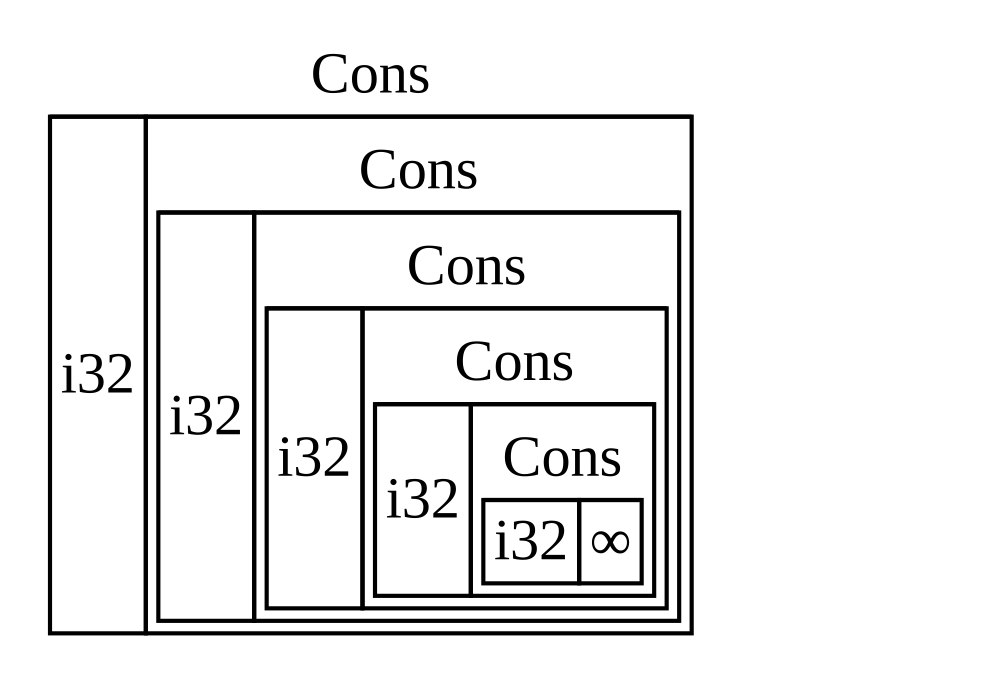
图 15-1:一个由无限个 Cons 变体组成的无限 List
Figure 15-1: An infinite List consisting of infinite
Cons variants
获取已知大小的递归类型
Getting a Recursive Type with a Known Size
由于 Rust 无法计算出为递归定义的类型分配多少空间,编译器给出了一个错误,并提出了以下有用的建议:
Because Rust can’t figure out how much space to allocate for recursively defined types, the compiler gives an error with this helpful suggestion:
help: insert some indirection (e.g., a `Box`, `Rc`, or `&`) to break the cycle
|
2 | Cons(i32, Box<List>),
| ++++ +
在此建议中,间接(indirection)意味着我们不应该直接存储一个值,而应该改变数据结构,通过存储指向该值的指针来间接存储该值。
In this suggestion, indirection means that instead of storing a value directly, we should change the data structure to store the value indirectly by storing a pointer to the value instead.
因为 Box<T> 是一个指针,所以 Rust 总是知道 Box<T> 需要多少空间:指针的大小不会根据它指向的数据量而改变。这意味着我们可以在 Cons 变体中放入一个 Box<T>,而不是直接放入另一个 List 值。Box<T> 将指向堆上的下一个 List 值,而不是在 Cons 变体内部。从概念上讲,我们仍然有一个通过持有其他列表的列表而创建的列表,但现在的这种实现更像是将项彼此相邻放置,而不是一个嵌套在另一个里面。
Because a Box<T> is a pointer, Rust always knows how much space a Box<T>
needs: A pointer’s size doesn’t change based on the amount of data it’s
pointing to. This means we can put a Box<T> inside the Cons variant instead
of another List value directly. The Box<T> will point to the next List
value that will be on the heap rather than inside the Cons variant.
Conceptually, we still have a list, created with lists holding other lists, but
this implementation is now more like placing the items next to one another
rather than inside one another.
我们可以将示例 15-2 中的 List 枚举定义和示例 15-3 中的 List 用法更改为示例 15-5 所示的代码,这段代码是可以编译的。
We can change the definition of the List enum in Listing 15-2 and the usage
of the List in Listing 15-3 to the code in Listing 15-5, which will compile.
enum List {
Cons(i32, Box<List>),
Nil,
}
use crate::List::{Cons, Nil};
fn main() {
let list = Cons(1, Box::new(Cons(2, Box::new(Cons(3, Box::new(Nil))))));
}Cons 变体需要 i32 的大小加上存储 box 指针数据的空间。Nil 变体不存储任何值,因此它在栈上比 Cons 变体需要的空间少。我们现在知道,任何 List 值都将占用一个 i32 的大小加上一个 box 指针数据的大小。通过使用 box,我们打破了无限递归链,因此编译器可以计算出存储 List 值所需的大小。图 15-2 展示了现在 Cons 变体的样子。
The Cons variant needs the size of an i32 plus the space to store the box’s
pointer data. The Nil variant stores no values, so it needs less space on the
stack than the Cons variant. We now know that any List value will take up
the size of an i32 plus the size of a box’s pointer data. By using a box,
we’ve broken the infinite, recursive chain, so the compiler can figure out the
size it needs to store a List value. Figure 15-2 shows what the Cons
variant looks like now.
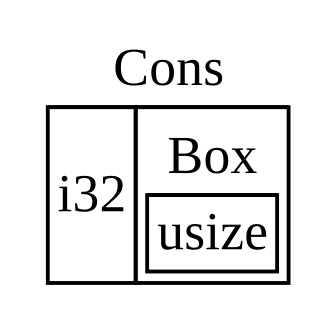
图 15-2:大小并非无限的 List,因为 Cons 持有一个 Box
Figure 15-2: A List that is not infinitely sized,
because Cons holds a Box
Box 仅提供间接性(indirection)和堆分配;它们没有其他特殊能力,不像我们将要看到的其他智能指针类型。它们也没有由于这些特殊能力而带来的性能开销,因此在像 cons list 这样只需要间接性功能的情况下,它们很有用。我们将在第 18 章中看到 box 的更多用例。
Boxes provide only the indirection and heap allocation; they don’t have any other special capabilities, like those we’ll see with the other smart pointer types. They also don’t have the performance overhead that these special capabilities incur, so they can be useful in cases like the cons list where the indirection is the only feature we need. We’ll look at more use cases for boxes in Chapter 18.
Box<T> 类型是一个智能指针,因为它实现了 Deref trait,这允许 Box<T> 值被当作引用对待。当一个 Box<T> 值超出作用域时,由于 Drop trait 的实现,该 box 指向的堆数据也会被清理。这两个 trait 对于我们在本章剩余部分讨论的其他智能指针类型所提供的功能将更加重要。让我们更详细地探讨这两个 trait。
The Box<T> type is a smart pointer because it implements the Deref trait,
which allows Box<T> values to be treated like references. When a Box<T>
value goes out of scope, the heap data that the box is pointing to is cleaned
up as well because of the Drop trait implementation. These two traits will be
even more important to the functionality provided by the other smart pointer
types we’ll discuss in the rest of this chapter. Let’s explore these two traits
in more detail.
通过 Deref Trait 将智能指针当作常规引用处理
通过 Deref trait 将智能指针当作常规引用处理
Treating Smart Pointers Like Regular References
实现 Deref trait 允许你自定义 解引用操作符(dereference operator)* 的行为(不要将其与乘法或通配符操作符混淆)。通过实现 Deref 使得智能指针可以被当作常规引用对待,你可以编写运行在引用上的代码,并将其同样用于智能指针。
Implementing the Deref trait allows you to customize the behavior of the
dereference operator * (not to be confused with the multiplication or glob
operator). By implementing Deref in such a way that a smart pointer can be
treated like a regular reference, you can write code that operates on
references and use that code with smart pointers too.
让我们首先看看解引用操作符如何作用于常规引用。然后,我们将尝试定义一个行为类似于 Box<T> 的自定义类型,并看看为什么解引用操作符在我们的新定义类型上不能像引用那样工作。我们将探索实现 Deref trait 如何使智能指针以类似于引用的方式工作。接着,我们将研究 Rust 的解引用强制转换(deref coercion)功能,以及它如何让我们同时处理引用或智能指针。
Let’s first look at how the dereference operator works with regular references.
Then, we’ll try to define a custom type that behaves like Box<T> and see why
the dereference operator doesn’t work like a reference on our newly defined
type. We’ll explore how implementing the Deref trait makes it possible for
smart pointers to work in ways similar to references. Then, we’ll look at
Rust’s deref coercion feature and how it lets us work with either references or
smart pointers.
通过解引用操作符追踪指针指向的值
Following the Reference to the Value
常规引用是一种指针,可以将指针想象成指向存储在别处的值的箭头。在示例 15-6 中,我们创建了一个指向 i32 值的引用,然后使用解引用操作符来追踪该引用指向的值。
A regular reference is a type of pointer, and one way to think of a pointer is as an arrow to a value stored somewhere else. In Listing 15-6, we create a reference to an i32 value and then use the dereference operator to follow the reference to the value.
fn main() {
let x = 5;
let y = &x;
assert_eq!(5, x);
assert_eq!(5, *y);
}变量 x 持有一个 i32 值 5。我们将 y 设置为 x 的引用。我们可以断言 x 等于 5。然而,如果我们想对 y 中的值进行断言,我们必须使用 *y 来追踪引用指向的值(即 解引用),以便编译器可以比较实际的值。一旦我们对 y 进行了解引用,我们就可以访问 y 指向的整数值,并将其与 5 进行比较。
The variable x holds an i32 value 5. We set y equal to a reference to
x. We can assert that x is equal to 5. However, if we want to make an
assertion about the value in y, we have to use *y to follow the reference
to the value it’s pointing to (hence, dereference) so that the compiler can
compare the actual value. Once we dereference y, we have access to the
integer value y is pointing to that we can compare with 5.
如果我们尝试写 assert_eq!(5, y);,我们会得到如下编译错误:
If we tried to write assert_eq!(5, y); instead, we would get this compilation
error:
$ cargo run
Compiling deref-example v0.1.0 (file:///projects/deref-example)
error[E0277]: can't compare `{integer}` with `&{integer}`
--> src/main.rs:6:5
|
6 | assert_eq!(5, y);
| ^^^^^^^^^^^^^^^^ no implementation for `{integer} == &{integer}`
|
= help: the trait `PartialEq<&{integer}>` is not implemented for `{integer}`
= note: this error originates in the macro `assert_eq` (in Nightly builds, run with -Z macro-backtrace for more info)
For more information about this error, try `rustc --explain E0277`.
error: could not compile `deref-example` (bin "deref-example") due to 1 previous error
比较数字和数字的引用是不允许的,因为它们是不同的类型。我们必须使用解引用操作符来追踪引用指向的值。
Comparing a number and a reference to a number isn’t allowed because they’re different types. We must use the dereference operator to follow the reference to the value it’s pointing to.
像使用引用一样使用 Box<T>
Using Box<T> Like a Reference
我们可以重写示例 15-6 中的代码,使用 Box<T> 代替引用;在示例 15-7 中作用于 Box<T> 的解引用操作符的功能,与示例 15-6 中作用于引用的解引用操作符相同。
We can rewrite the code in Listing 15-6 to use a Box<T> instead of a
reference; the dereference operator used on the Box<T> in Listing 15-7
functions in the same way as the dereference operator used on the reference in
Listing 15-6.
fn main() {
let x = 5;
let y = Box::new(x);
assert_eq!(5, x);
assert_eq!(5, *y);
}示例 15-7 与示例 15-6 的主要区别在于,这里我们将 y 设置为一个指向 x 值副本的 box 实例,而不是一个指向 x 值的引用。在最后的断言中,我们可以使用解引用操作符来追踪 box 的指针,就像 y 是引用时那样。接下来,我们将通过定义我们自己的 box 类型来探索 Box<T> 的特殊之处,正是这种特殊性使我们能够使用解引用操作符。
The main difference between Listing 15-7 and Listing 15-6 is that here we set
y to be an instance of a box pointing to a copied value of x rather than a
reference pointing to the value of x. In the last assertion, we can use the
dereference operator to follow the box’s pointer in the same way that we did
when y was a reference. Next, we’ll explore what is special about Box<T>
that enables us to use the dereference operator by defining our own box type.
自定义智能指针
Defining Our Own Smart Pointer
让我们构建一个类似于标准库提供的 Box<T> 类型的封装类型,以体验智能指针类型在默认情况下与引用的不同行为。然后,我们将研究如何添加使用解引用操作符的能力。
Let’s build a wrapper type similar to the Box<T> type provided by the
standard library to experience how smart pointer types behave differently from
references by default. Then, we’ll look at how to add the ability to use the
dereference operator.
注意:我们要构建的
MyBox<T>类型与真实的Box<T>之间有一个很大的区别:我们的版本不会将其数据存储在堆上。本例重点关注Deref,所以数据实际存储在哪里并不如类似指针的行为那么重要。
Note: There’s one big difference between the
MyBox<T>type we’re about to build and the realBox<T>: Our version will not store its data on the heap. We are focusing this example onDeref, so where the data is actually stored is less important than the pointer-like behavior.
Box<T> 类型最终被定义为带有一个元素的元组结构体,因此示例 15-8 以相同的方式定义了一个 MyBox<T> 类型。我们还将定义一个 new 函数来匹配 Box<T> 上定义的 new 函数。
The Box<T> type is ultimately defined as a tuple struct with one element, so
Listing 15-8 defines a MyBox<T> type in the same way. We’ll also define a
new function to match the new function defined on Box<T>.
struct MyBox<T>(T);
impl<T> MyBox<T> {
fn new(x: T) -> MyBox<T> {
MyBox(x)
}
}
fn main() {}我们定义了一个名为 MyBox 的结构体并声明了一个泛型参数 T,因为我们希望我们的类型可以持有任何类型的值。MyBox 类型是一个带有一个 T 类型元素的元组结构体。MyBox::new 函数接收一个 T 类型的参数,并返回一个持有该传入值的 MyBox 实例。
We define a struct named MyBox and declare a generic parameter T because we
want our type to hold values of any type. The MyBox type is a tuple struct
with one element of type T. The MyBox::new function takes one parameter of
type T and returns a MyBox instance that holds the value passed in.
让我们尝试将示例 15-7 中的 main 函数添加到示例 15-8 中,并将其改为使用我们定义的 MyBox<T> 类型而不是 Box<T>。示例 15-9 中的代码还无法编译,因为 Rust 不知道如何解引用 MyBox。
Let’s try adding the main function in Listing 15-7 to Listing 15-8 and
changing it to use the MyBox<T> type we’ve defined instead of Box<T>. The
code in Listing 15-9 won’t compile, because Rust doesn’t know how to
dereference MyBox.
struct MyBox<T>(T);
impl<T> MyBox<T> {
fn new(x: T) -> MyBox<T> {
MyBox(x)
}
}
fn main() {
let x = 5;
let y = MyBox::new(x);
assert_eq!(5, x);
assert_eq!(5, *y);
}这是生成的编译错误:
Here’s the resultant compilation error:
$ cargo run
Compiling deref-example v0.1.0 (file:///projects/deref-example)
error[E0614]: type `MyBox<{integer}>` cannot be dereferenced
--> src/main.rs:14:19
|
14 | assert_eq!(5, *y);
| ^^ can't be dereferenced
For more information about this error, try `rustc --explain E0614`.
error: could not compile `deref-example` (bin "deref-example") due to 1 previous error
我们的 MyBox<T> 类型不能被解引用,因为我们还没有为该类型实现这种能力。为了启用 * 操作符的解引用功能,我们需要实现 Deref trait。
Our MyBox<T> type can’t be dereferenced because we haven’t implemented that
ability on our type. To enable dereferencing with the * operator, we
implement the Deref trait.
实现 Deref trait
Implementing the Deref Trait
正如第 10 章“为类型实现 Trait”中讨论的,要实现一个 trait,我们需要提供该 trait 所需方法的实现。由标准库提供的 Deref trait 要求我们实现一个名为 deref 的方法,该方法借用 self 并返回一个指向内部数据的引用。示例 15-10 包含了一个添加到 MyBox<T> 定义中的 Deref 实现。
As discussed in “Implementing a Trait on a Type” in
Chapter 10, to implement a trait we need to provide implementations for the
trait’s required methods. The Deref trait, provided by the standard library,
requires us to implement one method named deref that borrows self and
returns a reference to the inner data. Listing 15-10 contains an implementation
of Deref to add to the definition of MyBox<T>.
use std::ops::Deref;
impl<T> Deref for MyBox<T> {
type Target = T;
fn deref(&self) -> &Self::Target {
&self.0
}
}
struct MyBox<T>(T);
impl<T> MyBox<T> {
fn new(x: T) -> MyBox<T> {
MyBox(x)
}
}
fn main() {
let x = 5;
let y = MyBox::new(x);
assert_eq!(5, x);
assert_eq!(5, *y);
}type Target = T; 语法为 Deref trait 定义了一个供其使用的关联类型。关联类型是声明泛型参数的一种略有不同的方式,但现在你不需要担心它们;我们将在第 20 章详细讨论。
The type Target = T; syntax defines an associated type for the Deref trait
to use. Associated types are a slightly different way of declaring a generic
parameter, but you don’t need to worry about them for now; we’ll cover them in
more detail in Chapter 20.
我们在 deref 方法体中填充了 &self.0,这样 deref 就会返回一个指向我们想要通过 * 操作符访问的值的引用;回想一下第 5 章“使用元组结构体创建不同类型”,.0 用来访问元组结构体中的第一个值。示例 15-9 中对 MyBox<T> 值调用 * 的 main 函数现在可以编译了,并且断言也能通过了!
We fill in the body of the deref method with &self.0 so that deref
returns a reference to the value we want to access with the * operator;
recall from “Creating Different Types with Tuple Structs” in Chapter 5 that .0 accesses the first value in a tuple struct.
The main function in Listing 15-9 that calls * on the MyBox<T> value now
compiles, and the assertions pass!
如果没有 Deref trait,编译器只能解引用 & 引用。deref 方法赋予了编译器这样一种能力:获取任何实现了 Deref 的类型的值,并调用 deref 方法以获得一个它知道如何解引用的引用。
Without the Deref trait, the compiler can only dereference & references.
The deref method gives the compiler the ability to take a value of any type
that implements Deref and call the deref method to get a reference that
it knows how to dereference.
当我们在示例 15-9 中输入 *y 时,在幕后 Rust 实际上运行了这段代码:
When we entered *y in Listing 15-9, behind the scenes Rust actually ran this
code:
*(y.deref())Rust 将 * 操作符替换为对 deref 方法的调用,然后再进行一次普通解引用,这样我们就不必考虑是否需要调用 deref 方法。Rust 的这一特性让我们编写的代码无论是在使用常规引用还是实现了 Deref 的类型时,其功能都是完全相同的。
Rust substitutes the * operator with a call to the deref method and then a
plain dereference so that we don’t have to think about whether or not we need
to call the deref method. This Rust feature lets us write code that functions
identically whether we have a regular reference or a type that implements
Deref.
deref 方法返回一个指向值的引用,并且在 *(y.deref()) 括号外仍然需要进行普通解引用的原因,与所有权系统有关。如果 deref 直接返回该值而不是指向该值的引用,那么该值将从 self 中移出。在这种情况下,或者在大多数使用解引用操作符的情况下,我们都不希望获取 MyBox<T> 内部值的所有权。
The reason the deref method returns a reference to a value, and that the
plain dereference outside the parentheses in *(y.deref()) is still necessary,
has to do with the ownership system. If the deref method returned the value
directly instead of a reference to the value, the value would be moved out of
self. We don’t want to take ownership of the inner value inside MyBox<T> in
this case or in most cases where we use the dereference operator.
请注意,每当我们代码中使用一次 * 时,该 * 操作符都会被替换为一次对 deref 方法的调用和一次对 * 操作符的调用。由于对 * 操作符的替换不会无限递归,我们最终会得到 i32 类型的数据,它与示例 15-9 中 assert_eq! 里的 5 相匹配。
Note that the * operator is replaced with a call to the deref method and
then a call to the * operator just once, each time we use a * in our code.
Because the substitution of the * operator does not recurse infinitely, we
end up with data of type i32, which matches the 5 in assert_eq! in
Listing 15-9.
函数和方法中的解引用强制转换
Using Deref Coercion in Functions and Methods
解引用强制转换(Deref coercion)将一个实现了 Deref trait 的类型的引用转换为另一个类型的引用。例如,解引用强制转换可以将 &String 转换为 &str,因为 String 实现了 Deref trait 并由此返回 &str。解引用强制转换是 Rust 对函数和方法参数执行的一种便捷操作,并且它只对实现了 Deref trait 的类型有效。当我们向函数或方法传递特定类型值的引用作为参数,而该引用与函数或方法定义中的参数类型不匹配时,这种转换就会自动发生。一系列对 deref 方法的调用会将我们提供的类型转换为参数所需的类型。
Deref coercion converts a reference to a type that implements the Deref
trait into a reference to another type. For example, deref coercion can convert
&String to &str because String implements the Deref trait such that it
returns &str. Deref coercion is a convenience Rust performs on arguments to
functions and methods, and it works only on types that implement the Deref
trait. It happens automatically when we pass a reference to a particular type’s
value as an argument to a function or method that doesn’t match the parameter
type in the function or method definition. A sequence of calls to the deref
method converts the type we provided into the type the parameter needs.
解引用强制转换被加入到 Rust 中,是为了让编写函数和方法调用的程序员不必添加那么多显式的使用 & 和 * 的引用和解引用。解引用强制转换特性还让我们能编写出更多可以同时适用于引用或智能指针的代码。
Deref coercion was added to Rust so that programmers writing function and
method calls don’t need to add as many explicit references and dereferences
with & and *. The deref coercion feature also lets us write more code that
can work for either references or smart pointers.
为了观察解引用强制转换的实际应用,我们将使用示例 15-8 中定义的 MyBox<T> 类型,以及示例 15-10 中添加的 Deref 实现。示例 15-11 展示了一个带有字符串切片参数的函数定义。
To see deref coercion in action, let’s use the MyBox<T> type we defined in
Listing 15-8 as well as the implementation of Deref that we added in Listing
15-10. Listing 15-11 shows the definition of a function that has a string slice
parameter.
fn hello(name: &str) {
println!("Hello, {name}!");
}
fn main() {}我们可以使用字符串切片作为参数来调用 hello 函数,例如 hello("Rust");。解引用强制转换使得使用 MyBox<String> 类型值的引用来调用 hello 成为可能,如示例 15-12 所示。
We can call the hello function with a string slice as an argument, such as
hello("Rust");, for example. Deref coercion makes it possible to call hello
with a reference to a value of type MyBox<String>, as shown in Listing 15-12.
use std::ops::Deref;
impl<T> Deref for MyBox<T> {
type Target = T;
fn deref(&self) -> &T {
&self.0
}
}
struct MyBox<T>(T);
impl<T> MyBox<T> {
fn new(x: T) -> MyBox<T> {
MyBox(x)
}
}
fn hello(name: &str) {
println!("Hello, {name}!");
}
fn main() {
let m = MyBox::new(String::from("Rust"));
hello(&m);
}这里我们使用参数 &m 调用 hello 函数,它是指向 MyBox<String> 值的引用。由于我们在示例 15-10 中为 MyBox<T> 实现了 Deref trait,Rust 可以通过调用 deref 将 &MyBox<String> 转换为 &String。标准库为 String 提供了返回字符串切片的 Deref 实现,这可以在 Deref 的 API 文档中找到。Rust 再次调用 deref 将 &String 转换为 &str,从而匹配 hello 函数的定义。
Here we’re calling the hello function with the argument &m, which is a
reference to a MyBox<String> value. Because we implemented the Deref trait
on MyBox<T> in Listing 15-10, Rust can turn &MyBox<String> into &String
by calling deref. The standard library provides an implementation of Deref
on String that returns a string slice, and this is in the API documentation
for Deref. Rust calls deref again to turn the &String into &str, which
matches the hello function’s definition.
如果 Rust 没有实现解引用强制转换,为了使用 &MyBox<String> 类型的值调用 hello,我们必须编写示例 15-13 中的代码,而不是示例 15-12 中的代码。
If Rust didn’t implement deref coercion, we would have to write the code in
Listing 15-13 instead of the code in Listing 15-12 to call hello with a value
of type &MyBox<String>.
use std::ops::Deref;
impl<T> Deref for MyBox<T> {
type Target = T;
fn deref(&self) -> &T {
&self.0
}
}
struct MyBox<T>(T);
impl<T> MyBox<T> {
fn new(x: T) -> MyBox<T> {
MyBox(x)
}
}
fn hello(name: &str) {
println!("Hello, {name}!");
}
fn main() {
let m = MyBox::new(String::from("Rust"));
hello(&(*m)[..]);
}(*m) 将 MyBox<String> 解引用为 String。然后,& 和 [..] 获取该 String 中等于整个字符串的字符串切片,以匹配 hello 的签名。如果没有解引用强制转换,由于涉及所有这些符号,代码将更难阅读、编写和理解。解引用强制转换允许 Rust 自动为我们处理这些转换。
The (*m) dereferences the MyBox<String> into a String. Then, the & and
[..] take a string slice of the String that is equal to the whole string to
match the signature of hello. This code without deref coercions is harder to
read, write, and understand with all of these symbols involved. Deref coercion
allows Rust to handle these conversions for us automatically.
当为涉及的类型定义了 Deref trait 时,Rust 将分析这些类型,并根据需要多次使用 Deref::deref 以获得匹配参数类型的引用。需要插入 Deref::deref 的次数是在编译时决定的,因此利用解引用强制转换没有运行时开销!
When the Deref trait is defined for the types involved, Rust will analyze the
types and use Deref::deref as many times as necessary to get a reference to
match the parameter’s type. The number of times that Deref::deref needs to be
inserted is resolved at compile time, so there is no runtime penalty for taking
advantage of deref coercion!
解引用强制转换如何与可变性交互
Handling Deref Coercion with Mutable References
类似于使用 Deref trait 覆盖不可变引用的 * 操作符,你可以使用 DerefMut trait 来覆盖可变引用的 * 操作符。
Similar to how you use the Deref trait to override the * operator on
immutable references, you can use the DerefMut trait to override the *
operator on mutable references.
当 Rust 发现类型和 trait 实现满足以下三种情况时,它会执行解引用强制转换:
Rust does deref coercion when it finds types and trait implementations in three cases:
-
当
T: Deref<Target=U>时,从&T到&U -
From
&Tto&UwhenT: Deref<Target=U> -
当
T: DerefMut<Target=U>时,从&mut T到&mut U -
From
&mut Tto&mut UwhenT: DerefMut<Target=U> -
当
T: Deref<Target=U>时,从&mut T到&U -
From
&mut Tto&UwhenT: Deref<Target=U>
前两种情况是相同的,除了第二种情况实现了可变性。第一种情况声明:如果你有一个 &T,且 T 为某种类型 U 实现了 Deref,你可以无缝地获得一个 &U。第二种情况声明:相同的解引用强制转换也发生在可变引用上。
The first two cases are the same except that the second implements mutability.
The first case states that if you have a &T, and T implements Deref to
some type U, you can get a &U transparently. The second case states that
the same deref coercion happens for mutable references.
第三种情况比较微妙:Rust 也会将可变引用强制转换为不可变引用。但反之则 不 可能:不可变引用永远不会强制转换为可变引用。根据借用规则,如果你有一个可变引用,那么该可变引用必须是该数据的唯一引用(否则程序将无法编译)。将一个可变引用转换为一个不可变引用永远不会破坏借用规则。将不可变引用转换为可变引用则要求初始的不可变引用是该数据的唯一不可变引用,但借用规则并不保证这一点。因此,Rust 不能假定将不可变引用转换为可变引用是可能的。
The third case is trickier: Rust will also coerce a mutable reference to an immutable one. But the reverse is not possible: Immutable references will never coerce to mutable references. Because of the borrowing rules, if you have a mutable reference, that mutable reference must be the only reference to that data (otherwise, the program wouldn’t compile). Converting one mutable reference to one immutable reference will never break the borrowing rules. Converting an immutable reference to a mutable reference would require that the initial immutable reference is the only immutable reference to that data, but the borrowing rules don’t guarantee that. Therefore, Rust can’t make the assumption that converting an immutable reference to a mutable reference is possible.
使用 Drop Trait 运行清理代码
使用 Drop trait 在清理时运行代码
Running Code on Cleanup with the Drop Trait
对智能指针模式很重要的第二个 trait 是 Drop,它允许你自定义当一个值即将超出作用域时发生的事情。你可以为任何类型提供 Drop trait 的实现,该代码可用于释放文件或网络连接等资源。
The second trait important to the smart pointer pattern is Drop, which lets
you customize what happens when a value is about to go out of scope. You can
provide an implementation for the Drop trait on any type, and that code can
be used to release resources like files or network connections.
我们是在智能指针的上下文中引入 Drop 的,因为 Drop trait 的功能几乎总是在实现智能指针时使用。例如,当一个 Box<T> 被丢弃(dropped)时,它会释放该 box 指向的堆空间。
We’re introducing Drop in the context of smart pointers because the
functionality of the Drop trait is almost always used when implementing a
smart pointer. For example, when a Box<T> is dropped, it will deallocate the
space on the heap that the box points to.
在某些语言中,对于某些类型,程序员在每次使用完这些类型的实例时必须调用代码来释放内存或资源。例子包括文件句柄、套接字和锁。如果程序员忘记了,系统可能会因过载而崩溃。在 Rust 中,你可以指定每当一个值超出作用域时运行的一段特定代码,编译器将自动插入这段代码。因此,你不需要小心翼翼地在程序中每个使用完特定类型实例的地方放置清理代码——你仍然不会泄露资源!
In some languages, for some types, the programmer must call code to free memory or resources every time they finish using an instance of those types. Examples include file handles, sockets, and locks. If the programmer forgets, the system might become overloaded and crash. In Rust, you can specify that a particular bit of code be run whenever a value goes out of scope, and the compiler will insert this code automatically. As a result, you don’t need to be careful about placing cleanup code everywhere in a program that an instance of a particular type is finished with—you still won’t leak resources!
你通过实现 Drop trait 来指定当值超出作用域时要运行的代码。Drop trait 要求你实现一个名为 drop 的方法,该方法获取对 self 的可变引用。为了查看 Rust 何时调用 drop,让我们先用 println! 语句实现 drop。
You specify the code to run when a value goes out of scope by implementing the
Drop trait. The Drop trait requires you to implement one method named
drop that takes a mutable reference to self. To see when Rust calls drop,
let’s implement drop with println! statements for now.
示例 15-14 展示了一个 CustomSmartPointer 结构体,其唯一自定义的功能是当实例超出作用域时打印 Dropping CustomSmartPointer!,以显示 Rust 何时运行 drop 方法。
Listing 15-14 shows a CustomSmartPointer struct whose only custom
functionality is that it will print Dropping CustomSmartPointer! when the
instance goes out of scope, to show when Rust runs the drop method.
struct CustomSmartPointer {
data: String,
}
impl Drop for CustomSmartPointer {
fn drop(&mut self) {
println!("Dropping CustomSmartPointer with data `{}`!", self.data);
}
}
fn main() {
let c = CustomSmartPointer {
data: String::from("my stuff"),
};
let d = CustomSmartPointer {
data: String::from("other stuff"),
};
println!("CustomSmartPointers created");
}Drop trait 包含在 prelude 中,所以我们不需要将其引入作用域。我们在 CustomSmartPointer 上实现 Drop trait,并为调用 println! 的 drop 方法提供了一个实现。drop 方法体是你放置任何想要在类型实例超出作用域时运行的逻辑的地方。我们在这里打印一些文本,以便直观地演示 Rust 何时调用 drop。
The Drop trait is included in the prelude, so we don’t need to bring it into
scope. We implement the Drop trait on CustomSmartPointer and provide an
implementation for the drop method that calls println!. The body of the
drop method is where you would place any logic that you wanted to run when an
instance of your type goes out of scope. We’re printing some text here to
demonstrate visually when Rust will call drop.
在 main 函数中,我们创建了两个 CustomSmartPointer 实例,然后打印 CustomSmartPointers created。在 main 结束时,我们的 CustomSmartPointer 实例将超出作用域,Rust 将调用我们在 drop 方法中放置的代码,打印出最后的消息。请注意,我们不需要显式调用 drop 方法。
In main, we create two instances of CustomSmartPointer and then print
CustomSmartPointers created. At the end of main, our instances of
CustomSmartPointer will go out of scope, and Rust will call the code we put
in the drop method, printing our final message. Note that we didn’t need to
call the drop method explicitly.
运行该程序时,我们将看到以下输出:
When we run this program, we’ll see the following output:
$ cargo run
Compiling drop-example v0.1.0 (file:///projects/drop-example)
Finished `dev` profile [unoptimized + debuginfo] target(s) in 0.60s
Running `target/debug/drop-example`
CustomSmartPointers created
Dropping CustomSmartPointer with data `other stuff`!
Dropping CustomSmartPointer with data `my stuff`!
当我们的实例超出作用域时,Rust 自动为我们调用了 drop,运行了我们指定的代码。变量按其创建的相反顺序被丢弃,因此 d 在 c 之前被丢弃。这个例子的目的是让你直观地了解 drop 方法的工作原理;通常你会指定你的类型需要运行的清理代码,而不是打印消息。
Rust automatically called drop for us when our instances went out of scope,
calling the code we specified. Variables are dropped in the reverse order of
their creation, so d was dropped before c. This example’s purpose is to
give you a visual guide to how the drop method works; usually you would
specify the cleanup code that your type needs to run rather than a print
message.
不幸的是,禁用自动 drop 功能并不直接。通常不需要禁用 drop;Drop trait 的全部意义就在于它是自动处理的。然而,偶尔你可能想要提前清理一个值。一个例子是使用管理锁的智能指针:你可能想要强制执行释放锁的 drop 方法,以便同一作用域内的其他代码可以获取锁。Rust 不允许你手动调用 Drop trait 的 drop 方法;相反,如果你想强制在值超出作用域之前将其丢弃,你必须调用标准库提供的 std::mem::drop 函数。
Unfortunately, it’s not straightforward to disable the automatic drop
functionality. Disabling drop isn’t usually necessary; the whole point of the
Drop trait is that it’s taken care of automatically. Occasionally, however,
you might want to clean up a value early. One example is when using smart
pointers that manage locks: You might want to force the drop method that
releases the lock so that other code in the same scope can acquire the lock.
Rust doesn’t let you call the Drop trait’s drop method manually; instead,
you have to call the std::mem::drop function provided by the standard library
if you want to force a value to be dropped before the end of its scope.
尝试通过修改示例 15-14 中的 main 函数来手动调用 Drop trait 的 drop 方法是行不通的,如示例 15-15 所示。
Trying to call the Drop trait’s drop method manually by modifying the
main function from Listing 15-14 won’t work, as shown in Listing 15-15.
struct CustomSmartPointer {
data: String,
}
impl Drop for CustomSmartPointer {
fn drop(&mut self) {
println!("Dropping CustomSmartPointer with data `{}`!", self.data);
}
}
fn main() {
let c = CustomSmartPointer {
data: String::from("some data"),
};
println!("CustomSmartPointer created");
c.drop();
println!("CustomSmartPointer dropped before the end of main");
}当我们尝试编译这段代码时,会得到如下错误:
When we try to compile this code, we’ll get this error:
$ cargo run
Compiling drop-example v0.1.0 (file:///projects/drop-example)
error[E0040]: explicit use of destructor method
--> src/main.rs:16:7
|
16 | c.drop();
| ^^^^ explicit destructor calls not allowed
|
help: consider using `drop` function
|
16 - c.drop();
16 + drop(c);
|
For more information about this error, try `rustc --explain E0040`.
error: could not compile `drop-example` (bin "drop-example") due to 1 previous error
该错误消息声明我们不允许显式调用 drop。错误消息使用了 析构函数(destructor)一词,这是编程中用于清理实例的函数的通用术语。析构函数 对应于创建实例的 构造函数(constructor)。Rust 中的 drop 函数是一种特殊的析构函数。
This error message states that we’re not allowed to explicitly call drop. The
error message uses the term destructor, which is the general programming term
for a function that cleans up an instance. A destructor is analogous to a
constructor, which creates an instance. The drop function in Rust is one
particular destructor.
Rust 不允许我们显式调用 drop,因为 Rust 仍然会在 main 结束时自动对该值调用 drop。这将导致双重释放错误,因为 Rust 正在尝试清理同一个值两次。
Rust doesn’t let us call drop explicitly, because Rust would still
automatically call drop on the value at the end of main. This would cause a
double free error because Rust would be trying to clean up the same value twice.
我们不能禁用值超出作用域时自动插入的 drop,也不能显式调用 drop 方法。因此,如果我们需要强制提前清理一个值,我们使用 std::mem::drop 函数。
We can’t disable the automatic insertion of drop when a value goes out of
scope, and we can’t call the drop method explicitly. So, if we need to force
a value to be cleaned up early, we use the std::mem::drop function.
std::mem::drop 函数不同于 Drop trait 中的 drop 方法。我们通过将想要强制丢弃的值作为参数传递来调用它。该函数包含在 prelude 中,因此我们可以修改示例 15-15 中的 main 来调用 drop 函数,如示例 15-16 所示。
std::mem::drop function is different from the drop method in the Drop
trait. We call it by passing as an argument the value we want to force-drop.
The function is in the prelude, so we can modify main in Listing 15-15 to
call the drop function, as shown in Listing 15-16.
struct CustomSmartPointer {
data: String,
}
impl Drop for CustomSmartPointer {
fn drop(&mut self) {
println!("Dropping CustomSmartPointer with data `{}`!", self.data);
}
}
fn main() {
let c = CustomSmartPointer {
data: String::from("some data"),
};
println!("CustomSmartPointer created");
drop(c);
println!("CustomSmartPointer dropped before the end of main");
}运行这段代码将打印以下内容:
Running this code will print the following:
$ cargo run
Compiling drop-example v0.1.0 (file:///projects/drop-example)
Finished `dev` profile [unoptimized + debuginfo] target(s) in 0.73s
Running `target/debug/drop-example`
CustomSmartPointer created
Dropping CustomSmartPointer with data `some data`!
CustomSmartPointer dropped before the end of main
文本 Dropping CustomSmartPointer with data `some data`! 被打印在 CustomSmartPointer created 和 CustomSmartPointer dropped before the end of main 之间,显示 drop 方法代码在那个点被调用以丢弃 c。
The text Dropping CustomSmartPointer with data `some data`! is printed
between the CustomSmartPointer created and CustomSmartPointer dropped before the end of main text, showing that the drop method code is called to drop
c at that point.
你可以通过许多方式使用 Drop trait 实现中指定的代码来使清理变得方便且安全:例如,你可以用它来创建你自己的内存分配器!有了 Drop trait 和 Rust 的所有权系统,你不需要记住清理,因为 Rust 会自动完成。
You can use code specified in a Drop trait implementation in many ways to
make cleanup convenient and safe: For instance, you could use it to create your
own memory allocator! With the Drop trait and Rust’s ownership system, you
don’t have to remember to clean up, because Rust does it automatically.
你也不需要担心因意外清理仍在使用的值而导致的问题:保证引用始终有效的所有权系统也确保了 drop 仅在值不再被使用时被调用一次。
You also don’t have to worry about problems resulting from accidentally
cleaning up values still in use: The ownership system that makes sure
references are always valid also ensures that drop gets called only once when
the value is no longer being used.
现在我们已经研究了 Box<T> 和智能指针的一些特性,让我们看看标准库中定义的其他一些智能指针。
Now that we’ve examined Box<T> and some of the characteristics of smart
pointers, let’s look at a few other smart pointers defined in the standard
library.
Rc<T> 引用计数智能指针
Rc<T>:引用计数智能指针
Rc<T>, the Reference-Counted Smart Pointer
在大多数情况下,所有权是明确的:你清楚地知道哪个变量拥有给定的值。然而,在某些情况下,单个值可能具有多个所有者。例如,在图数据结构中,多个边可能指向同一个节点,而该节点在概念上由指向它的所有边共同拥有。除非一个节点没有任何指向它的边,从而没有所有者,否则不应清理该节点。
In the majority of cases, ownership is clear: You know exactly which variable owns a given value. However, there are cases when a single value might have multiple owners. For example, in graph data structures, multiple edges might point to the same node, and that node is conceptually owned by all of the edges that point to it. A node shouldn’t be cleaned up unless it doesn’t have any edges pointing to it and so has no owners.
你必须通过使用 Rust 的 Rc<T> 类型来显式开启多重所有权,它是 引用计数(reference counting)的缩写。Rc<T> 类型会跟踪指向一个值的引用数量,以确定该值是否仍在使用。如果一个值的引用数量为零,则可以清理该值,而不会使任何引用变得无效。
You have to enable multiple ownership explicitly by using the Rust type
Rc<T>, which is an abbreviation for reference counting. The Rc<T> type
keeps track of the number of references to a value to determine whether or not
the value is still in use. If there are zero references to a value, the value
can be cleaned up without any references becoming invalid.
把 Rc<T> 想象成起居室里的电视机。当一个人进来打算看电视时,他会打开它。其他人也可以进到房间里来看电视。当最后一个人离开房间时,他会关掉电视,因为它不再被使用了。如果有人在其他人还在看电视时关掉电视,剩下的观众肯定会抗议!
Imagine Rc<T> as a TV in a family room. When one person enters to watch TV,
they turn it on. Others can come into the room and watch the TV. When the last
person leaves the room, they turn off the TV because it’s no longer being used.
If someone turns off the TV while others are still watching it, there would be
an uproar from the remaining TV watchers!
当我们想要在堆上分配一些数据供程序的多个部分读取,并且在编译时无法确定哪个部分最后结束使用该数据时,我们会使用 Rc<T> 类型。如果我们知道哪个部分会最后结束,我们就可以直接让该部分作为数据的所有者,这样在编译时强制执行的常规所有权规则就会生效。
We use the Rc<T> type when we want to allocate some data on the heap for
multiple parts of our program to read and we can’t determine at compile time
which part will finish using the data last. If we knew which part would finish
last, we could just make that part the data’s owner, and the normal ownership
rules enforced at compile time would take effect.
请注意,Rc<T> 仅用于单线程场景。当我们第 16 章讨论并发时,我们将介绍如何在多线程程序中进行引用计数。
Note that Rc<T> is only for use in single-threaded scenarios. When we discuss
concurrency in Chapter 16, we’ll cover how to do reference counting in
multithreaded programs.
共享数据
Sharing Data
让我们回到示例 15-5 中的 cons list 例子。回想一下,我们使用 Box<T> 定义了它。这一次,我们将创建两个列表,它们共同拥有第三个列表的所有权。从概念上讲,这类似于图 15-3。
Let’s return to our cons list example in Listing 15-5. Recall that we defined
it using Box<T>. This time, we’ll create two lists that both share ownership
of a third list. Conceptually, this looks similar to Figure 15-3.
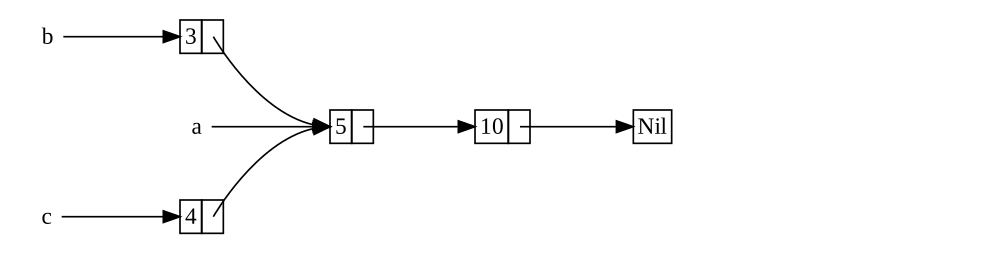
图 15-3:两个列表 b 和 c,共享第三个列表 a 的所有权
Figure 15-3: Two lists, b and c, sharing ownership of
a third list, a
我们将创建一个包含 5 和 10 的列表 a。然后,我们将创建另外两个列表:以 3 开始的 b 和以 4 开始的 c。列表 b 和 c 之后都将连接到包含 5 和 10 的第一个列表 a。换句话说,两个列表将共享包含 5 和 10 的第一个列表。
We’ll create list a that contains 5 and then 10. Then, we’ll make two
more lists: b that starts with 3 and c that starts with 4. Both the b
and c lists will then continue on to the first a list containing 5 and
10. In other words, both lists will share the first list containing 5 and
10.
尝试使用带 Box<T> 的 List 定义来实现此场景是行不通的,如示例 15-17 所示。
Trying to implement this scenario using our definition of List with Box<T>
won’t work, as shown in Listing 15-17.
enum List {
Cons(i32, Box<List>),
Nil,
}
use crate::List::{Cons, Nil};
fn main() {
let a = Cons(5, Box::new(Cons(10, Box::new(Nil))));
let b = Cons(3, Box::new(a));
let c = Cons(4, Box::new(a));
}编译这段代码时,我们会得到如下错误:
When we compile this code, we get this error:
$ cargo run
Compiling cons-list v0.1.0 (file:///projects/cons-list)
error[E0382]: use of moved value: `a`
--> src/main.rs:11:30
|
9 | let a = Cons(5, Box::new(Cons(10, Box::new(Nil))));
| - move occurs because `a` has type `List`, which does not implement the `Copy` trait
10 | let b = Cons(3, Box::new(a));
| - value moved here
11 | let c = Cons(4, Box::new(a));
| ^ value used here after move
|
note: if `List` implemented `Clone`, you could clone the value
--> src/main.rs:1:1
|
1 | enum List {
| ^^^^^^^^^ consider implementing `Clone` for this type
...
10 | let b = Cons(3, Box::new(a));
| - you could clone this value
For more information about this error, try `rustc --explain E0382`.
error: could not compile `cons-list` (bin "cons-list") due to 1 previous error
Cons 变体拥有它们持有的数据,因此当我们创建列表 b 时,a 被移入 b,b 拥有了 a。接着,当我们尝试在创建 c 时再次使用 a 时,这是不允许的,因为 a 已经被移走了。
The Cons variants own the data they hold, so when we create the b list, a
is moved into b and b owns a. Then, when we try to use a again when
creating c, we’re not allowed to because a has been moved.
我们可以将 Cons 的定义改为持有引用,但那样我们就必须指定生命周期参数。通过指定生命周期参数,我们将指定列表中的每个元素至少与整个列表存活得一样久。示例 15-17 中的元素和列表属于这种情况,但并非在所有场景下都是如此。
We could change the definition of Cons to hold references instead, but then
we would have to specify lifetime parameters. By specifying lifetime
parameters, we would be specifying that every element in the list will live at
least as long as the entire list. This is the case for the elements and lists
in Listing 15-17, but not in every scenario.
相反,我们将修改 List 的定义,使用 Rc<T> 代替 Box<T>,如示例 15-18 所示。现在每个 Cons 变体将持有一个值和一个指向 List 的 Rc<T>。在创建 b 时,我们不再获取 a 的所有权,而是克隆 a 所持有的 Rc<List>,从而将引用计数从一增加到二,并让 a 和 b 共享该 Rc<List> 中数据的所有权。在创建 c 时,我们也会克隆 a,将引用计数从二增加到三。每当我们调用 Rc::clone 时,指向 Rc<List> 内部数据的引用计数就会增加,并且除非引用计数为零,否则数据不会被清理。
Instead, we’ll change our definition of List to use Rc<T> in place of
Box<T>, as shown in Listing 15-18. Each Cons variant will now hold a value
and an Rc<T> pointing to a List. When we create b, instead of taking
ownership of a, we’ll clone the Rc<List> that a is holding, thereby
increasing the number of references from one to two and letting a and b
share ownership of the data in that Rc<List>. We’ll also clone a when
creating c, increasing the number of references from two to three. Every time
we call Rc::clone, the reference count to the data within the Rc<List> will
increase, and the data won’t be cleaned up unless there are zero references to
it.
enum List {
Cons(i32, Rc<List>),
Nil,
}
use crate::List::{Cons, Nil};
use std::rc::Rc;
fn main() {
let a = Rc::new(Cons(5, Rc::new(Cons(10, Rc::new(Nil)))));
let b = Cons(3, Rc::clone(&a));
let c = Cons(4, Rc::clone(&a));
}我们需要添加一个 use 语句将 Rc<T> 引入作用域,因为它不在 prelude 中。在 main 中,我们创建持有 5 和 10 的列表,并将它存储在 a 的新 Rc<List> 中。接着,在创建 b 和 c 时,我们调用 Rc::clone 函数并将 a 中 Rc<List> 的引用作为参数传递。
We need to add a use statement to bring Rc<T> into scope because it’s not
in the prelude. In main, we create the list holding 5 and 10 and store it
in a new Rc<List> in a. Then, when we create b and c, we call the
Rc::clone function and pass a reference to the Rc<List> in a as an
argument.
我们本可以调用 a.clone() 而不是 Rc::clone(&a),但在这种情况下 Rust 的惯例是使用 Rc::clone。Rc::clone 的实现并不像大多数类型的 clone 实现那样对所有数据进行深拷贝(deep copy)。调用 Rc::clone 只会增加引用计数,这并不耗时。数据的深拷贝可能需要大量时间。通过使用 Rc::clone 进行引用计数,我们可以从视觉上区分深拷贝类的克隆和增加引用计数类的克隆。在查找代码中的性能问题时,我们只需要考虑深拷贝克隆,而可以忽略对 Rc::clone 的调用。
We could have called a.clone() rather than Rc::clone(&a), but Rust’s
convention is to use Rc::clone in this case. The implementation of
Rc::clone doesn’t make a deep copy of all the data like most types’
implementations of clone do. The call to Rc::clone only increments the
reference count, which doesn’t take much time. Deep copies of data can take a
lot of time. By using Rc::clone for reference counting, we can visually
distinguish between the deep-copy kinds of clones and the kinds of clones that
increase the reference count. When looking for performance problems in the
code, we only need to consider the deep-copy clones and can disregard calls to
Rc::clone.
通过克隆增加引用计数
Cloning to Increase the Reference Count
让我们修改示例 15-18 中的示例,以便观察当我们创建和丢弃对 a 中 Rc<List> 的引用时引用计数的变化。
Let’s change our working example in Listing 15-18 so that we can see the
reference counts changing as we create and drop references to the Rc<List> in
a.
在示例 15-19 中,我们将修改 main,使其围绕列表 c 有一个内部作用域;这样我们就可以看到当 c 超出作用域时引用计数是如何变化的。
In Listing 15-19, we’ll change main so that it has an inner scope around list
c; then, we can see how the reference count changes when c goes out of
scope.
enum List {
Cons(i32, Rc<List>),
Nil,
}
use crate::List::{Cons, Nil};
use std::rc::Rc;
// --snip--
fn main() {
let a = Rc::new(Cons(5, Rc::new(Cons(10, Rc::new(Nil)))));
println!("count after creating a = {}", Rc::strong_count(&a));
let b = Cons(3, Rc::clone(&a));
println!("count after creating b = {}", Rc::strong_count(&a));
{
let c = Cons(4, Rc::clone(&a));
println!("count after creating c = {}", Rc::strong_count(&a));
}
println!("count after c goes out of scope = {}", Rc::strong_count(&a));
}在程序中引用计数发生变化的每个点,我们都打印引用计数,这是通过调用 Rc::strong_count 函数获得的。该函数被命名为 strong_count 而不是 count,是因为 Rc<T> 类型也有一个 weak_count;我们将在“使用 Weak<T> 防止引用循环”中看到 weak_count 的用途。
At each point in the program where the reference count changes, we print the
reference count, which we get by calling the Rc::strong_count function. This
function is named strong_count rather than count because the Rc<T> type
also has a weak_count; we’ll see what weak_count is used for in “Preventing
Reference Cycles Using Weak<T>”.
这段代码打印以下内容:
This code prints the following:
$ cargo run
Compiling cons-list v0.1.0 (file:///projects/cons-list)
Finished `dev` profile [unoptimized + debuginfo] target(s) in 0.45s
Running `target/debug/cons-list`
count after creating a = 1
count after creating b = 2
count after creating c = 3
count after c goes out of scope = 2
我们可以看到,a 中的 Rc<List> 初始引用计数为 1;接着,每次我们调用 clone,计数就增加 1。当 c 超出作用域时,计数减少 1。我们不需要像调用 Rc::clone 增加引用计数那样通过调用函数来减少引用计数:当 Rc<T> 值超出作用域时,Drop trait 的实现会自动减少引用计数。
We can see that the Rc<List> in a has an initial reference count of 1;
then, each time we call clone, the count goes up by 1. When c goes out of
scope, the count goes down by 1. We don’t have to call a function to decrease
the reference count like we have to call Rc::clone to increase the reference
count: The implementation of the Drop trait decreases the reference count
automatically when an Rc<T> value goes out of scope.
在这个例子中我们看不到的是,当 b 之后是 a 在 main 结尾超出作用域时,计数为 0,Rc<List> 被彻底清理。使用 Rc<T> 允许单个值具有多个所有者,而计数确保了只要任何所有者仍然存在,该值就保持有效。
What we can’t see in this example is that when b and then a go out of scope
at the end of main, the count is 0, and the Rc<List> is cleaned up
completely. Using Rc<T> allows a single value to have multiple owners, and
the count ensures that the value remains valid as long as any of the owners
still exist.
通过不可变引用,Rc<T> 允许你在程序的多个部分之间共享数据以供读取。如果 Rc<T> 也允许你拥有多个可变引用,你可能会违反第 4 章讨论的借用规则之一:对同一位置的多个可变借用可能导致数据竞争和不一致。但能够修改数据非常有用!在下一节中,我们将讨论内部可变性模式和 RefCell<T> 类型,你可以将它与 Rc<T> 结合使用,以克服这一不可变性限制。
Via immutable references, Rc<T> allows you to share data between multiple
parts of your program for reading only. If Rc<T> allowed you to have multiple
mutable references too, you might violate one of the borrowing rules discussed
in Chapter 4: Multiple mutable borrows to the same place can cause data races
and inconsistencies. But being able to mutate data is very useful! In the next
section, we’ll discuss the interior mutability pattern and the RefCell<T>
type that you can use in conjunction with an Rc<T> to work with this
immutability restriction.
RefCell<T> 与内部可变性模式
RefCell<T> 与内部可变性模式
RefCell<T> and the Interior Mutability Pattern
内部可变性(Interior mutability)是 Rust 中的一种设计模式,它允许你即使在存在对数据的不可变引用的情况下也能修改数据;通常,这种行为会被借用规则所禁止。为了修改数据,该模式在数据结构中使用 unsafe 代码来规避 Rust 通常用于管理修改和借用的规则。Unsafe 代码向编译器表明,我们将手动检查规则,而不是依赖编译器为我们检查;我们将在第 20 章更多地讨论 unsafe 代码。
Interior mutability is a design pattern in Rust that allows you to mutate
data even when there are immutable references to that data; normally, this
action is disallowed by the borrowing rules. To mutate data, the pattern uses
unsafe code inside a data structure to bend Rust’s usual rules that govern
mutation and borrowing. Unsafe code indicates to the compiler that we’re
checking the rules manually instead of relying on the compiler to check them
for us; we will discuss unsafe code more in Chapter 20.
只有当我们能够确保在运行时遵循借用规则时,我们才能使用采用了内部可变性模式的类型,即使编译器无法保证这一点。所涉及的 unsafe 代码随后被封装在安全的 API 中,而外部类型仍然是不可变的。
We can use types that use the interior mutability pattern only when we can
ensure that the borrowing rules will be followed at runtime, even though the
compiler can’t guarantee that. The unsafe code involved is then wrapped in a
safe API, and the outer type is still immutable.
让我们通过研究遵循内部可变性模式的 RefCell<T> 类型来探索这个概念。
Let’s explore this concept by looking at the RefCell<T> type that follows the
interior mutability pattern.
在运行时强制执行借用规则
Enforcing Borrowing Rules at Runtime
与 Rc<T> 不同,RefCell<T> 类型代表对其持有的数据的单一所有权。那么,是什么让 RefCell<T> 与 Box<T> 这样的类型有所不同呢?回想一下你在第 4 章学到的借用规则:
Unlike Rc<T>, the RefCell<T> type represents single ownership over the data
it holds. So, what makes RefCell<T> different from a type like Box<T>?
Recall the borrowing rules you learned in Chapter 4:
-
在任何给定的时间,你 要么 拥有一个可变引用,要么 拥有任意数量的不可变引用(但不能两者兼有)。
-
At any given time, you can have either one mutable reference or any number of immutable references (but not both).
-
引用必须始终有效。
-
References must always be valid.
对于引用和 Box<T>,借用规则的约束是在编译时强制执行的。对于 RefCell<T>,这些约束是在 运行时 强制执行的。对于引用,如果你违反了这些规则,你会得到一个编译器错误。对于 RefCell<T>,如果你违反了这些规则,你的程序将会 panic 并退出。
With references and Box<T>, the borrowing rules’ invariants are enforced at
compile time. With RefCell<T>, these invariants are enforced at runtime.
With references, if you break these rules, you’ll get a compiler error. With
RefCell<T>, if you break these rules, your program will panic and exit.
在编译时检查借用规则的优势在于,错误能在开发过程的早期被发现,并且因为所有的分析都在事先完成,所以对运行时性能没有影响。基于这些原因,在大多数情况下,在编译时检查借用规则是最佳选择,这也是 Rust 的默认行为。
The advantages of checking the borrowing rules at compile time are that errors will be caught sooner in the development process, and there is no impact on runtime performance because all the analysis is completed beforehand. For those reasons, checking the borrowing rules at compile time is the best choice in the majority of cases, which is why this is Rust’s default.
相比之下,在运行时检查借用规则的优势在于,它允许某些原本会被编译时检查禁止的内存安全场景。静态分析(如 Rust 编译器)本质上是保守的。代码的某些属性是无法通过分析代码来检测的:最著名的例子是停机问题(Halting Problem),这超出了本书的范围,但却是一个有趣的研究课题。
The advantage of checking the borrowing rules at runtime instead is that certain memory-safe scenarios are then allowed, where they would’ve been disallowed by the compile-time checks. Static analysis, like the Rust compiler, is inherently conservative. Some properties of code are impossible to detect by analyzing the code: The most famous example is the Halting Problem, which is beyond the scope of this book but is an interesting topic to research.
由于某些分析是不可能的,如果 Rust 编译器不能确定代码符合所有权规则,它可能会拒绝一个正确的程序;从这个角度看,它是保守的。如果 Rust 接受了一个错误的程序,用户就无法信任 Rust 提供的保证。然而,如果 Rust 拒绝了一个正确的程序,虽然会给程序员带来不便,但不会发生灾难性的后果。当你确信你的代码遵循借用规则但编译器无法理解和保证这一点时,RefCell<T> 类型非常有用。
Because some analysis is impossible, if the Rust compiler can’t be sure the
code complies with the ownership rules, it might reject a correct program; in
this way, it’s conservative. If Rust accepted an incorrect program, users
wouldn’t be able to trust the guarantees Rust makes. However, if Rust rejects a
correct program, the programmer will be inconvenienced, but nothing
catastrophic can occur. The RefCell<T> type is useful when you’re sure your
code follows the borrowing rules but the compiler is unable to understand and
guarantee that.
类似于 Rc<T>,RefCell<T> 仅用于单线程场景,如果你尝试在多线程上下文中使用它,将会得到一个编译时错误。我们将在第 16 章讨论如何在多线程程序中获得 RefCell<T> 的功能。
Similar to Rc<T>, RefCell<T> is only for use in single-threaded scenarios
and will give you a compile-time error if you try using it in a multithreaded
context. We’ll talk about how to get the functionality of RefCell<T> in a
multithreaded program in Chapter 16.
以下是选择 Box<T>、Rc<T> 或 RefCell<T> 的理由回顾:
Here is a recap of the reasons to choose Box<T>, Rc<T>, or RefCell<T>:
-
Rc<T>允许多个所有者拥有相同的数据;Box<T>和RefCell<T>只有单一所有者。 -
Rc<T>enables multiple owners of the same data;Box<T>andRefCell<T>have single owners. -
Box<T>允许在编译时检查不可变或可变借用;Rc<T>仅允许在编译时检查不可变借用;RefCell<T>允许在运行时检查不可变或可变借用。 -
Box<T>allows immutable or mutable borrows checked at compile time;Rc<T>allows only immutable borrows checked at compile time;RefCell<T>allows immutable or mutable borrows checked at runtime. -
由于
RefCell<T>允许在运行时检查可变借用,所以即使RefCell<T>本身是不可变的,你也可以修改RefCell<T>内部的值。 -
Because
RefCell<T>allows mutable borrows checked at runtime, you can mutate the value inside theRefCell<T>even when theRefCell<T>is immutable.
修改不可变值内部的值就是内部可变性模式。让我们看看内部可变性在什么情况下有用,并研究它是如何实现的。
Mutating the value inside an immutable value is the interior mutability pattern. Let’s look at a situation in which interior mutability is useful and examine how it’s possible.
使用内部可变性
Using Interior Mutability
借用规则的一个后果是,当你有一个不可变值时,你不能可变地借用它。例如,这段代码将无法编译:
A consequence of the borrowing rules is that when you have an immutable value, you can’t borrow it mutably. For example, this code won’t compile:
fn main() {
let x = 5;
let y = &mut x;
}如果你尝试编译这段代码,你会得到以下错误:
If you tried to compile this code, you’d get the following error:
$ cargo run
Compiling borrowing v0.1.0 (file:///projects/borrowing)
error[E0596]: cannot borrow `x` as mutable, as it is not declared as mutable
--> src/main.rs:3:13
|
3 | let y = &mut x;
| ^^^^^^ cannot borrow as mutable
|
help: consider changing this to be mutable
|
2 | let mut x = 5;
| +++
For more information about this error, try `rustc --explain E0596`.
error: could not compile `borrowing` (bin "borrowing") due to 1 previous error
然而,在某些情况下,一个值在自身的方法中修改自身但在其他代码看来是不可变的,这会非常有用。该值方法之外的代码将无法修改该值。使用 RefCell<T> 是获得内部可变性能力的一种方式,但 RefCell<T> 并没有完全绕过借用规则:编译器中的借用检查器允许这种内部可变性,而借用规则在运行时被检查。如果你违反了规则,你将得到一个 panic! 而不是编译器错误。
However, there are situations in which it would be useful for a value to mutate
itself in its methods but appear immutable to other code. Code outside the
value’s methods would not be able to mutate the value. Using RefCell<T> is
one way to get the ability to have interior mutability, but RefCell<T>
doesn’t get around the borrowing rules completely: The borrow checker in the
compiler allows this interior mutability, and the borrowing rules are checked
at runtime instead. If you violate the rules, you’ll get a panic! instead of
a compiler error.
让我们通过一个实际例子来看看我们如何使用 RefCell<T> 来修改不可变值,并了解为什么这很有用。
Let’s work through a practical example where we can use RefCell<T> to mutate
an immutable value and see why that is useful.
使用 Mock 对象进行测试
Testing with Mock Objects
有时在测试期间,程序员会使用一种类型来代替另一种类型,以便观察特定的行为并断言其已正确实现。这种占位符类型被称为 测试替身(test double)。你可以从电影制作中“特技替身”的角度来理解它,即一个人介入并替代演员执行一个特别棘手的场景。当我们运行测试时,测试替身会替代其他类型。Mock 对象 是一种特定类型的测试替身,它们记录测试期间发生的事情,以便你可以断言正确的动作已经发生。
Sometimes during testing a programmer will use a type in place of another type, in order to observe particular behavior and assert that it’s implemented correctly. This placeholder type is called a test double. Think of it in the sense of a stunt double in filmmaking, where a person steps in and substitutes for an actor to do a particularly tricky scene. Test doubles stand in for other types when we’re running tests. Mock objects are specific types of test doubles that record what happens during a test so that you can assert that the correct actions took place.
Rust 中没有像其他语言那样拥有对象概念,并且 Rust 也没有像其他一些语言那样在标准库中内置 Mock 对象功能。但是,你绝对可以创建一个结构体来实现与 Mock 对象相同的目的。
Rust doesn’t have objects in the same sense as other languages have objects, and Rust doesn’t have mock object functionality built into the standard library as some other languages do. However, you can definitely create a struct that will serve the same purposes as a mock object.
这是我们将要测试的场景:我们将创建一个库,它跟踪一个值与最大值的关系,并根据当前值与最大值的接近程度发送消息。例如,这个库可以用来跟踪用户允许发起的 API 调用次数的配额。
Here’s the scenario we’ll test: We’ll create a library that tracks a value against a maximum value and sends messages based on how close to the maximum value the current value is. This library could be used to keep track of a user’s quota for the number of API calls they’re allowed to make, for example.
我们的库只提供跟踪值与最大值的接近程度以及在什么时间应该发送什么消息的功能。使用我们库的应用程序预计将提供发送消息的机制:应用程序可以直接向用户显示消息,发送电子邮件,发送短信,或者执行其他操作。库不需要知道这些细节。它只需要某个实现了我们将提供的名为 Messenger 的 trait 的东西。示例 15-20 显示了库代码。
Our library will only provide the functionality of tracking how close to the
maximum a value is and what the messages should be at what times. Applications
that use our library will be expected to provide the mechanism for sending the
messages: The application could show the message to the user directly, send an
email, send a text message, or do something else. The library doesn’t need to
know that detail. All it needs is something that implements a trait we’ll
provide, called Messenger. Listing 15-20 shows the library code.
pub trait Messenger {
fn send(&self, msg: &str);
}
pub struct LimitTracker<'a, T: Messenger> {
messenger: &'a T,
value: usize,
max: usize,
}
impl<'a, T> LimitTracker<'a, T>
where
T: Messenger,
{
pub fn new(messenger: &'a T, max: usize) -> LimitTracker<'a, T> {
LimitTracker {
messenger,
value: 0,
max,
}
}
pub fn set_value(&mut self, value: usize) {
self.value = value;
let percentage_of_max = self.value as f64 / self.max as f64;
if percentage_of_max >= 1.0 {
self.messenger.send("Error: You are over your quota!");
} else if percentage_of_max >= 0.9 {
self.messenger
.send("Urgent warning: You've used up over 90% of your quota!");
} else if percentage_of_max >= 0.75 {
self.messenger
.send("Warning: You've used up over 75% of your quota!");
}
}
}这段代码的一个重要部分是 Messenger trait 有一个名为 send 的方法,它接收对 self 的不可变引用和消息文本。这个 trait 是我们的 Mock 对象需要实现的接口,以便 Mock 对象能像真实对象一样使用。另一个重要部分是我们想要测试 LimitTracker 上 set_value 方法的行为。我们可以改变传递给 value 参数的值,但 set_value 不返回任何东西供我们进行断言。我们想要能够确认,如果我们使用实现了 Messenger trait 的东西和特定的 max 值创建了一个 LimitTracker,那么当我们为 value 传递不同的数字时,Messenger 会被告知发送适当的消息。
One important part of this code is that the Messenger trait has one method
called send that takes an immutable reference to self and the text of the
message. This trait is the interface our mock object needs to implement so that
the mock can be used in the same way a real object is. The other important part
is that we want to test the behavior of the set_value method on the
LimitTracker. We can change what we pass in for the value parameter, but
set_value doesn’t return anything for us to make assertions on. We want to be
able to say that if we create a LimitTracker with something that implements
the Messenger trait and a particular value for max, the messenger is told
to send the appropriate messages when we pass different numbers for value.
我们需要一个 Mock 对象,当调用 send 时,它不发送电子邮件或短信,而只是跟踪它被告知发送的消息。我们可以创建 Mock 对象的一个新实例,创建一个使用该 Mock 对象的 LimitTracker,调用 LimitTracker 上的 set_value 方法,然后检查 Mock 对象是否拥有我们预期的消息。示例 15-21 显示了实现 Mock 对象的尝试,但借用检查器不允许这样做。
We need a mock object that, instead of sending an email or text message when we
call send, will only keep track of the messages it’s told to send. We can
create a new instance of the mock object, create a LimitTracker that uses the
mock object, call the set_value method on LimitTracker, and then check that
the mock object has the messages we expect. Listing 15-21 shows an attempt to
implement a mock object to do just that, but the borrow checker won’t allow it.
pub trait Messenger {
fn send(&self, msg: &str);
}
pub struct LimitTracker<'a, T: Messenger> {
messenger: &'a T,
value: usize,
max: usize,
}
impl<'a, T> LimitTracker<'a, T>
where
T: Messenger,
{
pub fn new(messenger: &'a T, max: usize) -> LimitTracker<'a, T> {
LimitTracker {
messenger,
value: 0,
max,
}
}
pub fn set_value(&mut self, value: usize) {
self.value = value;
let percentage_of_max = self.value as f64 / self.max as f64;
if percentage_of_max >= 1.0 {
self.messenger.send("Error: You are over your quota!");
} else if percentage_of_max >= 0.9 {
self.messenger
.send("Urgent warning: You've used up over 90% of your quota!");
} else if percentage_of_max >= 0.75 {
self.messenger
.send("Warning: You've used up over 75% of your quota!");
}
}
}
#[cfg(test)]
mod tests {
use super::*;
struct MockMessenger {
sent_messages: Vec<String>,
}
impl MockMessenger {
fn new() -> MockMessenger {
MockMessenger {
sent_messages: vec![],
}
}
}
impl Messenger for MockMessenger {
fn send(&self, message: &str) {
self.sent_messages.push(String::from(message));
}
}
#[test]
fn it_sends_an_over_75_percent_warning_message() {
let mock_messenger = MockMessenger::new();
let mut limit_tracker = LimitTracker::new(&mock_messenger, 100);
limit_tracker.set_value(80);
assert_eq!(mock_messenger.sent_messages.len(), 1);
}
}这段测试代码定义了一个 MockMessenger 结构体,它有一个 sent_messages 字段,类型为 String 值的 Vec,用于跟踪它被告知发送的消息。我们还定义了一个关联函数 new 以方便创建初始消息列表为空的新 MockMessenger 值。然后我们为 MockMessenger 实现 Messenger trait,以便可以将 MockMessenger 提供给 LimitTracker。在 send 方法的定义中,我们接收作为参数传递的消息,并将其存储在 MockMessenger 的 sent_messages 列表中。
This test code defines a MockMessenger struct that has a sent_messages
field with a Vec of String values to keep track of the messages it’s told
to send. We also define an associated function new to make it convenient to
create new MockMessenger values that start with an empty list of messages. We
then implement the Messenger trait for MockMessenger so that we can give a
MockMessenger to a LimitTracker. In the definition of the send method, we
take the message passed in as a parameter and store it in the MockMessenger
list of sent_messages.
在测试中,我们要测试当 LimitTracker 被告知将 value 设置为超过 max 值的 75% 时会发生什么。首先,我们创建一个新的 MockMessenger,它将以一个空的消息列表开始。然后,我们创建一个新的 LimitTracker 并给它一个对新 MockMessenger 的引用和一个为 100 的 max 值。我们调用 LimitTracker 上的 set_value 方法,传入值为 80,这大于 100 的 75%。然后,我们断言 MockMessenger 跟踪的消息列表现在应该包含一条消息。
In the test, we’re testing what happens when the LimitTracker is told to set
value to something that is more than 75 percent of the max value. First, we
create a new MockMessenger, which will start with an empty list of messages.
Then, we create a new LimitTracker and give it a reference to the new
MockMessenger and a max value of 100. We call the set_value method on
the LimitTracker with a value of 80, which is more than 75 percent of 100.
Then, we assert that the list of messages that the MockMessenger is keeping
track of should now have one message in it.
然而,这个测试有一个问题,如下所示:
However, there’s one problem with this test, as shown here:
$ cargo test
Compiling limit-tracker v0.1.0 (file:///projects/limit-tracker)
error[E0596]: cannot borrow `self.sent_messages` as mutable, as it is behind a `&` reference
--> src/lib.rs:58:13
|
58 | self.sent_messages.push(String::from(message));
| ^^^^^^^^^^^^^^^^^^ `self` is a `&` reference, so the data it refers to cannot be borrowed as mutable
|
help: consider changing this to be a mutable reference in the `impl` method and the `trait` definition
|
2 ~ fn send(&mut self, msg: &str);
3 | }
...
56 | impl Messenger for MockMessenger {
57 ~ fn send(&mut self, message: &str) {
|
For more information about this error, try `rustc --explain E0596`.
error: could not compile `limit-tracker` (lib test) due to 1 previous error
我们不能修改 MockMessenger 来跟踪消息,因为 send 方法接收的是对 self 的不可变引用。我们也不能采纳错误文本中的建议在 impl 方法和 trait 定义中都使用 &mut self。我们不想仅仅为了测试而改变 Messenger trait。相反,我们需要找到一种方法,使我们的测试代码能在现有设计下正确工作。
We can’t modify the MockMessenger to keep track of the messages, because the
send method takes an immutable reference to self. We also can’t take the
suggestion from the error text to use &mut self in both the impl method and
the trait definition. We do not want to change the Messenger trait solely for
the sake of testing. Instead, we need to find a way to make our test code work
correctly with our existing design.
这就是内部可变性可以提供帮助的情况!我们将 sent_messages 存储在 RefCell<T> 中,这样 send 方法就能够修改 sent_messages 来存储我们见过的消息。示例 15-22 展示了它的样子。
This is a situation in which interior mutability can help! We’ll store the
sent_messages within a RefCell<T>, and then the send method will be able
to modify sent_messages to store the messages we’ve seen. Listing 15-22 shows
what that looks like.
pub trait Messenger {
fn send(&self, msg: &str);
}
pub struct LimitTracker<'a, T: Messenger> {
messenger: &'a T,
value: usize,
max: usize,
}
impl<'a, T> LimitTracker<'a, T>
where
T: Messenger,
{
pub fn new(messenger: &'a T, max: usize) -> LimitTracker<'a, T> {
LimitTracker {
messenger,
value: 0,
max,
}
}
pub fn set_value(&mut self, value: usize) {
self.value = value;
let percentage_of_max = self.value as f64 / self.max as f64;
if percentage_of_max >= 1.0 {
self.messenger.send("Error: You are over your quota!");
} else if percentage_of_max >= 0.9 {
self.messenger
.send("Urgent warning: You've used up over 90% of your quota!");
} else if percentage_of_max >= 0.75 {
self.messenger
.send("Warning: You've used up over 75% of your quota!");
}
}
}
#[cfg(test)]
mod tests {
use super::*;
use std::cell::RefCell;
struct MockMessenger {
sent_messages: RefCell<Vec<String>>,
}
impl MockMessenger {
fn new() -> MockMessenger {
MockMessenger {
sent_messages: RefCell::new(vec![]),
}
}
}
impl Messenger for MockMessenger {
fn send(&self, message: &str) {
self.sent_messages.borrow_mut().push(String::from(message));
}
}
#[test]
fn it_sends_an_over_75_percent_warning_message() {
// --snip--
let mock_messenger = MockMessenger::new();
let mut limit_tracker = LimitTracker::new(&mock_messenger, 100);
limit_tracker.set_value(80);
assert_eq!(mock_messenger.sent_messages.borrow().len(), 1);
}
}sent_messages 字段现在是 RefCell<Vec<String>> 类型而不是 Vec<String>。在 new 函数中,我们在空 vector 之上创建了一个新的 RefCell<Vec<String>> 实例。
The sent_messages field is now of type RefCell<Vec<String>> instead of
Vec<String>. In the new function, we create a new RefCell<Vec<String>>
instance around the empty vector.
对于 send 方法的实现,第一个参数仍然是对 self 的不可变借用,这符合 trait 定义。我们在 self.sent_messages 上的 RefCell<Vec<String>> 上调用 borrow_mut,以获得对 RefCell<Vec<String>> 内部值(即 vector)的可变引用。然后,我们可以在对 vector 的可变引用上调用 push,以跟踪测试期间发送的消息。
For the implementation of the send method, the first parameter is still an
immutable borrow of self, which matches the trait definition. We call
borrow_mut on the RefCell<Vec<String>> in self.sent_messages to get a
mutable reference to the value inside the RefCell<Vec<String>>, which is the
vector. Then, we can call push on the mutable reference to the vector to keep
track of the messages sent during the test.
我们需要做的最后一个更改是在断言中:为了查看内部 vector 中有多少项,我们在 RefCell<Vec<String>> 上调用 borrow 来获取对该 vector 的不可变引用。
The last change we have to make is in the assertion: To see how many items are
in the inner vector, we call borrow on the RefCell<Vec<String>> to get an
immutable reference to the vector.
现在你已经看到了如何使用 RefCell<T>,让我们深入研究它是如何工作的!
Now that you’ve seen how to use RefCell<T>, let’s dig into how it works!
在运行时跟踪借用
Tracking Borrows at Runtime
创建不可变和可变引用时,我们分别使用 & 和 &mut 语法。对于 RefCell<T>,我们使用 borrow 和 borrow_mut 方法,它们属于 RefCell<T> 的安全 API。borrow 方法返回智能指针类型 Ref<T>,而 borrow_mut 返回智能指针类型 RefMut<T>。这两种类型都实现了 Deref,所以我们可以像处理常规引用一样处理它们。
When creating immutable and mutable references, we use the & and &mut
syntax, respectively. With RefCell<T>, we use the borrow and borrow_mut
methods, which are part of the safe API that belongs to RefCell<T>. The
borrow method returns the smart pointer type Ref<T>, and borrow_mut
returns the smart pointer type RefMut<T>. Both types implement Deref, so we
can treat them like regular references.
RefCell<T> 跟踪当前有多少 Ref<T> 和 RefMut<T> 智能指针处于活跃状态。每当我们调用 borrow 时,RefCell<T> 会增加其活跃不可变借用的计数。当一个 Ref<T> 值超出作用域时,不可变借用的计数减少 1。就像编译时借用规则一样,RefCell<T> 允许我们在任何时间点拥有多个不可变借用或一个可变借用。
The RefCell<T> keeps track of how many Ref<T> and RefMut<T> smart
pointers are currently active. Every time we call borrow, the RefCell<T>
increases its count of how many immutable borrows are active. When a Ref<T>
value goes out of scope, the count of immutable borrows goes down by 1. Just
like the compile-time borrowing rules, RefCell<T> lets us have many immutable
borrows or one mutable borrow at any point in time.
如果我们尝试违反这些规则,RefCell<T> 的实现将在运行时 panic,而不是像使用引用时那样得到编译器错误。示例 15-23 显示了对示例 15-22 中 send 实现的修改。我们故意尝试在同一作用域内创建两个活跃的可变借用,以说明 RefCell<T> 在运行时会阻止我们这样做。
If we try to violate these rules, rather than getting a compiler error as we
would with references, the implementation of RefCell<T> will panic at
runtime. Listing 15-23 shows a modification of the implementation of send in
Listing 15-22. We’re deliberately trying to create two mutable borrows active
for the same scope to illustrate that RefCell<T> prevents us from doing this
at runtime.
pub trait Messenger {
fn send(&self, msg: &str);
}
pub struct LimitTracker<'a, T: Messenger> {
messenger: &'a T,
value: usize,
max: usize,
}
impl<'a, T> LimitTracker<'a, T>
where
T: Messenger,
{
pub fn new(messenger: &'a T, max: usize) -> LimitTracker<'a, T> {
LimitTracker {
messenger,
value: 0,
max,
}
}
pub fn set_value(&mut self, value: usize) {
self.value = value;
let percentage_of_max = self.value as f64 / self.max as f64;
if percentage_of_max >= 1.0 {
self.messenger.send("Error: You are over your quota!");
} else if percentage_of_max >= 0.9 {
self.messenger
.send("Urgent warning: You've used up over 90% of your quota!");
} else if percentage_of_max >= 0.75 {
self.messenger
.send("Warning: You've used up over 75% of your quota!");
}
}
}
#[cfg(test)]
mod tests {
use super::*;
use std::cell::RefCell;
struct MockMessenger {
sent_messages: RefCell<Vec<String>>,
}
impl MockMessenger {
fn new() -> MockMessenger {
MockMessenger {
sent_messages: RefCell::new(vec![]),
}
}
}
impl Messenger for MockMessenger {
fn send(&self, message: &str) {
let mut one_borrow = self.sent_messages.borrow_mut();
let mut two_borrow = self.sent_messages.borrow_mut();
one_borrow.push(String::from(message));
two_borrow.push(String::from(message));
}
}
#[test]
fn it_sends_an_over_75_percent_warning_message() {
let mock_messenger = MockMessenger::new();
let mut limit_tracker = LimitTracker::new(&mock_messenger, 100);
limit_tracker.set_value(80);
assert_eq!(mock_messenger.sent_messages.borrow().len(), 1);
}
}我们为 borrow_mut 返回的 RefMut<T> 智能指针创建了一个变量 one_borrow。然后,我们以相同的方式在变量 two_borrow 中创建了另一个可变借用。这在同一作用域内创建了两个不被允许的可变引用。当我们运行库的测试时,示例 15-23 中的代码编译不会有任何错误,但测试会失败:
We create a variable one_borrow for the RefMut<T> smart pointer returned
from borrow_mut. Then, we create another mutable borrow in the same way in
the variable two_borrow. This makes two mutable references in the same scope,
which isn’t allowed. When we run the tests for our library, the code in Listing
15-23 will compile without any errors, but the test will fail:
$ cargo test
Compiling limit-tracker v0.1.0 (file:///projects/limit-tracker)
Finished `test` profile [unoptimized + debuginfo] target(s) in 0.91s
Running unittests src/lib.rs (target/debug/deps/limit_tracker-e599811fa246dbde)
running 1 test
test tests::it_sends_an_over_75_percent_warning_message ... FAILED
failures:
---- tests::it_sends_an_over_75_percent_warning_message stdout ----
thread 'tests::it_sends_an_over_75_percent_warning_message' panicked at src/lib.rs:60:53:
RefCell already borrowed
note: run with `RUST_BACKTRACE=1` environment variable to display a backtrace
failures:
tests::it_sends_an_over_75_percent_warning_message
test result: FAILED. 0 passed; 1 failed; 0 ignored; 0 measured; 0 filtered out; finished in 0.00s
error: test failed, to rerun pass `--lib`
注意代码发生了 panic,消息为 already borrowed: BorrowMutError。这就是 RefCell<T> 在运行时处理违反借用规则的情况。
Notice that the code panicked with the message already borrowed: BorrowMutError. This is how RefCell<T> handles violations of the borrowing
rules at runtime.
正如我们在这里所做的,选择在运行时而不是编译时捕获借用错误,意味着你可能会在开发过程的后期发现代码中的错误:甚至可能直到你的代码部署到生产环境之后。此外,由于在运行时而不是编译时跟踪借用,你的代码将承受少量的运行时性能损耗。然而,使用 RefCell<T> 使得在只允许不可变值的上下文中,编写一个能在使用过程中通过修改自身来跟踪所见消息的 Mock 对象成为可能。尽管存在权衡,你仍然可以使用 RefCell<T> 来获得比常规引用更多的功能。
Choosing to catch borrowing errors at runtime rather than compile time, as
we’ve done here, means you’d potentially be finding mistakes in your code later
in the development process: possibly not until your code was deployed to
production. Also, your code would incur a small runtime performance penalty as
a result of keeping track of the borrows at runtime rather than compile time.
However, using RefCell<T> makes it possible to write a mock object that can
modify itself to keep track of the messages it has seen while you’re using it
in a context where only immutable values are allowed. You can use RefCell<T>
despite its trade-offs to get more functionality than regular references
provide.
通过结合 Rc<T> 和 RefCell<T> 来允许可变数据的多个所有者
Allowing Multiple Owners of Mutable Data
使用 RefCell<T> 的一种常见方式是将其与 Rc<T> 结合使用。回想一下,Rc<T> 让你拥有一些数据的多个所有者,但它只提供对该数据的不可变访问。如果你拥有一个持有 RefCell<T> 的 Rc<T>,你就可以获得一个既可以拥有多个所有者 又 可以修改的值!
A common way to use RefCell<T> is in combination with Rc<T>. Recall that
Rc<T> lets you have multiple owners of some data, but it only gives immutable
access to that data. If you have an Rc<T> that holds a RefCell<T>, you can
get a value that can have multiple owners and that you can mutate!
例如,回想一下示例 15-18 中的 cons list 例子,我们使用 Rc<T> 来允许列表共享另一个列表的所有权。因为 Rc<T> 只持有不可变值,所以一旦创建了列表,我们就无法更改其中的任何值。让我们加入 RefCell<T> 以利用其更改列表中值的能力。示例 15-24 展示了通过在 Cons 定义中使用 RefCell<T>,我们可以修改所有列表中存储的值。
For example, recall the cons list example in Listing 15-18 where we used
Rc<T> to allow multiple lists to share ownership of another list. Because
Rc<T> holds only immutable values, we can’t change any of the values in the
list once we’ve created them. Let’s add in RefCell<T> for its ability to
change the values in the lists. Listing 15-24 shows that by using a
RefCell<T> in the Cons definition, we can modify the value stored in all
the lists.
#[derive(Debug)]
enum List {
Cons(Rc<RefCell<i32>>, Rc<List>),
Nil,
}
use crate::List::{Cons, Nil};
use std::cell::RefCell;
use std::rc::Rc;
fn main() {
let value = Rc::new(RefCell::new(5));
let a = Rc::new(Cons(Rc::clone(&value), Rc::new(Nil)));
let b = Cons(Rc::new(RefCell::new(3)), Rc::clone(&a));
let c = Cons(Rc::new(RefCell::new(4)), Rc::clone(&a));
*value.borrow_mut() += 10;
println!("a after = {a:?}");
println!("b after = {b:?}");
println!("c after = {c:?}");
}我们创建了一个 Rc<RefCell<i32>> 实例的值,并将其存储在一个名为 value 的变量中,以便稍后可以直接访问它。然后,我们在 a 中创建了一个带有持有 value 的 Cons 变体的 List。我们需要克隆 value,以便 a 和 value 都拥有内部值 5 的所有权,而不是将所有权从 value 转移到 a 或让 a 从 value 借用。
We create a value that is an instance of Rc<RefCell<i32>> and store it in a
variable named value so that we can access it directly later. Then, we create
a List in a with a Cons variant that holds value. We need to clone
value so that both a and value have ownership of the inner 5 value
rather than transferring ownership from value to a or having a borrow
from value.
我们将列表 a 包装在 Rc<T> 中,这样当我们在创建列表 b 和 c 时,它们都可以引用 a,这就是我们在示例 15-18 中所做的。
We wrap the list a in an Rc<T> so that when we create lists b and c,
they can both refer to a, which is what we did in Listing 15-18.
在创建了列表 a、b 和 c 之后,我们想要向 value 中的值加 10。我们通过在 value 上调用 borrow_mut 来实现这一点,它利用了我们在第 5 章“-> 运算符在哪?”中讨论的自动解引用功能,将 Rc<T> 解引用为内部的 RefCell<T> 值。borrow_mut 方法返回一个 RefMut<T> 智能指针,我们在其上使用解引用操作符并更改内部值。
After we’ve created the lists in a, b, and c, we want to add 10 to the
value in value. We do this by calling borrow_mut on value, which uses the
automatic dereferencing feature we discussed in “Where’s the ->
Operator?” in Chapter 5 to dereference
the Rc<T> to the inner RefCell<T> value. The borrow_mut method returns a
RefMut<T> smart pointer, and we use the dereference operator on it and change
the inner value.
当我们打印 a、b 和 c 时,我们可以看到它们都具有修改后的值 15 而不是 5:
When we print a, b, and c, we can see that they all have the modified
value of 15 rather than 5:
$ cargo run
Compiling cons-list v0.1.0 (file:///projects/cons-list)
Finished `dev` profile [unoptimized + debuginfo] target(s) in 0.63s
Running `target/debug/cons-list`
a after = Cons(RefCell { value: 15 }, Nil)
b after = Cons(RefCell { value: 3 }, Cons(RefCell { value: 15 }, Nil))
c after = Cons(RefCell { value: 4 }, Cons(RefCell { value: 15 }, Nil))
这种技术非常巧妙!通过使用 RefCell<T>,我们拥有了一个表面上不可变的 List 值。但是我们可以使用 RefCell<T> 上的方法来获得对其内部可变性的访问,以便在需要时修改我们的数据。借用规则的运行时检查保护我们免受数据竞争的影响,而在我们的数据结构中为了这种灵活性牺牲一点速度有时是值得的。请注意,RefCell<T> 不能用于多线程代码!Mutex<T> 是 RefCell<T> 的线程安全版本,我们将在第 16 章讨论 Mutex<T>。
This technique is pretty neat! By using RefCell<T>, we have an outwardly
immutable List value. But we can use the methods on RefCell<T> that provide
access to its interior mutability so that we can modify our data when we need
to. The runtime checks of the borrowing rules protect us from data races, and
it’s sometimes worth trading a bit of speed for this flexibility in our data
structures. Note that RefCell<T> does not work for multithreaded code!
Mutex<T> is the thread-safe version of RefCell<T>, and we’ll discuss
Mutex<T> in Chapter 16.
引用循环与内存泄漏
引用循环可能导致内存泄漏
Reference Cycles Can Leak Memory
Rust 的内存安全保证使得无意中创建永远无法清理的内存(被称为 内存泄漏,memory leak)变得很困难,但并非不可能。完全防止内存泄漏并不是 Rust 的保证之一,这意味着内存泄漏在 Rust 中是内存安全的。我们可以看到,通过使用 Rc<T> 和 RefCell<T>,Rust 允许内存泄漏:可能会创建项与项之间循环引用的引用。这会导致内存泄漏,因为循环中每个项的引用计数永远不会达到 0,值也永远不会被丢弃。
Rust’s memory safety guarantees make it difficult, but not impossible, to
accidentally create memory that is never cleaned up (known as a memory leak).
Preventing memory leaks entirely is not one of Rust’s guarantees, meaning
memory leaks are memory safe in Rust. We can see that Rust allows memory leaks
by using Rc<T> and RefCell<T>: It’s possible to create references where
items refer to each other in a cycle. This creates memory leaks because the
reference count of each item in the cycle will never reach 0, and the values
will never be dropped.
创建引用循环
Creating a Reference Cycle
让我们看看引用循环是如何发生的以及如何防止它。我们从示例 15-25 中 List 枚举的定义和 tail 方法开始。
Let’s look at how a reference cycle might happen and how to prevent it,
starting with the definition of the List enum and a tail method in Listing
15-25.
use crate::List::{Cons, Nil};
use std::cell::RefCell;
use std::rc::Rc;
#[derive(Debug)]
enum List {
Cons(i32, RefCell<Rc<List>>),
Nil,
}
impl List {
fn tail(&self) -> Option<&RefCell<Rc<List>>> {
match self {
Cons(_, item) => Some(item),
Nil => None,
}
}
}
fn main() {}我们使用了示例 15-5 中 List 定义的另一个变体。Cons 变体中的第二个元素现在是 RefCell<Rc<List>>,这意味着我们不再像示例 15-24 那样拥有修改 i32 值的能力,而是想要修改 Cons 变体指向的 List 值。我们还添加了一个 tail 方法,以便在拥有 Cons 变体时方便地访问第二个项。
We’re using another variation of the List definition from Listing 15-5. The
second element in the Cons variant is now RefCell<Rc<List>>, meaning that
instead of having the ability to modify the i32 value as we did in Listing
15-24, we want to modify the List value a Cons variant is pointing to.
We’re also adding a tail method to make it convenient for us to access the
second item if we have a Cons variant.
在示例 15-26 中,我们添加了一个使用示例 15-25 中定义的 main 函数。这段代码在 a 中创建了一个列表,在 b 中创建了一个指向 a 中列表的列表。然后,它修改 a 中的列表以指向 b,从而创建了一个引用循环。在此过程中有多个 println! 语句显示了各个阶段的引用计数。
In Listing 15-26, we’re adding a main function that uses the definitions in
Listing 15-25. This code creates a list in a and a list in b that points to
the list in a. Then, it modifies the list in a to point to b, creating a
reference cycle. There are println! statements along the way to show what the
reference counts are at various points in this process.
use crate::List::{Cons, Nil};
use std::cell::RefCell;
use std::rc::Rc;
#[derive(Debug)]
enum List {
Cons(i32, RefCell<Rc<List>>),
Nil,
}
impl List {
fn tail(&self) -> Option<&RefCell<Rc<List>>> {
match self {
Cons(_, item) => Some(item),
Nil => None,
}
}
}
fn main() {
let a = Rc::new(Cons(5, RefCell::new(Rc::new(Nil))));
println!("a initial rc count = {}", Rc::strong_count(&a));
println!("a next item = {:?}", a.tail());
let b = Rc::new(Cons(10, RefCell::new(Rc::clone(&a))));
println!("a rc count after b creation = {}", Rc::strong_count(&a));
println!("b initial rc count = {}", Rc::strong_count(&b));
println!("b next item = {:?}", b.tail());
if let Some(link) = a.tail() {
*link.borrow_mut() = Rc::clone(&b);
}
println!("b rc count after changing a = {}", Rc::strong_count(&b));
println!("a rc count after changing a = {}", Rc::strong_count(&a));
// Uncomment the next line to see that we have a cycle;
// it will overflow the stack.
// println!("a next item = {:?}", a.tail());
}我们在变量 a 中创建了一个持有 List 值的 Rc<List> 实例,初始列表为 5, Nil。然后我们在变量 b 中创建了另一个持有 List 值的 Rc<List> 实例,它包含值 10 并指向 a 中的列表。
We create an Rc<List> instance holding a List value in the variable a
with an initial list of 5, Nil. We then create an Rc<List> instance holding
another List value in the variable b that contains the value 10 and
points to the list in a.
我们修改 a 使其指向 b 而非 Nil,从而创建了一个循环。我们通过使用 tail 方法获取 a 中 RefCell<Rc<List>> 的引用(存入变量 link)来实现这一点。接着,我们在 RefCell<Rc<List>> 上调用 borrow_mut 方法,将内部持有的 Nil 值的 Rc<List> 更改为指向 b 的 Rc<List>。
We modify a so that it points to b instead of Nil, creating a cycle. We
do that by using the tail method to get a reference to the
RefCell<Rc<List>> in a, which we put in the variable link. Then, we use
the borrow_mut method on the RefCell<Rc<List>> to change the value inside
from an Rc<List> that holds a Nil value to the Rc<List> in b.
当我们运行这段代码(暂时保持最后一个 println! 为注释状态)时,将得到以下输出:
When we run this code, keeping the last println! commented out for the
moment, we’ll get this output:
$ cargo run
Compiling cons-list v0.1.0 (file:///projects/cons-list)
Finished `dev` profile [unoptimized + debuginfo] target(s) in 0.53s
Running `target/debug/cons-list`
a initial rc count = 1
a next item = Some(RefCell { value: Nil })
a rc count after b creation = 2
b initial rc count = 1
b next item = Some(RefCell { value: Cons(5, RefCell { value: Nil }) })
b rc count after changing a = 2
a rc count after changing a = 2
在我们修改 a 使其指向 b 后,a 和 b 中的 Rc<List> 实例的引用计数都是 2。在 main 结束时,Rust 丢弃变量 b,这将 b 的 Rc<List> 实例的引用计数从 2 减少到 1。Rc<List> 在堆上拥有的内存此时不会被丢弃,因为它的引用计数是 1,而不是 0。然后,Rust 丢弃 a,这同样将 a 的 Rc<List> 实例的引用计数从 2 减少到 1。这个实例的内存也无法被丢弃,因为另一个 Rc<List> 实例仍然引用它。分配给该列表的内存将永远无法被回收。为了直观展现这个引用循环,我们创建了图 15-4 所示的图表。
The reference count of the Rc<List> instances in both a and b is 2 after
we change the list in a to point to b. At the end of main, Rust drops the
variable b, which decreases the reference count of the b Rc<List>
instance from 2 to 1. The memory that Rc<List> has on the heap won’t be
dropped at this point because its reference count is 1, not 0. Then, Rust drops
a, which decreases the reference count of the a Rc<List> instance from 2
to 1 as well. This instance’s memory can’t be dropped either, because the other
Rc<List> instance still refers to it. The memory allocated to the list will
remain uncollected forever. To visualize this reference cycle, we’ve created
the diagram in Figure 15-4.
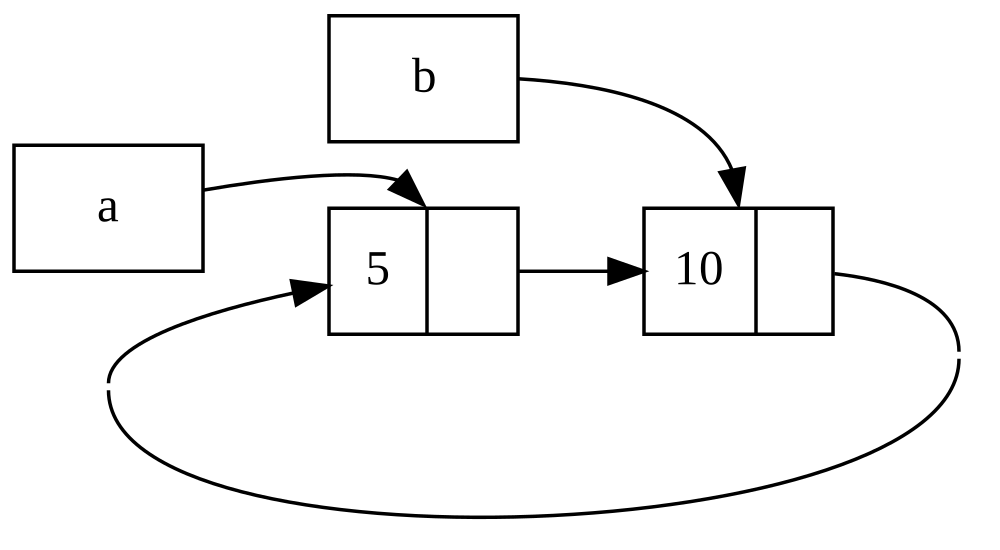
图 15-4:列表 a 和 b 互相指向的引用循环
Figure 15-4: A reference cycle of lists a and b
pointing to each other
如果你取消最后一个 println! 的注释并运行程序,Rust 将尝试打印这个循环:a 指向 b 指向 a 如此反复,直到栈溢出。
If you uncomment the last println! and run the program, Rust will try to
print this cycle with a pointing to b pointing to a and so forth until it
overflows the stack.
与现实世界的程序相比,在本例中创建引用循环的后果并不十分严重:创建引用循环后,程序就结束了。但是,如果一个更复杂的程序在一个循环中分配了大量内存并持有很长时间,程序将使用比它需要的更多的内存,并可能使系统不堪重负,导致可用内存耗尽。
Compared to a real-world program, the consequences of creating a reference cycle in this example aren’t very dire: Right after we create the reference cycle, the program ends. However, if a more complex program allocated lots of memory in a cycle and held onto it for a long time, the program would use more memory than it needed and might overwhelm the system, causing it to run out of available memory.
创建引用循环并不容易,但也并非不可能。如果你拥有的 RefCell<T> 值包含 Rc<T> 值或类似的具有内部可变性和引用计数的嵌套类型组合,你必须确保不创建循环;你不能指望 Rust 捕捉到它们。创建引用循环是你程序中的一个逻辑漏洞,你应该使用自动测试、代码审查和其他软件开发实践来将其降至最低。
Creating reference cycles is not easily done, but it’s not impossible either.
If you have RefCell<T> values that contain Rc<T> values or similar nested
combinations of types with interior mutability and reference counting, you must
ensure that you don’t create cycles; you can’t rely on Rust to catch them.
Creating a reference cycle would be a logic bug in your program that you should
use automated tests, code reviews, and other software development practices to
minimize.
避免引用循环的另一种解决方案是重构你的数据结构,使一些引用表达所有权,而另一些引用不表达所有权。结果是,你可以拥有由一些所有权关系和一些非所有权关系组成的循环,并且只有所有权关系会影响一个值是否可以被丢弃。在示例 15-25 中,我们总是希望 Cons 变体拥有它们的列表,因此重构数据结构是不可行的。让我们看一个使用由父节点和子节点组成的图的例子,看看非所有权关系何时是防止引用循环的合适方式。
Another solution for avoiding reference cycles is reorganizing your data
structures so that some references express ownership and some references don’t.
As a result, you can have cycles made up of some ownership relationships and
some non-ownership relationships, and only the ownership relationships affect
whether or not a value can be dropped. In Listing 15-25, we always want Cons
variants to own their list, so reorganizing the data structure isn’t possible.
Let’s look at an example using graphs made up of parent nodes and child nodes
to see when non-ownership relationships are an appropriate way to prevent
reference cycles.
使用 Weak<T> 防止引用循环
Preventing Reference Cycles Using Weak<T>
到目前为止,我们已经演示了调用 Rc::clone 会增加 Rc<T> 实例的 strong_count(强引用计数),并且只有当 strong_count 为 0 时 Rc<T> 实例才会被清理。你也可以通过调用 Rc::downgrade 并传递一个对 Rc<T> 的引用,来为 Rc<T> 实例中的值创建一个弱引用(weak reference)。强引用(Strong references)是你共享 Rc<T> 实例所有权的方式。弱引用(Weak references)不表达所有权关系,它们的计数不影响 Rc<T> 实例何时被清理。它们不会引起引用循环,因为任何涉及弱引用的循环一旦涉及值的强引用计数为 0 就会被打破。
So far, we’ve demonstrated that calling Rc::clone increases the
strong_count of an Rc<T> instance, and an Rc<T> instance is only cleaned
up if its strong_count is 0. You can also create a weak reference to the
value within an Rc<T> instance by calling Rc::downgrade and passing a
reference to the Rc<T>. Strong references are how you can share ownership
of an Rc<T> instance. Weak references don’t express an ownership
relationship, and their count doesn’t affect when an Rc<T> instance is
cleaned up. They won’t cause a reference cycle, because any cycle involving
some weak references will be broken once the strong reference count of values
involved is 0.
当你调用 Rc::downgrade 时,你会得到一个 Weak<T> 类型的智能指针。调用 Rc::downgrade 会将 weak_count(弱引用计数)增加 1,而不是将 Rc<T> 实例中的 strong_count 增加 1。Rc<T> 类型使用 weak_count 来跟踪存在多少个 Weak<T> 引用,类似于 strong_count。不同之处在于,不需要 weak_count 为 0 就能清理 Rc<T> 实例。
When you call Rc::downgrade, you get a smart pointer of type Weak<T>.
Instead of increasing the strong_count in the Rc<T> instance by 1, calling
Rc::downgrade increases the weak_count by 1. The Rc<T> type uses
weak_count to keep track of how many Weak<T> references exist, similar to
strong_count. The difference is the weak_count doesn’t need to be 0 for the
Rc<T> instance to be cleaned up.
因为 Weak<T> 引用的值可能已经被丢弃,所以要对 Weak<T> 指向的值执行任何操作,你必须确保该值仍然存在。通过在 Weak<T> 实例上调用 upgrade 方法来实现这一点,该方法将返回一个 Option<Rc<T>>。如果 Rc<T> 值尚未被丢弃,你将得到 Some 结果;如果 Rc<T> 值已被丢弃,你将得到 None 结果。因为 upgrade 返回 Option<Rc<T>>,Rust 会确保处理 Some 情况和 None 情况,并且不会出现无效指针。
Because the value that Weak<T> references might have been dropped, to do
anything with the value that a Weak<T> is pointing to you must make sure the
value still exists. Do this by calling the upgrade method on a Weak<T>
instance, which will return an Option<Rc<T>>. You’ll get a result of Some
if the Rc<T> value has not been dropped yet and a result of None if the
Rc<T> value has been dropped. Because upgrade returns an Option<Rc<T>>,
Rust will ensure that the Some case and the None case are handled, and
there won’t be an invalid pointer.
举个例子,我们将创建一个树,其项目既知道其子项目 又 知道其父项目,而不是使用仅知道下一个项目的列表。
As an example, rather than using a list whose items know only about the next item, we’ll create a tree whose items know about their child items and their parent items.
创建树形数据结构
Creating a Tree Data Structure
首先,我们将构建一个具有其子节点信息的树。我们将创建一个名为 Node 的结构体,它持有其自身的 i32 值以及对其子 Node 值的引用:
To start, we’ll build a tree with nodes that know about their child nodes.
We’ll create a struct named Node that holds its own i32 value as well as
references to its child Node values:
文件名:src/main.rs Filename: src/main.rs
use std::cell::RefCell;
use std::rc::Rc;
#[derive(Debug)]
struct Node {
value: i32,
children: RefCell<Vec<Rc<Node>>>,
}
fn main() {
let leaf = Rc::new(Node {
value: 3,
children: RefCell::new(vec![]),
});
let branch = Rc::new(Node {
value: 5,
children: RefCell::new(vec![Rc::clone(&leaf)]),
});
}我们希望 Node 拥有其子节点,并希望与变量共享该所有权,以便我们可以直接访问树中的每个 Node。为此,我们将 Vec<T> 项定义为 Rc<Node> 类型的值。我们还想修改哪些节点是另一个节点的子节点,因此我们在 children 中的 Vec<Rc<Node>> 周围加了一个 RefCell<T>。
We want a Node to own its children, and we want to share that ownership with
variables so that we can access each Node in the tree directly. To do this,
we define the Vec<T> items to be values of type Rc<Node>. We also want to
modify which nodes are children of another node, so we have a RefCell<T> in
children around the Vec<Rc<Node>>.
接下来,我们将使用我们的结构体定义,创建一个名为 leaf 的 Node 实例,值为 3 且没有子节点,以及另一个名为 branch 的实例,值为 5 且 leaf 是其子节点之一,如示例 15-27 所示。
Next, we’ll use our struct definition and create one Node instance named
leaf with the value 3 and no children, and another instance named branch
with the value 5 and leaf as one of its children, as shown in Listing 15-27.
use std::cell::RefCell;
use std::rc::Rc;
#[derive(Debug)]
struct Node {
value: i32,
children: RefCell<Vec<Rc<Node>>>,
}
fn main() {
let leaf = Rc::new(Node {
value: 3,
children: RefCell::new(vec![]),
});
let branch = Rc::new(Node {
value: 5,
children: RefCell::new(vec![Rc::clone(&leaf)]),
});
}我们克隆 leaf 中的 Rc<Node> 并将其存储在 branch 中,这意味着 leaf 中的 Node 现在有两个所有者:leaf 和 branch。我们可以通过 branch.children 从 branch 导航到 leaf,但无法从 leaf 导航到 branch。原因是 leaf 没有对 branch 的引用,并且不知道它们是相关的。我们希望 leaf 知道 branch 是它的父节点。我们接下来就这样做。
We clone the Rc<Node> in leaf and store that in branch, meaning the
Node in leaf now has two owners: leaf and branch. We can get from
branch to leaf through branch.children, but there’s no way to get from
leaf to branch. The reason is that leaf has no reference to branch and
doesn’t know they’re related. We want leaf to know that branch is its
parent. We’ll do that next.
添加从子节点到父节点的引用
Adding a Reference from a Child to Its Parent
为了让子节点知道其父节点,我们需要向 Node 结构体定义添加一个 parent 字段。困难在于决定 parent 的类型。我们知道它不能包含 Rc<T>,因为那会创建一个引用循环,leaf.parent 指向 branch 而 branch.children 指向 leaf,这将导致它们的 strong_count 值永远不会为 0。
To make the child node aware of its parent, we need to add a parent field to
our Node struct definition. The trouble is in deciding what the type of
parent should be. We know it can’t contain an Rc<T>, because that would
create a reference cycle with leaf.parent pointing to branch and
branch.children pointing to leaf, which would cause their strong_count
values to never be 0.
换种方式思考这些关系:父节点应该拥有其子节点:如果一个父节点被丢弃,它的子节点也应该被丢弃。然而,子节点不应该拥有其父节点:如果我们丢弃一个子节点,父节点应该仍然存在。这是弱引用的用例!
Thinking about the relationships another way, a parent node should own its children: If a parent node is dropped, its child nodes should be dropped as well. However, a child should not own its parent: If we drop a child node, the parent should still exist. This is a case for weak references!
因此,我们将 parent 的类型改为使用 Weak<T>,具体为 RefCell<Weak<Node>>,而不是 Rc<T>。现在我们的 Node 结构体定义如下所示:
So, instead of Rc<T>, we’ll make the type of parent use Weak<T>,
specifically a RefCell<Weak<Node>>. Now our Node struct definition looks
like this:
文件名:src/main.rs Filename: src/main.rs
use std::cell::RefCell;
use std::rc::{Rc, Weak};
#[derive(Debug)]
struct Node {
value: i32,
parent: RefCell<Weak<Node>>,
children: RefCell<Vec<Rc<Node>>>,
}
fn main() {
let leaf = Rc::new(Node {
value: 3,
parent: RefCell::new(Weak::new()),
children: RefCell::new(vec![]),
});
println!("leaf parent = {:?}", leaf.parent.borrow().upgrade());
let branch = Rc::new(Node {
value: 5,
parent: RefCell::new(Weak::new()),
children: RefCell::new(vec![Rc::clone(&leaf)]),
});
*leaf.parent.borrow_mut() = Rc::downgrade(&branch);
println!("leaf parent = {:?}", leaf.parent.borrow().upgrade());
}一个节点将能够引用其父节点,但并不拥有其父节点。在示例 15-28 中,我们更新 main 以使用这个新定义,这样 leaf 节点就有一种引用其父节点 branch 的方式。
A node will be able to refer to its parent node but doesn’t own its parent. In
Listing 15-28, we update main to use this new definition so that the leaf
node will have a way to refer to its parent, branch.
use std::cell::RefCell;
use std::rc::{Rc, Weak};
#[derive(Debug)]
struct Node {
value: i32,
parent: RefCell<Weak<Node>>,
children: RefCell<Vec<Rc<Node>>>,
}
fn main() {
let leaf = Rc::new(Node {
value: 3,
parent: RefCell::new(Weak::new()),
children: RefCell::new(vec![]),
});
println!("leaf parent = {:?}", leaf.parent.borrow().upgrade());
let branch = Rc::new(Node {
value: 5,
parent: RefCell::new(Weak::new()),
children: RefCell::new(vec![Rc::clone(&leaf)]),
});
*leaf.parent.borrow_mut() = Rc::downgrade(&branch);
println!("leaf parent = {:?}", leaf.parent.borrow().upgrade());
}创建 leaf 节点看起来与示例 15-27 类似,除了 parent 字段:leaf 开始时没有父节点,所以我们创建了一个新的空 Weak<Node> 引用实例。
Creating the leaf node looks similar to Listing 15-27 with the exception of
the parent field: leaf starts out without a parent, so we create a new,
empty Weak<Node> reference instance.
此时,当我们尝试使用 upgrade 方法获取 leaf 的父节点引用时,我们得到一个 None 值。我们在第一个 println! 语句的输出中看到了这一点:
At this point, when we try to get a reference to the parent of leaf by using
the upgrade method, we get a None value. We see this in the output from the
first println! statement:
leaf parent = None
当我们创建 branch 节点时,它的 parent 字段也将有一个新的 Weak<Node> 引用,因为 branch 也没有父节点。我们仍然将 leaf 作为 branch 的子节点之一。一旦我们在 branch 中有了 Node 实例,我们就可以修改 leaf 赋予它一个对其父节点的 Weak<Node> 引用。我们在 leaf 的 parent 字段中的 RefCell<Weak<Node>> 上使用 borrow_mut 方法,然后使用 Rc::downgrade 函数从 branch 中的 Rc<Node> 创建一个指向 branch 的 Weak<Node> 引用。
When we create the branch node, it will also have a new Weak<Node>
reference in the parent field because branch doesn’t have a parent node. We
still have leaf as one of the children of branch. Once we have the Node
instance in branch, we can modify leaf to give it a Weak<Node> reference
to its parent. We use the borrow_mut method on the RefCell<Weak<Node>> in
the parent field of leaf, and then we use the Rc::downgrade function to
create a Weak<Node> reference to branch from the Rc<Node> in branch.
当我们再次打印 leaf 的父节点时,这一次我们将得到一个持有 branch 的 Some 变体:现在 leaf 可以访问它的父节点了!当我们打印 leaf 时,我们也避免了像示例 15-26 那样最终导致栈溢出的循环;Weak<Node> 引用被打印为 (Weak):
When we print the parent of leaf again, this time we’ll get a Some variant
holding branch: Now leaf can access its parent! When we print leaf, we
also avoid the cycle that eventually ended in a stack overflow like we had in
Listing 15-26; the Weak<Node> references are printed as (Weak):
leaf parent = Some(Node { value: 5, parent: RefCell { value: (Weak) },
children: RefCell { value: [Node { value: 3, parent: RefCell { value: (Weak) },
children: RefCell { value: [] } }] } })
没有无限的输出表明这段代码没有创建引用循环。我们也可以通过查看调用 Rc::strong_count 和 Rc::weak_count 获得的值来得知这一点。
The lack of infinite output indicates that this code didn’t create a reference
cycle. We can also tell this by looking at the values we get from calling
Rc::strong_count and Rc::weak_count.
strong_count 和 weak_count 变化的直观展现
Visualizing Changes to strong_count and weak_count
让我们看看通过创建一个新的内部作用域并将 branch 的创建移动到该作用域中,Rc<Node> 实例的 strong_count 和 weak_count 值是如何变化的。通过这样做,我们可以看到当 branch 被创建以及随后因超出作用域而被丢弃时会发生什么。修改如示例 15-29 所示。
Let’s look at how the strong_count and weak_count values of the Rc<Node>
instances change by creating a new inner scope and moving the creation of
branch into that scope. By doing so, we can see what happens when branch is
created and then dropped when it goes out of scope. The modifications are shown
in Listing 15-29.
use std::cell::RefCell;
use std::rc::{Rc, Weak};
#[derive(Debug)]
struct Node {
value: i32,
parent: RefCell<Weak<Node>>,
children: RefCell<Vec<Rc<Node>>>,
}
fn main() {
let leaf = Rc::new(Node {
value: 3,
parent: RefCell::new(Weak::new()),
children: RefCell::new(vec![]),
});
println!(
"leaf strong = {}, weak = {}",
Rc::strong_count(&leaf),
Rc::weak_count(&leaf),
);
{
let branch = Rc::new(Node {
value: 5,
parent: RefCell::new(Weak::new()),
children: RefCell::new(vec![Rc::clone(&leaf)]),
});
*leaf.parent.borrow_mut() = Rc::downgrade(&branch);
println!(
"branch strong = {}, weak = {}",
Rc::strong_count(&branch),
Rc::weak_count(&branch),
);
println!(
"leaf strong = {}, weak = {}",
Rc::strong_count(&leaf),
Rc::weak_count(&leaf),
);
}
println!("leaf parent = {:?}", leaf.parent.borrow().upgrade());
println!(
"leaf strong = {}, weak = {}",
Rc::strong_count(&leaf),
Rc::weak_count(&leaf),
);
}在 leaf 被创建后,其 Rc<Node> 的强引用计数为 1,弱引用计数为 0。在内部作用域中,我们创建了 branch 并将其与 leaf 关联,此时当我们打印计数时,branch 中的 Rc<Node> 将具有 1 的强引用计数和 1 的弱引用计数(因为 leaf.parent 通过 Weak<Node> 指向 branch)。当我们打印 leaf 中的计数时,我们将看到它将具有 2 的强引用计数,因为 branch 现在在 branch.children 中存储了 leaf 的 Rc<Node> 的克隆,但弱引用计数仍将为 0。
After leaf is created, its Rc<Node> has a strong count of 1 and a weak
count of 0. In the inner scope, we create branch and associate it with
leaf, at which point when we print the counts, the Rc<Node> in branch
will have a strong count of 1 and a weak count of 1 (for leaf.parent pointing
to branch with a Weak<Node>). When we print the counts in leaf, we’ll see
it will have a strong count of 2 because branch now has a clone of the
Rc<Node> of leaf stored in branch.children but will still have a weak
count of 0.
当内部作用域结束时,branch 超出作用域,Rc<Node> 的强引用计数减少到 0,因此其 Node 被丢弃。来自 leaf.parent 的弱引用计数 1 对 Node 是否被丢弃没有影响,因此我们不会产生任何内存泄漏!
When the inner scope ends, branch goes out of scope and the strong count of
the Rc<Node> decreases to 0, so its Node is dropped. The weak count of 1
from leaf.parent has no bearing on whether or not Node is dropped, so we
don’t get any memory leaks!
如果我们在作用域结束后尝试访问 leaf 的父节点,我们将再次得到 None。在程序结束时,leaf 中的 Rc<Node> 具有 1 的强引用计数和 0 的弱引用计数,因为变量 leaf 现在又是对该 Rc<Node> 的唯一引用。
If we try to access the parent of leaf after the end of the scope, we’ll get
None again. At the end of the program, the Rc<Node> in leaf has a strong
count of 1 and a weak count of 0 because the variable leaf is now the only
reference to the Rc<Node> again.
所有管理计数和值丢弃的逻辑都内置在 Rc<T> 和 Weak<T> 及其 Drop trait 的实现中。通过在 Node 的定义中指定从子节点到父节点的关系应该是 Weak<T> 引用,你就能够让父节点指向子节点,反之亦然,而不会创建引用循环和内存泄漏。
All of the logic that manages the counts and value dropping is built into
Rc<T> and Weak<T> and their implementations of the Drop trait. By
specifying that the relationship from a child to its parent should be a
Weak<T> reference in the definition of Node, you’re able to have parent
nodes point to child nodes and vice versa without creating a reference cycle
and memory leaks.
总结
Summary
本章介绍了如何使用智能指针来做出与 Rust 默认常规引用不同的保证和权衡。Box<T> 类型具有已知的大小,并指向在堆上分配的数据。Rc<T> 类型跟踪指向堆上数据的引用数量,以便数据可以拥有多个所有者。带有内部可变性的 RefCell<T> 类型让我们在需要不可变类型但需要更改其内部值时可以使用它;它还在运行时而不是编译时强制执行借用规则。
This chapter covered how to use smart pointers to make different guarantees and
trade-offs from those Rust makes by default with regular references. The
Box<T> type has a known size and points to data allocated on the heap. The
Rc<T> type keeps track of the number of references to data on the heap so
that the data can have multiple owners. The RefCell<T> type with its interior
mutability gives us a type that we can use when we need an immutable type but
need to change an inner value of that type; it also enforces the borrowing
rules at runtime instead of at compile time.
此外还讨论了 Deref 和 Drop trait,它们启用了智能指针的大部分功能。我们探索了可能导致内存泄漏的引用循环,以及如何使用 Weak<T> 防止它们。
Also discussed were the Deref and Drop traits, which enable a lot of the
functionality of smart pointers. We explored reference cycles that can cause
memory leaks and how to prevent them using Weak<T>.
如果本章引起了你的兴趣,并且你想要实现自己的智能指针,请查看 “The Rustonomicon” 以获取更多有用的信息。
If this chapter has piqued your interest and you want to implement your own smart pointers, check out “The Rustonomicon” for more useful information.
接下来,我们将讨论 Rust 中的并发。你甚至会了解到一些新的智能指针。
Next, we’ll talk about concurrency in Rust. You’ll even learn about a few new smart pointers.
无畏并发
Fearless Concurrency
安全且高效地处理并发编程是 Rust 的另一个主要目标。并发编程(Concurrent programming)指程序的各个部分独立执行,而并行编程(parallel programming)指程序的各个部分同时执行。随着越来越多的计算机开始利用其多处理器的优势,这两种编程方式正变得日益重要。从历史上看,在这些语境下编程一直是困难且容易出错的。Rust 希望改变这一现状。
Handling concurrent programming safely and efficiently is another of Rust’s major goals. Concurrent programming, in which different parts of a program execute independently, and parallel programming, in which different parts of a program execute at the same time, are becoming increasingly important as more computers take advantage of their multiple processors. Historically, programming in these contexts has been difficult and error-prone. Rust hopes to change that.
最初,Rust 团队认为确保内存安全和防止并发问题是两个需要用不同方法解决的独立挑战。随着时间的推移,团队发现所有权和类型系统是帮助管理内存安全以及并发问题的强大工具集!通过利用所有权和类型检查,许多并发错误在 Rust 中是编译时错误,而不是运行时错误。因此,与其让你花大量时间尝试重现导致运行时并发 bug 的确切情况,错误的代码将无法通过编译,并会显示解释问题的错误信息。结果是,你可以在编写代码时修复它们,而不是在发布到生产环境之后。我们将 Rust 的这一方面昵称为无畏并发(fearless concurrency)。无畏并发允许你编写没有微妙 bug 且易于重构而不会引入新 bug 的代码。
Initially, the Rust team thought that ensuring memory safety and preventing concurrency problems were two separate challenges to be solved with different methods. Over time, the team discovered that the ownership and type systems are a powerful set of tools to help manage memory safety and concurrency problems! By leveraging ownership and type checking, many concurrency errors are compile-time errors in Rust rather than runtime errors. Therefore, rather than making you spend lots of time trying to reproduce the exact circumstances under which a runtime concurrency bug occurs, incorrect code will refuse to compile and present an error explaining the problem. As a result, you can fix your code while you’re working on it rather than potentially after it has been shipped to production. We’ve nicknamed this aspect of Rust fearless concurrency. Fearless concurrency allows you to write code that is free of subtle bugs and is easy to refactor without introducing new bugs.
注意:为了简单起见,我们将许多问题统称为并发,而不是通过说“并发和/或并行”来更精确。在本章中,请在每次我们使用“并发”时,在脑海中将其替换为“并发和/或并行”。在下一章,当这种区别变得更重要时,我们会更加具体。
Note: For simplicity’s sake, we’ll refer to many of the problems as concurrent rather than being more precise by saying concurrent and/or parallel. For this chapter, please mentally substitute concurrent and/or parallel whenever we use concurrent. In the next chapter, where the distinction matters more, we’ll be more specific.
许多语言对处理并发问题所提供的解决方案持有教条式的态度。例如,Erlang 具有优雅的消息传递并发功能,但共享线程间的状态却非常模糊。仅支持可能解决方案的一个子集对于高级语言来说是一种合理的策略,因为高级语言承诺通过放弃一些控制权来换取抽象带来的好处。然而,底层语言被期望在任何给定情况下提供性能最佳的解决方案,并且对硬件的抽象较少。因此,Rust 提供了多种工具,让你能以适合你的情况和要求的方式来对问题建模。
Many languages are dogmatic about the solutions they offer for handling concurrent problems. For example, Erlang has elegant functionality for message-passing concurrency but has only obscure ways to share state between threads. Supporting only a subset of possible solutions is a reasonable strategy for higher-level languages because a higher-level language promises benefits from giving up some control to gain abstractions. However, lower-level languages are expected to provide the solution with the best performance in any given situation and have fewer abstractions over the hardware. Therefore, Rust offers a variety of tools for modeling problems in whatever way is appropriate for your situation and requirements.
以下是我们在本章将涵盖的主题:
Here are the topics we’ll cover in this chapter:
-
如何创建线程以同时运行多段代码
-
How to create threads to run multiple pieces of code at the same time
-
消息传递(Message-passing)并发,其中通道在线程间发送消息
-
Message-passing concurrency, where channels send messages between threads
-
共享状态(Shared-state)并发,其中多个线程有权访问同一块数据
-
Shared-state concurrency, where multiple threads have access to some piece of data
-
Sync和Sendtrait,它们将 Rust 的并发保证扩展到用户定义类型以及标准库提供的类型 -
The
SyncandSendtraits, which extend Rust’s concurrency guarantees to user-defined types as well as types provided by the standard library
使用线程同时运行代码
使用线程同时运行代码
Using Threads to Run Code Simultaneously
在大多数当前操作系统中,执行程序的代码运行在“进程”(process)中,操作系统会同时管理多个进程。在程序内部,你也可以拥有同时运行的独立部分。运行这些独立部分的功能被称为“线程”(threads)。例如,一个 Web 服务器可以拥有多个线程,以便它能同时响应多个请求。
In most current operating systems, an executed program’s code is run in a process, and the operating system will manage multiple processes at once. Within a program, you can also have independent parts that run simultaneously. The features that run these independent parts are called threads. For example, a web server could have multiple threads so that it can respond to more than one request at the same time.
将程序中的计算拆分为多个线程以同时运行多个任务可以提高性能,但它也增加了复杂性。因为线程可以同时运行,所以无法预先保证不同线程中代码部分的运行顺序。这会导致一些问题,例如:
Splitting the computation in your program into multiple threads to run multiple tasks at the same time can improve performance, but it also adds complexity. Because threads can run simultaneously, there’s no inherent guarantee about the order in which parts of your code on different threads will run. This can lead to problems, such as:
-
竞态条件(Race conditions),线程以不一致的顺序访问数据或资源
-
死锁(Deadlocks),两个线程互相等待,导致两个线程都无法继续运行
-
只在某些特定情况下发生,且难以可靠地重现和修复的 bug
-
Race conditions, in which threads are accessing data or resources in an inconsistent order
-
Deadlocks, in which two threads are waiting for each other, preventing both threads from continuing
-
Bugs that only happen in certain situations and are hard to reproduce and fix reliably
Rust 试图减轻使用线程的负面影响,但在多线程上下文中编程仍然需要仔细思考,并且需要一个与单线程运行的程序不同的代码结构。
Rust attempts to mitigate the negative effects of using threads, but programming in a multithreaded context still takes careful thought and requires a code structure that is different from that in programs running in a single thread.
编程语言通过几种不同的方式实现线程,许多操作系统提供了编程语言可以调用以创建新线程的 API。Rust 标准库使用“1:1”线程实现模型,即程序为每个语言线程使用一个操作系统线程。有些 crate 实现了其他线程模型,这些模型在 1:1 模型的基础上做出了不同的权衡。(Rust 的异步系统,我们将在下一章看到,也提供了另一种并发处理方法。)
Programming languages implement threads in a few different ways, and many operating systems provide an API the programming language can call for creating new threads. The Rust standard library uses a 1:1 model of thread implementation, whereby a program uses one operating system thread per one language thread. There are crates that implement other models of threading that make different trade-offs to the 1:1 model. (Rust’s async system, which we will see in the next chapter, provides another approach to concurrency as well.)
使用 spawn 创建新线程
Creating a New Thread with spawn
要创建一个新线程,我们调用 thread::spawn 函数并传递给它一个闭包(我们在第 13 章讨论过闭包),该闭包包含我们想在新线程中运行的代码。示例 16-1 在主线程中打印一些文本,并在新线程中打印另一些文本。
To create a new thread, we call the thread::spawn function and pass it a
closure (we talked about closures in Chapter 13) containing the code we want to
run in the new thread. The example in Listing 16-1 prints some text from a main
thread and other text from a new thread.
use std::thread;
use std::time::Duration;
fn main() {
thread::spawn(|| {
for i in 1..10 {
println!("hi number {i} from the spawned thread!");
thread::sleep(Duration::from_millis(1));
}
});
for i in 1..5 {
println!("hi number {i} from the main thread!");
thread::sleep(Duration::from_millis(1));
}
}请注意,当 Rust 程序的主线程结束时,所有派生线程(spawned threads)都会被关闭,无论它们是否已运行结束。这个程序的输出每次可能会略有不同,但看起来会类似于以下内容:
Note that when the main thread of a Rust program completes, all spawned threads are shut down, whether or not they have finished running. The output from this program might be a little different every time, but it will look similar to the following:
hi number 1 from the main thread!
hi number 1 from the spawned thread!
hi number 2 from the main thread!
hi number 2 from the spawned thread!
hi number 3 from the main thread!
hi number 3 from the spawned thread!
hi number 4 from the main thread!
hi number 4 from the spawned thread!
hi number 5 from the spawned thread!
对 thread::sleep 的调用强制线程停止执行一小段时间,从而允许不同的线程运行。线程可能会轮流运行,但这并不保证:这取决于你的操作系统如何调度线程。在这次运行中,尽管派生线程的打印语句在代码中首先出现,但主线程先打印了。而且尽管我们告诉派生线程打印直到 i 为 9,但在主线程关闭之前它只运行到了 5。
The calls to thread::sleep force a thread to stop its execution for a short
duration, allowing a different thread to run. The threads will probably take
turns, but that isn’t guaranteed: It depends on how your operating system
schedules the threads. In this run, the main thread printed first, even though
the print statement from the spawned thread appears first in the code. And even
though we told the spawned thread to print until i is 9, it only got to 5
before the main thread shut down.
如果你运行这段代码只看到主线程的输出,或者没有看到任何交叉输出,请尝试增加范围中的数值,以便为操作系统提供更多在线程之间切换的机会。
If you run this code and only see output from the main thread, or don’t see any overlap, try increasing the numbers in the ranges to create more opportunities for the operating system to switch between the threads.
等待所有线程结束
Waiting for All Threads to Finish
示例 16-1 中的代码不仅由于主线程结束而导致派生线程大多数时候提前停止,而且由于无法保证线程运行的顺序,我们甚至无法保证派生线程是否能够运行!
The code in Listing 16-1 not only stops the spawned thread prematurely most of the time due to the main thread ending, but because there is no guarantee on the order in which threads run, we also can’t guarantee that the spawned thread will get to run at all!
我们可以通过将 thread::spawn 的返回值保存在变量中,来解决派生线程不运行或提前结束的问题。thread::spawn 的返回类型是 JoinHandle<T>。JoinHandle<T> 是一个拥有所有权的值,当我们对其调用 join 方法时,它将等待其线程结束。示例 16-2 展示了如何使用我们在示例 16-1 中创建的线程的 JoinHandle<T>,并展示了如何调用 join 以确保派生线程在 main 退出之前完成运行。
We can fix the problem of the spawned thread not running or of it ending
prematurely by saving the return value of thread::spawn in a variable. The
return type of thread::spawn is JoinHandle<T>. A JoinHandle<T> is an
owned value that, when we call the join method on it, will wait for its
thread to finish. Listing 16-2 shows how to use the JoinHandle<T> of the
thread we created in Listing 16-1 and how to call join to make sure the
spawned thread finishes before main exits.
use std::thread;
use std::time::Duration;
fn main() {
let handle = thread::spawn(|| {
for i in 1..10 {
println!("hi number {i} from the spawned thread!");
thread::sleep(Duration::from_millis(1));
}
});
for i in 1..5 {
println!("hi number {i} from the main thread!");
thread::sleep(Duration::from_millis(1));
}
handle.join().unwrap();
}在句柄(handle)上调用 join 会阻塞当前正在运行的线程,直到该句柄所代表的线程终止。“阻塞”(Blocking)线程意味着该线程被阻止执行工作或退出。因为我们将对 join 的调用放在了主线程的 for 循环之后,运行示例 16-2 应该产生类似于以下的输出:
Calling join on the handle blocks the thread currently running until the
thread represented by the handle terminates. Blocking a thread means that
thread is prevented from performing work or exiting. Because we’ve put the call
to join after the main thread’s for loop, running Listing 16-2 should
produce output similar to this:
hi number 1 from the main thread!
hi number 2 from the main thread!
hi number 1 from the spawned thread!
hi number 3 from the main thread!
hi number 2 from the spawned thread!
hi number 4 from the main thread!
hi number 3 from the spawned thread!
hi number 4 from the spawned thread!
hi number 5 from the spawned thread!
hi number 6 from the spawned thread!
hi number 7 from the spawned thread!
hi number 8 from the spawned thread!
hi number 9 from the spawned thread!
这两个线程继续交替进行,但主线程因为调用了 handle.join() 而等待,并且在派生线程结束之前不会退出。
The two threads continue alternating, but the main thread waits because of the
call to handle.join() and does not end until the spawned thread is finished.
但是,让我们看看如果我们改为将 handle.join() 移到 main 中的 for 循环之前,会发生什么:
But let’s see what happens when we instead move handle.join() before the
for loop in main, like this:
use std::thread;
use std::time::Duration;
fn main() {
let handle = thread::spawn(|| {
for i in 1..10 {
println!("hi number {i} from the spawned thread!");
thread::sleep(Duration::from_millis(1));
}
});
handle.join().unwrap();
for i in 1..5 {
println!("hi number {i} from the main thread!");
thread::sleep(Duration::from_millis(1));
}
}主线程将等待派生线程运行结束,然后才运行它自己的 for 循环,因此输出将不再交错,如下所示:
The main thread will wait for the spawned thread to finish and then run its
for loop, so the output won’t be interleaved anymore, as shown here:
hi number 1 from the spawned thread!
hi number 2 from the spawned thread!
hi number 3 from the spawned thread!
hi number 4 from the spawned thread!
hi number 5 from the spawned thread!
hi number 6 from the spawned thread!
hi number 7 from the spawned thread!
hi number 8 from the spawned thread!
hi number 9 from the spawned thread!
hi number 1 from the main thread!
hi number 2 from the main thread!
hi number 3 from the main thread!
hi number 4 from the main thread!
细小的细节,例如在何处调用 join,都会影响你的线程是否同时运行。
Small details, such as where join is called, can affect whether or not your
threads run at the same time.
在线程中使用 move 闭包
Using move Closures with Threads
我们经常会对传递给 thread::spawn 的闭包使用 move 关键字,因为闭包会获取它从环境中使用的值的所有权,从而将这些值的所有权从一个线程转移到另一个线程。在第 13 章的 “捕获引用或移动所有权” 中,我们在闭包的上下文中讨论了 move。现在我们将更多地关注 move 与 thread::spawn 之间的交互。
We’ll often use the move keyword with closures passed to thread::spawn
because the closure will then take ownership of the values it uses from the
environment, thus transferring ownership of those values from one thread to
another. In “Capturing References or Moving Ownership” in Chapter 13, we discussed move in the context of closures. Now we’ll
concentrate more on the interaction between move and thread::spawn.
请注意,在示例 16-1 中,我们传递给 thread::spawn 的闭包不带任何参数:我们没有在派生线程的代码中使用来自主线程的任何数据。要在派生线程中使用来自主线程的数据,派生线程的闭包必须捕获它需要的值。示例 16-3 尝试在主线程中创建一个 vector 并在派生线程中使用它。然而,这目前还行不通,稍后你就会看到原因。
Notice in Listing 16-1 that the closure we pass to thread::spawn takes no
arguments: We’re not using any data from the main thread in the spawned
thread’s code. To use data from the main thread in the spawned thread, the
spawned thread’s closure must capture the values it needs. Listing 16-3 shows
an attempt to create a vector in the main thread and use it in the spawned
thread. However, this won’t work yet, as you’ll see in a moment.
use std::thread;
fn main() {
let v = vec![1, 2, 3];
let handle = thread::spawn(|| {
println!("Here's a vector: {v:?}");
});
handle.join().unwrap();
}闭包使用了 v,因此它将捕获 v 并使其成为闭包环境的一部分。因为 thread::spawn 在新线程中运行这个闭包,所以我们应该能够在该新线程内部访问 v。但当我们编译这个示例时,会得到以下错误:
The closure uses v, so it will capture v and make it part of the closure’s
environment. Because thread::spawn runs this closure in a new thread, we
should be able to access v inside that new thread. But when we compile this
example, we get the following error:
$ cargo run
Compiling threads v0.1.0 (file:///projects/threads)
error[E0373]: closure may outlive the current function, but it borrows `v`, which is owned by the current function
--> src/main.rs:6:32
|
6 | let handle = thread::spawn(|| {
| ^^ may outlive borrowed value `v`
7 | println!("Here's a vector: {v:?}");
| - `v` is borrowed here
|
note: function requires argument type to outlive `'static`
--> src/main.rs:6:18
|
6 | let handle = thread::spawn(|| {
| __________________^
7 | | println!("Here's a vector: {v:?}");
8 | | });
| |______^
help: to force the closure to take ownership of `v` (and any other referenced variables), use the `move` keyword
|
6 | let handle = thread::spawn(move || {
| ++++
For more information about this error, try `rustc --explain E0373`.
error: could not compile `threads` (bin "threads") due to 1 previous error
Rust 会“推断”如何捕获 v,由于 println! 只需要 v 的引用,因此闭包尝试借用 v。然而,存在一个问题:Rust 无法判断派生线程会运行多久,因此它不知道对 v 的引用是否始终有效。
Rust infers how to capture v, and because println! only needs a reference
to v, the closure tries to borrow v. However, there’s a problem: Rust can’t
tell how long the spawned thread will run, so it doesn’t know whether the
reference to v will always be valid.
示例 16-4 提供了一个更有可能出现无效引用的场景。
Listing 16-4 provides a scenario that’s more likely to have a reference to v
that won’t be valid.
use std::thread;
fn main() {
let v = vec![1, 2, 3];
let handle = thread::spawn(|| {
println!("Here's a vector: {v:?}");
});
drop(v); // oh no!
handle.join().unwrap();
}如果 Rust 允许我们运行这段代码,那么派生线程极有可能立即被置于后台而根本没有运行。派生线程内部拥有对 v 的引用,但主线程立即调用了我们在第 15 章讨论过的 drop 函数丢弃了 v。然后,当派生线程开始执行时,v 不再有效,因此对它的引用也无效了。噢不!
If Rust allowed us to run this code, there’s a possibility that the spawned
thread would be immediately put in the background without running at all. The
spawned thread has a reference to v inside, but the main thread immediately
drops v, using the drop function we discussed in Chapter 15. Then, when the
spawned thread starts to execute, v is no longer valid, so a reference to it
is also invalid. Oh no!
要修复示例 16-3 中的编译错误,我们可以使用错误消息的建议:
To fix the compiler error in Listing 16-3, we can use the error message’s advice:
help: to force the closure to take ownership of `v` (and any other referenced variables), use the `move` keyword
|
6 | let handle = thread::spawn(move || {
| ++++
通过在闭包前添加 move 关键字,我们强制闭包获取其正在使用的值的所有权,而不是让 Rust 推断它应该借用这些值。对示例 16-3 进行修改后的示例 16-5 将按预期编译并运行。
By adding the move keyword before the closure, we force the closure to take
ownership of the values it’s using rather than allowing Rust to infer that it
should borrow the values. The modification to Listing 16-3 shown in Listing
16-5 will compile and run as we intend.
use std::thread;
fn main() {
let v = vec![1, 2, 3];
let handle = thread::spawn(move || {
println!("Here's a vector: {v:?}");
});
handle.join().unwrap();
}我们可能会尝试使用 move 闭包来修复示例 16-4 中主线程调用 drop 的代码。然而,这个修复将不起作用,因为示例 16-4 尝试执行的操作因另一个原因而被禁止。如果我们给闭包添加了 move,我们就会将 v 移入闭包的环境中,于是我们无法再在主线程中对其调用 drop。我们将得到如下编译错误:
We might be tempted to try the same thing to fix the code in Listing 16-4 where
the main thread called drop by using a move closure. However, this fix will
not work because what Listing 16-4 is trying to do is disallowed for a
different reason. If we added move to the closure, we would move v into the
closure’s environment, and we could no longer call drop on it in the main
thread. We would get this compiler error instead:
$ cargo run
Compiling threads v0.1.0 (file:///projects/threads)
error[E0382]: use of moved value: `v`
--> src/main.rs:10:10
|
4 | let v = vec![1, 2, 3];
| - move occurs because `v` has type `Vec<i32>`, which does not implement the `Copy` trait
5 |
6 | let handle = thread::spawn(move || {
| ------- value moved into closure here
7 | println!("Here's a vector: {v:?}");
| - variable moved due to use in closure
...
10 | drop(v); // oh no!
| ^ value used here after move
|
help: consider cloning the value before moving it into the closure
|
6 ~ let value = v.clone();
7 ~ let handle = thread::spawn(move || {
8 ~ println!("Here's a vector: {value:?}");
|
For more information about this error, try `rustc --explain E0382`.
error: could not compile `threads` (bin "threads") due to 1 previous error
Rust 的所有权规则再次拯救了我们!我们从示例 16-3 的代码中得到了一个错误,是因为 Rust 过于保守,仅为线程借用了 v,这意味着主线程理论上可能会使派生线程的引用失效。通过告诉 Rust 将 v 的所有权转移到派生线程,我们向 Rust 保证主线程将不再使用 v。如果我们以同样的方式修改示例 16-4,那么当我们尝试在主线程中使用 v 时,就违反了所有权规则。move 关键字覆盖了 Rust 保守的借用默认行为;它并不允许我们违反所有权规则。
Rust’s ownership rules have saved us again! We got an error from the code in
Listing 16-3 because Rust was being conservative and only borrowing v for the
thread, which meant the main thread could theoretically invalidate the spawned
thread’s reference. By telling Rust to move ownership of v to the spawned
thread, we’re guaranteeing to Rust that the main thread won’t use v anymore.
If we change Listing 16-4 in the same way, we’re then violating the ownership
rules when we try to use v in the main thread. The move keyword overrides
Rust’s conservative default of borrowing; it doesn’t let us violate the
ownership rules.
既然我们已经介绍了什么是线程以及线程 API 提供的方法,让我们来看一些可以使用线程的场景。
Now that we’ve covered what threads are and the methods supplied by the thread API, let’s look at some situations in which we can use threads.
使用消息传递在线程间转移数据
使用消息传递在线程间传输数据
Transfer Data Between Threads with Message Passing
一种日益流行的确保安全并发的方法是“消息传递”(message passing),在这种方法中,线程或 actor 通过彼此发送包含数据的消息来进行通信。这一理念可以用 Go 语言文档中的一句口号来概括:“不要通过共享内存来通信;相反,通过通信来共享内存。”
One increasingly popular approach to ensuring safe concurrency is message passing, where threads or actors communicate by sending each other messages containing data. Here’s the idea in a slogan from the Go language documentation: “Do not communicate by sharing memory; instead, share memory by communicating.”
为了实现基于消息发送的并发,Rust 标准库提供了“通道”(channels)的实现。通道是一个通用的编程概念,通过它,数据可以从一个线程发送到另一个线程。
To accomplish message-sending concurrency, Rust’s standard library provides an implementation of channels. A channel is a general programming concept by which data is sent from one thread to another.
你可以把编程中的通道想象成一个有方向的水道,比如一条小溪或河流。如果你把一个橡皮鸭之类的东西放入河中,它会顺流而下到达水道的尽头。
You can imagine a channel in programming as being like a directional channel of water, such as a stream or a river. If you put something like a rubber duck into a river, it will travel downstream to the end of the waterway.
一个通道由两部分组成:发送者(transmitter)和接收者(receiver)。发送者位于上游,是你把橡皮鸭放入河流的地方;接收者则是橡皮鸭在下游最终到达的地方。你代码的一部分调用发送者的方法并传入你想发送的数据,另一部分代码则检查接收端是否有到来的消息。如果发送者或接收者中的任何一半被丢弃(dropped),通道就被认为是“关闭”(closed)了。
A channel has two halves: a transmitter and a receiver. The transmitter half is the upstream location where you put the rubber duck into the river, and the receiver half is where the rubber duck ends up downstream. One part of your code calls methods on the transmitter with the data you want to send, and another part checks the receiving end for arriving messages. A channel is said to be closed if either the transmitter or receiver half is dropped.
在这里,我们将逐步编写一个程序,它包含一个生成值并将其发送到通道的线程,以及另一个接收值并将其打印出来的线程。我们将通过通道在线程间发送简单的数据来展示这一功能。一旦你熟悉了这种技术,你就可以将通道用于任何需要相互通信的线程,例如聊天系统,或者多个线程执行计算的一部分并将其发送给一个汇总结果的线程。
Here, we’ll work up to a program that has one thread to generate values and send them down a channel, and another thread that will receive the values and print them out. We’ll be sending simple values between threads using a channel to illustrate the feature. Once you’re familiar with the technique, you could use channels for any threads that need to communicate with each other, such as a chat system or a system where many threads perform parts of a calculation and send the parts to one thread that aggregates the results.
首先,在示例 16-6 中,我们将创建一个通道但不做任何处理。请注意,这还不能编译,因为 Rust 无法推断我们想通过通道发送什么类型的值。
First, in Listing 16-6, we’ll create a channel but not do anything with it. Note that this won’t compile yet because Rust can’t tell what type of values we want to send over the channel.
use std::sync::mpsc;
fn main() {
let (tx, rx) = mpsc::channel();
}我们使用 mpsc::channel 函数创建一个新通道;mpsc 代表“多个生产者,单个消费者”(multiple producer, single consumer)。简而言之,Rust 标准库实现通道的方式意味着一个通道可以有多个生产值的“发送”端,但只能有一个消费这些值的“接收”端。想象一下多条小溪汇流成一条大河:从任何一条小溪发送的东西最终都会汇聚到尽头的那条河里。我们现在先从单个生产者开始,但在使这个示例运行起来后,我们会添加多个生产者。
We create a new channel using the mpsc::channel function; mpsc stands for
multiple producer, single consumer. In short, the way Rust’s standard library
implements channels means a channel can have multiple sending ends that
produce values but only one receiving end that consumes those values. Imagine
multiple streams flowing together into one big river: Everything sent down any
of the streams will end up in one river at the end. We’ll start with a single
producer for now, but we’ll add multiple producers when we get this example
working.
mpsc::channel 函数返回一个元组,其第一个元素是发送端——发送者,第二个元素是接收端——接收者。在许多领域中,缩写 tx 和 rx 传统上分别代表“发送者”(transmitter)和“接收者”(receiver),因此我们将变量命名为这些缩写以指示每一端。我们使用带有模式的 let 语句来解构元组;我们将在第 19 章讨论 let 语句中模式的使用和解构。现在,只需知道以这种方式使用 let 语句是提取 mpsc::channel 返回的元组各个部分的便捷方法。
The mpsc::channel function returns a tuple, the first element of which is the
sending end—the transmitter—and the second element of which is the receiving
end—the receiver. The abbreviations tx and rx are traditionally used in
many fields for transmitter and receiver, respectively, so we name our
variables as such to indicate each end. We’re using a let statement with a
pattern that destructures the tuples; we’ll discuss the use of patterns in
let statements and destructuring in Chapter 19. For now, know that using a
let statement in this way is a convenient approach to extract the pieces of
the tuple returned by mpsc::channel.
让我们将发送端移入一个派生线程,并让它发送一个字符串,以便派生线程与主线程进行通信,如示例 16-7 所示。这就像是把橡皮鸭放入上游的河流中,或者是从一个线程发送聊天消息到另一个线程。
Let’s move the transmitting end into a spawned thread and have it send one string so that the spawned thread is communicating with the main thread, as shown in Listing 16-7. This is like putting a rubber duck in the river upstream or sending a chat message from one thread to another.
use std::sync::mpsc;
use std::thread;
fn main() {
let (tx, rx) = mpsc::channel();
thread::spawn(move || {
let val = String::from("hi");
tx.send(val).unwrap();
});
}同样,我们使用 thread::spawn 来创建一个新线程,然后使用 move 将 tx 移入闭包中,以便派生线程拥有 tx。派生线程需要拥有发送者才能通过通道发送消息。
Again, we’re using thread::spawn to create a new thread and then using move
to move tx into the closure so that the spawned thread owns tx. The spawned
thread needs to own the transmitter to be able to send messages through the
channel.
发送者有一个 send 方法,它接收我们想要发送的值。send 方法返回一个 Result<T, E> 类型,因此如果接收者已经被丢弃,且没有地方可以发送值,发送操作将返回一个错误。在这个示例中,我们调用 unwrap 以在发生错误时触发 panic。但在实际应用中,我们会妥善处理它:请回到第 9 章复习正确错误处理的策略。
The transmitter has a send method that takes the value we want to send. The
send method returns a Result<T, E> type, so if the receiver has already
been dropped and there’s nowhere to send a value, the send operation will
return an error. In this example, we’re calling unwrap to panic in case of an
error. But in a real application, we would handle it properly: Return to
Chapter 9 to review strategies for proper error handling.
在示例 16-8 中,我们将在主线程中从接收者那里获取值。这就像从河流尽头的水中捞回橡皮鸭,或者接收到一条聊天消息。
In Listing 16-8, we’ll get the value from the receiver in the main thread. This is like retrieving the rubber duck from the water at the end of the river or receiving a chat message.
use std::sync::mpsc;
use std::thread;
fn main() {
let (tx, rx) = mpsc::channel();
thread::spawn(move || {
let val = String::from("hi");
tx.send(val).unwrap();
});
let received = rx.recv().unwrap();
println!("Got: {received}");
}接收者有两个有用的方法:recv 和 try_recv。我们使用的是 recv,它是“接收”(receive)的缩写,它会阻塞主线程的执行,直到有值被发送到通道中。一旦有值发送过来,recv 会将其封装在 Result<T, E> 中返回。当发送者关闭时,recv 会返回一个错误,以此信号告知不会再有更多的值传过来。
The receiver has two useful methods: recv and try_recv. We’re using recv,
short for receive, which will block the main thread’s execution and wait
until a value is sent down the channel. Once a value is sent, recv will
return it in a Result<T, E>. When the transmitter closes, recv will return
an error to signal that no more values will be coming.
try_recv 方法不会阻塞,而是立即返回一个 Result<T, E>:如果有一个可用的消息,则返回包含该消息的 Ok 值;如果此时没有任何消息,则返回 Err 值。如果该线程在等待消息的同时还有其他工作要做,使用 try_recv 很有用:我们可以编写一个循环,每隔一段时间调用一次 try_recv,如果有可用消息就处理它,否则就先做一小会儿其他工作,然后再次检查。
The try_recv method doesn’t block, but will instead return a Result<T, E>
immediately: an Ok value holding a message if one is available and an Err
value if there aren’t any messages this time. Using try_recv is useful if
this thread has other work to do while waiting for messages: We could write a
loop that calls try_recv every so often, handles a message if one is
available, and otherwise does other work for a little while until checking
again.
为了简单起见,我们在本例中使用了 recv;除了等待消息,主线程没有其他工作要做,所以阻塞主线程是合适的。
We’ve used recv in this example for simplicity; we don’t have any other work
for the main thread to do other than wait for messages, so blocking the main
thread is appropriate.
当我们运行示例 16-8 中的代码时,我们将看到主线程打印出的值:
When we run the code in Listing 16-8, we’ll see the value printed from the main thread:
Got: hi
完美!
Perfect!
通过通道转移所有权
Transferring Ownership Through Channels
所有权规则在消息发送中起着至关重要的作用,因为它们能帮助你编写安全的并发代码。在整个 Rust 程序中考虑所有权的好处在于可以防止并发编程中的错误。让我们做一个实验,看看通道和所有权是如何协同工作来防止问题的:我们将尝试在将 val 发送到通道 之后,在派生线程中使用它。尝试编译示例 16-9 中的代码,看看为什么这种代码是不被允许的。
The ownership rules play a vital role in message sending because they help you
write safe, concurrent code. Preventing errors in concurrent programming is the
advantage of thinking about ownership throughout your Rust programs. Let’s do
an experiment to show how channels and ownership work together to prevent
problems: We’ll try to use a val value in the spawned thread after we’ve
sent it down the channel. Try compiling the code in Listing 16-9 to see why
this code isn’t allowed.
use std::sync::mpsc;
use std::thread;
fn main() {
let (tx, rx) = mpsc::channel();
thread::spawn(move || {
let val = String::from("hi");
tx.send(val).unwrap();
println!("val is {val}");
});
let received = rx.recv().unwrap();
println!("Got: {received}");
}在这里,我们在通过 tx.send 将 val 发送到通道之后,尝试打印它。允许这样做会是一个坏主意:一旦值发送给另一个线程,那个线程可能在我们再次尝试使用该值之前就对其进行了修改或丢弃。潜在地,由于数据不一致或不存在,另一个线程的修改可能会导致错误或意外结果。然而,如果我们尝试编译示例 16-9 中的代码,Rust 会报错:
Here, we try to print val after we’ve sent it down the channel via tx.send.
Allowing this would be a bad idea: Once the value has been sent to another
thread, that thread could modify or drop it before we try to use the value
again. Potentially, the other thread’s modifications could cause errors or
unexpected results due to inconsistent or nonexistent data. However, Rust gives
us an error if we try to compile the code in Listing 16-9:
$ cargo run
Compiling message-passing v0.1.0 (file:///projects/message-passing)
error[E0382]: borrow of moved value: `val`
--> src/main.rs:10:27
|
8 | let val = String::from("hi");
| --- move occurs because `val` has type `String`, which does not implement the `Copy` trait
9 | tx.send(val).unwrap();
| --- value moved here
10 | println!("val is {val}");
| ^^^ value borrowed here after move
|
= note: this error originates in the macro `$crate::format_args_nl` which comes from the expansion of the macro `println` (in Nightly builds, run with -Z macro-backtrace for more info)
For more information about this error, try `rustc --explain E0382`.
error: could not compile `message-passing` (bin "message-passing") due to 1 previous error
我们的并发错误导致了编译时错误。send 函数获取其参数的所有权,当值被移动时,接收者就获得了它的所有权。这阻止了我们在发送值后意外地再次使用它;所有权系统检查并确保了一切正常。
Our concurrency mistake has caused a compile-time error. The send function
takes ownership of its parameter, and when the value is moved the receiver
takes ownership of it. This stops us from accidentally using the value again
after sending it; the ownership system checks that everything is okay.
发送多个值
Sending Multiple Values
示例 16-8 中的代码虽然编译运行成功,但它并没有清晰地向我们展示两个独立的线程正在通过通道进行对话。
The code in Listing 16-8 compiled and ran, but it didn’t clearly show us that two separate threads were talking to each other over the channel.
在示例 16-10 中,我们做了一些修改,这将证明示例 16-8 中的代码是并发运行的:派生线程现在将发送多条消息,并在每条消息之间暂停一秒钟。
In Listing 16-10, we’ve made some modifications that will prove the code in Listing 16-8 is running concurrently: The spawned thread will now send multiple messages and pause for a second between each message.
use std::sync::mpsc;
use std::thread;
use std::time::Duration;
fn main() {
let (tx, rx) = mpsc::channel();
thread::spawn(move || {
let vals = vec![
String::from("hi"),
String::from("from"),
String::from("the"),
String::from("thread"),
];
for val in vals {
tx.send(val).unwrap();
thread::sleep(Duration::from_secs(1));
}
});
for received in rx {
println!("Got: {received}");
}
}这一次,派生线程有一个我们想要发送给主线程的字符串 vector。我们遍历它们,逐个发送,并在发送每个字符串之间调用 thread::sleep 函数暂停一秒钟,该函数接收一个为期一秒的 Duration 值。
This time, the spawned thread has a vector of strings that we want to send to
the main thread. We iterate over them, sending each individually, and pause
between each by calling the thread::sleep function with a Duration value of
one second.
在主线程中,我们不再显式调用 recv 函数:相反,我们将 rx 视为迭代器。对于收到的每个值,我们都将其打印出来。当通道关闭时,迭代将结束。
In the main thread, we’re not calling the recv function explicitly anymore:
Instead, we’re treating rx as an iterator. For each value received, we’re
printing it. When the channel is closed, iteration will end.
运行示例 16-10 中的代码时,你应该会看到以下输出,每行之间有一秒钟的停顿:
When running the code in Listing 16-10, you should see the following output with a one-second pause in between each line:
Got: hi
Got: from
Got: the
Got: thread
因为主线程的 for 循环中没有任何暂停或延迟的代码,所以我们可以看出主线程正在等待从派生线程接收值。
Because we don’t have any code that pauses or delays in the for loop in the
main thread, we can tell that the main thread is waiting to receive values from
the spawned thread.
创建多个生产者
Creating Multiple Producers
之前我们提到 mpsc 是“多个生产者,单个消费者”的缩写。让我们通过克隆发送者来扩展示例 16-10 中的代码,创建多个向同一个接收者发送值的线程,从而让 mpsc 发挥作用,如示例 16-11 所示。
Earlier we mentioned that mpsc was an acronym for multiple producer, single
consumer. Let’s put mpsc to use and expand the code in Listing 16-10 to
create multiple threads that all send values to the same receiver. We can do so
by cloning the transmitter, as shown in Listing 16-11.
use std::sync::mpsc;
use std::thread;
use std::time::Duration;
fn main() {
// --snip--
let (tx, rx) = mpsc::channel();
let tx1 = tx.clone();
thread::spawn(move || {
let vals = vec![
String::from("hi"),
String::from("from"),
String::from("the"),
String::from("thread"),
];
for val in vals {
tx1.send(val).unwrap();
thread::sleep(Duration::from_secs(1));
}
});
thread::spawn(move || {
let vals = vec![
String::from("more"),
String::from("messages"),
String::from("for"),
String::from("you"),
];
for val in vals {
tx.send(val).unwrap();
thread::sleep(Duration::from_secs(1));
}
});
for received in rx {
println!("Got: {received}");
}
// --snip--
}这一次,在创建第一个派生线程之前,我们对发送者调用 clone。这将为我们提供一个新的发送者,我们可以将其传递给第一个派生线程。我们将原始发送者传递给第二个派生线程。这样我们就有了两个线程,每个线程都向同一个接收者发送不同的消息。
This time, before we create the first spawned thread, we call clone on the
transmitter. This will give us a new transmitter we can pass to the first
spawned thread. We pass the original transmitter to a second spawned thread.
This gives us two threads, each sending different messages to the one receiver.
当你运行代码时,输出看起来应该像这样:
When you run the code, your output should look something like this:
Got: hi
Got: more
Got: from
Got: messages
Got: for
Got: the
Got: thread
Got: you
你可能会看到不同顺序的值,这取决于你的系统。这就是并发令人着迷同时也困难的地方。如果你对 thread::sleep 进行实验,在不同的线程中给它设置各种不同的值,那么每次运行都会更具不确定性,并产生不同的输出。
You might see the values in another order, depending on your system. This is
what makes concurrency interesting as well as difficult. If you experiment with
thread::sleep, giving it various values in the different threads, each run
will be more nondeterministic and create different output each time.
既然我们已经了解了通道的工作原理,那么让我们来看看另一种并发方法。
Now that we’ve looked at how channels work, let’s look at a different method of concurrency.
共享状态并发
共享状态并发
Shared-State Concurrency
消息传递是处理并发的一种绝佳方式,但它不是唯一的方式。另一种方法是让多个线程访问相同的共享数据。再次考虑 Go 语言文档中口号的一部分:“不要通过共享内存来通信。”
Message passing is a fine way to handle concurrency, but it’s not the only way. Another method would be for multiple threads to access the same shared data. Consider this part of the slogan from the Go language documentation again: “Do not communicate by sharing memory.”
通过共享内存进行通信会是什么样子?此外,为什么消息传递的拥护者会告诫不要使用内存共享?
What would communicating by sharing memory look like? In addition, why would message-passing enthusiasts caution not to use memory sharing?
在某种程度上,任何编程语言中的通道都类似于单一所有权,因为一旦你通过通道传输了一个值,你就不应该再使用该值。共享内存并发则类似于多重所有权:多个线程可以同时访问相同的内存位置。正如你在第 15 章中所看到的,智能指针使多重所有权成为可能,但多重所有权会增加复杂性,因为这些不同的所有者需要管理。Rust 的类型系统和所有权规则极大地协助了正确进行这种管理。作为示例,让我们看看互斥锁(mutexes),它是共享内存中最常见的并发原语之一。
In a way, channels in any programming language are similar to single ownership because once you transfer a value down a channel, you should no longer use that value. Shared-memory concurrency is like multiple ownership: Multiple threads can access the same memory location at the same time. As you saw in Chapter 15, where smart pointers made multiple ownership possible, multiple ownership can add complexity because these different owners need managing. Rust’s type system and ownership rules greatly assist in getting this management correct. For an example, let’s look at mutexes, one of the more common concurrency primitives for shared memory.
使用互斥锁控制访问
Controlling Access with Mutexes
“互斥锁”(Mutex)是“互斥”(mutual exclusion)的缩写,即互斥锁在任何给定时间只允许一个线程访问某些数据。为了访问互斥锁中的数据,线程必须首先通过请求获取互斥锁的“锁”(lock)来发出它想要访问的信号。锁是互斥锁的一部分数据结构,用于记录当前谁拥有对数据的排他性访问权。因此,互斥锁被描述为通过锁定系统“守护”(guarding)它所持有的数据。
Mutex is an abbreviation for mutual exclusion, as in a mutex allows only one thread to access some data at any given time. To access the data in a mutex, a thread must first signal that it wants access by asking to acquire the mutex’s lock. The lock is a data structure that is part of the mutex that keeps track of who currently has exclusive access to the data. Therefore, the mutex is described as guarding the data it holds via the locking system.
互斥锁因难以使用而声名狼藉,因为你必须记住两条规则:
Mutexes have a reputation for being difficult to use because you have to remember two rules:
-
在使用数据之前,你必须尝试获取锁。
-
当你处理完互斥锁守护的数据后,你必须解锁数据,以便其他线程可以获取锁。
-
You must attempt to acquire the lock before using the data.
-
When you’re done with the data that the mutex guards, you must unlock the data so that other threads can acquire the lock.
对于互斥锁的现实隐喻,想象一下会议上的一个小组讨论,现场只有一个麦克风。在小组成员发言之前,他们必须请求或示意他们想要使用麦克风。当他们拿到麦克风时,他们可以想说多久就说多久,然后将麦克风交给下一位请求发言的小组成员。如果一个小组成员在用完麦克风后忘记把它递交出去,其他人就无法发言。如果共享麦克风的管理出了问题,小组讨论就无法按计划进行!
For a real-world metaphor for a mutex, imagine a panel discussion at a conference with only one microphone. Before a panelist can speak, they have to ask or signal that they want to use the microphone. When they get the microphone, they can talk for as long as they want to and then hand the microphone to the next panelist who requests to speak. If a panelist forgets to hand the microphone off when they’re finished with it, no one else is able to speak. If management of the shared microphone goes wrong, the panel won’t work as planned!
互斥锁的管理可能非常棘手,难以做对,这也是为什么这么多人对通道充满热情的原因。然而,由于 Rust 的类型系统和所有权规则,你不会在锁定和解锁上出错。
Management of mutexes can be incredibly tricky to get right, which is why so many people are enthusiastic about channels. However, thanks to Rust’s type system and ownership rules, you can’t get locking and unlocking wrong.
Mutex<T> 的 API
The API of Mutex<T>
作为如何使用互斥锁的一个例子,让我们从在单线程上下文中使用互斥锁开始,如示例 16-12 所示。
As an example of how to use a mutex, let’s start by using a mutex in a single-threaded context, as shown in Listing 16-12.
use std::sync::Mutex;
fn main() {
let m = Mutex::new(5);
{
let mut num = m.lock().unwrap();
*num = 6;
}
println!("m = {m:?}");
}与许多类型一样,我们使用关联函数 new 创建 Mutex<T>。要访问互斥锁内部的数据,我们使用 lock 方法来获取锁。此调用将阻塞当前线程,使其无法执行任何工作,直到轮到我们获得锁。
As with many types, we create a Mutex<T> using the associated function new.
To access the data inside the mutex, we use the lock method to acquire the
lock. This call will block the current thread so that it can’t do any work
until it’s our turn to have the lock.
如果持有锁的另一个线程发生了 panic,则对 lock 的调用将会失败。在这种情况下,没有人能够再获得锁,所以我们选择使用 unwrap,如果处于这种情况,就让当前线程也发生 panic。
The call to lock would fail if another thread holding the lock panicked. In
that case, no one would ever be able to get the lock, so we’ve chosen to
unwrap and have this thread panic if we’re in that situation.
获取锁之后,我们可以将返回值(本例中名为 num)视为指向内部数据的可变引用。类型系统确保我们在使用 m 中的值之前获取了锁。m 的类型是 Mutex<i32> 而不是 i32,所以我们 必须 调用 lock 才能使用其中的 i32 值。我们不会忘记这一点;否则类型系统不会允许我们访问内部的 i32。
After we’ve acquired the lock, we can treat the return value, named num in
this case, as a mutable reference to the data inside. The type system ensures
that we acquire a lock before using the value in m. The type of m is
Mutex<i32>, not i32, so we must call lock to be able to use the i32
value. We can’t forget; the type system won’t let us access the inner i32
otherwise.
对 lock 的调用返回一个名为 MutexGuard 的类型,它被包装在一个 LockResult 中(我们通过调用 unwrap 来处理它)。MutexGuard 类型实现了 Deref 以指向我们的内部数据;该类型还具有 Drop 实现,当 MutexGuard 离开作用域(即内部作用域结束)时,它会自动释放锁。因此,我们不必担心忘记释放锁而阻塞其他线程使用互斥锁,因为锁的释放是自动发生的。
The call to lock returns a type called MutexGuard, wrapped in a
LockResult that we handled with the call to unwrap. The MutexGuard type
implements Deref to point at our inner data; the type also has a Drop
implementation that releases the lock automatically when a MutexGuard goes
out of scope, which happens at the end of the inner scope. As a result, we
don’t risk forgetting to release the lock and blocking the mutex from being
used by other threads because the lock release happens automatically.
丢弃锁后,我们可以打印互斥锁的值,并看到我们能够将内部的 i32 更改为 6。
After dropping the lock, we can print the mutex value and see that we were able
to change the inner i32 to 6.
在多个线程间共享 Mutex<T>
Shared Access to Mutex<T>
现在让我们尝试使用 Mutex<T> 在多个线程之间共享一个值。我们将启动 10 个线程,并让它们每个都将计数器值增加 1,使计数器从 0 增加到 10。示例 16-13 中的代码将出现编译错误,我们将利用该错误来进一步了解如何使用 Mutex<T> 以及 Rust 如何帮助我们正确使用它。
Now let’s try to share a value between multiple threads using Mutex<T>. We’ll
spin up 10 threads and have them each increment a counter value by 1, so the
counter goes from 0 to 10. The example in Listing 16-13 will have a compiler
error, and we’ll use that error to learn more about using Mutex<T> and how
Rust helps us use it correctly.
use std::sync::Mutex;
use std::thread;
fn main() {
let counter = Mutex::new(0);
let mut handles = vec![];
for _ in 0..10 {
let handle = thread::spawn(move || {
let mut num = counter.lock().unwrap();
*num += 1;
});
handles.push(handle);
}
for handle in handles {
handle.join().unwrap();
}
println!("Result: {}", *counter.lock().unwrap());
}我们创建一个 counter 变量,在 Mutex<T> 中持有一个 i32,就像我们在示例 16-12 中所做的那样。接着,我们通过遍历一个数字范围创建 10 个线程。我们使用 thread::spawn 并给所有线程传递相同的闭包:该闭包将计数器移入线程,通过调用 lock 方法获取 Mutex<T> 的锁,然后将互斥锁中的值加 1。当线程运行完其闭包时,num 将离开作用域并释放锁,以便另一个线程可以获取它。
We create a counter variable to hold an i32 inside a Mutex<T>, as we did
in Listing 16-12. Next, we create 10 threads by iterating over a range of
numbers. We use thread::spawn and give all the threads the same closure: one
that moves the counter into the thread, acquires a lock on the Mutex<T> by
calling the lock method, and then adds 1 to the value in the mutex. When a
thread finishes running its closure, num will go out of scope and release the
lock so that another thread can acquire it.
在主线程中,我们收集所有的 join handle。然后,就像我们在示例 16-2 中所做的那样,我们对每个句柄调用 join 以确保所有线程都运行结束。此时,主线程将获取锁并打印程序的运行结果。
In the main thread, we collect all the join handles. Then, as we did in Listing
16-2, we call join on each handle to make sure all the threads finish. At
that point, the main thread will acquire the lock and print the result of this
program.
我们暗示过这个例子无法编译。现在让我们看看原因!
We hinted that this example wouldn’t compile. Now let’s find out why!
$ cargo run
Compiling shared-state v0.1.0 (file:///projects/shared-state)
error[E0382]: borrow of moved value: `counter`
--> src/main.rs:21:29
|
5 | let counter = Mutex::new(0);
| ------- move occurs because `counter` has type `std::sync::Mutex<i32>`, which does not implement the `Copy` trait
...
8 | for _ in 0..10 {
| -------------- inside of this loop
9 | let handle = thread::spawn(move || {
| ------- value moved into closure here, in previous iteration of loop
...
21 | println!("Result: {}", *counter.lock().unwrap());
| ^^^^^^^ value borrowed here after move
|
help: consider moving the expression out of the loop so it is only moved once
|
8 ~ let mut value = counter.lock();
9 ~ for _ in 0..10 {
10 | let handle = thread::spawn(move || {
11 ~ let mut num = value.unwrap();
|
For more information about this error, try `rustc --explain E0382`.
error: could not compile `shared-state` (bin "shared-state") due to 1 previous error
错误消息指出 counter 值在循环的上一次迭代中已被移动。Rust 告诉我们,我们不能将 counter 锁的所有权移动到多个线程中。让我们用第 15 章讨论过的多重所有权方法来修复这个编译错误。
The error message states that the counter value was moved in the previous
iteration of the loop. Rust is telling us that we can’t move the ownership of
lock counter into multiple threads. Let’s fix the compiler error with the
multiple-ownership method we discussed in Chapter 15.
多线程中的多重所有权
Multiple Ownership with Multiple Threads
在第 15 章中,我们通过使用智能指针 Rc<T> 创建引用计数的值,从而将一个值交给多个所有者。让我们在这里做同样的事情,看看会发生什么。我们将在示例 16-14 中将 Mutex<T> 包装在 Rc<T> 中,并在将所有权移动到线程之前克隆 Rc<T>。
In Chapter 15, we gave a value to multiple owners by using the smart pointer
Rc<T> to create a reference-counted value. Let’s do the same here and see
what happens. We’ll wrap the Mutex<T> in Rc<T> in Listing 16-14 and clone
the Rc<T> before moving ownership to the thread.
use std::rc::Rc;
use std::sync::Mutex;
use std::thread;
fn main() {
let counter = Rc::new(Mutex::new(0));
let mut handles = vec![];
for _ in 0..10 {
let counter = Rc::clone(&counter);
let handle = thread::spawn(move || {
let mut num = counter.lock().unwrap();
*num += 1;
});
handles.push(handle);
}
for handle in handles {
handle.join().unwrap();
}
println!("Result: {}", *counter.lock().unwrap());
}我们再次编译,结果得到了……不同的错误!编译器教会了我们很多:
Once again, we compile and get… different errors! The compiler is teaching us a lot:
$ cargo run
Compiling shared-state v0.1.0 (file:///projects/shared-state)
error[E0277]: `Rc<std::sync::Mutex<i32>>` cannot be sent between threads safely
--> src/main.rs:11:36
|
11 | let handle = thread::spawn(move || {
| ------------- ^------
| | |
| ______________________|_____________within this `{closure@src/main.rs:11:36: 11:43}`
| | |
| | required by a bound introduced by this call
12 | | let mut num = counter.lock().unwrap();
13 | |
14 | | *num += 1;
15 | | });
| |_________^ `Rc<std::sync::Mutex<i32>>` cannot be sent between threads safely
|
= help: within `{closure@src/main.rs:11:36: 11:43}`, the trait `Send` is not implemented for `Rc<std::sync::Mutex<i32>>`
note: required because it's used within this closure
--> src/main.rs:11:36
|
11 | let handle = thread::spawn(move || {
| ^^^^^^^
note: required by a bound in `spawn`
--> /rustc/1159e78c4747b02ef996e55082b704c09b970588/library/std/src/thread/mod.rs:723:1
For more information about this error, try `rustc --explain E0277`.
error: could not compile `shared-state` (bin "shared-state") due to 1 previous error
哇,那个错误消息非常冗长!这里是需要关注的重点部分:`Rc<Mutex<i32>>` cannot be sent between threads safely(无法在线程间安全地发送 Rc<Mutex<i32>>)。编译器还告诉了我们原因:the trait `Send` is not implemented for `Rc<Mutex<i32>>`(没有为 Rc<Mutex<i32>> 实现 Send trait)。我们将在下一节讨论 Send:它是确保我们与线程一起使用的类型适用于并发情况的 trait 之一。
Wow, that error message is very wordy! Here’s the important part to focus on:
`Rc<Mutex<i32>>` cannot be sent between threads safely. The compiler is
also telling us the reason why: the trait `Send` is not implemented for `Rc<Mutex<i32>>`. We’ll talk about Send in the next section: It’s one of
the traits that ensures that the types we use with threads are meant for use in
concurrent situations.
不幸的是,Rc<T> 在线程间共享是不安全的。当 Rc<T> 管理引用计数时,它会在每次调用 clone 时增加计数,并在每个克隆被丢弃时减少计数。但它没有使用任何并发原语来确保对计数的更改不会被另一个线程中断。这可能会导致错误的计数——进而引发微妙的 bug,例如内存泄漏或在处理完之前值就被丢弃了。我们需要的是一个与 Rc<T> 完全一样,但能以线程安全的方式更改引用计数的类型。
Unfortunately, Rc<T> is not safe to share across threads. When Rc<T>
manages the reference count, it adds to the count for each call to clone and
subtracts from the count when each clone is dropped. But it doesn’t use any
concurrency primitives to make sure that changes to the count can’t be
interrupted by another thread. This could lead to wrong counts—subtle bugs that
could in turn lead to memory leaks or a value being dropped before we’re done
with it. What we need is a type that is exactly like Rc<T>, but that makes
changes to the reference count in a thread-safe way.
使用 Arc<T> 进行原子引用计数
Atomic Reference Counting with Arc<T>
幸运的是,Arc<T> 正是 一个类似于 Rc<T> 且可以在并发情况下安全使用的类型。这里的 a 代表“原子性”(atomic),意思是它是一个“原子引用计数”(atomically reference-counted)类型。“原子类型”是另一种并发原语,我们不会在这里详细介绍:更多细节请参阅标准库文档中的 std::sync::atomic。目前,你只需要知道原子类型就像原始类型一样工作,但可以安全地在线程间共享。
Fortunately, Arc<T> is a type like Rc<T> that is safe to use in
concurrent situations. The a stands for atomic, meaning it’s an atomically
reference-counted type. Atomics are an additional kind of concurrency
primitive that we won’t cover in detail here: See the standard library
documentation for std::sync::atomic for more
details. At this point, you just need to know that atomics work like primitive
types but are safe to share across threads.
你可能会疑惑,为什么不是所有的原始类型都是原子的,为什么标准库类型默认不使用 Arc<T> 实现。原因是线程安全会带来性能开销,只有在你真正需要的时候才愿意承担。如果你只是在单个线程内对值进行操作,那么如果你的代码不必强制执行原子类型提供的保证,它就可以运行得更快。
You might then wonder why all primitive types aren’t atomic and why standard
library types aren’t implemented to use Arc<T> by default. The reason is that
thread safety comes with a performance penalty that you only want to pay when
you really need to. If you’re just performing operations on values within a
single thread, your code can run faster if it doesn’t have to enforce the
guarantees atomics provide.
让我们回到之前的例子:Arc<T> 和 Rc<T> 具有相同的 API,所以我们通过更改 use 行、new 调用和 clone 调用来修复程序。示例 16-15 中的代码最终可以编译并运行。
Let’s return to our example: Arc<T> and Rc<T> have the same API, so we fix
our program by changing the use line, the call to new, and the call to
clone. The code in Listing 16-15 will finally compile and run.
use std::sync::{Arc, Mutex};
use std::thread;
fn main() {
let counter = Arc::new(Mutex::new(0));
let mut handles = vec![];
for _ in 0..10 {
let counter = Arc::clone(&counter);
let handle = thread::spawn(move || {
let mut num = counter.lock().unwrap();
*num += 1;
});
handles.push(handle);
}
for handle in handles {
handle.join().unwrap();
}
println!("Result: {}", *counter.lock().unwrap());
}这段代码将打印以下内容:
This code will print the following:
Result: 10
我们成功了!我们从 0 数到了 10,这看起来可能并不起眼,但它确实让我们学到了很多关于 Mutex<T> 和线程安全的知识。你也可以利用这个程序的结构来执行比递增计数器更复杂的操作。使用这种策略,你可以将计算分解为独立的部分,将这些部分拆分到不同线程中,然后使用 Mutex<T> 让每个线程使用其计算部分来更新最终结果。
We did it! We counted from 0 to 10, which may not seem very impressive, but it
did teach us a lot about Mutex<T> and thread safety. You could also use this
program’s structure to do more complicated operations than just incrementing a
counter. Using this strategy, you can divide a calculation into independent
parts, split those parts across threads, and then use a Mutex<T> to have each
thread update the final result with its part.
请注意,如果你正在进行简单的数值操作,在 标准库的 std::sync::atomic 模块 中有比 Mutex<T> 更简单的类型。这些类型提供了对原始类型的安全、并发、原子访问。在这个例子中我们选择使用带有原始类型的 Mutex<T>,以便集中精力讲解 Mutex<T> 是如何工作的。
Note that if you are doing simple numerical operations, there are types simpler
than Mutex<T> types provided by the std::sync::atomic module of the
standard library. These types provide safe, concurrent,
atomic access to primitive types. We chose to use Mutex<T> with a primitive
type for this example so that we could concentrate on how Mutex<T> works.
RefCell<T>/Rc<T> 与 Mutex<T>/Arc<T> 的比较
Comparing RefCell<T>/Rc<T> and Mutex<T>/Arc<T>
你可能已经注意到,counter 是不可变的,但我们可以获得其内部值的可变引用;这意味着 Mutex<T> 提供了内部可变性,就像 Cell 系列一样。正如我们在第 15 章中使用 RefCell<T> 允许我们修改 Rc<T> 内部的内容一样,我们使用 Mutex<T> 来修改 Arc<T> 内部的内容。
You might have noticed that counter is immutable but that we could get a
mutable reference to the value inside it; this means Mutex<T> provides
interior mutability, as the Cell family does. In the same way we used
RefCell<T> in Chapter 15 to allow us to mutate contents inside an Rc<T>, we
use Mutex<T> to mutate contents inside an Arc<T>.
另一个需要注意的细节是,当你使用 Mutex<T> 时,Rust 无法保护你免受所有类型的逻辑错误。回想一下第 15 章,使用 Rc<T> 存在创建引用循环的风险,即两个 Rc<T> 值相互引用,导致内存泄漏。同样,使用 Mutex<T> 也存在创建“死锁”(deadlocks)的风险。当一个操作需要锁定两个资源,而两个线程各获取了一个锁,导致它们永远相互等待时,就会发生死锁。如果你对死锁感兴趣,可以尝试编写一个出现死锁的 Rust 程序;然后,研究任何语言中互斥锁的死锁缓解策略,并尝试在 Rust 中实现它们。Mutex<T> 和 MutexGuard 的标准库 API 文档提供了有用的信息。
Another detail to note is that Rust can’t protect you from all kinds of logic
errors when you use Mutex<T>. Recall from Chapter 15 that using Rc<T> came
with the risk of creating reference cycles, where two Rc<T> values refer to
each other, causing memory leaks. Similarly, Mutex<T> comes with the risk of
creating deadlocks. These occur when an operation needs to lock two resources
and two threads have each acquired one of the locks, causing them to wait for
each other forever. If you’re interested in deadlocks, try creating a Rust
program that has a deadlock; then, research deadlock mitigation strategies for
mutexes in any language and have a go at implementing them in Rust. The
standard library API documentation for Mutex<T> and MutexGuard offers
useful information.
我们将通过讨论 Send 和 Sync trait,以及如何将它们用于自定义类型来结束本章。
We’ll round out this chapter by talking about the Send and Sync traits and
how we can use them with custom types.
使用 Send 和 Sync Trait 的可扩展并发
使用 Send 和 Sync 实现可扩展并发
Extensible Concurrency with Send and Sync
有趣的是,本章到目前为止讨论的几乎每一个并发特性都是标准库的一部分,而不是语言本身。你处理并发的选择并不局限于语言或标准库;你可以编写自己的并发特性或使用他人编写的特性。
Interestingly, almost every concurrency feature we’ve talked about so far in this chapter has been part of the standard library, not the language. Your options for handling concurrency are not limited to the language or the standard library; you can write your own concurrency features or use those written by others.
然而,在嵌入语言本身而非标准库的关键并发概念中,包括 std::marker trait 中的 Send 和 Sync。
However, among the key concurrency concepts that are embedded in the language
rather than the standard library are the std::marker traits Send and Sync.
使用 Send 在线程间转移所有权
Transferring Ownership Between Threads
Send 标记 trait 表明实现了 Send 的类型的所有权可以在线程之间转移。几乎所有的 Rust 类型都实现了 Send,但也有一些例外,包括 Rc<T>:它不能实现 Send,因为如果你克隆了一个 Rc<T> 值并尝试将克隆的所有权转移到另一个线程,两个线程可能会同时更新引用计数。出于这个原因,Rc<T> 被实现为在单线程情况下使用,因为在那里你不想承担线程安全的性能开销。
The Send marker trait indicates that ownership of values of the type
implementing Send can be transferred between threads. Almost every Rust type
implements Send, but there are some exceptions, including Rc<T>: This
cannot implement Send because if you cloned an Rc<T> value and tried to
transfer ownership of the clone to another thread, both threads might update
the reference count at the same time. For this reason, Rc<T> is implemented
for use in single-threaded situations where you don’t want to pay the
thread-safe performance penalty.
因此,Rust 的类型系统和 trait bound 确保了你永远不会意外地在线程间不安全地发送 Rc<T> 值。当我们在示例 16-14 中尝试这样做时,得到了错误 the trait `Send` is not implemented for `Rc<Mutex<i32>>`。当我们切换到实现了 Send 的 Arc<T> 时,代码便编译通过了。
Therefore, Rust’s type system and trait bounds ensure that you can never
accidentally send an Rc<T> value across threads unsafely. When we tried to do
this in Listing 16-14, we got the error the trait `Send` is not implemented for `Rc<Mutex<i32>>`. When we switched to Arc<T>, which does implement
Send, the code compiled.
任何完全由 Send 类型组成的类型也会被自动标记为 Send。除了裸指针(我们将在第 20 章讨论)之外,几乎所有的原始类型都是 Send。
Any type composed entirely of Send types is automatically marked as Send as
well. Almost all primitive types are Send, aside from raw pointers, which
we’ll discuss in Chapter 20.
从多个线程进行访问
Accessing from Multiple Threads
Sync 标记 trait 表明实现了 Sync 的类型可以安全地被多个线程引用。换句话说,如果 &T(T 的不可变引用)实现了 Send,则任何类型 T 都实现了 Sync,这意味着该引用可以安全地发送到另一个线程。与 Send 类似,原始类型都实现了 Sync,完全由实现 Sync 的类型组成的类型也实现了 Sync。
The Sync marker trait indicates that it is safe for the type implementing
Sync to be referenced from multiple threads. In other words, any type T
implements Sync if &T (an immutable reference to T) implements Send,
meaning the reference can be sent safely to another thread. Similar to Send,
primitive types all implement Sync, and types composed entirely of types that
implement Sync also implement Sync.
出于与不实现 Send 相同的原因,智能指针 Rc<T> 也不实现 Sync。RefCell<T> 类型(我们在第 15 章讨论过)以及相关的 Cell<T> 类型系列也不实现 Sync。RefCell<T> 在运行时执行的借用检查实现不是线程安全的。智能指针 Mutex<T> 实现了 Sync,可以用于在多个线程间共享访问,正如你在 “在多个线程间共享 Mutex<T>” 中看到的。
The smart pointer Rc<T> also doesn’t implement Sync for the same reasons
that it doesn’t implement Send. The RefCell<T> type (which we talked about
in Chapter 15) and the family of related Cell<T> types don’t implement
Sync. The implementation of borrow checking that RefCell<T> does at runtime
is not thread-safe. The smart pointer Mutex<T> implements Sync and can be
used to share access with multiple threads, as you saw in “Shared Access to
Mutex<T>”.
手动实现 Send 和 Sync 是不安全的
Implementing Send and Sync Manually Is Unsafe
因为完全由实现了 Send 和 Sync trait 的其他类型组成的类型也会自动实现 Send 和 Sync,所以我们不必手动实现这些 trait。作为标记 trait,它们甚至没有任何需要实现的方法。它们只是对于加强并发相关的约束很有用。
Because types composed entirely of other types that implement the Send and
Sync traits also automatically implement Send and Sync, we don’t have to
implement those traits manually. As marker traits, they don’t even have any
methods to implement. They’re just useful for enforcing invariants related to
concurrency.
手动实现这些 trait 涉及编写不安全的(unsafe)Rust 代码。我们将在第 20 章讨论使用不安全的 Rust 代码;目前,重要的信息是构建由非 Send 和 Sync 部分组成的新并发类型需要仔细思考以维护安全保证。“Rust 之书 (The Rustonomicon)” 有关于这些保证以及如何维护它们的更多信息。
Manually implementing these traits involves implementing unsafe Rust code.
We’ll talk about using unsafe Rust code in Chapter 20; for now, the important
information is that building new concurrent types not made up of Send and
Sync parts requires careful thought to uphold the safety guarantees. “The
Rustonomicon” has more information about these guarantees and how to
uphold them.
总结
Summary
这并不是你在本书中最后一次看到并发:下一章侧重于异步编程,第 21 章的项目将会在比这里讨论的小示例更现实的情况下使用本章的概念。
This isn’t the last you’ll see of concurrency in this book: The next chapter focuses on async programming, and the project in Chapter 21 will use the concepts in this chapter in a more realistic situation than the smaller examples discussed here.
如前所述,因为 Rust 处理并发的方式很少是语言本身的一部分,所以许多并发解决方案都是作为 crate 实现的。这些 crate 的演进速度比标准库快,因此在多线程情况下,请务必在线搜索当前的尖端 crate。
As mentioned earlier, because very little of how Rust handles concurrency is part of the language, many concurrency solutions are implemented as crates. These evolve more quickly than the standard library, so be sure to search online for the current, state-of-the-art crates to use in multithreaded situations.
Rust 标准库提供了用于消息传递的通道,以及可在并发上下文中安全使用的智能指针类型,如 Mutex<T> 和 Arc<T>。类型系统和借用检查器确保使用这些解决方案的代码不会以数据竞态或无效引用告终。一旦你让代码通过编译,你就可以放心,它将愉快地在多个线程上运行,而不会出现其他语言中常见的那些难以追踪的 bug。并发编程不再是一个令人恐惧的概念:放手去做,无畏地让你的程序并发运行吧!
The Rust standard library provides channels for message passing and smart
pointer types, such as Mutex<T> and Arc<T>, that are safe to use in
concurrent contexts. The type system and the borrow checker ensure that the
code using these solutions won’t end up with data races or invalid references.
Once you get your code to compile, you can rest assured that it will happily
run on multiple threads without the kinds of hard-to-track-down bugs common in
other languages. Concurrent programming is no longer a concept to be afraid of:
Go forth and make your programs concurrent, fearlessly!
异步编程基础:Async、Await、Futures 和 Streams
Fundamentals of Asynchronous Programming: Async, Await, Futures, and Streams
我们要求计算机执行的许多操作可能需要一段时间才能完成。如果我们能在等待这些长时间运行的过程完成时做点别的事情,那就太好了。现代计算机提供了两种同时处理多个操作的技术:并行(parallelism)和并发(concurrency)。然而,我们程序的逻辑大多是以线性方式编写的。我们希望能够指定程序应执行的操作,以及函数可以暂停并由程序的其他部分代为运行的点,而无需预先确切指定每段代码运行的顺序和方式。异步编程(asynchronous programming)是一种抽象,它让我们根据潜在的暂停点和最终结果来表达代码,并为我们处理协调细节。
Many operations we ask the computer to do can take a while to finish. It would be nice if we could do something else while we’re waiting for those long-running processes to complete. Modern computers offer two techniques for working on more than one operation at a time: parallelism and concurrency. Our programs’ logic, however, is written in a mostly linear fashion. We’d like to be able to specify the operations a program should perform and points at which a function could pause and some other part of the program could run instead, without needing to specify up front exactly the order and manner in which each bit of code should run. Asynchronous programming is an abstraction that lets us express our code in terms of potential pausing points and eventual results that takes care of the details of coordination for us.
本章在第 16 章使用线程实现并行和并发的基础上,引入了一种编写代码的替代方法:Rust 的 futures、streams 以及 async 和 await 语法,它们让我们能够表达操作如何异步化,以及实现异步运行时(asynchronous runtimes)的第三方 crate:管理和协调异步操作执行的代码。
This chapter builds on Chapter 16’s use of threads for parallelism and
concurrency by introducing an alternative approach to writing code: Rust’s
futures, streams, and the async and await syntax that let us express how
operations could be asynchronous, and the third-party crates that implement
asynchronous runtimes: code that manages and coordinates the execution of
asynchronous operations.
让我们考虑一个例子。假设你正在导出一段家庭庆祝活动的视频,这个操作可能需要几分钟到几小时不等。视频导出将尽可能多地使用 CPU 和 GPU 算力。如果你只有一个 CPU 核心,并且你的操作系统在导出完成之前没有暂停它——也就是说,如果它同步(synchronously)执行导出——那么在该任务运行时,你无法在计算机上做任何其他事情。那将是非常令人沮丧的体验。幸运的是,你的计算机操作系统能够而且确实会隐式地中断导出,其频率足以让你同时完成其他工作。
Let’s consider an example. Say you’re exporting a video you’ve created of a family celebration, an operation that could take anywhere from minutes to hours. The video export will use as much CPU and GPU power as it can. If you had only one CPU core and your operating system didn’t pause that export until it completed—that is, if it executed the export synchronously—you couldn’t do anything else on your computer while that task was running. That would be a pretty frustrating experience. Fortunately, your computer’s operating system can, and does, invisibly interrupt the export often enough to let you get other work done simultaneously.
现在假设你正在下载别人分享的视频,这也可能需要一段时间,但不会占用太多 CPU 时间。在这种情况下,CPU 必须等待数据从网络到达。虽然你可以在数据开始到达后就开始读取,但可能需要一些时间才能全部显示出来。即使数据全部就位,如果视频非常大,加载全部数据也可能至少需要一两秒钟。这听起来可能不多,但对于每秒可以执行数十亿次操作的现代处理器来说,这是一段非常长的时间。同样,你的操作系统会隐式地中断你的程序,以便在等待网络调用完成时允许 CPU 执行其他工作。
Now say you’re downloading a video shared by someone else, which can also take a while but does not take up as much CPU time. In this case, the CPU has to wait for data to arrive from the network. While you can start reading the data once it starts to arrive, it might take some time for all of it to show up. Even once the data is all present, if the video is quite large, it could take at least a second or two to load it all. That might not sound like much, but it’s a very long time for a modern processor, which can perform billions of operations every second. Again, your operating system will invisibly interrupt your program to allow the CPU to perform other work while waiting for the network call to finish.
视频导出是 CPU 密集型(CPU-bound)或 计算密集型(compute-bound)操作的一个例子。它受限于 CPU 或 GPU 内计算机潜在的数据处理速度,以及它可以为该操作投入多少速度。视频下载是 I/O 密集型(I/O-bound)操作的一个例子,因为它受限于计算机 输入和输出 的速度;它的速度只能取决于数据在网络上传输的速度。
The video export is an example of a CPU-bound or compute-bound operation. It’s limited by the computer’s potential data processing speed within the CPU or GPU, and how much of that speed it can dedicate to the operation. The video download is an example of an I/O-bound operation, because it’s limited by the speed of the computer’s input and output; it can only go as fast as the data can be sent across the network.
在这两个例子中,操作系统的隐式中断都提供了一种并发形式。不过,这种并发只发生在整个程序层面:操作系统中断一个程序是为了让其他程序完成工作。在许多情况下,因为我们对程序的理解比操作系统要细致得多,所以我们可以发现操作系统看不到的并发机会。
In both of these examples, the operating system’s invisible interrupts provide a form of concurrency. That concurrency happens only at the level of the entire program, though: the operating system interrupts one program to let other programs get work done. In many cases, because we understand our programs at a much more granular level than the operating system does, we can spot opportunities for concurrency that the operating system can’t see.
例如,如果我们正在构建一个管理文件下载的工具,我们应该能够编写我们的程序,使得启动一个下载不会锁死 UI,并且用户应该能够同时启动多个下载。然而,许多用于与网络交互的操作系统 API 是 阻塞(blocking)的;也就是说,它们会阻塞程序的进度,直到它们处理的数据完全准备就绪。
For example, if we’re building a tool to manage file downloads, we should be able to write our program so that starting one download won’t lock up the UI, and users should be able to start multiple downloads at the same time. Many operating system APIs for interacting with the network are blocking, though; that is, they block the program’s progress until the data they’re processing is completely ready.
注意:如果你仔细想想,大多数 函数调用都是这样工作的。然而,阻塞 这个术语通常保留给与文件、网络或计算机上的其他资源交互的函数调用,因为在这些情况下,单个程序将受益于该操作是 非 阻塞的。
Note: This is how most function calls work, if you think about it. However, the term blocking is usually reserved for function calls that interact with files, the network, or other resources on the computer, because those are the cases where an individual program would benefit from the operation being non-blocking.
我们可以通过为每个文件下载派生一个专用线程来避免阻塞主线程。然而,这些线程所使用的系统资源的开销最终会成为一个问题。最好是调用最初就不会阻塞,相反,我们可以定义一系列希望程序完成的任务,并允许运行时选择运行它们的最佳顺序和方式。
We could avoid blocking our main thread by spawning a dedicated thread to download each file. However, the overhead of the system resources used by those threads would eventually become a problem. It would be preferable if the call didn’t block in the first place, and instead we could define a number of tasks that we’d like our program to complete and allow the runtime to choose the best order and manner in which to run them.
这正是 Rust 的 async(asynchronous 的缩写,意为异步)抽象带给我们的。在本章中,你将通过以下主题了解异步的所有内容:
That is exactly what Rust’s async (short for asynchronous) abstraction gives us. In this chapter, you’ll learn all about async as we cover the following topics:
-
如何使用 Rust 的
async和await语法,并使用运行时执行异步函数 -
如何使用异步模型来解决我们在第 16 章中看到的同样一些挑战
-
多线程和异步如何提供互补的解决方案,在许多情况下你可以将它们结合起来
-
How to use Rust’s
asyncandawaitsyntax and execute asynchronous functions with a runtime -
How to use the async model to solve some of the same challenges we looked at in Chapter 16
-
How multithreading and async provide complementary solutions that you can combine in many cases
不过,在了解异步在实践中是如何工作的之前,我们需要绕道简要讨论一下并行和并发之间的区别。
Before we see how async works in practice, though, we need to take a short detour to discuss the differences between parallelism and concurrency.
并行与并发
Parallelism and Concurrency
到目前为止,我们大多将并行和并发视为可互换的。现在我们需要更精确地区分它们,因为当我们开始工作时,这些差异就会显现出来。
We’ve treated parallelism and concurrency as mostly interchangeable so far. Now we need to distinguish between them more precisely, because the differences will show up as we start working.
考虑一个团队拆分软件项目工作的不同方式。你可以给一个成员分配多个任务,给每个成员分配一个任务,或者混合使用这两种方法。
Consider the different ways a team could split up work on a software project. You could assign a single member multiple tasks, assign each member one task, or use a mix of the two approaches.
当一个人在任何任务完成之前处理多个不同的任务时,这就是 并发。实现并发的一种方式类似于在电脑上检出两个不同的项目,当你对一个项目感到厌倦或卡住时,就切换到另一个项目。你只是一个人,所以你不能在完全相同的时间在两个任务上取得进展,但你可以进行多任务处理,通过在它们之间切换来一次在一个任务上取得进展(见图 17-1)。
When an individual works on several different tasks before any of them is complete, this is concurrency. One way to implement concurrency is similar to having two different projects checked out on your computer, and when you get bored or stuck on one project, you switch to the other. You’re just one person, so you can’t make progress on both tasks at the exact same time, but you can multitask, making progress on one at a time by switching between them (see Figure 17-1).
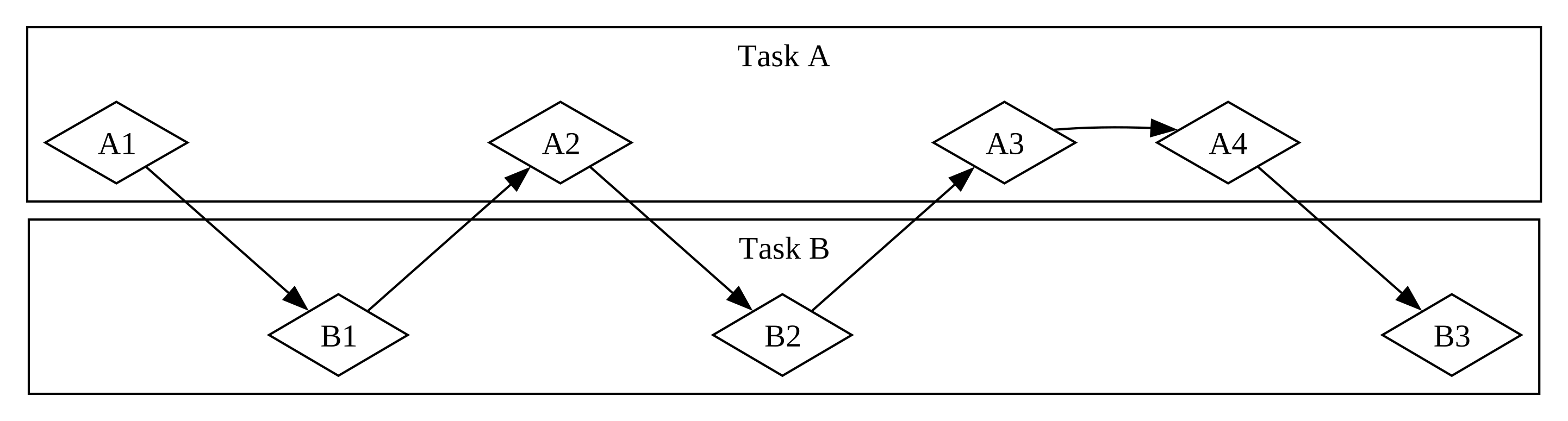
当团队通过让每个成员承担一个任务并独立完成来拆分一组任务时,这就是 并行。团队中的每个人都可以同时取得进展(见图 17-2)。
When the team splits up a group of tasks by having each member take one task and work on it alone, this is parallelism. Each person on the team can make progress at the exact same time (see Figure 17-2).
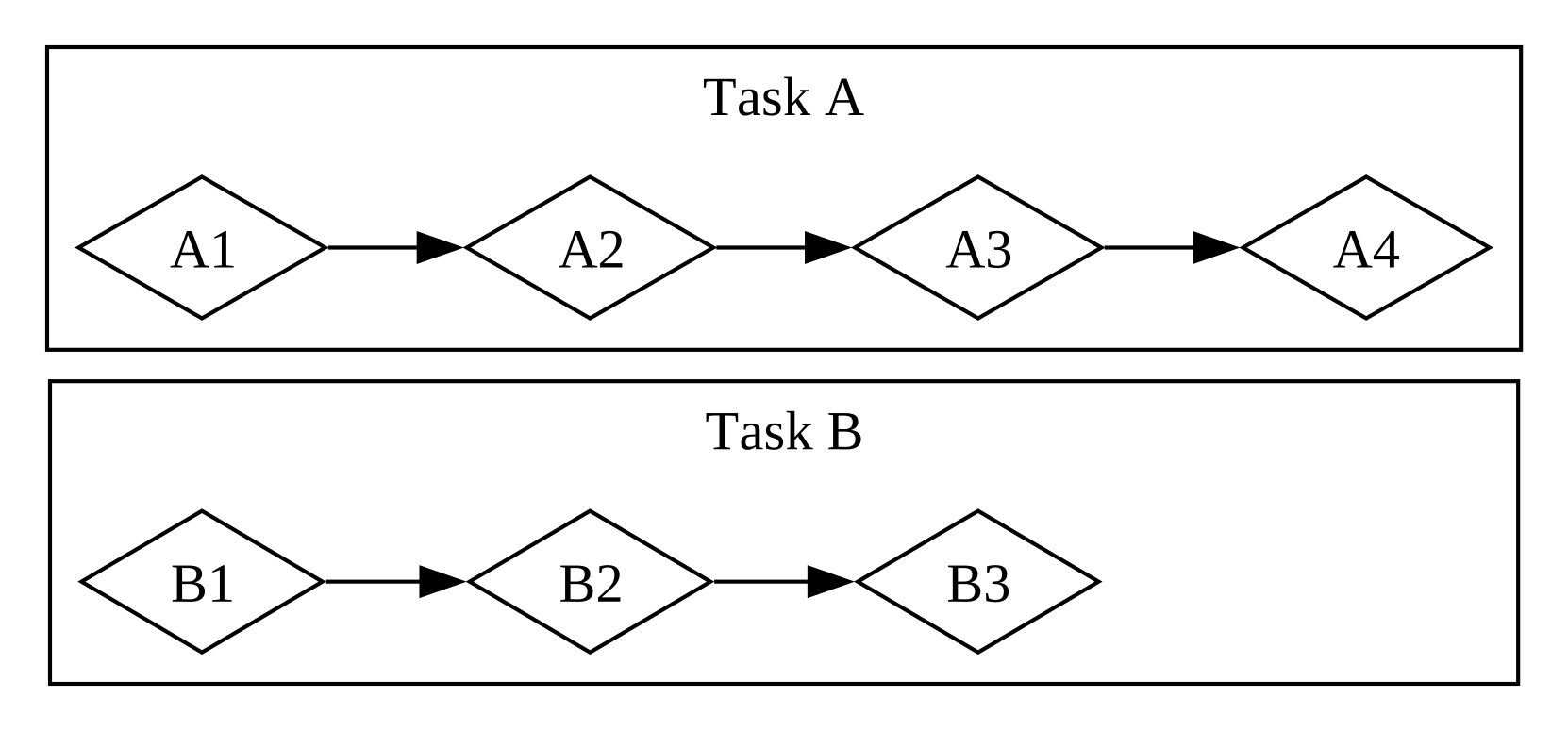
在这两种工作流中,你可能都需要在不同任务之间进行协调。也许你认为分配给一个人的任务完全独立于其他人的工作,但它实际上需要团队中的另一个人先完成他们的任务。有些工作可以并行完成,但有些工作实际上是 串行 的:它们只能按顺序发生,一个任务接着一个任务,如图 17-3 所示。
In both of these workflows, you might have to coordinate between different tasks. Maybe you thought the task assigned to one person was totally independent from everyone else’s work, but it actually requires another person on the team to finish their task first. Some of the work could be done in parallel, but some of it was actually serial: it could only happen in a series, one task after the other, as in Figure 17-3.
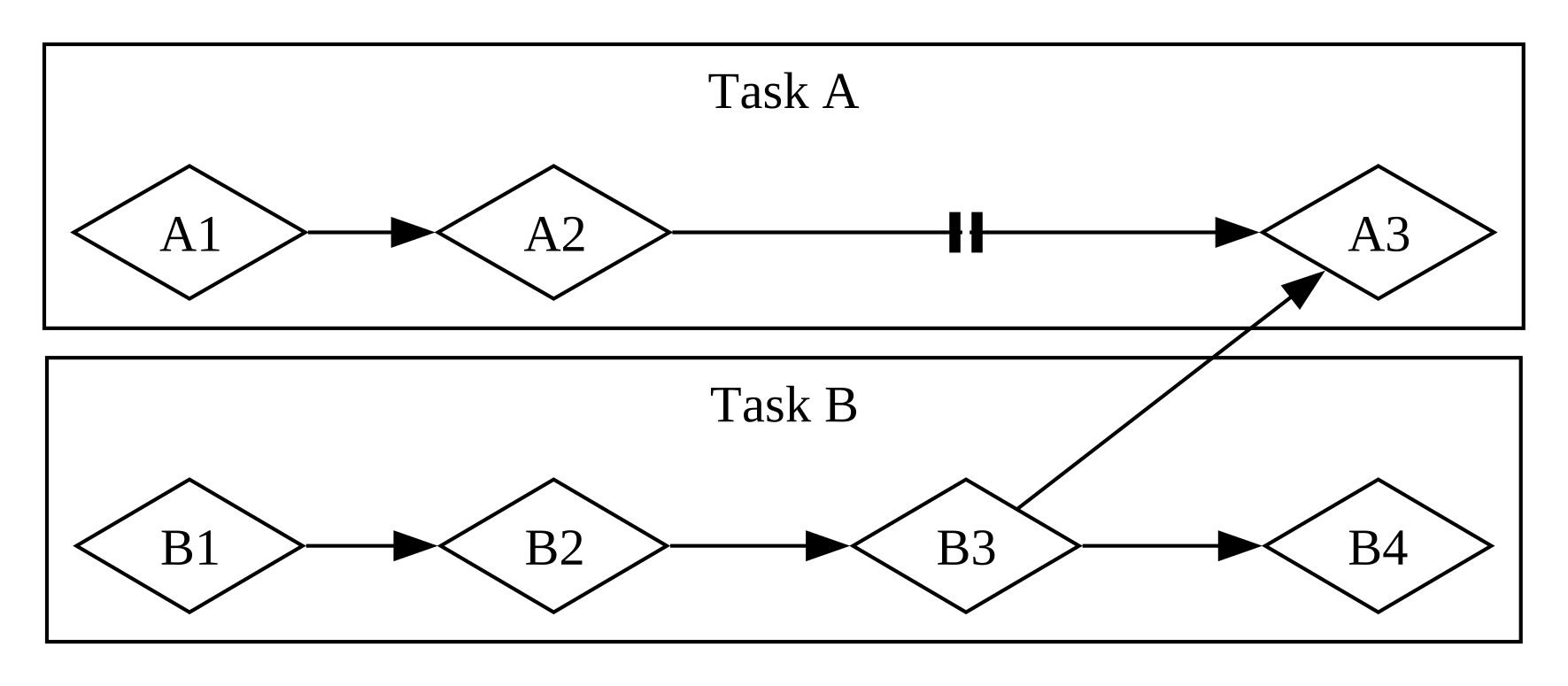
同样,你可能会意识到自己的一个任务取决于另一个任务。现在你的并发工作也变成了串行的。
Likewise, you might realize that one of your own tasks depends on another of your tasks. Now your concurrent work has also become serial.
并行和并发也可以相互交织。如果你得知一位同事在你完成你的一个任务之前一直处于卡住状态,你可能会将所有精力集中在该任务上以“解救”你的同事。你和你的同事不再能够并行工作,你也不再能够并发处理你自己的任务。
Parallelism and concurrency can intersect with each other, too. If you learn that a colleague is stuck until you finish one of your tasks, you’ll probably focus all your efforts on that task to “unblock” your colleague. You and your coworker are no longer able to work in parallel, and you’re also no longer able to work concurrently on your own tasks.
同样的动态在软件和硬件中也在发挥作用。在单核 CPU 的机器上,CPU 一次只能执行一个操作,但它仍然可以并发工作。利用线程、进程和异步等工具,计算机可以暂停一个活动并切换到其他活动,最后再循环回到第一个活动。在多核 CPU 的机器上,它也可以并行工作。一个核心可以执行一项任务,而另一个核心执行一项完全无关的任务,这些操作实际上是同时发生的。
The same basic dynamics come into play with software and hardware. On a machine with a single CPU core, the CPU can perform only one operation at a time, but it can still work concurrently. Using tools such as threads, processes, and async, the computer can pause one activity and switch to others before eventually cycling back to that first activity again. On a machine with multiple CPU cores, it can also do work in parallel. One core can be performing one task while another core performs a completely unrelated one, and those operations actually happen at the same time.
在 Rust 中运行异步代码通常是以并发方式发生的。根据硬件、操作系统和我们正在使用的异步运行时(稍后会详细介绍异步运行时)的不同,这种并发在底层也可能使用并行。
Running async code in Rust usually happens concurrently. Depending on the hardware, the operating system, and the async runtime we are using (more on async runtimes shortly), that concurrency may also use parallelism under the hood.
现在,让我们深入了解 Rust 中的异步编程实际上是如何工作的。
Now, let’s dive into how async programming in Rust actually works.
Future 和 Async 语法
Futures 和异步语法
Futures and the Async Syntax
Rust 异步编程的关键要素是 futures 以及 Rust 的 async 和 await 关键字。
The key elements of asynchronous programming in Rust are futures and Rust’s
async and await keywords.
一个 future 是一个目前可能还没有准备好,但在未来的某个时间点会准备好的值。(同样的概念出现在许多语言中,有时使用其他名称,如 task 或 promise。)Rust 提供了一个 Future trait 作为构建块,以便不同的异步操作可以用不同的数据结构实现,但拥有共同的接口。在 Rust 中,futures 是实现了 Future trait 的类型。每个 future 都持有其自身的关于已取得进展的信息,以及“就绪”(ready)意味着什么。
A future is a value that may not be ready now but will become ready at some
point in the future. (This same concept shows up in many languages, sometimes
under other names such as task or promise.) Rust provides a Future trait
as a building block so that different async operations can be implemented with
different data structures but with a common interface. In Rust, futures are
types that implement the Future trait. Each future holds its own information
about the progress that has been made and what “ready” means.
你可以将 async 关键字应用于代码块和函数,以指定它们可以被中断和恢复。在异步块(async block)或异步函数(async function)中,你可以使用 await 关键字来 等待一个 future(即等待它变得就绪)。在异步块或函数中等待 future 的任何一点都是该块或函数暂停和恢复的潜在位置。向 future 检查其值是否已可用的过程称为 轮询(polling)。
You can apply the async keyword to blocks and functions to specify that they
can be interrupted and resumed. Within an async block or async function, you
can use the await keyword to await a future (that is, wait for it to become
ready). Any point where you await a future within an async block or function is
a potential spot for that block or function to pause and resume. The process of
checking with a future to see if its value is available yet is called polling.
其他一些语言(如 C# 和 JavaScript)也使用 async 和 await 关键字进行异步编程。如果你熟悉这些语言,你可能会注意到 Rust 处理语法的方式有一些显著差异。这是有充分理由的,正如我们将看到的!
Some other languages, such as C# and JavaScript, also use async and await
keywords for async programming. If you’re familiar with those languages, you
may notice some significant differences in how Rust handles the syntax. That’s
for good reason, as we’ll see!
在编写异步 Rust 时,我们大部分时间都使用 async 和 await 关键字。Rust 将它们编译成使用 Future trait 的等效代码,就像它将 for 循环编译成使用 Iterator trait 的等效代码一样。不过,因为 Rust 提供了 Future trait,所以在需要时你也可以为自己的数据类型实现它。我们在本章中看到的许多函数都会返回具有其自身 Future 实现的类型。我们将在本章末尾回到该 trait 的定义,并深入研究它的工作原理,但这足以让我们继续前进。
When writing async Rust, we use the async and await keywords most of the
time. Rust compiles them into equivalent code using the Future trait, much as
it compiles for loops into equivalent code using the Iterator trait.
Because Rust provides the Future trait, though, you can also implement it for
your own data types when you need to. Many of the functions we’ll see
throughout this chapter return types with their own implementations of
Future. We’ll return to the definition of the trait at the end of the chapter
and dig into more of how it works, but this is enough detail to keep us moving
forward.
这一切可能感觉有点抽象,所以让我们编写第一个异步程序:一个小型的网页爬虫。我们将从命令行传入两个 URL,并发获取它们,并返回其中最先完成的那个的结果。这个示例将会有相当多新语法,但别担心——我们会在进行过程中解释你需要知道的一切。
This may all feel a bit abstract, so let’s write our first async program: a little web scraper. We’ll pass in two URLs from the command line, fetch both of them concurrently, and return the result of whichever one finishes first. This example will have a fair bit of new syntax, but don’t worry—we’ll explain everything you need to know as we go.
我们的第一个异步程序
Our First Async Program
为了将本章的重点放在学习异步而不是应付生态系统的各个部分上,我们创建了 trpl crate(trpl 是“The Rust Programming Language”的缩写)。它重新导出了你将需要的所有类型、trait 和函数,主要来自 futures 和 tokio crate。futures crate 是 Rust 异步代码实验的官方大本营,实际上 Future trait 最初就是在那里设计的。Tokio 是目前 Rust 中使用最广泛的异步运行时,尤其是对于 Web 应用程序。市面上还有其他出色的运行时,它们可能更适合你的目的。我们在 trpl 的底层使用了 tokio crate,因为它经过了充分的测试且使用广泛。
To keep the focus of this chapter on learning async rather than juggling parts
of the ecosystem, we’ve created the trpl crate (trpl is short for “The Rust
Programming Language”). It re-exports all the types, traits, and functions
you’ll need, primarily from the futures and
tokio crates. The futures crate is an official home
for Rust experimentation for async code, and it’s actually where the Future
trait was originally designed. Tokio is the most widely used async runtime in
Rust today, especially for web applications. There are other great runtimes out
there, and they may be more suitable for your purposes. We use the tokio
crate under the hood for trpl because it’s well tested and widely used.
在某些情况下,trpl 还会重命名或包装原始 API,以使你专注于本章相关的细节。如果你想了解这个 crate 的作用,我们鼓励你查看 它的源代码。你将能够看到每个重新导出是来自哪个 crate 的,并且我们留下了大量的注释来解释这个 crate 的作用。
In some cases, trpl also renames or wraps the original APIs to keep you
focused on the details relevant to this chapter. If you want to understand what
the crate does, we encourage you to check out its source code.
You’ll be able to see what crate each re-export comes from, and we’ve left
extensive comments explaining what the crate does.
创建一个名为 hello-async 的新二进制项目,并将 trpl crate 添加为依赖项:
Create a new binary project named hello-async and add the trpl crate as a
dependency:
$ cargo new hello-async
$ cd hello-async
$ cargo add trpl
现在我们可以使用 trpl 提供的各种组件来编写我们的第一个异步程序。我们将构建一个小型的命令行工具,它可以获取两个网页,从每个网页中提取 <title> 元素,并打印出最先完成整个过程的页面的标题。
Now we can use the various pieces provided by trpl to write our first async
program. We’ll build a little command line tool that fetches two web pages,
pulls the <title> element from each, and prints out the title of whichever
page finishes that whole process first.
定义 page_title 函数
Defining the page_title Function
让我们从编写一个函数开始,它将一个页面 URL 作为参数,向其发起请求,并返回 <title> 元素的文本(见示例 17-1)。
Let’s start by writing a function that takes one page URL as a parameter, makes
a request to it, and returns the text of the <title> element (see Listing
17-1).
extern crate trpl; // required for mdbook test
fn main() {
// TODO: we'll add this next!
}
use trpl::Html;
async fn page_title(url: &str) -> Option<String> {
let response = trpl::get(url).await;
let response_text = response.text().await;
Html::parse(&response_text)
.select_first("title")
.map(|title| title.inner_html())
}首先,我们定义一个名为 page_title 的函数,并用 async 关键字标记它。然后我们使用 trpl::get 函数来获取传入的任何 URL,并添加 await 关键字来等待响应(response)。为了获取 response 的文本,我们调用它的 text 方法,并再次使用 await 关键字等待它。这两个步骤都是异步的。对于 get 函数,我们必须等待服务器发回其响应的第一部分,其中将包括 HTTP 标头、cookie 等,这些可以与响应体分开交付。特别是如果正文非常大,它可能需要一些时间才能全部到达。因为我们必须等待 整个 响应到达,所以 text 方法也是异步的。
First, we define a function named page_title and mark it with the async
keyword. Then we use the trpl::get function to fetch whatever URL is passed
in and add the await keyword to await the response. To get the text of the
response, we call its text method and once again await it with the await
keyword. Both of these steps are asynchronous. For the get function, we have
to wait for the server to send back the first part of its response, which will
include HTTP headers, cookies, and so on and can be delivered separately from
the response body. Especially if the body is very large, it can take some time
for it all to arrive. Because we have to wait for the entirety of the
response to arrive, the text method is also async.
我们必须显式地等待这两个 future,因为 Rust 中的 future 是 惰性(lazy)的:在你就 await 关键字要求它们之前,它们什么都不做。(事实上,如果你不使用 future,Rust 会显示编译器警告。)这可能会让你想起第 13 章 “使用迭代器处理项序列” 一节中关于迭代器的讨论。除非你调用迭代器的 next 方法——无论是直接调用,还是通过使用 for 循环或 map 等底层使用 next 的方法——否则迭代器什么也不做。同样,除非你显式地要求,否则 future 什么也不做。这种惰性允许 Rust 避免运行直到真正需要的异步代码。
We have to explicitly await both of these futures, because futures in Rust are
lazy: they don’t do anything until you ask them to with the await keyword.
(In fact, Rust will show a compiler warning if you don’t use a future.) This
might remind you of the discussion of iterators in the “Processing a Series of
Items with Iterators” section in Chapter 13.
Iterators do nothing unless you call their next method—whether directly or by
using for loops or methods such as map that use next under the hood.
Likewise, futures do nothing unless you explicitly ask them to. This laziness
allows Rust to avoid running async code until it’s actually needed.
注意:这与我们在第 16 章 “使用 spawn 创建新线程” 一节中看到的
thread::spawn的行为不同,在那里我们传递给另一个线程的闭包会立即开始运行。这也与许多其他语言处理异步的方式不同。但正如迭代器一样,这对于 Rust 能够提供其性能保证至关重要。
Note: This is different from the behavior we saw when using
thread::spawnin the “Creating a New Thread with spawn” section in Chapter 16, where the closure we passed to another thread started running immediately. It’s also different from how many other languages approach async. But it’s important for Rust to be able to provide its performance guarantees, just as it is with iterators.
一旦我们有了 response_text,我们就可以使用 Html::parse 将其解析为 Html 类型的实例。我们现在有了一个可以用来将 HTML 处理为更丰富的数据结构的数据类型,而不是原始字符串。特别地,我们可以使用 select_first 方法来查找给定 CSS 选择器的第一个实例。通过传入字符串 "title",我们将获得文档中的第一个 <title> 元素(如果有的话)。因为可能没有任何匹配的元素,所以 select_first 返回一个 Option<ElementRef>。最后,我们使用 Option::map 方法,它允许我们在 Option 中的项存在时处理它,在不存在时什么也不做。(我们也可以在这里使用 match 表达式,但 map 更符合习惯。)在我们提供给 map 的函数体中,我们在 title 上调用 inner_html 以获取其内容,这是一个 String。说到底,我们得到了一个 Option<String>。
Once we have response_text, we can parse it into an instance of the Html
type using Html::parse. Instead of a raw string, we now have a data type we
can use to work with the HTML as a richer data structure. In particular, we can
use the select_first method to find the first instance of a given CSS
selector. By passing the string "title", we’ll get the first <title>
element in the document, if there is one. Because there may not be any matching
element, select_first returns an Option<ElementRef>. Finally, we use the
Option::map method, which lets us work with the item in the Option if it’s
present, and do nothing if it isn’t. (We could also use a match expression
here, but map is more idiomatic.) In the body of the function we supply to
map, we call inner_html on the title to get its content, which is a
String. When all is said and done, we have an Option<String>.
注意 Rust 的 await 关键字出现在你正在等待的表达式 之后,而不是之前。也就是说,它是一个 后缀(postfix)关键字。如果你在其他语言中使用过 async,这可能与你习惯的做法不同,但在 Rust 中,这使得链式方法调用处理起来更加美观。因此,我们可以更改 page_title 的函数体,将 trpl::get 和 text 函数调用链接在一起,并在它们之间使用 await,如示例 17-2 所示。
Notice that Rust’s await keyword goes after the expression you’re awaiting,
not before it. That is, it’s a postfix keyword. This may differ from what
you’re used to if you’ve used async in other languages, but in Rust it makes
chains of methods much nicer to work with. As a result, we could change the
body of page_title to chain the trpl::get and text function calls
together with await between them, as shown in Listing 17-2.
extern crate trpl; // required for mdbook test
use trpl::Html;
fn main() {
// TODO: we'll add this next!
}
async fn page_title(url: &str) -> Option<String> {
let response_text = trpl::get(url).await.text().await;
Html::parse(&response_text)
.select_first("title")
.map(|title| title.inner_html())
}至此,我们已经成功编写了第一个异步函数!在我们在 main 中添加代码来调用它之前,让我们再多谈谈我们所写的内容及其含义。
With that, we have successfully written our first async function! Before we add
some code in main to call it, let’s talk a little more about what we’ve
written and what it means.
当 Rust 看到一个被标记为 async 关键字的 代码块 时,它会将其编译成一个实现了 Future trait 的唯一的、匿名的数据类型。当 Rust 看到一个标记为 async 的 函数 时,它会将其编译成一个非异步函数,其主体是一个异步块。异步函数的返回类型是编译器为该异步块创建的匿名数据类型的类型。
When Rust sees a block marked with the async keyword, it compiles it into a
unique, anonymous data type that implements the Future trait. When Rust sees
a function marked with async, it compiles it into a non-async function
whose body is an async block. An async function’s return type is the type of
the anonymous data type the compiler creates for that async block.
因此,编写 async fn 相当于编写一个返回返回类型 future 的函数。对于编译器来说,像示例 17-1 中的 async fn page_title 这样的函数定义大致相当于这样定义的非异步函数:
Thus, writing async fn is equivalent to writing a function that returns a
future of the return type. To the compiler, a function definition such as the
async fn page_title in Listing 17-1 is roughly equivalent to a non-async
function defined like this:
#![allow(unused)]
fn main() {
extern crate trpl; // required for mdbook test
use std::future::Future;
use trpl::Html;
fn page_title(url: &str) -> impl Future<Output = Option<String>> {
async move {
let text = trpl::get(url).await.text().await;
Html::parse(&text)
.select_first("title")
.map(|title| title.inner_html())
}
}
}让我们逐一分析转换后的各个部分:
Let’s walk through each part of the transformed version:
-
它使用了我们在第 10 章 “Trait 作为参数” 一节中讨论过的
impl Trait语法。 -
返回值实现了带有关联类型
Output的Futuretrait。请注意,Output类型是Option<String>,这与page_title的async fn版本中原始返回类型相同。 -
在原函数体中调用的所有代码都被包装在一个
async move块中。记住,代码块是表达式。这整个块就是从函数返回的表达式。 -
就像刚才描述的那样,这个异步块产生一个类型为
Option<String>的值。该值与返回类型中的Output类型相匹配。这和你见过的其他代码块一样。 -
新的函数体是一个
async move块,这是因为它使用了url参数的方式。(本章稍后我们将更详细地讨论async与async move的对比。) -
It uses the
impl Traitsyntax we discussed back in Chapter 10 in the “Traits as Parameters” section. -
The returned value implements the
Futuretrait with an associated type ofOutput. Notice that theOutputtype isOption<String>, which is the same as the original return type from theasync fnversion ofpage_title. -
All of the code called in the body of the original function is wrapped in an
async moveblock. Remember that blocks are expressions. This whole block is the expression returned from the function. -
This async block produces a value with the type
Option<String>, as just described. That value matches theOutputtype in the return type. This is just like other blocks you have seen. -
The new function body is an
async moveblock because of how it uses theurlparameter. (We’ll talk much more aboutasyncversusasync movelater in the chapter.)
现在我们可以在 main 中调用 page_title 了。
Now we can call page_title in main.
使用运行时执行异步函数
Executing an Async Function with a Runtime
首先,我们将获取单个页面的标题,如示例 17-3 所示。不幸的是,这段代码目前还无法编译。
To start, we’ll get the title for a single page, shown in Listing 17-3. Unfortunately, this code doesn’t compile yet.
extern crate trpl; // required for mdbook test
use trpl::Html;
async fn main() {
let args: Vec<String> = std::env::args().collect();
let url = &args[1];
match page_title(url).await {
Some(title) => println!("The title for {url} was {title}"),
None => println!("{url} had no title"),
}
}
async fn page_title(url: &str) -> Option<String> {
let response_text = trpl::get(url).await.text().await;
Html::parse(&response_text)
.select_first("title")
.map(|title| title.inner_html())
}我们遵循第 12 章 “接受命令行参数” 一节中获取命令行参数的相同模式。然后我们将 URL 参数传递给 page_title 并等待(await)结果。因为 future 产生的值是一个 Option<String>,所以我们使用 match 表达式根据页面是否有 <title> 来打印不同的消息。
We follow the same pattern we used to get command line arguments in the
“Accepting Command Line Arguments” section in
Chapter 12. Then we pass the URL argument to page_title and await the result.
Because the value produced by the future is an Option<String>, we use a
match expression to print different messages to account for whether the page
had a <title>.
我们唯一可以使用 await 关键字的地方是在异步函数或代码块中,而 Rust 不允许我们将特殊的 main 函数标记为 async。
The only place we can use the await keyword is in async functions or blocks,
and Rust won’t let us mark the special main function as async.
error[E0752]: `main` function is not allowed to be `async`
--> src/main.rs:6:1
|
6 | async fn main() {
| ^^^^^^^^^^^^^^^ `main` function is not allowed to be `async`
main 不能被标记为 async 的原因是异步代码需要一个 运行时(runtime):一个管理异步代码执行细节的 Rust crate。程序的 main 函数可以 初始化 一个运行时,但它 本身 不是一个运行时。(稍后我们将看到更多关于为什么会出现这种情况的原因。)每个执行异步代码的 Rust 程序都至少有一个设置运行异步 future 的运行时的位置。
The reason main can’t be marked async is that async code needs a runtime:
a Rust crate that manages the details of executing asynchronous code. A
program’s main function can initialize a runtime, but it’s not a runtime
itself. (We’ll see more about why this is the case in a bit.) Every Rust
program that executes async code has at least one place where it sets up a
runtime that executes the futures.
大多数支持异步的语言都捆绑了一个运行时,但 Rust 没有。相反,有许多不同的异步运行时可用,每个运行时都针对其目标用例做出了不同的权衡。例如,一个具有多个 CPU 核心和大量 RAM 的高吞吐量 Web 服务器的需求,与一个具有单核心、少量 RAM 且没有堆分配能力的微控制器的需求非常不同。提供这些运行时的 crate 通常还提供常用功能(如文件或网络 I/O)的异步版本。
Most languages that support async bundle a runtime, but Rust does not. Instead, there are many different async runtimes available, each of which makes different tradeoffs suitable to the use case it targets. For example, a high-throughput web server with many CPU cores and a large amount of RAM has very different needs than a microcontroller with a single core, a small amount of RAM, and no heap allocation ability. The crates that provide those runtimes also often supply async versions of common functionality such as file or network I/O.
在这里以及本章的其余部分,我们将使用 trpl crate 中的 block_on 函数,它接收一个 future 作为参数,并阻塞当前线程直到该 future 运行完成。在幕后,调用 block_on 会使用 tokio crate 设置一个运行时,该运行时用于运行传入的 future(trpl crate 的 block_on 行为与其他运行时 crate 的 block_on 函数类似)。一旦 future 完成,block_on 就会返回 future 产生的任何值。
Here, and throughout the rest of this chapter, we’ll use the block_on
function from the trpl crate, which takes a future as an argument and blocks
the current thread until this future runs to completion. Behind the scenes,
calling block_on sets up a runtime using the tokio crate that’s used to run
the future passed in (the trpl crate’s block_on behavior is similar to
other runtime crates’ block_on functions). Once the future completes,
block_on returns whatever value the future produced.
我们可以将 page_title 返回的 future 直接传递给 block_on,一旦它完成,我们就可以像示例 17-3 中尝试做的那样,对结果 Option<String> 进行匹配。然而,对于本章中的大多数示例(以及现实世界中的大多数异步代码),我们将做的不仅仅是一个异步函数调用,因此我们将传递一个 async 块并显式地等待 page_title 调用的结果,如示例 17-4 所示。
We could pass the future returned by page_title directly to block_on and,
once it completed, we could match on the resulting Option<String> as we tried
to do in Listing 17-3. However, for most of the examples in the chapter (and
most async code in the real world), we’ll be doing more than just one async
function call, so instead we’ll pass an async block and explicitly await the
result of the page_title call, as in Listing 17-4.
extern crate trpl; // required for mdbook test
use trpl::Html;
fn main() {
let args: Vec<String> = std::env::args().collect();
trpl::block_on(async {
let url = &args[1];
match page_title(url).await {
Some(title) => println!("The title for {url} was {title}"),
None => println!("{url} had no title"),
}
})
}
async fn page_title(url: &str) -> Option<String> {
let response_text = trpl::get(url).await.text().await;
Html::parse(&response_text)
.select_first("title")
.map(|title| title.inner_html())
}当我们运行这段代码时,我们得到了最初预期的行为:
When we run this code, we get the behavior we expected initially:
$ cargo run -- "https://www.rust-lang.org"
Finished `dev` profile [unoptimized + debuginfo] target(s) in 0.05s
Running `target/debug/async_await 'https://www.rust-lang.org'`
The title for https://www.rust-lang.org was
Rust Programming Language
呼——我们终于有了一些可以工作的异步代码!但在我们添加让两个网站相互竞争的代码之前,让我们简要地将注意力转回到 future 的工作原理上。
Phew—we finally have some working async code! But before we add the code to race two sites against each other, let’s briefly turn our attention back to how futures work.
每个 等待点(await point)——即代码使用 await 关键字的每个地方——都代表一个将控制权交回运行时的位置。为了使其工作,Rust 需要跟踪异步块中涉及的状态,以便运行时可以启动一些其他工作,然后在准备好再次尝试推进第一个工作时返回。这是一个无形的状态机,就好像你写了一个像这样的枚举来保存每个等待点的当前状态:
Each await point—that is, every place where the code uses the await
keyword—represents a place where control is handed back to the runtime. To make
that work, Rust needs to keep track of the state involved in the async block so
that the runtime could kick off some other work and then come back when it’s
ready to try advancing the first one again. This is an invisible state machine,
as if you’d written an enum like this to save the current state at each await
point:
#![allow(unused)]
fn main() {
extern crate trpl; // required for mdbook test
enum PageTitleFuture<'a> {
Initial { url: &'a str },
GetAwaitPoint { url: &'a str },
TextAwaitPoint { response: trpl::Response },
}
}然而,手动编写在每个状态之间转换的代码会非常乏味且容易出错,尤其是当你以后需要向代码添加更多功能和更多状态时。幸运的是,Rust 编译器会自动为异步代码创建和管理状态机数据结构。围绕数据结构的普通借用和所有权规则仍然适用,令人高兴的是,编译器还会为我们处理这些检查并提供有用的错误消息。我们将在本章稍后部分处理其中一些错误。
Writing the code to transition between each state by hand would be tedious and error-prone, however, especially when you need to add more functionality and more states to the code later. Fortunately, the Rust compiler creates and manages the state machine data structures for async code automatically. The normal borrowing and ownership rules around data structures all still apply, and happily, the compiler also handles checking those for us and provides useful error messages. We’ll work through a few of those later in the chapter.
最终,必须有某种东西来执行这个状态机,而那个东西就是运行时。(这就是为什么在研究运行时时你可能会遇到 执行器 [executors] 的说法:执行器是运行时中负责执行异步代码的部分。)
Ultimately, something has to execute this state machine, and that something is a runtime. (This is why you may come across mentions of executors when looking into runtimes: an executor is the part of a runtime responsible for executing the async code.)
现在你可以明白为什么编译器在示例 17-3 中阻止我们将 main 本身变成异步函数了。如果 main 是一个异步函数,那么就需要其他东西来管理 main 返回的任何 future 的状态机,但 main 是程序的起点!相反,我们在 main 中调用了 trpl::block_on 函数来设置运行时并运行 async 块返回的 future,直到它完成。
Now you can see why the compiler stopped us from making main itself an async
function back in Listing 17-3. If main were an async function, something else
would need to manage the state machine for whatever future main returned, but
main is the starting point for the program! Instead, we called the
trpl::block_on function in main to set up a runtime and run the future
returned by the async block until it’s done.
注意:一些运行时提供了宏,因此你 可以 编写一个异步
main函数。这些宏将async fn main() { ... }重写为普通的fn main,这与我们在示例 17-4 中手动完成的工作相同:调用一个函数来运行 future 直到其完成,就像trpl::block_on所做的那样。
Note: Some runtimes provide macros so you can write an async
mainfunction. Those macros rewriteasync fn main() { ... }to be a normalfn main, which does the same thing we did by hand in Listing 17-4: call a function that runs a future to completion the waytrpl::block_ondoes.
现在让我们把这些碎片拼接起来,看看我们如何编写并发代码。
Now let’s put these pieces together and see how we can write concurrent code.
并发地竞争两个 URL
Racing Two URLs Against Each Other Concurrently
在示例 17-5 中,我们使用从命令行传入的两个不同 URL 调用 page_title,并通过选择最先完成的那个 future 来让它们竞争。
In Listing 17-5, we call page_title with two different URLs passed in from the
command line and race them by selecting whichever future finishes first.
extern crate trpl; // required for mdbook test
use trpl::{Either, Html};
fn main() {
let args: Vec<String> = std::env::args().collect();
trpl::block_on(async {
let title_fut_1 = page_title(&args[1]);
let title_fut_2 = page_title(&args[2]);
let (url, maybe_title) =
match trpl::select(title_fut_1, title_fut_2).await {
Either::Left(left) => left,
Either::Right(right) => right,
};
println!("{url} returned first");
match maybe_title {
Some(title) => println!("Its page title was: '{title}'"),
None => println!("It had no title."),
}
})
}
async fn page_title(url: &str) -> (&str, Option<String>) {
let response_text = trpl::get(url).await.text().await;
let title = Html::parse(&response_text)
.select_first("title")
.map(|title| title.inner_html());
(url, title)
}我们首先为每个用户提供的 URL 调用 page_title。我们将生成的 future 保存为 title_fut_1 和 title_fut_2。记住,这些目前什么都不做,因为 future 是惰性的,我们还没有等待它们。然后我们将这些 future 传递给 trpl::select,它返回一个值来指示传递给它的哪些 future 最先完成。
We begin by calling page_title for each of the user-supplied URLs. We save
the resulting futures as title_fut_1 and title_fut_2. Remember, these don’t
do anything yet, because futures are lazy and we haven’t yet awaited them. Then
we pass the futures to trpl::select, which returns a value to indicate which
of the futures passed to it finishes first.
注意:在底层,
trpl::select是建立在futurescrate 中定义的更通用的select函数之上的。futurescrate 的select函数可以做很多trpl::select函数做不到的事情,但它也有一些额外的复杂性,我们现在可以略过。
Note: Under the hood,
trpl::selectis built on a more generalselectfunction defined in thefuturescrate. Thefuturescrate’sselectfunction can do a lot of things that thetrpl::selectfunction can’t, but it also has some additional complexity that we can skip over for now.
任何一个 future 都可以合法地“获胜”,所以返回 Result 没有意义。相反,trpl::select 返回一个我们以前从未见过的类型:trpl::Either。Either 类型在某种程度上类似于 Result,因为它有两种情况。但与 Result 不同的是,Either 中没有成功或失败的概念。相反,它使用 Left 和 Right 来表示“两者择其一”:
Either future can legitimately “win,” so it doesn’t make sense to return a
Result. Instead, trpl::select returns a type we haven’t seen before,
trpl::Either. The Either type is somewhat similar to a Result in that it
has two cases. Unlike Result, though, there is no notion of success or
failure baked into Either. Instead, it uses Left and Right to indicate
“one or the other”:
#![allow(unused)]
fn main() {
enum Either<A, B> {
Left(A),
Right(B),
}
}如果第一个参数获胜,select 函数将返回带有该 future 输出的 Left;如果 那个(第二个)future 参数获胜,则返回带有第二个 future 输出的 Right。这与调用函数时参数出现的顺序相匹配:第一个参数在第二个参数的左侧。
The select function returns Left with that future’s output if the first
argument wins, and Right with the second future argument’s output if that
one wins. This matches the order the arguments appear in when calling the
function: the first argument is to the left of the second argument.
我们还更新了 page_title 以返回传入的相同 URL。这样,如果最先返回的页面没有我们可以解析的 <title>,我们仍然可以打印出有意义的消息。有了这些可用信息,我们最后通过更新 println! 输出,来指示哪个 URL 最先完成,以及该 URL 处的网页的 <title> 是什么(如果有的话)。
We also update page_title to return the same URL passed in. That way, if the
page that returns first does not have a <title> we can resolve, we can still
print a meaningful message. With that information available, we wrap up by
updating our println! output to indicate both which URL finished first and
what, if any, the <title> is for the web page at that URL.
你现在已经构建了一个小型且可以工作的网页爬虫!挑选几个 URL 并运行这个命令行工具。你可能会发现某些网站总是比其他网站快,而在其他情况下,速度更快的网站随每次运行而变化。更重要的是,你已经学习了使用 future 的基础知识,所以现在我们可以更深入地研究异步的功能。
You have built a small working web scraper now! Pick a couple URLs and run the command line tool. You may discover that some sites are consistently faster than others, while in other cases the faster site varies from run to run. More importantly, you’ve learned the basics of working with futures, so now we can dig deeper into what we can do with async.
使用 Async 应用并发
处理任意数量的 Future
向运行时交出控制权
Yielding Control to the Runtime
回想一下 “我们的第一个异步程序” 一节,在每个等待点(await point),如果正在等待的 future 尚未准备就绪,Rust 都会给运行时一个机会来暂停当前任务并切换到另一个任务。反之亦然:Rust 仅 在等待点暂停异步块并将控制权交回给运行时。等待点之间的所有内容都是同步的。
Recall from the “Our First Async Program” section that at each await point, Rust gives a runtime a chance to pause the task and switch to another one if the future being awaited isn’t ready. The inverse is also true: Rust only pauses async blocks and hands control back to a runtime at an await point. Everything between await points is synchronous.
这意味着如果你在一个没有等待点的异步块中做了一堆工作,那个 future 将会阻塞任何其他 future 取得进展。你有时可能会听到这被称为一个 future 饿死(starving)了其他 future。在某些情况下,这可能不是什么大问题。但是,如果你正在进行某种昂贵的设置或长时间运行的工作,或者你有一个会无限期地持续执行某个特定任务的 future,你就需要考虑何时以及在哪里将控制权交回给运行时。
That means if you do a bunch of work in an async block without an await point, that future will block any other futures from making progress. You may sometimes hear this referred to as one future starving other futures. In some cases, that may not be a big deal. However, if you are doing some kind of expensive setup or long-running work, or if you have a future that will keep doing some particular task indefinitely, you’ll need to think about when and where to hand control back to the runtime.
让我们模拟一个长时间运行的操作来说明饥饿问题,然后探索如何解决它。示例 17-14 引入了一个 slow 函数。
Let’s simulate a long-running operation to illustrate the starvation problem,
then explore how to solve it. Listing 17-14 introduces a slow function.
extern crate trpl; // required for mdbook test
use std::{thread, time::Duration};
fn main() {
trpl::block_on(async {
// We will call `slow` here later
});
}
fn slow(name: &str, ms: u64) {
thread::sleep(Duration::from_millis(ms));
println!("'{name}' ran for {ms}ms");
}这段代码使用 std::thread::sleep 而不是 trpl::sleep,因此调用 slow 将会阻塞当前线程若干毫秒。我们可以使用 slow 来代表现实世界中既耗时又具有阻塞性的操作。
This code uses std::thread::sleep instead of trpl::sleep so that calling
slow will block the current thread for some number of milliseconds. We can
use slow to stand in for real-world operations that are both long-running and
blocking.
在示例 17-15 中,我们使用 slow 来模仿在一对 future 中执行这种 CPU 密集型工作。
In Listing 17-15, we use slow to emulate doing this kind of CPU-bound work in
a pair of futures.
extern crate trpl; // required for mdbook test
use std::{thread, time::Duration};
fn main() {
trpl::block_on(async {
let a = async {
println!("'a' started.");
slow("a", 30);
slow("a", 10);
slow("a", 20);
trpl::sleep(Duration::from_millis(50)).await;
println!("'a' finished.");
};
let b = async {
println!("'b' started.");
slow("b", 75);
slow("b", 10);
slow("b", 15);
slow("b", 350);
trpl::sleep(Duration::from_millis(50)).await;
println!("'b' finished.");
};
trpl::select(a, b).await;
});
}
fn slow(name: &str, ms: u64) {
thread::sleep(Duration::from_millis(ms));
println!("'{name}' ran for {ms}ms");
}每个 future 仅在执行完一堆慢速操作 之后 才将控制权交回给运行时。如果你运行这段代码,你将看到如下输出:
Each future hands control back to the runtime only after carrying out a bunch of slow operations. If you run this code, you will see this output:
'a' started.
'a' ran for 30ms
'a' ran for 10ms
'a' ran for 20ms
'b' started.
'b' ran for 75ms
'b' ran for 10ms
'b' ran for 15ms
'b' ran for 350ms
'a' finished.
与示例 17-5 中我们使用 trpl::select 来竞争获取两个 URL 的 future 一样,一旦 a 完成,select 就会结束。然而,在这两个 future 中对 slow 的调用之间没有交错。a future 执行其所有工作直到 trpl::sleep 调用被等待(awaited),然后 b future 执行其所有工作直到它自己的 trpl::sleep 调用被等待,最后 a future 完成。为了允许两个 future 在它们的慢速任务之间取得进展,我们需要等待点,以便我们可以将控制权交回给运行时。这意味着我们需要一些我们可以等待的东西!
As with Listing 17-5 where we used trpl::select to race futures fetching two
URLs, select still finishes as soon as a is done. There’s no interleaving
between the calls to slow in the two futures, though. The a future does all
of its work until the trpl::sleep call is awaited, then the b future does
all of its work until its own trpl::sleep call is awaited, and finally the
a future completes. To allow both futures to make progress between their slow
tasks, we need await points so we can hand control back to the runtime. That
means we need something we can await!
我们已经可以在示例 17-15 中看到这种交接的发生:如果我们移除 a future 末尾的 trpl::sleep,它将会在 b future 根本 没有运行的情况下完成。让我们尝试使用 trpl::sleep 函数作为起点,让操作轮流取得进展,如示例 17-16 所示。
We can already see this kind of handoff happening in Listing 17-15: if we
removed the trpl::sleep at the end of the a future, it would complete
without the b future running at all. Let’s try using the trpl::sleep
function as a starting point for letting operations switch off making progress,
as shown in Listing 17-16.
extern crate trpl; // required for mdbook test
use std::{thread, time::Duration};
fn main() {
trpl::block_on(async {
let one_ms = Duration::from_millis(1);
let a = async {
println!("'a' started.");
slow("a", 30);
trpl::sleep(one_ms).await;
slow("a", 10);
trpl::sleep(one_ms).await;
slow("a", 20);
trpl::sleep(one_ms).await;
println!("'a' finished.");
};
let b = async {
println!("'b' started.");
slow("b", 75);
trpl::sleep(one_ms).await;
slow("b", 10);
trpl::sleep(one_ms).await;
slow("b", 15);
trpl::sleep(one_ms).await;
slow("b", 350);
trpl::sleep(one_ms).await;
println!("'b' finished.");
};
trpl::select(a, b).await;
});
}
fn slow(name: &str, ms: u64) {
thread::sleep(Duration::from_millis(ms));
println!("'{name}' ran for {ms}ms");
}我们在每次调用 slow 之间添加了带有等待点的 trpl::sleep 调用。现在两个 future 的工作交错进行了:
We’ve added trpl::sleep calls with await points between each call to slow.
Now the two futures’ work is interleaved:
'a' started.
'a' ran for 30ms
'b' started.
'b' ran for 75ms
'a' ran for 10ms
'b' ran for 10ms
'a' ran for 20ms
'b' ran for 15ms
'a' finished.
由于 a future 在调用 trpl::sleep 之前调用了 slow,所以它仍然运行了一会儿才将控制权交给 b,但之后每当其中一个 future 碰到等待点时,它们就会来回切换。在本例中,我们在每次调用 slow 之后都这样做,但我们可以按照对我们最有意义的任何方式来分解工作。
The a future still runs for a bit before handing off control to b, because
it calls slow before ever calling trpl::sleep, but after that the futures
swap back and forth each time one of them hits an await point. In this case, we
have done that after every call to slow, but we could break up the work in
whatever way makes the most sense to us.
然而,我们在这里并不是真的想要 休眠(sleep):我们想要尽可能快地取得进展。我们只需要将控制权交回给运行时。我们可以直接使用 trpl::yield_now 函数做到这一点。在示例 17-17 中,我们将所有那些 trpl::sleep 调用替换为 trpl::yield_now。
We don’t really want to sleep here, though: we want to make progress as fast
as we can. We just need to hand back control to the runtime. We can do that
directly, using the trpl::yield_now function. In Listing 17-17, we replace
all those trpl::sleep calls with trpl::yield_now.
extern crate trpl; // required for mdbook test
use std::{thread, time::Duration};
fn main() {
trpl::block_on(async {
let a = async {
println!("'a' started.");
slow("a", 30);
trpl::yield_now().await;
slow("a", 10);
trpl::yield_now().await;
slow("a", 20);
trpl::yield_now().await;
println!("'a' finished.");
};
let b = async {
println!("'b' started.");
slow("b", 75);
trpl::yield_now().await;
slow("b", 10);
trpl::yield_now().await;
slow("b", 15);
trpl::yield_now().await;
slow("b", 350);
trpl::yield_now().await;
println!("'b' finished.");
};
trpl::select(a, b).await;
});
}
fn slow(name: &str, ms: u64) {
thread::sleep(Duration::from_millis(ms));
println!("'{name}' ran for {ms}ms");
}这段代码不仅更清楚地表达了实际意图,而且比使用 sleep 快得多,因为像 sleep 所使用的计时器通常在粒度上有限制。例如,我们正在使用的 sleep 版本总是至少休眠一毫秒,即使我们传递给它一纳秒的 Duration。再说一遍,现代计算机是 飞快 的:它们可以在一毫秒内做很多事情!
This code is both clearer about the actual intent and can be significantly
faster than using sleep, because timers such as the one used by sleep often
have limits on how granular they can be. The version of sleep we are using,
for example, will always sleep for at least a millisecond, even if we pass it a
Duration of one nanosecond. Again, modern computers are fast: they can do a
lot in one millisecond!
这意味着异步甚至对计算密集型任务也很有用,这取决于你的程序还在做其他什么事情,因为它提供了一个有用的工具来构建程序不同部分之间的关系(但代价是异步状态机的开销)。这是一种 协作式多任务(cooperative multitasking)的形式,其中每个 future 都有权通过等待点决定何时移交控制权。因此,每个 future 也有责任避免阻塞太长时间。在某些基于 Rust 的嵌入式操作系统中,这是 唯一 的多任务处理方式!
This means that async can be useful even for compute-bound tasks, depending on what else your program is doing, because it provides a useful tool for structuring the relationships between different parts of the program (but at a cost of the overhead of the async state machine). This is a form of cooperative multitasking, where each future has the power to determine when it hands over control via await points. Each future therefore also has the responsibility to avoid blocking for too long. In some Rust-based embedded operating systems, this is the only kind of multitasking!
当然,在现实的代码中,你通常不会在每一行都交替进行函数调用和等待点。虽然以这种方式交出控制权的成本相对较低,但并不是免费的。在许多情况下,尝试分解计算密集型任务可能会使其显著变慢,因此有时为了 整体 性能,让操作短暂阻塞会更好。务必进行测量,看看代码实际的性能瓶颈在哪里。然而,如果你 确实 看到很多你原本预期会并发发生的工作正在串行发生,那么记住底层的动态是很重要的!
In real-world code, you won’t usually be alternating function calls with await points on every single line, of course. While yielding control in this way is relatively inexpensive, it’s not free. In many cases, trying to break up a compute-bound task might make it significantly slower, so sometimes it’s better for overall performance to let an operation block briefly. Always measure to see what your code’s actual performance bottlenecks are. The underlying dynamic is important to keep in mind, though, if you are seeing a lot of work happening in serial that you expected to happen concurrently!
构建我们自己的异步抽象
Building Our Own Async Abstractions
我们还可以将 future 组合在一起以创建新的模式。例如,我们可以利用已有的异步构建块构建一个 timeout 函数。完成后,结果将成为另一个构建块,我们可以使用它来创建更多的异步抽象。
We can also compose futures together to create new patterns. For example, we can
build a timeout function with async building blocks we already have. When
we’re done, the result will be another building block we could use to create
still more async abstractions.
示例 17-18 展示了我们期望这个 timeout 如何与慢速 future 一起工作。
Listing 17-18 shows how we would expect this timeout to work with a slow
future.
extern crate trpl; // required for mdbook test
use std::time::Duration;
fn main() {
trpl::block_on(async {
let slow = async {
trpl::sleep(Duration::from_secs(5)).await;
"Finally finished"
};
match timeout(slow, Duration::from_secs(2)).await {
Ok(message) => println!("Succeeded with '{message}'"),
Err(duration) => {
println!("Failed after {} seconds", duration.as_secs())
}
}
});
}让我们来实现它!首先,让我们考虑 timeout 的 API:
Let’s implement this! To begin, let’s think about the API for timeout:
-
它本身需要是一个异步函数,以便我们可以等待它。
-
它的第一个参数应该是要运行的 future。我们可以使其泛型化,以便让它适用于任何 future。
-
它的第二个参数将是等待的最长时间。如果我们使用
Duration,那将很容易传递给trpl::sleep。 -
它应该返回一个
Result。如果 future 成功完成,Result将是Ok且带有 future 产生的值。如果超时先到期,Result将是Err且带有超时等待的持续时间。 -
It needs to be an async function itself so we can await it.
-
Its first parameter should be a future to run. We can make it generic to allow it to work with any future.
-
Its second parameter will be the maximum time to wait. If we use a
Duration, that will make it easy to pass along totrpl::sleep. -
It should return a
Result. If the future completes successfully, theResultwill beOkwith the value produced by the future. If the timeout elapses first, theResultwill beErrwith the duration that the timeout waited for.
示例 17-19 展示了这一声明。
Listing 17-19 shows this declaration.
extern crate trpl; // required for mdbook test
use std::time::Duration;
fn main() {
trpl::block_on(async {
let slow = async {
trpl::sleep(Duration::from_secs(5)).await;
"Finally finished"
};
match timeout(slow, Duration::from_secs(2)).await {
Ok(message) => println!("Succeeded with '{message}'"),
Err(duration) => {
println!("Failed after {} seconds", duration.as_secs())
}
}
});
}
async fn timeout<F: Future>(
future_to_try: F,
max_time: Duration,
) -> Result<F::Output, Duration> {
// Here is where our implementation will go!
}这满足了我们对类型的目标。现在让我们考虑我们需要的 行为:我们想要让传入的 future 与持续时间进行竞争。我们可以使用 trpl::sleep 从持续时间创建一个计时器 future,并使用 trpl::select 将该计时器与调用者传入的 future 一起运行。
That satisfies our goals for the types. Now let’s think about the behavior we
need: we want to race the future passed in against the duration. We can use
trpl::sleep to make a timer future from the duration, and use trpl::select
to run that timer with the future the caller passes in.
在示例 17-20 中,我们通过对等待 trpl::select 的结果进行匹配来实现 timeout。
In Listing 17-20, we implement timeout by matching on the result of awaiting
trpl::select.
extern crate trpl; // required for mdbook test
use std::time::Duration;
use trpl::Either;
// --snip--
fn main() {
trpl::block_on(async {
let slow = async {
trpl::sleep(Duration::from_secs(5)).await;
"Finally finished"
};
match timeout(slow, Duration::from_secs(2)).await {
Ok(message) => println!("Succeeded with '{message}'"),
Err(duration) => {
println!("Failed after {} seconds", duration.as_secs())
}
}
});
}
async fn timeout<F: Future>(
future_to_try: F,
max_time: Duration,
) -> Result<F::Output, Duration> {
match trpl::select(future_to_try, trpl::sleep(max_time)).await {
Either::Left(output) => Ok(output),
Either::Right(_) => Err(max_time),
}
}trpl::select 的实现是不公平的:它总是按照参数传入的顺序轮询它们(其他 select 实现会随机选择先轮询哪个参数)。因此,我们首先将 future_to_try 传递给 select,这样即使 max_time 是非常短的持续时间,它也有机会完成。如果 future_to_try 最先完成,select 将返回带有来自 future_to_try 输出的 Left。如果 timer 最先完成,select 将返回带有计时器输出 () 的 Right。
The implementation of trpl::select is not fair: it always polls arguments in
the order in which they are passed (other select implementations will
randomly choose which argument to poll first). Thus, we pass future_to_try to
select first so it gets a chance to complete even if max_time is a very
short duration. If future_to_try finishes first, select will resolve to Left
with the output from future_to_try. If timer finishes first, select will
resolve to Right with the timer’s output of ().
如果 future_to_try 成功并且我们得到了一个 Left(output),我们返回 Ok(output)。如果休眠计时器先到期且我们得到了一个 Right(()),我们就用 _ 忽略 (),转而返回 Err(max_time)。
If the future_to_try succeeds and we get a Left(output), we return
Ok(output). If the sleep timer elapses instead and we get a Right(()), we
ignore the () with _ and return Err(max_time) instead.
至此,我们有了一个由另外两个异步助手构建而成的、可以工作的 timeout。如果我们运行代码,它将在超时后打印出失败模式:
With that, we have a working timeout built out of two other async helpers. If
we run our code, it will print the failure mode after the timeout:
Failed after 2 seconds
因为 future 可以与其他 future 组合,所以你可以使用更小的异步构建块构建非常强大的工具。例如,你可以使用相同的方法将超时与重试结合起来,然后再将其与网络调用(如示例 17-5 中的那些)等操作结合使用。
Because futures compose with other futures, you can build really powerful tools using smaller async building blocks. For example, you can use this same approach to combine timeouts with retries, and in turn use those with operations such as network calls (such as those in Listing 17-5).
在实践中,你通常会直接使用 async 和 await,其次是使用 select 这种函数和 join! 这种宏来控制最外层 future 的执行方式。
In practice, you’ll usually work directly with async and await, and
secondarily with functions such as select and macros such as the join!
macro to control how the outermost futures are executed.
我们现在已经看到了几种同时处理多个 future 的方法。接下来,我们将通过 streams 看看如何随时间处理一系列的 future。
We’ve now seen a number of ways to work with multiple futures at the same time. Up next, we’ll look at how we can work with multiple futures in a sequence over time with streams.
Stream:序列化的 Future
Streams:顺序运行的 Future
Streams: Futures in Sequence
回想一下我们在本章前面的 “消息传递” 一节中是如何使用异步通道接收者的。异步 recv 方法会随着时间的推移产生一系列项。这是一个更通用的模式——流(stream)的一个实例。许多概念都可以自然地表示为流:队列中变得可用的项、当完整数据集太大而无法放入计算机内存时从文件系统中增量提取的数据块,或者随着时间推移通过网络到达的数据。由于流(streams)是 future,我们可以将它们与任何其他种类的 future 一起使用,并以有趣的方式组合它们。例如,我们可以批量处理事件以避免触发过多的网络调用,为一系列长时间运行的操作设置超时,或者限制用户界面事件以避免做无谓的工作。
Recall how we used the receiver for our async channel earlier in this chapter
in the “Message Passing” section. The async
recv method produces a sequence of items over time. This is an instance of a
much more general pattern known as a stream. Many concepts are naturally
represented as streams: items becoming available in a queue, chunks of data
being pulled incrementally from the filesystem when the full data set is too
large for the computer’s memory, or data arriving over the network over time.
Because streams are futures, we can use them with any other kind of future and
combine them in interesting ways. For example, we can batch up events to avoid
triggering too many network calls, set timeouts on sequences of long-running
operations, or throttle user interface events to avoid doing needless work.
在第 13 章 “Iterator Trait 和 next 方法” 一节中,我们看到了一系列项,但迭代器(iterators)和异步通道接收者之间存在两个区别。第一个区别是时间:迭代器是同步的,而通道接收者是异步的。第二个区别是 API。当直接使用 Iterator 时,我们调用它的同步 next 方法。具体到 trpl::Receiver 流,我们调用的是异步 recv 方法。除此之外,这些 API 感觉非常相似,而这种相似性并非巧合。流就像是异步形式的迭代。不过,trpl::Receiver 是专门等待接收消息的,而通用的流 API 则广泛得多:它像 Iterator 那样提供下一个项,但是异步提供的。
We saw a sequence of items back in Chapter 13, when we looked at the Iterator
trait in “The Iterator Trait and the next Method” section, but there are two differences between iterators and the
async channel receiver. The first difference is time: iterators are
synchronous, while the channel receiver is asynchronous. The second difference
is the API. When working directly with Iterator, we call its synchronous
next method. With the trpl::Receiver stream in particular, we called an
asynchronous recv method instead. Otherwise, these APIs feel very similar,
and that similarity isn’t a coincidence. A stream is like an asynchronous form
of iteration. Whereas the trpl::Receiver specifically waits to receive
messages, though, the general-purpose stream API is much broader: it provides
the next item the way Iterator does, but asynchronously.
Rust 中迭代器和流之间的相似性意味着我们实际上可以从任何迭代器创建一个流。与迭代器一样,我们可以通过调用流的 next 方法并等待输出来处理流,如示例 17-21 所示,该示例目前还无法编译。
The similarity between iterators and streams in Rust means we can actually
create a stream from any iterator. As with an iterator, we can work with a
stream by calling its next method and then awaiting the output, as in Listing
17-21, which won’t compile yet.
extern crate trpl; // required for mdbook test
fn main() {
trpl::block_on(async {
let values = [1, 2, 3, 4, 5, 6, 7, 8, 9, 10];
let iter = values.iter().map(|n| n * 2);
let mut stream = trpl::stream_from_iter(iter);
while let Some(value) = stream.next().await {
println!("The value was: {value}");
}
});
}我们从一个数字数组开始,将其转换为迭代器,然后调用 map 将所有值翻倍。然后我们使用 trpl::stream_from_iter 函数将该迭代器转换为流。接下来,我们使用 while let 循环,在流中的项到达时对它们进行循环。
We start with an array of numbers, which we convert to an iterator and then
call map on to double all the values. Then we convert the iterator into a
stream using the trpl::stream_from_iter function. Next, we loop over the
items in the stream as they arrive with the while let loop.
不幸的是,当我们尝试运行代码时,它无法编译,而是报告没有可用的 next 方法:
Unfortunately, when we try to run the code, it doesn’t compile but instead
reports that there’s no next method available:
error[E0599]: no method named `next` found for struct `tokio_stream::iter::Iter` in the current scope
--> src/main.rs:10:40
|
10 | while let Some(value) = stream.next().await {
| ^^^^
|
= help: items from traits can only be used if the trait is in scope
help: the following traits which provide `next` are implemented but not in scope; perhaps you want to import one of them
|
1 + use crate::trpl::StreamExt;
|
1 + use futures_util::stream::stream::StreamExt;
|
1 + use std::iter::Iterator;
|
1 + use std::str::pattern::Searcher;
|
help: there is a method `try_next` with a similar name
|
10 | while let Some(value) = stream.try_next().await {
| ~~~~~~~~
正如该输出所解释的,编译器报错的原因是我们需要将正确的 trait 引入作用域才能使用 next 方法。鉴于我们到目前为止的讨论,你可能会理所当然地认为该 trait 是 Stream,但实际上它是 StreamExt。Ext 是 扩展(extension)的缩写,是 Rust 社区中用一个 trait 扩展另一个 trait 的常用模式。
As this output explains, the reason for the compiler error is that we need the
right trait in scope to be able to use the next method. Given our discussion
so far, you might reasonably expect that trait to be Stream, but it’s
actually StreamExt. Short for extension, Ext is a common pattern in the
Rust community for extending one trait with another.
Stream trait 定义了一个底层接口,有效地结合了 Iterator 和 Future trait。StreamExt 在 Stream 之上提供了一组更高级的 API,包括 next 方法以及类似于 Iterator trait 提供的其他实用方法。Stream 和 StreamExt 尚未成为 Rust 标准库的一部分,但大多数生态系统 crate 都使用类似的定义。
The Stream trait defines a low-level interface that effectively combines the
Iterator and Future traits. StreamExt supplies a higher-level set of APIs
on top of Stream, including the next method as well as other utility
methods similar to those provided by the Iterator trait. Stream and
StreamExt are not yet part of Rust’s standard library, but most ecosystem
crates use similar definitions.
解决编译器错误的方法是为 trpl::StreamExt 添加一个 use 语句,如示例 17-22 所示。
The fix to the compiler error is to add a use statement for
trpl::StreamExt, as in Listing 17-22.
extern crate trpl; // required for mdbook test
use trpl::StreamExt;
fn main() {
trpl::block_on(async {
let values = [1, 2, 3, 4, 5, 6, 7, 8, 9, 10];
// --snip--
let iter = values.iter().map(|n| n * 2);
let mut stream = trpl::stream_from_iter(iter);
while let Some(value) = stream.next().await {
println!("The value was: {value}");
}
});
}将所有这些碎片拼接在一起,这段代码就能按我们想要的方式工作了!更重要的是,既然我们将 StreamExt 引入了作用域,我们就可以使用它所有的实用方法,就像使用迭代器一样。
With all those pieces put together, this code works the way we want! What’s
more, now that we have StreamExt in scope, we can use all of its utility
methods, just as with iterators.
深入了解异步 Trait
深入探索异步相关的 Trait
A Closer Look at the Traits for Async
在本章中,我们以各种方式使用了 Future、Stream 和 StreamExt trait。然而,到目前为止,我们一直避免深入研究它们的工作原理或它们是如何结合在一起的细节,这对于你日常的 Rust 工作来说通常没问题。但有时,你会遇到需要理解这些 trait 的更多细节,以及 Pin 类型和 Unpin trait 的情况。在本节中,我们将深入研究到足以在这些场景中提供帮助的程度,而将 真正的 深度研究留给其他文档。
Throughout the chapter, we’ve used the Future, Stream, and StreamExt
traits in various ways. So far, though, we’ve avoided getting too far into the
details of how they work or how they fit together, which is fine most of the
time for your day-to-day Rust work. Sometimes, though, you’ll encounter
situations where you’ll need to understand a few more of these traits’ details,
along with the Pin type and the Unpin trait. In this section, we’ll dig in
just enough to help in those scenarios, still leaving the really deep dive
for other documentation.
Future Trait
The Future Trait
让我们首先仔细看看 Future trait 是如何工作的。以下是 Rust 对它的定义:
Let’s start by taking a closer look at how the Future trait works. Here’s how
Rust defines it:
#![allow(unused)]
fn main() {
use std::pin::Pin;
use std::task::{Context, Poll};
pub trait Future {
type Output;
fn poll(self: Pin<&mut Self>, cx: &mut Context<'_>) -> Poll<Self::Output>;
}
}该 trait 定义包含许多新类型,还有一些我们以前没见过的语法,所以让我们逐一分析这个定义。
That trait definition includes a bunch of new types and also some syntax we haven’t seen before, so let’s walk through the definition piece by piece.
首先,Future 的关联类型 Output 说明了 future 解析后的结果。这类似于 Iterator trait 的 Item 关联类型。其次,Future 拥有 poll 方法,它的 self 参数采用特殊的 Pin 引用,并接受一个指向 Context 类型的可变引用,然后返回一个 Poll<Self::Output>。我们稍后会详细讨论 Pin 和 Context。现在,让我们专注于该方法返回的内容,即 Poll 类型:
First, Future’s associated type Output says what the future resolves to.
This is analogous to the Item associated type for the Iterator trait.
Second, Future has the poll method, which takes a special Pin reference
for its self parameter and a mutable reference to a Context type, and
returns a Poll<Self::Output>. We’ll talk more about Pin and Context in a
moment. For now, let’s focus on what the method returns, the Poll type:
#![allow(unused)]
fn main() {
pub enum Poll<T> {
Ready(T),
Pending,
}
}这个 Poll 类型类似于 Option。它有一个带有值的变体 Ready(T),以及一个没有值的变体 Pending。然而,Poll 的含义与 Option 截然不同!Pending 变体表示 future 仍有工作要做,因此调用者稍后需要再次检查。Ready 变体表示 Future 已完成其工作且 T 值可用。
This Poll type is similar to an Option. It has one variant that has a value,
Ready(T), and one that does not, Pending. Poll means something quite
different from Option, though! The Pending variant indicates that the future
still has work to do, so the caller will need to check again later. The Ready
variant indicates that the Future has finished its work and the T value is
available.
注意:很少需要直接调用
poll,但如果你确实需要,请记住,对于大多数 future 来说,在 future 返回Ready后,调用者不应再次调用poll。许多 future 在就绪后如果再次被轮询,将会触发 panic。可以安全再次轮询的 future 会在其文档中明确说明。这类似于Iterator::next的行为。
Note: It’s rare to need to call
polldirectly, but if you do need to, keep in mind that with most futures, the caller should not callpollagain after the future has returnedReady. Many futures will panic if polled again after becoming ready. Futures that are safe to poll again will say so explicitly in their documentation. This is similar to howIterator::nextbehaves.
当你看到使用 await 的代码时,Rust 在底层将其编译为调用 poll 的代码。回顾一下示例 17-4,我们在单个 URL 解析后打印了页面标题,Rust 将其编译成类似于(尽管不完全是)这样的代码:
When you see code that uses await, Rust compiles it under the hood to code
that calls poll. If you look back at Listing 17-4, where we printed out the
page title for a single URL once it resolved, Rust compiles it into something
kind of (although not exactly) like this:
match page_title(url).poll() {
Ready(page_title) => match page_title {
Some(title) => println!("The title for {url} was {title}"),
None => println!("{url} had no title"),
},
Pending => {
// 但这里该写什么呢?
// But what goes here?
}
}当 future 仍处于 Pending 状态时,我们该怎么办?我们需要某种方式一次又一次地尝试,直到 future 最终就绪。换句话说,我们需要一个循环:
What should we do when the future is still Pending? We need some way to try
again, and again, and again, until the future is finally ready. In other words,
we need a loop:
let mut page_title_fut = page_title(url);
loop {
match page_title_fut.poll() {
Ready(value) => match page_title {
Some(title) => println!("The title for {url} was {title}"),
None => println!("{url} had no title"),
}
Pending => {
// 继续循环
// continue
}
}
}然而,如果 Rust 将其编译为完全那样的代码,那么每个 await 都将是阻塞的——这恰恰与我们的初衷相反!相反,Rust 确保该循环可以将控制权交给某个能够暂停此 future 的工作以处理其他 future,然后稍后再次检查此 future 的东西。正如我们所见,那个东西就是一个异步运行时,这种调度和协调工作是它的主要任务之一。
If Rust compiled it to exactly that code, though, every await would be
blocking—exactly the opposite of what we were going for! Instead, Rust ensures
that the loop can hand off control to something that can pause work on this
future to work on other futures and then check this one again later. As we’ve
seen, that something is an async runtime, and this scheduling and coordination
work is one of its main jobs.
在“使用消息传递在两个任务间发送数据”一节中,我们描述了等待 rx.recv。recv 调用返回一个 future,等待该 future 就会对其进行轮询。我们注意到,运行时会暂停该 future,直到它准备好消息 Some(message) 或在通道关闭时返回 None。随着对 Future trait,特别是 Future::poll 的深入理解,我们可以看到它是如何工作的。当 future 返回 Poll::Pending 时,运行时知道它还没准备好。相反,当 poll 返回 Poll::Ready(Some(message)) 或 Poll::Ready(None) 时,运行时知道 future 已准备就绪并推进它。
In the “Sending Data Between Two Tasks Using Message
Passing” section, we described waiting on
rx.recv. The recv call returns a future, and awaiting the future polls it.
We noted that a runtime will pause the future until it’s ready with either
Some(message) or None when the channel closes. With our deeper
understanding of the Future trait, and specifically Future::poll, we can
see how that works. The runtime knows the future isn’t ready when it returns
Poll::Pending. Conversely, the runtime knows the future is ready and
advances it when poll returns Poll::Ready(Some(message)) or
Poll::Ready(None).
运行时如何做到这一点的确切细节超出了本书的范围,但关键在于了解 future 的基本机制:运行时会 轮询 它负责的每个 future,当 future 尚未就绪时将其放回休眠状态。
The exact details of how a runtime does that are beyond the scope of this book, but the key is to see the basic mechanics of futures: a runtime polls each future it is responsible for, putting the future back to sleep when it is not yet ready.
Pin 类型与 Unpin Trait
The Pin Type and the Unpin Trait
回到示例 17-13,我们使用了 trpl::join! 宏来等待三个 future。然而,通常会有像 vector 这样的集合包含一些直到运行时才知道数量的 future。让我们将示例 17-13 更改为示例 17-23 中的代码,将三个 future 放入一个 vector 并改为调用 trpl::join_all 函数,该函数目前还无法编译。
Back in Listing 17-13, we used the trpl::join! macro to await three
futures. However, it’s common to have a collection such as a vector containing
some number futures that won’t be known until runtime. Let’s change Listing
17-13 to the code in Listing 17-23 that puts the three futures into a vector
and calls the trpl::join_all function instead, which won’t compile yet.
extern crate trpl; // required for mdbook test
use std::time::Duration;
fn main() {
trpl::block_on(async {
let (tx, mut rx) = trpl::channel();
let tx1 = tx.clone();
let tx1_fut = async move {
let vals = vec![
String::from("hi"),
String::from("from"),
String::from("the"),
String::from("future"),
];
for val in vals {
tx1.send(val).unwrap();
trpl::sleep(Duration::from_secs(1)).await;
}
};
let rx_fut = async {
while let Some(value) = rx.recv().await {
println!("received '{value}'");
}
};
let tx_fut = async move {
// --snip--
let vals = vec![
String::from("more"),
String::from("messages"),
String::from("for"),
String::from("you"),
];
for val in vals {
tx.send(val).unwrap();
trpl::sleep(Duration::from_secs(1)).await;
}
};
let futures: Vec<Box<dyn Future<Output = ()>>> =
vec![Box::new(tx1_fut), Box::new(rx_fut), Box::new(tx_fut)];
trpl::join_all(futures).await;
});
}我们将每个 future 放入 Box 中,使它们成为 trait 对象,就像我们在第 12 章的“从 run 返回错误”一节中所做的那样。(我们将在第 18 章详细介绍 trait 对象。)使用 trait 对象允许我们将这些类型产生的每个匿名 future 视为相同的类型,因为它们都实现了 Future trait。
We put each future within a Box to make them into trait objects, just as
we did in the “Returning Errors from run” section in Chapter 12. (We’ll cover
trait objects in detail in Chapter 18.) Using trait objects lets us treat each
of the anonymous futures produced by these types as the same type, because all
of them implement the Future trait.
这可能会让人感到惊讶。毕竟,这些异步块都没有返回任何内容,所以每个异步块都产生一个 Future<Output = ()>。但请记住,Future 是一个 trait,编译器会为每个异步块创建一个唯一的枚举,即使它们的输出类型相同。就像你不能在 Vec 中放入两个不同的手写结构体一样,你也不能混合编译器生成的枚举。
This might be surprising. After all, none of the async blocks returns anything,
so each one produces a Future<Output = ()>. Remember that Future is a
trait, though, and that the compiler creates a unique enum for each async
block, even when they have identical output types. Just as you can’t put two
different handwritten structs in a Vec, you can’t mix compiler-generated
enums.
然后我们将 future 集合传递给 trpl::join_all 函数并等待结果。然而,这无法编译;以下是错误消息的相关部分。
Then we pass the collection of futures to the trpl::join_all function and
await the result. However, this doesn’t compile; here’s the relevant part of
the error messages.
error[E0277]: `dyn Future<Output = ()>` cannot be unpinned
--> src/main.rs:48:33
|
48 | trpl::join_all(futures).await;
| ^^^^^ the trait `Unpin` is not implemented for `dyn Future<Output = ()>`
|
= note: consider using the `pin!` macro
consider using `Box::pin` if you need to access the pinned value outside of the current scope
= note: required for `Box<dyn Future<Output = ()>>` to implement `Future`
note: required by a bound in `futures_util::future::join_all::JoinAll`
--> file:///home/.cargo/registry/src/index.crates.io-1949cf8c6b5b557f/futures-util-0.3.30/src/future/join_all.rs:29:8
|
27 | pub struct JoinAll<F>
| ------- required by a bound in this struct
28 | where
29 | F: Future,
| ^^^^^^ required by this bound in `JoinAll`
这条错误消息中的提示告诉我们,我们应该使用 pin! 宏来 固定(pin)这些值,这意味着将它们放入 Pin 类型中,以保证这些值在内存中不会被移动。错误消息说需要固定是因为 dyn Future<Output = ()> 需要实现 Unpin trait,而它目前没有实现。
The note in this error message tells us that we should use the pin! macro to
pin the values, which means putting them inside the Pin type that
guarantees the values won’t be moved in memory. The error message says pinning
is required because dyn Future<Output = ()> needs to implement the Unpin
trait and it currently does not.
trpl::join_all 函数返回一个名为 JoinAll 的结构体。该结构体对类型 F 是泛型的,而 F 被约束为实现 Future trait。直接使用 await 等待一个 future 会隐式地固定该 future。这就是为什么我们不需要在每个想要等待 future 的地方都使用 pin!。
The trpl::join_all function returns a struct called JoinAll. That struct is
generic over a type F, which is constrained to implement the Future trait.
Directly awaiting a future with await pins the future implicitly. That’s why
we don’t need to use pin! everywhere we want to await futures.
然而,我们在这里并不是直接等待一个 future。相反,我们通过向 join_all 函数传递一个 future 集合来构造一个新的 future:JoinAll。join_all 的签名要求集合中项的类型都实现 Future trait,而 Box<T> 只有在它包装的 T 是实现了 Unpin trait 的 future 时才实现 Future。
However, we’re not directly awaiting a future here. Instead, we construct a new
future, JoinAll, by passing a collection of futures to the join_all function.
The signature for join_all requires that the types of the items in the
collection all implement the Future trait, and Box<T> implements Future
only if the T it wraps is a future that implements the Unpin trait.
这需要消化的东西很多!为了真正理解它,让我们进一步深入研究 Future trait 的实际工作原理,特别是关于固定的部分。再次看看 Future trait 的定义:
That’s a lot to absorb! To really understand it, let’s dive a little further
into how the Future trait actually works, in particular around pinning. Look
again at the definition of the Future trait:
#![allow(unused)]
fn main() {
use std::pin::Pin;
use std::task::{Context, Poll};
pub trait Future {
type Output;
// 所需方法
// Required method
fn poll(self: Pin<&mut Self>, cx: &mut Context<'_>) -> Poll<Self::Output>;
}
}cx 参数及其 Context 类型是运行时在保持惰性的同时,实际知道何时检查任何给定 future 的关键。同样,其工作原理的细节超出了本章的范围,通常只有在编写自定义 Future 实现时才需要考虑这一点。我们将转而关注 self 的类型,因为这是我们第一次看到 self 带有类型注解的方法。self 的类型注解与函数其他参数的类型注解类似,但有两个关键区别:
The cx parameter and its Context type are the key to how a runtime actually
knows when to check any given future while still being lazy. Again, the details
of how that works are beyond the scope of this chapter, and you generally only
need to think about this when writing a custom Future implementation. We’ll
focus instead on the type for self, as this is the first time we’ve seen a
method where self has a type annotation. A type annotation for self works
like type annotations for other function parameters but with two key
differences:
-
它告诉 Rust 为了调用该方法,
self必须是什么类型。 -
它不能是任何类型。它仅限于实现该方法的类型、该类型的引用或智能指针,或者是包装了该类型引用的
Pin。 -
It tells Rust what type
selfmust be for the method to be called. -
It can’t be just any type. It’s restricted to the type on which the method is implemented, a reference or smart pointer to that type, or a
Pinwrapping a reference to that type.
我们将在 第 18 章 看到更多关于这种语法的介绍。目前,只需知道如果我们想轮询一个 future 以检查它是 Pending 还是 Ready(Output),我们需要一个包装了该类型可变引用的 Pin。
We’ll see more on this syntax in Chapter 18. For now,
it’s enough to know that if we want to poll a future to check whether it is
Pending or Ready(Output), we need a Pin-wrapped mutable reference to the
type.
Pin 是指针类类型(如 &、&mut、Box 和 Rc)的包装器。(从技术上讲,Pin 适用于实现了 Deref 或 DerefMut trait 的类型,但这实际上等同于仅适用于引用和智能指针。)Pin 本身不是指针,也不像 Rc 和 Arc 那样通过引用计数拥有自己的行为;它纯粹是编译器用来对指针使用强制执行约束的工具。
Pin is a wrapper for pointer-like types such as &, &mut, Box, and Rc.
(Technically, Pin works with types that implement the Deref or DerefMut
traits, but this is effectively equivalent to working only with references and
smart pointers.) Pin is not a pointer itself and doesn’t have any behavior of
its own like Rc and Arc do with reference counting; it’s purely a tool the
compiler can use to enforce constraints on pointer usage.
回想一下 await 是根据对 poll 的调用实现的,这开始解释了我们之前看到的错误消息,但那是关于 Unpin 的,而不是 Pin。那么 Pin 究竟与 Unpin 有什么关系,为什么 Future 需要 self 处于 Pin 类型中才能调用 poll 呢?
Recalling that await is implemented in terms of calls to poll starts to
explain the error message we saw earlier, but that was in terms of Unpin, not
Pin. So how exactly does Pin relate to Unpin, and why does Future need
self to be in a Pin type to call poll?
回想本章前面提到的,future 中的一系列等待点会被编译成一个状态机,编译器会确保该状态机遵循 Rust 的所有常规安全规则,包括借用和所有权。为了做到这一点,Rust 会查看在一个等待点与下一个等待点或异步块结束之间需要哪些数据。然后它在编译后的状态机中创建一个相应的变体。每个变体都会获得它所需的、在源码该部分中使用的数据访问权限,无论是通过获取该数据的所有权,还是通过获取其可变或不可变引用。
Remember from earlier in this chapter that a series of await points in a future get compiled into a state machine, and the compiler makes sure that state machine follows all of Rust’s normal rules around safety, including borrowing and ownership. To make that work, Rust looks at what data is needed between one await point and either the next await point or the end of the async block. It then creates a corresponding variant in the compiled state machine. Each variant gets the access it needs to the data that will be used in that section of the source code, whether by taking ownership of that data or by getting a mutable or immutable reference to it.
到目前为止,一切都很顺利:如果我们在给定的异步块中弄错了所有权或引用,借用检查器就会告诉我们。当我们想要移动对应于该块的 future 时——例如将其移入 Vec 以传递给 join_all——情况就变得棘手了。
So far, so good: if we get anything wrong about the ownership or references in a
given async block, the borrow checker will tell us. When we want to move
around the future that corresponds to that block—like moving it into a Vec to
pass to join_all—things get trickier.
当我们移动一个 future 时——无论是通过将其推入数据结构以在 join_all 中作为迭代器使用,还是通过从函数返回它——这实际上意味着移动 Rust 为我们创建的状态机。与 Rust 中的大多数其他类型不同,Rust 为异步块创建的 future 最终可能会在其任何给定变体的字段中包含对自身的引用,如图 17-4 中的简化图示所示。
When we move a future—whether by pushing it into a data structure to use as an
iterator with join_all or by returning it from a function—that actually means
moving the state machine Rust creates for us. And unlike most other types in
Rust, the futures Rust creates for async blocks can end up with references to
themselves in the fields of any given variant, as shown in the simplified illustration in Figure 17-4.
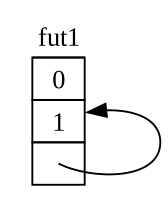
然而,默认情况下,任何包含对自身引用的对象在移动时都是不安全的,因为引用总是指向它们所引用的任何东西的实际内存地址(见图 17-5)。如果你移动数据结构本身,那些内部引用将仍指向旧的位置。然而,那个内存位置现在是无效的。一方面,当你对数据结构进行更改时,它的值将不会被更新。另一方面——更重要的是——计算机现在可以自由地将该内存重新用于其他目的!稍后你可能会读取到完全不相关的数据。
By default, though, any object that has a reference to itself is unsafe to move, because references always point to the actual memory address of whatever they refer to (see Figure 17-5). If you move the data structure itself, those internal references will be left pointing to the old location. However, that memory location is now invalid. For one thing, its value will not be updated when you make changes to the data structure. For another—more important—thing, the computer is now free to reuse that memory for other purposes! You could end up reading completely unrelated data later.
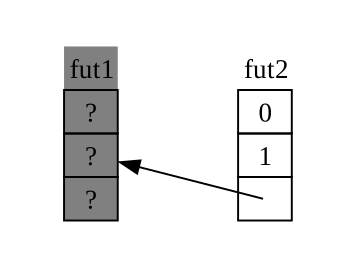
理论上,Rust 编译器可以尝试在对象每次被移动时更新对该对象的每个引用,但这可能会增加大量的性能开销,尤其是在整个引用网都需要更新的情况下。如果我们可以确保所讨论的数据结构 在内存中不移动,我们就不必更新任何引用。这正是 Rust 借用检查器的用途:在安全代码中,它防止你移动任何带有活动引用的项。
Theoretically, the Rust compiler could try to update every reference to an object whenever it gets moved, but that could add a lot of performance overhead, especially if a whole web of references needs updating. If we could instead make sure the data structure in question doesn’t move in memory, we wouldn’t have to update any references. This is exactly what Rust’s borrow checker is for: in safe code, it prevents you from moving any item with an active reference to it.
Pin 在此基础上为我们提供了所需的精确保证。当我们通过将指向某个值的指针包装在 Pin 中来 固定(pin)该值时,它就不能再移动了。因此,如果你有 Pin<Box<SomeType>>,你实际上固定的是 SomeType 值,而不是 Box 指针。图 17-6 展示了这一过程。
Pin builds on that to give us the exact guarantee we need. When we pin a
value by wrapping a pointer to that value in Pin, it can no longer move. Thus,
if you have Pin<Box<SomeType>>, you actually pin the SomeType value, not
the Box pointer. Figure 17-6 illustrates this process.
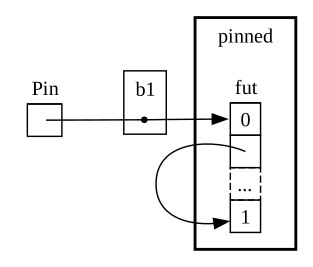
事实上,Box 指针仍然可以自由移动。请记住:我们关心的是确保最终被引用的数据保持在原位。如果指针移动了,但它指向的数据 仍在原位,如图 17-7 所示,就不会有潜在的问题。(作为一项独立练习,请查看类型文档以及 std::pin 模块,并尝试弄清楚如何使用包装了 Box 的 Pin 来做到这一点。)关键是自引用类型本身不能移动,因为它仍处于固定状态。
In fact, the Box pointer can still move around freely. Remember: we care about
making sure the data ultimately being referenced stays in place. If a pointer
moves around, but the data it points to is in the same place, as in Figure
17-7, there’s no potential problem. (As an independent exercise, look at the docs
for the types as well as the std::pin module and try to work out how you’d do
this with a Pin wrapping a Box.) The key is that the self-referential type
itself cannot move, because it is still pinned.
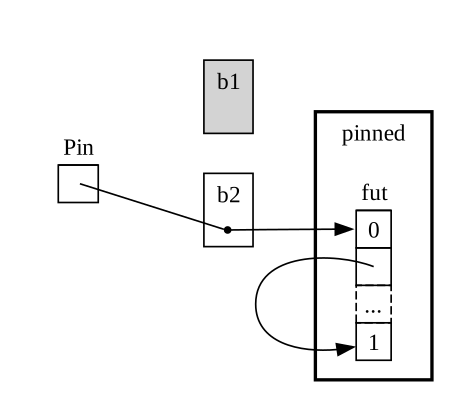
然而,大多数类型即使位于 Pin 指针之后,移动起来也是完全安全的。我们只有在项包含内部引用时才需要考虑固定。像数字和布尔值这样的原始值是安全的,因为它们显然没有内部引用。你在 Rust 中通常处理的大多数类型也是如此。例如,你可以放心地移动 Vec。根据我们目前所见,如果你有一个 Pin<Vec<String>> ,你必须通过 Pin 提供的安全但受限的 API 来执行所有操作,尽管如果没有其他引用,Vec<String> 总是可以安全移动的。我们需要一种方法来告诉编译器,在类似这样的情况下移动项是没问题的——这就是 Unpin 发挥作用的地方。
However, most types are perfectly safe to move around, even if they happen to be
behind a Pin pointer. We only need to think about pinning when items have internal references. Primitive values such as numbers and Booleans are safe because they obviously don’t have any internal references. Neither do most types you normally work with in Rust. You can move around a Vec, for example, without worrying. Given what we have seen so far, if you have a Pin<Vec, you’d have to do everything via the safe but restrictive APIs provided byPin, even though a Vecis always safe to move if there are no other references to it. We need a way to tell the compiler that it’s fine to move items around in cases like this—and that’s whereUnpin` comes into play.
Unpin 是一个标记 trait,类似于我们在第 16 章看到的 Send 和 Sync trait,因此它本身没有功能。标记 trait 的存在只是为了告诉编译器,在特定上下文中使用实现给定 trait 的类型是安全的。Unpin 告知编译器,给定类型 不 需要遵守关于所讨论的值是否可以安全移动的任何保证。
Unpin is a marker trait, similar to the Send and Sync traits we saw in
Chapter 16, and thus has no functionality of its own. Marker traits exist only
to tell the compiler it’s safe to use the type implementing a given trait in a
particular context. Unpin informs the compiler that a given type does not
need to uphold any guarantees about whether the value in question can be safely
moved.
就像 Send 和 Sync 一样,编译器会自动为所有它能证明安全的类型实现 Unpin。同样类似于 Send 和 Sync 的特殊情况是,没有为某个类型实现 Unpin。其表示法是 impl !Unpin for SomeType,其中 SomeType 是一个在 Pin 中使用指向该类型的指针时,确实 需要遵守这些保证才能保证安全的类型名称。
Just as with Send and Sync, the compiler implements Unpin automatically
for all types where it can prove it is safe. A special case, again similar to
Send and Sync, is where Unpin is not implemented for a type. The
notation for this is impl !Unpin for SomeType, where
SomeType is the name of a type that does need to uphold
those guarantees to be safe whenever a pointer to that type is used in a Pin.
换句话说,关于 Pin 和 Unpin 之间的关系,有两点需要记住。首先,Unpin 是“常规”情况,而 !Unpin 是特殊情况。其次,一个类型实现的是 Unpin 还是 !Unpin,只有 当你使用指向该类型的固定指针(如 Pin<&mut SomeType>)时才会有影响。
In other words, there are two things to keep in mind about the relationship
between Pin and Unpin. First, Unpin is the “normal” case, and !Unpin is
the special case. Second, whether a type implements Unpin or !Unpin only
matters when you’re using a pinned pointer to that type like Pin<&mut
SomeType>.
为了使之具体化,想一想 String:它有一个长度和组成它的 Unicode 字符。我们可以将 String 包装在 Pin 中,如图 17-8 所示。然而,String 会自动实现 Unpin,Rust 中的大多数其他类型也是如此。
To make that concrete, think about a String: it has a length and the Unicode
characters that make it up. We can wrap a String in Pin, as seen in Figure
17-8. However, String automatically implements Unpin, as do most other types
in Rust.
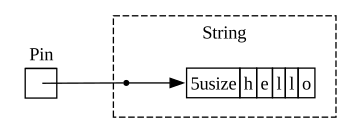
因此,我们可以执行一些如果 String 实现了 !Unpin 则是非法的操作,例如在内存中完全相同的位置将一个字符串替换为另一个,如图 17-9 所示。这并不违反 Pin 契约,因为 String 没有内部引用,移动起来并不会不安全。这正是它实现 Unpin 而不是 !Unpin 的原因。
As a result, we can do things that would be illegal if String implemented
!Unpin instead, such as replacing one string with another at the exact same
location in memory as in Figure 17-9. This doesn’t violate the Pin contract,
because String has no internal references that make it unsafe to move around.
That is precisely why it implements Unpin rather than !Unpin.
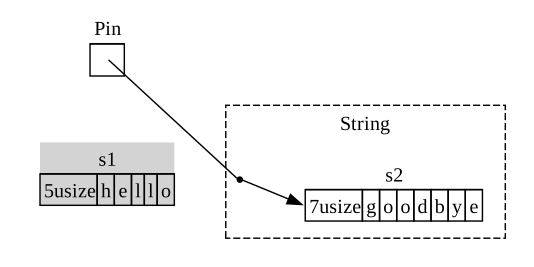
现在我们有了足够的知识来理解示例 17-23 中 join_all 调用报告的错误。我们最初尝试将异步块产生的 future 移动到 Vec<Box<dyn Future<Output = ()>>> 中,但正如我们所见,这些 future 可能包含内部引用,因此它们不会自动实现 Unpin。一旦我们固定了它们,我们就可以将生成的 Pin 类型传入 Vec,并确信 future 中的底层数据 不会 被移动。示例 17-24 展示了如何通过在定义三个 future 的地方调用 pin! 宏并调整 trait 对象类型来修复代码。
Now we know enough to understand the errors reported for that join_all call
from back in Listing 17-23. We originally tried to move the futures produced by
async blocks into a Vec<Box<dyn Future<Output = ()>>>, but as we’ve seen,
those futures may have internal references, so they don’t automatically
implement Unpin. Once we pin them, we can pass the resulting Pin type into
the Vec, confident that the underlying data in the futures will not be
moved. Listing 17-24 shows how to fix the code by calling the pin! macro
where each of the three futures are defined and adjusting the trait object type.
extern crate trpl; // required for mdbook test
use std::pin::{Pin, pin};
// --snip--
use std::time::Duration;
fn main() {
trpl::block_on(async {
let (tx, mut rx) = trpl::channel();
let tx1 = tx.clone();
let tx1_fut = pin!(async move {
// --snip--
let vals = vec![
String::from("hi"),
String::from("from"),
String::from("the"),
String::from("future"),
];
for val in vals {
tx1.send(val).unwrap();
trpl::sleep(Duration::from_secs(1)).await;
}
});
let rx_fut = pin!(async {
// --snip--
while let Some(value) = rx.recv().await {
println!("received '{value}'");
}
});
let tx_fut = pin!(async move {
// --snip--
let vals = vec![
String::from("more"),
String::from("messages"),
String::from("for"),
String::from("you"),
];
for val in vals {
tx.send(val).unwrap();
trpl::sleep(Duration::from_secs(1)).await;
}
});
let futures: Vec<Pin<&mut dyn Future<Output = ()>>> =
vec![tx1_fut, rx_fut, tx_fut];
trpl::join_all(futures).await;
});
}这个示例现在可以编译运行了,我们可以在运行时从 vector 中添加或移除 future,并将它们全部连接起来。
This example now compiles and runs, and we could add or remove futures from the vector at runtime and join them all.
Pin 和 Unpin 主要对于构建底层库或构建运行时本身很重要,而不是对于日常的 Rust 代码。但是,当你以后在错误消息中看到这些 trait 时,你就会更清楚如何修复你的代码了!
Pin and Unpin are mostly important for building lower-level libraries, or
when you’re building a runtime itself, rather than for day-to-day Rust code.
When you see these traits in error messages, though, now you’ll have a better
idea of how to fix your code!
注意:
Pin和Unpin的这种结合使得在 Rust 中安全地实现一整类复杂类型成为可能,否则这些类型由于自引用而极具挑战性。如今需要Pin的类型最常见于异步 Rust,但偶尔你可能也会在其他上下文中看到它们。
Note: This combination of
PinandUnpinmakes it possible to safely implement a whole class of complex types in Rust that would otherwise prove challenging because they’re self-referential. Types that requirePinshow up most commonly in async Rust today, but every once in a while, you might see them in other contexts, too.
Pin 和 Unpin 的具体工作方式,以及它们必须遵守的规则,在 std::pin 的 API 文档中有详尽介绍,如果你有兴趣了解更多,那是开始学习的好地方。
The specifics of how Pin and Unpin work, and the rules they’re required
to uphold, are covered extensively in the API documentation for std::pin, so
if you’re interested in learning more, that’s a great place to start.
如果你想更详细地了解底层的运作方式,请参阅《Rust 异步编程》的第 2 章和第 4 章。
If you want to understand how things work under the hood in even more detail, see Chapters 2 and 4 of Asynchronous Programming in Rust.
Stream Trait
The Stream Trait
现在你对 Future、Pin 和 Unpin trait 有了更深入的了解,我们可以将注意力转向 Stream trait。正如你本章前面学到的,流类似于异步迭代器。然而,与 Iterator 和 Future 不同的是,截至目前,Stream 在标准库中还没有定义,但整个生态系统中都在使用来自 futures crate 的非常通用的定义。
Now that you have a deeper grasp on the Future, Pin, and Unpin traits, we
can turn our attention to the Stream trait. As you learned earlier in the
chapter, streams are similar to asynchronous iterators. Unlike Iterator and
Future, however, Stream has no definition in the standard library as of
this writing, but there is a very common definition from the futures crate
used throughout the ecosystem.
在看看 Stream trait 如何合并 Iterator 和 Future 之前,让我们先回顾一下它们的定义。从 Iterator 中,我们得到了序列的概念:它的 next 方法提供一个 Option<Self::Item>。从 Future 中,我们得到了随时间变化的就绪概念:它的 poll 方法提供一个 Poll<Self::Output>。为了表示随时间变得就绪的项序列,我们定义了一个结合了这些特性的 Stream trait:
Let’s review the definitions of the Iterator and Future traits before
looking at how a Stream trait might merge them together. From Iterator, we
have the idea of a sequence: its next method provides an
Option<Self::Item>. From Future, we have the idea of readiness over time:
its poll method provides a Poll<Self::Output>. To represent a sequence of
items that become ready over time, we define a Stream trait that puts those
features together:
#![allow(unused)]
fn main() {
use std::pin::Pin;
use std::task::{Context, Poll};
trait Stream {
type Item;
fn poll_next(
self: Pin<&mut Self>,
cx: &mut Context<'_>
) -> Poll<Option<Self::Item>>;
}
}Stream trait 为流产生的项的类型定义了一个名为 Item 的关联类型。这类似于 Iterator,其中可能有零到多个项,而不同于 Future,后者总是产生单个 Output,即使它是单元类型 ()。
The Stream trait defines an associated type called Item for the type of the
items produced by the stream. This is similar to Iterator, where there may be
zero to many items, and unlike Future, where there is always a single
Output, even if it’s the unit type ().
Stream 还定义了一个获取这些项的方法。我们称之为 poll_next,以明确它像 Future::poll 那样进行轮询,并像 Iterator::next 那样产生项序列。它的返回类型结合了 Poll 和 Option。外层类型是 Poll,因为必须像 future 一样检查它的就绪状态。内层类型是 Option,因为它需要像迭代器一样发出是否还有更多消息的信号。
Stream also defines a method to get those items. We call it poll_next, to
make it clear that it polls in the same way Future::poll does and produces a
sequence of items in the same way Iterator::next does. Its return type
combines Poll with Option. The outer type is Poll, because it has to be
checked for readiness, just as a future does. The inner type is Option,
because it needs to signal whether there are more messages, just as an iterator
does.
非常类似于此定义的某些内容最终可能会成为 Rust 标准库的一部分。与此同时,它是大多数运行时工具包的一部分,因此你可以依赖它,接下来的所有内容通常也适用!
Something very similar to this definition will likely end up as part of Rust’s standard library. In the meantime, it’s part of the toolkit of most runtimes, so you can rely on it, and everything we cover next should generally apply!
然而,在“Streams:顺序运行的 Future”一节中看到的示例中,我们没有使用 poll_next 或 Stream,而是使用了 next 和 StreamExt。当然,我们 可以 通过手写自己的 Stream 状态机来直接根据 poll_next API 进行操作,就像我们 可以 通过 poll 方法直接处理 future 一样。但使用 await 要美妙得多,而 StreamExt trait 提供了 next 方法,让我们可以做到这一点:
In the examples we saw in the “Streams: Futures in Sequence” section, though, we didn’t use poll_next or Stream, but
instead used next and StreamExt. We could work directly in terms of the
poll_next API by hand-writing our own Stream state machines, of course,
just as we could work with futures directly via their poll method. Using
await is much nicer, though, and the StreamExt trait supplies the next
method so we can do just that:
#![allow(unused)]
fn main() {
use std::pin::Pin;
use std::task::{Context, Poll};
trait Stream {
type Item;
fn poll_next(
self: Pin<&mut Self>,
cx: &mut Context<'_>,
) -> Poll<Option<Self::Item>>;
}
trait StreamExt: Stream {
async fn next(&mut self) -> Option<Self::Item>
where
Self: Unpin;
// other methods...
}
}注意:我们在本章前面使用的实际定义看起来与此略有不同,因为它支持还不支持在 trait 中使用异步函数的 Rust 版本。因此,它看起来像这样:
fn next(&mut self) -> Next<'_, Self> where Self: Unpin;那个
Next类型是一个实现了Future的struct,它允许我们使用Next<'_, Self>来命名对self引用的生命周期,以便await可以与该方法一起工作。
Note: The actual definition we used earlier in the chapter looks slightly different than this, because it supports versions of Rust that did not yet support using async functions in traits. As a result, it looks like this:
fn next(&mut self) -> Next<'_, Self> where Self: Unpin;That
Nexttype is astructthat implementsFutureand allows us to name the lifetime of the reference toselfwithNext<'_, Self>, so thatawaitcan work with this method.
StreamExt trait 也是所有可用于流的有趣方法的归宿。StreamExt 会自动为每个实现 Stream 的类型实现,但这些 trait 是分开定义的,以便社区能够迭代便捷 API 而不影响基础 trait。
The StreamExt trait is also the home of all the interesting methods available
to use with streams. StreamExt is automatically implemented for every type
that implements Stream, but these traits are defined separately to enable the
community to iterate on convenience APIs without affecting the foundational
trait.
在 trpl crate 使用的 StreamExt 版本中,该 trait 不仅定义了 next 方法,还提供了一个 next 的默认实现,该实现正确处理了调用 Stream::poll_next 的细节。这意味着即使你需要编写自己的流式数据类型,你 只需 实现 Stream,然后任何使用你数据类型的人都可以自动使用 StreamExt 及其方法。
In the version of StreamExt used in the trpl crate, the trait not only
defines the next method but also supplies a default implementation of next
that correctly handles the details of calling Stream::poll_next. This means
that even when you need to write your own streaming data type, you only have
to implement Stream, and then anyone who uses your data type can use
StreamExt and its methods with it automatically.
这就是我们将涵盖的关于这些 trait 的底层细节的全部内容。最后,让我们考虑一下 future(包括流)、任务和线程是如何结合在一起的!
That’s all we’re going to cover for the lower-level details on these traits. To wrap up, let’s consider how futures (including streams), tasks, and threads all fit together!
Future、任务与线程
总结:Future、任务和线程
Putting It All Together: Futures, Tasks, and Threads
正如我们在 第 16 章 中看到的,线程提供了一种处理并发的方法。我们在本章中看到了另一种方法:将异步与 future 和流(streams)结合使用。如果你在想何时选择其中一种方法而不是另一种,答案是:视情况而定!而且在许多情况下,选择不是线程 或 异步,而是线程 和 异步。
As we saw in Chapter 16, threads provide one approach to concurrency. We’ve seen another approach in this chapter: using async with futures and streams. If you’re wondering when to choose one method over the other, the answer is: it depends! And in many cases, the choice isn’t threads or async but rather threads and async.
几十年来,许多操作系统都提供了基于线程的并发模型,因此许多编程语言都支持它们。然而,这些模型并非没有权衡。在许多操作系统上,它们为每个线程使用了相当多的内存。只有当你的操作系统和硬件支持线程时,线程才是一种选择。与主流台式机和移动计算机不同,一些嵌入式系统根本没有操作系统,因此它们也没有线程。
Many operating systems have supplied threading-based concurrency models for decades now, and many programming languages support them as a result. However, these models are not without their tradeoffs. On many operating systems, they use a fair bit of memory for each thread. Threads are also only an option when your operating system and hardware support them. Unlike mainstream desktop and mobile computers, some embedded systems don’t have an OS at all, so they also don’t have threads.
异步模型提供了一组不同的——并且最终是互补的——权衡。在异步模型中,并发操作不需要它们自己的线程。相反,它们可以在任务(tasks)上运行,就像我们在流(streams)一节中使用 trpl::spawn_task 从同步函数启动工作时那样。任务类似于线程,但它不是由操作系统管理的,而是由库级代码(运行时)管理的。
The async model provides a different—and ultimately complementary—set of
tradeoffs. In the async model, concurrent operations don’t require their own
threads. Instead, they can run on tasks, as when we used trpl::spawn_task to
kick off work from a synchronous function in the streams section. A task is
similar to a thread, but instead of being managed by the operating system, it’s
managed by library-level code: the runtime.
派生线程和派生任务的 API 如此相似是有原因的。线程充当一组同步操作的边界;线程 之间 是可以并发的。任务充当一组 异步 操作的边界;任务 之间 和 之内 都可以并发,因为一个任务可以在其主体内的 future 之间切换。最后,future 是 Rust 最细粒度的并发单位,每个 future 都可以代表一棵由其他 future 组成的树。运行时——具体来说是它的执行器——管理任务,而任务管理 future。在这一点上,任务类似于轻量级的、由运行时管理的线程,并且具有源于由运行时管理而非操作系统管理而带来的额外能力。
There’s a reason the APIs for spawning threads and spawning tasks are so similar. Threads act as a boundary for sets of synchronous operations; concurrency is possible between threads. Tasks act as a boundary for sets of asynchronous operations; concurrency is possible both between and within tasks, because a task can switch between futures in its body. Finally, futures are Rust’s most granular unit of concurrency, and each future may represent a tree of other futures. The runtime—specifically, its executor—manages tasks, and tasks manage futures. In that regard, tasks are similar to lightweight, runtime-managed threads with added capabilities that come from being managed by a runtime instead of by the operating system.
这并不意味着异步任务总是比线程好(反之亦然)。在某些方面,使用线程实现并发是比使用 async 实现并发更简单的编程模型。这既可以是优势,也可以是弱点。线程在某种程度上是“发射后不管”(fire and forget)的;它们没有与 future 对等的原生机制,所以它们只是运行到完成,除了操作系统本身之外不会被中断。
This doesn’t mean that async tasks are always better than threads (or vice
versa). Concurrency with threads is in some ways a simpler programming model
than concurrency with async. That can be a strength or a weakness. Threads are
somewhat “fire and forget”; they have no native equivalent to a future, so they
simply run to completion without being interrupted except by the operating
system itself.
而且事实证明,线程和任务通常能很好地配合工作,因为任务(至少在某些运行时中)可以在线程之间移动。实际上,在底层,我们一直在使用的运行时——包括 spawn_blocking 和 spawn_task 函数——默认就是多线程的!许多运行时使用一种称为 工作窃取(work stealing)的方法,根据线程当前的利用情况,透明地在线程之间移动任务,以提高系统的整体性能。这种方法实际上需要线程 和 任务,从而也需要 future。
And it turns out that threads and tasks often work
very well together, because tasks can (at least in some runtimes) be moved
around between threads. In fact, under the hood, the runtime we’ve been
using—including the spawn_blocking and spawn_task functions—is multithreaded
by default! Many runtimes use an approach called work stealing to
transparently move tasks around between threads, based on how the threads are
currently being utilized, to improve the system’s overall performance. That
approach actually requires threads and tasks, and therefore futures.
在考虑何时使用哪种方法时,请参考以下经验法则:
When thinking about which method to use when, consider these rules of thumb:
-
如果工作是 高度可并行化的(即 CPU 密集型),例如处理一堆数据,其中每个部分都可以单独处理,那么线程是更好的选择。
-
如果工作是 高度并发的(即 I/O 密集型),例如处理来自一堆不同来源的消息,这些消息可能以不同的间隔或不同的速率进来,那么异步是更好的选择。
-
If the work is very parallelizable (that is, CPU-bound), such as processing a bunch of data where each part can be processed separately, threads are a better choice.
-
If the work is very concurrent (that is, I/O-bound), such as handling messages from a bunch of different sources that may come in at different intervals or different rates, async is a better choice.
如果你既需要并行又需要并发,则不必在线程和异步之间做出选择。你可以自由地将它们结合使用,让各自发挥其所长。例如,示例 17-25 展示了现实世界 Rust 代码中这种混合方式的一个相当常见的例子。
And if you need both parallelism and concurrency, you don’t have to choose between threads and async. You can use them together freely, letting each play the part it’s best at. For example, Listing 17-25 shows a fairly common example of this kind of mix in real-world Rust code.
extern crate trpl; // for mdbook test
use std::{thread, time::Duration};
fn main() {
let (tx, mut rx) = trpl::channel();
thread::spawn(move || {
for i in 1..11 {
tx.send(i).unwrap();
thread::sleep(Duration::from_secs(1));
}
});
trpl::block_on(async {
while let Some(message) = rx.recv().await {
println!("{message}");
}
});
}我们首先创建一个异步通道,然后派生一个线程,并使用 move 关键字让该线程获取通道发送端的所有权。在线程内,我们发送数字 1 到 10,每两个数字之间休眠一秒。最后,我们运行一个由传递给 trpl::block_on 的异步块创建的 future,就像我们在本章中一直做的那样。在那个 future 中,我们等待那些消息,就像我们在看到的其他消息传递示例中一样。
We begin by creating an async channel, then spawning a thread that takes
ownership of the sender side of the channel using the move keyword. Within
the thread, we send the numbers 1 through 10, sleeping for a second between
each. Finally, we run a future created with an async block passed to
trpl::block_on just as we have throughout the chapter. In that future, we
await those messages, just as in the other message-passing examples we have
seen.
回到我们本章开篇提到的场景,想象一下使用专用线程运行一组视频编码任务(因为视频编码是计算密集型的),但使用异步通道通知 UI 这些操作已完成。在现实世界的用例中,这种组合的例子数不胜数。
To return to the scenario we opened the chapter with, imagine running a set of video encoding tasks using a dedicated thread (because video encoding is compute-bound) but notifying the UI that those operations are done with an async channel. There are countless examples of these kinds of combinations in real-world use cases.
总结
Summary
这并不是你在本书中最后一次看到并发。 第 21 章 中的项目将会在比这里讨论的小示例更现实的情况下应用这些概念,并更直接地比较使用线程与任务和 future 解决问题的方法。
This isn’t the last you’ll see of concurrency in this book. The project in Chapter 21 will apply these concepts in a more realistic situation than the simpler examples discussed here and compare problem-solving with threading versus tasks and futures more directly.
无论你选择哪种方法,Rust 都为你提供了编写安全、快速且并发代码所需的工具——无论是对于高吞吐量的 Web 服务器还是嵌入式操作系统。
No matter which of these approaches you choose, Rust gives you the tools you need to write safe, fast, concurrent code—whether for a high-throughput web server or an embedded operating system.
接下来,我们将讨论随着 Rust 程序变大,对问题进行建模和构建解决方案的惯用方法。此外,我们还将讨论 Rust 的惯用法与你可能熟悉的面向对象编程中的惯用法之间的关系。
Next, we’ll talk about idiomatic ways to model problems and structure solutions as your Rust programs get bigger. In addition, we’ll discuss how Rust’s idioms relate to those you might be familiar with from object-oriented programming.
面向对象编程特性
Object-Oriented Programming Features
面向对象编程(OOP)是一种对程序进行建模的方法。对象(objects)作为一种编程概念最早于 20 世纪 60 年代在 Simula 编程语言中被引入。这些对象影响了艾伦·凯(Alan Kay)的编程架构,在该架构中,对象之间通过传递消息进行通信。为了描述这种架构,他在 1967 年创造了“面向对象编程”这个术语。许多相互矛盾的定义描述了什么是 OOP,根据其中的一些定义,Rust 是面向对象的,但根据另一些定义,它则不是。在本章中,我们将探讨一些通常被认为属于面向对象的特性,以及这些特性如何转换为符合 Rust 习惯的写法。接着,我们将展示如何在 Rust 中实现一种面向对象的设计模式,并讨论这样做与利用 Rust 自身优势实现解决方案之间的权衡。
Object-oriented programming (OOP) is a way of modeling programs. Objects as a programmatic concept were introduced in the programming language Simula in the 1960s. Those objects influenced Alan Kay’s programming architecture in which objects pass messages to each other. To describe this architecture, he coined the term object-oriented programming in 1967. Many competing definitions describe what OOP is, and by some of these definitions Rust is object oriented but by others it is not. In this chapter, we’ll explore certain characteristics that are commonly considered object oriented and how those characteristics translate to idiomatic Rust. We’ll then show you how to implement an object-oriented design pattern in Rust and discuss the trade-offs of doing so versus implementing a solution using some of Rust’s strengths instead.
面向对象语言的特征
面向对象语言的特征
Characteristics of Object-Oriented Languages
编程界对于一种语言必须具备哪些特性才能被视为面向对象并没有达成共识。Rust 受到了许多编程范式的影响,包括 OOP;例如,我们在第 13 章探讨了来自函数式编程的特性。可以说,OOP 语言具有某些共同特征——即对象(objects)、封装(encapsulation)和继承(inheritance)。让我们看看这些特征各自意味着什么,以及 Rust 是否支持它们。
There is no consensus in the programming community about what features a language must have to be considered object oriented. Rust is influenced by many programming paradigms, including OOP; for example, we explored the features that came from functional programming in Chapter 13. Arguably, OOP languages share certain common characteristics—namely, objects, encapsulation, and inheritance. Let’s look at what each of those characteristics means and whether Rust supports it.
对象包含数据和行为
Objects Contain Data and Behavior
由埃里希·伽玛(Erich Gamma)、理查德·赫尔姆(Richard Helm)、拉尔夫·约翰逊(Ralph Johnson)和约翰·威利斯迪斯(John Vlissides)合著的《设计模式:可复用面向对象软件的基础》(Addison-Wesley, 1994)一书,通俗地被称为“四人帮”(Gang of Four)之书,是一本面向对象设计模式的目录。它对 OOP 这样定义:
The book Design Patterns: Elements of Reusable Object-Oriented Software by Erich Gamma, Richard Helm, Ralph Johnson, and John Vlissides (Addison-Wesley, 1994), colloquially referred to as The Gang of Four book, is a catalog of object-oriented design patterns. It defines OOP in this way:
面向对象程序由对象组成。一个对象包装了数据以及对这些数据进行操作的过程。这些过程通常被称为方法或操作。
Object-oriented programs are made up of objects. An object packages both data and the procedures that operate on that data. The procedures are typically called methods or operations.
根据这个定义,Rust 是面向对象的:结构体和枚举拥有数据,而 impl 块为结构体和枚举提供方法。尽管带有方法的结构体和枚举不被 称为 对象,但根据“四人帮”对对象的定义,它们提供了相同的功能。
Using this definition, Rust is object oriented: Structs and enums have data,
and impl blocks provide methods on structs and enums. Even though structs and
enums with methods aren’t called objects, they provide the same
functionality, according to the Gang of Four’s definition of objects.
隐藏实现细节的封装
Encapsulation That Hides Implementation Details
通常与 OOP 相关的另一个方面是 封装(encapsulation)的思想,这意味着对象的实现细节对于使用该对象的代码来说是不可访问的。因此,与对象交互的唯一方式是通过其公共 API;使用对象的代码不应该能够深入到对象的内部并直接更改数据或行为。这使程序员能够更改和重构对象的内部,而无需更改使用该对象的代码。
Another aspect commonly associated with OOP is the idea of encapsulation, which means that the implementation details of an object aren’t accessible to code using that object. Therefore, the only way to interact with an object is through its public API; code using the object shouldn’t be able to reach into the object’s internals and change data or behavior directly. This enables the programmer to change and refactor an object’s internals without needing to change the code that uses the object.
我们在第 7 章讨论了如何控制封装:我们可以使用 pub 关键字来决定代码中的哪些模块、类型、函数和方法应该是公开的,默认情况下,其他一切都是私有的。例如,我们可以定义一个结构体 AveragedCollection,它有一个包含 i32 值 vector 的字段。该结构体还可以有一个包含该 vector 中数值平均值的字段,这意味着平均值不必在任何人需要时才按需计算。换句话说,AveragedCollection 会为我们缓存计算好的平均值。示例 18-1 包含了 AveragedCollection 结构体的定义。
We discussed how to control encapsulation in Chapter 7: We can use the pub
keyword to decide which modules, types, functions, and methods in our code
should be public, and by default everything else is private. For example, we
can define a struct AveragedCollection that has a field containing a vector
of i32 values. The struct can also have a field that contains the average of
the values in the vector, meaning the average doesn’t have to be computed on
demand whenever anyone needs it. In other words, AveragedCollection will
cache the calculated average for us. Listing 18-1 has the definition of the
AveragedCollection struct.
pub struct AveragedCollection {
list: Vec<i32>,
average: f64,
}该结构体被标记为 pub,以便其他代码可以使用它,但结构体内部的字段保持私有。在这种情况下,这很重要,因为我们要确保每当从列表中添加或删除值时,平均值也会更新。我们通过在结构体上实现 add、remove 和 average 方法来做到这一点,如示例 18-2 所示。
The struct is marked pub so that other code can use it, but the fields within
the struct remain private. This is important in this case because we want to
ensure that whenever a value is added or removed from the list, the average is
also updated. We do this by implementing add, remove, and average methods
on the struct, as shown in Listing 18-2.
pub struct AveragedCollection {
list: Vec<i32>,
average: f64,
}
impl AveragedCollection {
pub fn add(&mut self, value: i32) {
self.list.push(value);
self.update_average();
}
pub fn remove(&mut self) -> Option<i32> {
let result = self.list.pop();
match result {
Some(value) => {
self.update_average();
Some(value)
}
None => None,
}
}
pub fn average(&self) -> f64 {
self.average
}
fn update_average(&mut self) {
let total: i32 = self.list.iter().sum();
self.average = total as f64 / self.list.len() as f64;
}
}公共方法 add、remove 和 average 是访问或修改 AveragedCollection 实例中数据的唯一途径。当使用 add 方法向 list 添加项,或使用 remove 方法删除项时,每个方法的实现都会调用私有的 update_average 方法,该方法也负责处理 average 字段的更新。
The public methods add, remove, and average are the only ways to access
or modify data in an instance of AveragedCollection. When an item is added to
list using the add method or removed using the remove method, the
implementations of each call the private update_average method that handles
updating the average field as well.
我们将 list 和 average 字段保持私有,这样外部代码就没有办法直接向 list 字段添加或删除项;否则,当 list 发生变化时,average 字段可能会变得不同步。average 方法返回 average 字段中的值,允许外部代码读取平均值但不能修改它。
We leave the list and average fields private so that there is no way for
external code to add or remove items to or from the list field directly;
otherwise, the average field might become out of sync when the list
changes. The average method returns the value in the average field,
allowing external code to read the average but not modify it.
由于我们封装了结构体 AveragedCollection 的实现细节,我们可以很容易地在未来更改某些方面,例如数据结构。比如,我们可以使用 HashSet<i32> 代替 Vec<i32> 作为 list 字段。只要 add、remove 和 average 公共方法的签名保持不变,使用 AveragedCollection 的代码就无需更改。如果我们将 list 改为公开,情况就不一定如此了:HashSet<i32> 和 Vec<i32> 添加和删除项的方法不同,因此如果外部代码直接修改 list,则可能不得不进行更改。
Because we’ve encapsulated the implementation details of the struct
AveragedCollection, we can easily change aspects, such as the data structure,
in the future. For instance, we could use a HashSet<i32> instead of a
Vec<i32> for the list field. As long as the signatures of the add,
remove, and average public methods stayed the same, code using
AveragedCollection wouldn’t need to change. If we made list public instead,
this wouldn’t necessarily be the case: HashSet<i32> and Vec<i32> have
different methods for adding and removing items, so the external code would
likely have to change if it were modifying list directly.
如果封装是一种语言被视为面向对象所必需的一个方面,那么 Rust 满足了这一要求。对代码的不同部分选择使用或不使用 pub 使得封装实现细节成为可能。
If encapsulation is a required aspect for a language to be considered object
oriented, then Rust meets that requirement. The option to use pub or not for
different parts of code enables encapsulation of implementation details.
作为类型系统和代码共享的继承
Inheritance as a Type System and as Code Sharing
继承(Inheritance)是一种机制,对象可以借此继承另一个对象定义的元素,从而获得父对象的数据和行为,而无需你重新定义它们。
Inheritance is a mechanism whereby an object can inherit elements from another object’s definition, thus gaining the parent object’s data and behavior without you having to define them again.
如果一种语言必须具备继承特性才能被称为面向对象,那么 Rust 不是这样的语言。在不使用宏的情况下,没有办法定义一个能够继承父结构体字段和方法实现的结构体。
If a language must have inheritance to be object oriented, then Rust is not such a language. There is no way to define a struct that inherits the parent struct’s fields and method implementations without using a macro.
然而,如果你习惯于在编程工具箱中使用继承,在 Rust 中你可以根据最初寻求继承的原因来使用其他解决方案。
However, if you’re used to having inheritance in your programming toolbox, you can use other solutions in Rust, depending on your reason for reaching for inheritance in the first place.
你会选择继承通常有两个主要原因。一是代码复用:你可以为一个类型实现特定的行为,而继承使你能够为另一个不同的类型复用该实现。在 Rust 代码中,你可以利用 trait 方法的默认实现来有限地做到这一点,正如你在示例 10-14 中看到的,我们在 Summary trait 上添加了 summarize 方法的默认实现。任何实现 Summary trait 的类型都可以直接使用 summarize 方法而无需编写进一步代码。这类似于父类拥有方法的实现,而继承的子类也拥有该方法的实现。当实现 Summary trait 时,我们也可以重写 summarize 方法的默认实现,这类似于子类重写从父类继承的方法实现。
You would choose inheritance for two main reasons. One is for reuse of code:
You can implement particular behavior for one type, and inheritance enables you
to reuse that implementation for a different type. You can do this in a limited
way in Rust code using default trait method implementations, which you saw in
Listing 10-14 when we added a default implementation of the summarize method
on the Summary trait. Any type implementing the Summary trait would have
the summarize method available on it without any further code. This is
similar to a parent class having an implementation of a method and an
inheriting child class also having the implementation of the method. We can
also override the default implementation of the summarize method when we
implement the Summary trait, which is similar to a child class overriding the
implementation of a method inherited from a parent class.
使用继承的另一个原因与类型系统有关:使子类型能够用于与父类型相同的地方。这也被称为 多态(polymorphism),意味着如果多个对象共享某些特征,你可以在运行时相互替换它们。
The other reason to use inheritance relates to the type system: to enable a child type to be used in the same places as the parent type. This is also called polymorphism, which means that you can substitute multiple objects for each other at runtime if they share certain characteristics.
多态
Polymorphism
对许多人来说,多态是继承的代名词。但它实际上是一个更通用的概念,指的是能够处理多种类型数据的代码。对于继承,这些类型通常是子类。
To many people, polymorphism is synonymous with inheritance. But it’s actually a more general concept that refers to code that can work with data of multiple types. For inheritance, those types are generally subclasses.
相比之下,Rust 使用泛型来抽象出各种可能的类型,并使用 trait bound 来对这些类型必须提供的功能施加约束。这有时被称为 受限参数多态(bounded parametric polymorphism)。
Rust instead uses generics to abstract over different possible types and trait bounds to impose constraints on what those types must provide. This is sometimes called bounded parametric polymorphism.
Rust 通过不提供继承而选择了一套不同的权衡。继承往往面临着共享过多不必要代码的风险。子类不应总是共享其父类的所有特征,但继承会强制这样做。这会降低程序设计的灵活性。它还引入了在子类上调用毫无意义或因不适用于子类而导致错误的方法的可能性。此外,有些语言只允许 单继承(即子类只能从一个类继承),进一步限制了程序设计的灵活性。
Rust has chosen a different set of trade-offs by not offering inheritance. Inheritance is often at risk of sharing more code than necessary. Subclasses shouldn’t always share all characteristics of their parent class but will do so with inheritance. This can make a program’s design less flexible. It also introduces the possibility of calling methods on subclasses that don’t make sense or that cause errors because the methods don’t apply to the subclass. In addition, some languages will only allow single inheritance (meaning a subclass can only inherit from one class), further restricting the flexibility of a program’s design.
由于这些原因,Rust 采取了不同的方法,使用 trait 对象代替继承来实现运行时的多态。让我们来看看 trait 对象是如何工作的。
For these reasons, Rust takes the different approach of using trait objects instead of inheritance to achieve polymorphism at runtime. Let’s look at how trait objects work.
使用 Trait 对象以允许不同类型的值
实现面向对象设计模式
实现面向对象设计模式
Implementing an Object-Oriented Design Pattern
状态模式(state pattern)是一种面向对象的设计模式。该模式的核心在于,我们定义了一个值在内部可以拥有的状态集合。状态由一组 状态对象(state objects)表示,值的行为根据其状态而改变。我们将通过一个博客文章(blog post)结构体的示例来展开,该结构体有一个字段用于持有其状态,状态将是“草稿”(draft)、“审核”(review)或“已发布”(published)状态对象集合中的一个。
The state pattern is an object-oriented design pattern. The crux of the pattern is that we define a set of states a value can have internally. The states are represented by a set of state objects, and the value’s behavior changes based on its state. We’re going to work through an example of a blog post struct that has a field to hold its state, which will be a state object from the set “draft,” “review,” or “published.”
状态对象共享功能:当然,在 Rust 中,我们使用结构体和 trait 而不是对象和继承。每个状态对象负责其自身的行为,并控制何时应转换为另一个状态。持有状态对象的值对状态的不同行为或何时进行状态转换一无所知。
The state objects share functionality: In Rust, of course, we use structs and traits rather than objects and inheritance. Each state object is responsible for its own behavior and for governing when it should change into another state. The value that holds a state object knows nothing about the different behavior of the states or when to transition between states.
使用状态模式的优势在于,当程序的业务需求发生变化时,我们不需要更改持有状态的值的代码或使用该值的代码。我们只需要更新其中一个状态对象内部的代码来更改其规则,或者可能添加更多的状态对象。
The advantage of using the state pattern is that, when the business requirements of the program change, we won’t need to change the code of the value holding the state or the code that uses the value. We’ll only need to update the code inside one of the state objects to change its rules or perhaps add more state objects.
首先,我们将以一种更传统的面向对象方式来实现状态模式。然后,我们将使用一种在 Rust 中更为自然的方法。让我们开始逐步使用状态模式来实现一个博客文章工作流。
First, we’re going to implement the state pattern in a more traditional object-oriented way. Then, we’ll use an approach that’s a bit more natural in Rust. Let’s dig in to incrementally implement a blog post workflow using the state pattern.
最终的功能将如下所示:
The final functionality will look like this:
-
博客文章以空草稿开始。
-
当草稿完成时,请求对该文章进行审核。
-
当文章被批准后,它将被发布。
-
只有已发布的博客文章才会返回打印内容,以免未经批准的文章被意外发布。
-
A blog post starts as an empty draft.
-
When the draft is done, a review of the post is requested.
-
When the post is approved, it gets published.
-
Only published blog posts return content to print so that unapproved posts can’t accidentally be published.
对文章尝试进行的任何其他更改都不应产生任何影响。例如,如果我们试图在请求审核之前批准一篇草稿博客文章,该文章应保持为未发布的草稿。
Any other changes attempted on a post should have no effect. For example, if we try to approve a draft blog post before we’ve requested a review, the post should remain an unpublished draft.
尝试传统的面向对象风格
Attempting Traditional Object-Oriented Style
解决同一个问题的方法有无数种,每种方法都有不同的权衡。本节的实现更多地采用传统的面向对象风格,这在 Rust 中是可以编写的,但没有利用 Rust 的一些优势。稍后,我们将演示另一种解决方案,它仍然使用面向对象设计模式,但结构对于有面向对象经验的程序员来说可能看起来不那么熟悉。我们将比较这两种解决方案,以体验以不同于其他语言的方式设计 Rust 代码所带来的权衡。
There are infinite ways to structure code to solve the same problem, each with different trade-offs. This section’s implementation is more of a traditional object-oriented style, which is possible to write in Rust, but doesn’t take advantage of some of Rust’s strengths. Later, we’ll demonstrate a different solution that still uses the object-oriented design pattern but is structured in a way that might look less familiar to programmers with object-oriented experience. We’ll compare the two solutions to experience the trade-offs of designing Rust code differently than code in other languages.
示例 18-11 以代码形式展示了这一工作流:这是我们将在名为 blog 的库 crate 中实现的 API 的使用示例。这目前还无法编译,因为我们还没有实现 blog crate。
Listing 18-11 shows this workflow in code form: This is an example usage of the
API we’ll implement in a library crate named blog. This won’t compile yet
because we haven’t implemented the blog crate.
use blog::Post;
fn main() {
let mut post = Post::new();
post.add_text("I ate a salad for lunch today");
assert_eq!("", post.content());
post.request_review();
assert_eq!("", post.content());
post.approve();
assert_eq!("I ate a salad for lunch today", post.content());
}我们希望允许用户使用 Post::new 创建一个新的草稿博客文章。我们希望允许向博客文章添加文本。如果我们在批准之前立即尝试获取文章内容,我们不应该得到任何文本,因为该文章仍是草稿。为了演示目的,我们在代码中添加了 assert_eq!。对此进行单元测试的一个极佳方法是断言草稿博客文章从 content 方法返回一个空字符串,但我们不打算为本示例编写测试。
We want to allow the user to create a new draft blog post with Post::new. We
want to allow text to be added to the blog post. If we try to get the post’s
content immediately, before approval, we shouldn’t get any text because the
post is still a draft. We’ve added assert_eq! in the code for demonstration
purposes. An excellent unit test for this would be to assert that a draft blog
post returns an empty string from the content method, but we’re not going to
write tests for this example.
接下来,我们希望能够请求对文章进行审核,并希望在等待审核期间 content 返回一个空字符串。当文章获得批准后,它应该被发布,这意味着当调用 content 时,将返回文章的文本。
Next, we want to enable a request for a review of the post, and we want
content to return an empty string while waiting for the review. When the post
receives approval, it should get published, meaning the text of the post will
be returned when content is called.
请注意,我们从 crate 中交互的唯一类型是 Post 类型。该类型将使用状态模式,并持有一个值,该值将是代表文章可能处于的三种状态(草稿、审核中或已发布)之一的状态对象。从一个状态到另一个状态的更改将在 Post 类型内部进行管理。状态会根据库用户在 Post 实例上调用的方法而改变,但用户不必直接管理状态变更。此外,用户不会在状态上犯错,例如在审核之前发布文章。
Notice that the only type we’re interacting with from the crate is the Post
type. This type will use the state pattern and will hold a value that will be
one of three state objects representing the various states a post can be
in—draft, review, or published. Changing from one state to another will be
managed internally within the Post type. The states change in response to the
methods called by our library’s users on the Post instance, but they don’t
have to manage the state changes directly. Also, users can’t make a mistake
with the states, such as publishing a post before it’s reviewed.
定义 Post 并创建新实例
Defining Post and Creating a New Instance
让我们开始实现该库!我们知道我们需要一个持有某些内容的公共 Post 结构体,因此我们将从结构体定义和用于创建 Post 实例的相关公共 new 函数开始,如示例 18-12 所示。我们还将创建一个私有的 State trait,它将定义 Post 的所有状态对象必须具备的行为。
Let’s get started on the implementation of the library! We know we need a
public Post struct that holds some content, so we’ll start with the
definition of the struct and an associated public new function to create an
instance of Post, as shown in Listing 18-12. We’ll also make a private
State trait that will define the behavior that all state objects for a Post
must have.
然后,Post 将在私有字段 state 中持有一个包装在 Option<T> 里的 Box<dyn State> trait 对象,以持有状态对象。稍后你就会看到为什么 Option<T> 是必要的。
Then, Post will hold a trait object of Box<dyn State> inside an Option<T>
in a private field named state to hold the state object. You’ll see why the
Option<T> is necessary in a bit.
pub struct Post {
state: Option<Box<dyn State>>,
content: String,
}
impl Post {
pub fn new() -> Post {
Post {
state: Some(Box::new(Draft {})),
content: String::new(),
}
}
}
trait State {}
struct Draft {}
impl State for Draft {}State trait 定义了不同文章状态共享的行为。状态对象包括 Draft、PendingReview 和 Published,它们都将实现 State trait。目前,该 trait 没有任何方法,我们将从仅定义 Draft 状态开始,因为那是我们希望文章开始时的状态。
The State trait defines the behavior shared by different post states. The
state objects are Draft, PendingReview, and Published, and they will all
implement the State trait. For now, the trait doesn’t have any methods, and
we’ll start by defining just the Draft state because that is the state we
want a post to start in.
当我们创建一个新的 Post 时,我们将它的 state 字段设置为一个持有一个 Box 的 Some 值。这个 Box 指向 Draft 结构体的一个新实例。这确保了每当我们创建一个新的 Post 实例时,它都会以草稿形式开始。由于 Post 的 state 字段是私有的,因此无法以任何其他状态创建 Post!在 Post::new 函数中,我们将 content 字段设置为一个新的空 String。
When we create a new Post, we set its state field to a Some value that
holds a Box. This Box points to a new instance of the Draft struct. This
ensures that whenever we create a new instance of Post, it will start out as
a draft. Because the state field of Post is private, there is no way to
create a Post in any other state! In the Post::new function, we set the
content field to a new, empty String.
存储文章内容的文本
Storing the Text of the Post Content
我们在示例 18-11 中看到,我们希望能够调用一个名为 add_text 的方法并传递给它一个 &str,该字符串随后作为博客文章的文本内容被添加。我们将其实现为一个方法,而不是将 content 字段公开为 pub,这样稍后我们可以实现一个控制如何读取 content 字段数据的方法。add_text 方法非常简单,所以让我们在示例 18-13 中将实现添加到 impl Post 块中。
We saw in Listing 18-11 that we want to be able to call a method named
add_text and pass it a &str that is then added as the text content of the
blog post. We implement this as a method, rather than exposing the content
field as pub, so that later we can implement a method that will control how
the content field’s data is read. The add_text method is pretty
straightforward, so let’s add the implementation in Listing 18-13 to the impl Post block.
pub struct Post {
state: Option<Box<dyn State>>,
content: String,
}
impl Post {
// --snip--
pub fn new() -> Post {
Post {
state: Some(Box::new(Draft {})),
content: String::new(),
}
}
pub fn add_text(&mut self, text: &str) {
self.content.push_str(text);
}
}
trait State {}
struct Draft {}
impl State for Draft {}add_text 方法接收一个对 self 的可变引用,因为我们正在更改调用 add_text 的 Post 实例。然后我们对 content 中的 String 调用 push_str,并传入 text 参数以添加到保存的 content 中。这种行为不依赖于文章所处的状态,因此它不是状态模式的一部分。add_text 方法根本不与 state 字段交互,但它是我们想要支持的行为的一部分。
The add_text method takes a mutable reference to self because we’re
changing the Post instance that we’re calling add_text on. We then call
push_str on the String in content and pass the text argument to add to
the saved content. This behavior doesn’t depend on the state the post is in,
so it’s not part of the state pattern. The add_text method doesn’t interact
with the state field at all, but it is part of the behavior we want to
support.
确保草稿文章的内容为空
Ensuring That the Content of a Draft Post Is Empty
即使在我们调用了 add_text 并为文章添加了一些内容之后,我们仍然希望 content 方法返回一个空字符串切片,因为文章仍处于草稿状态,如示例 18-11 中的第一个 assert_eq! 所示。目前,让我们用能满足这一要求的、最简单的方法来实现 content 方法:始终返回一个空字符串切片。一旦我们实现了更改文章状态以便它可以发布的功能,我们稍后将更改此方法。到目前为止,文章只能处于草稿状态,因此文章内容应始终为空。示例 18-14 展示了这一占位符实现。
Even after we’ve called add_text and added some content to our post, we still
want the content method to return an empty string slice because the post is
still in the draft state, as shown by the first assert_eq! in Listing 18-11.
For now, let’s implement the content method with the simplest thing that will
fulfill this requirement: always returning an empty string slice. We’ll change
this later once we implement the ability to change a post’s state so that it
can be published. So far, posts can only be in the draft state, so the post
content should always be empty. Listing 18-14 shows this placeholder
implementation.
pub struct Post {
state: Option<Box<dyn State>>,
content: String,
}
impl Post {
// --snip--
pub fn new() -> Post {
Post {
state: Some(Box::new(Draft {})),
content: String::new(),
}
}
pub fn add_text(&mut self, text: &str) {
self.content.push_str(text);
}
pub fn content(&self) -> &str {
""
}
}
trait State {}
struct Draft {}
impl State for Draft {}有了这个添加的 content 方法,示例 18-11 中直到第一个 assert_eq! 的所有内容都能按预期工作。
With this added content method, everything in Listing 18-11 through the first
assert_eq! works as intended.
请求审核,这会改变文章的状态
Requesting a Review, Which Changes the Post’s State
接下来,我们需要添加请求审核文章的功能,这应该将其状态从 Draft 更改为 PendingReview。示例 18-15 展示了这段代码。
Next, we need to add functionality to request a review of a post, which should
change its state from Draft to PendingReview. Listing 18-15 shows this code.
pub struct Post {
state: Option<Box<dyn State>>,
content: String,
}
impl Post {
// --snip--
pub fn new() -> Post {
Post {
state: Some(Box::new(Draft {})),
content: String::new(),
}
}
pub fn add_text(&mut self, text: &str) {
self.content.push_str(text);
}
pub fn content(&self) -> &str {
""
}
pub fn request_review(&mut self) {
if let Some(s) = self.state.take() {
self.state = Some(s.request_review())
}
}
}
trait State {
fn request_review(self: Box<Self>) -> Box<dyn State>;
}
struct Draft {}
impl State for Draft {
fn request_review(self: Box<Self>) -> Box<dyn State> {
Box::new(PendingReview {})
}
}
struct PendingReview {}
impl State for PendingReview {
fn request_review(self: Box<Self>) -> Box<dyn State> {
self
}
}我们给 Post 一个名为 request_review 的公共方法,它将接收一个对 self 的可变引用。然后,我们在 Post 的当前状态上调用一个内部的 request_review 方法,而这第二个 request_review 方法会消耗当前状态并返回一个新状态。
We give Post a public method named request_review that will take a mutable
reference to self. Then, we call an internal request_review method on the
current state of Post, and this second request_review method consumes the
current state and returns a new state.
我们将 request_review 方法添加到 State trait 中;所有实现该 trait 的类型现在都需要实现 request_review 方法。请注意,该方法的第一个参数不是 self、&self 或 &mut self,而是 self: Box<Self>。这种语法意味着该方法仅在对持有该类型的 Box 调用时才有效。这种语法获取了 Box<Self> 的所有权,使旧状态失效,以便 Post 的状态值可以转换为新状态。
We add the request_review method to the State trait; all types that
implement the trait will now need to implement the request_review method.
Note that rather than having self, &self, or &mut self as the first
parameter of the method, we have self: Box<Self>. This syntax means the
method is only valid when called on a Box holding the type. This syntax takes
ownership of Box<Self>, invalidating the old state so that the state value of
the Post can transform into a new state.
为了消耗旧状态,request_review 方法需要获取状态值的所有权。这就是 Post 的 state 字段中 Option 的用武之地:我们调用 take 方法将 Some 值从 state 字段中取出,并在其位置留下一个 None,因为 Rust 不允许我们在结构体中留有未填充的字段。这让我们可以将 state 值从 Post 中移出而不是借用它。然后,我们将文章的 state 值设置为该操作的结果。
To consume the old state, the request_review method needs to take ownership
of the state value. This is where the Option in the state field of Post
comes in: We call the take method to take the Some value out of the state
field and leave a None in its place because Rust doesn’t let us have
unpopulated fields in structs. This lets us move the state value out of
Post rather than borrowing it. Then, we’ll set the post’s state value to
the result of this operation.
我们需要暂时将 state 设置为 None,而不是直接通过 self.state = self.state.request_review(); 这样的代码来设置它,以便获得 state 值的所有权。这确保了在我们将其转换为新状态后,Post 无法再使用旧的 state 值。
We need to set state to None temporarily rather than setting it directly
with code like self.state = self.state.request_review(); to get ownership of
the state value. This ensures that Post can’t use the old state value
after we’ve transformed it into a new state.
Draft 上的 request_review 方法返回一个新的、装箱的 PendingReview 结构体实例,该结构体代表文章正在等待审核的状态。PendingReview 结构体也实现了 request_review 方法,但不进行任何转换。相反,它返回它自己,因为当我们对已经处于 PendingReview 状态的文章请求审核时,它应该保持在 PendingReview 状态。
The request_review method on Draft returns a new, boxed instance of a new
PendingReview struct, which represents the state when a post is waiting for a
review. The PendingReview struct also implements the request_review method
but doesn’t do any transformations. Rather, it returns itself because when we
request a review on a post already in the PendingReview state, it should stay
in the PendingReview state.
现在我们可以开始看到状态模式的优势了:无论其 state 值如何,Post 上的 request_review 方法都是一样的。每个状态负责其自身的规则。
Now we can start seeing the advantages of the state pattern: The
request_review method on Post is the same no matter its state value. Each
state is responsible for its own behavior.
我们将保持 Post 上的 content 方法不变,返回一个空字符串切片。我们现在可以拥有处于 PendingReview 状态以及 Draft 状态的 Post,但我们希望在 PendingReview 状态下具有相同的行为。示例 18-11 现在可以运行到第二个 assert_eq! 调用了!
We’ll leave the content method on Post as is, returning an empty string
slice. We can now have a Post in the PendingReview state as well as in the
Draft state, but we want the same behavior in the PendingReview state.
Listing 18-11 now works up to the second assert_eq! call!
添加 approve 以改变 content 的行为
Adding approve to Change content’s Behavior
approve 方法将类似于 request_review 方法:它将 state 设置为当前状态认为在获得批准时应具有的值,如示例 18-16 所示。
The approve method will be similar to the request_review method: It will
set state to the value that the current state says it should have when that
state is approved, as shown in Listing 18-16.
pub struct Post {
state: Option<Box<dyn State>>,
content: String,
}
impl Post {
// --snip--
pub fn new() -> Post {
Post {
state: Some(Box::new(Draft {})),
content: String::new(),
}
}
pub fn add_text(&mut self, text: &str) {
self.content.push_str(text);
}
pub fn content(&self) -> &str {
""
}
pub fn request_review(&mut self) {
if let Some(s) = self.state.take() {
self.state = Some(s.request_review())
}
}
pub fn approve(&mut self) {
if let Some(s) = self.state.take() {
self.state = Some(s.approve())
}
}
}
trait State {
fn request_review(self: Box<Self>) -> Box<dyn State>;
fn approve(self: Box<Self>) -> Box<dyn State>;
}
struct Draft {}
impl State for Draft {
// --snip--
fn request_review(self: Box<Self>) -> Box<dyn State> {
Box::new(PendingReview {})
}
fn approve(self: Box<Self>) -> Box<dyn State> {
self
}
}
struct PendingReview {}
impl State for PendingReview {
// --snip--
fn request_review(self: Box<Self>) -> Box<dyn State> {
self
}
fn approve(self: Box<Self>) -> Box<dyn State> {
Box::new(Published {})
}
}
struct Published {}
impl State for Published {
fn request_review(self: Box<Self>) -> Box<dyn State> {
self
}
fn approve(self: Box<Self>) -> Box<dyn State> {
self
}
}我们将 approve 方法添加到 State trait,并添加一个实现 State 的新结构体,即 Published 状态。
We add the approve method to the State trait and add a new struct that
implements State, the Published state.
类似于 PendingReview 上的 request_review 的工作方式,如果我们对 Draft 调用 approve 方法,它将没有效果,因为 approve 将返回 self。当我们对 PendingReview 调用 approve 时,它返回一个新的、装箱的 Published 结构体实例。Published 结构体实现了 State trait,对于 request_review 方法和 approve 方法,它都返回其自身,因为在这些情况下文章应该保持在 Published 状态。
Similar to the way request_review on PendingReview works, if we call the
approve method on a Draft, it will have no effect because approve will
return self. When we call approve on PendingReview, it returns a new,
boxed instance of the Published struct. The Published struct implements the
State trait, and for both the request_review method and the approve
method, it returns itself because the post should stay in the Published state
in those cases.
现在我们需要更新 Post 上的 content 方法。我们希望从 content 返回的值取决于 Post 的当前状态,因此我们将让 Post 委托给其 state 上定义的 content 方法,如示例 18-17 所示。
Now we need to update the content method on Post. We want the value
returned from content to depend on the current state of the Post, so we’re
going to have the Post delegate to a content method defined on its state,
as shown in Listing 18-17.
pub struct Post {
state: Option<Box<dyn State>>,
content: String,
}
impl Post {
// --snip--
pub fn new() -> Post {
Post {
state: Some(Box::new(Draft {})),
content: String::new(),
}
}
pub fn add_text(&mut self, text: &str) {
self.content.push_str(text);
}
pub fn content(&self) -> &str {
self.state.as_ref().unwrap().content(self)
}
// --snip--
pub fn request_review(&mut self) {
if let Some(s) = self.state.take() {
self.state = Some(s.request_review())
}
}
pub fn approve(&mut self) {
if let Some(s) = self.state.take() {
self.state = Some(s.approve())
}
}
}
trait State {
fn request_review(self: Box<Self>) -> Box<dyn State>;
fn approve(self: Box<Self>) -> Box<dyn State>;
}
struct Draft {}
impl State for Draft {
fn request_review(self: Box<Self>) -> Box<dyn State> {
Box::new(PendingReview {})
}
fn approve(self: Box<Self>) -> Box<dyn State> {
self
}
}
struct PendingReview {}
impl State for PendingReview {
fn request_review(self: Box<Self>) -> Box<dyn State> {
self
}
fn approve(self: Box<Self>) -> Box<dyn State> {
Box::new(Published {})
}
}
struct Published {}
impl State for Published {
fn request_review(self: Box<Self>) -> Box<dyn State> {
self
}
fn approve(self: Box<Self>) -> Box<dyn State> {
self
}
}因为目标是将所有这些规则保持在实现 State 的结构体内部,所以我们在 state 中的值上调用 content 方法,并传入文章实例(即 self)作为参数。然后,我们返回对 state 值使用 content 方法后返回的值。
Because the goal is to keep all of these rules inside the structs that
implement State, we call a content method on the value in state and pass
the post instance (that is, self) as an argument. Then, we return the value
that’s returned from using the content method on the state value.
我们对 Option 调用 as_ref 方法,因为我们想要对 Option 内部值的引用而不是其所有权。因为 state 是一个 Option<Box<dyn State>>,当我们调用 as_ref 时,会返回一个 Option<&Box<dyn State>>。如果我们不调用 as_ref,我们会得到一个错误,因为我们无法从函数参数借用的 &self 中移出 state。
We call the as_ref method on the Option because we want a reference to the
value inside the Option rather than ownership of the value. Because state is
an Option<Box<dyn State>>, when we call as_ref, an Option<&Box<dyn State>> is returned. If we didn’t call as_ref, we would get an error because
we can’t move state out of the borrowed &self of the function parameter.
然后我们调用 unwrap 方法,我们知道它永远不会发生 panic,因为我们知道 Post 上的方法确保了当这些方法完成时 state 始终包含一个 Some 值。这是我们在第 9 章 “当你拥有比编译器更多的信息时” 一节中讨论过的情况之一:当我们知道 None 值永远不可能出现时,即使编译器无法理解这一点。
We then call the unwrap method, which we know will never panic because we
know the methods on Post ensure that state will always contain a Some
value when those methods are done. This is one of the cases we talked about in
the “When You Have More Information Than the
Compiler” section of Chapter 9 when we
know that a None value is never possible, even though the compiler isn’t able
to understand that.
此时,当我们对 &Box<dyn State> 调用 content 时,解引用强制转换(deref coercion)将对 & 和 Box 起作用,因此 content 方法最终将在实现 State trait 的类型上被调用。这意味着我们需要将 content 添加到 State trait 定义中,而这正是我们将根据我们拥有的状态放入返回什么内容的逻辑的地方,如示例 18-18 所示。
At this point, when we call content on the &Box<dyn State>, deref coercion
will take effect on the & and the Box so that the content method will
ultimately be called on the type that implements the State trait. That means
we need to add content to the State trait definition, and that is where
we’ll put the logic for what content to return depending on which state we
have, as shown in Listing 18-18.
pub struct Post {
state: Option<Box<dyn State>>,
content: String,
}
impl Post {
pub fn new() -> Post {
Post {
state: Some(Box::new(Draft {})),
content: String::new(),
}
}
pub fn add_text(&mut self, text: &str) {
self.content.push_str(text);
}
pub fn content(&self) -> &str {
self.state.as_ref().unwrap().content(self)
}
pub fn request_review(&mut self) {
if let Some(s) = self.state.take() {
self.state = Some(s.request_review())
}
}
pub fn approve(&mut self) {
if let Some(s) = self.state.take() {
self.state = Some(s.approve())
}
}
}
trait State {
// --snip--
fn request_review(self: Box<Self>) -> Box<dyn State>;
fn approve(self: Box<Self>) -> Box<dyn State>;
fn content<'a>(&self, post: &'a Post) -> &'a str {
""
}
}
// --snip--
struct Draft {}
impl State for Draft {
fn request_review(self: Box<Self>) -> Box<dyn State> {
Box::new(PendingReview {})
}
fn approve(self: Box<Self>) -> Box<dyn State> {
self
}
}
struct PendingReview {}
impl State for PendingReview {
fn request_review(self: Box<Self>) -> Box<dyn State> {
self
}
fn approve(self: Box<Self>) -> Box<dyn State> {
Box::new(Published {})
}
}
struct Published {}
impl State for Published {
// --snip--
fn request_review(self: Box<Self>) -> Box<dyn State> {
self
}
fn approve(self: Box<Self>) -> Box<dyn State> {
self
}
fn content<'a>(&self, post: &'a Post) -> &'a str {
&post.content
}
}我们为 content 方法添加了一个返回空字符串切片的默认实现。这意味着我们不需要在 Draft 和 PendingReview 结构体上实现 content。 Published 结构体将重写 content 方法并返回 post.content 中的值。虽然方便,但在 State 上由 content 方法决定 Post 的内容,模糊了 State 的责任与 Post 的责任之间的界限。
We add a default implementation for the content method that returns an empty
string slice. That means we don’t need to implement content on the Draft
and PendingReview structs. The Published struct will override the content
method and return the value in post.content. While convenient, having the
content method on State determine the content of the Post is blurring
the lines between the responsibility of State and the responsibility of
Post.
请注意,我们需要在这个方法上使用生命周期注解,正如我们在第 10 章中所讨论的。我们将对 post 的引用作为参数,并返回对该 post 一部分的引用,因此返回引用的生命周期与 post 参数的生命周期相关。
Note that we need lifetime annotations on this method, as we discussed in
Chapter 10. We’re taking a reference to a post as an argument and returning a
reference to part of that post, so the lifetime of the returned reference is
related to the lifetime of the post argument.
大功告成——示例 18-11 的所有内容现在都能工作了!我们已经按照博客文章工作流的规则实现了状态模式。与规则相关的逻辑存在于状态对象中,而不是散布在 Post 中。
And we’re done—all of Listing 18-11 now works! We’ve implemented the state
pattern with the rules of the blog post workflow. The logic related to the
rules lives in the state objects rather than being scattered throughout Post.
为什么不用枚举?
Why Not An Enum?
你可能一直在想,为什么我们不使用一个带有不同可能文章状态作为变体的枚举。这当然是一个可能的解决方案;试一试并比较最终结果,看看你更喜欢哪一个!使用枚举的一个缺点是,检查枚举值的每个地方都需要一个
match表达式或类似结构来处理每个可能的变体。这可能比这个 trait 对象解决方案更重复。
You may have been wondering why we didn’t use an enum with the different possible post states as variants. That’s certainly a possible solution; try it and compare the end results to see which you prefer! One disadvantage of using an enum is that every place that checks the value of the enum will need a
matchexpression or similar to handle every possible variant. This could get more repetitive than this trait object solution.
评估状态模式
Evaluating the State Pattern
我们已经展示了 Rust 能够实现面向对象的状态模式,以封装文章在每个状态下应具有的不同行为。 Post 上的方法对各种行为一无所知。由于我们组织代码的方式,我们只需看一个地方就能知道已发布文章的各种行为方式: Published 结构体上 State trait 的实现。
We’ve shown that Rust is capable of implementing the object-oriented state
pattern to encapsulate the different kinds of behavior a post should have in
each state. The methods on Post know nothing about the various behaviors.
Because of the way we organized the code, we have to look in only one place to
know the different ways a published post can behave: the implementation of the
State trait on the Published struct.
如果我们要创建一个不使用状态模式的替代实现,我们可能会在 Post 的方法中,甚至在检查文章状态并据此改变行为的 main 代码中使用 match 表达式。那意味着我们将不得不看好几个地方才能理解文章处于已发布状态的所有影响。
If we were to create an alternative implementation that didn’t use the state
pattern, we might instead use match expressions in the methods on Post or
even in the main code that checks the state of the post and changes behavior
in those places. That would mean we would have to look in several places to
understand all the implications of a post being in the published state.
使用状态模式, Post 方法和我们使用 Post 的地方不需要 match 表达式,而且要添加一个新状态,我们只需要在一个位置添加一个新结构体并在该结构体上实现 trait 方法即可。
With the state pattern, the Post methods and the places we use Post don’t
need match expressions, and to add a new state, we would only need to add a
new struct and implement the trait methods on that one struct in one location.
使用状态模式的实现很容易扩展以添加更多功能。要体验维护使用状态模式的代码的简单性,请尝试以下几个建议:
The implementation using the state pattern is easy to extend to add more functionality. To see the simplicity of maintaining code that uses the state pattern, try a few of these suggestions:
-
添加一个
reject方法,将文章的状态从PendingReview改回Draft。 -
要求调用两次
approve才能将状态更改为Published。 -
仅允许用户在文章处于
Draft状态时添加文本内容。提示:让状态对象负责内容可能发生的变化,但不负责修改Post。 -
Add a
rejectmethod that changes the post’s state fromPendingReviewback toDraft. -
Require two calls to
approvebefore the state can be changed toPublished. -
Allow users to add text content only when a post is in the
Draftstate. Hint: have the state object responsible for what might change about the content but not responsible for modifying thePost.
状态模式的一个缺点是,由于各状态实现了状态间的转换,一些状态彼此耦合。如果我们要在 PendingReview 和 Published 之间添加另一个状态,例如 Scheduled,我们将不得不更改 PendingReview 中的代码以转而转换为 Scheduled。如果 PendingReview 不需要随着新状态的添加而改变,那工作量会更少,但那意味着需要切换到另一种设计模式。
One downside of the state pattern is that, because the states implement the
transitions between states, some of the states are coupled to each other. If we
add another state between PendingReview and Published, such as Scheduled,
we would have to change the code in PendingReview to transition to
Scheduled instead. It would be less work if PendingReview didn’t need to
change with the addition of a new state, but that would mean switching to
another design pattern.
另一个缺点是我们将一些逻辑重复了。为了消除一些重复,我们可能会尝试在 State trait 上为返回 self 的 request_review 和 approve 方法编写默认实现。然而,这行不通:当将 State 用作 trait 对象时,trait 并不确切知道具体的 self 会是什么,因此返回类型在编译时是未知的。(这是前面提到的 dyn 兼容性规则之一。)
Another downside is that we’ve duplicated some logic. To eliminate some of the
duplication, we might try to make default implementations for the
request_review and approve methods on the State trait that return self.
However, this wouldn’t work: When using State as a trait object, the trait
doesn’t know what the concrete self will be exactly, so the return type isn’t
known at compile time. (This is one of the dyn compatibility rules mentioned
earlier.)
其他重复包括 Post 上 request_review 和 approve 方法的类似实现。这两个方法都对 Post 的 state 字段使用 Option::take,如果 state 是 Some,它们委托给包装值对同一方法的实现,并将 state 字段的新值设置为结果。如果我们在 Post 上有很多遵循这种模式的方法,我们可能会考虑定义一个宏来消除这种重复(见第 20 章 “宏” 一节)。
Other duplication includes the similar implementations of the request_review
and approve methods on Post. Both methods use Option::take with the
state field of Post, and if state is Some, they delegate to the wrapped
value’s implementation of the same method and set the new value of the state
field to the result. If we had a lot of methods on Post that followed this
pattern, we might consider defining a macro to eliminate the repetition (see
the “Macros” section in Chapter 20).
通过完全按照为面向对象语言定义的方式来实现状态模式,我们并没有像我们本可以做到的那样充分利用 Rust 的优势。让我们看看我们可以对 blog crate 做些什么改变,使无效的状态和转换变成编译时错误。
By implementing the state pattern exactly as it’s defined for object-oriented
languages, we’re not taking as full advantage of Rust’s strengths as we could.
Let’s look at some changes we can make to the blog crate that can make
invalid states and transitions into compile-time errors.
将状态和行为编码为类型
Encoding States and Behavior as Types
我们将向你展示如何重新思考状态模式,以获得一套不同的权衡。与其完全封装状态和转换以便外部代码对其一无所知,我们将把状态编码到不同的类型中。因此,Rust 的类型检查系统将通过发布编译器错误来防止在只允许已发布文章的地方尝试使用草稿文章。
We’ll show you how to rethink the state pattern to get a different set of tradeoffs. Rather than encapsulating the states and transitions completely so that outside code has no knowledge of them, we’ll encode the states into different types. Consequently, Rust’s type-checking system will prevent attempts to use draft posts where only published posts are allowed by issuing a compiler error.
让我们考虑示例 18-11 中 main 的第一部分:
Let’s consider the first part of main in Listing 18-11:
use blog::Post;
fn main() {
let mut post = Post::new();
post.add_text("I ate a salad for lunch today");
assert_eq!("", post.content());
post.request_review();
assert_eq!("", post.content());
post.approve();
assert_eq!("I ate a salad for lunch today", post.content());
}我们仍然支持使用 Post::new 创建草稿状态下的新文章,以及向文章内容添加文本的能力。但我们不再在草稿文章上提供返回空字符串的 content 方法,而是让草稿文章根本没有 content 方法。这样一来,如果我们尝试获取草稿文章的内容,我们就会得到一个告知我们该方法不存在的编译器错误。因此,我们就不可能在生产环境中意外显示草稿文章内容,因为那段代码甚至根本无法编译。示例 18-19 展示了 Post 结构体和 DraftPost 结构体的定义,以及各自的方法。
We still enable the creation of new posts in the draft state using Post::new
and the ability to add text to the post’s content. But instead of having a
content method on a draft post that returns an empty string, we’ll make it so
that draft posts don’t have the content method at all. That way, if we try to
get a draft post’s content, we’ll get a compiler error telling us the method
doesn’t exist. As a result, it will be impossible for us to accidentally
display draft post content in production because that code won’t even compile.
Listing 18-19 shows the definition of a Post struct and a DraftPost struct,
as well as methods on each.
pub struct Post {
content: String,
}
pub struct DraftPost {
content: String,
}
impl Post {
pub fn new() -> DraftPost {
DraftPost {
content: String::new(),
}
}
pub fn content(&self) -> &str {
&self.content
}
}
impl DraftPost {
pub fn add_text(&mut self, text: &str) {
self.content.push_str(text);
}
}Post 和 DraftPost 结构体都有一个存储博客文章文本的私有 content 字段。这些结构体不再有 state 字段,因为我们将状态的编码移到了结构体的类型中。 Post 结构体将代表一篇已发布的文章,它有一个返回 content 的 content 方法。
Both the Post and DraftPost structs have a private content field that
stores the blog post text. The structs no longer have the state field because
we’re moving the encoding of the state to the types of the structs. The Post
struct will represent a published post, and it has a content method that
returns the content.
我们仍然有一个 Post::new 函数,但它不再返回 Post 的实例,而是返回 DraftPost 的实例。由于 content 是私有的,并且没有任何函数返回 Post,因此目前无法直接创建 Post 实例。
We still have a Post::new function, but instead of returning an instance of
Post, it returns an instance of DraftPost. Because content is private and
there aren’t any functions that return Post, it’s not possible to create an
instance of `Post right now.
DraftPost 结构体有一个 add_text 方法,所以我们可以像以前一样向 content 添加文本,但请注意,DraftPost 并没有定义 content 方法!所以现在程序确保了所有文章都以草稿文章开始,而草稿文章的内容不可用于显示。任何试图绕过这些约束的尝试都会导致编译器错误。
The DraftPost struct has an add_text method, so we can add text to
content as before, but note that DraftPost does not have a content method
defined! So now the program ensures that all posts start as draft posts, and
draft posts don’t have their content available for display. Any attempt to get
around these constraints will result in a compiler error.
那么,我们如何得到一篇已发布的文章呢?我们要强制执行这样的规则:草稿文章必须经过审核和批准才能发布。处于等待审核状态的文章仍不应显示任何内容。让我们通过添加另一个结构体 PendingReviewPost 来实现这些约束,在 DraftPost 上定义 request_review 方法以返回 PendingReviewPost,并在 PendingReviewPost 上定义 approve 方法以返回 Post,如示例 18-20 所示。
So, how do we get a published post? We want to enforce the rule that a draft
post has to be reviewed and approved before it can be published. A post in the
pending review state should still not display any content. Let’s implement
these constraints by adding another struct, PendingReviewPost, defining the
request_review method on DraftPost to return a PendingReviewPost and
defining an approve method on PendingReviewPost to return a Post, as
shown in Listing 18-20.
pub struct Post {
content: String,
}
pub struct DraftPost {
content: String,
}
impl Post {
pub fn new() -> DraftPost {
DraftPost {
content: String::new(),
}
}
pub fn content(&self) -> &str {
&self.content
}
}
impl DraftPost {
// --snip--
pub fn add_text(&mut self, text: &str) {
self.content.push_str(text);
}
pub fn request_review(self) -> PendingReviewPost {
PendingReviewPost {
content: self.content,
}
}
}
pub struct PendingReviewPost {
content: String,
}
impl PendingReviewPost {
pub fn approve(self) -> Post {
Post {
content: self.content,
}
}
}request_review 和 approve 方法获取 self 的所有权,从而消耗 DraftPost 和 PendingReviewPost 实例,并将它们分别转换为 PendingReviewPost 和已发布的 Post。这样,在我们对 DraftPost 实例调用 request_review 之后,就不会剩下任何残余的实例,依此类推。 PendingReviewPost 结构体上没有定义 content 方法,因此尝试读取其内容会导致编译器错误,就像 DraftPost 一样。因为获取定义了 content 方法的已发布 Post 实例的唯一方法是在 PendingReviewPost 上调用 approve 方法,而获取 PendingReviewPost 的唯一方法是在 DraftPost 上调用 request_review 方法,我们现在已经将博客文章工作流编码到了类型系统中。
The request_review and approve methods take ownership of self, thus
consuming the DraftPost and PendingReviewPost instances and transforming
them into a PendingReviewPost and a published Post, respectively. This way,
we won’t have any lingering DraftPost instances after we’ve called
request_review on them, and so forth. The PendingReviewPost struct doesn’t
have a content method defined on it, so attempting to read its content
results in a compiler error, as with DraftPost. Because the only way to get a
published Post instance that does have a content method defined is to call
the approve method on a PendingReviewPost, and the only way to get a
PendingReviewPost is to call the request_review method on a DraftPost,
we’ve now encoded the blog post workflow into the type system.
但我们也必须对 main 进行一些细微的修改。 request_review 和 approve 方法返回新实例,而不是修改调用它们的结构体,因此我们需要添加更多的 let post = 遮蔽(shadowing)赋值来保存返回的实例。我们也不能再让关于草稿和等待审核的文章内容为空字符串的断言存在,也不需要它们:我们无法再编译尝试使用这些状态下文章内容的代码。更新后的 main 代码如示例 18-21 所示。
But we also have to make some small changes to main. The request_review and
approve methods return new instances rather than modifying the struct they’re
called on, so we need to add more let post = shadowing assignments to save
the returned instances. We also can’t have the assertions about the draft and
pending review posts’ contents be empty strings, nor do we need them: We can’t
compile code that tries to use the content of posts in those states any longer.
The updated code in main is shown in Listing 18-21.
use blog::Post;
fn main() {
let mut post = Post::new();
post.add_text("I ate a salad for lunch today");
let post = post.request_review();
let post = post.approve();
assert_eq!("I ate a salad for lunch today", post.content());
}我们需要对 main 做出的重新赋值 post 的更改意味着,此实现不再完全遵循面向对象的状态模式:状态之间的转换不再完全封装在 Post 实现中。然而,我们的收获是由于类型系统和编译时发生的类型检查,现在不可能出现无效状态!这确保了某些 bug,例如显示未发布文章的内容,在进入生产环境之前就会被发现。
The changes we needed to make to main to reassign post mean that this
implementation doesn’t quite follow the object-oriented state pattern anymore:
The transformations between the states are no longer encapsulated entirely
within the Post implementation. However, our gain is that invalid states are
now impossible because of the type system and the type checking that happens at
compile time! This ensures that certain bugs, such as display of the content of
an unpublished post, will be discovered before they make it to production.
尝试本节开头针对 blog crate(示例 18-21 之后的样子)建议的任务,看看你对这个版本的代码设计有何看法。请注意,在这一设计中,某些任务可能已经完成了。
Try the tasks suggested at the start of this section on the blog crate as it
is after Listing 18-21 to see what you think about the design of this version
of the code. Note that some of the tasks might be completed already in this
design.
我们已经看到,即使 Rust 能够实现面向对象设计模式,其他模式(如将状态编码到类型系统中)在 Rust 中也是可用的。这些模式具有不同的权衡。虽然你可能非常熟悉面向对象模式,但重新思考问题以利用 Rust 的特性可以带来好处,例如在编译时防止某些 bug。由于 Rust 拥有面向对象语言所没有的某些特性(如所有权),面向对象模式在 Rust 中并不总是最佳解决方案。
We’ve seen that even though Rust is capable of implementing object-oriented design patterns, other patterns, such as encoding state into the type system, are also available in Rust. These patterns have different trade-offs. Although you might be very familiar with object-oriented patterns, rethinking the problem to take advantage of Rust’s features can provide benefits, such as preventing some bugs at compile time. Object-oriented patterns won’t always be the best solution in Rust due to certain features, like ownership, that object-oriented languages don’t have.
总结
Summary
无论你在读完本章后是否认为 Rust 是一门面向对象的语言,你现在都知道了可以在 Rust 中使用 trait 对象来获得某些面向对象特性。动态分派可以给你的代码带来一些灵活性,代价是一点运行时性能。你可以利用这种灵活性来实现面向对象模式,从而帮助提高代码的可维护性。Rust 还拥有面向对象语言所没有的其他特性,比如所有权。面向对象模式并不总是利用 Rust 优势的最佳方式,但它是一个可用的选项。
Regardless of whether you think Rust is an object-oriented language after reading this chapter, you now know that you can use trait objects to get some object-oriented features in Rust. Dynamic dispatch can give your code some flexibility in exchange for a bit of runtime performance. You can use this flexibility to implement object-oriented patterns that can help your code’s maintainability. Rust also has other features, like ownership, that object-oriented languages don’t have. An object-oriented pattern won’t always be the best way to take advantage of Rust’s strengths, but it is an available option.
接下来,我们将研究模式(patterns),这是 Rust 的另一个能提供极大灵活性的特性。我们在全书中已经简要地了解过它们,但尚未看到它们的全部本领。走起!
Next, we’ll look at patterns, which are another of Rust’s features that enable lots of flexibility. We’ve looked at them briefly throughout the book but haven’t seen their full capability yet. Let’s go!
模式与匹配
Patterns and Matching
模式是 Rust 中用于匹配类型结构(无论是复杂的还是简单的)的一种特殊语法。将模式与 match 表达式和其他构造结合使用,可以让你对程序的控制流有更多的控制。一个模式由以下内容的某种组合组成:
Patterns are a special syntax in Rust for matching against the structure of
types, both complex and simple. Using patterns in conjunction with match
expressions and other constructs gives you more control over a program’s
control flow. A pattern consists of some combination of the following:
-
字面量
-
解构后的数组、枚举、结构体或元组
-
变量
-
通配符
-
占位符
-
Literals
-
Destructured arrays, enums, structs, or tuples
-
Variables
-
Wildcards
-
Placeholders
模式的一些示例包括 x、(a, 3) 和 Some(Color::Red)。在模式有效的上下文中,这些组件描述了数据的形状。然后,我们的程序将值与模式进行匹配,以确定其数据是否具有正确的形状,从而继续运行特定的代码段。
Some example patterns include x, (a, 3), and Some(Color::Red). In the
contexts in which patterns are valid, these components describe the shape of
data. Our program then matches values against the patterns to determine whether
it has the correct shape of data to continue running a particular piece of code.
要使用模式,我们将它与某个值进行比较。如果模式与值匹配,我们就在代码中使用该值的部分。回想第 6 章中使用模式的 match 表达式,例如硬币分类机的例子。如果值符合模式的形状,我们就可以使用命名的部分。如果不符合,与该模式关联的代码就不会运行。
To use a pattern, we compare it to some value. If the pattern matches the
value, we use the value parts in our code. Recall the match expressions in
Chapter 6 that used patterns, such as the coin-sorting machine example. If the
value fits the shape of the pattern, we can use the named pieces. If it
doesn’t, the code associated with the pattern won’t run.
本章是关于模式相关所有内容的参考。我们将介绍使用模式的有效场所、可反驳(refutable)模式与不可反驳(irrefutable)模式的区别,以及你可能看到的各种模式语法。到本章结束时,你将学会如何使用模式以清晰的方式表达许多概念。
This chapter is a reference on all things related to patterns. We’ll cover the valid places to use patterns, the difference between refutable and irrefutable patterns, and the different kinds of pattern syntax that you might see. By the end of the chapter, you’ll know how to use patterns to express many concepts in a clear way.
所有可以使用模式的地方
模式可以使用的所有地方
All the Places Patterns Can Be Used
模式出现在 Rust 的许多地方,你可能已经在不知不觉中经常使用它们了!本节讨论了模式所有有效的使用场所。
Patterns pop up in a number of places in Rust, and you’ve been using them a lot without realizing it! This section discusses all the places where patterns are valid.
match 分支
match Arms
正如第 6 章中所讨论的,我们在 match 表达式的分支中使用模式。正式地讲,match 表达式由关键字 match、一个待匹配的值以及一个或多个匹配分支组成,每个分支包含一个模式和在值匹配该分支模式时运行的表达式,如下所示:
As discussed in Chapter 6, we use patterns in the arms of match expressions.
Formally, match expressions are defined as the keyword match, a value to
match on, and one or more match arms that consist of a pattern and an
expression to run if the value matches that arm’s pattern, like this:
match VALUE {
PATTERN => EXPRESSION,
PATTERN => EXPRESSION,
PATTERN => EXPRESSION,
}例如,这是来自示例 6-5 的 match 表达式,它对变量 x 中的 Option<i32> 值进行匹配:
For example, here’s the match expression from Listing 6-5 that matches on an
Option<i32> value in the variable x:
match x {
None => None,
Some(i) => Some(i + 1),
}这个 match 表达式中的模式是每个箭头左侧的 None 和 Some(i)。
The patterns in this match expression are the None and Some(i) to the
left of each arrow.
match 表达式的一个要求是它们必须是穷尽的 (exhaustive),即 match 表达式中值的所有可能性都必须被考虑到。确保覆盖每种可能性的一种方法是在最后一个分支使用一个通配模式:例如,一个匹配任何值的变量名永远不会失败,因此可以覆盖所有剩余的情况。
One requirement for match expressions is that they need to be exhaustive in
the sense that all possibilities for the value in the match expression must
be accounted for. One way to ensure that you’ve covered every possibility is to
have a catch-all pattern for the last arm: For example, a variable name
matching any value can never fail and thus covers every remaining case.
特殊的模式 _ 会匹配任何内容,但它从不绑定到变量,因此常用于最后一个匹配分支。例如,当你想要忽略任何未指定的数值时,_ 模式就很有用。我们将在本章稍后的“在模式中忽略值”部分更详细地介绍 _ 模式。
The particular pattern _ will match anything, but it never binds to a
variable, so it’s often used in the last match arm. The _ pattern can be
useful when you want to ignore any value not specified, for example. We’ll
cover the _ pattern in more detail in “Ignoring Values in a
Pattern” later in this chapter.
let 语句
let Statements
在本章之前,我们只明确讨论过在 match 和 if let 中使用模式,但事实上,我们在其他地方也使用了模式,包括 let 语句。例如,考虑这个使用 let 的直接变量赋值:
Prior to this chapter, we had only explicitly discussed using patterns with
match and if let, but in fact, we’ve used patterns in other places as well,
including in let statements. For example, consider this straightforward
variable assignment with let:
#![allow(unused)]
fn main() {
let x = 5;
}每次你像这样使用 let 语句时,你都在使用模式,尽管你可能没有意识到这一点!更正式地讲,let 语句看起来像这样:
Every time you’ve used a let statement like this you’ve been using patterns,
although you might not have realized it! More formally, a let statement looks
like this:
let PATTERN = EXPRESSION;
在像 let x = 5; 这样在 PATTERN 位置使用变量名的语句中,变量名只是一种特别简单的模式形式。Rust 将表达式与模式进行比较,并分配它找到的所有名称。因此,在 let x = 5; 的例子中,x 是一个模式,意思是“将匹配这里的内容绑定到变量 x”。因为名称 x 是整个模式,所以这个模式实际上意味着“将所有内容绑定到变量 x,无论值是什么。”
In statements like let x = 5; with a variable name in the PATTERN slot, the
variable name is just a particularly simple form of a pattern. Rust compares
the expression against the pattern and assigns any names it finds. So, in the
let x = 5; example, x is a pattern that means “bind what matches here to
the variable x.” Because the name x is the whole pattern, this pattern
effectively means “bind everything to the variable x, whatever the value is.”
为了更清楚地看到 let 的模式匹配方面,请考虑示例 19-1,它使用带有 let 的模式来解构一个元组。
To see the pattern-matching aspect of let more clearly, consider Listing
19-1, which uses a pattern with let to destructure a tuple.
fn main() {
let (x, y, z) = (1, 2, 3);
}在这里,我们将一个元组与一个模式进行匹配。Rust 将值 (1, 2, 3) 与模式 (x, y, z) 进行比较,发现该值匹配该模式——即,它发现两者的元素数量相同——因此 Rust 将 1 绑定到 x,2 绑定到 y,3 绑定到 z。你可以将这个元组模式看作是在其内部嵌套了三个单独的变量模式。
Here, we match a tuple against a pattern. Rust compares the value (1, 2, 3)
to the pattern (x, y, z) and sees that the value matches the pattern—that is,
it sees that the number of elements is the same in both—so Rust binds 1 to
x, 2 to y, and 3 to z. You can think of this tuple pattern as nesting
three individual variable patterns inside it.
如果模式中的元素数量与元组中的元素数量不匹配,则整体类型将不匹配,我们将得到编译器错误。例如,示例 19-2 显示了尝试将包含三个元素的元组解构为两个变量,这是行不通的。
If the number of elements in the pattern doesn’t match the number of elements in the tuple, the overall type won’t match and we’ll get a compiler error. For example, Listing 19-2 shows an attempt to destructure a tuple with three elements into two variables, which won’t work.
fn main() {
let (x, y) = (1, 2, 3);
}尝试编译这段代码会导致如下类型错误:
Attempting to compile this code results in this type error:
$ cargo run
Compiling patterns v0.1.0 (file:///projects/patterns)
error[E0308]: mismatched types
--> src/main.rs:2:9
|
2 | let (x, y) = (1, 2, 3);
| ^^^^^^ --------- this expression has type `({integer}, {integer}, {integer})`
| |
| expected a tuple with 3 elements, found one with 2 elements
|
= note: expected tuple `({integer}, {integer}, {integer})`
found tuple `(_, _)`
For more information about this error, try `rustc --explain E0308`.
error: could not compile `patterns` (bin "patterns") due to 1 previous error
要修复该错误,我们可以使用 _ 或 .. 忽略元组中的一个或多个值,你将在“在模式中忽略值”部分看到这一点。如果问题在于模式中的变量过多,解决方案是删除变量使类型匹配,从而使变量数量等于元组中的元素数量。
To fix the error, we could ignore one or more of the values in the tuple using
_ or .., as you’ll see in the “Ignoring Values in a
Pattern” section. If the problem
is that we have too many variables in the pattern, the solution is to make the
types match by removing variables so that the number of variables equals the
number of elements in the tuple.
条件 if let 表达式
Conditional if let Expressions
在第 6 章中,我们讨论了如何主要将 if let 表达式作为编写等效于仅匹配一种情况的 match 的更简短方式。可选地,if let 可以有一个对应的 else,其中包含在 if let 中的模式不匹配时运行的代码。
In Chapter 6, we discussed how to use if let expressions mainly as a shorter
way to write the equivalent of a match that only matches one case.
Optionally, if let can have a corresponding else containing code to run if
the pattern in the if let doesn’t match.
示例 19-3 展示了也可以混合搭配使用 if let、else if 和 else if let 表达式。这样做比 match 表达式具有更大的灵活性,在 match 中我们只能表达一个要与模式进行比较的值。此外,Rust 不要求一系列 if let、else if 和 else if let 分支中的条件相互关联。
Listing 19-3 shows that it’s also possible to mix and match if let, else if, and else if let expressions. Doing so gives us more flexibility than a
match expression in which we can express only one value to compare with the
patterns. Also, Rust doesn’t require that the conditions in a series of if let, else if, and else if let arms relate to each other.
示例 19-3 中的代码根据对多个条件的一系列检查来确定背景颜色。对于这个例子,我们创建了带有硬编码值的变量,实际程序可能会从用户输入中接收这些值。
The code in Listing 19-3 determines what color to make your background based on a series of checks for several conditions. For this example, we’ve created variables with hardcoded values that a real program might receive from user input.
fn main() {
let favorite_color: Option<&str> = None;
let is_tuesday = false;
let age: Result<u8, _> = "34".parse();
if let Some(color) = favorite_color {
println!("Using your favorite color, {color}, as the background");
} else if is_tuesday {
println!("Tuesday is green day!");
} else if let Ok(age) = age {
if age > 30 {
println!("Using purple as the background color");
} else {
println!("Using orange as the background color");
}
} else {
println!("Using blue as the background color");
}
}如果用户指定了最喜欢的颜色,则该颜色将用作背景。如果没有指定最喜欢的颜色且今天是星期二,背景颜色为绿色。否则,如果用户以字符串形式指定了他们的年龄,并且我们可以成功地将其解析为数字,则颜色根据该数字的值为紫色或橙色。如果这些条件都不适用,背景颜色为蓝色。
If the user specifies a favorite color, that color is used as the background. If no favorite color is specified and today is Tuesday, the background color is green. Otherwise, if the user specifies their age as a string and we can parse it as a number successfully, the color is either purple or orange depending on the value of the number. If none of these conditions apply, the background color is blue.
这种条件结构使我们能够支持复杂的需求。使用我们这里的硬编码值,这个示例将打印 Using purple as the background color。
This conditional structure lets us support complex requirements. With the
hardcoded values we have here, this example will print Using purple as the background color.
你可以看到 if let 也可以引入新变量,这些新变量会以与 match 分支相同的方式遮蔽 (shadow) 现有变量:行 if let Ok(age) = age 引入了一个新的 age 变量,其中包含 Ok 变体中的值,遮蔽了现有的 age 变量。这意味着我们需要将 if age > 30 条件放在该代码块内:我们不能将这两个条件合并为 if let Ok(age) = age && age > 30。我们要与 30 比较的新 age 直到大括号开始的新作用域才有效。
You can see that if let can also introduce new variables that shadow existing
variables in the same way that match arms can: The line if let Ok(age) = age
introduces a new age variable that contains the value inside the Ok variant,
shadowing the existing age variable. This means we need to place the if age > 30 condition within that block: We can’t combine these two conditions into if let Ok(age) = age && age > 30. The new age we want to compare to 30 isn’t
valid until the new scope starts with the curly bracket.
使用 if let 表达式的缺点是编译器不会检查穷尽性,而在 match 表达式中它会检查。如果我们省略了最后的 else 块,从而漏掉了一些情况的处理,编译器将不会提醒我们可能存在的逻辑错误。
The downside of using if let expressions is that the compiler doesn’t check
for exhaustiveness, whereas with match expressions it does. If we omitted the
last else block and therefore missed handling some cases, the compiler would
not alert us to the possible logic bug.
while let 条件循环
while let Conditional Loops
与 if let 的构造类似,while let 条件循环允许 while 循环只要模式继续匹配就一直运行。在示例 19-4 中,我们展示了一个 while let 循环,它等待线程之间发送的消息,但在这种情况下检查的是 Result 而不是 Option。
Similar in construction to if let, the while let conditional loop allows a
while loop to run for as long as a pattern continues to match. In Listing
19-4, we show a while let loop that waits on messages sent between threads,
but in this case checking a Result instead of an Option.
fn main() {
let (tx, rx) = std::sync::mpsc::channel();
std::thread::spawn(move || {
for val in [1, 2, 3] {
tx.send(val).unwrap();
}
});
while let Ok(value) = rx.recv() {
println!("{value}");
}
}这个例子打印 1、2,然后是 3。recv 方法从通道的接收端取出第一条消息并返回一个 Ok(value)。当我们第一次在第 16 章看到 recv 时,我们直接解包了错误,或者使用 for 循环将其作为迭代器进行交互。然而,如示例 19-4 所示,我们也可以使用 while let,因为只要发送端存在,recv 方法在每次消息到达时都会返回一个 Ok,然后在发送端断开连接后产生一个 Err。
This example prints 1, 2, and then 3. The recv method takes the first
message out of the receiver side of the channel and returns an Ok(value). When
we first saw recv back in Chapter 16, we unwrapped the error directly, or
we interacted with it as an iterator using a for loop. As Listing 19-4 shows,
though, we can also use while let, because the recv method returns an Ok
each time a message arrives, as long as the sender exists, and then produces an
Err once the sender side disconnects.
for 循环
for Loops
在 for 循环中,直接跟在关键字 for 之后的值是一个模式。例如,在 for x in y 中,x 就是模式。示例 19-5 演示了如何在 for 循环中使用模式来解构(或分解)元组作为 for 循环的一部分。
In a for loop, the value that directly follows the keyword for is a
pattern. For example, in for x in y, the x is the pattern. Listing 19-5
demonstrates how to use a pattern in a for loop to destructure, or break
apart, a tuple as part of the for loop.
fn main() {
let v = vec!['a', 'b', 'c'];
for (index, value) in v.iter().enumerate() {
println!("{value} is at index {index}");
}
}示例 19-5 中的代码将打印以下内容:
The code in Listing 19-5 will print the following:
$ cargo run
Compiling patterns v0.1.0 (file:///projects/patterns)
Finished `dev` profile [unoptimized + debuginfo] target(s) in 0.52s
Running `target/debug/patterns`
a is at index 0
b is at index 1
c is at index 2
我们使用 enumerate 方法适配一个迭代器,以便它产生一个值和该值的索引,并放入一个元组中。产生的第一个值是元组 (0, 'a')。当这个值与模式 (index, value) 匹配时,index 将是 0,value 将是 'a',打印出输出的第一行。
We adapt an iterator using the enumerate method so that it produces a value
and the index for that value, placed into a tuple. The first value produced is
the tuple (0, 'a'). When this value is matched to the pattern (index, value), index will be 0 and value will be 'a', printing the first line of
the output.
函数参数
Function Parameters
函数参数也可以是模式。示例 19-6 中的代码声明了一个名为 foo 的函数,它接受一个名为 x 的 i32 类型参数,现在看起来应该很熟悉了。
Function parameters can also be patterns. The code in Listing 19-6, which
declares a function named foo that takes one parameter named x of type
i32, should by now look familiar.
fn foo(x: i32) {
// code goes here
}
fn main() {}x 部分就是一个模式!就像我们处理 let 一样,我们可以在函数参数中将元组与模式进行匹配。示例 19-7 在将元组传递给函数时将其中的值拆分。
The x part is a pattern! As we did with let, we could match a tuple in a
function’s arguments to the pattern. Listing 19-7 splits the values in a tuple
as we pass it to a function.
fn print_coordinates(&(x, y): &(i32, i32)) {
println!("Current location: ({x}, {y})");
}
fn main() {
let point = (3, 5);
print_coordinates(&point);
}这段代码打印 Current location: (3, 5)。值 &(3, 5) 匹配模式 &(x, y),因此 x 是值 3,y 是值 5。
This code prints Current location: (3, 5). The values &(3, 5) match the
pattern &(x, y), so x is the value 3 and y is the value 5.
正如第 13 章所讨论的,由于闭包与函数相似,我们也可以在闭包参数列表中以与函数参数列表相同的方式使用模式。
We can also use patterns in closure parameter lists in the same way as in function parameter lists because closures are similar to functions, as discussed in Chapter 13.
到目前为止,你已经见过了几种使用模式的方法,但模式在我们能使用它们的每个地方的工作方式并不完全相同。在某些地方,模式必须是不可反驳的 (irrefutable);在其他情况下,它们可以是可反驳的 (refutable)。接下来我们将讨论这两个概念。
At this point, you’ve seen several ways to use patterns, but patterns don’t work the same in every place we can use them. In some places, the patterns must be irrefutable; in other circumstances, they can be refutable. We’ll discuss these two concepts next.
可反驳性:模式是否可能匹配失败
可反驳性:模式是否可能匹配失败
Refutability: Whether a Pattern Might Fail to Match
模式有两种形式:可反驳的和不可反驳的。对于任何传递的可能值都能匹配的模式是不可反驳的 (irrefutable)。例如,语句 let x = 5; 中的 x 就是一个例子,因为 x 可以匹配任何内容,因此永远不会匹配失败。对于某些可能值可能会匹配失败的模式是可反驳的 (refutable)。例如,表达式 if let Some(x) = a_value 中的 Some(x) 就是一个例子,因为如果 a_value 变量中的值是 None 而不是 Some,那么 Some(x) 模式将无法匹配。
Patterns come in two forms: refutable and irrefutable. Patterns that will match
for any possible value passed are irrefutable. An example would be x in the
statement let x = 5; because x matches anything and therefore cannot fail
to match. Patterns that can fail to match for some possible value are
refutable. An example would be Some(x) in the expression if let Some(x) = a_value because if the value in the a_value variable is None rather than
Some, the Some(x) pattern will not match.
函数参数、let 语句和 for 循环只能接受不可反驳的模式,因为当值不匹配时,程序无法执行任何有意义的操作。if let 和 while let 表达式以及 let...else 语句接受可反驳和不可反驳的模式,但编译器会对不可反驳的模式发出警告,因为根据定义,它们旨在处理可能的失败:条件句的功能在于它能够根据成功或失败而表现出不同的行为。
Function parameters, let statements, and for loops can only accept
irrefutable patterns because the program cannot do anything meaningful when
values don’t match. The if let and while let expressions and the
let...else statement accept refutable and irrefutable patterns, but the
compiler warns against irrefutable patterns because, by definition, they’re
intended to handle possible failure: The functionality of a conditional is in
its ability to perform differently depending on success or failure.
通常情况下,你不必担心可反驳和不可反驳模式之间的区别;但是,你需要熟悉可反驳性的概念,以便在错误消息中看到它时做出响应。在这些情况下,你需要根据代码的预期行为,更改模式或使用该模式的构造。
In general, you shouldn’t have to worry about the distinction between refutable and irrefutable patterns; however, you do need to be familiar with the concept of refutability so that you can respond when you see it in an error message. In those cases, you’ll need to change either the pattern or the construct you’re using the pattern with, depending on the intended behavior of the code.
让我们看一个例子,看看当我们尝试在 Rust 要求不可反驳模式的地方使用可反驳模式时会发生什么,反之亦然。示例 19-8 显示了一个 let 语句,但对于模式,我们指定了 Some(x),这是一个可反驳模式。正如你可能预料的那样,这段代码将无法编译。
Let’s look at an example of what happens when we try to use a refutable pattern
where Rust requires an irrefutable pattern and vice versa. Listing 19-8 shows a
let statement, but for the pattern, we’ve specified Some(x), a refutable
pattern. As you might expect, this code will not compile.
fn main() {
let some_option_value: Option<i32> = None;
let Some(x) = some_option_value;
}如果 some_option_value 是一个 None 值,它将无法匹配模式 Some(x),这意味着该模式是可反驳的。然而,let 语句只能接受不可反驳模式,因为代码无法对 None 值执行任何有效的操作。在编译时,Rust 会抱怨我们在需要不可反驳模式的地方尝试使用了可反驳模式:
If some_option_value were a None value, it would fail to match the pattern
Some(x), meaning the pattern is refutable. However, the let statement can
only accept an irrefutable pattern because there is nothing valid the code can
do with a None value. At compile time, Rust will complain that we’ve tried to
use a refutable pattern where an irrefutable pattern is required:
$ cargo run
Compiling patterns v0.1.0 (file:///projects/patterns)
error[E0005]: refutable pattern in local binding
--> src/main.rs:3:9
|
3 | let Some(x) = some_option_value;
| ^^^^^^^ pattern `None` not covered
|
= note: `let` bindings require an "irrefutable pattern", like a `struct` or an `enum` with only one variant
= note: for more information, visit https://doc.rust-lang.org/book/ch19-02-refutability.html
= note: the matched value is of type `Option<i32>`
help: you might want to use `let else` to handle the variant that isn't matched
|
3 | let Some(x) = some_option_value else { todo!() };
| ++++++++++++++++
For more information about this error, try `rustc --explain E0005`.
error: could not compile `patterns` (bin "patterns") due to 1 previous error
因为我们没有(也无法!)用模式 Some(x) 覆盖每一个有效的值,Rust 理所当然地产生了一个编译器错误。
Because we didn’t cover (and couldn’t cover!) every valid value with the
pattern Some(x), Rust rightfully produces a compiler error.
如果我们在需要不可反驳模式的地方使用了可反驳模式,我们可以通过更改使用该模式的代码来修复它:我们可以使用 let...else 代替 let。这样,如果模式不匹配,花括号中的代码将处理该值。示例 19-9 展示了如何修复示例 19-8 中的代码。
If we have a refutable pattern where an irrefutable pattern is needed, we can
fix it by changing the code that uses the pattern: Instead of using let, we
can use let...else. Then, if the pattern doesn’t match, the code in the curly
brackets will handle the value. Listing 19-9 shows how to fix the code in
Listing 19-8.
fn main() {
let some_option_value: Option<i32> = None;
let Some(x) = some_option_value else {
return;
};
}我们给代码提供了一个出路!这段代码是完全有效的,尽管这意味着我们在不收到警告的情况下不能使用不可反驳模式。如果我们给 let...else 一个总能匹配的模式,例如 x,如示例 19-10 所示,编译器将给出警告。
We’ve given the code an out! This code is perfectly valid, although it means we
cannot use an irrefutable pattern without receiving a warning. If we give
let...else a pattern that will always match, such as x, as shown in Listing
19-10, the compiler will give a warning.
fn main() {
let x = 5 else {
return;
};
}Rust 抱怨在不可反驳模式下使用 let...else 是没有意义的:
Rust complains that it doesn’t make sense to use let...else with an
irrefutable pattern:
$ cargo run
Compiling patterns v0.1.0 (file:///projects/patterns)
warning: irrefutable `let...else` pattern
--> src/main.rs:2:5
|
2 | let x = 5 else {
| ^^^^^^^^^
|
= note: this pattern will always match, so the `else` clause is useless
= help: consider removing the `else` clause
= note: `#[warn(irrefutable_let_patterns)]` on by default
warning: `patterns` (bin "patterns") generated 1 warning
Finished `dev` profile [unoptimized + debuginfo] target(s) in 0.39s
Running `target/debug/patterns`
出于这个原因,match 分支必须使用可反驳模式,除了最后一个分支,它应该使用不可反驳模式匹配任何剩余的值。Rust 允许我们在只有一个分支的 match 中使用不可反驳模式,但这种语法并不是特别有用,可以用更简单的 let 语句代替。
For this reason, match arms must use refutable patterns, except for the last
arm, which should match any remaining values with an irrefutable pattern. Rust
allows us to use an irrefutable pattern in a match with only one arm, but
this syntax isn’t particularly useful and could be replaced with a simpler
let statement.
现在你已经知道了模式可以在哪里使用以及可反驳和不可反驳模式之间的区别,让我们介绍一下我们可以用来创建模式的所有语法。
Now that you know where to use patterns and the difference between refutable and irrefutable patterns, let’s cover all the syntax we can use to create patterns.
模式语法
模式语法
Pattern Syntax
在本节中,我们收集了模式中所有有效的语法,并讨论了你可能想要使用每种语法的场景和原因。
In this section, we gather all the syntax that is valid in patterns and discuss why and when you might want to use each one.
匹配字面量
Matching Literals
正如你在第 6 章中所看到的,你可以直接将模式与字面量进行匹配。以下代码给出了一些示例:
As you saw in Chapter 6, you can match patterns against literals directly. The following code gives some examples:
fn main() {
let x = 1;
match x {
1 => println!("one"),
2 => println!("two"),
3 => println!("three"),
_ => println!("anything"),
}
}这段代码打印 one,因为 x 中的值是 1。当你希望代码在获得特定的具体值时执行某项操作时,这种语法非常有用。
This code prints one because the value in x is 1. This syntax is useful
when you want your code to take an action if it gets a particular concrete
value.
匹配命名变量
Matching Named Variables
命名变量是匹配任何值的不可反驳模式,我们在本书中已经多次使用过它们。但是,当你在 match、if let 或 while let 表达式中使用命名变量时,情况会变得复杂。因为这些表达式中的每一个都会开启一个新的作用域,所以在这些表达式内部作为模式一部分声明的变量将遮蔽(shadow)这些构造之外的同名变量,就像所有变量的情况一样。在示例 19-11 中,我们声明了一个名为 x 的变量,其值为 Some(5),以及一个值为 10 的变量 y。然后,我们在值 x 上创建一个 match 表达式。观察 match 分支中的模式和末尾的 println!,并在运行此代码或继续阅读之前,尝试弄清楚代码将打印什么。
Named variables are irrefutable patterns that match any value, and we’ve used
them many times in this book. However, there is a complication when you use
named variables in match, if let, or while let expressions. Because each
of these kinds of expressions starts a new scope, variables declared as part of
a pattern inside these expressions will shadow those with the same name outside
the constructs, as is the case with all variables. In Listing 19-11, we declare
a variable named x with the value Some(5) and a variable y with the value
10. We then create a match expression on the value x. Look at the
patterns in the match arms and println! at the end, and try to figure out
what the code will print before running this code or reading further.
fn main() {
let x = Some(5);
let y = 10;
match x {
Some(50) => println!("Got 50"),
Some(y) => println!("Matched, y = {y}"),
_ => println!("Default case, x = {x:?}"),
}
println!("at the end: x = {x:?}, y = {y}");
}让我们逐步了解 match 表达式运行时会发生什么。第一个匹配分支中的模式与 x 定义的值不匹配,因此代码继续执行。
Let’s walk through what happens when the match expression runs. The pattern
in the first match arm doesn’t match the defined value of x, so the code
continues.
第二个匹配分支中的模式引入了一个名为 y 的新变量,它将匹配 Some 值中的任何值。因为我们在 match 表达式内部的一个新作用域中,所以这是一个新的 y 变量,而不是我们在开头声明的值为 10 的 y。这个新的 y 绑定将匹配 Some 内部的任何值,这正是我们在 x 中所拥有的。因此,这个新的 y 绑定到 x 中 Some 的内部值。那个值是 5,所以该分支的表达式执行并打印 Matched, y = 5。
The pattern in the second match arm introduces a new variable named y that
will match any value inside a Some value. Because we’re in a new scope inside
the match expression, this is a new y variable, not the y we declared at
the beginning with the value 10. This new y binding will match any value
inside a Some, which is what we have in x. Therefore, this new y binds to
the inner value of the Some in x. That value is 5, so the expression for
that arm executes and prints Matched, y = 5.
如果 x 是 None 值而不是 Some(5),前两个分支中的模式将不匹配,因此该值将与下划线匹配。我们没有在下划线分支的模式中引入 x 变量,因此表达式中的 x 仍然是外部未被遮蔽的 x。在这种假设情况下,match 将打印 Default case, x = None。
If x had been a None value instead of Some(5), the patterns in the first
two arms wouldn’t have matched, so the value would have matched to the
underscore. We didn’t introduce the x variable in the pattern of the
underscore arm, so the x in the expression is still the outer x that hasn’t
been shadowed. In this hypothetical case, the match would print Default case, x = None.
当 match 表达式结束时,它的作用域也随之结束,内部的 y 作用域也随之结束。最后的 println! 输出 at the end: x = Some(5), y = 10。
When the match expression is done, its scope ends, and so does the scope of
the inner y. The last println! produces at the end: x = Some(5), y = 10.
为了创建一个比较外部 x 和 y 值的 match 表达式,而不是引入一个遮蔽现有 y 变量的新变量,我们需要使用匹配守卫(match guard)条件。我们将在稍后的“通过匹配守卫添加额外条件”部分讨论匹配守卫。
To create a match expression that compares the values of the outer x and
y, rather than introducing a new variable that shadows the existing y
variable, we would need to use a match guard conditional instead. We’ll talk
about match guards later in the “Adding Conditionals with Match
Guards” section.
匹配多种模式
Matching Multiple Patterns
在 match 表达式中,你可以使用 | 语法匹配多种模式,它是模式的“或”(OR)运算符。例如,在以下代码中,我们将 x 的值与匹配分支进行匹配,其中第一个分支有一个“或”选项,这意味着如果 x 的值匹配该分支中的任一值,该分支的代码就会运行:
In match expressions, you can match multiple patterns using the | syntax,
which is the pattern or operator. For example, in the following code, we match
the value of x against the match arms, the first of which has an or option,
meaning if the value of x matches either of the values in that arm, that
arm’s code will run:
fn main() {
let x = 1;
match x {
1 | 2 => println!("one or two"),
3 => println!("three"),
_ => println!("anything"),
}
}这段代码打印 one or two。
This code prints one or two.
使用 ..= 匹配值范围
Matching Ranges of Values with ..=
..= 语法允许我们匹配一个包含端点的值范围。在下面的代码中,当一个模式匹配给定范围内的任何值时,该分支将执行:
The ..= syntax allows us to match to an inclusive range of values. In the
following code, when a pattern matches any of the values within the given
range, that arm will execute:
fn main() {
let x = 5;
match x {
1..=5 => println!("one through five"),
_ => println!("something else"),
}
}如果 x 是 1、2、3、4 或 5,第一个分支将匹配。对于多个匹配值,这种语法比使用 | 运算符表达相同意思更方便;如果我们要使用 |,则必须指定 1 | 2 | 3 | 4 | 5。指定一个范围要短得多,特别是如果我们想要匹配 1 到 1,000 之间的任何数字时!
If x is 1, 2, 3, 4, or 5, the first arm will match. This syntax is
more convenient for multiple match values than using the | operator to
express the same idea; if we were to use |, we would have to specify 1 | 2 | 3 | 4 | 5. Specifying a range is much shorter, especially if we want to match,
say, any number between 1 and 1,000!
编译器会在编译时检查范围是否为空,并且由于 Rust 只能判断 char 和数值类型范围是否为空,因此范围仅允许用于数值或 char 值。
The compiler checks that the range isn’t empty at compile time, and because the
only types for which Rust can tell if a range is empty or not are char and
numeric values, ranges are only allowed with numeric or char values.
这是一个使用 char 值范围的例子:
Here is an example using ranges of char values:
fn main() {
let x = 'c';
match x {
'a'..='j' => println!("early ASCII letter"),
'k'..='z' => println!("late ASCII letter"),
_ => println!("something else"),
}
}Rust 可以判断 'c' 在第一个模式的范围内,并打印 early ASCII letter。
Rust can tell that 'c' is within the first pattern’s range and prints early ASCII letter.
通过解构分解值
Destructuring to Break Apart Values
我们还可以使用模式来解构结构体、枚举和元组,以便使用这些值的不同部分。让我们逐个看看。
We can also use patterns to destructure structs, enums, and tuples to use different parts of these values. Let’s walk through each value.
结构体
Structs
示例 19-12 显示了一个具有两个字段 x 和 y 的 Point 结构体,我们可以使用带有 let 语句的模式将其分解。
Listing 19-12 shows a Point struct with two fields, x and y, that we can
break apart using a pattern with a let statement.
struct Point {
x: i32,
y: i32,
}
fn main() {
let p = Point { x: 0, y: 7 };
let Point { x: a, y: b } = p;
assert_eq!(0, a);
assert_eq!(7, b);
}这段代码创建了变量 a 和 b,它们匹配 p 结构体的 x 和 y 字段的值。这个例子表明模式中的变量名不一定要与结构体的字段名匹配。但是,通常会将变量名与字段名相匹配,以便更容易记住哪些变量来自哪些字段。由于这种常见用法,并且由于编写 let Point { x: x, y: y } = p; 包含很多重复,Rust 为匹配结构体字段的模式提供了一种简写:你只需要列出结构体字段的名称,从模式创建的变量将具有相同的名称。示例 19-13 的行为与示例 19-12 中的代码相同,但在 let 模式中创建的变量是 x 和 y 而不是 a 和 b。
This code creates the variables a and b that match the values of the x
and y fields of the p struct. This example shows that the names of the
variables in the pattern don’t have to match the field names of the struct.
However, it’s common to match the variable names to the field names to make it
easier to remember which variables came from which fields. Because of this
common usage, and because writing let Point { x: x, y: y } = p; contains a
lot of duplication, Rust has a shorthand for patterns that match struct fields:
You only need to list the name of the struct field, and the variables created
from the pattern will have the same names. Listing 19-13 behaves in the same
way as the code in Listing 19-12, but the variables created in the let
pattern are x and y instead of a and b.
struct Point {
x: i32,
y: i32,
}
fn main() {
let p = Point { x: 0, y: 7 };
let Point { x, y } = p;
assert_eq!(0, x);
assert_eq!(7, y);
}这段代码创建了匹配 p 变量的 x 和 y 字段的变量 x 和 y。结果是变量 x 和 y 包含了 p 结构体中的值。
This code creates the variables x and y that match the x and y fields
of the p variable. The outcome is that the variables x and y contain the
values from the p struct.
我们还可以将字面量值作为结构体模式的一部分进行解构,而不是为所有字段创建变量。这样做允许我们在测试某些字段的特定值的同时,创建变量来解构其他字段。
We can also destructure with literal values as part of the struct pattern rather than creating variables for all the fields. Doing so allows us to test some of the fields for particular values while creating variables to destructure the other fields.
在示例 19-14 中,我们有一个 match 表达式,它将 Point 值分为三种情况:直接位于 x 轴上的点(当 y = 0 时成立)、位于 y 轴上的点(x = 0),或者不位于任何轴上的点。
In Listing 19-14, we have a match expression that separates Point values
into three cases: points that lie directly on the x axis (which is true when
y = 0), on the y axis (x = 0), or on neither axis.
struct Point {
x: i32,
y: i32,
}
fn main() {
let p = Point { x: 0, y: 7 };
match p {
Point { x, y: 0 } => println!("On the x axis at {x}"),
Point { x: 0, y } => println!("On the y axis at {y}"),
Point { x, y } => {
println!("On neither axis: ({x}, {y})");
}
}
}第一个分支通过指定 y 字段如果其值匹配字面量 0 则匹配,从而匹配位于 x 轴上的任何点。该模式仍然创建了一个 x 变量,我们可以在该分支的代码中使用它。
The first arm will match any point that lies on the x axis by specifying that
the y field matches if its value matches the literal 0. The pattern still
creates an x variable that we can use in the code for this arm.
类似地,第二个分支通过指定 x 字段的值为 0 来匹配 y 轴上的任何点,并为 y 字段的值创建一个变量 y。第三个分支没有指定任何字面量,因此它匹配任何其他 Point 并为 x 和 y 字段都创建变量。
Similarly, the second arm matches any point on the y axis by specifying that
the x field matches if its value is 0 and creates a variable y for the
value of the y field. The third arm doesn’t specify any literals, so it
matches any other Point and creates variables for both the x and y fields.
在这个例子中,值 p 凭借 x 包含 0 而匹配第二个分支,因此这段代码将打印 On the y axis at 7。
In this example, the value p matches the second arm by virtue of x
containing a 0, so this code will print On the y axis at 7.
记住,match 表达式一旦找到第一个匹配模式就会停止检查分支,所以即使 Point { x: 0, y: 0 } 同时在 x 轴和 y 轴上,这段代码也只会打印 On the x axis at 0。
Remember that a match expression stops checking arms once it has found the
first matching pattern, so even though Point { x: 0, y: 0 } is on the x axis
and the y axis, this code would only print On the x axis at 0.
枚举
Enums
我们在本书中已经解构过枚举(例如第 6 章中的示例 6-5),但尚未明确讨论过解构枚举的模式对应于枚举内部存储数据的定义方式。作为一个例子,在示例 19-15 中,我们使用示例 6-2 中的 Message 枚举,并编写一个带有可以解构每个内部值的模式的 match。
We’ve destructured enums in this book (for example, Listing 6-5 in Chapter 6),
but we haven’t yet explicitly discussed that the pattern to destructure an enum
corresponds to the way the data stored within the enum is defined. As an
example, in Listing 19-15, we use the Message enum from Listing 6-2 and write
a match with patterns that will destructure each inner value.
enum Message {
Quit,
Move { x: i32, y: i32 },
Write(String),
ChangeColor(i32, i32, i32),
}
fn main() {
let msg = Message::ChangeColor(0, 160, 255);
match msg {
Message::Quit => {
println!("The Quit variant has no data to destructure.");
}
Message::Move { x, y } => {
println!("Move in the x direction {x} and in the y direction {y}");
}
Message::Write(text) => {
println!("Text message: {text}");
}
Message::ChangeColor(r, g, b) => {
println!("Change color to red {r}, green {g}, and blue {b}");
}
}
}这段代码将打印 Change color to red 0, green 160, and blue 255。尝试更改 msg 的值以查看其他分支的代码运行。
This code will print Change color to red 0, green 160, and blue 255. Try
changing the value of msg to see the code from the other arms run.
对于不带任何数据的枚举变体,如 Message::Quit,我们无法进一步解构该值。我们只能匹配字面量 Message::Quit 值,且该模式中没有变量。
For enum variants without any data, like Message::Quit, we can’t destructure
the value any further. We can only match on the literal Message::Quit value,
and no variables are in that pattern.
对于类结构体的枚举变体,如 Message::Move,我们可以使用类似于匹配结构体的模式。在变体名称后面,我们放置花括号,然后列出带有变量的字段,以便分解这些部分以在该分支的代码中使用。这里我们使用了与示例 19-13 中相同的简写形式。
For struct-like enum variants, such as Message::Move, we can use a pattern
similar to the pattern we specify to match structs. After the variant name, we
place curly brackets and then list the fields with variables so that we break
apart the pieces to use in the code for this arm. Here we use the shorthand
form as we did in Listing 19-13.
对于类元组的枚举变体,如持有一个元素的元组的 Message::Write 和持有三个元素的元组的 Message::ChangeColor,模式类似于匹配元组的模式。模式中的变量数量必须与我们正在匹配的变体中的元素数量相匹配。
For tuple-like enum variants, like Message::Write that holds a tuple with one
element and Message::ChangeColor that holds a tuple with three elements, the
pattern is similar to the pattern we specify to match tuples. The number of
variables in the pattern must match the number of elements in the variant we’re
matching.
嵌套的结构体和枚举
Nested Structs and Enums
到目前为止,我们的例子都是匹配一层深的结构体或枚举,但匹配也可以作用于嵌套项!例如,我们可以重构示例 19-15 中的代码,在 ChangeColor 消息中支持 RGB 和 HSV 颜色,如示例 19-16 所示。
So far, our examples have all been matching structs or enums one level deep,
but matching can work on nested items too! For example, we can refactor the
code in Listing 19-15 to support RGB and HSV colors in the ChangeColor
message, as shown in Listing 19-16.
enum Color {
Rgb(i32, i32, i32),
Hsv(i32, i32, i32),
}
enum Message {
Quit,
Move { x: i32, y: i32 },
Write(String),
ChangeColor(Color),
}
fn main() {
let msg = Message::ChangeColor(Color::Hsv(0, 160, 255));
match msg {
Message::ChangeColor(Color::Rgb(r, g, b)) => {
println!("Change color to red {r}, green {g}, and blue {b}");
}
Message::ChangeColor(Color::Hsv(h, s, v)) => {
println!("Change color to hue {h}, saturation {s}, value {v}");
}
_ => (),
}
}match 表达式中第一个分支的模式匹配一个包含 Color::Rgb 变体的 Message::ChangeColor 枚举变体;然后,该模式绑定到三个内部的 i32 值。第二个分支的模式也匹配一个 Message::ChangeColor 枚举变体,但内部枚举匹配的是 Color::Hsv。即使涉及到两个枚举,我们也可以在一个 match 表达式中指定这些复杂的条件。
The pattern of the first arm in the match expression matches a
Message::ChangeColor enum variant that contains a Color::Rgb variant; then,
the pattern binds to the three inner i32 values. The pattern of the second
arm also matches a Message::ChangeColor enum variant, but the inner enum
matches Color::Hsv instead. We can specify these complex conditions in one
match expression, even though two enums are involved.
结构体和元组
Structs and Tuples
我们可以以更复杂的方式混合、匹配和嵌套解构模式。以下示例显示了一个复杂的解构,我们在元组内部嵌套了结构体和元组,并解构出所有的原始值:
We can mix, match, and nest destructuring patterns in even more complex ways. The following example shows a complicated destructure where we nest structs and tuples inside a tuple and destructure all the primitive values out:
fn main() {
struct Point {
x: i32,
y: i32,
}
let ((feet, inches), Point { x, y }) = ((3, 10), Point { x: 3, y: -10 });
}这段代码让我们能够将复杂的类型分解为其组成部分,以便我们可以分别使用我们感兴趣的值。
This code lets us break complex types into their component parts so that we can use the values we’re interested in separately.
使用模式解构是分别使用值的部分(如结构体中每个字段的值)的一种便捷方式。
Destructuring with patterns is a convenient way to use pieces of values, such as the value from each field in a struct, separately from each other.
在模式中忽略值
Ignoring Values in a Pattern
你已经看到,有时忽略模式中的值是很有用的,例如在 match 的最后一个分支中,以获得一个实际上不执行任何操作但确实考虑了所有剩余可能值的通配。有几种方法可以在模式中忽略整个值或部分值:使用 _ 模式(你已经见过)、在另一个模式中使用 _ 模式、使用以下划线开头的名称,或者使用 .. 忽略值的剩余部分。让我们探索如何以及为什么要使用这些模式。
You’ve seen that it’s sometimes useful to ignore values in a pattern, such as
in the last arm of a match, to get a catch-all that doesn’t actually do
anything but does account for all remaining possible values. There are a few
ways to ignore entire values or parts of values in a pattern: using the _
pattern (which you’ve seen), using the _ pattern within another pattern,
using a name that starts with an underscore, or using .. to ignore remaining
parts of a value. Let’s explore how and why to use each of these patterns.
使用 _ 忽略整个值
An Entire Value with _
我们已经使用下划线作为通配符模式,它可以匹配任何值但不绑定到该值。这在 match 表达式的最后一个分支中特别有用,但我们也可以在任何模式中使用它,包括函数参数,如示例 19-17 所示。
We’ve used the underscore as a wildcard pattern that will match any value but
not bind to the value. This is especially useful as the last arm in a match
expression, but we can also use it in any pattern, including function
parameters, as shown in Listing 19-17.
fn foo(_: i32, y: i32) {
println!("This code only uses the y parameter: {y}");
}
fn main() {
foo(3, 4);
}这段代码将完全忽略作为第一个参数传递的值 3,并将打印 This code only uses the y parameter: 4。
This code will completely ignore the value 3 passed as the first argument,
and will print This code only uses the y parameter: 4.
在大多数情况下,当你不再需要某个特定的函数参数时,你会更改签名以使其不包含未使用的参数。忽略函数参数在某些情况下特别有用,例如当你正在实现一个 trait 时,你需要特定的类型签名,但你的实现中的函数体不需要其中的一个参数。这样你就可以避免像使用名称时那样收到关于未使用函数参数的编译器警告。
In most cases when you no longer need a particular function parameter, you would change the signature so that it doesn’t include the unused parameter. Ignoring a function parameter can be especially useful in cases when, for example, you’re implementing a trait when you need a certain type signature but the function body in your implementation doesn’t need one of the parameters. You then avoid getting a compiler warning about unused function parameters, as you would if you used a name instead.
使用嵌套的 _ 忽略值的一部分
Parts of a Value with a Nested _
我们也可以在另一个模式中使用 _ 来忽略值的仅仅一部分,例如,当我们只想测试值的一部分,但在要运行的相应代码中不需要使用其他部分时。示例 19-18 展示了负责管理设置值的代码。业务要求是:不允许用户覆盖设置的现有自定义值,但如果当前未设置,则可以取消设置并赋予其一个值。
We can also use _ inside another pattern to ignore just part of a value, for
example, when we want to test for only part of a value but have no use for the
other parts in the corresponding code we want to run. Listing 19-18 shows code
responsible for managing a setting’s value. The business requirements are that
the user should not be allowed to overwrite an existing customization of a
setting but can unset the setting and give it a value if it is currently unset.
fn main() {
let mut setting_value = Some(5);
let new_setting_value = Some(10);
match (setting_value, new_setting_value) {
(Some(_), Some(_)) => {
println!("Can't overwrite an existing customized value");
}
_ => {
setting_value = new_setting_value;
}
}
println!("setting is {setting_value:?}");
}这段代码将打印 Can't overwrite an existing customized value,然后打印 setting is Some(5)。在第一个匹配分支中,我们不需要匹配或使用任何一个 Some 变体内部的值,但我们确实需要测试 setting_value 和 new_setting_value 是否是 Some 变体。在这种情况下,我们打印不更改 setting_value 的原因,并且它不会被更改。
This code will print Can't overwrite an existing customized value and then
setting is Some(5). In the first match arm, we don’t need to match on or use
the values inside either Some variant, but we do need to test for the case
when setting_value and new_setting_value are the Some variant. In that
case, we print the reason for not changing setting_value, and it doesn’t get
changed.
在由第二个分支中的 _ 模式表达的所有其他情况(如果 setting_value 或 new_setting_value 其中之一为 None)下,我们希望允许 new_setting_value 变为 setting_value。
In all other cases (if either setting_value or new_setting_value is None)
expressed by the _ pattern in the second arm, we want to allow
new_setting_value to become setting_value.
我们还可以在一个模式中的多个位置使用下划线来忽略特定的值。示例 19-19 展示了一个忽略包含五个项的元组中第二个和第四个值的例子。
We can also use underscores in multiple places within one pattern to ignore particular values. Listing 19-19 shows an example of ignoring the second and fourth values in a tuple of five items.
fn main() {
let numbers = (2, 4, 8, 16, 32);
match numbers {
(first, _, third, _, fifth) => {
println!("Some numbers: {first}, {third}, {fifth}");
}
}
}这段代码将打印 Some numbers: 2, 8, 32,而值 4 和 16 将被忽略。
This code will print Some numbers: 2, 8, 32, and the values 4 and 16 will
be ignored.
通过以下划线开头命名变量来忽略未使用的变量
An Unused Variable by Starting Its Name with _
如果你创建了一个变量但在任何地方都没有使用它,Rust 通常会发出警告,因为未使用的变量可能是一个 bug。但是,有时创建一个你尚未使用的变量很有用,例如当你正在进行原型设计或刚开始一个项目时。在这种情况下,你可以通过以下划线开头命名变量来告诉 Rust 不要警告你该未使用的变量。在示例 19-20 中,我们创建了两个未使用的变量,但当我们编译此代码时,我们应该只收到关于其中一个变量的警告。
If you create a variable but don’t use it anywhere, Rust will usually issue a warning because an unused variable could be a bug. However, sometimes it’s useful to be able to create a variable you won’t use yet, such as when you’re prototyping or just starting a project. In this situation, you can tell Rust not to warn you about the unused variable by starting the name of the variable with an underscore. In Listing 19-20, we create two unused variables, but when we compile this code, we should only get a warning about one of them.
fn main() {
let _x = 5;
let y = 10;
}在这里,我们收到了关于不使用变量 y 的警告,但没有收到关于不使用 _x 的警告。
Here, we get a warning about not using the variable y, but we don’t get a
warning about not using _x.
请注意,仅使用 _ 与使用以下划线开头的名称之间存在细微差别。语法 _x 仍然会将值绑定到变量,而 _ 则完全不绑定。为了展示这种区别很重要的情况,示例 19-21 将为我们提供一个错误。
Note that there is a subtle difference between using only _ and using a name
that starts with an underscore. The syntax _x still binds the value to the
variable, whereas _ doesn’t bind at all. To show a case where this
distinction matters, Listing 19-21 will provide us with an error.
fn main() {
let s = Some(String::from("Hello!"));
if let Some(_s) = s {
println!("found a string");
}
println!("{s:?}");
}我们将收到一个错误,因为 s 值仍将被移动到 _s 中,这阻止了我们再次使用 s。然而,单独使用下划线永远不会绑定到该值。示例 19-22 将编译而没有任何错误,因为 s 不会被移动到 _ 中。
We’ll receive an error because the s value will still be moved into _s,
which prevents us from using s again. However, using the underscore by itself
doesn’t ever bind to the value. Listing 19-22 will compile without any errors
because s doesn’t get moved into _.
fn main() {
let s = Some(String::from("Hello!"));
if let Some(_) = s {
println!("found a string");
}
println!("{s:?}");
}这段代码运行得很好,因为我们从未将 s 绑定到任何东西上;它没有被移动。
This code works just fine because we never bind s to anything; it isn’t moved.
使用 .. 忽略值的剩余部分
Remaining Parts of a Value with ..
对于具有许多部分的值,我们可以使用 .. 语法来使用特定部分并忽略其余部分,从而避免为每个忽略的值列出下划线。.. 模式会忽略值中我们在模式的其余部分没有明确匹配的任何部分。在示例 19-23 中,我们有一个 Point 结构体,它持有三维空间中的坐标。在 match 表达式中,我们只想对 x 坐标进行操作,并忽略 y 和 z 字段中的值。
With values that have many parts, we can use the .. syntax to use specific
parts and ignore the rest, avoiding the need to list underscores for each
ignored value. The .. pattern ignores any parts of a value that we haven’t
explicitly matched in the rest of the pattern. In Listing 19-23, we have a
Point struct that holds a coordinate in three-dimensional space. In the
match expression, we want to operate only on the x coordinate and ignore
the values in the y and z fields.
fn main() {
struct Point {
x: i32,
y: i32,
z: i32,
}
let origin = Point { x: 0, y: 0, z: 0 };
match origin {
Point { x, .. } => println!("x is {x}"),
}
}我们列出 x 值,然后只包含 .. 模式。这比必须列出 y: _ 和 z: _ 更快,特别是在我们处理具有许多字段的结构体,而其中只有一个或两个字段相关的情况下。
We list the x value and then just include the .. pattern. This is quicker
than having to list y: _ and z: _, particularly when we’re working with
structs that have lots of fields in situations where only one or two fields are
relevant.
语法 .. 会根据需要扩展为任意数量的值。示例 19-24 展示了如何对元组使用 ..。
The syntax .. will expand to as many values as it needs to be. Listing 19-24
shows how to use .. with a tuple.
fn main() {
let numbers = (2, 4, 8, 16, 32);
match numbers {
(first, .., last) => {
println!("Some numbers: {first}, {last}");
}
}
}在这段代码中,第一个和最后一个值与 first 和 last 匹配。.. 将匹配并忽略中间的所有内容。
In this code, the first and last values are matched with first and last.
The .. will match and ignore everything in the middle.
然而,使用 .. 必须是无歧义的。如果还不清楚哪些值是用于匹配的,哪些应该是忽略的,Rust 会报错。示例 19-25 展示了一个歧义地使用 .. 的例子,因此它将无法编译。
However, using .. must be unambiguous. If it is unclear which values are
intended for matching and which should be ignored, Rust will give us an error.
Listing 19-25 shows an example of using .. ambiguously, so it will not
compile.
fn main() {
let numbers = (2, 4, 8, 16, 32);
match numbers {
(.., second, ..) => {
println!("Some numbers: {second}")
},
}
}当我们编译这个例子时,会得到如下错误:
When we compile this example, we get this error:
$ cargo run
Compiling patterns v0.1.0 (file:///projects/patterns)
error: `..` can only be used once per tuple pattern
--> src/main.rs:5:22
|
5 | (.., second, ..) => {
| -- ^^ can only be used once per tuple pattern
| |
| previously used here
error: could not compile `patterns` (bin "patterns") due to 1 previous error
对于 Rust 来说,不可能确定在将值与 second 匹配之前要忽略元组中的多少个值,以及在那之后又要忽略多少个值。这段代码可能意味着我们要忽略 2,将 second 绑定到 4,然后忽略 8、16 和 32;或者我们要忽略 2 和 4,将 second 绑定到 8,然后忽略 16 和 32;等等。变量名 second 对 Rust 来说没有任何特殊含义,所以我们收到了编译器错误,因为像这样在两个地方使用 .. 是有歧义的。
It’s impossible for Rust to determine how many values in the tuple to ignore
before matching a value with second and then how many further values to
ignore thereafter. This code could mean that we want to ignore 2, bind
second to 4, and then ignore 8, 16, and 32; or that we want to ignore
2 and 4, bind second to 8, and then ignore 16 and 32; and so forth.
The variable name second doesn’t mean anything special to Rust, so we get a
compiler error because using .. in two places like this is ambiguous.
通过匹配守卫添加额外条件
Adding Conditionals with Match Guards
匹配守卫 (match guard) 是在 match 分支模式之后指定的额外 if 条件,该条件也必须匹配才能选择该分支。匹配守卫对于表达比单独模式所允许的更复杂的想法非常有用。但是请注意,它们仅在 match 表达式中可用,而不能在 if let 或 while let 表达式中使用。
A match guard is an additional if condition, specified after the pattern in
a match arm, that must also match for that arm to be chosen. Match guards are
useful for expressing more complex ideas than a pattern alone allows. Note,
however, that they are only available in match expressions, not if let or
while let expressions.
该条件可以使用在模式中创建的变量。示例 19-26 显示了一个 match,其中第一个分支具有模式 Some(x),并且还具有 if x % 2 == 0 的匹配守卫(如果数字为偶数,则为 true)。
The condition can use variables created in the pattern. Listing 19-26 shows a
match where the first arm has the pattern Some(x) and also has a match
guard of if x % 2 == 0 (which will be true if the number is even).
fn main() {
let num = Some(4);
match num {
Some(x) if x % 2 == 0 => println!("The number {x} is even"),
Some(x) => println!("The number {x} is odd"),
None => (),
}
}这个例子将打印 The number 4 is even。当 num 与第一个分支中的模式比较时,它会匹配,因为 Some(4) 匹配 Some(x)。然后,匹配守卫检查 x 除以 2 的余数是否等于 0,既然等于 0,第一个分支就被选中。
This example will print The number 4 is even. When num is compared to the
pattern in the first arm, it matches because Some(4) matches Some(x). Then,
the match guard checks whether the remainder of dividing x by 2 is equal to
0, and because it is, the first arm is selected.
如果 num 是 Some(5),第一个分支中的匹配守卫将为 false,因为 5 除以 2 的余数是 1,不等于 0。Rust 然后会转到第二个分支,由于第二个分支没有匹配守卫,因此匹配任何 Some 变体。
If num had been Some(5) instead, the match guard in the first arm would
have been false because the remainder of 5 divided by 2 is 1, which is not
equal to 0. Rust would then go to the second arm, which would match because the
second arm doesn’t have a match guard and therefore matches any Some variant.
无法在模式内表达 if x % 2 == 0 条件,因此匹配守卫赋予了我们表达这种逻辑的能力。这种额外表达能力的缺点是,当涉及匹配守卫表达式时,编译器不会尝试检查穷尽性。
There is no way to express the if x % 2 == 0 condition within a pattern, so
the match guard gives us the ability to express this logic. The downside of
this additional expressiveness is that the compiler doesn’t try to check for
exhaustiveness when match guard expressions are involved.
在讨论示例 19-11 时,我们提到可以使用匹配守卫来解决模式遮蔽问题。回想一下,我们在 match 表达式内部的模式中创建了一个新变量,而不是使用 match 之外的变量。那个新变量意味着我们无法针对外部变量的值进行测试。示例 19-27 展示了我们如何使用匹配守卫来解决这个问题。
When discussing Listing 19-11, we mentioned that we could use match guards to
solve our pattern-shadowing problem. Recall that we created a new variable
inside the pattern in the match expression instead of using the variable
outside the match. That new variable meant we couldn’t test against the value
of the outer variable. Listing 19-27 shows how we can use a match guard to fix
this problem.
fn main() {
let x = Some(5);
let y = 10;
match x {
Some(50) => println!("Got 50"),
Some(n) if n == y => println!("Matched, n = {n}"),
_ => println!("Default case, x = {x:?}"),
}
println!("at the end: x = {x:?}, y = {y}");
}这段代码现在将打印 Default case, x = Some(5)。第二个匹配分支中的模式没有引入一个会遮蔽外部 y 的新变量 y,这意味着我们可以在匹配守卫中使用外部 y。我们没有将模式指定为 Some(y)(这会遮蔽外部 y),而是指定为 Some(n)。这创建了一个新变量 n,它不会遮蔽任何变量,因为 match 之外没有 n 变量。
This code will now print Default case, x = Some(5). The pattern in the second
match arm doesn’t introduce a new variable y that would shadow the outer y,
meaning we can use the outer y in the match guard. Instead of specifying the
pattern as Some(y), which would have shadowed the outer y, we specify
Some(n). This creates a new variable n that doesn’t shadow anything because
there is no n variable outside the match.
匹配守卫 if n == y 不是模式,因此不会引入新变量。这里的 y 是外部的 y,而不是遮蔽它的新 y,我们可以通过将 n 与 y 进行比较来寻找具有与外部 y 相同值的值。
The match guard if n == y is not a pattern and therefore doesn’t introduce new
variables. This y is the outer y rather than a new y shadowing it, and
we can look for a value that has the same value as the outer y by comparing
n to y.
你也可以在匹配守卫中使用“或”运算符 | 来指定多种模式;匹配守卫条件将应用于所有模式。示例 19-28 展示了将使用 | 的模式与匹配守卫结合时的优先级。此示例的重要部分是 if y 匹配守卫应用于 4、5 和 6,尽管它看起来像是 if y 仅应用于 6。
You can also use the or operator | in a match guard to specify multiple
patterns; the match guard condition will apply to all the patterns. Listing
19-28 shows the precedence when combining a pattern that uses | with a match
guard. The important part of this example is that the if y match guard
applies to 4, 5, and 6, even though it might look like if y only
applies to 6.
fn main() {
let x = 4;
let y = false;
match x {
4 | 5 | 6 if y => println!("yes"),
_ => println!("no"),
}
}匹配条件指出,仅当 x 的值等于 4、5 或 6 且 y 为 true 时,该分支才匹配。运行此代码时,第一个分支的模式匹配,因为 x 为 4,但匹配守卫 if y 为 false,因此未选择第一个分支。代码移至第二个分支,该分支匹配,此程序打印 no。原因是 if 条件应用于整个模式 4 | 5 | 6,而不仅仅是最后一个值 6。换句话说,匹配守卫相对于模式的优先级表现如下:
The match condition states that the arm only matches if the value of x is
equal to 4, 5, or 6 and if y is true. When this code runs, the
pattern of the first arm matches because x is 4, but the match guard if y
is false, so the first arm is not chosen. The code moves on to the second
arm, which does match, and this program prints no. The reason is that the
if condition applies to the whole pattern 4 | 5 | 6, not just to the last
value 6. In other words, the precedence of a match guard in relation to a
pattern behaves like this:
(4 | 5 | 6) if y => ...
而不是这样:
rather than this:
4 | 5 | (6 if y) => ...
运行代码后,优先级行为是显而易见的:如果匹配守卫仅应用于使用 | 运算符指定的值列表中的最后一个值,则该分支将匹配,程序将打印 yes。
After running the code, the precedence behavior is evident: If the match guard
were applied only to the final value in the list of values specified using the
| operator, the arm would have matched, and the program would have printed
yes.
使用 @ 绑定
Using @ Bindings
“at”运算符 @ 允许我们创建一个变量,该变量在测试一个值是否匹配模式的同时持有该值。在示例 19-29 中,我们想要测试 Message::Hello 的 id 字段是否在范围 3..=7 内。我们还想将值绑定到变量 id,以便我们可以在与分支关联的代码中使用它。
The at operator @ lets us create a variable that holds a value at the same
time we’re testing that value for a pattern match. In Listing 19-29, we want to
test that a Message::Hello id field is within the range 3..=7. We also
want to bind the value to the variable id so that we can use it in the code
associated with the arm.
fn main() {
enum Message {
Hello { id: i32 },
}
let msg = Message::Hello { id: 5 };
match msg {
Message::Hello { id: id @ 3..=7 } => {
println!("Found an id in range: {id}")
}
Message::Hello { id: 10..=12 } => {
println!("Found an id in another range")
}
Message::Hello { id } => println!("Found some other id: {id}"),
}
}这个例子将打印 Found an id in range: 5。通过在范围 3..=7 之前指定 id @,我们捕获了匹配该范围的任何值到名为 id 的变量中,同时也测试了该值是否匹配该范围模式。
This example will print Found an id in range: 5. By specifying id @ before
the range 3..=7, we’re capturing whatever value matched the range in a
variable named id while also testing that the value matched the range pattern.
在第二个分支中,模式中仅指定了一个范围,与该分支关联的代码没有包含 id 字段实际值的变量。id 字段的值可能是 10、11 或 12,但与该模式关联的代码并不知道它是哪一个。模式代码无法使用 id 字段中的值,因为我们没有将 id 值保存在变量中。
In the second arm, where we only have a range specified in the pattern, the code
associated with the arm doesn’t have a variable that contains the actual value
of the id field. The id field’s value could have been 10, 11, or 12, but
the code that goes with that pattern doesn’t know which it is. The pattern code
isn’t able to use the value from the id field because we haven’t saved the
id value in a variable.
在最后一个分支中,我们指定了一个没有范围的变量,在分支的代码中,我们在名为 id 的变量中确实有可用的值。原因是由于我们使用了结构体字段简写语法。但我们在这个分支中没有对 id 字段中的值应用任何测试,就像我们对前两个分支所做的那样:任何值都会匹配此模式。
In the last arm, where we’ve specified a variable without a range, we do have
the value available to use in the arm’s code in a variable named id. The
reason is that we’ve used the struct field shorthand syntax. But we haven’t
applied any test to the value in the id field in this arm, as we did with the
first two arms: Any value would match this pattern.
使用 @ 允许我们在一个模式中测试一个值并将其保存在变量中。
Using @ lets us test a value and save it in a variable within one pattern.
总结
Summary
Rust 的模式在区分不同种类的数据时非常有用。当在 match 表达式中使用时,Rust 确保你的模式覆盖了每一个可能的值,否则你的程序将无法编译。let 语句和函数参数中的模式使这些构造更加有用,能够将值解构为更小的部分并将这些部分分配给变量。我们可以根据需要创建简单或复杂的模式。
Rust’s patterns are very useful in distinguishing between different kinds of
data. When used in match expressions, Rust ensures that your patterns cover
every possible value, or your program won’t compile. Patterns in let
statements and function parameters make those constructs more useful, enabling
the destructuring of values into smaller parts and assigning those parts to
variables. We can create simple or complex patterns to suit our needs.
接下来,在本书的倒数第二章中,我们将研究 Rust 各种功能的一些高级方面。
Next, for the penultimate chapter of the book, we’ll look at some advanced aspects of a variety of Rust’s features.
高级功能
Advanced Features
到目前为止,你已经学习了 Rust 编程语言中最常用的部分。在我们在第 21 章进行最后一个项目之前,我们将了解该语言的一些你可能偶尔会遇到但可能不会每天使用的方面。当遇到任何未知内容时,你可以将本章作为参考。这里介绍的功能在非常特定的情况下非常有用。虽然你可能不会经常用到它们,但我们希望确保你掌握了 Rust 提供的所有功能。
By now, you’ve learned the most commonly used parts of the Rust programming language. Before we do one more project, in Chapter 21, we’ll look at a few aspects of the language you might run into every once in a while but may not use every day. You can use this chapter as a reference for when you encounter any unknowns. The features covered here are useful in very specific situations. Although you might not reach for them often, we want to make sure you have a grasp of all the features Rust has to offer.
在本章中,我们将介绍:
In this chapter, we’ll cover:
-
不安全 Rust:如何选择退出 Rust 的某些保证,并负责手动维护这些保证
-
Unsafe Rust: How to opt out of some of Rust’s guarantees and take responsibility for manually upholding those guarantees
-
高级 trait:关联类型、默认类型参数、完全限定语法、父 trait 以及与 trait 相关的 Newtype 模式
-
Advanced traits: Associated types, default type parameters, fully qualified syntax, supertraits, and the newtype pattern in relation to traits
-
高级类型:关于 Newtype 模式、类型别名、Never 类型和动态大小类型的更多内容
-
Advanced types: More about the newtype pattern, type aliases, the never type, and dynamically sized types
-
高级函数和闭包:函数指针和返回闭包
-
Advanced functions and closures: Function pointers and returning closures
-
宏:在编译时定义更多代码的代码定义方式
-
Macros: Ways to define code that defines more code at compile time
这是一系列琳琅满目的 Rust 功能,每个人都能从中有所收获!让我们开始吧!
It’s a panoply of Rust features with something for everyone! Let’s dive in!
不安全 Rust
不安全 Rust
Unsafe Rust
到目前为止,我们讨论的所有代码都在编译时强制执行了 Rust 的内存安全保证。然而,Rust 内部隐藏了第二种不强制执行这些内存安全保证的语言:它被称为不安全 Rust (unsafe Rust),其工作方式与普通 Rust 相同,但赋予了我们额外的超能力。
All the code we’ve discussed so far has had Rust’s memory safety guarantees enforced at compile time. However, Rust has a second language hidden inside it that doesn’t enforce these memory safety guarantees: It’s called unsafe Rust and works just like regular Rust but gives us extra superpowers.
不安全 Rust 存在的原因是,静态分析本质上是保守的。当编译器尝试确定代码是否维护保证时,与其接受一些无效程序,不如拒绝一些有效的程序。尽管代码可能没问题,但如果 Rust 编译器没有足够的信息来确信,它就会拒绝该代码。在这种情况下,你可以使用不安全代码来告诉编译器:“相信我,我知道自己在做什么。” 但要警告你,使用不安全 Rust 的风险由你自己承担:如果你错误地使用了不安全代码,可能会由于内存不安全性(如空指针解引用)而导致问题。
Unsafe Rust exists because, by nature, static analysis is conservative. When the compiler tries to determine whether or not code upholds the guarantees, it’s better for it to reject some valid programs than to accept some invalid programs. Although the code might be okay, if the Rust compiler doesn’t have enough information to be confident, it will reject the code. In these cases, you can use unsafe code to tell the compiler, “Trust me, I know what I’m doing.” Be warned, however, that you use unsafe Rust at your own risk: If you use unsafe code incorrectly, problems can occur due to memory unsafety, such as null pointer dereferencing.
Rust 拥有不安全这一面的另一个原因是,底层的计算机硬件本身就是不安全的。如果 Rust 不允许你执行不安全的操作,你就无法完成某些任务。Rust 需要允许你进行底层系统编程,例如直接与操作系统交互,甚至编写你自己的操作系统。进行底层系统编程是该语言的目标之一。让我们探索一下我们可以用不安全 Rust 做什么以及如何去做。
Another reason Rust has an unsafe alter ego is that the underlying computer hardware is inherently unsafe. If Rust didn’t let you do unsafe operations, you couldn’t do certain tasks. Rust needs to allow you to do low-level systems programming, such as directly interacting with the operating system or even writing your own operating system. Working with low-level systems programming is one of the goals of the language. Let’s explore what we can do with unsafe Rust and how to do it.
行使不安全超能力
Performing Unsafe Superpowers
要切换到不安全 Rust,请使用 unsafe 关键字,然后开始一个包含不安全代码的新代码块。在不安全 Rust 中你可以采取五个在安全 Rust 中不能采取的行动,我们称之为不安全超能力。这些超能力包括:
To switch to unsafe Rust, use the unsafe keyword and then start a new block
that holds the unsafe code. You can take five actions in unsafe Rust that you
can’t in safe Rust, which we call unsafe superpowers. Those superpowers
include the ability to:
-
解引用原生指针。
-
调用不安全函数或方法。
-
访问或修改可变的静态变量。
-
实现不安全 trait。
-
访问
union(联合体)的字段。 -
Dereference a raw pointer.
-
Call an unsafe function or method.
-
Access or modify a mutable static variable.
-
Implement an unsafe trait.
-
Access fields of
unions.
重要的是要理解 unsafe 并没有关闭借用检查器或禁用 Rust 的任何其他安全检查:如果你在不安全代码中使用引用,它仍然会被检查。unsafe 关键字只允许你访问这五个随后不会由编译器进行内存安全检查的功能。在不安全块内部,你仍然可以获得一定程度的安全保障。
It’s important to understand that unsafe doesn’t turn off the borrow checker
or disable any of Rust’s other safety checks: If you use a reference in unsafe
code, it will still be checked. The unsafe keyword only gives you access to
these five features that are then not checked by the compiler for memory
safety. You’ll still get some degree of safety inside an unsafe block.
此外,unsafe 并不意味着块内的代码必然是危险的,或者它一定会产生内存安全问题:其意图是作为程序员,你要确保 unsafe 块内的代码将以有效的方式访问内存。
In addition, unsafe does not mean the code inside the block is necessarily
dangerous or that it will definitely have memory safety problems: The intent is
that as the programmer, you’ll ensure that the code inside an unsafe block
will access memory in a valid way.
人非圣贤,孰能无过,错误总会发生,但通过要求这五种不安全操作必须位于带有 unsafe 注解的块中,你就会知道任何与内存安全相关的错误必须在 unsafe 块内。请保持 unsafe 块尽可能小;以后当你调查内存 bug 时,你会对此心存感激。
People are fallible and mistakes will happen, but by requiring these five
unsafe operations to be inside blocks annotated with unsafe, you’ll know that
any errors related to memory safety must be within an unsafe block. Keep
unsafe blocks small; you’ll be thankful later when you investigate memory
bugs.
为了尽可能地隔离不安全代码,最好将此类代码封装在安全抽象中并提供安全的 API,我们将在本章稍后检查不安全函数和方法时讨论这一点。标准库的部分内容被实现为经过审计的不安全代码之上的安全抽象。将不安全代码包装在安全抽象中可以防止 unsafe 的使用泄露到你或你的用户可能想要使用通过 unsafe 代码实现的功能的所有地方,因为使用安全抽象是安全的。
To isolate unsafe code as much as possible, it’s best to enclose such code
within a safe abstraction and provide a safe API, which we’ll discuss later in
the chapter when we examine unsafe functions and methods. Parts of the standard
library are implemented as safe abstractions over unsafe code that has been
audited. Wrapping unsafe code in a safe abstraction prevents uses of unsafe
from leaking out into all the places that you or your users might want to use
the functionality implemented with unsafe code, because using a safe
abstraction is safe.
让我们依次看看这五种不安全超能力。我们还将研究一些为不安全代码提供安全接口的抽象。
Let’s look at each of the five unsafe superpowers in turn. We’ll also look at some abstractions that provide a safe interface to unsafe code.
解引用原生指针
Dereferencing a Raw Pointer
在第 4 章的“悬垂引用”部分,我们提到过编译器会确保引用总是有效的。不安全 Rust 有两种类似于引用的新类型,称为原生指针 (raw pointers)。与引用一样,原生指针可以是不可变的或可变的,分别写作 *const T 和 *mut T。这里的星号不是解引用运算符;它是类型名称的一部分。在原生指针的语境下,“不可变”意味着指针在被解引用后不能直接赋值。
In Chapter 4, in the “Dangling References” section, we mentioned that the compiler ensures that references are always
valid. Unsafe Rust has two new types called raw pointers that are similar to
references. As with references, raw pointers can be immutable or mutable and
are written as *const T and *mut T, respectively. The asterisk isn’t the
dereference operator; it’s part of the type name. In the context of raw
pointers, immutable means that the pointer can’t be directly assigned to
after being dereferenced.
与引用和智能指针不同,原生指针:
Different from references and smart pointers, raw pointers:
-
允许通过同时拥有指向相同位置的不可变和可变指针,或多个可变指针来忽略借用规则
-
不保证指向有效的内存
-
允许为空(null)
-
不实现任何自动清理
-
Are allowed to ignore the borrowing rules by having both immutable and mutable pointers or multiple mutable pointers to the same location
-
Aren’t guaranteed to point to valid memory
-
Are allowed to be null
-
Don’t implement any automatic cleanup
通过选择不让 Rust 强制执行这些保证,你可以放弃保证安全性,以换取更好的性能,或与 Rust 保证不适用的另一种语言或硬件进行交互的能力。
By opting out of having Rust enforce these guarantees, you can give up guaranteed safety in exchange for greater performance or the ability to interface with another language or hardware where Rust’s guarantees don’t apply.
示例 20-1 展示了如何创建一个不可变和可变的原生指针。
Listing 20-1 shows how to create an immutable and a mutable raw pointer.
fn main() {
let mut num = 5;
let r1 = &raw const num;
let r2 = &raw mut num;
}请注意,我们在这段代码中没有包含 unsafe 关键字。我们可以在安全代码中创建原生指针;只是不能在不安全块之外解引用原生指针,稍后你就会看到。
Notice that we don’t include the unsafe keyword in this code. We can create
raw pointers in safe code; we just can’t dereference raw pointers outside an
unsafe block, as you’ll see in a bit.
我们通过使用原生借用运算符创建了原生指针:&raw const num 创建了一个 *const i32 不可变原生指针,而 &raw mut num 创建了一个 *mut i32 可变原生指针。因为我们直接从局部变量创建了它们,所以我们知道这些特定的原生指针是有效的,但我们不能对任何原生指针都做这样的假设。
We’ve created raw pointers by using the raw borrow operators: &raw const num
creates a *const i32 immutable raw pointer, and &raw mut num creates a *mut i32 mutable raw pointer. Because we created them directly from a local
variable, we know these particular raw pointers are valid, but we can’t make
that assumption about just any raw pointer.
为了演示这一点,接下来我们将使用关键字 as 来强制转换一个值,而不是使用原生借用运算符,来创建一个我们无法确定其有效性的原生指针。示例 20-2 展示了如何创建一个指向内存中任意位置的原生指针。尝试使用任意内存是未定义的:该地址可能有数据,也可能没有,编译器可能会优化代码使其不进行内存访问,或者程序可能会因分段错误(segmentation fault)而终止。通常没有充分的理由编写这样的代码,尤其是在可以使用原生借用运算符的情况下,但这是可能的。
To demonstrate this, next we’ll create a raw pointer whose validity we can’t be
so certain of, using the keyword as to cast a value instead of using the raw
borrow operator. Listing 20-2 shows how to create a raw pointer to an arbitrary
location in memory. Trying to use arbitrary memory is undefined: There might be
data at that address or there might not, the compiler might optimize the code
so that there is no memory access, or the program might terminate with a
segmentation fault. Usually, there is no good reason to write code like this,
especially in cases where you can use a raw borrow operator instead, but it is
possible.
fn main() {
let address = 0x012345usize;
let r = address as *const i32;
}回想一下,我们可以在安全代码中创建原生指针,但不能解引用原生指针并读取所指向的数据。在示例 20-3 中,我们在一个需要 unsafe 块的原生指针上使用了解引用运算符 *。
Recall that we can create raw pointers in safe code, but we can’t dereference
raw pointers and read the data being pointed to. In Listing 20-3, we use the
dereference operator * on a raw pointer that requires an unsafe block.
fn main() {
let mut num = 5;
let r1 = &raw const num;
let r2 = &raw mut num;
unsafe {
println!("r1 is: {}", *r1);
println!("r2 is: {}", *r2);
}
}创建指针没有害处;只有当我们尝试访问它指向的值时,我们才可能最终处理一个无效的值。
Creating a pointer does no harm; it’s only when we try to access the value that it points at that we might end up dealing with an invalid value.
还要注意,在示例 20-1 和 20-3 中,我们创建了指向相同内存位置(即存储 num 的位置)的 *const i32 和 *mut i32 原生指针。如果我们转而尝试创建指向 num 的不可变和可变引用,代码将无法编译,因为 Rust 的所有权规则不允许在存在任何不可变引用的同时存在可变引用。使用原生指针,我们可以创建指向同一位置的可变指针和不可变指针,并通过可变指针更改数据,从而可能造成数据竞争。请务必小心!
Note also that in Listings 20-1 and 20-3, we created *const i32 and *mut i32 raw pointers that both pointed to the same memory location, where num is
stored. If we instead tried to create an immutable and a mutable reference to
num, the code would not have compiled because Rust’s ownership rules don’t
allow a mutable reference at the same time as any immutable references. With
raw pointers, we can create a mutable pointer and an immutable pointer to the
same location and change data through the mutable pointer, potentially creating
a data race. Be careful!
既然有这么多危险,为什么还要使用原生指针呢?一个主要的用例是在与 C 代码接口时,正如你将在下一节中看到的。另一种情况是构建借用检查器无法理解的安全抽象。我们将先介绍不安全函数,然后看一个使用不安全代码的安全抽象示例。
With all of these dangers, why would you ever use raw pointers? One major use case is when interfacing with C code, as you’ll see in the next section. Another case is when building up safe abstractions that the borrow checker doesn’t understand. We’ll introduce unsafe functions and then look at an example of a safe abstraction that uses unsafe code.
调用不安全函数或方法
Calling an Unsafe Function or Method
在不安全块中可以执行的第二类操作是调用不安全函数。不安全函数和方法看起来与普通函数和方法完全一样,但在定义其余部分之前多了一个 unsafe。在这种情况下,unsafe 关键字表示调用此函数时我们需要维护一些要求,因为 Rust 无法保证我们已经满足了这些要求。通过在 unsafe 块内调用不安全函数,我们表明已经阅读了该函数的文档,并承担了维护函数契约的责任。
The second type of operation you can perform in an unsafe block is calling
unsafe functions. Unsafe functions and methods look exactly like regular
functions and methods, but they have an extra unsafe before the rest of the
definition. The unsafe keyword in this context indicates the function has
requirements we need to uphold when we call this function, because Rust can’t
guarantee we’ve met these requirements. By calling an unsafe function within an
unsafe block, we’re saying that we’ve read this function’s documentation and
we take responsibility for upholding the function’s contracts.
这是一个名为 dangerous 的不安全函数,它的函数体中没有任何操作:
Here is an unsafe function named dangerous that doesn’t do anything in its
body:
fn main() {
unsafe fn dangerous() {}
unsafe {
dangerous();
}
}我们必须在一个单独的 unsafe 块中调用 dangerous 函数。如果我们尝试在没有 unsafe 块的情况下调用 dangerous,我们将得到一个错误:
We must call the dangerous function within a separate unsafe block. If we
try to call dangerous without the unsafe block, we’ll get an error:
$ cargo run
Compiling unsafe-example v0.1.0 (file:///projects/unsafe-example)
error[E0133]: call to unsafe function `dangerous` is unsafe and requires unsafe block
--> src/main.rs:4:5
|
4 | dangerous();
| ^^^^^^^^^^^ call to unsafe function
|
= note: consult the function's documentation for information on how to avoid undefined behavior
For more information about this error, try `rustc --explain E0133`.
error: could not compile `unsafe-example` (bin "unsafe-example") due to 1 previous error
通过 unsafe 块,我们向 Rust 断言我们已经阅读了该函数的文档,理解了如何正确使用它,并已验证我们履行了该函数的契约。
With the unsafe block, we’re asserting to Rust that we’ve read the function’s
documentation, we understand how to use it properly, and we’ve verified that
we’re fulfilling the contract of the function.
要在 unsafe 函数体内执行不安全操作,你仍然需要像在普通函数内部一样使用 unsafe 块,如果你忘记了,编译器会提醒你。这有助于我们保持 unsafe 块尽可能小,因为整个函数体可能并不都需要不安全操作。
To perform unsafe operations in the body of an unsafe function, you still
need to use an unsafe block, just as within a regular function, and the
compiler will warn you if you forget. This helps us keep unsafe blocks as
small as possible, as unsafe operations may not be needed across the whole
function body.
在不安全代码之上创建安全抽象
Creating a Safe Abstraction over Unsafe Code
仅仅因为一个函数包含不安全代码并不意味着我们需要将整个函数标记为不安全。事实上,将不安全代码包装在安全函数中是一种常见的抽象。作为一个例子,让我们研究一下标准库中的 split_at_mut 函数,它需要一些不安全代码。我们将探索如何实现它。这个安全方法定义在可变切片上:它接受一个切片,并根据作为参数给出的索引将其一分为二。示例 20-4 展示了如何使用 split_at_mut。
Just because a function contains unsafe code doesn’t mean we need to mark the
entire function as unsafe. In fact, wrapping unsafe code in a safe function is
a common abstraction. As an example, let’s study the split_at_mut function
from the standard library, which requires some unsafe code. We’ll explore how
we might implement it. This safe method is defined on mutable slices: It takes
one slice and makes it two by splitting the slice at the index given as an
argument. Listing 20-4 shows how to use split_at_mut.
fn main() {
let mut v = vec![1, 2, 3, 4, 5, 6];
let r = &mut v[..];
let (a, b) = r.split_at_mut(3);
assert_eq!(a, &mut [1, 2, 3]);
assert_eq!(b, &mut [4, 5, 6]);
}我们不能仅使用安全 Rust 来实现这个函数。一次尝试可能看起来像示例 20-5,它无法编译。为了简单起见,我们将 split_at_mut 实现为一个函数而不是方法,并且仅针对 i32 值的切片而不是泛型 T。
We can’t implement this function using only safe Rust. An attempt might look
something like Listing 20-5, which won’t compile. For simplicity, we’ll
implement split_at_mut as a function rather than a method and only for slices
of i32 values rather than for a generic type T.
fn split_at_mut(values: &mut [i32], mid: usize) -> (&mut [i32], &mut [i32]) {
let len = values.len();
assert!(mid <= len);
(&mut values[..mid], &mut values[mid..])
}
fn main() {
let mut vector = vec![1, 2, 3, 4, 5, 6];
let (left, right) = split_at_mut(&mut vector, 3);
}该函数首先获取切片的总长度。然后,它通过检查给定索引是否小于或等于长度来断言该索引在切片范围内。这种断言意味着,如果我们传递一个大于切片长度的索引进行拆分,该函数将在尝试使用该索引之前 panic。
This function first gets the total length of the slice. Then, it asserts that the index given as a parameter is within the slice by checking whether it’s less than or equal to the length. The assertion means that if we pass an index that is greater than the length to split the slice at, the function will panic before it attempts to use that index.
然后,我们在元组中返回两个可变切片:一个从原始切片的开始到 mid 索引,另一个从 mid 到切片的末尾。
Then, we return two mutable slices in a tuple: one from the start of the
original slice to the mid index and another from mid to the end of the
slice.
当我们尝试编译示例 20-5 中的代码时,会得到一个错误:
When we try to compile the code in Listing 20-5, we’ll get an error:
$ cargo run
Compiling unsafe-example v0.1.0 (file:///projects/unsafe-example)
error[E0499]: cannot borrow `*values` as mutable more than once at a time
--> src/main.rs:6:31
|
1 | fn split_at_mut(values: &mut [i32], mid: usize) -> (&mut [i32], &mut [i32]) {
| - let's call the lifetime of this reference `'1`
...
6 | (&mut values[..mid], &mut values[mid..])
| --------------------------^^^^^^--------
| | | |
| | | second mutable borrow occurs here
| | first mutable borrow occurs here
| returning this value requires that `*values` is borrowed for `'1`
|
= help: use `.split_at_mut(position)` to obtain two mutable non-overlapping sub-slices
For more information about this error, try `rustc --explain E0499`.
error: could not compile `unsafe-example` (bin "unsafe-example") due to 1 previous error
Rust 的借用检查器无法理解我们正在借用切片的不同部分;它只知道我们两次借用了同一个切片。借用切片的不同部分在根本上是没有问题的,因为这两个切片没有重叠,但 Rust 不够聪明,无法识别这一点。当我们知道代码没问题,但 Rust 不知道时,就是动用不安全代码的时候了。
Rust’s borrow checker can’t understand that we’re borrowing different parts of the slice; it only knows that we’re borrowing from the same slice twice. Borrowing different parts of a slice is fundamentally okay because the two slices aren’t overlapping, but Rust isn’t smart enough to know this. When we know code is okay, but Rust doesn’t, it’s time to reach for unsafe code.
示例 20-6 展示了如何使用 unsafe 块、原生指针以及一些不安全函数的调用来使 split_at_mut 的实现正常工作。
Listing 20-6 shows how to use an unsafe block, a raw pointer, and some calls
to unsafe functions to make the implementation of split_at_mut work.
use std::slice;
fn split_at_mut(values: &mut [i32], mid: usize) -> (&mut [i32], &mut [i32]) {
let len = values.len();
let ptr = values.as_mut_ptr();
assert!(mid <= len);
unsafe {
(
slice::from_raw_parts_mut(ptr, mid),
slice::from_raw_parts_mut(ptr.add(mid), len - mid),
)
}
}
fn main() {
let mut vector = vec![1, 2, 3, 4, 5, 6];
let (left, right) = split_at_mut(&mut vector, 3);
}回想一下第 4 章“切片类型”部分,切片是一个指向某些数据的指针和切片的长度。我们使用 len 方法获取切片的长度,使用 as_mut_ptr 方法访问切片的原生指针。在这种情况下,因为我们有一个指向 i32 值的可变切片,as_mut_ptr 返回一个类型为 *mut i32 的原生指针,我们将其存储在变量 ptr 中。
Recall from “The Slice Type” section in
Chapter 4 that a slice is a pointer to some data and the length of the slice.
We use the len method to get the length of a slice and the as_mut_ptr
method to access the raw pointer of a slice. In this case, because we have a
mutable slice to i32 values, as_mut_ptr returns a raw pointer with the type
*mut i32, which we’ve stored in the variable ptr.
我们保留了 mid 索引在切片范围内的断言。然后进入不安全代码:slice::from_raw_parts_mut 函数接受一个原生指针和一个长度,并创建一个切片。我们使用此函数创建一个从 ptr 开始且长度为 mid 项的切片。然后,我们在 ptr 上调用 add 方法,并以 mid 作为参数,以获得一个从 mid 开始的原生指针,并使用该指针和 mid 之后的剩余项数作为长度创建一个切片。
We keep the assertion that the mid index is within the slice. Then, we get to
the unsafe code: The slice::from_raw_parts_mut function takes a raw pointer
and a length, and it creates a slice. We use this function to create a slice
that starts from ptr and is mid items long. Then, we call the add method
on ptr with mid as an argument to get a raw pointer that starts at mid,
and we create a slice using that pointer and the remaining number of items
after mid as the length.
函数 slice::from_raw_parts_mut 是不安全的,因为它接受一个原生指针,并且必须相信这个指针是有效的。原生指针上的 add 方法也是不安全的,因为它必须相信偏移位置也是一个有效的指针。因此,我们必须在调用 slice::from_raw_parts_mut 和 add 时加上 unsafe 块,以便调用它们。通过查看代码并添加 mid 必须小于或等于 len 的断言,我们可以判断在 unsafe 块内使用的所有原生指针都将是切片内数据的有效指针。这是对 unsafe 的一次可接受且恰当的使用。
The function slice::from_raw_parts_mut is unsafe because it takes a raw
pointer and must trust that this pointer is valid. The add method on raw
pointers is also unsafe because it must trust that the offset location is also
a valid pointer. Therefore, we had to put an unsafe block around our calls to
slice::from_raw_parts_mut and add so that we could call them. By looking at
the code and by adding the assertion that mid must be less than or equal to
len, we can tell that all the raw pointers used within the unsafe block
will be valid pointers to data within the slice. This is an acceptable and
appropriate use of unsafe.
请注意,我们不需要将得到的 split_at_mut 函数标记为 unsafe ,并且我们可以从安全 Rust 调用此函数。我们已经为不安全代码创建了一个安全抽象,其函数的实现以安全的方式使用了 unsafe 代码,因为它只从该函数有权访问的数据中创建有效指针。
Note that we don’t need to mark the resultant split_at_mut function as
unsafe, and we can call this function from safe Rust. We’ve created a safe
abstraction to the unsafe code with an implementation of the function that uses
unsafe code in a safe way, because it creates only valid pointers from the
data this function has access to.
相比之下,示例 20-7 中 slice::from_raw_parts_mut 的使用在切片被使用时很可能会崩溃。这段代码接受一个任意的内存位置并创建一个长度为 10,000 的切片。
In contrast, the use of slice::from_raw_parts_mut in Listing 20-7 would
likely crash when the slice is used. This code takes an arbitrary memory
location and creates a slice 10,000 items long.
fn main() {
use std::slice;
let address = 0x01234usize;
let r = address as *mut i32;
let values: &[i32] = unsafe { slice::from_raw_parts_mut(r, 10000) };
}我们并不拥有此任意位置的内存,也不能保证此代码创建的切片包含有效的 i32 值。尝试像使用有效切片一样使用 values 会导致未定义行为。
We don’t own the memory at this arbitrary location, and there is no guarantee
that the slice this code creates contains valid i32 values. Attempting to use
values as though it’s a valid slice results in undefined behavior.
使用 extern 函数调用外部代码
Using extern Functions to Call External Code
有时你的 Rust 代码可能需要与用另一种语言编写的代码交互。为此,Rust 提供了关键字 extern,它有助于创建和使用外部函数接口 (Foreign Function Interface, FFI),这是编程语言定义函数并允许不同的(外部)编程语言调用这些函数的一种方式。
Sometimes your Rust code might need to interact with code written in another
language. For this, Rust has the keyword extern that facilitates the creation
and use of a Foreign Function Interface (FFI), which is a way for a
programming language to define functions and enable a different (foreign)
programming language to call those functions.
示例 20-8 演示了如何设置与 C 标准库中的 abs 函数的集成。在 extern 块中声明的函数通常在 Rust 代码中调用是不安全的,因此 extern 块也必须标记为 unsafe。原因在于其他语言不强制执行 Rust 的规则和保证,且 Rust 无法检查它们,因此确保安全性的责任落在了程序员身上。
Listing 20-8 demonstrates how to set up an integration with the abs function
from the C standard library. Functions declared within extern blocks are
generally unsafe to call from Rust code, so extern blocks must also be marked
unsafe. The reason is that other languages don’t enforce Rust’s rules and
guarantees, and Rust can’t check them, so responsibility falls on the
programmer to ensure safety.
unsafe extern "C" {
fn abs(input: i32) -> i32;
}
fn main() {
unsafe {
println!("Absolute value of -3 according to C: {}", abs(-3));
}
}在 unsafe extern "C" 块中,我们列出了想要调用的另一种语言的外部函数的名称和签名。"C" 部分定义了外部函数使用的应用二进制接口 (Application Binary Interface, ABI):ABI 定义了如何在汇编层面调用该函数。"C" ABI 是最常见的,遵循 C 编程语言的 ABI。关于 Rust 支持的所有 ABI 的信息可以在 Rust 参考手册中找到。
Within the unsafe extern "C" block, we list the names and signatures of
external functions from another language we want to call. The "C" part
defines which application binary interface (ABI) the external function uses:
The ABI defines how to call the function at the assembly level. The "C" ABI
is the most common and follows the C programming language’s ABI. Information
about all the ABIs Rust supports is available in the Rust Reference.
在 unsafe extern 块内声明的每一项都隐含地是不安全的。然而,一些 FFI 函数调用起来是安全的。例如,C 标准库中的 abs 函数没有任何内存安全方面的考虑,我们知道它可以被任何 i32 调用。在这种情况下,我们可以使用 safe 关键字来表示这个特定的函数调用是安全的,即使它位于 unsafe extern 块中。一旦我们进行了这种更改,调用它就不再需要 unsafe 块,如示例 20-9 所示。
Every item declared within an unsafe extern block is implicitly unsafe.
However, some FFI functions are safe to call. For example, the abs function
from C’s standard library does not have any memory safety considerations, and we
know it can be called with any i32. In cases like this, we can use the safe
keyword to say that this specific function is safe to call even though it is in
an unsafe extern block. Once we make that change, calling it no longer
requires an unsafe block, as shown in Listing 20-9.
unsafe extern "C" {
safe fn abs(input: i32) -> i32;
}
fn main() {
println!("Absolute value of -3 according to C: {}", abs(-3));
}将函数标记为 safe 并不代表它天生就是安全的!相反,这就像是你向 Rust 做出的一个它是安全的承诺。确保履行这一承诺仍然是你的责任!
Marking a function as safe does not inherently make it safe! Instead, it is
like a promise you are making to Rust that it is safe. It is still your
responsibility to make sure that promise is kept!
从其他语言调用 Rust 函数
Calling Rust Functions from Other Languages
我们还可以使用 extern 创建一个接口,允许其他语言调用 Rust 函数。我们不需要创建整个 extern 块,而是在相关函数的 fn 关键字之前添加 extern 关键字并指定要使用的 ABI。我们还需要添加一个 #[unsafe(no_mangle)] 注解,告诉 Rust 编译器不要混淆(mangle)此函数的名称。混淆 (Mangling) 是指编译器将我们给函数的名称更改为包含更多信息的不同名称,供编译过程的其他部分使用,但人类可读性较差。每种编程语言的编译器混淆名称的方式略有不同,因此为了让其他语言能够命名 Rust 函数,我们必须禁用 Rust 编译器的名称混淆。这是不安全的,因为如果没有内置的混淆,跨库可能会发生名称冲突,因此我们的责任是确保我们选择的名称在不混淆的情况下导出是安全的。
We can also use extern to create an interface that allows other languages to
call Rust functions. Instead of creating a whole extern block, we add the
extern keyword and specify the ABI to use just before the fn keyword for
the relevant function. We also need to add an #[unsafe(no_mangle)] annotation
to tell the Rust compiler not to mangle the name of this function. Mangling
is when a compiler changes the name we’ve given a function to a different name
that contains more information for other parts of the compilation process to
consume but is less human readable. Every programming language compiler mangles
names slightly differently, so for a Rust function to be nameable by other
languages, we must disable the Rust compiler’s name mangling. This is unsafe
because there might be name collisions across libraries without the built-in
mangling, so it is our responsibility to make sure the name we choose is safe
to export without mangling.
在下面的示例中,我们将 call_from_c 函数设置为可从 C 代码访问,在将其编译为共享库并从 C 链接之后:
In the following example, we make the call_from_c function accessible from C
code, after it’s compiled to a shared library and linked from C:
#[unsafe(no_mangle)]
pub extern "C" fn call_from_c() {
println!("Just called a Rust function from C!");
}
这种 extern 的用法只需要在属性中使用 unsafe ,而不需要在 extern 块上使用。
This usage of extern requires unsafe only in the attribute, not on the
extern block.
访问或修改可变静态变量
Accessing or Modifying a Mutable Static Variable
在本书中,我们还没有谈到全局变量,Rust 确实支持全局变量,但 Rust 的所有权规则可能会使其出现问题。如果两个线程正在访问同一个可变全局变量,可能会导致数据竞争。
In this book, we’ve not yet talked about global variables, which Rust does support but which can be problematic with Rust’s ownership rules. If two threads are accessing the same mutable global variable, it can cause a data race.
在 Rust 中,全局变量被称为静态 (static) 变量。示例 20-10 展示了一个以字符串切片为值的静态变量声明和使用的示例。
In Rust, global variables are called static variables. Listing 20-10 shows an example declaration and use of a static variable with a string slice as a value.
static HELLO_WORLD: &str = "Hello, world!";
fn main() {
println!("value is: {HELLO_WORLD}");
}静态变量类似于我们在第 3 章“声明常量”部分讨论过的常量。按照惯例,静态变量的名称采用 SCREAMING_SNAKE_CASE。静态变量只能存储具有 'static 生命周期的引用,这意味着 Rust 编译器可以计算出生命周期,我们不需要显式地标注它。访问不可变的静态变量是安全的。
Static variables are similar to constants, which we discussed in the
“Declaring Constants” section in Chapter 3. The
names of static variables are in SCREAMING_SNAKE_CASE by convention. Static
variables can only store references with the 'static lifetime, which means
the Rust compiler can figure out the lifetime and we aren’t required to
annotate it explicitly. Accessing an immutable static variable is safe.
常量和不可变静态变量之间的一个细微差别是,静态变量中的值在内存中具有固定的地址。使用该值将始终访问相同的数据。另一方面,常量允许在每次使用时复制其数据。另一个区别是静态变量可以是可变的。访问和修改可变静态变量是不安全的。示例 20-11 展示了如何声明、访问和修改名为 COUNTER 的可变静态变量。
A subtle difference between constants and immutable static variables is that
values in a static variable have a fixed address in memory. Using the value
will always access the same data. Constants, on the other hand, are allowed to
duplicate their data whenever they’re used. Another difference is that static
variables can be mutable. Accessing and modifying mutable static variables is
unsafe. Listing 20-11 shows how to declare, access, and modify a mutable
static variable named COUNTER.
static mut COUNTER: u32 = 0;
/// SAFETY: Calling this from more than a single thread at a time is undefined
/// behavior, so you *must* guarantee you only call it from a single thread at
/// a time.
unsafe fn add_to_count(inc: u32) {
unsafe {
COUNTER += inc;
}
}
fn main() {
unsafe {
// SAFETY: This is only called from a single thread in `main`.
add_to_count(3);
println!("COUNTER: {}", *(&raw const COUNTER));
}
}与普通变量一样,我们使用 mut 关键字指定可变性。任何读取或写入 COUNTER 的代码都必须位于 unsafe 块中。示例 20-11 中的代码可以编译并如我们预期的那样打印出 COUNTER: 3,因为它是单线程的。让多个线程访问 COUNTER 很可能会导致数据竞争,因此这是未定义行为。因此,我们需要将整个函数标记为 unsafe 并记录安全限制,以便任何调用该函数的人都知道哪些操作是可以安全执行的。
As with regular variables, we specify mutability using the mut keyword. Any
code that reads or writes from COUNTER must be within an unsafe block. The
code in Listing 20-11 compiles and prints COUNTER: 3 as we would expect
because it’s single threaded. Having multiple threads access COUNTER would
likely result in data races, so it is undefined behavior. Therefore, we need to
mark the entire function as unsafe and document the safety limitation so that
anyone calling the function knows what they are and are not allowed to do
safely.
每当我们编写不安全函数时,编写以 SAFETY 开头的注释并解释调用者需要做什么才能安全地调用该函数是一种惯例。同样,每当我们执行不安全操作时,编写以 SAFETY 开头的注释来解释如何维护安全规则也是一种惯例。
Whenever we write an unsafe function, it is idiomatic to write a comment
starting with SAFETY and explaining what the caller needs to do to call the
function safely. Likewise, whenever we perform an unsafe operation, it is
idiomatic to write a comment starting with SAFETY to explain how the safety
rules are upheld.
此外,编译器默认会通过编译器 lint 拒绝任何创建指向可变静态变量引用的尝试。你必须通过添加 #[allow(static_mut_refs)] 注解来显式选择不接受该 lint 的保护,或者通过使用其中一个原生借用运算符创建的原生指针来访问可变静态变量。这包括隐式创建引用的情况,例如在此代码清单的 println! 中使用它的情况。要求通过原生指针创建对静态可变变量的引用有助于使使用它们的安全要求更加明显。
Additionally, the compiler will deny by default any attempt to create
references to a mutable static variable through a compiler lint. You must
either explicitly opt out of that lint’s protections by adding an
#[allow(static_mut_refs)] annotation or access the mutable static variable
via a raw pointer created with one of the raw borrow operators. That includes
cases where the reference is created invisibly, as when it is used in the
println! in this code listing. Requiring references to static mutable
variables to be created via raw pointers helps make the safety requirements for
using them more obvious.
对于全局可访问的可变数据,很难确保没有数据竞争,这就是为什么 Rust 认为可变静态变量是不安全的。在可能的情况下,首选使用第 16 章讨论的并发技术和线程安全智能指针,以便编译器检查来自不同线程的数据访问是否安全。
With mutable data that is globally accessible, it’s difficult to ensure that there are no data races, which is why Rust considers mutable static variables to be unsafe. Where possible, it’s preferable to use the concurrency techniques and thread-safe smart pointers we discussed in Chapter 16 so that the compiler checks that data access from different threads is done safely.
实现不安全 trait
Implementing an Unsafe Trait
我们可以使用 unsafe 来实现一个不安全 trait。当一个 trait 的至少一个方法具有编译器无法验证的某些不变性(invariant)时,该 trait 就是不安全的。我们通过在 trait 之前添加 unsafe 关键字来声明一个 trait 是 unsafe 的,并将 trait 的实现也标记为 unsafe ,如示例 20-12 所示。
We can use unsafe to implement an unsafe trait. A trait is unsafe when at
least one of its methods has some invariant that the compiler can’t verify. We
declare that a trait is unsafe by adding the unsafe keyword before trait
and marking the implementation of the trait as unsafe too, as shown in
Listing 20-12.
unsafe trait Foo {
// methods go here
}
unsafe impl Foo for i32 {
// method implementations go here
}
fn main() {}通过使用 unsafe impl,我们承诺我们将维护编译器无法验证的不变性。
By using unsafe impl, we’re promising that we’ll uphold the invariants that
the compiler can’t verify.
作为一个例子,回想一下我们在第 16 章“使用 Send 和 Sync 的可扩展并发”部分讨论过的 Send 和 Sync 标记 trait:如果我们的类型完全由实现 Send 和 Sync 的其他类型组成,编译器会自动实现这些 trait。如果我们实现了一个包含未实现 Send 或 Sync 类型(如原生指针)的类型,并且我们想要将该类型标记为 Send 或 Sync,我们必须使用 unsafe。Rust 无法验证我们的类型是否维护了可以安全地在线程间发送或从多个线程访问的保证;因此,我们需要手动执行这些检查并使用 unsafe 做出指示。
As an example, recall the Send and Sync marker traits we discussed in the
“Extensible Concurrency with Send and Sync”
section in Chapter 16: The compiler implements these traits automatically if
our types are composed entirely of other types that implement Send and
Sync. If we implement a type that contains a type that does not implement
Send or Sync, such as raw pointers, and we want to mark that type as Send
or Sync, we must use unsafe. Rust can’t verify that our type upholds the
guarantees that it can be safely sent across threads or accessed from multiple
threads; therefore, we need to do those checks manually and indicate as such
with unsafe.
访问联合体的字段
Accessing Fields of a Union
最后一个仅在 unsafe 下工作的操作是访问联合体(union)的字段。联合体 (union) 类似于 struct,但在特定实例中一次只使用一个声明的字段。联合体主要用于与 C 代码中的联合体接口。访问联合体字段是不安全的,因为 Rust 无法保证当前存储在联合体实例中的数据的类型。你可以在 Rust 参考手册中了解更多关于联合体的信息。
The final action that works only with unsafe is accessing fields of a union.
A union is similar to a struct, but only one declared field is used in a
particular instance at one time. Unions are primarily used to interface with
unions in C code. Accessing union fields is unsafe because Rust can’t guarantee
the type of the data currently being stored in the union instance. You can
learn more about unions in the Rust Reference.
使用 Miri 检查不安全代码
Using Miri to Check Unsafe Code
在编写不安全代码时,你可能想要检查所编写的内容是否确实安全且正确。最好的方法之一是使用 Miri,这是一个用于检测未定义行为的官方 Rust 工具。借用检查器是一个在编译时工作的静态 (static) 工具,而 Miri 是一个在运行时工作的动态 (dynamic) 工具。它通过运行你的程序(或其测试套件)来检查你的代码,并检测你何时违反了它所理解的 Rust 工作规则。
When writing unsafe code, you might want to check that what you have written actually is safe and correct. One of the best ways to do that is to use Miri, an official Rust tool for detecting undefined behavior. Whereas the borrow checker is a static tool that works at compile time, Miri is a dynamic tool that works at runtime. It checks your code by running your program, or its test suite, and detecting when you violate the rules it understands about how Rust should work.
使用 Miri 需要 Rust 的 nightly 版本(我们将在附录 G:Rust 是如何开发的以及“Nightly Rust”中详细讨论)。你可以通过输入 rustup +nightly component add miri 同时安装 nightly 版 Rust 和 Miri 工具。这不会改变你项目使用的 Rust 版本;它只是将工具添加到你的系统中,以便你可以随时使用它。你可以通过输入 cargo +nightly miri run 或 cargo +nightly miri test 在项目上运行 Miri。
Using Miri requires a nightly build of Rust (which we talk about more in
Appendix G: How Rust is Made and “Nightly Rust”). You
can install both a nightly version of Rust and the Miri tool by typing rustup +nightly component add miri. This does not change what version of Rust your
project uses; it only adds the tool to your system so you can use it when you
want to. You can run Miri on a project by typing cargo +nightly miri run or
cargo +nightly miri test.
为了展示这有多大帮助,看看我们对示例 20-7 运行 Miri 时会发生什么。
For an example of how helpful this can be, consider what happens when we run it against Listing 20-7.
$ cargo +nightly miri run
Compiling unsafe-example v0.1.0 (file:///projects/unsafe-example)
Finished `dev` profile [unoptimized + debuginfo] target(s) in 0.01s
Running `file:///home/.rustup/toolchains/nightly/bin/cargo-miri runner target/miri/debug/unsafe-example`
warning: integer-to-pointer cast
--> src/main.rs:5:13
|
5 | let r = address as *mut i32;
| ^^^^^^^^^^^^^^^^^^^ integer-to-pointer cast
|
= help: this program is using integer-to-pointer casts or (equivalently) `ptr::with_exposed_provenance`, which means that Miri might miss pointer bugs in this program
= help: see https://doc.rust-lang.org/nightly/std/ptr/fn.with_exposed_provenance.html for more details on that operation
= help: to ensure that Miri does not miss bugs in your program, use Strict Provenance APIs (https://doc.rust-lang.org/nightly/std/ptr/index.html#strict-provenance, https://crates.io/crates/sptr) instead
= help: you can then set `MIRIFLAGS=-Zmiri-strict-provenance` to ensure you are not relying on `with_exposed_provenance` semantics
= help: alternatively, `MIRIFLAGS=-Zmiri-permissive-provenance` disables this warning
= note: BACKTRACE:
= note: inside `main` at src/main.rs:5:13: 5:32
error: Undefined Behavior: pointer not dereferenceable: pointer must be dereferenceable for 40000 bytes, but got 0x1234[noalloc] which is a dangling pointer (it has no provenance)
--> src/main.rs:7:35
|
7 | let values: &[i32] = unsafe { slice::from_raw_parts_mut(r, 10000) };
| ^^^^^^^^^^^^^^^^^^^^^^^^^^^^^^^^^^^ Undefined Behavior occurred here
|
= help: this indicates a bug in the program: it performed an invalid operation, and caused Undefined Behavior
= help: see https://doc.rust-lang.org/nightly/reference/behavior-considered-undefined.html for further information
= note: BACKTRACE:
= note: inside `main` at src/main.rs:7:35: 7:70
note: some details are omitted, run with `MIRIFLAGS=-Zmiri-backtrace=full` for a verbose backtrace
error: aborting due to 1 previous error; 1 warning emitted
Miri 正确地警告我们,我们正在将整数转换为指针,这可能是一个问题,但 Miri 无法确定是否存在问题,因为它不知道指针是如何产生的。然后,由于我们在示例 20-7 中有一个悬垂指针导致了未定义行为,Miri 返回了一个错误。感谢 Miri,我们现在知道存在未定义行为的风险,并且可以思考如何使代码安全。在某些情况下,Miri 甚至可以就如何修复错误提供建议。
Miri correctly warns us that we’re casting an integer to a pointer, which might be a problem, but Miri can’t determine whether a problem exists because it doesn’t know how the pointer originated. Then, Miri returns an error where Listing 20-7 has undefined behavior because we have a dangling pointer. Thanks to Miri, we now know there is a risk of undefined behavior, and we can think about how to make the code safe. In some cases, Miri can even make recommendations about how to fix errors.
Miri 并不能捕捉到你在编写不安全代码时可能犯下的所有错误。Miri 是一个动态分析工具,因此它只能捕捉到确实运行的代码中的问题。这意味着你需要结合良好的测试技术来使用它,以增加对所编写的不安全代码的信心。Miri 也不涵盖你的代码可能不健全的每一种可能方式。
Miri doesn’t catch everything you might get wrong when writing unsafe code. Miri is a dynamic analysis tool, so it only catches problems with code that actually gets run. That means you will need to use it in conjunction with good testing techniques to increase your confidence about the unsafe code you have written. Miri also does not cover every possible way your code can be unsound.
换句话说:如果 Miri 确实 捕捉到了问题,你就知道存在 bug;但仅仅因为 Miri 没有 捕捉到 bug 并不意味着没有问题。不过,它能捕捉到很多问题。尝试在本章的其他不安全代码示例上运行它,看看它会说什么!
Put another way: If Miri does catch a problem, you know there’s a bug, but just because Miri doesn’t catch a bug doesn’t mean there isn’t a problem. It can catch a lot, though. Try running it on the other examples of unsafe code in this chapter and see what it says!
你可以在 Miri 的 GitHub 仓库中了解更多信息。
You can learn more about Miri at its GitHub repository.
正确地使用不安全代码
Using Unsafe Code Correctly
使用 unsafe 来行使刚才讨论的五种超能力之一并不是错误的,甚至不被反对,但要确保 unsafe 代码正确是比较困难的,因为编译器无法帮助维护内存安全。当你有理由使用 unsafe 代码时,你可以这样做,并且显式的 unsafe 注解使得在发生问题时更容易追踪问题的根源。每当你编写不安全代码时,你可以使用 Miri 来帮助你更有信心地确保你编写的代码遵守了 Rust 的规则。
Using unsafe to use one of the five superpowers just discussed isn’t wrong or
even frowned upon, but it is trickier to get unsafe code correct because the
compiler can’t help uphold memory safety. When you have a reason to use
unsafe code, you can do so, and having the explicit unsafe annotation makes
it easier to track down the source of problems when they occur. Whenever you
write unsafe code, you can use Miri to help you be more confident that the code
you have written upholds Rust’s rules.
为了更深入地探索如何有效地使用不安全 Rust,请阅读 Rust 的官方 unsafe 指南:The Rustonomicon(Rust 死灵书)。
For a much deeper exploration of how to work effectively with unsafe Rust, read
Rust’s official guide for unsafe, The Rustonomicon.
高级 Trait
高级 Trait
Advanced Traits
我们首先在第 10 章的“使用 trait 定义共享行为”部分介绍了 trait,但没有讨论更高级的细节。既然你对 Rust 有了更多了解,我们可以深入研究其中的细节。
We first covered traits in the “Defining Shared Behavior with Traits” section in Chapter 10, but we didn’t discuss the more advanced details. Now that you know more about Rust, we can get into the nitty-gritty.
使用关联类型在 trait 定义中指定占位符类型
Defining Traits with Associated Types
关联类型 (Associated types) 将类型占位符与 trait 连接起来,使得 trait 方法定义可以在其签名中使用这些占位符类型。trait 的实现者将为特定的实现指定要用于替代占位符类型的具体类型。这样,我们就可以定义一个使用某些类型的 trait,而无需在实现 trait 之前确切地知道这些类型是什么。
Associated types connect a type placeholder with a trait such that the trait method definitions can use these placeholder types in their signatures. The implementor of a trait will specify the concrete type to be used instead of the placeholder type for the particular implementation. That way, we can define a trait that uses some types without needing to know exactly what those types are until the trait is implemented.
我们曾将本章中的大多数高级功能描述为很少需要的功能。关联类型介于两者之间:它们的使用频率低于本书其余部分解释的功能,但比本章讨论的许多其他功能更常见。
We’ve described most of the advanced features in this chapter as being rarely needed. Associated types are somewhere in the middle: They’re used more rarely than features explained in the rest of the book but more commonly than many of the other features discussed in this chapter.
具有关联类型的 trait 的一个例子是标准库提供的 Iterator trait。关联类型被命名为 Item,代表实现 Iterator trait 的类型正在迭代的值的类型。Iterator trait 的定义如示例 20-13 所示。
One example of a trait with an associated type is the Iterator trait that the
standard library provides. The associated type is named Item and stands in
for the type of the values the type implementing the Iterator trait is
iterating over. The definition of the Iterator trait is as shown in Listing
20-13.
pub trait Iterator {
type Item;
fn next(&mut self) -> Option<Self::Item>;
}类型 Item 是一个占位符,next 方法的定义显示它将返回 Option<Self::Item> 类型的值。Iterator trait 的实现者将为 Item 指定具体类型,而 next 方法将返回包含该具体类型值的 Option。
The type Item is a placeholder, and the next method’s definition shows that
it will return values of type Option<Self::Item>. Implementors of the
Iterator trait will specify the concrete type for Item, and the next
method will return an Option containing a value of that concrete type.
关联类型看起来像是与泛型类似的概念,因为后者允许我们定义一个函数而不指定它可以处理哪些类型。为了检查这两个概念之间的区别,我们将看看在名为 Counter 的类型上实现的 Iterator trait,该类型指定 Item 类型为 u32:
Associated types might seem like a similar concept to generics, in that the
latter allow us to define a function without specifying what types it can
handle. To examine the difference between the two concepts, we’ll look at an
implementation of the Iterator trait on a type named Counter that specifies
the Item type is u32:
struct Counter {
count: u32,
}
impl Counter {
fn new() -> Counter {
Counter { count: 0 }
}
}
impl Iterator for Counter {
type Item = u32;
fn next(&mut self) -> Option<Self::Item> {
// --snip--
if self.count < 5 {
self.count += 1;
Some(self.count)
} else {
None
}
}
}这种语法似乎与泛型的语法相当。那么,为什么不直接使用泛型来定义 Iterator trait 呢,如示例 20-14 所示?
This syntax seems comparable to that of generics. So, why not just define the
Iterator trait with generics, as shown in Listing 20-14?
pub trait Iterator<T> {
fn next(&mut self) -> Option<T>;
}区别在于,当使用泛型时(如示例 20-14 所示),我们必须在每个实现中标注类型;因为我们还可以为 Counter 实现 Iterator<String> 或任何其他类型,所以我们可以为 Counter 拥有 Iterator 的多个实现。换句话说,当一个 trait 具有泛型参数时,它可以为一个类型实现多次,每次更改泛型类型参数的具体类型。当我们在 Counter 上使用 next 方法时,我们将不得不提供类型标注,以指示我们要使用 Iterator 的哪种实现。
The difference is that when using generics, as in Listing 20-14, we must
annotate the types in each implementation; because we can also implement
Iterator<String> for Counter or any other type, we could have multiple
implementations of Iterator for Counter. In other words, when a trait has a
generic parameter, it can be implemented for a type multiple times, changing
the concrete types of the generic type parameters each time. When we use the
next method on Counter, we would have to provide type annotations to
indicate which implementation of Iterator we want to use.
使用关联类型,我们不需要标注类型,因为我们无法为一个类型多次实现同一个 trait。在示例 20-13 使用关联类型的定义中,我们只能选择一次 Item 的类型,因为只能有一个 impl Iterator for Counter。我们不需要在每次调用 Counter 的 next 方法时都指定我们想要一个 u32 值的迭代器。
With associated types, we don’t need to annotate types, because we can’t
implement a trait on a type multiple times. In Listing 20-13 with the
definition that uses associated types, we can choose what the type of Item
will be only once because there can be only one impl Iterator for Counter. We
don’t have to specify that we want an iterator of u32 values everywhere we
call next on Counter.
关联类型也成为 trait 契约的一部分:trait 的实现者必须提供一个类型来替代关联类型占位符。关联类型通常有一个名称来描述该类型的用途,并在 API 文档中记录关联类型是一个很好的做法。
Associated types also become part of the trait’s contract: Implementors of the trait must provide a type to stand in for the associated type placeholder. Associated types often have a name that describes how the type will be used, and documenting the associated type in the API documentation is a good practice.
默认泛型参数和运算符重载
Using Default Generic Parameters and Operator Overloading
当我们使用泛型类型参数时,可以为该泛型类型指定一个默认的具体类型。如果默认类型有效,这消除了 trait 实现者指定具体类型的需要。在声明泛型类型时,使用 <PlaceholderType=ConcreteType> 语法指定默认类型。
When we use generic type parameters, we can specify a default concrete type for
the generic type. This eliminates the need for implementors of the trait to
specify a concrete type if the default type works. You specify a default type
when declaring a generic type with the <PlaceholderType=ConcreteType> syntax.
这种技术非常有用的一个很好的例子是运算符重载 (operator overloading),即在特定情况下自定义运算符(如 +)的行为。
A great example of a situation where this technique is useful is with operator
overloading, in which you customize the behavior of an operator (such as +)
in particular situations.
Rust 不允许你创建自己的运算符或重载任意运算符。但你可以通过实现与运算符相关的 trait 来重载 std::ops 中列出的操作和对应的 trait。例如,在示例 20-15 中,我们重载了 + 运算符,将两个 Point 实例相加。我们通过在 Point 结构体上实现 Add trait 来做到这一点。
Rust doesn’t allow you to create your own operators or overload arbitrary
operators. But you can overload the operations and corresponding traits listed
in std::ops by implementing the traits associated with the operator. For
example, in Listing 20-15, we overload the + operator to add two Point
instances together. We do this by implementing the Add trait on a Point
struct.
use std::ops::Add;
#[derive(Debug, Copy, Clone, PartialEq)]
struct Point {
x: i32,
y: i32,
}
impl Add for Point {
type Output = Point;
fn add(self, other: Point) -> Point {
Point {
x: self.x + other.x,
y: self.y + other.y,
}
}
}
fn main() {
assert_eq!(
Point { x: 1, y: 0 } + Point { x: 2, y: 3 },
Point { x: 3, y: 3 }
);
}add 方法将两个 Point 实例的 x 值和两个 Point 实例的 y 值相加,创建一个新的 Point。Add trait 有一个名为 Output 的关联类型,用于确定 add 方法返回的类型。
The add method adds the x values of two Point instances and the y
values of two Point instances to create a new Point. The Add trait has an
associated type named Output that determines the type returned from the add
method.
此代码中的默认泛型类型位于 Add trait 中。这是它的定义:
The default generic type in this code is within the Add trait. Here is its
definition:
#![allow(unused)]
fn main() {
trait Add<Rhs=Self> {
type Output;
fn add(self, rhs: Rhs) -> Self::Output;
}
}这段代码看起来应该比较熟悉:一个具有一个方法和一个关联类型的 trait。新部分是 Rhs=Self:这种语法被称为默认类型参数 (default type parameters)。Rhs 泛型类型参数(“right-hand side”的缩写)定义了 add 方法中 rhs 参数的类型。如果在实现 Add trait 时不为 Rhs 指定具体类型,则 Rhs 的类型将默认为 Self,即我们正在为其实现 Add 的类型。
This code should look generally familiar: a trait with one method and an
associated type. The new part is Rhs=Self: This syntax is called default
type parameters. The Rhs generic type parameter (short for “right-hand
side”) defines the type of the rhs parameter in the add method. If we don’t
specify a concrete type for Rhs when we implement the Add trait, the type
of Rhs will default to Self, which will be the type we’re implementing
Add on.
当我们为 Point 实现 Add 时,我们使用了 Rhs 的默认值,因为我们想将两个 Point 实例相加。让我们看一个实现 Add trait 的示例,在这个示例中,我们想要自定义 Rhs 类型而不是使用默认值。
When we implemented Add for Point, we used the default for Rhs because we
wanted to add two Point instances. Let’s look at an example of implementing
the Add trait where we want to customize the Rhs type rather than using the
default.
我们有两个结构体 Millimeters 和 Meters,它们持有不同单位的值。这种将现有类型薄薄地包装在另一个结构体中的做法被称为 Newtype 模式 (newtype pattern),我们将在“使用 Newtype 模式实现外部 trait”部分中更详细地描述它。我们想要将毫米单位的值加到米单位的值上,并让 Add 的实现正确地进行转换。我们可以为 Millimeters 实现 Add,并将 Meters 作为 Rhs,如示例 20-16 所示。
We have two structs, Millimeters and Meters, holding values in different
units. This thin wrapping of an existing type in another struct is known as the
newtype pattern, which we describe in more detail in the “Implementing
External Traits with the Newtype Pattern” section. We
want to add values in millimeters to values in meters and have the
implementation of Add do the conversion correctly. We can implement Add for
Millimeters with Meters as the Rhs, as shown in Listing 20-16.
use std::ops::Add;
struct Millimeters(u32);
struct Meters(u32);
impl Add<Meters> for Millimeters {
type Output = Millimeters;
fn add(self, other: Meters) -> Millimeters {
Millimeters(self.0 + (other.0 * 1000))
}
}为了将 Millimeters 和 Meters 相加,我们指定 impl Add<Meters> 来设置 Rhs 类型参数的值,而不是使用默认的 Self。
To add Millimeters and Meters, we specify impl Add<Meters> to set the
value of the Rhs type parameter instead of using the default of Self.
你将以两种主要方式使用默认类型参数:
You’ll use default type parameters in two main ways:
-
扩展一个类型而不破坏现有代码
-
允许在大多数用户不需要的特定情况下进行自定义
-
To extend a type without breaking existing code
-
To allow customization in specific cases most users won’t need
标准库的 Add trait 是第二个目的的一个例子:通常情况下,你会将两个相似的类型相加,但 Add trait 提供了除此之外的自定义能力。在 Add trait 定义中使用默认类型参数意味着大多数时候你不需要指定额外的参数。换句话说,不需要一些实现样板,使得 trait 更容易使用。
The standard library’s Add trait is an example of the second purpose:
Usually, you’ll add two like types, but the Add trait provides the ability to
customize beyond that. Using a default type parameter in the Add trait
definition means you don’t have to specify the extra parameter most of the
time. In other words, a bit of implementation boilerplate isn’t needed, making
it easier to use the trait.
第一个目的与第二个目的类似,但方向相反:如果你想向现有的 trait 添加类型参数,你可以给它一个默认值,以便在不破坏现有实现代码的情况下扩展 trait 的功能。
The first purpose is similar to the second but in reverse: If you want to add a type parameter to an existing trait, you can give it a default to allow extension of the functionality of the trait without breaking the existing implementation code.
区分重名的法
Disambiguating Between Identically Named Methods
Rust 中没有任何规定可以防止一个 trait 拥有与另一个 trait 相同名称的方法,Rust 也不会阻止你在一个类型上实现这两个 trait。直接在类型上实现与 trait 中的方法同名的方法也是可能的。
Nothing in Rust prevents a trait from having a method with the same name as another trait’s method, nor does Rust prevent you from implementing both traits on one type. It’s also possible to implement a method directly on the type with the same name as methods from traits.
当调用同名方法时,你需要告诉 Rust 你想使用哪一个。考虑示例 20-17 中的代码,我们定义了两个 trait Pilot 和 Wizard,它们都有一个名为 fly 的方法。然后我们在一个已经实现了名为 fly 方法的类型 Human 上实现这两个 trait。每个 fly 方法的作用都不同。
When calling methods with the same name, you’ll need to tell Rust which one you
want to use. Consider the code in Listing 20-17 where we’ve defined two traits,
Pilot and Wizard, that both have a method called fly. We then implement
both traits on a type Human that already has a method named fly implemented
on it. Each fly method does something different.
trait Pilot {
fn fly(&self);
}
trait Wizard {
fn fly(&self);
}
struct Human;
impl Pilot for Human {
fn fly(&self) {
println!("This is your captain speaking.");
}
}
impl Wizard for Human {
fn fly(&self) {
println!("Up!");
}
}
impl Human {
fn fly(&self) {
println!("*waving arms furiously*");
}
}
fn main() {}当我们对 Human 的实例调用 fly 时,编译器默认调用直接在类型上实现的方法,如示例 20-18 所示。
When we call fly on an instance of Human, the compiler defaults to calling
the method that is directly implemented on the type, as shown in Listing 20-18.
trait Pilot {
fn fly(&self);
}
trait Wizard {
fn fly(&self);
}
struct Human;
impl Pilot for Human {
fn fly(&self) {
println!("This is your captain speaking.");
}
}
impl Wizard for Human {
fn fly(&self) {
println!("Up!");
}
}
impl Human {
fn fly(&self) {
println!("*waving arms furiously*");
}
}
fn main() {
let person = Human;
person.fly();
}运行这段代码将打印 *waving arms furiously*,表明 Rust 调用了直接在 Human 上实现的 fly 方法。
Running this code will print *waving arms furiously*, showing that Rust
called the fly method implemented on Human directly.
要从 Pilot trait 或 Wizard trait 调用 fly 方法,我们需要使用更明确的语法来指定我们指的是哪个 fly 方法。示例 20-19 演示了这种语法。
To call the fly methods from either the Pilot trait or the Wizard trait,
we need to use more explicit syntax to specify which fly method we mean.
Listing 20-19 demonstrates this syntax.
trait Pilot {
fn fly(&self);
}
trait Wizard {
fn fly(&self);
}
struct Human;
impl Pilot for Human {
fn fly(&self) {
println!("This is your captain speaking.");
}
}
impl Wizard for Human {
fn fly(&self) {
println!("Up!");
}
}
impl Human {
fn fly(&self) {
println!("*waving arms furiously*");
}
}
fn main() {
let person = Human;
Pilot::fly(&person);
Wizard::fly(&person);
person.fly();
}在方法名之前指定 trait 名称,可以向 Rust 澄清我们想要调用 fly 的哪个实现。我们也可以写 Human::fly(&person),这相当于我们在示例 20-19 中使用的 person.fly(),但在不需要区分的情况下,这样写有点长。
Specifying the trait name before the method name clarifies to Rust which
implementation of fly we want to call. We could also write
Human::fly(&person), which is equivalent to the person.fly() that we used
in Listing 20-19, but this is a bit longer to write if we don’t need to
disambiguate.
运行这段代码将打印以下内容:
Running this code prints the following:
$ cargo run
Compiling traits-example v0.1.0 (file:///projects/traits-example)
Finished `dev` profile [unoptimized + debuginfo] target(s) in 0.46s
Running `target/debug/traits-example`
This is your captain speaking.
Up!
*waving arms furiously*
由于 fly 方法接受一个 self 参数,如果我们有两个都实现了一个 trait 的类型,Rust 可以根据 self 的类型弄清楚该使用 trait 的哪种实现。
Because the fly method takes a self parameter, if we had two types that
both implement one trait, Rust could figure out which implementation of a
trait to use based on the type of self.
然而,不是方法的关联函数没有 self 参数。当有多个类型或 trait 定义了具有相同函数名的非方法函数时,除非你使用完全限定语法,否则 Rust 并不总能知道你指的是哪个类型。例如,在示例 20-20 中,我们为一个动物收容所创建了一个 trait,该收容所希望给所有幼犬命名为 Spot。我们创建了一个 Animal trait,其关联的非方法函数为 baby_name。Animal trait 是为结构体 Dog 实现的,在 Dog 上我们也直接提供了一个关联的非方法函数 baby_name。
However, associated functions that are not methods don’t have a self
parameter. When there are multiple types or traits that define non-method
functions with the same function name, Rust doesn’t always know which type you
mean unless you use fully qualified syntax. For example, in Listing 20-20, we
create a trait for an animal shelter that wants to name all baby dogs Spot. We
make an Animal trait with an associated non-method function baby_name. The
Animal trait is implemented for the struct Dog, on which we also provide an
associated non-method function baby_name directly.
trait Animal {
fn baby_name() -> String;
}
struct Dog;
impl Dog {
fn baby_name() -> String {
String::from("Spot")
}
}
impl Animal for Dog {
fn baby_name() -> String {
String::from("puppy")
}
}
fn main() {
println!("A baby dog is called a {}", Dog::baby_name());
}我们在 Dog 上定义的 baby_name 关联函数中实现了将所有幼犬命名为 Spot 的代码。Dog 类型也实现了 Animal trait,该 trait 描述了所有动物具有的特征。幼狗被称为 puppy,这在 Dog 上的 Animal trait 实现中的 baby_name 函数(与 Animal trait 相关联)中得到了表达。
We implement the code for naming all puppies Spot in the baby_name associated
function that is defined on Dog. The Dog type also implements the trait
Animal, which describes characteristics that all animals have. Baby dogs are
called puppies, and that is expressed in the implementation of the Animal
trait on Dog in the baby_name function associated with the Animal trait.
在 main 中,我们调用 Dog::baby_name 函数,该函数直接调用在 Dog 上定义的关联函数。这段代码打印以下内容:
In main, we call the Dog::baby_name function, which calls the associated
function defined on Dog directly. This code prints the following:
$ cargo run
Compiling traits-example v0.1.0 (file:///projects/traits-example)
Finished `dev` profile [unoptimized + debuginfo] target(s) in 0.54s
Running `target/debug/traits-example`
A baby dog is called a Spot
这个输出不是我们想要的。我们想要调用作为 Animal trait(我们在 Dog 上实现的)一部分的 baby_name 函数,以便代码打印 A baby dog is called a puppy。我们在示例 20-19 中使用的指定 trait 名称的技术在这里没有帮助;如果我们将 main 更改为示例 20-21 中的代码,我们将得到一个编译错误。
This output isn’t what we wanted. We want to call the baby_name function that
is part of the Animal trait that we implemented on Dog so that the code
prints A baby dog is called a puppy. The technique of specifying the trait
name that we used in Listing 20-19 doesn’t help here; if we change main to
the code in Listing 20-21, we’ll get a compilation error.
trait Animal {
fn baby_name() -> String;
}
struct Dog;
impl Dog {
fn baby_name() -> String {
String::from("Spot")
}
}
impl Animal for Dog {
fn baby_name() -> String {
String::from("puppy")
}
}
fn main() {
println!("A baby dog is called a {}", Animal::baby_name());
}因为 Animal::baby_name 没有 self 参数,并且可能有其他实现 Animal trait 的类型,Rust 无法弄清楚我们想要 Animal::baby_name 的哪种实现。我们将得到如下编译器错误:
Because Animal::baby_name doesn’t have a self parameter, and there could be
other types that implement the Animal trait, Rust can’t figure out which
implementation of Animal::baby_name we want. We’ll get this compiler error:
$ cargo run
Compiling traits-example v0.1.0 (file:///projects/traits-example)
error[E0790]: cannot call associated function on trait without specifying the corresponding `impl` type
--> src/main.rs:20:43
|
2 | fn baby_name() -> String;
| ------------------------- `Animal::baby_name` defined here
...
20 | println!("A baby dog is called a {}", Animal::baby_name());
| ^^^^^^^^^^^^^^^^^^^ cannot call associated function of trait
|
help: use the fully-qualified path to the only available implementation
|
20 | println!("A baby dog is called a {}", <Dog as Animal>::baby_name());
| +++++++ +
For more information about this error, try `rustc --explain E0790`.
error: could not compile `traits-example` (bin "traits-example") due to 1 previous error
为了消除歧义并告诉 Rust 我们想要使用 Dog 对应的 Animal 实现,而不是某个其他类型对应的 Animal 实现,我们需要使用完全限定语法 (fully qualified syntax)。示例 20-22 演示了如何使用完全限定语法。
To disambiguate and tell Rust that we want to use the implementation of
Animal for Dog as opposed to the implementation of Animal for some other
type, we need to use fully qualified syntax. Listing 20-22 demonstrates how to
use fully qualified syntax.
trait Animal {
fn baby_name() -> String;
}
struct Dog;
impl Dog {
fn baby_name() -> String {
String::from("Spot")
}
}
impl Animal for Dog {
fn baby_name() -> String {
String::from("puppy")
}
}
fn main() {
println!("A baby dog is called a {}", <Dog as Animal>::baby_name());
}我们在尖括号内向 Rust 提供了一个类型标注,这表明我们想要调用实现在 Dog 上的 Animal trait 中的 baby_name 方法,方法是声明我们希望在这次函数调用中将 Dog 类型视为 Animal。这段代码现在将打印我们想要的内容:
We’re providing Rust with a type annotation within the angle brackets, which
indicates we want to call the baby_name method from the Animal trait as
implemented on Dog by saying that we want to treat the Dog type as an
Animal for this function call. This code will now print what we want:
$ cargo run
Compiling traits-example v0.1.0 (file:///projects/traits-example)
Finished `dev` profile [unoptimized + debuginfo] target(s) in 0.48s
Running `target/debug/traits-example`
A baby dog is called a puppy
通常,完全限定语法定义如下:
In general, fully qualified syntax is defined as follows:
<Type as Trait>::function(receiver_if_method, next_arg, ...);对于不是方法的关联函数,将没有 receiver:只有其他参数列表。你可以在调用函数或方法的任何地方使用完全限定语法。但是,如果 Rust 可以从程序中的其他信息推断出任何部分,你可以省略该语法。只有在存在多个使用相同名称的实现且 Rust 需要帮助来确定你想调用哪个实现的情况下,你才需要使用这种更冗长的语法。
For associated functions that aren’t methods, there would not be a receiver:
There would only be the list of other arguments. You could use fully qualified
syntax everywhere that you call functions or methods. However, you’re allowed
to omit any part of this syntax that Rust can figure out from other information
in the program. You only need to use this more verbose syntax in cases where
there are multiple implementations that use the same name and Rust needs help
to identify which implementation you want to call.
使用父 Trait
Using Supertraits
有时你可能会编写一个依赖于另一个 trait 的 trait 定义:为了让一个类型实现第一个 trait,你想要要求该类型同时也实现第二个 trait。你这样做是为了让你的 trait 定义能够使用第二个 trait 的关联项。你的 trait 定义所依赖的这个 trait 被称为你的 trait 的父 trait (supertrait)。
Sometimes you might write a trait definition that depends on another trait: For a type to implement the first trait, you want to require that type to also implement the second trait. You would do this so that your trait definition can make use of the associated items of the second trait. The trait your trait definition is relying on is called a supertrait of your trait.
例如,假设我们想要创建一个具有 outline_print 方法的 OutlinePrint trait,该方法将以星号加框的格式打印给定的值。也就是说,给定一个实现标准库 trait Display 并产生 (x, y) 的 Point 结构体,当我们在一个 x 为 1 且 y 为 3 的 Point 实例上调用 outline_print 时,它应该打印以下内容:
For example, let’s say we want to make an OutlinePrint trait with an
outline_print method that will print a given value formatted so that it’s
framed in asterisks. That is, given a Point struct that implements the
standard library trait Display to result in (x, y), when we call
outline_print on a Point instance that has 1 for x and 3 for y, it
should print the following:
**********
* *
* (1, 3) *
* *
**********
在 outline_print 方法的实现中,我们想要使用 Display trait 的功能。因此,我们需要指定 OutlinePrint trait 仅适用于那些也实现了 Display 并提供 OutlinePrint 所需功能的类型。我们可以在 trait 定义中通过指定 OutlinePrint: Display 来做到这一点。这种技术类似于向 trait 添加 trait bound。示例 20-23 展示了 OutlinePrint trait 的一个实现。
In the implementation of the outline_print method, we want to use the
Display trait’s functionality. Therefore, we need to specify that the
OutlinePrint trait will work only for types that also implement Display and
provide the functionality that OutlinePrint needs. We can do that in the
trait definition by specifying OutlinePrint: Display. This technique is
similar to adding a trait bound to the trait. Listing 20-23 shows an
implementation of the OutlinePrint trait.
use std::fmt;
trait OutlinePrint: fmt::Display {
fn outline_print(&self) {
let output = self.to_string();
let len = output.len();
println!("{}", "*".repeat(len + 4));
println!("*{}*", " ".repeat(len + 2));
println!("* {output} *");
println!("*{}*", " ".repeat(len + 2));
println!("{}", "*".repeat(len + 4));
}
}
fn main() {}因为我们已经指定 OutlinePrint 需要 Display trait,所以我们可以使用为任何实现 Display 的类型自动实现的 to_string 函数。如果我们尝试在不添加冒号并在 trait 名称后指定 Display trait 的情况下使用 to_string,我们将得到一个错误,提示在当前作用域内找不到类型 &Self 的名为 to_string 的方法。
Because we’ve specified that OutlinePrint requires the Display trait, we
can use the to_string function that is automatically implemented for any type
that implements Display. If we tried to use to_string without adding a
colon and specifying the Display trait after the trait name, we’d get an
error saying that no method named to_string was found for the type &Self in
the current scope.
让我们看看当我们尝试在未实现 Display 的类型(例如 Point 结构体)上实现 OutlinePrint 时会发生什么:
Let’s see what happens when we try to implement OutlinePrint on a type that
doesn’t implement Display, such as the Point struct:
use std::fmt;
trait OutlinePrint: fmt::Display {
fn outline_print(&self) {
let output = self.to_string();
let len = output.len();
println!("{}", "*".repeat(len + 4));
println!("*{}*", " ".repeat(len + 2));
println!("* {output} *");
println!("*{}*", " ".repeat(len + 2));
println!("{}", "*".repeat(len + 4));
}
}
struct Point {
x: i32,
y: i32,
}
impl OutlinePrint for Point {}
fn main() {
let p = Point { x: 1, y: 3 };
p.outline_print();
}我们得到一个错误,提示需要 Display 但未实现:
We get an error saying that Display is required but not implemented:
$ cargo run
Compiling traits-example v0.1.0 (file:///projects/traits-example)
error[E0277]: `Point` doesn't implement `std::fmt::Display`
--> src/main.rs:20:23
|
20 | impl OutlinePrint for Point {}
| ^^^^^ the trait `std::fmt::Display` is not implemented for `Point`
|
note: required by a bound in `OutlinePrint`
--> src/main.rs:3:21
|
3 | trait OutlinePrint: fmt::Display {
| ^^^^^^^^^^^^ required by this bound in `OutlinePrint`
error[E0277]: `Point` doesn't implement `std::fmt::Display`
--> src/main.rs:24:7
|
24 | p.outline_print();
| ^^^^^^^^^^^^^ the trait `std::fmt::Display` is not implemented for `Point`
|
note: required by a bound in `OutlinePrint::outline_print`
--> src/main.rs:3:21
|
3 | trait OutlinePrint: fmt::Display {
| ^^^^^^^^^^^^ required by this bound in `OutlinePrint::outline_print`
4 | fn outline_print(&self) {
| ------------- required by a bound in this associated function
For more information about this error, try `rustc --explain E0277`.
error: could not compile `traits-example` (bin "traits-example") due to 2 previous errors
要修复此问题,我们在 Point 上实现 Display 并满足 OutlinePrint 所要求的约束,如下所示:
To fix this, we implement Display on Point and satisfy the constraint that
OutlinePrint requires, like so:
trait OutlinePrint: fmt::Display {
fn outline_print(&self) {
let output = self.to_string();
let len = output.len();
println!("{}", "*".repeat(len + 4));
println!("*{}*", " ".repeat(len + 2));
println!("* {output} *");
println!("*{}*", " ".repeat(len + 2));
println!("{}", "*".repeat(len + 4));
}
}
struct Point {
x: i32,
y: i32,
}
impl OutlinePrint for Point {}
use std::fmt;
impl fmt::Display for Point {
fn fmt(&self, f: &mut fmt::Formatter) -> fmt::Result {
write!(f, "({}, {})", self.x, self.y)
}
}
fn main() {
let p = Point { x: 1, y: 3 };
p.outline_print();
}然后,在 Point 上实现 OutlinePrint trait 就会成功编译,我们可以对 Point 实例调用 outline_print 从而在星号轮廓中显示它。
Then, implementing the OutlinePrint trait on Point will compile
successfully, and we can call outline_print on a Point instance to display
it within an outline of asterisks.
使用 Newtype 模式实现外部 Trait
Implementing External Traits with the Newtype Pattern
在第 10 章的“在类型上实现 trait”部分,我们提到了孤儿规则 (orphan rule),该规则规定只有当 trait 或类型(或两者)对于我们的 crate 是本地的时,我们才被允许在类型上实现 trait。可以使用 Newtype 模式来绕过此限制,该模式涉及在元组结构体中创建一个新类型。(我们在第 5 章的“使用元组结构体创建不同类型”部分介绍过元组结构体。)该元组结构体将有一个字段,并成为我们要为其实现 trait 的类型的薄包装。然后,该包装类型对于我们的 crate 是本地的,我们就可以在该包装上实现该 trait。Newtype 是一个起源于 Haskell 编程语言的术语。使用此模式没有运行时性能损失,并且包装类型在编译时会被消除。
In the “Implementing a Trait on a Type” section in Chapter 10, we mentioned the orphan rule that states we’re only allowed to implement a trait on a type if either the trait or the type, or both, are local to our crate. It’s possible to get around this restriction using the newtype pattern, which involves creating a new type in a tuple struct. (We covered tuple structs in the “Creating Different Types with Tuple Structs” section in Chapter 5.) The tuple struct will have one field and be a thin wrapper around the type for which we want to implement a trait. Then, the wrapper type is local to our crate, and we can implement the trait on the wrapper. Newtype is a term that originates from the Haskell programming language. There is no runtime performance penalty for using this pattern, and the wrapper type is elided at compile time.
作为一个例子,假设我们想要在 Vec<T> 上实现 Display,由于 Display trait 和 Vec<T> 类型都定义在我们的 crate 之外,孤儿规则阻止了我们直接这样做。我们可以创建一个持有 Vec<T> 实例的 Wrapper 结构体;然后我们就可以在 Wrapper 上实现 Display 并使用 Vec<T> 的值,如示例 20-24 所示。
As an example, let’s say we want to implement Display on Vec<T>, which the
orphan rule prevents us from doing directly because the Display trait and the
Vec<T> type are defined outside our crate. We can make a Wrapper struct
that holds an instance of Vec<T>; then, we can implement Display on
Wrapper and use the Vec<T> value, as shown in Listing 20-24.
use std::fmt;
struct Wrapper(Vec<String>);
impl fmt::Display for Wrapper {
fn fmt(&self, f: &mut fmt::Formatter) -> fmt::Result {
write!(f, "[{}]", self.0.join(", "))
}
}
fn main() {
let w = Wrapper(vec![String::from("hello"), String::from("world")]);
println!("w = {w}");
}Display 的实现使用 self.0 来访问内部的 Vec<T>,因为 Wrapper 是一个元组结构体,而 Vec<T> 是元组中索引为 0 的项。然后,我们就可以在 Wrapper 上使用 Display trait 的功能了。
The implementation of Display uses self.0 to access the inner Vec<T>
because Wrapper is a tuple struct and Vec<T> is the item at index 0 in the
tuple. Then, we can use the functionality of the Display trait on Wrapper.
使用这种技术的缺点是 Wrapper 是一个新类型,因此它没有它所持有的值的方法。我们将不得不直接在 Wrapper 上实现 Vec<T> 的所有方法,并让这些方法委托给 self.0,这将允许我们将 Wrapper 完全视为 Vec<T>。如果我们想要新类型拥有内部类型所拥有的每一个方法,那么在 Wrapper 上实现 Deref trait 以返回内部类型将是一个解决方案(我们在第 15 章的“像对待普通引用一样对待智能指针”部分讨论过实现 Deref trait)。如果我们不想要 Wrapper 类型拥有内部类型的所有方法——例如,为了限制 Wrapper 类型的一行为——我们将不得不手动仅实现我们想要的方法。
The downside of using this technique is that Wrapper is a new type, so it
doesn’t have the methods of the value it’s holding. We would have to implement
all the methods of Vec<T> directly on Wrapper such that the methods
delegate to self.0, which would allow us to treat Wrapper exactly like a
Vec<T>. If we wanted the new type to have every method the inner type has,
implementing the Deref trait on the Wrapper to return the inner type would
be a solution (we discussed implementing the Deref trait in the “Treating
Smart Pointers Like Regular References”
section in Chapter 15). If we didn’t want the Wrapper type to have all the
methods of the inner type—for example, to restrict the Wrapper type’s
behavior—we would have to implement just the methods we do want manually.
即使不涉及 trait,这种 Newtype 模式也很有用。让我们转换焦点,看看一些与 Rust 类型系统交互的高级方法。
This newtype pattern is also useful even when traits are not involved. Let’s switch focus and look at some advanced ways to interact with Rust’s type system.
高级类型
高级类型
Advanced Types
Rust 类型系统有一些我们到目前为止提到过但尚未讨论的功能。我们将从讨论通用的 Newtype 开始,研究为什么它们作为类型很有用。然后,我们将转向类型别名(type alias),这是一个类似于 Newtype 但语义略有不同的功能。我们还将讨论 ! 类型和动态大小类型(dynamically sized types)。
The Rust type system has some features that we’ve so far mentioned but haven’t
yet discussed. We’ll start by discussing newtypes in general as we examine why
they are useful as types. Then, we’ll move on to type aliases, a feature
similar to newtypes but with slightly different semantics. We’ll also discuss
the ! type and dynamically sized types.
使用 Newtype 模式实现类型安全和抽象
Type Safety and Abstraction with the Newtype Pattern
本节假设你已经阅读了前面的“使用 Newtype 模式实现外部 trait”部分。Newtype 模式除了我们已经讨论过的任务外,还对其他任务很有用,包括静态地强制执行值永远不会被混淆,以及指示值的单位。你在示例 20-16 中看到了使用 Newtype 指示单位的例子:回想一下,Millimeters 和 Meters 结构体将 u32 值包装在 Newtype 中。如果我们编写一个具有 Millimeters 类型参数的函数,我们就无法编译一个意外尝试使用 Meters 类型或纯 u32 值调用该函数的程序。
This section assumes you’ve read the earlier section “Implementing External
Traits with the Newtype Pattern”. The newtype pattern
is also useful for tasks beyond those we’ve discussed so far, including
statically enforcing that values are never confused and indicating the units of
a value. You saw an example of using newtypes to indicate units in Listing
20-16: Recall that the Millimeters and Meters structs wrapped u32 values
in a newtype. If we wrote a function with a parameter of type Millimeters, we
wouldn’t be able to compile a program that accidentally tried to call that
function with a value of type Meters or a plain u32.
我们还可以使用 Newtype 模式来抽象掉类型的一些实现细节:新类型可以公开一个不同于私有内部类型 API 的公有 API。
We can also use the newtype pattern to abstract away some implementation details of a type: The new type can expose a public API that is different from the API of the private inner type.
Newtype 还可以隐藏内部实现。例如,我们可以提供一个 People 类型来包装一个 HashMap<i32, String>,其中存储了与姓名关联的人员 ID。使用 People 的代码将仅与我们提供的公有 API 交互,例如将姓名字符串添加到 People 集合的方法;该代码不需要知道我们在内部为姓名分配了一个 i32 类型的 ID。Newtype 模式是实现封装以隐藏实现细节的一种轻量级方式,我们在第 18 章的“隐藏实现细节的封装”部分中讨论过这一内容。
Newtypes can also hide internal implementation. For example, we could provide a
People type to wrap a HashMap<i32, String> that stores a person’s ID
associated with their name. Code using People would only interact with the
public API we provide, such as a method to add a name string to the People
collection; that code wouldn’t need to know that we assign an i32 ID to names
internally. The newtype pattern is a lightweight way to achieve encapsulation
to hide implementation details, which we discussed in the “Encapsulation that
Hides Implementation
Details”
section in Chapter 18.
类型同义词和类型别名
Type Synonyms and Type Aliases
Rust 提供了声明类型别名 (type alias) 的能力,以便为现有类型提供另一个名称。为此,我们使用 type 关键字。例如,我们可以像这样为 i32 创建别名 Kilometers:
Rust provides the ability to declare a type alias to give an existing type
another name. For this we use the type keyword. For example, we can create
the alias Kilometers to i32 like so:
fn main() {
type Kilometers = i32;
let x: i32 = 5;
let y: Kilometers = 5;
println!("x + y = {}", x + y);
}现在别名 Kilometers 是 i32 的同义词 (synonym);与我们在示例 20-16 中创建的 Millimeters 和 Meters 类型不同,Kilometers 不是一个单独的新类型。类型为 Kilometers 的值将被视为与 i32 类型的值相同:
Now the alias Kilometers is a synonym for i32; unlike the Millimeters
and Meters types we created in Listing 20-16, Kilometers is not a separate,
new type. Values that have the type Kilometers will be treated the same as
values of type i32:
fn main() {
type Kilometers = i32;
let x: i32 = 5;
let y: Kilometers = 5;
println!("x + y = {}", x + y);
}因为 Kilometers 和 i32 是相同的类型,我们可以将这两种类型的值相加,并且可以将 Kilometers 值传递给接受 i32 参数的函数。但是,使用这种方法,我们无法获得前面讨论的 Newtype 模式所带来的类型检查优势。换句话说,如果我们如果在某处混淆了 Kilometers 和 i32 值,编译器将不会给出错误。
Because Kilometers and i32 are the same type, we can add values of both
types and can pass Kilometers values to functions that take i32
parameters. However, using this method, we don’t get the type-checking benefits
that we get from the newtype pattern discussed earlier. In other words, if we
mix up Kilometers and i32 values somewhere, the compiler will not give us
an error.
类型同义词的主要用例是减少重复。例如,我们可能有一个像这样冗长的类型:
The main use case for type synonyms is to reduce repetition. For example, we might have a lengthy type like this:
Box<dyn Fn() + Send + 'static>在代码各处的函数签名和类型标注中编写这种冗长的类型可能会令人厌烦且容易出错。想象一下,一个项目中充满了类似于示例 20-25 中的代码。
Writing this lengthy type in function signatures and as type annotations all over the code can be tiresome and error-prone. Imagine having a project full of code like that in Listing 20-25.
fn main() {
let f: Box<dyn Fn() + Send + 'static> = Box::new(|| println!("hi"));
fn takes_long_type(f: Box<dyn Fn() + Send + 'static>) {
// --snip--
}
fn returns_long_type() -> Box<dyn Fn() + Send + 'static> {
// --snip--
Box::new(|| ())
}
}类型别名通过减少重复使此代码更易于管理。在示例 20-26 中,我们为该冗长类型引入了名为 Thunk 的别名,并可以用较短的别名 Thunk 替换该类型的所有用途。
A type alias makes this code more manageable by reducing the repetition. In
Listing 20-26, we’ve introduced an alias named Thunk for the verbose type and
can replace all uses of the type with the shorter alias Thunk.
fn main() {
type Thunk = Box<dyn Fn() + Send + 'static>;
let f: Thunk = Box::new(|| println!("hi"));
fn takes_long_type(f: Thunk) {
// --snip--
}
fn returns_long_type() -> Thunk {
// --snip--
Box::new(|| ())
}
}这段代码读起来和写起来都容易得多!为类型别名选择一个有意义的名称也有助于传达你的意图(thunk 是一个用于表示稍后求值的代码的术语,因此对于存储的闭包来说是一个合适的名称)。
This code is much easier to read and write! Choosing a meaningful name for a type alias can help communicate your intent as well (thunk is a word for code to be evaluated at a later time, so it’s an appropriate name for a closure that gets stored).
类型别名也经常与 Result<T, E> 类型一起使用,以减少重复。考虑标准库中的 std::io 模块。I/O 操作通常返回 Result<T, E> 以处理操作失败的情况。该库有一个 std::io::Error 结构体,代表所有可能的 I/O 错误。std::io 中的许多函数将返回 Result<T, E>,其中 E 为 std::io::Error,例如 Write trait 中的这些函数:
Type aliases are also commonly used with the Result<T, E> type for reducing
repetition. Consider the std::io module in the standard library. I/O
operations often return a Result<T, E> to handle situations when operations
fail to work. This library has a std::io::Error struct that represents all
possible I/O errors. Many of the functions in std::io will be returning
Result<T, E> where the E is std::io::Error, such as these functions in
the Write trait:
use std::fmt;
use std::io::Error;
pub trait Write {
fn write(&mut self, buf: &[u8]) -> Result<usize, Error>;
fn flush(&mut self) -> Result<(), Error>;
fn write_all(&mut self, buf: &[u8]) -> Result<(), Error>;
fn write_fmt(&mut self, fmt: fmt::Arguments) -> Result<(), Error>;
}Result<..., Error> 重复了很多次。因此,std::io 有这个类型别名声明:
The Result<..., Error> is repeated a lot. As such, std::io has this type
alias declaration:
use std::fmt;
type Result<T> = std::result::Result<T, std::io::Error>;
pub trait Write {
fn write(&mut self, buf: &[u8]) -> Result<usize>;
fn flush(&mut self) -> Result<()>;
fn write_all(&mut self, buf: &[u8]) -> Result<()>;
fn write_fmt(&mut self, fmt: fmt::Arguments) -> Result<()>;
}因为此声明在 std::io 模块中,我们可以使用完全限定的别名 std::io::Result<T>;也就是说,一个 E 已填充为 std::io::Error 的 Result<T, E>。Write trait 函数签名最终看起来像这样:
Because this declaration is in the std::io module, we can use the fully
qualified alias std::io::Result<T>; that is, a Result<T, E> with the E
filled in as std::io::Error. The Write trait function signatures end up
looking like this:
use std::fmt;
type Result<T> = std::result::Result<T, std::io::Error>;
pub trait Write {
fn write(&mut self, buf: &[u8]) -> Result<usize>;
fn flush(&mut self) -> Result<()>;
fn write_all(&mut self, buf: &[u8]) -> Result<()>;
fn write_fmt(&mut self, fmt: fmt::Arguments) -> Result<()>;
}类型别名在两个方面提供了帮助:它使代码更容易编写,并且在整个 std::io 中为我们提供了一个一致的接口。因为它是别名,所以它只是另一个 Result<T, E>,这意味着我们可以对它使用任何适用于 Result<T, E> 的方法,以及特殊的语法(如 ? 运算符)。
The type alias helps in two ways: It makes code easier to write and it gives
us a consistent interface across all of std::io. Because it’s an alias, it’s
just another Result<T, E>, which means we can use any methods that work on
Result<T, E> with it, as well as special syntax like the ? operator.
永不返回的 Never 类型
The Never Type That Never Returns
Rust 有一个名为 ! 的特殊类型,在类型理论术语中被称为空类型 (empty type),因为它没有值。我们更倾向于称它为 Never 类型,因为当一个函数永远不会返回时,它代表了返回类型。这是一个例子:
Rust has a special type named ! that’s known in type theory lingo as the
empty type because it has no values. We prefer to call it the never type
because it stands in the place of the return type when a function will never
return. Here is an example:
fn bar() -> ! {
// --snip--
panic!();
}这段代码读作“函数 bar 永远不会返回。” 永远不返回的函数被称为发散函数 (diverging functions)。我们无法创建 ! 类型的值,因此 bar 永远不可能返回。
This code is read as “the function bar returns never.” Functions that return
never are called diverging functions. We can’t create values of the type !,
so bar can never possibly return.
但是,对于一个永远无法为其创建值的类型有什么用呢?回想一下示例 2-5 中的代码,这是猜数字游戏的一部分;我们在示例 20-27 中再现了其中的一部分。
But what use is a type you can never create values for? Recall the code from Listing 2-5, part of the number-guessing game; we’ve reproduced a bit of it here in Listing 20-27.
use std::cmp::Ordering;
use std::io;
use rand::Rng;
fn main() {
println!("Guess the number!");
let secret_number = rand::thread_rng().gen_range(1..=100);
println!("The secret number is: {secret_number}");
loop {
println!("Please input your guess.");
let mut guess = String::new();
// --snip--
io::stdin()
.read_line(&mut guess)
.expect("Failed to read line");
let guess: u32 = match guess.trim().parse() {
Ok(num) => num,
Err(_) => continue,
};
println!("You guessed: {guess}");
// --snip--
match guess.cmp(&secret_number) {
Ordering::Less => println!("Too small!"),
Ordering::Greater => println!("Too big!"),
Ordering::Equal => {
println!("You win!");
break;
}
}
}
}当时,我们跳过了这段代码中的一些细节。在第 6 章的“match 控制流结构”部分,我们讨论过 match 分支必须全部返回相同的类型。因此,例如,以下代码不起作用:
At the time, we skipped over some details in this code. In “The match
Control Flow Construct”
section in Chapter 6, we discussed that match arms must all return the same
type. So, for example, the following code doesn’t work:
fn main() {
let guess = "3";
let guess = match guess.trim().parse() {
Ok(_) => 5,
Err(_) => "hello",
};
}在此代码中,guess 的类型必须是整数且是字符串,而 Rust 要求 guess 只能有一种类型。那么,continue 返回什么呢?在示例 20-27 中,我们是如何被允许从一个分支返回 u32 而另一个分支以 continue 结尾的呢?
The type of guess in this code would have to be an integer and a string,
and Rust requires that guess have only one type. So, what does continue
return? How were we allowed to return a u32 from one arm and have another arm
that ends with continue in Listing 20-27?
正如你可能已经猜到的那样,continue 具有一个 ! 值。也就是说,当 Rust 计算 guess 的类型时,它会查看两个匹配分支,前者具有 u32 值,后者具有 ! 值。因为 ! 永远不可能有值,所以 Rust 决定 guess 的类型是 u32。
As you might have guessed, continue has a ! value. That is, when Rust
computes the type of guess, it looks at both match arms, the former with a
value of u32 and the latter with a ! value. Because ! can never have a
value, Rust decides that the type of guess is u32.
描述这种行为的正式方式是,类型为 ! 的表达式可以被强转(coerced)为任何其他类型。我们被允许以 continue 结束这个 match 分支,因为 continue 不返回值;相反,它将控制权移回循环顶部,因此在 Err 的情况下,我们从未给 guess 分配值。
The formal way of describing this behavior is that expressions of type ! can
be coerced into any other type. We’re allowed to end this match arm with
continue because continue doesn’t return a value; instead, it moves control
back to the top of the loop, so in the Err case, we never assign a value to
guess.
Never 类型对 panic! 宏也很有用。回想一下我们在 Option<T> 值上调用的 unwrap 函数,它的定义如下,要么产生一个值,要么 panic:
The never type is useful with the panic! macro as well. Recall the unwrap
function that we call on Option<T> values to produce a value or panic with
this definition:
enum Option<T> {
Some(T),
None,
}
use crate::Option::*;
impl<T> Option<T> {
pub fn unwrap(self) -> T {
match self {
Some(val) => val,
None => panic!("called `Option::unwrap()` on a `None` value"),
}
}
}在此代码中,发生了与示例 20-27 中的 match 相同的情况:Rust 看到 val 具有类型 T,而 panic! 具有类型 !,因此整个 match 表达式的结果是 T。这段代码之所以起作用,是因为 panic! 不产生值,它结束了程序。在 None 的情况下,我们将不会从 unwrap 返回值,因此此代码是有效的。
In this code, the same thing happens as in the match in Listing 20-27: Rust
sees that val has the type T and panic! has the type !, so the result
of the overall match expression is T. This code works because panic!
doesn’t produce a value; it ends the program. In the None case, we won’t be
returning a value from unwrap, so this code is valid.
最后一个具有 ! 类型的表达式是循环:
One final expression that has the type ! is a loop:
fn main() {
print!("forever ");
loop {
print!("and ever ");
}
}在这里,循环永远不会结束,因此 ! 是该表达式的值。但是,如果我们包含一个 break,情况就不再如此了,因为循环在执行到 break 时就会终止。
Here, the loop never ends, so ! is the value of the expression. However, this
wouldn’t be true if we included a break, because the loop would terminate
when it got to the break.
动态大小类型和 Sized Trait
Dynamically Sized Types and the Sized Trait
Rust 需要了解其类型的某些细节,例如要为特定类型的值分配多少空间。这使得其类型系统的一个角落起初有些令人困惑:动态大小类型 (dynamically sized types) 的概念。有时被称为 DST 或无大小类型 (unsized types),这些类型让我们可以编写使用仅在运行时才能知道其大小的值的代码。
Rust needs to know certain details about its types, such as how much space to allocate for a value of a particular type. This leaves one corner of its type system a little confusing at first: the concept of dynamically sized types. Sometimes referred to as DSTs or unsized types, these types let us write code using values whose size we can know only at runtime.
让我们深入研究一下我们在本书中一直在使用的名为 str 的动态大小类型的细节。没错,不是 &str,而是单独的 str,是一个 DST。在许多情况下,例如存储用户输入的文本时,我们在运行时才能知道字符串有多长。这意味着我们不能创建一个 str 类型的变量,也不能接受一个 str 类型的参数。考虑以下代码,它不起作用:
Let’s dig into the details of a dynamically sized type called str, which
we’ve been using throughout the book. That’s right, not &str, but str on
its own, is a DST. In many cases, such as when storing text entered by a user,
we can’t know how long the string is until runtime. That means we can’t create
a variable of type str, nor can we take an argument of type str. Consider
the following code, which does not work:
fn main() {
let s1: str = "Hello there!";
let s2: str = "How's it going?";
}Rust 需要知道为任何特定类型的值分配多少内存,并且同一类型的所有值必须使用相同数量的内存。如果 Rust 允许我们编写这段代码,这两个 str 值将需要占用相同数量的空间。但它们具有不同的长度:s1 需要 12 字节的存储空间,而 s2 需要 15 字节。这就是为什么无法创建一个持有动态大小类型的变量。
Rust needs to know how much memory to allocate for any value of a particular
type, and all values of a type must use the same amount of memory. If Rust
allowed us to write this code, these two str values would need to take up the
same amount of space. But they have different lengths: s1 needs 12 bytes of
storage and s2 needs 15. This is why it’s not possible to create a variable
holding a dynamically sized type.
那我们该怎么办呢?在这种情况下,你已经知道答案了:我们将 s1 和 s2 的类型改为字符串切片 (&str) 而不是 str。回想一下第 4 章“字符串切片”部分,切片数据结构仅存储切片的起始位置和长度。因此,虽然 &T 是存储 T 所在内存地址的单个值,但字符串切片是两个值:str 的地址及其长度。因此,我们可以在编译时知道字符串切片值的大小:它是 usize 长度的两倍。也就是说,无论它引用的字符串有多长,我们始终知道字符串切片的大小。通常,这就是在 Rust 中使用动态大小类型的方式:它们具有一个额外的元数据位,用于存储动态信息的大小。动态大小类型的金科玉律是,我们必须始终将动态大小类型的值放在某种指针之后。
So, what do we do? In this case, you already know the answer: We make the type
of s1 and s2 string slice (&str) rather than str. Recall from the
“String Slices” section in Chapter 4 that the
slice data structure only stores the starting position and the length of the
slice. So, although &T is a single value that stores the memory address of
where the T is located, a string slice is two values: the address of the
str and its length. As such, we can know the size of a string slice value at
compile time: It’s twice the length of a usize. That is, we always know the
size of a string slice, no matter how long the string it refers to is. In
general, this is the way in which dynamically sized types are used in Rust:
They have an extra bit of metadata that stores the size of the dynamic
information. The golden rule of dynamically sized types is that we must always
put values of dynamically sized types behind a pointer of some kind.
我们可以将 str 与各种指针结合使用:例如 Box<str> 或 Rc<str>。事实上,你以前见过这种情况,但是使用的是不同的动态大小类型:trait。每个 trait 都是一个动态大小类型,我们可以通过使用 trait 的名称来引用它。在第 18 章的“使用 trait 对象抽象化共享行为”部分,我们提到过,要将 trait 作为 trait 对象使用,我们必须将其放在指针之后,例如 &dyn Trait 或 Box<dyn Trait>(Rc<dyn Trait> 也可以)。
We can combine str with all kinds of pointers: for example, Box<str> or
Rc<str>. In fact, you’ve seen this before but with a different dynamically
sized type: traits. Every trait is a dynamically sized type we can refer to by
using the name of the trait. In the “Using Trait Objects to Abstract over
Shared Behavior” section in Chapter 18, we mentioned that to use traits as trait
objects, we must put them behind a pointer, such as &dyn Trait or Box<dyn Trait> (Rc<dyn Trait> would work too).
为了处理 DST,Rust 提供了 Sized trait 来确定类型的大小在编译时是否已知。对于在编译时已知大小的所有内容,都会自动实现此 trait。此外,Rust 会隐式地为每个泛型函数添加一个关于 Sized 的约束。也就是说,一个像这样的泛型函数定义:
To work with DSTs, Rust provides the Sized trait to determine whether or not
a type’s size is known at compile time. This trait is automatically implemented
for everything whose size is known at compile time. In addition, Rust
implicitly adds a bound on Sized to every generic function. That is, a
generic function definition like this:
fn generic<T>(t: T) {
// --snip--
}实际上被视为像我们这样编写的一样:
is actually treated as though we had written this:
fn generic<T: Sized>(t: T) {
// --snip--
}默认情况下,泛型函数仅适用于在编译时具有已知大小的类型。但是,你可以使用以下特殊语法来放宽此限制:
By default, generic functions will work only on types that have a known size at compile time. However, you can use the following special syntax to relax this restriction:
fn generic<T: ?Sized>(t: &T) {
// --snip--
}关于 ?Sized 的 trait bound 意味着“T 可能是也可能不是 Sized”,这种表示法覆盖了泛型类型在编译时必须具有已知大小的默认规定。具有此含义的 ?Trait 语法仅对 Sized 可用,而对任何其他 trait 不可用。
A trait bound on ?Sized means “T may or may not be Sized,” and this
notation overrides the default that generic types must have a known size at
compile time. The ?Trait syntax with this meaning is only available for
Sized, not any other traits.
另请注意,我们将 t 参数的类型从 T 更改为 &T。由于该类型可能不是 Sized,因此我们需要将其放在某种指针之后。在这种情况下,我们选择了一个引用。
Also note that we switched the type of the t parameter from T to &T.
Because the type might not be Sized, we need to use it behind some kind of
pointer. In this case, we’ve chosen a reference.
接下来,我们将讨论函数和闭包!
Next, we’ll talk about functions and closures!
高级函数与闭包
高级函数和闭包
Advanced Functions and Closures
本节探讨一些与函数和闭包相关的高级功能,包括函数指针和返回闭包。
This section explores some advanced features related to functions and closures, including function pointers and returning closures.
函数指针
Function Pointers
我们已经讨论了如何将闭包传递给函数;你也可以将普通函数传递给函数!当你想要传递一个已经定义的函数而不是定义一个新的闭包时,这种技术非常有用。函数强制转换(coerce)为 fn 类型(小写 f),不要与 Fn 闭包 trait 混淆。fn 类型被称为函数指针 (function pointer)。通过函数指针传递函数允许你将函数作为其他函数的参数。
We’ve talked about how to pass closures to functions; you can also pass regular
functions to functions! This technique is useful when you want to pass a
function you’ve already defined rather than defining a new closure. Functions
coerce to the type fn (with a lowercase f), not to be confused with the
Fn closure trait. The fn type is called a function pointer. Passing
functions with function pointers will allow you to use functions as arguments
to other functions.
指定参数为函数指针的语法与闭包的语法类似,如示例 20-28 所示,我们定义了一个将参数加 1 的函数 add_one。函数 do_twice 接受两个参数:一个指向任何接受 i32 参数并返回 i32 的函数的函数指针,以及一个 i32 值。do_twice 函数调用函数 f 两次,并将 arg 值传递给它,然后将两次函数调用的结果相加。main 函数使用参数 add_one 和 5 调用 do_twice。
The syntax for specifying that a parameter is a function pointer is similar to
that of closures, as shown in Listing 20-28, where we’ve defined a function
add_one that adds 1 to its parameter. The function do_twice takes two
parameters: a function pointer to any function that takes an i32 parameter
and returns an i32, and one i32 value. The do_twice function calls the
function f twice, passing it the arg value, then adds the two function call
results together. The main function calls do_twice with the arguments
add_one and 5.
fn add_one(x: i32) -> i32 {
x + 1
}
fn do_twice(f: fn(i32) -> i32, arg: i32) -> i32 {
f(arg) + f(arg)
}
fn main() {
let answer = do_twice(add_one, 5);
println!("The answer is: {answer}");
}这段代码打印 The answer is: 12。我们指定 do_twice 中的参数 f 是一个 fn,它接受一个 i32 类型的参数并返回一个 i32。然后我们可以在 do_twice 的主体中调用 f。在 main 中,我们可以将函数名 add_one 作为第一个参数传递给 do_twice。
This code prints The answer is: 12. We specify that the parameter f in
do_twice is an fn that takes one parameter of type i32 and returns an
i32. We can then call f in the body of do_twice. In main, we can pass
the function name add_one as the first argument to do_twice.
与闭包不同,fn 是一个类型而不是一个 trait,因此我们直接指定 fn 作为参数类型,而不是声明一个以 Fn trait 之一作为 trait bound 的泛型类型参数。
Unlike closures, fn is a type rather than a trait, so we specify fn as the
parameter type directly rather than declaring a generic type parameter with one
of the Fn traits as a trait bound.
函数指针实现了所有三个闭包 trait(Fn、FnMut 和 FnOnce),这意味着你总是可以将函数指针作为参数传递给期望闭包的函数。最好使用泛型类型和其中一个闭包 trait 来编写函数,这样你的函数既可以接受函数也可以接受闭包。
Function pointers implement all three of the closure traits (Fn, FnMut, and
FnOnce), meaning you can always pass a function pointer as an argument for a
function that expects a closure. It’s best to write functions using a generic
type and one of the closure traits so that your functions can accept either
functions or closures.
即便如此,一个你只想接受 fn 而不接受闭包的例子是与没有闭包的外部代码交互时:C 函数可以接受函数作为参数,但 C 没有闭包。
That said, one example of where you would want to only accept fn and not
closures is when interfacing with external code that doesn’t have closures: C
functions can accept functions as arguments, but C doesn’t have closures.
作为一个既可以使用内联定义的闭包又可以使用命名函数的例子,让我们看看标准库中 Iterator trait 提供的 map 方法的使用。为了使用 map 方法将数字向量转换为字符串向量,我们可以使用闭包,如示例 20-29 所示。
As an example of where you could use either a closure defined inline or a named
function, let’s look at a use of the map method provided by the Iterator
trait in the standard library. To use the map method to turn a vector of
numbers into a vector of strings, we could use a closure, as in Listing 20-29.
fn main() {
let list_of_numbers = vec![1, 2, 3];
let list_of_strings: Vec<String> =
list_of_numbers.iter().map(|i| i.to_string()).collect();
}或者我们可以将一个函数命名为 map 的参数,而不是闭包。示例 20-30 展示了这看起来像什么。
Or we could name a function as the argument to map instead of the closure.
Listing 20-30 shows what this would look like.
fn main() {
let list_of_numbers = vec![1, 2, 3];
let list_of_strings: Vec<String> =
list_of_numbers.iter().map(ToString::to_string).collect();
}请注意,我们必须使用我们在“高级 Trait”部分讨论过的完全限定语法,因为有多个名为 to_string 的可用函数。
Note that we must use the fully qualified syntax that we talked about in the
“Advanced Traits” section because there are
multiple functions available named to_string.
这里,我们使用的是 ToString trait 中定义的 to_string 函数,标准库已经为任何实现 Display 的类型实现了该 trait。
Here, we’re using the to_string function defined in the ToString trait,
which the standard library has implemented for any type that implements
Display.
回想一下第 6 章“枚举值”部分,我们定义的每个枚举变体的名称也成为了一个初始化函数。我们可以将这些初始化函数作为实现了闭包 trait 的函数指针来使用,这意味着我们可以将初始化函数作为参数指定给接受闭包的方法,如示例 20-31 所示。
Recall from the “Enum Values” section in Chapter 6 that the name of each enum variant that we define also becomes an initializer function. We can use these initializer functions as function pointers that implement the closure traits, which means we can specify the initializer functions as arguments for methods that take closures, as seen in Listing 20-31.
fn main() {
enum Status {
Value(u32),
Stop,
}
let list_of_statuses: Vec<Status> = (0u32..20).map(Status::Value).collect();
}这里,我们通过使用 Status::Value 的初始化函数,使用调用 map 的范围内的每个 u32 值来创建 Status::Value 实例。有些人喜欢这种风格,有些人则喜欢使用闭包。它们会编译为相同的代码,因此请使用对你来说更清晰的风格。
Here, we create Status::Value instances using each u32 value in the range
that map is called on by using the initializer function of Status::Value.
Some people prefer this style and some people prefer to use closures. They
compile to the same code, so use whichever style is clearer to you.
返回闭包
Returning Closures
闭包是由 trait 表示的,这意味着你不能直接返回闭包。在大多数你可能想要返回 trait 的情况下,你可以转而使用实现该 trait 的具体类型作为函数的返回值。然而,通常不能对闭包这样做,因为它们没有可返回的具体类型;例如,如果闭包从其作用域捕获任何值,则不允许使用函数指针 fn 作为返回类型。
Closures are represented by traits, which means you can’t return closures
directly. In most cases where you might want to return a trait, you can instead
use the concrete type that implements the trait as the return value of the
function. However, you can’t usually do that with closures because they don’t
have a concrete type that is returnable; you’re not allowed to use the function
pointer fn as a return type if the closure captures any values from its
scope, for example.
相反,你通常会使用我们在第 10 章中学到的 impl Trait 语法。你可以使用 Fn、FnOnce 和 FnMut 返回任何函数类型。例如,示例 20-32 中的代码可以正常编译。
Instead, you will normally use the impl Trait syntax we learned about in
Chapter 10. You can return any function type, using Fn, FnOnce, and FnMut.
For example, the code in Listing 20-32 will compile just fine.
#![allow(unused)]
fn main() {
fn returns_closure() -> impl Fn(i32) -> i32 {
|x| x + 1
}
}但是,正如我们在第 13 章“推断和标注闭包类型”部分指出的,每个闭包也都有其自身独特的类型。如果你需要处理具有相同签名但不同实现的多个函数,则需要为它们使用 trait 对象。考虑如果你编写类似于示例 20-33 所示的代码会发生什么。
However, as we noted in the “Inferring and Annotating Closure Types” section in Chapter 13, each closure is also its own distinct type. If you need to work with multiple functions that have the same signature but different implementations, you will need to use a trait object for them. Consider what happens if you write code like that shown in Listing 20-33.
fn main() {
let handlers = vec![returns_closure(), returns_initialized_closure(123)];
for handler in handlers {
let output = handler(5);
println!("{output}");
}
}
fn returns_closure() -> impl Fn(i32) -> i32 {
|x| x + 1
}
fn returns_initialized_closure(init: i32) -> impl Fn(i32) -> i32 {
move |x| x + init
}这里我们有两个函数 returns_closure 和 returns_initialized_closure,它们都返回 impl Fn(i32) -> i32。请注意,即使它们实现了相同的类型,它们返回的闭包也是不同的。如果我们尝试编译这个,Rust 会告诉我们它行不通:
Here we have two functions, returns_closure and returns_initialized_closure,
which both return impl Fn(i32) -> i32. Notice that the closures that they
return are different, even though they implement the same type. If we try to
compile this, Rust lets us know that it won’t work:
$ cargo build
Compiling functions-example v0.1.0 (file:///projects/functions-example)
error[E0308]: mismatched types
--> src/main.rs:2:44
|
2 | let handlers = vec![returns_closure(), returns_initialized_closure(123)];
| ^^^^^^^^^^^^^^^^^^^^^^^^^^^^^^^^ expected opaque type, found a different opaque type
...
9 | fn returns_closure() -> impl Fn(i32) -> i32 {
| ------------------- the expected opaque type
...
13 | fn returns_initialized_closure(init: i32) -> impl Fn(i32) -> i32 {
| ------------------- the found opaque type
|
= note: expected opaque type `impl Fn(i32) -> i32`
found opaque type `impl Fn(i32) -> i32`
= note: distinct uses of `impl Trait` result in different opaque types
For more information about this error, try `rustc --explain E0308`.
error: could not compile `functions-example` (bin "functions-example") due to 1 previous error
错误消息告诉我们,每当我们返回 impl Trait 时,Rust 都会创建一个唯一的不透明类型 (opaque type),这是一个我们无法看到 Rust 为我们构造的细节,也无法猜测 Rust 将生成的类型以供我们自己编写。因此,即使这些函数返回实现相同 trait (Fn(i32) -> i32) 的闭包,Rust 为每个函数生成的不透明类型也是截然不同的。(这类似于 Rust 为不同的 async 块生成不同的具体类型,即使它们具有相同的输出类型,正如我们在第 17 章“Pin 类型和 Unpin Trait”中看到的那样。)我们已经多次看到这个问题的解决方案:我们可以使用 trait 对象,如示例 20-34 所示。
The error message tells us that whenever we return an impl Trait, Rust
creates a unique opaque type, a type where we cannot see into the details of
what Rust constructs for us, nor can we guess the type Rust will generate to
write ourselves. So, even though these functions return closures that implement
the same trait, Fn(i32) -> i32, the opaque types Rust generates for each are
distinct. (This is similar to how Rust produces different concrete types for
distinct async blocks even when they have the same output type, as we saw in
“The Pin Type and the Unpin Trait” in
Chapter 17.) We have seen a solution to this problem a few times now: We can
use a trait object, as in Listing 20-34.
fn main() {
let handlers = vec![returns_closure(), returns_initialized_closure(123)];
for handler in handlers {
let output = handler(5);
println!("{output}");
}
}
fn returns_closure() -> Box<dyn Fn(i32) -> i32> {
Box::new(|x| x + 1)
}
fn returns_initialized_closure(init: i32) -> Box<dyn Fn(i32) -> i32> {
Box::new(move |x| x + init)
}这段代码可以正常编译。有关 trait 对象的更多信息,请参阅第 18 章中的“使用 trait 对象抽象化共享行为”部分。
This code will compile just fine. For more about trait objects, refer to the section “Using Trait Objects To Abstract over Shared Behavior” in Chapter 18.
接下来,让我们看看宏!
Next, let’s look at macros!
宏
宏
Macros
我们在本书中一直使用像 println! 这样的宏,但我们还没有充分探索什么是宏以及它是如何工作的。宏 (macro) 一词指的是 Rust 中的一系列功能——使用 macro_rules! 的声明式宏 (declarative macros),以及三种过程宏 (procedural macros):
We’ve used macros like println! throughout this book, but we haven’t fully
explored what a macro is and how it works. The term macro refers to a family
of features in Rust—declarative macros with macro_rules! and three kinds of
procedural macros:
-
自定义
#[derive]宏,用于指定在结构体和枚举上使用的derive属性所添加的代码 -
类属性宏 (Attribute-like macros),定义可用于任何项的自定义属性
-
类函数宏 (Function-like macros),看起来像函数调用,但对其作为参数指定的标记 (tokens) 进行操作
-
Custom
#[derive]macros that specify code added with thederiveattribute used on structs and enums -
Attribute-like macros that define custom attributes usable on any item
-
Function-like macros that look like function calls but operate on the tokens specified as their argument
我们将依次讨论这些宏,但首先,让我们看看既然已经有了函数,为什么还需要宏。
We’ll talk about each of these in turn, but first, let’s look at why we even need macros when we already have functions.
宏与函数的区别
The Difference Between Macros and Functions
从根本上说,宏是一种编写能够编写其他代码的代码的方式,这被称为元编程 (metaprogramming)。在附录 C 中,我们讨论了 derive 属性,它为你生成各种 trait 的实现。我们在本书中还使用了 println! 和 vec! 宏。所有这些宏都会展开 (expand),产生比你手动编写的代码更多的代码。
Fundamentally, macros are a way of writing code that writes other code, which
is known as metaprogramming. In Appendix C, we discuss the derive
attribute, which generates an implementation of various traits for you. We’ve
also used the println! and vec! macros throughout the book. All of these
macros expand to produce more code than the code you’ve written manually.
元编程对于减少必须编写和维护的代码量非常有用,这也是函数的作用之一。但是,宏具有一些函数所不具备的额外能力。
Metaprogramming is useful for reducing the amount of code you have to write and maintain, which is also one of the roles of functions. However, macros have some additional powers that functions don’t have.
函数签名必须声明函数拥有的参数数量和类型。另一方面,宏可以接受可变数量的参数:我们可以使用一个参数调用 println!("hello"),或者使用两个参数调用 println!("hello {}", name)。此外,宏在编译器解释代码含义之前就被展开了,因此宏可以(例如)在给定类型上实现 trait。函数则不能,因为函数在运行时被调用,而 trait 需要在编译时实现。
A function signature must declare the number and type of parameters the
function has. Macros, on the other hand, can take a variable number of
parameters: We can call println!("hello") with one argument or
println!("hello {}", name) with two arguments. Also, macros are expanded
before the compiler interprets the meaning of the code, so a macro can, for
example, implement a trait on a given type. A function can’t, because it gets
called at runtime and a trait needs to be implemented at compile time.
实现宏而不是函数的缺点是宏定义比函数定义更复杂,因为你是在编写编写 Rust 代码的 Rust 代码。由于这种间接性,宏定义通常比函数定义更难阅读、理解和维护。
The downside to implementing a macro instead of a function is that macro definitions are more complex than function definitions because you’re writing Rust code that writes Rust code. Due to this indirection, macro definitions are generally more difficult to read, understand, and maintain than function definitions.
宏和函数之间的另一个重要区别是,在文件中调用宏之前必须定义宏或将其引入作用域,而函数则可以在任何地方定义并在任何地方调用。
Another important difference between macros and functions is that you must define macros or bring them into scope before you call them in a file, as opposed to functions you can define anywhere and call anywhere.
用于通用元编程的声明式宏
Declarative Macros for General Metaprogramming
Rust 中应用最广泛的宏形式是声明式宏 (declarative macro)。它们有时也被称为“示例宏 (macros by example)”、“macro_rules! 宏”或简称为“宏”。从核心上讲,声明式宏允许你编写类似于 Rust match 表达式的内容。正如第 6 章中所讨论的,match 表达式是控制结构,它们接受一个表达式,将表达式的结果值与模式进行比较,然后运行与匹配模式关联的代码。宏也将一个值与同特定代码关联的模式进行比较:在这种情况下,该值是传递给宏的字面 Rust 源代码;模式与该源代码的结构进行比较;并且与每个模式关联的代码在匹配时会替换传递给宏的代码。这一切都发生在编译期间。
The most widely used form of macros in Rust is the declarative macro. These
are also sometimes referred to as “macros by example,” “macro_rules! macros,”
or just plain “macros.” At their core, declarative macros allow you to write
something similar to a Rust match expression. As discussed in Chapter 6,
match expressions are control structures that take an expression, compare the
resultant value of the expression to patterns, and then run the code associated
with the matching pattern. Macros also compare a value to patterns that are
associated with particular code: In this situation, the value is the literal
Rust source code passed to the macro; the patterns are compared with the
structure of that source code; and the code associated with each pattern, when
matched, replaces the code passed to the macro. This all happens during
compilation.
要定义宏,你需要使用 macro_rules! 结构。让我们通过查看 vec! 宏是如何定义的来探索如何使用 macro_rules!。第 8 章介绍了我们如何使用 vec! 宏来创建具有特定值的新向量。例如,以下宏创建了一个包含三个整数的新向量:
To define a macro, you use the macro_rules! construct. Let’s explore how to
use macro_rules! by looking at how the vec! macro is defined. Chapter 8
covered how we can use the vec! macro to create a new vector with particular
values. For example, the following macro creates a new vector containing three
integers:
#![allow(unused)]
fn main() {
let v: Vec<u32> = vec![1, 2, 3];
}我们也可以使用 vec! 宏来创建一个包含两个整数的向量,或一个包含五个字符串切片的向量。我们无法使用函数来完成同样的操作,因为我们无法预先知道值的数量或类型。
We could also use the vec! macro to make a vector of two integers or a vector
of five string slices. We wouldn’t be able to use a function to do the same
because we wouldn’t know the number or type of values up front.
示例 20-35 展示了 vec! 宏的一个稍微简化的定义。
Listing 20-35 shows a slightly simplified definition of the vec! macro.
#[macro_export]
macro_rules! vec {
( $( $x:expr ),* ) => {
{
let mut temp_vec = Vec::new();
$(
temp_vec.push($x);
)*
temp_vec
}
};
}注意:标准库中
vec!宏的实际定义包含预先分配正确内存量的代码。为了使示例更简单,该代码属于一种优化,我们在这里没有包含它。
Note: The actual definition of the
vec!macro in the standard library includes code to pre-allocate the correct amount of memory up front. That code is an optimization that we don’t include here, to make the example simpler.
#[macro_export] 注解表明,只要定义该宏的 crate 被引入作用域,该宏就应该是可用的。没有这个注解,宏就无法被引入作用域。
The #[macro_export] annotation indicates that this macro should be made
available whenever the crate in which the macro is defined is brought into
scope. Without this annotation, the macro can’t be brought into scope.
然后我们使用 macro_rules! 和我们要定义的宏的名称(不带感叹号)开始宏定义。在本例中为 vec,其后是表示宏定义主体的花括号。
We then start the macro definition with macro_rules! and the name of the
macro we’re defining without the exclamation mark. The name, in this case
vec, is followed by curly brackets denoting the body of the macro definition.
vec! 主体中的结构类似于 match 表达式的结构。这里我们有一个带有模式 ( $( $x:expr ),* ) 的分支,后跟 => 和与此模式关联的代码块。如果模式匹配,则将发出关联的代码块。鉴于这是此宏中唯一的模式,因此只有一种有效的匹配方式;任何其他模式都将导致错误。更复杂的宏将具有多个分支。
The structure in the vec! body is similar to the structure of a match
expression. Here we have one arm with the pattern ( $( $x:expr ),* ),
followed by => and the block of code associated with this pattern. If the
pattern matches, the associated block of code will be emitted. Given that this
is the only pattern in this macro, there is only one valid way to match; any
other pattern will result in an error. More complex macros will have more than
one arm.
宏定义中的有效模式语法与第 19 章中涵盖的模式语法不同,因为宏模式是针对 Rust 代码结构而不是值进行匹配的。让我们逐步了解示例 20-29 中的模式片段意味着什么;有关完整的宏模式语法,请参见 Rust 参考手册。
Valid pattern syntax in macro definitions is different from the pattern syntax covered in Chapter 19 because macro patterns are matched against Rust code structure rather than values. Let’s walk through what the pattern pieces in Listing 20-29 mean; for the full macro pattern syntax, see the Rust Reference.
首先,我们使用一组圆括号来包围整个模式。我们使用美元符号 ($) 在宏系统中声明一个变量,该变量将包含匹配模式的 Rust 代码。美元符号清楚地表明这是一个宏变量,而不是普通 Rust 变量。接下来是一组圆括号,它捕获与圆括号内模式匹配的值,以便在替换代码中使用。在 $() 内部是 $x:expr,它匹配任何 Rust 表达式,并将该表达式命名为 $x。
First, we use a set of parentheses to encompass the whole pattern. We use a
dollar sign ($) to declare a variable in the macro system that will contain the Rust code matching the pattern. The dollar sign makes it clear this is a macro variable as opposed to a regular Rust variable. Next comes a set of parentheses that captures values that match the pattern within the parentheses for use in the replacement code. Within $() is $x:expr, which matches any Rust expression and gives the expression the name $x.
$() 之后的逗号表示字面量逗号分隔符必须出现在匹配 $() 中代码的每个代码实例之间。* 指定该模式匹配零个或多个 * 之前的内容。
The comma following $() indicates that a literal comma separator character
must appear between each instance of the code that matches the code in $().
The * specifies that the pattern matches zero or more of whatever precedes
the *.
当我们使用 vec![1, 2, 3]; 调用此宏时,$x 模式通过三个表达式 1、2 和 3 匹配了三次。
When we call this macro with vec![1, 2, 3];, the $x pattern matches three
times with the three expressions 1, 2, and 3.
现在让我们看看与该分支关联的代码主体中的模式:根据模式匹配的次数,针对匹配 $() 的每个部分生成 $()* 内部的 temp_vec.push() 零次或多次。$x 被每个匹配的表达式替换。当我们使用 vec![1, 2, 3]; 调用此宏时,替换此宏调用生成的代码将如下所示:
Now let’s look at the pattern in the body of the code associated with this arm:
temp_vec.push() within $()* is generated for each part that matches $()
in the pattern zero or more times depending on how many times the pattern
matches. The $x is replaced with each expression matched. When we call this
macro with vec![1, 2, 3];, the code generated that replaces this macro call
will be the following:
{
let mut temp_vec = Vec::new();
temp_vec.push(1);
temp_vec.push(2);
temp_vec.push(3);
temp_vec
}我们定义了一个可以接受任何类型、任何数量参数的宏,并且可以生成代码来创建一个包含指定元素的向量。
We’ve defined a macro that can take any number of arguments of any type and can generate code to create a vector containing the specified elements.
要了解有关如何编写宏的更多信息,请查阅在线文档或其他资源,例如由 Daniel Keep 发起并由 Lukas Wirth 继续编写的 “The Little Book of Rust Macros”。
To learn more about how to write macros, consult the online documentation or other resources, such as “The Little Book of Rust Macros” started by Daniel Keep and continued by Lukas Wirth.
用于从属性生成代码的过程宏
Procedural Macros for Generating Code from Attributes
宏的第二种形式是过程宏,它的行为更像一个函数(并且是一种过程)。过程宏 (Procedural macros) 接受一段代码作为输入,对该代码进行操作,并产生一段代码作为输出,而不是像声明式宏那样与模式匹配并将代码替换为其他代码。过程宏有三种类型:自定义 derive、类属性和类函数,它们的工作方式都类似。
The second form of macros is the procedural macro, which acts more like a
function (and is a type of procedure). Procedural macros accept some code as
an input, operate on that code, and produce some code as an output rather than
matching against patterns and replacing the code with other code as declarative
macros do. The three kinds of procedural macros are custom derive,
attribute-like, and function-like, and all work in a similar fashion.
创建过程宏时,定义必须驻留在其自身具有特殊 crate 类型的 crate 中。这是由于复杂的架构原因,我们希望将来能消除这些原因。在示例 20-36 中,我们展示了如何定义一个过程宏,其中 some_attribute 是使用特定宏品种的占位符。
When creating procedural macros, the definitions must reside in their own crate
with a special crate type. This is for complex technical reasons that we hope
to eliminate in the future. In Listing 20-36, we show how to define a
procedural macro, where some_attribute is a placeholder for using a specific
macro variety.
use proc_macro::TokenStream;
#[some_attribute]
pub fn some_name(input: TokenStream) -> TokenStream {
}定义过程宏的函数接受一个 TokenStream 作为输入,并产生一个 TokenStream 作为输出。TokenStream 类型由 Rust 包含的 proc_macro crate 定义,代表一个标记序列。这是宏的核心:宏操作的源代码构成了输入的 TokenStream,而宏产生的代码则是输出的 TokenStream。该函数还附加了一个属性,用于指定我们正在创建哪种过程宏。我们可以在同一个 crate 中拥有多种过程宏。
The function that defines a procedural macro takes a TokenStream as an input
and produces a TokenStream as an output. The TokenStream type is defined by
the proc_macro crate that is included with Rust and represents a sequence of
tokens. This is the core of the macro: The source code that the macro is
operating on makes up the input TokenStream, and the code the macro produces
is the output TokenStream. The function also has an attribute attached to it
that specifies which kind of procedural macro we’re creating. We can have
multiple kinds of procedural macros in the same crate.
让我们看看不同种类的过程宏。我们将从自定义 derive 宏开始,然后解释使其他形式不同的微小差异。
Let’s look at the different kinds of procedural macros. We’ll start with a
custom derive macro and then explain the small dissimilarities that make the
other forms different.
自定义 derive 宏
Custom derive Macros
让我们创建一个名为 hello_macro 的 crate,它定义了一个名为 HelloMacro 的 trait,该 trait 具有一个名为 hello_macro 的关联函数。我们将提供一个过程宏,而不是让我们的用户为他们的每个类型实现 HelloMacro trait,这样用户就可以用 #[derive(HelloMacro)] 注解他们的类型,从而获得 hello_macro 函数的默认实现。默认实现将打印 Hello, Macro! My name is TypeName!,其中 TypeName 是定义了该 trait 的类型的名称。换句话说,我们将编写一个 crate,使另一位程序员能够使用我们的 crate 编写类似于示例 20-37 的代码。
Let’s create a crate named hello_macro that defines a trait named
HelloMacro with one associated function named hello_macro. Rather than
making our users implement the HelloMacro trait for each of their types,
we’ll provide a procedural macro so that users can annotate their type with
#[derive(HelloMacro)] to get a default implementation of the hello_macro
function. The default implementation will print Hello, Macro! My name is TypeName! where TypeName is the name of the type on which this trait has
been defined. In other words, we’ll write a crate that enables another
programmer to write code like Listing 20-37 using our crate.
use hello_macro::HelloMacro;
use hello_macro_derive::HelloMacro;
#[derive(HelloMacro)]
struct Pancakes;
fn main() {
Pancakes::hello_macro();
}完成后,这段代码将打印 Hello, Macro! My name is Pancakes!。第一步是创建一个新的库 crate,如下所示:
This code will print Hello, Macro! My name is Pancakes! when we’re done. The
first step is to make a new library crate, like this:
$ cargo new hello_macro --lib
接下来,在示例 20-38 中,我们将定义 HelloMacro trait 及其关联函数。
Next, in Listing 20-38, we’ll define the HelloMacro trait and its associated
function.
pub trait HelloMacro {
fn hello_macro();
}我们有了一个 trait 及其函数。此时,我们的 crate 用户可以实现该 trait 来实现所需的功能,如示例 20-39 所示。
We have a trait and its function. At this point, our crate user could implement the trait to achieve the desired functionality, as in Listing 20-39.
use hello_macro::HelloMacro;
struct Pancakes;
impl HelloMacro for Pancakes {
fn hello_macro() {
println!("Hello, Macro! My name is Pancakes!");
}
}
fn main() {
Pancakes::hello_macro();
}但是,他们需要为他们想要使用 hello_macro 的每个类型编写实现块;我们希望让他们免于执行这项工作。
However, they would need to write the implementation block for each type they
wanted to use with hello_macro; we want to spare them from having to do this
work.
此外,我们目前还无法为 hello_macro 函数提供默认实现,以打印实现该 trait 的类型的名称:Rust 不具备反射能力,因此无法在运行时查找类型的名称。我们需要一个宏在编译时生成代码。
Additionally, we can’t yet provide the hello_macro function with default
implementation that will print the name of the type the trait is implemented
on: Rust doesn’t have reflection capabilities, so it can’t look up the type’s
name at runtime. We need a macro to generate code at compile time.
下一步是定义过程宏。在撰写本文时,过程宏需要位于它们自己的 crate 中。最终,此限制可能会被取消。构造 crate 和宏 crate 的惯例是:对于名为 foo 的 crate,自定义 derive 过程宏 crate 被称为 foo_derive。让我们在 hello_macro 项目中启动一个名为 hello_macro_derive 的新 crate:
The next step is to define the procedural macro. At the time of this writing,
procedural macros need to be in their own crate. Eventually, this restriction
might be lifted. The convention for structuring crates and macro crates is as
follows: For a crate named foo, a custom derive procedural macro crate is
called foo_derive. Let’s start a new crate called hello_macro_derive inside
our hello_macro project:
$ cargo new hello_macro_derive --lib
我们的这两个 crate 紧密相关,因此我们在 hello_macro crate 的目录中创建过程宏 crate。如果我们更改了 hello_macro 中的 trait 定义,我们也必须更改 hello_macro_derive 中过程宏的实现。这两个 crate 需要分别发布,使用这些 crate 的程序员需要将两者都添加为依赖项,并将它们都引入作用域。我们可以让 hello_macro crate 使用 hello_macro_derive 作为依赖项并重新导出过程宏代码。但是,我们目前的项目结构使程序员即使不需要 derive 功能也可以使用 hello_macro。
Our two crates are tightly related, so we create the procedural macro crate
within the directory of our hello_macro crate. If we change the trait
definition in hello_macro, we’ll have to change the implementation of the
procedural macro in hello_macro_derive as well. The two crates will need to
be published separately, and programmers using these crates will need to add
both as dependencies and bring them both into scope. We could instead have the
hello_macro crate use hello_macro_derive as a dependency and re-export the
procedural macro code. However, the way we’ve structured the project makes it
possible for programmers to use hello_macro even if they don’t want the
derive functionality.
我们需要将 hello_macro_derive crate 声明为过程宏 crate。我们还将需要来自 syn 和 quote crate 的功能(稍后你将看到),因此我们需要将它们添加为依赖项。将以下内容添加到 hello_macro_derive 的 Cargo.toml 文件中:
We need to declare the hello_macro_derive crate as a procedural macro crate.
We’ll also need functionality from the syn and quote crates, as you’ll see
in a moment, so we need to add them as dependencies. Add the following to the
Cargo.toml file for hello_macro_derive:
[lib]
proc-macro = true
[dependencies]
syn = "2.0"
quote = "1.0"
要开始定义过程宏,请将示例 20-40 中的代码放入 hello_macro_derive crate 的 src/lib.rs 文件中。请注意,在为 impl_hello_macro 函数添加定义之前,此代码将无法编译。
To start defining the procedural macro, place the code in Listing 20-40 into
your src/lib.rs file for the hello_macro_derive crate. Note that this code
won’t compile until we add a definition for the impl_hello_macro function.
use proc_macro::TokenStream;
use quote::quote;
#[proc_macro_derive(HelloMacro)]
pub fn hello_macro_derive(input: TokenStream) -> TokenStream {
// Construct a representation of Rust code as a syntax tree
// that we can manipulate.
let ast = syn::parse(input).unwrap();
// Build the trait implementation.
impl_hello_macro(&ast)
}请注意,我们将代码拆分为负责解析 TokenStream 的 hello_macro_derive 函数和负责转换语法树的 impl_hello_macro 函数:这使得编写过程宏更加方便。外部函数(在本例中为 hello_macro_derive)中的代码对于你看到或创建的几乎每个过程宏 crate 都是相同的。你在内部函数(在本例中为 impl_hello_macro)主体中指定的代码将根据你的过程宏的目的而有所不同。
Notice that we’ve split the code into the hello_macro_derive function, which
is responsible for parsing the TokenStream, and the impl_hello_macro
function, which is responsible for transforming the syntax tree: This makes
writing a procedural macro more convenient. The code in the outer function
(hello_macro_derive in this case) will be the same for almost every
procedural macro crate you see or create. The code you specify in the body of
the inner function (impl_hello_macro in this case) will be different
depending on your procedural macro’s purpose.
我们引入了三个新的 crate:proc_macro、syn 和 quote。proc_macro crate 随 Rust 附带,因此我们不需要在 Cargo.toml 的依赖项中添加它。proc_macro crate 是编译器的 API,它允许我们从我们的代码中读取和操作 Rust 代码。
We’ve introduced three new crates: proc_macro, syn,
and quote. The proc_macro crate comes with Rust,
so we didn’t need to add that to the dependencies in Cargo.toml. The
proc_macro crate is the compiler’s API that allows us to read and manipulate
Rust code from our code.
syn crate 将字符串形式的 Rust 代码解析为我们可以对其执行操作的数据结构。quote crate 则将 syn 数据结构转换回 Rust 代码。这些 crate 使解析我们可能想要处理的任何种类的 Rust 代码变得简单得多:为 Rust 代码编写一个完整的解析器绝非易事。
The syn crate parses Rust code from a string into a data structure that we
can perform operations on. The quote crate turns syn data structures back
into Rust code. These crates make it much simpler to parse any sort of Rust
code we might want to handle: Writing a full parser for Rust code is no simple
task.
当我们的库用户在类型上指定 #[derive(HelloMacro)] 时,hello_macro_derive 函数将被调用。这是可能的,因为我们在这里用 proc_macro_derive 注解了 hello_macro_derive 函数,并指定了名称 HelloMacro,这与我们的 trait 名称相匹配;这是大多数过程宏遵循的惯例。
The hello_macro_derive function will be called when a user of our library
specifies #[derive(HelloMacro)] on a type. This is possible because we’ve
annotated the hello_macro_derive function here with proc_macro_derive and
specified the name HelloMacro, which matches our trait name; this is the
convention most procedural macros follow.
hello_macro_derive 函数首先将 input 从 TokenStream 转换为我们可以解释并执行操作的数据结构。这就是 syn 发挥作用的地方。syn 中的 parse 函数接受一个 TokenStream 并返回一个代表已解析 Rust 代码的 DeriveInput 结构体。示例 20-41 展示了从解析 struct Pancakes; 字符串中获得的 DeriveInput 结构体的相关部分。
The hello_macro_derive function first converts the input from a
TokenStream to a data structure that we can then interpret and perform
operations on. This is where syn comes into play. The parse function in
syn takes a TokenStream and returns a DeriveInput struct representing the
parsed Rust code. Listing 20-41 shows the relevant parts of the DeriveInput
struct we get from parsing the struct Pancakes; string.
DeriveInput {
// --snip--
ident: Ident {
ident: "Pancakes",
span: #0 bytes(95..103)
},
data: Struct(
DataStruct {
struct_token: Struct,
fields: Unit,
semi_token: Some(
Semi
)
}
)
}该结构体的字段表明,我们解析的 Rust 代码是一个单位结构体,其 ident(identifier,意为名称)为 Pancakes。该结构体上还有更多字段用于描述各种 Rust 代码;有关更多信息,请查看 syn 文档中的 DeriveInput。
The fields of this struct show that the Rust code we’ve parsed is a unit struct
with the ident (identifier, meaning the name) of Pancakes. There are more
fields on this struct for describing all sorts of Rust code; check the syn
documentation for DeriveInput for more information.
很快我们将定义 impl_hello_macro 函数,这是我们构建想要包含的新 Rust 代码的地方。但在此之前,请注意我们 derive 宏的输出也是一个 TokenStream。返回的 TokenStream 会被添加到我们 crate 用户编写的代码中,因此当他们编译其 crate 时,他们将获得我们在修改后的 TokenStream 中提供的额外功能。
Soon we’ll define the impl_hello_macro function, which is where we’ll build
the new Rust code we want to include. But before we do, note that the output
for our derive macro is also a TokenStream. The returned TokenStream is
added to the code that our crate users write, so when they compile their crate,
they’ll get the extra functionality that we provide in the modified
TokenStream.
你可能已经注意到,我们在这里调用 unwrap 是为了在调用 syn::parse 函数失败时导致 hello_macro_derive 函数 panic。我们的过程宏在发生错误时必须 panic,因为为了符合过程宏 API,proc_macro_derive 函数必须返回 TokenStream 而不是 Result。为了简化示例,我们使用了 unwrap;在生产代码中,你应该通过使用 panic! 或 expect 提供关于出错原因的更具体的错误消息。
You might have noticed that we’re calling unwrap to cause the
hello_macro_derive function to panic if the call to the syn::parse function
fails here. It’s necessary for our procedural macro to panic on errors because
proc_macro_derive functions must return TokenStream rather than Result to
conform to the procedural macro API. We’ve simplified this example by using
unwrap; in production code, you should provide more specific error messages
about what went wrong by using panic! or expect.
现在我们已经有了将带注解的 Rust 代码从 TokenStream 转换为 DeriveInput 实例的代码,让我们生成在带注解的类型上实现 HelloMacro trait 的代码,如示例 20-42 所示。
Now that we have the code to turn the annotated Rust code from a TokenStream
into a DeriveInput instance, let’s generate the code that implements the
HelloMacro trait on the annotated type, as shown in Listing 20-42.
use proc_macro::TokenStream;
use quote::quote;
#[proc_macro_derive(HelloMacro)]
pub fn hello_macro_derive(input: TokenStream) -> TokenStream {
// Construct a representation of Rust code as a syntax tree
// that we can manipulate
let ast = syn::parse(input).unwrap();
// Build the trait implementation
impl_hello_macro(&ast)
}
fn impl_hello_macro(ast: &syn::DeriveInput) -> TokenStream {
let name = &ast.ident;
let generated = quote! {
impl HelloMacro for #name {
fn hello_macro() {
println!("Hello, Macro! My name is {}!", stringify!(#name));
}
}
};
generated.into()
}我们通过 ast.ident 获得一个包含带注解类型的名称(标识符)的 Ident 结构体实例。示例 20-41 中的结构体显示,当我们在示例 20-37 的代码上运行 impl_hello_macro 函数时,我们获得的 ident 的 ident 字段值为 "Pancakes"。因此,示例 20-42 中的 name 变量将包含一个 Ident 结构体实例,当打印时,它将是字符串 "Pancakes",即示例 20-37 中结构体的名称。
We get an Ident struct instance containing the name (identifier) of the
annotated type using ast.ident. The struct in Listing 20-41 shows that when
we run the impl_hello_macro function on the code in Listing 20-37, the
ident we get will have the ident field with a value of "Pancakes". Thus,
the name variable in Listing 20-42 will contain an Ident struct instance
that, when printed, will be the string "Pancakes", the name of the struct in
Listing 20-37.
quote! 宏允许我们定义想要返回的 Rust 代码。编译器期望的是不同于 quote! 宏执行直接结果的东西,因此我们需要将其转换为 TokenStream。我们通过调用 into 方法来做到这一点,该方法会消费这个中间表示并返回所需 TokenStream 类型的值。
The quote! macro lets us define the Rust code that we want to return. The
compiler expects something different from the direct result of the quote!
macro’s execution, so we need to convert it to a TokenStream. We do this by
calling the into method, which consumes this intermediate representation and
returns a value of the required TokenStream type.
quote! 宏还提供了一些非常酷的模板机制:我们可以输入 #name,而 quote! 会用变量 name 中的值替换它。你甚至可以进行一些类似于普通宏工作方式的重复操作。请查看 quote crate 的文档进行深入介绍。
The quote! macro also provides some very cool templating mechanics: We can
enter #name, and quote! will replace it with the value in the variable
name. You can even do some repetition similar to the way regular macros work.
Check out the quote crate’s docs for a thorough introduction.
我们希望我们的过程宏为用户标注的类型生成 HelloMacro trait 的实现,我们可以通过使用 #name 获得该类型。该 trait 实现具有一个函数 hello_macro ,其主体包含我们想要提供的功能:打印 Hello, Macro! My name is 以及随后的带注解类型的名称。
We want our procedural macro to generate an implementation of our HelloMacro
trait for the type the user annotated, which we can get by using #name. The
trait implementation has the one function hello_macro, whose body contains the
functionality we want to provide: printing Hello, Macro! My name is and then
the name of the annotated type.
这里使用的 stringify! 宏是 Rust 内置的。它接受一个 Rust 表达式(例如 1 + 2),并在编译时将该表达式转换为字面量字符串(例如 "1 + 2")。这与 format! 或 println! 不同,后者是计算表达式然后将结果转换为 String 的宏。由于 #name 输入可能是一个要字面打印的表达式,因此我们使用 stringify!。使用 stringify! 还可以通过在编译时将 #name 转换为字面量字符串来节省一次分配。
The stringify! macro used here is built into Rust. It takes a Rust
expression, such as 1 + 2, and at compile time turns the expression into a
string literal, such as "1 + 2". This is different from format! or
println!, which are macros that evaluate the expression and then turn the
result into a String. There is a possibility that the #name input might be
an expression to print literally, so we use stringify!. Using stringify!
also saves an allocation by converting #name to a string literal at compile
time.
此时,在 hello_macro 和 hello_macro_derive 中 cargo build 都应该能成功完成。让我们将这些 crate 连接到示例 20-37 中的代码,看看过程宏的实际效果!使用 cargo new pancakes 在你的 projects 目录中创建一个新的二进制项目。我们需要在 pancakes crate 的 Cargo.toml 中将 hello_macro 和 hello_macro_derive 添加为依赖项。如果你正在将你的 hello_macro 和 hello_macro_derive 版本发布到 crates.io,它们将是普通依赖项;如果不是,你可以将它们指定为 path 依赖项,如下所示:
At this point, cargo build should complete successfully in both hello_macro
and hello_macro_derive. Let’s hook up these crates to the code in Listing
20-37 to see the procedural macro in action! Create a new binary project in
your projects directory using cargo new pancakes. We need to add
hello_macro and hello_macro_derive as dependencies in the pancakes
crate’s Cargo.toml. If you’re publishing your versions of hello_macro and
hello_macro_derive to crates.io, they
would be regular dependencies; if not, you can specify them as path
dependencies as follows:
[dependencies]
hello_macro = { path = "../hello_macro" }
hello_macro_derive = { path = "../hello_macro/hello_macro_derive" }
将示例 20-37 中的代码放入 src/main.rs,然后运行 cargo run:它应该打印 Hello, Macro! My name is Pancakes!。来自过程宏的 HelloMacro trait 的实现被包含在内,而不需要 pancakes crate 去实现它;#[derive(HelloMacro)] 添加了该 trait 实现。
Put the code in Listing 20-37 into src/main.rs, and run cargo run: It
should print Hello, Macro! My name is Pancakes!. The implementation of the
HelloMacro trait from the procedural macro was included without the
pancakes crate needing to implement it; the #[derive(HelloMacro)] added the
trait implementation.
接下来,让我们探索其他种类的过程宏与自定义 derive 宏的区别。
Next, let’s explore how the other kinds of procedural macros differ from custom
derive macros.
类属性宏
Attribute-Like Macros
类属性宏类似于自定义 derive 宏,但它们允许你创建新的属性,而不是为 derive 属性生成代码。它们也更灵活:derive 仅适用于结构体和枚举;属性也可以应用于其他项,例如函数。这是一个使用类属性宏的例子。假设你有一个名为 route 的属性,在处理 Web 应用程序框架时用于注解函数:
Attribute-Like macros are similar to custom derive macros, but instead of
generating code for the derive attribute, they allow you to create new
attributes. They’re also more flexible: derive only works for structs and
enums; attributes can be applied to other items as well, such as functions.
Here’s an example of using an attribute-like macro. Say you have an attribute
named route that annotates functions when using a web application framework:
#[route(GET, "/")]
fn index() {这个 #[route] 属性将由框架定义为过程宏。宏定义函数的签名看起来像这样:
#[proc_macro_attribute]
pub fn route(attr: TokenStream, item: TokenStream) -> TokenStream {这里,我们有两个 TokenStream 类型的参数。第一个是属性的内容:即 GET, "/" 部分。第二个是属性所附加项的主体:在本例中是 fn index() {} 以及函数主体的其余部分。
Here, we have two parameters of type TokenStream. The first is for the
contents of the attribute: the GET, "/" part. The second is the body of the
item the attribute is attached to: in this case, fn index() {} and the rest
of the function’s body.
除此之外,类属性宏的工作方式与自定义 derive 宏相同:你创建一个具有 proc-macro crate 类型的 crate,并实现一个生成你想要代码的函数!
Other than that, attribute-like macros work the same way as custom derive
macros: You create a crate with the proc-macro crate type and implement a
function that generates the code you want!
类函数宏
Function-Like Macros
类函数宏定义了看起来像函数调用的宏。与 macro_rules! 宏类似,它们比函数更灵活;例如,它们可以接受未知数量的参数。但是,macro_rules! 宏只能使用我们在前面的[“用于通用元编程的声明式宏”][decl]部分讨论过的类似 match 的语法来定义。类函数宏接受一个 TokenStream 参数,其定义就像其他两种过程宏一样使用 Rust 代码操作该 TokenStream。类函数宏的一个例子是 sql! 宏,它可能会被像这样调用:
Function-Like macros define macros that look like function calls. Similarly to
macro_rules! macros, they’re more flexible than functions; for example, they
can take an unknown number of arguments. However, macro_rules! macros can
only be defined using the match-like syntax we discussed in the [“Declarative
Macros for General Metaprogramming”][decl] section earlier.
Function-like macros take a TokenStream parameter, and their definition
manipulates that TokenStream using Rust code as the other two types of
procedural macros do. An example of a function-like macro is an sql! macro
that might be called like so:
let sql = sql!(SELECT * FROM posts WHERE id=1);这个宏会解析其中的 SQL 语句并检查其语法是否正确,这比 macro_rules! 宏能做的处理要复杂得多。sql! 宏将像这样定义:
#[proc_macro]
pub fn sql(input: TokenStream) -> TokenStream {这个定义类似于自定义 derive 宏的签名:我们接收圆括号内的标记,并返回我们想要生成的代码。
This definition is similar to the custom derive macro’s signature: We receive
the tokens that are inside the parentheses and return the code we wanted to
generate.
总结
Summary
呼!现在你的工具箱中已经有了一些你可能不会经常使用,但你会知道它们在非常特殊的情况下可用的 Rust 功能。我们介绍了几个复杂的主题,这样当你以后在错误消息建议或他人的代码中遇到它们时,你就能识别出这些概念和语法。请将本章作为指引你寻找解决方案的参考。
Whew! Now you have some Rust features in your toolbox that you likely won’t use often, but you’ll know they’re available in very particular circumstances. We’ve introduced several complex topics so that when you encounter them in error message suggestions or in other people’s code, you’ll be able to recognize these concepts and syntax. Use this chapter as a reference to guide you to solutions.
接下来,我们将把贯穿全书讨论的所有内容付诸实践,再完成一个项目!
Next, we’ll put everything we’ve discussed throughout the book into practice and do one more project!
[decl]:
最后一个项目:构建多线程 Web 服务器
Final Project: Building a Multithreaded Web Server
这是一段漫长的旅程,但我们已经到达了本书的尽头。在本章中,我们将共同构建最后一个项目,以展示我们在最后几章中涵盖的一些概念,并回顾一些早期的课程。
It’s been a long journey, but we’ve reached the end of the book. In this chapter, we’ll build one more project together to demonstrate some of the concepts we covered in the final chapters, as well as recap some earlier lessons.
对于我们的最后一个项目,我们将制作一个会说 “Hello!” 的 Web 服务器,在 Web 浏览器中看起来如图 21-1 所示。
For our final project, we’ll make a web server that says “Hello!” and looks like Figure 21-1 in a web browser.
这是我们构建 Web 服务器的计划:
Here is our plan for building the web server:
-
了解一些关于 TCP 和 HTTP 的知识。
-
在套接字上监听 TCP 连接。
-
解析少量的 HTTP 请求。
-
创建一个正式的 HTTP 响应。
-
使用线程池提高服务器的吞吐量。
-
Learn a bit about TCP and HTTP.
-
Listen for TCP connections on a socket.
-
Parse a small number of HTTP requests.
-
Create a proper HTTP response.
-
Improve the throughput of our server with a thread pool.
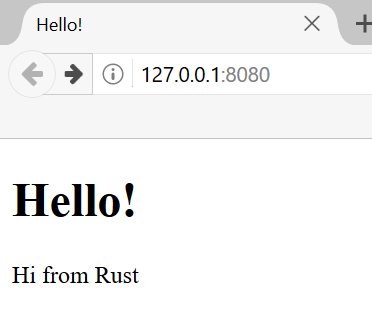
图 21-1:我们最后的共同项目
Before we get started, we should mention two details. First, the method we’ll use won’t be the best way to build a web server with Rust. Community members have published a number of production-ready crates available at crates.io that provide more complete web server and thread pool implementations than we’ll build. However, our intention in this chapter is to help you learn, not to take the easy route. Because Rust is a systems programming language, we can choose the level of abstraction we want to work with and can go to a lower level than is possible or practical in other languages.
在开始之前,我们应该提到两个细节。首先,我们将使用的方法并不是用 Rust 构建 Web 服务器的最佳方式。社区成员在 crates.io 上发布了许多生产级 crate,它们提供了比我们将构建的更完整的 Web 服务器和线程池实现。然而,我们在本章的意图是帮助你学习,而不是走捷径。因为 Rust 是一门系统编程语言,我们可以选择想要工作的抽象层级,并且可以深入到其他语言中不可能或不实际的底层。
其次,我们在这里不会使用 async 和 await。构建线程池本身就是一个巨大的挑战,更不用说还要构建一个异步运行时了!不过,我们会说明 async 和 await 如何适用于我们在本章中遇到的一些相同问题。最终,正如我们在第 17 章中指出的,许多异步运行时使用线程池来管理它们的工作。
Second, we will not be using async and await here. Building a thread pool is a big enough challenge on its own, without adding in building an async runtime! However, we will note how async and await might be applicable to some of the same problems we will see in this chapter. Ultimately, as we noted back in Chapter 17, many async runtimes use thread pools for managing their work.
因此,我们将手动编写基础的 HTTP 服务器和线程池,以便你学习将来可能使用的 crate 背后的通用思路和技术。
We’ll therefore write the basic HTTP server and thread pool manually so that you can learn the general ideas and techniques behind the crates you might use in the future.
构建单线程 Web 服务器
构建单线程 Web 服务器
Building a Single-Threaded Web Server
我们将从让单线程 Web 服务器运行开始。在开始之前,让我们快速回顾一下构建 Web 服务器所涉及的协议。这些协议的细节超出了本书的范围,但简要概述将为你提供所需的信息。
We’ll start by getting a single-threaded web server working. Before we begin, let’s look at a quick overview of the protocols involved in building web servers. The details of these protocols are beyond the scope of this book, but a brief overview will give you the information you need.
构建 Web 服务器涉及的两个主要协议是超文本传输协议 (HTTP) 和传输控制协议 (TCP)。这两个协议都是请求-响应 (request-response) 协议,意味着客户端 (client) 发起请求,而服务器 (server) 监听请求并向客户端提供响应。这些请求和响应的内容由协议定义。
The two main protocols involved in web servers are Hypertext Transfer Protocol (HTTP) and Transmission Control Protocol (TCP). Both protocols are request-response protocols, meaning a client initiates requests and a server listens to the requests and provides a response to the client. The contents of those requests and responses are defined by the protocols.
TCP 是底层协议,它描述了信息如何从一台服务器传输到另一台服务器的细节,但没有指定这些信息是什么。HTTP 构建在 TCP 之上,定义了请求和响应的内容。技术上可以将 HTTP 与其他协议配合使用,但在绝大多数情况下,HTTP 通过 TCP 发送数据。我们将处理 TCP 和 HTTP 请求和响应的原始字节。
TCP is the lower-level protocol that describes the details of how information gets from one server to another but doesn’t specify what that information is. HTTP builds on top of TCP by defining the contents of the requests and responses. It’s technically possible to use HTTP with other protocols, but in the vast majority of cases, HTTP sends its data over TCP. We’ll work with the raw bytes of TCP and HTTP requests and responses.
监听 TCP 连接
Listening to the TCP Connection
我们的 Web 服务器需要监听 TCP 连接,所以这是我们要处理的第一部分。标准库提供了一个 std::net 模块,可以让我们做到这一点。让我们以通常的方式创建一个新项目:
Our web server needs to listen to a TCP connection, so that’s the first part
we’ll work on. The standard library offers a std::net module that lets us do
this. Let’s make a new project in the usual fashion:
$ cargo new hello
Created binary (application) `hello` project
$ cd hello
现在在 src/main.rs 中输入示例 21-1 中的代码开始。此代码将在本地地址 127.0.0.1:7878 监听传入的 TCP 流。当它接收到传入流时,将打印 Connection established!。
Now enter the code in Listing 21-1 in src/main.rs to start. This code will
listen at the local address 127.0.0.1:7878 for incoming TCP streams. When it
gets an incoming stream, it will print Connection established!.
use std::net::TcpListener;
fn main() {
let listener = TcpListener::bind("127.0.0.1:7878").unwrap();
for stream in listener.incoming() {
let stream = stream.unwrap();
println!("Connection established!");
}
}使用 TcpListener,我们可以在地址 127.0.0.1:7878 监听 TCP 连接。在地址中,冒号前的部分是代表你计算机的 IP 地址(每台计算机上都是一样的,并不代表作者的具体计算机),7878 是端口。我们选择这个端口有两个原因:HTTP 通常不在此端口上被接受,因此我们的服务器不太可能与你机器上可能运行的其他 Web 服务器发生冲突;而且 7878 是在电话键盘上打出的 rust。
Using TcpListener, we can listen for TCP connections at the address
127.0.0.1:7878. In the address, the section before the colon is an IP address
representing your computer (this is the same on every computer and doesn’t
represent the authors’ computer specifically), and 7878 is the port. We’ve
chosen this port for two reasons: HTTP isn’t normally accepted on this port, so
our server is unlikely to conflict with any other web server you might have
running on your machine, and 7878 is rust typed on a telephone.
这种情况下的 bind 函数的工作方式类似于 new 函数,因为它将返回一个新的 TcpListener 实例。该函数被称为 bind,是因为在网络编程中,连接到要监听的端口被称为“绑定到端口 (binding to a port)”。
The bind function in this scenario works like the new function in that it
will return a new TcpListener instance. The function is called bind
because, in networking, connecting to a port to listen to is known as “binding
to a port.”
bind 函数返回一个 Result<T, E>,这表明绑定有可能失败,例如,如果我们运行了程序的两个实例,从而有两个程序监听同一个端口。因为我们编写基础服务器只是为了学习目的,所以我们不必担心处理这类错误;相反,如果发生错误,我们使用 unwrap 停止程序。
The bind function returns a Result<T, E>, which indicates that it’s
possible for binding to fail, for example, if we ran two instances of our
program and so had two programs listening to the same port. Because we’re
writing a basic server just for learning purposes, we won’t worry about
handling these kinds of errors; instead, we use unwrap to stop the program if
errors happen.
TcpListener 上的 incoming 方法返回一个迭代器,它为我们提供一系列流(更具体地说,是 TcpStream 类型的流)。单个流 (stream) 代表客户端与服务器之间的一个打开的连接。连接 (Connection) 是完整的请求和响应过程的名称,其中客户端连接到服务器,服务器生成响应,然后服务器关闭连接。因此,我们将从 TcpStream 读取内容以查看客户端发送了什么,然后将我们的响应写入流中以将数据发送回客户端。总的来说,这个 for 循环将轮流处理每个连接,并产生一系列流供我们处理。
The incoming method on TcpListener returns an iterator that gives us a
sequence of streams (more specifically, streams of type TcpStream). A single
stream represents an open connection between the client and the server.
Connection is the name for the full request and response process in which a
client connects to the server, the server generates a response, and the server
closes the connection. As such, we will read from the TcpStream to see what
the client sent and then write our response to the stream to send data back to
the client. Overall, this for loop will process each connection in turn and
produce a series of streams for us to handle.
目前,我们对流的处理包括:如果流有任何错误,调用 unwrap 终止程序;如果没有错误,程序将打印一条消息。我们将在下一个代码清单中为成功的情况添加更多功能。当我们客户端连接到服务器时,我们可能会从 incoming 方法接收到错误,原因是我们实际上并没有迭代连接。相反,我们是在迭代连接尝试 (connection attempts)。连接可能由于多种原因而不成功,其中许多原因与操作系统相关。例如,许多操作系统对它们可以支持的并发打开连接数有限制;超过该数量的新连接尝试将产生错误,直到关闭一些打开的连接。
For now, our handling of the stream consists of calling unwrap to terminate
our program if the stream has any errors; if there aren’t any errors, the
program prints a message. We’ll add more functionality for the success case in
the next listing. The reason we might receive errors from the incoming method
when a client connects to the server is that we’re not actually iterating over
connections. Instead, we’re iterating over connection attempts. The
connection might not be successful for a number of reasons, many of them
operating system specific. For example, many operating systems have a limit to
the number of simultaneous open connections they can support; new connection
attempts beyond that number will produce an error until some of the open
connections are closed.
让我们试着运行这段代码!在终端中执行 cargo run,然后在 Web 浏览器中加载 127.0.0.1:7878。浏览器应该会显示类似“连接已重置”的错误消息,因为服务器当前没有发回任何数据。但是当你查看终端时,你应该会看到浏览器连接到服务器时打印的几条消息!
Let’s try running this code! Invoke cargo run in the terminal and then load
127.0.0.1:7878 in a web browser. The browser should show an error message
like “Connection reset” because the server isn’t currently sending back any
data. But when you look at your terminal, you should see several messages that
were printed when the browser connected to the server!
Running `target/debug/hello`
Connection established!
Connection established!
Connection established!
有时你会看到为一个浏览器请求打印了多条消息;原因可能是浏览器正在请求页面,同时也请求其他资源,例如出现在浏览器标签页中的 favicon.ico 图标。
Sometimes you’ll see multiple messages printed for one browser request; the reason might be that the browser is making a request for the page as well as a request for other resources, like the favicon.ico icon that appears in the browser tab.
也可能是因为浏览器尝试多次连接到服务器,因为服务器没有响应任何数据。当 stream 超出作用域并在循环结束时被丢弃(drop)时,连接作为 drop 实现的一部分被关闭。浏览器有时会通过重试来处理关闭的连接,因为问题可能是暂时的。
It could also be that the browser is trying to connect to the server multiple
times because the server isn’t responding with any data. When stream goes out
of scope and is dropped at the end of the loop, the connection is closed as
part of the drop implementation. Browsers sometimes deal with closed
connections by retrying, because the problem might be temporary.
浏览器有时也会在不发送任何请求的情况下打开与服务器的多个连接,以便如果它们以后确实发送请求,这些请求可以更迅速地发生。当这种情况发生时,我们的服务器将看到每个连接,无论该连接上是否有任何请求。例如,许多版本的基于 Chrome 的浏览器都会这样做;你可以通过使用私密浏览模式或使用不同的浏览器来禁用该优化。
Browsers also sometimes open multiple connections to the server without sending any requests so that if they do later send requests, those requests can happen more quickly. When this occurs, our server will see each connection, regardless of whether there are any requests over that connection. Many versions of Chrome-based browsers do this, for example; you can disable that optimization by using private browsing mode or using a different browser.
重要的因素是,我们已经成功获得了一个 TCP 连接的句柄!
The important factor is that we’ve successfully gotten a handle to a TCP connection!
记得在运行完特定版本的代码后,通过按 ctrl-C 停止程序。然后,在每次进行代码更改后,通过调用 cargo run 命令重启程序,以确保你运行的是最新的代码。
Remember to stop the program by pressing ctrl-C when
you’re done running a particular version of the code. Then, restart the program
by invoking the cargo run command after you’ve made each set of code changes
to make sure you’re running the newest code.
读取请求
Reading the Request
让我们实现从浏览器读取请求的功能!为了将首先获得连接和随后对连接采取行动的关注点分开,我们将开始一个处理连接的新函数。在这个新的 handle_connection 函数中,我们将从 TCP 流中读取数据并打印它,以便我们可以看到从浏览器发送的数据。将代码更改为如示例 21-2 所示。
Let’s implement the functionality to read the request from the browser! To
separate the concerns of first getting a connection and then taking some action
with the connection, we’ll start a new function for processing connections. In
this new handle_connection function, we’ll read data from the TCP stream and
print it so that we can see the data being sent from the browser. Change the
code to look like Listing 21-2.
use std::{
io::{BufReader, prelude::*},
net::{TcpListener, TcpStream},
};
fn main() {
let listener = TcpListener::bind("127.0.0.1:7878").unwrap();
for stream in listener.incoming() {
let stream = stream.unwrap();
handle_connection(stream);
}
}
fn handle_connection(mut stream: TcpStream) {
let buf_reader = BufReader::new(&stream);
let http_request: Vec<_> = buf_reader
.lines()
.map(|result| result.unwrap())
.take_while(|line| !line.is_empty())
.collect();
println!("Request: {http_request:#?}");
}我们将 std::io::BufReader 和 std::io::prelude 引入作用域,以便能够访问允许我们从流中读取和向流中写入的 trait 和类型。在 main 函数的 for 循环中,我们现在不再打印一条说明建立了连接的消息,而是调用新的 handle_connection 函数并将 stream 传递给它。
We bring std::io::BufReader and std::io::prelude into scope to get access
to traits and types that let us read from and write to the stream. In the for
loop in the main function, instead of printing a message that says we made a
connection, we now call the new handle_connection function and pass the
stream to it.
在 handle_connection 函数中,我们创建了一个包装 stream 引用的新 BufReader 实例。BufReader 通过为我们管理对 std::io::Read trait 方法的调用来添加缓冲区。
In the handle_connection function, we create a new BufReader instance that
wraps a reference to the stream. The BufReader adds buffering by managing
calls to the std::io::Read trait methods for us.
我们创建一个名为 http_request 的变量,用于收集浏览器发送到我们服务器的请求行。我们通过添加 Vec<_> 类型标注来表明我们想要将这些行收集到一个向量中。
We create a variable named http_request to collect the lines of the request
the browser sends to our server. We indicate that we want to collect these
lines in a vector by adding the Vec<_> type annotation.
BufReader 实现了 std::io::BufRead trait,该 trait 提供了 lines 方法。lines 方法通过在每当看到换行符字节时拆分数据流,返回一个 Result<String, std::io::Error> 的迭代器。为了获得每个 String,我们对每个 Result 进行 map 和 unwrap。如果数据不是有效的 UTF-8 或者从流中读取时出现问题,Result 可能是个错误。同样,生产环境的程序应该更优雅地处理这些错误,但为了简单起见,我们选择在出现错误的情况下停止程序。
BufReader implements the std::io::BufRead trait, which provides the lines
method. The lines method returns an iterator of Result<String, std::io::Error> by splitting the stream of data whenever it sees a newline
byte. To get each String, we map and unwrap each Result. The Result
might be an error if the data isn’t valid UTF-8 or if there was a problem
reading from the stream. Again, a production program should handle these errors
more gracefully, but we’re choosing to stop the program in the error case for
simplicity.
浏览器通过连续发送两个换行符来发出 HTTP 请求结束的信号,因此为了从流中获取一个请求,我们获取多行,直到获得一个空字符串的行。一旦我们将这些行收集到向量中,我们就使用精美的调试格式打印它们,以便我们可以查看 Web 浏览器发送到我们服务器的指令。
The browser signals the end of an HTTP request by sending two newline characters in a row, so to get one request from the stream, we take lines until we get a line that is the empty string. Once we’ve collected the lines into the vector, we’re printing them out using pretty debug formatting so that we can take a look at the instructions the web browser is sending to our server.
让我们试试这段代码!启动程序并再次在 Web 浏览器中发出请求。请注意,浏览器中仍会得到一个错误页面,但终端中程序的输出现在将类似于:
Let’s try this code! Start the program and make a request in a web browser again. Note that we’ll still get an error page in the browser, but our program’s output in the terminal will now look similar to this:
$ cargo run
Compiling hello v0.1.0 (file:///projects/hello)
Finished `dev` profile [unoptimized + debuginfo] target(s) in 0.42s
Running `target/debug/hello`
Request: [
"GET / HTTP/1.1",
"Host: 127.0.0.1:7878",
"User-Agent: Mozilla/5.0 (Macintosh; Intel Mac OS X 10.15; rv:99.0) Gecko/20100101 Firefox/99.0",
"Accept: text/html,application/xhtml+xml,application/xml;q=0.9,image/avif,image/webp,*/*;q=0.8",
"Accept-Language: en-US,en;q=0.5",
"Accept-Encoding: gzip, deflate, br",
"DNT: 1",
"Connection: keep-alive",
"Upgrade-Insecure-Requests: 1",
"Sec-Fetch-Dest: document",
"Sec-Fetch-Mode: navigate",
"Sec-Fetch-Site: none",
"Sec-Fetch-User: ?1",
"Cache-Control: max-age=0",
]
根据你的浏览器,你可能会得到略有不同的输出。现在我们正在打印请求数据,我们可以通过查看请求第一行 GET 之后的路径,来了解为什么一个浏览器请求会产生多个连接。如果重复的连接都在请求 /,我们知道浏览器正在重复获取 /,因为它没有收到我们程序的响应。
Depending on your browser, you might get slightly different output. Now that
we’re printing the request data, we can see why we get multiple connections
from one browser request by looking at the path after GET in the first line
of the request. If the repeated connections are all requesting /, we know the
browser is trying to fetch / repeatedly because it’s not getting a response
from our program.
让我们分解这个请求数据,以了解浏览器在向我们的程序请求什么。
Let’s break down this request data to understand what the browser is asking of our program.
仔细观察 HTTP 请求
Looking More Closely at an HTTP Request
HTTP 是一种基于文本的协议,一个请求采用如下格式:
HTTP is a text-based protocol, and a request takes this format:
Method Request-URI HTTP-Version CRLF
headers CRLF
message-body
第一行是请求行 (request line),它保存着关于客户端正在请求什么的信息。请求行的第一部分指示所使用的方法 (method),如 GET 或 POST,它描述了客户端如何发出此请求。我们的客户端使用了 GET 请求,这意味着它正在请求信息。
The first line is the request line that holds information about what the
client is requesting. The first part of the request line indicates the method
being used, such as GET or POST, which describes how the client is making
this request. Our client used a GET request, which means it is asking for
information.
请求行的下一部分是 /,它指示客户端正在请求的统一资源标识符 (URI):URI 与统一资源定位符 (URL) 几乎相同,但并不完全相同。在本章中,URI 和 URL 之间的区别并不重要,但 HTTP 规范使用了术语 URI,因此我们可以在脑海中用 URL 替换这里的 URI。
The next part of the request line is /, which indicates the uniform resource identifier (URI) the client is requesting: A URI is almost, but not quite, the same as a uniform resource locator (URL). The difference between URIs and URLs isn’t important for our purposes in this chapter, but the HTTP spec uses the term URI, so we can just mentally substitute URL for URI here.
最后一部分是客户端使用的 HTTP 版本,然后请求行以 CRLF 序列结尾。(CRLF 代表回车 (carriage return) 和换行 (line feed),这些是打字机时代的术语!)CRLF 序列也可以写作 \r\n,其中 \r 是回车,\n 是换行。CRLF 序列将请求行与请求数据的其余部分分开。请注意,当打印 CRLF 时,我们看到的是开始新行而不是 \r\n。
The last part is the HTTP version the client uses, and then the request line
ends in a CRLF sequence. (CRLF stands for carriage return and line feed,
which are terms from the typewriter days!) The CRLF sequence can also be
written as \r\n, where \r is a carriage return and \n is a line feed. The
CRLF sequence separates the request line from the rest of the request data.
Note that when the CRLF is printed, we see a new line start rather than \r\n.
查看我们到目前为止通过运行程序收到的请求行数据,我们看到 GET 是方法,/ 是请求 URI,HTTP/1.1 是版本。
Looking at the request line data we received from running our program so far,
we see that GET is the method, / is the request URI, and HTTP/1.1 is the
version.
在请求行之后,从 Host: 开始的剩余行都是标头 (headers)。GET 请求没有正文 (body)。
After the request line, the remaining lines starting from Host: onward are
headers. GET requests have no body.
尝试从不同的浏览器发出请求,或者请求不同的地址,例如 127.0.0.1:7878/test,看看请求数据如何变化。
Try making a request from a different browser or asking for a different address, such as 127.0.0.1:7878/test, to see how the request data changes.
现在我们知道了浏览器在请求什么,让我们发回一些数据!
Now that we know what the browser is asking for, let’s send back some data!
编写响应
Writing a Response
我们将实现发送数据作为对客户端请求的响应。响应具有以下格式:
We’re going to implement sending data in response to a client request. Responses have the following format:
HTTP-Version Status-Code Reason-Phrase CRLF
headers CRLF
message-body
第一行是状态行 (status line),其中包含响应中使用的 HTTP 版本、汇总请求结果的数字状态码 (status code),以及对状态码进行文本描述的原因短语 (reason phrase)。在 CRLF 序列之后是任何标头,接着是另一个 CRLF 序列,最后是响应的正文。
The first line is a status line that contains the HTTP version used in the response, a numeric status code that summarizes the result of the request, and a reason phrase that provides a text description of the status code. After the CRLF sequence are any headers, another CRLF sequence, and the body of the response.
这是一个使用 HTTP 1.1 版本、状态码为 200、原因短语为 OK、没有标头且没有正文的响应示例:
HTTP/1.1 200 OK\r\n\r\n
状态码 200 是标准的成功响应。这段文本是一个极小的成功 HTTP 响应。让我们把这个写入流中,作为我们对成功请求的响应!在 handle_connection 函数中,删除打印请求数据的 println!,并将其替换为示例 21-3 中的代码。
The status code 200 is the standard success response. The text is a tiny
successful HTTP response. Let’s write this to the stream as our response to a
successful request! From the handle_connection function, remove the
println! that was printing the request data and replace it with the code in
Listing 21-3.
use std::{
io::{BufReader, prelude::*},
net::{TcpListener, TcpStream},
};
fn main() {
let listener = TcpListener::bind("127.0.0.1:7878").unwrap();
for stream in listener.incoming() {
let stream = stream.unwrap();
handle_connection(stream);
}
}
fn handle_connection(mut stream: TcpStream) {
let buf_reader = BufReader::new(&stream);
let http_request: Vec<_> = buf_reader
.lines()
.map(|result| result.unwrap())
.take_while(|line| !line.is_empty())
.collect();
let response = "HTTP/1.1 200 OK\r\n\r\n";
stream.write_all(response.as_bytes()).unwrap();
}第一行新代码定义了保存成功消息数据的 response 变量。然后,我们在 response 上调用 as_bytes 将字符串数据转换为字节。stream 上的 write_all 方法接受一个 &[u8] 并将这些字节直接发送到连接中。因为 write_all 操作可能会失败,所以我们像之前一样对任何错误结果使用 unwrap。同样,在真实的应用程序中,你会在这里添加错误处理。
The first new line defines the response variable that holds the success
message’s data. Then, we call as_bytes on our response to convert the
string data to bytes. The write_all method on stream takes a &[u8] and
sends those bytes directly down the connection. Because the write_all
operation could fail, we use unwrap on any error result as before. Again, in
a real application, you would add error handling here.
有了这些更改,让我们运行代码并发出请求。由于我们不再向终端打印任何数据,因此除了来自 Cargo 的输出外,我们不会看到任何输出。当你在 Web 浏览器中加载 127.0.0.1:7878 时,你应该得到一个空白页而不是错误。你刚刚手动编码实现了接收 HTTP 请求并发送响应!
With these changes, let’s run our code and make a request. We’re no longer printing any data to the terminal, so we won’t see any output other than the output from Cargo. When you load 127.0.0.1:7878 in a web browser, you should get a blank page instead of an error. You’ve just handcoded receiving an HTTP request and sending a response!
返回真正的 HTML
Returning Real HTML
让我们实现返回不仅仅是一个空白页的功能。在项目目录的根目录下(而不是在 src 目录中)创建新文件 hello.html。你可以输入任何你想要的 HTML;示例 21-4 显示了一种可能性。
Let’s implement the functionality for returning more than a blank page. Create the new file hello.html in the root of your project directory, not in the src directory. You can input any HTML you want; Listing 21-4 shows one possibility.
<!DOCTYPE html>
<html lang="en">
<head>
<meta charset="utf-8">
<title>Hello!</title>
</head>
<body>
<h1>Hello!</h1>
<p>Hi from Rust</p>
</body>
</html>
这是一个带有标题和一些文本的最小 HTML5 文档。为了在接收到请求时从服务器返回此内容,我们将修改 handle_connection(如示例 21-5 所示),以读取 HTML 文件,将其作为正文添加到响应中并发送。
This is a minimal HTML5 document with a heading and some text. To return this
from the server when a request is received, we’ll modify handle_connection as
shown in Listing 21-5 to read the HTML file, add it to the response as a body,
and send it.
use std::{
fs,
io::{BufReader, prelude::*},
net::{TcpListener, TcpStream},
};
// --snip--
fn main() {
let listener = TcpListener::bind("127.0.0.1:7878").unwrap();
for stream in listener.incoming() {
let stream = stream.unwrap();
handle_connection(stream);
}
}
fn handle_connection(mut stream: TcpStream) {
let buf_reader = BufReader::new(&stream);
let http_request: Vec<_> = buf_reader
.lines()
.map(|result| result.unwrap())
.take_while(|line| !line.is_empty())
.collect();
let status_line = "HTTP/1.1 200 OK";
let contents = fs::read_to_string("hello.html").unwrap();
let length = contents.len();
let response =
format!("{status_line}\r\nContent-Length: {length}\r\n\r\n{contents}");
stream.write_all(response.as_bytes()).unwrap();
}我们在 use 语句中添加了 fs,以便将标准库的文件系统模块引入作用域。将文件内容读取到字符串的代码应该看起来很熟悉;我们在示例 12-4 的 I/O 项目中读取文件内容时使用过它。
We’ve added fs to the use statement to bring the standard library’s
filesystem module into scope. The code for reading the contents of a file to a
string should look familiar; we used it when we read the contents of a file for
our I/O project in Listing 12-4.
接下来,我们使用 format! 将文件内容作为成功响应的正文添加进去。为了确保 HTTP 响应有效,我们添加了 Content-Length 标头,该标头设置为我们响应正文的大小——在本例中是 hello.html 的大小。
Next, we use format! to add the file’s contents as the body of the success
response. To ensure a valid HTTP response, we add the Content-Length header,
which is set to the size of our response body—in this case, the size of
hello.html.
使用 cargo run 运行此代码并在浏览器中加载 127.0.0.1:7878;你应该能看到你的 HTML 被渲染了!
Run this code with cargo run and load 127.0.0.1:7878 in your browser; you
should see your HTML rendered!
目前,我们忽略了 http_request 中的请求数据,只是无条件地发回 HTML 文件的内容。这意味着如果你尝试在浏览器中请求 127.0.0.1:7878/something-else,你仍然会得到这个相同的 HTML 响应。目前,我们的服务器非常有限,没有做到大多数 Web 服务器所做的事情。我们希望根据请求自定义我们的响应,并仅针对格式正确的 / 请求发回 HTML 文件。
Currently, we’re ignoring the request data in http_request and just sending
back the contents of the HTML file unconditionally. That means if you try
requesting 127.0.0.1:7878/something-else in your browser, you’ll still get
back this same HTML response. At the moment, our server is very limited and
does not do what most web servers do. We want to customize our responses
depending on the request and only send back the HTML file for a well-formed
request to /.
验证请求并选择性地响应
Validating the Request and Selectively Responding
现在,我们的 Web 服务器无论客户端请求什么,都会返回文件中的 HTML。让我们添加功能,在返回 HTML 文件之前检查浏览器是否正在请求 /,并在浏览器请求其他任何内容时返回错误。为此,我们需要修改 handle_connection,如示例 21-6 所示。这段新代码将收到的请求内容与我们已知的 / 请求的样子进行比对,并添加 if 和 else 块以不同地对待请求。
Right now, our web server will return the HTML in the file no matter what the
client requested. Let’s add functionality to check that the browser is
requesting / before returning the HTML file and to return an error if the
browser requests anything else. For this we need to modify handle_connection,
as shown in Listing 21-6. This new code checks the content of the request
received against what we know a request for / looks like and adds if and
else blocks to treat requests differently.
use std::{
fs,
io::{BufReader, prelude::*},
net::{TcpListener, TcpStream},
};
fn main() {
let listener = TcpListener::bind("127.0.0.1:7878").unwrap();
for stream in listener.incoming() {
let stream = stream.unwrap();
handle_connection(stream);
}
}
// --snip--
fn handle_connection(mut stream: TcpStream) {
let buf_reader = BufReader::new(&stream);
let request_line = buf_reader.lines().next().unwrap().unwrap();
if request_line == "GET / HTTP/1.1" {
let status_line = "HTTP/1.1 200 OK";
let contents = fs::read_to_string("hello.html").unwrap();
let length = contents.len();
let response = format!(
"{status_line}\r\nContent-Length: {length}\r\n\r\n{contents}"
);
stream.write_all(response.as_bytes()).unwrap();
} else {
// some other request
}
}我们只打算查看 HTTP 请求的第一行,所以我们不再将整个请求读入一个向量,而是调用 next 从迭代器中获取第一项。第一个 unwrap 处理 Option 并在迭代器没有项时停止程序。第二个 unwrap 处理 Result,其效果与示例 21-2 中添加的 map 中的 unwrap 相同。
We’re only going to be looking at the first line of the HTTP request, so rather
than reading the entire request into a vector, we’re calling next to get the
first item from the iterator. The first unwrap takes care of the Option and
stops the program if the iterator has no items. The second unwrap handles the
Result and has the same effect as the unwrap that was in the map added in
Listing 21-2.
接下来,我们检查 request_line 是否等于指向 / 路径的 GET 请求的请求行。如果相等,if 块将返回 HTML 文件的内容。
Next, we check the request_line to see if it equals the request line of a GET
request to the / path. If it does, the if block returns the contents of our
HTML file.
如果 request_line 不等于指向 / 路径的 GET 请求,则意味着我们收到了一些其他请求。稍后我们将在 else 块中添加代码以响应所有其他请求。
If the request_line does not equal the GET request to the / path, it
means we’ve received some other request. We’ll add code to the else block in
a moment to respond to all other requests.
现在运行此代码并请求 127.0.0.1:7878;你应该得到 hello.html 中的 HTML。如果你进行任何其他请求,例如 127.0.0.1:7878/something-else,你将得到一个连接错误,就像你在运行示例 21-1 和示例 21-2 中的代码时看到的那样。
Run this code now and request 127.0.0.1:7878; you should get the HTML in hello.html. If you make any other request, such as 127.0.0.1:7878/something-else, you’ll get a connection error like those you saw when running the code in Listing 21-1 and Listing 21-2.
现在让我们将示例 21-7 中的代码添加到 else 块中,以返回一个状态码为 404 的响应,这表明未找到请求的内容。我们还将返回一些 HTML 供浏览器渲染,以向终端用户说明响应。
Now let’s add the code in Listing 21-7 to the else block to return a response
with the status code 404, which signals that the content for the request was
not found. We’ll also return some HTML for a page to render in the browser
indicating the response to the end user.
use std::{
fs,
io::{BufReader, prelude::*},
net::{TcpListener, TcpStream},
};
fn main() {
let listener = TcpListener::bind("127.0.0.1:7878").unwrap();
for stream in listener.incoming() {
let stream = stream.unwrap();
handle_connection(stream);
}
}
fn handle_connection(mut stream: TcpStream) {
let buf_reader = BufReader::new(&stream);
let request_line = buf_reader.lines().next().unwrap().unwrap();
if request_line == "GET / HTTP/1.1" {
let status_line = "HTTP/1.1 200 OK";
let contents = fs::read_to_string("hello.html").unwrap();
let length = contents.len();
let response = format!(
"{status_line}\r\nContent-Length: {length}\r\n\r\n{contents}"
);
stream.write_all(response.as_bytes()).unwrap();
// --snip--
} else {
let status_line = "HTTP/1.1 404 NOT FOUND";
let contents = fs::read_to_string("404.html").unwrap();
let length = contents.len();
let response = format!(
"{status_line}\r\nContent-Length: {length}\r\n\r\n{contents}"
);
stream.write_all(response.as_bytes()).unwrap();
}
}在这里,我们的响应有一个状态行,状态码为 404,原因短语为 NOT FOUND。响应的正文将是 404.html 文件中的 HTML。你需要在 hello.html 旁边创建一个 404.html 文件作为错误页面;同样,你可以随意使用任何 HTML,或者使用示例 21-8 中的示例 HTML。
Here, our response has a status line with status code 404 and the reason phrase
NOT FOUND. The body of the response will be the HTML in the file 404.html.
You’ll need to create a 404.html file next to hello.html for the error
page; again, feel free to use any HTML you want, or use the example HTML in
Listing 21-8.
<!DOCTYPE html>
<html lang="en">
<head>
<meta charset="utf-8">
<title>Hello!</title>
</head>
<body>
<h1>Oops!</h1>
<p>Sorry, I don't know what you're asking for.</p>
</body>
</html>
有了这些更改,再次运行你的服务器。请求 127.0.0.1:7878 应返回 hello.html 的内容,而任何其他请求(如 127.0.0.1:7878/foo)应返回来自 404.html 的错误 HTML。
With these changes, run your server again. Requesting 127.0.0.1:7878 should return the contents of hello.html, and any other request, like 127.0.0.1:7878/foo, should return the error HTML from 404.html.
重构
Refactoring
目前,if 和 else 块有很多重复:它们都在读取文件并将文件内容写入流。唯一的区别是状态行和文件名。让我们通过将这些差异提取到单独的 if 和 else 行中来简化代码,这些行将状态行和文件名的值分配给变量;然后我们就可以无条件地在读取文件和编写响应的代码中使用这些变量。示例 21-9 展示了替换庞大的 if 和 else 块后的结果代码。
At the moment, the if and else blocks have a lot of repetition: They’re
both reading files and writing the contents of the files to the stream. The
only differences are the status line and the filename. Let’s make the code more
concise by pulling out those differences into separate if and else lines
that will assign the values of the status line and the filename to variables;
we can then use those variables unconditionally in the code to read the file
and write the response. Listing 21-9 shows the resultant code after replacing
the large if and else blocks.
use std::{
fs,
io::{BufReader, prelude::*},
net::{TcpListener, TcpStream},
};
fn main() {
let listener = TcpListener::bind("127.0.0.1:7878").unwrap();
for stream in listener.incoming() {
let stream = stream.unwrap();
handle_connection(stream);
}
}
// --snip--
fn handle_connection(mut stream: TcpStream) {
// --snip--
let buf_reader = BufReader::new(&stream);
let request_line = buf_reader.lines().next().unwrap().unwrap();
let (status_line, filename) = if request_line == "GET / HTTP/1.1" {
("HTTP/1.1 200 OK", "hello.html")
} else {
("HTTP/1.1 404 NOT FOUND", "404.html")
};
let contents = fs::read_to_string(filename).unwrap();
let length = contents.len();
let response =
format!("{status_line}\r\nContent-Length: {length}\r\n\r\n{contents}");
stream.write_all(response.as_bytes()).unwrap();
}现在 if 和 else 块仅在一个元组中返回状态行和文件名的适当值;然后我们使用解构,通过 let 语句中的模式(如第 19 章所述)将这两个值分配给 status_line 和 filename。
Now the if and else blocks only return the appropriate values for the
status line and filename in a tuple; we then use destructuring to assign these
two values to status_line and filename using a pattern in the let
statement, as discussed in Chapter 19.
以前重复的代码现在位于 if 和 else 块之外,并使用 status_line 和 filename 变量。这使得更容易看到两种情况之间的区别,并且这意味着如果我们想要更改读取文件和编写响应的工作方式,我们只需要在一个地方更新代码。示例 21-9 中的代码行为将与示例 21-7 中的相同。
The previously duplicated code is now outside the if and else blocks and
uses the status_line and filename variables. This makes it easier to see
the difference between the two cases, and it means we have only one place to
update the code if we want to change how the file reading and response writing
work. The behavior of the code in Listing 21-9 will be the same as that in
Listing 21-7.
太棒了!我们现在拥有一个大约 40 行 Rust 代码的简单 Web 服务器,它对一个请求响应一页内容,对所有其他请求响应 404 响应。
Awesome! We now have a simple web server in approximately 40 lines of Rust code that responds to one request with a page of content and responds to all other requests with a 404 response.
目前,我们的服务器在单线程中运行,这意味着它一次只能处理一个请求。让我们通过模拟一些慢速请求来研究这可能产生的问题。然后,我们将修复它,使我们的服务器可以同时处理多个请求。
Currently, our server runs in a single thread, meaning it can only serve one request at a time. Let’s examine how that can be a problem by simulating some slow requests. Then, we’ll fix it so that our server can handle multiple requests at once.
将单线程服务器变为多线程服务器
从单线程到多线程服务器
From a Single-Threaded to a Multithreaded Server
现在,服务器将依次处理每个请求,这意味着在处理完第一个连接之前,它不会处理第二个连接。如果服务器收到的请求越来越多,这种串行执行的效果会越来越差。如果服务器收到一个处理时间很长的请求,后续的请求即使能很快处理,也必须等待长请求处理完毕。我们需要解决这个问题,但首先让我们看看实际存在的问题。
Right now, the server will process each request in turn, meaning it won’t process a second connection until the first connection is finished processing. If the server received more and more requests, this serial execution would be less and less optimal. If the server receives a request that takes a long time to process, subsequent requests will have to wait until the long request is finished, even if the new requests can be processed quickly. We’ll need to fix this, but first we’ll look at the problem in action.
模拟慢请求
Simulating a Slow Request
我们将看看缓慢处理的请求如何影响对当前服务器实现发出的其他请求。示例 21-10 实现了对 /sleep 请求的处理,其中包含模拟的慢响应,该响应将导致服务器在响应前休眠五秒钟。
We’ll look at how a slowly processing request can affect other requests made to our current server implementation. Listing 21-10 implements handling a request to /sleep with a simulated slow response that will cause the server to sleep for five seconds before responding.
use std::{
fs,
io::{BufReader, prelude::*},
net::{TcpListener, TcpStream},
thread,
time::Duration,
};
// --snip--
fn main() {
let listener = TcpListener::bind("127.0.0.1:7878").unwrap();
for stream in listener.incoming() {
let stream = stream.unwrap();
handle_connection(stream);
}
}
fn handle_connection(mut stream: TcpStream) {
// --snip--
let buf_reader = BufReader::new(&stream);
let request_line = buf_reader.lines().next().unwrap().unwrap();
let (status_line, filename) = match &request_line[..] {
"GET / HTTP/1.1" => ("HTTP/1.1 200 OK", "hello.html"),
"GET /sleep HTTP/1.1" => {
thread::sleep(Duration::from_secs(5));
("HTTP/1.1 200 OK", "hello.html")
}
_ => ("HTTP/1.1 404 NOT FOUND", "404.html"),
};
// --snip--
let contents = fs::read_to_string(filename).unwrap();
let length = contents.len();
let response =
format!("{status_line}\r\nContent-Length: {length}\r\n\r\n{contents}");
stream.write_all(response.as_bytes()).unwrap();
}既然有了三种情况,我们现在从 if 切换到了 match。我们需要显式地在 request_line 的切片上进行匹配,以便与字符串字面值进行模式匹配;match 不会像相等方法那样自动进行引用和解引用。
We switched from if to match now that we have three cases. We need to
explicitly match on a slice of request_line to pattern-match against the
string literal values; match doesn’t do automatic referencing and
dereferencing, like the equality method does.
第一个分支与示例 21-9 中的 if 块相同。第二个分支匹配对 /sleep 的请求。收到该请求后,服务器将在渲染成功的 HTML 页面之前休眠五秒钟。第三个分支与示例 21-9 中的 else 块相同。
The first arm is the same as the if block from Listing 21-9. The second arm
matches a request to /sleep. When that request is received, the server will
sleep for five seconds before rendering the successful HTML page. The third arm
is the same as the else block from Listing 21-9.
你可以看到我们的服务器是多么原始:真正的库会以一种更简洁的方式处理多个请求的识别!
You can see how primitive our server is: Real libraries would handle the recognition of multiple requests in a much less verbose way!
使用 cargo run 启动服务器。然后,打开两个浏览器窗口:一个访问 http://127.0.0.1:7878,另一个访问 http://127.0.0.1:7878/sleep。如果你像以前一样多次输入 / URI,你会看到它响应很快。但如果你输入 /sleep 然后加载 /,你会看到 / 会一直等待直到 sleep 完成整整五秒的休眠后才加载。
Start the server using cargo run. Then, open two browser windows: one for
http://127.0.0.1:7878 and the other for http://127.0.0.1:7878/sleep. If you
enter the / URI a few times, as before, you’ll see it respond quickly. But if
you enter /sleep and then load /, you’ll see that / waits until sleep
has slept for its full five seconds before loading.
我们可以使用多种技术来避免请求在慢请求之后堆积,包括像我们在第 17 章中所做的那样使用 async;我们要实现的是线程池。
There are multiple techniques we could use to avoid requests backing up behind a slow request, including using async as we did Chapter 17; the one we’ll implement is a thread pool.
使用线程池改善吞吐量
Improving Throughput with a Thread Pool
线程池(thread pool)是一组已派生并准备好等待处理任务的线程。当程序收到新任务时,它会将池中的一个线程分配给该任务,该线程将处理该任务。池中的剩余线程可用于处理在第一个线程处理期间进入的任何其他任务。当第一个线程处理完任务后,它会被返回到空闲线程池中,准备处理新任务。线程池允许你并发处理连接,从而增加服务器的吞吐量。
A thread pool is a group of spawned threads that are ready and waiting to handle a task. When the program receives a new task, it assigns one of the threads in the pool to the task, and that thread will process the task. The remaining threads in the pool are available to handle any other tasks that come in while the first thread is processing. When the first thread is done processing its task, it’s returned to the pool of idle threads, ready to handle a new task. A thread pool allows you to process connections concurrently, increasing the throughput of your server.
我们将池中线程的数量限制在一个较小的数字,以保护我们免受 DoS 攻击;如果我们的程序为每个进入的请求创建一个新线程,那么向我们服务器发出 1000 万个请求的人可能会耗尽我们服务器的所有资源并使请求处理陷于停顿,从而造成严重破坏。
We’ll limit the number of threads in the pool to a small number to protect us from DoS attacks; if we had our program create a new thread for each request as it came in, someone making 10 million requests to our server could wreak havoc by using up all our server’s resources and grinding the processing of requests to a halt.
因此,我们将让固定数量的线程在池中等待,而不是派生无限数量的线程。进入的请求被发送到池中进行处理。池将维护一个入站请求队列。池中的每个线程都会从这个队列中弹出一个请求,处理该请求,然后再向队列索要另一个请求。通过这种设计,我们可以并发处理多达 N 个请求,其中 N 是线程数。如果每个线程都在响应一个耗时较长的请求,后续请求仍然可以在队列中积压,但我们增加了在达到该点之前可以处理的耗时较长请求的数量。
Rather than spawning unlimited threads, then, we’ll have a fixed number of
threads waiting in the pool. Requests that come in are sent to the pool for
processing. The pool will maintain a queue of incoming requests. Each of the
threads in the pool will pop off a request from this queue, handle the request,
and then ask the queue for another request. With this design, we can process up
to N requests concurrently, where N is the number of threads. If each
thread is responding to a long-running request, subsequent requests can still
back up in the queue, but we’ve increased the number of long-running requests
we can handle before reaching that point.
这种技术只是提高 Web 服务器吞吐量的众多方法之一。你可能探索的其他选项包括 fork/join 模型、单线程异步 I/O 模型和多线程异步 I/O 模型。如果你对这个话题感兴趣,可以阅读更多关于其他解决方案的信息并尝试实现它们;对于像 Rust 这样的底层语言,所有这些选项都是可能的。
This technique is just one of many ways to improve the throughput of a web server. Other options you might explore are the fork/join model, the single-threaded async I/O model, and the multithreaded async I/O model. If you’re interested in this topic, you can read more about other solutions and try to implement them; with a low-level language like Rust, all of these options are possible.
在开始实现线程池之前,让我们先谈谈使用该池应该是什么样子的。当你尝试设计代码时,先编写客户端接口可以帮助指导你的设计。编写代码的 API,使其以你想要调用它的方式进行结构化;然后,在该结构内实现功能,而不是先实现功能然后再设计公共 API。
Before we begin implementing a thread pool, let’s talk about what using the pool should look like. When you’re trying to design code, writing the client interface first can help guide your design. Write the API of the code so that it’s structured in the way you want to call it; then, implement the functionality within that structure rather than implementing the functionality and then designing the public API.
类似于我们在第 12 章的项目中使用测试驱动开发的方式,这里我们将使用编译器驱动开发。我们将编写调用我们想要的函数的代码,然后查看编译器的错误,以确定接下来应该更改什么以使代码工作。然而,在此之前,我们将探讨我们不打算作为起点的技术。
Similar to how we used test-driven development in the project in Chapter 12, we’ll use compiler-driven development here. We’ll write the code that calls the functions we want, and then we’ll look at errors from the compiler to determine what we should change next to get the code to work. Before we do that, however, we’ll explore the technique we’re not going to use as a starting point.
为每个请求派生一个线程
Spawning a Thread for Each Request
首先,让我们探讨一下如果代码确实为每个连接创建一个新线程,它会是什么样子。如前所述,由于可能会派生无限数量的线程,这并不是我们的最终计划,但它是首先获得一个工作的多线程服务器的起点。然后,我们将添加线程池作为改进,对比这两个解决方案会更容易。
First, let’s explore how our code might look if it did create a new thread for every connection. As mentioned earlier, this isn’t our final plan due to the problems with potentially spawning an unlimited number of threads, but it is a starting point to get a working multithreaded server first. Then, we’ll add the thread pool as an improvement, and contrasting the two solutions will be easier.
示例 21-11 显示了对 main 进行的更改,以便在 for 循环中派生一个新线程来处理每个流。
Listing 21-11 shows the changes to make to main to spawn a new thread to
handle each stream within the for loop.
use std::{
fs,
io::{BufReader, prelude::*},
net::{TcpListener, TcpStream},
thread,
time::Duration,
};
fn main() {
let listener = TcpListener::bind("127.0.0.1:7878").unwrap();
for stream in listener.incoming() {
let stream = stream.unwrap();
thread::spawn(|| {
handle_connection(stream);
});
}
}
fn handle_connection(mut stream: TcpStream) {
let buf_reader = BufReader::new(&stream);
let request_line = buf_reader.lines().next().unwrap().unwrap();
let (status_line, filename) = match &request_line[..] {
"GET / HTTP/1.1" => ("HTTP/1.1 200 OK", "hello.html"),
"GET /sleep HTTP/1.1" => {
thread::sleep(Duration::from_secs(5));
("HTTP/1.1 200 OK", "hello.html")
}
_ => ("HTTP/1.1 404 NOT FOUND", "404.html"),
};
let contents = fs::read_to_string(filename).unwrap();
let length = contents.len();
let response =
format!("{status_line}\r\nContent-Length: {length}\r\n\r\n{contents}");
stream.write_all(response.as_bytes()).unwrap();
}正如你在第 16 章中学到的,thread::spawn 将创建一个新线程,然后在闭包中在新线程中运行代码。如果你运行这段代码并在浏览器中加载 /sleep,然后在另外两个浏览器标签页中加载 /,你确实会看到对 / 的请求不必等待 /sleep 完成。然而,正如我们提到的,这最终会使系统不堪重负,因为你会无限制地创建新线程。
As you learned in Chapter 16, thread::spawn will create a new thread and then
run the code in the closure in the new thread. If you run this code and load
/sleep in your browser, then / in two more browser tabs, you’ll indeed see
that the requests to / don’t have to wait for /sleep to finish. However, as
we mentioned, this will eventually overwhelm the system because you’d be making
new threads without any limit.
你可能还记得第 17 章中提到,这正是 async 和 await 大显身手的场景!在构建线程池时请记住这一点,并思考使用 async 会有哪些不同或相同之处。
You may also recall from Chapter 17 that this is exactly the kind of situation where async and await really shine! Keep that in mind as we build the thread pool and think about how things would look different or the same with async.
创建有限数量的线程
Creating a Finite Number of Threads
我们希望我们的线程池能以类似、熟悉的方式工作,这样从线程切换到线程池就不需要对使用我们 API 的代码进行大幅更改。示例 21-12 展示了我们要使用的 ThreadPool 结构体的假设接口,用来代替 thread::spawn。
We want our thread pool to work in a similar, familiar way so that switching
from threads to a thread pool doesn’t require large changes to the code that
uses our API. Listing 21-12 shows the hypothetical interface for a ThreadPool
struct we want to use instead of thread::spawn.
use std::{
fs,
io::{BufReader, prelude::*},
net::{TcpListener, TcpStream},
thread,
time::Duration,
};
fn main() {
let listener = TcpListener::bind("127.0.0.1:7878").unwrap();
let pool = ThreadPool::new(4);
for stream in listener.incoming() {
let stream = stream.unwrap();
pool.execute(|| {
handle_connection(stream);
});
}
}
fn handle_connection(mut stream: TcpStream) {
let buf_reader = BufReader::new(&stream);
let request_line = buf_reader.lines().next().unwrap().unwrap();
let (status_line, filename) = match &request_line[..] {
"GET / HTTP/1.1" => ("HTTP/1.1 200 OK", "hello.html"),
"GET /sleep HTTP/1.1" => {
thread::sleep(Duration::from_secs(5));
("HTTP/1.1 200 OK", "hello.html")
}
_ => ("HTTP/1.1 404 NOT FOUND", "404.html"),
};
let contents = fs::read_to_string(filename).unwrap();
let length = contents.len();
let response =
format!("{status_line}\r\nContent-Length: {length}\r\n\r\n{contents}");
stream.write_all(response.as_bytes()).unwrap();
}我们使用 ThreadPool::new 来创建一个具有可配置线程数量的新线程池,在本例中为四个。然后,在 for 循环中,pool.execute 具有与 thread::spawn 类似的接口,因为它接收一个闭包,该池应该为每个流运行该闭包。我们需要实现 pool.execute,使其接收闭包并将其交给池中的线程运行。这段代码还不能编译,但我们将尝试这样做,以便编译器可以指导我们如何修复它。
We use ThreadPool::new to create a new thread pool with a configurable number
of threads, in this case four. Then, in the for loop, pool.execute has a
similar interface as thread::spawn in that it takes a closure that the pool
should run for each stream. We need to implement pool.execute so that it
takes the closure and gives it to a thread in the pool to run. This code won’t
yet compile, but we’ll try so that the compiler can guide us in how to fix it.
使用编译器驱动开发构建 ThreadPool
Building ThreadPool Using Compiler-Driven Development
对 src/main.rs 进行示例 21-12 中的更改,然后让我们使用来自 cargo check 的编译器错误来驱动我们的开发。这是我们得到的第一个错误:
Make the changes in Listing 21-12 to src/main.rs, and then let’s use the
compiler errors from cargo check to drive our development. Here is the first
error we get:
$ cargo check
Checking hello v0.1.0 (file:///projects/hello)
error[E0433]: failed to resolve: use of undeclared type `ThreadPool`
--> src/main.rs:11:16
|
11 | let pool = ThreadPool::new(4);
| ^^^^^^^^^^ use of undeclared type `ThreadPool`
For more information about this error, try `rustc --explain E0433`.
error: could not compile `hello` (bin "hello") due to 1 previous error
太棒了!这个错误告诉我们我们需要一个 ThreadPool 类型或模块,所以我们现在就构建一个。我们的 ThreadPool 实现将独立于我们的 Web 服务器正在执行的工作类型。因此,让我们将 hello crate 从二进制 crate 切换为库 crate,以容纳我们的 ThreadPool 实现。在更改为库 crate 后,我们还可以将独立的线程池库用于我们想要使用线程池执行的任何工作,而不仅仅是为 Web 请求提供服务。
Great! This error tells us we need a ThreadPool type or module, so we’ll
build one now. Our ThreadPool implementation will be independent of the kind
of work our web server is doing. So, let’s switch the hello crate from a
binary crate to a library crate to hold our ThreadPool implementation. After
we change to a library crate, we could also use the separate thread pool
library for any work we want to do using a thread pool, not just for serving
web requests.
创建一个包含以下内容的 src/lib.rs 文件,这是我们目前可以拥有的 ThreadPool 结构体的最简单定义:
Create a src/lib.rs file that contains the following, which is the simplest
definition of a ThreadPool struct that we can have for now:
pub struct ThreadPool;然后,编辑 main.rs 文件,通过在 src/main.rs 顶部添加以下代码,将 ThreadPool 从库 crate 引入作用域:
Then, edit the main.rs file to bring ThreadPool into scope from the library
crate by adding the following code to the top of src/main.rs:
use hello::ThreadPool;
use std::{
fs,
io::{BufReader, prelude::*},
net::{TcpListener, TcpStream},
thread,
time::Duration,
};
fn main() {
let listener = TcpListener::bind("127.0.0.1:7878").unwrap();
let pool = ThreadPool::new(4);
for stream in listener.incoming() {
let stream = stream.unwrap();
pool.execute(|| {
handle_connection(stream);
});
}
}
fn handle_connection(mut stream: TcpStream) {
let buf_reader = BufReader::new(&stream);
let request_line = buf_reader.lines().next().unwrap().unwrap();
let (status_line, filename) = match &request_line[..] {
"GET / HTTP/1.1" => ("HTTP/1.1 200 OK", "hello.html"),
"GET /sleep HTTP/1.1" => {
thread::sleep(Duration::from_secs(5));
("HTTP/1.1 200 OK", "hello.html")
}
_ => ("HTTP/1.1 404 NOT FOUND", "404.html"),
};
let contents = fs::read_to_string(filename).unwrap();
let length = contents.len();
let response =
format!("{status_line}\r\nContent-Length: {length}\r\n\r\n{contents}");
stream.write_all(response.as_bytes()).unwrap();
}这段代码仍然无法运行,但让我们再次检查它以获得我们需要解决的下一个错误:
This code still won’t work, but let’s check it again to get the next error that we need to address:
$ cargo check
Checking hello v0.1.0 (file:///projects/hello)
error[E0599]: no function or associated item named `new` found for struct `ThreadPool` in the current scope
--> src/main.rs:12:28
|
12 | let pool = ThreadPool::new(4);
| ^^^ function or associated item not found in `ThreadPool`
For more information about this error, try `rustc --explain E0599`.
error: could not compile `hello` (bin "hello") due to 1 previous error
此错误表明接下来我们需要为 ThreadPool 创建一个名为 new 的关联函数。我们还知道 new 需要有一个可以接受 4 作为参数的参数,并应返回一个 ThreadPool 实例。让我们实现具有这些特征的最简单的 new 函数:
This error indicates that next we need to create an associated function named
new for ThreadPool. We also know that new needs to have one parameter
that can accept 4 as an argument and should return a ThreadPool instance.
Let’s implement the simplest new function that will have those
characteristics:
pub struct ThreadPool;
impl ThreadPool {
pub fn new(size: usize) -> ThreadPool {
ThreadPool
}
}我们选择 usize 作为 size 参数的类型,因为我们知道负数的线程数量没有任何意义。我们还知道我们将使用这个 4 作为线程集合中的元素数量,这正是 usize 类型的用途,如第 3 章“整数类型”一节中所述。
We chose usize as the type of the size parameter because we know that a
negative number of threads doesn’t make any sense. We also know we’ll use this
4 as the number of elements in a collection of threads, which is what the
usize type is for, as discussed in the “Integer Types” section in Chapter 3.
让我们再次检查代码:
Let’s check the code again:
$ cargo check
Checking hello v0.1.0 (file:///projects/hello)
error[E0599]: no method named `execute` found for struct `ThreadPool` in the current scope
--> src/main.rs:17:14
|
17 | pool.execute(|| {
| -----^^^^^^^ method not found in `ThreadPool`
For more information about this error, try `rustc --explain E0599`.
error: could not compile `hello` (bin "hello") due to 1 previous error
现在的错误是因为我们在 ThreadPool 上没有 execute 方法。回想一下“创建有限数量的线程”一节,我们决定我们的线程池应该具有类似于 thread::spawn 的接口。此外,我们将实现 execute 函数,使其接收它被给出的闭包并将其交给池中的空闲线程运行。
Now the error occurs because we don’t have an execute method on ThreadPool.
Recall from the “Creating a Finite Number of
Threads” section that we
decided our thread pool should have an interface similar to thread::spawn. In
addition, we’ll implement the execute function so that it takes the closure
it’s given and gives it to an idle thread in the pool to run.
我们将在 ThreadPool 上定义 execute 方法以接收一个闭包作为参数。回想一下第 13 章中的“将捕获的值移出闭包”,我们可以通过三种不同的 trait 接收闭包作为参数:Fn、FnMut 和 FnOnce。我们需要决定在这里使用哪种闭包。我们知道最终将执行与标准库 thread::spawn 实现类似的操作,因此我们可以查看 thread::spawn 的签名对其参数有哪些约束。文档向我们展示了以下内容:
We’ll define the execute method on ThreadPool to take a closure as a
parameter. Recall from the “Moving Captured Values Out of
Closures” in Chapter 13 that we can
take closures as parameters with three different traits: Fn, FnMut, and
FnOnce. We need to decide which kind of closure to use here. We know we’ll
end up doing something similar to the standard library thread::spawn
implementation, so we can look at what bounds the signature of thread::spawn
has on its parameter. The documentation shows us the following:
pub fn spawn<F, T>(f: F) -> JoinHandle<T>
where
F: FnOnce() -> T,
F: Send + 'static,
T: Send + 'static,F 类型参数是我们在这里关注的参数;T 类型参数与返回值有关,我们不关心。我们可以看到 spawn 使用 FnOnce 作为 F 的 trait 约束。这可能也是我们想要的,因为我们最终会将 execute 中获得的参数传递给 spawn。我们可以进一步确信 FnOnce 是我们要使用的 trait,因为运行请求的线程只会执行该请求的闭包一次,这与 FnOnce 中的 Once 相匹配。
The F type parameter is the one we’re concerned with here; the T type
parameter is related to the return value, and we’re not concerned with that. We
can see that spawn uses FnOnce as the trait bound on F. This is probably
what we want as well, because we’ll eventually pass the argument we get in
execute to spawn. We can be further confident that FnOnce is the trait we
want to use because the thread for running a request will only execute that
request’s closure one time, which matches the Once in FnOnce.
F 类型参数还具有 trait 约束 Send 和生命周期约束 'static,这在我们的情况下很有用:我们需要 Send 将闭包从一个线程转移到另一个线程,需要 'static 是因为我们不知道线程执行需要多长时间。让我们在 ThreadPool 上创建一个 execute 方法,它将接受一个具有这些约束的 F 类型泛型参数:
The F type parameter also has the trait bound Send and the lifetime bound
'static, which are useful in our situation: We need Send to transfer the
closure from one thread to another and 'static because we don’t know how long
the thread will take to execute. Let’s create an execute method on
ThreadPool that will take a generic parameter of type F with these bounds:
pub struct ThreadPool;
impl ThreadPool {
// --snip--
pub fn new(size: usize) -> ThreadPool {
ThreadPool
}
pub fn execute<F>(&self, f: F)
where
F: FnOnce() + Send + 'static,
{
}
}我们仍然在 FnOnce 后面使用 (),因为这个 FnOnce 代表一个不带参数并返回单元类型 () 的闭包。就像函数定义一样,返回类型可以从签名中省略,但即使我们没有参数,我们仍然需要括号。
We still use the () after FnOnce because this FnOnce represents a closure
that takes no parameters and returns the unit type (). Just like function
definitions, the return type can be omitted from the signature, but even if we
have no parameters, we still need the parentheses.
同样,这是 execute 方法的最简单实现:它什么都不做,但我们只是试图让我们的代码编译。让我们再次检查它:
Again, this is the simplest implementation of the execute method: It does
nothing, but we’re only trying to make our code compile. Let’s check it again:
$ cargo check
Checking hello v0.1.0 (file:///projects/hello)
Finished `dev` profile [unoptimized + debuginfo] target(s) in 0.24s
编译通过了!但请注意,如果你尝试 cargo run 并在浏览器中发出请求,你将在浏览器中看到我们在本章开头看到的错误。我们的库实际上还没有调用传递给 execute 的闭包!
It compiles! But note that if you try cargo run and make a request in the
browser, you’ll see the errors in the browser that we saw at the beginning of
the chapter. Our library isn’t actually calling the closure passed to execute
yet!
注意:关于具有严格编译器的语言(如 Haskell 和 Rust),你可能会听到一种说法:“如果代码编译通过,它就能工作。”但这种说法并非普遍成立。我们的项目编译通过了,但它绝对什么也没做!如果我们正在构建一个真实的、完整的项目,现在是开始编写单元测试以检查代码是否既编译通过又具有我们想要的行为的好时机。
Note: A saying you might hear about languages with strict compilers, such as Haskell and Rust, is “If the code compiles, it works.” But this saying is not universally true. Our project compiles, but it does absolutely nothing! If we were building a real, complete project, this would be a good time to start writing unit tests to check that the code compiles and has the behavior we want.
思考一下:如果我们要执行的是 future 而不是闭包,这里会有什么不同?
Consider: What would be different here if we were going to execute a future instead of a closure?
在 new 中验证线程数量
Validating the Number of Threads in new
我们还没有对 new 和 execute 的参数做任何处理。让我们实现这些函数的函数体,并使其具备我们想要的行为。首先,让我们考虑一下 new。之前我们为 size 参数选择了一个无符号类型,因为具有负数线程的池没有任何意义。然而,具有零个线程的池也没有任何意义,但零是一个完全有效的 usize。我们将添加代码以在返回 ThreadPool 实例之前检查 size 是否大于零,并且如果接收到零,我们将使用 assert! 宏使程序 panic,如示例 21-13 所示。
We aren’t doing anything with the parameters to new and execute. Let’s
implement the bodies of these functions with the behavior we want. To start,
let’s think about new. Earlier we chose an unsigned type for the size
parameter because a pool with a negative number of threads makes no sense.
However, a pool with zero threads also makes no sense, yet zero is a perfectly
valid usize. We’ll add code to check that size is greater than zero before
we return a ThreadPool instance, and we’ll have the program panic if it
receives a zero by using the assert! macro, as shown in Listing 21-13.
pub struct ThreadPool;
impl ThreadPool {
/// Create a new ThreadPool.
///
/// The size is the number of threads in the pool.
///
/// # Panics
///
/// The `new` function will panic if the size is zero.
pub fn new(size: usize) -> ThreadPool {
assert!(size > 0);
ThreadPool
}
// --snip--
pub fn execute<F>(&self, f: F)
where
F: FnOnce() + Send + 'static,
{
}
}我们还通过文档注释为我们的 ThreadPool 添加了一些文档。请注意,我们遵循了良好的文档实践,添加了一个部分来说明我们的函数可能发生 panic 的情况,如第 14 章所述。尝试运行 cargo doc --open 并单击 ThreadPool 结构体以查看 new 生成的文档是什么样子的!
We’ve also added some documentation for our ThreadPool with doc comments.
Note that we followed good documentation practices by adding a section that
calls out the situations in which our function can panic, as discussed in
Chapter 14. Try running cargo doc --open and clicking the ThreadPool struct
to see what the generated docs for new look like!
除了像我们在这里所做的那样添加 assert! 宏之外,我们还可以将 new 更改为 build 并返回一个 Result,就像我们在示例 12-9 的 I/O 项目中对 Config::build 所做的那样。但在这种情况下,我们认为尝试创建没有任何线程的线程池应该是一个不可恢复的错误。如果你觉得自己雄心勃勃,可以尝试编写一个名为 build 的函数,其签名如下,以便与 new 函数进行比较:
Instead of adding the assert! macro as we’ve done here, we could change new
into build and return a Result like we did with Config::build in the I/O
project in Listing 12-9. But we’ve decided in this case that trying to create a
thread pool without any threads should be an unrecoverable error. If you’re
feeling ambitious, try to write a function named build with the following
signature to compare with the new function:
pub fn build(size: usize) -> Result<ThreadPool, PoolCreationError> {创建存储线程的空间
Creating Space to Store the Threads
既然我们已经有办法知道我们拥有要在池中存储的有效线程数量,我们就可以在返回结构体之前创建这些线程并将它们存储在 ThreadPool 结构体中。但是我们如何“存储”一个线程呢?让我们再看看 thread::spawn 签名:
Now that we have a way to know we have a valid number of threads to store in
the pool, we can create those threads and store them in the ThreadPool struct
before returning the struct. But how do we “store” a thread? Let’s take another
look at the thread::spawn signature:
pub fn spawn<F, T>(f: F) -> JoinHandle<T>
where
F: FnOnce() -> T,
F: Send + 'static,
T: Send + 'static,spawn 函数返回一个 JoinHandle<T>,其中 T 是闭包返回的类型。让我们也尝试使用 JoinHandle 看看会发生什么。在我们的例子中,我们传递给线程池的闭包将处理连接且不返回任何内容,因此 T 将是单元类型 ()。
The spawn function returns a JoinHandle<T>, where T is the type that the
closure returns. Let’s try using JoinHandle too and see what happens. In our
case, the closures we’re passing to the thread pool will handle the connection
and not return anything, so T will be the unit type ().
示例 21-14 中的代码可以编译,但它还没有创建任何线程。我们更改了 ThreadPool 的定义以持有一个 thread::JoinHandle<()> 实例的向量,用 size 容量初始化该向量,设置了一个将运行一些代码来创建线程的 for 循环,并返回了一个包含它们的 ThreadPool 实例。
The code in Listing 21-14 will compile, but it doesn’t create any threads yet.
We’ve changed the definition of ThreadPool to hold a vector of
thread::JoinHandle<()> instances, initialized the vector with a capacity of
size, set up a for loop that will run some code to create the threads, and
returned a ThreadPool instance containing them.
use std::thread;
pub struct ThreadPool {
threads: Vec<thread::JoinHandle<()>>,
}
impl ThreadPool {
// --snip--
/// Create a new ThreadPool.
///
/// The size is the number of threads in the pool.
///
/// # Panics
///
/// The `new` function will panic if the size is zero.
pub fn new(size: usize) -> ThreadPool {
assert!(size > 0);
let mut threads = Vec::with_capacity(size);
for _ in 0..size {
// create some threads and store them in the vector
}
ThreadPool { threads }
}
// --snip--
pub fn execute<F>(&self, f: F)
where
F: FnOnce() + Send + 'static,
{
}
}我们在库 crate 中引入了 std::thread,因为我们在 ThreadPool 的向量中使用了 thread::JoinHandle 作为项的类型。
We’ve brought std::thread into scope in the library crate because we’re
using thread::JoinHandle as the type of the items in the vector in
ThreadPool.
一旦收到有效的大小,我们的 ThreadPool 就会创建一个可以容纳 size 个项的新向量。with_capacity 函数执行与 Vec::new 相同的任务,但有一个重要的区别:它在向量中预先分配空间。因为我们知道我们需要在向量中存储 size 个元素,所以预先进行这种分配比使用 Vec::new(它在插入元素时会调整自身大小)效率稍微高一点。
Once a valid size is received, our ThreadPool creates a new vector that can
hold size items. The with_capacity function performs the same task as
Vec::new but with an important difference: It pre-allocates space in the
vector. Because we know we need to store size elements in the vector, doing
this allocation up front is slightly more efficient than using Vec::new,
which resizes itself as elements are inserted.
当你再次运行 cargo check 时,它应该会成功。
When you run cargo check again, it should succeed.
从 ThreadPool 发送代码到线程
Sending Code from the ThreadPool to a Thread
我们在示例 21-14 的 for 循环中留下了关于创建线程的注释。在这里,我们将看看我们如何实际创建线程。标准库提供了 thread::spawn 作为创建线程的一种方式,并且 thread::spawn 期望在线程创建后立即获取该线程应运行的一些代码。然而,在我们的例子中,我们希望创建线程并让它们等待我们稍后发送的代码。标准库的线程实现不包含任何执行此操作的方法;我们必须手动实现它。
We left a comment in the for loop in Listing 21-14 regarding the creation of
threads. Here, we’ll look at how we actually create threads. The standard
library provides thread::spawn as a way to create threads, and
thread::spawn expects to get some code the thread should run as soon as the
thread is created. However, in our case, we want to create the threads and have
them wait for code that we’ll send later. The standard library’s
implementation of threads doesn’t include any way to do that; we have to
implement it manually.
我们将通过在 ThreadPool 和线程之间引入一种管理这种新行为的新数据结构来实现这种行为。我们将这个数据结构称为 Worker,这是池化实现中的常用术语。Worker 获取需要运行的代码并在其线程中运行该代码。
We’ll implement this behavior by introducing a new data structure between the
ThreadPool and the threads that will manage this new behavior. We’ll call
this data structure Worker, which is a common term in pooling
implementations. The Worker picks up code that needs to be run and runs the
code in its thread.
想想在餐厅厨房里工作的人:工作人员等待客户点餐,然后他们负责接单并完成点单。
Think of people working in the kitchen at a restaurant: The workers wait until orders come in from customers, and then they’re responsible for taking those orders and filling them.
我们不会在线程池中存储 JoinHandle<()> 实例的向量,而是存储 Worker 结构体的实例。每个 Worker 将存储一个 JoinHandle<()> 实例。然后,我们将在 Worker 上实现一个方法,该方法将获取要运行的代码闭包并将其发送到已经运行的线程中执行。我们还将给每个 Worker 一个 id,以便我们在日志记录或调试时能够区分池中不同的 Worker 实例。
Instead of storing a vector of JoinHandle<()> instances in the thread pool,
we’ll store instances of the Worker struct. Each Worker will store a single
JoinHandle<()> instance. Then, we’ll implement a method on Worker that will
take a closure of code to run and send it to the already running thread for
execution. We’ll also give each Worker an id so that we can distinguish
between the different instances of Worker in the pool when logging or
debugging.
这是我们在创建 ThreadPool 时将发生的新过程。在以这种方式设置好 Worker 后,我们将实现将闭包发送到线程的代码:
Here is the new process that will happen when we create a ThreadPool. We’ll
implement the code that sends the closure to the thread after we have Worker
set up in this way:
-
定义一个持有
id和JoinHandle<()>的Worker结构体。 -
将
ThreadPool更改为持有Worker实例的向量。 -
定义一个
Worker::new函数,它接收一个id编号并返回一个持有该id和通过空闭包派生的线程的Worker实例。 -
在
ThreadPool::new中,使用for循环计数器生成一个id,使用该id创建一个新的Worker,并将该Worker存储在向量中。 -
Define a
Workerstruct that holds anidand aJoinHandle<()>. -
Change
ThreadPoolto hold a vector ofWorkerinstances. -
Define a
Worker::newfunction that takes anidnumber and returns aWorkerinstance that holds theidand a thread spawned with an empty closure. -
In
ThreadPool::new, use theforloop counter to generate anid, create a newWorkerwith thatid, and store theWorkerin the vector.
如果你准备好迎接挑战,请在查看示例 21-15 中的代码之前尝试自己实现这些更改。
If you’re up for a challenge, try implementing these changes on your own before looking at the code in Listing 21-15.
准备好了吗?这是示例 21-15,它是进行上述修改的一种方式。
Ready? Here is Listing 21-15 with one way to make the preceding modifications.
use std::thread;
pub struct ThreadPool {
workers: Vec<Worker>,
}
impl ThreadPool {
// --snip--
/// Create a new ThreadPool.
///
/// The size is the number of threads in the pool.
///
/// # Panics
///
/// The `new` function will panic if the size is zero.
pub fn new(size: usize) -> ThreadPool {
assert!(size > 0);
let mut workers = Vec::with_capacity(size);
for id in 0..size {
workers.push(Worker::new(id));
}
ThreadPool { workers }
}
// --snip--
pub fn execute<F>(&self, f: F)
where
F: FnOnce() + Send + 'static,
{
}
}
struct Worker {
id: usize,
thread: thread::JoinHandle<()>,
}
impl Worker {
fn new(id: usize) -> Worker {
let thread = thread::spawn(|| {});
Worker { id, thread }
}
}我们将 ThreadPool 上字段的名称从 threads 更改为 workers,因为它现在持有的是 Worker 实例而不是 JoinHandle<()> 实例。我们将 for 循环中的计数器作为 Worker::new 的参数,并将每个新的 Worker 存储在名为 workers 的向量中。
We’ve changed the name of the field on ThreadPool from threads to workers
because it’s now holding Worker instances instead of JoinHandle<()>
instances. We use the counter in the for loop as an argument to
Worker::new, and we store each new Worker in the vector named workers.
外部代码(如 src/main.rs 中的服务器)不需要知道关于在 ThreadPool 内部使用 Worker 结构体的实现细节,因此我们将 Worker 结构体及其 new 函数设为私有。Worker::new 函数使用我们给它的 id 并存储一个 JoinHandle<()> 实例,该实例是通过使用空闭包派生新线程创建的。
External code (like our server in src/main.rs) doesn’t need to know the
implementation details regarding using a Worker struct within ThreadPool,
so we make the Worker struct and its new function private. The
Worker::new function uses the id we give it and stores a JoinHandle<()>
instance that is created by spawning a new thread using an empty closure.
注意:如果操作系统因为系统资源不足而无法创建线程,
thread::spawn将会 panic。这将导致我们的整个服务器 panic,即使某些线程的创建可能已经成功。为了简单起见,这种行为是可以接受的,但在生产级线程池实现中,你可能希望使用std::thread::Builder及其返回Result的spawn方法。
Note: If the operating system can’t create a thread because there aren’t enough system resources,
thread::spawnwill panic. That will cause our whole server to panic, even though the creation of some threads might succeed. For simplicity’s sake, this behavior is fine, but in a production thread pool implementation, you’d likely want to usestd::thread::Builderand itsspawnmethod that returnsResultinstead.
这段代码将编译并存储我们在 ThreadPool::new 的参数中指定的 Worker 实例数量。但是我们仍然没有处理我们在 execute 中获取的闭包。接下来让我们看看如何做到这一点。
This code will compile and will store the number of Worker instances we
specified as an argument to ThreadPool::new. But we’re still not processing
the closure that we get in execute. Let’s look at how to do that next.
通过通道向线程发送请求
Sending Requests to Threads via Channels
我们要解决的下一个问题是传递给 thread::spawn 的闭包绝对什么也没做。目前,我们在 execute 方法中获取了想要执行的闭包。但是我们需要在创建 ThreadPool 期间创建每个 Worker 时,给 thread::spawn 一个要运行的闭包。
The next problem we’ll tackle is that the closures given to thread::spawn do
absolutely nothing. Currently, we get the closure we want to execute in the
execute method. But we need to give thread::spawn a closure to run when we
create each Worker during the creation of the ThreadPool.
我们希望刚刚创建的 Worker 结构体从 ThreadPool 持有的队列中获取要运行的代码,并将该代码发送到其线程中运行。
We want the Worker structs that we just created to fetch the code to run from
a queue held in the ThreadPool and send that code to its thread to run.
我们在第 16 章中学到的通道——两个线程之间通信的一种简单方式——将非常适合这种用例。我们将使用通道作为任务队列,execute 将从 ThreadPool 发送一个任务到 Worker 实例,后者将任务发送到其线程。计划如下:
The channels we learned about in Chapter 16—a simple way to communicate between
two threads—would be perfect for this use case. We’ll use a channel to function
as the queue of jobs, and execute will send a job from the ThreadPool to
the Worker instances, which will send the job to its thread. Here is the plan:
-
ThreadPool将创建一个通道并持有发送端。 -
每个
Worker将持有接收端。 -
我们将创建一个新的
Job结构体,它将持有我们想要通过通道发送的闭包。 -
execute方法将通过发送端发送它想要执行的任务。 -
在其线程中,
Worker将循环遍历其接收端并执行它接收到的任何任务的闭包。 -
The
ThreadPoolwill create a channel and hold on to the sender. -
Each
Workerwill hold on to the receiver. -
We’ll create a new
Jobstruct that will hold the closures we want to send down the channel. -
The
executemethod will send the job it wants to execute through the sender. -
In its thread, the
Workerwill loop over its receiver and execute the closures of any jobs it receives.
让我们先在 ThreadPool::new 中创建一个通道并在 ThreadPool 实例中持有发送端,如示例 21-16 所示。Job 结构体目前不持有任何内容,但将作为我们通过通道发送的项的类型。
Let’s start by creating a channel in ThreadPool::new and holding the sender
in the ThreadPool instance, as shown in Listing 21-16. The Job struct
doesn’t hold anything for now but will be the type of item we’re sending down
the channel.
use std::{sync::mpsc, thread};
pub struct ThreadPool {
workers: Vec<Worker>,
sender: mpsc::Sender<Job>,
}
struct Job;
impl ThreadPool {
// --snip--
/// Create a new ThreadPool.
///
/// The size is the number of threads in the pool.
///
/// # Panics
///
/// The `new` function will panic if the size is zero.
pub fn new(size: usize) -> ThreadPool {
assert!(size > 0);
let (sender, receiver) = mpsc::channel();
let mut workers = Vec::with_capacity(size);
for id in 0..size {
workers.push(Worker::new(id));
}
ThreadPool { workers, sender }
}
// --snip--
pub fn execute<F>(&self, f: F)
where
F: FnOnce() + Send + 'static,
{
}
}
struct Worker {
id: usize,
thread: thread::JoinHandle<()>,
}
impl Worker {
fn new(id: usize) -> Worker {
let thread = thread::spawn(|| {});
Worker { id, thread }
}
}在 ThreadPool::new 中,我们创建了新通道并让池持有发送端。这将成功编译。
In ThreadPool::new, we create our new channel and have the pool hold the
sender. This will successfully compile.
让我们尝试在线程池创建通道时,将通道的接收端传递到每个 Worker 中。我们知道我们想在 Worker 实例派生的线程中使用接收端,所以我们将在闭包中引用 receiver 参数。示例 21-17 中的代码还不能编译。
Let’s try passing a receiver of the channel into each Worker as the thread
pool creates the channel. We know we want to use the receiver in the thread that
the Worker instances spawn, so we’ll reference the receiver parameter in the
closure. The code in Listing 21-17 won’t quite compile yet.
use std::{sync::mpsc, thread};
pub struct ThreadPool {
workers: Vec<Worker>,
sender: mpsc::Sender<Job>,
}
struct Job;
impl ThreadPool {
// --snip--
/// Create a new ThreadPool.
///
/// The size is the number of threads in the pool.
///
/// # Panics
///
/// The `new` function will panic if the size is zero.
pub fn new(size: usize) -> ThreadPool {
assert!(size > 0);
let (sender, receiver) = mpsc::channel();
let mut workers = Vec::with_capacity(size);
for id in 0..size {
workers.push(Worker::new(id, receiver));
}
ThreadPool { workers, sender }
}
// --snip--
pub fn execute<F>(&self, f: F)
where
F: FnOnce() + Send + 'static,
{
}
}
// --snip--
struct Worker {
id: usize,
thread: thread::JoinHandle<()>,
}
impl Worker {
fn new(id: usize, receiver: mpsc::Receiver<Job>) -> Worker {
let thread = thread::spawn(|| {
receiver;
});
Worker { id, thread }
}
}我们做了一些简单直接的更改:我们将接收端传递给 Worker::new,然后在闭包内部使用它。
We’ve made some small and straightforward changes: We pass the receiver into
Worker::new, and then we use it inside the closure.
当我们尝试检查这段代码时,我们得到了这个错误:
When we try to check this code, we get this error:
$ cargo check
Checking hello v0.1.0 (file:///projects/hello)
error[E0382]: use of moved value: `receiver`
--> src/lib.rs:26:42
|
21 | let (sender, receiver) = mpsc::channel();
| -------- move occurs because `receiver` has type `std::sync::mpsc::Receiver<Job>`, which does not implement the `Copy` trait
...
25 | for id in 0..size {
| ----------------- inside of this loop
26 | workers.push(Worker::new(id, receiver));
| ^^^^^^^^ value moved here, in previous iteration of loop
|
note: consider changing this parameter type in method `new` to borrow instead if owning the value isn't necessary
--> src/lib.rs:47:33
|
47 | fn new(id: usize, receiver: mpsc::Receiver<Job>) -> Worker {
| --- in this method ^^^^^^^^^^^^^^^^^^^ this parameter takes ownership of the value
help: consider moving the expression out of the loop so it is only moved once
|
25 ~ let mut value = Worker::new(id, receiver);
26 ~ for id in 0..size {
27 ~ workers.push(value);
|
For more information about this error, try `rustc --explain E0382`.
error: could not compile `hello` (lib) due to 1 previous error
代码试图将 receiver 传递给多个 Worker 实例。这行不通,你可能还记得第 16 章:Rust 提供的通道实现是多生产者、单消费者(multiple producer, single consumer)。这意味着我们不能仅仅通过克隆通道的消费端来修复这段代码。我们也不想多次向多个消费者发送消息;我们希望有一个消息列表,其中有多个 Worker 实例,使得每条消息只被处理一次。
The code is trying to pass receiver to multiple Worker instances. This
won’t work, as you’ll recall from Chapter 16: The channel implementation that
Rust provides is multiple producer, single consumer. This means we can’t
just clone the consuming end of the channel to fix this code. We also don’t
want to send a message multiple times to multiple consumers; we want one list
of messages with multiple Worker instances such that each message gets
processed once.
此外,从通道队列中取出任务涉及修改 receiver,因此线程需要一种安全的方式来共享和修改 receiver;否则,我们可能会遇到竞态条件(如第 16 章所述)。
Additionally, taking a job off the channel queue involves mutating the
receiver, so the threads need a safe way to share and modify receiver;
otherwise, we might get race conditions (as covered in Chapter 16).
回想一下第 16 章中讨论的线程安全智能指针:为了在多个线程之间共享所有权并允许线程修改值,我们需要使用 Arc<Mutex<T>>。Arc 类型将允许多个 Worker 实例拥有接收端,而 Mutex 将确保一次只有一个 Worker 从接收端获取任务。示例 21-18 显示了我们需要做的更改。
Recall the thread-safe smart pointers discussed in Chapter 16: To share
ownership across multiple threads and allow the threads to mutate the value, we
need to use Arc<Mutex<T>>. The Arc type will let multiple Worker instances
own the receiver, and Mutex will ensure that only one Worker gets a job from
the receiver at a time. Listing 21-18 shows the changes we need to make.
use std::{
sync::{Arc, Mutex, mpsc},
thread,
};
// --snip--
pub struct ThreadPool {
workers: Vec<Worker>,
sender: mpsc::Sender<Job>,
}
struct Job;
impl ThreadPool {
// --snip--
/// Create a new ThreadPool.
///
/// The size is the number of threads in the pool.
///
/// # Panics
///
/// The `new` function will panic if the size is zero.
pub fn new(size: usize) -> ThreadPool {
assert!(size > 0);
let (sender, receiver) = mpsc::channel();
let receiver = Arc::new(Mutex::new(receiver));
let mut workers = Vec::with_capacity(size);
for id in 0..size {
workers.push(Worker::new(id, Arc::clone(&receiver)));
}
ThreadPool { workers, sender }
}
// --snip--
pub fn execute<F>(&self, f: F)
where
F: FnOnce() + Send + 'static,
{
}
}
// --snip--
struct Worker {
id: usize,
thread: thread::JoinHandle<()>,
}
impl Worker {
fn new(id: usize, receiver: Arc<Mutex<mpsc::Receiver<Job>>>) -> Worker {
// --snip--
let thread = thread::spawn(|| {
receiver;
});
Worker { id, thread }
}
}在 ThreadPool::new 中,我们将接收端放入 Arc 和 Mutex 中。对于每个新 Worker,我们克隆 Arc 以增加引用计数,以便 Worker 实例可以共享接收端的所有权。
In ThreadPool::new, we put the receiver in an Arc and a Mutex. For each
new Worker, we clone the Arc to bump the reference count so that the
Worker instances can share ownership of the receiver.
通过这些更改,代码编译通过了!我们就快成功了!
With these changes, the code compiles! We’re getting there!
实现 execute 方法
Implementing the execute Method
最后让我们实现 ThreadPool 上的 execute 方法。我们还将把 Job 从结构体更改为 trait 对象的类型别名,该对象持有 execute 接收的闭包类型。正如第 20 章“类型别名”一节中所述,类型别名允许我们将长类型缩短以便于使用。查看示例 21-19。
Let’s finally implement the execute method on ThreadPool. We’ll also change
Job from a struct to a type alias for a trait object that holds the type of
closure that execute receives. As discussed in the “Type Synonyms and Type
Aliases” section in Chapter 20, type aliases
allow us to make long types shorter for ease of use. Look at Listing 21-19.
use std::{
sync::{Arc, Mutex, mpsc},
thread,
};
pub struct ThreadPool {
workers: Vec<Worker>,
sender: mpsc::Sender<Job>,
}
// --snip--
type Job = Box<dyn FnOnce() + Send + 'static>;
impl ThreadPool {
// --snip--
/// Create a new ThreadPool.
///
/// The size is the number of threads in the pool.
///
/// # Panics
///
/// The `new` function will panic if the size is zero.
pub fn new(size: usize) -> ThreadPool {
assert!(size > 0);
let (sender, receiver) = mpsc::channel();
let receiver = Arc::new(Mutex::new(receiver));
let mut workers = Vec::with_capacity(size);
for id in 0..size {
workers.push(Worker::new(id, Arc::clone(&receiver)));
}
ThreadPool { workers, sender }
}
pub fn execute<F>(&self, f: F)
where
F: FnOnce() + Send + 'static,
{
let job = Box::new(f);
self.sender.send(job).unwrap();
}
}
// --snip--
struct Worker {
id: usize,
thread: thread::JoinHandle<()>,
}
impl Worker {
fn new(id: usize, receiver: Arc<Mutex<mpsc::Receiver<Job>>>) -> Worker {
let thread = thread::spawn(|| {
receiver;
});
Worker { id, thread }
}
}在使用 execute 中获得的闭包创建新的 Job 实例后,我们将该任务发送到通道的发送端。我们在 send 上调用 unwrap 以处理发送失败的情况。这可能会发生,例如,如果我们停止了所有线程的执行,这意味着接收端已停止接收新消息。目前,我们无法停止线程执行:只要池存在,我们的线程就会继续执行。我们使用 unwrap 的原因是我们知道失败情况不会发生,但编译器并不知道。
After creating a new Job instance using the closure we get in execute, we
send that job down the sending end of the channel. We’re calling unwrap on
send for the case that sending fails. This might happen if, for example, we
stop all our threads from executing, meaning the receiving end has stopped
receiving new messages. At the moment, we can’t stop our threads from
executing: Our threads continue executing as long as the pool exists. The
reason we use unwrap is that we know the failure case won’t happen, but the
compiler doesn’t know that.
但我们还没完呢!在 Worker 中,传递给 thread::spawn 的闭包仍然只引用通道的接收端。相反,我们需要闭包永远循环,向通道的接收端索要任务,并在获得任务时运行它。让我们对 Worker::new 进行示例 21-20 中所示的更改。
But we’re not quite done yet! In the Worker, our closure being passed to
thread::spawn still only references the receiving end of the channel.
Instead, we need the closure to loop forever, asking the receiving end of the
channel for a job and running the job when it gets one. Let’s make the change
shown in Listing 21-20 to Worker::new.
use std::{
sync::{Arc, Mutex, mpsc},
thread,
};
pub struct ThreadPool {
workers: Vec<Worker>,
sender: mpsc::Sender<Job>,
}
type Job = Box<dyn FnOnce() + Send + 'static>;
impl ThreadPool {
/// Create a new ThreadPool.
///
/// The size is the number of threads in the pool.
///
/// # Panics
///
/// The `new` function will panic if the size is zero.
pub fn new(size: usize) -> ThreadPool {
assert!(size > 0);
let (sender, receiver) = mpsc::channel();
let receiver = Arc::new(Mutex::new(receiver));
let mut workers = Vec::with_capacity(size);
for id in 0..size {
workers.push(Worker::new(id, Arc::clone(&receiver)));
}
ThreadPool { workers, sender }
}
pub fn execute<F>(&self, f: F)
where
F: FnOnce() + Send + 'static,
{
let job = Box::new(f);
self.sender.send(job).unwrap();
}
}
struct Worker {
id: usize,
thread: thread::JoinHandle<()>,
}
// --snip--
impl Worker {
fn new(id: usize, receiver: Arc<Mutex<mpsc::Receiver<Job>>>) -> Worker {
let thread = thread::spawn(move || {
loop {
let job = receiver.lock().unwrap().recv().unwrap();
println!("Worker {id} got a job; executing.");
job();
}
});
Worker { id, thread }
}
}在这里,我们首先在 receiver 上调用 lock 以获取互斥锁,然后调用 unwrap 以在发生任何错误时 panic。如果互斥锁处于*被污染(poisoned)*状态,获取锁可能会失败,这发生在其他某个线程在持有锁时发生 panic 而不是释放锁的情况下。在这种情况下,调用 unwrap 使此线程 panic 是正确的做法。你可以随意将此 unwrap 更改为带对你有意义的错误消息的 expect。
Here, we first call lock on the receiver to acquire the mutex, and then we
call unwrap to panic on any errors. Acquiring a lock might fail if the mutex
is in a poisoned state, which can happen if some other thread panicked while
holding the lock rather than releasing the lock. In this situation, calling
unwrap to have this thread panic is the correct action to take. Feel free to
change this unwrap to an expect with an error message that is meaningful to
you.
如果我们获得了互斥锁,我们就调用 recv 从通道接收一个 Job。最后一个 unwrap 也会跳过这里的任何错误,如果持有发送端的线程已经关闭,可能会发生错误,类似于如果接收端关闭,send 方法会返回 Err。
If we get the lock on the mutex, we call recv to receive a Job from the
channel. A final unwrap moves past any errors here as well, which might occur
if the thread holding the sender has shut down, similar to how the send
method returns Err if the receiver shuts down.
对 recv 的调用是阻塞的,因此如果还没有任务,当前线程将等待直到任务可用。Mutex<T> 确保一次只有一个 Worker 线程尝试请求任务。
The call to recv blocks, so if there is no job yet, the current thread will
wait until a job becomes available. The Mutex<T> ensures that only one
Worker thread at a time is trying to request a job.
我们的线程池现在处于工作状态!运行 cargo run 并发出一些请求:
Our thread pool is now in a working state! Give it a cargo run and make some
requests:
$ cargo run
Compiling hello v0.1.0 (file:///projects/hello)
warning: field `workers` is never read
--> src/lib.rs:7:5
|
6 | pub struct ThreadPool {
| ---------- field in this struct
7 | workers: Vec<Worker>,
| ^^^^^^^
|
= note: `#[warn(dead_code)]` on by default
warning: fields `id` and `thread` are never read
--> src/lib.rs:48:5
|
47 | struct Worker {
| ------ fields in this struct
48 | id: usize,
| ^^
49 | thread: thread::JoinHandle<()>,
| ^^^^^^
warning: `hello` (lib) generated 2 warnings
Finished `dev` profile [unoptimized + debuginfo] target(s) in 4.91s
Running `target/debug/hello`
Worker 0 got a job; executing.
Worker 2 got a job; executing.
Worker 1 got a job; executing.
Worker 3 got a job; executing.
Worker 0 got a job; executing.
Worker 2 got a job; executing.
Worker 1 got a job; executing.
Worker 3 got a job; executing.
Worker 0 got a job; executing.
Worker 2 got a job; executing.
成功了!我们现在有了一个异步执行连接的线程池。创建的线程永远不会超过四个,因此如果服务器收到大量请求,我们的系统就不会超载。如果我们向 /sleep 发出请求,服务器将能够通过让另一个线程运行其他请求来为它们提供服务。
Success! We now have a thread pool that executes connections asynchronously. There are never more than four threads created, so our system won’t get overloaded if the server receives a lot of requests. If we make a request to /sleep, the server will be able to serve other requests by having another thread run them.
注意:如果你在多个浏览器窗口中同时打开 /sleep,它们可能会以五秒的间隔逐个加载。出于缓存原因,某些 Web 浏览器会按顺序执行同一请求的多个实例。这种限制不是由我们的 Web 服务器造成的。
Note: If you open /sleep in multiple browser windows simultaneously, they might load one at a time in five-second intervals. Some web browsers execute multiple instances of the same request sequentially for caching reasons. This limitation is not caused by our web server.
现在是暂停并思考示例 21-18、21-19 和 21-20 中的代码如果使用 future 而不是闭包来完成工作会有什么不同的好时机。哪些类型会改变?方法签名会有什么不同(如果有的话)?代码的哪些部分将保持不变?
This is a good time to pause and consider how the code in Listings 21-18, 21-19, and 21-20 would be different if we were using futures instead of a closure for the work to be done. What types would change? How would the method signatures be different, if at all? What parts of the code would stay the same?
在学习了第 17 章和第 19 章中的 while let 循环之后,你可能会想知道为什么我们没有像示例 21-21 所示那样编写 Worker 线程代码。
After learning about the while let loop in Chapter 17 and Chapter 19, you
might be wondering why we didn’t write the Worker thread code as shown in
Listing 21-21.
use std::{
sync::{Arc, Mutex, mpsc},
thread,
};
pub struct ThreadPool {
workers: Vec<Worker>,
sender: mpsc::Sender<Job>,
}
type Job = Box<dyn FnOnce() + Send + 'static>;
impl ThreadPool {
/// Create a new ThreadPool.
///
/// The size is the number of threads in the pool.
///
/// # Panics
///
/// The `new` function will panic if the size is zero.
pub fn new(size: usize) -> ThreadPool {
assert!(size > 0);
let (sender, receiver) = mpsc::channel();
let receiver = Arc::new(Mutex::new(receiver));
let mut workers = Vec::with_capacity(size);
for id in 0..size {
workers.push(Worker::new(id, Arc::clone(&receiver)));
}
ThreadPool { workers, sender }
}
pub fn execute<F>(&self, f: F)
where
F: FnOnce() + Send + 'static,
{
let job = Box::new(f);
self.sender.send(job).unwrap();
}
}
struct Worker {
id: usize,
thread: thread::JoinHandle<()>,
}
// --snip--
impl Worker {
fn new(id: usize, receiver: Arc<Mutex<mpsc::Receiver<Job>>>) -> Worker {
let thread = thread::spawn(move || {
while let Ok(job) = receiver.lock().unwrap().recv() {
println!("Worker {id} got a job; executing.");
job();
}
});
Worker { id, thread }
}
}这段代码可以编译并运行,但不会产生预期的线程行为:慢请求仍然会导致其他请求等待处理。原因有些微妙:Mutex 结构体没有公共的 unlock 方法,因为锁的所有权基于 lock 方法返回的 LockResult<MutexGuard<T>> 中 MutexGuard<T> 的生命周期。在编译时,借用检查器可以强制执行以下规则:除非我们持有锁,否则无法访问受 Mutex 保护的资源。然而,如果我们不注意 MutexGuard<T> 的生命周期,这种实现也可能导致锁被持有的时间超过预期。
This code compiles and runs but doesn’t result in the desired threading
behavior: A slow request will still cause other requests to wait to be
processed. The reason is somewhat subtle: The Mutex struct has no public
unlock method because the ownership of the lock is based on the lifetime of
the MutexGuard<T> within the LockResult<MutexGuard<T>> that the lock
method returns. At compile time, the borrow checker can then enforce the rule
that a resource guarded by a Mutex cannot be accessed unless we hold the
lock. However, this implementation can also result in the lock being held
longer than intended if we aren’t mindful of the lifetime of the
MutexGuard<T>.
示例 21-20 中使用 let job = receiver.lock().unwrap().recv().unwrap(); 的代码之所以有效,是因为对于 let,等号右侧表达式中使用的任何临时值都会在 let 语句结束时立即丢弃。然而,while let(以及 if let 和 match)在相关联的语句块结束之前不会丢弃临时值。在示例 21-21 中,锁在调用 job() 的整个过程中一直被持有,这意味着其他 Worker 实例无法接收任务。
The code in Listing 21-20 that uses let job = receiver.lock().unwrap().recv().unwrap(); works because with let, any
temporary values used in the expression on the right-hand side of the equal
sign are immediately dropped when the let statement ends. However, while let (and if let and match) does not drop temporary values until the end of
the associated block. In Listing 21-21, the lock remains held for the duration
of the call to job(), meaning other Worker instances cannot receive jobs.
优雅停机与清理
从单线程到多线程服务器
From a Single-Threaded to a Multithreaded Server
现在,服务器将依次处理每个请求,这意味着在处理完第一个连接之前,它不会处理第二个连接。如果服务器收到的请求越来越多,这种串行执行的效果会越来越差。如果服务器收到一个处理时间很长的请求,后续的请求即使能很快处理,也必须等待长请求处理完毕。我们需要解决这个问题,但首先让我们看看实际存在的问题。
Right now, the server will process each request in turn, meaning it won’t process a second connection until the first connection is finished processing. If the server received more and more requests, this serial execution would be less and less optimal. If the server receives a request that takes a long time to process, subsequent requests will have to wait until the long request is finished, even if the new requests can be processed quickly. We’ll need to fix this, but first we’ll look at the problem in action.
模拟慢请求
Simulating a Slow Request
我们将看看缓慢处理的请求如何影响对当前服务器实现发出的其他请求。示例 21-10 实现了对 /sleep 请求的处理,其中包含模拟的慢响应,该响应将导致服务器在响应前休眠五秒钟。
We’ll look at how a slowly processing request can affect other requests made to our current server implementation. Listing 21-10 implements handling a request to /sleep with a simulated slow response that will cause the server to sleep for five seconds before responding.
use std::{
fs,
io::{BufReader, prelude::*},
net::{TcpListener, TcpStream},
thread,
time::Duration,
};
// --snip--
fn main() {
let listener = TcpListener::bind("127.0.0.1:7878").unwrap();
for stream in listener.incoming() {
let stream = stream.unwrap();
handle_connection(stream);
}
}
fn handle_connection(mut stream: TcpStream) {
// --snip--
let buf_reader = BufReader::new(&stream);
let request_line = buf_reader.lines().next().unwrap().unwrap();
let (status_line, filename) = match &request_line[..] {
"GET / HTTP/1.1" => ("HTTP/1.1 200 OK", "hello.html"),
"GET /sleep HTTP/1.1" => {
thread::sleep(Duration::from_secs(5));
("HTTP/1.1 200 OK", "hello.html")
}
_ => ("HTTP/1.1 404 NOT FOUND", "404.html"),
};
// --snip--
let contents = fs::read_to_string(filename).unwrap();
let length = contents.len();
let response =
format!("{status_line}\r\nContent-Length: {length}\r\n\r\n{contents}");
stream.write_all(response.as_bytes()).unwrap();
}既然有了三种情况,我们现在从 if 切换到了 match。我们需要显式地在 request_line 的切片上进行匹配,以便与字符串字面值进行模式匹配;match 不会像相等方法那样自动进行引用和解引用。
We switched from if to match now that we have three cases. We need to
explicitly match on a slice of request_line to pattern-match against the
string literal values; match doesn’t do automatic referencing and
dereferencing, like the equality method does.
第一个分支与示例 21-9 中的 if 块相同。第二个分支匹配对 /sleep 的请求。收到该请求后,服务器将在渲染成功的 HTML 页面之前休眠五秒钟。第三个分支与示例 21-9 中的 else 块相同。
The first arm is the same as the if block from Listing 21-9. The second arm
matches a request to /sleep. When that request is received, the server will
sleep for five seconds before rendering the successful HTML page. The third arm
is the same as the else block from Listing 21-9.
你可以看到我们的服务器是多么原始:真正的库会以一种更简洁的方式处理多个请求的识别!
You can see how primitive our server is: Real libraries would handle the recognition of multiple requests in a much less verbose way!
使用 cargo run 启动服务器。然后,打开两个浏览器窗口:一个访问 http://127.0.0.1:7878,另一个访问 http://127.0.0.1:7878/sleep。如果你像以前一样多次输入 / URI,你会看到它响应很快。但如果你输入 /sleep 然后加载 /,你会看到 / 会一直等待直到 sleep 完成整整五秒的休眠后才加载。
Start the server using cargo run. Then, open two browser windows: one for
http://127.0.0.1:7878 and the other for http://127.0.0.1:7878/sleep. If you
enter the / URI a few times, as before, you’ll see it respond quickly. But if
you enter /sleep and then load /, you’ll see that / waits until sleep
has slept for its full five seconds before loading.
我们可以使用多种技术来避免请求在慢请求之后堆积,包括像我们在第 17 章中所做的那样使用 async;我们要实现的是线程池。
There are multiple techniques we could use to avoid requests backing up behind a slow request, including using async as we did Chapter 17; the one we’ll implement is a thread pool.
使用线程池改善吞吐量
Improving Throughput with a Thread Pool
线程池(thread pool)是一组已派生并准备好等待处理任务的线程。当程序收到新任务时,它会将池中的一个线程分配给该任务,该线程将处理该任务。池中的剩余线程可用于处理在第一个线程处理期间进入的任何其他任务。当第一个线程处理完任务后,它会被返回到空闲线程池中,准备处理新任务。线程池允许你并发处理连接,从而增加服务器的吞吐量。
A thread pool is a group of spawned threads that are ready and waiting to handle a task. When the program receives a new task, it assigns one of the threads in the pool to the task, and that thread will process the task. The remaining threads in the pool are available to handle any other tasks that come in while the first thread is processing. When the first thread is done processing its task, it’s returned to the pool of idle threads, ready to handle a new task. A thread pool allows you to process connections concurrently, increasing the throughput of your server.
我们将池中线程的数量限制在一个较小的数字,以保护我们免受 DoS 攻击;如果我们的程序为每个进入的请求创建一个新线程,那么向我们服务器发出 1000 万个请求的人可能会耗尽我们服务器的所有资源并使请求处理陷于停顿,从而造成严重破坏。
We’ll limit the number of threads in the pool to a small number to protect us from DoS attacks; if we had our program create a new thread for each request as it came in, someone making 10 million requests to our server could wreak havoc by using up all our server’s resources and grinding the processing of requests to a halt.
因此,我们将让固定数量的线程在池中等待,而不是派生无限数量的线程。进入的请求被发送到池中进行处理。池将维护一个入站请求队列。池中的每个线程都会从这个队列中弹出一个请求,处理该请求,然后再向队列索要另一个请求。通过这种设计,我们可以并发处理多达 N 个请求,其中 N 是线程数。如果每个线程都在响应一个耗时较长的请求,后续请求仍然可以在队列中积压,但我们增加了在达到该点之前可以处理的耗时较长请求的数量。
Rather than spawning unlimited threads, then, we’ll have a fixed number of
threads waiting in the pool. Requests that come in are sent to the pool for
processing. The pool will maintain a queue of incoming requests. Each of the
threads in the pool will pop off a request from this queue, handle the request,
and then ask the queue for another request. With this design, we can process up
to N requests concurrently, where N is the number of threads. If each
thread is responding to a long-running request, subsequent requests can still
back up in the queue, but we’ve increased the number of long-running requests
we can handle before reaching that point.
这种技术只是提高 Web 服务器吞吐量的众多方法之一。你可能探索的其他选项包括 fork/join 模型、单线程异步 I/O 模型和多线程异步 I/O 模型。如果你对这个话题感兴趣,可以阅读更多关于其他解决方案的信息并尝试实现它们;对于像 Rust 这样的底层语言,所有这些选项都是可能的。
This technique is just one of many ways to improve the throughput of a web server. Other options you might explore are the fork/join model, the single-threaded async I/O model, and the multithreaded async I/O model. If you’re interested in this topic, you can read more about other solutions and try to implement them; with a low-level language like Rust, all of these options are possible.
在开始实现线程池之前,让我们先谈谈使用该池应该是什么样子的。当你尝试设计代码时,先编写客户端接口可以帮助指导你的设计。编写代码的 API,使其以你想要调用它的方式进行结构化;然后,在该结构内实现功能,而不是先实现功能然后再设计公共 API。
Before we begin implementing a thread pool, let’s talk about what using the pool should look like. When you’re trying to design code, writing the client interface first can help guide your design. Write the API of the code so that it’s structured in the way you want to call it; then, implement the functionality within that structure rather than implementing the functionality and then designing the public API.
类似于我们在第 12 章的项目中使用测试驱动开发的方式,这里我们将使用编译器驱动开发。我们将编写调用我们想要的函数的代码,然后查看编译器的错误,以确定接下来应该更改什么以使代码工作。然而,在此之前,我们将探讨我们不打算作为起点的技术。
Similar to how we used test-driven development in the project in Chapter 12, we’ll use compiler-driven development here. We’ll write the code that calls the functions we want, and then we’ll look at errors from the compiler to determine what we should change next to get the code to work. Before we do that, however, we’ll explore the technique we’re not going to use as a starting point.
为每个请求派生一个线程
Spawning a Thread for Each Request
首先,让我们探讨一下如果代码确实为每个连接创建一个新线程,它会是什么样子。如前所述,由于可能会派生无限数量的线程,这并不是我们的最终计划,但它是首先获得一个工作的多线程服务器的起点。然后,我们将添加线程池作为改进,对比这两个解决方案会更容易。
First, let’s explore how our code might look if it did create a new thread for every connection. As mentioned earlier, this isn’t our final plan due to the problems with potentially spawning an unlimited number of threads, but it is a starting point to get a working multithreaded server first. Then, we’ll add the thread pool as an improvement, and contrasting the two solutions will be easier.
示例 21-11 显示了对 main 进行的更改,以便在 for 循环中派生一个新线程来处理每个流。
Listing 21-11 shows the changes to make to main to spawn a new thread to
handle each stream within the for loop.
use std::{
fs,
io::{BufReader, prelude::*},
net::{TcpListener, TcpStream},
thread,
time::Duration,
};
fn main() {
let listener = TcpListener::bind("127.0.0.1:7878").unwrap();
for stream in listener.incoming() {
let stream = stream.unwrap();
thread::spawn(|| {
handle_connection(stream);
});
}
}
fn handle_connection(mut stream: TcpStream) {
let buf_reader = BufReader::new(&stream);
let request_line = buf_reader.lines().next().unwrap().unwrap();
let (status_line, filename) = match &request_line[..] {
"GET / HTTP/1.1" => ("HTTP/1.1 200 OK", "hello.html"),
"GET /sleep HTTP/1.1" => {
thread::sleep(Duration::from_secs(5));
("HTTP/1.1 200 OK", "hello.html")
}
_ => ("HTTP/1.1 404 NOT FOUND", "404.html"),
};
let contents = fs::read_to_string(filename).unwrap();
let length = contents.len();
let response =
format!("{status_line}\r\nContent-Length: {length}\r\n\r\n{contents}");
stream.write_all(response.as_bytes()).unwrap();
}正如你在第 16 章中学到的,thread::spawn 将创建一个新线程,然后在闭包中在新线程中运行代码。如果你运行这段代码并在浏览器中加载 /sleep,然后在另外两个浏览器标签页中加载 /,你确实会看到对 / 的请求不必等待 /sleep 完成。然而,正如我们提到的,这最终会使系统不堪重负,因为你会无限制地创建新线程。
As you learned in Chapter 16, thread::spawn will create a new thread and then
run the code in the closure in the new thread. If you run this code and load
/sleep in your browser, then / in two more browser tabs, you’ll indeed see
that the requests to / don’t have to wait for /sleep to finish. However, as
we mentioned, this will eventually overwhelm the system because you’d be making
new threads without any limit.
你可能还记得第 17 章中提到,这正是 async 和 await 大显身手的场景!在构建线程池时请记住这一点,并思考使用 async 会有哪些不同或相同之处。
You may also recall from Chapter 17 that this is exactly the kind of situation where async and await really shine! Keep that in mind as we build the thread pool and think about how things would look different or the same with async.
创建有限数量的线程
Creating a Finite Number of Threads
我们希望我们的线程池能以类似、熟悉的方式工作,这样从线程切换到线程池就不需要对使用我们 API 的代码进行大幅更改。示例 21-12 展示了我们要使用的 ThreadPool 结构体的假设接口,用来代替 thread::spawn。
We want our thread pool to work in a similar, familiar way so that switching
from threads to a thread pool doesn’t require large changes to the code that
uses our API. Listing 21-12 shows the hypothetical interface for a ThreadPool
struct we want to use instead of thread::spawn.
use std::{
fs,
io::{BufReader, prelude::*},
net::{TcpListener, TcpStream},
thread,
time::Duration,
};
fn main() {
let listener = TcpListener::bind("127.0.0.1:7878").unwrap();
let pool = ThreadPool::new(4);
for stream in listener.incoming() {
let stream = stream.unwrap();
pool.execute(|| {
handle_connection(stream);
});
}
}
fn handle_connection(mut stream: TcpStream) {
let buf_reader = BufReader::new(&stream);
let request_line = buf_reader.lines().next().unwrap().unwrap();
let (status_line, filename) = match &request_line[..] {
"GET / HTTP/1.1" => ("HTTP/1.1 200 OK", "hello.html"),
"GET /sleep HTTP/1.1" => {
thread::sleep(Duration::from_secs(5));
("HTTP/1.1 200 OK", "hello.html")
}
_ => ("HTTP/1.1 404 NOT FOUND", "404.html"),
};
let contents = fs::read_to_string(filename).unwrap();
let length = contents.len();
let response =
format!("{status_line}\r\nContent-Length: {length}\r\n\r\n{contents}");
stream.write_all(response.as_bytes()).unwrap();
}我们使用 ThreadPool::new 来创建一个具有可配置线程数量的新线程池,在本例中为四个。然后,在 for 循环中,pool.execute 具有与 thread::spawn 类似的接口,因为它接收一个闭包,该池应该为每个流运行该闭包。我们需要实现 pool.execute,使其接收闭包并将其交给池中的线程运行。这段代码还不能编译,但我们将尝试这样做,以便编译器可以指导我们如何修复它。
We use ThreadPool::new to create a new thread pool with a configurable number
of threads, in this case four. Then, in the for loop, pool.execute has a
similar interface as thread::spawn in that it takes a closure that the pool
should run for each stream. We need to implement pool.execute so that it
takes the closure and gives it to a thread in the pool to run. This code won’t
yet compile, but we’ll try so that the compiler can guide us in how to fix it.
使用编译器驱动开发构建 ThreadPool
Building ThreadPool Using Compiler-Driven Development
对 src/main.rs 进行示例 21-12 中的更改,然后让我们使用来自 cargo check 的编译器错误来驱动我们的开发。这是我们得到的第一个错误:
Make the changes in Listing 21-12 to src/main.rs, and then let’s use the
compiler errors from cargo check to drive our development. Here is the first
error we get:
$ cargo check
Checking hello v0.1.0 (file:///projects/hello)
error[E0433]: failed to resolve: use of undeclared type `ThreadPool`
--> src/main.rs:11:16
|
11 | let pool = ThreadPool::new(4);
| ^^^^^^^^^^ use of undeclared type `ThreadPool`
For more information about this error, try `rustc --explain E0433`.
error: could not compile `hello` (bin "hello") due to 1 previous error
太棒了!这个错误告诉我们我们需要一个 ThreadPool 类型或模块,所以我们现在就构建一个。我们的 ThreadPool 实现将独立于我们的 Web 服务器正在执行的工作类型。因此,让我们将 hello crate 从二进制 crate 切换为库 crate,以容纳我们的 ThreadPool 实现。在更改为库 crate 后,我们还可以将独立的线程池库用于我们想要使用线程池执行的任何工作,而不仅仅是为 Web 请求提供服务。
Great! This error tells us we need a ThreadPool type or module, so we’ll
build one now. Our ThreadPool implementation will be independent of the kind
of work our web server is doing. So, let’s switch the hello crate from a
binary crate to a library crate to hold our ThreadPool implementation. After
we change to a library crate, we could also use the separate thread pool
library for any work we want to do using a thread pool, not just for serving
web requests.
创建一个包含以下内容的 src/lib.rs 文件,这是我们目前可以拥有的 ThreadPool 结构体的最简单定义:
Create a src/lib.rs file that contains the following, which is the simplest
definition of a ThreadPool struct that we can have for now:
pub struct ThreadPool;然后,编辑 main.rs 文件,通过在 src/main.rs 顶部添加以下代码,将 ThreadPool 从库 crate 引入作用域:
Then, edit the main.rs file to bring ThreadPool into scope from the library
crate by adding the following code to the top of src/main.rs:
use hello::ThreadPool;
use std::{
fs,
io::{BufReader, prelude::*},
net::{TcpListener, TcpStream},
thread,
time::Duration,
};
fn main() {
let listener = TcpListener::bind("127.0.0.1:7878").unwrap();
let pool = ThreadPool::new(4);
for stream in listener.incoming() {
let stream = stream.unwrap();
pool.execute(|| {
handle_connection(stream);
});
}
}
fn handle_connection(mut stream: TcpStream) {
let buf_reader = BufReader::new(&stream);
let request_line = buf_reader.lines().next().unwrap().unwrap();
let (status_line, filename) = match &request_line[..] {
"GET / HTTP/1.1" => ("HTTP/1.1 200 OK", "hello.html"),
"GET /sleep HTTP/1.1" => {
thread::sleep(Duration::from_secs(5));
("HTTP/1.1 200 OK", "hello.html")
}
_ => ("HTTP/1.1 404 NOT FOUND", "404.html"),
};
let contents = fs::read_to_string(filename).unwrap();
let length = contents.len();
let response =
format!("{status_line}\r\nContent-Length: {length}\r\n\r\n{contents}");
stream.write_all(response.as_bytes()).unwrap();
}这段代码仍然无法运行,但让我们再次检查它以获得我们需要解决的下一个错误:
This code still won’t work, but let’s check it again to get the next error that we need to address:
$ cargo check
Checking hello v0.1.0 (file:///projects/hello)
error[E0599]: no function or associated item named `new` found for struct `ThreadPool` in the current scope
--> src/main.rs:12:28
|
12 | let pool = ThreadPool::new(4);
| ^^^ function or associated item not found in `ThreadPool`
For more information about this error, try `rustc --explain E0599`.
error: could not compile `hello` (bin "hello") due to 1 previous error
此错误表明接下来我们需要为 ThreadPool 创建一个名为 new 的关联函数。我们还知道 new 需要有一个可以接受 4 作为参数的参数,并应返回一个 ThreadPool 实例。让我们实现具有这些特征的最简单的 new 函数:
This error indicates that next we need to create an associated function named
new for ThreadPool. We also know that new needs to have one parameter
that can accept 4 as an argument and should return a ThreadPool instance.
Let’s implement the simplest new function that will have those
characteristics:
pub struct ThreadPool;
impl ThreadPool {
pub fn new(size: usize) -> ThreadPool {
ThreadPool
}
}我们选择 usize 作为 size 参数的类型,因为我们知道负数的线程数量没有任何意义。我们还知道我们将使用这个 4 作为线程集合中的元素数量,这正是 usize 类型的用途,如第 3 章“整数类型”一节中所述。
We chose usize as the type of the size parameter because we know that a
negative number of threads doesn’t make any sense. We also know we’ll use this
4 as the number of elements in a collection of threads, which is what the
usize type is for, as discussed in the “Integer Types” section in Chapter 3.
让我们再次检查代码:
Let’s check the code again:
$ cargo check
Checking hello v0.1.0 (file:///projects/hello)
error[E0599]: no method named `execute` found for struct `ThreadPool` in the current scope
--> src/main.rs:17:14
|
17 | pool.execute(|| {
| -----^^^^^^^ method not found in `ThreadPool`
For more information about this error, try `rustc --explain E0599`.
error: could not compile `hello` (bin "hello") due to 1 previous error
现在的错误是因为我们在 ThreadPool 上没有 execute 方法。回想一下“创建有限数量的线程”一节,我们决定我们的线程池应该具有类似于 thread::spawn 的接口。此外,我们将实现 execute 函数,使其接收它被给出的闭包并将其交给池中的空闲线程运行。
Now the error occurs because we don’t have an execute method on ThreadPool.
Recall from the “Creating a Finite Number of
Threads” section that we
decided our thread pool should have an interface similar to thread::spawn. In
addition, we’ll implement the execute function so that it takes the closure
it’s given and gives it to an idle thread in the pool to run.
我们将在 ThreadPool 上定义 execute 方法以接收一个闭包作为参数。回想一下第 13 章中的“将捕获的值移出闭包”,我们可以通过三种不同的 trait 接收闭包作为参数:Fn、FnMut 和 FnOnce。我们需要决定在这里使用哪种闭包。我们知道最终将执行与标准库 thread::spawn 实现类似的操作,因此我们可以查看 thread::spawn 的签名对其参数有哪些约束。文档向我们展示了以下内容:
We’ll define the execute method on ThreadPool to take a closure as a
parameter. Recall from the “Moving Captured Values Out of
Closures” in Chapter 13 that we can
take closures as parameters with three different traits: Fn, FnMut, and
FnOnce. We need to decide which kind of closure to use here. We know we’ll
end up doing something similar to the standard library thread::spawn
implementation, so we can look at what bounds the signature of thread::spawn
has on its parameter. The documentation shows us the following:
pub fn spawn<F, T>(f: F) -> JoinHandle<T>
where
F: FnOnce() -> T,
F: Send + 'static,
T: Send + 'static,F 类型参数是我们在这里关注的参数;T 类型参数与返回值有关,我们不关心。我们可以看到 spawn 使用 FnOnce 作为 F 的 trait 约束。这可能也是我们想要的,因为我们最终会将 execute 中获得的参数传递给 spawn。我们可以进一步确信 FnOnce 是我们要使用的 trait,因为运行请求的线程只会执行该请求的闭包一次,这与 FnOnce 中的 Once 相匹配。
The F type parameter is the one we’re concerned with here; the T type
parameter is related to the return value, and we’re not concerned with that. We
can see that spawn uses FnOnce as the trait bound on F. This is probably
what we want as well, because we’ll eventually pass the argument we get in
execute to spawn. We can be further confident that FnOnce is the trait we
want to use because the thread for running a request will only execute that
request’s closure one time, which matches the Once in FnOnce.
F 类型参数还具有 trait 约束 Send 和生命周期约束 'static,这在我们的情况下很有用:我们需要 Send 将闭包从一个线程转移到另一个线程,需要 'static 是因为我们不知道线程执行需要多长时间。让我们在 ThreadPool 上创建一个 execute 方法,它将接受一个具有这些约束的 F 类型泛型参数:
The F type parameter also has the trait bound Send and the lifetime bound
'static, which are useful in our situation: We need Send to transfer the
closure from one thread to another and 'static because we don’t know how long
the thread will take to execute. Let’s create an execute method on
ThreadPool that will take a generic parameter of type F with these bounds:
pub struct ThreadPool;
impl ThreadPool {
// --snip--
pub fn new(size: usize) -> ThreadPool {
ThreadPool
}
pub fn execute<F>(&self, f: F)
where
F: FnOnce() + Send + 'static,
{
}
}我们仍然在 FnOnce 后面使用 (),因为这个 FnOnce 代表一个不带参数并返回单元类型 () 的闭包。就像函数定义一样,返回类型可以从签名中省略,但即使我们没有参数,我们仍然需要括号。
We still use the () after FnOnce because this FnOnce represents a closure
that takes no parameters and returns the unit type (). Just like function
definitions, the return type can be omitted from the signature, but even if we
have no parameters, we still need the parentheses.
同样,这是 execute 方法的最简单实现:它什么都不做,但我们只是试图让我们的代码编译。让我们再次检查它:
Again, this is the simplest implementation of the execute method: It does
nothing, but we’re only trying to make our code compile. Let’s check it again:
$ cargo check
Checking hello v0.1.0 (file:///projects/hello)
Finished `dev` profile [unoptimized + debuginfo] target(s) in 0.24s
编译通过了!但请注意,如果你尝试 cargo run 并在浏览器中发出请求,你将在浏览器中看到我们在本章开头看到的错误。我们的库实际上还没有调用传递给 execute 的闭包!
It compiles! But note that if you try cargo run and make a request in the
browser, you’ll see the errors in the browser that we saw at the beginning of
the chapter. Our library isn’t actually calling the closure passed to execute
yet!
注意:关于具有严格编译器的语言(如 Haskell 和 Rust),你可能会听到一种说法:“如果代码编译通过,它就能工作。”但这种说法并非普遍成立。我们的项目编译通过了,但它绝对什么也没做!如果我们正在构建一个真实的、完整的项目,现在是开始编写单元测试以检查代码是否既编译通过又具有我们想要的行为的好时机。
Note: A saying you might hear about languages with strict compilers, such as Haskell and Rust, is “If the code compiles, it works.” But this saying is not universally true. Our project compiles, but it does absolutely nothing! If we were building a real, complete project, this would be a good time to start writing unit tests to check that the code compiles and has the behavior we want.
思考一下:如果我们要执行的是 future 而不是闭包,这里会有什么不同?
Consider: What would be different here if we were going to execute a future instead of a closure?
在 new 中验证线程数量
Validating the Number of Threads in new
我们还没有对 new 和 execute 的参数做任何处理。让我们实现这些函数的函数体,并使其具备我们想要的行为。首先,让我们考虑一下 new。之前我们为 size 参数选择了一个无符号类型,因为具有负数线程的池没有任何意义。然而,具有零个线程的池也没有任何意义,但零是一个完全有效的 usize。我们将添加代码以在返回 ThreadPool 实例之前检查 size 是否大于零,并且如果接收到零,我们将使用 assert! 宏使程序 panic,如示例 21-13 所示。
We aren’t doing anything with the parameters to new and execute. Let’s
implement the bodies of these functions with the behavior we want. To start,
let’s think about new. Earlier we chose an unsigned type for the size
parameter because a pool with a negative number of threads makes no sense.
However, a pool with zero threads also makes no sense, yet zero is a perfectly
valid usize. We’ll add code to check that size is greater than zero before
we return a ThreadPool instance, and we’ll have the program panic if it
receives a zero by using the assert! macro, as shown in Listing 21-13.
pub struct ThreadPool;
impl ThreadPool {
/// Create a new ThreadPool.
///
/// The size is the number of threads in the pool.
///
/// # Panics
///
/// The `new` function will panic if the size is zero.
pub fn new(size: usize) -> ThreadPool {
assert!(size > 0);
ThreadPool
}
// --snip--
pub fn execute<F>(&self, f: F)
where
F: FnOnce() + Send + 'static,
{
}
}我们还通过文档注释为我们的 ThreadPool 添加了一些文档。请注意,我们遵循了良好的文档实践,添加了一个部分来说明我们的函数可能发生 panic 的情况,如第 14 章所述。尝试运行 cargo doc --open 并单击 ThreadPool 结构体以查看 new 生成的文档是什么样子的!
We’ve also added some documentation for our ThreadPool with doc comments.
Note that we followed good documentation practices by adding a section that
calls out the situations in which our function can panic, as discussed in
Chapter 14. Try running cargo doc --open and clicking the ThreadPool struct
to see what the generated docs for new look like!
除了像我们在这里所做的那样添加 assert! 宏之外,我们还可以将 new 更改为 build 并返回一个 Result,就像我们在示例 12-9 的 I/O 项目中对 Config::build 所做的那样。但在这种情况下,我们认为尝试创建没有任何线程的线程池应该是一个不可恢复的错误。如果你觉得自己雄心勃勃,可以尝试编写一个名为 build 的函数,其签名如下,以便与 new 函数进行比较:
Instead of adding the assert! macro as we’ve done here, we could change new
into build and return a Result like we did with Config::build in the I/O
project in Listing 12-9. But we’ve decided in this case that trying to create a
thread pool without any threads should be an unrecoverable error. If you’re
feeling ambitious, try to write a function named build with the following
signature to compare with the new function:
pub fn build(size: usize) -> Result<ThreadPool, PoolCreationError> {创建存储线程的空间
Creating Space to Store the Threads
既然我们已经有办法知道我们拥有要在池中存储的有效线程数量,我们就可以在返回结构体之前创建这些线程并将它们存储在 ThreadPool 结构体中。但是我们如何“存储”一个线程呢?让我们再看看 thread::spawn 签名:
Now that we have a way to know we have a valid number of threads to store in
the pool, we can create those threads and store them in the ThreadPool struct
before returning the struct. But how do we “store” a thread? Let’s take another
look at the thread::spawn signature:
pub fn spawn<F, T>(f: F) -> JoinHandle<T>
where
F: FnOnce() -> T,
F: Send + 'static,
T: Send + 'static,spawn 函数返回一个 JoinHandle<T>,其中 T 是闭包返回的类型。让我们也尝试使用 JoinHandle 看看会发生什么。在我们的例子中,我们传递给线程池的闭包将处理连接且不返回任何内容,因此 T 将是单元类型 ()。
The spawn function returns a JoinHandle<T>, where T is the type that the
closure returns. Let’s try using JoinHandle too and see what happens. In our
case, the closures we’re passing to the thread pool will handle the connection
and not return anything, so T will be the unit type ().
示例 21-14 中的代码可以编译,但它还没有创建任何线程。我们更改了 ThreadPool 的定义以持有一个 thread::JoinHandle<()> 实例的向量,用 size 容量初始化该向量,设置了一个将运行一些代码来创建线程的 for 循环,并返回了一个包含它们的 ThreadPool 实例。
The code in Listing 21-14 will compile, but it doesn’t create any threads yet.
We’ve changed the definition of ThreadPool to hold a vector of
thread::JoinHandle<()> instances, initialized the vector with a capacity of
size, set up a for loop that will run some code to create the threads, and
returned a ThreadPool instance containing them.
use std::thread;
pub struct ThreadPool {
threads: Vec<thread::JoinHandle<()>>,
}
impl ThreadPool {
// --snip--
/// Create a new ThreadPool.
///
/// The size is the number of threads in the pool.
///
/// # Panics
///
/// The `new` function will panic if the size is zero.
pub fn new(size: usize) -> ThreadPool {
assert!(size > 0);
let mut threads = Vec::with_capacity(size);
for _ in 0..size {
// create some threads and store them in the vector
}
ThreadPool { threads }
}
// --snip--
pub fn execute<F>(&self, f: F)
where
F: FnOnce() + Send + 'static,
{
}
}我们在库 crate 中引入了 std::thread,因为我们在 ThreadPool 的向量中使用了 thread::JoinHandle 作为项的类型。
We’ve brought std::thread into scope in the library crate because we’re
using thread::JoinHandle as the type of the items in the vector in
ThreadPool.
一旦收到有效的大小,我们的 ThreadPool 就会创建一个可以容纳 size 个项的新向量。with_capacity 函数执行与 Vec::new 相同的任务,但有一个重要的区别:它在向量中预先分配空间。因为我们知道我们需要在向量中存储 size 个元素,所以预先进行这种分配比使用 Vec::new(它在插入元素时会调整自身大小)效率稍微高一点。
Once a valid size is received, our ThreadPool creates a new vector that can
hold size items. The with_capacity function performs the same task as
Vec::new but with an important difference: It pre-allocates space in the
vector. Because we know we need to store size elements in the vector, doing
this allocation up front is slightly more efficient than using Vec::new,
which resizes itself as elements are inserted.
当你再次运行 cargo check 时,它应该会成功。
When you run cargo check again, it should succeed.
从 ThreadPool 发送代码到线程
Sending Code from the ThreadPool to a Thread
我们在示例 21-14 的 for 循环中留下了关于创建线程的注释。在这里,我们将看看我们如何实际创建线程。标准库提供了 thread::spawn 作为创建线程的一种方式,并且 thread::spawn 期望在线程创建后立即获取该线程应运行的一些代码。然而,在我们的例子中,我们希望创建线程并让它们等待我们稍后发送的代码。标准库的线程实现不包含任何执行此操作的方法;我们必须手动实现它。
We left a comment in the for loop in Listing 21-14 regarding the creation of
threads. Here, we’ll look at how we actually create threads. The standard
library provides thread::spawn as a way to create threads, and
thread::spawn expects to get some code the thread should run as soon as the
thread is created. However, in our case, we want to create the threads and have
them wait for code that we’ll send later. The standard library’s
implementation of threads doesn’t include any way to do that; we have to
implement it manually.
我们将通过在 ThreadPool 和线程之间引入一种管理这种新行为的新数据结构来实现这种行为。我们将这个数据结构称为 Worker,这是池化实现中的常用术语。Worker 获取需要运行的代码并在其线程中运行该代码。
We’ll implement this behavior by introducing a new data structure between the
ThreadPool and the threads that will manage this new behavior. We’ll call
this data structure Worker, which is a common term in pooling
implementations. The Worker picks up code that needs to be run and runs the
code in its thread.
想想在餐厅厨房里工作的人:工作人员等待客户点餐,然后他们负责接单并完成点单。
Think of people working in the kitchen at a restaurant: The workers wait until orders come in from customers, and then they’re responsible for taking those orders and filling them.
我们不会在线程池中存储 JoinHandle<()> 实例的向量,而是存储 Worker 结构体的实例。每个 Worker 将存储一个 JoinHandle<()> 实例。然后,我们将在 Worker 上实现一个方法,该方法将获取要运行的代码闭包并将其发送到已经运行的线程中执行。我们还将给每个 Worker 一个 id,以便我们在日志记录或调试时能够区分池中不同的 Worker 实例。
Instead of storing a vector of JoinHandle<()> instances in the thread pool,
we’ll store instances of the Worker struct. Each Worker will store a single
JoinHandle<()> instance. Then, we’ll implement a method on Worker that will
take a closure of code to run and send it to the already running thread for
execution. We’ll also give each Worker an id so that we can distinguish
between the different instances of Worker in the pool when logging or
debugging.
这是我们在创建 ThreadPool 时将发生的新过程。在以这种方式设置好 Worker 后,我们将实现将闭包发送到线程的代码:
Here is the new process that will happen when we create a ThreadPool. We’ll
implement the code that sends the closure to the thread after we have Worker
set up in this way:
-
定义一个持有
id和JoinHandle<()>的Worker结构体。 -
将
ThreadPool更改为持有Worker实例的向量。 -
定义一个
Worker::new函数,它接收一个id编号并返回一个持有该id和通过空闭包派生的线程的Worker实例。 -
在
ThreadPool::new中,使用for循环计数器生成一个id,使用该id创建一个新的Worker,并将该Worker存储在向量中。 -
Define a
Workerstruct that holds anidand aJoinHandle<()>. -
Change
ThreadPoolto hold a vector ofWorkerinstances. -
Define a
Worker::newfunction that takes anidnumber and returns aWorkerinstance that holds theidand a thread spawned with an empty closure. -
In
ThreadPool::new, use theforloop counter to generate anid, create a newWorkerwith thatid, and store theWorkerin the vector.
如果你准备好迎接挑战,请在查看示例 21-15 中的代码之前尝试自己实现这些更改。
If you’re up for a challenge, try implementing these changes on your own before looking at the code in Listing 21-15.
准备好了吗?这是示例 21-15,它是进行上述修改的一种方式。
Ready? Here is Listing 21-15 with one way to make the preceding modifications.
use std::thread;
pub struct ThreadPool {
workers: Vec<Worker>,
}
impl ThreadPool {
// --snip--
/// Create a new ThreadPool.
///
/// The size is the number of threads in the pool.
///
/// # Panics
///
/// The `new` function will panic if the size is zero.
pub fn new(size: usize) -> ThreadPool {
assert!(size > 0);
let mut workers = Vec::with_capacity(size);
for id in 0..size {
workers.push(Worker::new(id));
}
ThreadPool { workers }
}
// --snip--
pub fn execute<F>(&self, f: F)
where
F: FnOnce() + Send + 'static,
{
}
}
struct Worker {
id: usize,
thread: thread::JoinHandle<()>,
}
impl Worker {
fn new(id: usize) -> Worker {
let thread = thread::spawn(|| {});
Worker { id, thread }
}
}我们将 ThreadPool 上字段的名称从 threads 更改为 workers,因为它现在持有的是 Worker 实例而不是 JoinHandle<()> 实例。我们将 for 循环中的计数器作为 Worker::new 的参数,并将每个新的 Worker 存储在名为 workers 的向量中。
We’ve changed the name of the field on ThreadPool from threads to workers
because it’s now holding Worker instances instead of JoinHandle<()>
instances. We use the counter in the for loop as an argument to
Worker::new, and we store each new Worker in the vector named workers.
外部代码(如 src/main.rs 中的服务器)不需要知道关于在 ThreadPool 内部使用 Worker 结构体的实现细节,因此我们将 Worker 结构体及其 new 函数设为私有。Worker::new 函数使用我们给它的 id 并存储一个 JoinHandle<()> 实例,该实例是通过使用空闭包派生新线程创建的。
External code (like our server in src/main.rs) doesn’t need to know the
implementation details regarding using a Worker struct within ThreadPool,
so we make the Worker struct and its new function private. The
Worker::new function uses the id we give it and stores a JoinHandle<()>
instance that is created by spawning a new thread using an empty closure.
注意:如果操作系统因为系统资源不足而无法创建线程,
thread::spawn将会 panic。这将导致我们的整个服务器 panic,即使某些线程的创建可能已经成功。为了简单起见,这种行为是可以接受的,但在生产级线程池实现中,你可能希望使用std::thread::Builder及其返回Result的spawn方法。
Note: If the operating system can’t create a thread because there aren’t enough system resources,
thread::spawnwill panic. That will cause our whole server to panic, even though the creation of some threads might succeed. For simplicity’s sake, this behavior is fine, but in a production thread pool implementation, you’d likely want to usestd::thread::Builderand itsspawnmethod that returnsResultinstead.
这段代码将编译并存储我们在 ThreadPool::new 的参数中指定的 Worker 实例数量。但是我们仍然没有处理我们在 execute 中获取的闭包。接下来让我们看看如何做到这一点。
This code will compile and will store the number of Worker instances we
specified as an argument to ThreadPool::new. But we’re still not processing
the closure that we get in execute. Let’s look at how to do that next.
通过通道向线程发送请求
Sending Requests to Threads via Channels
我们要解决的下一个问题是传递给 thread::spawn 的闭包绝对什么也没做。目前,我们在 execute 方法中获取了想要执行的闭包。但是我们需要在创建 ThreadPool 期间创建每个 Worker 时,给 thread::spawn 一个要运行的闭包。
The next problem we’ll tackle is that the closures given to thread::spawn do
absolutely nothing. Currently, we get the closure we want to execute in the
execute method. But we need to give thread::spawn a closure to run when we
create each Worker during the creation of the ThreadPool.
我们希望刚刚创建的 Worker 结构体从 ThreadPool 持有的队列中获取要运行的代码,并将该代码发送到其线程中运行。
We want the Worker structs that we just created to fetch the code to run from
a queue held in the ThreadPool and send that code to its thread to run.
我们在第 16 章中学到的通道——两个线程之间通信的一种简单方式——将非常适合这种用例。我们将使用通道作为任务队列,execute 将从 ThreadPool 发送一个任务到 Worker 实例,后者将任务发送到其线程。计划如下:
The channels we learned about in Chapter 16—a simple way to communicate between
two threads—would be perfect for this use case. We’ll use a channel to function
as the queue of jobs, and execute will send a job from the ThreadPool to
the Worker instances, which will send the job to its thread. Here is the plan:
-
ThreadPool将创建一个通道并持有发送端。 -
每个
Worker将持有接收端。 -
我们将创建一个新的
Job结构体,它将持有我们想要通过通道发送的闭包。 -
execute方法将通过发送端发送它想要执行的任务。 -
在其线程中,
Worker将循环遍历其接收端并执行它接收到的任何任务的闭包。 -
The
ThreadPoolwill create a channel and hold on to the sender. -
Each
Workerwill hold on to the receiver. -
We’ll create a new
Jobstruct that will hold the closures we want to send down the channel. -
The
executemethod will send the job it wants to execute through the sender. -
In its thread, the
Workerwill loop over its receiver and execute the closures of any jobs it receives.
让我们先在 ThreadPool::new 中创建一个通道并在 ThreadPool 实例中持有发送端,如示例 21-16 所示。Job 结构体目前不持有任何内容,但将作为我们通过通道发送的项的类型。
Let’s start by creating a channel in ThreadPool::new and holding the sender
in the ThreadPool instance, as shown in Listing 21-16. The Job struct
doesn’t hold anything for now but will be the type of item we’re sending down
the channel.
use std::{sync::mpsc, thread};
pub struct ThreadPool {
workers: Vec<Worker>,
sender: mpsc::Sender<Job>,
}
struct Job;
impl ThreadPool {
// --snip--
/// Create a new ThreadPool.
///
/// The size is the number of threads in the pool.
///
/// # Panics
///
/// The `new` function will panic if the size is zero.
pub fn new(size: usize) -> ThreadPool {
assert!(size > 0);
let (sender, receiver) = mpsc::channel();
let mut workers = Vec::with_capacity(size);
for id in 0..size {
workers.push(Worker::new(id));
}
ThreadPool { workers, sender }
}
// --snip--
pub fn execute<F>(&self, f: F)
where
F: FnOnce() + Send + 'static,
{
}
}
struct Worker {
id: usize,
thread: thread::JoinHandle<()>,
}
impl Worker {
fn new(id: usize) -> Worker {
let thread = thread::spawn(|| {});
Worker { id, thread }
}
}在 ThreadPool::new 中,我们创建了新通道并让池持有发送端。这将成功编译。
In ThreadPool::new, we create our new channel and have the pool hold the
sender. This will successfully compile.
让我们尝试在线程池创建通道时,将通道的接收端传递到每个 Worker 中。我们知道我们想在 Worker 实例派生的线程中使用接收端,所以我们将在闭包中引用 receiver 参数。示例 21-17 中的代码还不能编译。
Let’s try passing a receiver of the channel into each Worker as the thread
pool creates the channel. We know we want to use the receiver in the thread that
the Worker instances spawn, so we’ll reference the receiver parameter in the
closure. The code in Listing 21-17 won’t quite compile yet.
use std::{sync::mpsc, thread};
pub struct ThreadPool {
workers: Vec<Worker>,
sender: mpsc::Sender<Job>,
}
struct Job;
impl ThreadPool {
// --snip--
/// Create a new ThreadPool.
///
/// The size is the number of threads in the pool.
///
/// # Panics
///
/// The `new` function will panic if the size is zero.
pub fn new(size: usize) -> ThreadPool {
assert!(size > 0);
let (sender, receiver) = mpsc::channel();
let mut workers = Vec::with_capacity(size);
for id in 0..size {
workers.push(Worker::new(id, receiver));
}
ThreadPool { workers, sender }
}
// --snip--
pub fn execute<F>(&self, f: F)
where
F: FnOnce() + Send + 'static,
{
}
}
// --snip--
struct Worker {
id: usize,
thread: thread::JoinHandle<()>,
}
impl Worker {
fn new(id: usize, receiver: mpsc::Receiver<Job>) -> Worker {
let thread = thread::spawn(|| {
receiver;
});
Worker { id, thread }
}
}我们做了一些简单直接的更改:我们将接收端传递给 Worker::new,然后在闭包内部使用它。
We’ve made some small and straightforward changes: We pass the receiver into
Worker::new, and then we use it inside the closure.
当我们尝试检查这段代码时,我们得到了这个错误:
When we try to check this code, we get this error:
$ cargo check
Checking hello v0.1.0 (file:///projects/hello)
error[E0382]: use of moved value: `receiver`
--> src/lib.rs:26:42
|
21 | let (sender, receiver) = mpsc::channel();
| -------- move occurs because `receiver` has type `std::sync::mpsc::Receiver<Job>`, which does not implement the `Copy` trait
...
25 | for id in 0..size {
| ----------------- inside of this loop
26 | workers.push(Worker::new(id, receiver));
| ^^^^^^^^ value moved here, in previous iteration of loop
|
note: consider changing this parameter type in method `new` to borrow instead if owning the value isn't necessary
--> src/lib.rs:47:33
|
47 | fn new(id: usize, receiver: mpsc::Receiver<Job>) -> Worker {
| --- in this method ^^^^^^^^^^^^^^^^^^^ this parameter takes ownership of the value
help: consider moving the expression out of the loop so it is only moved once
|
25 ~ let mut value = Worker::new(id, receiver);
26 ~ for id in 0..size {
27 ~ workers.push(value);
|
For more information about this error, try `rustc --explain E0382`.
error: could not compile `hello` (lib) due to 1 previous error
代码试图将 receiver 传递给多个 Worker 实例。这行不通,你可能还记得第 16 章:Rust 提供的通道实现是多生产者、单消费者(multiple producer, single consumer)。这意味着我们不能仅仅通过克隆通道的消费端来修复这段代码。我们也不想多次向多个消费者发送消息;我们希望有一个消息列表,其中有多个 Worker 实例,使得每条消息只被处理一次。
The code is trying to pass receiver to multiple Worker instances. This
won’t work, as you’ll recall from Chapter 16: The channel implementation that
Rust provides is multiple producer, single consumer. This means we can’t
just clone the consuming end of the channel to fix this code. We also don’t
want to send a message multiple times to multiple consumers; we want one list
of messages with multiple Worker instances such that each message gets
processed once.
此外,从通道队列中取出任务涉及修改 receiver,因此线程需要一种安全的方式来共享和修改 receiver;否则,我们可能会遇到竞态条件(如第 16 章所述)。
Additionally, taking a job off the channel queue involves mutating the
receiver, so the threads need a safe way to share and modify receiver;
otherwise, we might get race conditions (as covered in Chapter 16).
回想一下第 16 章中讨论的线程安全智能指针:为了在多个线程之间共享所有权并允许线程修改值,我们需要使用 Arc<Mutex<T>>。Arc 类型将允许多个 Worker 实例拥有接收端,而 Mutex 将确保一次只有一个 Worker 从接收端获取任务。示例 21-18 显示了我们需要做的更改。
Recall the thread-safe smart pointers discussed in Chapter 16: To share
ownership across multiple threads and allow the threads to mutate the value, we
need to use Arc<Mutex<T>>. The Arc type will let multiple Worker instances
own the receiver, and Mutex will ensure that only one Worker gets a job from
the receiver at a time. Listing 21-18 shows the changes we need to make.
use std::{
sync::{Arc, Mutex, mpsc},
thread,
};
// --snip--
pub struct ThreadPool {
workers: Vec<Worker>,
sender: mpsc::Sender<Job>,
}
struct Job;
impl ThreadPool {
// --snip--
/// Create a new ThreadPool.
///
/// The size is the number of threads in the pool.
///
/// # Panics
///
/// The `new` function will panic if the size is zero.
pub fn new(size: usize) -> ThreadPool {
assert!(size > 0);
let (sender, receiver) = mpsc::channel();
let receiver = Arc::new(Mutex::new(receiver));
let mut workers = Vec::with_capacity(size);
for id in 0..size {
workers.push(Worker::new(id, Arc::clone(&receiver)));
}
ThreadPool { workers, sender }
}
// --snip--
pub fn execute<F>(&self, f: F)
where
F: FnOnce() + Send + 'static,
{
}
}
// --snip--
struct Worker {
id: usize,
thread: thread::JoinHandle<()>,
}
impl Worker {
fn new(id: usize, receiver: Arc<Mutex<mpsc::Receiver<Job>>>) -> Worker {
// --snip--
let thread = thread::spawn(|| {
receiver;
});
Worker { id, thread }
}
}在 ThreadPool::new 中,我们将接收端放入 Arc 和 Mutex 中。对于每个新 Worker,我们克隆 Arc 以增加引用计数,以便 Worker 实例可以共享接收端的所有权。
In ThreadPool::new, we put the receiver in an Arc and a Mutex. For each
new Worker, we clone the Arc to bump the reference count so that the
Worker instances can share ownership of the receiver.
通过这些更改,代码编译通过了!我们就快成功了!
With these changes, the code compiles! We’re getting there!
实现 execute 方法
Implementing the execute Method
最后让我们实现 ThreadPool 上的 execute 方法。我们还将把 Job 从结构体更改为 trait 对象的类型别名,该对象持有 execute 接收的闭包类型。正如第 20 章“类型别名”一节中所述,类型别名允许我们将长类型缩短以便于使用。查看示例 21-19。
Let’s finally implement the execute method on ThreadPool. We’ll also change
Job from a struct to a type alias for a trait object that holds the type of
closure that execute receives. As discussed in the “Type Synonyms and Type
Aliases” section in Chapter 20, type aliases
allow us to make long types shorter for ease of use. Look at Listing 21-19.
use std::{
sync::{Arc, Mutex, mpsc},
thread,
};
pub struct ThreadPool {
workers: Vec<Worker>,
sender: mpsc::Sender<Job>,
}
// --snip--
type Job = Box<dyn FnOnce() + Send + 'static>;
impl ThreadPool {
// --snip--
/// Create a new ThreadPool.
///
/// The size is the number of threads in the pool.
///
/// # Panics
///
/// The `new` function will panic if the size is zero.
pub fn new(size: usize) -> ThreadPool {
assert!(size > 0);
let (sender, receiver) = mpsc::channel();
let receiver = Arc::new(Mutex::new(receiver));
let mut workers = Vec::with_capacity(size);
for id in 0..size {
workers.push(Worker::new(id, Arc::clone(&receiver)));
}
ThreadPool { workers, sender }
}
pub fn execute<F>(&self, f: F)
where
F: FnOnce() + Send + 'static,
{
let job = Box::new(f);
self.sender.send(job).unwrap();
}
}
// --snip--
struct Worker {
id: usize,
thread: thread::JoinHandle<()>,
}
impl Worker {
fn new(id: usize, receiver: Arc<Mutex<mpsc::Receiver<Job>>>) -> Worker {
let thread = thread::spawn(|| {
receiver;
});
Worker { id, thread }
}
}在使用 execute 中获得的闭包创建新的 Job 实例后,我们将该任务发送到通道的发送端。我们在 send 上调用 unwrap 以处理发送失败的情况。这可能会发生,例如,如果我们停止了所有线程的执行,这意味着接收端已停止接收新消息。目前,我们无法停止线程执行:只要池存在,我们的线程就会继续执行。我们使用 unwrap 的原因是我们知道失败情况不会发生,但编译器并不知道。
After creating a new Job instance using the closure we get in execute, we
send that job down the sending end of the channel. We’re calling unwrap on
send for the case that sending fails. This might happen if, for example, we
stop all our threads from executing, meaning the receiving end has stopped
receiving new messages. At the moment, we can’t stop our threads from
executing: Our threads continue executing as long as the pool exists. The
reason we use unwrap is that we know the failure case won’t happen, but the
compiler doesn’t know that.
但我们还没完呢!在 Worker 中,传递给 thread::spawn 的闭包仍然只引用通道的接收端。相反,我们需要闭包永远循环,向通道的接收端索要任务,并在获得任务时运行它。让我们对 Worker::new 进行示例 21-20 中所示的更改。
But we’re not quite done yet! In the Worker, our closure being passed to
thread::spawn still only references the receiving end of the channel.
Instead, we need the closure to loop forever, asking the receiving end of the
channel for a job and running the job when it gets one. Let’s make the change
shown in Listing 21-20 to Worker::new.
use std::{
sync::{Arc, Mutex, mpsc},
thread,
};
pub struct ThreadPool {
workers: Vec<Worker>,
sender: mpsc::Sender<Job>,
}
type Job = Box<dyn FnOnce() + Send + 'static>;
impl ThreadPool {
/// Create a new ThreadPool.
///
/// The size is the number of threads in the pool.
///
/// # Panics
///
/// The `new` function will panic if the size is zero.
pub fn new(size: usize) -> ThreadPool {
assert!(size > 0);
let (sender, receiver) = mpsc::channel();
let receiver = Arc::new(Mutex::new(receiver));
let mut workers = Vec::with_capacity(size);
for id in 0..size {
workers.push(Worker::new(id, Arc::clone(&receiver)));
}
ThreadPool { workers, sender }
}
pub fn execute<F>(&self, f: F)
where
F: FnOnce() + Send + 'static,
{
let job = Box::new(f);
self.sender.send(job).unwrap();
}
}
struct Worker {
id: usize,
thread: thread::JoinHandle<()>,
}
// --snip--
impl Worker {
fn new(id: usize, receiver: Arc<Mutex<mpsc::Receiver<Job>>>) -> Worker {
let thread = thread::spawn(move || {
loop {
let job = receiver.lock().unwrap().recv().unwrap();
println!("Worker {id} got a job; executing.");
job();
}
});
Worker { id, thread }
}
}在这里,我们首先在 receiver 上调用 lock 以获取互斥锁,然后调用 unwrap 以在发生任何错误时 panic。如果互斥锁处于*被污染(poisoned)*状态,获取锁可能会失败,这发生在其他某个线程在持有锁时发生 panic 而不是释放锁的情况下。在这种情况下,调用 unwrap 使此线程 panic 是正确的做法。你可以随意将此 unwrap 更改为带对你有意义的错误消息的 expect。
Here, we first call lock on the receiver to acquire the mutex, and then we
call unwrap to panic on any errors. Acquiring a lock might fail if the mutex
is in a poisoned state, which can happen if some other thread panicked while
holding the lock rather than releasing the lock. In this situation, calling
unwrap to have this thread panic is the correct action to take. Feel free to
change this unwrap to an expect with an error message that is meaningful to
you.
如果我们获得了互斥锁,我们就调用 recv 从通道接收一个 Job。最后一个 unwrap 也会跳过这里的任何错误,如果持有发送端的线程已经关闭,可能会发生错误,类似于如果接收端关闭,send 方法会返回 Err。
If we get the lock on the mutex, we call recv to receive a Job from the
channel. A final unwrap moves past any errors here as well, which might occur
if the thread holding the sender has shut down, similar to how the send
method returns Err if the receiver shuts down.
对 recv 的调用是阻塞的,因此如果还没有任务,当前线程将等待直到任务可用。Mutex<T> 确保一次只有一个 Worker 线程尝试请求任务。
The call to recv blocks, so if there is no job yet, the current thread will
wait until a job becomes available. The Mutex<T> ensures that only one
Worker thread at a time is trying to request a job.
我们的线程池现在处于工作状态!运行 cargo run 并发出一些请求:
Our thread pool is now in a working state! Give it a cargo run and make some
requests:
$ cargo run
Compiling hello v0.1.0 (file:///projects/hello)
warning: field `workers` is never read
--> src/lib.rs:7:5
|
6 | pub struct ThreadPool {
| ---------- field in this struct
7 | workers: Vec<Worker>,
| ^^^^^^^
|
= note: `#[warn(dead_code)]` on by default
warning: fields `id` and `thread` are never read
--> src/lib.rs:48:5
|
47 | struct Worker {
| ------ fields in this struct
48 | id: usize,
| ^^
49 | thread: thread::JoinHandle<()>,
| ^^^^^^
warning: `hello` (lib) generated 2 warnings
Finished `dev` profile [unoptimized + debuginfo] target(s) in 4.91s
Running `target/debug/hello`
Worker 0 got a job; executing.
Worker 2 got a job; executing.
Worker 1 got a job; executing.
Worker 3 got a job; executing.
Worker 0 got a job; executing.
Worker 2 got a job; executing.
Worker 1 got a job; executing.
Worker 3 got a job; executing.
Worker 0 got a job; executing.
Worker 2 got a job; executing.
成功了!我们现在有了一个异步执行连接的线程池。创建的线程永远不会超过四个,因此如果服务器收到大量请求,我们的系统就不会超载。如果我们向 /sleep 发出请求,服务器将能够通过让另一个线程运行其他请求来为它们提供服务。
Success! We now have a thread pool that executes connections asynchronously. There are never more than four threads created, so our system won’t get overloaded if the server receives a lot of requests. If we make a request to /sleep, the server will be able to serve other requests by having another thread run them.
注意:如果你在多个浏览器窗口中同时打开 /sleep,它们可能会以五秒的间隔逐个加载。出于缓存原因,某些 Web 浏览器会按顺序执行同一请求的多个实例。这种限制不是由我们的 Web 服务器造成的。
Note: If you open /sleep in multiple browser windows simultaneously, they might load one at a time in five-second intervals. Some web browsers execute multiple instances of the same request sequentially for caching reasons. This limitation is not caused by our web server.
现在是暂停并思考示例 21-18、21-19 和 21-20 中的代码如果使用 future 而不是闭包来完成工作会有什么不同的好时机。哪些类型会改变?方法签名会有什么不同(如果有的话)?代码的哪些部分将保持不变?
This is a good time to pause and consider how the code in Listings 21-18, 21-19, and 21-20 would be different if we were using futures instead of a closure for the work to be done. What types would change? How would the method signatures be different, if at all? What parts of the code would stay the same?
在学习了第 17 章和第 19 章中的 while let 循环之后,你可能会想知道为什么我们没有像示例 21-21 所示那样编写 Worker 线程代码。
After learning about the while let loop in Chapter 17 and Chapter 19, you
might be wondering why we didn’t write the Worker thread code as shown in
Listing 21-21.
use std::{
sync::{Arc, Mutex, mpsc},
thread,
};
pub struct ThreadPool {
workers: Vec<Worker>,
sender: mpsc::Sender<Job>,
}
type Job = Box<dyn FnOnce() + Send + 'static>;
impl ThreadPool {
/// Create a new ThreadPool.
///
/// The size is the number of threads in the pool.
///
/// # Panics
///
/// The `new` function will panic if the size is zero.
pub fn new(size: usize) -> ThreadPool {
assert!(size > 0);
let (sender, receiver) = mpsc::channel();
let receiver = Arc::new(Mutex::new(receiver));
let mut workers = Vec::with_capacity(size);
for id in 0..size {
workers.push(Worker::new(id, Arc::clone(&receiver)));
}
ThreadPool { workers, sender }
}
pub fn execute<F>(&self, f: F)
where
F: FnOnce() + Send + 'static,
{
let job = Box::new(f);
self.sender.send(job).unwrap();
}
}
struct Worker {
id: usize,
thread: thread::JoinHandle<()>,
}
// --snip--
impl Worker {
fn new(id: usize, receiver: Arc<Mutex<mpsc::Receiver<Job>>>) -> Worker {
let thread = thread::spawn(move || {
while let Ok(job) = receiver.lock().unwrap().recv() {
println!("Worker {id} got a job; executing.");
job();
}
});
Worker { id, thread }
}
}这段代码可以编译并运行,但不会产生预期的线程行为:慢请求仍然会导致其他请求等待处理。原因有些微妙:Mutex 结构体没有公共的 unlock 方法,因为锁的所有权基于 lock 方法返回的 LockResult<MutexGuard<T>> 中 MutexGuard<T> 的生命周期。在编译时,借用检查器可以强制执行以下规则:除非我们持有锁,否则无法访问受 Mutex 保护的资源。然而,如果我们不注意 MutexGuard<T> 的生命周期,这种实现也可能导致锁被持有的时间超过预期。
This code compiles and runs but doesn’t result in the desired threading
behavior: A slow request will still cause other requests to wait to be
processed. The reason is somewhat subtle: The Mutex struct has no public
unlock method because the ownership of the lock is based on the lifetime of
the MutexGuard<T> within the LockResult<MutexGuard<T>> that the lock
method returns. At compile time, the borrow checker can then enforce the rule
that a resource guarded by a Mutex cannot be accessed unless we hold the
lock. However, this implementation can also result in the lock being held
longer than intended if we aren’t mindful of the lifetime of the
MutexGuard<T>.
示例 21-20 中使用 let job = receiver.lock().unwrap().recv().unwrap(); 的代码之所以有效,是因为对于 let,等号右侧表达式中使用的任何临时值都会在 let 语句结束时立即丢弃。然而,while let(以及 if let 和 match)在相关联的语句块结束之前不会丢弃临时值。在示例 21-21 中,锁在调用 job() 的整个过程中一直被持有,这意味着其他 Worker 实例无法接收任务。
The code in Listing 21-20 that uses let job = receiver.lock().unwrap().recv().unwrap(); works because with let, any
temporary values used in the expression on the right-hand side of the equal
sign are immediately dropped when the let statement ends. However, while let (and if let and match) does not drop temporary values until the end of
the associated block. In Listing 21-21, the lock remains held for the duration
of the call to job(), meaning other Worker instances cannot receive jobs.
优雅停机与清理
Graceful Shutdown and Cleanup
示例 21-20 中的代码按照我们的预期,通过使用线程池异步响应请求。我们收到了一些关于未直接使用的 workers、id 和 thread 字段的警告,这提醒我们没有进行任何清理工作。当我们使用不太优雅的 ctrl-C 方法停止主线程时,所有其他线程也会立即停止,即使它们正处于处理请求的过程中。
The code in Listing 21-20 is responding to requests asynchronously through the
use of a thread pool, as we intended. We get some warnings about the workers,
id, and thread fields that we’re not using in a direct way that reminds us
we’re not cleaning up anything. When we use the less elegant
ctrl-C method to halt the main thread, all other threads
are stopped immediately as well, even if they’re in the middle of serving a
request.
接下来,我们将实现 Drop trait,对线程池中的每个线程调用 join,以便它们在关闭前可以完成正在处理的请求。然后,我们将实现一种方法来告诉线程它们应该停止接受新请求并关机。为了看到代码的效果,我们将修改服务器,使其在优雅关闭其线程池之前仅接受两个请求。
Next, then, we’ll implement the Drop trait to call join on each of the
threads in the pool so that they can finish the requests they’re working on
before closing. Then, we’ll implement a way to tell the threads they should
stop accepting new requests and shut down. To see this code in action, we’ll
modify our server to accept only two requests before gracefully shutting down
its thread pool.
在此过程中需要注意的一点是:这些都不会影响处理执行闭包的代码部分,所以如果我们为 async 运行时使用线程池,这里的一切都会是一样的。
One thing to notice as we go: None of this affects the parts of the code that handle executing the closures, so everything here would be the same if we were using a thread pool for an async runtime.
在 ThreadPool 上实现 Drop Trait
Implementing the Drop Trait on ThreadPool
让我们从在线程池上实现 Drop 开始。当线程池被丢弃时,我们的线程应该全部进行 join,以确保它们完成工作。示例 21-22 展示了 Drop 实现的第一次尝试;这段代码还不能完全工作。
Let’s start with implementing Drop on our thread pool. When the pool is
dropped, our threads should all join to make sure they finish their work.
Listing 21-22 shows a first attempt at a Drop implementation; this code won’t
quite work yet.
use std::{
sync::{Arc, Mutex, mpsc},
thread,
};
pub struct ThreadPool {
workers: Vec<Worker>,
sender: mpsc::Sender<Job>,
}
type Job = Box<dyn FnOnce() + Send + 'static>;
impl ThreadPool {
/// Create a new ThreadPool.
///
/// The size is the number of threads in the pool.
///
/// # Panics
///
/// The `new` function will panic if the size is zero.
pub fn new(size: usize) -> ThreadPool {
assert!(size > 0);
let (sender, receiver) = mpsc::channel();
let receiver = Arc::new(Mutex::new(receiver));
let mut workers = Vec::with_capacity(size);
for id in 0..size {
workers.push(Worker::new(id, Arc::clone(&receiver)));
}
ThreadPool { workers, sender }
}
pub fn execute<F>(&self, f: F)
where
F: FnOnce() + Send + 'static,
{
let job = Box::new(f);
self.sender.send(job).unwrap();
}
}
impl Drop for ThreadPool {
fn drop(&mut self) {
for worker in &mut self.workers {
println!("Shutting down worker {}", worker.id);
worker.thread.join().unwrap();
}
}
}
struct Worker {
id: usize,
thread: thread::JoinHandle<()>,
}
impl Worker {
fn new(id: usize, receiver: Arc<Mutex<mpsc::Receiver<Job>>>) -> Worker {
let thread = thread::spawn(move || {
loop {
let job = receiver.lock().unwrap().recv().unwrap();
println!("Worker {id} got a job; executing.");
job();
}
});
Worker { id, thread }
}
}首先,我们遍历线程池中的每个 workers。我们为此使用 &mut,因为 self 是一个可变引用,而且我们也需要能够修改 worker。对于每个 worker,我们打印一条消息,说明该特定的 Worker 实例正在关闭,然后我们在该 Worker 实例的线程上调用 join。如果 join 调用失败,我们使用 unwrap 让 Rust 发生 panic 并进入非优雅停机状态。
First, we loop through each of the thread pool workers. We use &mut for this
because self is a mutable reference, and we also need to be able to mutate
worker. For each worker, we print a message saying that this particular
Worker instance is shutting down, and then we call join on that Worker
instance’s thread. If the call to join fails, we use unwrap to make Rust
panic and go into an ungraceful shutdown.
这是我们编译这段代码时得到的错误:
Here is the error we get when we compile this code:
$ cargo check
Checking hello v0.1.0 (file:///projects/hello)
error[E0507]: cannot move out of `worker.thread` which is behind a mutable reference
--> src/lib.rs:52:13
|
52 | worker.thread.join().unwrap();
| ^^^^^^^^^^^^^ ------ `worker.thread` moved due to this method call
| |
| move occurs because `worker.thread` has type `JoinHandle<()>`, which does not implement the `Copy` trait
|
note: `JoinHandle::<T>::join` takes ownership of the receiver `self`, which moves `worker.thread`
--> /rustc/1159e78c4747b02ef996e55082b704c09b970588/library/std/src/thread/mod.rs:1921:17
For more information about this error, try `rustc --explain E0507`.
error: could not compile `hello` (lib) due to 1 previous error
错误告诉我们无法调用 join,因为我们只有每个 worker 的可变借用,而 join 需要获取其参数的所有权。为了解决这个问题,我们需要将线程从拥有 thread 的 Worker 实例中移出,以便 join 可以消耗该线程。实现这一点的一种方法是采取我们在示例 18-15 中采取的方法。如果 Worker 持有一个 Option<thread::JoinHandle<()>>,我们可以在 Option 上调用 take 方法将值从 Some 变体中移出,并在其位置留下一个 None 变体。换句话说,一个正在运行的 Worker 在 thread 中会有一个 Some 变体,而当我们想要清理 Worker 时,我们会用 None 替换 Some,这样 Worker 就没有线程可以运行了。
The error tells us we can’t call join because we only have a mutable borrow
of each worker and join takes ownership of its argument. To solve this
issue, we need to move the thread out of the Worker instance that owns
thread so that join can consume the thread. One way to do this is to take
the same approach we took in Listing 18-15. If Worker held an
Option<thread::JoinHandle<()>>, we could call the take method on the
Option to move the value out of the Some variant and leave a None variant
in its place. In other words, a Worker that is running would have a Some
variant in thread, and when we wanted to clean up a Worker, we’d replace
Some with None so that the Worker wouldn’t have a thread to run.
然而,这种情况唯一出现的时候是在丢弃 Worker 时。作为代价,我们在访问 worker.thread 的任何地方都必须处理 Option<thread::JoinHandle<()>>。惯用的 Rust 经常使用 Option,但当你发现自己为了像这样规避问题而将某些你已知永远存在的东西包装在 Option 中时,寻找替代方法以使你的代码更简洁且更不容易出错是一个好主意。
However, the only time this would come up would be when dropping the
Worker. In exchange, we’d have to deal with an
Option<thread::JoinHandle<()>> anywhere we accessed worker.thread.
Idiomatic Rust uses Option quite a bit, but when you find yourself wrapping
something you know will always be present in an Option as a workaround like
this, it’s a good idea to look for alternative approaches to make your code
cleaner and less error-prone.
在这种情况下,存在更好的替代方案:Vec::drain 方法。它接受一个范围参数来指定要从向量中移除哪些项,并返回这些项的迭代器。传递 .. 范围语法将移除向量中的每一个值。
In this case, a better alternative exists: the Vec::drain method. It accepts
a range parameter to specify which items to remove from the vector and returns
an iterator of those items. Passing the .. range syntax will remove every
value from the vector.
所以,我们需要像这样更新 ThreadPool 的 drop 实现:
So, we need to update the ThreadPool drop implementation like this:
#![allow(unused)]
fn main() {
use std::{
sync::{Arc, Mutex, mpsc},
thread,
};
pub struct ThreadPool {
workers: Vec<Worker>,
sender: mpsc::Sender<Job>,
}
type Job = Box<dyn FnOnce() + Send + 'static>;
impl ThreadPool {
/// Create a new ThreadPool.
///
/// The size is the number of threads in the pool.
///
/// # Panics
///
/// The `new` function will panic if the size is zero.
pub fn new(size: usize) -> ThreadPool {
assert!(size > 0);
let (sender, receiver) = mpsc::channel();
let receiver = Arc::new(Mutex::new(receiver));
let mut workers = Vec::with_capacity(size);
for id in 0..size {
workers.push(Worker::new(id, Arc::clone(&receiver)));
}
ThreadPool { workers, sender }
}
pub fn execute<F>(&self, f: F)
where
F: FnOnce() + Send + 'static,
{
let job = Box::new(f);
self.sender.send(job).unwrap();
}
}
impl Drop for ThreadPool {
fn drop(&mut self) {
for worker in self.workers.drain(..) {
println!("Shutting down worker {}", worker.id);
worker.thread.join().unwrap();
}
}
}
struct Worker {
id: usize,
thread: thread::JoinHandle<()>,
}
impl Worker {
fn new(id: usize, receiver: Arc<Mutex<mpsc::Receiver<Job>>>) -> Worker {
let thread = thread::spawn(move || {
loop {
let job = receiver.lock().unwrap().recv().unwrap();
println!("Worker {id} got a job; executing.");
job();
}
});
Worker { id, thread }
}
}
}这解决了编译器错误,并且不需要对我们的代码进行任何其他更改。请注意,由于 drop 可以在发生 panic 时调用,unwrap 也可能发生 panic 并导致双重 panic,这会立即导致程序崩溃并结束任何正在进行的清理。对于示例程序来说这是可以的,但不建议用于生产代码。
This resolves the compiler error and does not require any other changes to our code. Note that, because drop can be called when panicking, the unwrap could also panic and cause a double panic, which immediately crashes the program and ends any cleanup in progress. This is fine for an example program, but it isn’t recommended for production code.
向线程发出停止监听任务的信号
Signaling to the Threads to Stop Listening for Jobs
随着我们所做的所有更改,我们的代码编译通过且没有任何警告。然而,坏消息是这段代码还不能按照我们想要的方式运行。关键在于 Worker 实例线程运行的闭包中的逻辑:目前我们调用了 join,但这不会关闭线程,因为它们永远在 loop 中寻找任务。如果我们尝试使用当前的 drop 实现来丢弃 ThreadPool,主线程将永远阻塞,等待第一个线程完成。
With all the changes we’ve made, our code compiles without any warnings.
However, the bad news is that this code doesn’t function the way we want it to
yet. The key is the logic in the closures run by the threads of the Worker
instances: At the moment, we call join, but that won’t shut down the threads,
because they loop forever looking for jobs. If we try to drop our
ThreadPool with our current implementation of drop, the main thread will
block forever, waiting for the first thread to finish.
为了解决这个问题,我们需要修改 ThreadPool 的 drop 实现,然后修改 Worker 循环。
To fix this problem, we’ll need a change in the ThreadPool drop
implementation and then a change in the Worker loop.
首先,我们将更改 ThreadPool 的 drop 实现,在等待线程完成之前显式丢弃 sender。示例 21-23 展示了对 ThreadPool 进行的显式丢弃 sender 的更改。与线程不同,这里我们确实需要使用 Option 才能使用 Option::take 将 sender 从 ThreadPool 中移出。
First, we’ll change the ThreadPool drop implementation to explicitly drop
the sender before waiting for the threads to finish. Listing 21-23 shows the
changes to ThreadPool to explicitly drop sender. Unlike with the thread,
here we do need to use an Option to be able to move sender out of
ThreadPool with Option::take.
use std::{
sync::{Arc, Mutex, mpsc},
thread,
};
pub struct ThreadPool {
workers: Vec<Worker>,
sender: Option<mpsc::Sender<Job>>,
}
// --snip--
type Job = Box<dyn FnOnce() + Send + 'static>;
impl ThreadPool {
/// Create a new ThreadPool.
///
/// The size is the number of threads in the pool.
///
/// # Panics
///
/// The `new` function will panic if the size is zero.
pub fn new(size: usize) -> ThreadPool {
// --snip--
assert!(size > 0);
let (sender, receiver) = mpsc::channel();
let receiver = Arc::new(Mutex::new(receiver));
let mut workers = Vec::with_capacity(size);
for id in 0..size {
workers.push(Worker::new(id, Arc::clone(&receiver)));
}
ThreadPool {
workers,
sender: Some(sender),
}
}
pub fn execute<F>(&self, f: F)
where
F: FnOnce() + Send + 'static,
{
let job = Box::new(f);
self.sender.as_ref().unwrap().send(job).unwrap();
}
}
impl Drop for ThreadPool {
fn drop(&mut self) {
drop(self.sender.take());
for worker in self.workers.drain(..) {
println!("Shutting down worker {}", worker.id);
worker.thread.join().unwrap();
}
}
}
struct Worker {
id: usize,
thread: thread::JoinHandle<()>,
}
impl Worker {
fn new(id: usize, receiver: Arc<Mutex<mpsc::Receiver<Job>>>) -> Worker {
let thread = thread::spawn(move || {
loop {
let job = receiver.lock().unwrap().recv().unwrap();
println!("Worker {id} got a job; executing.");
job();
}
});
Worker { id, thread }
}
}丢弃 sender 会关闭通道,这表明将不再发送任何消息运行。当这种情况发生时,Worker 实例在无限循环中执行的所有 recv 调用都将返回错误。在示例 21-24 中,我们更改 Worker 循环,使其在那种情况下优雅地退出循环,这意味着当 ThreadPool 的 drop 实现对线程调用 join 时,线程将会完成。
Dropping sender closes the channel, which indicates no more messages will be
sent. When that happens, all the calls to recv that the Worker instances do
in the infinite loop will return an error. In Listing 21-24, we change the
Worker loop to gracefully exit the loop in that case, which means the threads
will finish when the ThreadPool drop implementation calls join on them.
use std::{
sync::{Arc, Mutex, mpsc},
thread,
};
pub struct ThreadPool {
workers: Vec<Worker>,
sender: Option<mpsc::Sender<Job>>,
}
type Job = Box<dyn FnOnce() + Send + 'static>;
impl ThreadPool {
/// Create a new ThreadPool.
///
/// The size is the number of threads in the pool.
///
/// # Panics
///
/// The `new` function will panic if the size is zero.
pub fn new(size: usize) -> ThreadPool {
assert!(size > 0);
let (sender, receiver) = mpsc::channel();
let receiver = Arc::new(Mutex::new(receiver));
let mut workers = Vec::with_capacity(size);
for id in 0..size {
workers.push(Worker::new(id, Arc::clone(&receiver)));
}
ThreadPool {
workers,
sender: Some(sender),
}
}
pub fn execute<F>(&self, f: F)
where
F: FnOnce() + Send + 'static,
{
let job = Box::new(f);
self.sender.as_ref().unwrap().send(job).unwrap();
}
}
impl Drop for ThreadPool {
fn drop(&mut self) {
drop(self.sender.take());
for worker in self.workers.drain(..) {
println!("Shutting down worker {}", worker.id);
worker.thread.join().unwrap();
}
}
}
struct Worker {
id: usize,
thread: thread::JoinHandle<()>,
}
impl Worker {
fn new(id: usize, receiver: Arc<Mutex<mpsc::Receiver<Job>>>) -> Worker {
let thread = thread::spawn(move || {
loop {
let message = receiver.lock().unwrap().recv();
match message {
Ok(job) => {
println!("Worker {id} got a job; executing.");
job();
}
Err(_) => {
println!("Worker {id} disconnected; shutting down.");
break;
}
}
}
});
Worker { id, thread }
}
}为了看到代码的运行效果,让我们修改 main,使其在优雅地关闭服务器之前仅接受两个请求,如示例 21-25 所示。
To see this code in action, let’s modify main to accept only two requests
before gracefully shutting down the server, as shown in Listing 21-25.
use hello::ThreadPool;
use std::{
fs,
io::{BufReader, prelude::*},
net::{TcpListener, TcpStream},
thread,
time::Duration,
};
fn main() {
let listener = TcpListener::bind("127.0.0.1:7878").unwrap();
let pool = ThreadPool::new(4);
for stream in listener.incoming().take(2) {
let stream = stream.unwrap();
pool.execute(|| {
handle_connection(stream);
});
}
println!("Shutting down.");
}
fn handle_connection(mut stream: TcpStream) {
let buf_reader = BufReader::new(&stream);
let request_line = buf_reader.lines().next().unwrap().unwrap();
let (status_line, filename) = match &request_line[..] {
"GET / HTTP/1.1" => ("HTTP/1.1 200 OK", "hello.html"),
"GET /sleep HTTP/1.1" => {
thread::sleep(Duration::from_secs(5));
("HTTP/1.1 200 OK", "hello.html")
}
_ => ("HTTP/1.1 404 NOT FOUND", "404.html"),
};
let contents = fs::read_to_string(filename).unwrap();
let length = contents.len();
let response =
format!("{status_line}\r\nContent-Length: {length}\r\n\r\n{contents}");
stream.write_all(response.as_bytes()).unwrap();
}你不会希望现实世界中的 Web 服务器在处理完两个请求后就关闭。这段代码只是演示优雅停机和清理工作正常。
You wouldn’t want a real-world web server to shut down after serving only two requests. This code just demonstrates that the graceful shutdown and cleanup is in working order.
take 方法定义在 Iterator trait 中,它将迭代限制在最多前两个项。ThreadPool 将在 main 结束时超出作用域,随后 drop 实现将运行。
The take method is defined in the Iterator trait and limits the iteration
to the first two items at most. The ThreadPool will go out of scope at the
end of main, and the drop implementation will run.
使用 cargo run 启动服务器并发出三个请求。第三个请求应该会报错,在你的终端中,你应该会看到类似于这样的输出:
Start the server with cargo run and make three requests. The third request
should error, and in your terminal, you should see output similar to this:
$ cargo run
Compiling hello v0.1.0 (file:///projects/hello)
Finished `dev` profile [unoptimized + debuginfo] target(s) in 0.41s
Running `target/debug/hello`
Worker 0 got a job; executing.
Shutting down.
Shutting down worker 0
Worker 3 got a job; executing.
Worker 1 disconnected; shutting down.
Worker 2 disconnected; shutting down.
Worker 3 disconnected; shutting down.
Worker 0 disconnected; shutting down.
Shutting down worker 1
Shutting down worker 2
Shutting down worker 3
你可能会看到打印出的 Worker ID 和消息顺序有所不同。我们可以从这些消息中看到这段代码是如何工作的:Worker 实例 0 和 3 获取了前两个请求。服务器在第二个连接后停止接受连接,并且 ThreadPool 上的 Drop 实现甚至在 Worker 3 开始其工作之前就开始执行。丢弃 sender 会断开所有 Worker 实例的连接并告诉它们关机。Worker 实例在断开连接时各打印一条消息,然后线程池调用 join 以等待每个 Worker 线程完成。
You might see a different ordering of Worker IDs and messages printed. We can
see how this code works from the messages: Worker instances 0 and 3 got the
first two requests. The server stopped accepting connections after the second
connection, and the Drop implementation on ThreadPool starts executing
before Worker 3 even starts its job. Dropping the sender disconnects all the
Worker instances and tells them to shut down. The Worker instances each
print a message when they disconnect, and then the thread pool calls join to
wait for each Worker thread to finish.
请注意这次特定执行的一个有趣方面:ThreadPool 丢弃了 sender,但在任何 Worker 收到错误之前,我们就尝试 join Worker 0。Worker 0 尚未从 recv 获得错误,因此主线程发生阻塞,等待 Worker 0 完成。与此同时,Worker 3 收到一个任务,然后所有线程都收到了一个错误。当 Worker 0 完成时,主线程等待其余 Worker 实例完成。在那时,它们都已退出循环并停止。
Notice one interesting aspect of this particular execution: The ThreadPool
dropped the sender, and before any Worker received an error, we tried to
join Worker 0. Worker 0 had not yet gotten an error from recv, so the main
thread blocked, waiting for Worker 0 to finish. In the meantime, Worker 3
received a job and then all threads received an error. When Worker 0 finished,
the main thread waited for the rest of the Worker instances to finish. At that
point, they had all exited their loops and stopped.
恭喜!我们现在完成了我们的项目;我们有一个基本的 Web 服务器,它使用线程池进行异步响应。我们能够对服务器执行优雅停机,清理池中的所有线程。
Congrats! We’ve now completed our project; we have a basic web server that uses a thread pool to respond asynchronously. We’re able to perform a graceful shutdown of the server, which cleans up all the threads in the pool.
以下是完整的代码供参考:
Here’s the full code for reference:
use hello::ThreadPool;
use std::{
fs,
io::{BufReader, prelude::*},
net::{TcpListener, TcpStream},
thread,
time::Duration,
};
fn main() {
let listener = TcpListener::bind("127.0.0.1:7878").unwrap();
let pool = ThreadPool::new(4);
for stream in listener.incoming().take(2) {
let stream = stream.unwrap();
pool.execute(|| {
handle_connection(stream);
});
}
println!("Shutting down.");
}
fn handle_connection(mut stream: TcpStream) {
let buf_reader = BufReader::new(&stream);
let request_line = buf_reader.lines().next().unwrap().unwrap();
let (status_line, filename) = match &request_line[..] {
"GET / HTTP/1.1" => ("HTTP/1.1 200 OK", "hello.html"),
"GET /sleep HTTP/1.1" => {
thread::sleep(Duration::from_secs(5));
("HTTP/1.1 200 OK", "hello.html")
}
_ => ("HTTP/1.1 404 NOT FOUND", "404.html"),
};
let contents = fs::read_to_string(filename).unwrap();
let length = contents.len();
let response =
format!("{status_line}\r\nContent-Length: {length}\r\n\r\n{contents}");
stream.write_all(response.as_bytes()).unwrap();
}use std::{
sync::{Arc, Mutex, mpsc},
thread,
};
pub struct ThreadPool {
workers: Vec<Worker>,
sender: Option<mpsc::Sender<Job>>,
}
type Job = Box<dyn FnOnce() + Send + 'static>;
impl ThreadPool {
/// Create a new ThreadPool.
///
/// The size is the number of threads in the pool.
///
/// # Panics
///
/// The `new` function will panic if the size is zero.
pub fn new(size: usize) -> ThreadPool {
assert!(size > 0);
let (sender, receiver) = mpsc::channel();
let receiver = Arc::new(Mutex::new(receiver));
let mut workers = Vec::with_capacity(size);
for id in 0..size {
workers.push(Worker::new(id, Arc::clone(&receiver)));
}
ThreadPool {
workers,
sender: Some(sender),
}
}
pub fn execute<F>(&self, f: F)
where
F: FnOnce() + Send + 'static,
{
let job = Box::new(f);
self.sender.as_ref().unwrap().send(job).unwrap();
}
}
impl Drop for ThreadPool {
fn drop(&mut self) {
drop(self.sender.take());
for worker in &mut self.workers {
println!("Shutting down worker {}", worker.id);
if let Some(thread) = worker.thread.take() {
thread.join().unwrap();
}
}
}
}
struct Worker {
id: usize,
thread: Option<thread::JoinHandle<()>>,
}
impl Worker {
fn new(id: usize, receiver: Arc<Mutex<mpsc::Receiver<Job>>>) -> Worker {
let thread = thread::spawn(move || {
loop {
let message = receiver.lock().unwrap().recv();
match message {
Ok(job) => {
println!("Worker {id} got a job; executing.");
job();
}
Err(_) => {
println!("Worker {id} disconnected; shutting down.");
break;
}
}
}
});
Worker {
id,
thread: Some(thread),
}
}
}我们在这里还可以做得更多!如果你想继续增强这个项目,这里有一些想法:
We could do more here! If you want to continue enhancing this project, here are some ideas:
-
为
ThreadPool及其公共方法添加更多文档。 -
Add more documentation to
ThreadPooland its public methods. -
为库的功能添加测试。
-
Add tests of the library’s functionality.
-
将
unwrap调用更改为更健壮的错误处理。 -
Change calls to
unwrapto more robust error handling. -
使用
ThreadPool执行 Web 请求服务之外的某些任务。 -
Use
ThreadPoolto perform some task other than serving web requests. -
在 crates.io 上找一个线程池 crate,并改用该 crate 实现类似的 Web 服务器。然后,将其 API 和健壮性与我们实现的线程池进行比较。
-
Find a thread pool crate on crates.io and implement a similar web server using the crate instead. Then, compare its API and robustness to the thread pool we implemented.
总结
Summary
做得好!你已经读到了本书的结尾!我们要感谢你加入我们的 Rust 之旅。你现在已经准备好实现你自己的 Rust 项目并协助他人的项目了。请记住,有一个热情的 Rustacean 社区,他们非常愿意帮助你解决在 Rust 旅程中遇到的任何挑战。
Well done! You’ve made it to the end of the book! We want to thank you for joining us on this tour of Rust. You’re now ready to implement your own Rust projects and help with other people’s projects. Keep in mind that there is a welcoming community of other Rustaceans who would love to help you with any challenges you encounter on your Rust journey.
附录
Appendix
以下部分包含你可能在 Rust 旅程中发现有用的参考资料。
The following sections contain reference material you may find useful in your Rust journey.
附录 A:关键字
Appendix A: Keywords
以下列表包含了 Rust 语言中为当前或未来使用而保留的关键字。因此,它们不能被用作标识符(除非作为原始标识符,我们将在 “原始标识符” 部分进行讨论)。标识符 是函数、变量、参数、结构体字段、模块、crate、常量、宏、静态值、属性、类型、trait 或生命周期的名称。
The following lists contain keywords that are reserved for current or future use by the Rust language. As such, they cannot be used as identifiers (except as raw identifiers, as we discuss in the “Raw Identifiers” section). Identifiers are names of functions, variables, parameters, struct fields, modules, crates, constants, macros, static values, attributes, types, traits, or lifetimes.
当前使用的关键字
Keywords Currently in Use
以下是当前使用的关键字列表,并描述了它们的功能。
The following is a list of keywords currently in use, with their functionality described.
-
as: 执行原始类型转换,消除包含某项的特定 trait 的歧义,或者在use语句中重命名项。 -
as: Perform primitive casting, disambiguate the specific trait containing an item, or rename items inusestatements. -
async: 返回一个Future而不是阻塞当前线程。 -
async: Return aFutureinstead of blocking the current thread. -
await: 暂停执行直到Future的结果就绪。 -
await: Suspend execution until the result of aFutureis ready. -
break: 立即退出循环。 -
break: Exit a loop immediately. -
const: 定义常量项或常量原始指针。 -
const: Define constant items or constant raw pointers. -
continue: 继续下一次循环迭代。 -
continue: Continue to the next loop iteration. -
crate: 在模块路径中,指代 crate 根。 -
crate: In a module path, refers to the crate root. -
dyn: 动态分发到 trait 对象。 -
dyn: Dynamic dispatch to a trait object. -
else:if和if let控制流结构的备选分支。 -
else: Fallback forifandif letcontrol flow constructs. -
enum: 定义枚举。 -
enum: Define an enumeration. -
extern: 链接外部函数或变量。 -
extern: Link an external function or variable. -
false: 布尔值假字面量。 -
false: Boolean false literal. -
fn: 定义函数或函数指针类型。 -
fn: Define a function or the function pointer type. -
for: 遍历迭代器中的项,实现 trait,或指定高阶生命周期。 -
for: Loop over items from an iterator, implement a trait, or specify a higher ranked lifetime. -
if: 根据条件表达式的结果进行分支。 -
if: Branch based on the result of a conditional expression. -
impl: 实现固有功能或 trait 功能。 -
impl: Implement inherent or trait functionality. -
in:for循环语法的一部分。 -
in: Part offorloop syntax. -
let: 绑定变量。 -
let: Bind a variable. -
loop: 无条件循环。 -
loop: Loop unconditionally. -
match: 将值与模式进行匹配。 -
match: Match a value to patterns. -
mod: 定义模块。 -
mod: Define a module. -
move: 使闭包获取其捕获的所有权。 -
move: Make a closure take ownership of all its captures. -
mut: 表示引用、原始指针或模式绑定中的可变性。 -
mut: Denote mutability in references, raw pointers, or pattern bindings. -
pub: 表示结构体字段、impl块或模块的公有可见性。 -
pub: Denote public visibility in struct fields,implblocks, or modules. -
ref: 通过引用绑定。 -
ref: Bind by reference. -
return: 从函数返回。 -
return: Return from function. -
Self: 正在定义或实现的类型的类型别名。 -
Self: A type alias for the type we are defining or implementing. -
self: 方法主体或当前模块。 -
self: Method subject or current module. -
static: 全局变量或持续整个程序执行过程的生命周期。 -
static: Global variable or lifetime lasting the entire program execution. -
struct: 定义结构体。 -
struct: Define a structure. -
super: 当前模块的父模块。 -
super: Parent module of the current module. -
trait: 定义 trait。 -
trait: Define a trait. -
true: 布尔值真字面量。 -
true: Boolean true literal. -
type: 定义类型别名或关联类型。 -
type: Define a type alias or associated type. -
union: 定义 联合体;仅在联合体声明中使用时才是关键字。 -
union: Define a union; is a keyword only when used in a union declaration. -
unsafe: 表示不安全的代码、函数、trait 或实现。 -
unsafe: Denote unsafe code, functions, traits, or implementations. -
use: 将符号引入作用域。 -
use: Bring symbols into scope. -
where: 表示约束类型的子句。 -
where: Denote clauses that constrain a type. -
while: 根据表达式的结果进行条件循环。 -
while: Loop conditionally based on the result of an expression.
为未来保留的关键字
Keywords Reserved for Future Use
以下关键字目前还没有任何功能,但被 Rust 保留以备未来可能的使用:
The following keywords do not yet have any functionality but are reserved by Rust for potential future use:
abstractbecomeboxdofinalgenmacrooverrideprivtrytypeofunsizedvirtualyield
原始标识符
Raw Identifiers
原始标识符(Raw identifiers)是允许你使用关键字作为标识符的一种语法,即使它们通常不被允许。你通过在关键字前加前缀 r# 来使用原始标识符。
Raw identifiers are the syntax that lets you use keywords where they wouldn’t
normally be allowed. You use a raw identifier by prefixing a keyword with r#.
例如,match 是一个关键字。如果你尝试编译以下使用 match 作为名称的函数:
For example, match is a keyword. If you try to compile the following function
that uses match as its name:
文件名:src/main.rs
fn match(needle: &str, haystack: &str) -> bool {
haystack.contains(needle)
}你将得到如下错误:
you’ll get this error:
error: expected identifier, found keyword `match`
--> src/main.rs:4:4
|
4 | fn match(needle: &str, haystack: &str) -> bool {
| ^^^^^ expected identifier, found keyword
错误显示你不能使用关键字 match 作为函数标识符。要使用 match 作为函数名,你需要使用原始标识符语法,如下所示:
The error shows that you can’t use the keyword match as the function
identifier. To use match as a function name, you need to use the raw
identifier syntax, like this:
文件名:src/main.rs
fn r#match(needle: &str, haystack: &str) -> bool {
haystack.contains(needle)
}
fn main() {
assert!(r#match("foo", "foobar"));
}这段代码将编译通过而没有任何错误。请注意,在函数定义的名称上以及 main 中调用该函数的地方都带有 r# 前缀。
This code will compile without any errors. Note the r# prefix on the function
name in its definition as well as where the function is called in main.
原始标识符允许你使用任何你选择的单词作为标识符,即使该单词恰好是保留关键字。这给了我们选择标识符名称的更多自由,也让我们能够与那些这些单词并非关键字的语言编写的程序进行集成。此外,原始标识符允许你使用与你的 crate 使用不同 Rust 版本(edition)编写的库。例如,try 在 2015 版本中不是关键字,但在 2018、2021 和 2024 版本中是。如果你依赖一个使用 2015 版本编写且拥有 try 函数的库,在后续版本的代码中调用该函数时,你需要使用原始标识符语法(在本例中为 r#try)。有关版本的更多信息,请参阅 附录 E。
Raw identifiers allow you to use any word you choose as an identifier, even if
that word happens to be a reserved keyword. This gives us more freedom to choose
identifier names, as well as lets us integrate with programs written in a
language where these words aren’t keywords. In addition, raw identifiers allow
you to use libraries written in a different Rust edition than your crate uses.
For example, try isn’t a keyword in the 2015 edition but is in the 2018, 2021,
and 2024 editions. If you depend on a library that is written using the 2015
edition and has a try function, you’ll need to use the raw identifier syntax,
r#try in this case, to call that function from your code on later editions.
See Appendix E for more information on editions.
B - 运算符与符号
C - 可派生的 Trait
D - 实用开发工具
附录 D:有用的开发工具
Appendix D: Useful Development Tools
在本附录中,我们将讨论 Rust 项目提供的一些有用的开发工具。我们将了解自动格式化、应用警告修复的快速方法、代码检查工具(linter)以及与 IDE 的集成。
In this appendix, we talk about some useful development tools that the Rust project provides. We’ll look at automatic formatting, quick ways to apply warning fixes, a linter, and integrating with IDEs.
使用 rustfmt 进行自动格式化
Automatic Formatting with rustfmt
rustfmt 工具根据社区代码风格重新格式化你的代码。许多协作项目使用 rustfmt 来防止在编写 Rust 时由于使用哪种风格而产生争论:每个人都使用该工具格式化他们的代码。
The rustfmt tool reformats your code according to the community code style.
Many collaborative projects use rustfmt to prevent arguments about which
style to use when writing Rust: Everyone formats their code using the tool.
Rust 的安装默认包含 rustfmt,因此你的系统上应该已经有了 rustfmt 和 cargo-fmt 程序。这两个命令类似于 rustc 和 cargo,因为 rustfmt 允许进行更精细的控制,而 cargo-fmt 则理解使用 Cargo 的项目的约定。要格式化任何 Cargo 项目,请输入以下内容:
Rust installations include rustfmt by default, so you should already have the
programs rustfmt and cargo-fmt on your system. These two commands are
analogous to rustc and cargo in that rustfmt allows finer grained control
and cargo-fmt understands conventions of a project that uses Cargo. To format
any Cargo project, enter the following:
$ cargo fmt
运行此命令会重新格式化当前 crate 中的所有 Rust 代码。这应该只会改变代码风格,而不会改变代码语义。有关 rustfmt 的更多信息,请参阅 其文档。
Running this command reformats all the Rust code in the current crate. This
should only change the code style, not the code semantics. For more information
on rustfmt, see its documentation.
使用 rustfix 修复代码
Fix Your Code with rustfix
rustfix 工具包含在 Rust 安装中,它可以自动修复具有明确纠正方法的编译器警告,这些纠正方法很可能就是你想要的。你以前可能见过编译器警告。例如,考虑这段代码:
The rustfix tool is included with Rust installations and can automatically
fix compiler warnings that have a clear way to correct the problem that’s
likely what you want. You’ve probably seen compiler warnings before. For
example, consider this code:
文件名: src/main.rs Filename: src/main.rs
fn main() {
let mut x = 42;
println!("{x}");
}在这里,我们将变量 x 定义为可变的,但我们从未实际修改过它。Rust 对此发出了警告:
Here, we’re defining the variable x as mutable, but we never actually mutate
it. Rust warns us about that:
$ cargo build
Compiling myprogram v0.1.0 (file:///projects/myprogram)
warning: variable does not need to be mutable
--> src/main.rs:2:9
|
2 | let mut x = 0;
| ----^
| |
| help: remove this `mut`
|
= note: `#[warn(unused_mut)]` on by default
警告建议我们删除 mut 关键字。我们可以使用 rustfix 工具,通过运行 cargo fix 命令来自动应用该建议:
The warning suggests that we remove the mut keyword. We can automatically
apply that suggestion using the rustfix tool by running the command cargo fix:
$ cargo fix
Checking myprogram v0.1.0 (file:///projects/myprogram)
Fixing src/main.rs (1 fix)
Finished dev [unoptimized + debuginfo] target(s) in 0.59s
当我们再次查看 src/main.rs 时,我们会发现 cargo fix 已经修改了代码:
When we look at src/main.rs again, we’ll see that cargo fix has changed the
code:
文件名: src/main.rs Filename: src/main.rs
fn main() {
let x = 42;
println!("{x}");
}变量 x 现在是不可变的,警告不再出现。
The variable x is now immutable, and the warning no longer appears.
你还可以使用 cargo fix 命令在不同的 Rust 版本(Edition)之间迁移代码。版本在 附录 E 中有介绍。
You can also use the cargo fix command to transition your code between
different Rust editions. Editions are covered in Appendix E.
使用 Clippy 获得更多 Lint
More Lints with Clippy
Clippy 工具是一系列用于分析代码的检查项(lint)集合,以便你可以发现常见错误并改进你的 Rust 代码。Clippy 包含在标准的 Rust 安装中。
The Clippy tool is a collection of lints to analyze your code so that you can catch common mistakes and improve your Rust code. Clippy is included with standard Rust installations.
要在任何 Cargo 项目上运行 Clippy 的检查,请输入以下内容:
To run Clippy’s lints on any Cargo project, enter the following:
$ cargo clippy
例如,假设你编写了一个使用数学常数(如圆周率)近似值的程序,如下所示:
For example, say you write a program that uses an approximation of a mathematical constant, such as pi, as this program does:
fn main() {
let x = 3.1415;
let r = 8.0;
println!("the area of the circle is {}", x * r * r);
}在该项目上运行 cargo clippy 会导致此错误:
Running cargo clippy on this project results in this error:
error: approximate value of `f{32, 64}::consts::PI` found
--> src/main.rs:2:13
|
2 | let x = 3.1415;
| ^^^^^^
|
= note: `#[deny(clippy::approx_constant)]` on by default
= help: consider using the constant directly
= help: for further information visit https://rust-lang.github.io/rust-clippy/master/index.html#approx_constant
此错误让你知道 Rust 已经定义了一个更精确的 PI 常数,如果使用该常数,你的程序将更正确。然后,你应该修改代码以使用 PI 常数。
This error lets you know that Rust already has a more precise PI constant
defined, and that your program would be more correct if you used the constant
instead. You would then change your code to use the PI constant.
以下代码不会导致 Clippy 产生任何错误或警告:
The following code doesn’t result in any errors or warnings from Clippy:
fn main() {
let x = std::f64::consts::PI;
let r = 8.0;
println!("the area of the circle is {}", x * r * r);
}有关 Clippy 的更多信息,请参阅 其文档。
For more information on Clippy, see its documentation.
使用 rust-analyzer 进行 IDE 集成
IDE Integration Using rust-analyzer
为了帮助进行 IDE 集成,Rust 社区建议使用 rust-analyzer。该工具是一套以编译器为核心的实用程序,它们遵循 语言服务器协议 (Language Server Protocol),这是 IDE 和编程语言之间通信的规范。不同的客户端可以使用 rust-analyzer,例如 Visual Studio Code 的 Rust analyzer 插件。
To help with IDE integration, the Rust community recommends using
rust-analyzer. This tool is a set of
compiler-centric utilities that speak Language Server Protocol, which is a specification for IDEs and programming languages to
communicate with each other. Different clients can use rust-analyzer, such as
the Rust analyzer plug-in for Visual Studio Code.
访问 rust-analyzer 项目的 主页 以获取安装说明,然后在你的特定 IDE 中安装语言服务器支持。你的 IDE 将获得诸如自动补全、跳转到定义和内联错误等功能。
Visit the rust-analyzer project’s home page
for installation instructions, then install the language server support in your
particular IDE. Your IDE will gain capabilities such as autocompletion, jump to
definition, and inline errors.
E - 版本 (Editions)
附录 E:版本(Editions)
Appendix E: Editions
在第 1 章中,你已经看到 cargo new 会在你的 Cargo.toml 文件中添加一些关于版本的元数据。本附录将讨论这意味着什么!
In Chapter 1, you saw that cargo new adds a bit of metadata to your
Cargo.toml file about an edition. This appendix talks about what that means!
Rust 语言和编译器拥有六周一个版本的发布周期,这意味着用户可以不断获得新功能。其他编程语言发布较大变更的频率较低;而 Rust 发布较小更新的频率较高。一段时间后,所有这些微小的变化就会累积起来。但是,从一个发布版本到另一个发布版本,很难回过头来说:“哇,在 Rust 1.10 到 Rust 1.31 之间,Rust 发生了很大变化!”
The Rust language and compiler have a six-week release cycle, meaning users get a constant stream of new features. Other programming languages release larger changes less often; Rust releases smaller updates more frequently. After a while, all of these tiny changes add up. But from release to release, it can be difficult to look back and say, “Wow, between Rust 1.10 and Rust 1.31, Rust has changed a lot!”
大约每隔三年,Rust 团队会发布一个新的 Rust 版本(edition)。每个版本都会将已经落地的功能整合到一个清晰的软件包中,并提供全面更新的文档和工具。新版本作为通常六周发布流程的一部分发布。
Every three years or so, the Rust team produces a new Rust edition. Each edition brings together the features that have landed into a clear package with fully updated documentation and tooling. New editions ship as part of the usual six-week release process.
版本对不同的人有不同的目的:
Editions serve different purposes for different people:
-
对于活跃的 Rust 用户,新版本将增量变化整合到一个易于理解的包中。
-
对于非用户,新版本标志着一些重大进展已经落地,这可能值得再次关注 Rust。
-
对于 Rust 的开发者,新版本为整个项目提供了一个凝聚点。
-
For active Rust users, a new edition brings together incremental changes into an easy-to-understand package.
-
For non-users, a new edition signals that some major advancements have landed, which might make Rust worth another look.
-
For those developing Rust, a new edition provides a rallying point for the project as a whole.
在撰写本文时,已有四个 Rust 版本可用:Rust 2015、Rust 2018、Rust 2021 和 Rust 2024。本书是使用 Rust 2024 版本的习惯用法编写的。
At the time of this writing, four Rust editions are available: Rust 2015, Rust 2018, Rust 2021, and Rust 2024. This book is written using Rust 2024 edition idioms.
Cargo.toml 中的 edition 键指示编译器应对你的代码使用哪个版本。如果该键不存在,出于向后兼容性的原因,Rust 使用 2015 作为版本值。
The edition key in Cargo.toml indicates which edition the compiler should
use for your code. If the key doesn’t exist, Rust uses 2015 as the edition
value for backward compatibility reasons.
每个项目都可以选择加入默认 2015 版本以外的版本。版本可能包含不兼容的变更,例如包含一个与代码中标识符冲突的新关键字。但是,除非你选择加入这些变更,否则即使你升级了所使用的 Rust 编译器版本,你的代码也将继续编译。
Each project can opt in to an edition other than the default 2015 edition. Editions can contain incompatible changes, such as including a new keyword that conflicts with identifiers in code. However, unless you opt in to those changes, your code will continue to compile even as you upgrade the Rust compiler version you use.
所有 Rust 编译器版本都支持该编译器发布之前存在的任何版本,并且它们可以将任何受支持版本的 crate 链接在一起。版本的更改仅影响编译器最初解析代码的方式。因此,如果你使用的是 Rust 2015,而你的一个依赖项使用的是 Rust 2018,你的项目将能够编译并使用该依赖项。相反的情况,即你的项目使用 Rust 2018 而依赖项使用 Rust 2015,同样有效。
All Rust compiler versions support any edition that existed prior to that compiler’s release, and they can link crates of any supported editions together. Edition changes only affect the way the compiler initially parses code. Therefore, if you’re using Rust 2015 and one of your dependencies uses Rust 2018, your project will compile and be able to use that dependency. The opposite situation, where your project uses Rust 2018 and a dependency uses Rust 2015, works as well.
明确一点:大多数功能在所有版本上都可用。随着新的稳定版的发布,使用任何 Rust 版本的开发者都将继续看到改进。然而,在某些情况下,主要是当添加新关键字时,某些新功能可能仅在以后的版本中可用。如果你想利用这些功能,则需要切换版本。
To be clear: Most features will be available on all editions. Developers using any Rust edition will continue to see improvements as new stable releases are made. However, in some cases, mainly when new keywords are added, some new features might only be available in later editions. You will need to switch editions if you want to take advantage of such features.
有关更多详细信息,请参见 Rust 版本指南。这是一本完整的书,列举了版本之间的差异,并解释了如何通过 cargo fix 自动将你的代码升级到新版本。
For more details, see The Rust Edition Guide. This is a
complete book that enumerates the differences between editions and explains how
to automatically upgrade your code to a new edition via cargo fix.
F - 本书译本
附录 F:本书的译本
Appendix F: Translations of the Book
关于除英语之外其他语言的资源。大多数译本仍在进行中;请查看 翻译标签 (Translations label) 以提供帮助,或者让我们知道新的译本!
For resources in languages other than English. Most are still in progress; see the Translations label to help or let us know about a new translation!
G - Rust 是如何开发的与 “Nightly Rust”
附录 G - Rust 是如何开发的与“Nightly Rust”
Appendix G - How Rust is Made and “Nightly Rust”
本附录介绍 Rust 是如何开发的,以及这对作为 Rust 开发者的你有什么影响。
This appendix is about how Rust is made and how that affects you as a Rust developer.
稳步前行(Stability Without Stagnation)
Stability Without Stagnation
作为一个语言,Rust 非常看重代码的稳定性。我们希望 Rust 成为你可以信赖的坚实基石,如果事物总是在变动,那是不可能的。与此同时,如果我们不能试验新特性,我们可能直到发布之后才发现重要的缺陷,而那时我们已经无法再更改了。
As a language, Rust cares a lot about the stability of your code. We want Rust to be a rock-solid foundation you can build on, and if things were constantly changing, that would be impossible. At the same time, if we can’t experiment with new features, we may not find out important flaws until after their release, when we can no longer change things.
我们对这个问题的解决方案是所谓的“稳步前行”(stability without stagnation),我们的指导原则是:你永远不必担心升级到新的稳定版 Rust。每次升级都应该是无痛的,同时也应该带给你新特性、更少的 bug 和更快的编译速度。
Our solution to this problem is what we call “stability without stagnation”, and our guiding principle is this: you should never have to fear upgrading to a new version of stable Rust. Each upgrade should be painless, but should also bring you new features, fewer bugs, and faster compile times.
呜——!发布通道与搭乘列车
Choo, Choo! Release Channels and Riding the Trains
Rust 的开发运行在一个“列车时刻表”上。也就是说,所有的开发都在 Rust 仓库的 main 分支上完成。发布遵循软件发布列车模型,该模型已被 Cisco IOS 和其他软件项目采用。Rust 有三个发布通道:
Rust development operates on a train schedule. That is, all development is done in the main branch of the Rust repository. Releases follow a software release train model, which has been used by Cisco IOS and other software projects. There are three release channels for Rust:
- Nightly
- Beta
- Stable
大多数 Rust 开发者主要使用 stable(稳定)通道,但那些想要尝试实验性新特性的人可能会使用 nightly(每夜)或 beta(测试)通道。
Most Rust developers primarily use the stable channel, but those who want to try out experimental new features may use nightly or beta.
这是一个开发和发布流程如何运作的例子:假设 Rust 团队正在开发 Rust 1.5 版本。该版本发布于 2015 年 12 月,但它能为我们提供真实的版本号。一个新特性被添加到 Rust 中:一个新的提交进入了 main 分支。每天晚上,都会产生一个新的 Rust nightly 版本。每一天都是发布日,这些发布由我们的发布基础设施自动创建。所以随着时间的推移,我们的发布看起来像这样,每晚一次:
Here’s an example of how the development and release process works: let’s assume that the Rust team is working on the release of Rust 1.5. That release happened in December of 2015, but it will provide us with realistic version numbers. A new feature is added to Rust: a new commit lands on the main branch. Each night, a new nightly version of Rust is produced. Every day is a release day, and these releases are created by our release infrastructure automatically. So as time passes, our releases look like this, once a night:
nightly: * - - * - - *
每隔六周,就该准备一个新版本了!Rust 仓库的 beta 分支从 nightly 使用的 main 分支中分出来。现在,有两个发布通道:
Every six weeks, it’s time to prepare a new release! The beta branch of the
Rust repository branches off from the main branch used by nightly. Now,
there are two releases:
nightly: * - - * - - *
|
beta: *
大多数 Rust 用户并不主动使用 beta 版本,但在他们的 CI 系统中针对 beta 进行测试,以帮助 Rust 发现可能的回归。与此同时,每晚仍然有一个 nightly 版本发布:
Most Rust users do not use beta releases actively, but test against beta in their CI system to help Rust discover possible regressions. In the meantime, there’s still a nightly release every night:
nightly: * - - * - - * - - * - - *
|
beta: *
假设发现了一个回归。幸好我们在回归混入稳定版之前有时间测试 beta 版!修复补丁被应用到 main 分支,从而修复 nightly,然后修复补丁被回传(backport)到 beta 分支,并产生一个新的 beta 版本:
Let’s say a regression is found. Good thing we had some time to test the beta
release before the regression snuck into a stable release! The fix is applied
to the main branch, so that nightly is fixed, and then the fix is backported to
the beta branch, and a new release of beta is produced:
nightly: * - - * - - * - - * - - * - - *
|
beta: * - - - - - - - - *
在第一个 beta 版创建六周后,就该发布稳定版了!stable 分支从 beta 分支产生:
Six weeks after the first beta was created, it’s time for a stable release! The
stable branch is produced from the beta branch:
nightly: * - - * - - * - - * - - * - - * - * - *
|
beta: * - - - - - - - - *
|
stable: *
太棒了!Rust 1.5 完成了!然而,我们忘了一件事:因为六周已经过去了,我们还需要下一个 Rust 版本 1.6 的新 beta 版。所以在 stable 从 beta 分离出来后,下一个版本的 beta 又从 nightly 分离出来了:
Hooray! Rust 1.5 is done! However, we’ve forgotten one thing: because the six
weeks have gone by, we also need a new beta of the next version of Rust, 1.6.
So after stable branches off of beta, the next version of beta branches
off of nightly again:
nightly: * - - * - - * - - * - - * - - * - * - *
| |
beta: * - - - - - - - - * *
|
stable: *
这被称为“列车模型”,因为每六周,一个版本就“离开车站”,但在作为稳定版到达之前,它仍需经过 beta 通道的旅程。
This is called the “train model” because every six weeks, a release “leaves the station”, but still has to take a journey through the beta channel before it arrives as a stable release.
Rust 每六周发布一次,像时钟一样准确。如果你知道一个 Rust 版本的发布日期,你就能知道下一个版本的日期:就在六周后。每六周安排一次发布的一个好处是下一班列车很快就会到来。如果一个特性错过了某个特定版本,不必担心:另一个版本很快就会发布!这有助于减轻在接近发布截止日期时匆忙加入可能未完善特性的压力。
Rust releases every six weeks, like clockwork. If you know the date of one Rust release, you can know the date of the next one: it’s six weeks later. A nice aspect of having releases scheduled every six weeks is that the next train is coming soon. If a feature happens to miss a particular release, there’s no need to worry: another one is happening in a short time! This helps reduce pressure to sneak possibly unpolished features in close to the release deadline.
得益于这个过程,你总是可以检出 Rust 的下一个构建版本,并亲自验证升级是否容易:如果 beta 版不像预期的那样工作,你可以向团队报告并让它在下一个稳定版发布之前得到修复!beta 版中的破坏性变动相对少见,但 rustc 仍然是一个软件,bug 确实存在。
Thanks to this process, you can always check out the next build of Rust and
verify for yourself that it’s easy to upgrade to: if a beta release doesn’t
work as expected, you can report it to the team and get it fixed before the
next stable release happens! Breakage in a beta release is relatively rare, but
rustc is still a piece of software, and bugs do exist.
维护时间
Maintenance time
Rust 项目支持最近的稳定版本。当一个新的稳定版本发布时,旧版本就达到了生命周期终点(EOL)。这意味着每个版本都支持六周。
The Rust project supports the most recent stable version. When a new stable version is released, the old version reaches its end of life (EOL). This means each version is supported for six weeks.
不稳定特性
Unstable Features
这种发布模型还有一个特别之处:不稳定特性。Rust 使用一种称为“特性标记”(feature flags)的技术来确定在给定的发布版本中启用哪些特性。如果一个新特性正在积极开发中,它会进入 main 分支,从而进入 nightly 版本,但被置于一个特性标记之后。如果你作为用户希望尝试正在进行中的特性,你可以这样做,但你必须使用 Rust 的 nightly 版本,并在源代码中添加相应的标记以启用它。
There’s one more catch with this release model: unstable features. Rust uses a technique called “feature flags” to determine what features are enabled in a given release. If a new feature is under active development, it lands on the main branch, and therefore, in nightly, but behind a feature flag. If you, as a user, wish to try out the work-in-progress feature, you can, but you must be using a nightly release of Rust and annotate your source code with the appropriate flag to opt in.
如果你使用的是 Rust 的 beta 或 stable 版本,你不能使用任何特性标记。这是让我们在宣布特性永久稳定之前获得实际使用经验的关键。那些希望选择最前沿技术的人可以这样做,而那些想要稳如磐石体验的人可以坚持使用稳定版,并确信他们的代码不会损坏。稳步前行。
If you’re using a beta or stable release of Rust, you can’t use any feature flags. This is the key that allows us to get practical use with new features before we declare them stable forever. Those who wish to opt into the bleeding edge can do so, and those who want a rock-solid experience can stick with stable and know that their code won’t break. Stability without stagnation.
本书仅包含关于稳定特性的信息,因为进行中的特性仍在变化,而且在本手册编写之时和它们在稳定构建中启用之时之间,肯定会有所不同。你可以在网上找到仅限 nightly 特性的文档。
This book only contains information about stable features, as in-progress features are still changing, and surely they’ll be different between when this book was written and when they get enabled in stable builds. You can find documentation for nightly-only features online.
Rustup 和 Rust Nightly 的角色
Rustup and the Role of Rust Nightly
Rustup 使得在全局或每个项目的基础上切换不同的 Rust 发布通道变得容易。默认情况下,你将安装稳定版 Rust。例如,要安装 nightly 版本:
Rustup makes it easy to change between different release channels of Rust, on a global or per-project basis. By default, you’ll have stable Rust installed. To install nightly, for example:
$ rustup toolchain install nightly
你也可以使用 rustup 查看已安装的所有工具链(Rust 的发布版本和相关组件)。这是作者之一的 Windows 电脑上的一个例子:
You can see all of the toolchains (releases of Rust and associated
components) you have installed with rustup as well. Here’s an example on one
of your authors’ Windows computer:
> rustup toolchain list
stable-x86_64-pc-windows-msvc (default)
beta-x86_64-pc-windows-msvc
nightly-x86_64-pc-windows-msvc
如你所见,stable 工具链是默认的。大多数 Rust 用户大部分时间使用 stable。你可能希望大部分时间使用 stable,但在特定项目中使用 nightly,因为你关注某个尖端特性。为此,你可以在该项目的目录中使用 rustup override 来设置 rustup 在该目录中应使用的 nightly 工具链:
As you can see, the stable toolchain is the default. Most Rust users use stable
most of the time. You might want to use stable most of the time, but use
nightly on a specific project, because you care about a cutting-edge feature.
To do so, you can use rustup override in that project’s directory to set the
nightly toolchain as the one rustup should use when you’re in that directory:
$ cd ~/projects/needs-nightly
$ rustup override set nightly
现在,每当你在 ~/projects/needs-nightly 内部调用 rustc 或 cargo 时,rustup 都会确保你使用的是 nightly Rust,而不是默认的 stable Rust。当你有许多 Rust 项目时,这非常方便!
Now, every time you call rustc or cargo inside of
~/projects/needs-nightly, rustup will make sure that you are using nightly
Rust, rather than your default of stable Rust. This comes in handy when you
have a lot of Rust projects!
RFC 流程和团队
The RFC Process and Teams
那么你如何了解这些新特性呢?Rust 的开发模型遵循一个“意见征求稿(Request For Comments,简称 RFC)流程”。如果你想对 Rust 进行改进,你可以写一份提案,称为 RFC。
So how do you learn about these new features? Rust’s development model follows a Request For Comments (RFC) process. If you’d like an improvement in Rust, you can write up a proposal, called an RFC.
任何人都可以编写 RFC 来改进 Rust,这些提案由 Rust 团队评审和讨论,该团队由许多主题小组组成。Rust 官方网站上有团队的完整列表,其中包括项目各个领域的团队:语言设计、编译器实现、基础设施、文档等。相应的团队会阅读提案和评论,写下他们自己的一些评论,最终,达成接受或拒绝该特性的共识。
Anyone can write RFCs to improve Rust, and the proposals are reviewed and discussed by the Rust team, which is comprised of many topic subteams. There’s a full list of the teams on Rust’s website, which includes teams for each area of the project: language design, compiler implementation, infrastructure, documentation, and more. The appropriate team reads the proposal and the comments, writes some comments of their own, and eventually, there’s consensus to accept or reject the feature.
如果特性被接受,会在 Rust 仓库中开启一个 issue,然后就有人可以实现它。实现该特性的人很可能不是最初提议该特性的人!当实现准备就绪时,它会进入 main 分支并置于一个特性门控(feature gate)之后,正如我们在 “不稳定特性”部分所讨论的那样。
If the feature is accepted, an issue is opened on the Rust repository, and someone can implement it. The person who implements it very well may not be the person who proposed the feature in the first place! When the implementation is ready, it lands on the main branch behind a feature gate, as we discussed in the “Unstable Features” section.
一段时间后,一旦使用 nightly 版本的 Rust 开发者能够尝试新特性,团队成员将讨论该特性、它在 nightly 上的表现,并决定是否应该让它进入 stable Rust。如果决定推进,特性门控将被移除,该特性现在被认为是稳定的!它将搭乘列车进入一个新的 Rust 稳定版。
After some time, once Rust developers who use nightly releases have been able to try out the new feature, team members will discuss the feature, how it’s worked out on nightly, and decide if it should make it into stable Rust or not. If the decision is to move forward, the feature gate is removed, and the feature is now considered stable! It rides the trains into a new stable release of Rust.